

Page 1
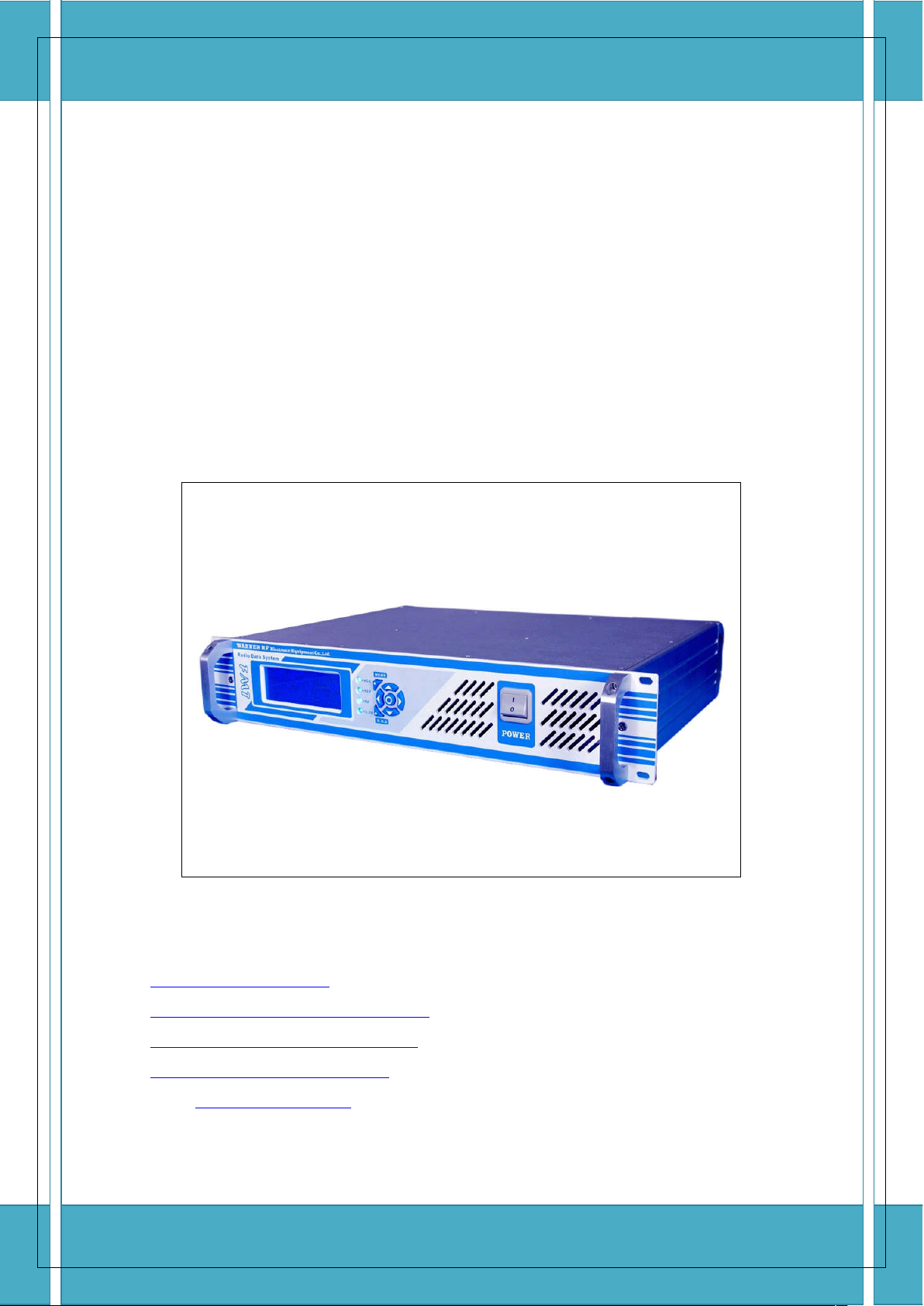
FM Transmitter
Operation User Manual
FMT-80D/FMT-150D/FMT-350D/FMT-600D
WhatsAPP: +86 18627319118
Https://www.108MHz.com
Http://stores.ebay.com/Warner-RF-Center
Https://www.facebook.com/WarnerFM/
Https://www.facebook.com/bd7bq/
Email: littleshirely@gmail.com
Page 2
FMT-80D/FMT-150D/FMT-350D-FMT-600D Use Manual
Before powering on the transmitter for the first
time, check your AC power voltage and the antenna
or dummy load is well connected.
The manual provides important guidelines for installing. Review the information
carefully for proper installation.
Technical specification sand manual contents are subject to change without notice.
WhatsAPP: +86 18627319118 Https://www.108MHz.com Http://stores.ebay.com/Warner-RF-Center 2
Page 3
FMT-80D/FMT-150D/FMT-350D-FMT-600D Use Manual
IMPORTANT
1.
Maintenance can only be operated by authorized professionals.
2. Get lightening protection measures ready in thunderstorm weather.
3. Do not touch the antenna when the transmitter is powered on.
4. Do not power on the transmitter if the antenna is not well connected.
5. Do not use the transmitter under the explosive environment, such as gas/refueling station, etc.
6. Do not use the transmitter in the extreme dusty, damp or high temperature environment.
7. Be sure to comply with the rules released by local radio administrations.
8. It is necessary that the main system being provided with grounding to ensure both the operators’
safety and correct operation of the equipment.
INDEX
Feature.
General illustration.
Button Definition.
Operating instructions.
Technical specifications.
About Us.
FEATURE
FMT RDS series product includes FMT-80D, FMT-150D, FMT-350D and FMT-600D, which its max power is
80W, 150W, 300W and 600W. Each of the product possesses of multiple functions, reliable and steady
performance, fast operation and well-structured in heat dissipation. Main features are as follows,
1. Standard 2U, 19 inch design, whole aluminum chassis.
2. Power adjustable from 0-80/150/300/600 Watts.
3. LCD displays product model, version, operating frequency, temperature, forward power, reflected
power, pre-emphasis and audio mode etc.
4. Automatic power control maintaining the output at any preset level.
5. Pre-emphasis optional at 0, 50us, 75us, 100us.
6. Provided with SWR protection function and temperature protection, raise alarm prompts once meet
any trouble while working.
7. Wiredrawing and oxidation makes surface bright, clean and elegant.
Note: RDS is used to set station name, send radio text message. (NO AF/TA function)
WhatsAPP: +86 18627319118 Https://www.108MHz.com Http://stores.ebay.com/Warner-RF-Center 3
Page 4
FMT-80D/FMT-150D/FMT-350D-FMT-600D Use Manual
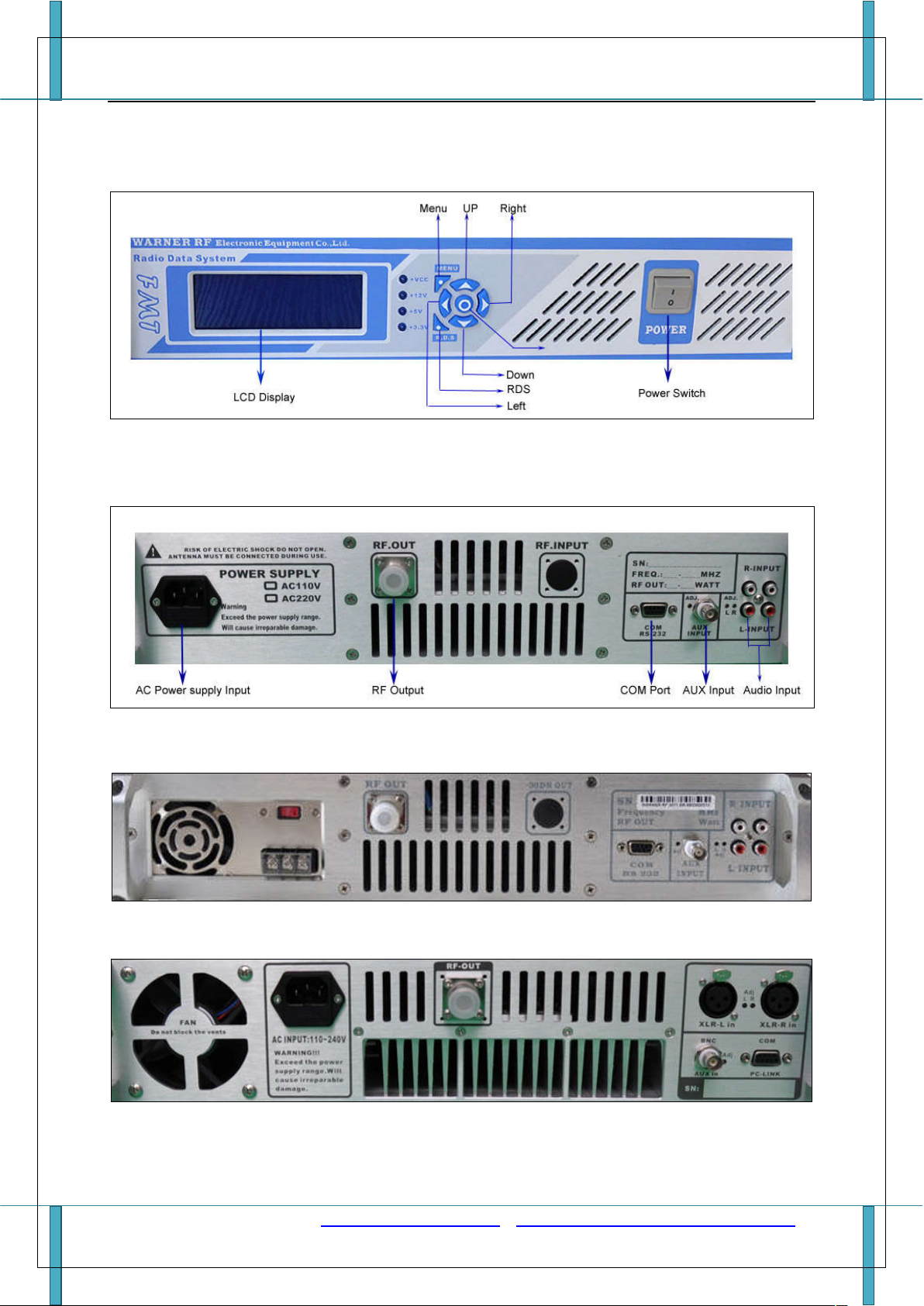
GENERAL ILLUSTRATION
1. Illustration of front panel
2. Illustration of back panel.
(1) Back panel of FMT-/80D/150D
(2) Back panel of FMT-300D
(3) Back panel of FMT-600D
WhatsAPP: +86 18627319118 Https://www.108MHz.com Http://stores.ebay.com/Warner-RF-Center 4
Page 5
FMT-80D/FMT-150D/FMT-350D-FMT-600D Use Manual
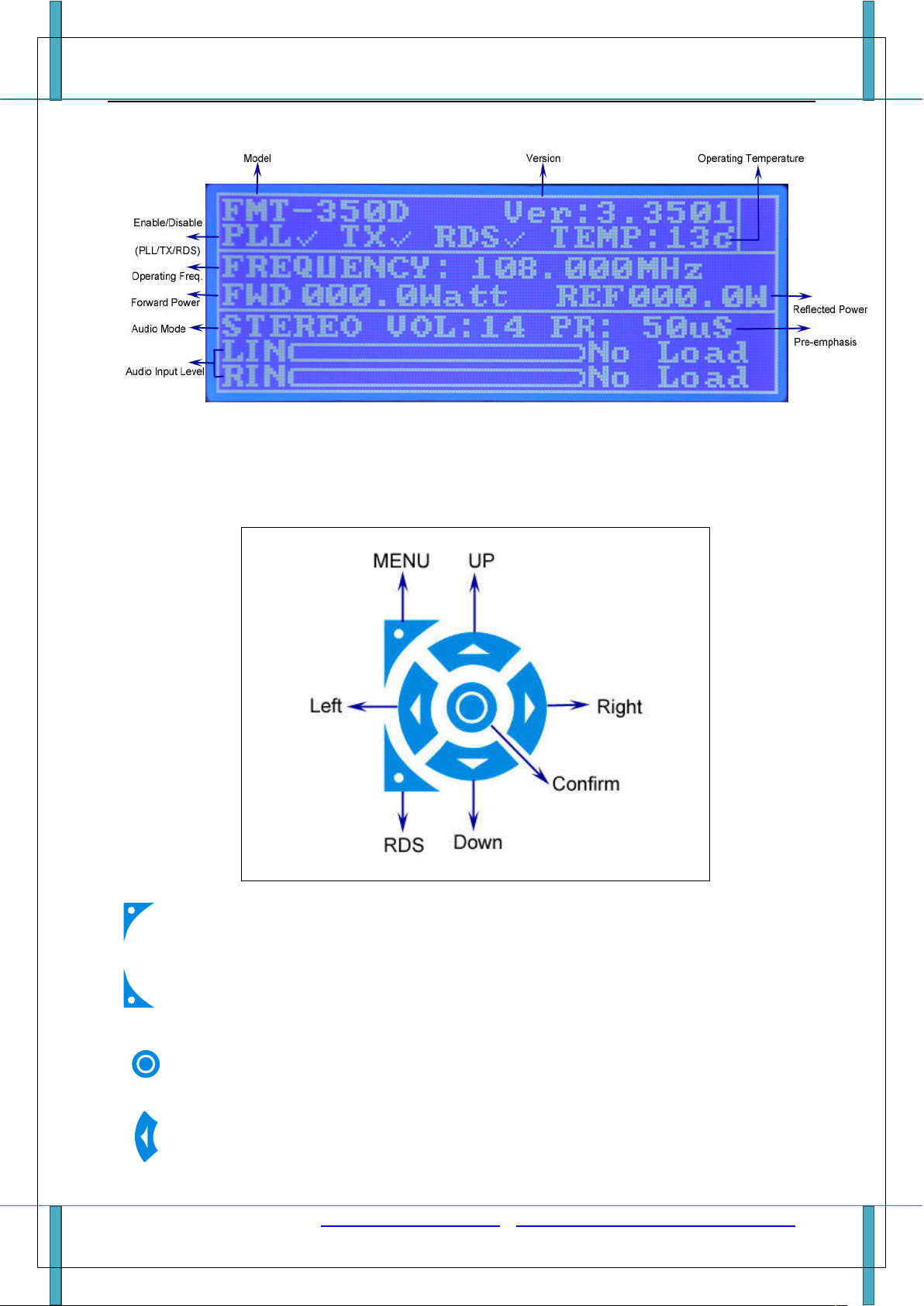
3. Diagram of Display LCD
Button DEFINITION
1. Operation buttons.
: To enter into Menu configuration or exit.
: To enter into RDS configuration menu.
: Confirm, to save changes when configuration is finished.
: To move cursor left position.
WhatsAPP: +86 18627319118 Https://www.108MHz.com Http://stores.ebay.com/Warner-RF-Center 5
Page 6

FMT-80D/FMT-150D/FMT-350D-FMT-600D Use Manual
: To move cursor right position.
: To move cursor up or increase.
: To move cursor down or decrease.
2. Power Switch, to turn ON/OFF.
Switch the button to ‘I’ to turn on the transmitter, and ‘O’ to turn off the transmitter.
OPERATION INSTRUCTIONS
IMPORTANT
Be sure the antenna or dummy load is well connected before turning on the transmitter.
1. Turn ON/OFF
(1) After the antenna or dummy load is connected, switch the power button to ‘I’ to turn on the
transmitter.
(2) Boot screen shows product model (Boot screen can be customized for free, please contact us
before making purchase )
(3) Then the transmitter goes into working status. (Take FMT-350D as example, the same as below.)
WhatsAPP: +86 18627319118 Https://www.108MHz.com Http://stores.ebay.com/Warner-RF-Center 6
Page 7

FMT-80D/FMT-150D/FMT-350D-FMT-600D Use Manual
(4) LCD displays the product model, product version. PLL/TX/RDS is enabled or disabled, operating
temperature, frequency, forward power, reflected power, audio mode, pre-emphasis and audio
input level.
(5) Switch the power button to ‘O’ to turn off the transmitter. All settings will be saved when the
transmitter is turned off, and will be restored when the power is turned on next time.
2. Menu-Set Frequency
(1) Press button to enter into ‘FREQUENCY SET’.
(2)
(3)
Press button to confirm.
The frequency can be set by to move cursor and buttons to
increase or decrease the frequency value. Only the frequency is between 87.5MHz and 108MHz,
the input frequency is valid and can save to confirm. The frequency step is 5 KHz.
Then press button to save or to exit.
(4)
WhatsAPP: +86 18627319118 Https://www.108MHz.com Http://stores.ebay.com/Warner-RF-Center 7
Page 8

FMT-80D/FMT-150D/FMT-350D-FMT-600D Use Manual
3. MENU-RF Power Set
(1) Press button then press to move cursor to ‘RF Power SET’, press button
to confirm.
(2) Press to increase the power or to decrease the power level. The power range is
0~80/150/300/600 Watts, depends on product model. The step is 1W for FMT-150D/350D/600D
and 0.1W for FMT-80D. For quick power set, press and hold the button can increase or decrease
the power continuously.
(3) Then press to save or to exit.
4. MENU- Audio Parameter Set
Press button then press to move cursor to ‘Audio Parameter Set’, press
(1)
button to confirm.
WhatsAPP: +86 18627319118 Https://www.108MHz.com Http://stores.ebay.com/Warner-RF-Center 8
Page 9

FMT-80D/FMT-150D/FMT-350D-FMT-600D Use Manual
Audio Mode has 4 options, which are ‘Stereo’, ‘R+R’, ‘L+L’ and ‘MIX’. Each option can be set by
(2)
or button to select.
WhatsAPP: +86 18627319118 Https://www.108MHz.com Http://stores.ebay.com/Warner-RF-Center 9
Page 10

FMT-80D/FMT-150D/FMT-350D-FMT-600D Use Manual
Then press button to go to the next menu option ‘Volume’. Volume can be set by or
(3)
button to increase or decrease. The range is 00~15.
(4) Then press button to go to the next menu option ‘PR’ to set pre-emphasis.
(5) ‘PR’ has 4 options, which are ‘OFF’, ‘50us’, ‘75us’ and ‘100us’. Each option can be selected by
or button.
WhatsAPP: +86 18627319118 Https://www.108MHz.com Http://stores.ebay.com/Warner-RF-Center 10
Page 11

FMT-80D/FMT-150D/FMT-350D-FMT-600D Use Manual
(6) Then press button to save or button to exit.
5. RDS – RDS FUNC
(1) Press button to enter into ‘RDS FUNC’.
WhatsAPP: +86 18627319118 Https://www.108MHz.com Http://stores.ebay.com/Warner-RF-Center 11
Page 12

FMT-80D/FMT-150D/FMT-350D-FMT-600D Use Manual
(2) Press button to confirm.
(3) RDS FUNC has two options ‘enable’ and ‘disable’, which can be switched by pressing or .
(4)
Then press
button to save.
6. RDS – PS NAME
(1) Press button.
(2) Press button to move cursor ‘PS NAME’, then press button to confirm.
(3) Edit your PS name with characters provided. Character can be selected by 4 buttons
to move cursor left/right/up/down. Then press button to confirm and
then go to edit the next character.
(4) Repeat (3) to select the character you want, till all your PS Name characters are finished.
(5) PS NAME has max 8 characters can be edited. There are 88 commonly used characters available
to use as PS name, and they are listed as below image.
WhatsAPP: +86 18627319118 Https://www.108MHz.com Http://stores.ebay.com/Warner-RF-Center 12
Page 13

FMT-80D/FMT-150D/FMT-350D-FMT-600D Use Manual
(6) Then move cursor to ‘SAVE’ and press to save your changes, or to ‘EXIT’ to abandon.
7. RDS – PI Code
PI code is program identification code in order to recognize countries/regions and broadcast stations.
It should be set according to the standard in each country/region.
A wrong value code may cause the tuner to fail to recognize the RDS/RBDS correctly.
We set PI code at 1000H by default. It may not meet the users' standard. Please reset it if necessary.
(1) Press button.
(2) Press button to move cursor ‘PI Code’, then press button to confirm.
(3) Set the value by to increase or to decrease, and or to move cursor left or
right. PI code range is from 0000H to FFFFH.
(4) Press to save.
8. RDS – M/S
M/S indicates if the broadcast program is music or speech.
(1) Press button.
(2) Press button to move cursor to ‘M/S’ option, then press button to confirm.
WhatsAPP: +86 18627319118 Https://www.108MHz.com Http://stores.ebay.com/Warner-RF-Center 13
Page 14

FMT-80D/FMT-150D/FMT-350D-FMT-600D Use Manual
(3) Press or to select music or speech and press button to confirm.
9. RDS - PTY
Program Type indicates which genre the broadcast program is. PTY code varies depending on
countries/regions.
(1) Press button.
(2) Press button to move cursor to ‘PTY’ option, then press button to confirm.
(3) Set by button to increase or button to decrease the value. The range is 00-31.
(4) Press button to save.
10. RDS – TEXT
(1) Press button.
(2) Press button to move cursor to ‘TEXT’, then press button to confirm.
WhatsAPP: +86 18627319118 Https://www.108MHz.com Http://stores.ebay.com/Warner-RF-Center 14
Page 15

FMT-80D/FMT-150D/FMT-350D-FMT-600D Use Manual
(3) Edit your text with characters provided. Character can be selected by pressing 4 buttons
to move cursor left/right/up/down and press button to confirm. Then
go to edit the next character.
(4) Repeat (3) to select the character you want, till all your texts are finished.
(5) TEXT has max 64 characters that can be edited. There are 88 commonly used characters available
to use. (The same as PS name)
(6) Then move cursor to ‘SAVE’ and press to save your changes, or move to ‘EXIT’ to abandon.
TECHNICAL SPECIFICATIONS
Technical specifications
Item
FMT-80D FMT-150D FMT-350D FMT-600D
Power Transistor SD2931 SD2931 MRFE6V6300H MRFE6V5600H
Output RF power 0-80W 0-150W 0-350W 0-600W
Package Weight 9Kg 9.5Kg 10.5Kg 11Kg
Audio Input RCA XLR
Power supply Input 110V/220V (can be switched) AC 100-240V
Frequency range 87.5~108MHz
Frequency stability ±10PPM (-10 to +60 )℃ ℃
Frequency step 100KHz
Environment temperature
WhatsAPP: +86 18627319118 Https://www.108MHz.com Http://stores.ebay.com/Warner-RF-Center 15
-10℃~50℃
Page 16

FMT-80D/FMT-150D/FMT-350D-FMT-600D Use Manual
Output Impedance 50Ω
Harmonic & Clutter radiation
Audio Distortion 0.5%
Frequency response 50Hz~15000Hz
Stereo Separation ≥40 dB
Input level -15 ~ -30db
Frequency deviation ≤±75KHZ
SNR ≥50 dB
Modulation Mode WFM
Tuning Design PLL
AUX Input BNC/Q9
RF Output N
Dimensions Standard 2U 19 inches (483mm * 400mm * 89mm)
≤-65dB
ABOUT US
We are a professional company focus on RF technology research and development, specialized in
professional fm transmitter! Our fm transmitters are ideal equipments to build your own broadcast station,
especially used in campus, factories, farms etc. Please be assured, we provide you after-all services and
technical supports! You can get in touch with us from any below contacts.
WhatsAPP: +86 18627319118
Https://www.108MHz.com
Http://stores.ebay.com/Warner-RF-Center
Https://www.facebook.com/WarnerFM/
Https://www.facebook.com/bd7bq/
Email: littleshirely@gmail.com
WhatsAPP: +86 18627319118 Https://www.108MHz.com Http://stores.ebay.com/Warner-RF-Center 16
 Loading...