

Page 1
CL-200A Manual, Rev. 120523
WWaarrnneerr IInnssttrruummeennttss
DDuuaall--CChhaannnneell BBiippoollaarr TTeemmppeerraattuurree CCoonnttrroolllleerr
L
MMooddeell CCL
Warner Instruments
1125 Dixwell Avenue, Hamden, CT 06514
(800) 599-4203 / (203) 776-0664
(203) 776-1278 - fax
--220000AA
Page 2

CL-200A Manual, Rev. 120523
Table of Contents
INTRODUCTION.......................................................................................................................................4
NOMENCLATURE....................................................................................................................................5
Text conventions.....................................................................................................................................5
CONTROL DESCRIPTION......................................................................................................................6
Front panel..............................................................................................................................................6
Power Switch (Item A)..........................................................................................................................6
Meter Selector Switch and Meter (Item B)...........................................................................................6
Cooling Mode Switch (Item C).............................................................................................................7
Thermistor Recorder Outputs (Items E, V)...........................................................................................7
Monitor Temp In BNC (Item F)............................................................................................................7
Loop Speed Switch (Item G).................................................................................................................7
Set Temperature Control (Item H) .......................................................................................................7
External/Internal Select Control (Item J).............................................................................................7
Manual Voltage Control (Item K)........................................................................................................ 7
Peltier Limit LED (Item L)...................................................................................................................8
Freeze Alert LED (Item M) ..................................................................................................................8
Heat / Cool LED’s (Item N) .................................................................................................................8
Current Limit LED (Item O).................................................................................................................8
Feedback Thermistor Selector Switch (Item R)....................................................................................8
Thermistor Open LED (Item S)............................................................................................................8
Rear panel ...............................................................................................................................................9
External Volts Set (Item T)...................................................................................................................9
External Temp Set (Item U)..................................................................................................................9
Heater/Cooler input (Item W) ..............................................................................................................9
Power Entry Module (Item Y) ..............................................................................................................9
Ground Terminals (Item X)..................................................................................................................9
SETUP........................................................................................................................................................10
Warner Peltier Driven Systems...........................................................................................................10
Operating With Other Equipment......................................................................................................10
Warner Resistive Heating Systems.....................................................................................................10
Third-party Equipment.......................................................................................................................10
Thermistor Considerations.................................................................................................................10
OPERATION ............................................................................................................................................11
AUTOMATIC MODE .........................................................................................................................11
Feedback Thermistor Selection...........................................................................................................11
MANUAL MODE.................................................................................................................................12
Page 3

CL-200A Manual, Rev. 120523
APPENDIX................................................................................................................................................13
Specifications.........................................................................................................................................13
Accessories and replacement parts.....................................................................................................13
Warranty and service...........................................................................................................................14
Warranty.............................................................................................................................................14
Service notes.......................................................................................................................................14
Certifications.........................................................................................................................................15
Page 4

CL-200A Manual, Rev. 120523
4
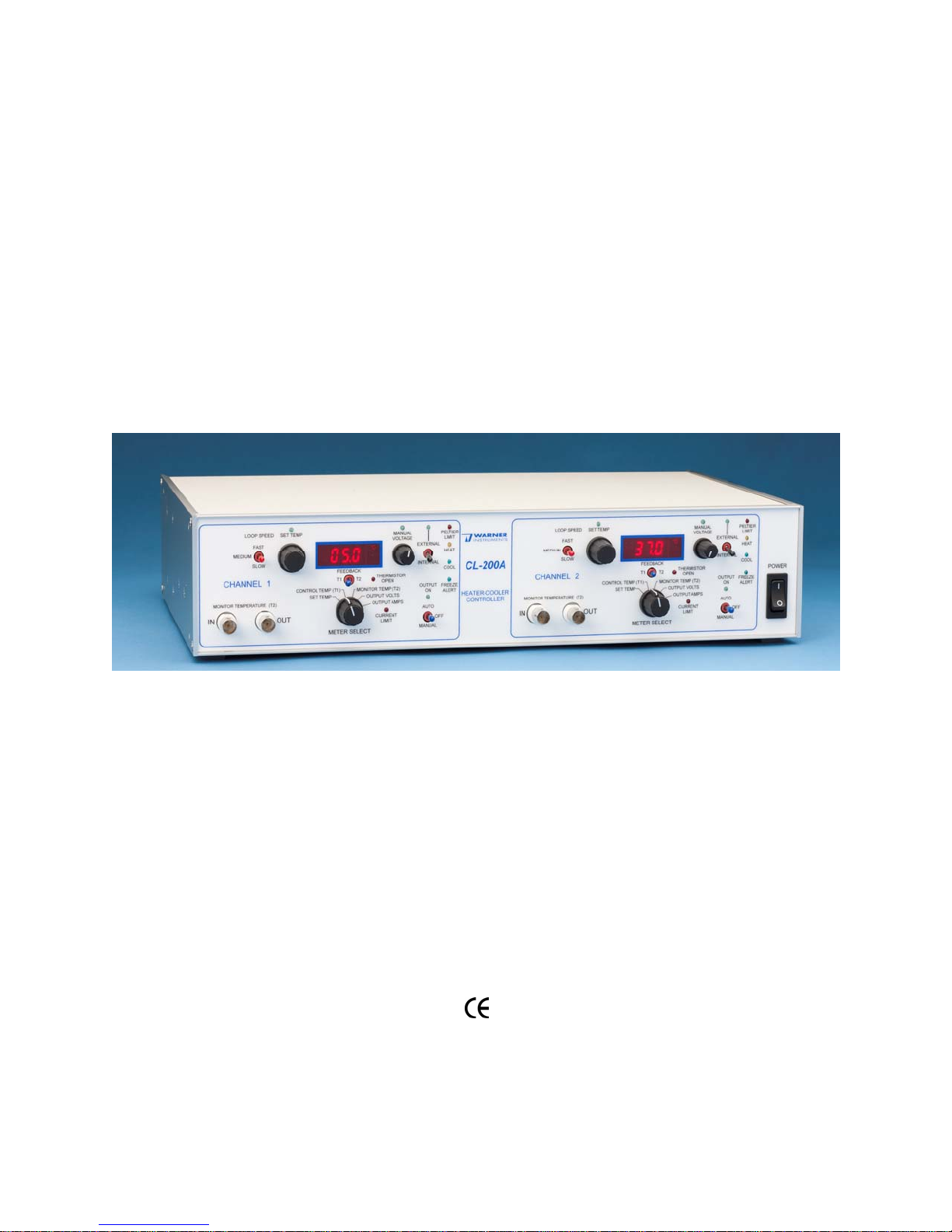
The CL-200A Dual-Channel Bipolar Temperature Controller from Warner Instruments is a versatile
and user-friendly thermal control device. This dual-channel automatic temperature controller is
capable of accurately maintaining two Peltier devices between -6°C and 65°C. The unit will also
maintain a resistive heater from ambient to 65°C.
While specifically designed for use with Warner’s Heating/Cooling Platforms and In-Line Solution
Heater/Coolers, this instrument can be easily adapted for use with custom-built equipment according
to the requirements of the user. When coupled with the SC-20 Dual In-line Solution Heater/Cooler,
the CL-200A provides efficient control of perfusion solution temperatures.
The unit is simple to use with a single control for temperature adjustment. Total automatic control is
provided in automatic mode, while manual control is available in manual mode. A loop-speed selector
is used to optimize the response of the system to accommodate thermal delay characteristics intrinsic
to the setup.
Features of the CL-200A include
Quiet operation suitable for use in sensitive electrophysiology applications
Automatic and manual modes
Single control temperature adjustment
Freeze alert
Built-in protection for Peltier devices
Selectable loop speed optimizes system speed and stability
Simultaneous monitoring of system temperature and a separate point of interest
Heat Loss compensation mode
Open thermistor fault protection
External inputs for computer control
Compatible with all Warner Peltier-driven Heater/Cooler devices
THIS EQUIPMENT IS NOT DESIGNED NOR INTENDED
FOR USE ON HUMAN SUBJECTS
Warner Instruments
A Harvard Apparatus Company
Page 5

CL-200A Manual, Rev. 120523
5
NOMENCLATURE
Text conventions
This manual refers to instrument controls at two functional levels; specific controls and settings
of these controls. To increase readability, we employ the following text conventions. Since our goal is
to provide clarity rather than complexity, we welcome any feedback you may wish to provide.
Warner Instrument product model numbers are presented using bold type.
References to controls are specified using
SMALL CAPS.
References to control settings are specified using italic type.
Special comments and warnings are presented in highlighted text.
Any other formatting should be apparent from context.
Warner Instruments
A Harvard Apparatus Company
Page 6
CL-200A Manual, Rev. 120523
6
CONTROL DESCRIPTION
Front panel
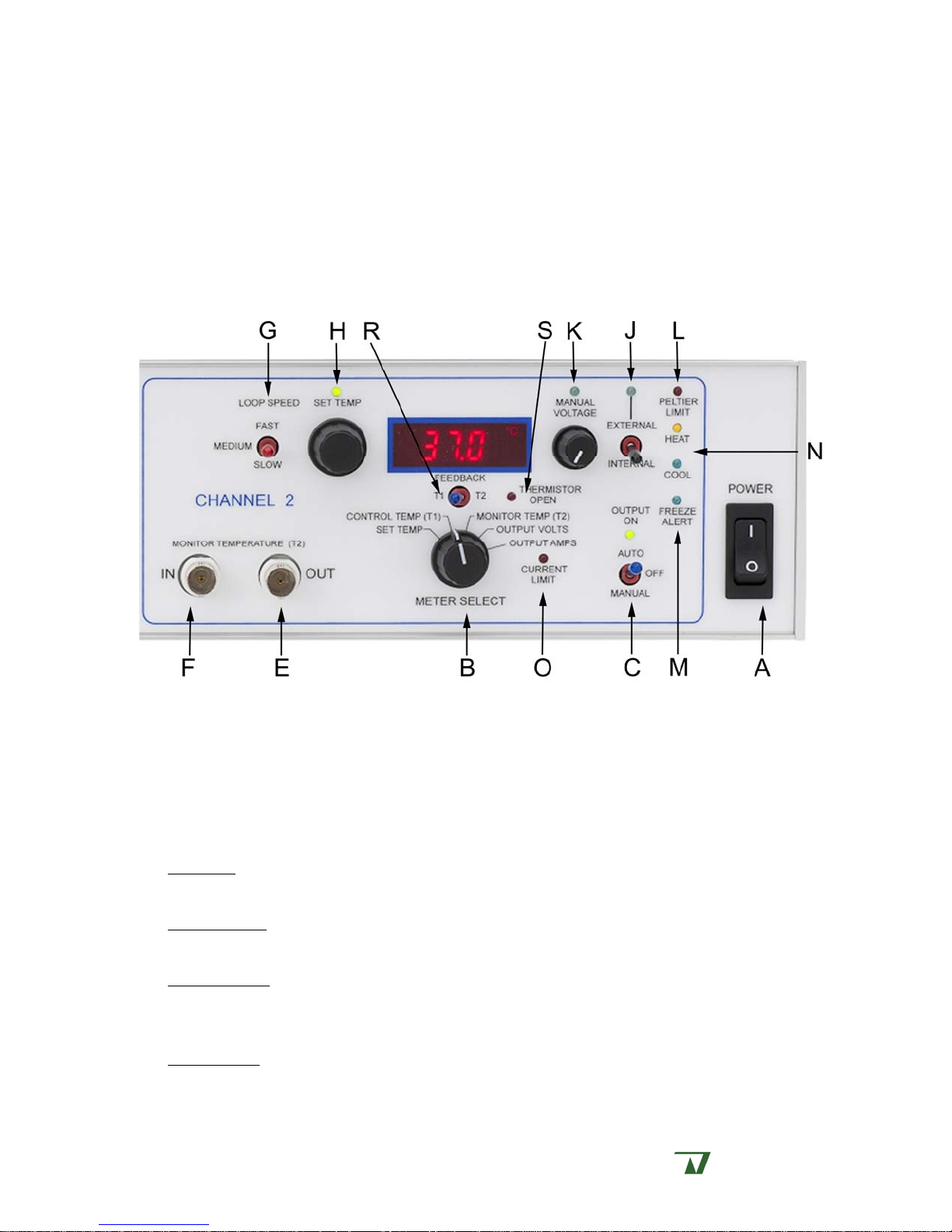
A labeled image of the face panel for one channel of the CL-200A is shown below. Operating
components are identified by letters. Refer to this diagram as an aid in identification of the described
components.
Power Switch (Item A)
Supplies power to the CL-200A.
Meter Selector Switch and Meter (Item B)
THE SELECTOR SWITCH selects the parameter displayed on the associated METER. Included
options are Set Temp, Control Temp (T1), Monitor Temp (T2), Output Volts, and Output Amps
and are described below.
Set Temp
EXT TEMP SET BNC (Item Q). Displayed units are °C.
Control Temp
heater/cooler device being used. Displayed data is informative only and is in units of °C.
Monitor Temp
MONITOR TEMP IN BNC (Item F). This provides a convenient means to determine the
temperature of any point of interest within your configuration. Displayed units are °C.
Output Volts
EXT VOLT SET BNC (Item T). Displayed units are Volts.
reports the adjustment from either the SET TEMPERATURE control (Item H) or the
reports the actual temperature of the feedback thermistor situated within the
reports the temperature of the sensor thermistor which connects via the
reports the adjustment from either the MANUAL VOLTAGE control (Item K) or the
Warner Instruments
A Harvard Apparatus Company
Page 7

CL-200A Manual, Rev. 120523
7
Output Amps reports the current output command associated with either the MANUAL
VOLTAGE
METER also provides an indication that the main POWER is on.
The
control (Item K) or the EXT VOLT SET BNC (Item T). Displayed units are Amperes.
Cooling Mode Switch (Item C)
Selects between Automatic or Manual operational modes, or center select for off.
Thermistor Recorder Outputs (Items E, V)
BNC connectors are provided to send thermistor readings to a data acquisition system or
chart recorder.
ONITOR TEMP OUT (Item E) reports the temperature of the sensor thermistor which connects
M
via the
C
MONITOR TEMP IN BNC (Item F). Output is calibrated to 100 mV/C.
ONTROL TEMP OUT (Item V, back panel) reports the actual temperature of the feedback
thermistor situated within the heater/cooler device being used. Output is calibrated to 100
mV/C.
Monitor Temp In BNC (Item F)
BNC for connecting a sensor thermistor used to sample the temperature at a point of
interest. This input is designed for use with the TA-29 cable assembly.
Loop Speed Switch (Item G)
This switch sets the feedback loop speed for the CONTROL TEMP THERMISTOR when the CL-
200A is used in automatic mode. Feedback options include fast, medium, and slow. Optimally
set to fast for most applications but can be set to medium or slow for systems with longer
thermal delay characteristics. For example, use the medium speed for use with the SC-20
Bipolar In-Line Solution Heater.
Set Temperature Control (Item H)
This dial adjusts the set point of the automatic temperature control system. The associated
GREEN LED is on when the INTERNAL/EXTERNAL SELECT CONTROL (Item J) is set to internal, and
the
COOLING MODE SWITCH (Item C) is set to auto. Set value can be read from the METER (Item B)
in the set temp position.
External/Internal Select Control (Item J)
This switch selects between internal or external control inputs when the instrument is in
Manual mode (Item C).
When the
SWITCH
the
(Item C) is set to auto, the SET TEMPERATURE CONTROL (Item H) will be active. Setting
COOLING MODE SWITCH (Item C) to manual disables the SET TEMPERATURE CONTROL (Item H)
and activates the
INTERNAL/EXTERNAL SELECT CONTROL is set to internal, and the COOLING MODE
MANUAL VOLTAGE CONTROL (Item K).
Manual Voltage Control (Item K)
This dial is used to manually adjust the voltage output to the heater/cooler device. The
associated
GREEN LED is on when the INTERNAL/EXTERNAL SELECT CONTROL (Item J) is set to
Warner Instruments
A Harvard Apparatus Company
Page 8

CL-200A Manual, Rev. 120523
8
internal, and the COOLING MODE SWITCH (Item C) is set to manual. Set value can be read from
the
METER (Item B) in the output volts position.
Peltier Limit LED (Item L)
This option functions only when the CL-200A is used with an SC-20 Dual In-line Solution
Heater/Cooler. The
RED LED is lit when the temperature of the Peltier device within the SC-20
exceeds its operational limits. Activation of this circuit automatically sets the output voltage of
the CL-200A to 0 V.
Freeze Alert LED (Item M)
This option functions only when the CL-200A is used with an SC-20 Dual In-line Solution
Heater/Cooler. The
Activation of this circuit is informative only
BLUE LED is lit when the Peltier device within the SC-20 approaches 0°C.
and will not alter any instrument setting.
Heat / Cool LED’s (Item N)
RED and BLUE LED’S indicate heating or cooling power applied to the Peltier device.
Current Limit LED (Item O)
This indicator light informs the user that the channel has reached the maximum current
output of 5 Amperes. This indicator is informative only, and will not alter the function or
settings of the device.
Feedback Thermistor Selector Switch (Item R)
This switch can be set to select the thermistor that will be used as the control point for the
feedback regulation of set temperature.
Thermistor Open LED (Item S)
This LED indicator will signify an open thermistor circuit (broken thermistor wire).
Warner Instruments
A Harvard Apparatus Company
Page 9

CL-200A Manual, Rev. 120523
9
Rear panel
A picture of the rear panel connections of the CL-200A is shown below. Important
components are identified by letter (T-Y). Refer to this diagram as an aid in identification of the
described components.
External Volts Set (Item T)
Input BNC for the application of a specified voltage to be applied to the heater/cooler being
controlled. Input functions only when the
external, and the
COOLING MODE SWITCH (Item C) is set to manual. Units are 1 V/V input. This
INTERNAL/EXTERNAL SELECT CONTROL (Item J) is set to
input can be used for computer control purposes.
External Temp Set (Item U)
Input BNC for adjusting the SET TEMPERATURE of the CL-200A. Input functions only when
the
INTERNAL/EXTERNAL SELECT CONTROL (Item J) is set to external, and the COOLING MODE
SWITCH
(Item C) is set to auto. Units are 100 mV/°C. This input can be used for computer control
purposes.
Heater/Cooler Peripheral Device Output (Item W)
This is the connection port for Warner Heater/Cooler devices such as the SC-20 Dual In-
line Heater/Cooler and QE-1HC Heating/Cooling Platform.
Power Entry Module (Item Y)
Comprised of the line cord attachment point, line voltage selector and fuse buss. Power
entry is selectable between 115 VAC, 60 Hz or 230 VAC, 50 Hz. The replaceable fuse is 0.4 amp
slow-blow for 230 V applications, or 0.8 amp “slow-blow” for 115 V applications.
Ground Terminals (Item X)
Provides separate connections for chassis and circuit ground. Banana jacks are bridged
when shipped from the factory.
Warner Instruments
A Harvard Apparatus Company
Page 10

CL-200A Manual, Rev. 120523
10
SETUP
The CL-200A has been designed primarily to drive Warner’s expanding line of Peltier-driven
heating and cooling devices. However, the instrument is also capable of supplying power to Warner’s
line of resistive heaters (Series 20 heater platforms, in-line solution heaters, etc.) by using the ACC-1
adapter cable at the peripheral device output (Item W). The instrument will auto-detect when a
resistive-only heating device has been attached and will disable cooling commands.
Warner Peltier Driven Systems
The set up for the CL-200A is straightforward when used with a Peltier driven heater/cooler.
First connect the cable from the heater/cooler peripheral device into the 15-pin D-connector on the
back of the CL-200A. Then connect the TA-29 thermistor (supplied with the heater/cooler) to the
MONITOR TEMP IN BNC (Item F).
If using the SC-20 in-line solution heater/cooler, set the CL-200A loop speed to medium. If using
a different device, then set the loop speed to the setting specified in that devices user’s manual, or
initially set the loop speed to fast and adjust as necessary to achieve stable performance.
If using external control inputs
on the A/D board or a power supply) to either the
, make connections from your command output (e.g., analog out
EXT TEMP SET (Item U) or EXT VOLT SET (Item T)
BNC’s on the rear panel.
Operating With Other Equipment
The CL-200A can be used to power other Warner equipment such as the SH-27B and SF-28
inline solution heaters. In addition, the controller can be used as an independent device to power
third-party equipment so long as the following considerations are met.
Warner Resistive Heating Systems
Use of the CL-200A to power Warner resistive heaters is permitted if used in conjunction
with the ACC-1 adapter cable. When the CL-200A is connected to a resistive device, all
command inputs (auto and manual modes for both internal and external commands) are
functional with the exception that cooling commands are not executed.
Third-party Equipment
The CL-200A heater controller will work with many other heating devices if used in
conjunction with the ACC-1 adapter cable. To obtain maximum heating power, the resistance of
the third-party heating element should be between 8-12 . However, any element that works at
a maximum of 15 V and 2.4 A will also work with the CL-200A.
Thermistor Considerations
The CL-200A heater controller is designed to accommodate Unical NTC thermistors from
Thermometrics (Edison, New Jersey). This family of thermistors can be interchanged without
recalibration of the instrument. The nominal resistance of a Unical NTC thermistor is 10.0 k
at 25C. Other NTC thermistors may be used with the CL-200A if the nominal resistance is also
10.0 k at 25C.
Warner Instruments
A Harvard Apparatus Company
Page 11

CL-200A Manual, Rev. 120523
11
OPERATION
The main use of a heater/cooler control device such as the CL-200A is to maintain a constant
bath temperature with minimum deviation from a set temperature. This is usually achieved by using
a thermally controlled chamber/platform or in-line solution heater, or a combination of both.
NOTE: Refer to the front and rear panel schematics on pages 6-9 for orientation of the CL-200A controls.
AUTOMATIC MODE
In Automatic Mode, the CL-200A maintains the temperature of the connected heater/cooler at
the value set by the user.
Operation is straightforward. Connect your heater/cooler device and sensor thermistor as
described on page 10. Set the CL-200A to internal commands by setting the
SELECT
MODE SWITCH
point using the
control (Item J) to internal. Place the CL-200A into auto mode by switching the COOLING
(Item C) to auto. Switch the METER (Item B) to Set Temp and adjust to the desired set-
SET TEMPERATURE control (Item H).
Alternatively, the CL-200A can be commanded using external inputs. Set the CL-200A to
external commands by setting the
INTERNAL/EXTERNAL SELECT control (Item J) to external. In this
mode the CL-200A will accept external temperature settings from the
the instrument rear panel. This input is calibrated to 100 mV/°C.
INTERNAL/EXTERNAL
EXT TEMP SET BNC (Item U) on
The selectable
LOOP SPEED control (Item G) is used to adjust the speed of the feedback loop in
the heater/cooler-thermistor system, which controls the rate of change of the CL-200A output
voltage. Non-Warner heater systems with feedback thermistors can be used in automatic mode
provided they are compatible with the CL-200A requirements.
LOOP SPEED is normally set to fast to provide the shortest cycle time between the application of
power to the heater element and the sensing of temperature at the thermistor. For heater/cooler-
thermistor systems with long response times, such as with Warner’s SC-20 in-line solution
heater/cooler, the fast setting will cause the temperature to overshoot the target resulting in system
oscillation. For this condition, try medium or slow settings to find a more optimal feedback rate.
Feedback Thermistor Selection
A FEEDBACK THERMISTOR switch allows the user to select which thermistor is used for the
control loop. Choosing T1 (control thermistor) sets the peripheral device’s internal thermistor to
control the feedback loop. Selecting T2 (monitor thermistor) allows feedback control at the location of
the monitor thermistor, as selected by the user.
The standard
sensor is placed at the optimal point to control the temperature of the heating/cooling device. The
MONITOR THERMISTOR is the peripheral thermistor that can be used to monitor the temperature at
another location in the experimental configuration. This thermistor monitors the temperature at the
selected point in the experiment and is more accurate but is less stable in the control loop because of
the delay between heating (or cooling) and sensing.
CONTROL THERMISTOR is the sensor located in the heating/cooling device. This
To protect the experiment if the monitor thermistor is removed, the limit of the increase in
temperature between the control and monitor thermistors in the feedback loop is 8˚C. This lowers
Warner Instruments
A Harvard Apparatus Company
Page 12

CL-200A Manual, Rev. 120523
12
the probability of overheating the experiment to the point of damage. There is no protection from
overcooling caused by a misplaced monitor thermistor.
An indicator on the front panel indicates an open-thermistor fault of the selected feedback
thermistor. Normally if a thermistor becomes open, as with a broken wire, the controller sees this as
a lower temperature. The controller will then increase the output power to try to raise the
temperature. This can cause overheating of the experiment if the fault is not noticed. In the CL-
200A, the selected feedback thermistor is monitored for an open condition. If an open fault is
detected, the output power is shut off, preventing overheating. A red LED indicates the presence of
an open thermistor.
MANUAL MODE
In manual mode, the MANUAL VOLTAGE control (Item K) is used to set the output voltage to a
fixed value. In manual mode, the
system of the CL-200A.
Operation is again straightforward. Set the CL-200A to accept internal commands by setting the
INTERNAL/EXTERNAL SELECT control (Item J) to internal. Place the CL-200A into manual mode by
switching the
COOLING MODE SWITCH (Item C) to manual. Switch the METER (Item B) to Output Volts
and adjust to the desired set-point using the
SET TEMPERATURE control (Item H) is disabled, as is the feedback
MANUAL VOLTAGE control (Item K).
Alternatively, the CL-200A can be commanded using external inputs. Set the CL-200A to
external commands by setting the
mode the CL-200A will accept external voltage commands at the
INTERNAL/EXTERNAL SELECT control (Item J) to external. In this
EXT VOLT SET BNC (Item T) located
on the instrument rear panel.
In this mode, the instrument operates as a 0-15 VDC power supply that can provide up to 5A of
current to each channel. Use this mode with heater systems that will operate properly with a fixed
voltage and lack of feedback thermistors.
The CL-200A has a convenient feature for switching modes. In the CL-200A, the control loop
integrator is held at its last value when switching to off, allowing the integrator to resume when the
Automatic mode is again selected.
When the CL-200A is switched to manual mode, the integrator tracks the manual voltage.
When the mode is set from manual to off, this value is held. Switching to automatic mode allows the
control loop integrator to begin at the last voltage setting of the manual mode. This allows the user
to set the integrator to any desired initial value for the automatic mode.
Warner Instruments
A Harvard Apparatus Company
Page 13

CL-200A Manual, Rev. 120523
13
APPENDIX
Specifications
Maximum Output Voltage
Maximum Output Current
Manual Voltage Range
Maximum Output Power
Power Requirements
Power Fuse (5 x 20 mm )
Front Panel Input
Recorder Outputs
Rear Panel Inputs
Temperature Range
Meter Display; Resolution
±15 V Heat/Cool, 0 to 15 V Heat-Only
5.0 Amperes DC per channel
0 to 15 VDC
75 Watts @ 3Ω Load Each Channel
100-130 or 200-260 VAC, 50/60 Hz, 80 VA
0.8 A Slow-Blow for 100-130 VAC
0.4 A Slow-Blow for 200-260 VAC
External thermistor
(BNC, calibrated to 10.0 k at 25°C )
Monitor Temp Out (BNC, 100 mV/°C )
Control Temp Out (BNC, 100 mV/°C )
External Temperature Set (BNC, 100 mV/°C )
External Voltage Set (BNC)
Heater/Cooler Device (15-pin D connector)
Peltier: -6 ˚C to 65 ˚C
Resistive: Ambient to 65 C
3 digit LED display of C or V
0.1 ˚C / 0.01 Volt / 0.01 Ampere
Meter Readouts
Set temperature (°C )
Control Temperature (°C )
Monitor Temperature (°C )
Output Voltage (V )
Output Current (A)
Enclosure
Weight
Operating conditions:
This equipment is intended to be operated in a controlled laboratory environment and is not
approved for use with human subjects.
8.9 X 42.6 X 29.2 cm (W x H x D)
10 lb (4.54 Kg)
Ambient temperature: 0 to 40 °C
Altitude: sea level to 2000 m
Relative humidity: 0-95%
Accessories and replacement parts
Model number Order number Description
ACC-1 64-1427 Adapter cable for heater only components
Warner Instruments
A Harvard Apparatus Company
Page 14

CL-200A Manual, Rev. 120523
14
Warranty and service
Warranty
The model CL-200A is covered by our Warranty to be free from defects in materials and
workmanship for a period of one year from the date of shipment. If a failure occurs within this time,
we will either repair or replace the faulty component(s). This warranty does not cover instrument
failure or damage caused by physical abuse or electrical stress (inputs exceeding specified limits).
In the event that instrument repairs are necessary, shipping charges to the factory are the
customer's responsibility. Return charges will be paid by Warner Instruments, Inc.
Normal business hours are 8:30 AM to 5:00 PM (EST), Monday through Friday. Our offices are
located at 1125 Dixwell Avenue, Hamden, CT 06514, and we can be reached by phone at (800) 599-
4203 or (203) 776-0664. Our fax number is (203) 776-1278. In addition, we can be reached by e-mail
at support@warneronline.com or through our Web page at http://www.warneronline.com.
Service notes
Please refer all questions regarding service to our Technical Department.
A) If the instrument
black
POWER INPUT MODULE). If the fuse is found to be defective replace it with a 5x20 mm,
POWER light fails to light, check the fuse at the rear panel (located in the
0.8 A, slow-blow fuse (0.4 A for facilities using 220-240 V line voltages). If the replacement
fuse also fails, please call Warner Instruments for assistance.
B) Occasionally, a knob on the front panel will loosen after long use. These are "collet" style
knobs and are tightened with a screw located under the knob cap. To gain access to the
adjustment screw, pry the cap off with a thin bladed screwdriver or similar tool.
C) Should service be required, please contact the factory. The problem may often be corrected
by our shipping a replacement part. Factory service, if required will be expedited to
minimize the customer inconvenience.
D) Instruments are inspected immediately upon receipt and the customer is notified if the
repair is not covered by the warranty. Repairs can often be completed in 1-2 days from our
receipt of the instrument.
E) If factory service is required, please observe the following instructions:
1) Package the instrument with at least 3 inches of cushioning on all sides. Use the
original shipping carton if it is available.
2) Insure the shipment for its full value.
3) Include with the shipment an explanation of the problem experienced.
IMPORTANT for customers outside of the U.S.: Please contact us before return shipping any
goods. We will provide instructions so that the shipment will not be delayed or subject to
unnecessary expense in clearing U.S. Customs.
Warner Instruments
A Harvard Apparatus Company
Page 15

CL-200A Manual, Rev. 120523
15
Certifications
Declaration of Conformity
CE MARKING (EMC)
Application of Council Directive: 89/336/EEC
Standards To Which Conformity
Is Declared:
EN55022 Class A
EN61000-3-2
EN61000-3-3
EN50082-1:1992
EN61000-4-2
EN61000-4-3
ENV50204
EN610000-4-4
EN610000-4-8
EN610000-4-11
Manufacturer’s Name:
Warner Instruments, LLC
Manufacturer’s Address: 1125 Dixwell Avenue
Hamden, CT 06514
Tel: (203) 776-0664
Equipment Description:
Power Controller
Equipment Class: ITE-Class A
Model Numbers: CL-200A
I the undersigned, hereby declare that the equipment specified
above, conforms to the above Directive(s) and Standard(s).
Place: Hamden, Connecticut USA
Signature:
Full Name: Burton J. Warner
Position: President
Warner Instruments
A Harvard Apparatus Company
Page 16

CL-200A Manual, Rev. 120523
16
Declaration of Conformity
CE MARKING (LVD)
Application of Council Directive: 73/23/EEC
Standards To Which Conformity Is
Declared:
EN61010-1:1993
Manufacturer’s Name:
Warner Instruments, LLC
Manufacturer’s Address: 1125 Dixwell Avenue
Hamden, CT 06514
Tel: (203) 776-0664
Equipment Description:
Power Controller
Safety requirements for electrical
equipment for measurement and
laboratory use
Equipment Class: Class I
Model Numbers: CL-200A
I the undersigned, hereby declare that the equipment specified
above, conforms to the above Directive(s) and Standard(s).
Place: Hamden, Connecticut USA
Signature:
Full Name: Burton J. Warner
Position: President
Warner Instruments
A Harvard Apparatus Company
Page 17

CL-200A Manual, Rev. 120523
17
Warner Instruments
A Harvard Apparatus Company
 Loading...