

Page 1
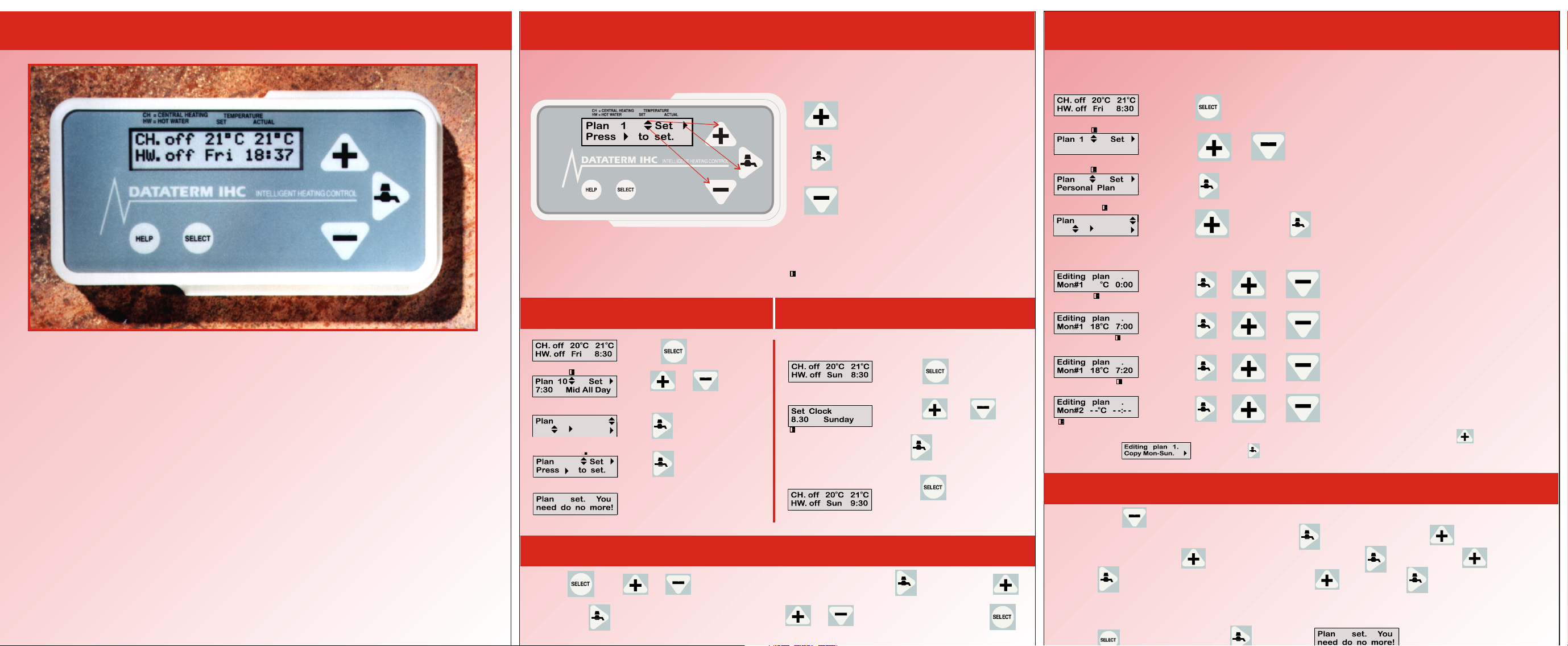
Dataterm IHC User Guide
See What’s Happening: Creating a personal plan:
1 5
The Display Screen and Keys. Personal Plans 1,2 & 3 are for you to create. Simply follow the
instructions below and enter the times and temperatures you require.
What is Dataterm IHC?
Dataterm IHC is an intelligent heating control. It has advanced abilities which a
simple programmer and room thermostat cannot offer. It uses fuel economically
and is dedicated to your comfort.
How does it Work?
Dataterm IHC does the thinking for you, it has 30 inbuilt heating plans and the
facility for 3 individual custom plans. Simply choose one to suit your requirements
and your heating and hot water will be run efficiently for as long as you wish.
Using any one of the 3 custom plans Dataterm IHC will give you exactly the
temperature at the time required, with up to 8 set-points per day. This should cater
for the most demanding life styles.
What Next?
On the next page you will see how easy it is to put Dataterm IHC to work. The
built-in clock is already accurately set and needs adjusting only twice a year for
summer / winter time. Apart from that all you need do is choose a plan to suit
your needs and get it working.
Use this key to temporarily raise the
CH. off 21 C 21 C
HW. off Fri 18:37
The Plus, Minus and Tap keys shown above also act as Up, Down and Right arrows, these are
displayed on the screen when editing or setting plans and options. The position of the cursor is
shown on the screen in the way of a flashing oblong.
How to load a plan
oo
2
Setting the Clock
temperature and turn the heat on.
The tap key is used to boost hot water
and to move across the screen.
Use this key to temporarily lower the
temperature and turn the heat off.
3
Summer and Winter Time.
Press Once
Press Twice
Use or to find
a plan from 1 to 33
Press or
2
Use or Set
Edit
Use to set the plan
to change the hour
Use for minutes
2
2
Viewing time and temperature settings
Use to confirm this
Done
& days
Press to return
to normal display
4
Press then or to select required plan, then press followed by
And then view the set-points by using or When finished press 4
times.
Press Once
Personal Plan 1
2
2
Use or Set
Edit
2
Press or to reach personal plans 1,2 or 3
Press to confirm your choice
Press and then to begin editing
Begin Editing. #1 is the first of mondays 8 set-points.
2
2
2
2
If your set-points for Monday are the same for all days of the week then press until you see
this display, then press the plan is now copied and all that remains is to program
the hot water or continue as above to enter the individual daily set-points.
Press & or to set chosen temperature
Press & or to fix set-point hour
Press & or to fix minutes (5 minute increments)
Press & or to progress through the 8 set-points
Hot Water
Pressing will run through all of the days, when you reach “HW#1” Stop This
is set-point #1 for the hot water. Press once followed by once, this will
give an “ON” press again for an “OFF” Press followed by to set hour
press again to set minute followed by again then to set HW#2 and so
on until you have finished.
Setting a plan
Press once followed by twice =
2
Done
6
Page 2
Heating and Hot Water Plans
DataTerm IHC comes with 30 built in plans and 3 user definable plans, these are numbered in
the following way,
1-3 User definable (blank, time and temperature requirements needed.)
4-33 Built in ready to run plans, Please refer to 2 or 5 over leaf for help on selecting a plan
Plans 1,2,& 3 User Definable. Temperatures in represent and in
BLUE OFF
PLAN 4 Warm All Day
Mon - Fri 06:30 17:00 19:00 22:00
Sat 08:00 17:00 19:00 23:00
Sun 01:00 08:30 17:00 19:00 22:30
H W 06:30 08:30 13:00 14:00 18:00 22:00
20C 21C 22C
20C 21C 22C
14C 14C
ON ON ON
20C 21C 22C
OFF OFF OFF
14C
14C
PLAN 5 Cool All Day Heating as 4 above but generally 4C lower
H W 06:30 08:30 18:00 22:00
ON ON
OFF OFF
PLAN 6 Warm All Day
Mon - Fri 07:00 17:00 19:00 22:30
Sat 08:00 17:00 19:00 23:00
Sun 01:00 08:30 17:00 19:00 22:30
H W 07:00 09:00 13:00 14:00 18:00 22:30
20C 21C 22C
20C 21C 22C
14C 14C
ON ON ON
20C 21C 22C
OFF OFF OFF
14C
14C
PLAN 7 Mid All Day Heating as 6 above but generally 2C lower
H W 07:00 09:00 18:00 22:30
ON ON
OFF OFF
PLAN 8 Cool All Day Heating as 6 above but generally 4C lower
H W 07:00 09:00 18:00 22:30
ON ON
OFF OFF
PLAN 9 Warm All Day
Mon - Fri 07:30 17:00 19:00 22:30
Sat 08:00 17:00 19:00 23:00
Sun 01:00 08:30 17:00 19:00 22:30
H W 07:00 09:00 13:00 14:00 18:00 22:30
20C 21C 22C
20C 21C 22C
14C 14C
ON ON ON
20C 21C 22C
OFF OFF OFF
14C
14C
PLAN 10 Mid All Day Heating as 9 above but generally 2C lower
H W 07:00 09:00 18:00 22:30
ON ON
OFF OFF
PLAN 11 Cool All Day Heating as 9 above but generally 4C lower
H W 07:00 09:00 18:00 22:30
ON ON
OFF OFF
PLAN 12 Mid All Day
Mon - Fri 08:15 17:00 19:00 23:30
Sat 08:30 17:00 19:00 23:30
Sun 01:00 09:00 17:00 19:00 23:30
HW 08:00 10:00 18:00 23:30
18C 19C 20C
18C 19C 20C
12C 12C
ON ON
18C 19C 20C
OFF OFF
12C
12C
PLAN 13 Cool All Day Heating as 12 above but generally 2C lower
HW 08:00 10:00 18:00 23:30
ON ON
OFF OFF
PLAN 14 Mid All Day
Mon - Fri 00:00 09:00 17:00 19:00
Sat 00:00 08:30 17:00 19:00
Sun 00:00 01:00 09:00 17:00 19:00
HW 08:00 10:00 18:00 23:30
12C
12C
12C 12C
ON ON
18C 19C 20C
18C 19C 20C
18C 19C 20C
OFF OFF
ON RED
7
PLAN 16 Warm Out All Day
Mon - Fri 06:30 08:30 17:00 18:00 19:00 22:30
Sat 08:00 17:00 19:00 23:00
Sun 01:00 08:30 17:00 19:00 22:30
HW 07:00 09:00 18:00 22:30
20C 20C 21C 22C
20C 21C 22C
14C 14C
ON ON
14C 14C
14C
20C 21C 22C
OFF OFF
PLAN 17 Cool Out All Day Heating as 16 above but generally 4C lower
H W 06:30 08:30 18:00 22:00
ON ON
OFF OFF
PLAN 18 Warm Out All Day
Mon - Fri 07:00 08:30 17:00 18:00 19:00 22:30
Sat 08:00 17:00 19:00 23:00
Sun 01:00 08:30 17:00 19:00 22:30
H W 07:00 09:00 18:00 22:30
20C 20C 20C 22C
20C 21C 22C
14C 14C
ON ON
14C 14C
14C
20C 21C 22C
OFF OFF
PLAN 19 Mid Out All Day Heating as 18 above but generally 2C lower
H W 07:00 09:00 18:00 22:30
ON ON
OFF OFF
PLAN 20 Warm Out All Day
Mon - Fri 07:30 08:30 17:00 18:00 19:00 22:30
Sat 08:00 17:00 18:00 19:00 23:00
Sun 01:00 08:30 17:00 18:00 19:00 22:30
H W 07:00 09:00 18:00 22:30
20C 20C 21C 22C
20C 20C 21C 22C
14C 14C
ON ON
14C 14C
14C
20C 20C 21C 22C
OFF OFF
PLAN 21 Cool Out All Day Heating as 20 above but generally 4C lower
H W 07:00 09:00 18:00 22:30
ON ON
OFF OFF
PLAN 22 Mid Out All Day
Mon - Fri 08:15 09:00 18:00 19:00 20:00 22:30
Sat 08:30 18:00 19:00 23:00
Sun 01:00 09:00 18:00 19:00 22:30
HW 08:00 10:00 18:00 23:30
18C 18C 19C 20C
18C 19C 20C
12C 12C
ON ON
14C 12C
12C
18C 19C 20C
OFF OFF
PLAN 23 Cool Out All Day Heating as 22 above but generally 2C lower
HW 08:00 10:00 18:00 23:30
ON ON
OFF OFF
PLAN 24 Warm Out Day + Lunch Time
Mon - Fri 07:00 08:30 12:30 14:00 17:00 18:00 19:00 22:30
Sat 08:00 17:00 18:00 19:00 23:00
Sun 01:00 08:30 17:00 18:00 19:00 22:30
HW 07:00 09:00 13:00 14:00 18:00 22:30
20C 18C 20C 21C 22C
20C 20C 21C 22C
14C 14C
ON ON ON
14C 14C 14C
14C
20C 20C 21C 22C
OFF OFF OFF
PLAN 25 Mid Out Day + Lunch Heating as 24 above but generally 2C Lwr
HW 07:00 09:00 18:00 22:30
ON ON
OFF OFF
PLAN 26 COMMERCIAL 08:00 - 17:30 5-DAY WEEK 21C & 12C
Mon - Fri 08:00 17:30 18:30
Sat 17:30
Sun 17:30
HW 08:30 17:30
21C
ON
12C 12C
12C
12C
OFF
PLAN 27 COMMERCIAL 08:00 - 18:00 5-DAY WEEK 21C & 12C
HW 09:00 18:00
ON
OFF
PLAN 28 COMMERCIAL 08:30 - 17:30 6-DAY WEEK 21C & 12C
HW 08:30 17:30
ON
OFF
PLAN 30 BACKGROUND HEAT ALL DAY
Mon - Fri 08:00 11:00 13:00 15:00 17:00 19:00 21:00 23:00
Sat 08:00 11:00 13:00 15:00 17:00 19:00 21:00 23:00
Sun 08:00 11:00 13:00 15:00 17:00 19:00 21:00 23:00
HW USE BOOST KEY FOR 1 HOUR ADVANCE
14C 14C 14C 14C 14C 14C 14C
14C 14C 14C 14C 14C 14C 14C
14C 14C 14C 14C 14C 14C 14C
10C
10C
10C
PLAN 31 Heating as 30 above but temperatures generally 2C higher
PLAN 32 Holiday Plan - No Hot Water 7C 24 hours
Mon - Fri 08:00 11:00 13:00 15:00 17:00 19:00 21:00 23:00
Sat 08:00 11:00 13:00 15:00 17:00 19:00 21:00 23:00
Sun 08:00 11:00 13:00 15:00 17:00 19:00 21:00 23:00
07C 07C 07C 07C 07C 07C 07C 07C
07C 07C 07C 07C 07C 07C 07C 07C
07C 07C 07C 07C 07C 07C 07C 07C
PLAN 33 Holiday plan as 32 above but 12C 24 hours
How does Dataterm differ from an ordinary room thermostat?
It learns how your building responds to heating and cooling, and
uses this memorized data to avoid atmospheric variations.
How do I guess the `early start` time for my heating, to be warm when I get up?
You don`t need to any more. Dataterm will get you to within 10C of your set
temperature on time, to give you comfort without wasting your money.
Does this mean that Dataterm takes decisions away from me...so I`m not in control?
Just the opposite. Dataterm obeys `set-point` instructions, creating warmth at the
levels you choose, at times you dictate - offering up to 8 periods a day, without fuss.
Does this involve much complex plan programming, with so many possible variations?
No. There are 30 built-in plans, and the green section on the other side of this guide
shows how to get any plan working instantly.
How do I review or check all the set-point times & temperatures in these built-in plans?
You need to use the 'view' function of Dataterm: press the SELECT key, then the tap
symbol key, then the + key and the tap key again, you can view the set-points for any plan.
What can I do if none of these built-in plans are really suited to my needs?
Dataterm gives you the power to create (`edit`) your own personal plans, so you can store
three different custom built plans in the three memories provided.
What do the symbols on the Dataterm display screen mean?
Dataterm control is designed around three arrows - shown as small black triangles on
the screen. When a screen arrow flashes, for action just press the same shape key.
What can I do if I need help in the middle of adjusting Dataterm?
Easy. Use the HELP button, and the screen messages will steer you to safety. Because
they are context-sensitive, they relate to the topic you need help with.
Can I over ride a heating plan which is already running automatically?
Yes, at any time. Press the plus or minus buttons to change temperature temporarily,
and the heating plan will resume when the next set-point comes along
Does Dataterm start the heating at once when I ask for more warmth?
No. Dataterm uses advanced `fuzzy logic` which intelligently disregards short-term
fluctuations - so it takes adequate time to confirm a real change before switching.
What does the tap symbol mean?
In addition to planned hot water, pressing this button gives you an hour`s extra hot
water boost. Pressing it again turns the boost off. The screen shows what`s happening.
What else will Dataterm do?
Dataterm will protect your building from frost and can reduce condensation, depending
upon the heating plan you have chosen.
Is there any way of knowing how long my heating has been on?
Dataterm will give running totals for how long heating has been switched on. Simply
press the HELP key during normal operation.
Can I choose temperatures to be shown as Celsius (C) or Fahrenheit (F)?
Yes. However, this is an adjustment which you should ask your installer to arrange
to be carried out for you.
Who do I contact for help or advice with Dataterm?
The HELP button displays a series of screens: the last one gives a 'phone help number.
Answers to most commonly asked questions...
 Loading...