

Page 1

W420
W420EX
Ed. 1.1.0 (US)
3/2016
User's manual
Page 2

Doc: Wamblee_W420_Users manual (US)
Page 3
3
Page 4
4
Page 5
Warning
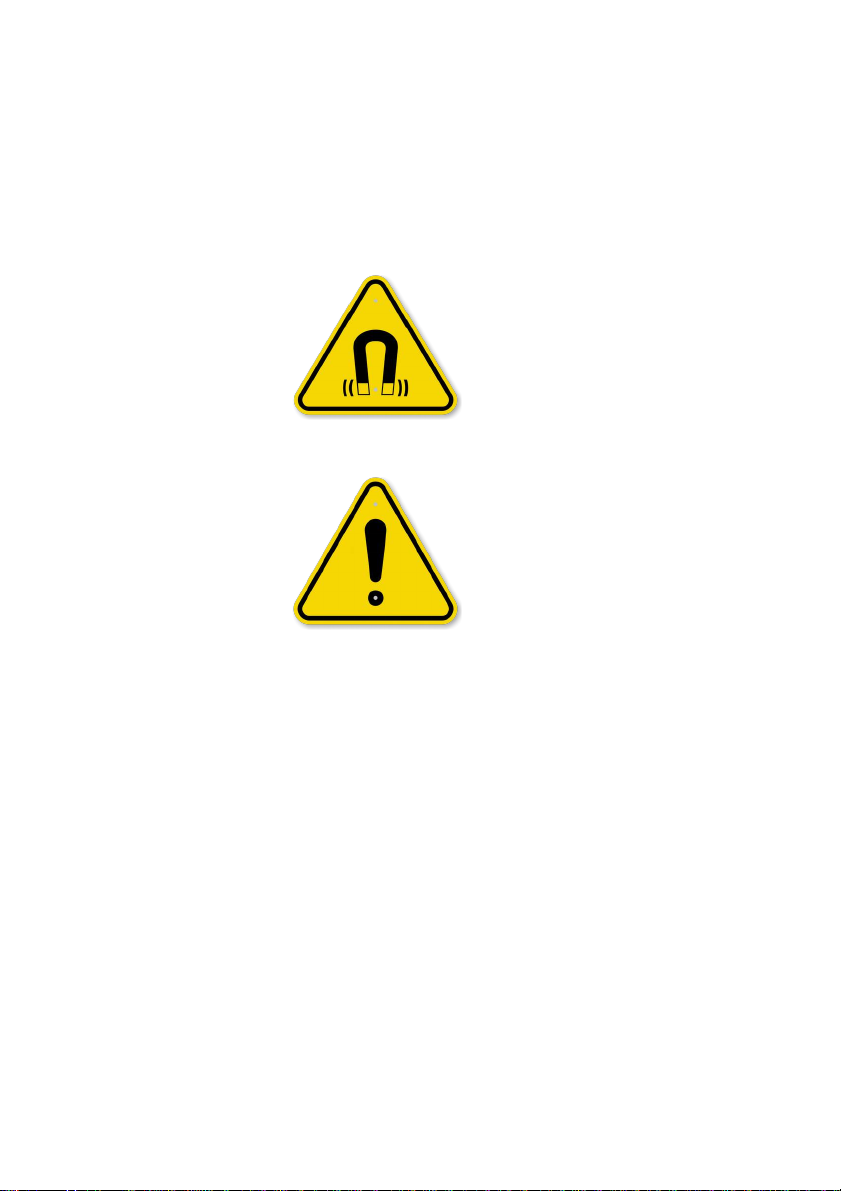
This device must only be used in situations of serious, imminent danger.
Deliberate use in a non-emergency situation may lead to prosecution.
Keep the device at least 1 meter away from magnetic sources and any
devices sensitive to magnetic fields.
Change or modifications not expressly approved by the manufacturer
could void the user's authority to operate the equipment (FCC 15.21).
The technical data, information and illustrations contained in this manual
were believed to be correct at the time of print. Wamblee s.r.l. reserve the
right to change specifications and other information contained in this
manual as part of our continual improvement process.
No part of this manual may be reproduced, stored in a retrieval system or
transmitted in any form, electronic or otherwise, without the prior
permission of Wamblee s.r.l..
No liability can be accepted for any inaccuracies or omissions in this
manual.
WamBlee is a registered trademarks of WamBlee s.r.l.
5
Page 6

6
EN
Page 7

Introduction
Congratulations and thank you for purchasing the W420/W420EX
AIS MSLD, one of the most high-tech, reliable devices available on the
market.
The W420/W420EX AIS MSLD, when activated, is capable of
transmitting an AIS signal, useful for locating people who are missing at
sea.
As the owner of this radio device you are advised to:
Read this manual.
Activate your W420/W420EX ONLY in the event of an emergency.
Prepare and check an emergency plan.
Do not activate your W420/W420EX to check whether it is
working properly: follow the test procedures described in this
manual.
.
This product has been evaluated for compliance with the FCC RF
exposure limits given in CFR 47 part 1.307(b) at a distance of greater than
2 cms.
7
EN
Page 8
Technical specifications
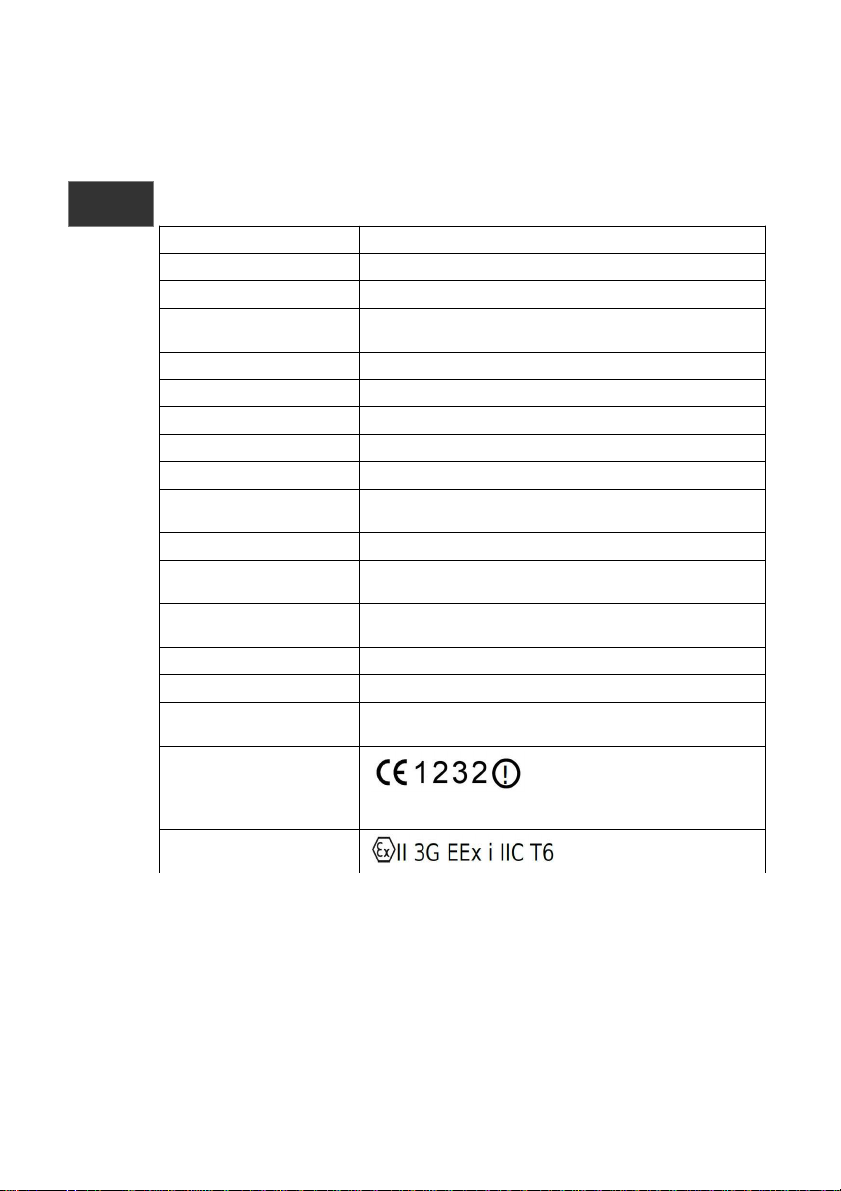
Emission VHF channel AIS 1 & 2
Emission power +31 dBm typical, > +27 dBm
Modulation GMSK, 16K0GXW
Message type Type 1 (GPS, UTC, SOG, COG, UID) and type 14 (SART
ACTIVE or SART TEST)
GPS module Update position every minute
Light signalling white LED, 70 mS flash repeated 20 times/minute
Antenna Flexible wipe antenna with rubber protective sheath
Operating temperature from -20°C to +55°C
Stowage temperature from -30°C to +70°C
Battery supply 3 primary LiMnO2 2/3AA batteries(CR123) non
hazardous
Battery replacement
5 year from installation
Operations and controls Armed, manual activation, partially automatic, TEST
function
Duration of
operation(once activated)
At least 24 hours
Size 125 x 65 x 25 mm (L x W x H) (antenna excluded)
Weight 140 g
Standard applied and
compliance
R&TTE Directive 99/05/EEC, EN61097-14, EN61108
part1,2 e 4, EN60945, ITU-R M.1371
Approval
FCC ID : XLK-W420
ATEX approval
(for W420EX version)
8
EN
Page 9

Installation
The W420/W420EX device has been designed to be worn by the user.
The device can be installed directly on lifejacket using the mounting
bracket and adhesive sticker to fix the antenna. The use of the AIS MSLD
unit with the antenna around the neck or close to the body, dramatically
reduce the coverage area and is not recommended.
For this type of installation please consult the life jacket manufacturer of
our representative dealer.
9
EN
Page 10
Operation
Before wearing the device it is recommended that you proceed with a test
of your W420/W420EX AIS MSLD to ensure it is working properly; test
procedures are described in the 'Functional Test’ section of the manual.
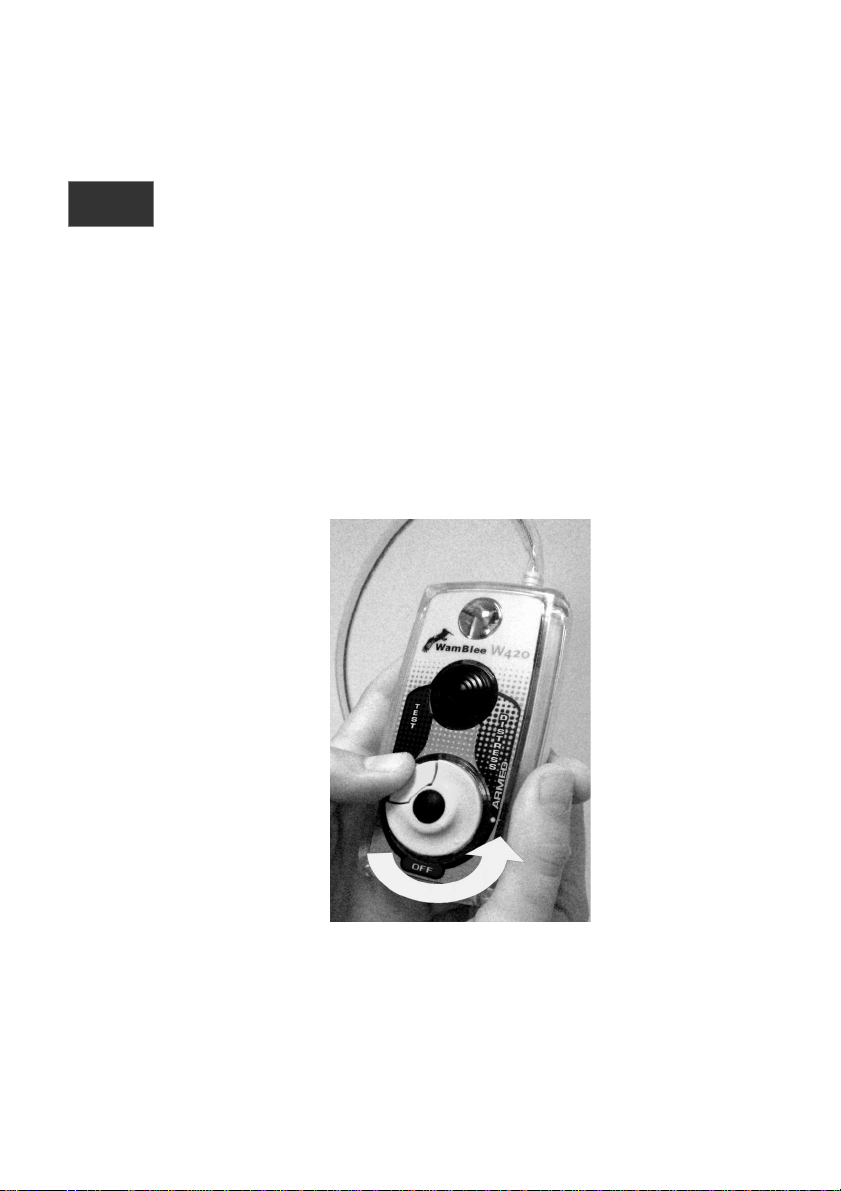
How to “arm” your W420/W420EX AIS MSLD
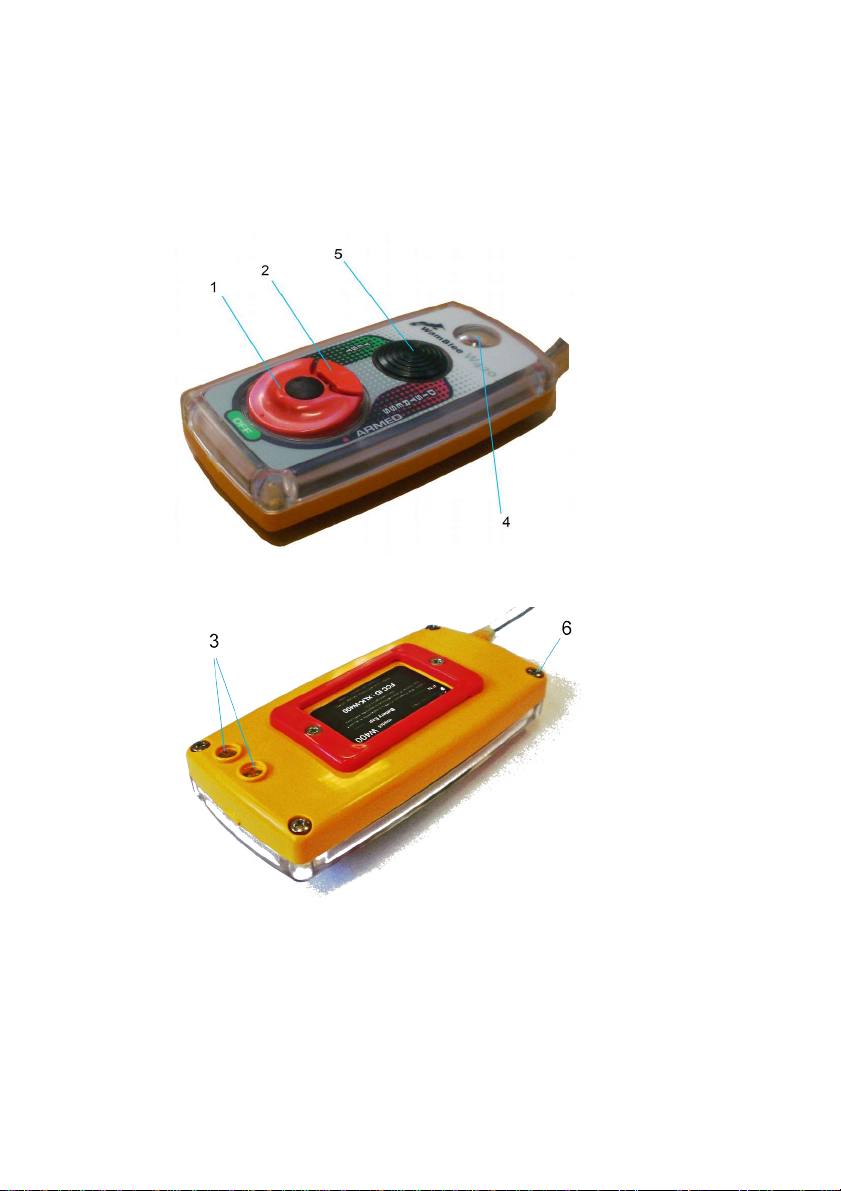
To ensure that your device is ready for activation, the knob (1) must be set
to the 'ARMED' position.
Press the push button (2) inwards to release the safety lock. Then, keeping
the push button pressed, rotate the knob anticlockwise until it reaches the
'ARMED' position, then release the push button (2).
Your W420/W420EX is ready to be activated in the event of an emergency.
10
EN
Page 11
Automatic activation
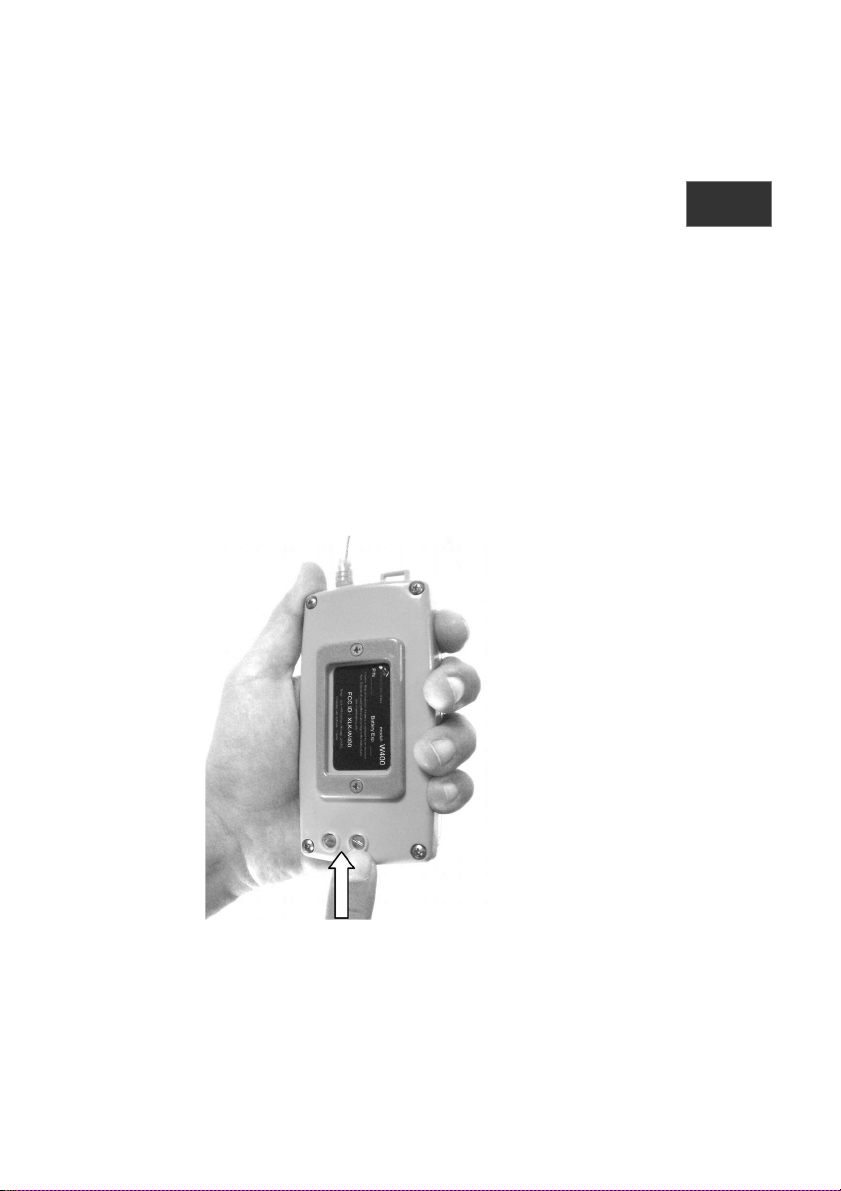
If your device accidentally falls in the water it will, on coming into contact
with the water, start working within approximately 5-10 seconds. The
‘water contact’ sensors are located on the rear of your device (3) and must
be externally accessible; keeping your W420/W420EX in a waterproof
pocket or a zone inaccessible to water will prevent its activation.
Activation of your W420/W420EX AIS MSLD will be indicated by:
A red light inside the flash lens (4)
A beep emitted for two seconds at the moment of activation
A white light flashing once every 4 seconds.
During this stage, your device W420/W420EX will transmit in the VHF band
allocated to service international shipping a series of AIS SART ALERT
messages.
11
EN
Page 12
Manual activation
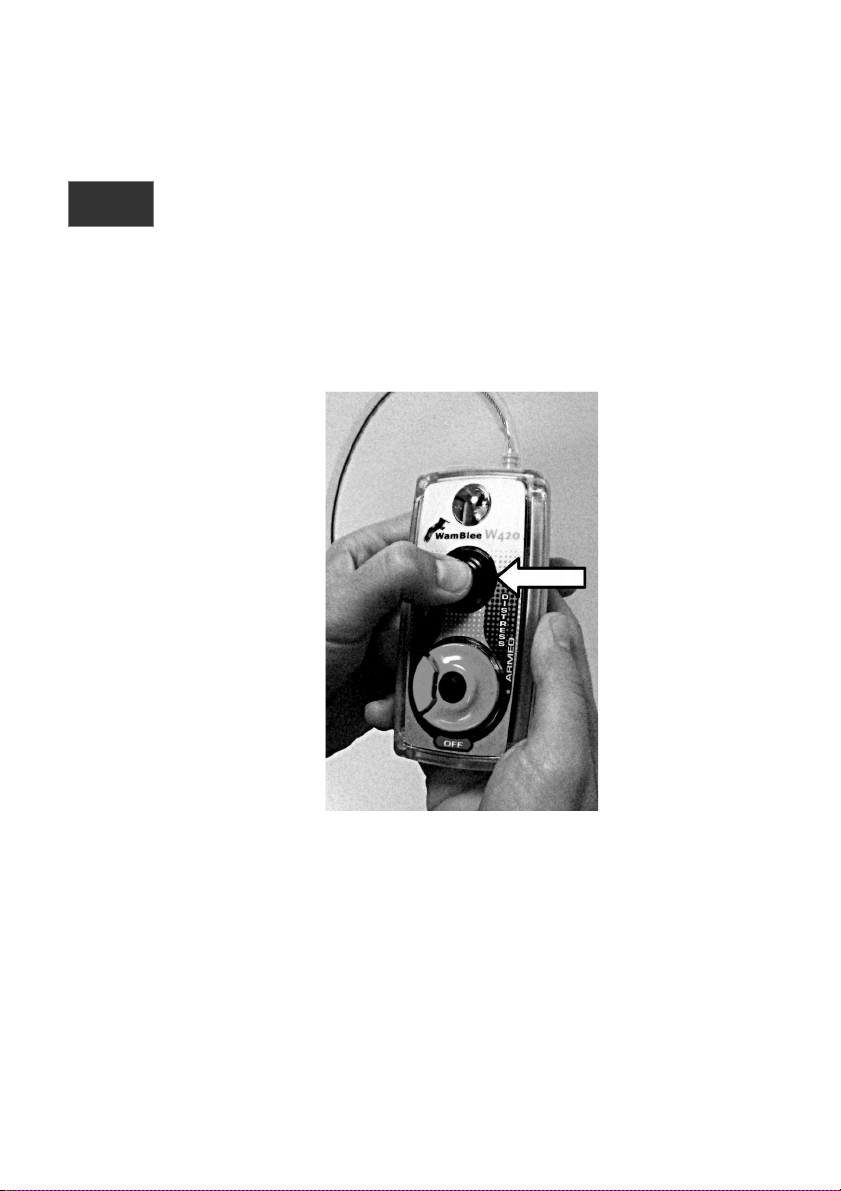
Should your W420/W420EX AIS MSLD fail to activate automatically you can
proceed with manual activation. After checking that the knob (1) is in the
'ARMED' position, press the 'Test/Activation' push button (5). Once pressed
your W420/W420EX device will be activated the same way as it is in
automatic mode.
12
EN
Page 13
Deactivation
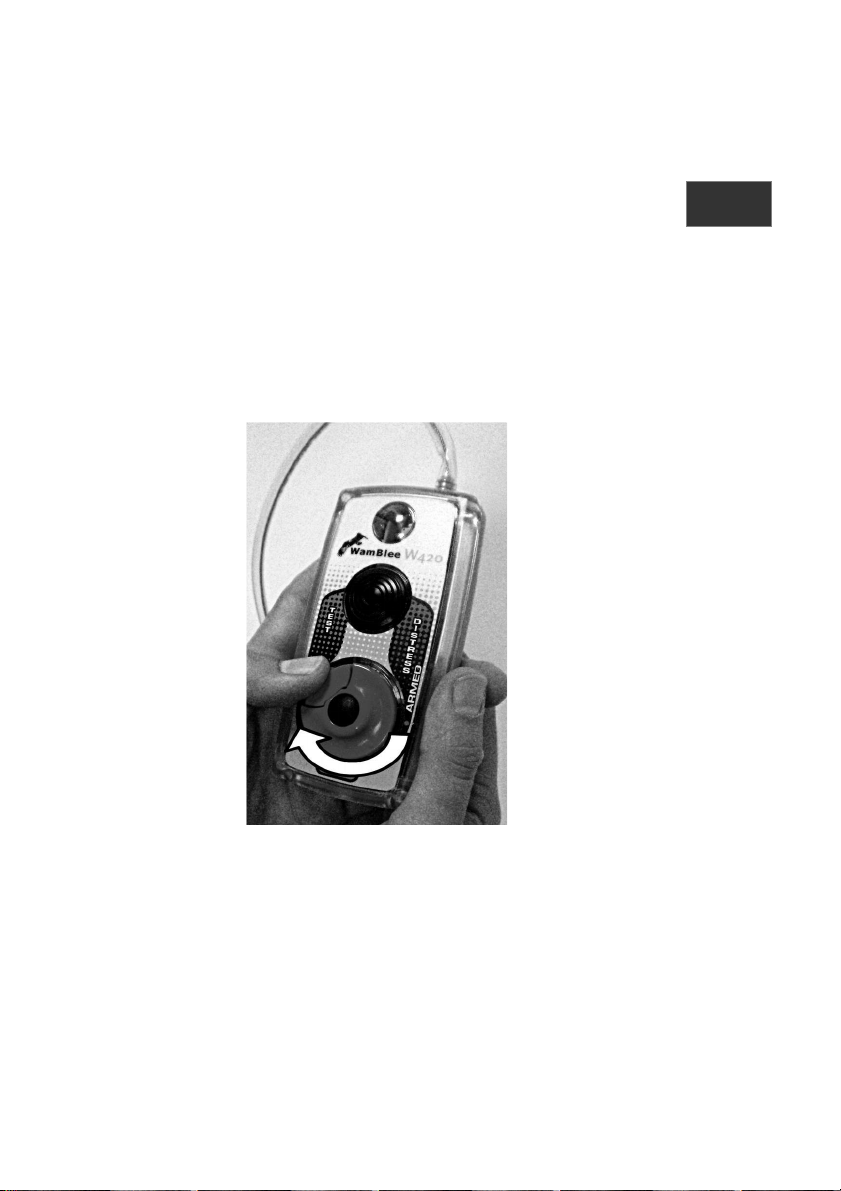
To turning off your W420/W420EX it is necessary to rotate the knob (1)
clockwise, repositioning it to 'OFF'.
Press the push button (2) inwards to release the safety lock and then,
continuing to hold the push button down, rotate the knob clockwise until
the 'OFF' position is reached, then release the push button (2).
The device will be deactivated and stop emitting AIS SART ALERT
messages.
13
EN
Page 14

Preventing accidental activation
To avoid accidental activation of your product, we recommend:
• When not in use, store it in a dry environment
• When not in use, make sure the knob (1) is positioned in OFF
• In the case of obvious malfunctions, if possible remove the
batteries
In case of accidental activation
In the case of accidental activation involving transmission of AIS SART
ALERT messages, the user should deactivate the W420/W420EX MSLD and
notify the appropriate search and rescue authorities (e.g., U.S. Coast Guard
or Rescue Coordination Centre serving the geographic area) at the earliest
possible time.
Periodic checks and maintenance
Our W420/W420EX AIS MSLD does not require special maintenance, it is
only necessary to make a visual check (checking the integrity of the plastic
case) every time you proceed with a periodic test or if there is a doubt
about a possible plastic case damage and make a periodically functional
check.
There are two kinds of tests; a SHORT test that consists in checking battery
state and a LONG test that checks the operation of the GPS module. It is
recommended to carry out a SHORT test once a month, and the LONG test
is recommended on a yearly basis.
The execution of tests over the recommended schedule reduces the life
time of the batteries.
Short test (only battery)
Make sure the knob (1) is in the 'TEST' position, then press the
'Test/Activation’ pushbutton (5).
Lighting of the red indicator light inside the flash lens (4) and
buzzer tone for about two seconds.
14
Page 15
Flash lighting of the battery state green indicator inside the flash
lens (4); during this phase release the pressure from the TEST
pushbutton in order to carry out only the SHORT test.
At the end of the test the red led should turn off indicating the
that the test I s finished.
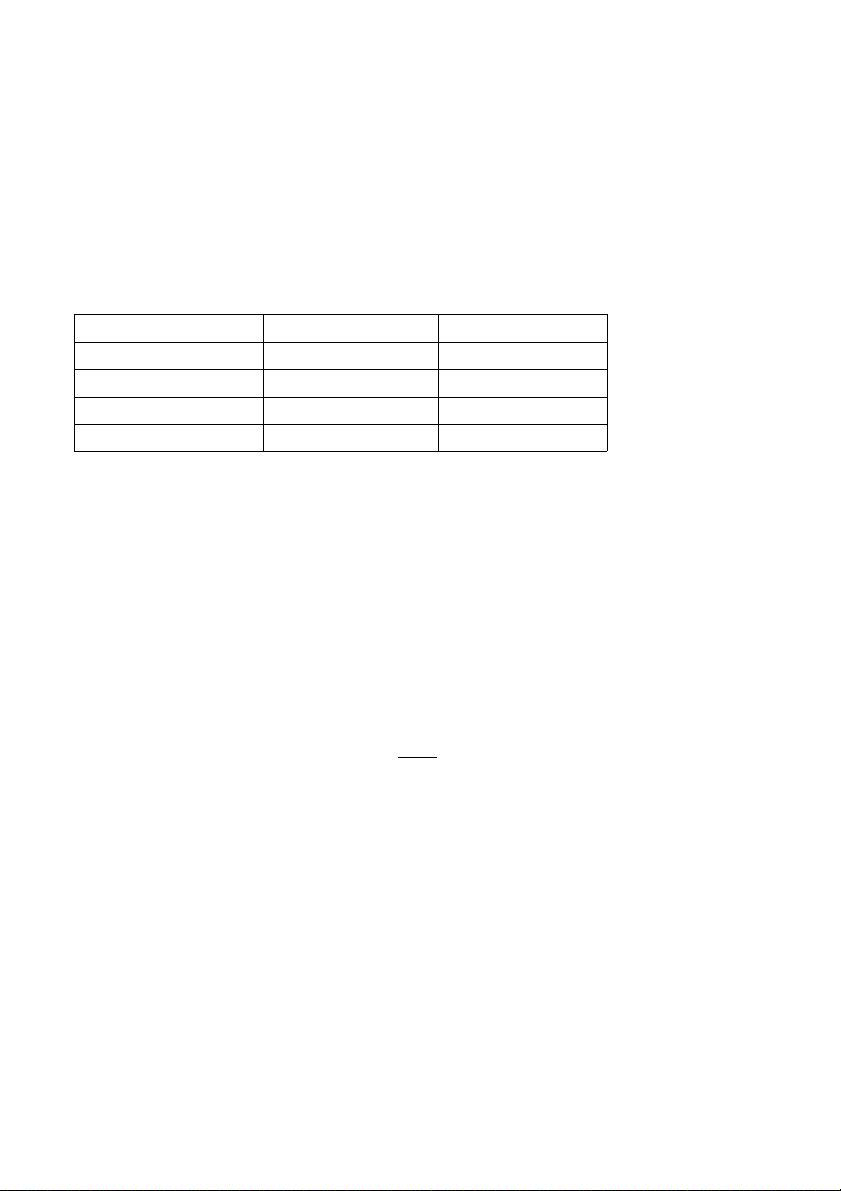
Device status Green indicator Red indicator
Battery charged 3 flashes On
Battery almost charged 2 flashes On
Battery almost flat 1 flash On
Battery needs changing Off Off
Long test (GPS check)
The execution of the LONG test allows to check the operation of the GPS
module within your W420 AIS MSLD device and allows to emit an AIS test
message.
Make sure the knob (1) is in the 'TEST' position, then press the
'Test/Activation’ pushbutton (5).
Lighting of the red indicator light inside the flash lens (4) and
buzzer tone for about two seconds.
Flash lighting of the battery state green indicator inside the flash
lens (4); during this phase keep the pressure on the TEST
pushbutton.
After about 10 seconds from pressing the TEST pushbutton the
red led will start flashing slowly (1 flash per second). Release the
pressure from the TEST pushbutton.
Your device will try to obtain the position in the next 5 minutes.
If the position is acquired before five minutes, the flash will start
and an AIS test transmission will be performed as confirmation to
the fix found.
15
Page 16

If the position isn't acquired within 5 minutes the flash will start
and an AIS test transmission – with the default paramiters (ie
without the position) - will be performed as confirmation of the fix
reception failure.
ID code
The ID code is reported on the external label on the back plane of your
W420/W420EX AIS MSLD. This code is fixed in the device and cannot be
changed by the user.
Compatibility with AIS Chart plotter system
The W420/W420EX AIS MSLD works as an AIS SART unit. Please verify with
the chart plotter or AIS receiver manufacturer that your AIS unit is able to
properly receive the AIS message type 14 (AIS SART).
16
Page 17

Changing the batteries
The supplied batteries must be changed 5 years after their installation.
Batteries must only be of the specific models approved by WamBlee; of
unapproved models may involve the malfunction or breakdown of
the device .
To change the batteries proceed as follows:
Make sure the knob (1) is in the 'OFF' position.
Use a suitable Phillips screwdriver to remove the 4 screws on the
underside edges of the device (6).
Remove the upper part of the case; if necessary tap the edge
gently.
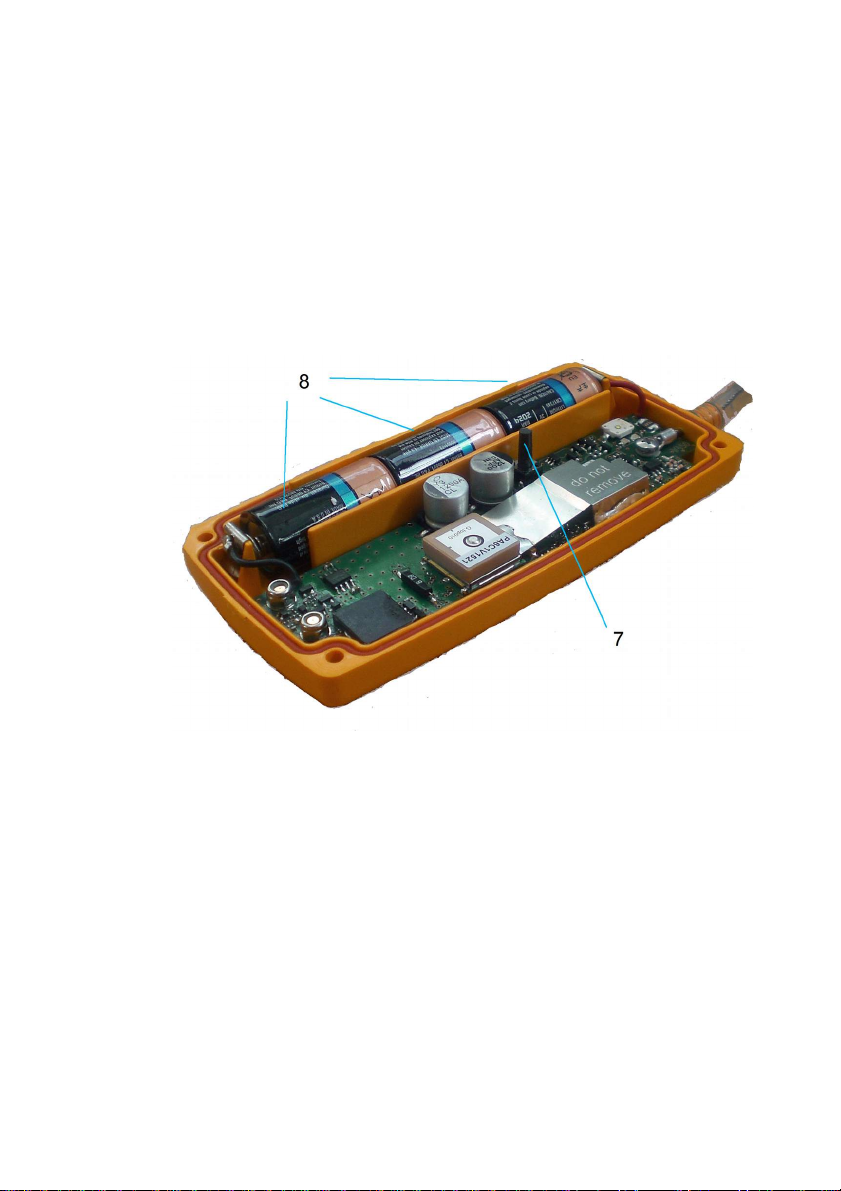
Remove the three old batteries (8) and replace them with three
new ones. Make sure they are installed the right way round
(positive pole facing top of device).
Press the push button (7) and check the test sequence as
described in 'Periodic checks’.
Re-close the upper lid, making sure the seal is inserted in its seat
correctly and is not damaged. If you notice that the seal is
damaged or see any infiltration of foreign matters inside the
device replace the seal.
Screw the 4 underside edge screws back in; tighten properly but
not excessively.
The batteries should be disposed of properly and not thrown in the
household trash. Check with authorized operators on proper disposal of
used batteries indicating the chemical (Li-MnO2).
17
Page 18

Approved batteries
The batteries approved for your device unit are, at the time this handbook
going to press, the following:
VARTA CR2/3AH
Duracell CR123A, DL123A
Please note that the new battery cell/pack shall be new or maximum not
more of 2 Years old from date of manufacturing.
This list is continuously updated and can be consulted on the following
website www.wamblee.it
Shipping
Within the delivery of the device, remove the internal batteries (see
'Changing the batteries') and ship the unit without the batteries using the
original container or alternatively a carton after the apparatus with
appropriately wrapped airball or bubblewrap.
Troubleshooting
Should the device fail to pass the periodic check it will be necessary to
send your W420/W420EX to our after-sales service, which will restore
proper performance.
A list of after-sales centres authorised to carry out maintenance on your
device can be consulted on our website:
www.wamblee.it
18
Page 19

Warranty
Your unit is covered by a 5 year parts and labor warranty. (battery
excluded). Wamblee s.r.l. warrants to the purchaser that the products
conform to manufacturers specifications and that the products are free of
defects on materials and workmanship for a period of one year from the
date delivered to the customer/end user. In the event of a defect,
due to faulty material, design or construction, the customer will
return to Wamblee at the business address were we, or the
manufacturer will undertake, at our choice, a repair or replacement.
Warranty covers all parts, materials and labor, provided that the product is
returned to our works. Exclusions: damage caused by other than normal
use and lack of basic, general care carried out in accordance with the
instruction manuals.
Wamblee s.r.l. does not accept any responsibility or any claim for direct or
indirect consequences of defects of the equipment, either during the
guarantee period or at a later stage.
Disclaimer
The Wamblee products are an aid to recovery only, it is the
responsibility of the user/operator to ensure they are fully conversant
with the operation of the equipment and the equipment is kept in full
working order at all times combined with functionality and damage checks
before and after each use.
Wamblee does not accept liability for loss of life or injury caused during
any accident during which the equipment is being used, how so ever it
arises. Wamblee Alerting Units/MSLDs are an ‘Aid to rescue only’, they do
not guarantee your safety.
The Wamblee MSLDs will dramatically increase the chances of detection
and location of a Man Over Board. Personal safety remains at all times the
sole responsibility of the individual. It is the responsibility of the
individual to inform their local Coast Guard, their senior
personnel/crew members and or family of their intended
location/destination and estimated duration of journey. It is also the
responsibility of the individual to notify these people of the type of
safety equipment they will be carrying. In the case of accidental activation
the user should deactivate the unit and notify the appropriate Search And
Rescue Authority.
19
Page 20

Wamblee s.r.l.
Via Vittori 19 – 48018 FAENZA (RA) ITALY
Tel. +39 0546 623891 / Fax +39 0546 623891 / email:[email protected]
Made in Italy
20
 Loading...