

Page 1
STARTER KIT
Quick Start Guide
Page 2
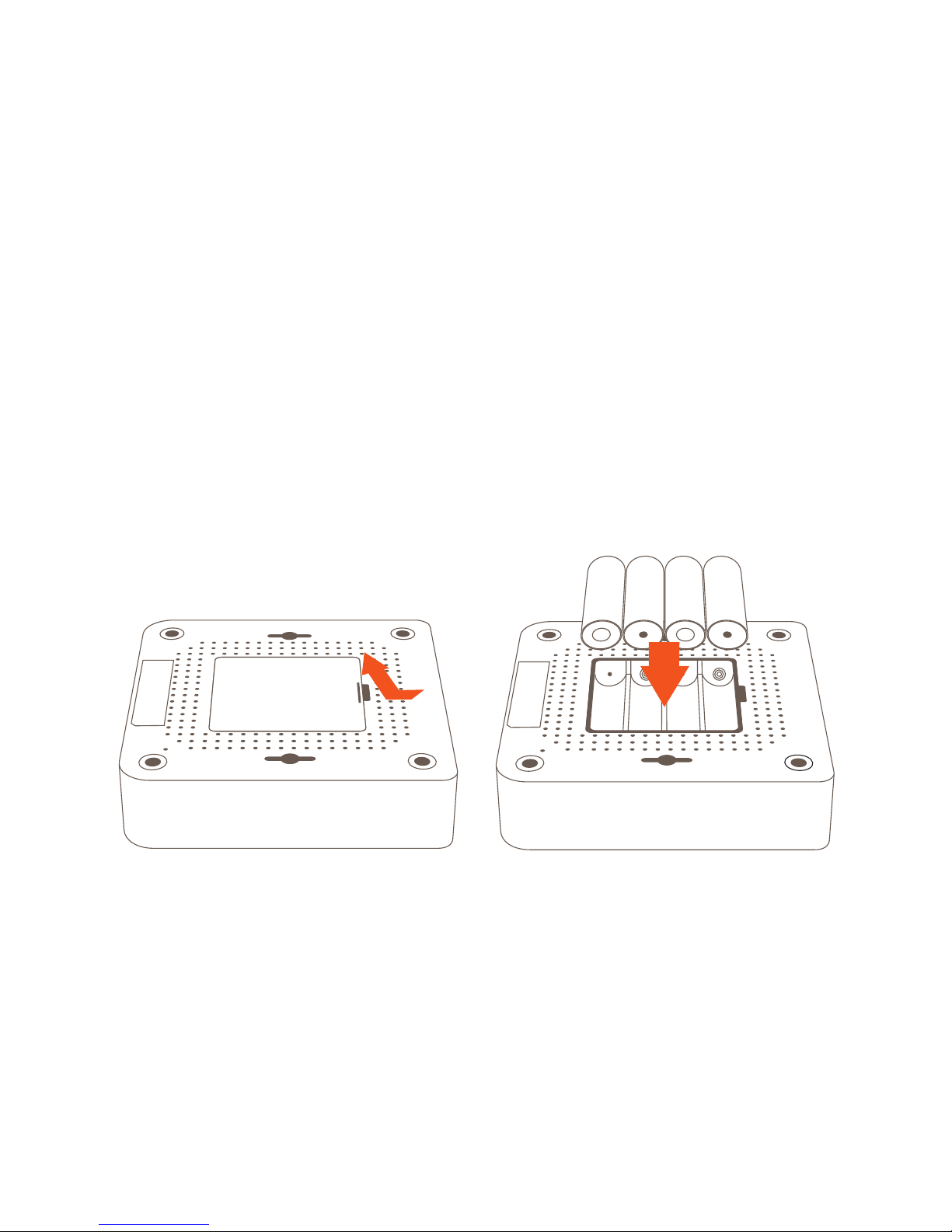
Note: Hub does not recharge the batteries.
Battery Backup Installation
The Wally Hub can remain operational for several hours in the event of a
power loss by installing the 4 AA batteries.
• Remove the bottom cover
• Insert the 4 AA batteries
• Re-insert the bottom cover and snap into place
Page 3

Simple Hub Setup
Install the Wally Hub in a location that is central to where your Wally
Sensors will be located.
• Plug in the power adapter to an outlet and attach the power
connector to the back of the Wally Hub
• It is recommended that you connect your Wally Hub using the included
ethernet cable. Optionally, you may connect using WiFi by following the
instructions in the Wally apps
• Continue setting up your Wally Hub by downloading the Wally app or
going to my.wallyhome.com and follow the instructions
Power
Connector
Power
Adapter
Ethernet
Cable
Page 4

Setting up Sensor
Using the Sensor for leaks, temperature, and humidity
• From the mobile or web app, tap the button at the bottom of the
dashboard view
• Follow the guided instructions to setup and connect your sensor
to the hub
Using the Sensor to monitor doors and windows
• From the mobile or web app tap the button at the bottom of the
dashboard view
• Follow the guided instructions to setup and connect you sensor to the hub
• In the Sensor settings page, ensure open/closed is on
• Mount the magnet and Sensor as illustrated in the setup to begin
monitoring your door or window
Locate
alignment marks
Final
Position
Allow up to
~12 mm space
Page 5

Wally Hub LED Behavior
LED Flashing LED Solid Action
Not connected to Internet
(slow)
Online/On Battery
Online
Connecting to the Wally App
Connected to the Wally App
Alert
Factory Reset
Using WiFi to setup
(if not using mobile app)
Firmware Update
Audio On/Off
3 times
Sensor Pair success
Sensor Pairing
Page 6

Download the Wally® app or go to my.wallyhome.com and follow the
instructions to connect Wally!
The App Store is a registered trademark of Apple Inc.
Android, Google Play, and the Google Play logo are trademarks of Google Inc.
Need Help?
Visit www.wallyhome.com or email us at Support@wallyhome.com
 Loading...