

Page 1
Item no. 2003-6
Article No 2003-6
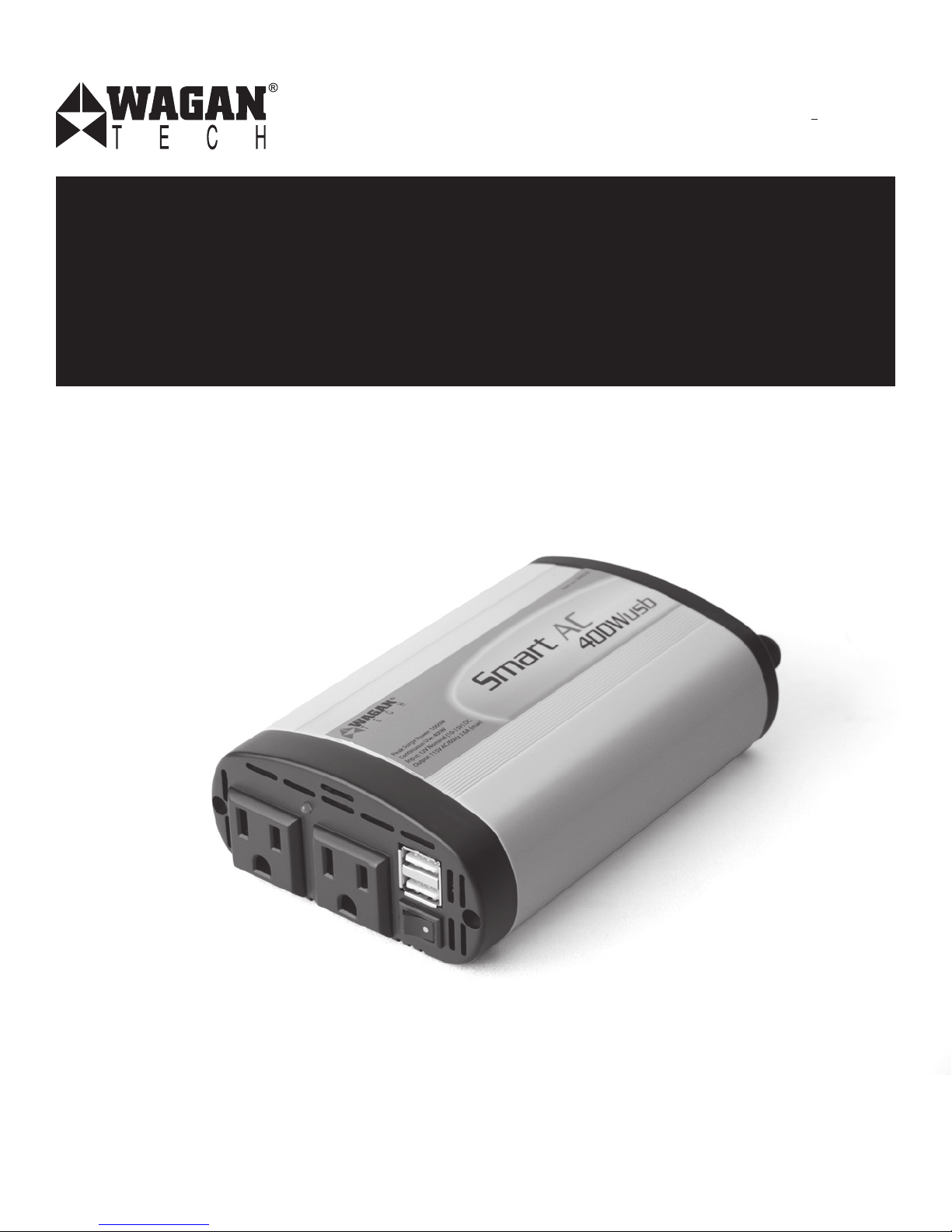
Smart AC™ Inverter 400W USB
Onduleur Smart AC™ 400W CC vers CA + USB
User’s Manual
Guide d’Utilisation
Page 2

Smart AC™ 400W DC to AC Power Inverter + USB by Wagan Tech
1
User’s Manual—Read before using this equipment
©2011 Wagan Corporation. All Rights Reserved.
Wagan Tech and wagan.com are trademarks used by Wagan Corporation.
2
Your 400 Watt Power Inverter converts 12 Volt DC vehicle battery power into
110 volts of AC power. You can use the inverter in your vehicle to operate
many types of appliances that use AC power such as TVs, VCRs, portable
computers, power tools and lights for emergency or camping use.
The inverter works with your vehicle’s engine turned on or off (accessory
mode). It provides a continuous output of up to 400 watts.
FEATURES
• 1,000W Peak Power: Allows you to power appliances that require a
large amount of initial (peak) power to work (such as many TVs and
motor-powered equipment).
• Low Battery Alarm: The inverter sounds an audible alarm then turns
itself off if the source battery becomes too low.
• Overheat Protection: The inverter temporarily shuts itself down to
protect itself from overheating.
• Overload/Short Circuit Protection: The inverter automatically turns itself
off if the connected load is too high or if it shorts.
• Fuse: The inverter comes with a fuse(s) already installed.
• Dual AC Outlets: Allows you to power two appliances at the same
time.
• Dual USB Power Port: Allows you to power up to 2 USB appliances.
SAFETY PRECAUTIONS
• Keep away from children! The inverter produces the same amount of
power as your home AC wall outlets and is not to be treated like a toy.
• Do not use the inverter in a positively grounded vehicle.
• Do not attempt to open the inverter casing. Internal contents may be
hazardous and harmful.
• Do not operate the inverter in or around water. The voltage of the unit
makes it an electrical shock hazard if operated in wet conditions. Do
not let the cord of the inverter or any plugged in appliance’s cord get
wet.
• Do not connect the AC inverter directly to another AC power source.
• If there is anything wrong with the inverter, disconnect all input and
output power (all AC, DC, and USB plugs).
• The following operations will damage the inverter and void its
warranty:
○ Reversing polarity by connecting the wires to the
incorrect terminals.
○ Connecting the inverter to a power source greater than
15 Volts DC.
○ Operating the inverter and battery in or around water.
Page 3
+
Inverter
Battery
AC Appliance
+
Smart AC™ 400W DC to AC Power Inverter + USB by Wagan Tech
3
User’s Manual—Read before using this equipment
©2011 Wagan Corporation. All Rights Reserved.
Wagan Tech and wagan.com are trademarks used by Wagan Corporation.
4
PRE-OPERATION
• Make sure there is at least 2 inches of clearance around the inverter
for air flow. The inverter generates heat while in operation. This is
not a malfunction. However, if the inverter gets too hot, it will turn
off automatically. It is important to position the inverter in a way
that allows air to flow freely around it so the heat may disperse.
The inverter’s thermal protection prevents it from operating when its
temperature exceeds 130ºF ± 10º (55ºC ± 5º).
• If you operate the inverter in a moving vehicle, you need to secure the
inverter to prevent it from shifting around while the vehicle is moving.
OPERATION
1. Disconnect the inverter before starting the vehicle’s engine.
2. Determine the right operating voltage for both input and output of the
inverter.
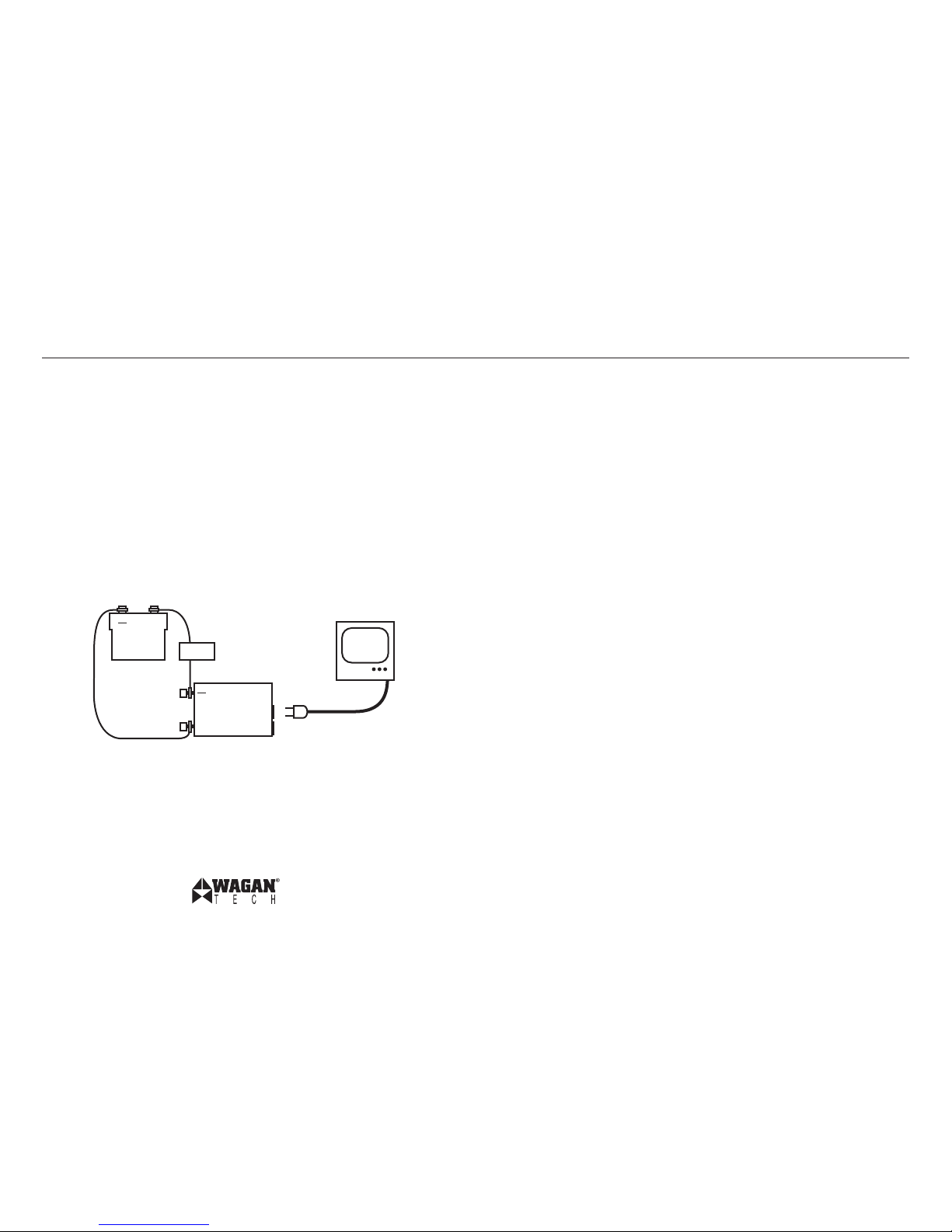
3. Connecting:
A. to Vehicle’s 12V DC Cigarette Lighter Outlet:
i. Unscrew the red cover for the positive (+) input terminal of the
inverter.
ii. Attach the red (+) output of the DC plug to the terminal.
iii. Secure the terminal with the cover.
iv. Repeat the process with the black, negative (−) terminal,
matching DC plug output.
B. to a Battery:
i. Unscew the red terminal cover of the inverter.
ii. Attach the red, positive (+) cable to the positive terminal.
Secure the wire with the terminal cover.
iii. Attach the other end of the cable to the red, positive (+)
terminal of the battery.
iv. Repeat the process with the black, negative (−) terminal,
matching black cable.
4. Turn on the power switch (located at the front of the inverter). The
green LED will light up indicating that the unit is working.
5. Plug your appliances into the AC sockets at the front of the inverter.
6. When you are not using the inverter, turn the power switch off and
disconnect the inverter from power supply.
PRODUCT USAGE DIAGRAM
Fuse
Page 4
Smart AC™ 400W DC to AC Power Inverter + USB by Wagan Tech
5
User’s Manual—Read before using this equipment
©2011 Wagan Corporation. All Rights Reserved.
Wagan Tech and wagan.com are trademarks used by Wagan Corporation.
6
MEASURING THE AC VOLTAGE
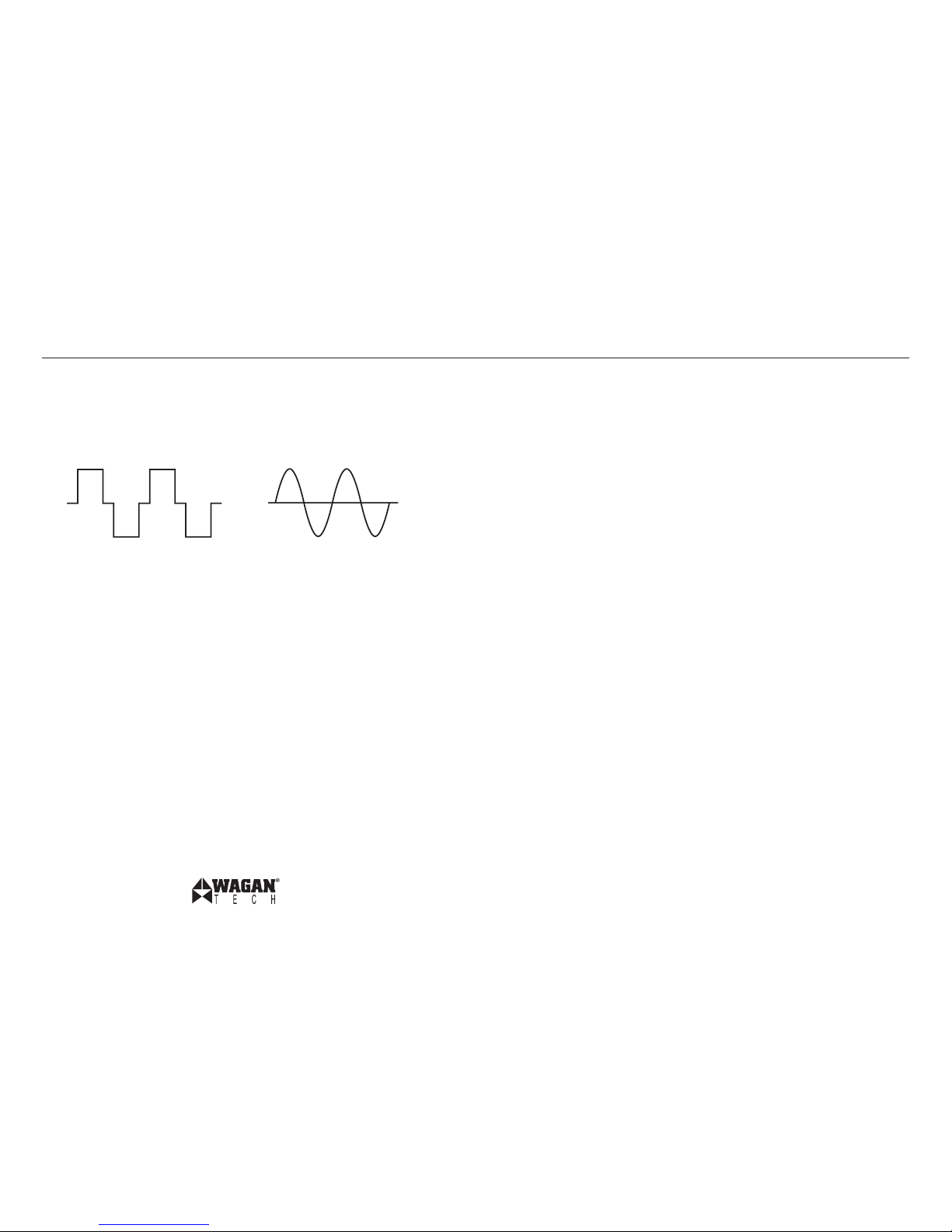
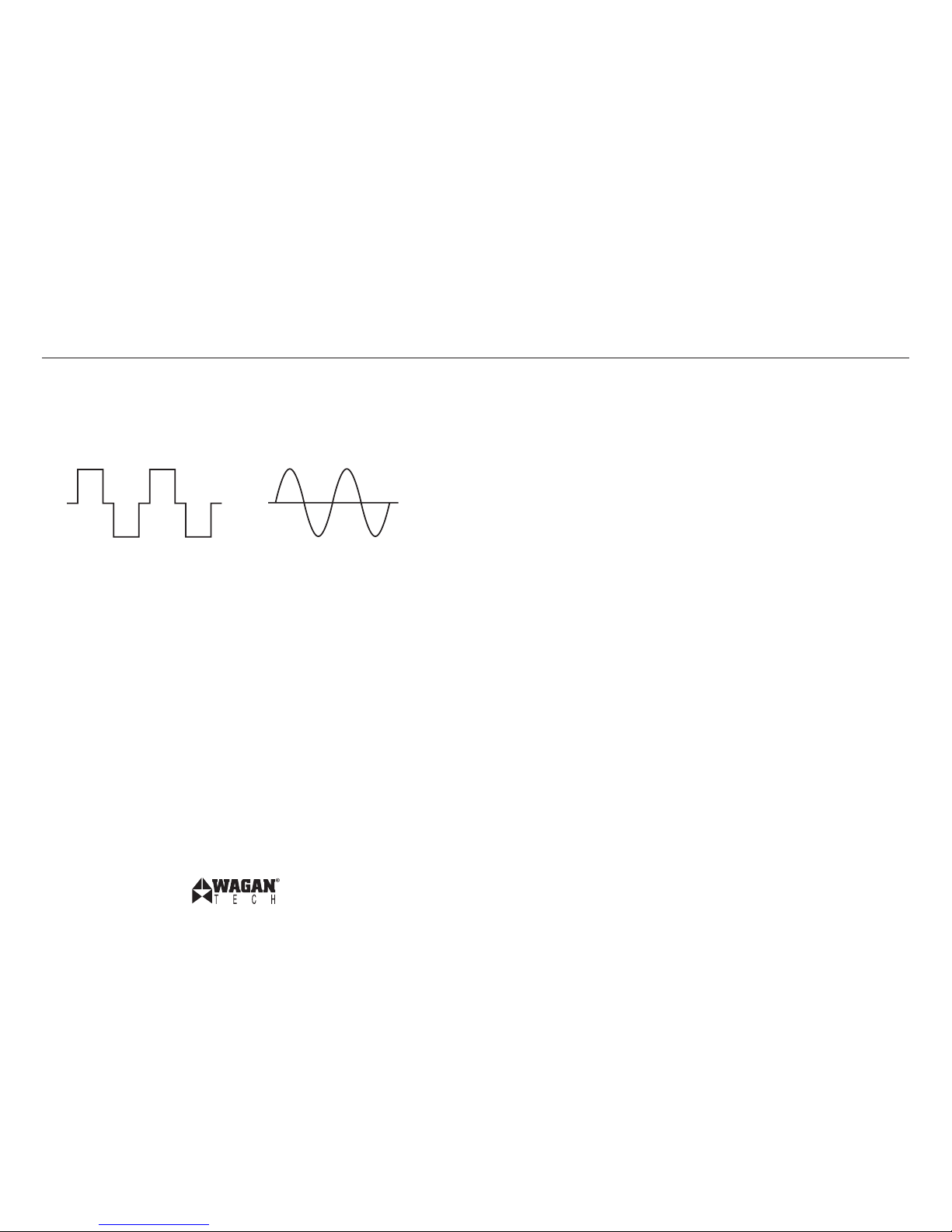
This inverter’s AC output is a modified sine wave (MSW) at 115 volts AC.
The figure below compares a modified sine wave to a pure sine wave.
MAINTENANCE
Very little maintenance is required to keep the inverter operating properly.
Simply keep it clean.
TROUBLESHOOTING
Inverter Beeping
If the power inverter makes a beeping sound, turn off the power inverter,
disconnect all appliances from inverter and disconnect the inverter from the
power supply. The beeping sound is the low battery warning indicating that
the voltage of the battery power supply is getting low. Restart the vehicle
engine to charge the battery before using it to operate the power inverter
again.
Buzz in Audio Systems
Some stereo systems and boom boxes will emit a buzzing noise from their
loudspeakers when operating with a power inverter. The power supply in the
device does not adequately filter the modified sine wave produced by the
power inverter. The only solution is to use a sound system that incorporates a
higher quality power supply.
Operating a Television
Picture tubes have a degaussing coil that uses a high initial surge of power
to light up the screen from a “cold start.” If the TV does not start up on
the first attempt, try switching the TV on and off consecutively every 2 to 3
seconds (it may take 2 to 5 tries before starting).
This modified sine wave has a root mean square (RMS) voltage of 115 volts.
Most ordinary AC voltmeters are calibrated to read “average” voltage and
assume that the AC waveform will be a pure sine wave. These meters will
not correctly read MSW voltage, and will display about 20 to 30 volts too
low. Any multi-meter identified as “TRUE RMS” will accurately read MSW
correctly.
ADDING AN EXTENSION CORD
Using an extension cord will reduce power output. However, if you need an
extension cord, we recommend placing the extension cord between the AC
output of the inverter and the AC appliances. You may use up to 100 feet of
high quality extension cord.
Pure Sine Wave
Modified Sine Wave (MSW)
Page 5
Smart AC™ 400W DC to AC Power Inverter + USB by Wagan Tech
7
User’s Manual—Read before using this equipment
©2011 Wagan Corporation. All Rights Reserved.
Wagan Tech and wagan.com are trademarks used by Wagan Corporation.
8
Television Interference
Operating the power inverter can interfere with television reception on some
channels. If this situation occurs, the following steps may help to alleviate the
problem:
• Make sure that the chassis ground lug on the back of the power
inverter is solidly connected to the ground system of your vehicle.
• Do not operate high power loads with the power inverter while
watching television.
• Make sure that the antenna connected to your television provides an
adequate static-free signal and that you are using a good quality
cable between the antenna and the television.
• Move the television as far away from the power inverter as possible.
• Keep the cables between the battery and the power inverter as short
as possible and twist them together with about 2 to 3 twists per foot.
This minimizes radiated interference from the cables.
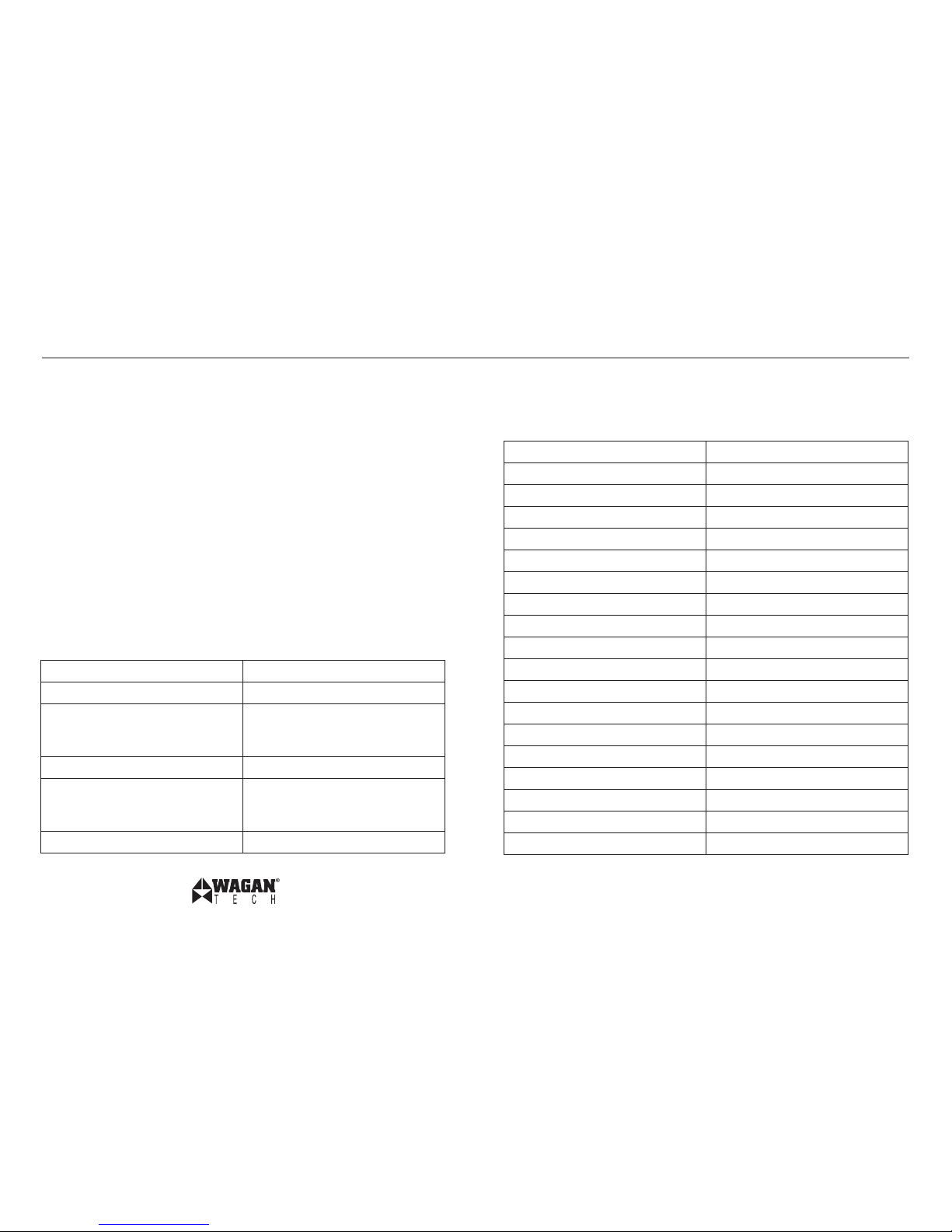
Condition Solution
Poor contact Clean contact parts thoroughly
Battery voltage is too low Start the engine to recharge the
battery. Replace the battery if
needed.
Shutdown on overload Reduce the inverter’s wattage load
Thermal shutdown Allow the inverter to cool down by
reducing the load or turning it off for
a while.
Receptacle has no power Check the receptacle wiring.
SPECIFICATIONS
All specifications are typical at nominal line, half load and 77ºF (25ºC)
unless otherwise noted. Specifications are subject to change without notice.
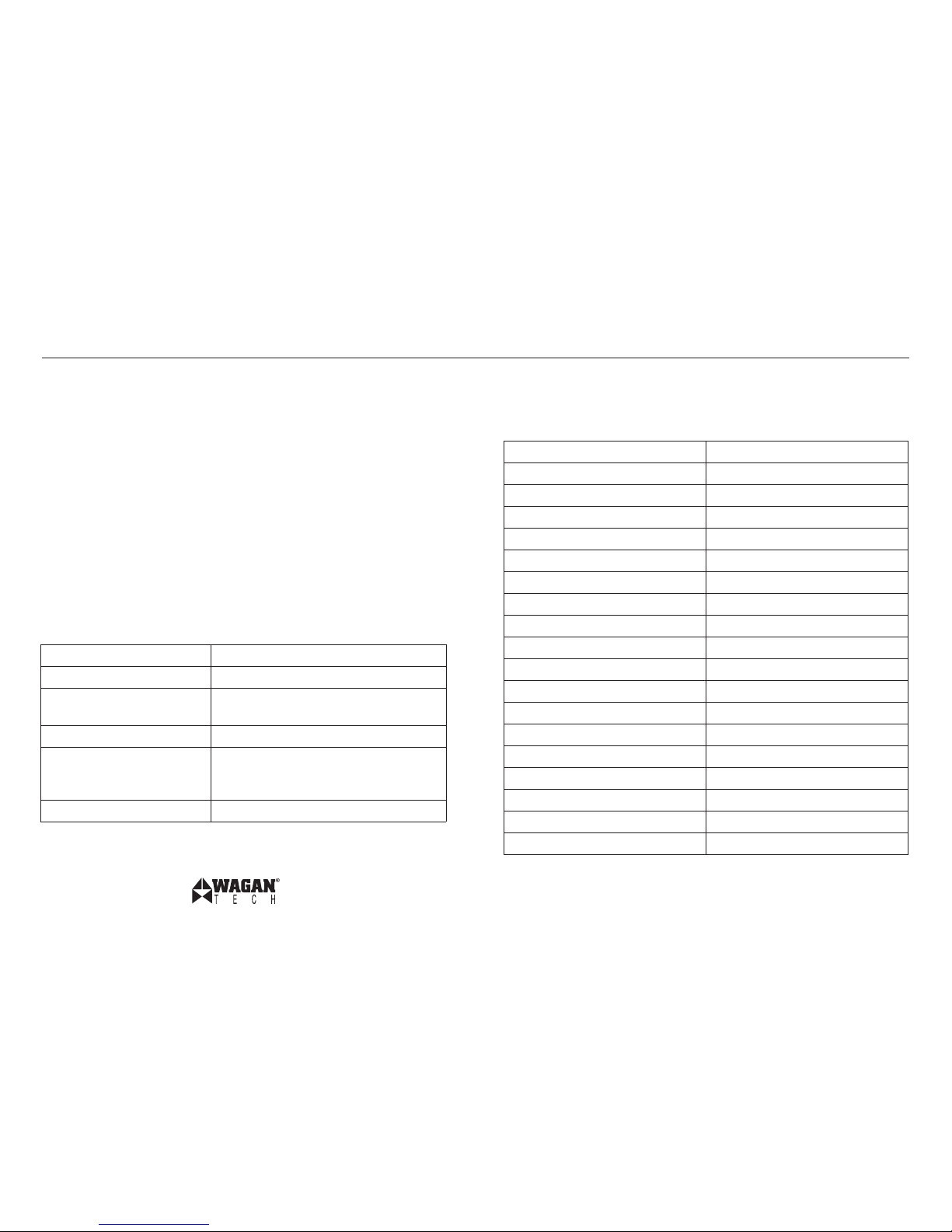
Name Description
Input 12V (10–15V) DC
Output 110V AC
Output frequency 60 Hz
Output waveform Modified Sine Waveform
Continuous power 400 Watts
Surge Power 1000 Watts
Efficiency Approximately 90%
Current drawn when no load < 0.3 Amps
Battery low alarm 10.5 ± 0.5V DC
Battery low shutdown 10 ± 0.5V DC
Alarm and thermal shutdown 130ºF ± 10º (55ºC ± 5º)
Internal DC fuse 35 Amps
External DC fuse None
AC output sockets Two 3-prong outlets
USB output sockets Two outlets
Power switch DC input ON/OFF control
Dimensions (L x W x H) 5 x 4 x 2 inches
Net Weight 650 g
Page 6

Onduleur Smart AC™ 400W CC vers CA + USB par Wagan Tech
9
Guide d’Utilisation—Lire avant d’utiliser cet équipement
©2011 Wagan Corporation. Tous droits réservés.
Wagan Tech et Wagan.com sont des marques de
commerce utilisées par Wagan Corporation.
10
Votre onduleur 400 Watt permet de convertir le courant d’une batterie
automobile de 12 Volt CC en un courant CA 110 volts. Vous pouvez utiliser
cet onduleur dans votre véhicule pour faire fonctionner différents types
de systèmes utilisant un courant CA, tels que AC des TVs, des VCRs, des
ordinateurs portables, des systèmes électriques et des éclairages en cas
d’urgence ou de camping.
L’onduleur fonctionne que le moteur soit allumé ou éteint (mode accessoires).
Il génère une sortie électrique continue de 400 watts.
FONCTIONS
• 1,000W au maximum de sa puissance: Vous permet d’alimenter des
systèmes qui nécessitent un fort courant électrique de départ (pic) pour
pouvoir fonctionner (comme c’est le cas pour de nombreux postes télé
et systèmes à moteurs)
• Alarme en cas de batterie faible: L’onduleur émet une alarme sonore
et s’éteint automatiquement lorsque le niveau de charge de la batterie
est trop faible.
• Protection anti-surchauffe: L’onduleur s’éteint automatiquement pour
éviter de surchauffer.
• Protection anti-surcharge/court-circuit: l’onduleur s’éteint
automatiquement lorsqu’il ets connecté et que la chare électrique est
trop élevée ou qu’il risque de court-circuiter.
• Fusible: L’onduleur est équipé d’un/de fusible(s) déjà installé(s).
• Prise CA double: Vous permet d’alimenter deux unités en même temps.
CONSIGNES DE SECURITE
• Tenir hors de portée des enfants! L’onduleur produit la même charge
électrique que vos prises murales CA domestique et n’est pas conçu
pour servir de jouet.
• N’utilisez pas l’onduleur sur un véhicule relié positivement au sol.
• N’essayez pas d’ouvrir le boîtier de l’onduleur. Les composants
internes peuvent être dangereux ou blessants.
• N’utilisez pas l’onduleur à proximité d’eau. La tension électrique de
l’unité pourrait vous électrocuter si elle entrait en contact avec de
l’humidité. Pensez à bien isoler le cordon d’alimentation des sources
d’humidité.
• Ne branchez pas l’onduleur Ca directement à une autre source
électrique CA.
• En cas de problème avec l’onduleur, débranchez toutes les entrées et
les sorties (toutes les prises CA, CC et USB).
• Les opérations suivantes pourraient endommager l’onduleur et annuler
votre garantie:
○ Inverser la polarité en connectant les câbles aux mauvaises bornes.
○ Connecter l’onduleur à une source électrique supérieure
à 15 Volts CC.
○ Utiliser l’onduleur et la batterie à proximité d’eau.
Page 7
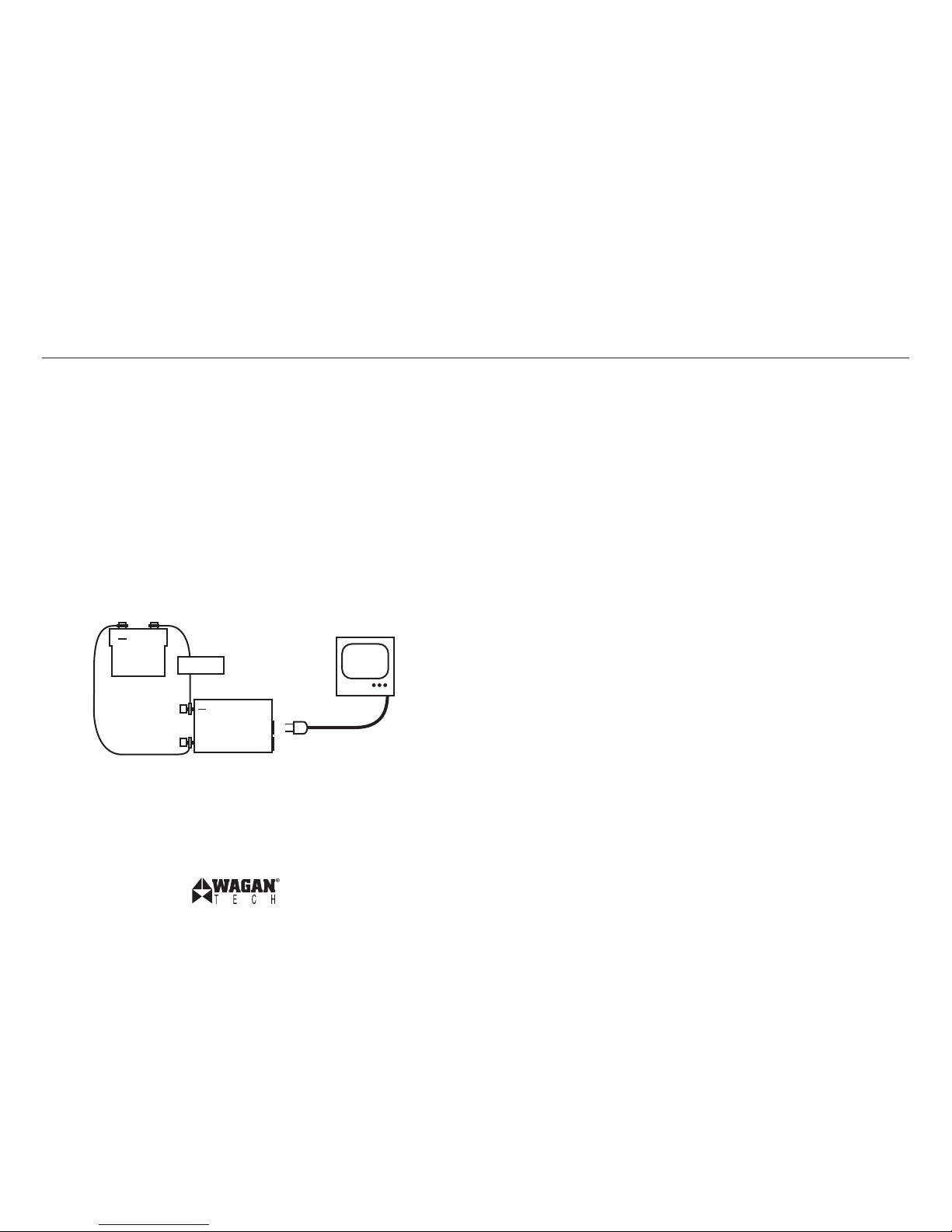
+
Batterie
Inverseur
Appareil à CA
+
Onduleur Smart AC™ 400W CC vers CA + USB par Wagan Tech
11
Guide d’Utilisation—Lire avant d’utiliser cet équipement
©2011 Wagan Corporation. Tous droits réservés.
Wagan Tech et Wagan.com sont des marques de
commerce utilisées par Wagan Corporation.
12
PRE-OPERATION
• Vérifiez qu’il existe un espace d’au moins 2 pouces autour de
l’onduleur pour que l’air puisse circuler. L’onduleur génère de la
chaleur lorsqu’il fonctionne. Ce n’est pas un défaut de fonctionnement.
Toutefois, si l’onduleur devient trop chaud, il s’éteint automatiquement.
Il est important de positionner l’onduleur de manière à ce que l’air
puisse circuler librement pour permettre à la chaleur de se disperser.
La protection thermique de l’onduleur lui évite de fonctionner lorsque
la température est supérieure à 130ºF ± 10º (55ºC ± 5º).
• Si vous utilisez l’onduleur dans un véhicule en mouvement, vous devez
le sécuriser pour éviter qu’il ne se déplace pendant le trajet.
2. Déterminez la bonne tension électrique d’entrée et de sortie de
l’onduleur.
3. Connexion:
A. A la sortie de l’allume-cigare 12V CC:
i. Dévissez le cache rouge de la borne (+) positive de
l’onduleur.
ii. Reliez la sortie rouge (+) positive de la prise CC à la borne.
iii. Sécurisez la borne au moyen du cache.
iv. Répétez la procédure avec la sortie noire, négative (−) en
faisant correspondre la prise CC
B. A la batterie:
i. Dévissez le cache rouge de l’onduleur.
ii. Reliez la sortie rouge (+) positive du câble à la borne
positive. Sécurisez le fil avec le cache.
iii. Reliez l’autre extrémité du câble à la borne rouge (+) positive
de la batterie.
iv. Répétez la procédure avec la sortie noire, négative (−) en
faisant correspondre le câble noir.
5. Allumez l’interrupteur (situé sur l’onduleur, côté face). La DEL verte
clignote pour signaler que l’unité fonctionne.
6. Vérifiez que vos systèmes CA/USB ne sont pas alimentés. Branchez les
systèmes aux prises CA ou USB situées sur l’onduleur (côté face), puis
allumez le système.
7. Lorsque vous n’utilisez pas l’onduleur, éteignez l’interrupteur et
débranchez l’onduleur de la prise électrique.
DIAGRAMME D’UTILISATION DE PRODUIT
OPERATION
1. Débranchez l’onduleur avant de démarrer le moteur du véhicule.
Fusible
Page 8
Onduleur Smart AC™ 400W CC vers CA + USB par Wagan Tech
13
Guide d’Utilisation—Lire avant d’utiliser cet équipement
©2011 Wagan Corporation. Tous droits réservés.
Wagan Tech et Wagan.com sont des marques de
commerce utilisées par Wagan Corporation.
14
MESURE DE LA TENSION CA
La sortie CA de cet onduleur est une sortie à ondulation modifiée de 115
volts CA. Le schéma ci-dessous compare une onde modifiée à une onde
standard.
ENTRETIEN
Cet onduleur ne requière que très peu d’entretien. Vous n’aurez qu’à le
nettoyer.
DEPANNAGE
L’onduleur Emet un Signal Sonore
Si l’onduleur émet un signal sonore, coupez l’alimentation, débranchez tous
les systèmes reliés à m’onduleur et débranchez l’onduleur de la source
d’alimentation électrique. Le signal sonore indique que le niveau de charge
de la batterie est faible ou que l’a batterie est mal alimentée. Redémarrez le
moteur du véhicule pour charger la batterie avant de rebrancher l’onduleur.
Interference sur les Systemes Radios
Certains systèmes stéréo émettent des “buzz” depuis les haut-parleurs
lorsqu’ils sont reliés à un onduleur. L’alimentation électrique du système ne
filtre pas correctement l’ondulation modifiée the produite par le courant de
l’onduleur. La seule solution est d’utiliser un système sonore qui incorpore une
tension électrique de plus haute qualité.
Faire Fonctionner une Television
Les tubes cathodiques sont équipés d’une bobine qui utilise une sonde
électrique pour éclairer l’écran pour les “démarrages à froid”. Si la TV ne
s’allume pas après un premier essai, essayez de l’allumer et de l’éteindre
consécutivement pendant 2 à 3 secondes il se peut que vous ayez besoin de
2 à 5 tentatives).
Cette ondulation modifiée est dotée d’une tension carrée (RMS) de 115 volts.
La plupart des voltmètres CA sont calibrés pour lire une tension “moyenne”
et assumer que l’ondulation CA est une onde standard. Ces mètres ne liront
pas correctement la tension MSW et afficheront de 20 à 30 volts de moins.
Tout multimètre identifié comme “VERITABLE RMS” lira la tension MSW
correctement.
AJOUTER UN CORDON D’ALIMENTATION
L’utilisation une rallonge électrique réduira la sortie électrique. Toutefois, si
vous avez besoin d’une rallonge, nous vous conseillons de la placer entre la
sortie CA de l’onduleur et les systèmes CA. Vous pouvez utiliser jusqu’à 100
pieds de longueur pour une rallonge de bonne qualité.
Onde Sinusoïdale Standard
Onde Sinusoïdale Modifiée
Page 9
Onduleur Smart AC™ 400W CC vers CA + USB par Wagan Tech
15
Guide d’Utilisation—Lire avant d’utiliser cet équipement
©2011 Wagan Corporation. Tous droits réservés.
Wagan Tech et Wagan.com sont des marques de
commerce utilisées par Wagan Corporation.
16
Interference Televisuelle
Utiliser l’onduleur peut interférer avec la réception de certaines chaînes télé.
Dans ce cas, suivez les étapes suivantes:
• Vérifiez que le châssis à l’arrière de m’onduleur est bien connecté au
système au sol de votre véhicule.
• N’utilisez pas de charges électriques lourdes pendant que vous
regardez la télévision.
• Vérifiez que l’antenne est reliée à votre télévision fournit un signal non
statique et que votre câble est de bonne qualité entre l’antenne et la
télévision.
• Déplacez la télévision aussi loin que possible de l’onduleur.
• Gardez les câbles entre la batterie et l’onduleur aussi courts que
possible et entremêlez –les de 2 à 3 entremêlements par pouce. Ceci
réduit les interférences inter-câbles.
Problème Solution
Mauvais contact Nettoyez les connexions avec précaution
Charge de la batterie faible Démarrez le moteur pour recharger la
batterie. Remplacez la batterie au besoin.
Extinction en cas de surcharge Réduisez la charge électrique de l’onduleur.
Extinction thermique Laissez l’onduleur refroidir en réduisant la
charge électrique ou en l’éteignant pendant
quelques minutes.
Le socle n’est pas alimenté Vérifiez les branchements du socle.
SPECIFICATIONS
Toutes ces caractéristiques sont standard, mesurée sur charge moyenne et à
77ºF (25ºC) sauf contre-notice. Changements possibles sans préavis.
Nom Description
Entrée 12V (10–15V) CC
Sortie 110V CA
Fréquence de sortie 60 Hz
Onde de sortie Ondulation modifiée
Alimentation continue 400 Watts
Sonde électrique 1000 Watts
Efficacité Environ 90%
Courant standard sans charge < 0.3 Amps
Alarme batterie faible 10.5 ± 0.5V CC
Extinction batterie faible 10 ± 0.5V CC
Extinction thermique et alarme 130ºF ± 10º (55ºC ± 5º)
Fusible interne CC 35 Amps
Fusible externe CC Aucun
Prises de sortie CA Deux prises à 3 pattes
Prises de sortie USB Deux prises
Interrupteur Contrôle ON/OFF d’entrée CC
Dimensions (L x P x H) 5 x 4 x 2 pouces
Poids net 650 g
Page 10
Tous les produits de WAGAN Corporation sont garantis à l’acheteur original.
Durée de la garantie : Ce produit est garanti à l’acheteur original durant une période
de un (1) an suivant la date d’achat contre tout défaut de fabrication et de matériaux.
WAGAN Corporation se dégage de toute responsabilité pour tout dommage indirect. En
aucun cas WAGAN Corporation ne sera responsable pour tout montant de dommages
au-delà du montant versé pour l’achat du produit au détail. Dans le cas où un article
serait défectueux, communiquer avec WAGAN Corporation au (800) 231-5806 afin
d’obtenir un numéro d’autorisation de retour de marchandise et des directives de retour.
Tout article retourné nécessitera un numéro d’autorisation de retour distinct. Après avoir
reçu un numéro d’autorisation de retour ainsi que les directives de WAGAN Corporation,
suivre les directives et expédier l’article, PORT PAYÉ, avec toute la documentation requise,
une explication détaillée du problème, votre nom, votre adresse et votre numéro de
téléphone le jour. WAGAN Corporation remplacera ou réparera la pièce défectueuse,
à sa discrétion.
Un numéro d’autorisation de retour de marchandise est REQUIS pour transmettre un
article défectueux. WAGAN Corporation n’est pas responsable d’un article retourné sans
un numéro officiel d’autorisation de retour de marchandise. L’article doit être retourné port
payé. WAGAN Corporation n’est pas responsable des frais d’expédition encourus pour
retourner l’article à l’entreprise pour fins de réparation ou de remplacement. La présente
garantie est nulle si le produit a été endommagé par accident, lors de l’expédition, par
une utilisation abusive, une mauvaise utilisation, la négligence, un mauvais entretien, un
usage commercial, des réparations par du personnel non autorisé ou autres causes ne
résultant pas d’un défaut de fabrication ou des matériaux. La présente garantie ne s’étend
pas aux unités qui ont été utilisées contrairement aux directives écrites fournies.
Dégagement de garantie : La présente garantie tient lieu de toutes les garanties
expresses ou implicites et aucun représentant ni quiconque n’est autorisé à assumer une
responsabilité autre en regard de la vente de nos produits. Il n’y aura aucune réclamation
pour défaut ou défaut de performance ou bris du produit en vertu d’une présomption
de tort, contrat ou loi commerciale incluant mais sans s’y limiter, la négligence, la faute
lourde, la responsabilité stricte, le bris de garantie ou le bris de contrat.
Performance de la garantie : Durant la période de garantie de un (1) an mentionnée
ci-dessus, un produit défectueux sera remplacé par un modèle comparable lorsque le
produit est retourné à WAGAN Corporation avec un reçu original du détaillant. Le produit
de substitution sera garanti pour la période résiduelle de garantie de un (1) an.
Mis à jour en août 2008.
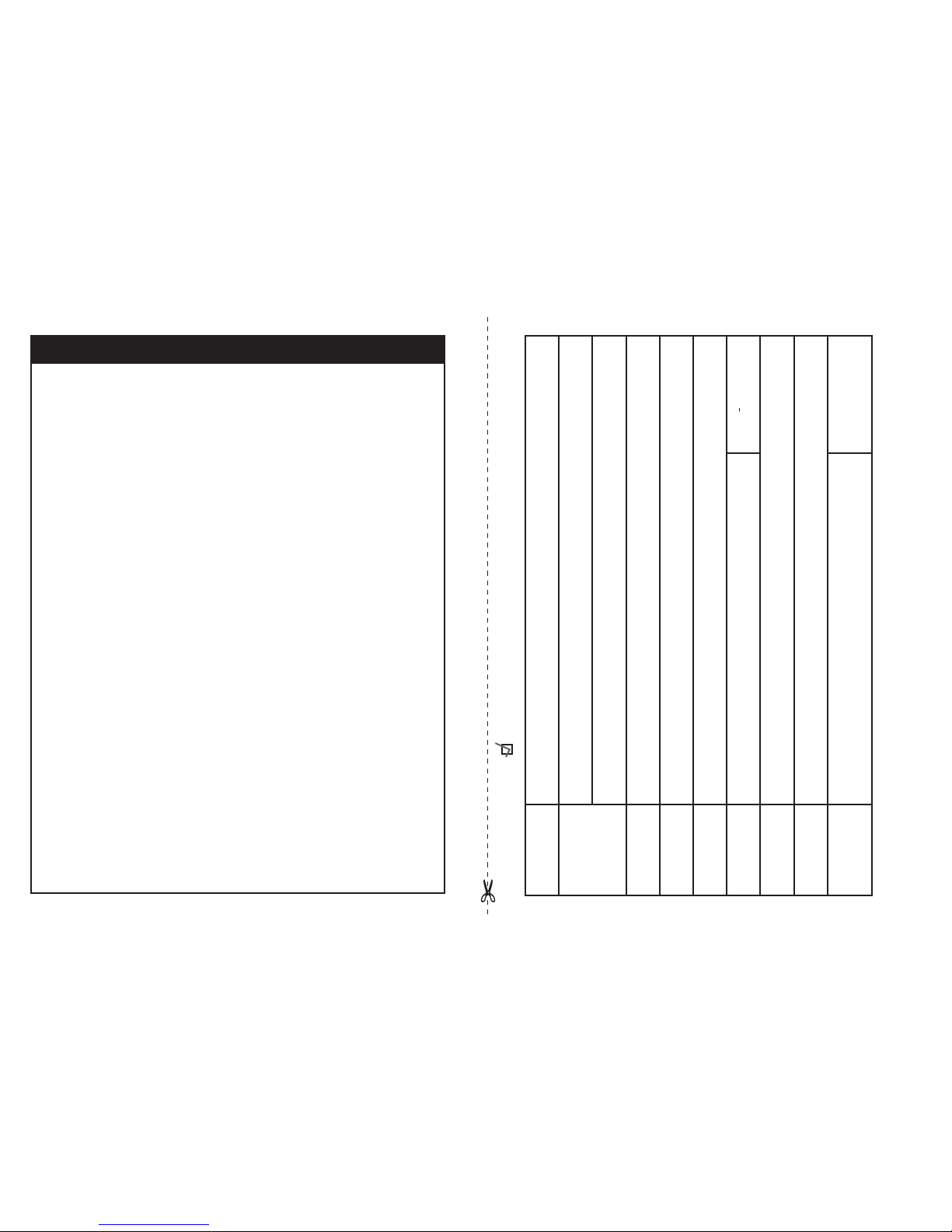
GARANTIE LIMITÉE DE WAGAN CORP.
Prière d’activer ma garantie limitée pour WAGAN Corp.
Nom
Adresse
Ville
Province, Code
postal
Adresse de
courriel
Article acheté N
o
d’article
Nom du
détaillant
Date d’achat
Signature Date
Tous les produits WAGAN Corporation doivent être
enregistrés dans les trente (30) jours suivant l’achat
pour activer la présente garantie. Poster le formulaire
d’enregistrement complété avec une copie du reçu de
vente original à :
Service à la clientèle
WAGAN Corporation
31088 San Clemente St.
Hayward, CA 94544
États-Unis
Page 11
All WAGAN Corporation products are warranted to the original purchaser of
this product.
Warranty Duration: This product is warranted to the original purchaser for a period
of one (1) Year from the original purchase date, to be free of defects in material
and workmanship. WAGAN Corporation disclaims any liability for consequential
damages. In no event will WAGAN Corporation be responsible for any amount of
damages beyond the amount paid for the product at retail. In the event of a defective
item, please contact WAGAN Corporation at (800) 231-5806 to obtain a Returned
Merchandise Authorization number (RMA#), and return instructions. Each item
returned will require a separate RMA#. After you have received the RMA# and the
return instructions from WAGAN Corporation, please follow the instructions and send
the item with PREPAID SHIPPING, along with all of the required documentation, a
complete explanation of the problem, your name, address and daytime phone number.
WAGAN Corporation will, at its option, replace or repair the defective part.
A Returned Merchandise Authorization number (RMA#) is REQUIRED when sending
in any defective item. WAGAN Corporation is not responsible for any item(s) returned
without an official Returned Merchandise Authorization number. The item(s) must be
returned with prepaid shipping. WAGAN Corporation is not responsible for any
shipping charges incurred in returning the item(s) back to the company for repair or
replacement. This warranty is void if the product has been damaged by accident,
in shipment, unreasonable use, misuse, neglect, improper service, commercial use,
repairs by unauthorized personnel or other causes not arising out of defects in
materials or workmanship. This warranty is effective only if the product is purchased
and operated in the USA and does not extend to any units which have been used in
violation of written instructions furnished.
Warranty Disclaimers: This warranty is in lieu of all warranties expressed or implied
and no representative or person is authorized to assume any other liability in
connection with the sale of our products. There shall be no claims for defects or failure
of performance or product failure under any theory of tort, contract or commercial law
including, but not limited to negligence, gross negligence, strict liability, breach of
warranty and breach of contract.
Warranty Performance: During the above one (1) Year warranty period, a product with
a defect will be replaced with a comparable model when the product is returned to
WAGAN Corporation with an original store receipt. The replacement product will be
in warranty for the balance of the one (1) Year warranty period.
©2008 WAGAN Corp. Updated August 2008
WAGAN CORP. LIMITED WARRANTY
Please activate my limited warranty for WAGAN Corp.
All WAGAN Corporation Products must be registered
within (30) days of purchase to activate this warranty.
Mail the complete registration form, along with a copy of
the original sales receipt to:
Attn: Customer Service
WAGAN Corporation
31088 San Clemente St.
Hayward, CA 94544
U.S.A.
Name
Mailing Address
City
State, Zip code
E-mail Address
Item Purchased Item No.
Store Name
Date of Purchase
Signature Date
Page 12

Page 13

www.wagan.com
©2011 Wagan Corporation
All Rights Reserved/Tous droits réservés
Wagan Tech and wagan.com are trademarks used by Wagan Corporation
Wagan Tech et wagan.com sont des marques de commerce utilisées par Wagan Corporation
REV20111024
 Loading...