

Page 1

R
Item no. 2591
Steering Wheel
Handsfree Phone Kit
User’s Manual
Page 2

Page 3

User’s Manual—Please read before using this equipment
PRODUCT COMPONENTS
LED Indicator
Microphone
Headset
Charger Port
Outlet for Headset
Strap
Multifunction Key
Volume +
Volume -
Mode Selector
Headset Ear Clip
DC Charger
Headset Carrying Strap
©2008 Wagan Corporation. All Rights Reserved.
Wagan and wagan.com are trademarks used by Wagan Corporation.
Page 4

Steering Wheel Handsfree Phone Kit by Wagan Tech
©2008 Wagan Corporation. All Rights Reserved.
Wagan and wagan.com are trademarks used by Wagan Corporation.
MAIN FEATURES
High echo cancellation.
•
SmartAudio noise suppresion function to ensure crystal clear
•
communication even in noisy environments.
One flexible and convenient multifunction key to pair devices, voice dial,
•
answer, reject and redial the last number.
Supports FM stereo frequency transmission.
•
Ergonomic steer wheeling design.
•
Use headset separately for private calls or when you leave the car.
•
CHARGING THE STEERING WHEEL KIT
The Steering Wheel Handsfree Phone kit comes with a built-in rechargeable
battery. Prior to using the device, it is recommended to charge the battery fully
for the first time.
Important: the charging indicator will be delayed about 15 minutes if the
headset has not been used for a long time or the battery is drained.
Select the “CHARGE” position to use the device while charging the headset.
NORMAL CHARGING TIME
Normal charging time for a full charge is under 4 hours. When the battery is
fully charged the LED indicator will turn off.
SWITCHING ON AND OFF
To turn the device on slide the mode selector to the “ON” position. To switch
off, while in standby mode slide to the “OFF” position. The LED will turn off.
R
Page 5

User’s Manual—Please read before using this equipment
CONNECTING THE HANDSFREE KIT TO A BLUETOOTH DEVICE
Switch on the handsfree kit.
1.
Insert the detachable headset into the outlet of the steering wheel kit.
2.
Press and hold the “Multifunction” key for 5 seconds until the headset
3.
LED alternately flashes red and blue. Its now ready for pairing.
Activate your Bluetooth® enabled device and search for the Bluetooth
4.
headset: EL-2591.
Select Bluetooth device: EL-2591.
5.
Enter the password or PIN “0000”and confirm.
6.
After pairing is complete, the headset LED will flash blue 3 times.
7.
Turn on a nearby FM radio and tune it to FM frequency 107.9MHz to
8.
ensure the point-to-point wireless connection with the Bluetooth device
has been completed.
You also can pair the headset with your Bluetooth device successfully prior to
inserting the headset into the steering wheel kit outlet.
NOTE: Please adjust your phone and car volume to moderate levels before
using the Steering Wheel Handsfree Phone Kit.
ANSWERING A CALL
When the headset is connected to your Bluetooth device and you receive an
incoming call, press the “Multifunction” key for 0.1 seconds to answer.
REJECTING A CALL
When receiving an incoming call, you will hear a beep. Press and hold the
“Multifunction”key for 2 seconds if you wish to reject the call.
©2008 Wagan Corporation. All Rights Reserved.
Wagan and wagan.com are trademarks used by Wagan Corporation.
Page 6

Steering Wheel Handsfree Phone Kit by Wagan Tech
©2008 Wagan Corporation. All Rights Reserved.
Wagan and wagan.com are trademarks used by Wagan Corporation.
ENDING A CALL
Press the “Multifunction” key once to end a call.
VOICE DIALING FROM HANDSFREE PHONE KIT
If your mobile is equipped with a voice dialling function,simply press the
“Multifunction”key on the steering wheel kit. When you hear a beep, say the
voice tag to dial out a call.
(Note: please make sure to record the voice tag into your Bluetooth device
before using the voice dialing function)
REDIALING THE LAST NUMBER
Under standby mode, press the “Multifunction” key twice rapidly.
SAVING A NUMBER
The Steering Wheel Handsfree Phone Kit can save a phone number to memory.
Use it to conveniently call home or quickly dial an emergency care center.
When in a call, press and hold the “Multifunction” key for 2 seconds to save
the number into headset. When you hear a beep the number is saved.
DIALING THE SAVED NUMBER
When the steering wheel kit is connected to your phone in standby mode, press
and hold the ”Multifunction”key for 2 seconds to dial the saved number.
R
Page 7

User’s Manual—Please read before using this equipment
ADJUSTING THE VOLUME
Adjust the volume with the “+” and “-” keys to reach your desired level. You can
also adjust the Bluetooth device volume or car audio if using the FM transmitter.
CARE AND PRECAUTIONS
Never mount or store your headset over any air bag deployment area as
•
serious injury may result if the air bag deploys.
Never allow children to play with the headset: small parts may be a
•
choking hazard.
Do not attempt to disassemble or damage the headset or built-in battery.
•
Do not disassemble the charger as it may expose you to dangerous high
voltages and other risks.
Only use the supplied charger when charging the headset. Please
•
recharge the headset when its indicator flashes red.
Do not use the charger outdoors in damp areas. Avoid charging the
•
headset in extremely high and low temperatures.
Do not expose the headset to extremely high or low temperatures (below
•
32ºF (0ºC) or above 122ºF (50ºC).
Use your mobile phone and headset while driving in accordance with
•
your local laws. Please pay attention and focus on the road to drive in a
responsible and safe manner if you use the headset while driving.
Observe all signs that require an electrical devices or RF radio products
•
to be switched off in designated areas. These could include hospitals,
blasting areas and potentially explosive atmospheres .
Turn off you headset prior to boarding any aircraft. Do not use in flight.
•
NOTE: Check local regulations regarding the disposal of batteries. Do
•
not dispose of as household waste.
©2008 Wagan Corporation. All Rights Reserved.
Wagan and wagan.com are trademarks used by Wagan Corporation.
Page 8
Steering Wheel Handsfree Phone Kit by Wagan Tech
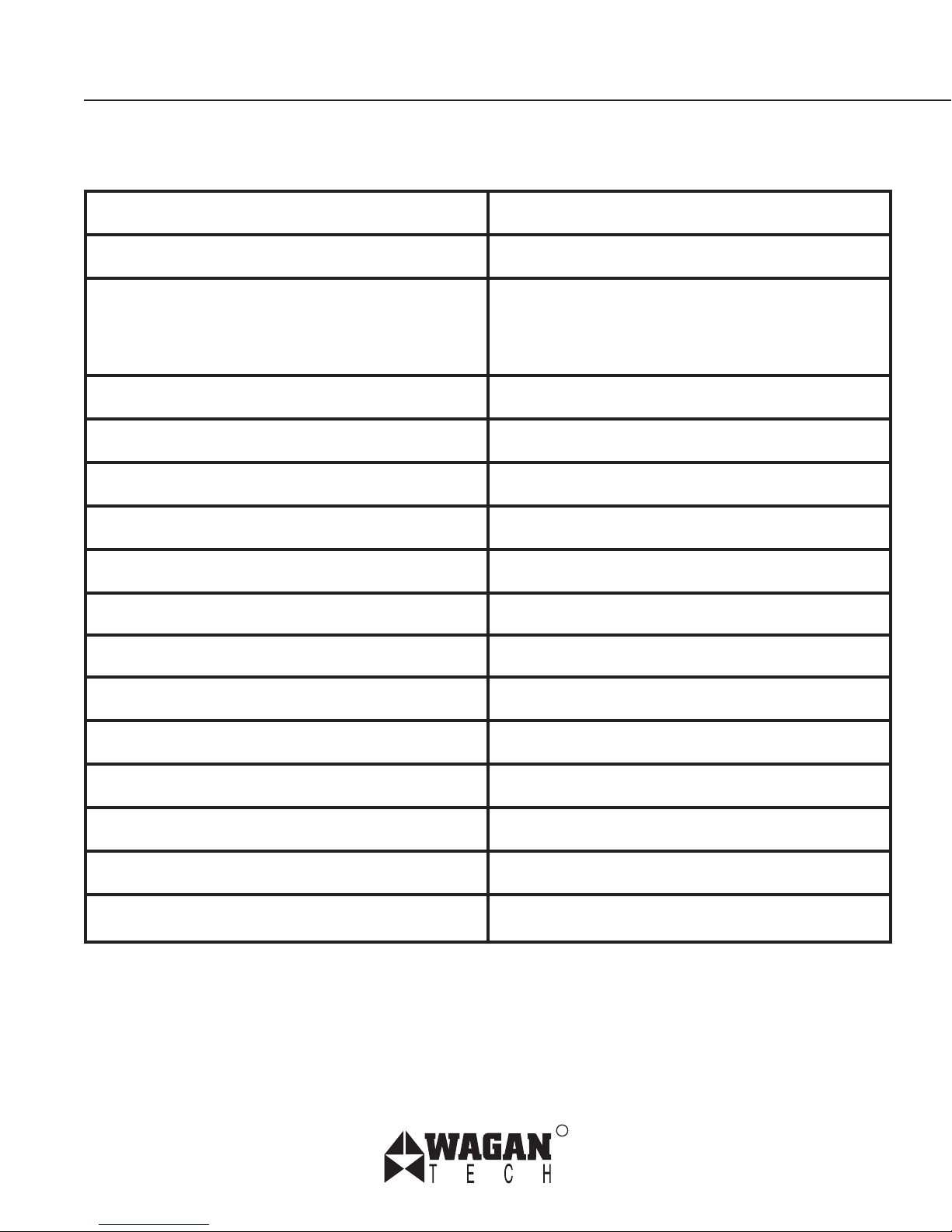
PRODUCT SPECIFICATIONS
Bluetooth standard Bluetooth V2.0
Frequency range 2.4GHZ
Application scope Excellent compatibility with Bluetooth
enabled devices such as mobile
phones, PC, PDA and more
FM transmission frequency 107.9 MHZ
FM working range up to 6 meters
Battery type Rechargeable lithium polymer
Steering Wheel Kit Standby Time
Up to 300 hours
Steering Wheel Kit Charging time About 4 hours
Headset Talk Time Up to 4 hours
Headset Standby Time 160 hours
Headset Charging Time
2.5 hours
Charging current ≤250mA
Charging voltage 5VDC
Dimensions 167 x 42.5 x 25 mm
Working temperature 0~50ºC
Working humidity 10-90%.
R
Page 9

Page 10
Item no.
Date
Attn: Customer Service
WAGAN Corporation
31088 San Clemente St.
Hayward, CA 94544
Please activate my limited warranty for WAGAN Corp.
Name
Mailing
address
City
State, Zip code
E-mail address
Item purchased
Store name
Date of purchase
Signature
All WAGAN Corporation Products must be registered
within (30) days of purchase to activate this warranty.
Mail the complete registration form, along with a copy
of the original sales receipt to:
Page 11

WAGAN CORP. LIMITED WARRANTY
All WAGAN Corporation products are warranted to the original purchaser of
this product.
Warranty Duration: This product is warranted to the original purchaser for a
period of one (1) Year from the original purchase date, to be free of defects in
material and workmanship. WAGAN Corporation disclaims any liability for
consequential damages. In no event will WAGAN Corporation be responsible
for any amount of damages beyond the amount paid for the product at retail. In
the event of a defective item, please contact WAGAN Corporation at (800) 2315806 to obtain a Returned Merchandise Authorization number (RMA#), and return
instructions. Each item returned will require a separate RMA#. After you have
received the RMA# and the return instructions from WAGAN Corporation, please
follow the instructions and send the item with PREPAID SHIPPING, along with all of
the required documentation, a complete explanation of the problem, your name,
address and daytime phone number. WAGAN Corporation will, at its option,
replace or repair the defective part.
A Returned Merchandise Authorization number (RMA#) is REQUIRED when
sending in any defective item. WAGAN Corporation is not responsible for any
item(s) returned without an official Returned Merchandise Authorization number.
The item(s) must be returned with prepaid shipping. WAGAN Corporation is not
responsible for any shipping charges incurred in returning the item(s) back to the
company for repair or replacement. This warranty is void if the product has been
damaged by accident, in shipment, unreasonable use, misuse, neglect, improper
service, commercial use, repairs by unauthorized personnel or other causes not
Detach and return the page to the left
arising out of defects in materials or workmanship. This warranty is effective only
if the product is purchased and operated in the USA and does not extend to any
units which have been used in violation of written instructions furnished.
Warranty Disclaimers: This warranty is in lieu of all warranties expressed or
implied and no representative or person is authorized to assume any other liability
in connection with the sale of our products. There shall be no claims for defects
or failure of performance or product failure under any theory of tort, contract or
commercial law including, but not limited to negligence, gross negligence, strict
liability, breach of warranty and breach of contract.
Warranty Performance: During the above one (1) Year warranty period, a product
with a defect will be replaced with a comparable model when the product is
returned to WAGAN Corporation with an original store receipt. The replacement
product will be in warranty for the balance of the one (1) Year warranty period.
©2008 WAGAN Corp. Updated August 2008
Page 12

www.wagan.com
R
© 2008 Wagan Corporation. All Rights Reserved.
Wagan and wagan.com are trademarks used by Wagan Corporation.
 Loading...