

Page 1
INSTALLATION INSTRUCTION
Paloma - 512/522 LED
WTK-LED512, WHK-LED512, WTK-LED522, WHK-LED522
WARNING
IMPORTANT: NEVER attempt any work without shutting o the electricity.
- Read all instructions before installing.
- System is intended for installation by a qualied electrician in accordance with the National Electrical Code and local
regulations.
- Go to the main fuse box, or circuit breaker. Place the main power switch in the “OFF” position and unscrew the fuse(s) or
switch ”OFF” the circuit breaker switch(es) that control the power to the xture or room that you are working on.
- Place the wall switch in the “OFF” position.
AVERTISSEMENT
IMPORTANT : Coupez l’électricité avant TOUTE manipulation.
- Lisez toutes les instructions avant d’installer.
- Système est destiné à être installé par un électricien qualié en conformité avec le code national de l’électricité et les
règlements locaux.
- Accédez au panneau central de disjoncteurs ou de fusibles de votre demeure et placez l’interrupteur principal en
position d’arrêt (« OFF »).
- Placez l’interrupteur mural en position d’arrêt (« OFF »).
All parts must be used as indicated in these instructions. Do not substitute any parts, leave parts out, or use any parts that are
worn out or broken. Failure to follow this instruction may invalidate the ETL/CETL listing of this xture.
Overview:
Fixtures are designed for use on WAC Lighting’s W track systems.
LED TRACK LUMINAIRE TRACK SYSTEM
WTK-LED512, WTK-LED522 Series WT 120V W Track
WHK-LED512, WHK-LED522 Series WHT 277V W Track
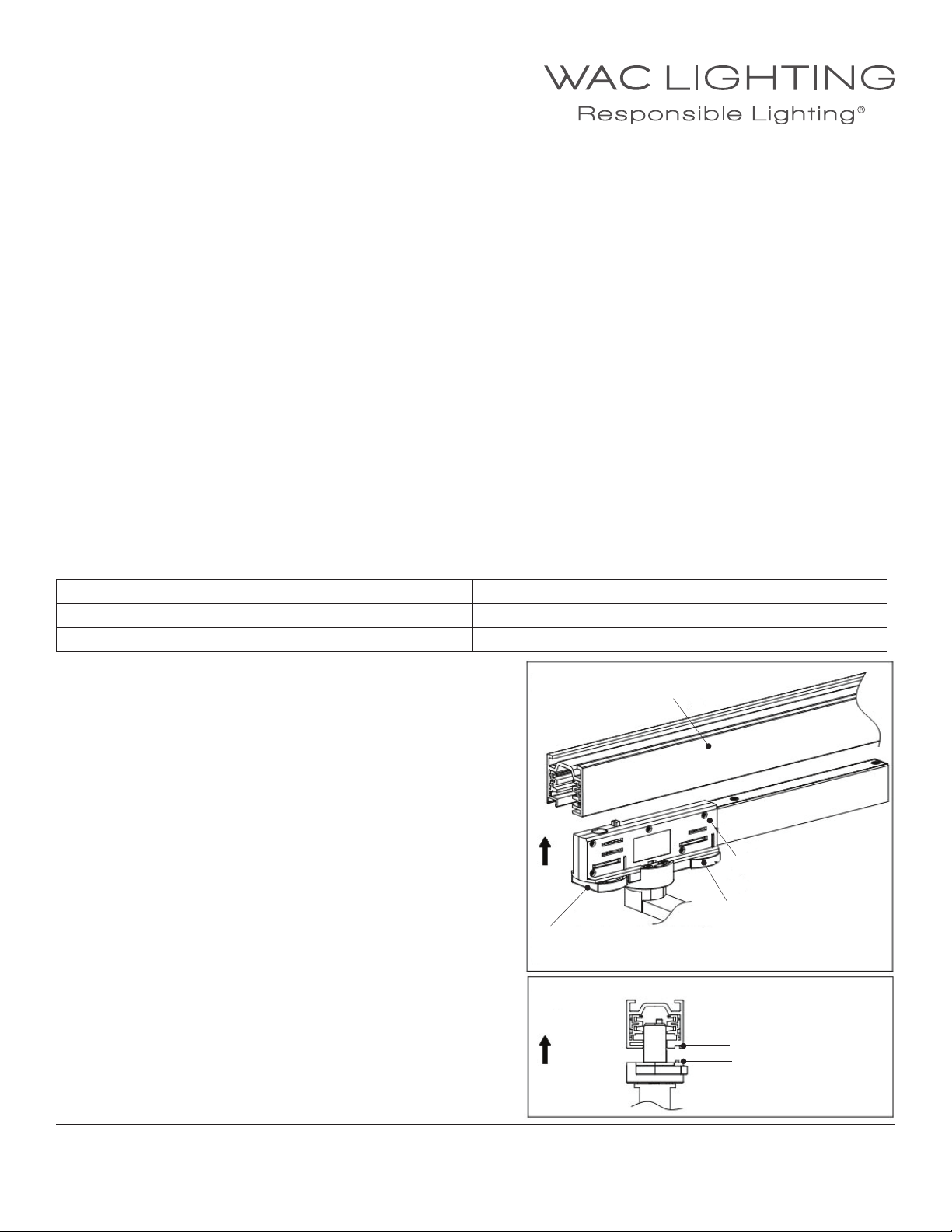
Installing on Track
Figure 1
1. Make sure that the lock switch is in the unlock position
and the circuit selection handle is in the o position.
(See Figure 1)
Circuit selection handle
2. Align the alignment tab bump on the adapter
(Power o position)
with the groove/slot on the track (see Figure 2).
Once aligned, insert adapter into the track.
Figure 2
Track
Adapter
Lock switch
(Unlock position)
Groove
Alignment tab
WAC Lighting
www.waclighting.com
Phone (800) 526.2588 • Fax (800) 526.2585
WAC Lighting retains the right to modify the design of our products at any time as part of the company's continuous improvement program. NOVEMBER, 2014
Headquarters/Eastern Distribution Center
44 Harbor Park Drive • Port Washington, NY 11050
Phone (516) 515.5000 • Fax (516) 515.5050
Western Distribution Center
1750 Archibald Ave • Ontario, CA 91761
Phone (800) 526.2588 • Fax (800) 526.2585
Page 2
INSTALLATION INSTRUCTION
Paloma - 512/522 LED
WTK-LED512, WHK-LED512, WTK-LED522, WHK-LED522
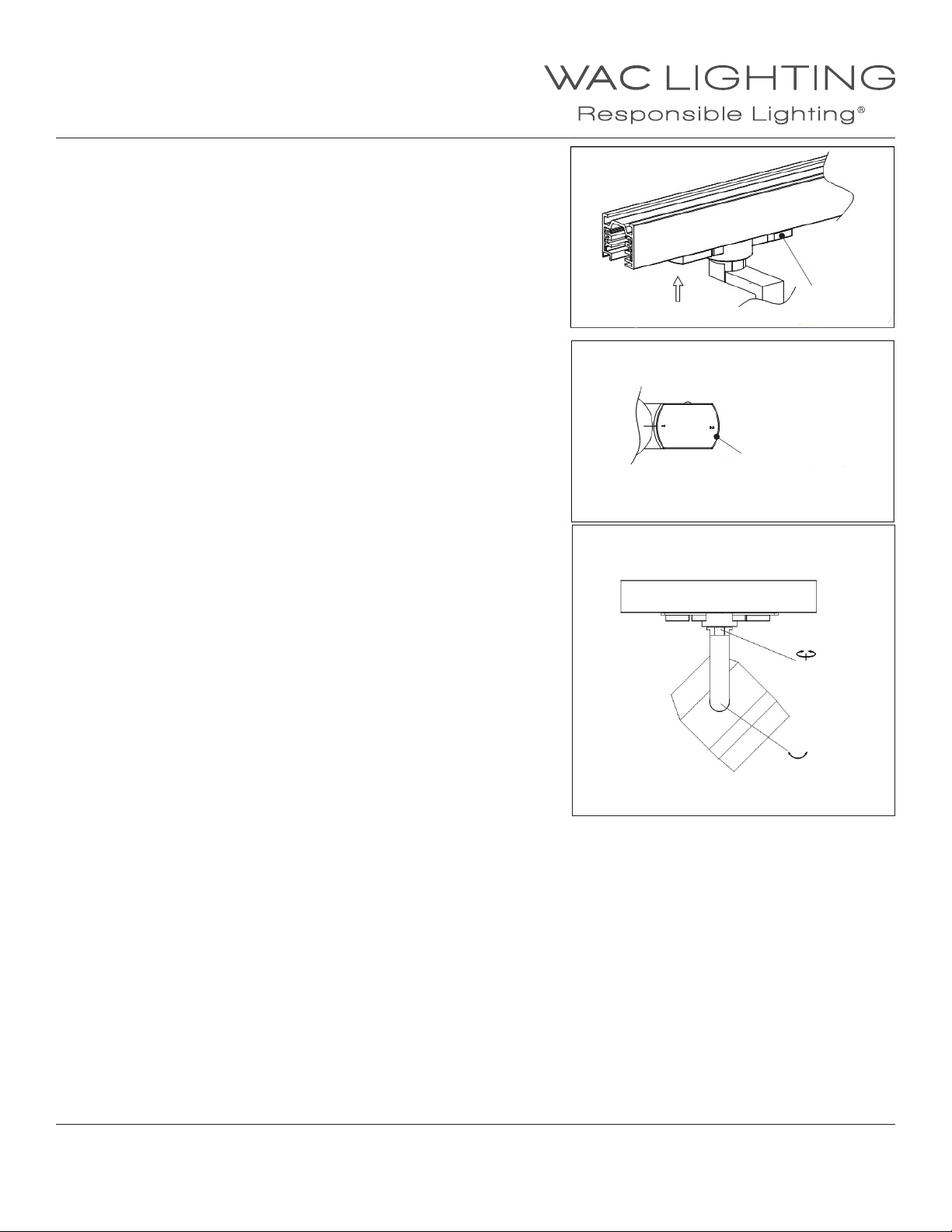
3. To secure the xture to the track turn the lock
switch to its locked position. (See Figure 3)
4. Select the circuit you want the luminaire to be powered
on by rotating the circuit selection handle
to circuit 1 or 2. (See View A)
5. Switch the main fuse breaker and circuit breaker to “ON” position.
6. Place the wall switch in the “ON” position.
POSITIONING THE FIXTURE
7. After the light is on, rotate the luminaire’s body
horizontally and vertically to aim it properly. (See Figure 4)
Figure 3
View A
Figure 4
View A
Lock switch
(Lock position)
Circuit selection handle
1. Power on at circuit 1
2. Power on at circuit 2
365°
±90°
WAC Lighting
www.waclighting.com
Phone (800) 526.2588 • Fax (800) 526.2585
WAC Lighting retains the right to modify the design of our products at any time as part of the company's continuous improvement program. NOVEMBER, 2014
Headquarters/Eastern Distribution Center
44 Harbor Park Drive • Port Washington, NY 11050
Phone (516) 515.5000 • Fax (516) 515.5050
Western Distribution Center
1750 Archibald Ave • Ontario, CA 91761
Phone (800) 526.2588 • Fax (800) 526.2585
 Loading...