

Page 1
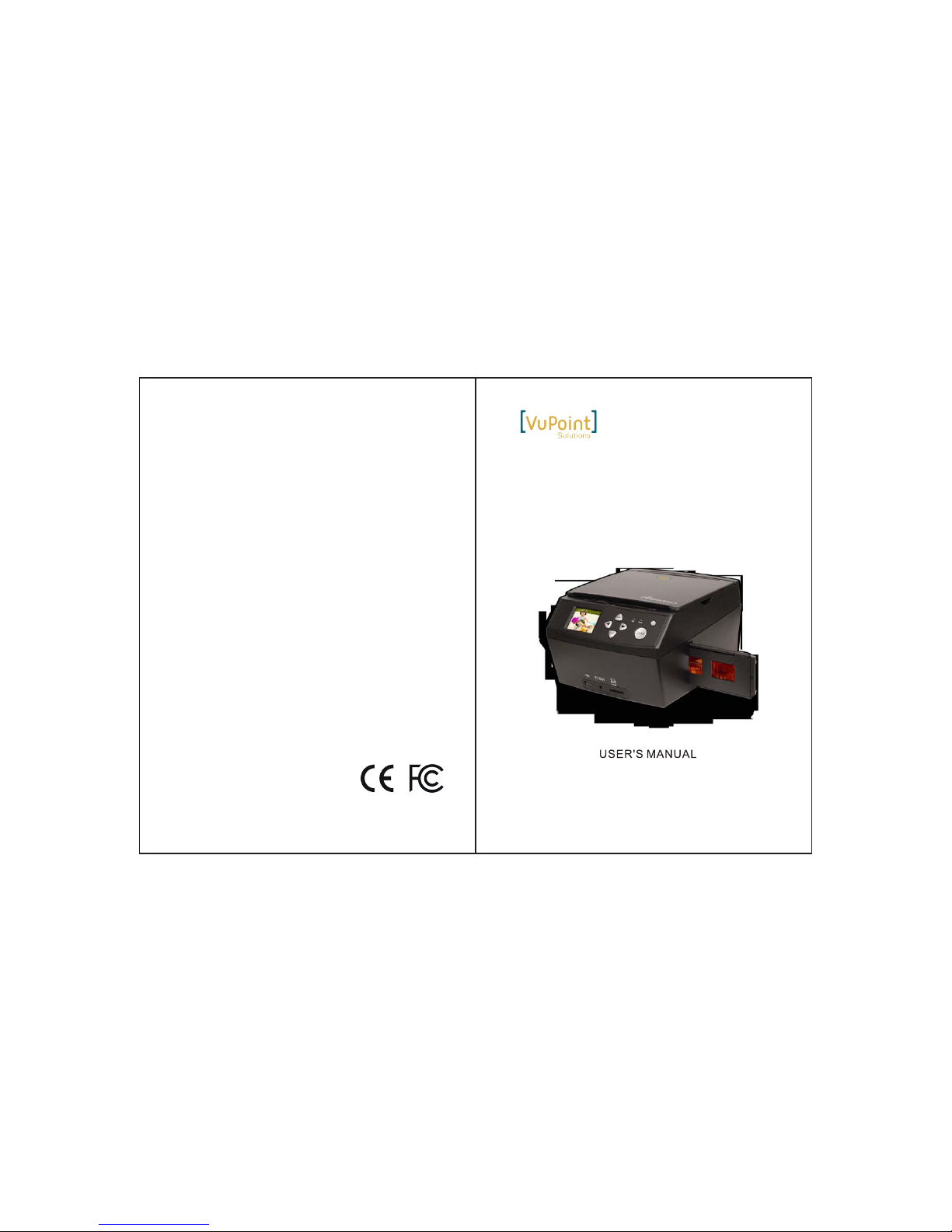
All-in-One Digital Converter
FC-D680-VP
Windows® and Vista™ are registered trademarks of Microsoft Corporation.
Mac OS® is a registered trademark of Apple Inc. SD/SDHC is a trademark of
SD-3C, LLC. All trademarks are the properties of their respective owners.
FCC (Federal Communications Commission)
This device complies with Part 15 of the FCC Rules.
Operation is subject to the following two conditions:
(1)
(2)
This device may not cause harmful interference, and
this device must accept any interference received,
including interference that may cause undesired operation.
FC-D680-VP_Manual_14-1119
K929-MS680C0035
Page 2
1.Preface
2.Safety Precautions
Ple ase che ck scanne r pa cka ge w het he r it co nt ain ed a s fol lo w obj ec ts,
if la ck of any o bject , pleas e contact w ith ret ailer s wh om yo u bu y the
pro duct fr om.
3.Package Contents
1
Tha nk you fo r purch asing thi s produ ct!
Ple ase rea d this user 's manu al c are fu lly b ef ore u si ng th is p rod uc t.
Ple ase ret ain thi s manual fo r futur e refer en ce.
Do no t disas semble th is unit .
Do no t touch i nner part o f the sca nn er af te r dro pp ing o r ot her
dam age suf fe rin g.
Do st op usin g it if the re is any pro bl em wi th t he sc an ner, s uc h
as sm oke or sm ell whi le using.
Do no t clean t he scan ner with al co hol , ga sol in e, di lu ent a nd
oth er orga nic sol vent.
Do no t use it in m any dus ts with t he damp env ir onm en t.
Do no t overl oad the U SB connec tions o n yo ur co mp ute r to
avo id poor w orking of t he scan ne r for o ve rlo ad ing .
Ple ase use f ilms of s tanda rd size.
Cle aning :Ple as e mak e su re th e sc ann er is cle an befo re usin g
so as t o produ ce a clea n image
.
Cle an the ba ck plate, p lease p us h mob il e but to n to FI LM s ide ,
cle aning b rush can be i ns ert f ro m rig ht s ide t o cl ean
eff ic ien t, t his p ro duc ts w ill s hu t dow n au tom at ica ll y ,if no t
wor king wi thin 2 hour s.
Non u se peri od: Make th e produ ct s wit h lo ng se rv ing l if e and
Preface 1...........................................................
Safety Precautions..........................................1
Package Contents...........................................1
CONTENTS
Parts Guide.....................................................3
Slide and Negative holder loading method.........4
Operation Guide............................................. 6
Product Specification....................................13
Declaration...................................................13
Page 3
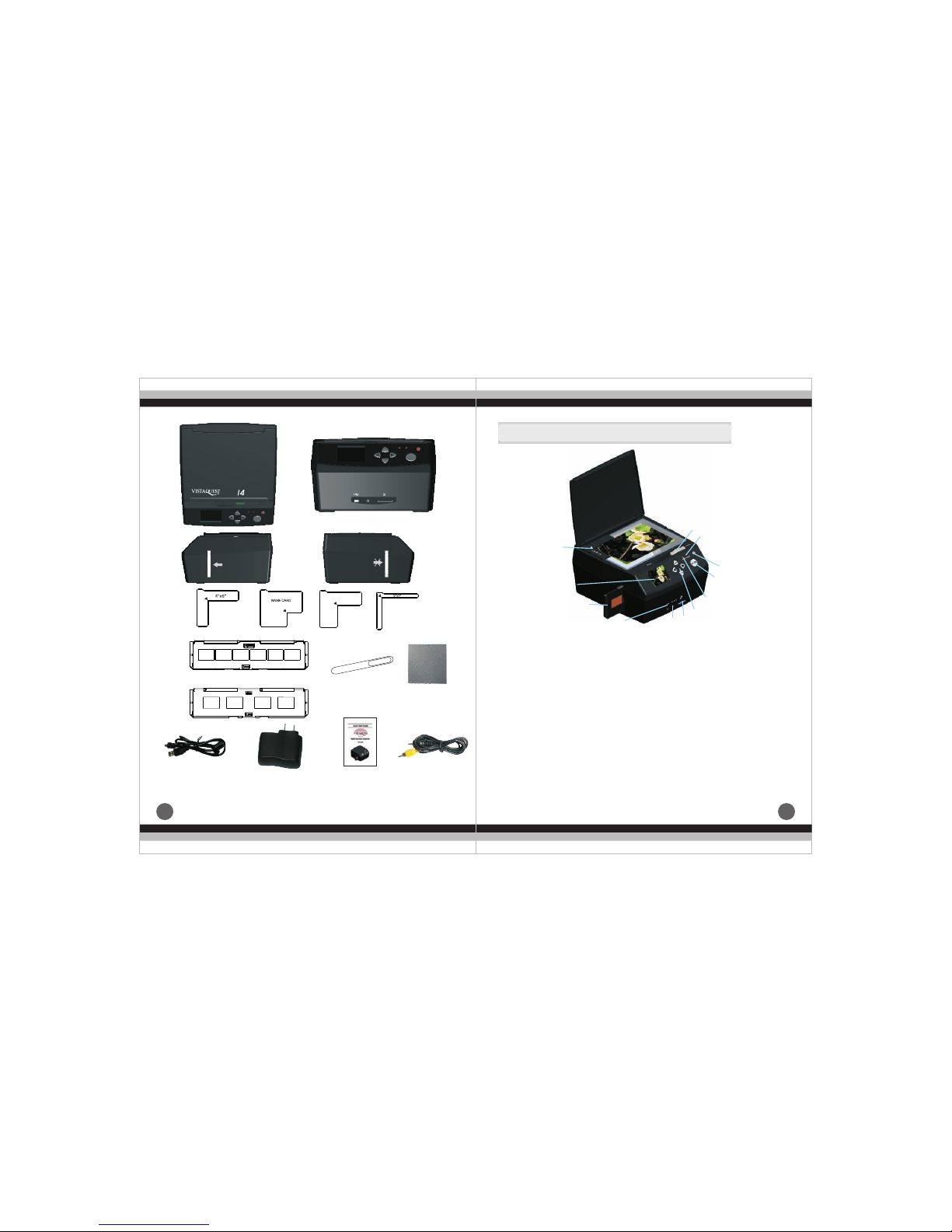
4.Parts Guide
32
③
④
②
⑤
⑩
⑿
⑾
⑨
⒀
⑧
⑥ ⑦
①
⑴.Photo positioning holder( "X 5",4" X 6",5" X 7"and name
card)
⑵.Film holder( Positive,Negative)
⑶.Joe objective
⑷.LCD
⑸.USB interface
⑹.TV- OUT interface
⑺.SD/ MMC slot
⑻.Conversion button of film and picture scanner
⑼.Power switch button
⑽.Combined button(Left/ Right button, MENU button, ENTER
button)
⑾.SCAN button
⑿.Lamp of film scan mode
3½
⒀.Lamp of picture scan mode
USB Cable
TV Cable
Power Adapter Quick-Start Guide
Negative
Slide
SCAN
ENTER
MENU
Film
Photo
Film
Photo
MEG A PIXELS
ENTER
MENU
SCAN
Film
Photo
TV OUT
3½"X5"
Cleaning Cloth
Cleaning Brush
VQ1400
Page 4
54
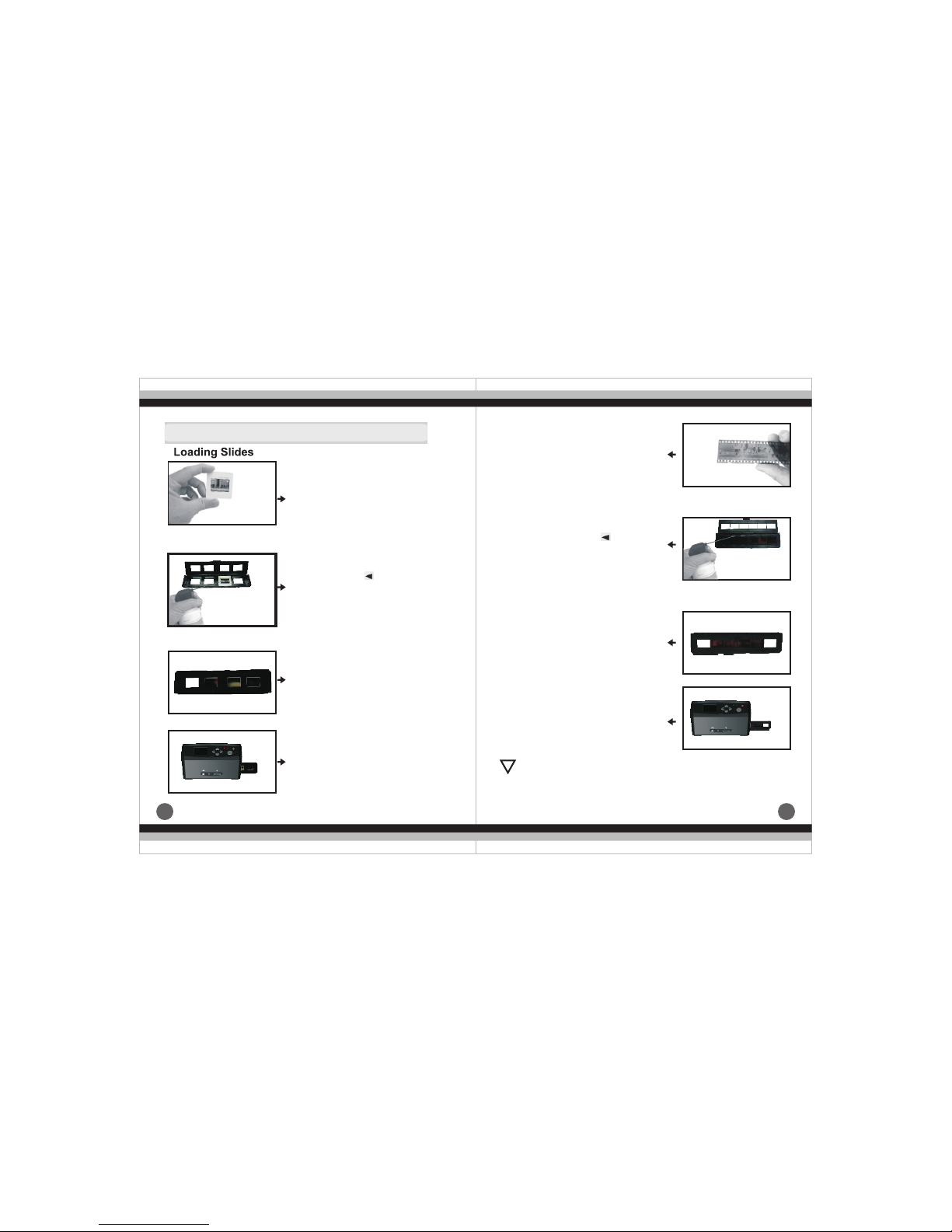
5.Slide and Negative holder loading method
Loadi ng N eg atives
a.H old up th e negat ive tow ard the l ight.
Fac e the rig h side of t he slid e of the
neg ativ to y ourse lf
b.Tak e out neg ative h older out . Let the
sid e with “o pen” lo go face y ourself ,
and l et the si de with “ ” logo fa ce
dow n. Open t he nega tive ho lder,
the n place n egati ve into r ecessed
are a in the ho lder.
c.C lose th e negat ive hol der and pre ss
the e dges so t hat it lo cks in pl ace
d. In sert th e negat ive holde r in to th e
slo t on the ri ght sid e of the fi lm
sca nner as s hown.
a.H old up th e slide t oward t he light. F ace
the r igh sid e of the sl ide to yo urself.
(we d on't pr ovide whi te smal l ho lde r)
b.Tak e out sli de hold er out. Let t he side
wit h “open ” logo fa ce your self, and l et
the s ide wit h “ ”logo f ace dow n.
Ope n the sli de hold er, then p lace
sli des int o reces sed area in t he
hol der.(f ilms al so could be l oa ded a s
a str ip into t he slid e holde r, formi ng
dra wer typ e as belo w pictu re)
c.C lose th e slide h older and p re ss th e
edg es so tha t it lock s in plac e
d. In sert th e slide h older int o the slo t
on th e right s ide of th e film sc anner
as sh own.
ENTER
MENU
SCAN
Film
Photo
TV OUT
ENTER
MENU
SCAN
Film
Photo
TV OUT
:Ha ndle fi lms wit h care to a void scra th es or f in ger p ri nts (f or
the b est use c otton g loves w hen handl in g fil ms )It i s
rec ommen ded to us e compres se d cot to n to re mo ve an y du st
on th e films .
!
Page 5
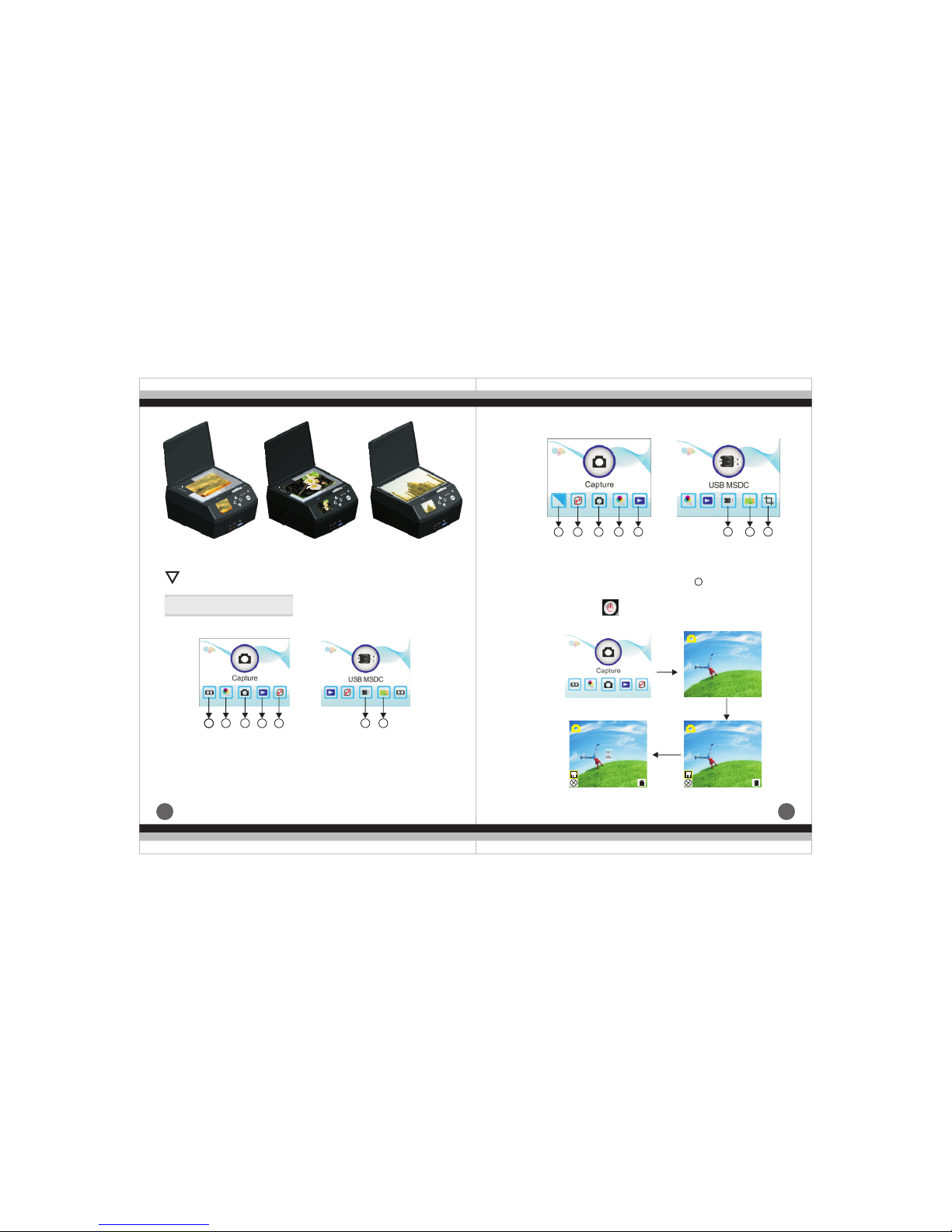
76
(4R ) (5R)(3R)
Ple ase loc ate the p osition in g she et i nto t he c orr es pon di ng fi xe d
hol e,th en s can p ic tur e or n ame c ar d!
6.Operation Guide
(1) .Intr oduct ion of Ne gativ e Mode Main M en u
①
②
③ Cap ture
④ Pla yb ack
Fil m
Res oluti on
① Eff ect
②
③ Cap ture
④ Res oluti on
For mat
⑤For mat
⑥USB M SDC
⑦Lan guage
⑤Pla yb ack
⑥USB M SDC
⑦Lan guage
Pho to si ze
(2) .Intr oduct ion of Pi cture M ode Main Me nu
(3) .
Cap ture Pi ctu re
a.O pen by pr essin g ,pre ss E NTE R in to sc an m ode ,und er
thi s mode pr ess SCA N and ENTER i n turn to c aptur e th e cur re nt
ima ge
!
11
2 3
4 5
6 7
1 2 3
4 5 6
7
8
8
ENTER
ENTER
SCAN
EV 0.0
EV 0.0
EV 0.0
Page 6
98
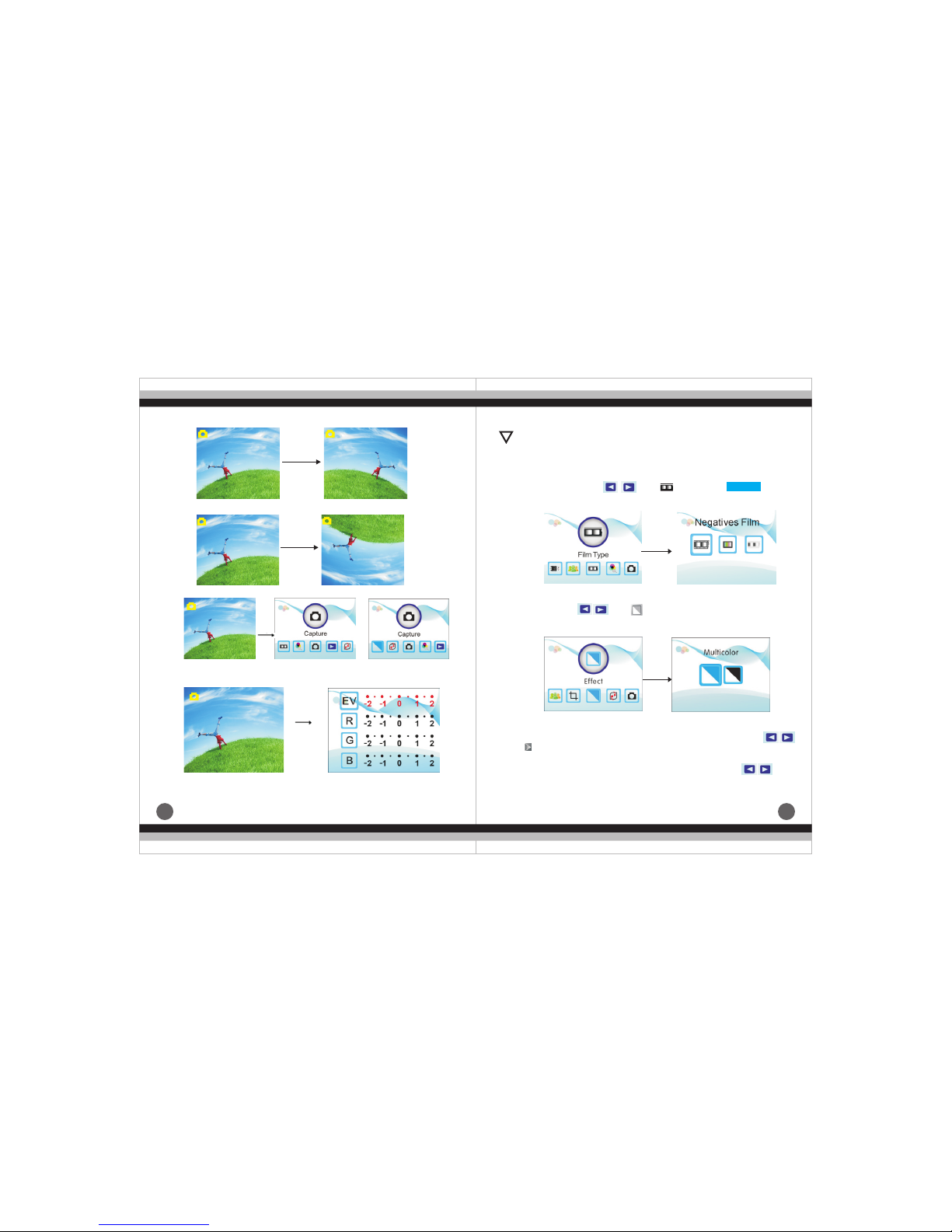
Pre ss righ t key,th e im age p os iti on b e alt er ed fr om u p to do wn
Pre ss left k ey,th e image p ositi on be alt ered fr om left t o right .
MENU
ENTE R
or
Und er conv ert neg ative and p ho to mo de , mus t pu sh th e bu tto n
to th e corre spond ing mode: s uc h as pu sh l eft “ FI LM” e nt eri ng
neg ative s can mode; p ush rig ht “ PHO TO” en ter in g pic tu re sc an
mod e.
b.C hoice o f pictu re mode, und er t he pi ct ure s ca n mod e ma in
men u,pr es s unt il , the n pr ess E NT ER in to
the c hoice o f colou r 、B&W.
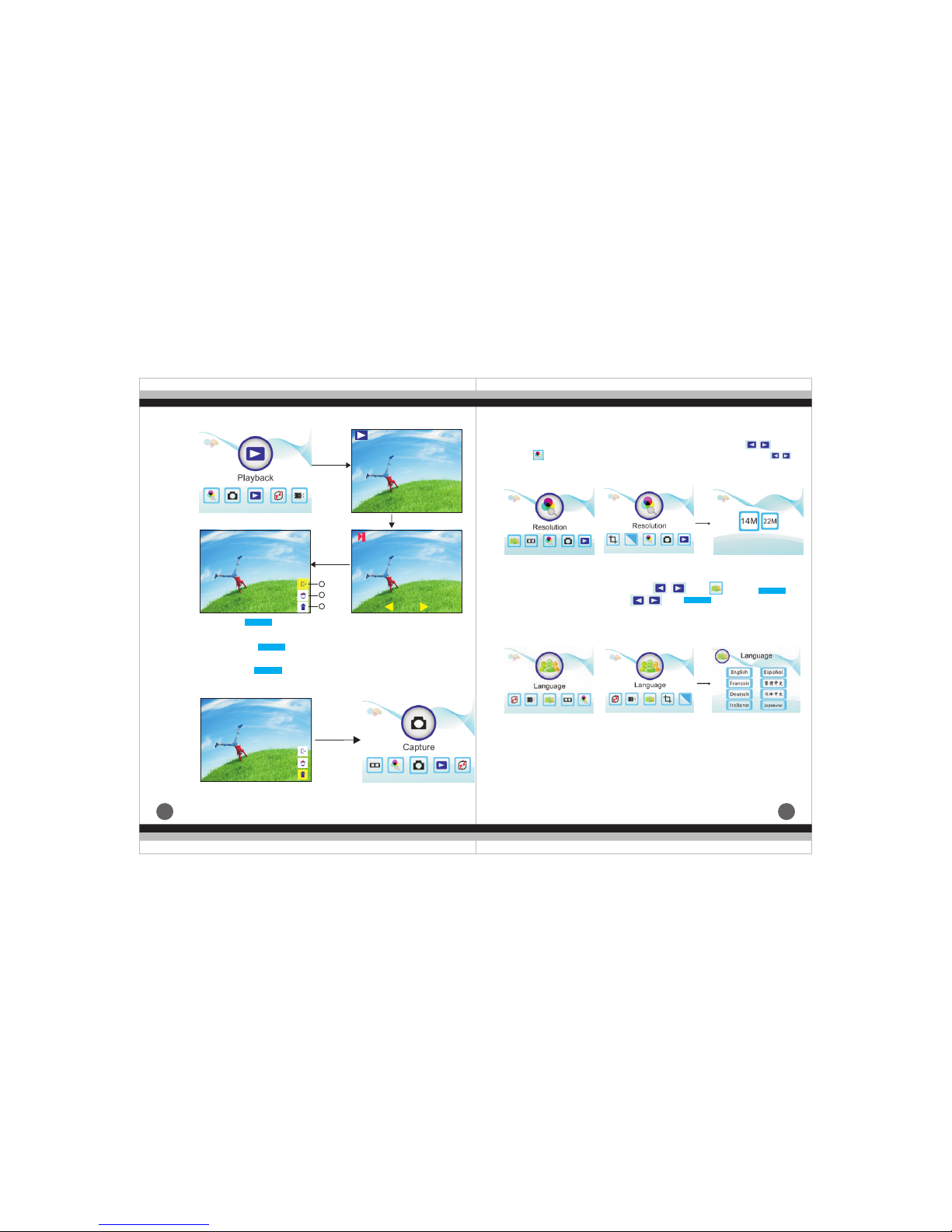
(5) .Meth od of pla ying scan ne d pic tu re
Und er the ne gativ e film and pi cture m ai n men u mo de, pr es s ,
unt il ,the n press E NTER in to auto play sc anned pic tu re mo de,
pre ss ENTE R again t o suspend a utoma ti c pla y, th en en te r pre vi ew
and c hoose p icture mo de, y ou ca n ch oos e by p res sing ;
pre ss ENTE R again i nto edit im age mod e, th en yo u ca n del et e、
exi t、retur n to the ma in menu.
Mirr or
Flip
EV 0.0 EV 0.0
EV 0.0
EV 0.0
c.P ress ME NU back to th e main me nu.
!
(4) .Oper ation G uide
a.I n main me nu, pre ss ,unt i ENTE R yo u
can c hose ne gativ e、slide、B&W
,th en pres s
Ente r
Ente r
d.p ress EN TER to se t expos ure compe ns ati on
EV 0.0
EV 0.0
b.S canni ng mirr or film o r print m ode and t urnin g funct ion.
Page 7
11
10
(6).R esolu tion choi ce o f neg at ive f il m and p ic tur e ma in me nu U nde r
the n egati ve film a nd pictur e main me nu m ode ,p re ss
unt il , pres s ENTER i nto ima ge reso lution ch oi ce, p res s
to ch oose 14 M、22M.
Ent er
Ent er
or
or
③.
and e nter ma in menu m ode
Hom e:pr es s but to n to ex it t he pi ct ure e di tin g mo de
Exi t
Ent er
Ent er
Ent er
1
2
3
① i t
pic ture au to-pl ayback mo de.
.Ex :pr ess t o ex it pi ct ure e di tin g mo de an d en ter t he
②.
wil l be disp layed on th e scree n
Del ete: pr ess t o de let e cu rre nt p ict ur, a nd ne xt p ict ur e
ENT ER
ENT ER
ENT ER
ENT ER
ENT ER
Hom e
Ent er
(7) .Sett ing Lan guage
Und er main m enu mod e,pr es s
cho se lang uage, the n press a nd , on e of follow in g 8
lan guage c an be set: Eng li sh、Fr an ch、Ge rm an、It al ian、
Spa nish、T-C hinese、S- Ch ine se、J apa ne se.
,un ti , pres s t o
Page 8
13
12
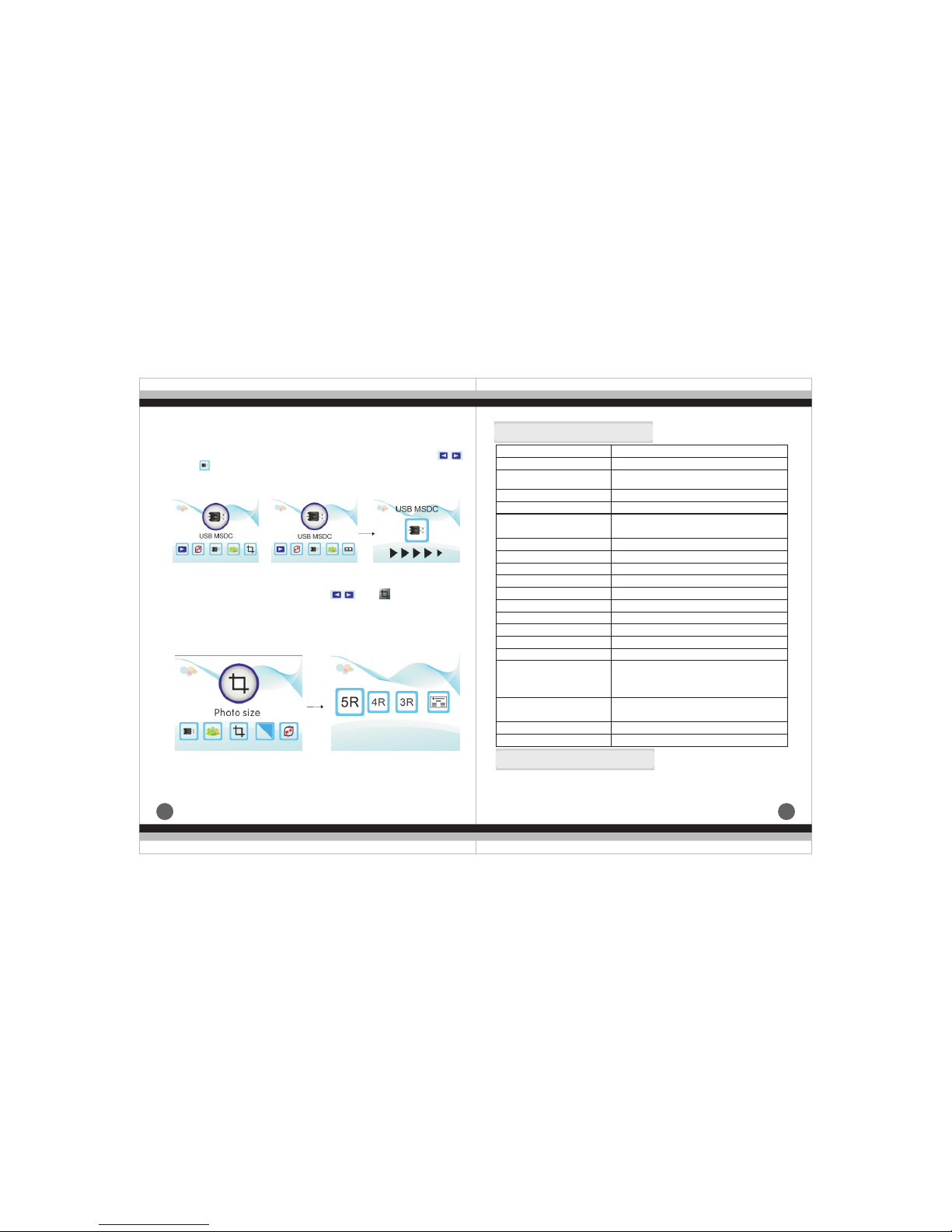
(8)、T he main m enu of nega tive fi lm a nd pi ct ure h ow t o ent er U SB
MSD C
Und er the ne gativ e film an d picture m ai n men u mo de, pr es s ,
unt il ,pr es s ENT ER i nto U SB M SDC ,you c an v iew a nd e dit t he
sca nned pi cture in th e compu te r aft er s ucc es sfu l co nne ct ing .
(9)、H ow to cho ose pictu re size u nd er th e ma in me nu m ode
Und er the ma in menu mod e, pr ess ,
ENT ER into c uttin g mode, y ou ca n ch oos e co rre sp odi ng size
to cu t pictu re:5 R( 5 "* 7 ) ,4 R( 4" * 6) ,3 R( 3. 5" * 5) an d nam e ca rd.
unti l , p res s
Win dows XP / Vist a/
Win dows 7 / Windows 8/
Mac 10.7. 3
Ente r
Ente r
or
7.
Product Specification
Film scanner/ USB MSDC/Photo Scanner
Function
Interface
Image Sensor
USB2.0
14.0 Mega pixels (4416*3312)
1/2.3” CMOS sensor
Display
Exposure Control
Color 2.4〞TFT LCD
Automatic / Manual (-2.0 EV~ +2.0EV)
Resolution
14.0 Mega pixels / 22 Mega pixels
(interpolation)
3200 Dpi & 4000 Dpi(interpolated)
3:2
Single pass
35mm Film, Monochrome, Slide
B&W, Slides, Negatives
LED Back light
Scan Quality(reference)
Picture aspect ratio Scan
Method
Film type
Picture Effects
Light Source
File format
TV-OUT type
External memory card
Power Supply
Picture: JPEG
NTSC/PAL
SD/SDHC card up to 32GB
DC 5V Adapter / USB Port
Language
Simplified Chinese / Traditional Chinese /
English / French / German / Italian /
Spanish / Japanese
Support system
Dimensions (L x W x H)
Weight
Approx. 9.6" × 5.5" × 8.7"
Approx. 2.9 lbs
Please note product specifications are subjected to change.
Any changes will be made without notification.
8.Declaration
 Loading...