

Page 1
VOLCANO 980 LUMEN
CAMPING LED FLASHLIGHT
FC-B55
USER MANUAL
Page 2

Thank you for choosing Vulta.
The Vulta Volcano FC-B55 delivers a crisp,
white light with two distinct beams, wide
and telescopic. The FC-B55 incorporates the
CREE XM-L2, a breakthrough LED marketleader, which combines high efficiency with
high drive-current. The LED is housed in an
ultraclear, tempered glass lens for optimal
resistance to impacts and scratches.
Crafted from MIL-SPEC Type III hard anodized
aluminum alloy with a stainless steel bezel,
and with a waterproof rating of IPX-8, the
Volcano FC-B55 is a rugged tool that will
withstand harsh environments.
Ideal for camping but also great for general
use, this durable, compact flashlight features
a dual-button side-switch system to engage
Turbo mode for maximum 980-lumens (lm)
brightness, four constant-on modes, and four
special modes including SOS and various
strobes for emergency situations.
02
VULTA VOLCANO
Page 3

PRECAUTIONS ⚠⚡
• Please read and follow these instructions and
keep this manual in a safe place.
• This flashlight is extremely bright and
can cause temporary or even permanent
blindness. Do not shine the flashlight in the
eyes of any person or animal. When powering
on the flashlight, make sure to point it down
or away from you or anyone else.
• The surface of this product can become hot
after prolonged use. Be careful when touching
it and make sure to keep it away from
anything flammable or combustible.
• Do not stand the flashlight upright on its lamp
head when powered on. In this position, the
lamp head can become dangerously hot and
damage the flashlight and anything nearby.
• Never leave the flashlight unattended when it
is powered on.
• Before storage and transportation, make
sure to lock the flashlight according to the
instructions in this manual. Before longterm storage, remove the batteries to avoid
leakage.
• This product is compatible only with
alkaline, NiCd, or NiMH AA batteries. It is not
compatible with disposable or rechargeable
Lithium AA batteries.
VULTA VOLCANO
03
Page 4

• Always install AA batteries of the same type,
brand, and age. Do not combine different
types or brands, or old and new batteries. This
can cause the batteries to leak, overheat, or
explode.
• Install the batteries in the proper orientation
as indicated by the markings in the battery
carrier. Installing batteries in the reverse
orientation can cause them to leak, overheat,
or explode, and will void the warranty.
• This product is waterproofed for freshwater
only. If it comes into contact with salt water,
immediately dry the flashlight and remove
the batteries, reassemble, and rinse with
freshwater. Dry thoroughly and install new
batteries.
• Do not attempt to disassemble or repair this
product. It is dangerous and will also void the
warranty.
• Keep this product away from children. Do not
leave children unattended near this product.
• Use only parts provided by the manufacturer.
• Make sure that this product is intact and that
there are no missing parts.
• To avoid damage to this product, be careful
not to overtighten or improperly thread any of
the threaded fittings.
• All photos are for illustrative purposes only.
04
VULTA VOLCANO
Page 5
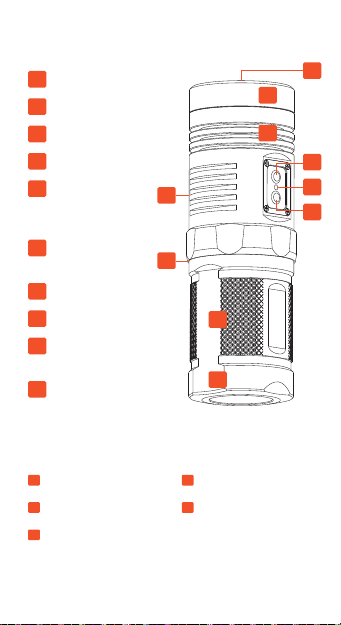
PRODUCT DIAGRAM
A
LED
B
LAMP HEAD
C
HEAT SINK AREA
D
MODE BUTTON
E
LOW-VOLTAGE
WARNING LED
(RED)
F
POWER
BUTTON
G
LANYARD EYE
H
O-RING
I
BATTERY
CARRIER
J
MAIN BODY
Also Included:
HOLSTER
LANYARD
SPARE O-RING
G
H
A
B
C
D
E
F
I
J
USER MANUAL
TWO-YEAR
LIMITED
WARRANTY
VULTA VOLCANO
05
Page 6

A Note about Maximum Output
When the flashlight is in High mode, the
battery discharge, drive circuit, and LED will
all be producing heat, and the lamp head may
become extremely hot. Please be cautious
when touching it. To protect the battery,
circuit, and LED, and to extend the lifetime
of the flashlight, we do not recommend
continuously running the flashlight on High
mode for more than 10 minutes.
INSTALLING BATTERIES
The Volcano FC-B55 is powered by four AA
batteries—either alkaline, NiCd, or NiMH. The
batteries are inserted into the all-aluminum
battery carrier, which is housed in the main
body of the flashlight. The battery carrier can
be preloaded so it’s always ready for use. To
facilitate quick and easy loads in low-light
situations, the carrier can face either direction
when you insert it into the main body.
Note: Disposable or rechargeable Lithium AA
batteries are not recommended for this flashlight.
To install batteries, follow these steps:
1. Unscrew the main
body from the lamp
head and remove
the battery carrier.
2. Insert four fresh
AA batteries into
the battery carrier.
Make sure the
batteries are facing
the proper direction
as indicated by the
markings in the
carrier.
3. Insert the battery
carrier into the main
body.
4. Screw the main
body onto the lamp
head until tight.
06
VULTA VOLCANO
Page 7

OPERATION
The FC-B55 features a unique dual-button
side-switch system to turn on the flashlight
and engage the different modes.
POWERING ON THE
VOLCANO FC-B55
To turn on the FC-B55, press the Power
button. Upon powering on, the flashlight
will enter Turbo mode for 3 minutes before
entering High mode. The next time you power
on the flashlight, it will enter the most recent
constant-on mode, including Moon mode.
Low-Voltage Warning LED: The low-
voltage warning LED displays when your
rechargeable NiMH batteries are running
low on power. When the warning LED glows
red, battery power is low and we recommend
installing new batteries. If you don’t have
batteries handy, you can switch to a loweroutput mode. As battery power continues to
drop, the warning LED will dim further and
start to blink. At this point, you will need to
change or recharge your batteries.
Tip: Make sure your batteries have a full
charge when using this flashlight and always
carry spare batteries.
VULTA VOLCANO
07
Page 8

SETTING THE MODE
Turbo/High/Medium/Low: In addition to Turbo
mode, there are three constant-on modes:
High, Medium, and Low. Turbo is the highest
output but will switch to High mode after
three minutes in order to avoid overheating.
Press the Mode button to cycle through the
four constant-on modes in descending order
of brightness.
Moon Mode: In Moon mode, the flashlight will
emit 1 lm of light when it powers on. This is
the lowest-power setting on the Volcano FCB55 and will remain in effect until you turn off
Moon mode. To enter Moon mode, start with
the flashlight powered off. Press and hold the
power button for approximately two seconds
until the flashlight powers on. To exit this
setting, press the Mode button. To turn the
flashlight off, press the Power button.
Aviation Signal: The Aviation signal produces
a single bright flash at approximately twosecond intervals. To enter Aviation Signal
mode, start with the flashlight powered
off. Press and hold the Mode button for
approximately two seconds until the light
starts to flash as described. To turn the
flashlight off, press the Mode button. To enter
a constant mode, press the Power button.
08
VULTA VOLCANO
Page 9

SOS: In SOS mode, the flashlight will blink
brightly in the international Morse code
distress signal pattern (· · · – – – · · ·). To enter
SOS mode, start with the flashlight powered
on. Press and hold the Power button for
approximately two seconds until the flashlight
starts to blink in the SOS pattern. To turn the
flashlight off, press the Power button. To enter
a constant mode, press the Mode button.
Police Strobe: Police Strobe mode emits
one-second bursts of quick bright flashes at
one-second intervals. To enter Police Strobe
mode, start with the flashlight powered
on. Press and hold the Mode button for
approximately two seconds until the light
starts to flash as described. To turn the
flashlight off, press the Power button. To enter
a constant mode, press the Mode button.
Strobe: Strobe mode continuously emits quick
flashes of bright light. To enter Strobe mode,
quickly press the Mode button twice in any
mode. Press any button to exit this mode.
Lock: Locking the flashlight prevents it from
accidentally turning on during storage or
transportation. To lock the flashlight, make
sure the flashlight is turned off, and then
press and hold both buttons for approximately
VULTA VOLCANO
09
Page 10

two seconds. Remember to repeat these
steps to unlock the flashlight.
THE LANYARD
You can attach and wear the included lanyard
to help prevent accidental drops and to free
up a pocket. To attach the lanyard, clip it onto
the recessed lanyard eye on the flashlight’s
lamp head.
O-RING MAINTENANCE
The Volcano FC-B55’s O-ring is installed
at the bottom of the threaded portion of
the main body to help seal out water. The
O-ring is prelubricated to extend its lifetime,
ensure smooth operation, and increase water
resistance. When the O-ring dries out or there
is little or no lubricant on it, we recommend
applying a small amount of O-ring lubricant
to it.
The FC-B55 comes with a replacement
O-ring. If the original one wears out after
long-term use, replace it with the included
spare.
10
VULTA VOLCANO
Page 11

SPECIFICATIONS
OUTPUT Turbo, Strobe, SOS, Aviation Signal,
BEAM INTENSITY 24,800 cd
LED TYPE CREE XM-L2
POWER SOURCE Four AA batteries (alkaline, NiCd,
RUNTIME Turbo: Automatically switches to
CONSTRUCTION Body: MIL-SPEC Type III hard
IMPACT
RESISTANCE
WATERPROOFING IPX-8 standard, up to 6.5´ (2 m)
EFFECTIVE RANGE 1,033´ (315 m)
DIMENSIONS Length: 4.7˝ (120.6 mm)
WEIGHT Without batteries: 5.8 oz. (165.4 g)
Police Strobe: 980 lm
High: 550 lm
Mid: 220 lm
Low: 30 lm
Moon: 1 lm
NiMH)
High after 3 min. of continuous use
High: 1.7 hr.
Mid: 4 hr.
Low: 31 hr.
Moon: 480 hr.
anodized aerospace-grade
aluminum alloy
Bezel: Stainless steel
Lens: Tempered glass
Up to 6.5´ (2 m)
submersion
Head diameter: 1.6˝ (40 mm)
Body diameter: 1.65˝ (42 mm)
With batteries: 9.4 oz. (268 g)
VULTA VOLCANO
11
Page 12

TWO-YEAR LIMITED WARRANTY
This VULTA product is warranted to the original purchaser to be
free from defects in materials and workmanship under normal
consumer use for a period of two (2) years from the original
purchase date or thirty (30) days after replacement, whichever
occurs later. The warranty provider’s responsibility with respect
to this limited warranty shall be limited solely to repair or
replacement, at the provider’s discretion, of any product that fails
during normal use of this product in its intended manner and in its
intended environment. Inoperability of the product or part(s) shall
be determined by the warranty provider. If the product has been
discontinued, the warranty provider reserves the right to replace it
with a model of equivalent quality and function.
This warranty does not cover damage or defect caused by misuse,
neglect, accident, alteration, abuse, improper installation or
maintenance. EXCEPT AS PROVIDED HEREIN, THE WARRANTY
PROVIDER MAKES NEITHER ANY EXPRESS WARRANTIES NOR
ANY IMPLIED WARRANTIES, INCLUDING BUT NOT LIMITED TO
ANY IMPLIED WARRANTY OF MERCHANTABILITY OR FITNESS
FOR A PARTICULAR PURPOSE. This warranty provides you with
specific legal rights, and you may also have additional rights that
vary from state to state.
To obtain warranty coverage, contact the Vulta Customer Service
Department to obtain a return merchandise authorization (“RMA”)
number, and return the defective product to Vulta along with the
RMA number and proof of purchase. Shipment of the defective
product is at the purchaser’s own risk and expense.
For more information or to arrange service, visit
www.vultagear.com or call Customer Service at 212-594-2353.
Product warranty provided by the Gradus Group.
VULTA is a registered trademark of the Gradus Group.
www.gradusgroup.com
© 2014 Gradus Group LLC. All Rights Reserved.
GG1
 Loading...