

Page 1
ABC
ABC
Building
Building
Block
Block
L
e
L
e
p
s
i
r
n
e
I
s
L
User’s Manual
™
™
f
f
t
t
B
B
r
r
a
a
i
n
o
g
i
c
a
l
T
h
i
n
k
i
i
n
n
g
Age 3 months+
Page 2

rent:
r Pa
ea
D
ver notice the look on your baby's face w
E
? These m
new
these m
and R
ased on the aw
B
toys w
cognitive a
creative skills such a
Left B
skills such as logic, pa
deta
ents are a
om
ents, w
om
in™
ra
ight B
ill help develop both sid
dvantage. R
toys are designed
rain™
orking together, this revolutiona
ils. W
your child's w
rainy B
t B
A
birth - and w
rainy B
and B
incerely,
S
riends at VTech
our F
Y
To learn m
please visit w
parent's grea
e ha
ve created
the B
series of toys.
ard-w
s m
es of a child
rain™
ight B
rt, im
usic, a
to encourage cognitive thinking
rainy B
inning B
tterns, letters &
hole brain, and boost a baby's intellect!
that your child
e know
®
, w
aby
e're proud to be a pa
®
, your child's future is our inspira
aby
®
and The B
ore about these and other B
.brainybaby.com
w
w
®
Left B
ething
rain™
hen he learns som
ard. To encourage
test rew
aby
iny B
ra
eo series, these
®
vid
aby
's brain to give him
toys focus on encouraging
gination, a
a
num
ry line of toys w
rt of that. A
rainy B
w
w
or w
tive thinking.
crea
nd
nd analyzing
bers, a
's education begins at
ill engage
fter all, at VTech
tion!
ny
pa
®
om
C
aby
®
products,
aby
iny B
ra
.vtech.com
.
a
®
Page 3
Introduction
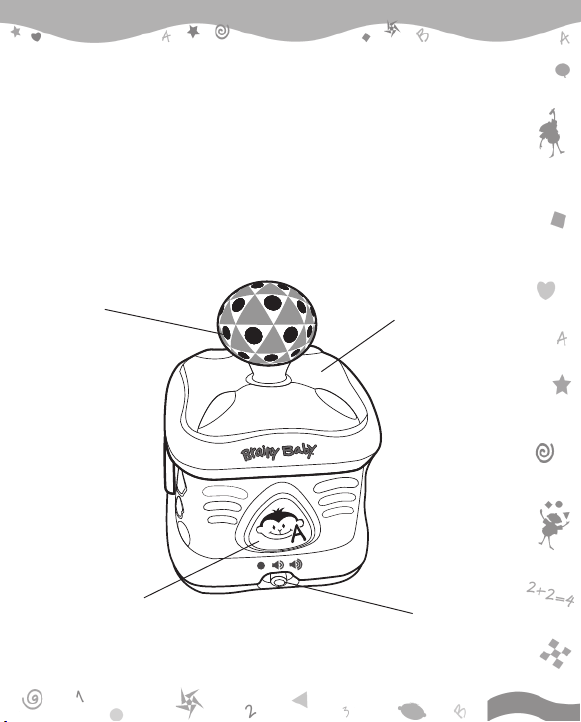
Thank you for purchasing the Brainy Baby® ABC Building BlockTM learning toy.
The Brainy Baby® ABC Building BlockTM is designed for babies 3 months and
up. Four brightly colored buttons reward curiosity with lessons in letter names,
rhyming and vocabulary. Wiggle the joystick to hear upbeat tunes that can be
sped up or slowed down depending on how quickly the joystick is moved. Bright
colors, graphics, lights and left-brain patterns are sure to attract baby's
attention.
JOYSTICK
LETTER BUTTON
FLASHING LIGHTS
ON/OFF/VOLUME
CONTROL SWITCH
2
Page 4
Included in This Package
- One Brainy Baby® ABC Building Block
- One instruction manual
WARNING: All packing materials, such as tape, plastic sheets, wire ties
and tags are not part of this toy, and should be discarded for
your child’s safety.
TM
learning toy
Getting Started
Battery Installation
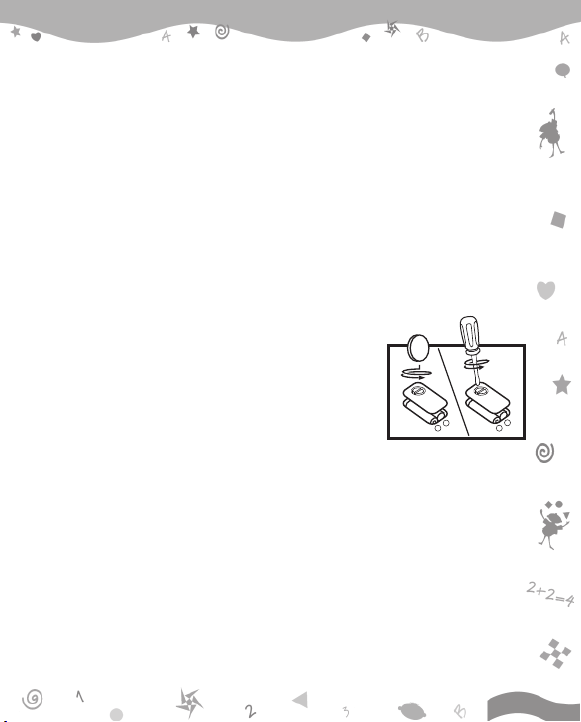
1. Make sure the unit is turned off.
2. Locate the battery cover on the bottom of the
unit. Use a coin or a screwdriver to loosen the screw.
3. Install 2 new ‘AA’ (UM-3/LR6) batteries following
the diagram inside the battery box. (The use of
-
+
new alkaline batteries is recommended for
maximum performance.)
4. Replace the battery cover and tighten the screw to secure the battery
cover.
Battery Notice
• Install batteries correctly observing the polarity ( +, - ) signs to avoid
leakage.
• Do not mix old and new batteries.
• Do not use batteries of different types.
-
+
3
Page 5
• Remove exhausted or new batteries from the equipment when the unit
will not be used for an extended period of time.
• Do not dispose of batteries in fire.
• Do not attempt to recharge ordinary batteries.
• The supply terminals are not to be short-circuited.
• Only batteries of the same and equivalent type as recommended are to
be used.
WE DO NOT RECOMMEND THE USE OF RECHARGEABLE BATTERIES.
Product Features
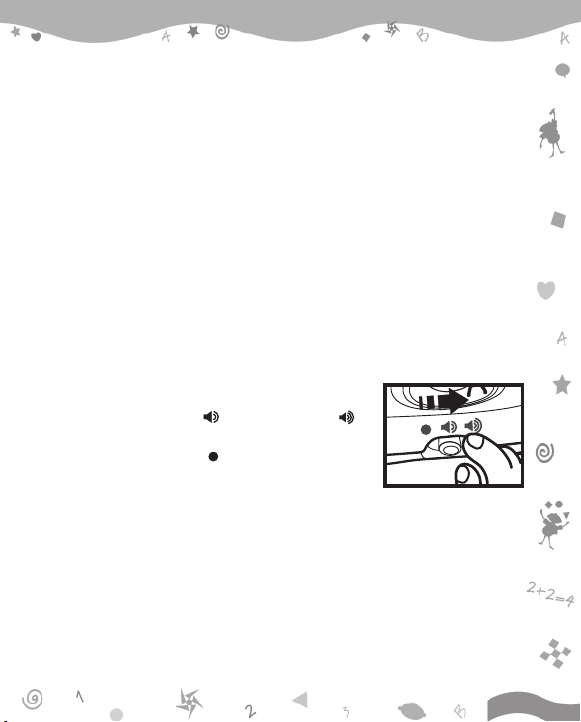
1. On/Off/Volume Control Switch
To turn the unit on, slide the on/off/volume control
switch to the low volume ( ) or high volume ( )
position. To turn the unit off, slide the on/off/volume
control switch to the off ( ) position.
2. Automatic Shut-off
To preserve battery life, the Brainy Baby® ABC Building BlockTM will automatically
power-down after several seconds without input. The unit can be turned on
again by pressing any button.
4
Page 6
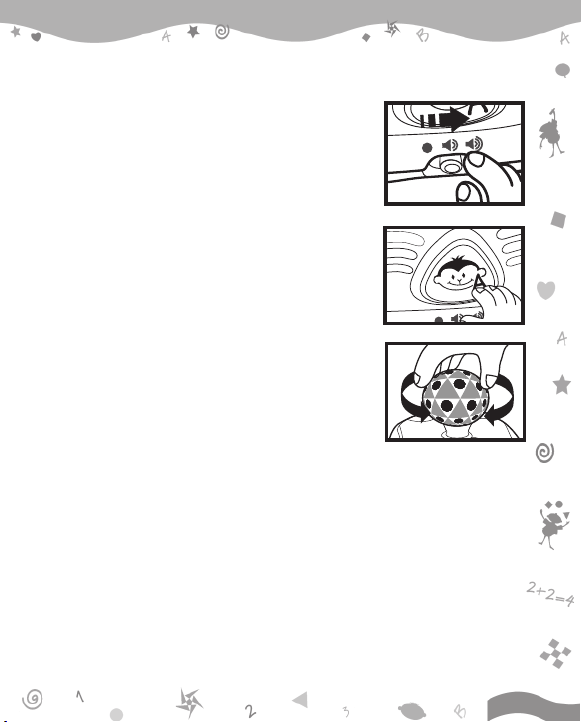
Activities
1. Slide the on/off/volume control switch to turn
the unit on. You will hear a giggle followed by “A,
B, C, D! Please learn some letters with me!” The
lights will light up with the sounds.
2. Press the shape buttons to learn letters, words,
rhyming and hear a variety of fun sounds. The
lights will light up with the sounds.
3. Move the joystick to hear a variety of short
tunes. Move the joystick quickly to hear the
short tunes play faster, or hold the joystick
down in any direction to hear the short tunes
play slower. The lights will flash with the short
tunes.
4. If there is no input to the unit after
approximately five seconds, a question will be
asked. After another five seconds if there is still
no input, another question will be asked. You will
have two chances to select the correct answer.
If there continues to be no input to the unit, it
will automatically power down.
5
Page 7
Troubleshooting
If for some reason the program/activity stops working, please follow these
steps:
1. Please turn the unit off.
2. Interrupt the power supply by removing the batteries.
3. Let the unit stand for a few minutes, then replace the batteries.
4. Turn the unit on. the unit should now be ready to play again.
If the problem persists, please call our Consumer Services Department at 1800-521-2010 in the U.S. or 1-877-352-8697 in Canada, and a service
representative will be happy to help you.
For information on this product warranty, please call VTech® at 1-800-5212010 in the U.S. or 1-877-352-8697 in Canada.
Important Note:
Creating and developing Brainy Baby® products is accompanied by a
responsibility that we at VTech® take very seriously. We make every effort
to ensure the accuracy of the information, which forms the value of our
products. However, errors sometimes can occur. It is important for you
to know that we stand behind our products and encourage you to call
our Consumer Services Department at 1-800-521-2010 in the U.S., or 1877-352-8697 in Canada, with any problems and/or suggestions that
you might have. A service representative will be happy to help you.
6
Page 8

Care and Maintenance
1. Keep the unit clean by wiping it with a slightly damp cloth.
2. Keep the unit out of direct sunlight and away from any direct heat source.
3. Remove the batteries when the unit is not in use for an extended period
of time.
4. Do not drop the unit on hard surfaces and do not expose the unit to
moisture or water.
Note:
This equipment has been tested and found to comply with the limits for a
Class B digital device, pursuant to Part 15 of the FCC Rules. These limits are
designed to provide reasonable protection against harmful interference in a
residential installation. This equipment generates, uses and can radiate radio
frequency energy and, if not installed and used in accordance with the
instructions, may cause harmful interference to radio communications. However,
there is no guarantee that interference will not occur in a particular installation.
If this equipment does cause harmful interference to radio or television
reception, which can be determined by turning the equipment off and on, the
user is encouraged to try to correct the interference by one or more of the
following measures:
• Reorient or relocate the receiving antenna
• Increase the separation between the equipment and receiver
• Connect the equipment into an outlet on a circuit different from that to
which the receiver is connected
• Consult the dealer or an experienced radio/TV technician for help
7
Page 9
THIS DEVICE COMPLIES WITH PART 15 OF THE FCC RULES. OPERATION
IS SUBJECT TO THE FOLLOWING TWO CONDITIONS: (1) THIS DEVICE
MAY NOT CAUSE HARMFUL INTERFERENCE, AND (2) THIS DEVICE MUST
ACCEPT ANY INTERFERENCE RECEIVED, INCLUDING INTERFERENCE
THAT MAY CAUSE UNDESIRED OPERATION.
THIS CLASS B DIGITAL APPARATUS COMPLIES WITH CANADIAN ICES-
003.
CET APPAREIL NUMÉRIQUE DE LA CLASSE B EST CONFORME À LA
NORME NMB-003 DU CANADA.
Printed in China
91-61820-001-006
8
 Loading...