

Page 1
0
1
6
MNO
9
WXYZ
3
DEF
#
5
JKL
8
TUV
2
ABC
4
GHI
7
PQRS
a » A
LINK
ErisStation
TM
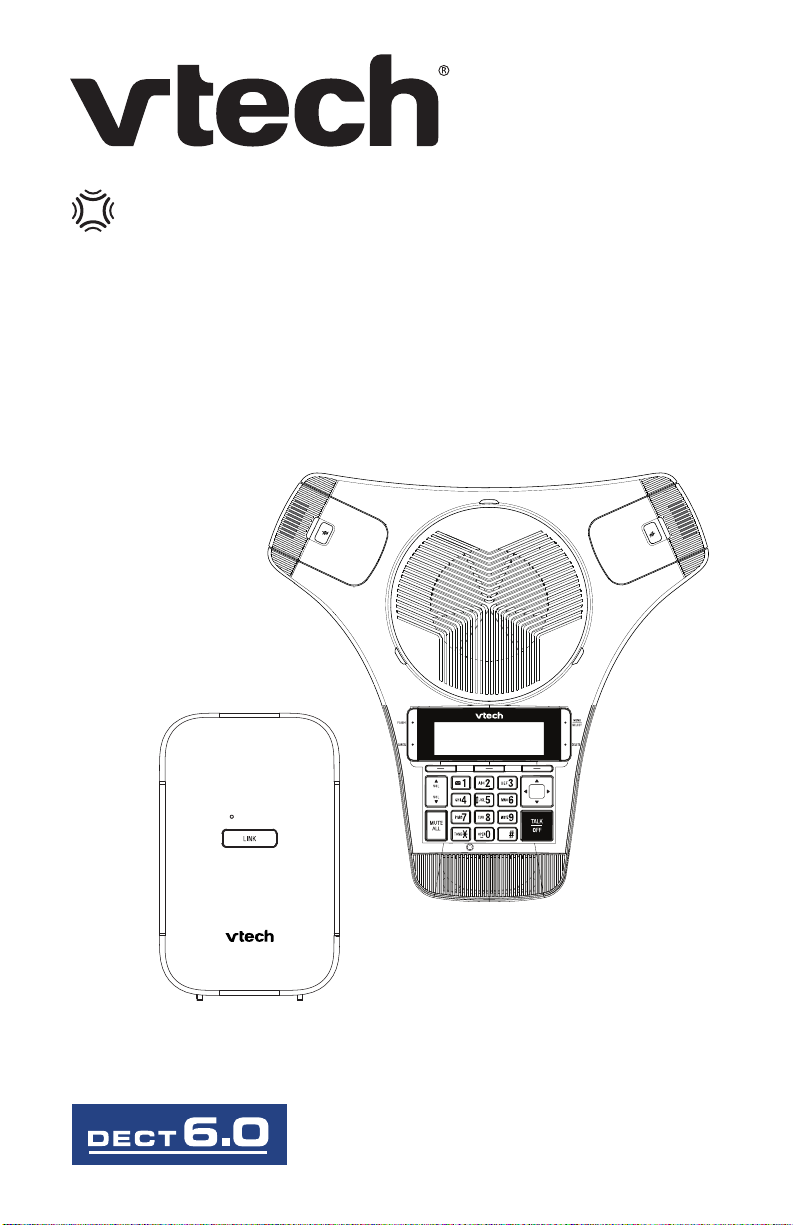
Wireless Conference Phone with Two Wireless Mics
VCS712
Quick Start Guide
ErisStation
Page 2

Important safety instructions
When using your ErisStation® Wireless Conference Phone with Two Wireless
Mics , basic safety precautions should always be followed to reduce the risk of
re, electric shock and injury to persons, including the following:
1. Read and understand all instructions.
2. Follow all warnings and instructions marked on the product.
3. Unplug this product from the wall outlet before cleaning. Do not use liquid or
aerosol cleaners. Use a damp cloth for cleaning.
4. Do not use this product near water such as near a bathtub, wash bowl,
kitchen sink, laundry tub or swimming pool, or in a wet basement or shower.
5. Do not place this product on an unstable table, shelf, stand or other unstable
surfaces.
6. Slots and openings in the back or bottom of the base unit and wireless
mic are provided for ventilation. To protect them from overheating, these
openings must not be blocked by placing the product on a soft surface such
as a bed, sofa or rug. This product should never be placed near or over a
radiator or heat register. This product should not be placed in any area where
proper ventilation is not provided.
7. This product should be operated only from the type of power source
indicated on the marking label. If you are not sure of the type of power supply
in your oce, consult your dealer or local power company.
8. Do not allow anything to rest on the power cord. Do not install this product
where the cord may be walked on.
9. Never push objects of any kind into this product through the slots in the base
unit or wireless mic because they may touch dangerous voltage points or
create a short circuit. Never spill liquid of any kind on the product.
10. To reduce the risk of electric shock, do not disassemble this product, but take
it to an authorized service facility. Opening or removing parts of the base
unit or wireless mic other than specied access doors may expose you to
dangerous voltages or other risks. Incorrect reassembling can cause electric
shock when the product is subsequently used.
11. Do not overload wall outlets and extension cords.
12. Unplug this product from the wall outlet and refer servicing to an authorized
service facility under the following conditions:
A. When the power supply cord or plug is damaged or frayed.
B. If liquid has been spilled onto the product.
C. If the product has been exposed to rain or water.
D. If the product does not operate normally by following the operating
instructions. Adjust only those controls that are covered by the operation
instructions. Improper adjustment of other controls may result in damage
and often requires extensive work by an authorized technician to restore
the product to normal operation.
2
Page 3

E. If the product has been dropped and the base unit and/or wireless mic
has been damaged.
F. If the product exhibits a distinct change in performance.
13. Avoid using the ErisStation® Wireless Conference Phone with Two Wireless
Mics during an electrical storm. There is a remote risk of electric shock from
lightning.
14. Do not use the ErisStation® Wireless Conference Phone with Two
Wireless Mics to report a gas leak in the vicinity of the leak. Under certain
circumstances, a spark may be created when the adapter is plugged into
the power outlet, or when the wireless mic is replaced in its cradle. This is
a common event associated with the closing of any electrical circuit. The
user should not plug the phone into a power outlet, and should not put a
charged wireless mic onto the charging cradle, if the phone is located in an
environment containing concentrations of ammable or ame-supporting
gases, unless there is adequate ventilation. A spark in such an environment
could create a re or explosion. Such environments might include: medical
use of oxygen without adequate ventilation; industrial gases (cleaning
solvents; gasoline vapors; etc.); a leak of natural gas; etc.
15. Only put the wireless mic next to your mouth when it is in normal talk mode.
16. The power cables are intended to be correctly oriented in a vertical or oor
mount position. The prongs are not designed to hold the plug in place if it is
plugged into a ceiling or cabinet outlet.
17. For pluggable equipment, the socket-outlet shall be installed near the
equipment and shall be easily accessible.
18. CAUTION: Use only the batteries indicated in this manual. There may be
a risk of explosion if a wrong type of battery is used. Use only the supplied
rechargeable battery or replacement battery pack. Do not dispose of
batteries in a re. They may explode. Dispose of used battery according to
the information in The RBRC® seal.
19. Use only the adapter included with this product. Incorrect adapter polarity or
voltage can seriously damage the product.
SAVE THESE INSTRUCTIONS
Battery
• CAUTION: Use Only Supplied Battery.
• Do not dispose of the battery in a re. Check with local waste management
codes for special disposal instructions.
• Do not open or mutilate the battery. Released electrolyte is corrosive and
may cause burns or injury to the eyes or skin. The electrolyte may be toxic if
swallowed.
• Exercise care in handling batteries in order not to create a short circuit with
conductive materials.
• Charge the battery provided with or identied for use with this product only in
accordance with the instructions and limitations specied in this manual.
3
Page 4

Precautions for users of implanted cardiac pacemakers
Cardiac pacemakers (applies only to digital cordless telephones):
Wireless Technology Research, LLC (WTR), an independent research entity,
led a multidisciplinary evaluation of the interference between portable wireless
telephones and implanted cardiac pacemakers. Supported by the U.S. Food and
Drug Administration, WTR recommends to physicians that:
Pacemaker patients
• Should keep the wireless telephone at least six inches from the pacemaker.
• Should NOT place wireless telephones directly over the pacemaker, such as
in a breast pocket, when it is turned ON.
• Should use the wireless telephone at the ear opposite the pacemaker.
WTR’s evaluation did not identify any risk to bystanders with pacemakers from
other persons using wireless telephones.
About wireless mics
• Privacy: The same features that make a wireless mic convenient create
some limitations. Calls on conference phones are transmitted between
the base unit and the wireless mic by radio waves, so there is a possibility
that the wireless mic conversations could be intercepted by radio receiving
equipment within range of the wireless mic. For this reason, you should not
think of conference phone conversations as being as private as those on
corded telephones.
• Electrical power: The base unit of this conference phone must be
connected to a working electrical outlet. The electrical outlet should not be
controlled by a wall switch. Calls cannot be made from the conference phone
if the base unit is unplugged, switched o or if the electrical power
is interrupted.
• Potential TV interference: Wireless mic operates at frequencies that may
cause interference to televisions and VCRs. To minimize or prevent such
interference, do not place the base unit near or on top of a TV or VCR. If
interference is experienced, moving the wireless mic farther away from the
TV or VCR often reduces or eliminates the interference.
• Rechargeable batteries: Exercise care in handling batteries in order not to
create a short circuit with conducting material such as rings, bracelets and
keys. The battery or conductor may overheat and cause harm.
• Nickel-metal hydride rechargeable batteries: Dispose of these batteries
in a safe manner. Do not burn or puncture. Like other batteries of this type, if
burned or punctured, they could release caustic material which could cause
injury.
4
Page 5

Compliance
FCC part 15
This device complies with Part 15 of the FCC rules.
Operation is subject to the following two conditions: (1) This device may not
cause harmful interference, and (2) this device must accept any interference
received, including interference that may cause undesired operation.
This equipment has been tested and found to comply with the limits for a Class
B digital device, pursuant to Part 15 of the FCC rules. These limits are designed
to provide reasonable protection against harmful interference in residential
installation.
This equipment generates, uses and can radiate radio frequency energy and, if
not installed and used in accordance with the instructions, may cause harmful
interference to radio communications. However, there is no guarantee that
interference will not occur in a particular installation; if this equipment does cause
harmful interference to radio or television reception, which can be determined
by turning the equipment o and on, you are encouraged to try to correct the
interference by one of the following measures:
1. Reorient or relocate the receiving television or radio antenna.
2. Increase the separation between the telephone equipment and the receiver.)
3. Connect the telephone equipment into an outlet on a circuit dierent from
that to which the television, radio or other receiver is connected.
4. Consult the dealer or an experienced Radio/TV Technician for help.
Privacy of communications may not be ensured when using this phone.
Warning: Changes or modications to this equipment not expressly approved by
the party responsible for compliance could void the user’s authority to operate
the equipment.
Caution: To maintain the compliance with the FCC’s RF exposure guideline,
place the base station at least 20 cm from nearby persons.
The VCS712 base station has been tested and meets the FCC RF exposure
guidelines when used with the accessories supplied or designated for this
product. Use of other accessories may not ensure compliance with FCC RF
exposure guidelines.
FCC Part 68 and ACTA
This equipment complies with Part 68 of the FCC rules and with technical
requirements adopted by the Administrative Council for Terminal Attachments
(ACTA). The label on the back or bottom of this equipment contains, among other
things, a product identier in the format US:AAAEQ##TXXXX. This identier must
be provided to your telephone service provider upon request.
The plug and jack used to connect this equipment to premises wiring and the
5
Page 6

telephone network must comply with applicable Part 68 rules and technical
requirements adopted by ACTA. A compliant telephone cord and modular plug
is provided with this product. It is designed to be connected to a compatible
modular jack that is also compliant. An RJ11 jack should normally be used for
connecting to a single line and an RJ14 jack for two lines. See the installation
instructions in the user’s manual.
The Ringer Equivalence Number (REN) is used to determine how many devices
you may connect to your telephone line and still have them ring when you
are called. The REN for this product is encoded as the 6th and 7th characters
following the US: in the product identier (e.g., if ## is 03, the REN is 0.3). In
most, but not all areas, the sum of all RENs should be ve (5.0) or less. For more
information, please contact your telephone service provider.
This equipment must not be used with Party Lines. If you have specially wired
alarm dialing equipment connected to your telephone line, ensure the connection
of this equipment does not disable your alarm equipment. If you have questions
about what will disable alarm equipment, consult your telephone service provider
or a qualied installer.
If this equipment is malfunctioning, it must be unplugged from the modular jack
until the problem has been corrected. Repairs to this telephone equipment
can only be made by the manufacturer or its authorized agents. For repair
procedures, follow the instructions outlined under the Limited warranty.
If this equipment is causing harm to the telephone network, the telephone service
provider may temporarily discontinue your telephone service. The telephone
service provider is required to notify you before interrupting service.
If advance notice is not practical, you will be notied as soon as possible. You
will be given the opportunity to correct the problem and the telephone service
provider is required to inform you of your right to le a complaint with the FCC.
Your telephone service provider may make changes in its facilities, equipment,
operation, or procedures that could aect the proper functioning of this product.
The telephone service provider is required to notify you if such changes are
planned.
If this product is equipped with a corded or cordless handset, it is hearing aid
compatible.
If this product has memory dialing locations, you may choose to store emergency
telephone numbers (e.g., police, re, medical) in these locations. If you do store
or test emergency numbers, please:
• Remain on the line and briey explain the reason for the call before hanging
up.
• Perform such activities in o-peak hours, such as early morning or late
evening.
6
Page 7

Industry Canada
This Class B digital apparatus complies with Canadian requirements: CAN ICES3 (B)/NMB-3(B). Cet appareil numérique de la classe B est conforme à la norme
CAN ICES-3 (B)/NMB-3(B) du Canada.
This device contains licence-exempt transmitter(s)/receiver(s) that comply with
Innovation, Science and Economic Development Canada’s licence-exempt
RSS(s).
Operation is subject to the following two conditions: (1) this device may not
cause interference, and (2) this device must accept any interference, including
interference that may cause undesired operation of the device.
Privacy of communications may not be ensured when using this telephone.
The term ‘’IC:‘’ before the certication/registration number only signies that the
Industry Canada technical specications were met.
The Ringer Equivalence Number (REN) for this terminal equipment is 1.0. The
REN is an indication of the maximum number of devices allowed to be connected
to a telephone interface. The termination on an interface may consist of any
combination of devices subject only to the requirement that the sum of the RENs
of all devices does not exceed ve.
This product meets the applicable Innovation, Science and Economic
Development Canada technical specications.
7
Page 8

Important Battery Information
The detachable wireless microphones of this product use rechargeable Ni-MH
400 mAh 2.4V batteries. Use only the batteries that came with the product or
contact VTech if you need replacement batteries. Do not use any other type
of battery since this may lead to leakage, re, explosion, or other dangerous
situations.
Never disassemble, alter, or short-circuit batteries or use them for purposes
other than the intended one. Charge batteries only within the detachable wireless
microphones placed in the chargers on the product.
Charging and Discharging, Storage
• The full performance of a new batteries is achieved only after two or three
complete charge and discharge cycles.
• The batteries can be charged and discharged hundreds of times, but they will
eventually wear out. Contact VTech if you need to replace the batteries.
• If left unused, a fully charged battery will lose its charge over time.
• Use the batteries only for their intended purpose. Do not short-circuit the
batteries. Short-circuiting the terminals may damage the batteries or the
connecting object. Do not use a damaged charger or battery. Using a
damaged battery may cause it to explode.
• Do not place or store the batteries, inside or outside the microphone, in the
immediate vicinity of open re or other heat sources.
• Leaving the batteries in hot or cold places will reduce their capacity and
lifetime. Charge batteries within an ambient temperature range of +5° C to
+40° C (+41° F to +104° F), max. humidity 85%. A device with a hot or cold
battery may not work temporarily, even when the battery is fully charged.
• Avoid overcharging. Repeated overcharging can lead to deterioration in
batteries performance. Never attempt charging the batteries with reversed
polarity as this may cause the gas pressure inside the batteries to rise and
lead to leakages.
• Remove batteries if storing product for more than 1 month.
• Store batteries in a cool, dry place without corrosive gases. Temperature
range for storage of charged batteries up to 6 months: -20° C to +45° C
(-4° F to 113° F); up to 2 years: -20° C to +35° C (-4° F to 95° F); humidity
65±20%. Discharge and charge batteries every 3 months.
Disposal of the device and batteries
Disposal of electrical and electronic products and batteries should be done in line
with local regulations. Please contact local authorities for further information.
8
Page 9

Introduction
This quick start guide provides you with the basic installation, setup, and
operation instructions. A limited set of features are described in abbreviated
form. You may refer to the user’s manual for complete installation and operation
instructions for this innovative and feature-rich VTech product. The ErisStation®
Wireless Conference Phone with Two Wireless Mics is designed for use in oce
settings. It consists of a base station, conference phone with charging dock,
and two wireless mics that enable clear conversation between participants in
dierent areas of a meeting room. For large meeting rooms, you can extend the
range of the VCS712 with a VTech VCS850 DECT expansion speakerphone. For
more information on using the VCS712 DECT features, see the VCS712 User’s
Manual, available at businessphones.vtech.com.
NOTE: The ErisStation® Wireless Conference Phone with Two Wireless Mics
requires a telephone line to operate. If you subscribe to digital subscriber line
(DSL) high-speed Internet service through your telephone line, you must install
a DSL lter between the telephone line cord and wall jack. Contact your DSL
service provider for more information about DSL lter.
The ErisStation® Wireless Conference Phone with Two Wireless Mics is not
compatible with IP-PBX systems, unless it comes with an analog-line interface
with RJ-11 connector. If you already have an IP-PBX system in place, please
contact your system provider for a digital-to-
analog interface converter.
The ErisStation® Wireless Conference Phone with Two Wireless Mics is not a
network device and is not PoE (Power over Ethernet) compatible. It does not
require an ethernet network to work. Do not connect it to your ethernet network
or directly with any other network devices.
IMPORTANT!
Refer to the user’s manual for a full set of installation and operation instructions.
For customer service, visit our website at businessphones.vtech.com or
call 1 (888) 370-2006.
9
Page 10
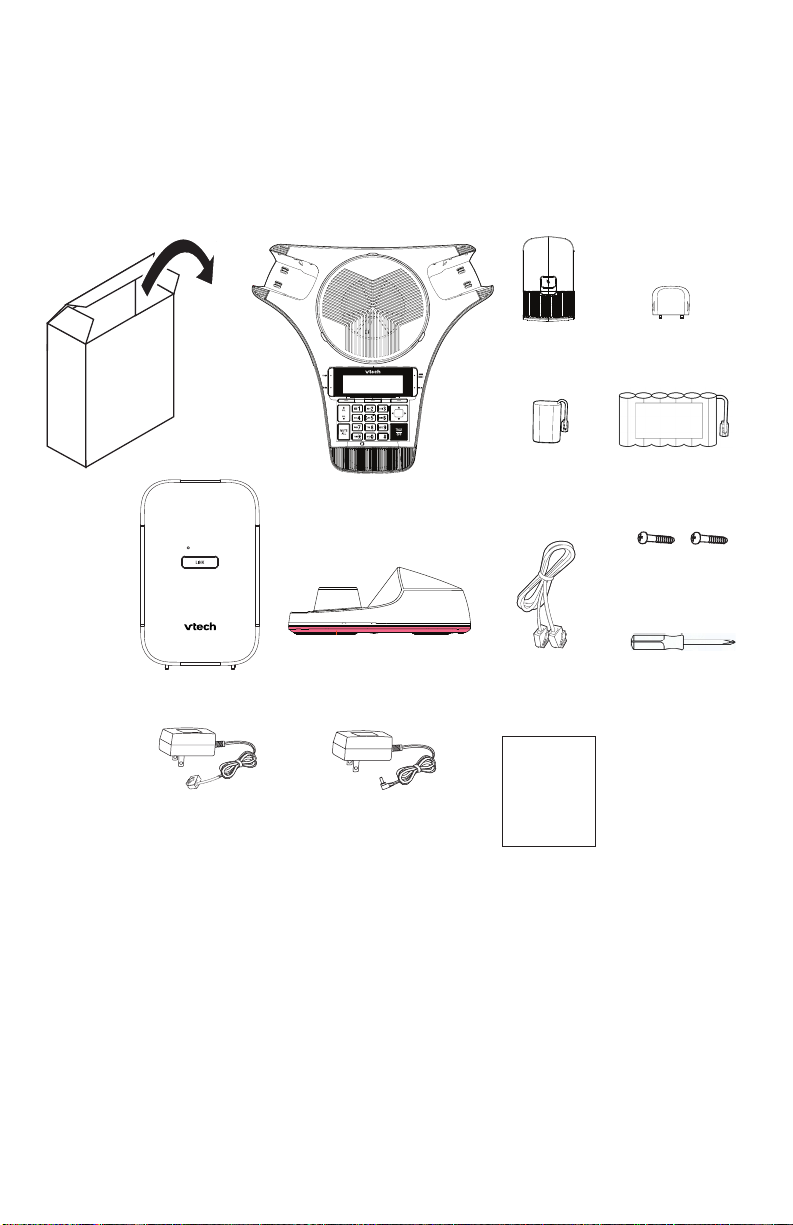
Parts Checklist
ErisStation
U
s
e
r
’
s
m
a
n
u
a
l
Quick start guide
(x4)
(x4)
LINK
U
s
e
r
’
s
m
a
n
u
a
l
Quick start guide
(x4)
(x4)
illustration scale 50%
01
Your ErisStation® Wireless Conference Phone with Two Wireless Mics package
contains the following items.
Save your sales receipt and original packaging in the event warranty service is
necessary.
Base Station
Power adapter
for base station
(modular jack)
ErisStation
Conference Phone
Charging dock
Power Adapter
for charging dock
(round jack)
Wireless
Mic x2
Wireless Mic
Battery x2
Telephone
line cord
Quick
Start
Guide
VCS712
Wireless Mic
battery door x2
Conference
phone battery
2 (two) screws for
Conference Phone
battery door
Screwdriver
To purchase any accessories or replacements, visit our website at
businessphones.vtech.com or call 1-888-370-2006.
10
Page 11

Install the base station
1. Plug one end of the telephone line cord into the TEL LINE jack on the rear of
the base station, and plug the other end into a telephone wall jack.
2. Connect the modular jack power adapter to the base station power jack.
3. Plug the power adapter into an electrical outlet that is not controlled by a wall
switch.
IMPORTANT INFORMATION
• Use only the modular jack power adapter provided with the product.
To order a replacement power adapter, visit our website at
businessphones.vtech.com or call 1 (888) 370-2006.
• The modular jack power adapter is intended to be correctly oriented in a
vertical or oor mount position. The prongs are not designed to hold the plug
in place if it is plugged into a ceiling, under-the-table, or cabinet outlet.
Install the conference phone battery
• CAUTION: Risk of explosion! Batteries should not be exposed to
excessive heat such as bright sunlight or re.
• CAUTION: Risk of explosion if battery is replaced by an incorrect
type. Dispose of used batteries according to the instructions.
• Use only the supplied battery.
1. After removing the battery door, plug the battery connector securely into the
socket inside the battery compartment.
2. Place the battery into the battery compartment with the label THIS SIDE UP
facing up.
3. Attach the battery door, and secure it in place with the provided screws.
Connect power to the conference phone
1. Plug the round jack end of the AC adapter into the power jack on the back of
the charging dock.
2. Plug the large end of the AC adapter into a wall outlet not controlled by a
switch.
3. Place the rear connectors of the conference phone into the charging dock.
• The supplied round jack power adapter is designed for use only with the
VCS712 conference phone. It is not designed to power other devices. Do
not connect the supplied round jack power adapter to any other devices.
• The round jack power adapter is intended to be correctly oriented in a
vertical or oor mount position. The prongs are not designed to hold the
plug in place if it is plugged into a ceiling, under-the-table, or cabinet
outlet.
11
Page 12
DC power cable
(with yellow plugs) Ethernet cable
Ethernet cable
Slots
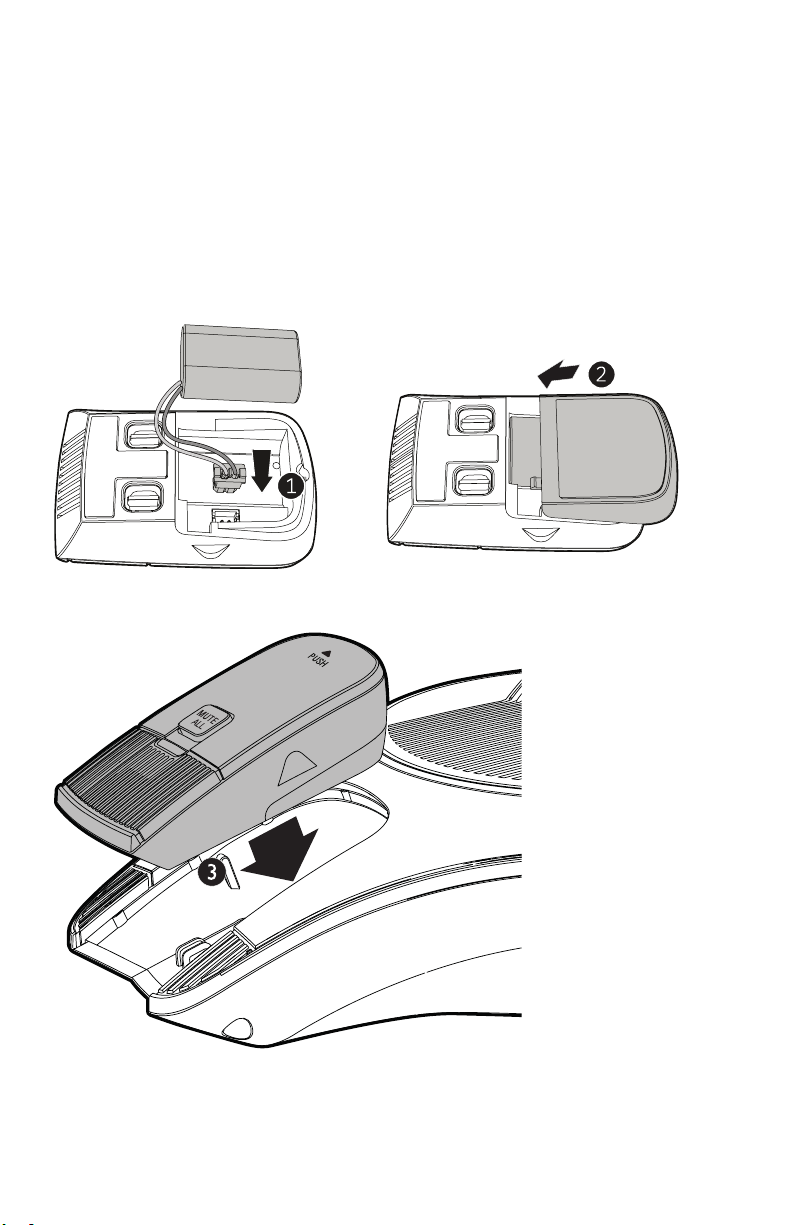
Install the wireless mic battery
1. Plug the battery connector securely into the socket inside the battery
compartment. Insert the battery (with the label THIS SIDE UP facing up) into
the battery compartment.
2. Slide the battery door until it clicks into place.
3. Place the wireless mics into the charging cradles until they are ush.
NOTE: The status indicator on the wireless mic turns orange when charging, and
turns o when the wireless mic is fully charged.
12
Page 13
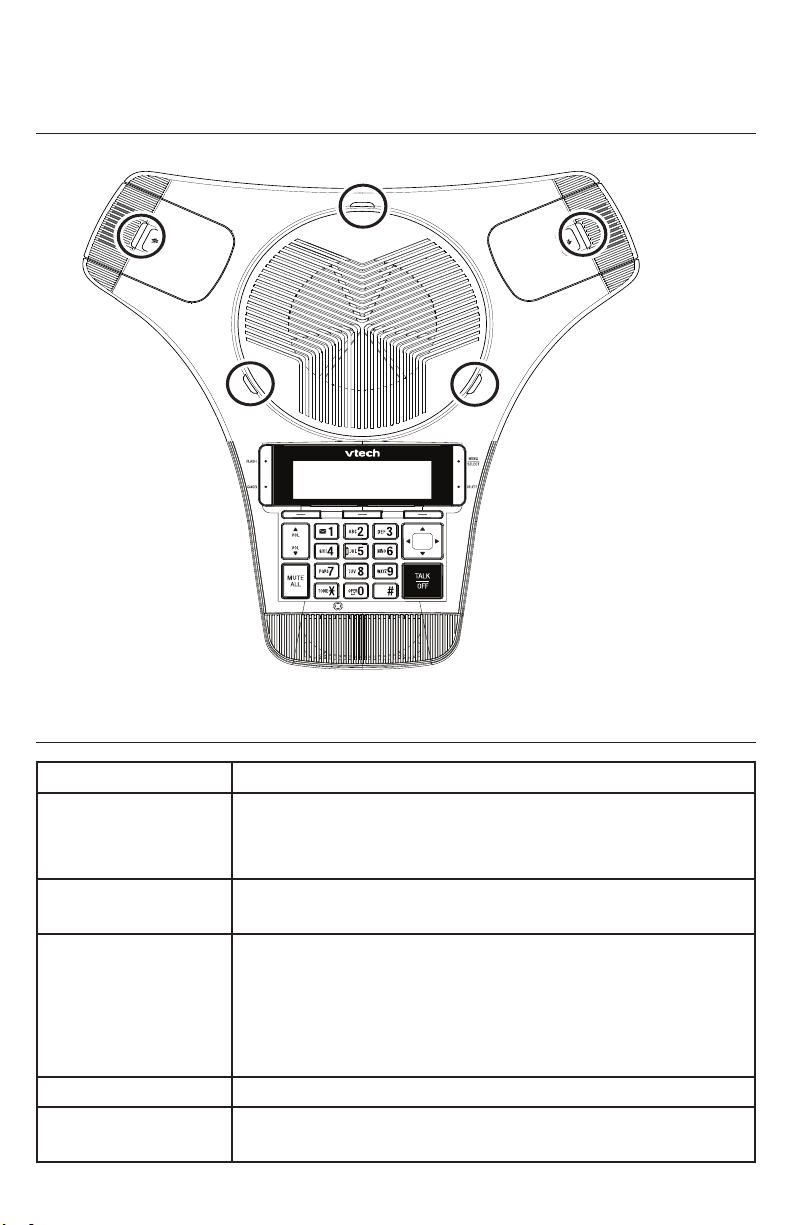
Status Indicators Overview
0
1
6
MNO
9
WXYZ
3
DEF
#
5
JKL
8
TUV
2
ABC
4
GHI
7
PQRS
a » A
ErisStation
Status indicator on conference phone/wireless mics
Multipurpose LED for conference phone and wireless mics
Power up • Steady Orange for ve seconds.
On a call • Steady Green during a call.
• Steady Red when a call is muted, or if there are new
messages.
Incoming call • Flashes Green quickly when there is an incoming
call.
Charging • Steady Orange while charging
• Steady Orange for ve seconds when charging
completed and you connect the conference phone to
the charging dock.
• O when charging completed.
Low battery • Flashes Orange slowly
Stand by • O when DECT linked; conference phone is idling;
audio mode is not in use.
13
Page 14
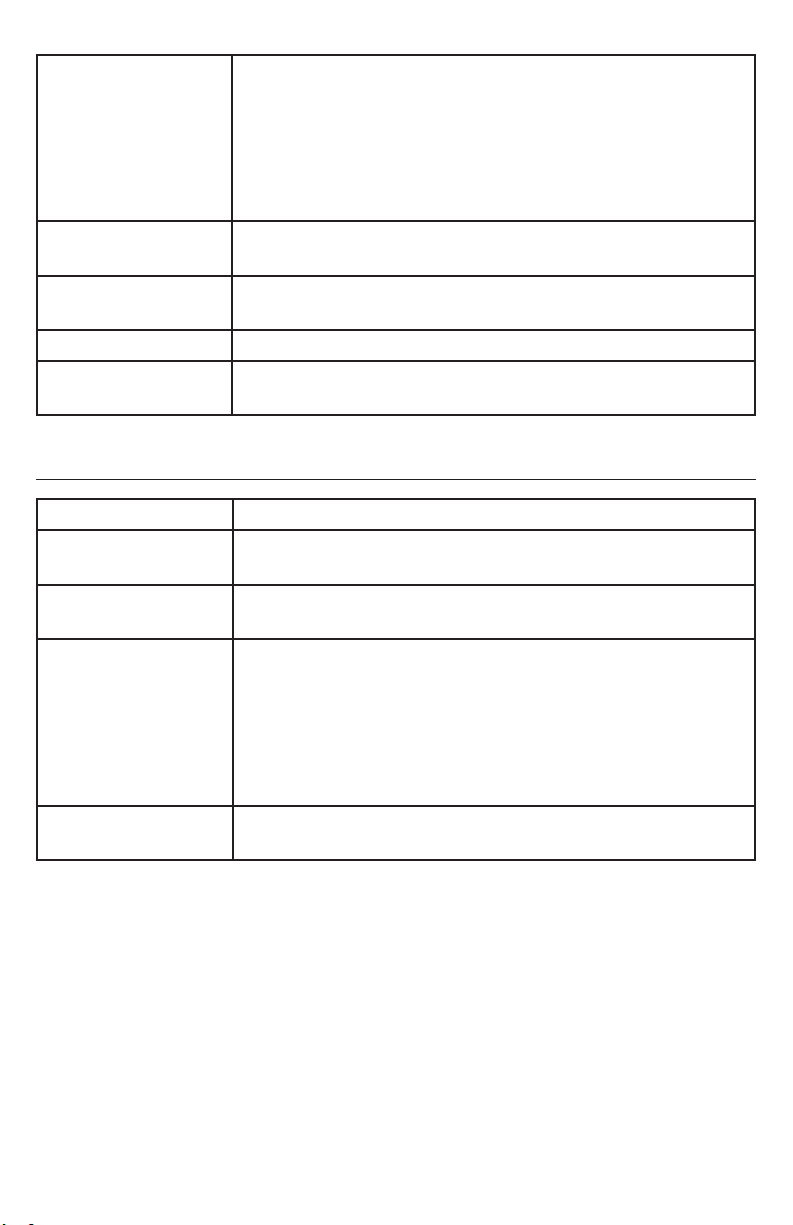
Registration • Flashes Red and Green alternately when DECT
registration in progress.
• Steady Green for ve seconds when registration
successful.
• Steady Red for ve seconds when registration failed
or canceled.
Paged by base
station
DECT Searching
Mode
Reset mode • Steady Orange
CEC battery testing
mode
Status indicator on the base station
Power up • Flashes Green slowly when power is just turned on.
Incoming call • Flashes Green quickly when there is an incoming
Line in use • Steady Green when a system device / parallel set is
Deregistration • Flashes Green quickly when the base is in
Registration • Flashes Green slowly when the base is in
• Flashes Green slowly
• Flashes Red slowly when out of range or not
registered.
• Flashes Red
PSTN call.
in use with the PSTN line.
deregistration standby mode.
• Steady Green for ve seconds after conrmation of
deregistration.
• Flashes Green slowly when no devices are
registered.
registration mode.
14
Page 15

Power Requirements
Wireless Mics Battery: (BT183642/BT283642) 2.4V,400mAh Ni-MH
Conference Phone Battery: (BT200660) 7.2V 4000mAh Ni-MH
Charging dock power adapter: (CS36M120300FUF)
Input: 100-240V AC 50/60Hz Output: 12V DC @
3000mA
Base Station Power adapter:
(S003GU0600040) Input: 100-240V AC 50/60 Hz Output:
6.0V DC @ 400mA
(CS3E060040LU) Input: 100-120V AC 60Hz Output:
6.0V DC @ 400mA
Registering the conference phone
To register the conference phone to the base:
1. On the conference phone, press MENU and use the keypad to enter the
secret code 7344. The Registration menu appears.
2. Select This speaker, then select with Base station.
3. Follow the instructions on the conference phone screen. Press NEXT to
move through the screens.
a. Connect the conference phone with AC power.
b. Press and hold the LINK key at base for 4 seconds.
c. Press the # key on the conference phone.
4. If prompted, enter the PIN. Default PIN is 1590.
The conference phone displays a message with the results:
“Registration completed” or “Registration failed.”
To deregister the conference phone:
1. On the conference phone, press MENU and use the keypad to enter the
secret code 7344. The Registration menu appears.
2. Select Deregistration.
3. Select This speaker.
4. Select YES on the “Deregister this speaker?” screen.
5. Enter the PIN. Default PIN is 1590.
If deregistration is successful, the conference phone displays the message
“<DEVICE_NAME> is deregistered.”
15
Page 16

Registering the wireless mics
To register the wireless mics to the base:
1. On the conference phone, press MENU and use keypad to enter the secret
code 7344.
The Registration menu appears.
2. Select Wireless microphone.
3. Select with Base station.
4. Follow the instructions on the conference phone screen. Press NEXT to
move through the screens.
a. Connect the conference phone with AC power.
b. Put one wireless mic on the conference phone charge cradle
c. Press and hold the LINK key at base for 4 seconds.
d. Press and hold the MUTE key on the wireless mic for 3 seconds.
If registration is successful, the mic LED lights up in green for 5 seconds.
If registration is unsuccessful, the mic LED lights up in red for 5 seconds.
5. To register the second wireless mic, repeat steps 2 to 4.
To deregister the wireless mics:
1. On the conference phone, press MENU and use keypad to enter the secret
code 7344.
The Registration menu appears.
2. Select Deregistration.
3. Select Wireless microphone 1 or Wireless microphone 2.
4. Enter the PIN. Default PIN is 1590.
If deregistration is successful, the conference phone displays the message
“<DEVICE_NAME> is deregistered.”
5. To deregister the second wireless mic, repeat steps 3 to 4.
16
Page 17

California Energy Commission (CEC) battery charging
testing instructions
This telephone is set up to comply with the energy-conserving standards right
out of the box. These instructions are intended for CEC compliance testing
only. When the CEC battery charging testing mode is activated, all telephone
functions, except battery charging, will be disabled. These instructions assume
that all devices have been registered to the base station before activating this
test mode.
To activate CEC battery charging testing mode:
1. Remove the conference phone from the charging dock.
2. Remove the battery from the conference phone.
3. Press and hold MUTE on the conference phone.
4. With the MUTE key pressed, insert the battery in the conference phone, and
then wait for 5 seconds.
5. When the conference phone status indicators start ashing red, release
MUTE, and then press MUTE immediately. The conference phone displays
the mess-age: “To use the phone again, please reset the power.”
6. Put the conference phone on the charging dock to charge the conference
phone battery. The battery icon indicates the charge status as the
battery charges.
To deactivate CEC battery charging testing mode:
1. Remove the conference phone from the charging dock.
2. Remove the battery from the conference phone.
3. Reinsert the battery in the conference phone without pressing any keys.
17
Page 18

For cUL compliance only
Mesures de sécurité importantes
Vous devez toujours observer des mesures de précaution lorsque vous utilisez le
Téléphone de conférence avec microphones sans l ErisStation, an d’éviter les
risques d’incendie, d’électrocution et de blessures, incluant ce qui suit :
1. Lisez et comprenez bien toutes les instructions.
2. Observez toutes les instructions et mises en garde inscrites sur l’appareil.
3. Débranchez ce téléphone de la prise murale avant de le nettoyer. N’utilisez
pas de nettoyeurs liquides ni en aérosol. N’utilisez qu’un chion doux et
légèrement humecté.
4. N’utilisez pas ce produit près de l’eau, tel que près d’un bain, d’un lavabo,
d’un évier de cuisine, d’un bac de lavage ou d’une piscine, ou dans un sous-
sol humide ou sous la douche.
5. Ne déposez pas ce téléphone sur un chariot, support ou table chancelants.
L’appareil pourrait tomber et être sérieusement endommagé.
6. Les ouvertures situées à l’arrière ou sous le socle et le microphone sans l
servent à la ventilation. An d’empêcher la surchaue, ces ouvertures ne
doivent pas être obstruées en plaçant l’appareil sur un lit, divan, tapis ou
autre surface similaires. Ne placez pas cet appareil à proximité d’un élément
de chauage ni d’une plinthe électrique. De plus, ne l’installez pas dans une
unité murale ou un cabinet fermé qui ne possède pas d’aération adéquate.
7. Ne faites fonctionner cet appareil qu’avec le type d’alimentation indiqué sur
les étiquettes de l’appareil. Si vous ne connaissez pas le voltage de votre
maison, consultez votre marchand ou votre fournisseur d’électricité.
8. Ne déposez rien sur le cordon d’alimentation. Installez cet appareil dans
un endroit sécuritaire, là où personne ne pourra trébucher sur la ligne
d’alimentation ni le cordon téléphonique modulaire.
9. N’enfoncez jamais d’objets dans les fentes du socle ou du microphone
sans l, car ceci risquerait d’entrer en contact avec des points de tension
dangereux ou provoquer un court-circuit. N’échappez pas de liquides dans
l’appareil.
10. An de réduire les risques d’électrocution, ne démontez pas l’appareil,
mais apportez-le plutôt à un centre de service qualié s’il doit être réparé.
L’ouverture ou le retrait de pièces du socle ou du microphone sans l autre
que les portes d’accès peuvent vous exposer à des tensions dangereuses
et à d’autres risques. Débranchez l’appareil avant de procéder au nettoyage.
Utilisez un chion humide et doux.
11. Ne surchargez pas les prises de courant et les rallonges.
18
Page 19

12. Débranchez cet appareil de la prise de courant et communiquez avec le
département de service à la clientèle de VTech dans les cas suivants :
A. Lorsque le cordon d’alimentation est endommagé ou écorché.
B. Si du liquide a été échappé dans l’appareil.
C. Si l’appareil a été exposé à une source d’humidité telle que la pluie ou
l’eau.
D. Si le produit ne fonctionne pas normalement en respectant les
instructions de fonctionnement. Réglez uniquement les commandes
indiquées dans le les instructions de fonctionnement. Les réglages
incorrects des autres commandes pourraient provoquer un dommage qui
pourrait exiger un travail exhaustif de la part d’un technicien autorisé an
de rétablir le fonctionnement normal de l’appareil.
E. Si le produit a été échappé et que le socle et/ou le microphone sans l a
été endommagé.
F. Si le produit ache une nette diminution de sa performance.
13. Évitez d’utiliser le Téléphone de conférence avec microphones sans l
ErisStation pendant un orage.
14. N’utilisez pas le Téléphone de conférence avec microphones sans l
ErisStation pour rapporter une fuite de gaz à proximité de la fuite. En
certaines circonstances, une ammèche pourrait être provoquée lorsque
l’adaptateur est branché dans une prise de courant ou lorsque le microphone
auxiliaire est déposé sur son socle. Ceci est un événement commun associé
à la fermeture d’un circuit électrique. L’utilisateur ne doit pas brancher le
téléphone dans une prise de courant ni insérer un microphone sans l
rechargé dans le socle, si le téléphone se trouve dans un environnement
contenant des concentrations de matières inammables ou autres gaz
susceptibles de produire des ammes, sauf en présence d’une aération
adéquate. Une ammèche dans un tel endroit pourrait provoquer un incendie
ou une explosion. De tels environnements peuvent comprendre: des endroits
où l’on utilise de l’oxygène médical sans ventilation adéquate; des gaz
industriels (dissolvants de nettoyage, des vapeurs d’essence, etc.); une fuite
de gaz naturel, etc.
15. Ne déposez que le microphone sans l près de votre oreille que lorsqu’il est
en mode de conversation normale.
16. Ces adaptateurs ont été conçus pour être orientés en position verticale ou
montés au sol. Les broches ne sont pas conçues pour maintenir l’adaptateur
en place si celui-ci est barnché dans une prise au plafond ou sous une table/
armoire.
17. Pour les PRODUITS À BRANCHER À UNE PRISE DE COURANT, la prise
de courant doit être installée près du produit, an d’assurer une accessibilité
sécuritaire à la prise de courant.
19
Page 20

18. MISE EN GARDE : Il peut y avoir un risque d’explosion si vous utilisez le
mauvais type de piles. N’utilisez que le bloc-piles rechargeable inclus ou
le bloc-piles de rechange. N’incinérez pas les piles. Celles-ci risqueraient
d’exploser. Jetez les piles usées selon les renseignements suivant le sceau
du RBRCMD.
19. N’utilisez que les adaptateurs inclus avec ce produit. L’utilisation d’un
adaptateur dont la polarité ou la tension serait inadéquate risque
d’endommager sérieusement le produit et mettre votre sécurité en péril.
CONSERVEZ CES INSTRUCTIONS
Pile
• MISE EN GARDE : N’utilisez que la pile incluse.
• Ne jetez pas la pile au feu. Vériez les instructions spéciques de mise aux
rebus auprès des autorités locales.
• N’ouvrez pas et ne mutilez pas la pile. L’électrolyte qui s’en échapperait est
corrosif et pourrait causer des brûlures ou des blessures aux yeux ou à la
peau. L’électrolyte est toxique si avalé.
• Soyez prudents lorsque vous manipulez les piles an d’éviter les courtscircuits provoqués par des matériaux conducteurs.
• Rechargez la pile incluse avec cet appareil, selon les instructions et limites
spéciées dans ce guide d’utilisation.
Stimulateurs cardiaques implantés dans l’organisme
Les simulateurs cardiaques (s’applique uniquement aux téléphones numériques
sans l):
L’organisme ‘Wireless Technology Research, LLC (WTR)’, une rme de
recherche indépendante, a mené une évaluation pluridisciplinaire des
interférences entre les téléphones sans l portatifs et les stimulateurs cardiaques
implantés dans l’organisme. Appuyée par l’Administration des aliments et
drogues (FDA) des États-Unis, la rme WTR recommande aux médecins:
Avis aux détenteurs de stimulateurs cardiaques
• Ils doivent tenir le téléphone sans l à une distance d’au moins six pouces du
stimulateur cardiaque.
• Ils ne doivent PAS placer le téléphone sans l directement sur le stimulateur
cardiaque, tel que dans une poche de chemise, lorsque celui-ci est en
marche.
• Ils doivent utiliser le téléphone sans l en l’appuyant sur l’oreille qui se trouve
dans la direction opposée au stimulateur cardiaque.
L’étude eectuée par l’organisme WRS n’a pas identié de risque pour les
détenteurs de simulateurs cardiaques causés par les gens qui utilisent un
téléphone sans l à proximité de ceux-ci.
20
Page 21

À propos des microphones sans l
• Condentialité: Les mêmes caractéristiques qui constituent des avantages
pour les téléphones sans l achent également des restrictions. Les appels
téléphoniques sur les téléphones conférence sans l sont transmis entre
le combiné sans l et le socle par le biais d’ondes radio ; il y a donc la
possibilité que vos conversations téléphoniques sans l soient interceptées
par des équipements de réception radio se trouvant dans la portée du
combiné sans l. Pour cette raison, vous ne devez pas percevoir les
communications sur les téléphones conférence sans l comme étant aussi
condentielles que celles des téléphones à cordons.
• Alimentation électrique: Le socle de ce téléphone conférence sans l doit
être branché à une prise électrique fonctionnelle. La prise électrique ne doit
pas être contrôlée par un interrupteur mural. Les appels ne pourront pas être
eectués du téléphone conférence sans l si le socle est débranché ou mis
hors tension ou si le courant est interrompu.
• Possibilité d’interférences aux téléviseurs: Certains microphones sans l
sans l fonctionnent sur des fréquences pouvant causer des interférences
aux téléviseurs et aux magnétoscopes. Pour réduire ou prévenir de telles
interférences, ne placez pas le socle du téléphone sans l à proximité ou
sur un téléviseur ou magnétoscope. S’il y a présence de parasites, il est
conseillé d’éloigner le téléphone sans l du téléviseur ou du magnétoscope
an de réduire possiblement les interférences.
• Piles rechargeables: Manipulez les piles avec soin an de ne pas les courtcircuiter avec des bagues, bracelets ou clés. Les piles ou le conducteur peut
surchauer et causer des blessures.
Les bloc-piles rechargeables à l’hydrure métallique de nickel: Jetez ces blocspiles de manière écologique et sécuritaire. Ne les incinérez pas et ne les percez
pas. Tel que les autres piles de ce type, elles pourraient dégager une matière
toxique qui peut causer des blessures corporelles si elles sont brûlées ou
percées.
21
Page 22

22
Page 23

23
Page 24

VTECH COMMUNICATIONS LTD.
A member of THE VTECH GROUP OF COMPANIES.
Distributed in the U.S.A. by VTech Communications Inc., Beaverton, Oregon 97008.
VTech is a registered trademark of VTech Holdings Limited. ErisStation® is a registered
trademark of VTech Communications Inc.
Orbitlink Wireless TechnologyTM is a trademark of VTech Communications, Inc.
Copyright © 2019 for VTECH COMMUNICATIONS LTD. All rights reserved.
Printed in China. Version 1, 05/19. v2019001
 Loading...