

Page 1

SUBWOOFER
SXSUB
SET YOUR MUSIC FREE™
Page 2

TABLE OF CONTENTS
Product Overview
Getting Started
Watching TV
Playing Music
Voice Control
VSSL App
Device Status
Troubleshooting
Specifications
Warranty Information
Safety Information
2
3
3
3
3
4
5
6
8
9
9
VSSL SX SUBWOOFER 1
Page 3
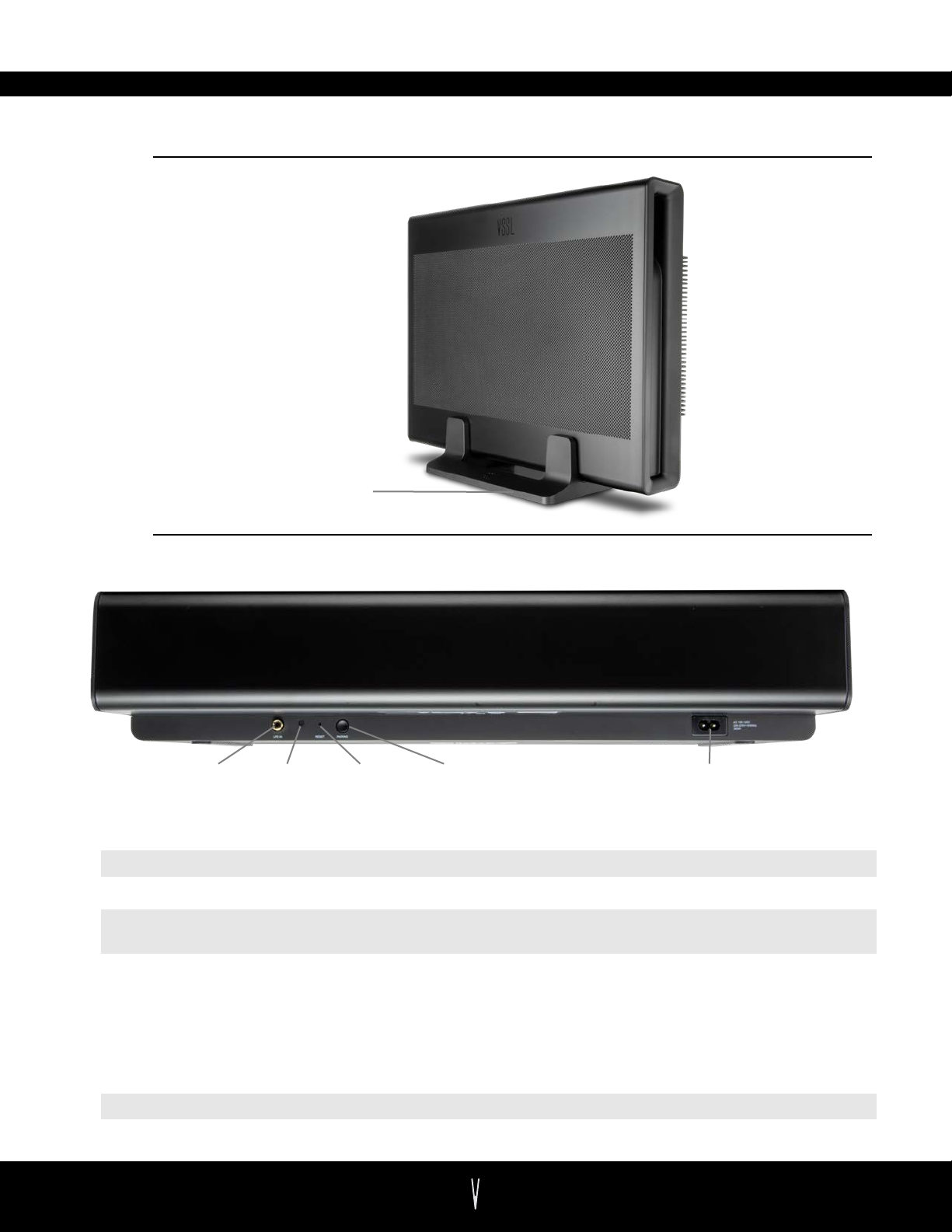
PRODUCT OVERVIEW
FRONT
SUBWOOFER STAND
BACK
LFE INPUT STAT US
LFE Input
Status Indicator
INDICATOR
Low frequency RCA input for connection to soundbar, amplifier, or any line level source
Indicates the status of the sub. See the Device Status section for more information.
Reset Button Use a pin to restart the device. Hold for 10 seconds to restore to its factory settings.
Pairing Button
For use only if setting up when high-speed WiFi is not available. See Oine Pairing
Instructions.
Power Connection
Power supply for SX Subwoofer
RESET
BUTTON
PAIRING
BUTTON
POWER CONNECTION
ACCESSORIES
Power Cord Standard 3-prong power adapter for the U.S.
Subwoofer Stand Optional subwoofer stand.
VSSL SX SUBWOOFER
2
Page 4
GETTING STARTED
1. PLAN YOUR AUDIO SYSTEM
For TV Audio - Your SX Subwoofer can connect to your SX Soundbar wirelessly to act as the bass
for Dolby Digital surround sound listening. Follow the instructions in the VSSL app to pair the
products together.
For Stereo Audio – You can also pair the SX Subwoofer with up to 7 SX Speakers for streaming
stereo/mono audio. Eortlessly create a group of audio in any room where you can’t or don’t
want to run in-ceiling speakers and wiring.
2. INSTALLATION OPTIONS
Flat - When laid flat on its feet, the SX Subwoofer stands at just over 4 inches in height. This allows
you to hide your sub under or behind furniture when space is limited.
Stand - Each SX subwoofer includes an industrial strength stand for applications where conserving
floor space is needed. Slip the sub sideways into the stand and display it proudly, stand it up
behind furniture, or neatly alongside your TV stand.
3. DOWNLOAD THE VSSL APP
Once you’re ready to set up your SX product, download the app from the
app store on your mobile device. Open the app and we’ll guide you
through connecting and setting up your VSSL.
WATCHING TV
The VSSL SX Series allows you to listen to your TV’s audio AND your favorite streaming music within
a single, sleek design. The VSSL app will guide you on setting up your subwoofer for TV and the
Dolby Digital surround sound experience.
PLAYING MUSIC
Listening to music with VSSL is easy. Just play music in your favorite music streaming app, choose
your preferred streaming method, and select the SX zone to play to.
VSSL SX SUBWOOFER
3
Page 5

VSSL APP
When your SX subwoofer is plugged into power, the VSSL app will automatically recognize your
device and initiate setup. Simply follow the prompts to give your product a name and choose which
SX products you’d like to pair it to.
Unlike the SX Soundbar and SX Speaker, the SX Subwoofer requires another paired SX product in
order to participate in the streaming process. When setting up the SX Subwoofer outside of an SX
Zone, simply connect to the subwoofer’s LFE input. Please note that control options are extremely
limited within the VSSL app and the device will need to be discovered anew each time you’d like to
configure its settings.
OFFLINE MODE
To wirelessly pair the SX Subwoofer to an SX Speaker or SX Soundbar without WiFi, single tap
the pair button on the back of the SX Subwoofer and double tap the pair button of the SX
Speaker or Soundbar within 60 seconds of each other. Both LED’s will blink green
momentarily while pairing. If the operation times out, go ahead and try again.
VSSL SX SUBWOOFER
4
Page 6
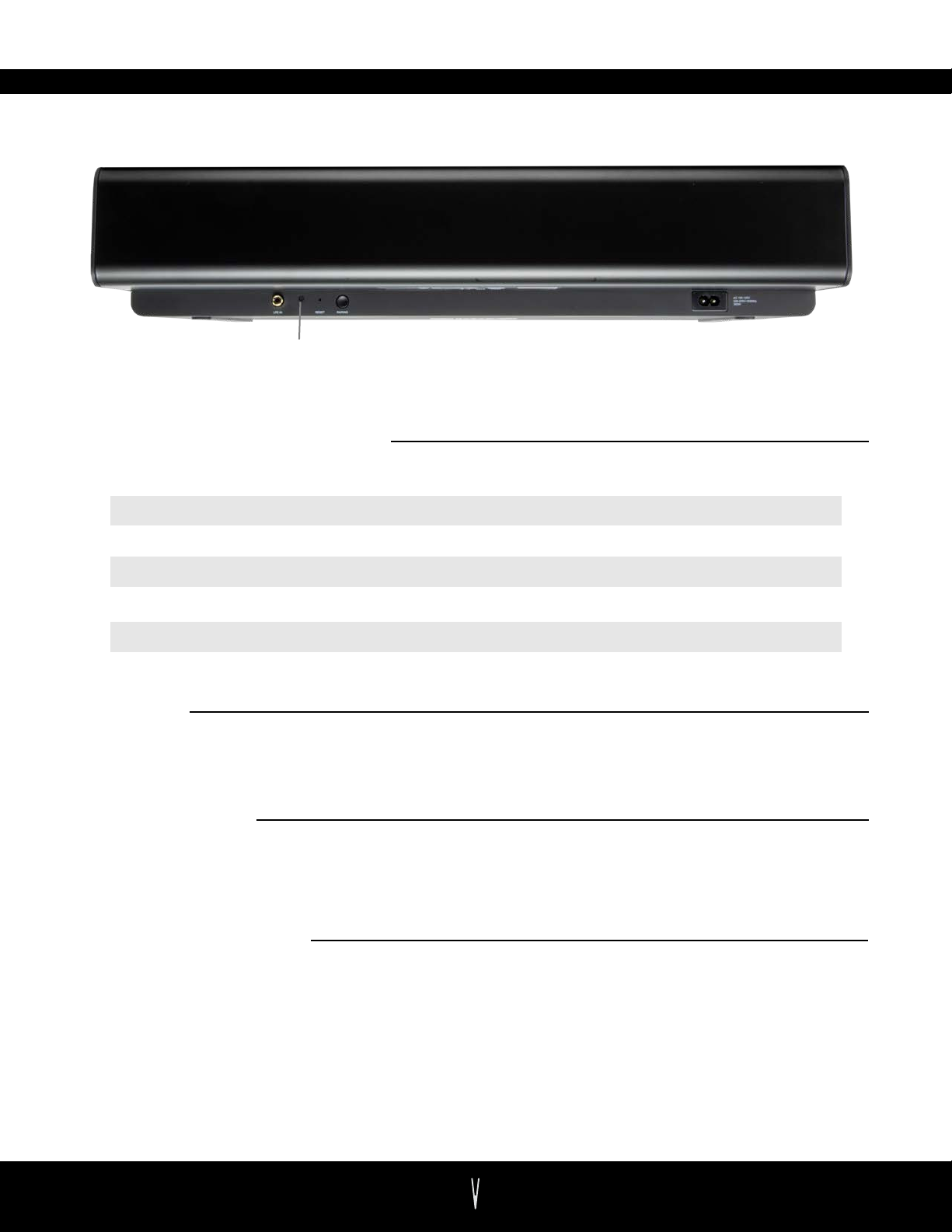
DEVICE STATUS
STATUS INDICATOR
DEVICE STATUS INDICATOR
Pulsing White
Pulsing Purple
The device is booting up.
The device is receiving a firmware update.
Pulsing Orange The device is completing a factory reset.
Flashing Green The device is attempting to pair with another SX product.
Intermittent Solid Green The device is is too close to other IoT devices
Solid White A new audio souce has been detected.
BOOT UP
During boot up, the LED light will pulse for 5-10 seconds. Once the subwoofer is ready to
be set up, the LED will turn o.
POWER MODES
The SX Subwoofer automatically enters into a low power standby mode 10 minutes after a
stream has been paused or ended. The subwoofer also automatically exits low power
mode when a new stream is started.
SOFTWARE UPDATES
Your SX Subwoofer shouldn’t need very many updates. If it does need an update, the VSSL
app will alert you next time it is opened.
VSSL SX SUBWOOFER
5
Page 7

TROUBLESHOOTING
VSSL APP HANGS
When opening the app, the screen indicates that it cannot find a device.
Make sure the sub is powered on and you are standing near the device with your phone.
1.
Force quit the VSSL app on your iOS or Android device.
2.
Perform a factory reset by holding in the reset button for at least 10 seconds.
3.
SUBWOOFER WON’T PAIR SUCCESSFULLY
The subwoofer continues to blink green even though I’ve followed the VSSL app steps.
Unplug the subwoofer and remove it from the area temporarily and closer to the SX product.
1.
Try reducing wireless interference by moving the SX Subwoofer at least 10 feet from any other
2.
IoT device, but not more than 100 feet away from the nearest SX product.
Perform a factory reset by holding in the reset button for at least 10 seconds.
3.
NO AUDIO OUTPUT
You are able to connect/play to your zone, but no music can be heard from the sub.
Open the VSSL app to make sure the zone you're playing to is not muted and the volume is
1.
turned up high enough to hear. You might change to a song with more bass.
Within the SX Group settings, ensure that the subwoofer level is set to at least 0.
2.
Enable bass management when paired to an SX Soundbar.
3.
Attempt to increase the crossover frequency in the settings.
4.
MUSIC STOPS
Your music intermittently stops on its own and/or the zone disconnects from the device.
Close and restart the music app that was being used when the music stopped.
1.
Try reducing wireless interference by moving the SX Subwoofer at least 10 feet from another
2.
IoT device, but not more than 100 feet away from the nearest SX product.
Try dierent streaming protocols AirPlay 2, Chromecast, and Spotify Connect within dierent
3.
music apps in order to isolate the issue.
Check the music service’s online site to find reports of a possible service outage.
4.
Visit help.vssl.com/ and make the required adjustments to your network with the help of your
5.
Internet Service Provider.
Reboot your network.
6.
Perform a factory reset from the app or hold in the reset button for at least 10 seconds after
7.
network adjustments have been made.
STATUS INDICATOR LIGHT IS FLASHING GREEN
Your SX Subwoofer is losing connection to the other paired SX devices.
Open the VSSL app and set up the SX Subwoofer.
1.
Reboot your SX subwoofer by unplugging and plugging in the power cord.
2.
Perform a factory reset by holding in the reset button for at least 10 seconds.
3.
VSSL SX SUBWOOFER
6
Page 8

TROUBLESHOOTING
INDICATOR LIGHTS ARE DEAD
Even after booting up, the zone indicator lights do not turn on.
Ensure the power cord is fully inserted into the back of the SX Subwoofer. Open the VSSL app,
1.
enter the settings section and enable status lights.
Perform a factory reset by holding in the reset button for at least 10 seconds.
2.
MY STREAMING APP IS FROZEN WITH MUSIC PLAYING
Force or hard close and restart the app on your device.
1.
Reboot your SX Speaker from the VSSL app or by unplugging and plugging in the power cord.
2.
Note: For more support and other questions please visit, vssl.com/support
VSSL SX SUBWOOFER
7
Page 9

SPECIFICATIONS
Amplifier:
Woofer:
Dual Acoustic Ports:
Freq. Response:
All Digital Sound:
Equalization:
Wireless Connectivity:
Power Supply:
Weight:
Dimensions:
Operating Temperature:
Multiple Orientations:
Class-D digital amplifier
10” Honeycomb
Tuned to enhance subwoofer performance
25Hz
All filter settings, active EQ, and time alignment are done digitally
through DSP circuitry for zero-loss audio quality and energy
Advanced EQ settings
Connects to any SX Soundbar or SX Speaker
Auto-switching 100-240V ~50-60Hz 2 A AC universal input
29.8lbs
L: 21.65” (550mm) x W: 16.96” (431mm) x H: 4.37” (111mm)
32° to 104°F (0°-40° C)
Upright in stand (included) or lay flat (built-in rubber feet)
VSSL SX SUBWOOFER
8
Page 10
WARRANTY INFORMATION
All VSSL branded products have a limited one (1) year warranty. The VSSL Product Warranty covers defects
in materials and workmanship in every VSSL product for one (1) year from the date of shipment from VSSL
or the date of the original retail purchase from an authorized VSSL Dealer. The VSSL Product Warranty will
cover the cost of parts and repair labor on all products deemed to be defective by Soundvision
Technologies. The VSSL Product Warranty does not guarantee that VSSL products will at all times operate
without interruption or will be error-free, or that all errors may be corrected. The warranty extends only to
the original purchaser of the product and not to any subsequent owner.
Soundvision Technologies’ obligation under this warranty is limited to repairing or replacing any component
found defective in material or workmanship under normal conditions of use with an equal and/or current
product. Products to be repaired or returned under this warranty must be returned to VSSL through an
authorized VSSL dealer with all transportation and insurance charges prepaid. The warranty period is not
extended if we repair or replace your product.
There are some exclusions to the VSSL Product Warranty, including but not limited to:
• Products which have been abused, modified, or disassembled;
• Problems that result from external causes such as accident, abuse or misuse;
• Use that is not in accordance with VSSL product instructions;
• Products with missing or altered serial numbers;
• Products which have had their housings opened or are otherwise tampered with; or
• Problems caused by using third party accessories, parts, or components.
IMPORTANT SAFETY INFORMATION
Read these instructions.
1.
Keep these instructions.
2.
Heed all warnings.
3.
Follow all instructions
4.
Do not use this apparatus near water.
5.
Clean only with dry cloth.
6.
Do not block any ventilation openings. Install in accordance with manufacturer’s instructions.
7.
Do not install near any heat sources such as radiators, heat registers, stoves, or other apparatus (including
8.
amplifiers) that produce heat.
Do not bypass the safety purpose of the polarized or grounding-type plug. A polarized plug has two blades
9.
with one wider than the other. A grounding type plug has two blades and a third grounding prong. The wide
blade or the third prong are provided for your safety. If the provided plug does not fit into your outlet,
consult an electrician for replacement of the obsolete outlet.
Protect the power cord from being walked on or pinched, particularly at plugs, convenience receptacles,
10.
and the point where they exit from the apparatus.
Only use attachments/accessories specified by the manufacturer.
11.
Use only with the cart, stand, tripod, bracket, or table specified by the manufacturer, or sold with the
12.
apparatus. When a cart is used, use caution when moving the cart/apparatus combination to avoid injury
from tip-over.
Unplug this apparatus during lightning storms or when unused for long periods of time.
13.
Refer all servicing to qualified service personnel. Servicing is required when the apparatus has been
14.
damaged in any way, such as; power-supply cord or plug is damaged, liquid has been spilled or objects have
fallen into the apparatus, the apparatus has been exposed to rain or moisture, does not operate normally, or
has been dropped.
WARNING
To reduce the risk of fire or electric shock, do not expose this apparatus to rain or moisture.
•
The apparatus shall not be exposed to dripping or splashing and that no objects filled with liquids, such as
•
vases, shall be placed on the apparatus.
An appliance coupler is used as the disconnect device, the disconnect device shall remain readily operable.
•
Please always keep at least 20cm away from this device.
•
VSSL SX SUBWOOFER
9
Page 11
EU REGLATORY CONFORMANCE
According to Article 10 (10) of Directive 2014/53/EU, the packaging
shows that this radio equipment will be subject to some restrictions
when placed on the market in Belgium (BE), Bulgaria (BG), the
Czech Republic (CZ), Denmark (DK), Germany (DE), Estonia (EE),
Ireland (IE), Greece (EL), Spain (ES), France (FR), Italy (IT), Cyprus
(CY), Latvia (LV), Luxembourg (LU), Hungary (HU), Malta (MT),
Netherlands (NL), Austria (AT), Poland (PL), Portugal (PT), Romania
(RO), Slovenia (SI), Slovakia (SK), Finland (FI), Sweden (SE), the
United Kingdom (UK), Turkey(TR), Norway (NO), Switzerland (CH),
Iceland (IS), and Liechtenstein (LI). The WLAN function for this
BE BG CZ DK DE
EE IE EL ES FR
IT CY LV LU HU
MT NL AT PL PT
RO SI SK FI SE
UKLITR NO CH IS
device is restricted to indoor use only when operating in the 5150 to
5350 MHz frequency range.
FCC STATEMENT
This device complies with Part 15 of the FCC Rules. Operation is subject to the following two
conditions:
(1) This device may not cause harmful interference, and
(2) This device must accept any interference received, including interference that may cause
undesired operation.
Cet appareil est conforme à la section 15 des réglementations de la FCC. Le fonctionnement de
l’appareil est sujetaux deux conditions suivantes :
(1) cet appareil ne doit pas provoquer d’interférences néfastes, et
(2) cet appareil doit tolérer les interférences reçues, y compris celles qui risquent de provoquer un
fonctionnement indésirable.
Note: This product has been tested and found to comply with the limits for a Class B digital device,
pursuant to Part 15 of the FCC Rules. These limits are designed to provide reasonable protection
against harmful interference in a residential installation. This product generates, uses, and can radiate
radio frequency energy and, if not installed and used in accordance with the instructions, may cause
harmful interference to radio communications. However, there is no guarantee that interference will
not occur in a particular installation. If this product does cause harmful interference to radio or
television reception, which can be determined by turning the equipment o and on, the user is
encouraged to try to correct the interference by one or more of the following measures:
—Reorient or relocate the receiving antenna.
—Increase the separation between the equipment and receiver.
—Connect the equipment into an outlet on a circuit dierent from that to which the receiver is
connected.
—Consult the dealer or an experienced radio/TV technician for help.
Please take attention that changes or modifications not expressly approved by the party responsible
for compliance could void the user’s authority to operate the equipment.
This device complies with Industry Canada licence-exempt RSS standard(s). Operation is subject to
the following two conditions:
(1) this device may not cause interference, and
(2) this device must accept any interference, including interference that may cause undesired
operation of the device.
Le présent appareil est conforme aux CNR d'Industrie Canada applicables aux appareils radioexempts
de licence. L'exploitation est autorisée aux deux conditions suivantes :
(1) l'appareil ne doit pas produire de brouillage, et
(2) l'utilisateur de l'appareil doit accepter tout brouillage radioélectrique subi, même si le brouillage
est susceptible d'en compromettre le fonctionnement.
VSSL SX SUBWOOFER
10
 Loading...