

Page 1

Voyage MPD Starter Kit 2.0 - Getting Started Guide
Voyage Design and Consultants
15-Mar-2014
Version 1.2
Page 2
Voyage MPD Starter Kit 2.0 - Getting Started Guide
© 2014 Voyage Design and Consultants Page 1 15-Mar-2014/ Version 1.2
1 Introduction
Voyage MPD Starter Kit is a compact Computer-Audio-Source (CAS) system for playing your favourite audio files
from a USB flash memory or network drives. It offers high quality audio playback, with low power consumption,
silent and at a very low cost.
1.1 Specifications
Voyage MPD 0.9.2 pre-loaded on 4GB/8GB SD card or 16GB mSATA SSD.
PCEngines APU embedded board
o AMD G series T40N or T40E APU, 1 GHz dual core (Bobcat core)
o 2GB DDR3-1066 DRAM
o 3 Gigabit Ethernet (Realtek RTL8111E)
o 2 miniPCI-e slots, LPC bus, GPIO header, I2C bus, COM2 (3.3V RXD/TXD).
o 2 USB ports
Aluminum indoor enclosure
This is a DIY kit and assembly required. This kit does not include a PSU. Suggest at least 18W (e.g. 12V
1.5A) AC-to-DC power adapter with a jack with 2.5 mm center positive connector.
For audio output, you need a separate USB audio DAC/converter (not included.) that supports USB Audio Class
1 or Class 2. Voyage MPD Starter Kit does not work with the USB audio DAC/converter that does not natively
support USB Audio Class 1 or Class 2 specification.
1.2 Assembly Guide
The APU CPU and south bridge are passively cooled by heat conduction to the aluminum enclosure.
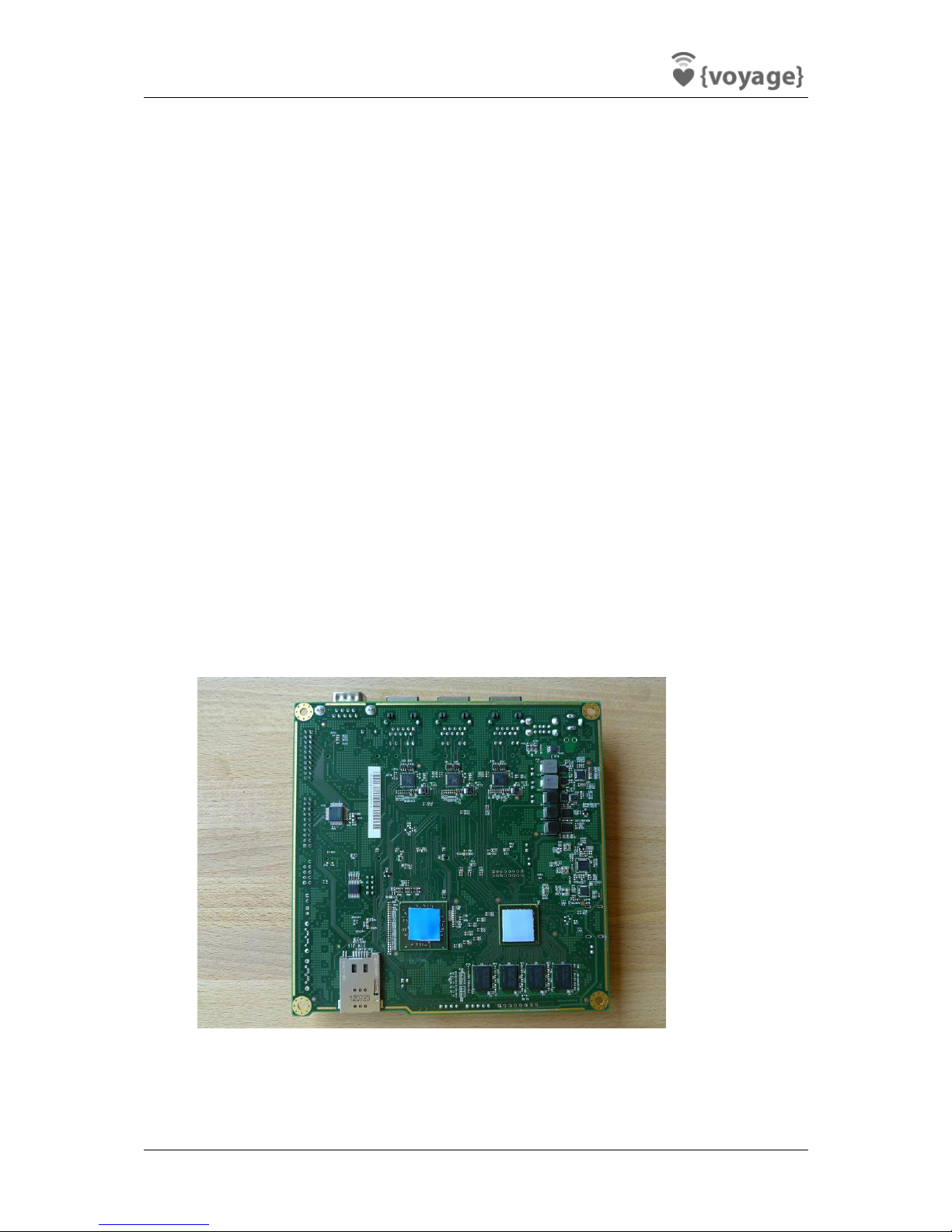
1. Remove DB9 hex nuts. Using a small x-acto knife or similar, peel transparent backing foil from the small
heat spreaders. Apply to CPU and south bridge. Then peel the blue cover foil from the heat spreaders
(shown: blue cover foil removed on the right one).
Page 3
Voyage MPD Starter Kit 2.0 - Getting Started Guide
© 2014 Voyage Design and Consultants Page 2 15-Mar-2014/ Version 1.2
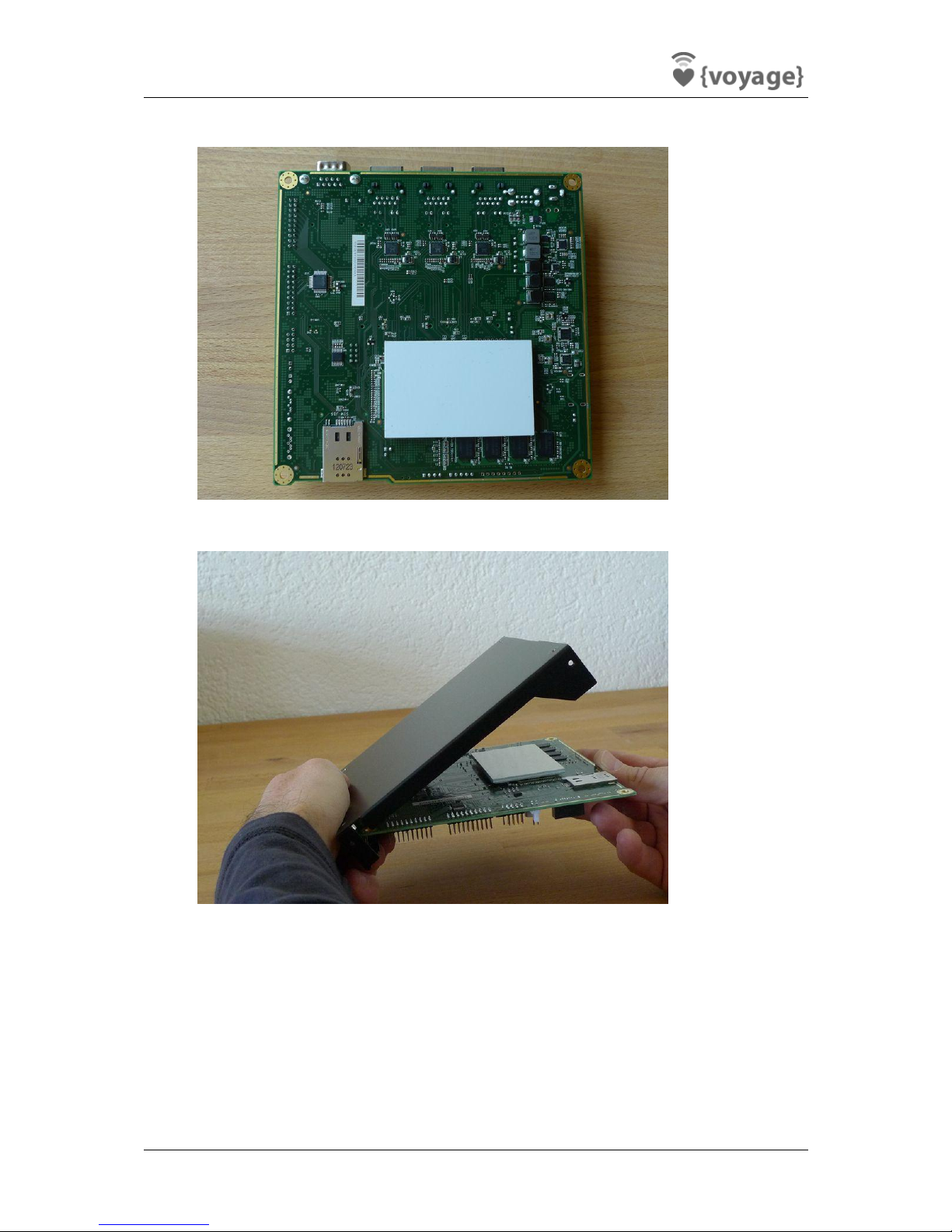
2. Place the aluminum heat spreader (blank side down) over CPU and south bridge. Make sure to avoid
conflict with nearby through hole components. Peel the cover foil.
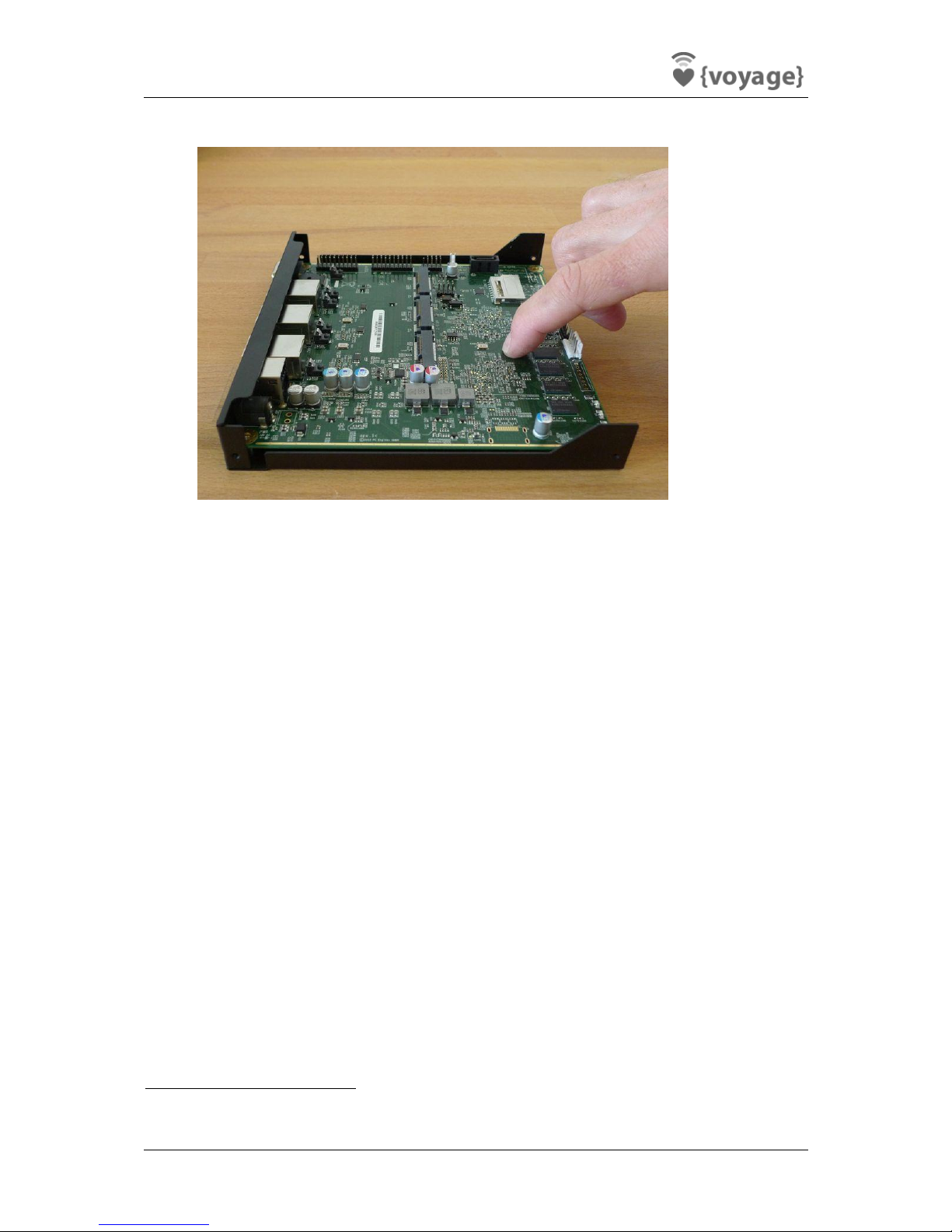
3. "Bottoms up" - hold the enclosure base upside down, feed the board DB9 and LAN connectors through
the openings. Lightly press board and enclosure base together to stick the heat spreader in place.
Page 4
Voyage MPD Starter Kit 2.0 - Getting Started Guide
© 2014 Voyage Design and Consultants Page 3 15-Mar-2014/ Version 1.2
4. Turn around and carefully press down around CPU and heat sink to get good contact between
enclosure and heat spreader. Then insert screws and hex nuts.
5. Insert SD-card or mSATA card to APU board. (Most of the kits have SD-card or mSATA SSD preinstalled.)
6. (Optional) For Voyage MPD Wireless Kit:
a. Snap U.FL connector of the pigtail to the connector (marked with “main”) on mini-PCIe card
b. Insert the wireless mini-PCIe card to APU board.
c. Fix RP-SMA connectors of the pigtail on the back of the enclosure.
d. Fasten antenna on the RP-SMA connectors
7. Put the top enclosure and fasten by 4 screws.
1.3 Before you start
It is suggested to connect on-board DB9 connector to the serial console via null modem cable when you first
power on the kit. It allows you to review the boot activities and assist troubleshooting if any problem is
encountered. The board’s default of serial setting is 115200 8N1. Connect the board using serial console is
optional. Here is some recommended terminal software to connect to the APU board.
Windows: Tera Term1 or HyperTerminal Private Edition 6.32
Linux: minicom
2 Starting up Voyage MPD Starter Kit
1. If you want to access Voyage MPD system using a serial console, connect serial port to a PC through
null modem cable (RXD / TXD crossed over). Set serial terminal to 115200 8N1, flow control = none or
xon-xoff. This step is optional if you really want to access Voyage MPD via serial console and for
troubleshooting.
2. Connect Ethernet cable to RJ45 socket (LAN1, leftmost) on the board if needed; connect the other end
of the cable to your network/wireless router.
1
http://ttssh2.sourceforge.jp
2
http://www.brothersoft.com/hyperterminal-private-edition-download-71955.html
Page 5
Voyage MPD Starter Kit 2.0 - Getting Started Guide
© 2014 Voyage Design and Consultants Page 4 15-Mar-2014/ Version 1.2
3. Connect DC power output of the AC adaptor to the DC jack of the board. To avoid arcing, please plug in
the DC jack to the board first, then plug the adapter into mains.
4. The board should now power on. All three LEDs will light during BIOS POST, then the system turn off
two of the LEDs after POST.
5. During the boot process, Voyage MPD tries to request DHCP lease from your network3. Once the boot
completes, a login prompt would appears in the serial console. The default login user is “root” and
password is “voyage”. If you don’t have a serial console, you can connect to Voyage MPD using ssh
protocol. PuTTy (for Windows) and ssh command (for Linux or Mac OS X) are recommended for
accessing Voyage MPD remotely.
6. By default, Voyage MPD mounts the disk as read-only. You can issue “remountrw” command to mount
disk as read-write for installing additional package from Debian. Once you have installed the package,
you may want to mount the disk as read-only by “remountro”. To remove all docs and manpages, you
can run “remove.docs”.
7. If you have Voyage MPD Wireless Kit, please follow section 4.3 or 4.4 to setup wireless access point or
wireless client respectively.
3 Getting Started to Playback Music
1 Connect USB DAC or audio converter to the USB port of APU board via a USB cable.
2 Connect USB flash memory or external USB HDD to APU. The disk will be automatically mounted (as
/media/usb0) and the music files will be automatically seen by MPD.
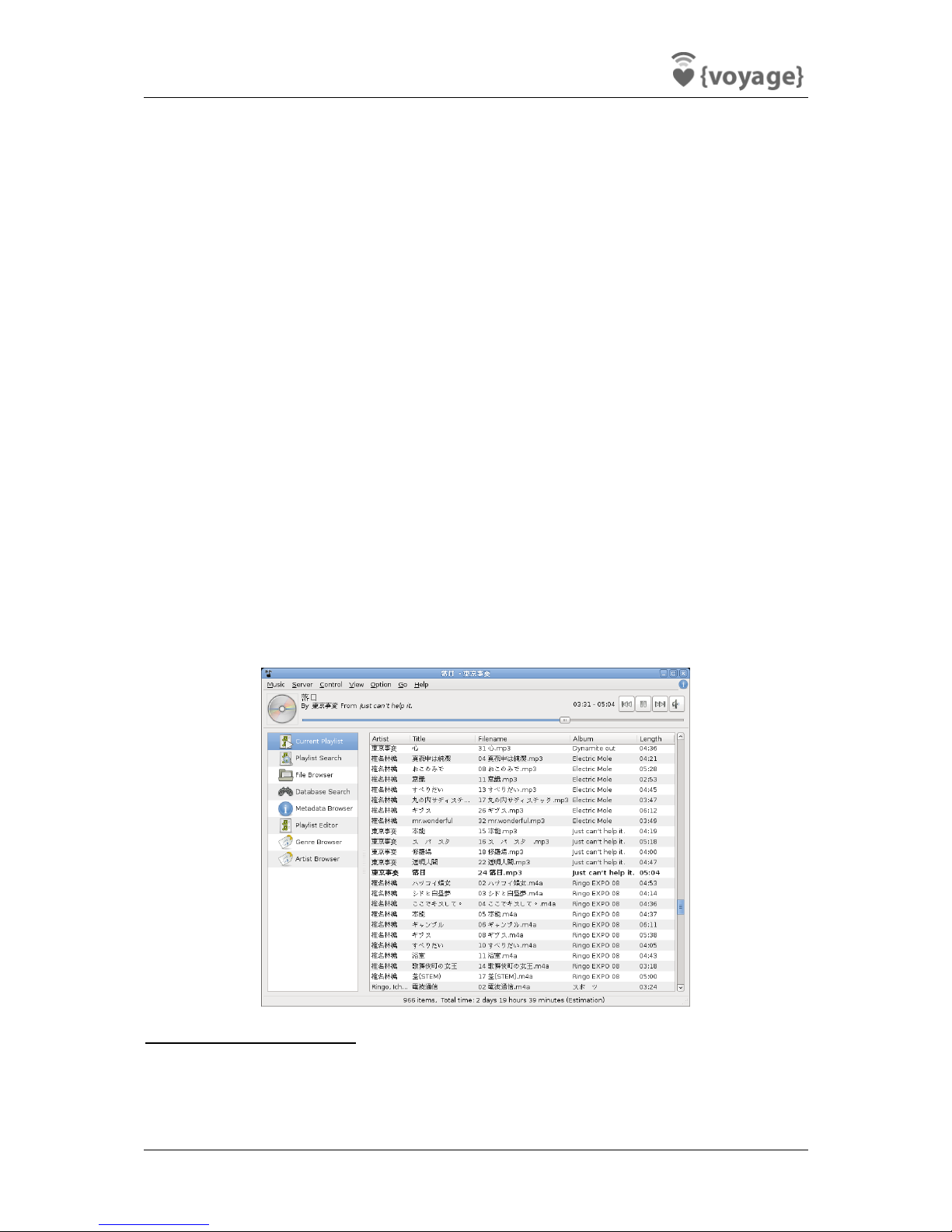
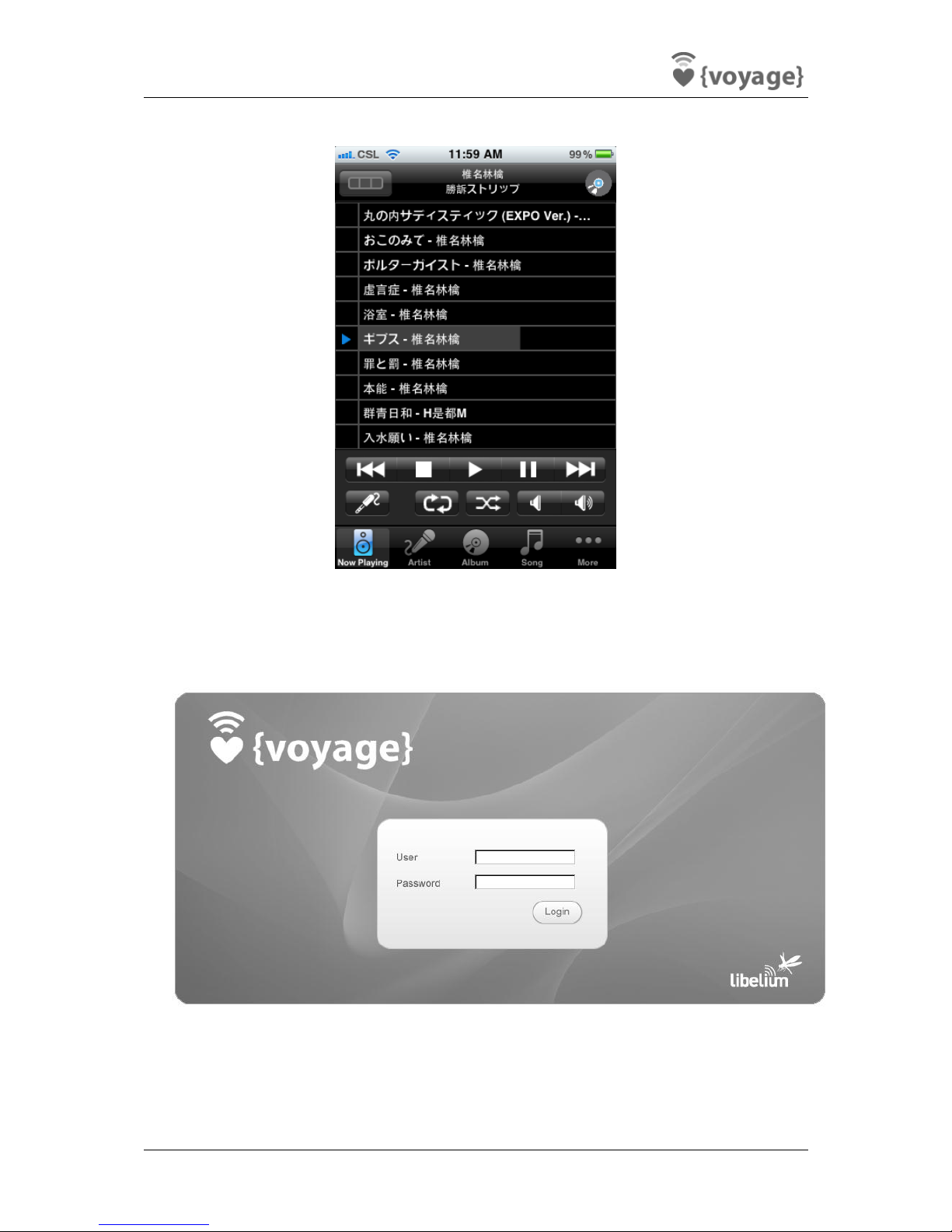
3 Fire up gmpc4 or Music Player Minion5 application in another computer on the network and connects to
Voyage MPD, or you can use ssh connect to the box and run "mpc" commands. (If the kit connects to a
wireless router, you can run MPoD6 app on your iPhone and connect to it.) Add your music to the
playlist and play. MPD connection parameter is:
a. IP: <Voyage MPD IP address in eth0> or voyage.local3
b. Port: 6600
You can find out the IP address using “ifconfig eth0” command from the serial console or ssh terminal.
3
On Windows PC with iTunes installed, you may remotely access the kit using hostname voyage.local
4
gmpc, Gnome Music Player Client - http://gmpclient.org/
5
Music Player Minion, a Firefox addons - https://addons.mozilla.org/en-us/firefox/addon/music-player-minion/
6
MPoD for iPhone - http://www.katoemba.net/makesnosenseatall/mpod/ and
MPad for iPad - http://www.katoemba.net/makesnosenseatall/mpad/
Page 6
Voyage MPD Starter Kit 2.0 - Getting Started Guide
© 2014 Voyage Design and Consultants Page 5 15-Mar-2014/ Version 1.2
gmpc connects to Voyage MPD
MPod connects to Voyage MPD
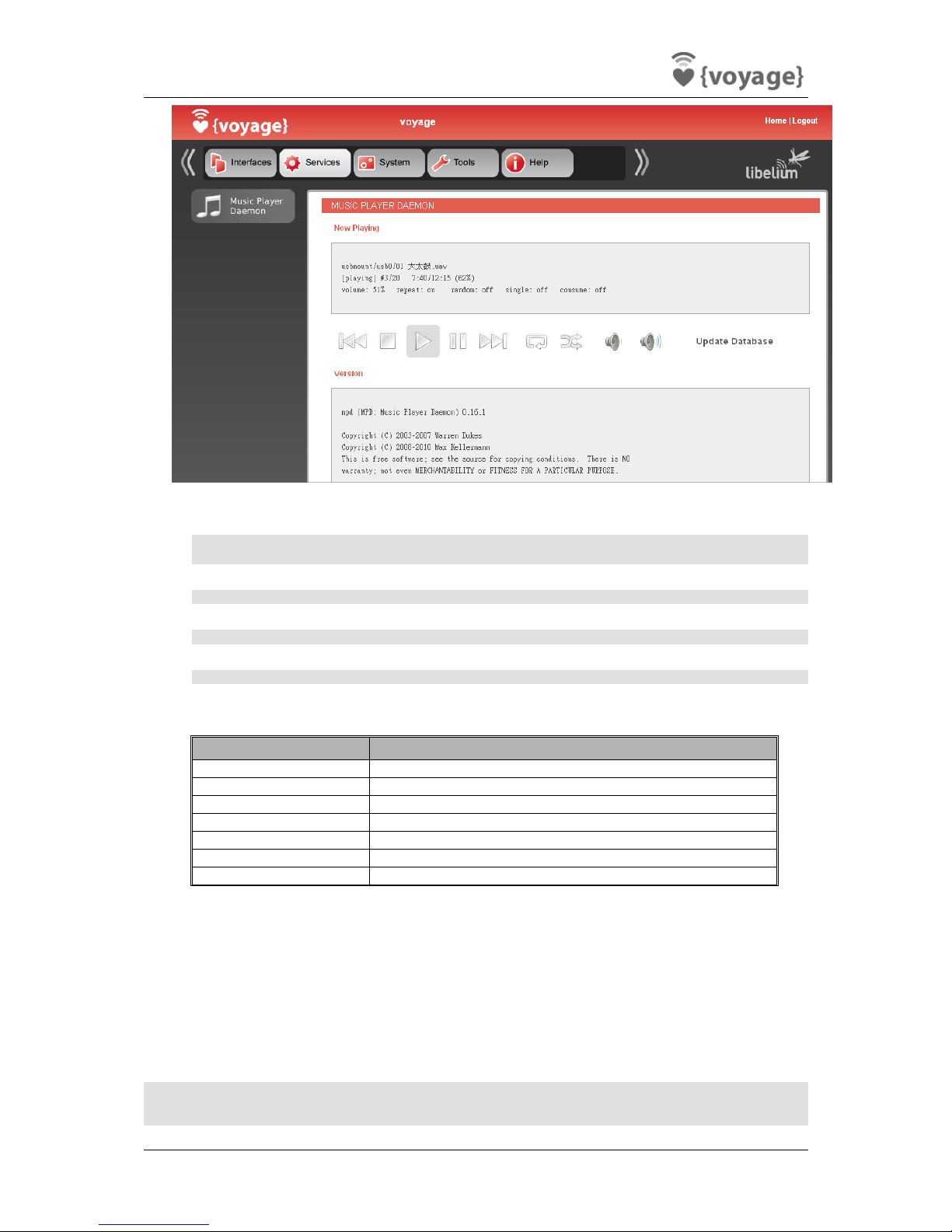
4 There is also a web GUI in the kit with minimalistic functions to control the playback. It is enabled by
default. URL is http://<Voyage MPD IP address in eth0>. At login screen, User is “root” and password
is “voyage”.
5 After login, click “Services” button then “Music Player Daemon” plug-in to control the playback of MPD.
Page 7
Voyage MPD Starter Kit 2.0 - Getting Started Guide
© 2014 Voyage Design and Consultants Page 6 15-Mar-2014/ Version 1.2
6 If you have console or ssh login, you can run the following Linux commands to control the playback. You
can query the all music files that could be read by MPD using the following commands:
# mpc update
# mpc listall
To add all music files to play list, run
# mpc listall | mpc add
The start play the music by:
# mpc play
There are some other useful commands in mpc. To see also available commands, run
# mpc help
Here are some frequently used mpc commands:
MPC COMMANDS
DESCRIPTION
mpc next
Play next song
mpc prev
Play previous song
mpc volume 50
set volume to 50%
mpc stop
stop playing
mpc random
toggle shuffling of songs on or off
mpc repeat
toggle repeating of the playlist
mpc clear
clear the playlist
4 Advanced Setup
Additional setup information could be found in /README in the root disk. This section provides some hands-on
setup of Voyage MPD Starter kit.
4.1 Mount to NFS shared drive
Let say the music library is stored on another Linux server (IP: 192.168.1.101) where the music files are
accessible via NFS mount (/home/public). So edit /etc/fstab and add NFS mount entry:
# remountrw
# vi /etc/fstab
192.168.1.101:/home/public /mnt/public nfs rw,noatime 0 0
Page 8
Voyage MPD Starter Kit 2.0 - Getting Started Guide
© 2014 Voyage Design and Consultants Page 7 15-Mar-2014/ Version 1.2
Then create a /mnt/public directory on Voyage MPD and mount to NFS server:
# mkdir /mnt/public
# mount -a
Since MPD set /var/lib/mpd/music as default music library path, we now create a symlink that points from default
library path to our NFS mount point.
# ln -s /mnt/public/ /var/lib/mpd/music/public
At last, make sure the NFS shared directories and files are readable by MPD:
# chmod –R ugo+r /mnt/public/
4.2 Mount to SAMBA shared drive
Like NFS share, if you have music files on Windows or Samba server, you can mount a directory to the samba
shared directory. Edit /etc/fstab as below:
# remountrw
# vi /etc/fstab
192.168.1.101:/public /mnt/public cifs
username=<username>,password=<password>,file_mode=0644,dir_mode=0755,iocharset=utf8 0 0
This assumes you have 192.168.1.101 server with a Windows/Samba shared directory named “public”. You
need to provide the username and password.
Like NFS mount, create a /mnt/public directory on Voyage MPD and mount to Windows/SAMBA server. Then
create a symlink so that MPD is able to search the music files under the SAMBA shared directory.
# mkdir /mnt/public
# mount –a
# ln -s /mnt/public/ /var/lib/mpd/music/public
# chmod –R ugo+r /mnt/public/
Note: If you are using Synology NAS, please use “username=<name of NAS>/admin” as user name parameter.
4.3 Access to UPnP AV Media Server
If you have music files hosted on UPnP AV Media Server in your network, you can use djmount to access UPnP
media from Voyage MPD.
If djmount is not installed, you can use apt-get to install it (requires Internet access from the kit).
# apt-get update
# apt-get install djmount
Then create a mount directory for UPnP media and run djmount manually:
# mkdir /media/upnp
# djmount -o allow_other,nonempty,iocharset=utf-8 /media/upnp
[I] Mount options = allow_other,nonempty,iocharset=utf-8
[I] Charset : successfully initialised charset='utf-8'
Make sure your UPnP media contents are publicly accessible from your network. When djmount is running, you
should be able to locate the media files under /media/upnp.
#find /media/upnp/
…
/media/upnp/punknix: root/Browse Folders/flac
/media/upnp/punknix: root/Browse Folders/flac/2l.no
/media/upnp/punknix: root/Browse Folders/flac/2l.no/Shchedrin: Basso Ostinato.flac
/media/upnp/punknix: root/Browse Folders/flac/2l.no/Crystalline.flac
/media/upnp/punknix: root/Browse Folders/flac/2l.no/Violin Concerto no. 4 in D major KV 218 Allegro.flac
…
Page 9

Voyage MPD Starter Kit 2.0 - Getting Started Guide
© 2014 Voyage Design and Consultants Page 8 15-Mar-2014/ Version 1.2
Then update MPD database (e.g. by “mpc update” command) so that MPD is able to recognized the music files
from the UPnP directory.
Some known issues in djmount are:
1. It does not automatically start after reboot. You will need to start it manually using the above
commands.
2. djmount consumes more memory and CPU cycles than NFS or SAMBA client service. Voyage MPD
kit may potentially run out of memory if it is run in a prolonged period (> 1 day) without reboot.
4.4 Setting up Wireless Access Point (WPA2) under NAT network
Assume you have wireless card and want to setup a wireless access points where wireless client are in a NAT
network. Add the following lines in /etc/network/interfaces:
auto wlan0
iface wlan0 inet static
address 10.1.10.1
netmask 255.255.255.0
broadcast 10.1.10.255
hostapd /etc/hostapd/hostapd.wlan0.conf
up nat.sh wlan0 eth0 "10.1.10.0/24"
This assumes you wireless device is wlan0 and the above will setup wlan0 interface with IP address 10.1.10.1
assigned and all traffics are NAT’d to eth0. All wireless clients connected to this access point will be assigned
with IP range 10.1.10.0/24.
Then create a file /etc/hostapd/hostapd.wlan0.conf:
interface=wlan0
driver=nl80211
logger_syslog=-1
logger_syslog_level=2
logger_stdout=-1
logger_stdout_level=2
debug=4
channel=6
hw_mode=g
macaddr_acl=0
auth_algs=3
eapol_key_index_workaround=0
eap_server=0
wpa=3
ssid=voyage-mpd
wpa_passphrase=voyage-mpd
wpa_key_mgmt=WPA-PSK
wpa_pairwise=TKIP
eapol_version=1
The above configuration will setup both WPA and W PA2. To setup WPA2 only, set “wpa=2”. The wireless AP
service name (ESSID) will be “voyage-mpd” with passphrase “voyage-mpd”. Change ssid, wpa_passphrase
and channel values if desirable. Then run:
# ifup wlan0
to activate the wireless access point now. The above setting also automatically enables wireless access point
after reboot.
4.4.1 802.11n Access Point Support
For wireless card that supports 802.11n, adds the following lines in file /etc/hostapd/hostapd.wlan0.conf to enable
802.11n support for access point.
wme_enabled=1
ieee80211n=1
ht_capab=[HT40-][HT40+][SHORT-GI-40][TX-STBC][RX-STBC1][DSSS_CCK-40]
*** Please note the above configuration only works for wireless card that supports 802.11n. Applying this
configuration to 802.11 a/b/g cards will make the access point functions to fail completely ***
Page 10
Voyage MPD Starter Kit 2.0 - Getting Started Guide
© 2014 Voyage Design and Consultants Page 9 15-Mar-2014/ Version 1.2
4.5 Connect to existing Wireless Access Point or Wireless Router (WPA)
If you have nl80211 compatible wireless card (e.g. NMP-8601 / NMP-8602 / RM2) and want to connect to an
existing wireless access point or router in your network, update with the following lines in /etc/network/interfaces:
auto wlan0
iface wlan0 inet dhcp
wpa-driver wext
wpa-ssid <your ssid>
wpa-psk <your WPA shared key>
wpa-key-mgmt WPA-PSK
wpa-pairwise TKIP
wpa-group TKIP
wpa-proto WPA
wireless-mode Managed
Replace <your ssid> to the SSID and <your WPA shared key> to WPA shared key of your wireless access
point / router.
If you use WPA2 in your wireless network, you need to change wpa-proto to “RSN”. You also need to change
wpa-pairwise and wpa-group to “CCMP TKIP” as well. Then run:
# ifup wlan0
to connect to the wireless access point / router now. The above settings also automatically connect to wireless
access point / router after reboot.
5 Troubleshooting
5.1 MPD cannot read my music files on USB disk, NFS or Windows/Samba file
shares when running “mpc listall”
If you use USB disk, first check if the USB device is mounted successfully, run:
# root@voyage:~# df
Filesystem 1K-blocks Used Available Use% Mounted on
...
/dev/sda1 1941504 1368856 474024 75% /media/usb0
...
You should see the entry like above.
First check you use NFS mount or Windows/Samba shares, you should see the following entry (below show NFS
mount):
Filesystem 1K-blocks Used Available Use% Mounted on
...
192.168.1.101:/home/public 103343616 80710144 17383936 83% /mnt/public
...
If you see the corresponding entries, problem the music files does not have proper permission set correctly, run:
# cd /media/usb0
# chmod –R 777 /media/usb0
or,
# cd /mnt/public
# chmod –R 777 /mnt/public
The above commands will set the permission of all files (and under all sub-directories) to be publicly readable.
Then run “mpc update; mpc listall” should see all music file scanned by MPD daemon.
Page 11
Voyage MPD Starter Kit 2.0 - Getting Started Guide
© 2014 Voyage Design and Consultants Page 10 15-Mar-2014/ Version 1.2
5.2 After restarting Voyage MPD Starter Kit, all my previous changes to MPD are lost
This is a known issue in Voyage MPD software if you restart the box by unplug and then re-plug the power. The
most proper way is to issue a “halt” command via ssh or serial console to shutdown, or use “reboot” command to
restart the box gracefully.
However, you can implement periodic saving data to disk so that it could recover from sudden power lost. In
webgui (e.g. <Voyage MPD IP> or voyage.local), go to System Cron and add the following entries:
# m h dom mon dow command
*/5 * * * * ( /etc/init.d/voyage-sync sync )
Then, edit (use nano or vi), /etc/default/voyage-util and appends the following lines to the file:
VOYAGE_SYNC_RECOVER="YES"
VOYAGE_SYNC_RECOVER_DIRS="var/lib/mpd"
Or simply append the above lines using command line in ssh or serial console:
echo "VOYAGE_SYNC_RECOVER=\"YES\"" >> /etc/default/voyage-util
echo "VOYAGE_SYNC_RECOVER_DIRS=\"var/lib/mpd\"" >> /etc/default/voyage-util
5.3 MPD client software cannot show Japanese characters correctly
If you have USB disk device holding music filename in Japanese characters which cannot be displayed correctly
under MPD client software such as gmpc, you properly need to enable UTF8 encoding when the USB disk device
is mounted.
Run the following command to append a UTF8 mount option to /etc/usbmount/usbmount.conf
# echo "FS_MOUNTOPTIONS=\"-fstype=vfat,utf8 -fstype=fat,utf8\"" >> /etc/usbmount/usbmount.conf
This will mount your USB disk device using UTF8 codeset. Then reboot MPD kit, do "Update Database" in MPD
client software. You should be able to see Japanese characters correctly.
5.4 Voyage MPD Starter Kit does not recognize all my USB drives that has 8
partitions
When USB drives are plugged to Voyage MPD Start Kit, usbmount will be triggered to mount the USB drive to
/media/usb0 to /media/usb7 mount points. However, if you have many partitions in your drivers, usbmount may
not recognize all drives and only a few drives (e.g. 3 – 4 drives) are mounted. If this is the case, change the
following line in /usr/share/usbmount/usbmount, from
lockfile-create --retry 3 /var/run/usbmount/.mount || \
to
lockfile-create --retry 99 /var/run/usbmount/.mount || \
This should be around line 221 of /usr/share/usbmount/usbmount. There are racing conditions to create 8 mount
points by usbmount at the same time. After 3 retries fail, the mount point creation abort. The above change
increases no. of retries to 99. However, this will take approximately 30 sec. to 60 sec. to create all mount points
successfully.
5.5 Voyage MPD play with “click” sound or cannot play on my 24-bit/192kHz USB
DAC or the playback is sluggish
There are 2 solutions to this problem:
5.5.1 Using network mounted drive instead of USB disk devices
Voyage MPD may not play music files properly or play with continual “click” noise for some 24-bit/192kHz USB
DACs. This usually happens when both USB ports are used for USB DAC and USB hard disk / flash memory.
This is because the USB ports are not capable or have enough bandwidth to support both USB devices at the
same time. To solve this problem, please use NFS / SAMBA mount for holding music files on a remote machine /
NAS instead of USB hard disk / flash memory.
Page 12
Voyage MPD Starter Kit 2.0 - Getting Started Guide
© 2014 Voyage Design and Consultants Page 11 15-Mar-2014/ Version 1.2
5.5.2 Changing MPD sample rate to auto.
The default MPD configuration assumes 44.1k 16-bit sampling rate. If your music files are in different bit-rate
such as 192kHz 24-bit, resampling will be done by mpd software that consume a lot of CPU.
You can run “top” command to show the CPU consumption on mpd process.
To make MPD disable re-sampling and detect the bit-rate automatically, remove the "format" lines in
/etc/mpd.conf like below:
audio_output {
type "alsa"
name "My ALSA Device"
device "hw:0,0" # optional
# format "44100:16:2" # optional
# mixer_device "default" # optional
# mixer_control "PCM" # optional
# mixer_index "0" # optional
}
Then restart mpd service by running command "/etc/init.d/mpd restart".
5.6 Voyage MPD kit hangs during startup after reboot
The most of the reasons for the kit to hang during startup is the instability and under-power of a power adaptor
(PSU). This is usually the case if you have a Voyage MPD Wireless kit or plug-in MiniPCI module that consumes
extra power.
First, check the PSU to make sure it could provide a stable source of 15W power, which equivalent to 12V x
1.25A for example. Try switching to a different PSU to see if the hanging problem is resolved.
5.7 The music output is muted after reboot
In the recent version of Voyage MPD (e.g. 0.9-rc1), there is a known issue that the music output is muted after
reboot. Run the following commands to check if you music device is set to mute:
# amixer
Simple mixer control 'XMOS Clock Selector',0
Capabilities: pvolume pswitch penum
Playback channels: Front Left - Front Right
Limits: Playback 0 - 127
Mono:
Front Left: Playback 127 [100%] [0.00dB] [off]
Front Right: Playback 127 [100%] [0.00dB] [off]
Simple mixer control 'XMOS Clock Selector',1
Capabilities: pvolume pvolume-joined pswitch pswitch-joined penum
Playback channels: Mono
Limits: Playback 0 - 127
Mono: Playback 127 [100%] [0.00dB] [off]
If you see the Playback is set to [off], the music output is muted. You can use ‘alsamixer’ tools to unmute (by
press ‘M’ key to toggle mute/unmute for each control). Or you can simply run the following commands:
# amixer scontrols|sed -e 's/^Simple mixer control//'|while read line;do amixer sset "$line" unmute;done
Simple mixer control 'XMOS Clock Selector',0
Capabilities: pvolume pswitch penum
Playback channels: Front Left - Front Right
Limits: Playback 0 - 127
Mono:
Front Left: Playback 127 [100%] [0.00dB] [on]
Front Right: Playback 127 [100%] [0.00dB] [on]
Simple mixer control 'XMOS Clock Selector',1
Capabilities: pvolume pvolume-joined pswitch pswitch-joined penum
Playback channels: Mono
Limits: Playback 0 - 127
Mono: Playback 127 [100%] [0.00dB] [on]
 Loading...