

Page 1

Q U I C K
S T A R T
G U I D E
WIRELESS SPEAKER
Instructions en français ............ 11
Instrucciones en español .........22
Page 2
2
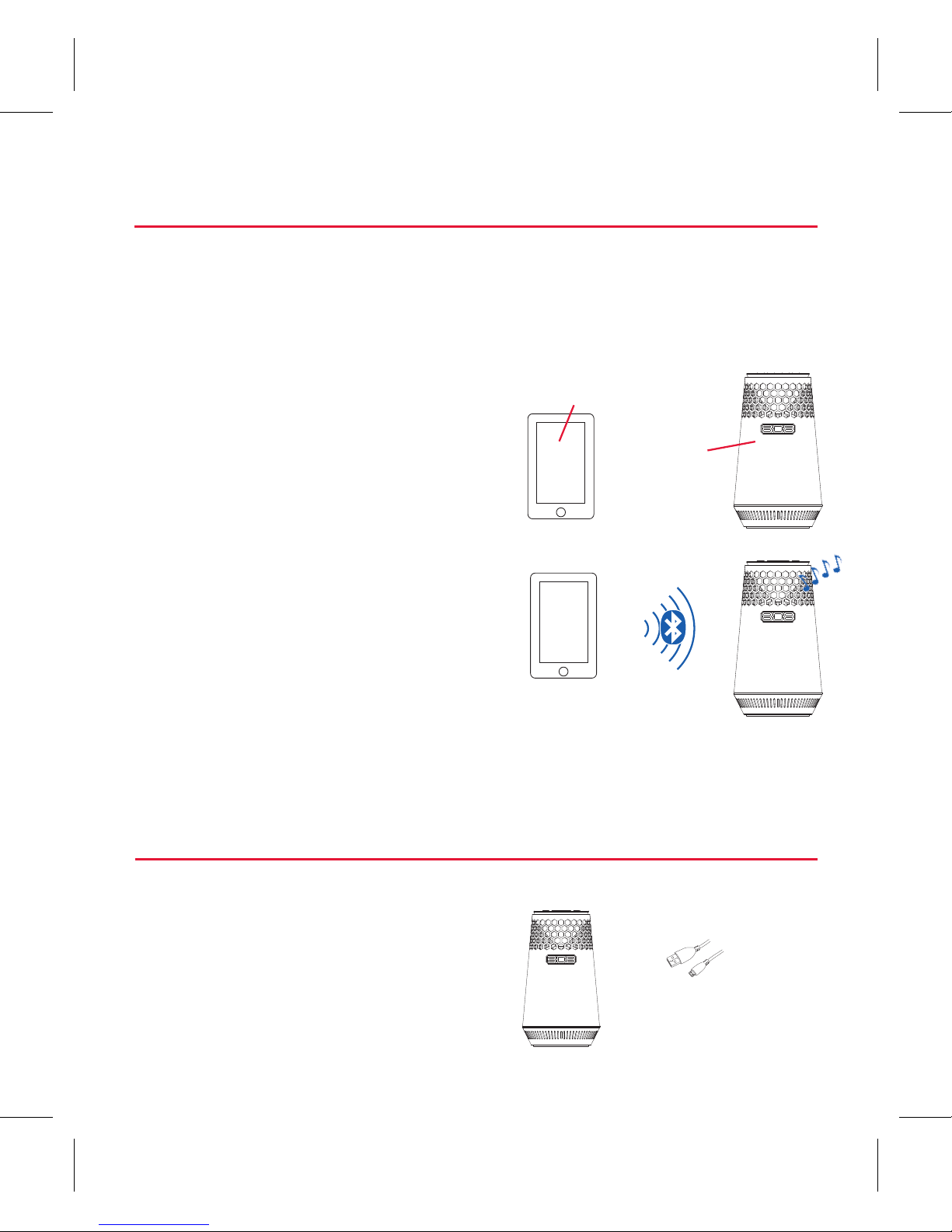
“Hi
phone.
I’m a
speaker.”
Make sure the following
items came in this package.
Step 1: Unpack
Your speaker
Bluetooth wireless is a quick and easy way to connect a
smartphone to a speaker or a headset. There are basically
two steps to making Bluetooth work.
PAIRING: The two devices
get to know each other.
CONNECTING: The two
devices do something
together (like play music).
“Hi. I’m a
phone.”
This guide takes you through the steps to get started.
Getting to know Bluetooth
USB cable
Page 3
3
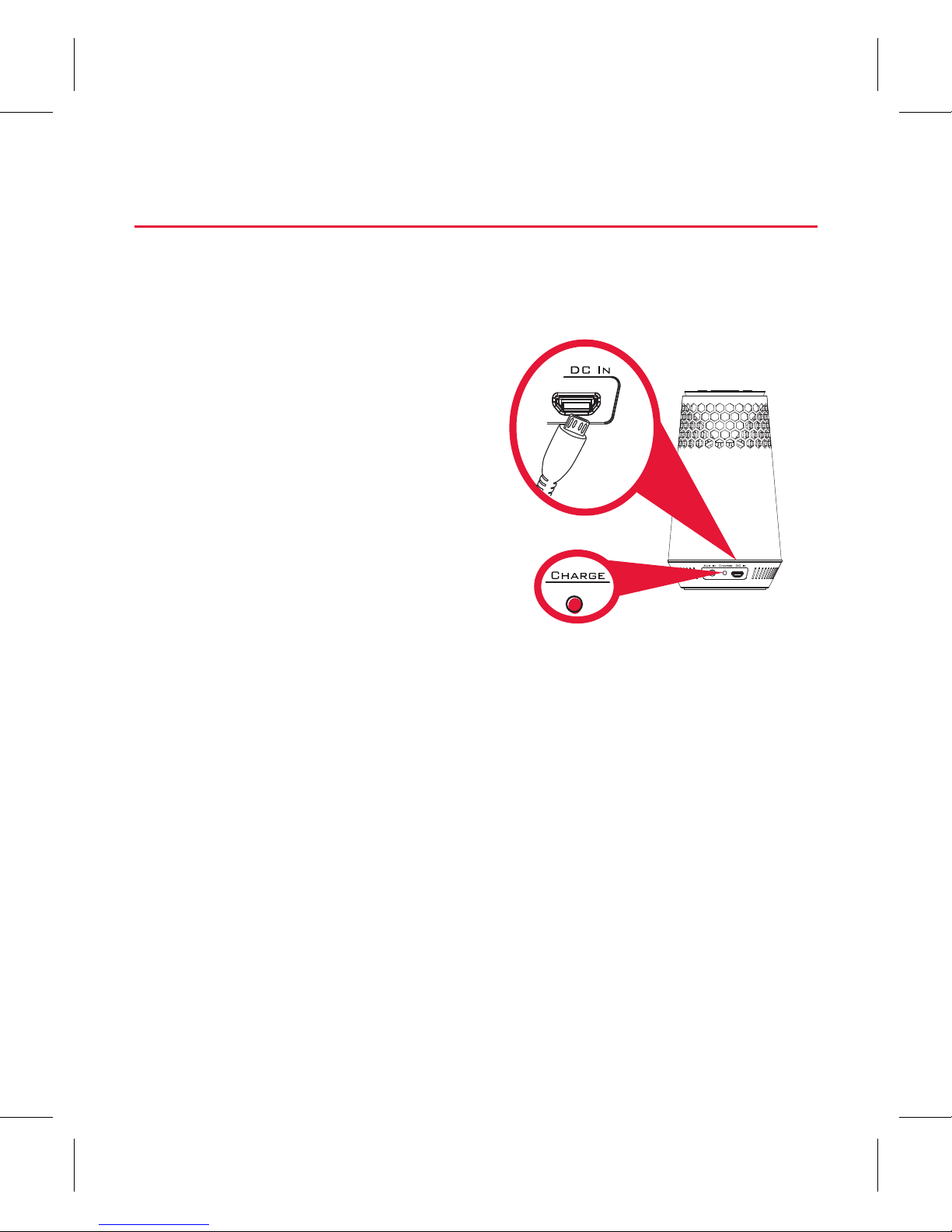
Before you start using the HEX LIGHT speaker for the first
time, it’s a good idea to charge it completely.
Speaker back
Step 2: Charge the HEX LIGHT
To charge the speaker:
Plug the included USB cable
into the DC IN jack on the
back of the speaker.
Plug the other end of the
USB charging cable into
a power source, like a
computer or a USB charging
adapter.
The CHARGE indicator on the back of the speaker is red
while the speaker is charging. It turns green when the
speaker is fully charged.
Note: You can use the speaker while it’s charging.
Page 4
4
Step 3: Turn on
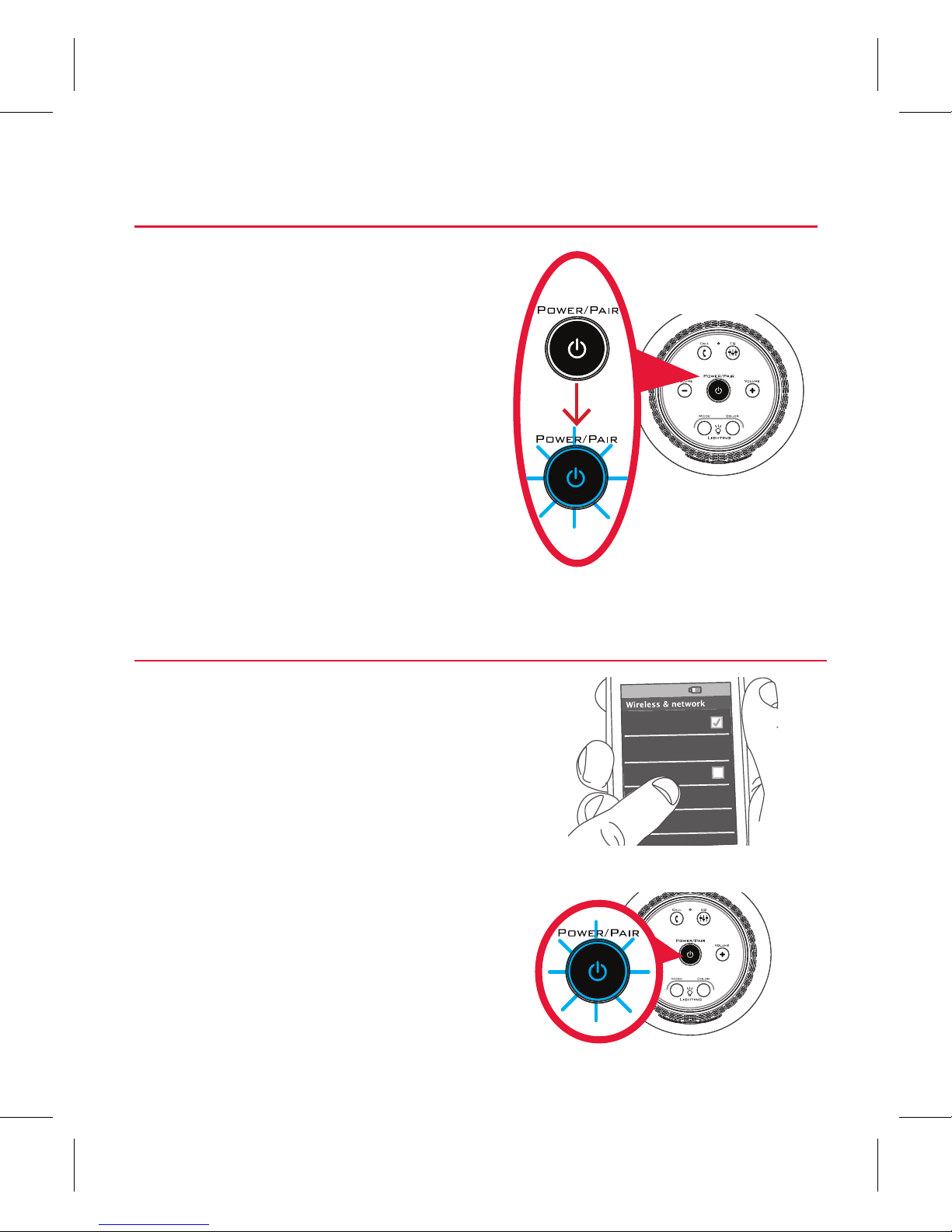
Press and hold the POWER/
PAIR button on the top of the
speaker. The power up tone
sounds and the POWER/PAIR
button starts blinking.
After a few seconds, the
speaker goes to Bluetooth
pairing mode to set up with
your smartphone.
Speaker
top
Enable Bluetooth on your
smartphone or other device.
Step 4: Pair + Connect
Wi-Fi
Bluetooth
Bluetooth Settings
VPN Settings
Wi-Fi Settings
8:45PM
Make sure the POWER/PAIR
button on the top of the
speaker is blinking rapidly. (If it
isn’t, give a short double-press
on the POWER/PAIR button.
The speaker gives an audio
signal.)
Speaker top
Page 5

5
If you’ve previously paired your phone or other Bluetooth device with this
speaker, the speaker will automatically attempt to reconnect to that device
when you switch the speaker on. If you want to pair to a new device, give a
short double-press to the POWER/PAIR button. The speaker gives a signal
and the POWER/PAIR button starts blinking.
Choose 808 Hex Light from the pairing options on your
smartphone. (If it’s not in the list, choose “Scan” from your
phone’s Bluetooth menu.)
The speaker gives an audio signal when it’s finished pairing
and connecting to your smartphone. The POWER/PAIR
button turns solid blue.
Note: The process of enabling Bluetooth and connecting varies from device
to device. See your device’s owners manual for more information and specific
instructions.
Bluetooth Wireless Connection Tips
• Make sure the Bluetooth capability of your device is turned on.
• Make sure there’s nothing plugged into the speaker’s AUX IN jack when
you’re trying to use Bluetooth.
• The Bluetooth wireless connection works up to a range of roughly 33 feet (10
meters). This range may vary, however, based on other factors, such as room layout,
wall material, obstacles, your device’s Bluetooth performance, etc. If you’re having
problems connecting to this speaker, move closer to it.
• If your device asks you for a password to connect, use “0000”.
Page 6
6
To adjust the volume of your audio: Use the volume
controls on your phone or the VOLUME – and VOLUME +
buttons on top of the speaker.
Using Bass Boost
The Hex Light speaker has a Bass Boost feature that
enhances the lower frequencies in your music. Bass Boost
is turned on by default. Press the EQ button on the top of
the speaker to toggle Bass Boost on and o.
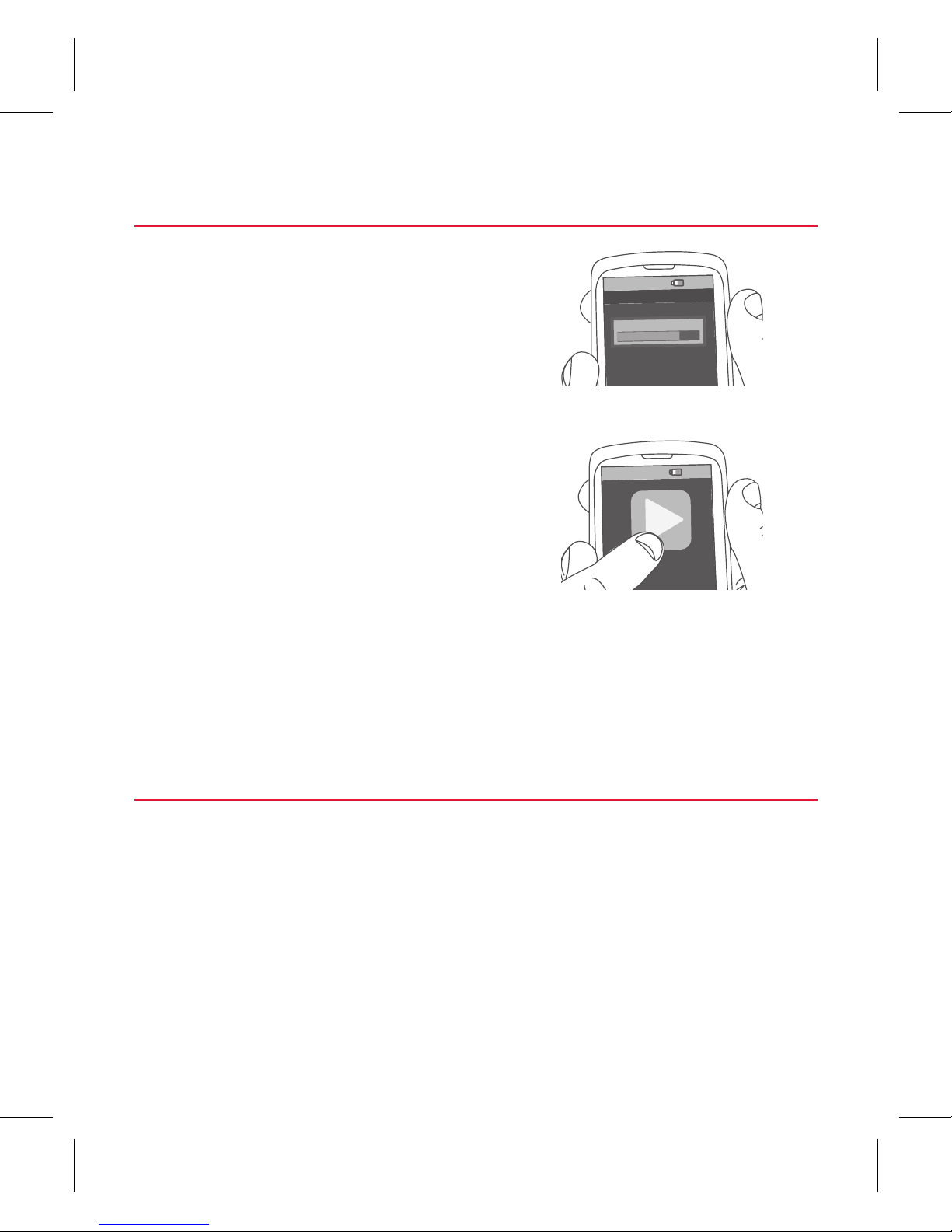
Set your device’s volume for
music to 75%.
Note: This is to make sure the sound
from the speaker isn’t too loud when you
start streaming.
Start playing music or other
audio on your device. Within
seconds, the speaker starts
streaming the audio wirelessly
via Bluetooth.
Step 5: Play music
8:45PM
Now playing
Media volume
8:45PM
Page 7
7
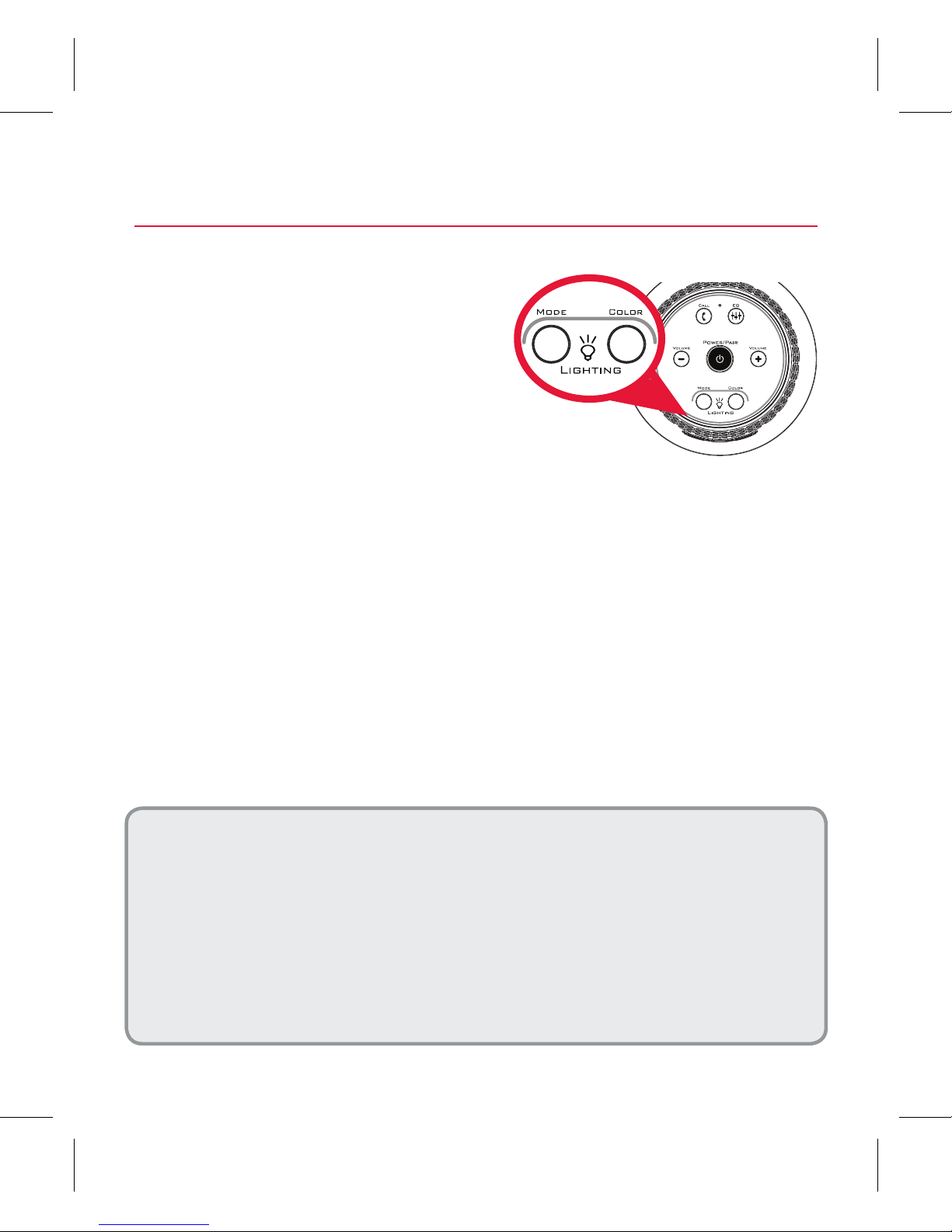
Press the MODE button on
the top of the speaker to
activate multi-mode lighting.
Keep pressing the MODE
button to cycle through the
following light modes.
Using the Multi-Mode Lighting
Still: Press the COLOR button to change colors.
Pulse: The light pulses to the beat of your music (you might
need to turn your music up!). Press COLOR to change colors.
Chase: The light races in a circle. Press COLOR to change
colors.
Breath: The light gradually intensifies and diminishes.
Chill: The light slowly goes through all the colors.
Rave: The light pulses and changes color to the beat of
your music.
Speaker top
Multi-Mode Lighting Demo
This speaker has a lighting demo mode that shows o all of the lighting options.
To activate the lighting demo: Make sure the speaker’s on. Then press and
hold POWER/PAIR and VOLUME+ at the same time for 10 seconds (until the
demo light show starts).
To exit the lighting demo: Press and hold POWER/PAIR until the speaker turns o.
Then turn the speaker back on as normal.
Note: To hear audio during the lighting demo, plug your player into the speaker’s
AUX IN jack. Bluetooth audio does not work during the lighting demo.
Page 8
8
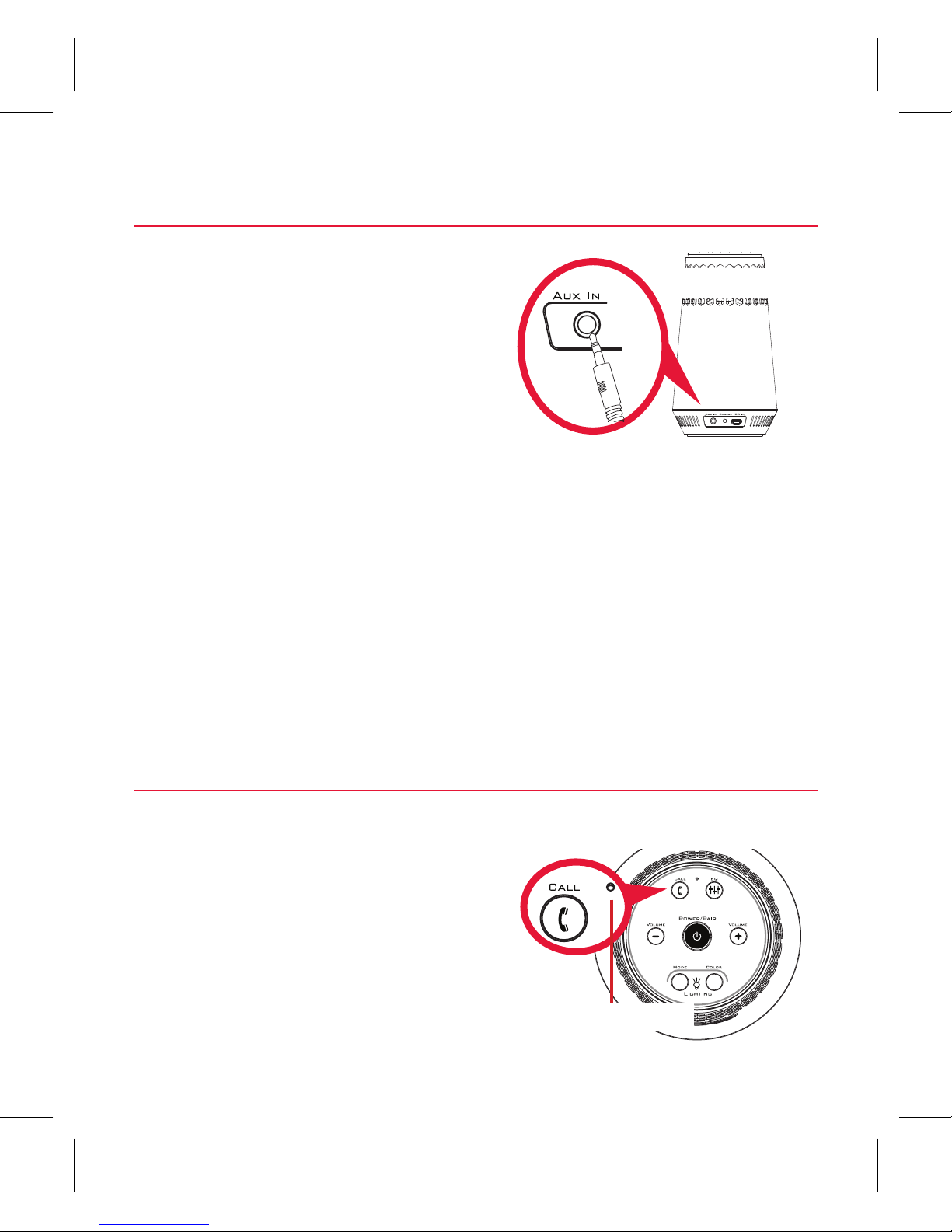
Use a 3.5mm audio cable (not
included) to connect the audio
output from your device to
the AUX IN audio input on the
speaker’s back panel.
Using the AUX IN input
The speaker automatically switches to the AUX IN audio,
and the POWER/PAIR button turns white.
To listen to Bluetooth audio again, unplug the cable from
the speaker’s AUX IN jack. The speaker will try to reconnect
to the last Bluetooth device.
Speaker back
Using the Speakerphone
Speaker top
This speaker has a built-in
microphone, so you can use
it for phone calls as well as
music. Your phone will ring
through the speaker when
you’re receiving a call.
Microphone
Page 9
9
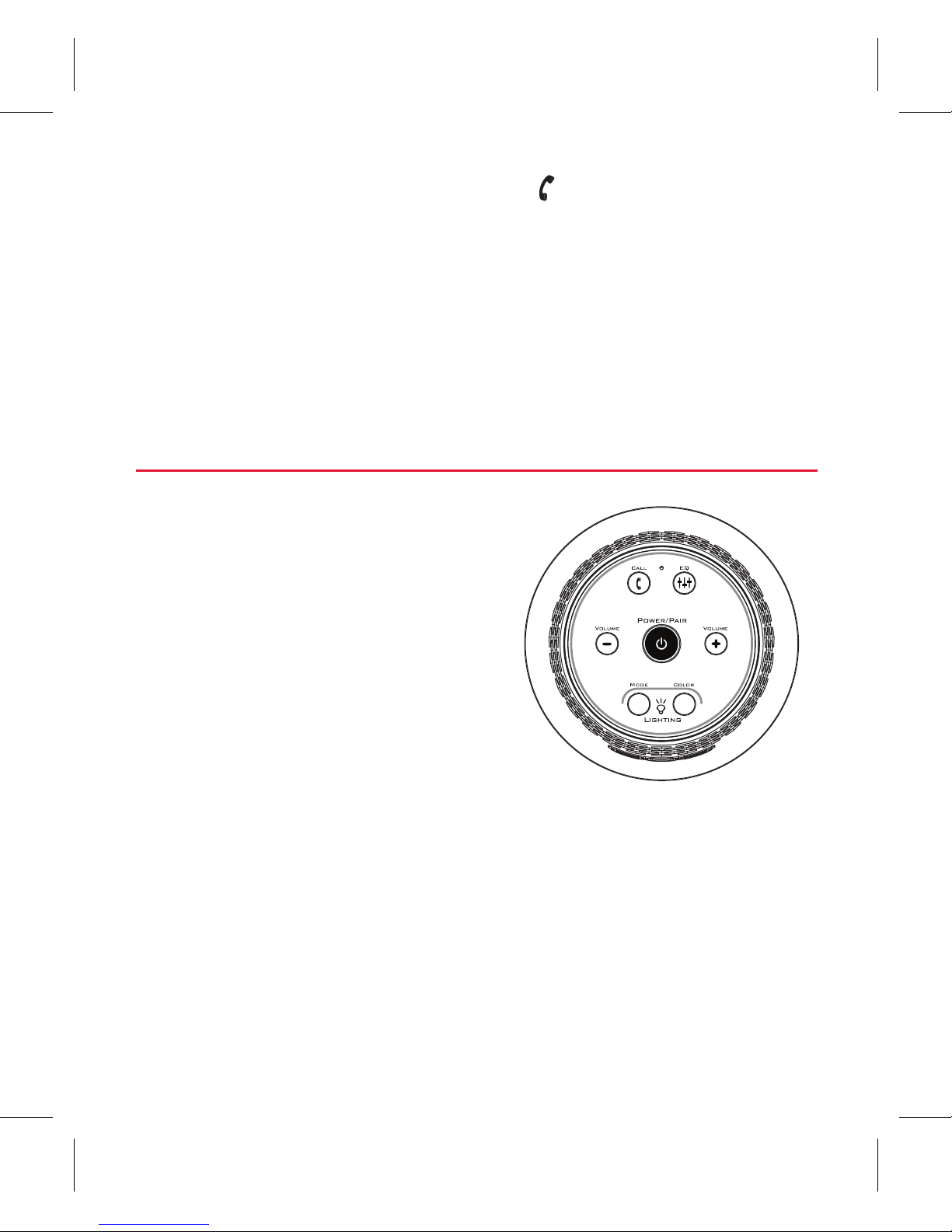
Tour of the speaker
Top
CALL button answers or ends
calls on a Bluetooth-connected
phone.
EQ switches between bass
boost and regular equalization.
POWER/PAIR button turns
the speaker on/o (press and
To answer/end the call: Press the
button on top of the
speaker.
Note: Make sure you’re close enough to the speaker’s built-in microphone so
that the other person can hear you!
IMPORTANT: Not all phones support playback control and phone answer/end
control. Check your phone’s user manual for more information if you’re having
trouble with these functions.
hold) and puts the speaker into pairing mode (short press).
It also shows the Bluetooth status of the speaker:
• fast blinking blue while pairing or reconnecting
• solid blue when paired
• solid white when the AUX IN jack is in use
• o when the speaker’s o.
Page 10
10
VOLUME – / VOLUME + increase or decrease the volume of
the speaker’s audio.
LIGHTING buttons control the speaker’s multi-mode
lighting. Pressing MODE to cycle through the six light
modes: Still, Pulse, Chase, Breath, Chill, Rave, and O. Press
COLOR in Still, Pulse, and Chase mode to change the color
of the light.
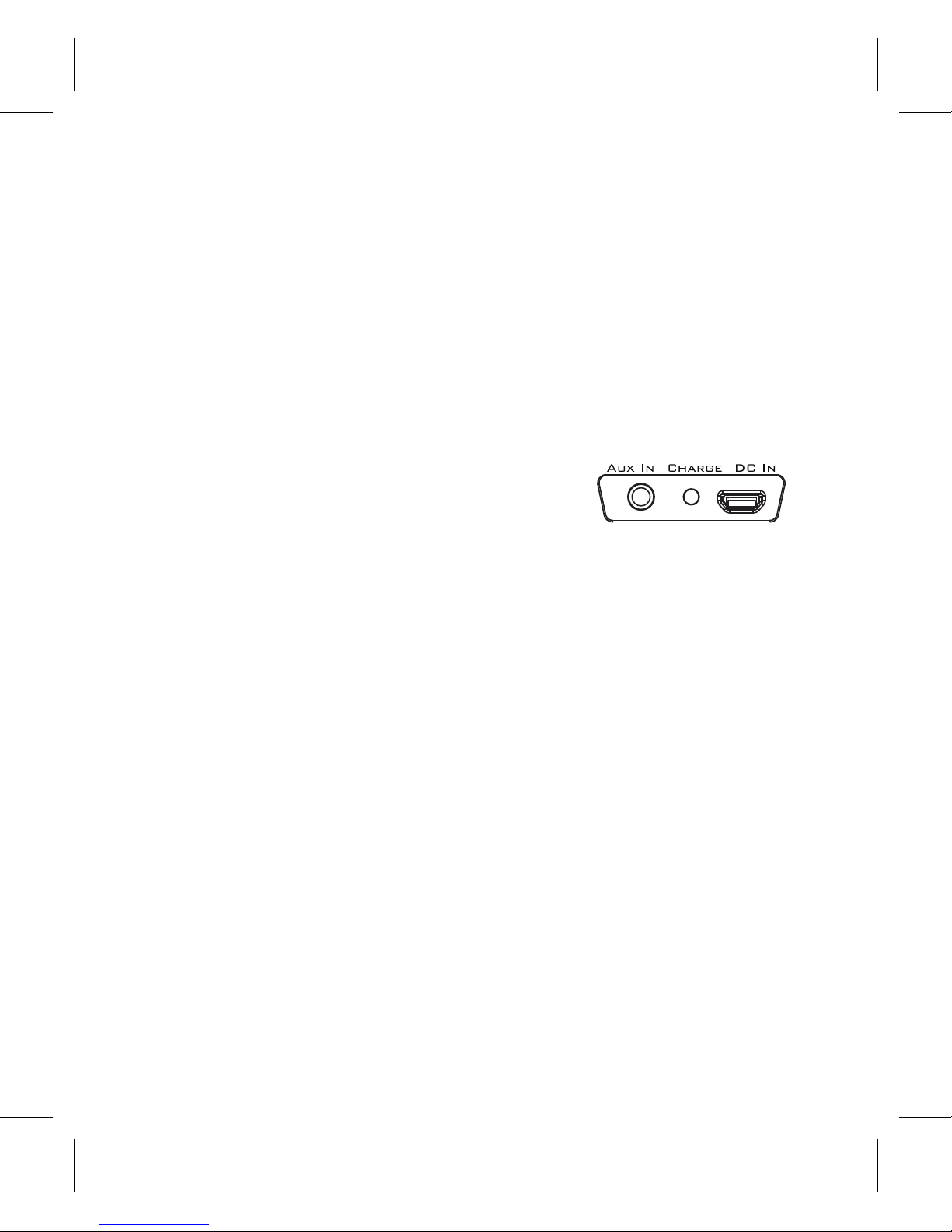
Back
AUX IN jack lets you connect an audio
device directly to the speaker using a
3.5mm audio cable (not provided).
CHARGE indicator shows the charging status of the speaker:
• solid red while charging
• solid green when charged
DC IN jack connects to the provided USB charging cable to
plug the speaker into a power source or adapter.
Page 11

11
GUIDE DE
DÉMARRAGE
RAPIDE
HAUT-PARLEUR SANS FIL
English instructions ................... 1
Instrucciones en español .........22
Page 12

12
« Bonjour.
Je suis un
haut-
parleur. »
S’assurer que les articles
suivants sont inclus dans
l’emballage.
Étape 1 : Déballer
Votre haut-parleur
La liaison sans fil Bluetooth est une solution rapide et
simple pour connecter un téléphone intelligent à un
haut-parleur ou à un casque d’écoute. Il y a deux étapes
fondamentales pour faire fonctionner Bluetooth.
APPARIEMENT : Les deux
appareils apprennent à se
connaître.
CONNEXION : Les deux
appareils font quelque chose
ensemble (par exemple,
diuser de la musique).
« Bonjour. Je suis
un téléphone. »
Ce guide présente les étapes
permettant de commencer à
utiliser le produit.
Familiarisation avec Bluetooth
Câble USB
Page 13

13
Avant de commencer à utiliser le haut-parleur HEX
LIGHT pour la première fois, il est conseillé de le charger
complètement.
Arrière du
haut-parleur
Étape 2 : Charger le HEX LIGHT.
Pour charger le hautparleur : Brancher le câble
de chargement USB inclus
sur la prise DC IN située à
l’arrière du haut-parleur.
Brancher l’autre extrémité
du câble de chargement
USB sur une source
d’alimentation, par
exemple un ordinateur ou
un adaptateur chargeur USB.
Le voyant CHARGE à l’arrière du haut-parleur est rouge
pendant la charge. Le voyant devient vert lorsque le hautparleur est complètement chargé.
Remarque : Il est possible d’utiliser le haut-parleur pendant qu’il se charge.
Page 14

14
Étape 3 : Allumer.
Appuyer sans relâcher sur le
bouton POWER/PAIR (mise
en marche/appariement), situé
sur le dessus du haut-parleur.
Le son d’alimentation retentit
et le bouton POWER/PAIR
commence à clignoter.
Après quelques secondes, le
haut-parleur passe en mode
d’appariement Bluetooth pour se
configurer avec votre téléphone
intelligent.
Dessus du
haut-parleur
Activer la fonction Bluetooth du
téléphone intelligent ou de tout
autre appareil.
Vérifier que le bouton POWER/
PAIR situé sur le dessus du hautparleur clignote rapidement.
(dans le cas contraire, appuyer
rapidement deux fois sur le
bouton POWER/PAIR. Le haut-
parleur émet un signal audio.)
Étape 4 : Apparier + connecter
Wi-Fi
Bluetooth
Bluetooth Settings
VPN Settings
Wi-Fi Settings
8:45PM
Dessus du haut-parleur
Page 15

15
Si votre téléphone ou tout autre appareil Bluetooth a été apparié
antérieurement au haut-parleur, celui-ci, lorsqu’il est allumé, essaie
automatiquement de se reconnecter à cet appareil. Pour apparier le hautparleur à un nouvel appareil, appuyer rapidement deux fois sur le bouton
POWER/PAIR (mise en marche/appariement). Le haut-parleur émet un signal
et le bouton POWER/PAIR commence à clignoter.
Sélectionner 808 Hex Light dans les options d’appariement
de votre téléphone intelligent. (S’il ne figure pas sur la
liste, choisir « Balayer/Scan » dans le menu Bluetooth du
téléphone.)
Le haut-parleur émet un signal sonore lorsque l’appariement
et la connexion à votre téléphone intelligent sont terminés. Le
bouton POWER/PAIR devient bleu fixe.
Remarque : Le processus d’activation Bluetooth et de connexion varie d’un
appareil à l’autre. Se reporter au manuel du propriétaire concernant l’appareil
pour obtenir des informations supplémentaires et des instructions spécifiques.
Conseils pour la connexion sans fil Bluetooth
• Vérifier que la fonction Bluetooth de l’appareil est activée.
• Vérifier que rien n’est branché sur la prise AUX IN du haut-parleur lorsque vous
tentez d’utiliser Bluetooth.
•La connexion sans fil Bluetooth dispose d’une portée d’environ 10 m (33 pi).
Cependant, cette portée peut varier en fonction d’autres facteurs, tels que
l’agencement de la pièce, le matériau des murs, les obstacles, la performance
Bluetooth de votre appareil, etc. En cas de problème de connexion avec ce hautparleur, se rapprocher.
• Si l’appareil demande un mot de passe pour se connecter, utiliser « 0000 ».
Page 16

16
Réglage du volume audio : Utiliser les commandes de
volume de votre appareil ou les boutons VOLUME – et
VOLUME + situés sur la partie supérieure du haut-parleur.
Utilisation de la fonction Bass Boost
Le haut-parleur Hex Light dispose d’une fonction Bass Boost
(amplificateur de basses) qui améliore les fréquences basses
de votre musique. Cette fonction est activée par défaut.
Appuyez sur le bouton EQ situé sur le dessus du haut-parleur
pour activer/désactiver la fonction Bass Boost.
Réduire le volume sonore de
l’appareil à 75 % pour écouter
de la musique.
Remarque : Cela permet de s’assurer que
le son émis par le haut-parleur n’est pas
trop fort lorsque démarre la diusion
en flux.
Démarrer l’écoute de musique
ou de toute autre source audio
sur l’appareil. En quelques
secondes, le haut-parleur
diuse l’audio en flux sans fil
via Bluetooth.
Étape 5 : Écouter de la musique
8:45PM
Now playing
Media volume
8:45PM
Page 17

17
Dessus du haut-parleur
Appuyer sur le bouton
MODE sur le dessus du
haut-parleur pour activer
l’éclairage multimode.
Continuer à appuyer sur le
bouton MODE pour eectuer
le cycle complet des modes
de lumière suivants.
Utilisation de l’éclairage multimode
Lumière en continu : Appuyer sur le bouton COLOR pour
changer de couleur.
Mode pulsations : La lumière émet des pulsations
coordonnées au rythme de la musique (Il est parfois
nécessaire d’augmenter le son!). Appuyer sur COLOR pour
changer de couleur.
Mode Chasser : La lumière court en cercle. Appuyer sur
COLOR pour changer de couleur.
Mode Respirer : La lumière augmente graduellement puis
diminue.
Mode Calmer : La lumière passe lentement d’une couleur
à l’autre.
Mode Rave : La lumière pulse et change de couleur au
rythme de la musique.
Page 18

18
Utiliser le câble audio 3,5 mm
(non inclus) pour connecter la
sortie audio de votre appareil
à l’entrée audio AUX IN située
sur le panneau latéral du hautparleur.
Utilisation de l’entrée auxiliaire AUX IN
Le haut-parleur passe automatiquement à audio AUX IN,
et le bouton POWER/PAIR devient blanc.
Pour écouter de nouveau l’audio via Bluetooth, débrancher
le câble de la prise AUX IN du haut-parleur. Le haut-parleur
eectue une tentative de reconnexion au dernier dispositif
Bluetooth connecté.
Arrière du
haut-parleur
Démonstration de l’éclairage multimode
Ce haut-parleur dispose d’un mode de démonstration qui présente toutes les options
d’éclairage.
Pour activer la démonstration de l’éclairage : Vérifier que le haut-parleur est en
marche. Puis appuyer et maintenir enfoncés les boutons POWER/PAIR et VOLUME+
simultanément pendant 10 secondes (jusqu’à ce que la démonstration d’éclairage
commence).
Pour quitter la démonstration de l’éclairage : appuyer et maintenir enfoncé le
bouton POWER/PAIR jusqu’à ce que le haut-parleur s’éteigne. Puis allumer de
nouveau le haut-parleur de manière habituelle.
Remarque : pour écouter l’audio pendant la démonstration de l’éclairage, brancher le
lecteur sur la prise AUX IN. La lecture audio Bluetooth ne fonctionne pas pendant la
démonstration de l’éclairage.
Page 19

19
Utilisation du téléphone haut-parleur
Dessus du haut-parleur
Ce haut-parleur dispose
d’un microphone intégré qui
permet de l’utiliser pour les
appels téléphoniques aussi
bien que pour la musique.
Votre téléphone sonnera par
l’intermédiaire du haut-parleur
lors de la réception d’un appel.
Microphone
Pour répondre/mettre fin à un appel : Appuyer sur le
bouton situé sur le dessus du haut-parleur.
Remarque : Vérifier que l’utilisateur est susamment près du microphone
intégré du haut-parleur pour être entendu par l’autre personne!
IMPORTANT : Les téléphones ne sont pas tous compatibles avec la commande
de lecture et la commande pour répondre/mettre fin à un appel Se reporter
au manuel de l’utilisateur du téléphone pour obtenir des informations
supplémentaires en cas de diculté avec ces fonctions.
Page 20

20
Tour du haut-parleur
Dessus
Le bouton CALL permet de
prendre et de mettre fin à
des appels sur un téléphone
connecté avec Bluetooth.
Le contacteur EQ permet de
passer du mode amplification
des basses à l’égalisation
normale.
Le bouton POWER/PAIR allume et éteint le haut-
parleur (appuyer et maintenir appuyé) et le met en mode
d’appariement (par un appui rapide). Il indique aussi l’état
de connexion Bluetooth du haut-parleur :
• bleu clignotant rapidement pendant l’appariement ou la
reconnexion.
• bleu continu lorsque l’appariement est terminé
• blanc continu lorsque la prise AUX IN est utilisée
• éteint lorsque le haut-parleur est éteint
Les boutons VOLUME – / VOLUME + baissent ou
augmentent le son du haut-parleur.
Page 21

21
Les boutons LIGHTING (éclairage) commandent l’éclairage
multimode du haut-parleur. Appuyer sur MODE pour
eectuer le cycle complet des six modes de lumière :
Continu, Pulsations, Chasser, Respirer, Calmer, Rave et Éteint.
Appuyer sur COLOR dans les modes Continu, Pulsations et
Chasser pour changer la couleur de la lumière.
Arrière
La prise AUX IN permet de connecter un
appareil audio directement au hautparleur au moyen d’un câble audio de 3,5 mm (non fourni).
Le voyant CHARGE indique l’état de charge du haut-parleur :
• rouge continu pendant la charge
• vert continu une fois chargé
La prise de charge DC IN se connecte au câble de charge
USB fourni pour brancher le haut-parleur sur une source
d’alimentation ou un adaptateur.
Page 22

22
GUÍA DE
INICIO
RÁPIDO
ALTAVOZ INALÁMBRICO
English instructions ................... 1
Instructions en français ............ 11
Page 23

23
“Hola. Yo
soy un
altavoz”.
Asegúrese que los
siguientes artículos estén
incluidos en el empaque.
Paso 1: Desempaque
Su altavoz
Bluetooth inalámbrico es una forma rápida y fácil de
conectar un teléfono inteligente a un parlante o un
auricular. Básicamente, hay dos pasos para hacer que
Bluetooth funcione.
SINCRONIZACIÓN: Los dos
dispositivos se conocen
entre sí.
CONEXIÓN: Los dos
dispositivos hacen algo
conjuntamente (tal como
reproducir música).
“Hola. Soy un
teléfono”.
Esta guía lo lleva a través
de los pasos para poder
comenzar.
Lo que usted debe saber sobre Bluetooth
Cable USB
Page 24

24
Antes de utilizar el altavoz HEX LIGHT por primera vez, se
recomienda cargarlo completamente.
Parte posterior
del altavoz
Paso 2: Cargue el altavoz HEX LIGHT.
Para cargar el altavoz:
Acople el cable USB incluido
al conector DC IN ubicado
en la parte posterior del
altavoz.
Conecte el otro extremo del
cable de carga USB en la
fuente de alimentación, tal
como una computadora o
un adaptador de carga USB.
El indicador CHARGE ubicado en la parte posterior del
altavoz se iluminará rojo mientras el altavoz se esté
cargando. Éste cambia a color verde cuando el altavoz está
completamente cargado.
Aviso: Usted puede usar el altavoz mientras éste está cargando.
Page 25

25
Paso 3: Enciéndalo
Mantenga oprimido el botón
POWER/PAIR ubicado en la
parte superior del altavoz. El
tono de energización suena y el
botón POWER/PAIR comienza a
parpadear.
Después de unos cuantos
segundos, el altavoz pasa
al modo de sincronización
Bluetooth para configurar con su
teléfono inteligente.
Parte superior
del altavoz
Active la función Bluetooth en
su teléfono inteligente u otro
dispositivo.
Asegúrese que el botón
POWER/PAIR en la parte
superior del altavoz esté
parpadeando rápidamente. (Si no
parpadea rápidamente, oprima
brevemente el botón POWER/
PAIR dos veces. El altavoz
emitirá una señal de audio.)
Paso 4: Sincronice + Conecte
Wi-Fi
Bluetooth
Bluetooth Settings
VPN Settings
Wi-Fi Settings
8:45PM
Parte superior del altavoz
Page 26

26
Si anteriormente sincronizó su teléfono u otro dispositivo Bluetooth con este
altavoz, el altavoz intentará automáticamente reconectarse al dispositivo
cuando encienda el altavoz. Si desea sincronizarse a un nuevo dispositivo,
oprima brevemente el botón POWER/PAIR dos veces. El altavoz emite una
señal y el botón POWER/PAIR comienza a parpadear.
Seleccione 808 Hex Light de las opciones de sincronización en
su teléfono inteligente. (Si no aparece en la lista, seleccione
“Explorar” en el menú de Bluetooth de su teléfono.)
El altavoz emite una señal de audio cuando termina de
sincronizar y conectarse al teléfono inteligente. El botón
POWER/PAIR se enciende de color azul continuo.
Aviso: El proceso de activación de Bluetooth y de la conexión varía según
el dispositivo. Consulte el manual del usuario del dispositivo para obtener
información adicional e instrucciones específicas.
Consejos para la conexión inalámbrica Bluetooth
• Asegúrese que la función Bluetooth del dispositivo esté activada.
• Asegúrese que no haya nada acoplado al conector AUX IN del altavoz cuando esté
intentando utilizar Bluetooth.
• La conexión inalámbrica Bluetooth funciona hasta un alcance de aproximadamente
10 metros (33 pies). Sin embargo, este alcance puede variar dependiendo de
otros factores, tales como el diseño de la habitación, el material de las paredes,
obstáculos, el desempeño de Bluetooth de su dispositivo, etc. Si tiene problemas
para conectarse con el altavoz, acérquese más.
• Si su dispositivo le solicita un código para conectarse, utilice “0000”.
Page 27

27
Para ajustar el volumen del audio: Utilice los controles
de volumen de su teléfono o los botones VOLUME – y
VOLUME + en la parte superior del altavoz.
Uso de la acentuación de graves
El altavoz Hex Light tiene una función de atenuación de
graves que optimiza las frecuencias musicales más bajas. La
atenuación de graves se activa de manera predeterminada.
Oprima el botón EQ en la parte superior del altavoz para
activar y desactivar la atenuación de graves.
Ajuste el volumen del
dispositivo al 75% para
escuchar música.
Aviso: Esto permite asegurarse que
el sonido que emita el altavoz cuando
comience la canalización no sea
demasiado alto.
Comience a reproducir
música u otro tipo de
audio en su dispositivo. En
pocos segundos el altavoz
comenzará a canalizar el audio
inalámbricamente a través de
Bluetooth.
Paso 5: Reproduzca música
8:45PM
Now playing
Media volume
8:45PM
Page 28

28
Parte superior del altavoz
Oprima el botón MODE en
la parte superior del altavoz
para activar la iluminación
multimodo. Mantenga
oprimido el botón MODE
para recorrer los siguientes
modos de iluminación.
Uso de la iluminación multimodo
Iluminación continua: Oprima el botón COLOR para
cambiar los colores.
Modo pulso: La luz pulsa al ritmo de su música (¡deberá
incrementar el volumen de su música!). Oprima COLOR para
cambiar los colores.
Modo perseguir: La luz avanza en un círculo. Oprima COLOR
para cambiar los colores.
Modo respirar: La luz se intensifica y disminuye
gradualmente.
Modo relajante: La luz avanza lentamente a través de
todos los colores.
Modo de fiesta rave: La luz pulsa y cambia de color con el
ritmo de la música.
Page 29

29
Utilice el cable de audio de
3.5 mm (no incluido) para
conectar la salida de audio de
su dispositivo a la entrada de
audio AUX IN ubicada en el
panel posterior del altavoz.
Uso de la entrada AUX IN
El altavoz cambia automáticamente a la señal de audio,
AUX IN y el botón POWER/PAIR se ilumina blanco.
Para escuchar nuevamente el audio a través de Bluetooth,
desenchufe el cable del conector AUX IN del altavoz.
El altavoz intentará reconectarse al último dispositivo
Bluetooth.
Parte posterior
del altavoz
Demostración de la Iluminación Multimodo
Este altavoz tiene un modo de demostración de iluminación que muestra todas las
opciones de iluminación.
Para activar la demostración de iluminación: Cerciórese de que el altavoz esté
encendido. Luego oprima simultáneamente y no suelte los botones POWER/
PAIR y VOLUME+ durante 10 segundos (hasta que comience la demostración de
iluminación).
Para salir de la demostración de iluminación: Oprima y no suelte el botón POWER/
PAIR hasta que el altavoz se apague. Luego encienda nuevamente el altavoz de
manera normal.
Aviso: Para escuchar audio durante la demostración de iluminación, enchufe su
reproductor en la entrada de audio AUX IN del altavoz. El audio a través de Bluetooth
no funciona durante la demostración de iluminación.
Page 30

30
Recorrido del altavoz
Cara
El botón CALL también contesta
llamadas o las finaliza en un
teléfono conectado por medio de
Bluetooth.
EQ cambia entre la acentuación de
graves y la ecualización regular.
Para contestar/finalizar una llamada: Oprima el botón
ubicado en la parte superior del altavoz.
Aviso: ¡Asegúrese que esté lo suficientemente cerca del micrófono integrado
del altavoz para que la otra persona le pueda escuchar!
IMPORTANTE: No todos los teléfonos son compatibles con el control de
reproducción y con el control para contestar/finalizar llamadas telefónicas.
Consulte el manual del usuario del teléfono para obtener información adicional
si está enfrentando problemas con estas funciones.
Uso del teléfono inteligente
Parte superior
del altavoz
Este altavoz tiene un
micrófono integrado, para que
usted pueda utilizarlo durante
las llamadas telefónicas o para
escuchar música. El teléfono
sonará a través del altavoz
cuando reciba una llamada.
Micrófono
Page 31

31
El botón POWER/PAIR enciende y apaga el altavoz (oprima
y no suelte) y pone el altavoz en el modo de sincronización
También muestra el estado Bluetooth del altavoz:
• parpadeo rápido en color azul mientras se lleva a cabo la
sincronización o reconexión
• azul continuo cuando está sincronizado
• blanco continuo cuando se utiliza el conector AUX IN
• apagado cuando el altavoz está apagado
VOLUME – / VOLUME + aumentan o disminuyen el
volumen del audio del altavoz.
Los botones LIGHTING controlan la iluminación multimodo
del altavoz. Oprima MODE para recorrer los seis modos de
iluminación: Still, Pulse, Chase, Breath, Chill, Rave, and O.
Oprima COLOR en modo Still, Pulse, y modo Chase para
cambiar el color de la luz.
Parte posterior
La prise AUX IN permet de connecter un
appareil audio directement au hautparleur au moyen d’un câble audio de 3,5 mm (non fourni).
Le voyant CHARGE indique l’état de charge du haut-parleur :
• rojo continuo mientras se está cargando
• verde continuo cuando ya está cargado
El conector DC IN se conecta al cable de carga USB
suministrado para enchufar el altavoz en un adaptador o
fuente de alimentación.
Page 32

If you have any questions about this product, visit 808Audio.com or call our
toll-free help line at 1-800-732-6866.
Pour toute question sur ce produit, visiter le site 808Audio.com ou appeler
notre ligne d’assistance sans frais en composant le 1 800 732-6866.
Si tiene preguntas sobre este producto, visite 808Audio.com o llame a nuestra
línea de ayuda libre de cargo, al 1-800-732-6866.
SP300 QSG 02
© 2015 Voxx Accessories Corp.
3502 Woodview Trace, Suite 220
Indianapolis, IN 46268
www.808Audio.com
 Loading...