

Page 1

Page 2
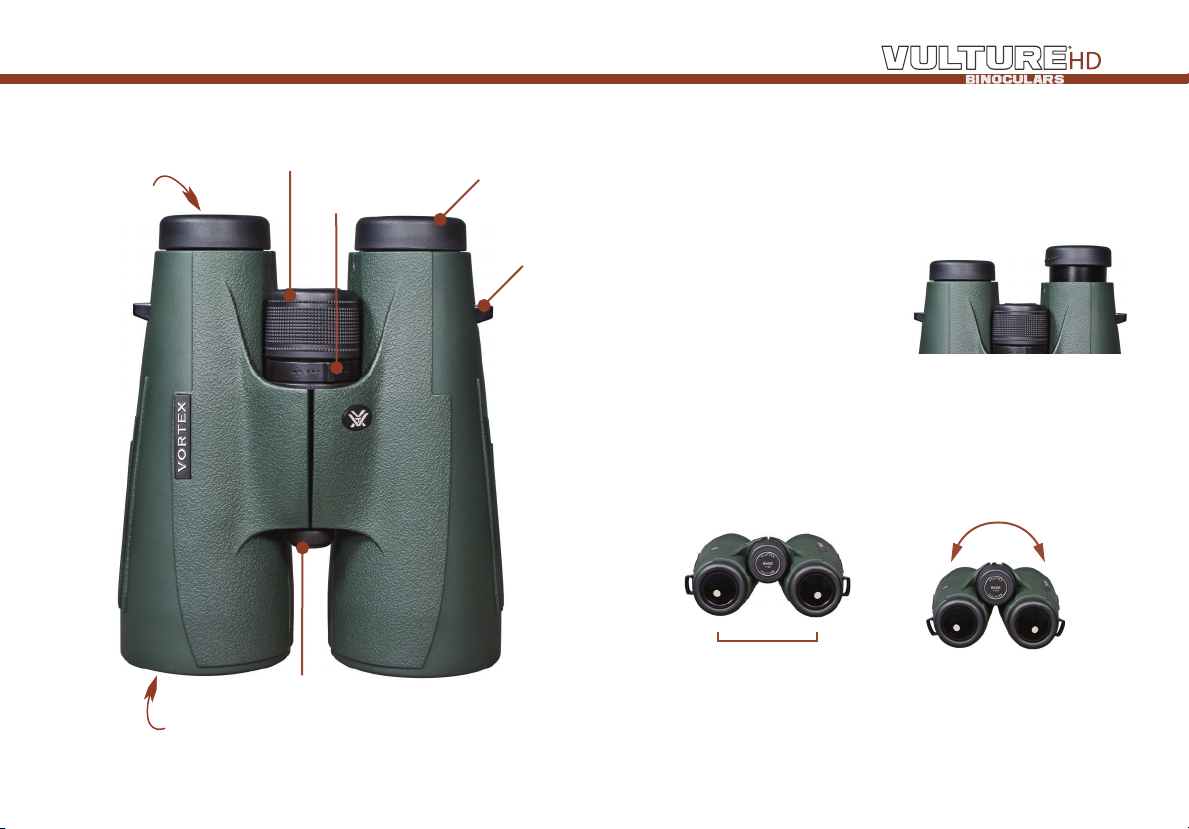
Ocular Lens
Objective Lens
Center Focus
Diopter
Tripod Adapter Socket
Twist-up Eyecup
Strap
Attachment
Basic OperatiOn
Adjust the eyecups
The eyecups on a Vulture HD binocular twist up and down so any
viewer can see the full field and enjoy comfortable viewing—with
or without eyeglasses.
When not using eyeglasses or
sunglasses, keep the eyecups fully
extended. For the best viewing
when viewing through eyeglasses,
twist eyecups down.
Adjust the interpupillary distance
The interpupillary distance (IPD) is the distance between the centers
of the left and right eye pupils. Match the IPD of your eyes to that of
the binocular so that you see a single image that is free of shading.
IPD
Distance between the centers
of the ocular lenses.
Rotate the binocular barrels
inward or outward to line your
eyes up with ocular lenses.
3 2
Page 3

Properly focus the binocular
For the best views, follow this two-step process to properly adjust
the center focus and diopter. Choose an object that is about 20
yards away from you and stay in the same spot until you have
adjusted the binocular for your eyes.
1. Adjust the center focus—start by closing your right eye or
covering the right objective lens with
your hand. Focus your left eye on the
object and adjust the center focus
wheel until the image is in focus.
Leave the center focus in this position
as you adjust the diopter.
2. Adjust the diopter—start by
closing your left eye or covering the
left objective lens with your hand.
Look through your right eye and adjust
the diopter ring (found on the center
dial) until the object is in focus. Make
note of this diopter setting in case you need to set it again. From
this point on, you will only need to use the center focus wheel.
Caution: Binoculars are not intended for looking at the sun, or any
other intense light source. Such viewing could damage the retina and
cornea of your eyes—even to the point of causing blindness.
accessOries
Carry Case
The protective case of the Vulture HD provides safe storage between
viewing sessions. The carry strap is already attached to the case.
Lens Covers
The Vulture HD comes with a rainguard for the ocular lenses and
tethered objective lens covers. Use these covers to protect the
lenses whenever you are not viewing.
Neckstrap
Securely attach your binocular to the binocular strap:
1. Thread the end of the
strap from the bottom
up through the strap
attachment loop.
Note: Please do not thread a metal ring directly onto the strap
attachment loop when attaching rings or clips for other after-market
equipment. Instead, use nylon zip ties according to the manufacturer’s
instructions.
2. Hold the buckle
and thread the end
of the strap inside
the buckle.
5 4
3. Adjust the overall
length and pull the strap
webbing tight so it is
secure within the buckle.
Page 4

Lens care
Maintain the optical brilliance of the Vulture HD binocular by
keeping lens surfaces free of dirt, oils, and dust.
Protect lenses while out in the field
Make use of the provided eyepiece and tethered objective lens
covers to protect the lenses when not viewing. If the optics are
exposed to moisture, keep the caps off and allow the optics to dry
out completely before putting them in the case for storage.
Keep lenses clean
In order to enjoy the best views through your binocular, take time to
regularly clean the exterior lenses:
1. Remove any dust or grit from lenses before wiping. Use a can
of pressurized air, soft camel hair brush, or an acrylic optical brush.
2. Clear lenses of smudges, fingerprints, or eyelash oil. Fog the
lenses with your own breath, then use a non-abrasive lens cloth to
clean the lenses.
Note: Use lens cleaning fluid
and optical paper to clean
lenses. Never use facial tissue,
heavy cotton, or flannel clothing
on lenses—these materials can
scratch the surface of a lens.
the Vip Warranty
We build optics based on our commitment to your absolute
satisfaction. That’s why Vortex products are unconditionally
guaranteed and we make this Very Important Promise to you—a
Very Important Person.
Rest assured that in the event your
Vulture HD binocular becomes damaged
or defective, Vortex Optics will repair or
replace the binocular at no charge to you.
Call Vortex Optics at 800-426-0048 for
prompt, professional, and friendly service.
Vortex Optics
2120 West Greenview Drive
Middleton, WI 53562
service@vortexoptics.com
Visit vortexoptics.com for more information. Canadian customers
may visit vortexcanada.net for customer service information.
Note: The VIP warranty does not cover theft, loss, or deliberate damage
to the product.
7 6
Page 5

#BIN-VR-13A
© Vortex Optics USA
 Loading...