

Page 1

VONETS——VRP300 300M Mini WiFi Repeater & 3G/4G WiFi Router
1
300M Mini WiFi Repeater & 3G/4G WiFi Router
VRP300
Quick Setting Guide
Page 2

VONETS——VRP300 300M Mini WiFi Repeater & 3G/4G WiFi Router
2
Declaration
Copyright © 2013 Shenzhen HouTian Network Communication Technology
Co.Ltd
All rights reserved, with retained ownership
Without Shenzhen HouTian Network Communication Technology Co.Ltd written
authorization, any company or personal can’t copy, writer or translation part or all
contents. Can’t do commodity distribution for any commercial or profitable purposes
by any ways(electricity, mechanical, photoprint, record or other methods).
VONETS is the registered trademark of Shenzhen HouTian Network Communication
Technology Co.Ltd. The other all trademarks or registered trademarks mentioned in
this documents are belong to the individual owners. The product specifications and
information technology mentioned in this manual are just for reference, if any updates,
without other notice. Except for special agreements, this manual is just for user
guidance, any statements, information and so on in this manual can’t constitute the
warranty of any forms.
Page 3
VONETS——VRP300 300M Mini WiFi Repeater & 3G/4G WiFi Router
3
Product Introduction:
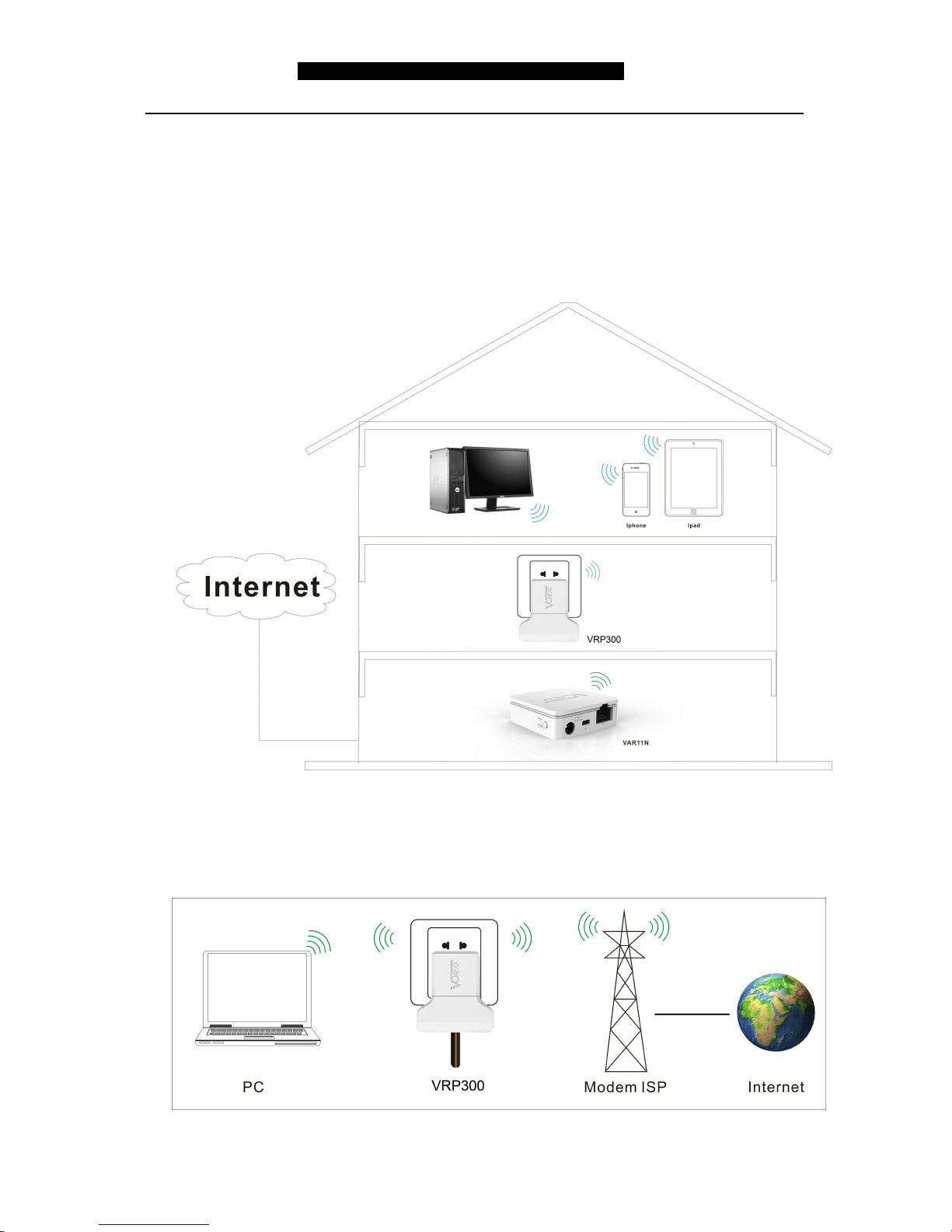
VRP300 supports 4 kinds of work modes
1. WiFi Repeater (VRP300): is a functional device that assists the Internet
communication gateway to expand wireless coverage area. It is mainly used for
expansion of wireless network signal and area coverage to make sure the smooth
running of home wireless network.
2. 3G/4G WiFi Router (VRP300): automatically connects to ISP’s 3G/4G WiFi data
network by an external 3G network card, that creates a “hotspot” 3G to WiFi for
customers, so that more than one person enjoy the simple, convenient WiFi
network at the same time.
Page 4
VONETS——VRP300 300M Mini WiFi Repeater & 3G/4G WiFi Router
4
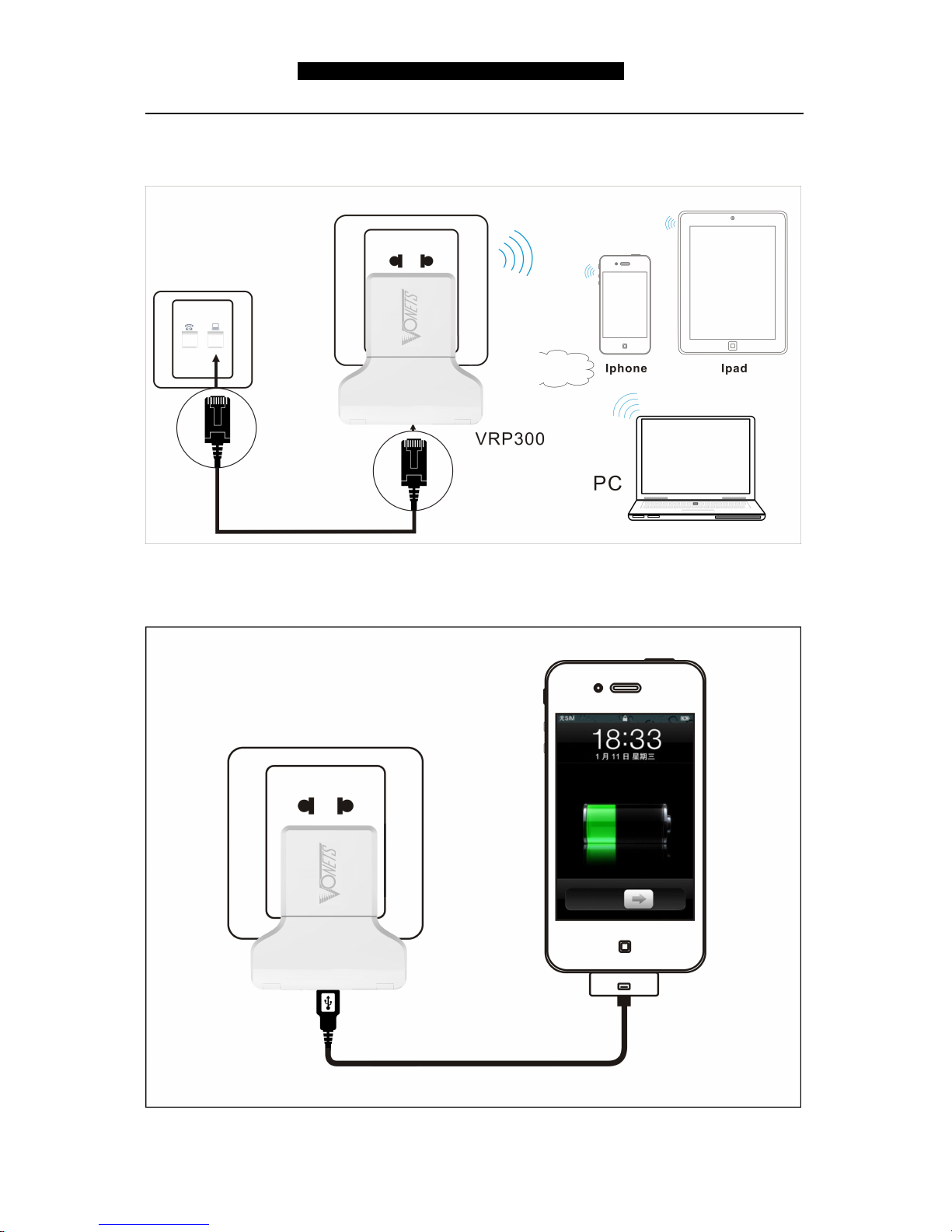
3. Intelligent wifi bridge mode(VRP300): WiFi intelligent bridge function, wireless to
wired, wired to wireless intelligent switching
4. Charger(VRP300): 2A charger function, low noise, automatically fit for most smart
phones, tablet PCs
Page 5
VONETS——VRP300 300M Mini WiFi Repeater & 3G/4G WiFi Router
5
Remark:
1. The default work mode of VRP300 is WiFi Repeater mode, when it is connected 3G
network card, it will be switched to 3G router mode automatically without any setting
to run 3G/4G WiFi network.
2. When you want to restore the factory default setting, please press RESET button on
the product for 5 seconds, after green light blink a few, it will reset automatically (it will
take about 30 seconds)
3. Humanized design,When you do not need to connect Wifi while sleeping at night, you
can press the switch on the housing, turned off the wifi to reduce unnecessary
radiation, beneficial to health.
Chapter 1 Quick Setting Guide of WiFi
Repeater mode
1. Configure VRP300
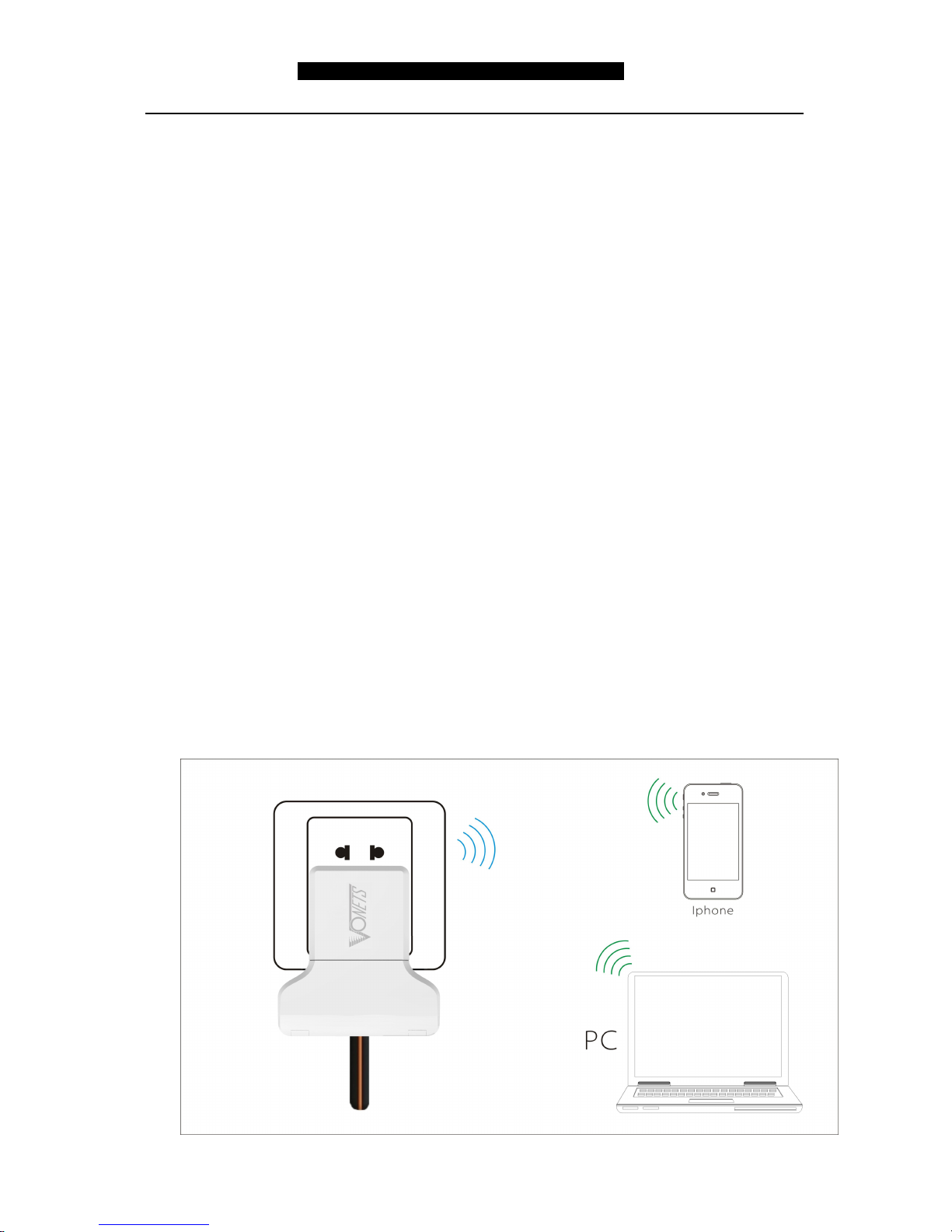
Wireless connect VRP300 by laptops, smart mobiles, IPAD and other wireless
devices.
The default WiFi SSID (WiFi name) is: VONETS_the last six characters of product
MAC address.
The default WiFi password is 12345678
See the following picture:
Page 6
VONETS——VRP300 300M Mini WiFi Repeater & 3G/4G WiFi Router
6
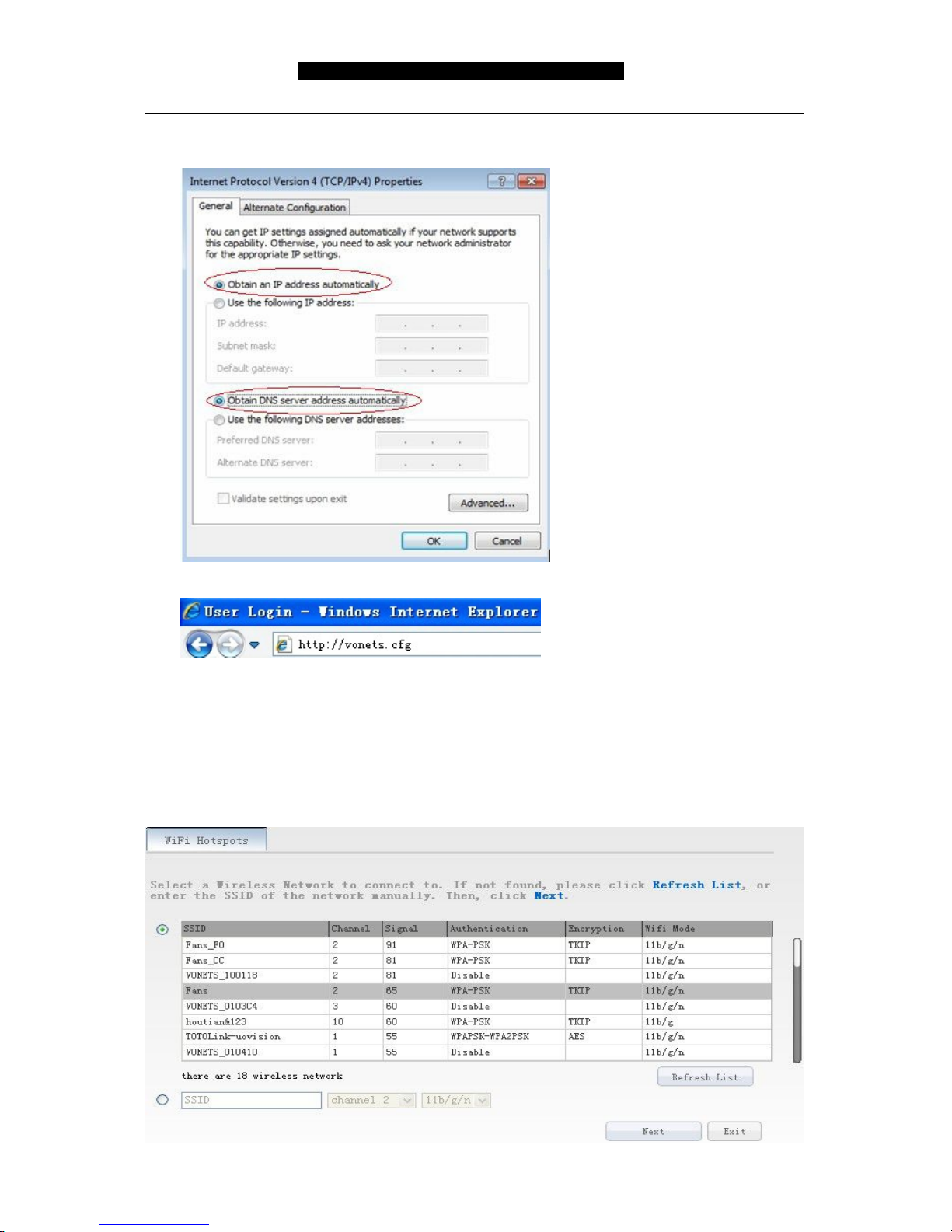
Set computer IP address to automatically, please see the words in the red circle of the
following picture:
2. Open the IE browser, enter http://vonets.cfg virtual domain name setting(VDNS).
Remark:
Enter domain name, then Enter, the login page will appear, the default admin and
password is admin.
3. Scan Hotspots
After entering the IE browser, the WiFi hotspots window will appear, can search the
WIFI hotspots signal that opened SSID broadcast around, please see the following:
Page 7
VONETS——VRP300 300M Mini WiFi Repeater & 3G/4G WiFi Router
7
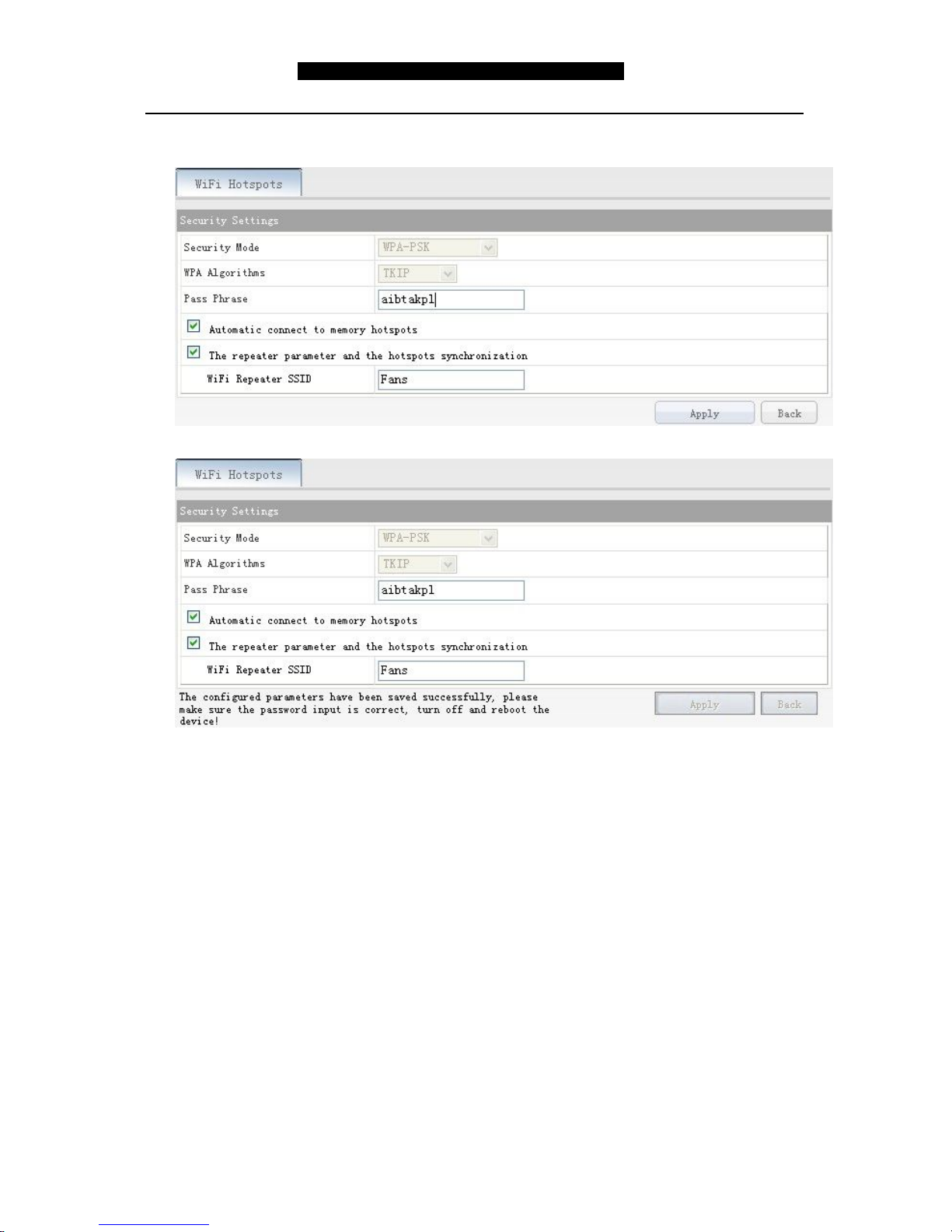
Choose a correct WiFi signal, then click Next, the following interface will appear:
Enter the correct password, confirm it is correct one, then click Apply button.
Click Apply button, the above interface will appear, the configured parameters h
ave been saved successfully, please make sure the password input is correct, tu
rn off and reboot the device.
Remark: After configured successfully, the WiFi name and password of the device are the
same as the source hotspot’s parameters, users can go to WiFi Repeater menu to change
SSID and password.
Page 8
VONETS——VRP300 300M Mini WiFi Repeater & 3G/4G WiFi Router
8
Chapter 2 Quick Setting Guide of 3G/4G Router
mode
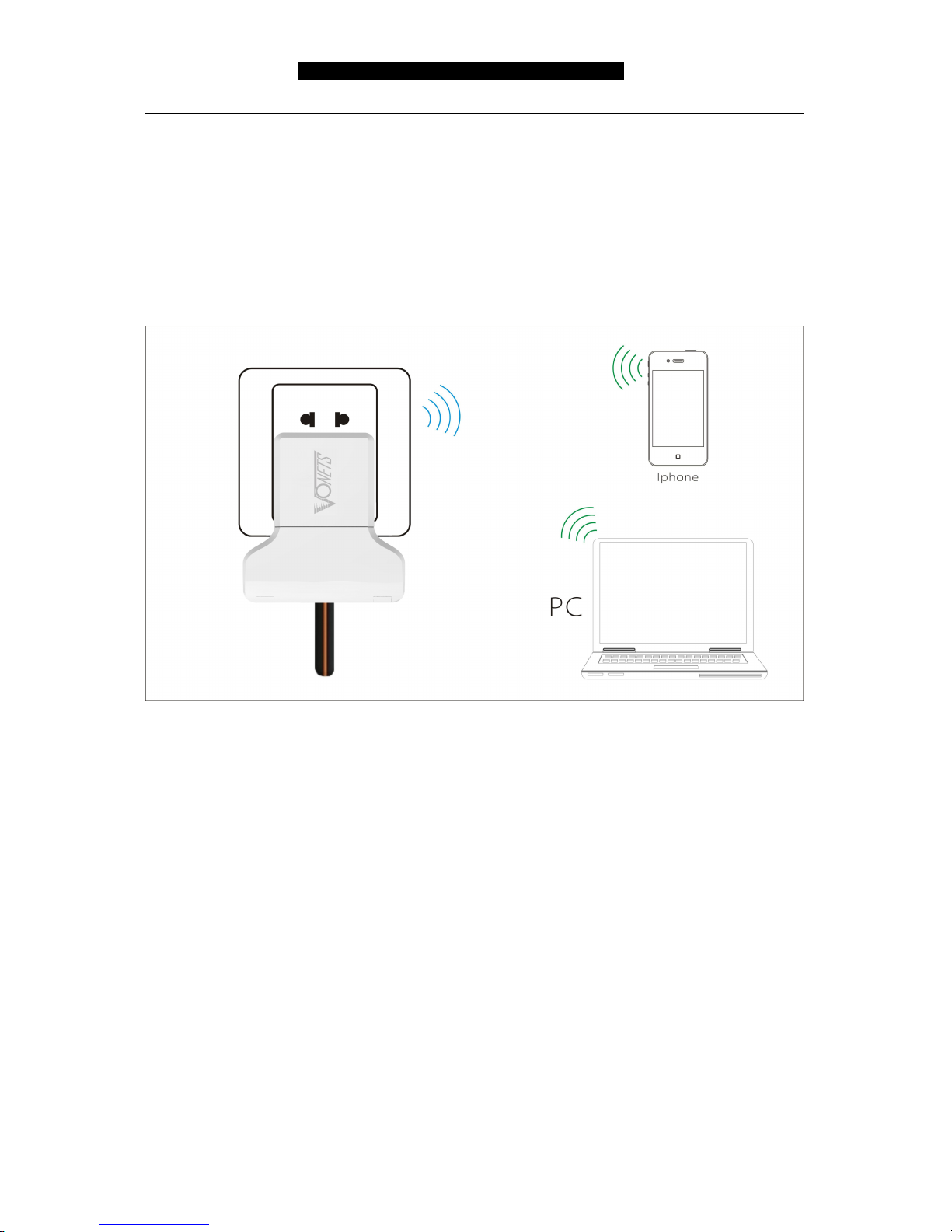
1. VRP300 is connected to 3G/4G network card and power adapter, VRP300 will be
switched to 3G/4G router mode automatically, users no need any setting can have run
3G/4G WiFi network. See the following picture:
Remark:
1. When the green light is blinking, it means the product is doing 3G/4G dial-up
connection.
2. When the green light is always on, it means the dial-up connection is successful,
user can connect it by wireless devices.
3. When users connect it by wireless devices, please pay attention to:
The default WiFi SSID (WiFi name) is: VONETS_the last six characters of product
MAC address.
The default WiFi password is 12345678.
Page 9
VONETS——VRP300 300M Mini WiFi Repeater & 3G/4G WiFi Router
9
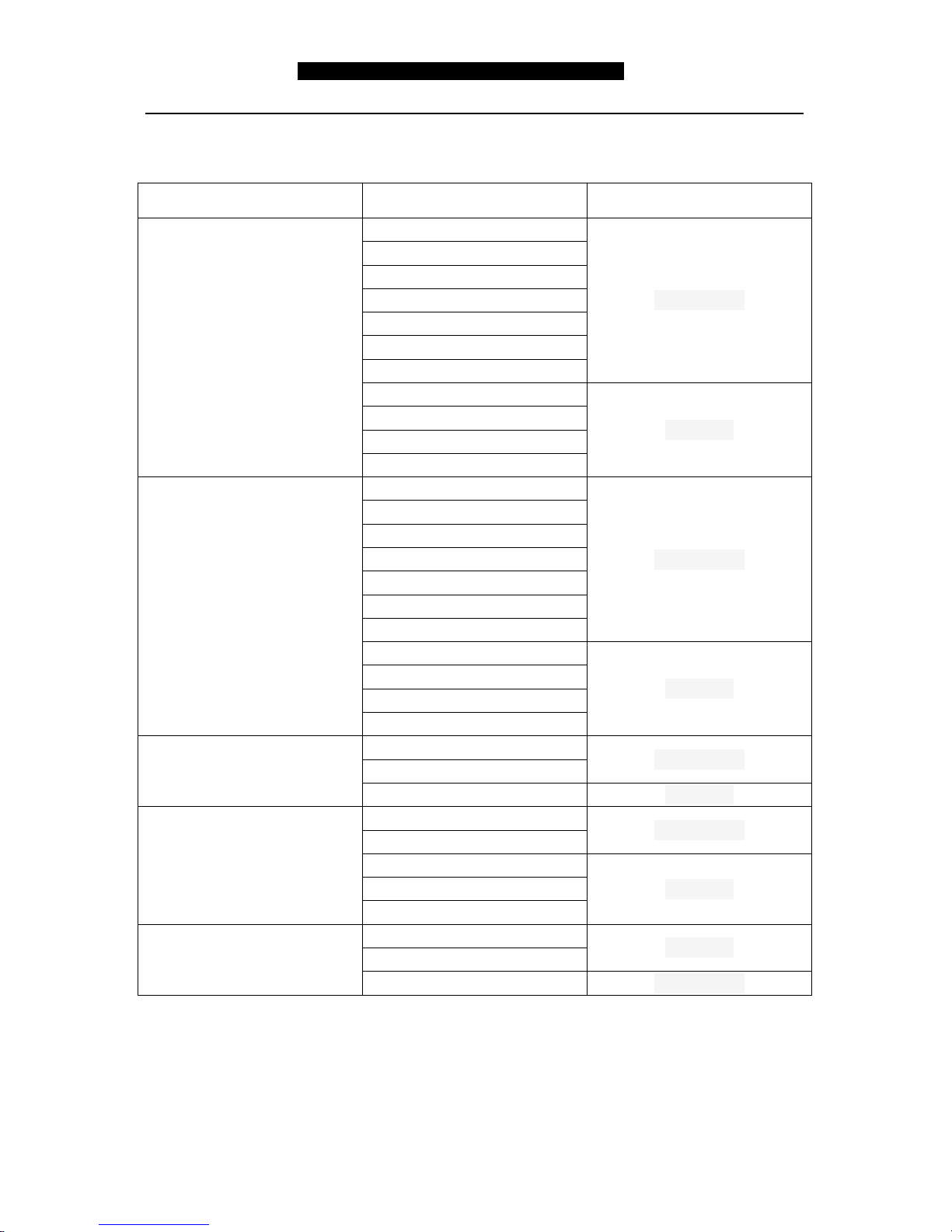
Chapter 3 VRP300 supported 3G card model
Brand Model Device Type
HUAWEI
122
CDMA2000
189
167
1261
177
156
EC1260
E1750
WCDMA
E180
E3131
E353
ZTE
AC59
CDMA2000
AC583
AC2787
AC586
AC2746
AC582
AC2736
MF668A
WCDMA
MF656A
MF631
190
ETON
(ITON)TU930-EC4.3
CDMA2000
(ITON)TU930(WF4.2)
(ITON)TU930(WF6.4)
WCDMA
Vtion
(Vtion)E1916
CDMA2000
(Vtion)E1920
(Vtion)U2916
WCDMA
(Vtion)U1920
(Vtion)U1916
Freedom-e
W6
WCDMA
W8
U8
CDMA2000
Shenzhen HouTian Network Communication Technology Co.,Ltd
http://www.vonets.com
 Loading...