

Page 1

DLP®-Link
TM
3D GLASSES
User Manual
MUV110062-V1R2 EDGE
TM
1.1+ English User Manual
Page 2
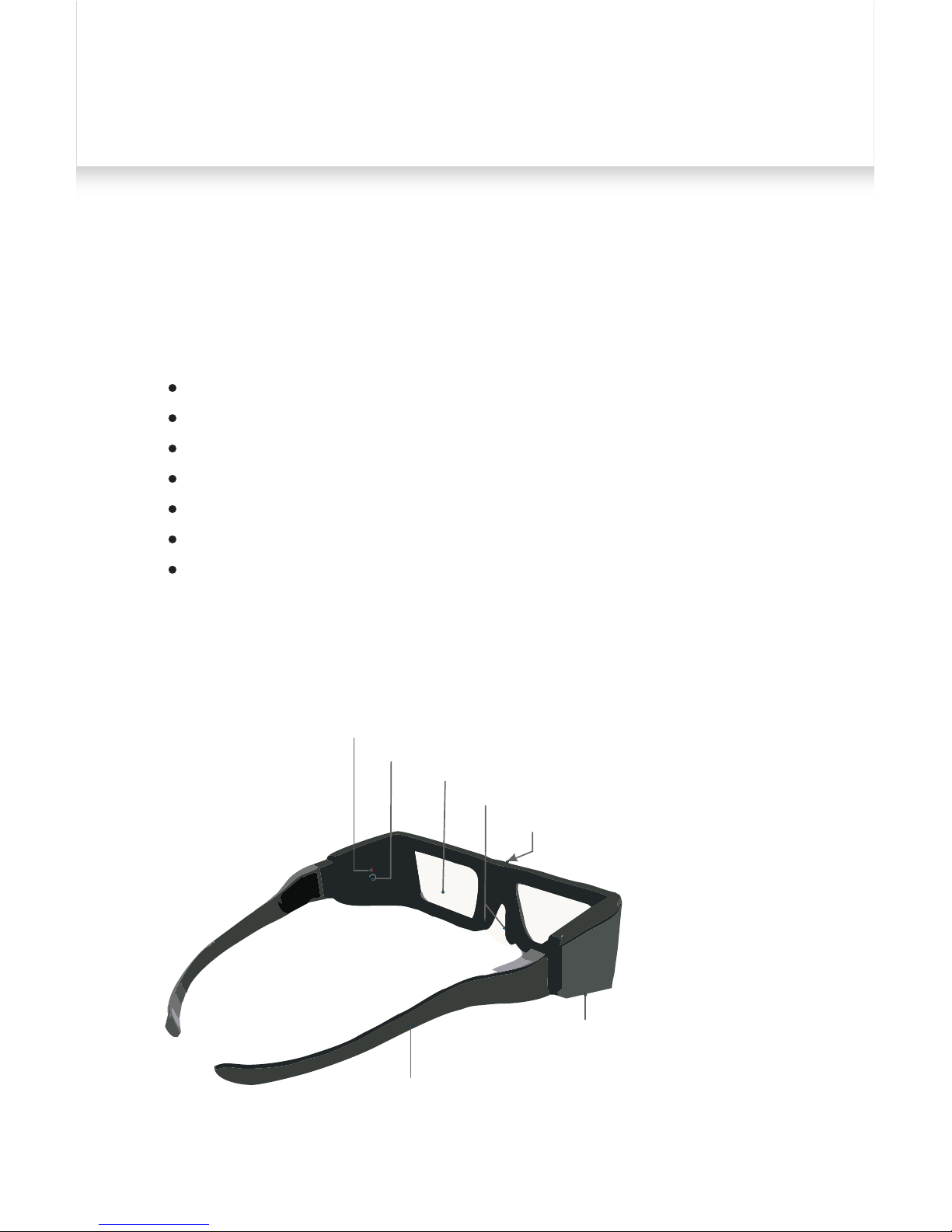
OVERVIEW
LED Indicator(Red)
Power Button
LC Lense
Rubber Nosepieces
DLP
®
-Link Signal Reciever™
Battery Compartment
Removable arms
Volfoni EDGETM1.1+ DLP®-Link™ 3D Glasses can only be used
with DLP®-Link™ 3D ready TV Sets and DLP®-Link™ Projectors.
Characteristics
Authorized DLP®-Link™ communication
Rubber nosepiece
Stylish and rugged
Unbeatable receiving angle
Disposable battery (CR2032)
Optimal circuit layout
CE certified
Product Features
01.
Page 3

What is required for a DLP®-Link™ 3D system
3D Contents (3D movies, Games etc )
3D Playback Device (3D Ready PC, Blu-ray Player, 3D TVs...)
3D Playback Software (required when viewing 3D movies
on 3D ready PC)
DLP®-Link™ 3D Display (DLP®-Link™ 3D Ready Projectors/TV sets)
DLP®-Link™ 3D Glasses
02.
Page 4

HOW TO USE THE 3D GLASSES
Set your playback device to 3D, press the power button to turn
on the glasses.
Now you are ready to enjoy vivid 3D content.
Turning ON the Glasses:
Press the Power Button once. Red LED is on for 1.5 seconds
and LC lenses will then turn black.
Turning OFF the Glasses:
Hold the Power Button for 1.5 seconds, and red LED and LC
Lenses will blink three times.
* Auto OFF: The Glasses will turn off automatically in five minutes
in absence of DLP®-Link™ signal. Red LED and LC Lenses will
blink three times.
Low Battery Warning:
When the battery of your glasses is low, the red LED blinks five
times in once per second when the glasses are turned on. Then
the red LED blinks continuously. Please see next page to know
how to change the battery.
03.
Page 5
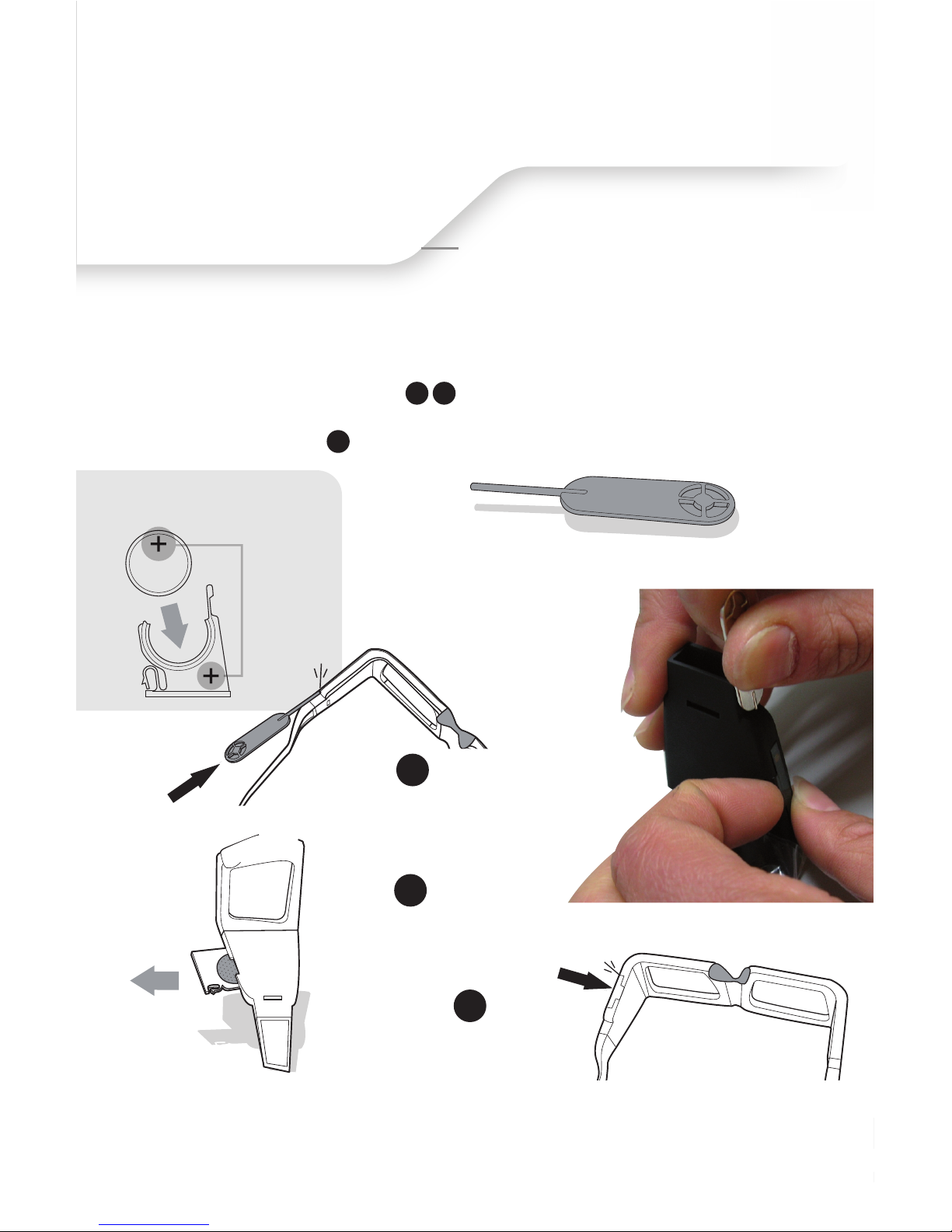
click
PUSH
STEP 3
Reinsert the battery and
push to hear the "click" to
lock it.
BATTERY REPLACEMENT
click
STEP 1
Insert the tool into the hole in the
under right side of glasses until
you hear the "click".
STEP 2
PULL OUT
Pull towards you
with your nail to remove
the battery encasement.
BATTERY TOOL
to unlock the battery tray
LITHIUM BATTERY
CR2032
3V
HL
Make sure you install the
battery in the right position.
Note: Please, make sure that there is no obstacle in front of the IR capter during
the 3D projection.
Note: When the battery has less than three hours remaining, the lenses will
flash once a second to indicate that you must change the battery. It is
recommended to check the battery life before distributing to viewers.
To open the battery encasement on the right arm of the glasses:
-Use an instrument such as the Volfoni's battery tool, a paper clip or a prong.
-Put the glasses on a desk/table as it will be more convenient and easy.
-Find the small hole on the right arm of the glasses, where the arm connects
with the battery encasement.
-Put the prong inside and when you hear a "click," you can pop open the
battery encasement.
1 2
3
04.
Page 6

Warning
Before using the glasses, read the user’s guide and following warnings. Using
glasses improperly may result in health-related complications.
Warning – No Object Nearby
Involuntary movement or surprised reaction result from watching certain 3D video.
It might be dangerous for surrounding objects or viewers.
05.
0.2 ms
1.8 ms
1:200 (no ghosting)
34%
Fall time
Twisted NematicType of liquid crystal
DLP
®
-Link™ SignalSync operation
Sync at all frame rates up to 144Hz (triple flash)
Rise time
Contrast
Transmission in the clear state
16,5%
Residual light
Chromaticity
56 grs (less than 2 ounces)
Color correction not mandatory
Disposable
50 hrs
Weight
Battery
CR2032Battery type
Autonomy
0°C to 40°CWorking temperature
-10°C to 75°CStorage temperature
These parameters are for information purpose only. They may be
adapted if necessary.
Page 7

Caution
1. The glasses are designed to view 3D contents only. Do not use
the glasses as general eyewear, UV protector, reading glasses.
2. The glasses are powered by CR2032 type lithium-manganese
dioxide battery. The battery should be replaced with a same or
equivalent type, and should be installed in correct polarity.
3. Hold the glasses by the frame, keep your fingers away from the
lenses in order to avoid fingerprints and scratches.
4. Store the glasses in a dry and clean place in a standard indoor
temperature. Extreme temperature may cause product malfunction and reduce battery life.
5. Do not apply force to the glasses. The LC lenses may break if
the glasses are rotated, twisted or bended.
6. Do not disassemble, repair or modify the glasses by yourself.
7. Do not use the glasses if there is any sign of cracked lenses or
exposed wiring.
8. Certain light source and fluorescent light may cause lenses
flicker, please turn off the light source when using or storing.
9. Clean the glasses with lint free, dry and clean soft cloth, shake
off any dust before cleaning.
Warning – Pregnant women and young children should
not use these glasses.
The glasses are not designed for pregnant women and children
under age of five. Those people are more likely experience
after-effect when they watch 3D content.
Warning – Choking Hazard
Keep the glasses out of reach of small children.
06.
Page 8

Warning – Epilepsy and Seizures
Some individuals may experience seizures or lose consciousness
momentarily when exposed to certain flashing lights and
patterns that may appear in television, PC pictures or video
games. Even people who have no history of seizures or epilepsy
may have an undiagnosed condition. If you or anyone in your
family has experienced symptoms linked to a seizure condition,
including experiencing seizures or a loss of awareness, consult
your physician before viewing 3D media. We recommend that
anyone who experienced following symptoms should discontinue use it immediately. Symptoms may include, among others:
1)Lightheadedness
2)Altered vision
3)Eye or face twitching
4)Confusion
5)Disorientation
6)Loss of awareness
7)Involuntary movements
8)Convulsions
9)Nausea
Parents should monitor and ask their children about above symptoms.
Warning – Eye Fatigue
Some individuals have reported dizziness, headaches, or eye
fatigue as a result of viewing media in 3D. Stop using if you or
your child experience any of these conditions. Take a rest and
consult a doctor if eye fatigue continued.
You may be able to reduce the effect of eye fatigue by taking
the following precautions:
>> Do not watch 3D content when you are fatigued or ill.
>> Do not use the 3D glasses for extended periods of time.
>> Use the 3D glasses after reducing the depth setting.
>> Use the 3D glasses with a refresh rate of 100Hz or higher.
07.
Page 9
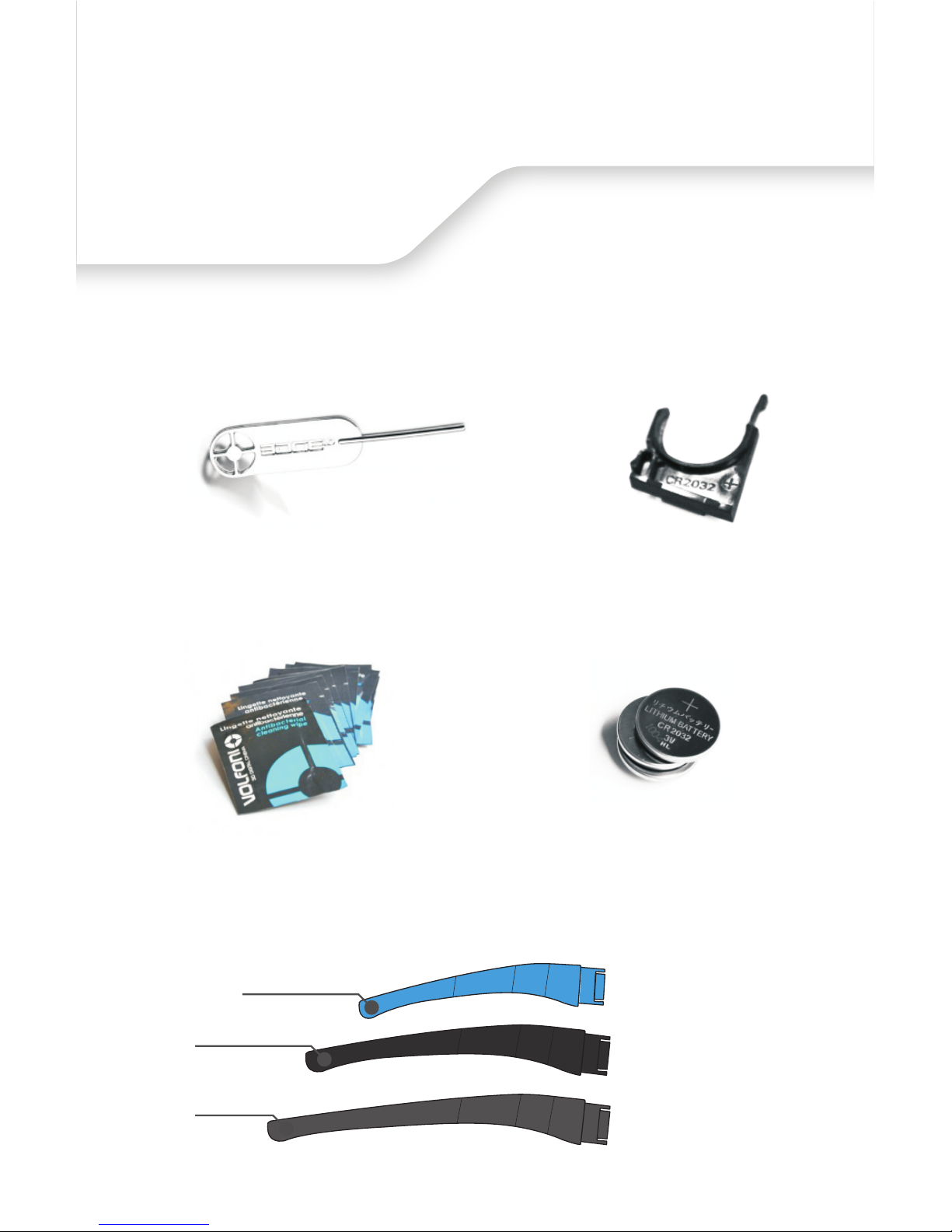
ACCESSORIES (Sold Separately)
Battery Tool
Battery Encasement
Batteries(CR2032)
Antibacterial Cleaning Wipes
S size
M size
L size
Adaptable arms
08.
Page 10

VOLFONI SAS
29, rue Jean Jacques Rousseau
75001 Paris
France
VOLFONI GmbH
Erzgießereistraße 38
80335 München
Germany
VOLFONI Ltd
21, Tower one
Lippo center 89,
Queensway
Hong-Kong
VOLFONI Inc
3450, Cahuenga Bd West.
UNIT 504
Los Angeles, CA, 90068
USA
VOLFONI Ltd.
90 Long Acre
Covent Garden
London
WC2E 9RZ
UK
VOLFONI Iberia, S.L.
Ronda Guglielmo Marconi, 4
46980 Paterna (Valencia)
Spain
www.volfoni.com
 Loading...