

Page 1
Quick Start Guide
Vodafone Business Connect
Page 2
Safety instructions
Read the following instructions carefully. Failure to comply with
these instructions can be dangerous and/or illegal. You are solely
responsible for how your Vodafone DSL Router is used and for the
consequences of its use. Do not activate the device in places where
the use of wireless products is prohibited or where it can cause
interference or hazards.
Read the “Safety information” section
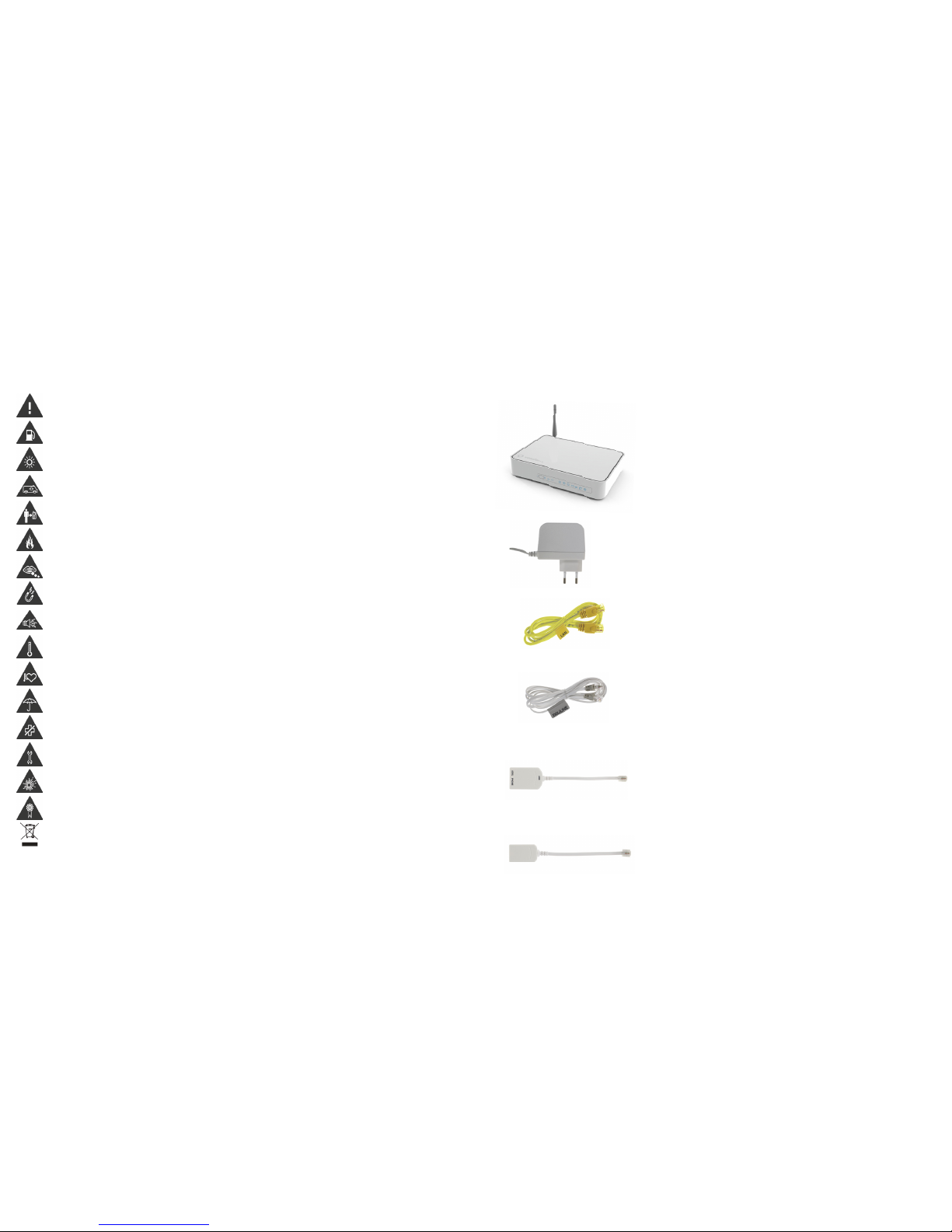
Do not use the device at refueling stations
The device may generate intense or flashing light
Do not rely on this device for emergency
communications
Maintain a distance of at least 20 cm from the
Vodafone DSL Router
Do not dispose of the device in fire
Small parts may cause chocking
Avoid contact with magnetic media
The device may generate intense noise
Avoid extreme temperatures
Keep it away from pacemakers and other individual
medical devices
Avoid contact with liquids Keep the device dry
Deactivate the device when asked to do so
in hospitals and medical facilities
Do not try to disassemble the device
Deactivate the device in explosive environments
Use only authorized accessories
This product is recyclable. Dispose of it appropriately
Declaration of conformity
EN300328V1.6.1 (2004-07), ΕΝ301 489-01 V1.4.1
(2002-08ΧΕΝ301 489-17 V1.2.1 (2002-08), Safety ΕΝ 60950-1:2001
In compliance with the provisions of Directives 89/336/EEC,
92/31/EEC, 93/68/EEC, 99/5/EEC and LVD 73/23/EEC.
In compliance with Annex III to Directive 1999/5/EC.
FCC approved
Installing your Vodafone DSL Router easily!
Follow the steps described in this guide to install your device easily.
A complete package contains the following:
To find the latest version of the Short Installation Guide or other information,
visit www.vodafone.gr
Vodafone DSL Router
Power adapter
Two Ethernet/LAN cables (yellow)
Two DSL/LINE telephone cables (grey)
ADSL splitter
ADSL filter
Page 3
1
2
3
4
5
6
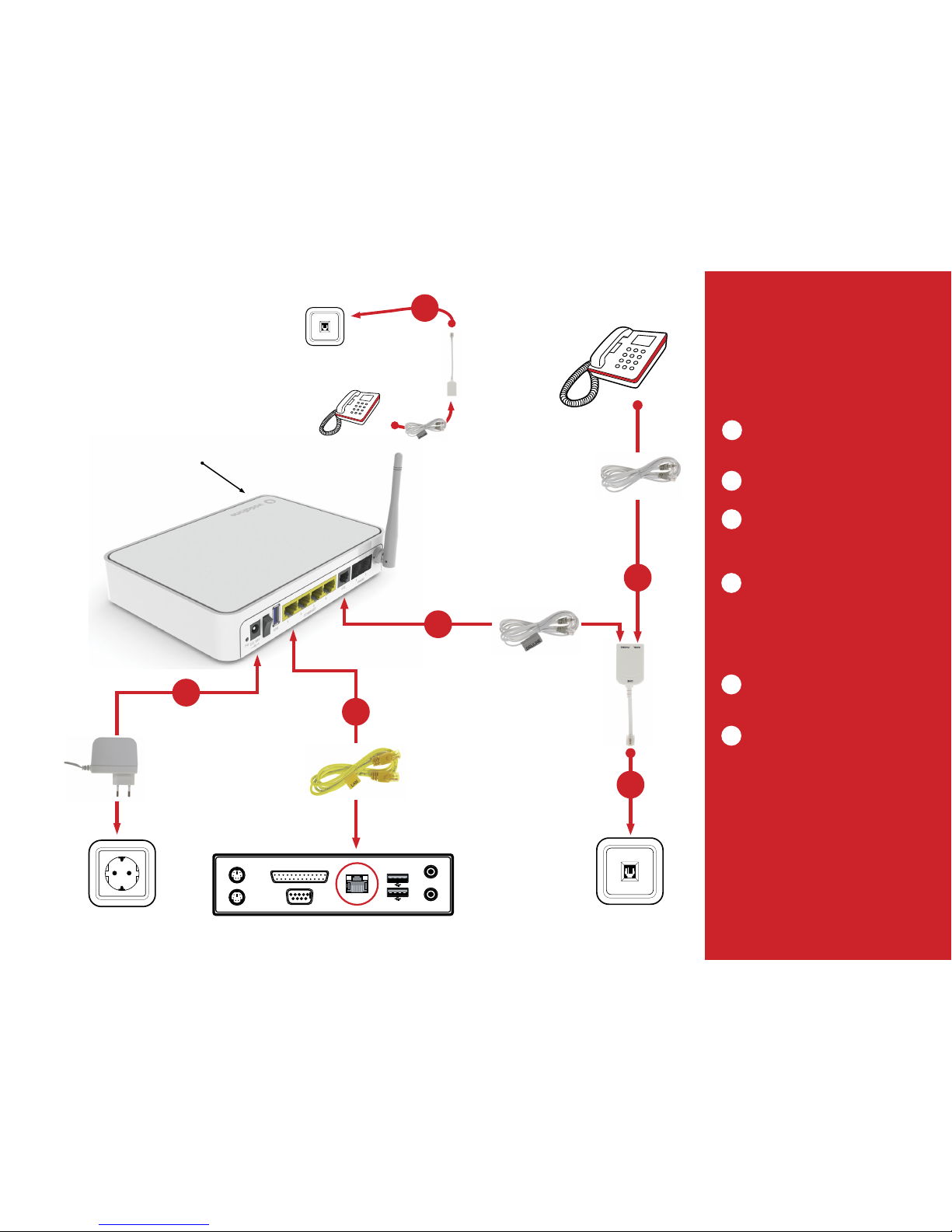
Telephone set
ADSL splitter
Telephone socket
Computer (PC/laptop)
Power socket
Vodafone DSL Router
Wi-Fi button:
Press to activate/deactivate Wi-Fi
Telephone socket
Telephone set
ADSL filter
Installation steps to activate
the Internet access service
Internet products from Vodafone.
For these products, fixed telephony is offered via a third
provider:
Disconnect the landline cable from the power
socket on the wall. Insert the telephone cable into
the PHONE port of the ADSL splitter.
Connect the ADSL splitter to the telephone
socket on the wall.
Insert the grey DSL/LINE cable into the grey DSL
port of the Vodafone DSL Router. Insert the other
end of the cable into the DSL (or Modem) port of
the ADSL splitter.
If you want to set up a wired connection to your
computer (laptop or PC), insert one end of the
yellow LAN/Ethernet cable into one of the
corresponding (yellow) ports on the back of the
Vodafone DSL Router. Insert the other end of
the cable into the Ethernet/LAN port of your
computer.
Insert the power adapter into a power socket and
the other end of the cable into the appropriate
port on the back of the device.
6. If you are using more than one telephone
sets on the same line, you will need to insert an
ADSL filter between the telephone set and the
corresponding telephone socket. We suggest that
you do not use more than 2 telephone sets.
1
2
3
4
5
6
Page 4
Installation steps to activate
the combined fixed telephony
and Internet access service
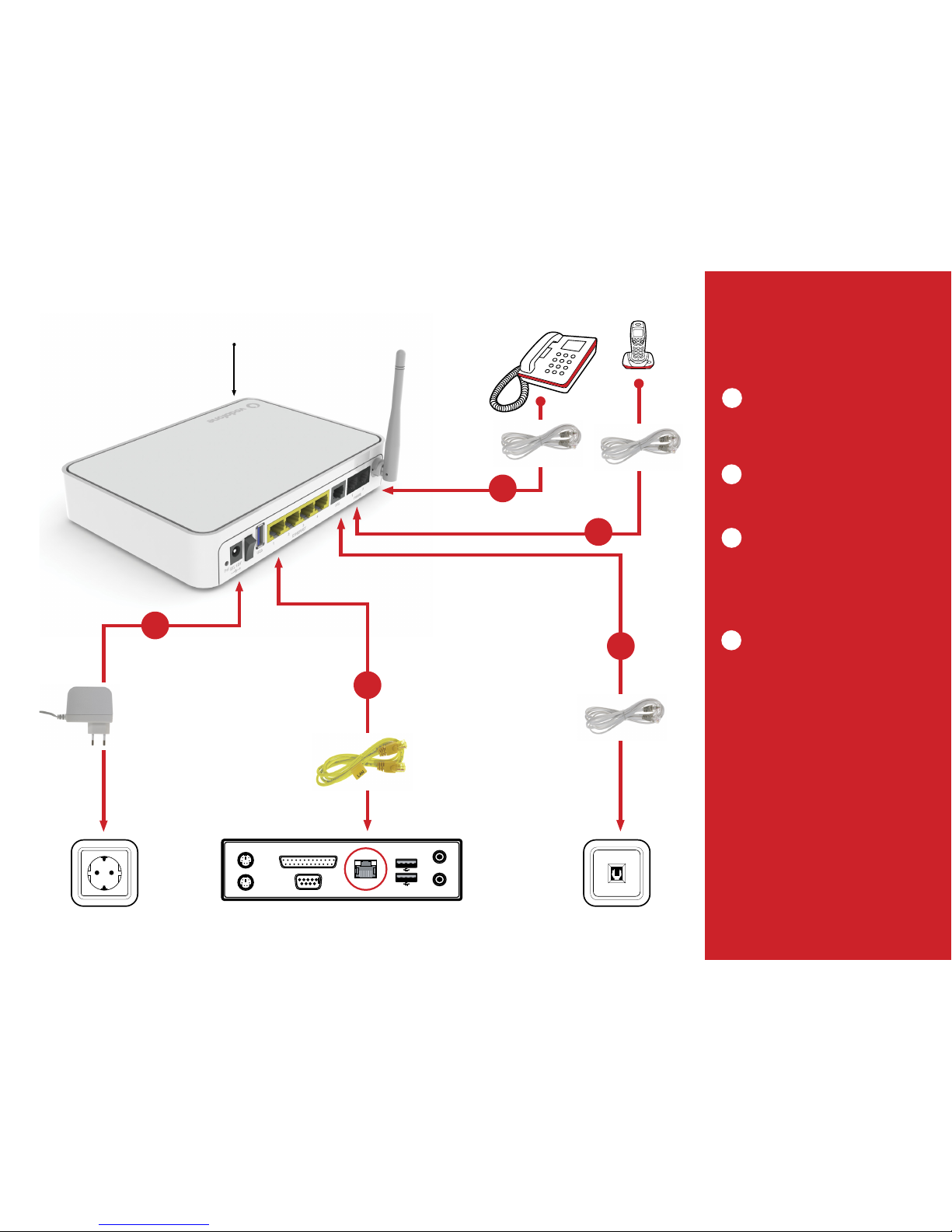
Disconnect the landline cable from the telephone
socket on the wall. Insert the grey DSL/LINE
telephone cable into the grey DSL port of the
Vodafone DSL Router. Insert the other end of the
cable into the telephone socket on the wall.
If you have purchased the relevant service,
connect your two telephone sets to the first and
second black PHONE ports of the Vodafone DSL
Router.
If you want to set up a wired connection to your
computer (laptop or PC), insert one end of the
yellow LAN/Ethernet cable into one of the
corresponding (yellow) ports on the back of
the Vodafone DSL Router. Insert the other end
of the cable into the Ethernet/LAN port of your
computer.
Insert the power adapter into a power socket and
the other end of the cable into the appropriate
port on the back of the device.
1
2
3
4
Telephone socket
Telephone set
Telephone set
Computer (PC/laptop)
Power socket
Vodafone DSL Router
Wi-Fi button:
Press to activate/deactivate Wi-Fi
1
2
3
4
2
Page 5
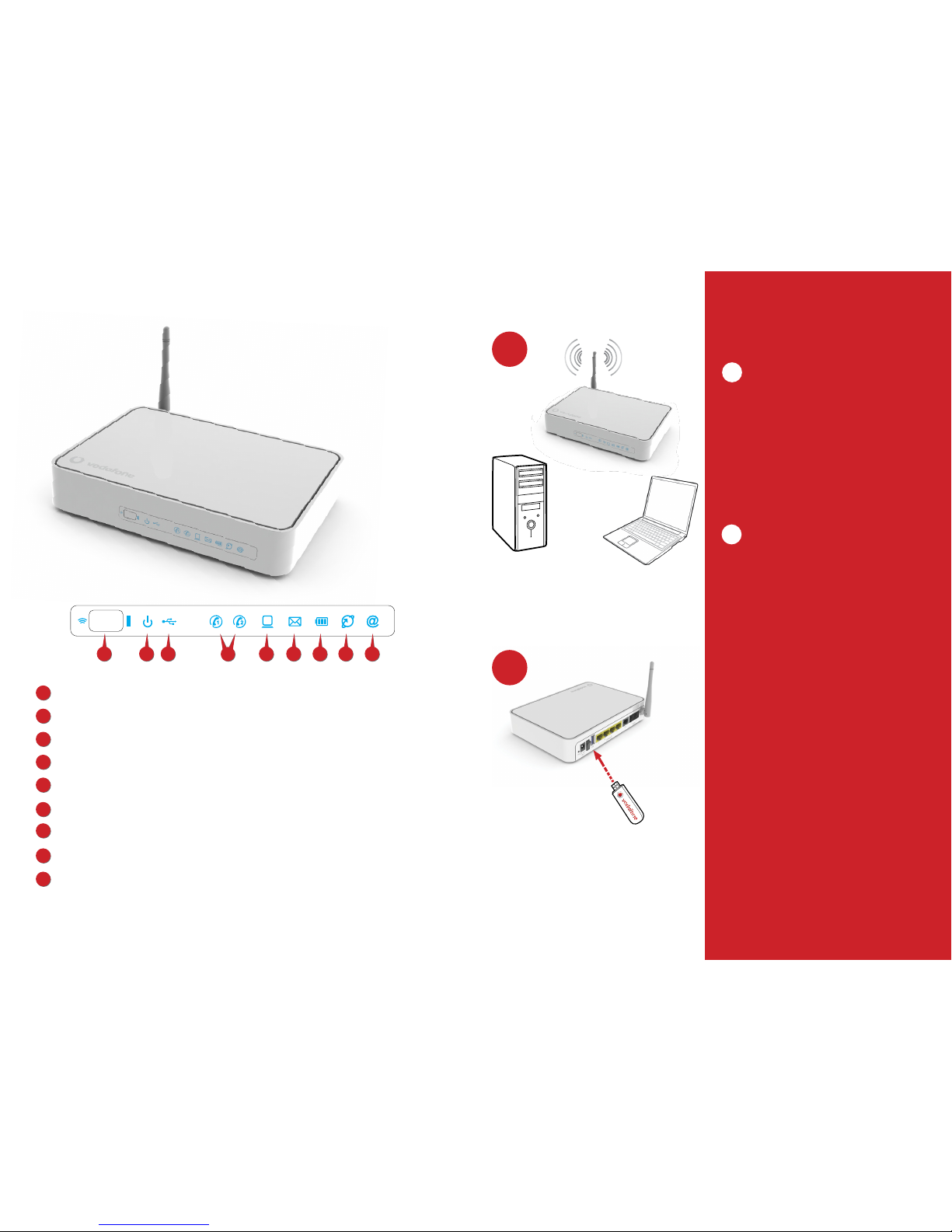
Installation options
Wireless Internet connection
Turn on your computer’s wireless connection (Wi-
Fi) by following its manufacturer’s instructions.
From the list of available wireless networks,
choose the one designated as Vodafone-XXXXX,
where ΧΧΧΧΧ are the last 5 digits of the device
serial number printed on the back of the Vodafone
DSL Router, in the (S/N) field. When the Wi-Fi Key
is requested, enter the WPA alphanumerical key
printed on the back of the Vodafone DSL Router.
Direct Internet access with computer
Vodafone Mobile Internet services
• Alternatively, you may connect to the Internet
through a Vodafone Mobile Broadband ser vice
plan, by using the Vodafone USB modem.
• Insert the Vodafone USB modem to the back of
the Vodafone DSL Router.
• To complete the settings, follow the
corresponding instructions in the User Guide.
A
B
Front illuminated indicators
1
2
3
6
5
7
8
9
4
Wi-Fi button and indicator:
Power supply indicator
USB indicator
Telephone line indicator
Ethernet indicator
New voice message
Battery charge indicator
ADSL indicator
Broadband indicator
1
2
3
4
5
7
6
8
9
B
A
1
To connect to the Internet via the Vodafone USB modem, you should have activated the computer (desktop or laptop)
Vodafone Mobile Broadband service plan. Corresponding charges shall apply.
Vodafone USB modem
Installation options
Installation help and instructions:
Visit www.vodafone.gr/business
or call 1399 (Corporate Customer Care Department)
free of charge from you Vodafone mobile.
Page 6

Safety information
Radio frequency exposure limits
To avoid the possibility of exceeding the radio frequency exposure
limits, you, or anybody else who is around, must be at least 20 cm
away from the aerial linked to the Vodafone DSL Router.
Young children
Keep the Vodafone DSL Router and its components out of reach
of children and do not allow children to play with the router. They
may be injured, cause injuries to others or damage the Vodafone
DSL Router. The Vodafone DSL Router includes small pointed parts
which can cause injuries or become detached and cause chocking.
Interference
The Vodafone DSL Router includes a transmitter and a receiver.
When on, it receives and transmits radio frequency energy. You must
be careful when using the Vodafone DSL Router very near individual
medical devices, such as pacemakers and hearing aids. All wireless
products are sensitive to interference which may affect their
performance. The Vodafone DSL Router is designed for operation at
a distance of at least 20 cm from any individual. Failure to comply
with this instruction may lead to exposure to radio frequency energy
in excess of the limits set forth in relevant directives.
Pacemakers
Pacemaker manufacturers suggest that a pacemaker should
be at least 15 cm away from a wireless device to avoid possible
interference between the device and the pacemaker.
Hearing aids
Hearing aids or other cochlear implants users may experience
noise interference when using, or being close to, wireless devices.
The level of interference depends on the type of the aid and
the distance from the source of interference. You may reduce
interference by moving further away from the source. Consult your
hearing aid manufacturer for alternative solutions.
Medical devices
To find out whether the Vodafone DSL Router could affect the
operation of your medical device, consult with your doctor and the
device manufacturer.
Hospitals
To prevent possible interference with sensitive medical equipment,
deactivate your wireless device when requested to do so in
hospitals, clinics or health facilities.
Explosive environments
Where there is a possible explosive atmosphere, you must comply
with all posted instructions and must, upon request, deactivate
the Vodafone DSL Router or any other wireless device. Areas with
possible explosive environments are refueling stations, spaces
under boat decks, fuel or chemical transportation or storage
facilities, as well as areas where the air contains chemicals or
particles (such as grains, dust or suspended metallic particles).
Battery
The device is accompanied by a rechargeable battery pack.
• Do not expose the battery to excessive heat or flame.
• Do not immerse the battery in water.
• Do not subject the battery to strong blows or let it come in
contact with drops.
• Do not disassemble or modify the battery for any reason
whatsoever.
• Do not keep the battery discharged. Charge the battery at
temperatures ranging between 0°C and +45°C.
• Do not keep the battery with less than 50% of its original capacity
or at a temperature other than specified.
Safety information
Explosion areas
To avoid causing interference with explosion operations, you must deactivate the Vodafone DSL Router when you are in explosion areas or in
areas where there are signs instructing you to deactivate “two-way wireless devices” or “electronic devices”. Watch out for warnings, comply
with restrictions and observe all the rules.
• DO NOT use this product near water, for example in a damp basement or close to a swimming pool.
• DO NOT expose the device to moisture, dust or corrosive liquids.
• DO NOT place objects on the device.
• DO NOT install, use or maintain the device during a storm. There is slight risk of electrocution.
• Connect ONLY appropriate components to the device.
• DO NOT open the device or unit. If you open or remove the covers, you may be exposed to dangerously high voltages or other hazards.
ONLY specialized and knowledgeable technicians should service or disassemble the device. Contact your supplier for more information.
• Make sure that you have inserted cables into the correct ports.
• Place the connection cables carefully to eliminate any possibility of somebody stepping or stumbling on them.
• Make sure that you have disconnected all cables from the device before you take it for servicing or disassemble it.
• Use ONLY an appropriate power adapter or cable for your device.
• Connect the power adapter or cable to an appropriate power supply line (e.g. 110V AC in Northern America or 230V AC in Europe).
• DO NOT let anything come into contact with the power adapter or cable and DO NOT place the product in a place where somebody could
step or stumble on it.
• DO NOT use the device if the power adapter or cable is damaged. There is a risk of electrocution.
• If the power adapter or cable is damaged, disconnect it from the power socket.
• DO NOT try to repair the power adapter or cable. Contact your nearest supplier and buy a new one.
• DO NOT use the device outdoors. Make sure that all connections are located indoors. There is slight risk of electrocution.
• DO NOT block the device ventilation openings. Insufficient air flow may damage the device.
• Use only a telecommunications cable no. 26 AWG (American Wire Gauge) or a cable of a higher cross section.
• Aerial warning! This device complies with the ETSI and FCC certification requirements when used with the accompanying aerial(s). Use only
the accompanying aerial(s).
• If you mount the device on the wall, make sure not to cause any damage to power, gas or water lines.
Page 7
1-3 Tzavella St., 152 31 Chalandri
Tel.: 210 67 02 000, 210 67 03 000 Fax: 210 67 03 200
CUSTOMER CARE DEPARTMENT
1399 (free of charge from Vodafone mobiles),
80011 127127 (free of charge from landlines)
 Loading...