

Page 1
BT-1 User’s Guide
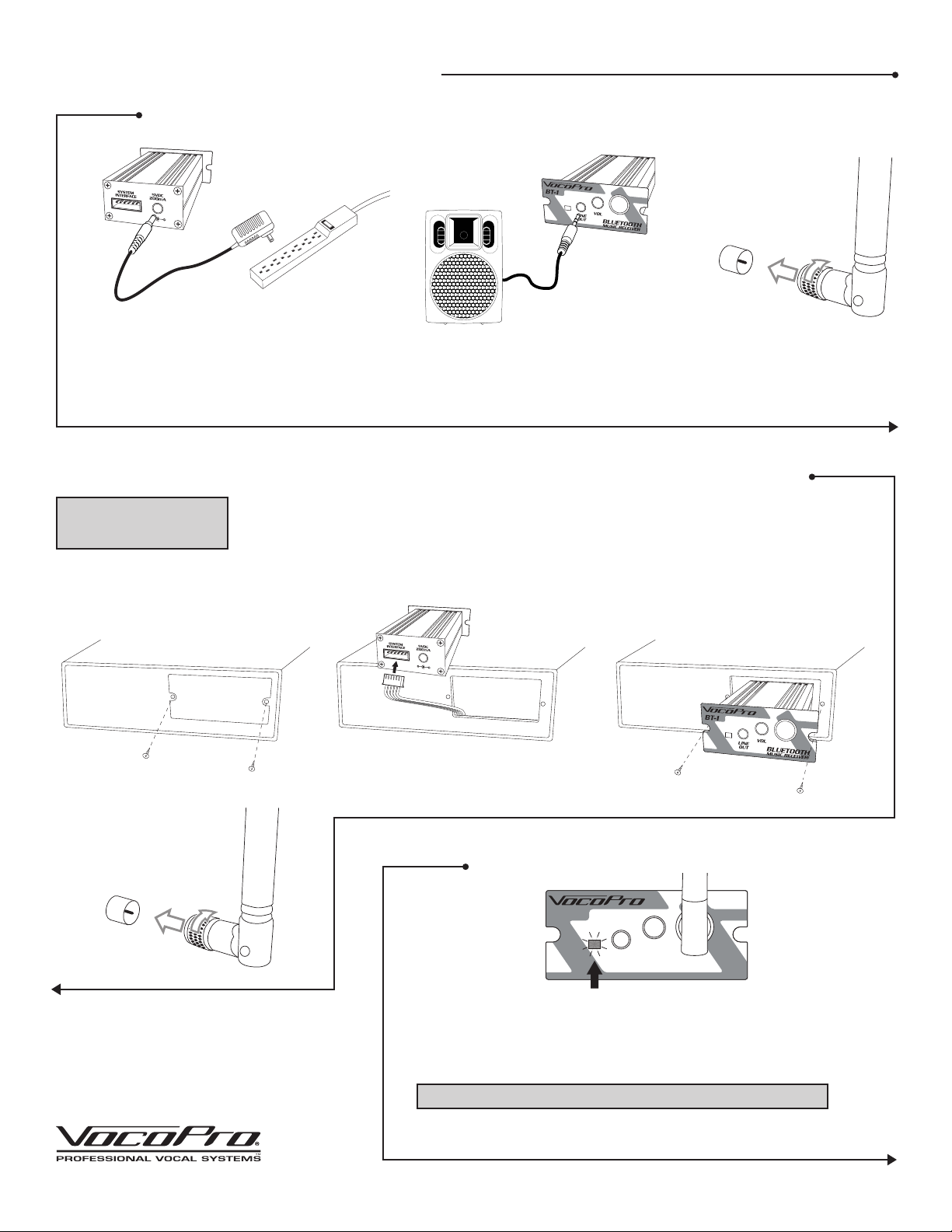
Getting Connected (For BT-1L only)
1
1. Connect the power supply to the BT-1L and a power outlet.
2. Using the supplied 1/8” to 1/8” audio cable, connect one end to the audio output on the
BT-1, connect the other end to your powered speaker or audio system.
3. Install the antenna by aligning it to the center of the antenna input and turn clockwise.
Installation (For BT-1 only)
NOTE: Do not connect 6-pin
connector and 5V power
adapter simultaneously.
1. Remove the expansion port cover plate from your compatible host unit.
2. Find the 6-pin cable and connect its connector to the 6-pin connector on the back of the BT-1.
3. Slide the BT-1 into the port and secure with the screws.
4. Install the antenna by aligning it to the center of the antenna input and turn clockwise.
32
Connector
Antenna
1
4
Connector
Antenna
2 3
Pairing
BT-1
LINE
OUT
1. When powered, the BT-1/L will automatically be discoverable in
pairing mode (indicated by the blinking LED).
2. Go to the Bluetooth settings on your Bluetooth device and pair
the device labeled VOCOPRO. This will cause the LED to remain lit
signaling a successful pairing.
NOTE: If you are prompted for a password, use: 0000.
3. Use the volume knob to adjust volume of bluetooth audio output.
4. Enjoy your music!
VOL
BLUETOOTH
MUSIC RECEIVER
Page 2
Specifications
• Bluetooth: Version 3
• Frequency Band 2.402GHz~2.480GHz ISM Band
• Audio input: Bluetooth
• Audio output: 1/8” mini-jack
• Power - 5VDC 200 mA
6-Pin Connector
Troubleshooting
If you experience performance issues with the BT-1/L, perform
the following:
1. Make sure the BT-1/L is still paired.
This can be verified by checking the LED.
• Solid LED: Paired
• Blinking LED: Not paired
If need be, repeat the process to pair your Bluetooth device.
2. Make sure you are within operating range.
The operating range is approximately 30 ft. If you are in excess
of 30 ft from the BT-1/L, the signal may cut-out or drop. Also
try and limit any obstructions to line of sight.
3. Check the volume levels.
On the BT-1/L, check the VOLUME knob to make sure it is at a
sufficient level. Check the volume setting for the sound system.
Lastly, check the sound settings on your Bluetooth device.
OWNER’S MANUAL
www.vocopro.com
v1.0404
© VocoPro 2013
BT-1 User’s Guide
BLUETOOTH MUSIC RECEIVER
BT-1
BLUETOOTH MUSIC RECEIVER
BT-1
 Loading...