

Page 1
V 1.0.3 29-03-2006
User manual
MB-600 Matte box system
Version 1.0.0
www.vocas.com
Page 2

2
Index
Introduction .......................................................................................................... 3
Available kits ........................................................................................................ 4
MB-611 kit, 0600-0611 ................................................................................................................ 4
MB-612 kit, 0600-0612 ................................................................................................................ 4
MB-623 kit, 0600-0623 ................................................................................................................ 4
Guide to modules & components......................................................................... 5
A. MB-600 Front unit 0620-0101 ................................................................................................. 6
B. MB-600 Filter stages 0620-0311 and 0620-0312 .................................................................... 7
C. MB-600 Rear plate 165 mm 0620-0201 .................................................................................. 8
D & E. Rail adapters .................................................................................................................... 9
How to ................................................................................................................ 10
1. Attach a filter stage.................................................................................................................10
2. Lock the filter frame ................................................................................................................12
3. Lock the rotation of the filter stage ..........................................................................................12
4. Attach a rail bracket ................................................................................................................13
5. Attach an accessory in the front of the matte box hood...........................................................13
5.Operate the unique eyebrows..................................................................................................14
Accessories ........................................................................................................ 15
Adapter rings: .............................................................................................................................15
Flags: .........................................................................................................................................15
Rail adapter kits: ........................................................................................................................16
Rail adapter separate modules: ..................................................................................................16
Units to use in the front of the matte box hood:...........................................................................17
Filter frames: ..............................................................................................................................17
Contact data....................................................................................................... 20
© Vocas Systems B.V.
Page 3
3
Introduction
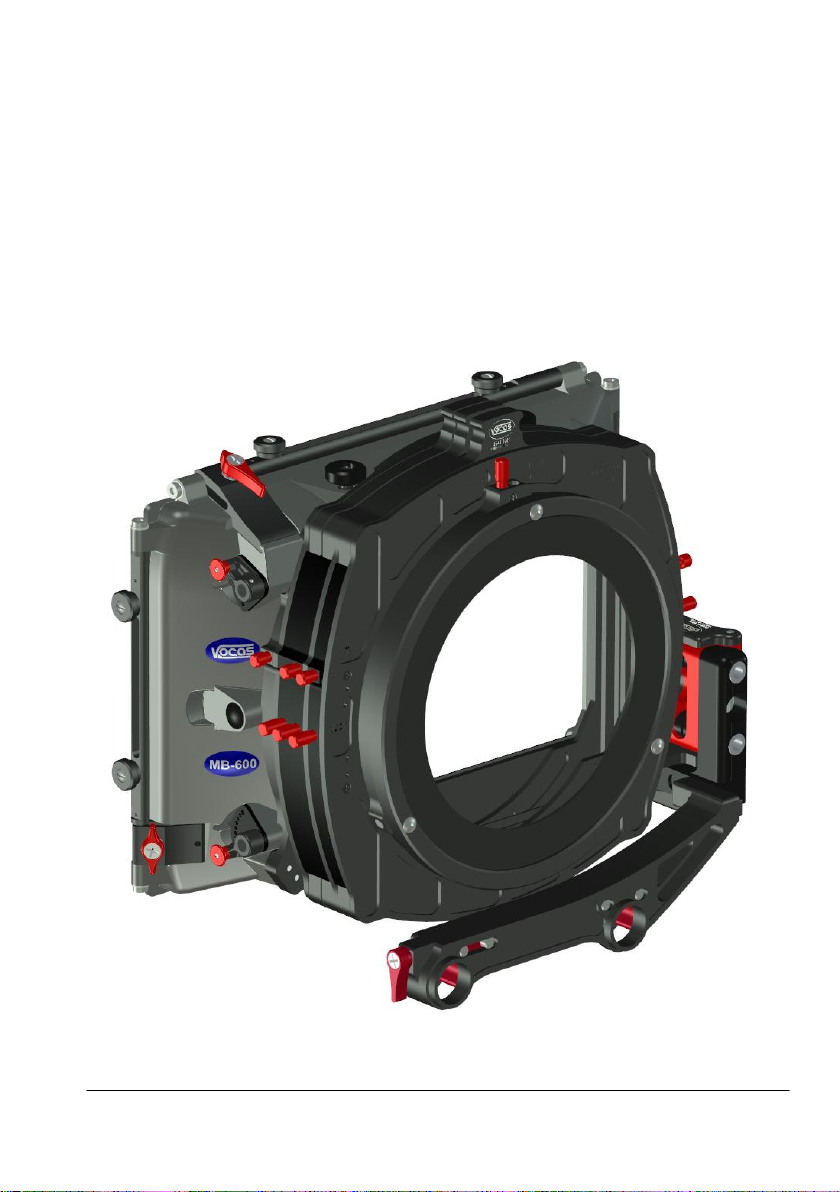
Thank you for purchasing a Vocas product. You are now the owner of a revolutionary matte box!
Its modular design, combined with the highest durability is unique in the market. More than 25 years
of experience are part of MB-600 design and functionality.
We believe that the Vocas MB-600 matte box gives you the perfect tool for lens flare reduction and
using multiple filters. Before you start to use your new accessory, please read these instructions
carefully to enjoy optimum performance and a longer service life. Keep this manual in a safe place
for future reference.
In the interest of continually improving products, Vocas Systems B.V. reserves the right to update
or modify information contained in this manual.
© Vocas Systems B.V.
Page 4

4
Available kits
Since the MB-600 matte box has a modular design, every combination, in addition to the three
available kits, is possible.
MB-611 kit, 0600-0611
Box contents:
MB-600 Front unit 0620-0101
MB-600 Rear plate 165 mm 0620-0201
MB-600 Single rotatable filter stage 0620-0311
MB-600 Filter frame 6,6" x 6,6" 0640-0001
MB-600 19 mm bars adapter 0660-0010
MB-612 kit, 0600-0612
Box contents:
MB-600 Front unit 0620-0101
MB-600 Rear plate 165 mm 0620-0201
MB-600 Double rotatable filter stage 0620-0312
MB-600 Filter frame 6,6" x 6,6" 0640-0001 (2X)
MB-600 19 mm bars adapter 0660-0010
MB-623 kit, 0600-0623
Box contents:
MB-600 Front unit 0620-0101
MB-600 Rear plate 165 mm 0620-0201
MB-600 Single rotatable filter stage 0620-0311
MB-600 Double rotatable filter stage 0620-0312
MB-600 Filter frame 6,6" x 6,6" 0640-0001 (3X)
MB-600 19 mm swing away 0660-0100
MB-600 Donut adapter ring 0630-0001
Side flag kit for MB-450 0440-0001
© Vocas Systems B.V.
Page 5
5
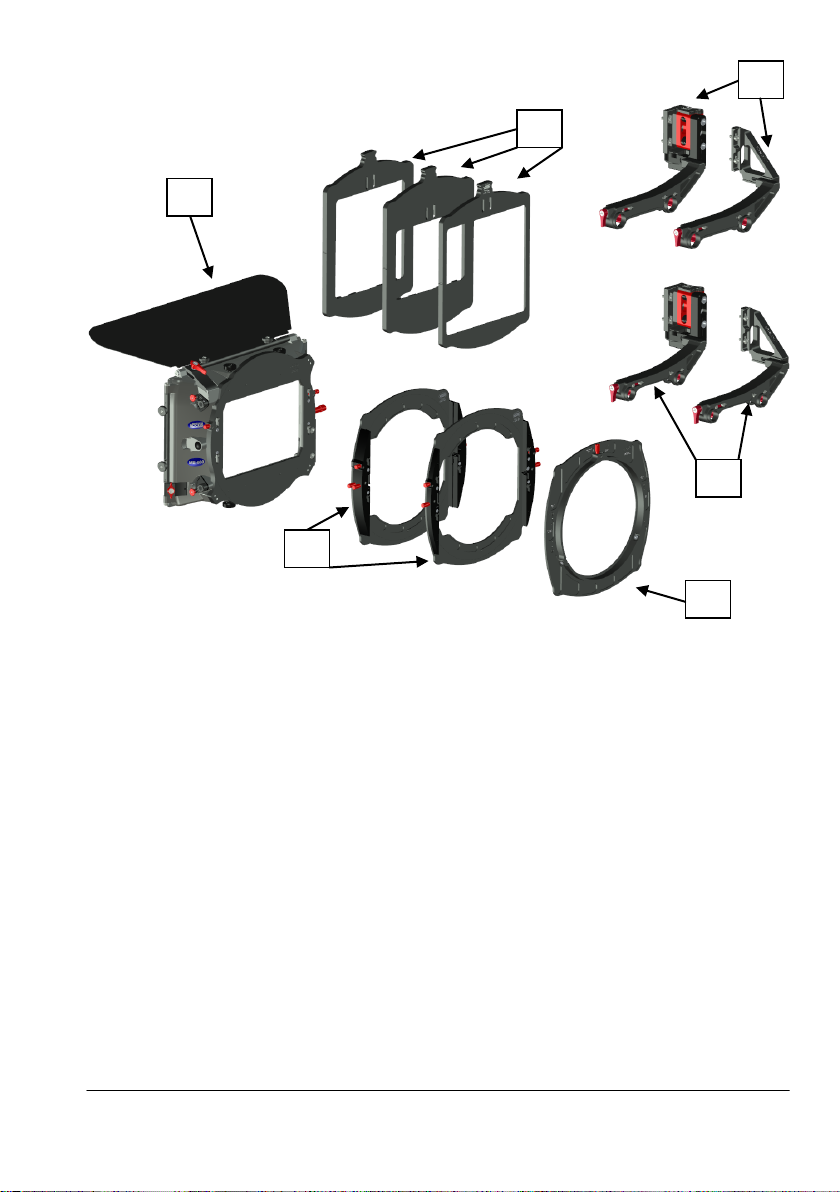
Guide to modules & components
A B C D F
E
Modules
A:
MB-600 Front unit 0620-0101
B:
MB-600 Single rotatable filter stage 0620-0311
MB-600 Double rotatable filter stage 0620-0312
C:
MB-600 Rear plate 165 mm 0620-0201
D:
Rail adapters for 19 mm rails:
MB-600 19 mm bars adapter kit 0660-0010
MB-600 15 mm studio bars adapter kit 0660-0015
E:
Rail adapters for 15 mm studio rails:
MB-600 19 mm swing away kit 0660-0100
MB-600 15 mm studio swing away kit 0660-0105
F:
MB-600 Filter frame 6,6" x 6,6" 0640-0001
MB-600 Filter frame 5,65" x 5,65" / 4"x 5,65" vertical 0640-0002
MB-600 Filter frame 4" x 5,65" horizontal / 4" x 4" 0640-0004
© Vocas Systems B.V.
Page 6
6
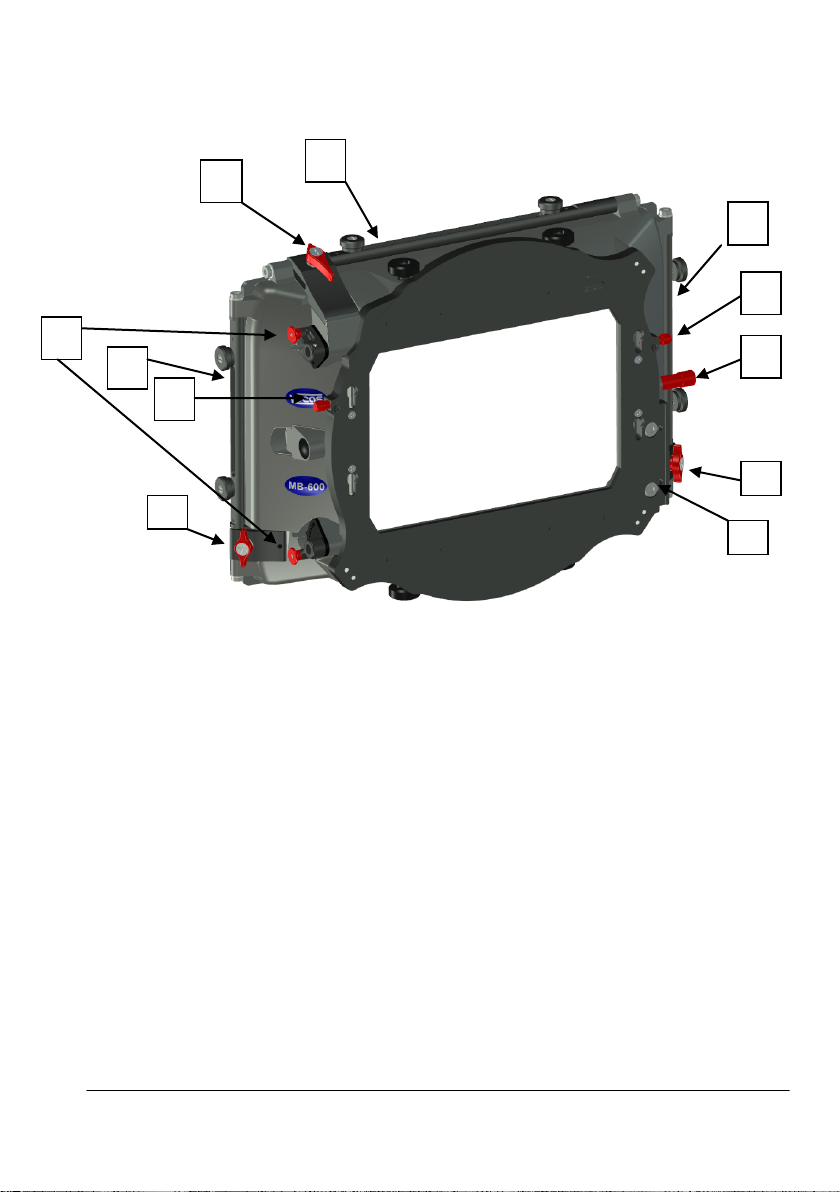
Components
1 2 3
5 3 8 7 7
A. MB-600 Front unit 0620-0101
1. Top flag attachment point
2. Top flag tilt fixation
3. Side flag attachment points
4. Side flag adjustment fixation
5. Eyebrow control
6. Attachment point for rail adapter
7. Filter stage lock
8. Knob for units to use in the front of the matte box hood
© Vocas Systems B.V.
Page 7
7
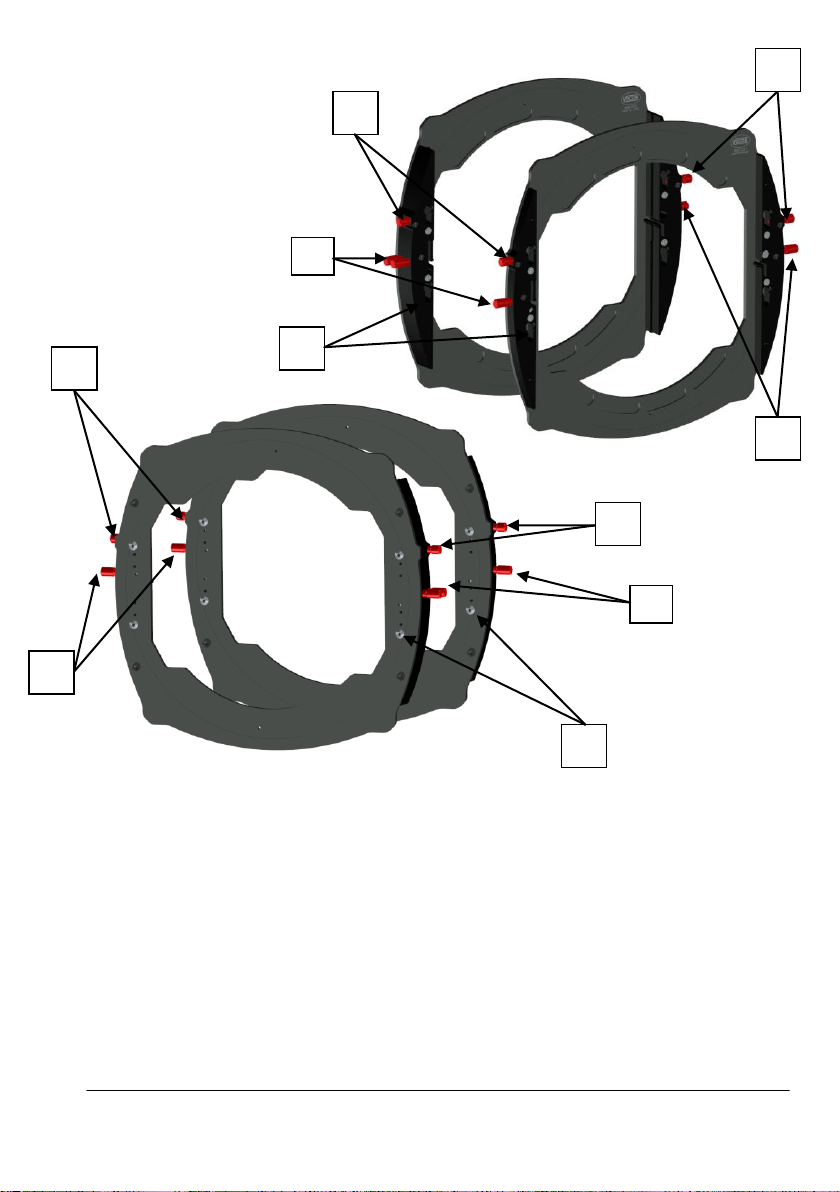
B. MB-600 filter stages 0620-0311 and 0620-0312
2 1 3 1 2
3 4 3 3 5
1. Filter frame lock
Use to lock the filter frames in the filter stage.
2. Rotation lock
Use to lock the rotation of the filter stages.
8. Filter stage lock
Will lock the next attached filter stage or rear plate.
4. Mushroom shaped lock pin
Locks in the key hole slots in the next filter stage or front unit.
5. Key hole shaped slots
Use for attaching the next filter stage or the rear plate.
© Vocas Systems B.V.
Page 8
8
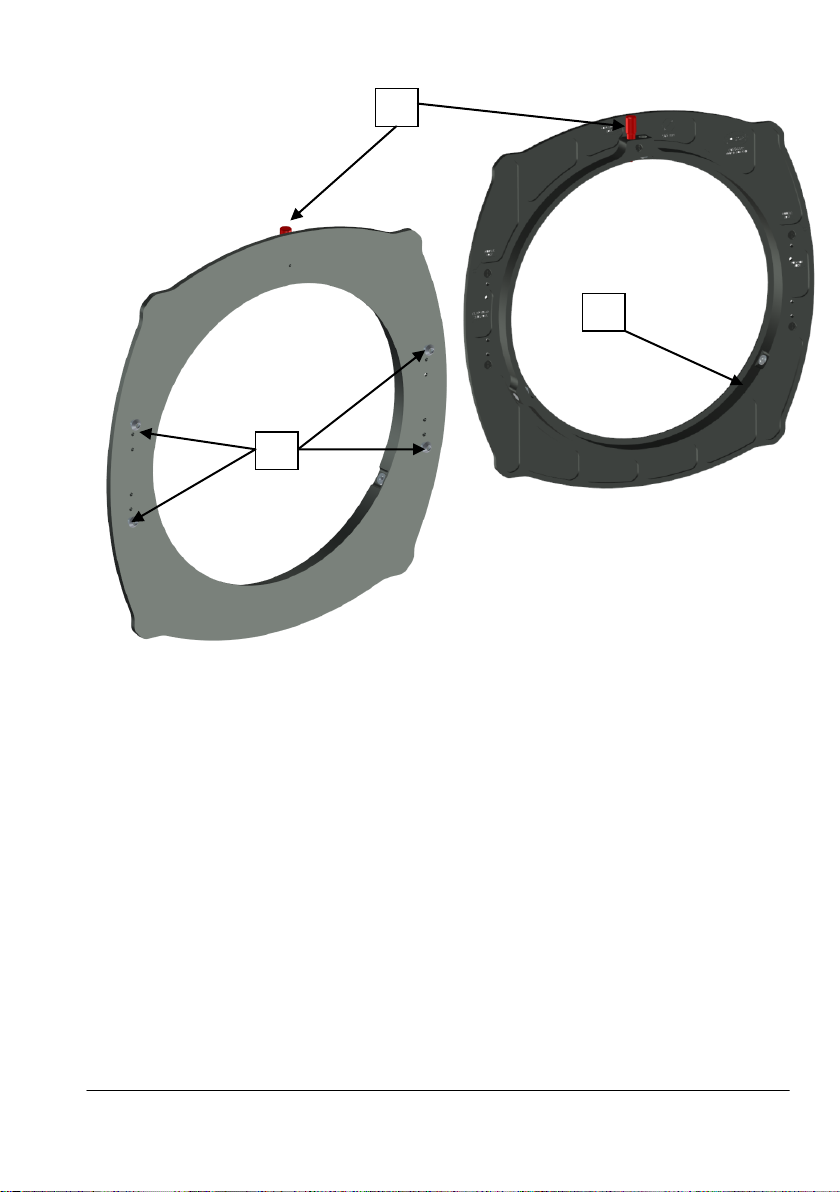
C. MB-600 Rear plate 165 mm 0620-0201
1 3 2
1. Adapter ring lock
Locks the inserted adapter ring.
2. 165 mm rear end opening
Can be used for all 165 mm adapter rings to fit the largest lenses.
3. Mushroom shaped lock pin
Locks in the key hole slots in the next filter stage.
© Vocas Systems B.V.
Page 9
9
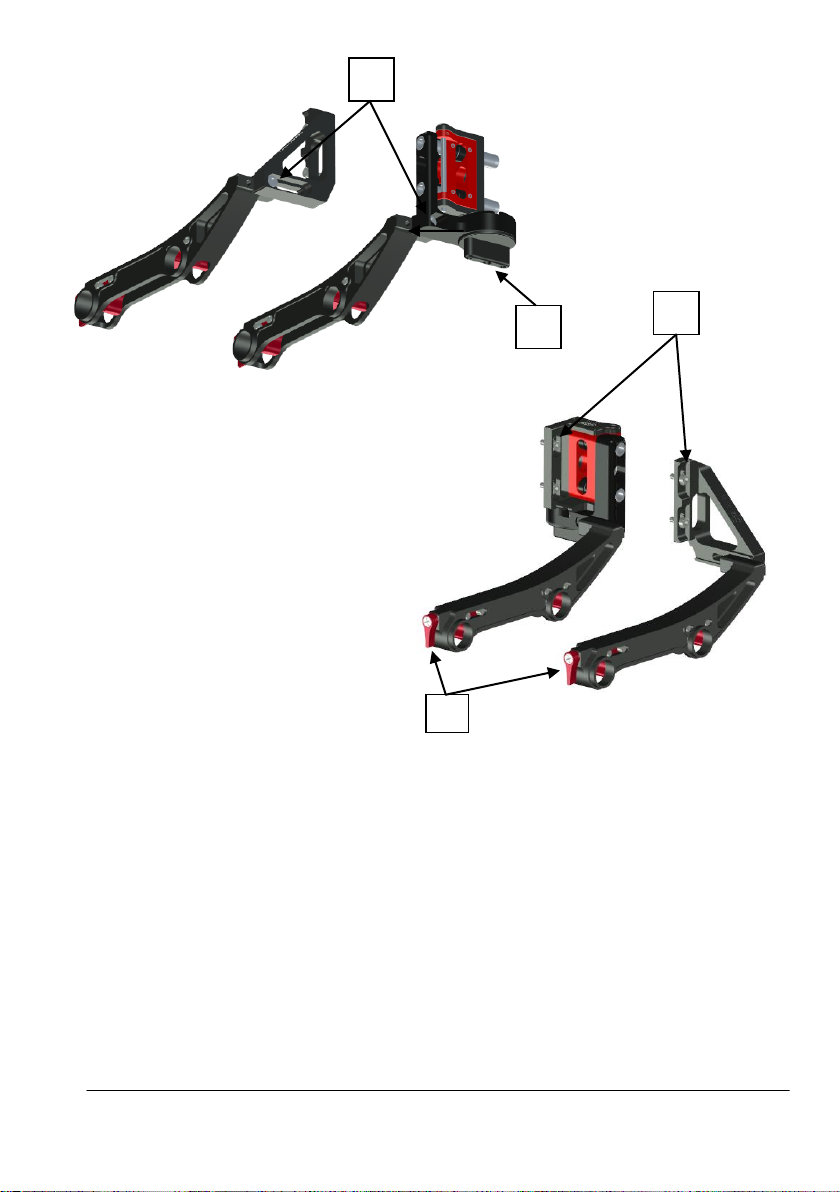
D & E. Rail adapters
1
4
2
3
1. Winged nut
For attaching and securing the bracket to the rails.
2. M5 Screw for attaching the rail bracket to the bars adapter or swing away bracket
Is also used for length adjustment.
3. M4 Screws for attaching the whole rail bracket kit to the matte box
Are also used for height adjustment of the whole matte box.
4. Knob for operating the swing away bracket
This one button is used for both operating and locking the swing away mechanism.
© Vocas Systems B.V.
Page 10
10
How to
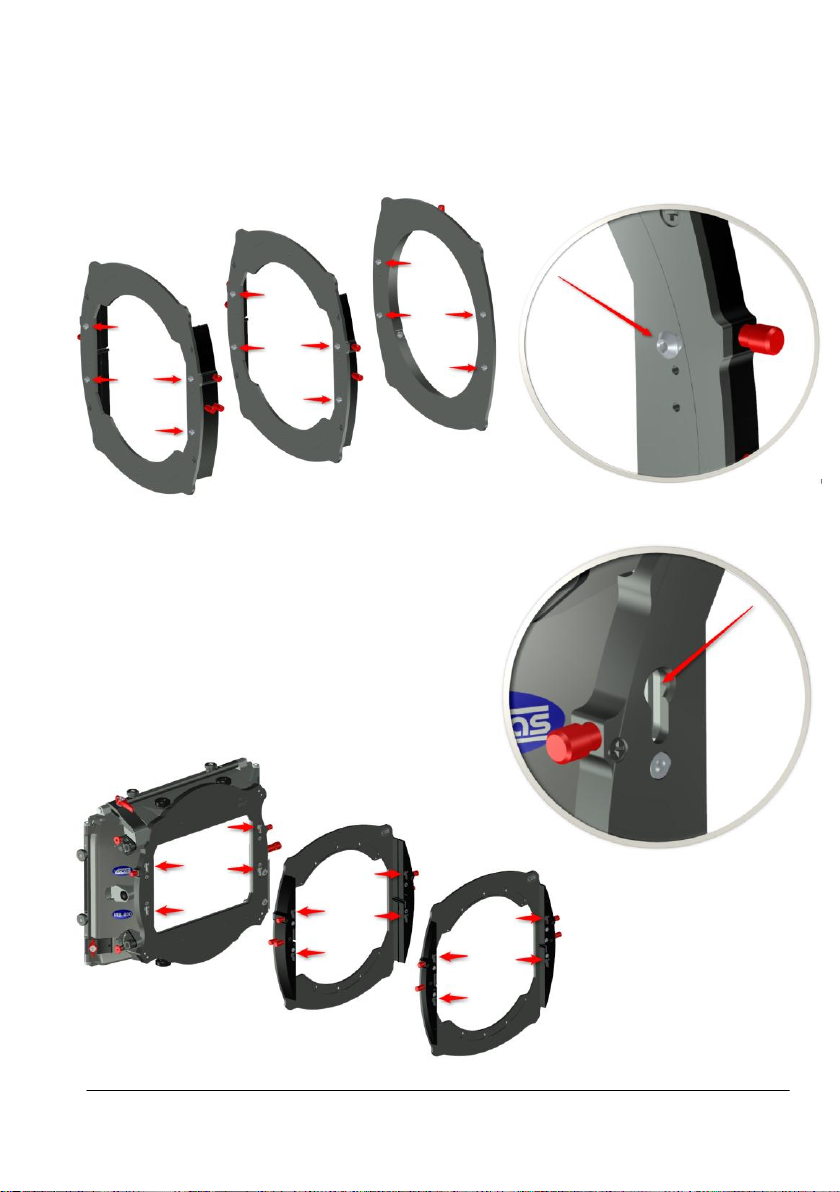
1. Attach a filter stage
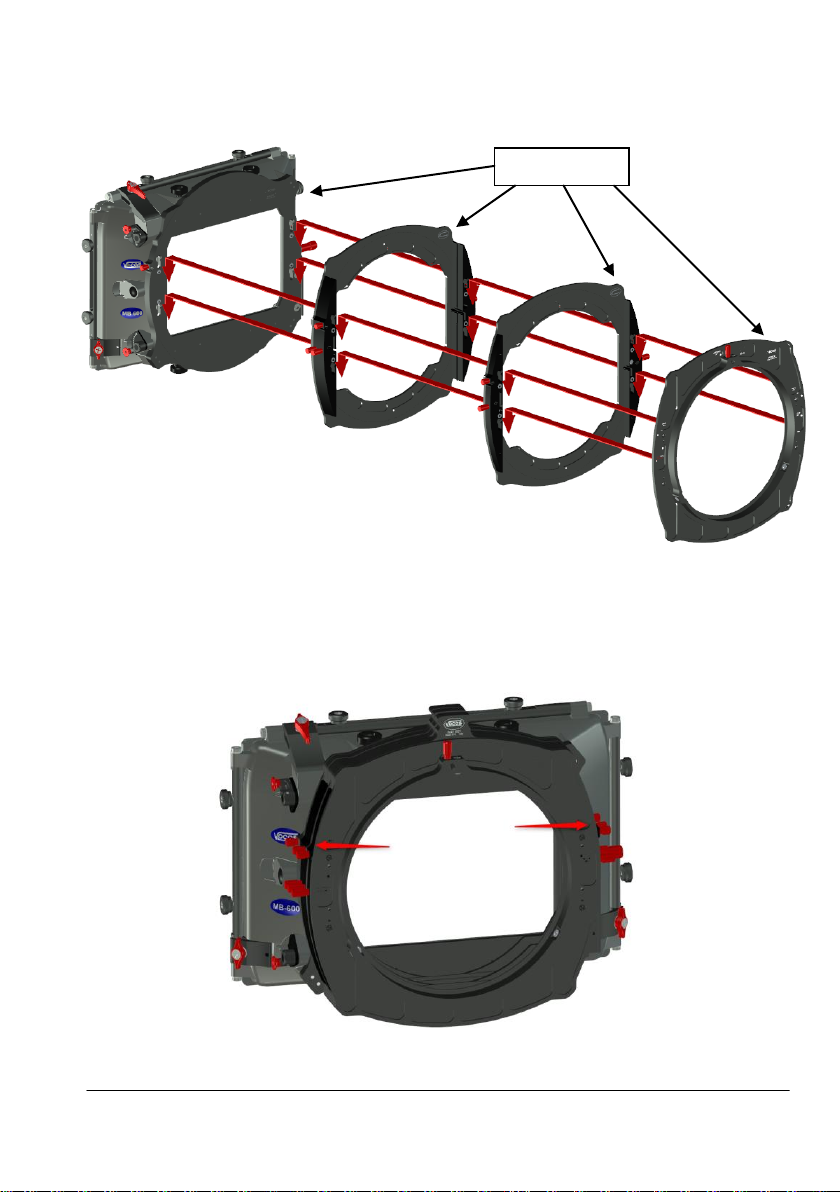
1. Please note that the rear unit and each filter stage have four mushroom shaped pins.
2. Also please note that the front unit and each filter stage has four key hole shaped slots.
© Vocas Systems B.V.
Page 11
11
3. Insert the mushroom shaped pins of the filter stage into the key hole shaped slots of the
Engravings
front unit, and push downwards. Make sure to feel a clear “click”.
Make sure all the engravings are at the right top side.
4. Now lock these connections by turning the filter stage lock on both sides of the filter
stages clockwise.
Now the filter stage is attached to the front unit.
You can repeat this for every next filter stage and finally for the rear unit.
© Vocas Systems B.V.
Page 12
12
2. Lock the filter frame
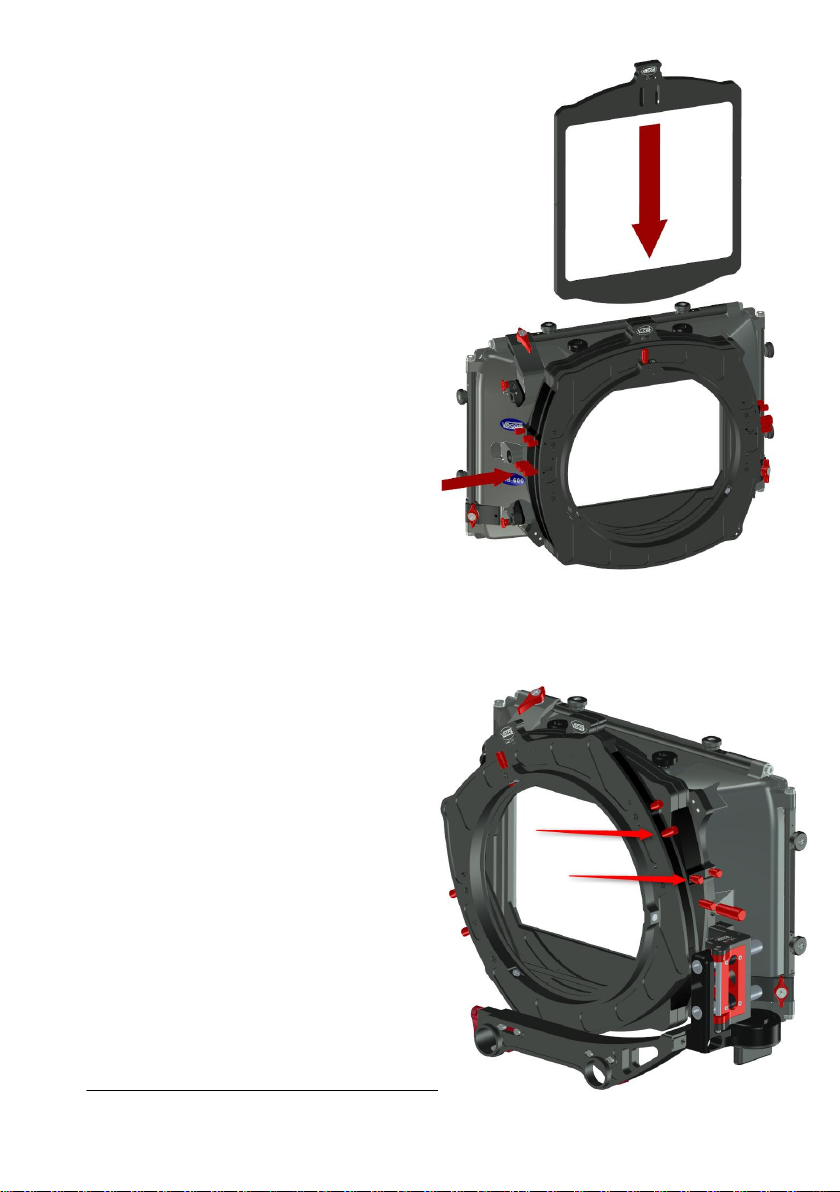
1. Before inserting a filter frame in the filter stage,
make sure the filter frame lock at the left
side of the matte box is released totally
by rotating it counter clockwise.
2. Put the filter frame in the filter stage
until you feel a very clear “centre click”
3. Lock the filter frame lock by rotating it clockwise.
3. Lock the rotation of the filter stage
1. The filter stages can be rotated,
turn the rotation lock clockwise to
lock the rotation of the filter stages.
© Vocas Systems B.V.
Page 13
13
4. Attach a rail bracket
0470-0001
0410-0004
0410-0015
This applies to all rail adapters.
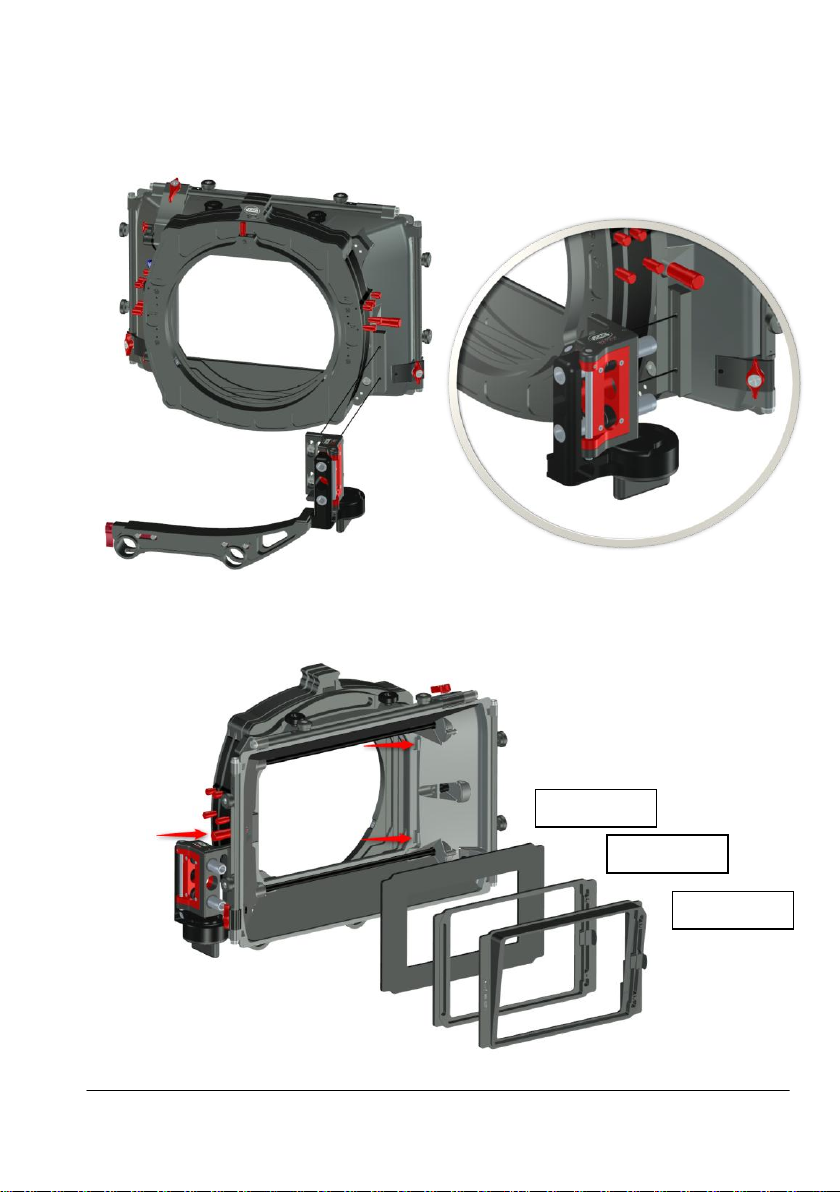
Attach the two M4 screws of the rail bracket to the matte box as shown.
Please note the screws use slotted holes, for vertical adjustment.
5. Attach an accessory in the front of the matte box hood
Pull the red knob outwards, insert the accessory in the compartment and release the red knob.
© Vocas Systems B.V.
Page 14
14
5.Operate the unique eyebrows
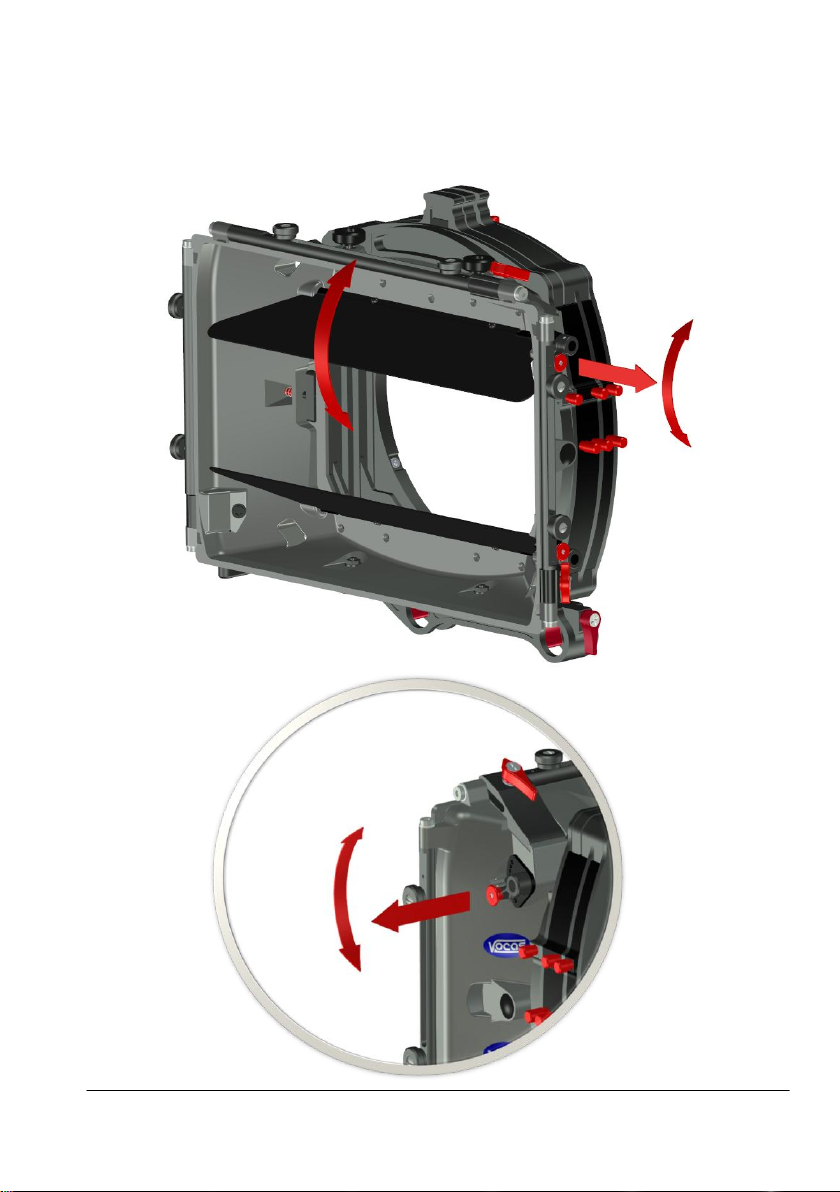
This matte box is equipped with the patented, and therefore, unique eyebrows.These eyebrows can
be quickly adjusted to the focal length of your lens giving it the best protection against lens flare.
Pull the red knob outwards to unlock the eyebrow tilting mechanism.
Rotate the eyebrow to the desired position.
© Vocas Systems B.V.
Page 15
15
Accessories
0630-0001
0630-0010
0440-0001
0430-0001
0430-0002
0430-0003
0430-0004
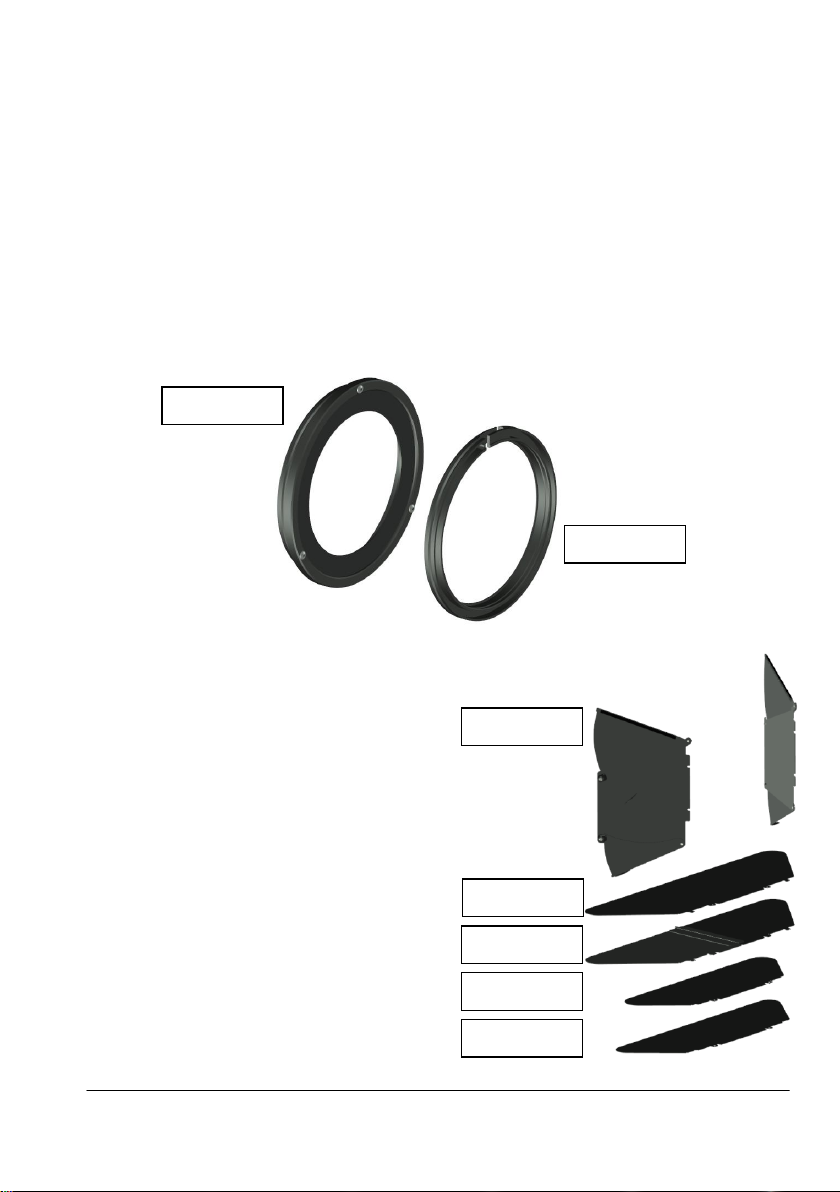
Adapter rings:
MB-600 Donut adapter ring 0630-0001
Fits in most 165 mm matte boxes, works on lenses up to 156 mm in outside front diameter.
This kit comes with four interchangeable soft rubber rings:
124 mm : for all lenses from 130 mm to 156 mm.
105 mm : for all lenses from 110 mm to 135 mm.
85 mm : for all lenses from 90 mm to 115 mm.
75 mm : for all lenses from 80 mm to 90 mm.
MB-600 adapter ring 165 mm to 143 mm 0630-0010
This is a step-down ring to the the Vocas 143 mm adapter ring system, and some other brand’s
143 mm adapter ring systems.
Flags:
Side flag kit for MB-600 0440-0001
(No top flag included, add top flag large)
Top flag large (51 cm wide) 0430-0001
Non foldable.
Top flag large (51 cm wide) 0430-0002
Foldable.
Top flag compact (38 cm wide) 0430-0003
(Included with front unit 0620-0101)
Top flag medium (42 cm wide) 0430-0004
© Vocas Systems B.V.
Page 16
16
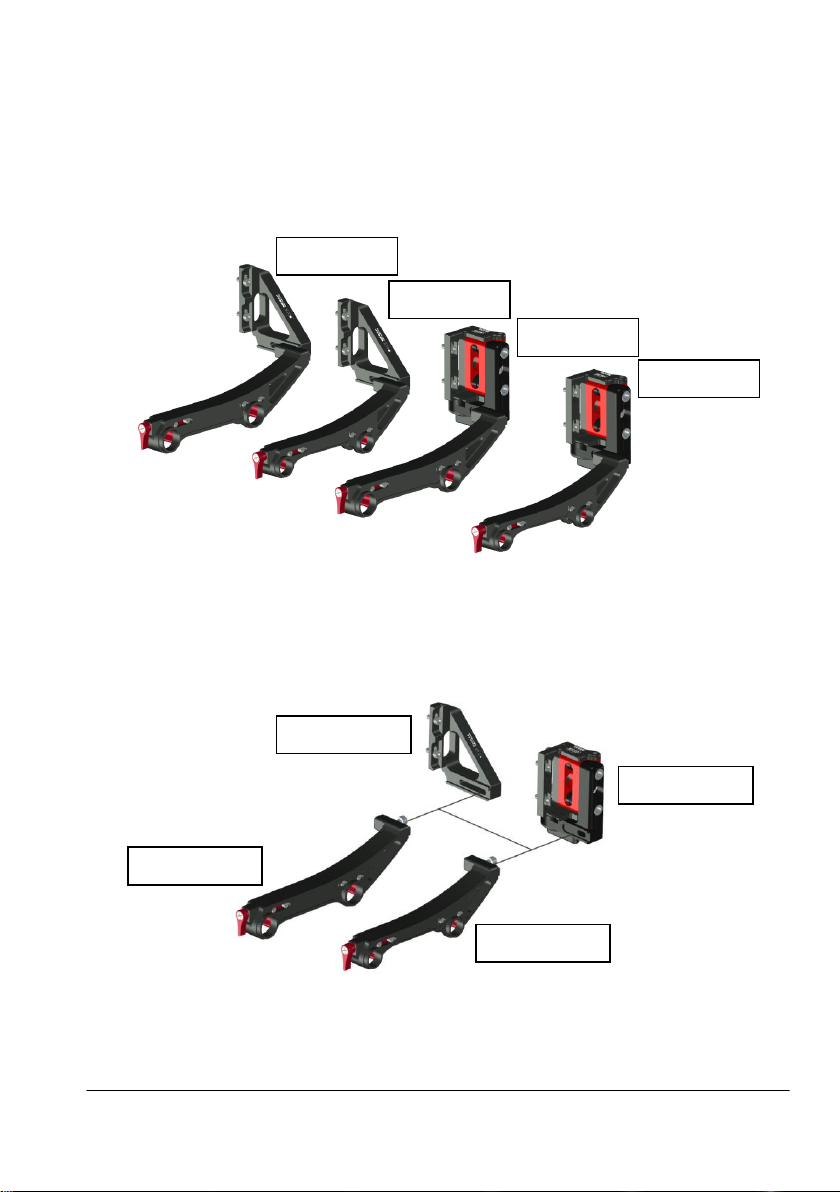
Rail adapter kits:
0660-0015-02
0660-0010-02
0660-0010-01
0660-0100-01
0660-0010
0660-0015
0660-0100
0660-0105
MB-600 19 mm bars adapter kit 0660-0010
Direct connection to 19 mm rails.
MB-600 15 mm studio bars adapter kit 0660-0015
Direct connection to 15 mm studio rails
MB-600 19 mm swing away kit 0660-0100
Swing away connection to 19 mm rails.
MB-600 15 mm studio swing away kit 0660-0105
Swing away connection to 15 mm studio rails.
Rail adapter separate modules:
MB-600 bars adapter bracket (No rail bracket!) 0660-0010-01
MB-600 swing away (No rail bracket!) 0660-0100-01
MB-600 separate 19 mm rail bracket 0660-0010-02
MB-600 separate 15 mm studio rail bracket 0660-0015-02
© Vocas Systems B.V.
Page 17
17
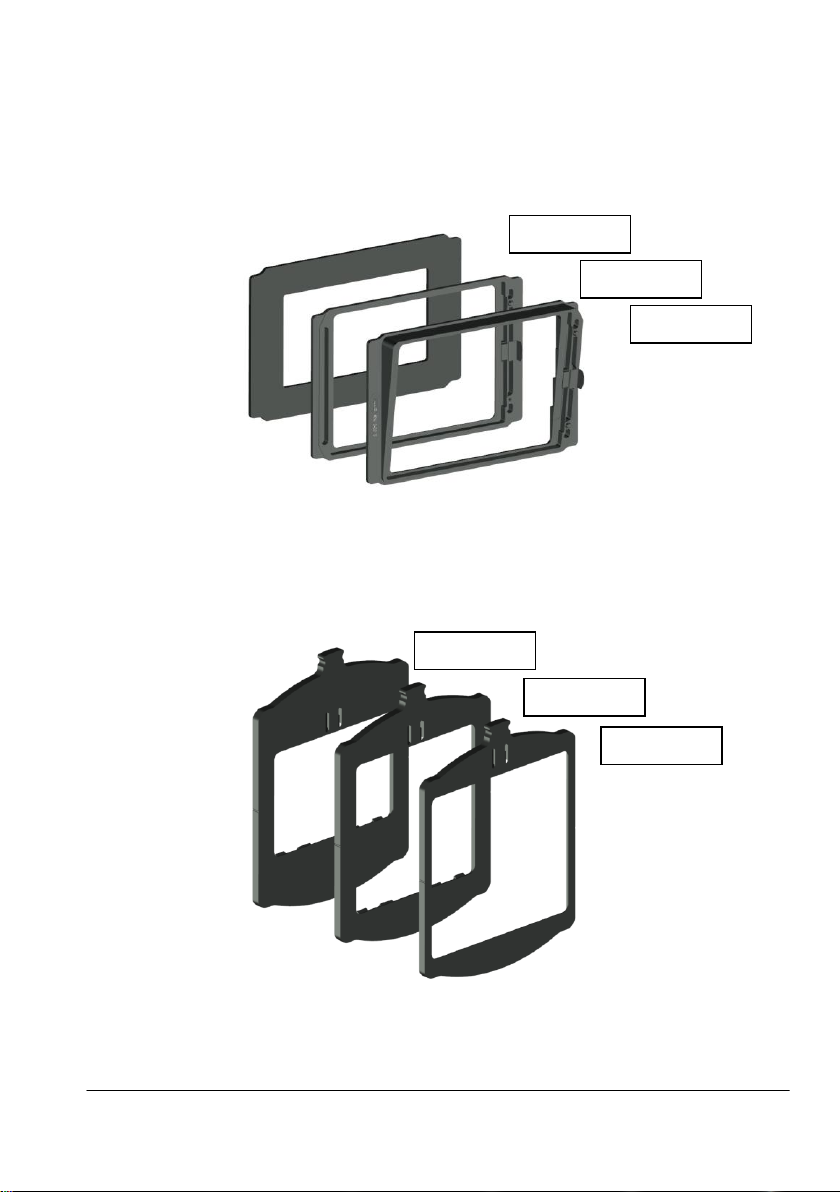
Units to use in the front of the matte box hood:
0470-0001
0410-0004
0410-0015
0640-0001
0640-0002
0640-0004
Mask or matte 0470-0001
This mask offer additional lens flare protection for non wide-angle lenses.
Additional Panavision filter stage 0410-0004
This filter holder can hold a Panavision size filter.
Tilted filter holder for a Panavision filter 0410-0015
This Panavision filter holder is fixed tilted for optimal reduction or even elimination of reflection
between filters or the lens front.
Filter frames:
MB-600 Filter frame 6,6" x 6,6" 0640-0001
MB-600 Filter frame 5,65" x 5,65" / 4"x 5,65" vertical 0640-0002
MB-600 Filter frame 4" x 5,65" horizontal / 4" x 4" 0640-0004
For all available accessories and compatibilities please check our website: www.vocas.com
© Vocas Systems B.V.
Page 18

18
© Vocas Systems B.V.
Page 19

19
© Vocas Systems B.V.
Page 20

20
Contact data
Vocas Systems B.V.
Larenseweg 121
1221 CL Hilversum, The Netherlands
T:+31(0)35-6233707 F:+31(0)35-6233997
www.vocas.com
© Vocas Systems B.V.
 Loading...