

Page 1
Manual
Vlinder D2R2
Page 2

Introduction
Introduction
Congratulations with your purchase of the Vlinder. You have chosen a
high-quality and innovative product. The manual and enclosed safety
instructions are part of this product and contain important safety and
usage guidelines. Before using the Vlinder for the rst time, please take
the time to read these instructions properly. You can also consult our
website www.vlinderalarm.com for extensive information on how to use
the Vlinder.
Page 3
Functions
Functions
Alarm
In case of an emergency, the senior will activate the alarm
by pushing the red button. The follower receives the
emergency call with location via the app on the phone.
Medication Memo
Via the app, the follower can set a time and date for
medicine intake. The Vlinder gives a medicine notication.
Good morning alarm
Every morning the Vlinder detects movement as a sign of
life.
Wander detection
The caregiver can establish a safety zone for the person
with dementia. The Vlinder gives a notication as soon as
that person leaves the safety zone.
Wireless charging
The Vlinder is charged with a smart wireless base unit.
Via the Vlinder, a two-way audio connection can be
requested with the desired follower.
Calls
Localizing
The follower can localize the Vlinder by GPS via
corresponding app on the phone.
** Please note! Calls to the Vlinder are handled by an international provider based in
Sweden. In Europe, the average costs are 21 cents per minute. The exact costs
depend on your own location and telecom provider and the duration of the call. The
Swedish provider guarantees global coverage for incoming and outgoing calls and
works with all providers.
Page 4
Functions of the Vlinder
Our aim was to keep the design of the Vlinder as simple as possible to
ensure that anyone can use it. For more information on the Vlinder’s
functions, please visit www.vlinderalarm.nl/functions.
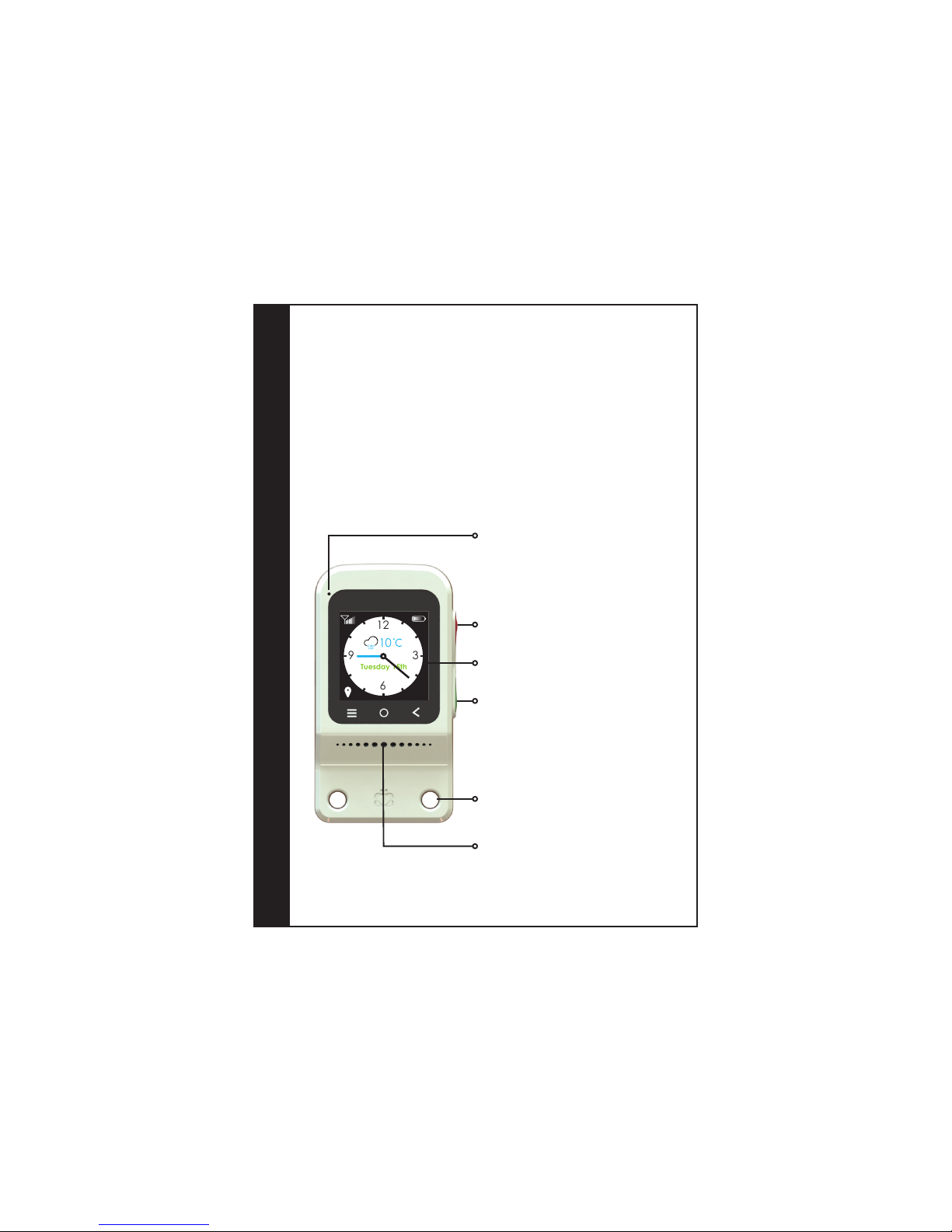
Functions of the Vlinder
Touchscreen: You can move between screens by
swiping (sweeping your nger across the screen):
a variety of clock faces, a status message about
the time, day and current weather and contact
requests to your follower(s).
Microphone: You do not have to hold the
Vlinder close to your ear when using a two-way
connection, as the product allows for
hands-free operation.
You can use the included cord to hang the
Vlinder around your neck. The chain uses a
magnetic lock and can easily be opened by
pulling on both ends of the lock.
Speaker.
Red button: When you are in distress, press
down on the button until the Vlinder emits an
alarm. All followers will automatically be
notied. Once someone has responded, a
two-way connection will be established.
Turn on the display: Press the green button
briey. You can always return to the home
screen by pressing the green button. To turn o
the Vlinder, please refer to the footnote under 2
The Vlinder.
12
6
39
10
12
6
39
10
Tuesday 15th
Page 5
Display
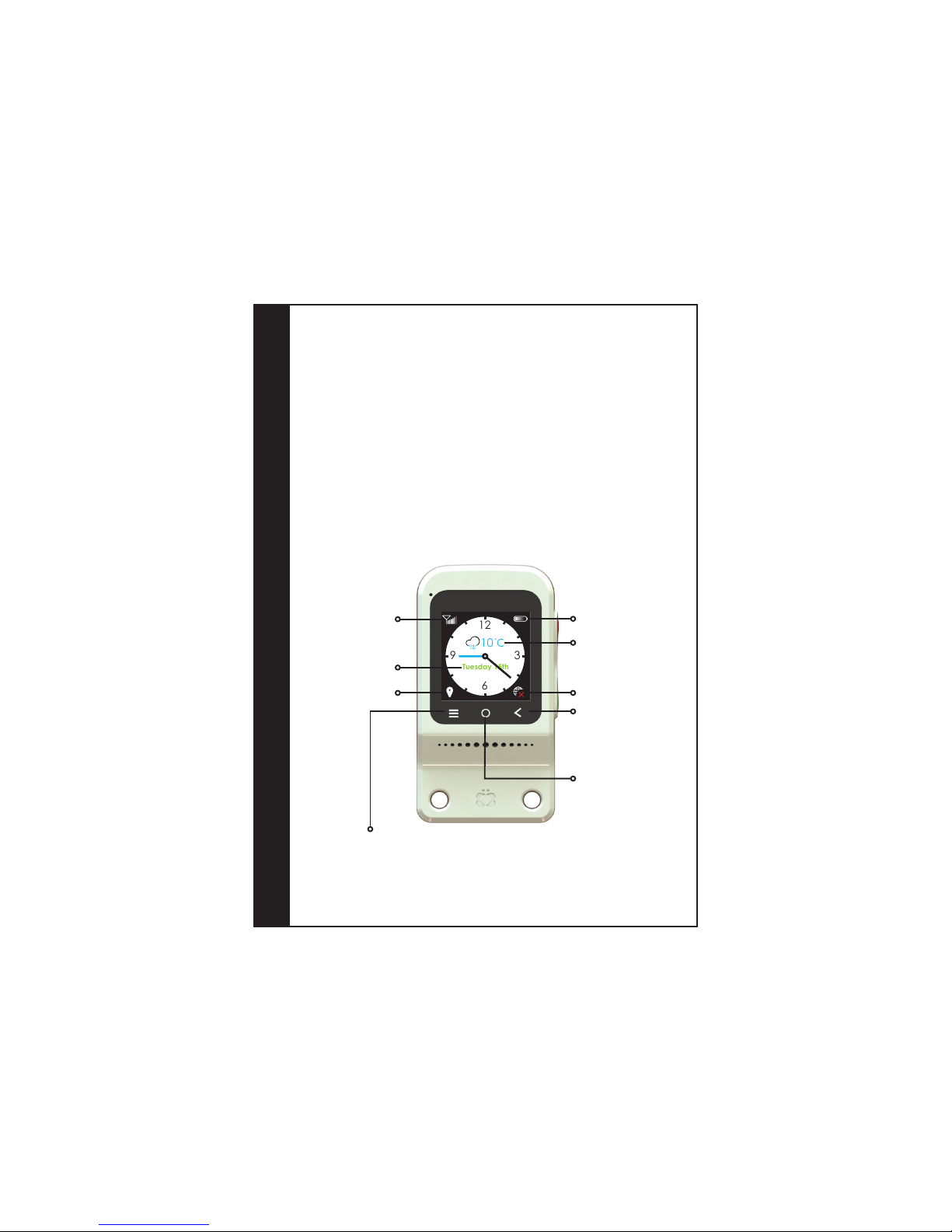
The following icons may appear on the display of the Vlinder:
Display
Cellular network display
Contact request. Press the three bars to display
your contacts on the screen. By tapping a portrait,
you can request a follower to open a two-way
connection. Please note that the incurred costs
will be charged to the follower.
No contact with the
server, alarm cannot be
processed.
Vlinder displays a brief
status update about the
time, the day and the
current weather.
QR connection code.
Tapping this item will
display the QR
connection code with
which you can add a
new follower.
Today’s weather
forecast
12
6
39
10
Tuesday 15th
The battery’s remaining
charge
Day and date
Retrieve location
Page 6
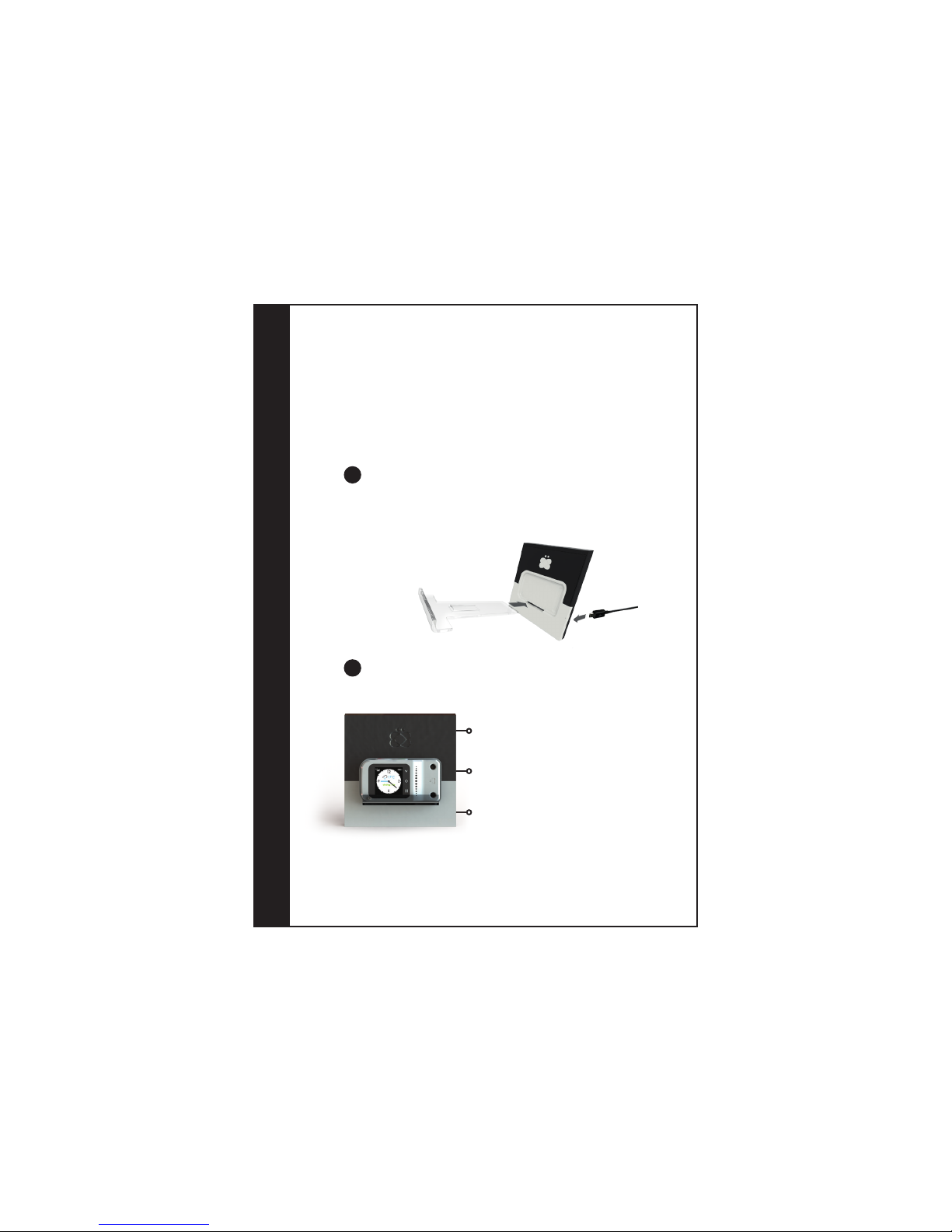
Charging station
1
1 The charging station
The Vlinder can be charged simply by placing it in the charging station.
We recommend that you place the charging station on your nightstand
and charge the Vlinder nightly.
Take the charging station and the transparent stand out of the box.
Assemble the station as depicted below (mind the proper position
of the stand). Slide the stand backwards through the front of the
charging station. The standing edge should point upwards.
1
Connect the wide connector of the plug to the cable and the small
connector to the charging station. Connect the cable to the mains
supply.
** Charging the Vlinder via the charging station will take 6 hours at most. To speed
up the charging process, you can also connect the included cable directly to the
Vlinder. In that case, the Vlinder will be fully charged in no more than 3 hours.
2
Light on. Move your hand over the logo to
activate the light.
Display. The display will automatically rotate 90°
when the Vlinder is placed in the charging
station.
Charging. Place the Vlinder in the charging
station with the display facing forwards and the
red and green buttons facing upwards. It will
begin charging automatically.
Page 7
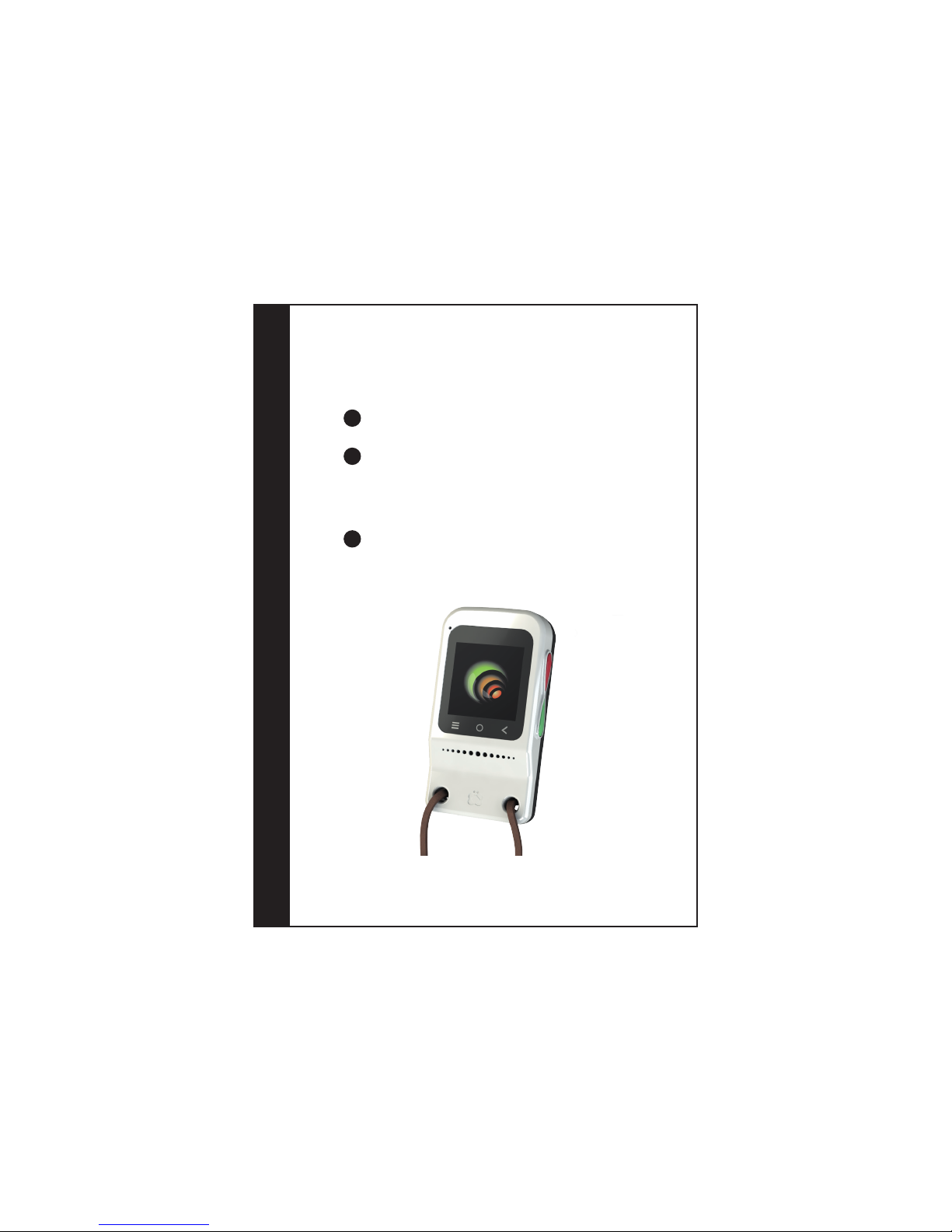
2 The Vlinder
Vlinder
Remove the foil covering the display.
3
Take the cord out of the packaging. This cord has a two-part
magnetic lock that will open if you should get caught on
something. You can now thread the short side of the lock through
the opening in the Vlinder and then close the cord with the
magnetic lock.
4
To turn on the Vlinder, press down on the red button until the
display turns on. The process of retrieving the rst location and
information may take several minutes. You can proceed to step 6
while you wait.
5
** In case you would like to shut down the Vlinder, please press “O”. The QR-code will
appear. Please press and hold the green and red button simultaneously. The Vlinder
will show you it is shutting down.
Page 8
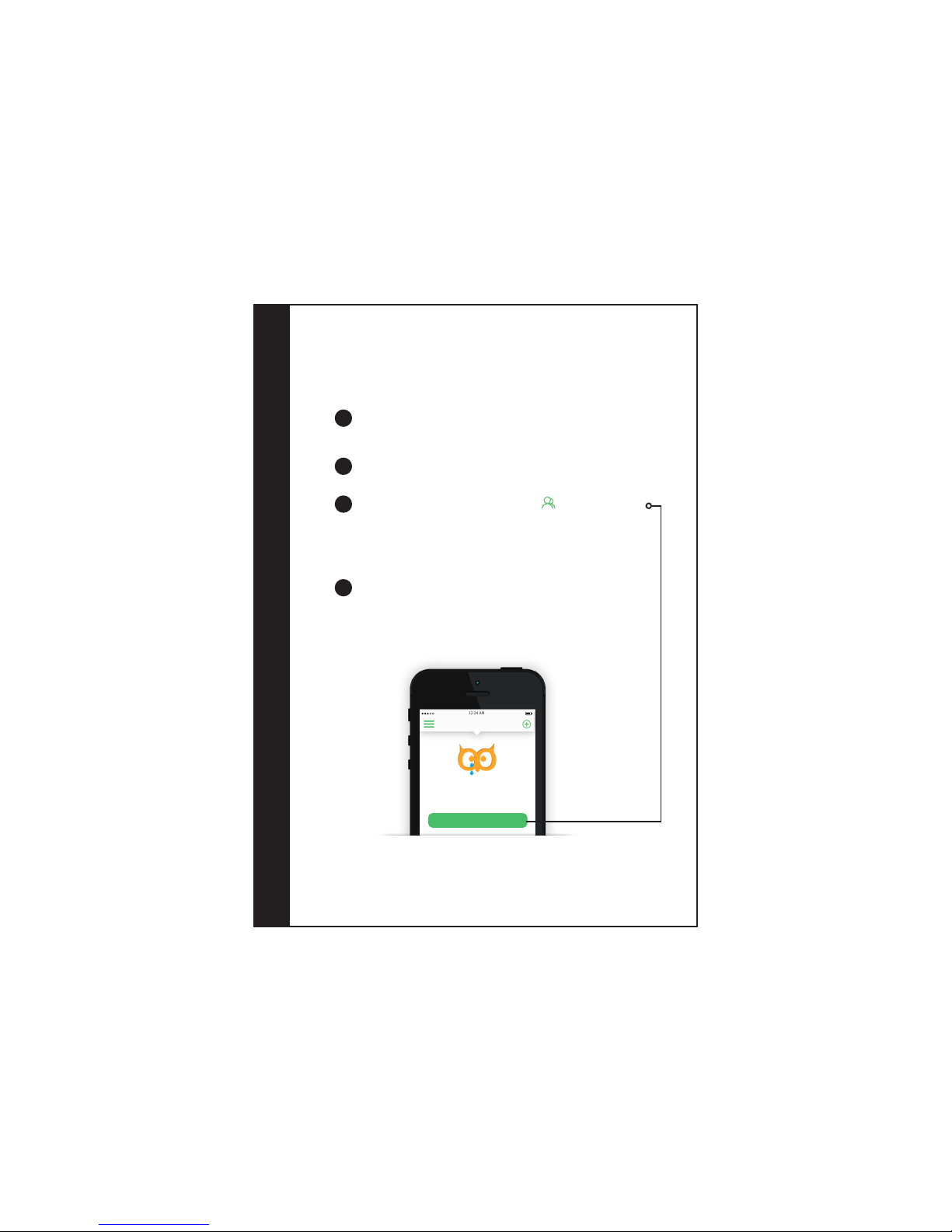
Linking to the Loox app
3 Loox App
** Please note: To ensure the Loox app functions properly, make sure to download
the latest version of your mobile phone’s operating system and turn on location
services. The Loox app works best with iOS 8.0 and Android 4.0.2. Although earlier
versions of both operating systems are supported, the app may not function
properly.
To set up the Vlinder, your follower(s) must download the Loox app
to their mobile phone(s). You can nd the app in the App Store or
on Google Play by searching for the keyword “Loox.”
6
Create your prole by following the app’s instructions. For more
information about using the Loox app, please refer to
www.loox.me.
7
Now scan the QR code displayed on the Vlinder’s screen by holding
the square with the green border above the QR code.
If your Vlinder is not displaying a QR code, press the button with
the “O” symbol at the bottom of the Vlinder’s display.
9
In the Loox app, navigate to your contacts and select the “Add
friends” option as depicted below. The app has the option to scan
QR codes. You can use this option by tapping on the QR icon in the
top-most bar and then hitting the green bar with the “open QR
code scanner” option.
8
12:24 AM
Friends
add friends by scanning their QR-code
or unique code
Let’s nd some friends
ADD FRIENDS
Page 9
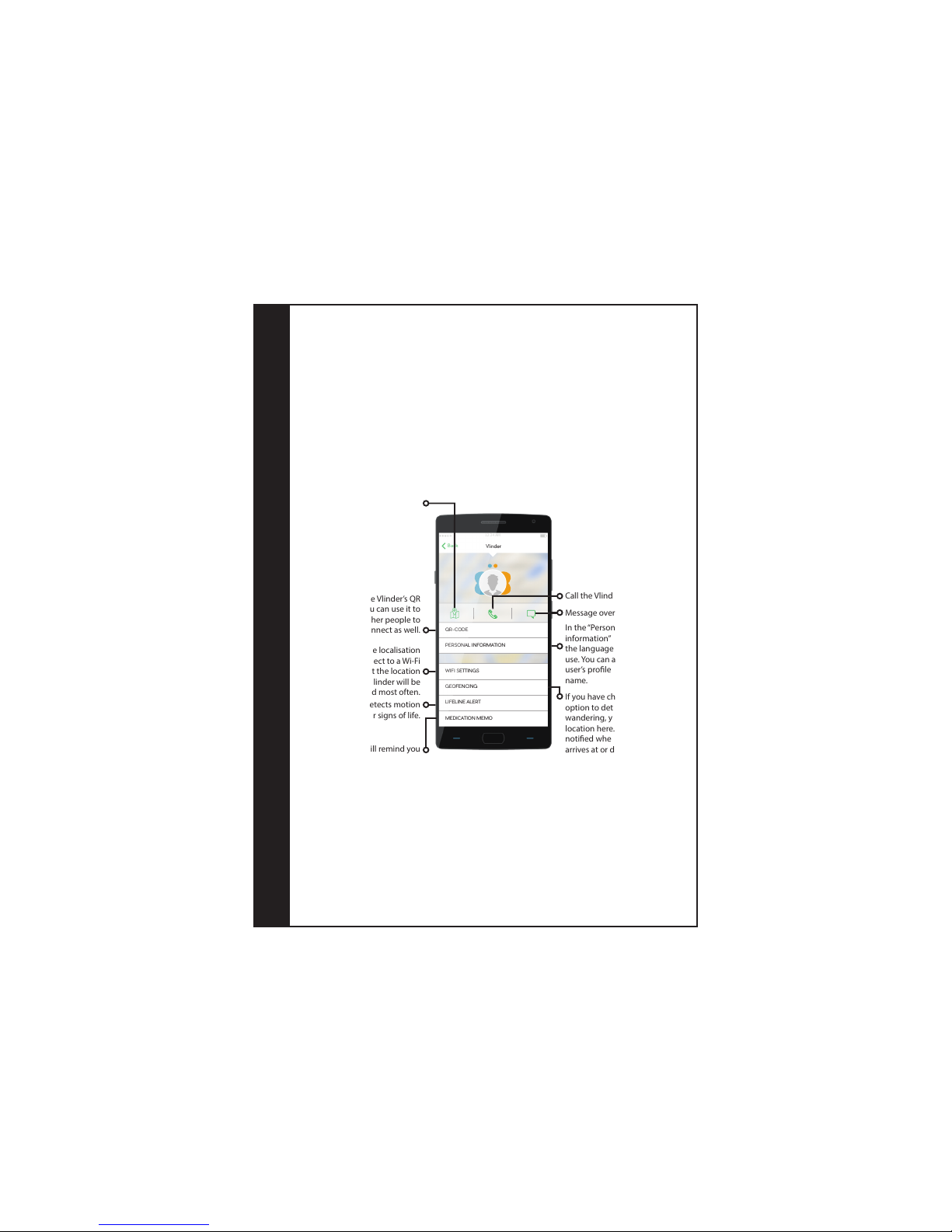
4 functions
Call the Vlinder.
Message overview.
In the “Personal
information” menu, select
the language you want to
use. You can also add the
user’s prole picture and
name.
If you have chosen the
option to detect
wandering, you can set a
location here. You will be
notied when the Vlinder
arrives at or departs from
this location.
This is the Vlinder’s QR
code. You can use it to
allow other people to
connect as well.
Localisation.
To improve the localisation
process, connect to a Wi-Fi
network at the location
where the Vlinder will be
found most often.
The Vlinder will remind you
when it is time to take your
medication.
The Vlinder detects motion
for signs of life.
Setting up functions
12:24 AM
Vlinder
Back
QR-CODE
PERSONAL INFORMATION
WIFI SETTINGS
GEOFENCING
LIFELINE ALERT
MEDICATION MEMO
The functions on the Vlinder can only be set up via the Loox app. To do
so, open the app and navigate to the “Friends” page. Tap “Vlinder” to
open the page depicted below.
** Detailed information about all functions of the Vlinder can be found atwww.vlinderalarm.com/functions.
Page 10
Designed by Watcherenterprises B.V in the Netherlands. Assembled in China.
Watcherenterprises B.V., Rombout Hogerbeetsstraat 109-36, 1052 VW Amsterdam, the Netherlands | Telephone +31 20 776 1799
Visit www.vlinderalarm.com for an online version of the declaration of conformity for the European Union.
FCC ID: 2AGTLD2R2
Vlinder’s unique ID
Maintenance
The Vlinder and the charging station should be cleaned with a soft lint-free cloth. Make sure the cloth is not too wet to
prevent moisture from penetrating the device. Do not use chemical cleaning agents.
Warranty and repair
Your Vlinder comes with a 24-month warranty period. If your Vlinder has a malfunction that is the result of a production error,
please contact the retailer from which you purchased the Vlinder. If you have purchased your Vlinder in our web shop, please
contact us directly. For more information on what is covered by the warranty, please consult our general terms and
conditions at www.vlinderalarm.com.
If your Vlinder malfunctions outside the warranty period, please contact Watcher Enterprises directly.
If you have any questions about the Vlinder or the Loox app that are not covered on our website, please contact our
customer service department by sending an email to [email protected].
 Loading...