

Page 1
●
Be sure to read this user manual before using the VISOR.
●Please keep this manual as it may be useful later.
User s Manual
Bluetooth Speaker Phone
Bluetooth Speaker Phone
Page 2
2
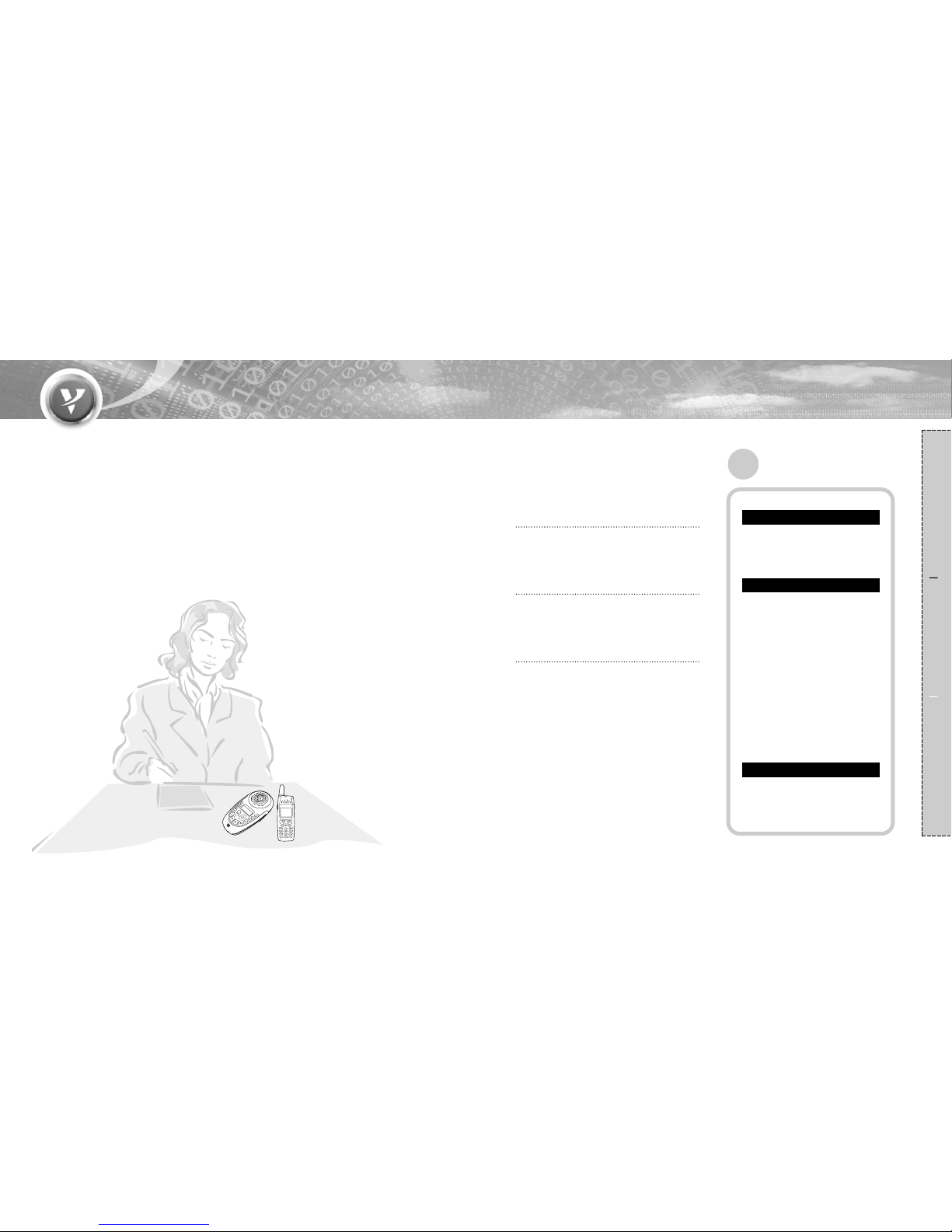
Fr ee & easy to use device
as a Speaker phone
in the office.
Preparation How to use Reference
1
I
LCD display
You can have conversations without noise and
feedback.
I
Crystal clear tone quality
VISOR can be used as a handsfree unit or
headset as the situation demands.
I
Supports both handsfree & headset
You can view battery, volume and call status
at a glance.
Contents
Preparation
Features ······································1
Part description····························3
Button functions···························5
How to use
Configuration·······························6
Handset compatibility ··················9
Pairing with a Bluetooth mobile
phone ········································10
Making a call
·Number dialing ·····························11
·Speed dialing
·····························11
·Last number/Voice dialing···········12
·Speaker mute function················12
·Microphone Volume Up/Down·····12
Answering/Rejecting a call/
Transferring audio
·························13
Upgrading the firmware·············14
Reference
Troubleshooting·························15
Precautions································16
Specifications ····························17
Features
Page 3
43
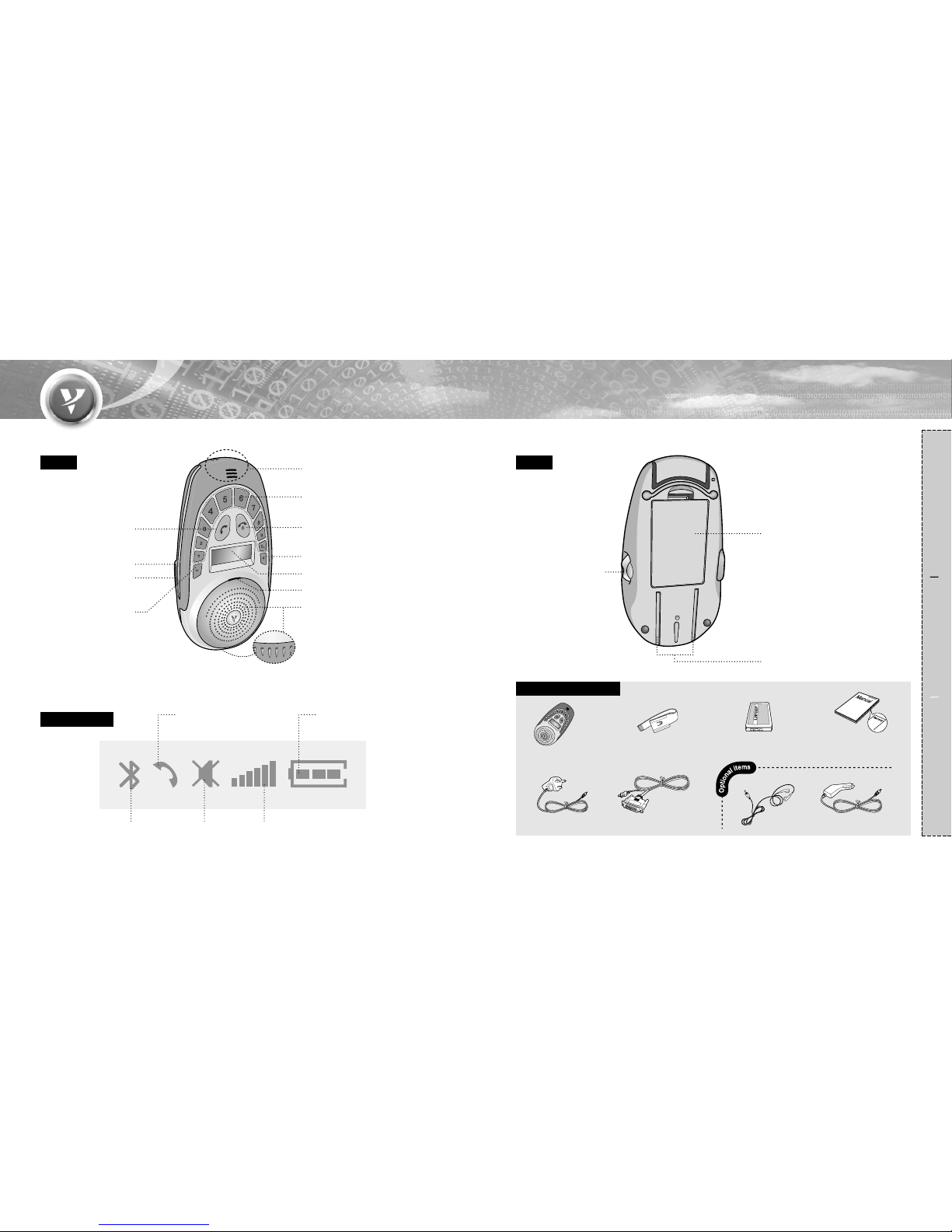
Front Back
LCD Indicators
Speaker
Call status
Bluetooth connection
status
Volume status
Internal Mic.
Number button(for dialing)
END & Power button
SEND button
DC jack outlet
Earphone outlet
�Button
(for mute)
# button(for pairing mode)
LCD display
Preparation How to use Reference
Blue LED
Battery cover
Sunvisor clip fixing groove
Volume control &
Audio transfer
Included Accessories
Visor
Upgrading cable
Cigar lighter jack
DC power jack
Sunvisor clip
User guide/
Warranty card
Battery
(rechargeable Li-ion)
Earphone
Battery status
Mute
Part description
Page 4
65
Preparation How to use Reference
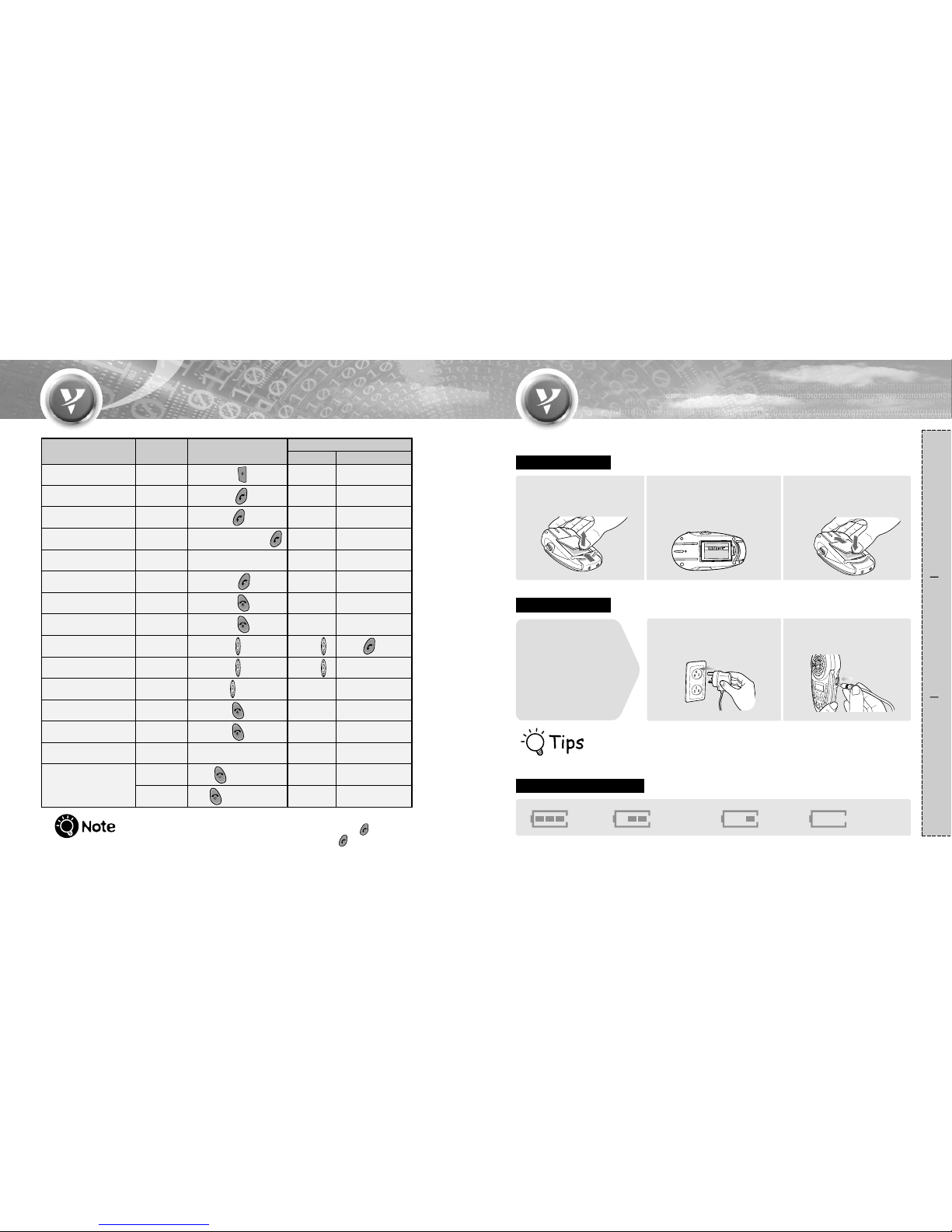
Press
Hold
Hold
Hold
Visor Status
Function How to use button
Supporting profile
Handsfree Headset
Dial the number then
Hold the Speed dial number
(press the last digit longer).
Press
Press
Press
Hold
Hold
-
Y
Y
Y
Y
Y
N
Y
N
Y
N
Y
Y
YN
Y
Y
Y( )
Press of Visor
Consult with your
phone manual.
YY
Y
Y
Y
Y
Y
Y
Y
Y
Y
Y
-
-
ringing
ringing
talking
talking
talking
-
-
Rejecting a call
Ending a call
Transferring audio
(handset->Visor)
Transferring audio
(Visor->handset)
Slide the up or down.
-
Volume control
-
Power on
Hold
Hold the number '0'
Press - 1 digit deleted
Hold - all digits deleted
-
-
-
-
Power off
Dialing '+'
Deleting the pressed
number
Pairing mode
Last number called
Voice dialing(provided
the phone supports this)
Number dialing
Speed dialing
Answering a call
Inserting the battery
Open the cover to
the direction marked,
and insert the battery.
1
Insert the battery with the
sticker facing up.
●
Make sure the contacts are
connected properly.
2
Fit the cover to get the
protruded part into the
groove part tightly.
3
Charging the battery
Checking the battery status
Connect the DC power
jack to a power outlet.
1
Connect the DC power
jack to VISOR.
2
For the best results, fully charge the battery prior to initial use.
�
It takes about 3 hours to get fully charge the battery.
Full
Discharged
a little
Low
Charging
required
Button functions Configuration
First,
When you receive your VISOR
the battery will not be completely
charged. Before using the VISOR
for the first time you should fully
charge the battery with the
supplied charger.
�
While talking you can answer an another call by pressing SEND( ),
and you can get back to the waiting call by pressing SEND( ) again.
Hold
Y( )
Hold
Page 5
87
Preparation How to use Reference
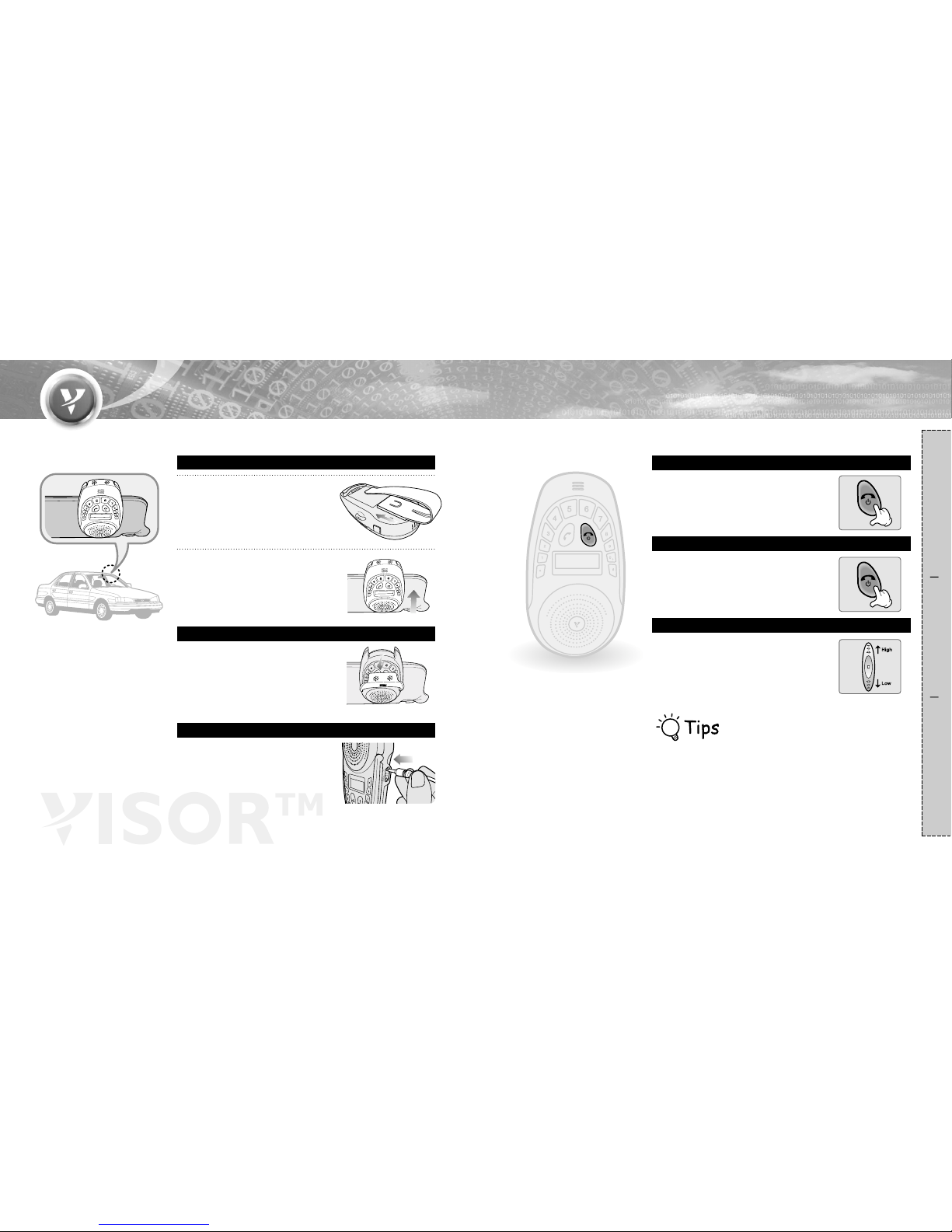
Fix the sunvisor clip into the
back fixing groove.
1
Place it on the sunvisor in a car.
●
Position the microphone towards the
driver.
2
Slide the mic down to get
clearer sound.
Mounting on the sunvisor
Using Mic.
You can make conversations with
them.
Using earphones
�
Earphone : Optional(Nokia earphone compatible-2.5mm (4p))
�
Car charger : Optional(charger for Nokia compatible)
�
Battery : Nokia 8210 series compatible
Press and hold END & Power button
for more than 3 seconds.
●
Power turns on.
Power on
Press and hold END & Power button
for more than 3 seconds.
●
Power turns off.
Power off
Slide the volume controller
up or down.
●
For higher volume slide the button up.
●
For lower volume slide the button down.
Volume control
Configuration
Page 6
10
Preparation How to use Reference
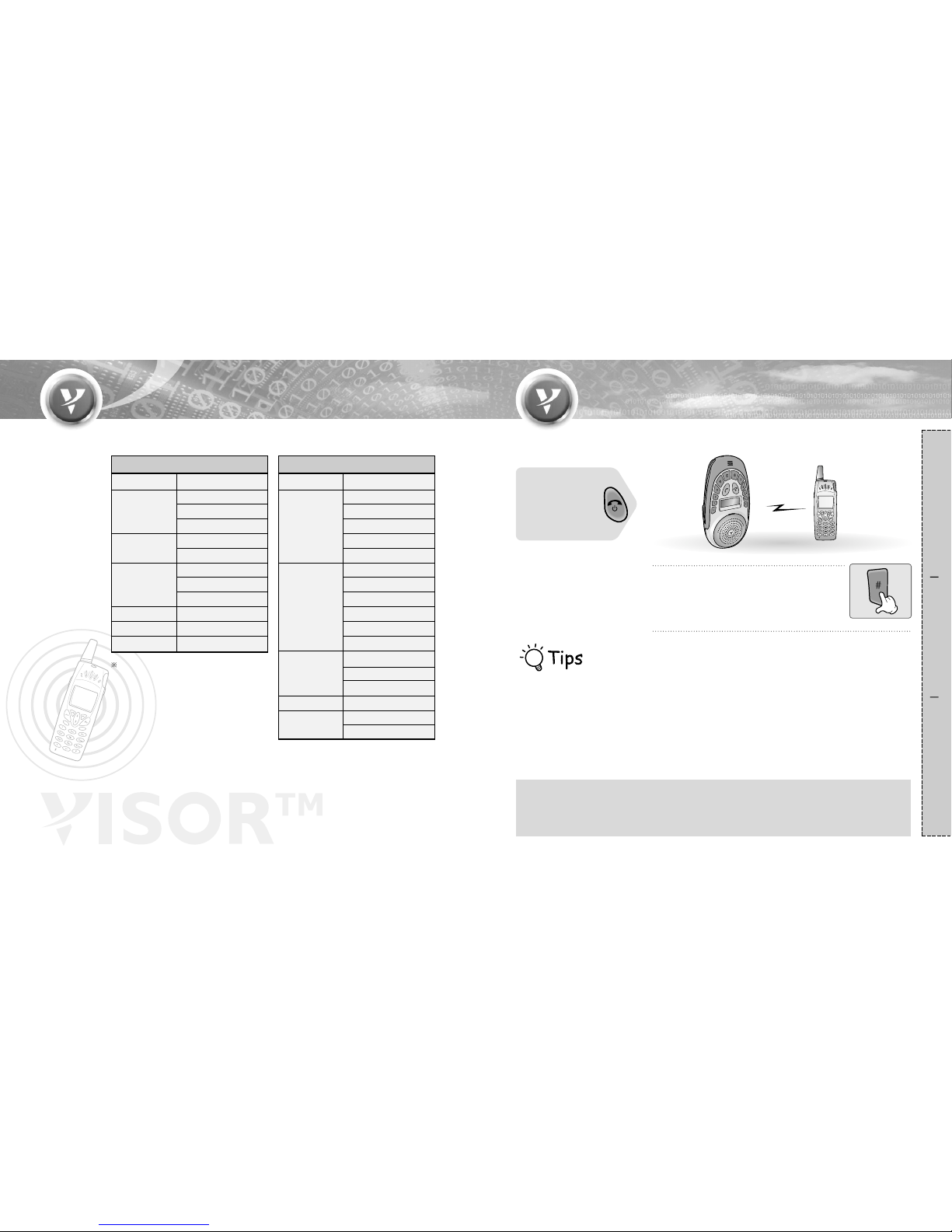
Functionality varies according to handset. First, check to see if the handset supports
handsfree profile or headset profile.
Press # button for more than 2 seconds.
●
The blue LED will flash once a second and
a melody.
1
From the handset, search for and register the Visor.
●
Please consult with the user manual of the handset.
●
During the procedure, a pincode(or passcode) will be asked for.
Enter '0000'.
●
When the pairing is completed, the blue LED of the VISOR flashes
every 4~5 seconds with a melody. If it flashes once a second, please
try from the beginning again.
2
After pairing the Bluetooth mobile phone with VISOR you can use it as a handsfree unit.
First,
Turn on by pressing
the END & Power
button.
I
Pairing can be done with up to 3 handsets maximum
I
•VISOR stores up to 3 different phones in memory.
•Adding a 4th phone will remove the handset least recently used from memory.
•Priority is given to the handset most recently paired.
•When you want to change the handset priority, try to connect from the handset.
•If the latest paired handset supports handsfree profile, when you turn on VISOR, it connects automatically.
9
Handset compatibility
Pairing with a Bluetooth mobile phone
�
Once your phone is paired with
VISOR, it will be recognized
automatically next time.
If your handset is not on this list
please consult your user manual.
Handset supporting headset profile
Ericsson
Sony Ericsson
Motorola
Philips
Samsung
Sky
Model
Handset supporting handsfree profile
Motorola
T68i / T68ie
T610
T613
T630
Z600
6310 / 6310i
8910 / 8910i
3650
6230
6600
n-Gage
S55
S56
SX1
X70
V525
V600
Maker
Model
R520m / R520mc
T39 / T39m / T39mc
T68m / T68mc
P800
T68
A803
T280i
TimePort 260C V1.1
Fisio 825/826
X7700
IM6200
Maker
Nokia
Sony Ericsson
Siemens
Panasonic
Page 7
1211
Preparation How to use Reference
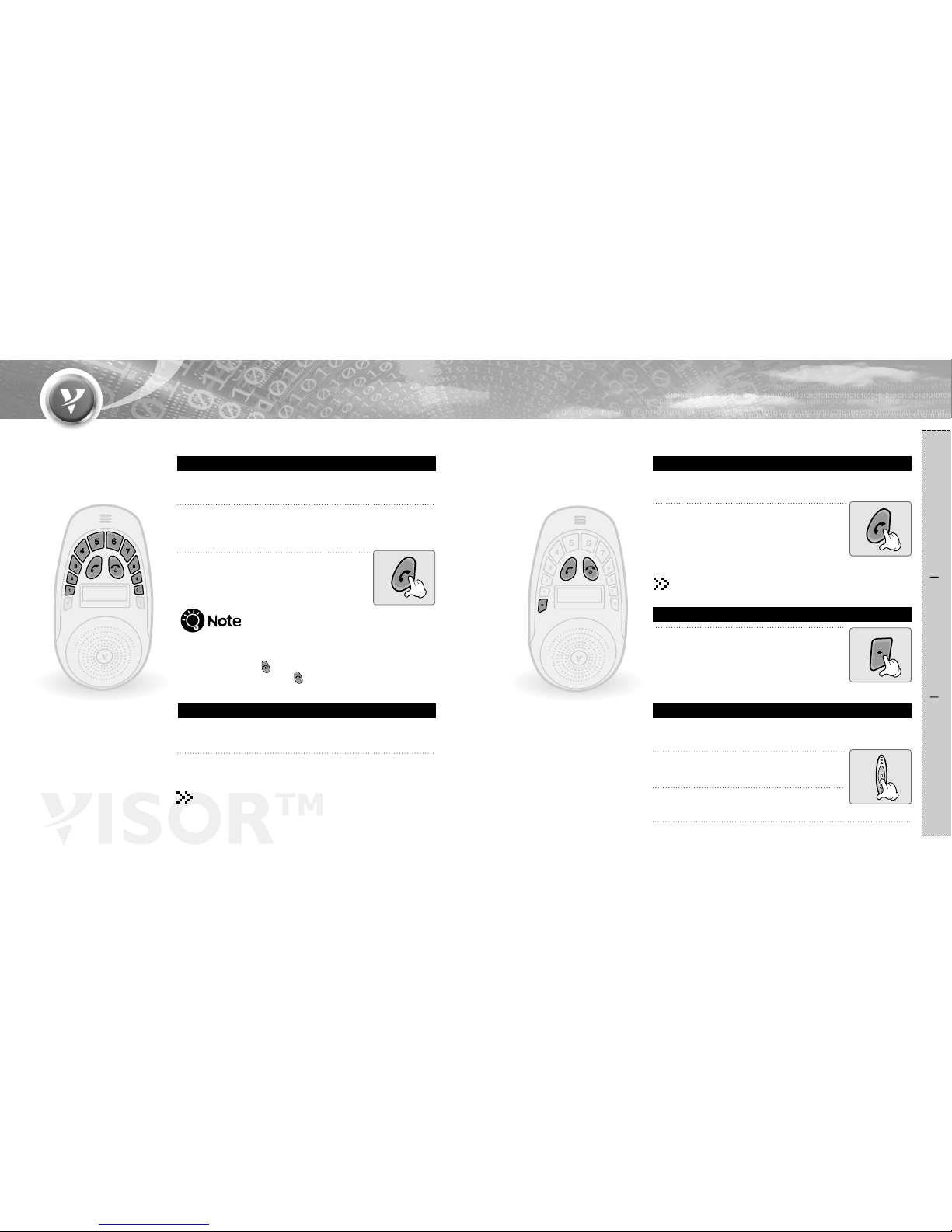
Press SEND button.
●
By pressing this button the last number dialed will be called.
(In the case of SonyEricsson handset, voice dialing
initiates.)
●
By holding this button voice dialing will be activated.
(If the handset supports this function.)
You can make conversation with a speaker phone
and use it as a handsfree unit.
Last number/Voice dialing
There are 5(0~4) volume levels.
Level '0' is Mic mute, Level '1' is the default volume.
Microphone Volume Up/Down
Ending a call
●
Press END & Power button.
Dial the number buttons to make a call to specific
number.
1
Press SEND.
●
The call will be made.
2
You can make number dialing only provided that your mobile
phone supports handsfree profile.
Number dialing
Making a call
Press ��button for more than 2 seconds,
(sound will still be heard through earphones.)
●
When Mute is on you will see the Mute icon
display on LCD.
●
By pressing ��button for more than 2 seconds, mute
function will be cancelled.
Speaker mute function
Speed dialing
Ending a call
●
Press END & Power button.
You can make a call using the speed dial settings saved in
your mobile phone.
Press the last digit number for more than 1 second.
●
You can reach the saved number in the mobile phone.
1. If required to press '+' button, press and hold '0' .
2. If you want to correct the number while number dialing :
press END & Power( ) - 1 digit deleted only.
press and hold END & Power( ) - all digits deleted.
Press the volume control button
twice short.
1
Then, you can hear the 'beep' and LCD
tells as ' EnterMicGain'.
2
Press the level number (0~4).
3
Page 8
1413
Preparation How to use Reference
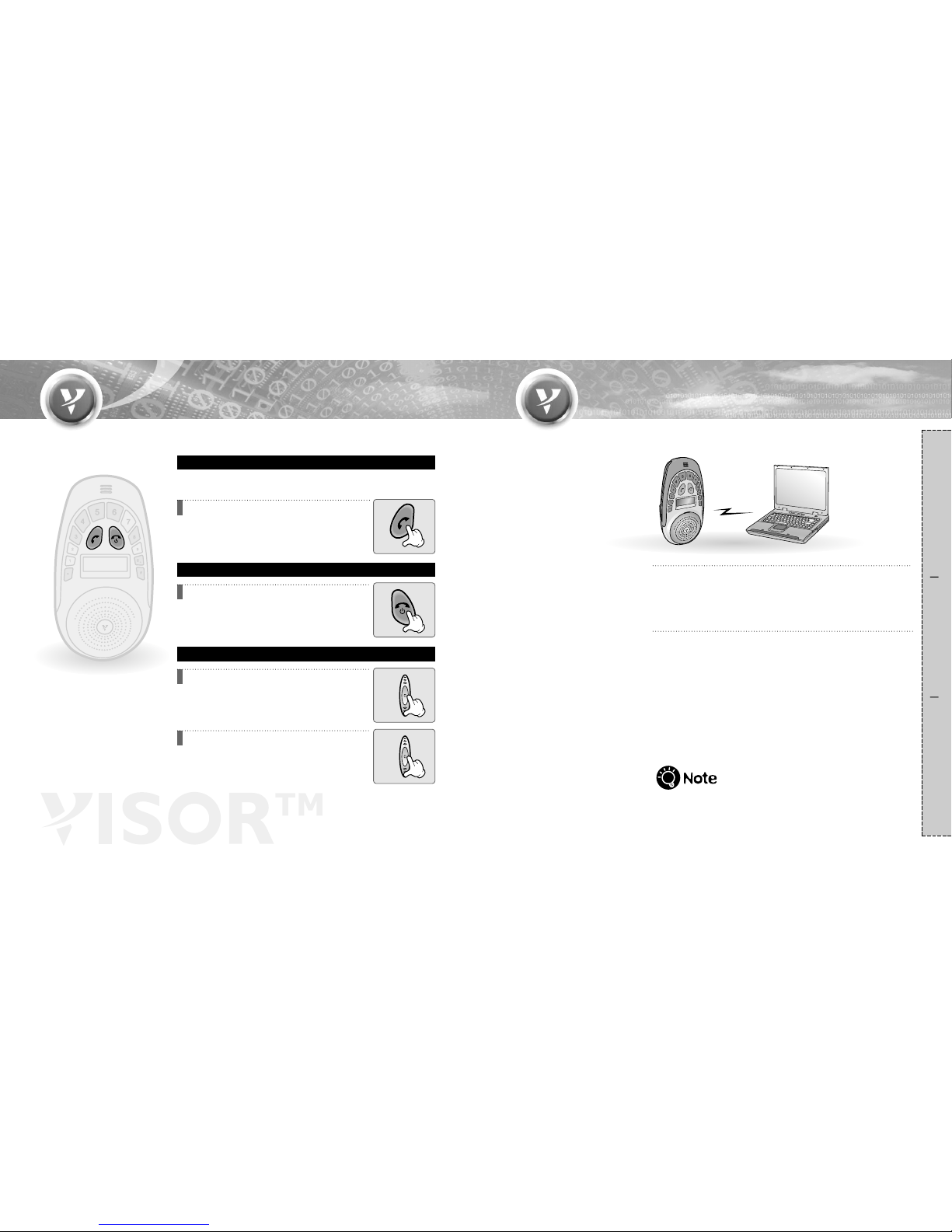
When ringing VISOR will play a melody and the blue LED will
flash.
Connect the Visor and PC by using
the upgrading cable. Make sure that the charger
should be connected to the Visor first.
1
You can get downloaded the latest
firmware from the website.
2
Additional features may be added through new firmware revisions.
When ringing press SEND button.
●
You can make conversation through
the speaker phone.
Answering a call
When ringing press END & Power button.
Rejecting a call
Transferring audio
Handset��Visor : Press Volume control button
of the Visor for more than 1 second during
talking.
●
It can be transferred to the Visor without ending a call.
Visor��Handset : Press Volume control button
of the Visor for more than 1 second during
talking.
●
It can be transferred to the handset without
ending a call.
Answering/Rejecting a call/
T ransferring audio
Upgrading the firmware
�
When the phone supports handsfree profile Caller ID indication basic
functionality is available, but some handsets may not support this
function depending on the spec. of the handset (ex. Nokia 3650).
Page 9
1615
Preparation How to use Reference
No sound from
the speaker.
Check if the volume status
is at lower level.
▶
Slide the volume controller up
to turn up the sound.
Check if the handset
supports handsfree
profile.
Can not make
conversation
through the Visor.
Can not pair VISOR
with the Bluetooth
device.
▶
In order to make conversation with
Visor, you need a Bluetooth handset
supporting handsfree profile.
Check if the battery of the
VISOR is low.
▶
Charge the battery.
Check if the power
of the Visor turned off.
▶
Press END & Power button for more than
3 seconds and turn on the unit.
Check if the Bluetooth device
to be paired turned off.
▶
Turn on the power.
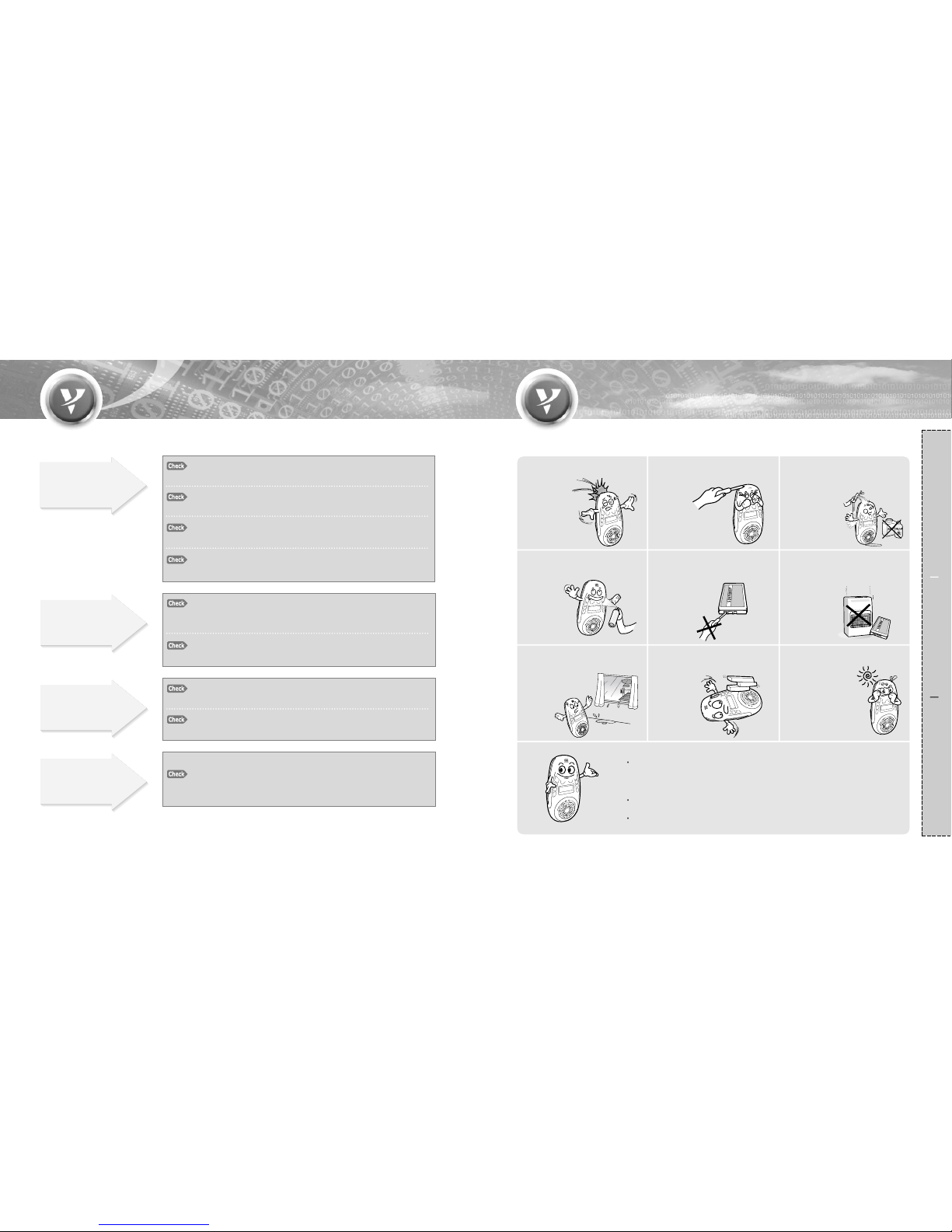
Do not drop the unit from
high places.
Do not modify, repair & take
apart at discretion.
Do not expose directly
to flammables.
Keep unit away from
humidity & dust.
Do not place the heavy
objects on the unit.
Changes or modifications not expressly approved by the party
responsible for compliance could void the user's authority to
operate the equipment.
Risk of explotion if battery is replaced by an incorrect type.
Dispose of used batteries according to the instructions.
Keep away from direct light
or heat.
Do not expose directly to
the water, alcohol, benzene,
etc. for cleaning.
Do not disassemble the battery.
∙It may cause the explosion.
Do not place or keep the unit
near the flammables.
∙
It may cause an explosion.
Does not turn on.
Check if the battery of the
VISOR is fully discharged.
▶
Charge the battery.
Check if the battery inserted
properly.
▶
Remove the battery and
insert it again.
Check if the dust exists
in the outlet of charging jack.
▶
Remove the dust and connect
it again.
Check if END & Power button
was not pressed long enough.
▶
Press END & Power button
for more than 3 seconds to turn on.
Troubleshooting Precautions
Page 10
1817
Preparation How to use Reference
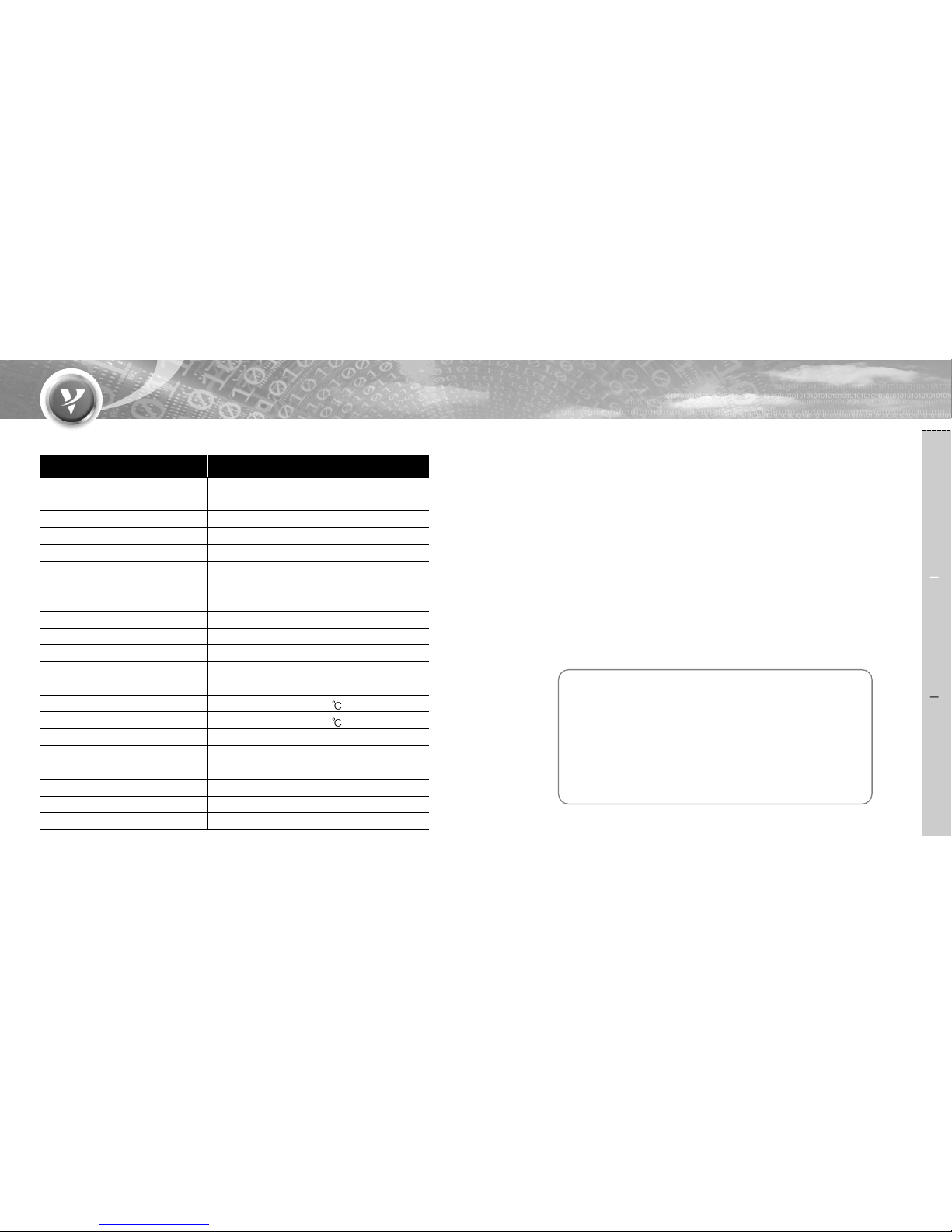
Ear Phone Interface Ear Phone Type(Nokia)
Battery 3.6V, 950mA Li-Ion
Speaker 8Ω/1.5W(Normal)
MIC -47 +/- 1.5dB
Power Consumption Max 250mA
Cigar Lighter Jack OUT : 5.0V/800mA
AC/DC Adaptor 5.0V/1A
Carrier Frequency 2400MHz to 2483.5MHz(USA, Europe)
Modulation Method GFSK, 1Mbps, 0.5BT Gaussian
Transmission Power Typ. 1.0 dBm
Hopping 1600hops/sec, 1MHz channel space
Rx. Sensitivity Typ. -83.0dBm
Built in Memory Flash memory(4MBit)
Operating Temperature -20 ~ 70
Storage Temperature -40 ~ 85
Noise suppression <52dB
Echo Cancellation up to 18dB
Supported Profile Headset and Handsfree
Security Level Level 3
Standby Time 150 hours
Talking Time 5 hours
Function Description
Specifications
Limited Warranty
1. This product was produced under strict quality management and inspection.
2. All defective units within the applicable Warranty period/s will be repaired or
replaced, in the case those faulty goods were handled normally.
3. To get Warranty service, return the unit to the outlet from which the unit was
purchased.
4. Fill in this Warranty card and keep it.
5. Free of charge Warranty shall not apply to :
-Defects or damage resulting from use of the unit in other than its normal
and intended manner, eg, in excess of their maximum specifications or
operating instructions.
-Defects or damage from misuse, accident, neglect, improper testing,
installation, alteration or modification of any kind, or spillage of food or
liquid.
Products name :
Model number :
Purchased date: Warranty period : 1year
Outlet the unit was purchased :
Tel :
Customer Address:
Name :
Tel :
 Loading...