

Page 1

[QR code]
FOREO
BEAR™
FOREO.COM/SUPPORT
--------------------------------------------------------------------------------------------------------------------------
[EN icon]
GETTING STARTED: This booklet contains all essential instructions. If you have any further questions
regarding the device’s operation, or would like to access additional product resources, visit
foreo.com/support.
WARNING: No modification of this equipment is allowed.
Please READ ALL INSTRUCTIONS BEFORE USE and utilize this device only for its intended use as
described in this manual.
INTENDED USE: BEAR™ is intended for facial and neck stimulation, and is indicated for over-the-
counter cosmetic use.
INCLUDED: 1 BEAR™ Device, 1 2ml Sample SERUM, 1 USB Charging Cable, 1 User Manual, 1
Quick Start Guide, 1 Stand & 1 Travel Pouch (included with BEAR™ only).
--------------------------------------------------------------------------------------------------------------------------
BEAR™ FEATURES
[insert diagram of BEAR device]
• Microcurrent Spheres - Deliver microcurrent directly to skin for a tighter, more toned complexion.
• T-Sonic™ Pulsations - Enhance product absorption and gently massage face to boost skin’s radiance.
• Smart Swedish Design - Gently curved to fit facial contours, and lightweight for skincare on-the-go.
• Anti-Shock System™ - Scans skin’s resistance & adjusts microcurrent intensity for maximum safety &
comfort.
• Bluetooth Indicator Light - Flashes to indicate when device is in Bluetooth pairing mode.
• Universal Power Button - Turns device on and off, and puts device in Bluetooth pairing mode.
• Intensity Indicator Lights - Light up to indicate the microcurrent intensity levels of your device.
• Charging Port - Up to 90 uses per charge (based on a 1-minute treatment time per use).
--------------------------------------------------------------------------------------------------------------------------
CONTRAINDICATIONS FOR USE
Page 2

Do NOT use:
• On the chest / breast area, eye area (circular muscle within the orbital rim), mid-line (bone) of neck, or
the genitals / groin area.
• Over red skin, raised moles, major arteries (eg. carotid), enlarged capillaries, metal implants, infected
areas, or areas with no feeling in them.
• The device to treat rosacea, moles, warts, open sores, cancerous lesions, or any skin condition.
• If you have any existing medical conditions such as epilepsy, a hemorrhagic disease, cancer, tumors, or
perceptual disturbance.
• If you have any implanted medical device or any other electronic instrument or body aids.
• If you have had a laser treatment, chemical peel, or have any other form of injured or damaged skin.
• If you have had cosmetic surgery on your face.
• On or near children or those with reduced physical and mental abilities.
--------------------------
• The safety of the device for use during pregnancy has not been established. If you are pregnant, consult
your physician before using this device.
• If you have a skin condition or any medical concerns, please consult a physician before use.
• If you have suspected or diagnosed heart disease, follow precautions recommended by your physician.
• This device should not be used by children or those with reduced physical and mental abilities.
--------------------------------------------------------------------------------------------------------------------------
HOW TO USE BEAR™
Before using your device:
• Charge BEAR™ using the USB charging cable provided for up to 1.5 hours or until fully charged. A
fully charged BEAR™ should last for up to 90 uses, based on a 1-minute treatment time per use.
• To unlock and register your device for first time use, download the FOREO For You app. Connect to the
app via Bluetooth on your smartphone, and press the universal button on BEAR™ to sync your device to
the app and set up your microcurrent preferences.
CAUTION:
• BEAR™ must be completely dry before starting your microcurrent treatment.
• This device must be used with FOREO’s SERUM SERUM SERUM.
Directions for use:
1. Clean and dry your face and neck carefully so there is no remaining residue of any kind.
2. Apply SERUM SERUM SERUM to your skin, distributing it evenly across all the areas you wish
to treat.
3. For Pre-Set Routine: Select your preferred microcurrent treatment in the FOREO For You app.
Follow the video on the app and continue as instructed. Device will automatically switch off after
routine is complete.
For Manual Mode: i) Press the universal button to activate microcurrent. The lights underneath
the universal button indicate the microcurrent intensity setting. You can manually choose from
preselected microcurrent intensities by quick pressing the universal button once for each level,
and turn off T-Sonic™ pulsations by double pressing the universal button. To access the full
Page 3

range of microcurrent intensities, you will need to use the app. ii) Lightly press both metallic
spheres to your face, and gently glide the device across your cheekbones and forehead, around
your lips, and over your jawline and neck as desired. Make sure that both microcurrent spheres
are touching your skin at all times. Always glide the device slowly, in an upward motion, and
with light pressure for enhanced results. iii) Once you have finished your treatment, press and
hold the universal button for 3 seconds to turn off device.
4. Gently massage any remaining serum into your skin, or remove excess with a cotton pad. Apply
any other skincare products of your choice, if desired.
TREATMENT AREAS:
CHEEKS
[insert image of movement]
• Hold your device vertically and at a slight angle so that the top sphere is at the corner of your nose, and
the bottom sphere is at the corner of your mouth.
• Slowly glide the microcurrent spheres under the natural contour of your cheek, and upward toward your
ear.
FOREHEAD
[insert image of movement]
• Hold your device horizontally, at the top of your brow, and slowly glide the microcurrent spheres upward
toward your hairline.
• Repeat movement evenly across your whole forehead.
JAWLINE
[insert image of movement]
• Hold your device vertically at the center of your chin, with one sphere above the jawline and one sphere
below the jawline.
• Glide the microcurrent spheres slowly along the right side of your jawline toward your right ear.
• Move back to the center of your chin, and glide the microcurrent spheres slowly along the left side of your
jawline toward your left ear.
• Repeat both movements evenly.
NECK
[insert image of movement]
• Hold your device horizontally at the base of your neck (slightly off-center), and slowly glide the
microcurrent spheres up, ending on the edge of the jawline.
• Repeat movement evenly across your whole neck, always avoiding the mid-line (bone) of the neck.
--------------------------------------------------------------------------------------------------------------------------
Page 4

WARNINGS:
• Toning with BEAR™ should be comfortable – if you experience any discomfort or irritation,
discontinue use immediately and consult a physician.
• Electronic monitoring equipment, such as ECG monitors and ECG alarms, may not operate properly
when the device is in use.
• Close supervision is necessary when this device is used, cleaned or stored near children or those with
reduced physical or mental abilities.
• The long-term effects of microcurrent are unknown.
• Exercise particular care when toning the under-eye regions and do not bring the device into contact with
the eyelids or eyes themselves.
• There may be a perception of flashing lights during the use of your device, resulting from the
stimulation of your optic nerve. If you notice this condition constantly without the use of your device,
consult your physician.
• A slight tingling sensation may occur while using the device, which is normal and not cause for any
concern. Lowering the intensity may reduce or eliminate this sensation.
• Given the efficiency of the FOREO toning routines, we recommend that you do not use BEAR™ for
more than 3 minutes at a time.
• For reasons of hygiene, we do not recommend sharing your BEAR™ with anyone else.
• Do not use while driving or operating heavy machinery.
• Do not use the device when it is plugged in.
• Do not insert any object into any opening of the device.
• Do not use the device if it is overheating or you suspect that it is malfunctioning.
• Avoid leaving your BEAR™ in direct sunlight and never expose it to extreme heat or boiling water.
• BEAR™ should be completely dry before activating the microcurrent function. Do not use the device if
it has been submerged in water, and do not use with wet hands.
• This device should only be used with a SELV power adapter.
• It is recommended that IEC60950 standard power suppliers are used to charge the device.
• Before charging, make sure that the plug and socket are completely dry. Failure to do so may result in
electric shock, short circuit, or fire.
• Do not use the device while charging. Discontinue use if this device or charger is not working properly
or appears damaged in any way. Use the power cord supplied with your device only.
• The battery must be removed from the appliance before it is disposed of. The appliance must be
disconnected from the supply mains when removing the battery, and the battery is to be disposed of
safely.
• This product contains no serviceable parts.
• The device is intended for cosmetic use on the face and neck. Any harmful consequences resulting from
misuse, application to other body areas, connection to improper voltage sources, dirty conductive solution
or spheres, or any other improper applications are not the responsibility of FOREO.
--------------------------------------------------------------------------------------------------------------------------
MAINTENANCE & SAFETY
Page 5
CLEANING: Always clean BEAR™ thoroughly after use. Wash the metallic spheres and silicone
surface with water and soap, then rinse with warm water. Pat dry with a lint-free, non-abrasive cloth or
towel. After use, we recommend spraying the device with FOREO’s Silicone Cleaning Spray and rinsing
with warm water for optimal results.
NOTE: Never use cleaning products containing alcohol, petrol or acetone, as they may irritate the skin
and damage the silicone.
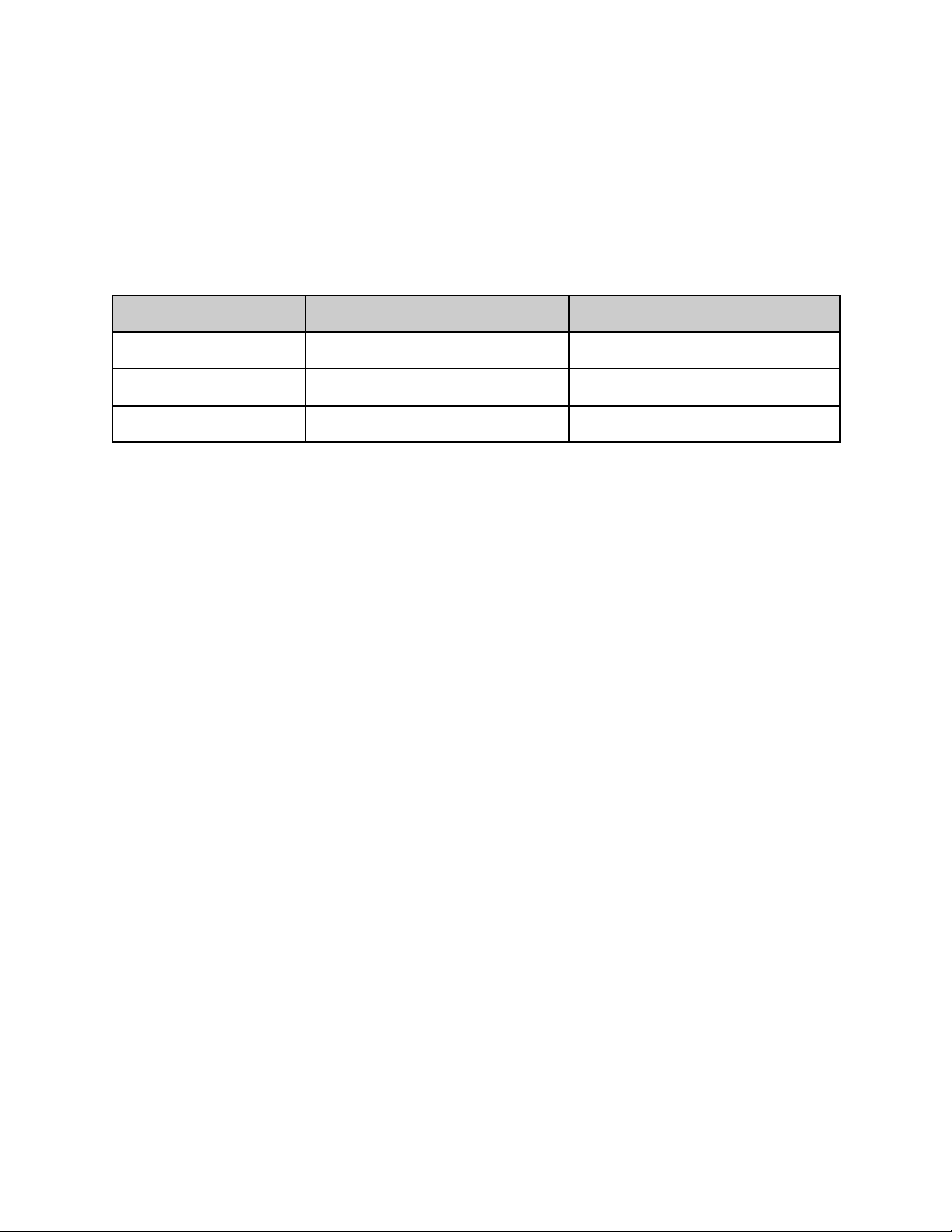
ENVIRONMENTAL REQUIREMENTS:
Emissions Test
Operation
Storage and Transport
Temperature
5 to 40 °C
-10 to 50 °C
Humidity
15 to 93% RH, non-condensing
<=93% RH, non-condensing
Pressure
700 - 1060hPa
700 - 1060hPa
TROUBLESHOOTING:
If BEAR™ is not activated when pressing the universal button:
• Battery is empty. Recharge using USB charging cable for up to 1.5 hours until fully charged and then
restart your device by holding down the universal button.
If BEAR™ cannot be switched off and/or the universal button does not respond:
• Microprocessor is temporarily malfunctioning. Press and hold the universal button to restart the device.
If BEAR™ won’t sync to the FOREO For You app:
● Switch your Bluetooth off and then on again to try reconnecting.
● Close the FOREO For You app and then reopen it to start the process over.
● Check to see if the app needs to be updated in your mobile device’s app store.
--------------------------------------------------------------------------------------------------------------------------
WARRANTY TERMS & CONDITIONS
REGISTER WARRANTY: To activate your 2-Year Limited Warranty, register through the FOREO For
You app, or visit foreo.com/product-registration for more information.
2-YEAR LIMITED WARRANTY: FOREO warrants this device for a period of TWO (2) YEARS after
the original date of purchase against defects due to faulty workmanship or materials arising from Normal
Use of the device. The warranty covers working parts that affect the function of the device. It does NOT
cover cosmetic deterioration caused by fair wear and tear, or damage caused by accident, misuse or
neglect. Any attempt to open or take apart the device (or its accessories) will void the warranty.If you
discover a defect and notify FOREO during the warranty period, FOREO will, at its discretion, replace
the device free of charge. Claims under warranty must be supported by reasonable evidence that the date
of the claim is within the warranty period. To validate your warranty, please keep your original purchase
receipt together with these warranty conditions for the duration of the warranty period.To claim your
warranty, you must log in to your account at www.foreo.com and then select the option to make a
warranty claim. Shipping costs are nonrefundable. This undertaking is in addition to your statutory rights
as a consumer and does not affect those rights in any way.
Page 6
--------------------------------------------------------------------------------------------------------------------------
DISPOSAL INFORMATION: Battery must be recycled or disposed of properly. Disposal of
old electronic equipment (applicable in the EU and other European countries with separate
waste collection systems). The crossed-out dustbin symbol indicates that this device should
not be treated as household waste, but rather be brought to the appropriate collection point
for recycling of electrical and electronic equipment. For more information about the recycling of your
device, please contact your local household waste disposal service or your place of purchase. Please see
back page for instructions on how to remove the battery.
--------------------------------------------------------------------------------------------------------------------------
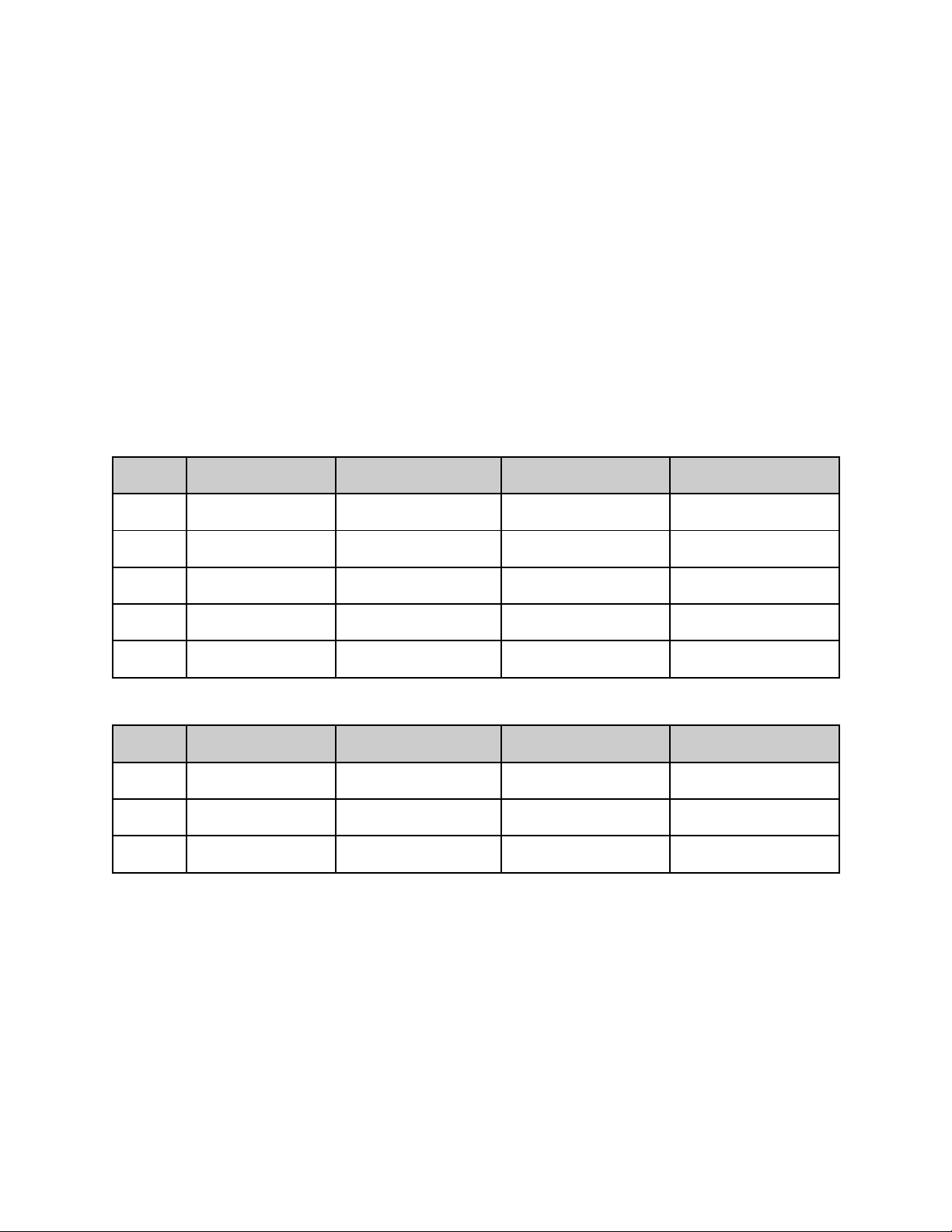
SPECIFICATIONS
BEAR™:
Level
Input (V)
P(mW) at 10kΩ
P(mW) at 50kΩ
P(mW) at 100kΩ
1
3.3
2.87
14.36
28.73
2
3.3
3.38
16.88
33.76
3
3.3
3.92
19.59
39.19
4
3.3
4.50
22.51
45.02
5
3.3
5.13
25.63
51.27
BEAR mini™:
Level
Input (V)
P(mW) at 10kΩ
P(mW) at 50kΩ
P(mW) at 100kΩ
1
3.3
2.59
12.95
25.91
2
3.3
3.07
15.35
30.69
3
3.3
3.59
17.94
35.88
--------------------------------------------------------------------------------------------------------------------------
DISCLAIMER: Users of this device do so at their own risk. Neither FOREO nor its retailers assume any
responsibility or liability for any injuries or damages, physical or otherwise, resulting, directly or
indirectly, from the use of this device. Furthermore, FOREO reserves the right to revise this publication
and to make changes from time to time in the contents thereof without obligation to notify any person of
such revision or changes.
CAUTION: Changes or modifications to this unit not expressly approved by the party responsible for
compliance could void the user's authority to operate the equipment.
Page 7

NOTE:
1) This equipment has been tested and found to comply with the limits for a Class B digital device,
pursuant to part 15 of the FCC Rules. These limits are designed to provide reasonable protection against
harmful interference in a residential installation. This equipment generates uses and can radiate radio
frequency energy and, if not installed and used in accordance with the instructions, may cause harmful
interference to radio communications. However, there is no guarantee that interference will not occur in a
particular installation. If this equipment does cause harmful interference to radio or television reception,
which can be determined by turning the equipment off and on, the user is encouraged to try to correct the
interference by one or more of the following measures:
• Reorient or relocate the receiving antenna.
• Increase the separation between the equipment and receiver.
• Connect the equipment into an outlet on a circuit different from that to which the receiver is connected.
• Consult the dealer or an experienced radio / TV technician for help.
2) This device complies with CAN ICES-3 (B)/NMB-3(B). This device complies with Industry Canada
licence-exempt RSS standard(s). Operation is subject to the following two conditions:
• This device may not cause interference.
• This device must accept any interference, including interference that may cause undesired operation of
the device.
Under Industry Canada regulations, this radio transmitter may only operate using an antenna of a type and
maximum (or lesser) gain approved for the transmitter by Industry Canada. To reduce potential radio
interference to other users, the antenna type and its gain should be so chosen that the equivalent
isotropically radiated power (e.i.r.p.) is not more than that necessary for successful communication.
Le présent appareil est conforme aux CNR d'Industrie Canada applicables aux appareils radioexempts de
licence. L'exploitation est autorisée aux deux conditions suivantes :
(1) l'appareil ne doit pas produire de brouillage, et
(2) l'utilisateur de l'appareil doit accepter tout brouillage radioélectrique subi, même si le brouillage est
susceptible d'en compromettre le fonctionnement. Conformément à la réglementation d'Industrie Canada,
le présent émetteur radio peut
fonctionner avec une antenne d'un type et d'un gain maximal (ou inférieur) approuvé pour l'émetteur par
Industrie Canada. Dans le but de réduire les risques de brouillage radioélectrique à l'intention des autres
utilisateurs, il faut choisir le type d'antenne et son gain de sorte que la puissance isotrope rayonnée
équivalente (p.i.r.e.) ne dépasse pas l'intensité nécessaire à l'établissement d'une communication
satisfaisante.
Model may be changed for improvements without notice.
[BACK PAGE]
[insert battery removal images here]
Page 8

*Not applicable to Brazil
[insert disposal symbols here]
[CE]
EUROPEAN CONFORMITY
[Instructions for Use]
CONSULT INSTRUCTIONS FOR USE
[RoHS Compliant]
RESTRICTION OF HAZARDOUS SUBSTANCES COMPLIANT
[Recycling Triangle]
PACKAGING IS MADE OF RECYCLABLE MATERIAL
[Crossed-out Dustbin]
GARBAGE WASTE ELECTRICAL & ELECTRONIC EQUIPMENT DIRECTIVE
©2018/19 FOREO AB. ALL RIGHTS RESERVED.
IMPORTER AND DISTRIBUTOR IN EU: FOREO AB, KARLÄVAGEN 41, 114 31 STOCKHOLM,
SWEDEN IMPORTER AND DISTRIBUTOR IN US: FOREO INC., 1525 E. PAMA LANE, LAS
VEGAS, NV 89119, USA. MANUFACTURED FOR: FOREO AB. DESIGNED AND DEVELOPED
BY: FOREO SWEDEN. IMPORTER AND DISTRIBUTOR IN AUS.: SUITE 10, 1014 DONCASTER
ROAD, DONCASTER EAST VICTORIA 3109, AUSTRALIA. MANUFACTURED BY: VIS
(SHANGHAI) TECHNOLOGY CO., LTD. NO.58 LINSHENG ROAD, TINGLIN TOWN, JINSHAN
DISTRICT, SHANGHAI, CHINA
WWW.FOREO.COM
Rev. 09/2019
 Loading...