

Page 1
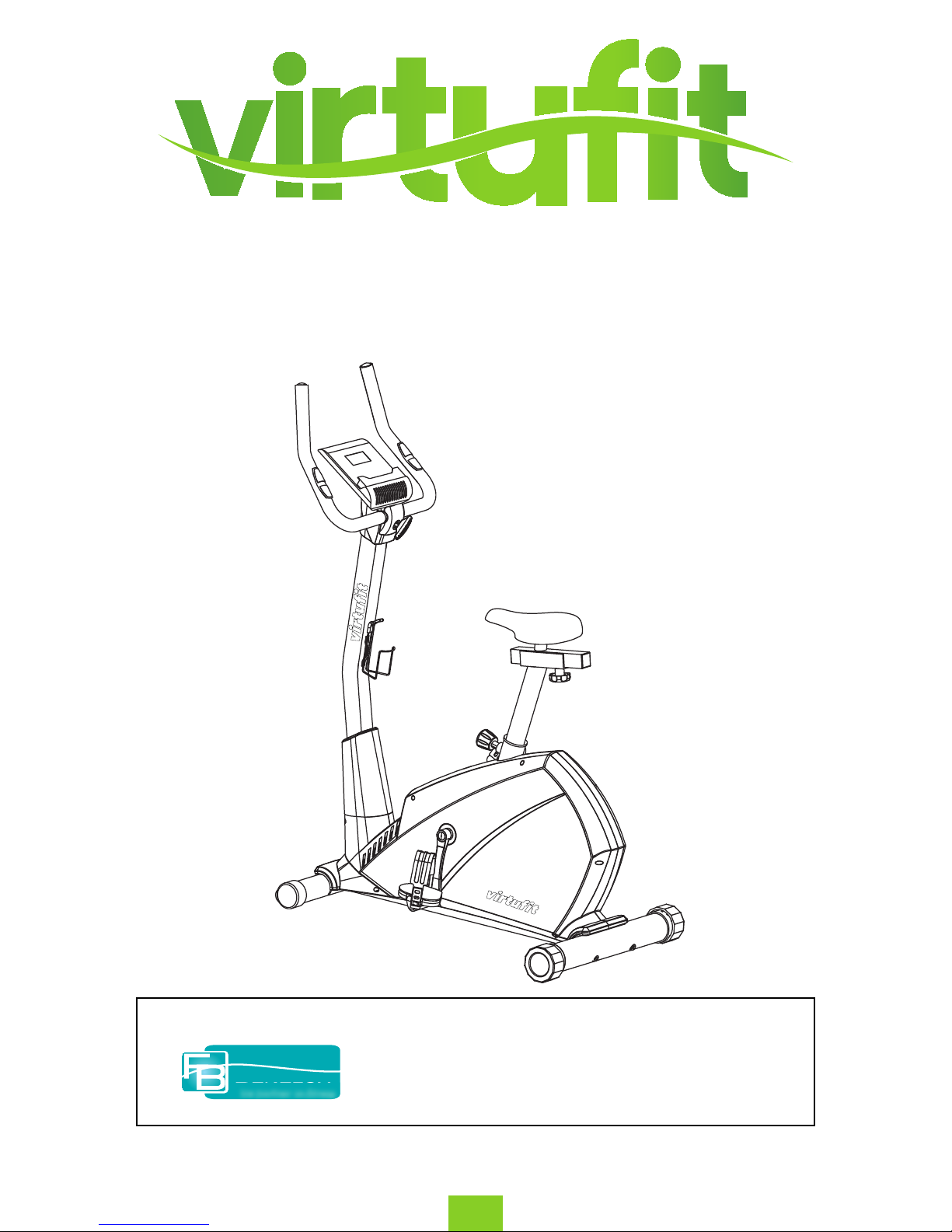
Virtufit HTR 2.0 Ergometer Hometrainer
HTR 2.0 Ergometer Hometrainer
Manual
ENG
T +31 (0)74-7600219
E service@ tnessbenelux.nl
W www. tnessbenelux.nl
Twekkelerweg 263
7553 LZ Hengelo
The Netherlands
Fitness
Benelux
Uw partner in fitness
For questions or missing parts please contact Fitness Benelux:
Page 2

2
ENG
Virtufit HTR 2.0 Ergometer Hometrainer
INDEX
SAFETY PRECAUTIONS ............................................................................................................................................................... 3
EXPLODED DRAWING ................................................................................................................................................................. 4
PARTS LIST ....................................................................................................................................................................................... 5
ASSEMBLY INSTRUCTIONS ....................................................................................................................................................... 6
USER INSTRUCTIONS .................................................................................................................................................................. 12
DISPLAY INSTRUCTIONS ............................................................................................................................................................ 13
TRAINING INSTRUCTIONS ......................................................................................................................................................... 16
Page 3

3
Virtufit HTR 2.0 Ergometer Hometrainer
ENG
Thank you for purchasing this bike! For your safety and benet, read this manual carefully before
using the machine. Prior to assembly, remove components from the box and verify that all the listed
parts were supplied. Assembly instructions are described in the following steps and illustrations.
- Check all the screws, nuts and other connections before using the machine for the rst time and
ensure that the trainer is in the safe condition.
- Set up the machine in a dry level place and leave it away from moisture and water.
- Place a suitable base (e.g. rubber mat, wooden board etc.) beneath the machine in the area of
assembly to avoid dirt and damages.
- Before beginning training, remove all objects within a radius of 2 meters from the machine.
- DO NOT use aggressive cleaning articles to clean the machine, Only use the supplied tools or suitable
tools of your own to assemble the machine or repair any parts of machine. Remove drops of sweat
from the machine immediately after nishing training.
- Your health can be aected by incorrect or excessive training. Consult a doctor before beginning
a training program. He can dene the maximum setting (Pulse. Watts. Duration of training etc) to
which you may train yourself and can get precise information during training. This machine is not
suitable for therapeutic purpose.
- Only do training on the machine when it is in correct working way. Use only original spare parts for
any necessary repairs.
- This machine can be used for only one person’s training at a time.
- Wear training clothes and shoes which are suitable for tness training with the machine. Your
training shoes should be appropriate for the trainer.
- If you have a feeling of dizziness, sickness or other abnormal symptoms, please stop training and
consult a doctor.
- People such as children and handicapped persons should only use the machine in the presence of
another person who can give aid and advice.
SAFETY PRECAUTIONS
Page 4
4
ENG
Virtufit HTR 2.0 Ergometer Hometrainer
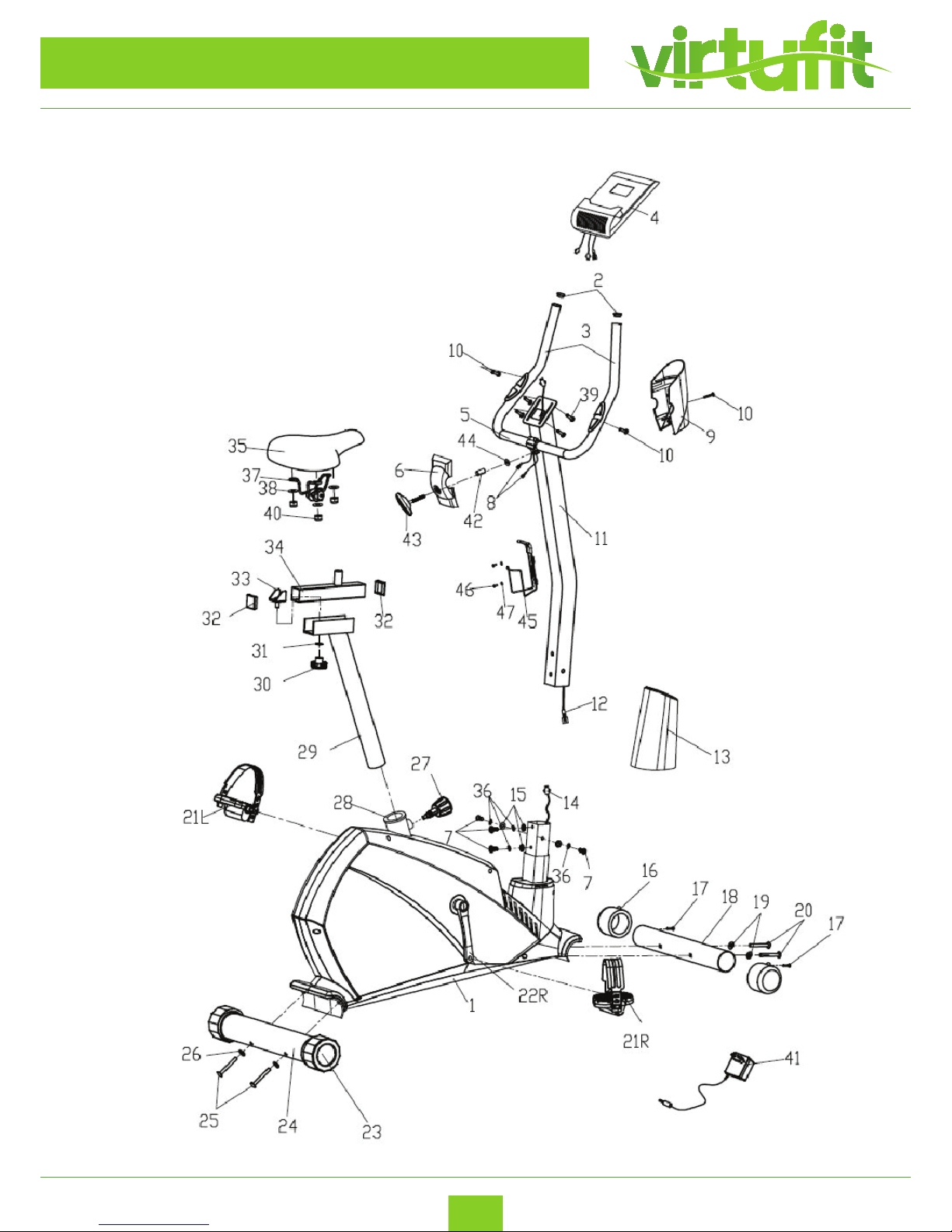
EXPLODED DRAWING
SAVETHESEINSTRUCTIONS/Maximumuser’sweight:100KG
EXPLODEDDIAGRAM
Page 5
5
Virtufit HTR 2.0 Ergometer Hometrainer
ENG
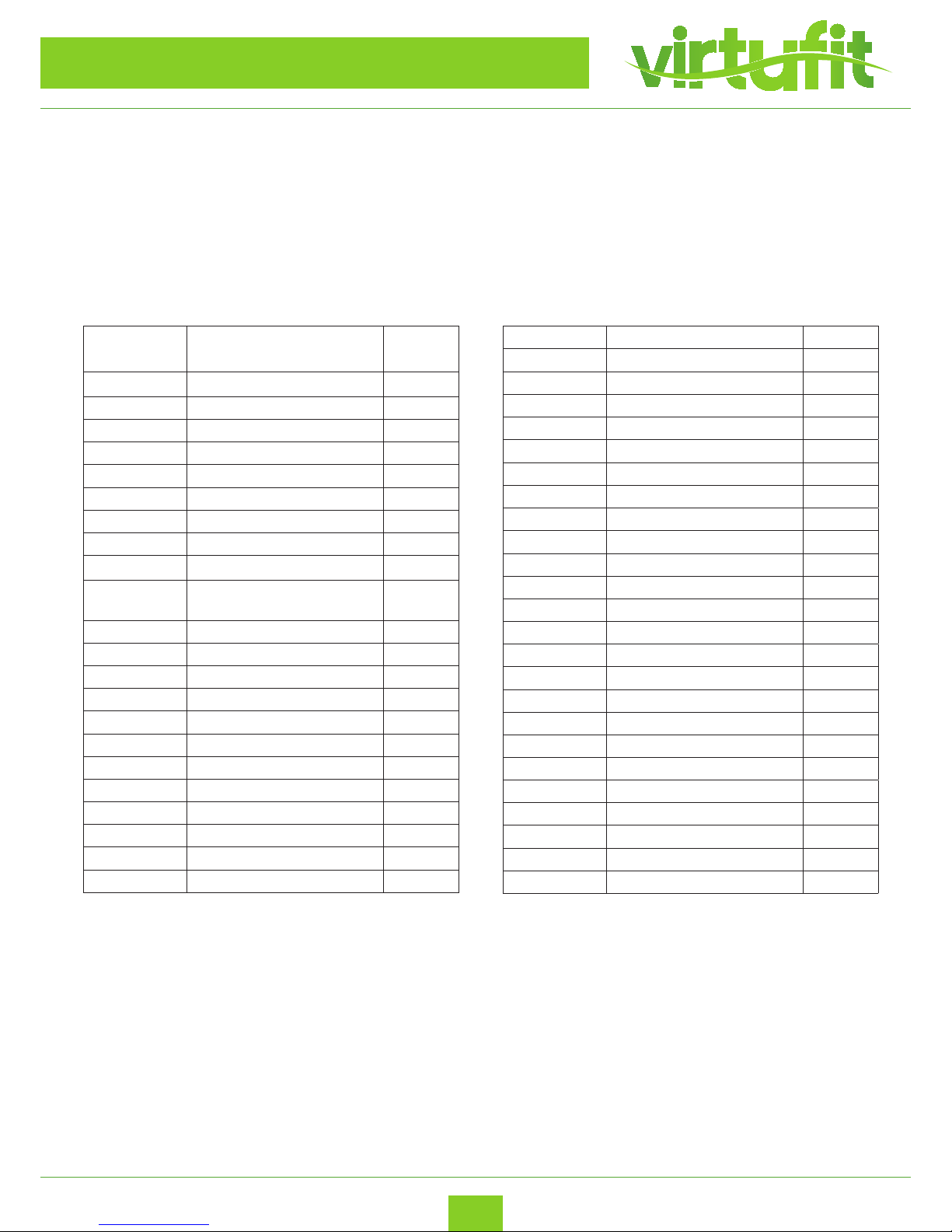
PARTS LIST
Nr. Description Quan-
tity
1 Main Frame 1
2 Round End Cap 2
3 Hand grip foam 2
4 Computer 1
5 Handlebar 1
6 Front Handlebar Cover 1
7 Allen Bolt (M8X15)
8 Pulse Sensor Wire 2
9 Rear Handlebar Cover 1
10 Cross Tapping Screw
(ST4.2X18)
3
11 Handlebar Post 1
12 Extension Sensor Wire 1
13 Protective Guard 1
14 Lower Sensor Wire 1
15 Flat Washer d8 4
16 Front End Cap 2
17 Cross Tapping Screw ST3.5X10 2
18 Front Stabilizer 1
19 Arc Washer d8XΦ19X1.5XR30 2
20 Allen Bolt M8XL72 2
21 L/R Pedal (L/R) 1 pr
22 L/R Crank(L/R) 1 pr
23 Rear End Cap 2
24 Rear Stabilizer 1
25 Allen Bolt M8XL90 2
26 Arc Washer d8X2 XΦ25 XR39 2
27 Pop-pin Knob M16X1.5X32 1
28 Saddle Post Bushing 1
29 Saddle Post 1
30 Knob Nut M10 1
31 Flat Washer d10 1
32 Square End Cap 2
33 U-shaped Slider 1
34 Horizontal Saddle Post 1
35 Saddle 1
36 Spring Washer (D8)
37 Saddle bracket 1
38 Flat Washer 3
39 Cross Screw M5X10 4
40 Nylon nut 3
41 Adaptor 1
42 Spacer 1
43 T-Handle knob 1
44 Flat washer 1
45 Bottle holder 1
46 Cross Tapping Screw 2
47 Flat washer 2
Most of the listed assembly hardware has been packaged separately, but some hardware
items have been preinstalled in the identied assembly parts. In these instances, simply
remove and reinstall the hardware as assembly is required.
Please reference the individual assembly steps and make note of all preinstalled
PREPARATION: Before assembling, make sure that you will have enough space around the item; use
the present tooling for assembling; before assembling please check whether all needed parts are
available. It is strongly recommended this machine to be assembled by two or more people to avoid
possible injury.
4
4
Page 6
6
ENG
Virtufit HTR 2.0 Ergometer Hometrainer
ASSEMBLY INSTRUCTIONS
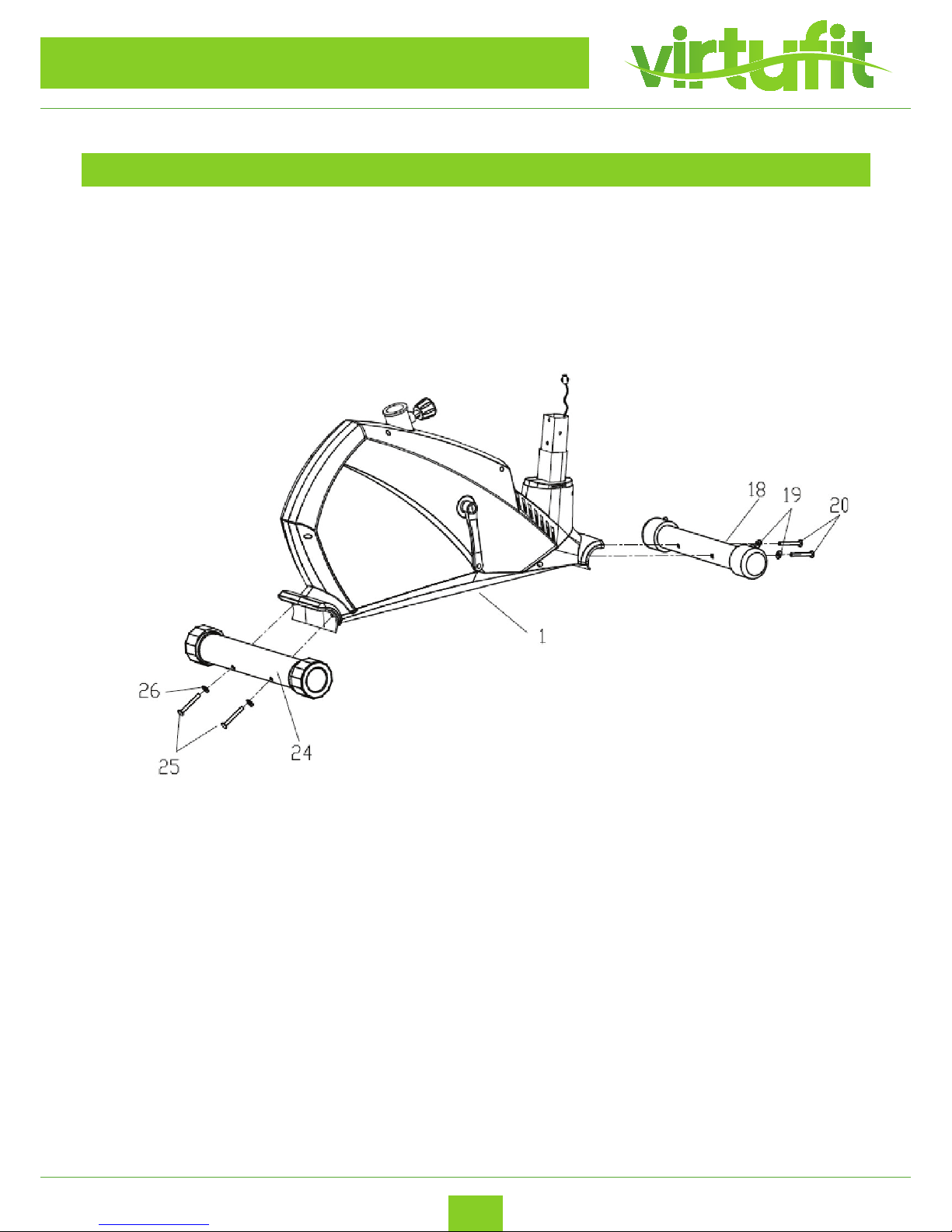
STEP 1
1. Attach the front stabilizer (18) to the main frame (1) with the allen bolts (20) and arc washers (19)
2. Fix the rear stabilizer (24) to the main frame (1) with the allen bolts (25) and arc washers (26) as
shown.
Page 7
7
Virtufit HTR 2.0 Ergometer Hometrainer
ENG
STEP 2
ASSEMBLY INSTRUCTIONS
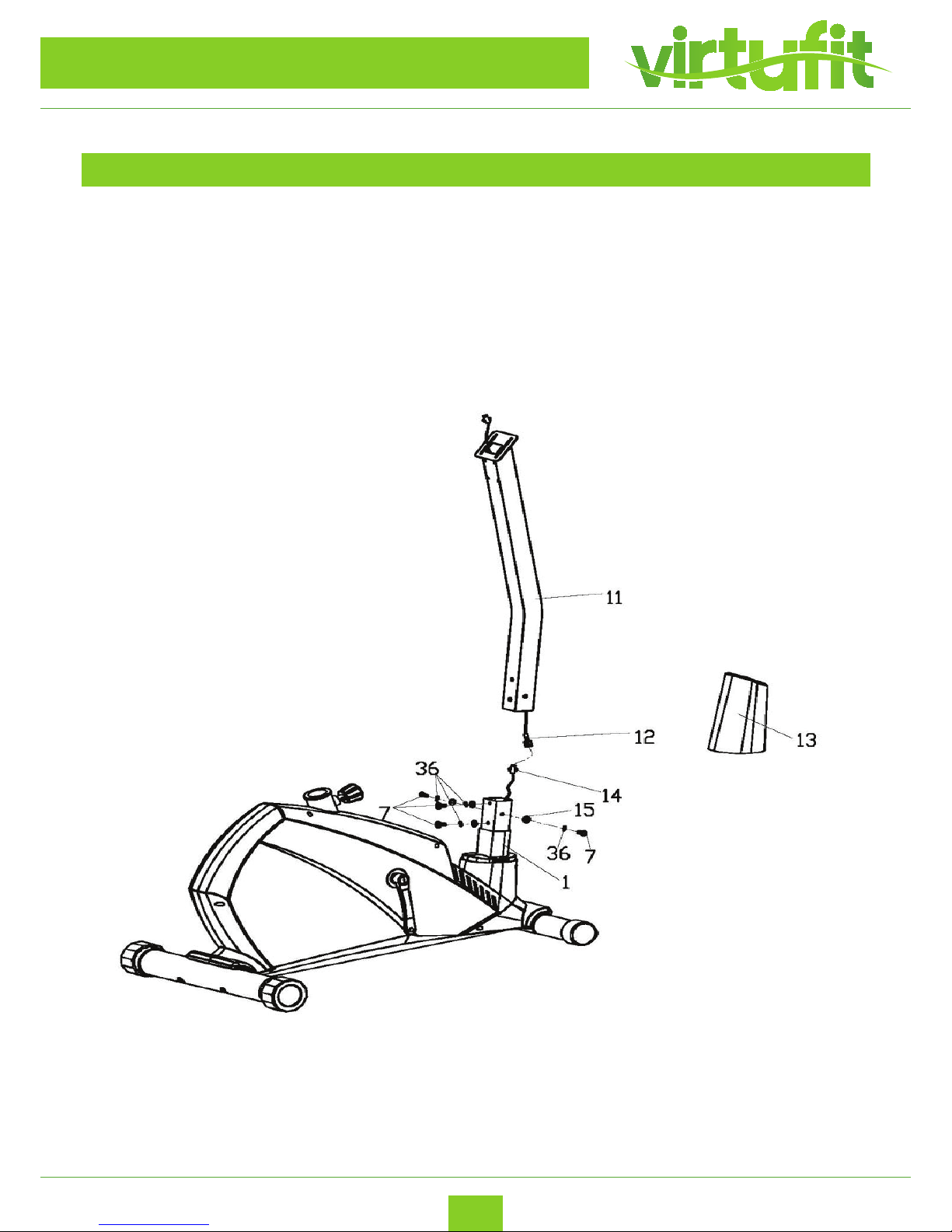
1. Slip the protective guard (13) onto the handlebar post (11);
2. Connect the lower sensor wire (14) to the extension sensor wire (12), and then x the handlebar
post (11) on the main frame (1), using the allen bolts (7), spring washers (36), and at washers (15)
as shown. Slip down protective guard (13) and t in the place.
Page 8
8
ENG
Virtufit HTR 2.0 Ergometer Hometrainer
STEP 3
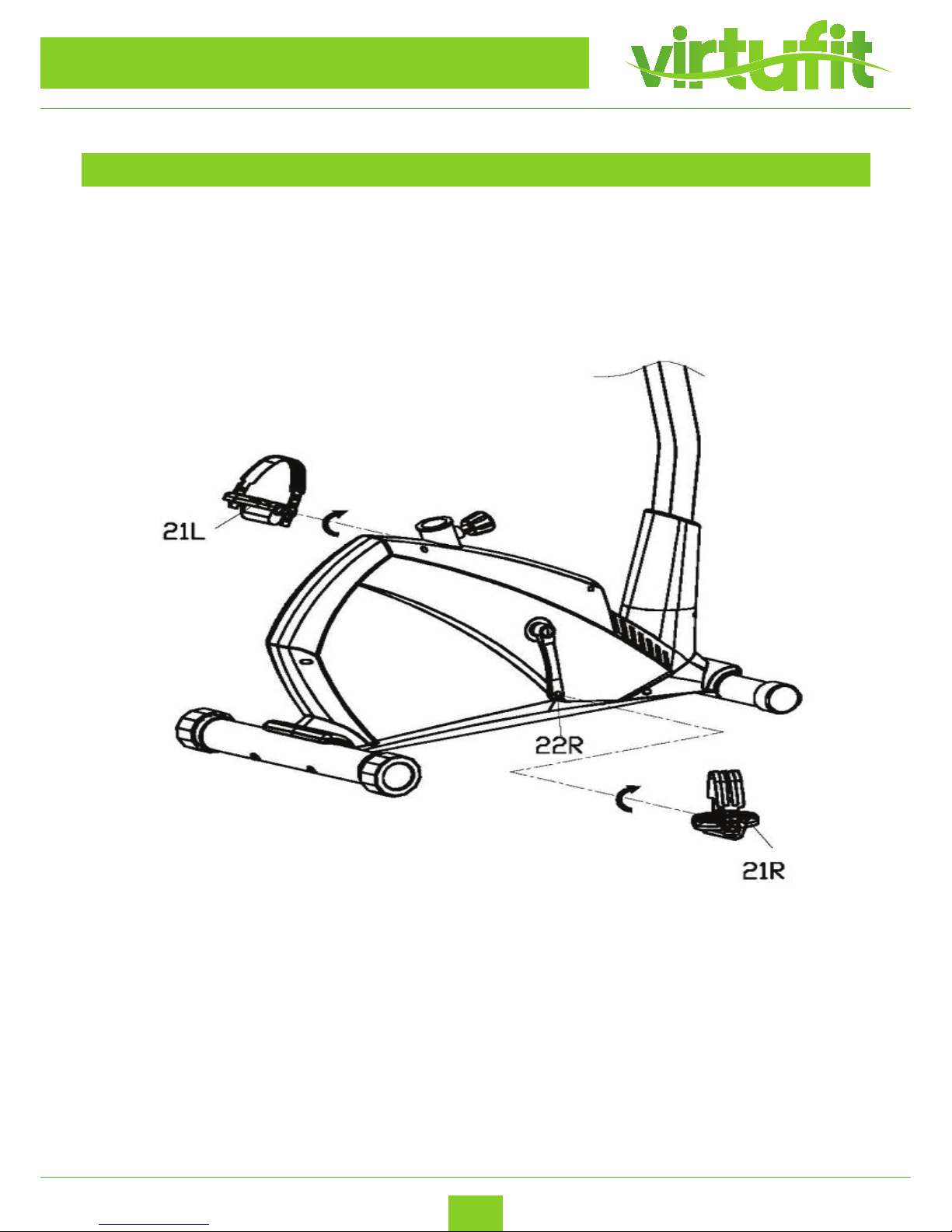
Attach the pedals (21L/R) to the cranks (22L/R) respectively, viewed from the rider’s exercising position.
Always make sure the pedals are securely tightened before any exercise.
ASSEMBLY INSTRUCTIONS
Note: both pedals are labeled L for left and R for right. To tighten turn the Left pedal
counterclockwise and the right pedal clockwise.
Page 9
9
Virtufit HTR 2.0 Ergometer Hometrainer
ENG
STEP 4
ASSEMBLY INSTRUCTIONS
Saddle Post
(29), secured with the Flat
Saddle bracket
(37) to the Saddle (35) with
Flat Washer
(38) and
Nylon nut
(40),
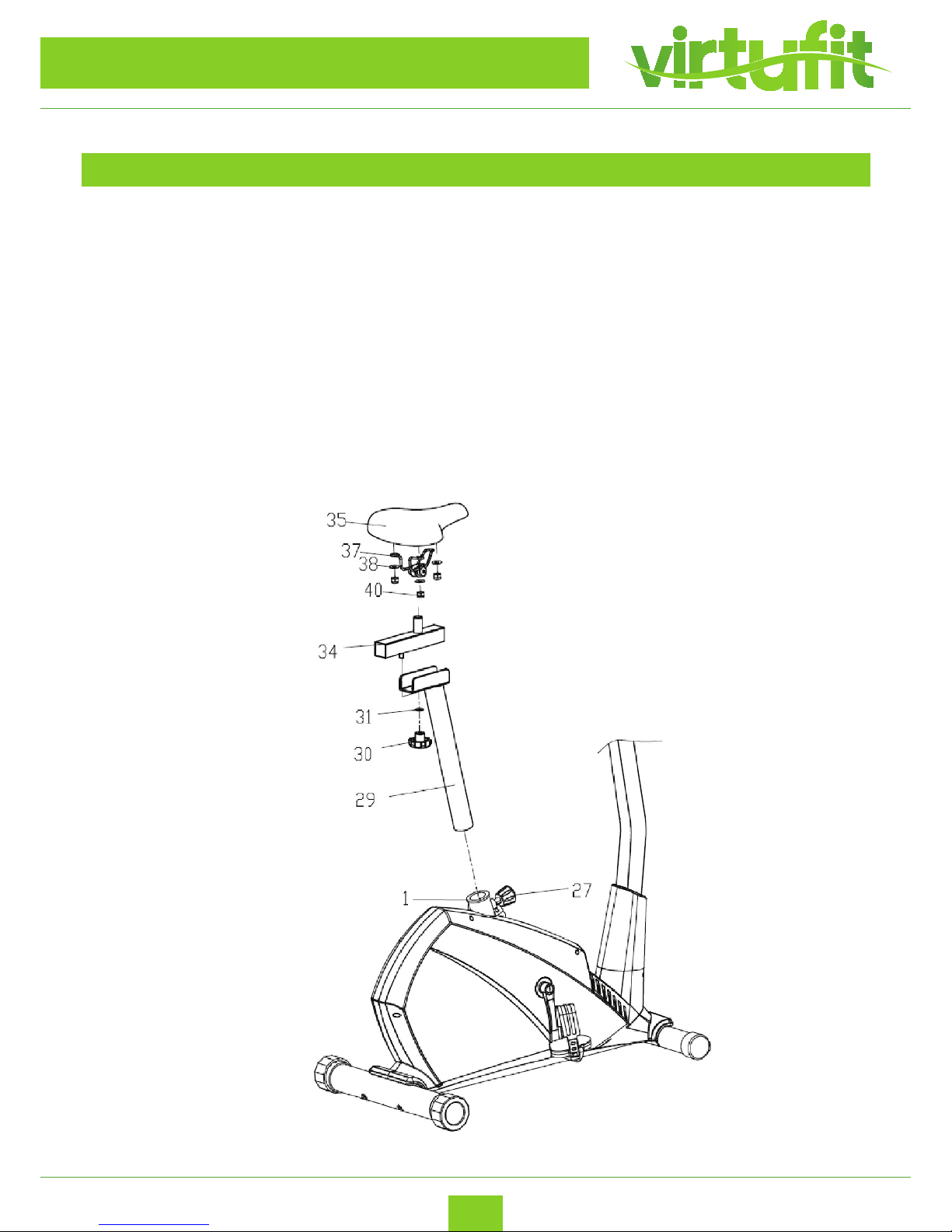
1. Insert the saddle post (29) into the main frame (1), secured with the knob (27) at a proper
height as shown.
2. And then t the horizontal saddle post (34) to the saddle post (29), secured with the at
washer (31) and knob nut (30) as shown.
3. Install the saddle bracket (37) to the saddle (35) with at washer (38) and nylon nut (40),
Then attach the saddle (35) to the horizontal saddle post (34), secured the screw and nut
under the saddle with wrench.
Note: make sure the saddle (35) has been tightly attached to the horizontal saddle post (34)
before exercising.
Page 10
10
ENG
Virtufit HTR 2.0 Ergometer Hometrainer
STEP 5
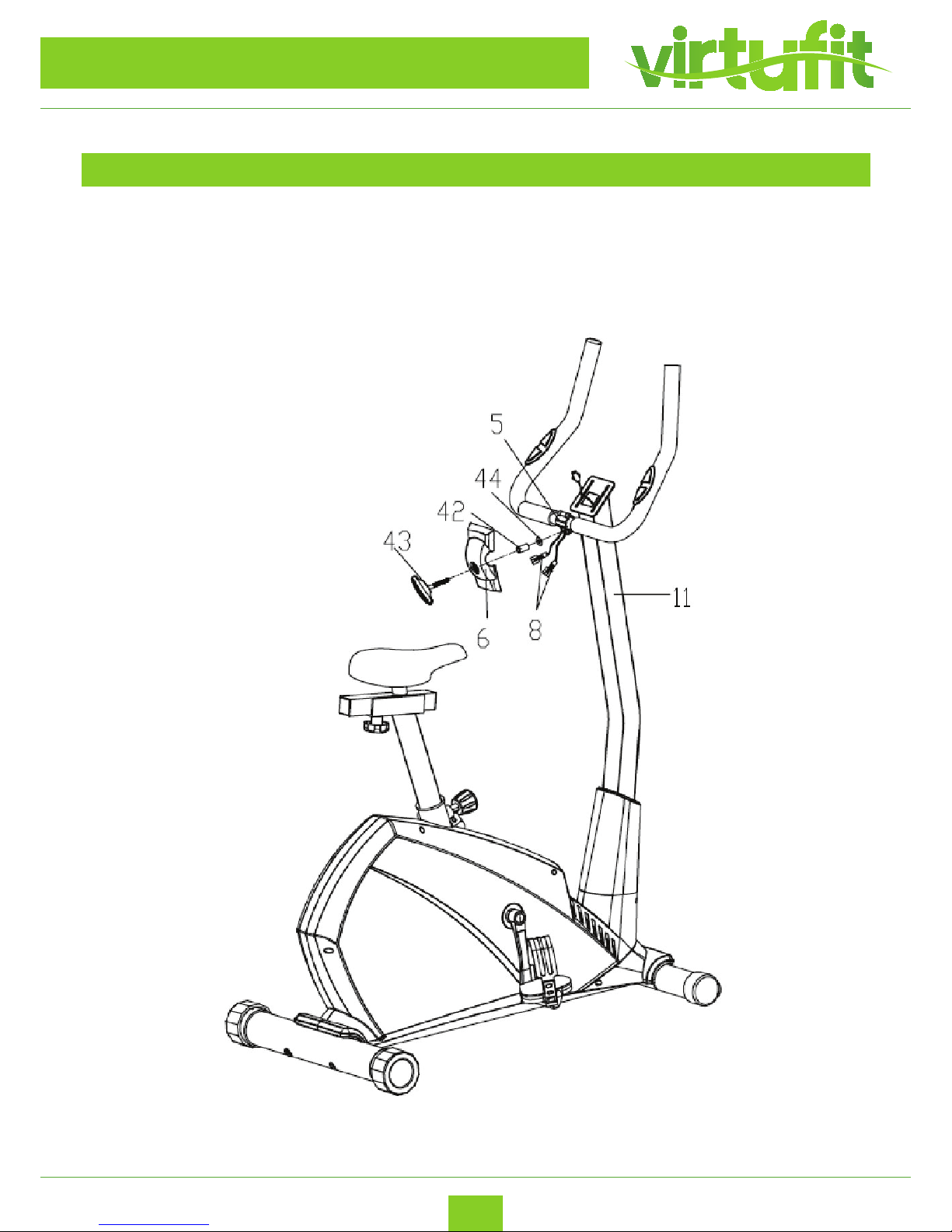
Feed the pulse sensor wires (8) through the computer bracket on the top of handlebar post
(11). Attach the handlebar (5) to the handlebar post (11), then insert the t-handle knob ( 43 )
into the front handlebar (6) spacer (42) and at washer ( 44 ) to lock the handlebar tightly.
ASSEMBLY INSTRUCTIONS
T-Handle knob (43)
Page 11
11
Virtufit HTR 2.0 Ergometer Hometrainer
ENG
STEP 6
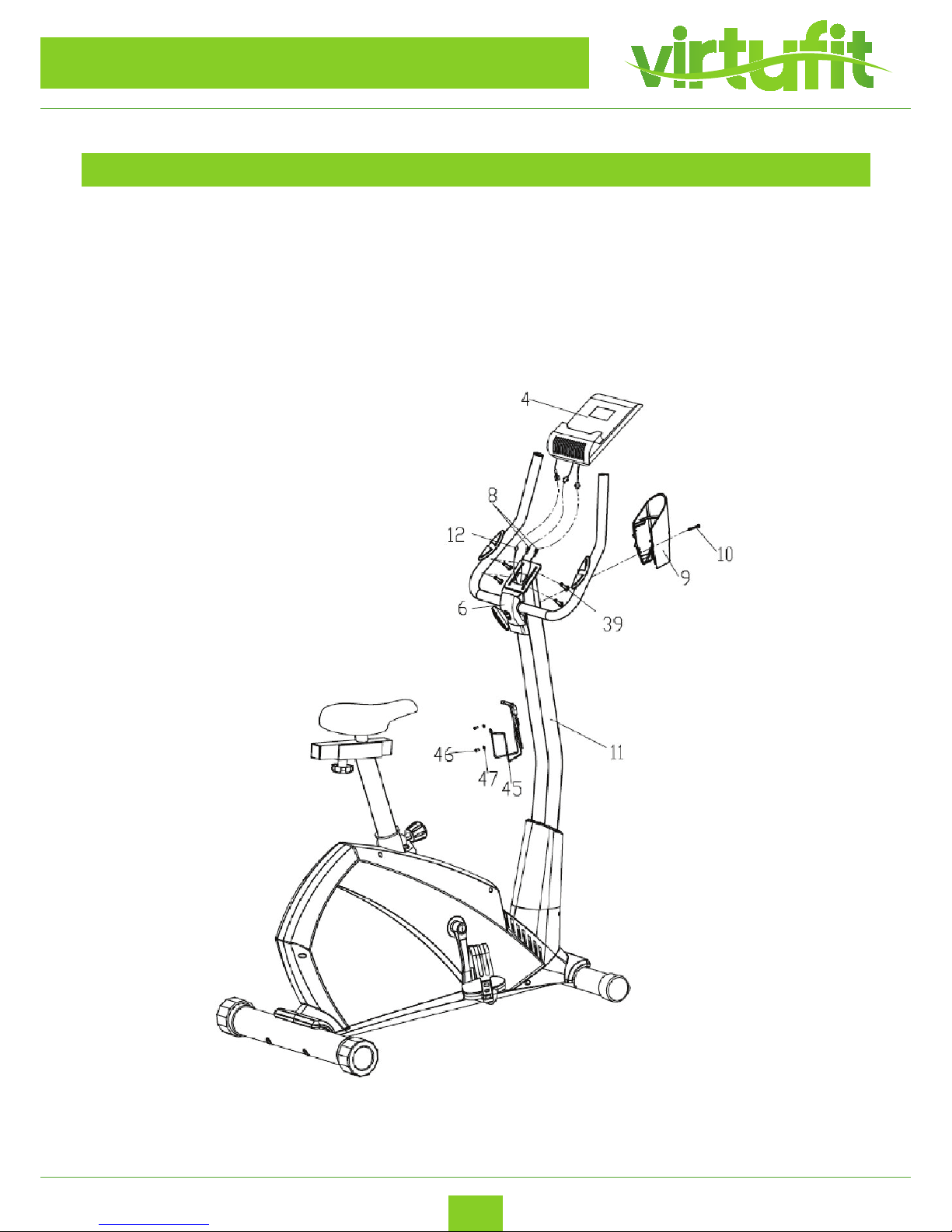
1. Connect all the wires (8 & 12) to the wires come from the computer (4), and then install the
computer(4) onto the computer bracket on the top of the handlebar post (11), secured it with
the cross screws (39) as shown.
2. Attach the rear handlebar cover (9) to the handlebar post (11), t the front and rear
covers (6 & 9) properly, and then secure them together with the cross screw (10) as shown.
3. Insert the bottle holder (45) to the handlebar post (11) with cross tapping screw (46) and at
washer (47).
ASSEMBLY INSTRUCTIONS
s shown.
Bottle holder (45) to the Handlebar Post (11) with Cross Tapping Screw (46) and Flat
The hometrainer is now ready for use!
Page 12
12
ENG
Virtufit HTR 2.0 Ergometer Hometrainer
USER INSTRUCTIONS
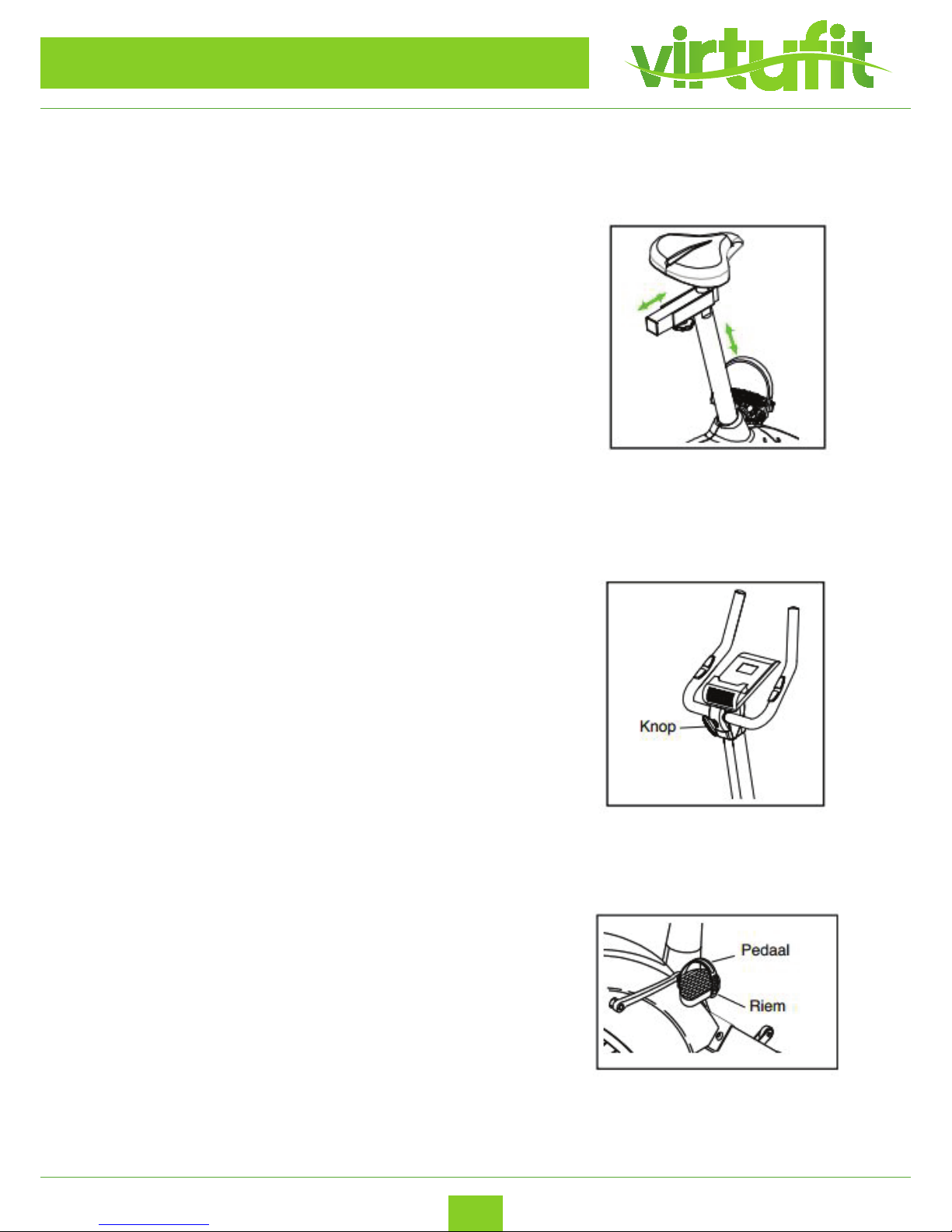
How to adjust the height and the horizontal position of the
saddle
To be able to train eectively, the saddle must be at the correct
height. During stairs, your knees must be slightly bent when
the pedals are in the lowest position. To adjust the height of the
saddle, rst release the seat post button. Pull the knob towards
you, slide the seat post up or down to the desired position and
release the knob. Move the seat post slightly up or down to make
sure that the button is in the seat post in one of the adjusting
holes. Then tighten the button. To adjust the horizontal position
of the saddle, rst release the saddle button a few turns. Then
slide the saddle forward or back into the desired position and
rmly tighten the saddle.
How to adjust the angle of the handles
To adjust the angle of the handles, loosen the button and
put the handles in the desired position. Then retighten the
handles by turning the knob.
How to adjust the footrests
To adjust the footrests, rst pull the ends of the footrests
apart from the lips on the pedals. Adjust the footrests
to the desired position and then tighten the ends of the
footrests on the lips.
Page 13

13
Virtufit HTR 2.0 Ergometer Hometrainer
ENG
DISPLAY INSTRUCTIONS
FUNCTIONS
WORKOUT SELECTION
START/STOP:
1. Start & Pauses workouts.
2. Start body fat measurement.
3. Operates only when in stop mode. Holding key for 3 seconds will reset all function value to be
zero.
DOWN:
Decrease value of selected workout parameter: TIME, DISTANCE, etc. During the workout, it will
decrease the resistance load.
UP :
Increases value of selected workout parameter. During the workout, it will increase the resistance load.
ENTER:
To input desired value or work out mode.
TEST(PULSE , RECOVERY):
Press to enter into Recovery function when computer has the heart rate value. Recovery is Fitness Level
1-6 after 1 minute.F1 is the best, and F6 is the worst.
MODE:
Press to switch display form RPM to SPEED, ODO to DIST , WATT to Calories during workout.
After power-up using UP or DOWN keys to select then pressing ENTER to enter the desired mode.
After selecting your desired program, you may pre-set several workout parameters for desired results.
WORKOUT PARAMETERS: TIME / DISTANCE / CALORIES /AGE
Note: Some parameters are not adjustable in certain programs.
Once a program has been selected, pressing ENTER, will make “Time” parameter ash. Using
UP OR DOWN KEY you may select desired time value. Press ENTER KEY to input value. Flashing
prompt will move to the next parameter. Continue use of UP OR DOWN KEY. Press START/STOP to
start workout.
Page 14

14
ENG
Virtufit HTR 2.0 Ergometer Hometrainer
DISPLAY INSTRUCTIONS
PROGRAMS
P1 Manual
Selecting “Manual” using UP OR DOWN KEY then pressing ENTER KEY . 1St parameter “Time” will
ash so value can be adjusted using UP OR DOWN KEY .Press ENTER KEY to save value & move to next
parameter to be adjusted. Continue through all desired parameters, pressing START/STOP to start
workout.
Note: One of workout parameters counts down to be zero, it will have bi sounds and stop the workout
automatically. Press START KEY to continue the workout to reach the unnished workout parameter.
P2 - P14 Pre-programs
There are 10 program proles ready for use. All program proles have 24 level of resistance.
Selecting one of pre-programs using UP OR DOWN KEY then pressing ENTER KEY . 1St parameter
“Time” will ash so value can be adjusted using UP OR DOWN KEY .Press ENTER KEY to save value &
move to next parameter to be adjusted.
Continue through all desired parameters, pressing START/STOP to start workout.
Note: One of workout parameters counts down to be zero, it will have bi sounds and stop the workout
automatically. Press START KEY to continue the workout to reach the unnished workout parameter.
P15 Watt control program
Selecting “Watt control program” using UP OR DOWN KEY then pressing ENTER KEY . 1St parameter
“Time” will ash so value can be adjusted using UP OR DOWN KEY .Press ENTER KEY to save value &
move to next parameter to be adjusted. Continue through all desired parameters, pressing START/STOP
to start workout.
Note: One of workout parameters counts down to be zero, it will have bi sounds and stop the workout
automatically. Press START KEY to continue the workout to reach the unnished workout parameter.
Computer will adjust the resistance load automatically depends on the speed to maintain the constant
watt value. User can use up down key to adjust the watt value during workout.
P16 BODY FAT PROGRAM
Selecting “BODY FAT Program ” using UP OR DOWN KEY then pressing ENTER. “Male ” will ash so Gender
can be adjusted using UP OR DWON KEY, press ENTER to save gender & move to next data. “175” of
Height will ash so Height can be adjusted to use UP OR DOWN KEY , press ENTER KEY save value & move
to next data. “75“of Weight will ash so Weight can be adjusted to use UP OR DOWN KEY , press ENTER
KEY to save vale & move to next data. “30” of Age will ash so Age can be adjusted using UP OR DOWN
KEY , press ENTER to save value.
Press START/STOP to start measurement, please also grasp hand pulse grips.
After 15 seconds the display will show out Body Fat %, BMR, BMI & BODY TYPE.
Page 15

15
Virtufit HTR 2.0 Ergometer Hometrainer
ENG
DISPLAY INSTRUCTIONS
NOTE:
Body Types: There are 9 body types divided according to the FAT% calculated. Type 1 is from 5% to 9%.
Type 2 is from 10% to 14%. Type 3 is from 15% to 19%. Type 4 is from 20% to 24%. Type 5 is from 25% to
29%. Type 6 is from 30% to 34%. Type 7 is from 35% to 39%. Type 8 is from 40% to 44%. Type 9 is from
45% to 50%.
BMR: Basal Metabolism Ratio
BMI: Body Mass Index
Press START/STOP KEY to return the main Display.
P17 TARGET HEART RATE Program
Selecting “TARGET H.R.” using UP OR DOWN KEY then pressing ENTER KEY . 1St parameter “Time”
will ash so value can be adjusted using UP OR DOWN KEY .Press ENTER KEY to save value & move to
next parameter to be adjusted. Continue through all desired parameters, pressing START/STOP to start
workout.
Note: If Pulse is above or below (± 5) the set TARGET H.R, computer will adjust the resistance load
automatically. It will check Every 10 seconds approx. l resistance load will increase or decrease.
One of workout parameters counts down to be zero, it will have bi sounds and stop the workout
automatically. Press START/STOP to continue the workout to reach unnished workout parameter.
P18-P20 HEART RATE CONTROL Program
There are 3 selection for target pulse:
P18- 60% TARGET H.R= 60% of (220-AGE)
P19- 75% TARGET H.R= 75% of (220-AGE)
P20- 85% TARGET H.R= 85% of (220-AGE)
Setting Parameters for HEART RATE CONTROL
Selecting “One of Heart Rate Control Program .” using UP OR DOWN KEY then pressing ENTER KEY . 1St
parameter “Time” will ash so value can be adjusted using UP OR DOWN KEY .Press ENTER KEY to save
value & move to next parameter to be adjusted. Continue through all desired parameters, pressing
START/STOP to start workout.
Note: If Pulse is above or below (± 5) the TARGET H.R, computer will adjust the resistance load
automatically. It will check Every 10 seconds approx. l resistance load will increase or decrease .
One of workout parameters counts down to be zero, it will have bi sounds and stop the workout
automatically. Press START/STOP KEY to continue the workout to reach unnished workout parameter.
P21P24 USER PROGRAM
There are four user programs can be selected form U1 to U4.
User program allows user to set their own program that can be used immediately.
Setting Parameters for User Program
Selecting user using UP OR DOWN KEY then pressing ENTER KEY. 1St parameter “Time” will ash so
value can be adjusted using UP OR DOWN KEY. Press ENTER KEY to save value & move to next parameter
to be adjusted.
Page 16
16
ENG
Virtufit HTR 2.0 Ergometer Hometrainer
DISPLAY INSTRUCTIONS
Continue through all desired parameters .
After nished set up desired parameter, the level 1 will ash, use UP OR DOWN KEY to adjust then
pressing ENTER until nished. ( There are 10 times total). Press START/STOP to start workout.
Note: One of workout parameters counts down to be zero, it will have bi sounds and stop the workout
automatically. Press START/STOP KEY to continue the workout to reach unnished workout parameter.
WARMUP
TRAINING INSTRUCTIONS
A successful exercise program consists of a warm-up, aerobic exercise, and a cool-down. Do the entire
program at least two and preferably three times a week, resting for a day between workouts. After
several months, you can increase your workouts to four or ve times per week.
The purpose of warming up is to prepare your body for exercise and to minimize injuries. Warm up for
two to ve minutes before strength-training or aerobic exercising. Perform activities that raise your heart
rate and warm the working muscles. Activities may include brisk walking, jogging, jumping jacks, jump
rope, and running in place.
Stretching while your muscles are warm after a proper warm-up and again after your strength
or aerobic training session is very important. Muscles stretch more easily at these times because of their
elevated temperature, which greatly reduces the risk of injury. Stretches should be held for 15 to 30
seconds. DO NOT BOUNCE.
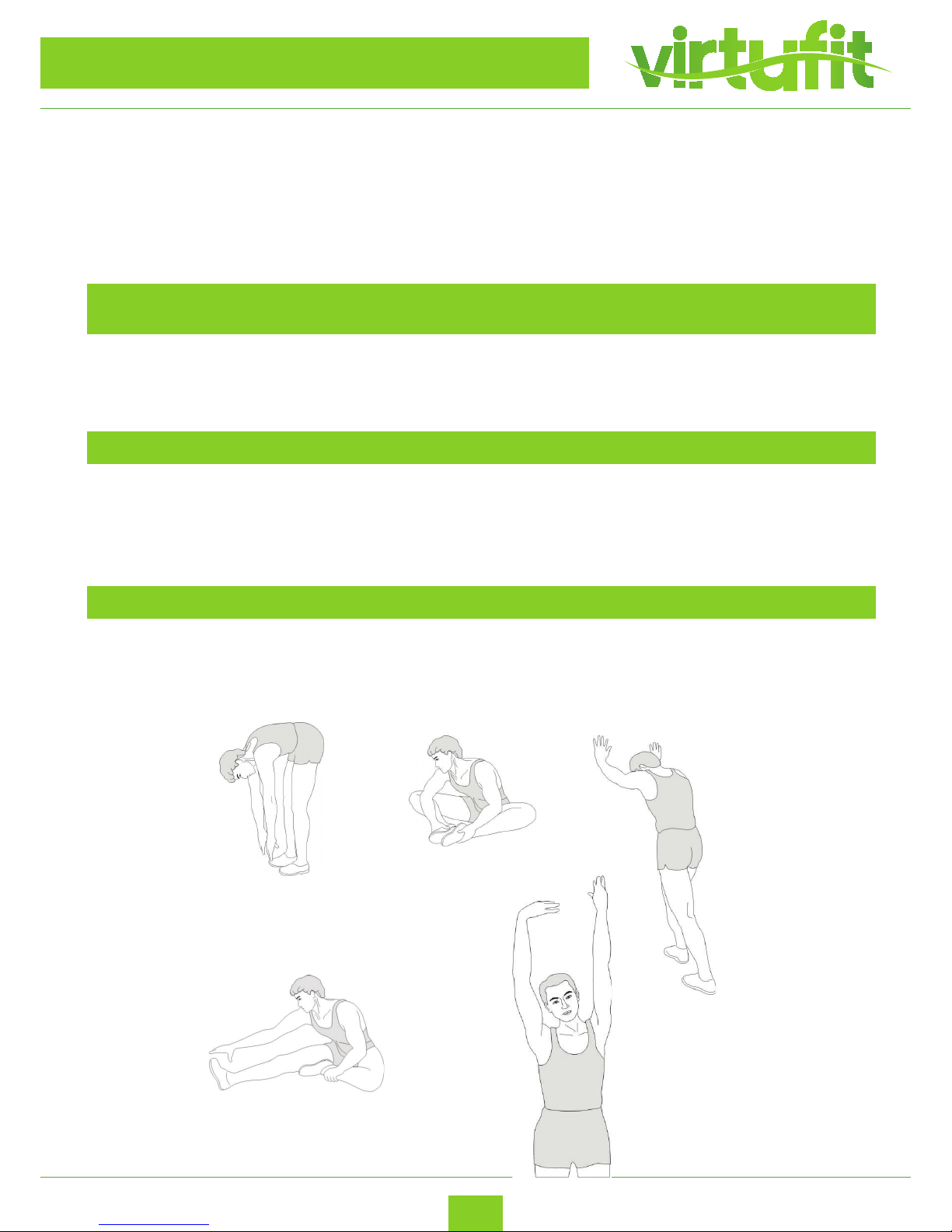
STRETCHING
Toe touch
Inner thigh stretch
Achilles stretch
Hamstring stretch
Side stretch
Page 17
17
Virtufit HTR 2.0 Ergometer Hometrainer
ENG
TRAINING INSTRUCTIONS
COOLING DOWN
The purpose of cooling down is to return the body to its normal or near normal, resting state at the end
of each exercise session. A proper cool-down slowly lowers your heart rate and allows blood to return to
the heart.
T +31 (0)74-7600219
E service@ tnessbenelux.nl
W www. tnessbenelux.nl
Twekkelerweg 263
7553 LZ Hengelo
The Netherlands
Fitness
Benelux
Uw partner in fitness
For questions or missing parts please contact Fitness Benelux:
 Loading...