

Page 1
version:1.0
User Manual
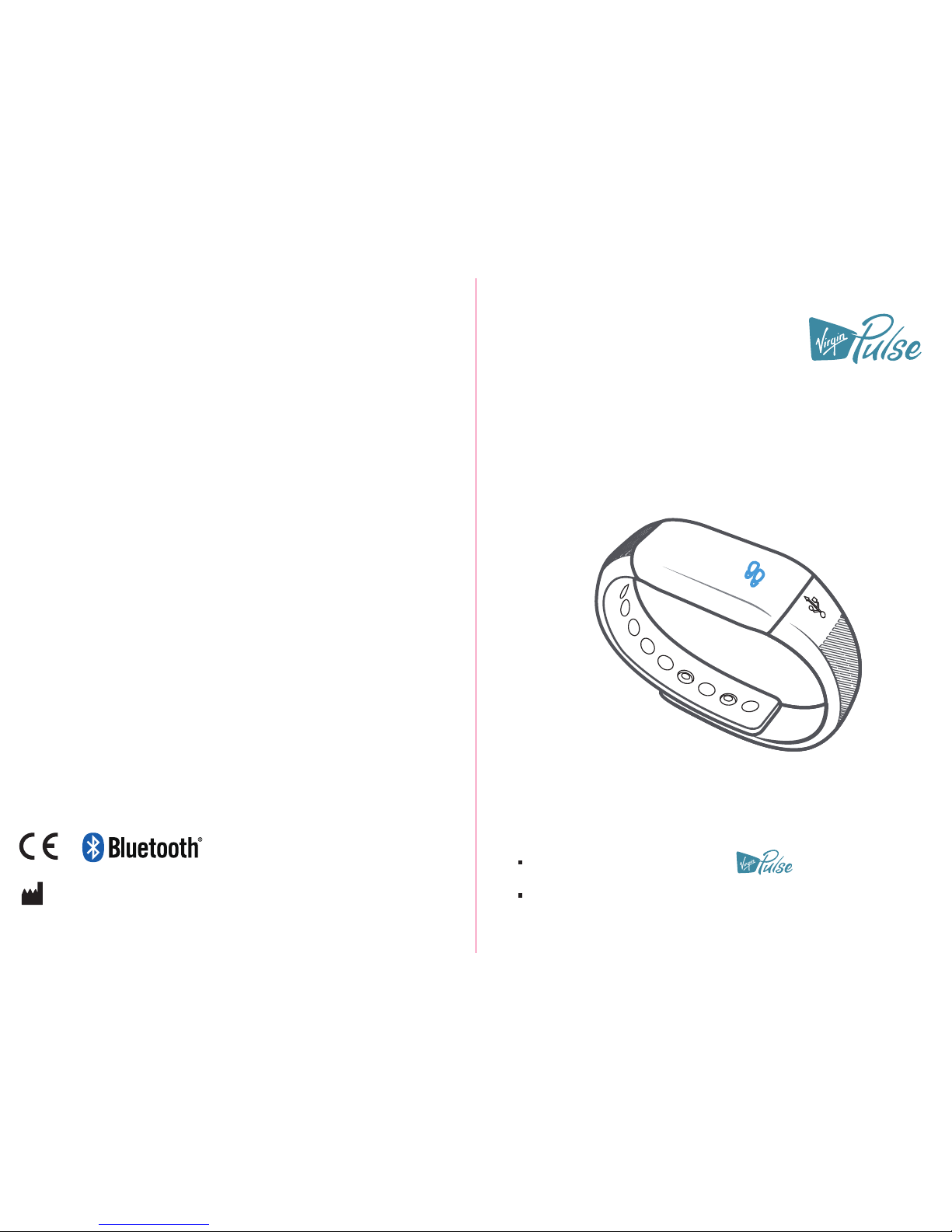
MAX BUZZ VP-T001
Please do read the user manual carefully and thoroughly so as to ensure
the safe usage of this product, and keep the manual well for further
reference in case you have problems.
Thank you very much for selecting the MAX BUZZ VP-T001.
2865
FCC ID: 2AKPRVP-T001
Virgin Pulse
492 old Connecticut Path,Suite 601 Framingham,MA 01701,USA
Page 2

1
Table of Contents
Table of Contents
Overview
Device Components
Initial Start-Up
General Instructions
Install the App and Pair-up
Start Measuring
How to Use
Troubleshooting
Specifications
Maintenance
Warranty
3
3
6
8
11-12
13
14
14
.................................................................................................................
.................................................................................................................
...................................................................................................................
.............................................................................................................................
............................................................................................................................
...............................................................................................................................
......................................................................................................................................
............................................. ............................................................
How to Charge the Power
5
...........................................................................................................
How to Wear the MAX BUZZ
7
.........................................................
How to View the Data
10
................................................................................................................
....................................
Symbol Meaning
Symbol Meaning
2
.................................................................................................................
OLED Display
4
.................................................................................................................
How to Turn on the MAX BUZZ for Your First Use
5
............................................................
Warning
14
......................................................................................................................................
MAX BUZZ Care
15
................................................................................................................
Built-in Battery Care
15
..................................................................................................................
Health Disclaimer
15
.......................................................................................................................
Other Notes
15
................................................................................................................................
FCC Statement
16
............................................................................................................................
View the Data
How to Light it Up
.............................................................................................................. 9
Caller ID Function
10
................................................................................................................
Sleep Condition Monitor
10
................................................................................................................
Alarm Clock Reminding
11
................................................................................................................
Page 3
2 3
List
1. MAX BUZZ VP-T001 (Built-in Polymer Lithium Battery)
2. User Manual
OverviewSymbol Meaning
General Instructions
Device Components
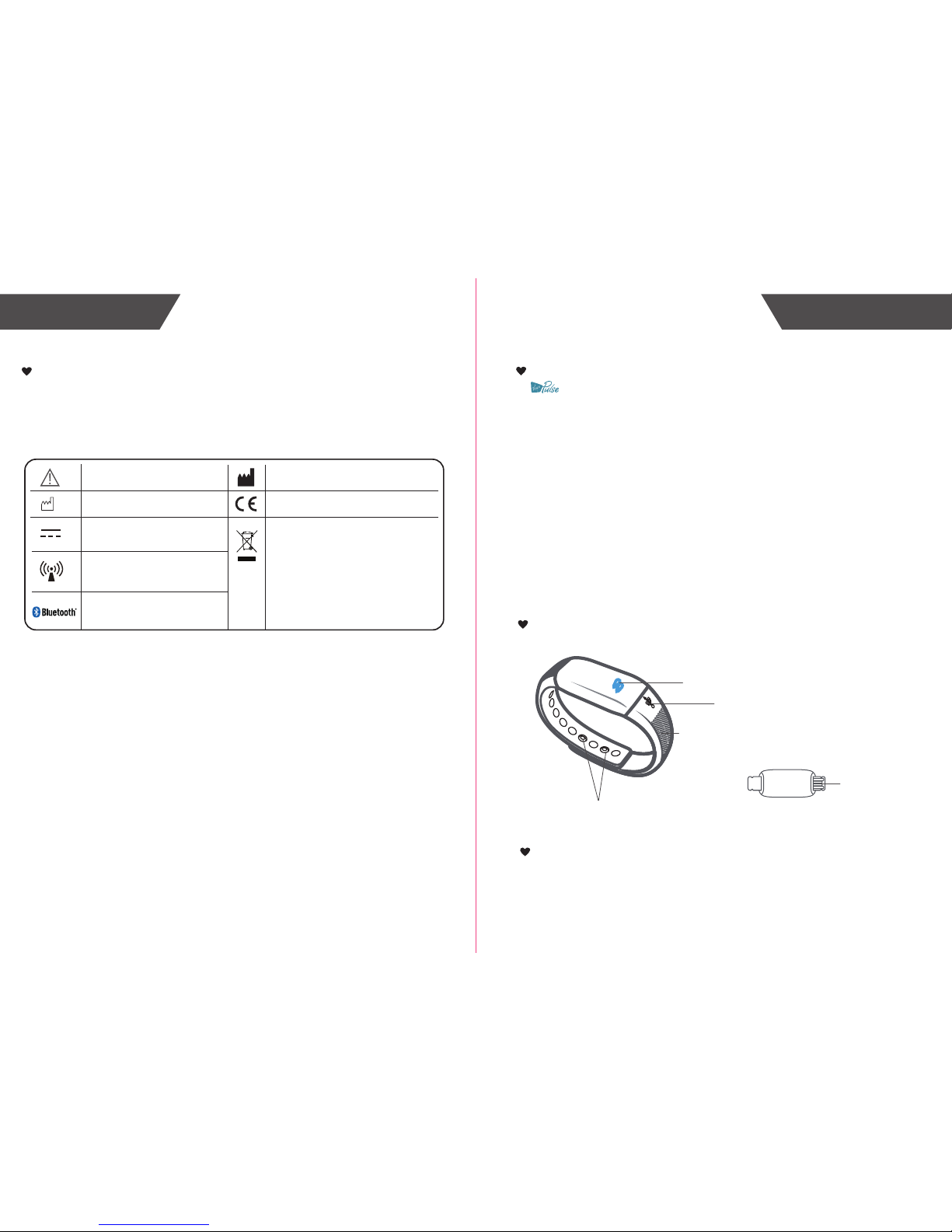
The warning signs and symbols are essential to ensure your correct and safe use of
this product and protect you and others from injury. Please kindly find the meanings of the
warning signs and symbols, which you may encounter in the label and user manual, as
follows:
Symbol Meaning
USB Interface
USB Icon
Wristband Button
Symbol for “THE OPERATION
GUIDE MUST BE READ”
Symbol for “MANUFACTURER”
Symbol for “ENVIRONMENT
PROTECTION – Waste electrical
products should not be disposed of with
household waste. Please recycle where
facilities exist. Check with your local
authority or retailer for recycling advice”
Symbol for “DIRECT CURRENT”
Symbol for “MANUFACTURE
DATE”
Symbol for “Including RF
transmitter”
Symbol for “COMPLIES WITH EU
REQUIREMENTS”
MAX BUZZ VP-T001 is designed to measure the walking steps,
distance and the consumed calories. It also can monitor the sleep quality.
And it has the alarm clock function and caller ID function.
This device has Bluetooth 4.0 technology, the user can set the time
and unit etc. through the bluetooth, and then download the information
to the MAX BUZZ. The data in the MAX BUZZ also can be uploaded to
the device which supports the Bluetooth 4.0 technology. So the user can
check it at anytime.
Main Features:
a. support the Bluetooth 4.0 technology
b. OLED display
c. keep a record of the measuring data during 14 days
d. display walking steps, walking distance, the consumed calories ,and the current time.
e. It can monitor the sleeping condition, and has two special functions: alarm clock
reminding and caller ID reminding. (Notes: All these functions need to be set on the
app.)
2865
Wristband
OLED Display
The Bluetooth Combination Mark
Page 4
5
4
OLED Display
How to Charge the Power
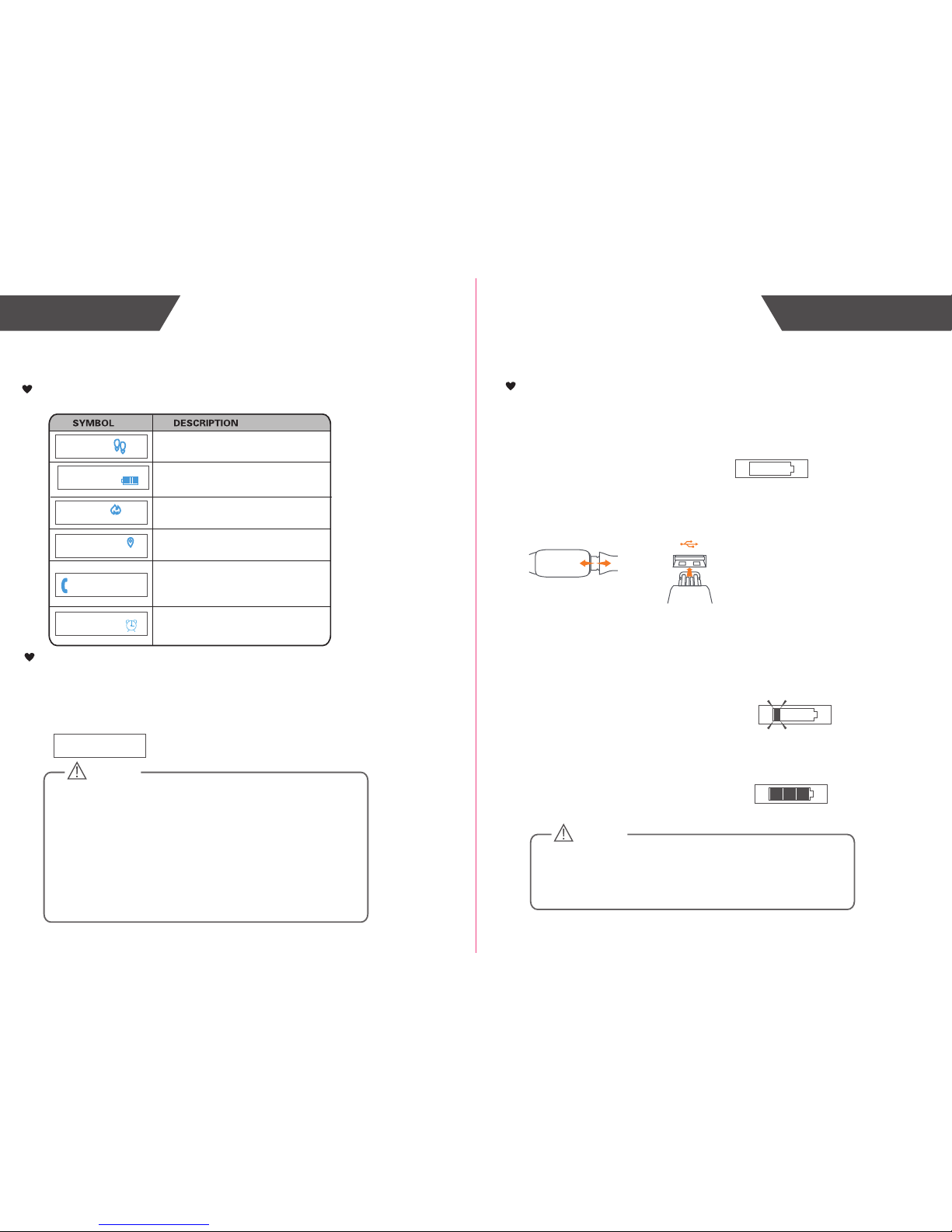
When the OLED displays the following symbol, it reminds you to
charge the power at once.
Pull out the wristband, then insert the device’s charging port into
the computer or charger’s USB port to finish the charging.
When the device is charging the power, the OLED will display as
the following picture. The power symbol blinks.
The OLED displays as the following picture, it means the
charging is complete.
Initial Start-UpOverview
How to Turn on the MAX BUZZ for Your First Use
The MAX BUZZ is in the shipping mode when you open the box the first
time, so you have to plug it into a USB port or charger to wake the
device up. It will take about 3 seconds before it vibrates twice and show
“Hello!”, an then show the battery charging symbol. Now the MAX BUZZ
is activated, you can use it to start your measurement.
CAUTION
Batteries (battery pack or batteries installed) shall not be exposed
to excessive heat such as sunshine, fire or the like.
Steps
The Walking Distance(Default: mile)
The Consumed Calorie (kcal)
The Current Time (Default: 12 hours)
Monitoring Caller ID
Note:
(1) When the device is in the shipping mode, if you charge the
power, it will divert to the normal mode, then you can start your
measurement.
(2) When the shipping mode is removed, the MAX BUZZ will
display the initial time: 12:00 A.M..
(3) After pairing up with the mobile device, the MAX BUZZ will
download the time from the mobile device and it will display the
current time.
Alarm clock reminding
Hello !
CAUTION
The Mini USB port is only used for charging the power, but can
not be used for transmitting the data to the computer.
4:07
PM
171
1:12
AM
3.8
CAL
0.06
MI
12345678
Page 5
7
6
Install the App and Pair-Up
Initial Start-UpInitial Start-Up
How to Wear the MAX BUZZ
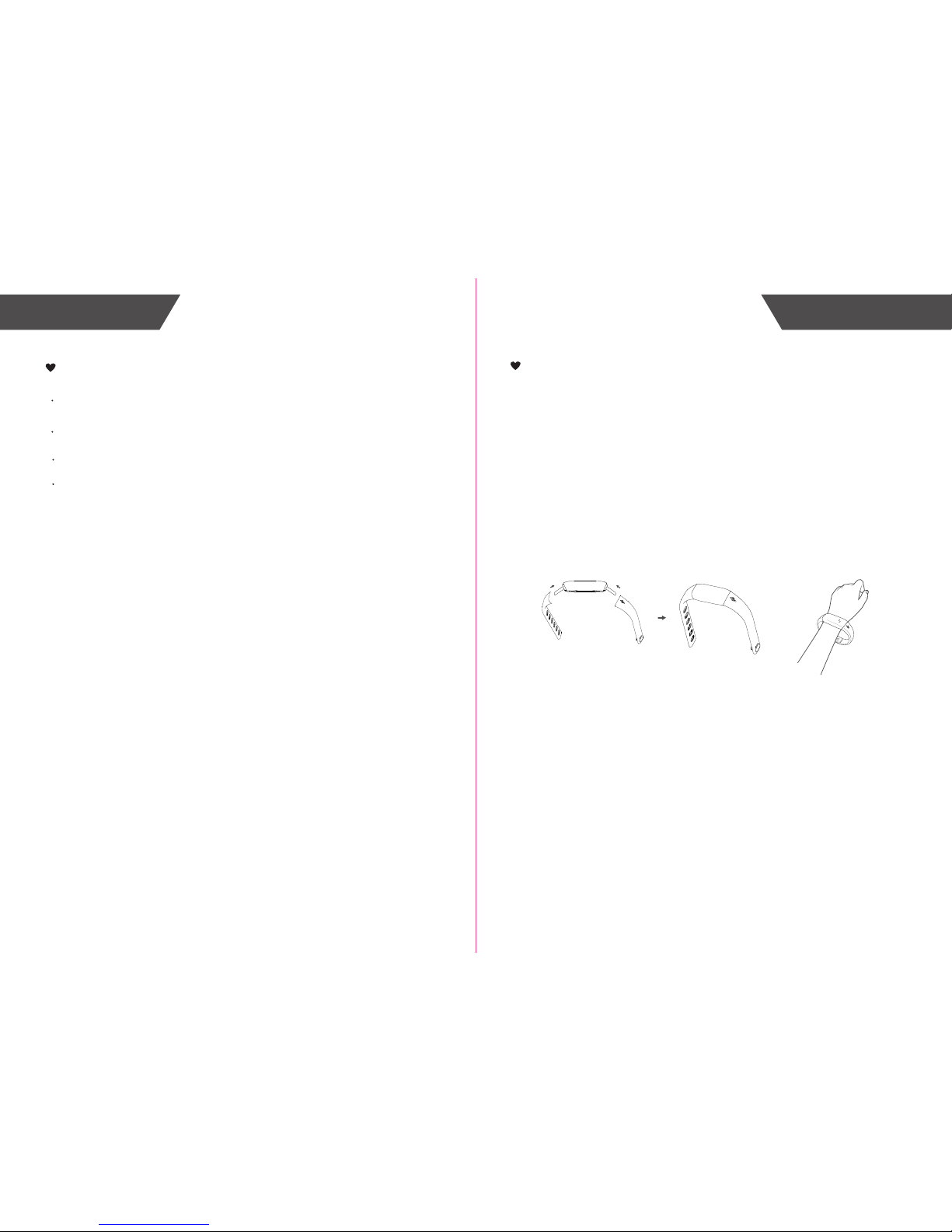
1. Place the MAX BUZZ around your wrist. One side of the MAX
BUZZ is with the USB logo. If you wear it around your left wrist, the
side with USB logo should be on the inside of your left wrist. If you
wear it around your right wrist, the side with USB logo should be on
the outside of your right wrist.
Press the wristband button into the wristband button hole to adjust
the suitable wristband length.
Download the Virgin Pulse app from APP Store or Google Play.
Install the APP, and register an account. Then set your personal
information (Name, Gender, Birthday,Height and weight).
Enter the Device interface to add the device. Select the QR
code scanner icon, use the mobile device to scan the special QR
code which is located on the kraft paper for the MAX BUZZ to bind
the device, it will synchronize with your mobile device.
Before you use the mobile device which supports Bluetooth 4.0
technology, please turn on the Bluetooth.
The time on MAX BUZZ will synchronize with the time on your
mobile device. The measuring data will be transmitted to your
device which supports Bluetooth 4.0 technology through the
Bluetooth.
List of compatible devices:
For iOS devices:
The operating system must be iOS 9 and above.
For Android devices:
The operating system must be 4.3 and above.
Notes: If you need to assemble the wristband first, please insert
the wristband which has the USB icon into the USB interface of the
MAX BUZZ.Then, insert the wristband which has the button hole
into the other interface of the MAX BUZZ.
2865
Page 6
Start Measuring
8
9
View the Data
The measuring data will be transmitted to your device which supports
Bluetooth 4.0 technology if you have paired up with it.
How to Use
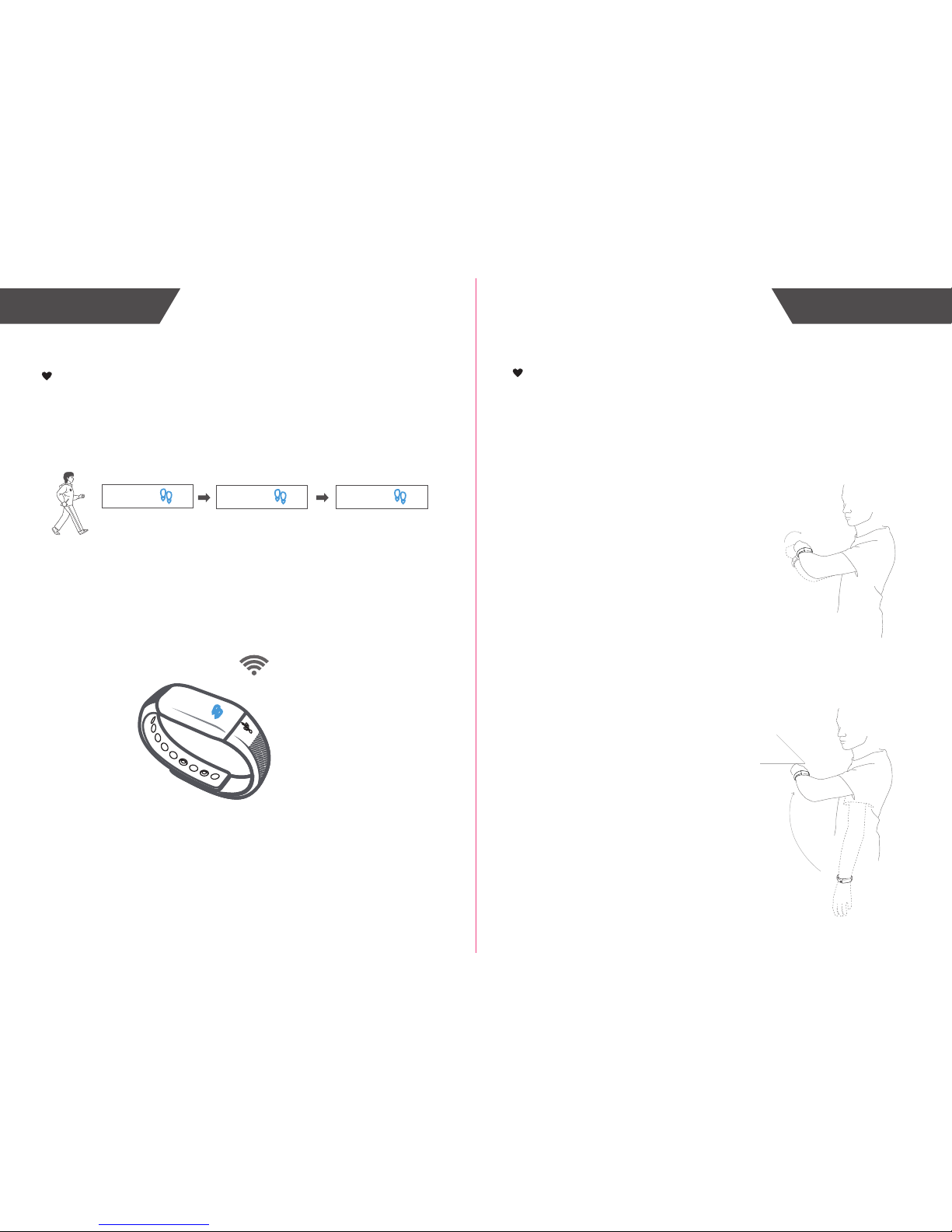
Follow the hints in the manual to wear the MAX BUZZ. Then it can
start the measurement.
Start Walking
(within 10 steps)
10 Steps
More than 10 steps
(the numeral increases)
How to Light it up
If the MAX BUZZ detect the action of watching, the LED will light
up automatically, indicating the MAX BUZZ is on. There are two
ways to light it up.
The first way:
The top case is towards
outside, rotate your hand
towards inside in horizontal
direction about 90° ,then rotate
your hand again between 30°
and 80° to watch normally, the
MAX BUZZ will light up.
The second way:
Swing the hand from the
vertical posture to the position of
watching the watch normally,the
surface angle is between 30°
and 80°, the MAX BUZZ will
light up.
2865
10
0
11
Page 7
Troubleshooting
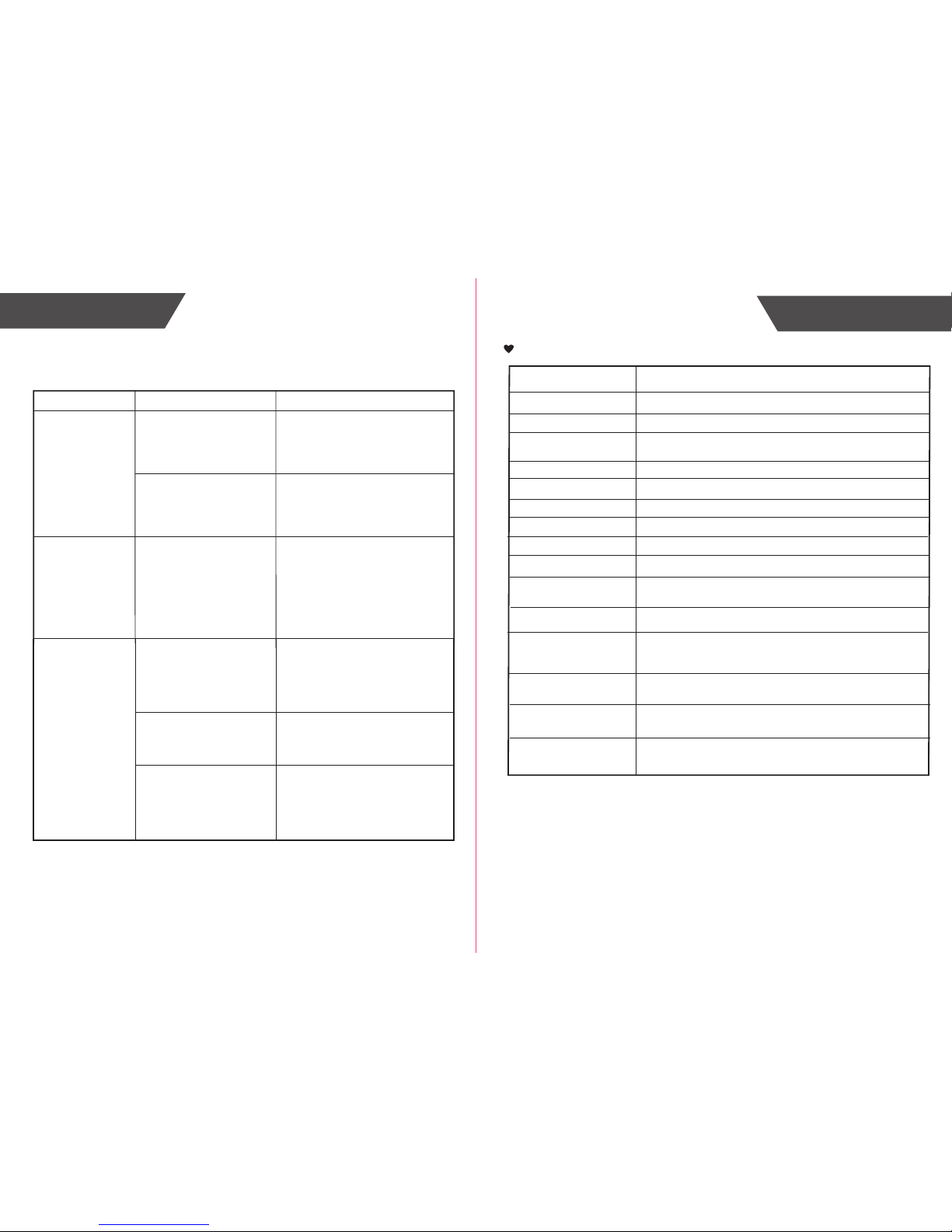
Solution
Problem
Root Cause
Abnormal
measuring results:
Huge difference
between two recent
measurement.
Incorrect portable fashion
make the device
has irregular shaking
Less than 10 steps
Slide or wearing
the slippers to walk
Use the correct portable fashion,
avoid that the MAX BUZZ has
irregular shaking
Continue to walk more than
10 steps
Walk in a normal way
10
11
Troubleshooting
How to View the Data
View the Data
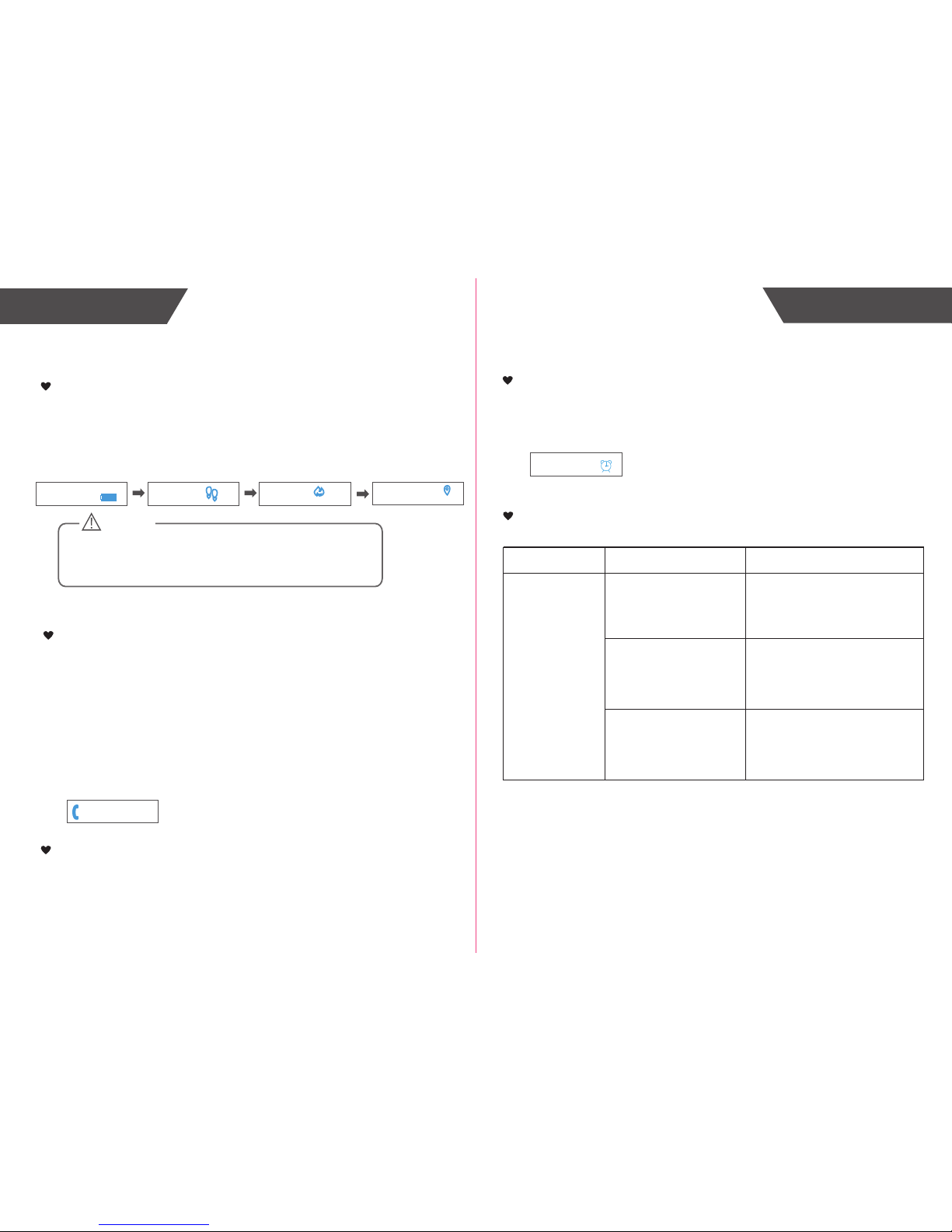
Following the steps of HOW TO LIGHT IT UP to read the data
you want. It will display the time, the steps you have walked, the
consumed calorie, and the distance you have walked one by one,
and then turn off.
CAUTION
Note: The data of the day will be cleared to zero automatically
when the time is 12:00 AM. The data cannot be cleared to zero
manually.
Caller ID Function
You can set the Caller ID function on the app. Keep the MAX BUZZ
connecting with the mobile device. When the phone call is coming,it will
display the phone icon and the name if the caller information is in the phone’s
contact list. When it is a strange phone call, the MAX BUZZ will only display
phone icon and telephone number. When it can’t get the phone number and
name, it will only display “calling”. When the phone is ringing, the MAX BUZZ
will display the caller ID at the same time. After displaying 3s, it will display
with the interval vibration. After answering the phone, the MAX BUZZ stop
reminding. If not answering the phone, the MAX BUZZ will remind you about
13s from the beginning to the end.
You can set the alarm clock reminding on the app. When the setting time is coming,
it will display the alarm clock icon and vibrate continuously.
You can set 6 alarm clocks in total.
Alarm Clock Reminding
You can wear the MAX BUZZ to sleep, it will monitor your sleeping condition.
The sleeping data will upload to the app, you can check your sleeping condition
on the app.
Sleep Condition Monitor
171
3.8
CAL
0.06
MI
1:12
AM
4:07
PM
12345678
Page 8
Problem Root Cause Solution
No display on
OLED when the
device powers on.
The device
powers off.
Low battery.
Bluetooth is OFF.
Data transmission
failed.
Turn ON the Bluetooth.
The App is OFF.
Press the icon to turn ON your
app.
Place your device which supports
the Bluetooth 4.0 technology closer
to the MAX BUZZ.
Out of range of Bluetooth
transmission.
Please charge power in time.
12
13
The power is not enough.
Charge power in time.
The device didn’t logout
the shipping mode for the first
measurement.
Charge the power, the device
will recover to the normal mode.
Troubleshooting Specifications
Specifications
About the Accuracy of This Product
This product passes strict inspection before delivery and therefore its accuracy is guaranteed by the manufacturer.
Please refer to the above table for the descriptions on accuracy.
WARNING: No modification of this equipment is allowed.
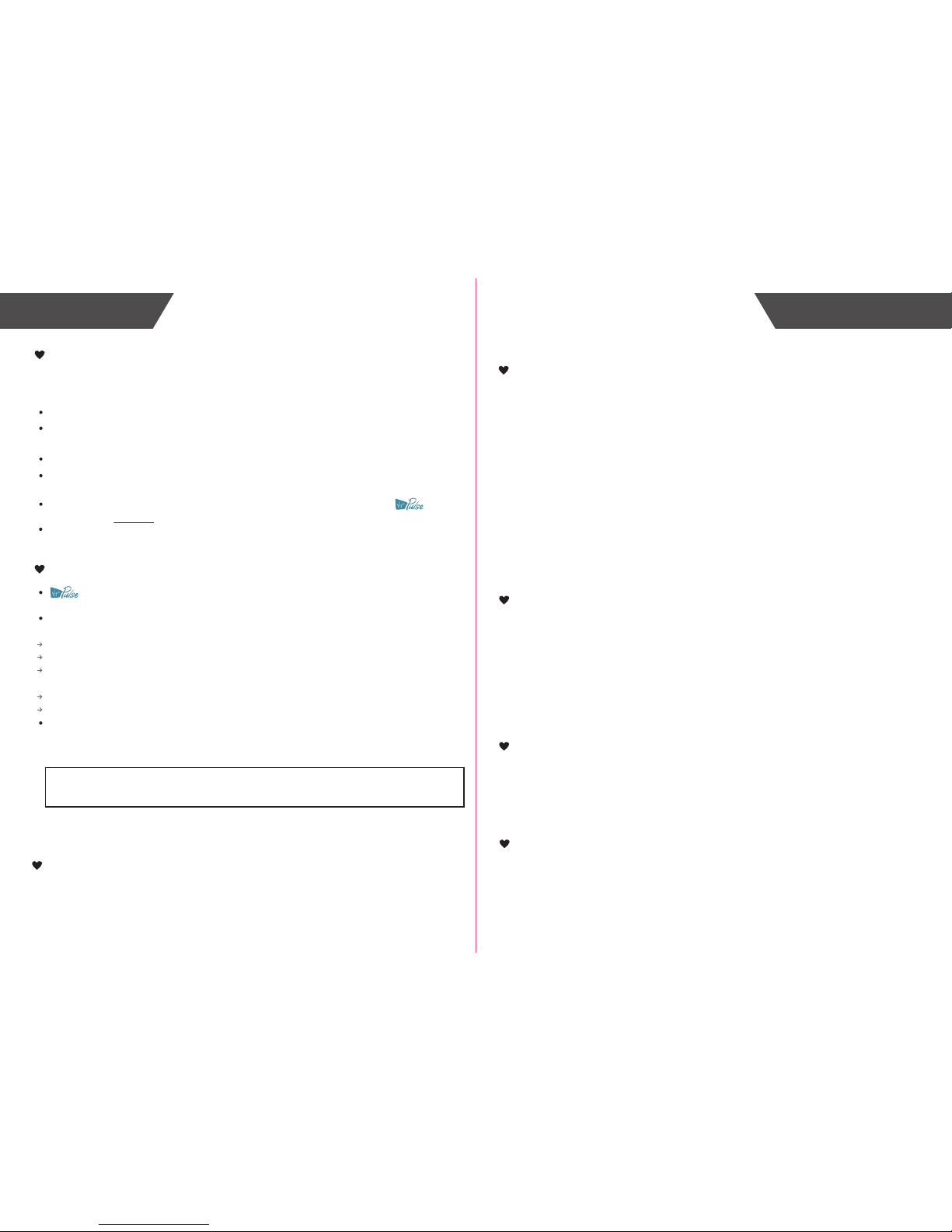
Product Name
Dimension
MAX BUZZ (VP-T001)
Whole size: 215 mm x 20 mm x 10 mm (Approx.)
Weight Approx. 20 g (including the wristband)
Display
Blue OLED
V.A.:22.4mm x 5.6mm
Steps 0-120000 steps, division 1 step
Calories
Battery Grade
Working Environment Temperature: 0℃ to 40℃
Relative Humidity: ≤90% RH
Storage Environment Temperature: -20℃ to 60℃
Power Source 3.7V / 70mAh polymer lithium battery
Battery Life
The MAX BUZZ can be used about 7 days
when fully charged
Exercise Time 0-23 hours and 59 minutes, division 1 minute
Accessories
1. One Wrist Band
2. User Manual
1-7 grade, division 1 grade
0-12000.0 kcal, division 0.1 kcal
Relative Humidity: ≤90% RH
Atmospheric Pressure: 80 kPa ~ 106 kPa
Atmospheric Pressure: 50 kPa ~ 106 kPa
Distance 60.00 km
Accuracy of Steps About 300±12 steps
Protection against
ingress of water
IP67
Page 9
When carrying out usual maintenance, please ensure practice of the following Do’s and
Don’ts:
warrants its products free of defects in materials and workmanship in normal
use for a period of TWO years from the date of retail purchase.
This warranty does NOT cover damages caused by misuse or abuse, including but not
limited to:
Failure caused by unauthorized repairs or modifications;
Damage caused by shock or drop during transportation;
Failure caused by improper operation inconsistent with the instructions stated in this user
manual;
Malfunction or damage from failure to provide the recommended maintenance;
Damage caused by improper use of power supply.
Should this device require maintenance (or replacement at our option) under warranty,
please deliver the original package to Virgin Pulse prepaid. Please return the store
receipt (with the retail purchase date) and a note with reasons to return on it as well.
15
14
Maintenance
Warranty
Maintenance
DO use a dry soft cloth to wipe the dust.
DO use a wet soft cloth, dipped into water and wrung out, to wipe the dirt. Then use a
dry soft cloth to dry up the device.
DON’T wash the device with water or immerse it in water.
DON’T use propellant, abrasive or other chemicals to wipe the dirt in avoidance of
discolor or malfunction.
DON’T disassemble this device. If you have any problems, please contact .
(Please refer to Warranty for contact information)
Charge the power once for every 3 months, or at least once for half a year, if the device
is not likely to be used for a long time.
Warning
MAX BUZZ Care
Built-in Battery Care
Warning
Virgin Pulse
492 old Connecticut Path,Suite 601 Framingham,MA 01701,USA
While your MAX BUZZ is designed to be worn 24/7, its components are electronic
and susceptible to damage if used improperly. Please read the safety guidelines on
the following pages to ensure proper use and care.
• Do not expose your MAX BUZZ to liquid, moisture, humidity, or rain while charging.
Exposure of the MAX BUZZ to moisture while charging could result in electric shock.
• Do not tamper with or abuse the MAX BUZZ. For example, without limitation, do not drop,
disassemble, open, crush, excessively bend, deform, puncture, shred, microwave,
incinerate, paint, or insert foreign objects into the MAX BUZZ.
• Do not use abrasive cleaners to clean your MAX BUZZ.
• Do not expose your MAX BUZZ to extremely high or low temperatures.
• Do not leave your MAX BUZZ near open flames such as cooking burners, candles,
or fireplaces.
• Do not bring your MAX BUZZ into contact with any sharp objects. This could cause
scratches and damage.
• Do not insert anything into your MAX BUZZ unless otherwise specified in the user
instructions. This may damage the internal components.
• Do not attempt to repair, modify, or disassemble your MAX BUZZ; it does not contain any
user-serviceable components.
• Do not attempt to replace your MAX BUZZ’s battery. It is built-in and not changeable.
• Only charge the battery in accordance with the user instructions supplied with the MAX
BUZZ.
• Avoid charging your MAX BUZZ in extremely high or low temperatures.
• Do not wear your MAX BUZZ while you are charging it.
• Do not attempt to disassemble the MAX BUZZ or force open the built-in battery.
• Do not clean the MAX BUZZ when it is being charged. Always unplug the charger first
before cleaning the MAX BUZZ.
• Do not dispose of your MAX BUZZ in a fire. The battery could explode causing injury or
death.
Health Disclaimer
WARNING: THIS MAX BUZZ IS NOT A MEDICAL DEVICE. The MAX BUZZ
and its associated applications should not be used to diagnose, treat, or prevent any disease
or medical condition. Always seek the advice of a qualified medical professional before
making any changes to your exercise, sleep or nutrition, as doing so may cause severe
harm or death.
• Dispose of the MAX BUZZ, the MAX BUZZ’s battery in accordance with local
regulations. Do not dispose of the battery with regular household waste.
• Recycle your package in accordance with local regulations.
Other Notes
Page 10

FCC STATEMENT
FCC Statement
FCC ID: 2AKPRVP-T001
This device complies with Part 15 of the FCC Rules. Operation is subject to the following
two conditions: (1) this device may not cause harmful interference, and
(2) this device must accept any interference received, including interference that may
cause undesired operation.
• Caution: The user is cautioned that changes or modifications not expressly approved by
the party responsible for compliance could void the user's authority to operate the equipment.
• NOTE: This equipment has been tested and found to comply with the limits for a Class B
digital device, pursuant to Part 15 of the FCC Rules. These limits are designed to provide
reasonable protection against harmful interference in a residential installation. This equipment
generates, uses and can radiate radio frequency energy and, if not installed and used in
accordance with the instructions, may cause harmful interference to radio communications.
However, there is no guarantee that interference will not occur in a particular installation.
• If this equipment does cause harmful interference to radio or television reception,
which can be determined by turning the equipment off and on, the user is encouraged
to try to correct the interference by one or more of the following measures:
-- Reorient or relocate the receiving antenna.
-- Increase the separation between the equipment and receiver.
-- Connect the equipment into an outlet on a circuit different from that to which the receiver
is connected.
-- Consult the dealer or an experienced radio/TV technician for help.
FCC Radiation Exposure Statement:
• This equipment complies with FCC radiation exposure limits set forth for an uncontrolled
environment.
• This transmitter must not be co-located or operating in conjunction with any other antenna
or transmitter.
16
 Loading...