

Page 1

MVR-310 4CH Mobile DVR
User’s Manual
7KLVPDQXDOZDVFRPSOHWHDQGFRUUHFWDWWKHWLPHRISULQWLQJ7KHRQJRLQJGHYHORSPHQWRIWKHSURGXFWV
PD\PHDQWKDWWKHFRQWHQWRIWKHXVHUJXLGHFDQFKDQJHZLWKRXWQRWLFH
7KHPDQXDOZLOOEHNHSWXSGDWLQJSHULRGLFDOO\DQGVRIWZDUHUHIHUUHGDVZHOO
© 2014 ViPRO Corporation
Page 2

NOTICE
The information in this manual was current when published. The contents of this manual are subject to change
without prior notice and will be updated accompanying with the release of new version.
The purpose of this manual is to kindly aid the user for the operation for our MDVR (especially for GUI setting). The
user should have a basic understanding of computer operation and basic knowledge of how to connect peripherals
and make some settings.
Mobile DVR MVR-310 NOTICE 2
ViPRO Corporation User's Manual MVR-310-GUI |
v1.1 | 2014.01
Page 3

Table of Content
1 PRODUCTION CHRACTERISTICS AND OVERVIEW 5
1.1 PRODUCT OVERVIEW 5
1.2 REMOTE CONTROL 6
1.3 GUI (GRAPHIC USER INTERFACE) TREE 9
2 SYSTEM START UP 9
3 GUI CONFIGURATION 11
3.1 SEARCH 12
3.1.1 REC. SEARCH 12
3.1.2 EVENT FILES 16
3.2 SETUP 17
3.2.1 SYSTEM 18
3.2.1.1 DATE/TIME 18
3.2.1.2 OPTIONS 20
3.2.1.3 REGISTER INFO 22
3.2.1.4 FORMAT 22
3.2.1.5 UPGRADE 23
3.2.1.6 USER SECURITY 25
3.2.1.7 CONFIG 27
3.2.1.8 USER LOG 27
3.2.1.9 BLACKBOX FILE 28
3.2.1.10 GEO-FENCING 29
3.2.2 RECORD 30
3.2.2.1 OPTION 30
3.2.2.2 OSD OVERLAY 33
3.2.2.3 CAMERA SETTINGS 34
3.2.2.4 RECORD SETTING 35
3.2.2.5 SUB-STREAM 35
3.2.2.6 SCHEDULE 36
3.2.2.7 OTHER SETTINGS 37
Mobile DVR MVR-310 Table of Content 3
ViPRO Corporation User's Manual MVR-310-GUI |
v1.1 | 2014.01
Page 4

3.2.3 NETWORK 39
3.2.3.1 LOCAL 39
3.2.3.2 SERVER NETWORK 40
3.2.3.3 WIFI 41
3.2.3.4 MOBILE NETWORK 42
3.2.3.5 FTP SETTINGS 44
3.2.3.6 FTP FOR SNAP 46
3.2.4 EVENT 47
3.2.4.1 SENSOR 47
3.2.4.2 SENSOR OUTPUT 48
3.2.4.3 SPEED 50
3.2.4.4 ACCELERATION 50
3.2.4.5 TEMPERATURE 51
3.2.4.6 CAMERA 51
3.2.4.7 VOLTAGE 52
3.2.4.8 EMERGENCY EVENT 53
3.2.5 PERIPHERAL 54
3.2.5.1 PTZ 54
3.2.5.2 EXT.COM SETUP 55
3.2.5.3 SMART BATTERY 55
3.2.5.4 LANGUAGE SETTING 55
3.3 INFORMATION 56
3.3.1 SYSTEM 56
3.3.2 DIAL STATUS 57
3.3.3 HISTORY 57
3.3.4 MODULES 58
3.3.5 BATTERY INFO 59
ViPRO Corporation User's Manual MVR-310-GUI |
v1.1 | 2014.01
Mobile DVR MVR-310 Table of Content 4
Page 5

1 PRODUCTION CHRACTERISTICS AND OVERVIEW
1.1 PRODUCT OVERVIEW
ViPRO MVR-310- is middle range MDVR model specially designed for vehicle surveillance and remote monitoring,
combined with high-speed processor and embedded operating system. The advanced H.264 video compression
and decompression, wireless transmission, GPS location make MVR-310 a very powerful and perfect solution for
vehicles.
MDVR Features and Capabilities
z Support high speed industrial level SD card for recording .
z UPS (Uninterrupted Power Supply) supported to protect the MDVR from the damage of high voltage and
provide the power to the MDVR when the MDVR external power is cut off (for example accidents happen)
z Patented special file system is professional to improve the security level of data, provid self-recoverye
-function, self-check, self-backup for certain critical data and avoid data fragment that affects system efficiency.-
z Dual streams: one for local recording and one for wireless transmission.
z 4 channel real-time D1 at 25 fps/30fps continuous or priority video recording and live view display.
z Semi-transparent GUI makes setting for GUI and live display synchronously.
z Maximum 1 hour pre-recording and 30 minutes post-recording
z Watermark prevents any modification in recorded file which is part of the law enforcement.
z 4 channels for high-fidelity, digitally recorded, synchronized audio matched to 4 video channels
z User friendly criteria to playback the events associated video only.
z Automatic timer to resume the live display if the unit is idle for user defined time.
z User-selectable settings for quality and audio record enable/disable for each video channel.
z 12v power supply for multiple devices such as cameras, sensors, relays and any other accessories.
Remote Connection Capabilities
z PC-Based Client software for live view, playback video, playback events associated video, and download
capabilities. Support CMS (Central Management System) for remote monitoring via built-in 3G module
(HSPA or EVDO), Ceiba (Playback Analysis Software) for video playback, meta-data analysis.ADS by WIFI
to download the video files and event files.
ViPRO Corporation User's Manual MVR-310-GUI |
v1.1 | 2014.01
Mobile DVR MVR-310 PRODUCT OVERVIEW 5
Page 6
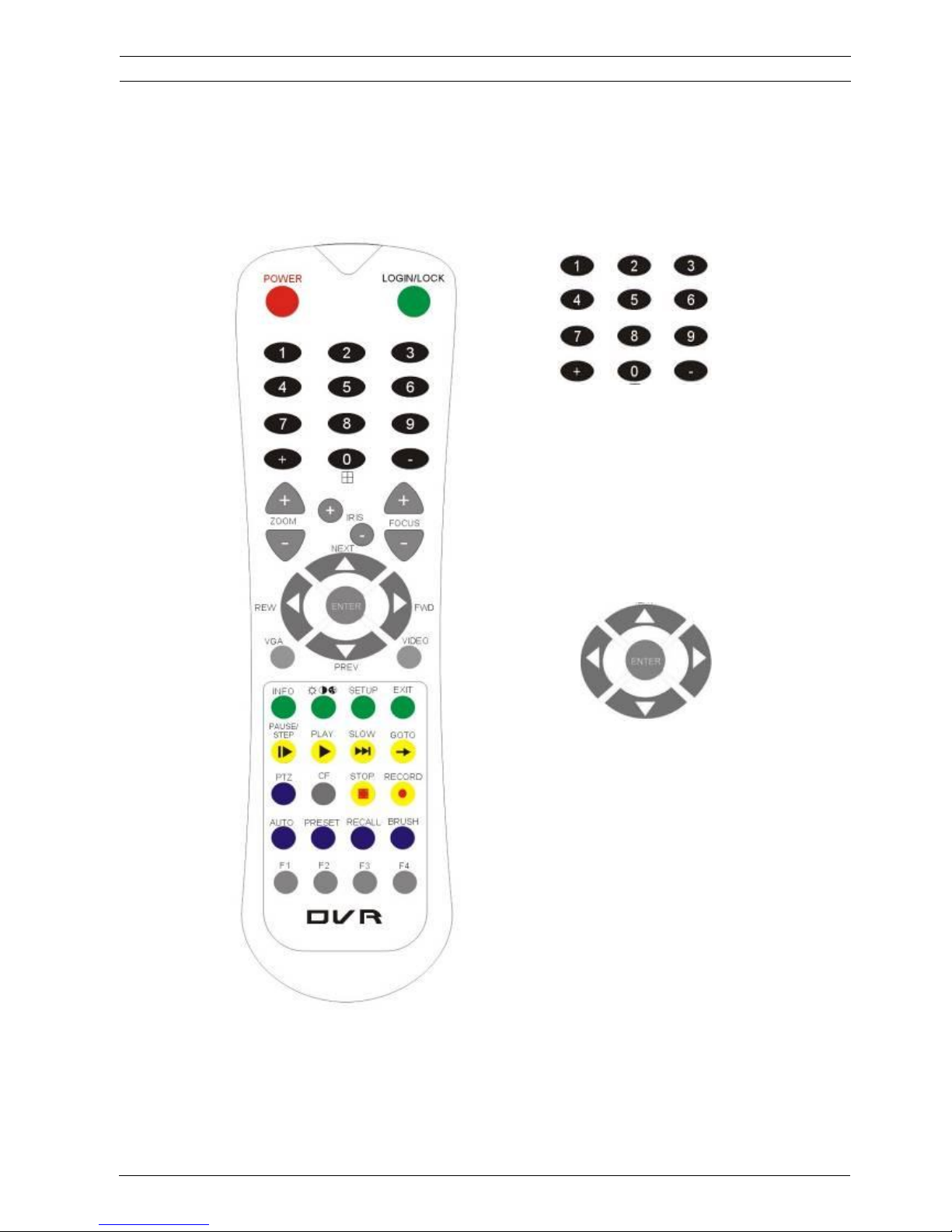
1.2 REMOTE CONTROL
Each MDVR includes remote control that allows the user to transmit commands to recording module
Numeric
Input Keys
Use the numeric button to input
digital in setup
menu or switch the full screen for each
channel or the channels QUAD view
Navigation
Arrows
Use the ARROW keys to move between
selections, input fields and icons.
Press ENTER to select
And EXIT to return and entering into the OSD
screen to check the MDVR working status.
Next and previous is also used to increase or
decrease volume when at live or search
screens.
ViPRO Corporation User's Manual MVR-310-GUI |
v1.1 | 2014.01
Mobile DVR MVR-310 REMOTE CONTROL 6
and display on screen control menu
Page 7

Remote Control Key Functions:
1) Numeric Keypad
[0-9] keys: During setup, number keys are used to input number values. In QUAD view, the user
can press 1, 2, 3 and 4 to switch the full screen for each channel, and press 0 to switch to quad view.
During full screen view of each camera, the user can press key to adjust contrast,
luminance, color and saturation, and then press + and - to make the adjustments. Pressing
will navigate through the color adjustment options.
2) Setup Menu Navigation
▲, ▼: Up, down directional keys: Move selection up and down in setup menu.
►, ◄:
Left, Right directional keys: Move cursor left or right in setup menu.
[ENTER] key: During setup, select and save the settings
3) Other Keys Function
LOGIN/ LOCK
The user can press LOGIN / LOCK or SETUP key to enter the GUI to setup. If
password is enabled, the user have to input default admin password: 88888888.
POWER
To reset the MDVR to sleep mode (The user can press power button again to let
MDVR start up when it is in sleep mode).
Switch full screen of one channel to quad view.
Brightness, contrast, color adjustment for each channel. Use [+] [-] button to
change the values. The user have to adjust the values for each channel
individually.
SETUP
Login GUI to setup the parameters.
EXIT
Return to the previous menu.
STOP
Used to stop the recording manually. Only valid when the user setup the record
mode by the setting in MDVR menu
RECORD
Used to start the recording manually. Only valid when the user setup the record
mode by the setting in MDVR menu.
PAUSE/STEP
▐►
Freezes playback to a single frame and can advance one frame at a time. To
advance the frame press. Pause / Step to move frame by frame. Press EXIT to
return to normal playback speed.
PLAY
►
Starts/Resumes playback from any other mode (FF, RR, Frame by Frame etc).
SLOW
Reduces playback speed to 1/2, 1/4, 1/8 modes. Press PLAY to return to normal
playback speed.
ViPRO Corporation User's Manual MVR-310-GUI |
v1.1 | 2014.01
Mobile DVR MVR-310 REMOTE CONTROL 7
Page 8
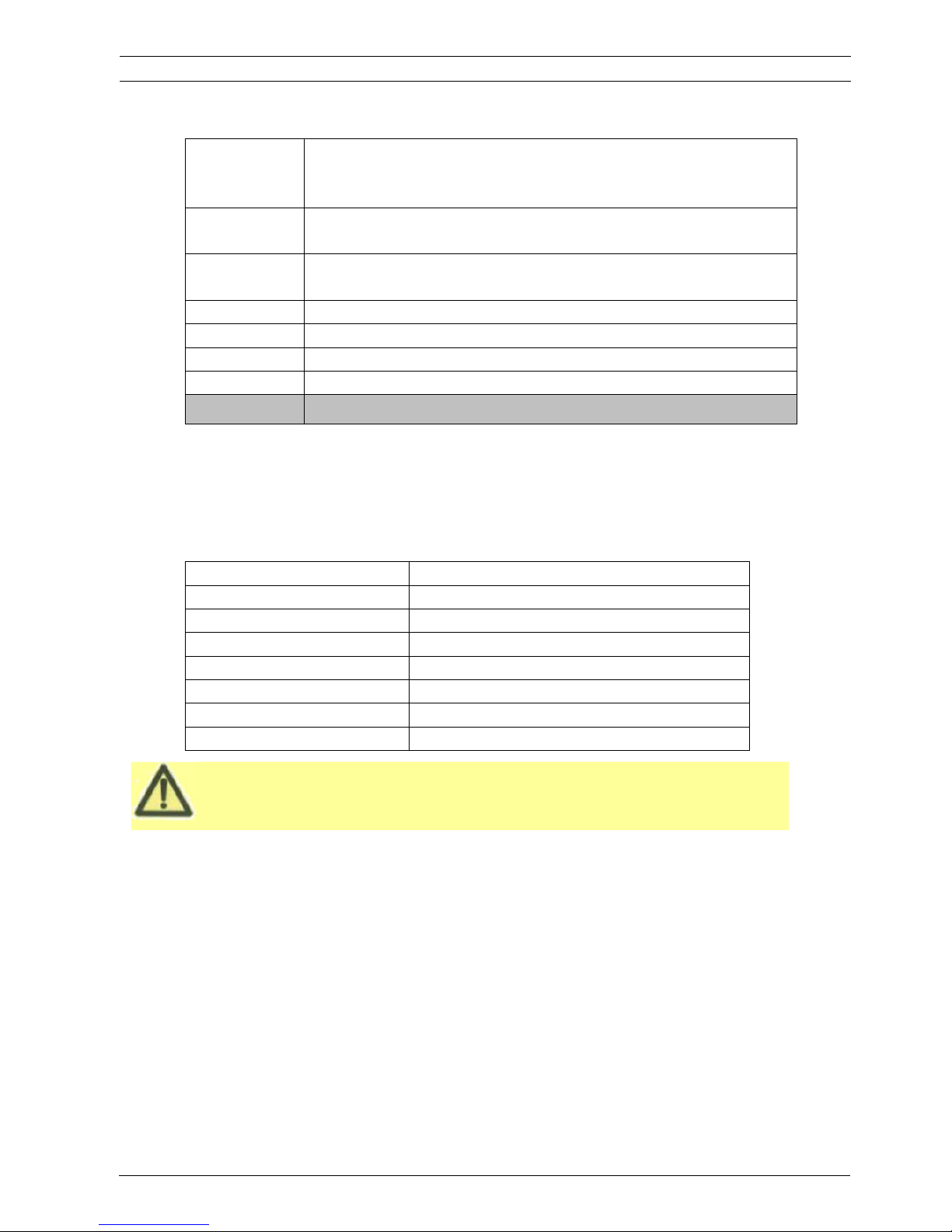
Please put the battery into the remote control before the user use it as there is no
battery in the standard package
GOTO
Î
Î
Quick search mode when the user playback the record file in MDVR. Press GOTO
button and input the desired time, and the select SURE to jump to the specific time
the user want to playback.
NEXT
Increase volume while playback (if audio is recorded).
PREV
Decrease volume while playback (if audio is recorded).
REW
Rewinds the video while playback. X2 and X 4 modes available.
FWD
Fast forward the video while playback. X2 and X4 mode available.
CF
No use at present.
[F1]
Export all the event record files of the day to USB by press F1 key.
[F2],[F3],[F4]
Reserved for future use.
4) PTZ Function Key
MVR-310 DVR can support PTZ camera by the protocol PELCO-D or PELCO-P. While the MDVR is
connected the PTZ camera by RS485 signal (on the RS232/485 expand box), following commands can
control PTZ:
[ZOOM IN +], [ZOOM OUT -]
ZOOM IN/OUT
[IRIS +], [IRIS-]
Brightness control
[FOCUS +], [FOCUS -]
Focus control
PTZ
Enable the PTZ function
AUTO
Auto run with the PTZ pattern
PRESET
Preset default position
RECALL
Recall the position that the user have setup.
BRUSH
Brush the glass screen
ViPRO Corporation User's Manual MVR-310-GUI |
v1.1 | 2014.01
Mobile DVR MVR-310 REMOTE CONTROL 8
Page 9

1.3 GUI (GRAPHIC USER INTERFACE) TREE
ViPRO Corporation User's Manual MVR-310-GUI |
v1.1 | 2014.01
Mobile DVR MVR-310 GUI TREE 9
Page 10
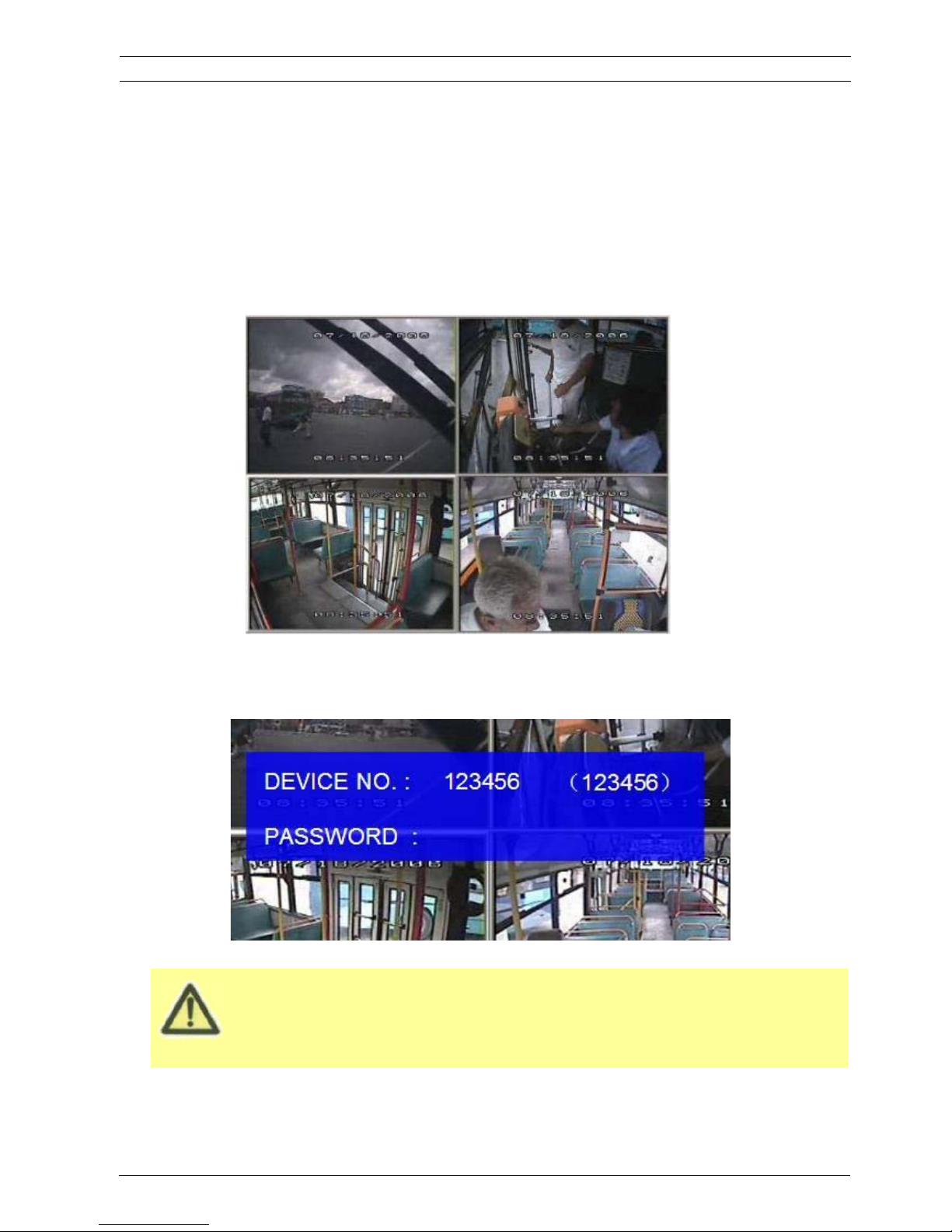
The MDVR GUI is semi-transparent. The user can setup the transparency percentage from the MDVR
GUI.
During the setting, the user can check the video from each camera as well.
Please make sure the user lock the removable hard disk case before connect the power for MDVR,
System Login for Setup
x If password is disenable, press SETUP key on the handheld controller into the setup menu directly.
x If password is enable, press LOGIN/LOCK OR ENTER key on the handheld controller, the setup menu
will appear.
ViPRO Corporation User's Manual MVR-310-GUI |
v1.1 | 2014.01
Mobile DVR MVR-310 SYSTEM START UP 10
2 SYSTEM START UP
After connecting the MDVR to a vehicle power supply, turn on the vehicle ignition and the unit will
automatically start up. Power is normally supplied to the MDVR as long as the vehicle ignition is ON.
“Display only view” of the cameras is immediately available to be viewed in quad mode. Normally, the
power supply for MDVR is about 12V/3A, without any accessories.
Page 11
Please press SAVE in the GUI menu to make all the setting valid. The MDVR system will give the user a
remark if the user save the setting successfully. After the user modify the settings for the network, and
recording, the MDVR system will restart automatically after the system exits to Quad view
The MDVR will stop recording when enter into the MDVR configuration GUI.
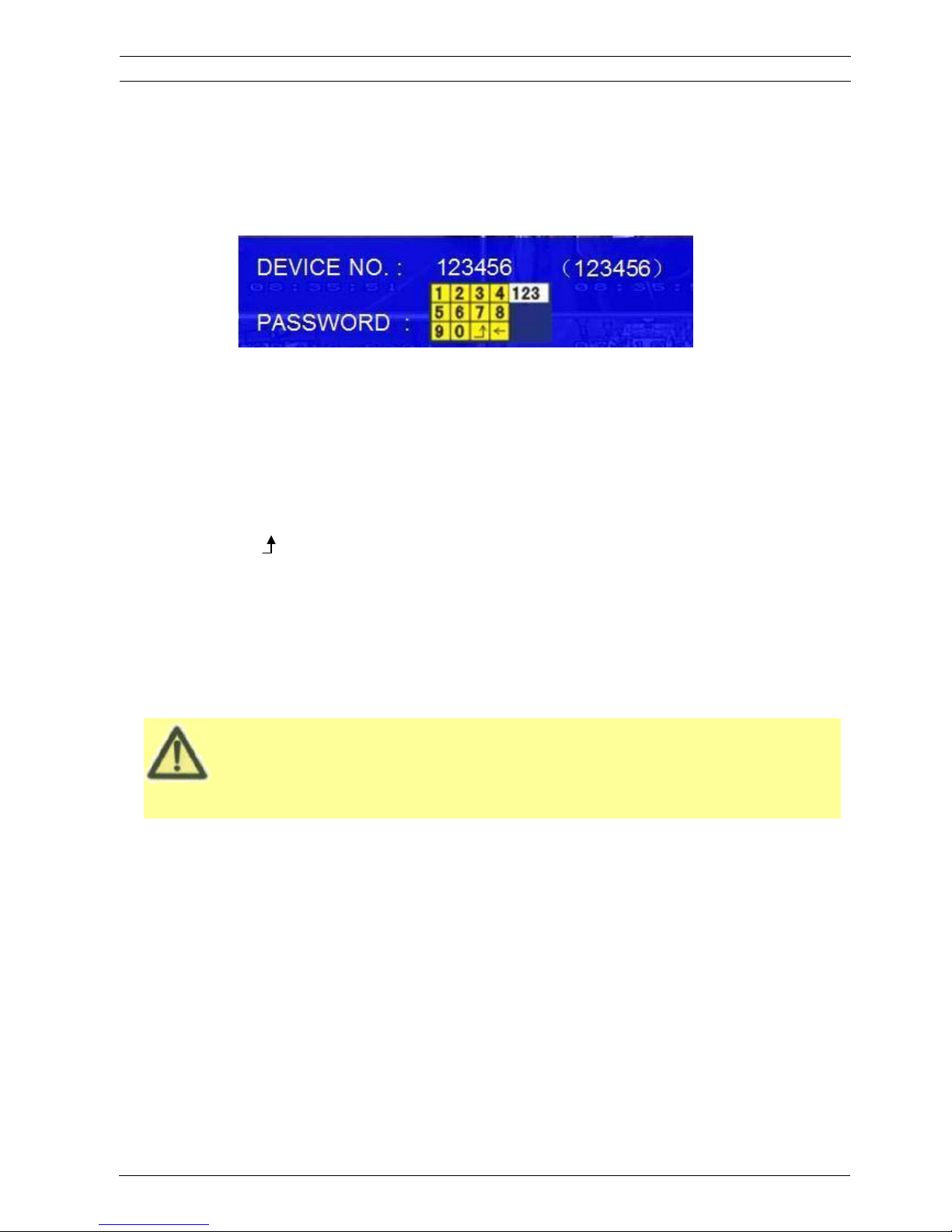
DEVICE NO.: The unit ID of MDVR. The user can setup the ID for the MDVR in the menu “REGISTER
INFORMATION”. After setting, the ID number will appear automatically on the login screen. It’s the
number in the bracket
PASSWORD: Enter the admin password or user password.
Keyboard: Press ǏEnterǐto use keyboard to type device ID and password.
1˅0~9, number key, pressǏEnterǐto select the number.
2˅123: Input type shift key. (Number, capital, small letter)
3˅Ǐ
←ǐdelete, ǏǐExit.
3 GUI CONFIGURATION
This part will show all the main functions for MDVR including SEARCH, SETUP and INFORMATION. SEARCH is
for searching all the regular video files and alarm files. SETUP is for all the configurations for MDVR including
recording, playback, event, network setup and INFORMATION displays the MDVR and accessory working status.
ViPRO Corporation User's Manual MVR-310-GUI |
v1.1 | 2014.01
Mobile DVR MVR-310 GUI CONFIGURATION 11
x If password is disenable, press SETUP key on the handheld controller into the setup menu directly.
x If password is enable, press LOGIN/LOCK OR ENTER key on the handheld controller, the setup menu
will appear.
Page 12

3.1 SEARCH
3.1.1 REC. SEARCH
The user can search all the video files including normal files, alarm files by record date and file type and
storage source. Please select the REC.SEARCH and enter into following screen.
SOURCE˖˖Source means which storage medium the recording files are stored in. Hard disk is the main
recording medium for MVR-310 MDVR but this model can support SD card for mirror recording as well.
TYPE: The type of the file including all file, alarm file and normal file.
ViPRO Corporation User's Manual MVR-310-GUI |
v1.1 | 2014.01
Mobile DVR MVR-310 SEARCH 12
DATE: MDVR system will display the current date automatically. The date with record files is indicated by
green. The date with alarm file is indicated by red. The date without video files is indicated by
background color.
Page 13
Please active the lock files in EVENT menu. Only EVENT file can be locked since for end user the event
files are very important.
If the video file is locked, it cannot be deleted by HDD overwrite function. The user have to unlock the
files first and
then HDD overwrite function will delete the files. Only the HDD format will delete the locked
.
Please press
ǏSEARCHǐto enter into the below menu
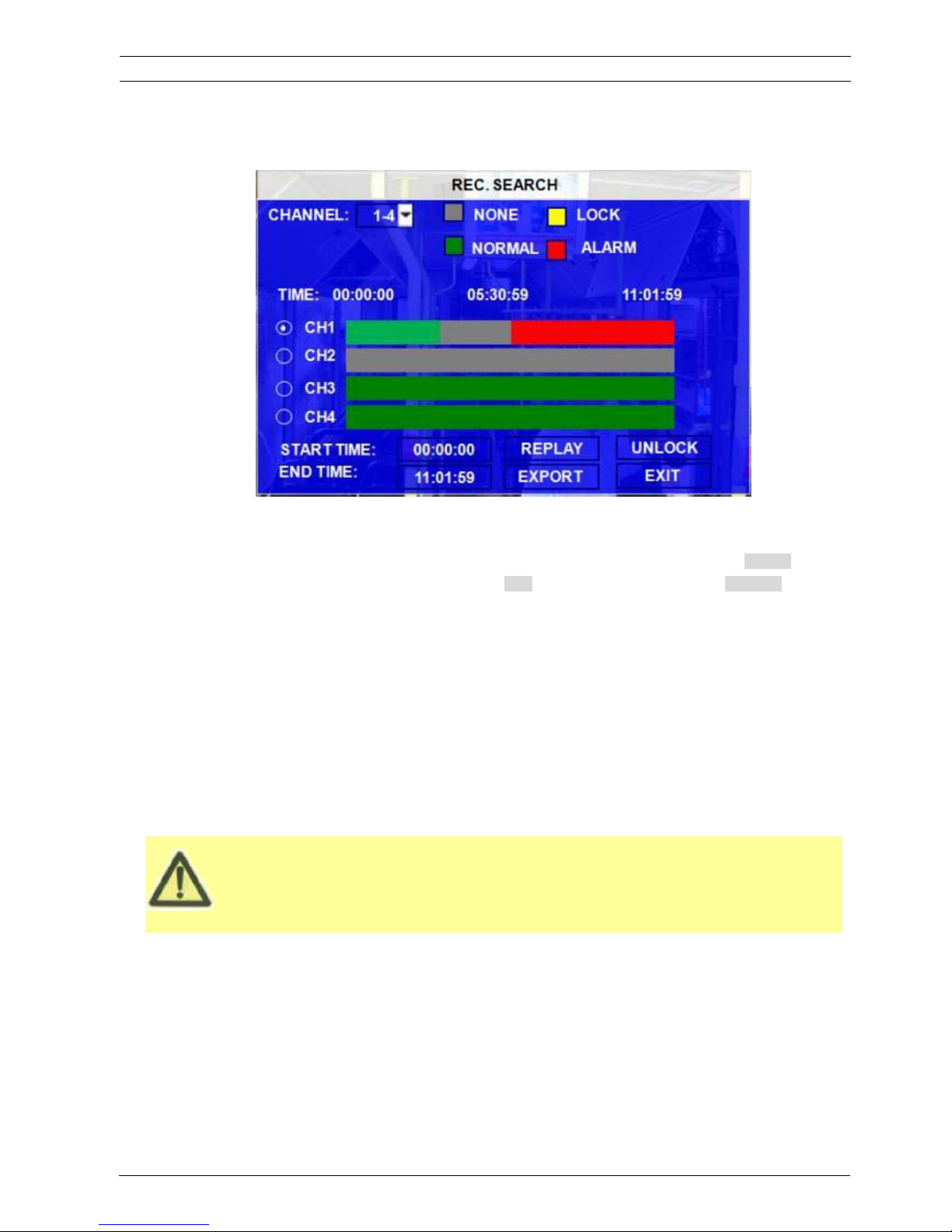
CHANNEL˖˖As MVR-310 supports 4CH, the user have to choose the channels from which channel the user want to
playback the video.
VIDEO FILE STATUS: GREY mean there is no video file in this channel or no video during this period, GREEN
means the file is normal recording file, RED means alarm file but not locked, YELLOW
means the locked alarm files.
START TIME and END TIME: The MDVR device can support the video clip function. This time schedule is for both
playback locally (playback on MDVR device) and export (export to thumb drive and
playback on PC by MINI Player or Ceiba software). The user have to choose the
channel first, and then setup the start time and end time for the video clip. For
example: if the user select the start time is 01:20:00 and the end time is 02:20:00,
then click REPLAY, the MDVR system will playback (local playback) the video file in
this period on this channel. During playback, the user can press ENTRE key to
show OSD information.
UNLOCK: the user have to select the channel first, and then unlock the files in certain period.
The user can export the MDVR video files to external storage device for playback easily. Just please input the
ViPRO Corporation User's Manual MVR-310-GUI |
v1.1 | 2014.01
Mobile DVR MVR-310 REC SEARCH 13
Page 14
More information
If the user do not connect external storage device or the storage device is defective, the system will
display NO EXTERNAL STORAGE.
If the MDVR’s current video type is different with the setting for the MDVR record last time, the video file
can not playback, for example, the video type of record files is NSTC, but the MDVR recording system
now is changed to PAL, the user can’t playback the video file until the user change the video type to be
NSTC. Meanwhile the MDVR system will show the user the INFORMATION: PLEASE CHANGE THE
VIDEO TYPE TO PLAYBACK.
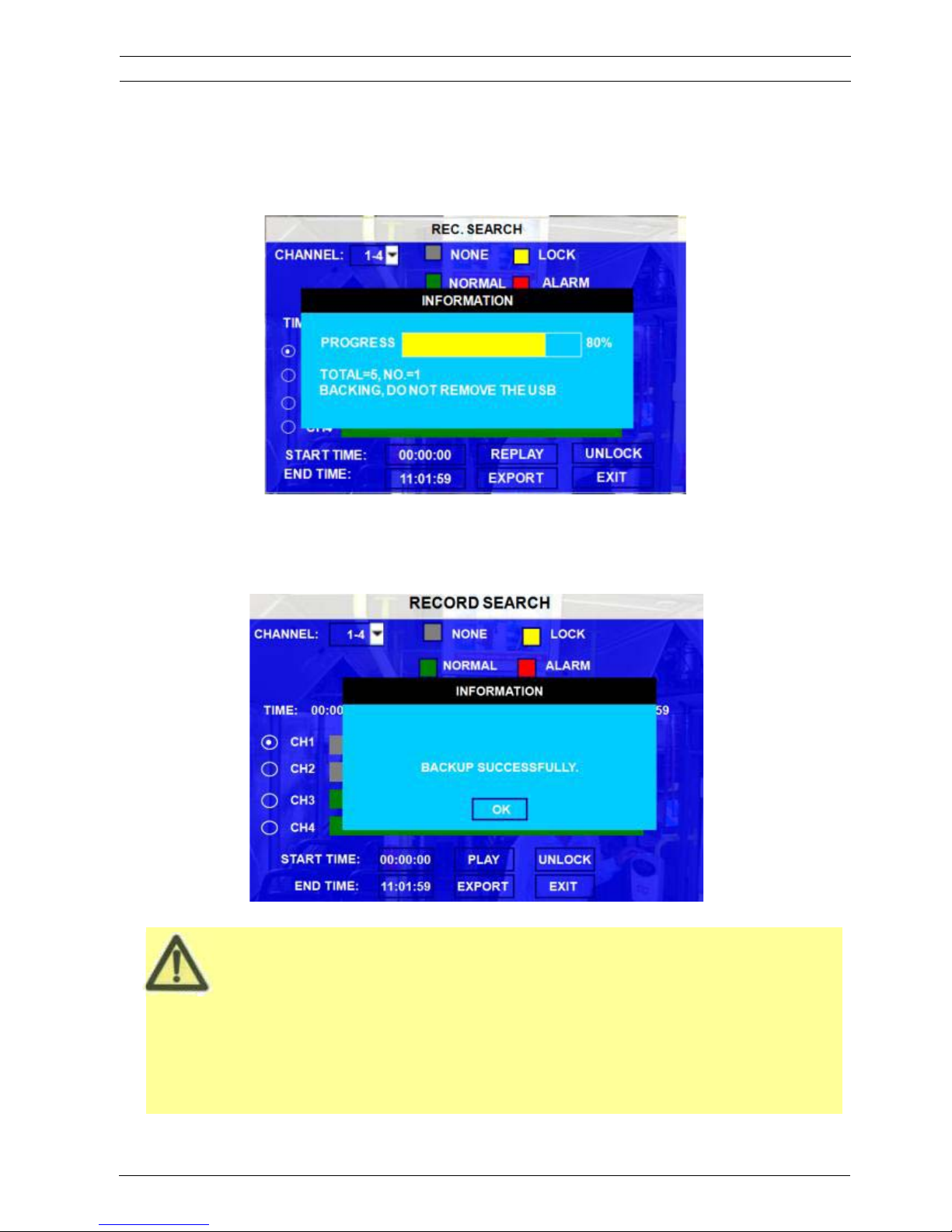
START TIME and END TIME for the video from certain channel for local playback, insert the external storage
device by USB port and then click EXPORT, the following screen will pop up. During backing up, the external
device is not allowed to be moved.
TOTAL: total quantity of the files that the user selected for back up.
NO.: The file number which is being copied to external thumb drive.
After successful backup, the following screen will pop up.
ViPRO Corporation User's Manual MVR-310-GUI |
v1.1 | 2014.01
Mobile DVR MVR-310 REC SEARCH 14
Page 15
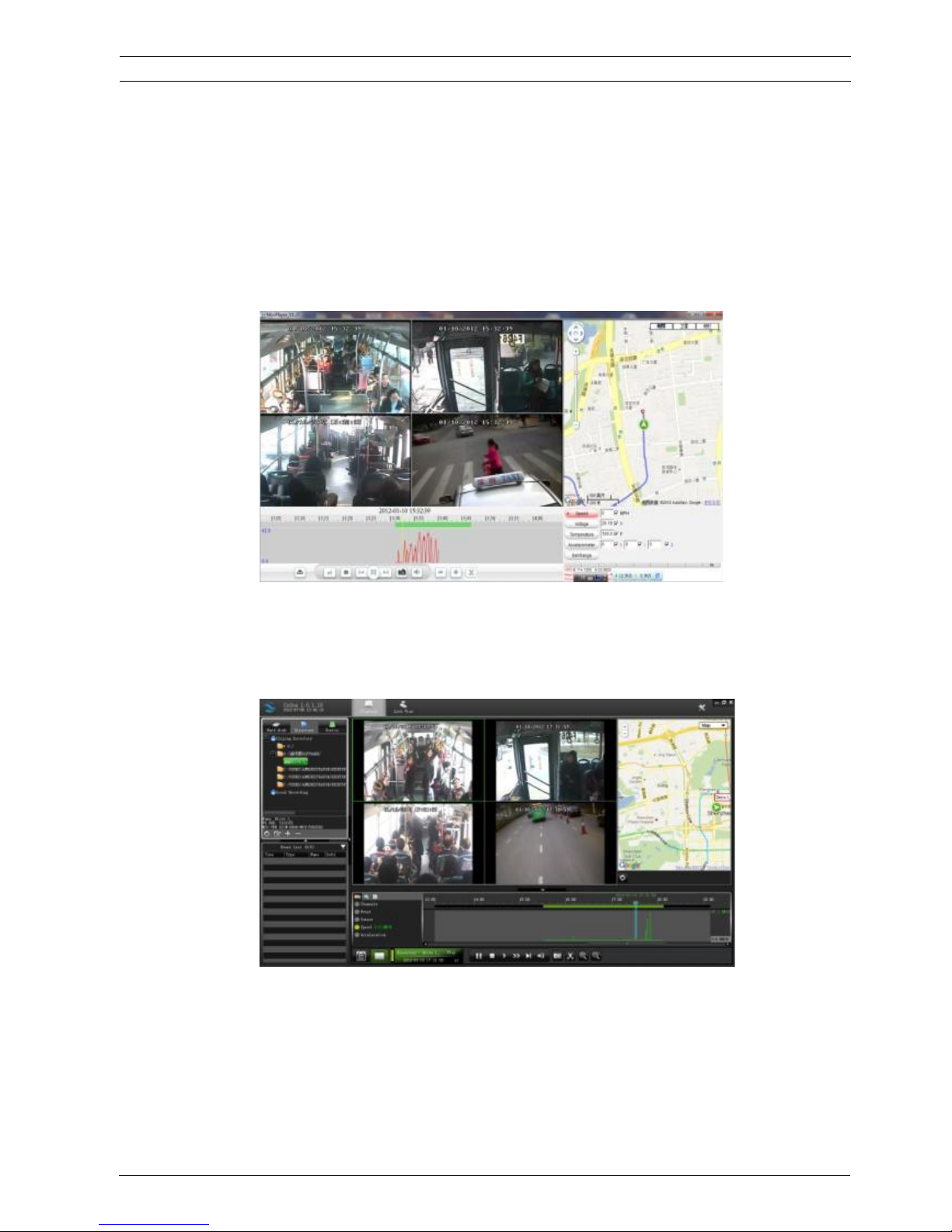
After backup, the user can copy the video clips to the computer for playback. This exported video file can be
playback easily by MINI player or Ceiba as following:
By Mini player:
MINI player is a very simple player, with which user can playback the video files including video, audio,
GPS location, alarm information easily.
By Ceiba software:
ViPRO Corporation User's Manual MVR-310-GUI |
v1.1 | 2014.01
Mobile DVR MVR-310 REC SEARCH 15
Page 16
3.1.2 EVENT FILES
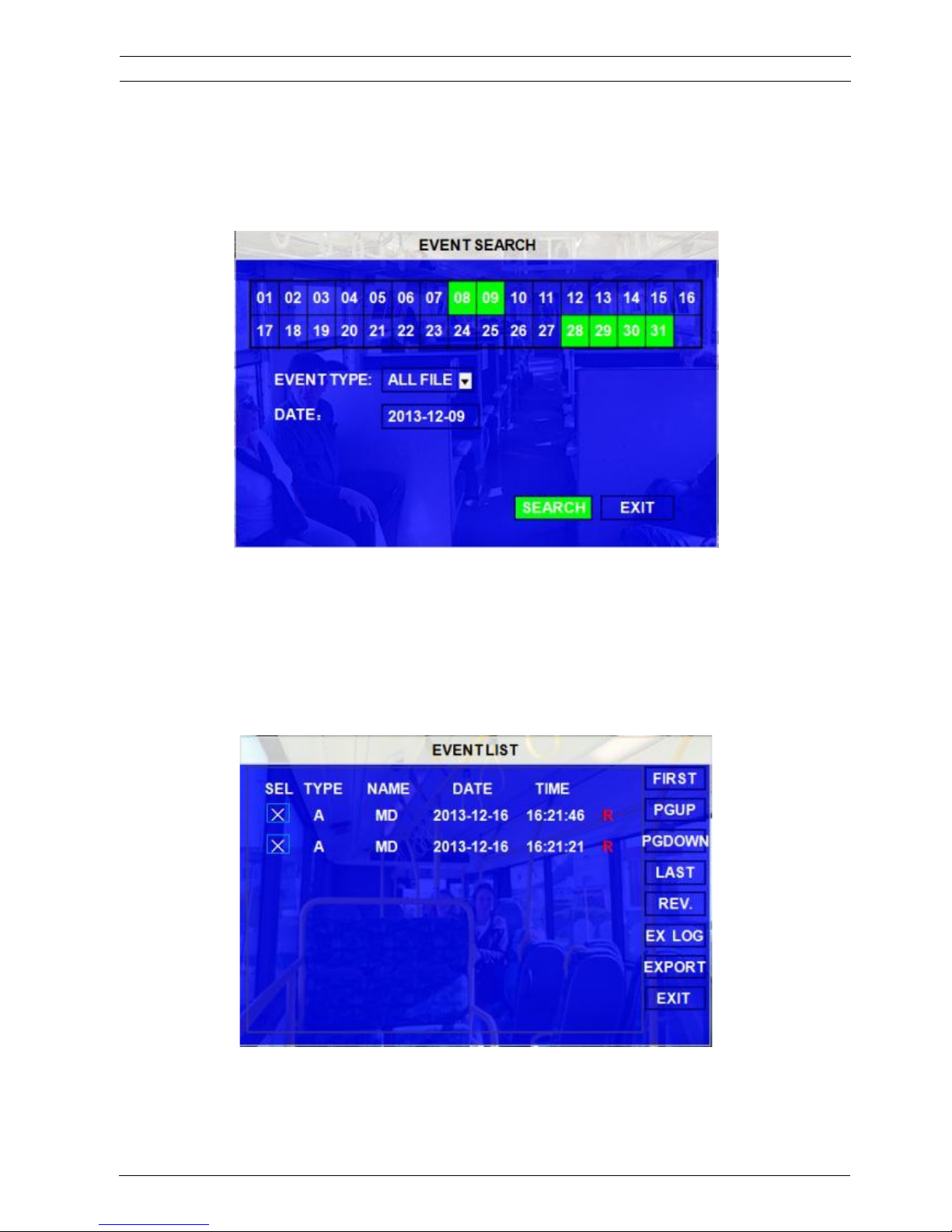
Search all the event LOG.
EVENT TYPE: The type of the alarm file including I&O ALARM/ACCELERATION/SPPED/TEMP ALARM/BD
ALARM/MD ALARM/VL ALARM. The user can please select different alarm type to search the
log and playback the corresponding video files.
DATE: MDVR system will display the current date automatically. Or the user can input the date the userrself by the
soft
keyboard.
Please press
ǏSEARCHǐto enter into the next menu listing out all the LOG depends on
FILE TYPE and DATE selected.
ViPRO Corporation User's Manual MVR-310-GUI |
v1.1 | 2014.01
Mobile DVR MVR-310 EVENT FILES 16
Page 17

SEL: For selecting the LOG for backup. Please move the arrow key on remote control to select the LOG file that
need to back up. The file selected will be remarked by the icon
. Please press ǏREV.ǐto for reversing
selection.
EVENT NAME: The event name is the one thatthe user setup for the events on the EVENT menu. But here just
show the event OSD information (the abbreviation). The alarm includes such as video loss, I/O
sensor, alarm for over speed, low speed or high temperature and so on.
DATE: Display the date on which the alarm is triggered.
TIME: The start time when the alarm is triggered
REC: if there is an red “R” means it has the corresponding alarm video files.
REV.: Reversing selection. For example: If there are no any files are selected and the user select ǏREV.ǐ, all the
files are selected. If one file is selected and select ǏREV.ǐ, the others will be selected and the
originally-selected one will be unselected.
EX LOG: Export the selected LOG to external device by USB port on the front of MDVR.
EXPORT: Export the corresponding video if the event has the record file. If no related video file, the user will got a
remind information that no video file.
3.2 SETUP
Move arrow key to select SYSTEM and press ENTER. The MDVR setup screen will show the menu as below:
ViPRO Corporation User's Manual MVR-310-GUI |
v1.1 | 2014.01
Mobile DVR MVR-310 SETUP 17
Page 18
3.2.1 SYSTEM
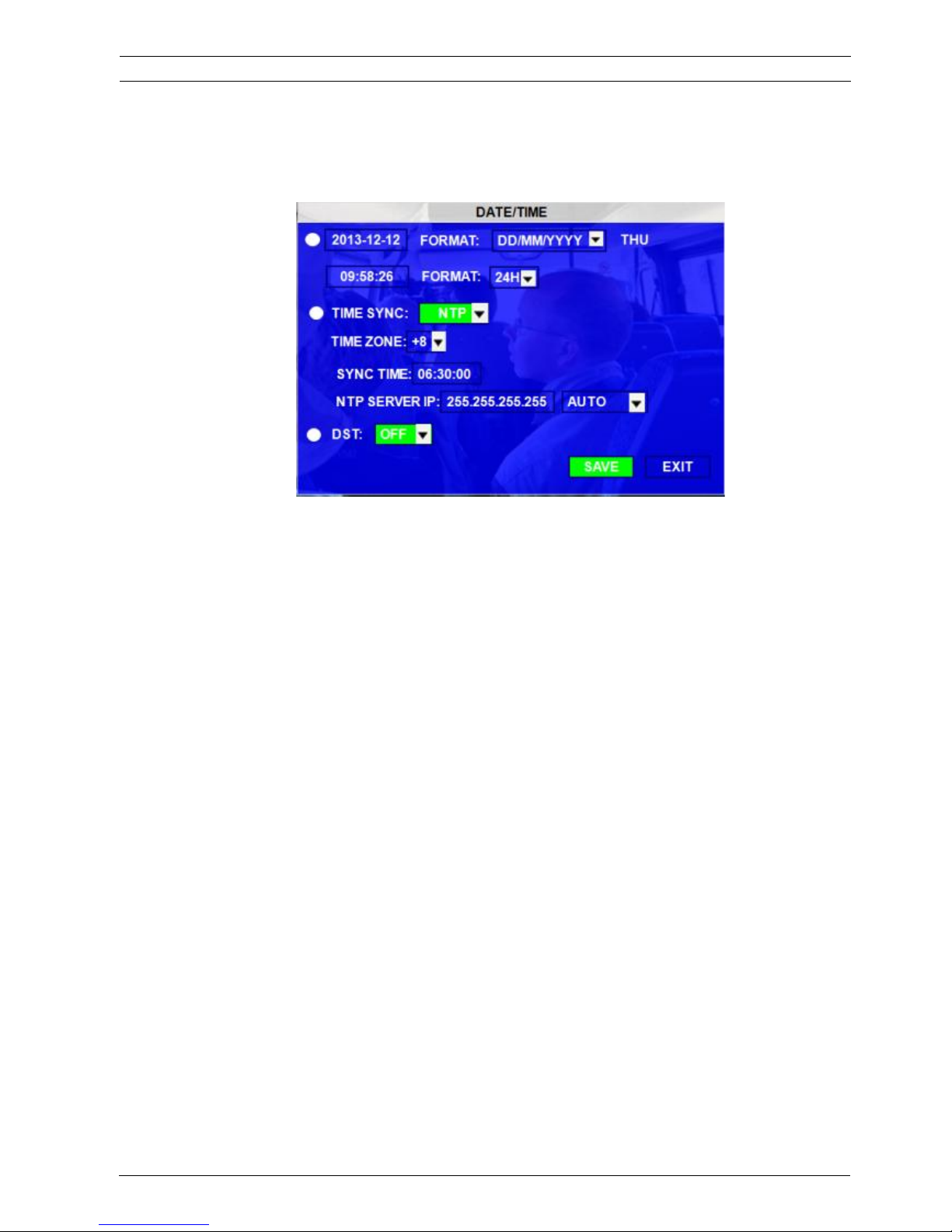
3.2.1.1 DATE/TIME
DATE FORMAT: Press ENTER on remote control to select different format MM/DD/YYYY,
DD/MM/YYYY,YYYY-MM-DD
TIME FORMAT: 12H or 24H, Press ENTER to select different format.
TIME SYNC SOURCE: The system can adjust the time in different zone via either “GPS” or “NTP”.
A: While selecting the “GPS”, the MDVR device must have GPS connection (Should have GPS
module and antenna) and GPS must receive the signal. When the system time arrives the sync
time, MDVR unit will synchronize with GPS time once.
B: While selecting the “NTP” (Network Time Protocol), the device must have network access
connection and assign the NTP IP location.
TIME ZONE: Please choose the correct time zone for MDVR system.
SYNC TIME: This is the time when the unit will sync the system time every day. The method depends on the
setting on the TIME SYNC SOURCE option:
NTP SERVER IP: Input the server IP which can support NTP protocol, in order to allow the system can have time
synchronization through the network. [Example: "192.43.244.18", "129.6.15.28",
"211.22.55.116", "194.88.2.60"]
DST: Daylight Time. Only when it set on, the following option will available.
DST MODE: There are two modes: AUTO/MANUAL. Auto: According to the international DST, i.e.: valid only
between 2AM on Second Sun in March and 2AM on First Sun in NOV.
ViPRO Corporation User's Manual MVR-310-GUI |
v1.1 | 2014.01
Mobile DVR MVR-310 SYSTEM 18
Page 19
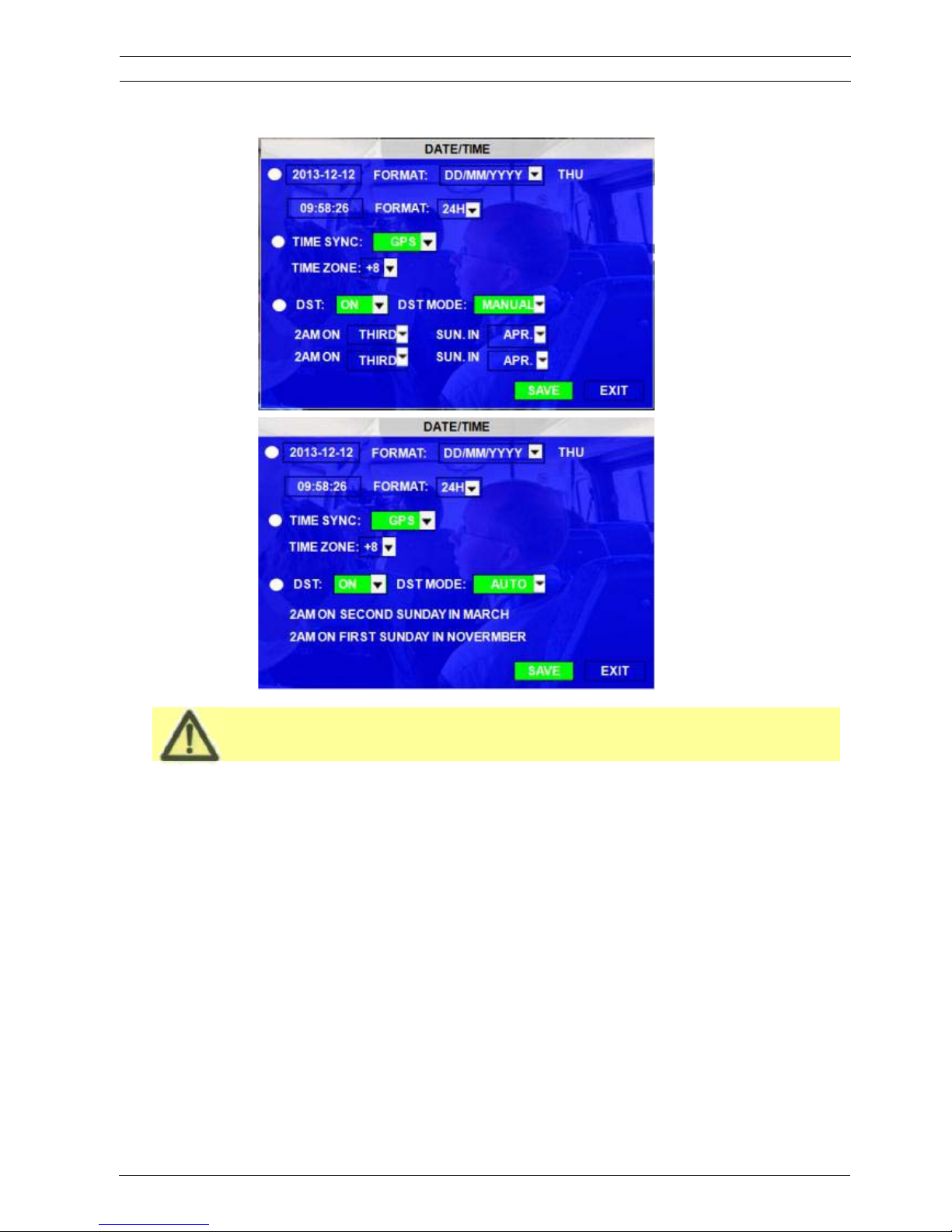
While setting the DST, the former date must be earlier than the later date. If the two setting
date is the same, the DST will be invalid.
Scroll toǏSAVEǐto make the setting valid.
ViPRO Corporation User's Manual MVR-310-GUI |
v1.1 | 2014.01
Mobile DVR MVR-310 DATE/TIME 19
Page 20
3.2.1.2 OPTIONS
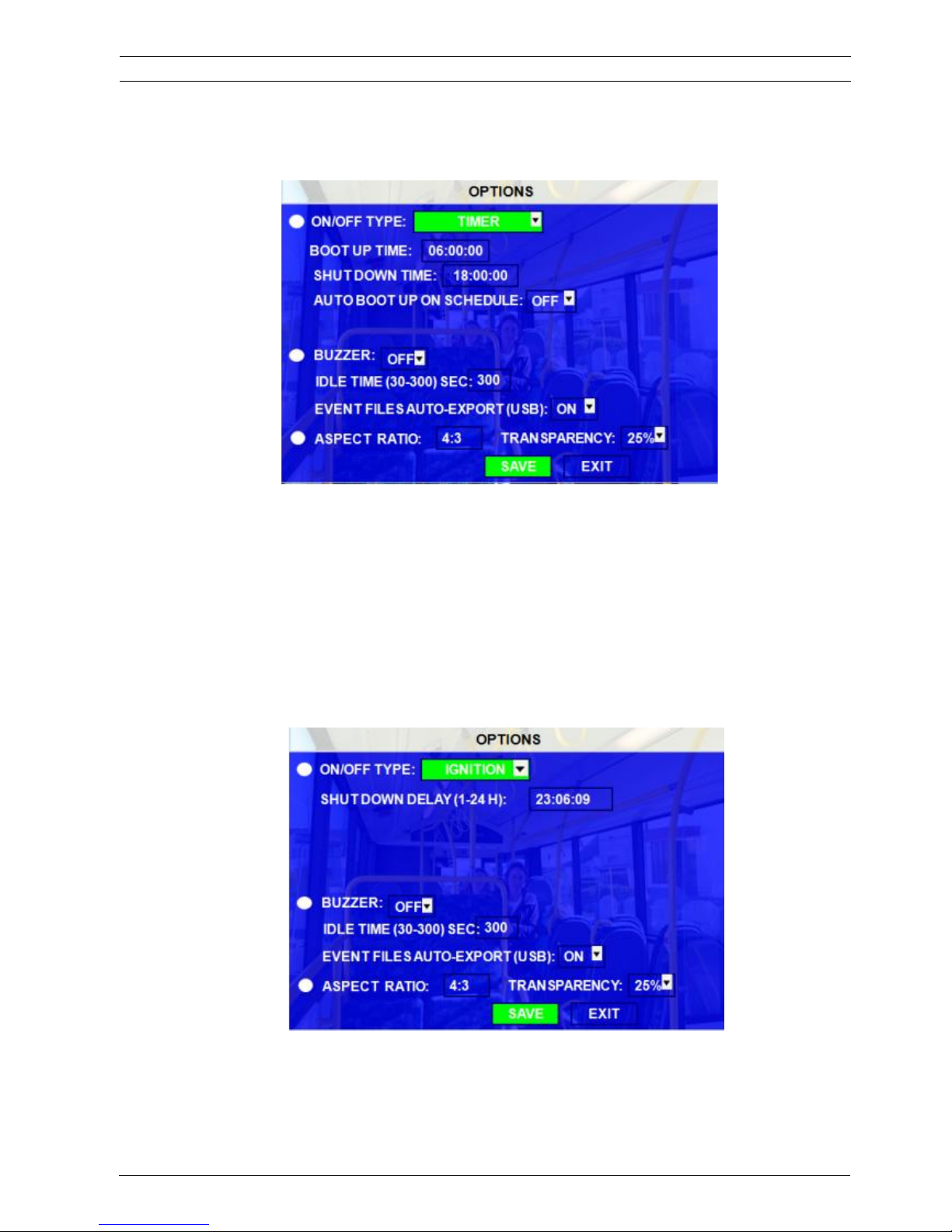
ON/OFF TYPE:
There are ignition, timer and ignition or timer three options. They are the modes to boot up the
MDVR device (not for recording). For example, the setting is TIMER from 5:00~12:00am,
MDVR will startup automatically at 5:00am and shut down at 12:00am, but after the MDVR
starts up, it records or not depending on the setting in the SCHEDULE and RECORD
SETTINGS menu.
A) IGNITION: for shut down delay function. If the user make the setting for SHOW DOWN DELAY time is
5 min, the MDVR will shut down in 5 minutes after the ignition is off. This means that for example: if the
SHUT DOWN DELAY setting is 1 hour. It is 5:00am when the user turn off the ignition, the MDVR
system will shut down at 6:00am not at 5:00am.
B) TIMER: MDVR will boot up or shut down automatically at certain time configured every day.
ViPRO Corporation User's Manual MVR-310-GUI |
v1.1 | 2014.01
Mobile DVR MVR-310 OPTIONS 20
Page 21
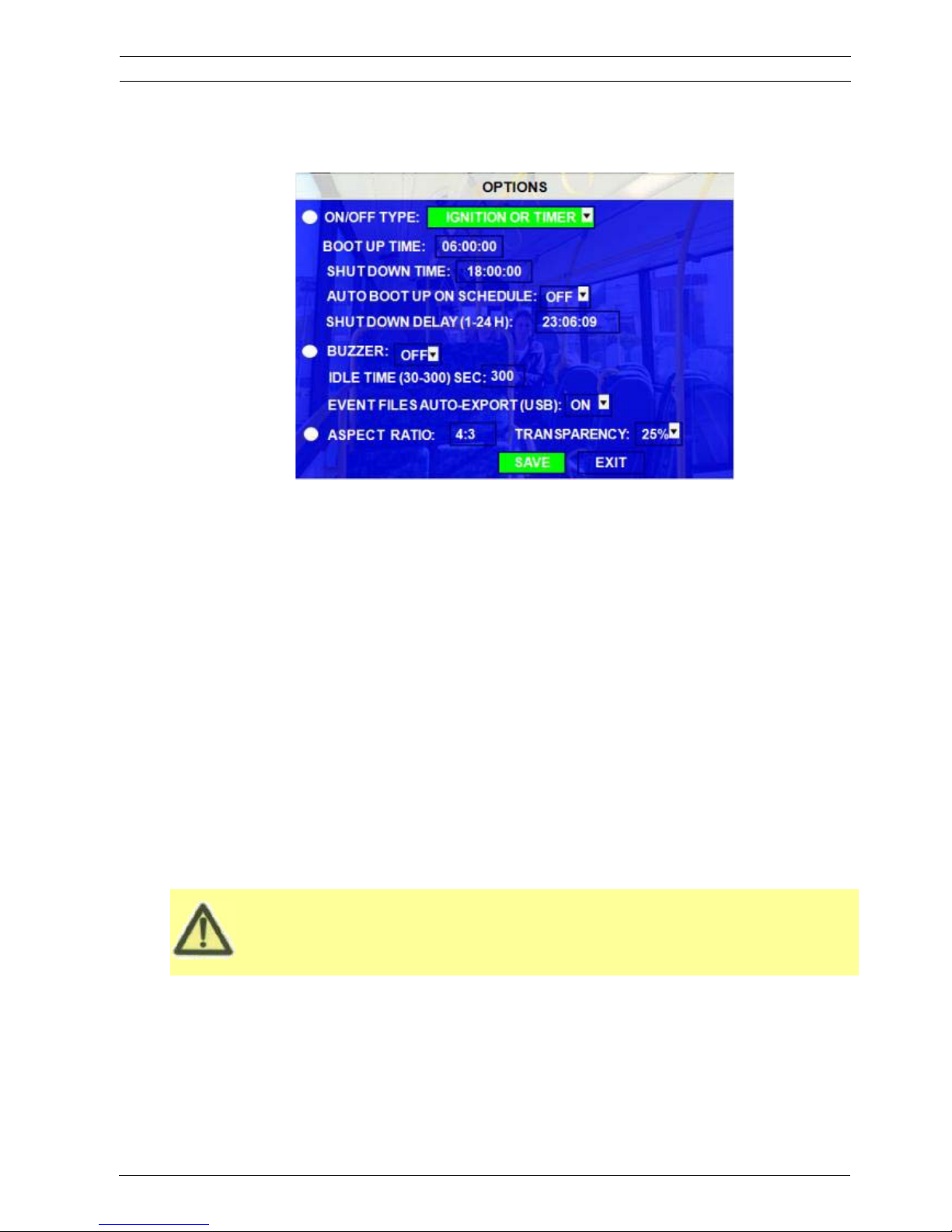
For TIMER type, if the setting for boot up time is 6:00:00 and shut time is 11:00:00, this means that the
MDVR only work from 6:00~11:00am every day and after 11:00 the MDVR unit will shut down
“automatically. The “shutdown delay” function is only for the IGNITION / IGNITION or TIMER setup.
C) IGNITION OR TIMER: means include both conditions.
BOOT UP TIME: The exact time for MDVR starts to work every day.
SHUT DOWN TIME: The exact time for MDVR shut down every day.
AUTO BOOT UP ON SCHDULE: ON means TIMER start up function is linked to record function. This
means that if the user boot up the MDVR device at certain time and the
MDVR system will to start recording at the same time. For example, if
the BOOT UP setting is 6:00 and SHUT DOWN TIME setting is 8:00am,
but record schedule is 5:00, then the MDVR will start up and record at
5:00.
BUZZER SWITCH: ON means the buzzer will alarm when alarm happens, OFF means no audio when
alarm happens.
IDLE TIME (SEC): How long the operation interface will switch to the QUAD view. If the user does
not make any operation on MDVR GUI for some time, the MDVR system will return
back to the QUAD view automatically. We suggest that the user please setup this
idle time as the user setup demand. Once the MDVR access into the GUI, the
MDVR will stop recording.
EVENT FILES AUTO-EXPORT (USB): When this switch is ON, the user can back up all the alarm record
files of the current day to thumb drive by press F1 key on remote control.
ASPECT MODE: This is the output mode for monitor.
TRANSPARENCY: Setup the brightness for the screen display as the user want.
Scroll toǏSAVEǐto make the setting valid
ViPRO Corporation User's Manual MVR-310-GUI |
v1.1 | 2014.01
Mobile DVR MVR-310 OPTIONS 21
Page 22
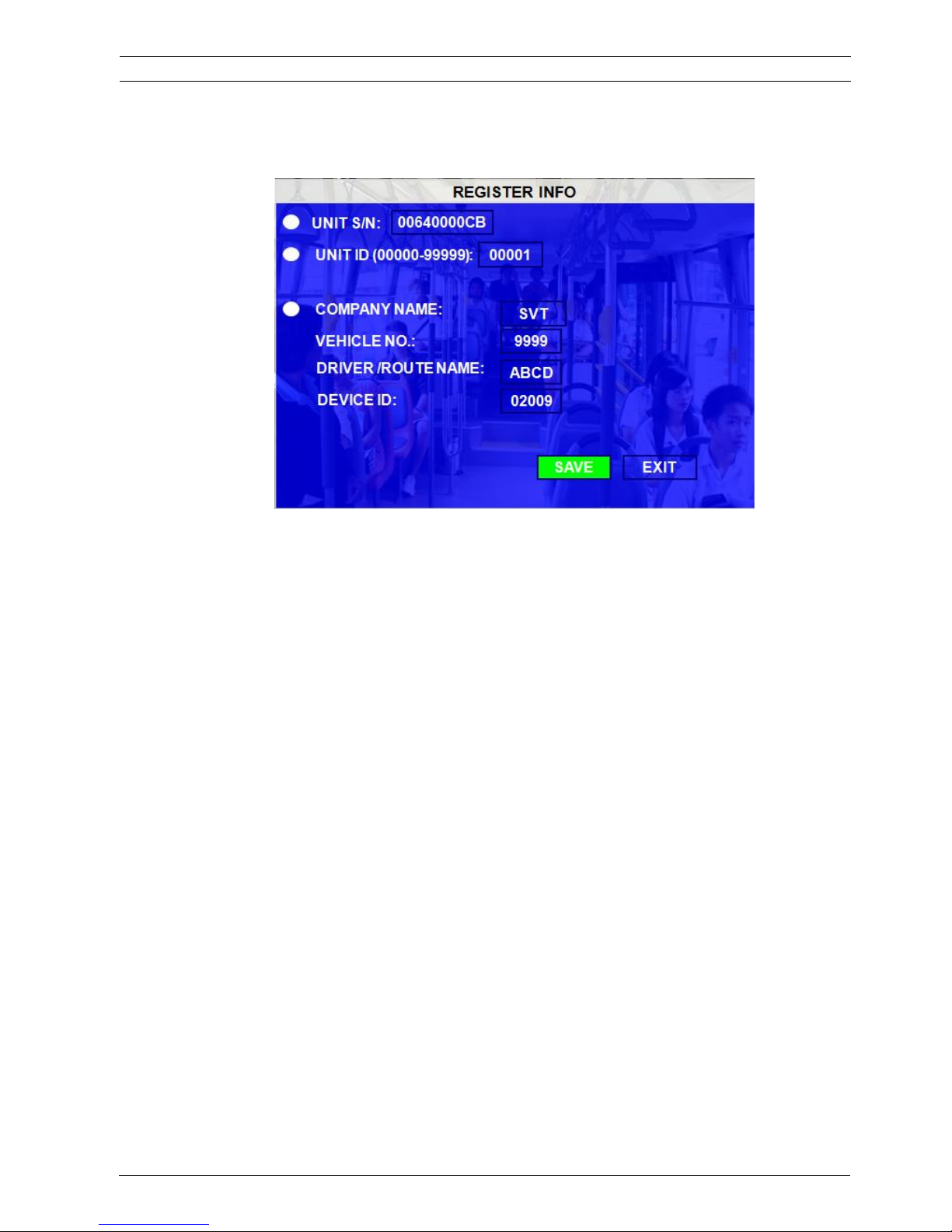
3.2.1.3 REGISTER INFO
UNIT S/N: The series number for MDVR. Each MDVR has only one S/N. This number is read from special
encrypted chipset.
UNIT ID: Device ID. Use the NUMERIC keypad on the remote control to enter the system ID from 00000 to
99999. This ID is used to login to the unit (if security is enabled)
COMPANY NAME: The name of company. Press the arrow key on the remote control and highlight this
option and then input the name of the company.
VEHICLE NO.: The number of the vehicles.
DRIVER/ROUTE NAME: The driver’s name and the route name
DEVICE ID: This is the unique ID can be recognized for the message server of PC software for MDVR
including CMS (Central Management Software), Ceiba (Ceiba Playback and Analysis Software)
and ADS (Auto Download Software). If the user need to connect MDVR to any PC software,
please make sure the user setup this ID for MDVR.
Remark: when the user connect MDVR to PC software, make sure VEHICLE NO. and DEVICE ID is filled.
Otherwise, it can’t connect to message server.
Scroll toǏSAVEǐto make the setting valid.
3.2.1.4 FORMAT
Select the devices to format: HDD, SD card or external storage device.
ViPRO Corporation User's Manual MVR-310-GUI |
v1.1 | 2014.01
Mobile DVR MVR-310 REGISTER INFO 22
Page 23
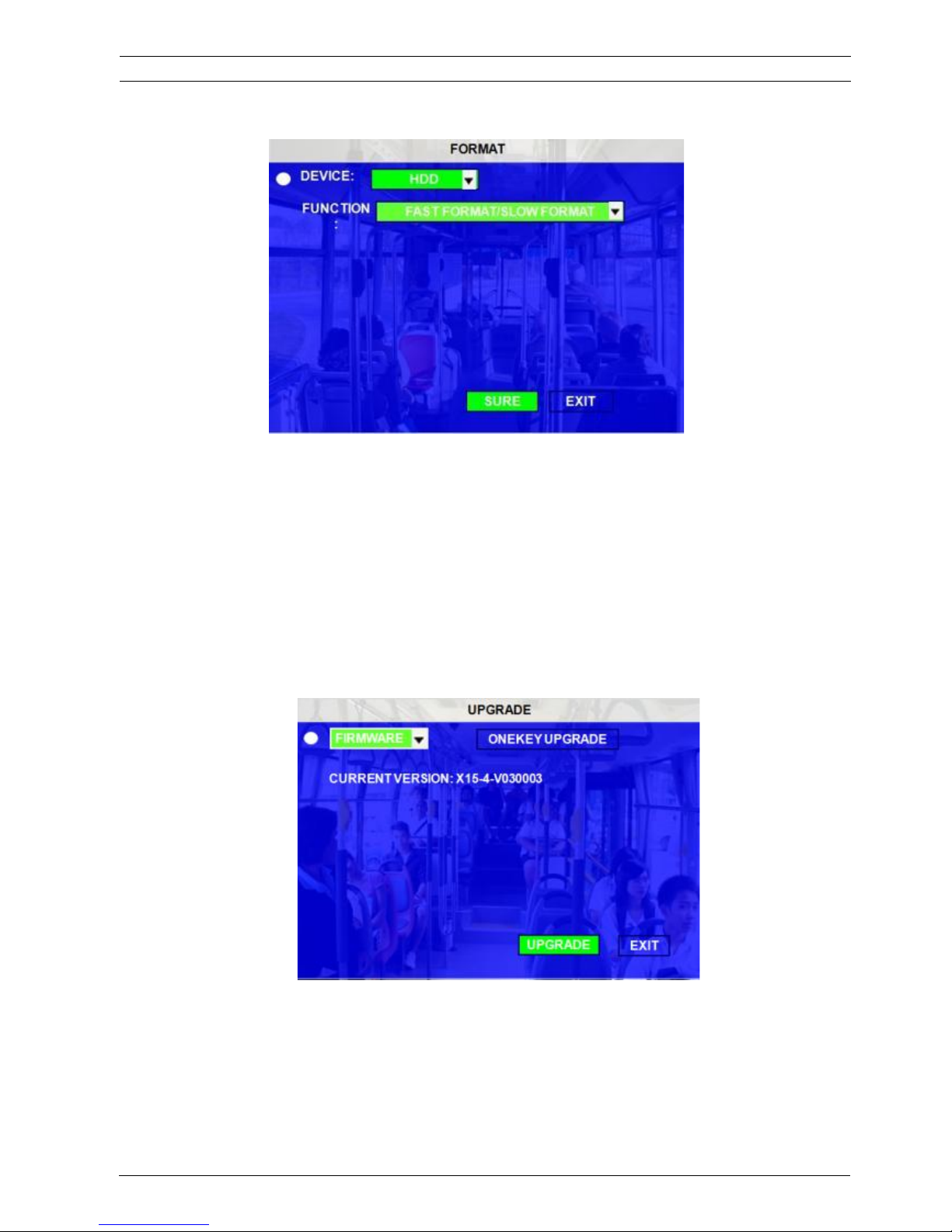
DEVICE: Please press ENTER to select the target device to format. There are 3 options: HDD, USB and
MIRROR SD. Then press ǏFORMATǐto format the device.
FUNCTION: FAST FORMAT, SLOW FORMAT
FAST FORMAT is the same as the fast format on PC.
SLOW FORMAT means the MDVR system will check whether the hard disk has bad sectors, if so, the MDVR will
make a record and won’t write data here again.
After format success, MDVR unit will restart automatically.
3.2.1.5 UPGRADE
Upgrade to new firmware or MCU.
FIRMWARE: Upgrade the firmware.
MCU: Upgrade the MCU.
ViPRO Corporation User's Manual MVR-310-GUI |
v1.1 | 2014.01
Mobile DVR MVR-310 UPGRADE 23
Page 24
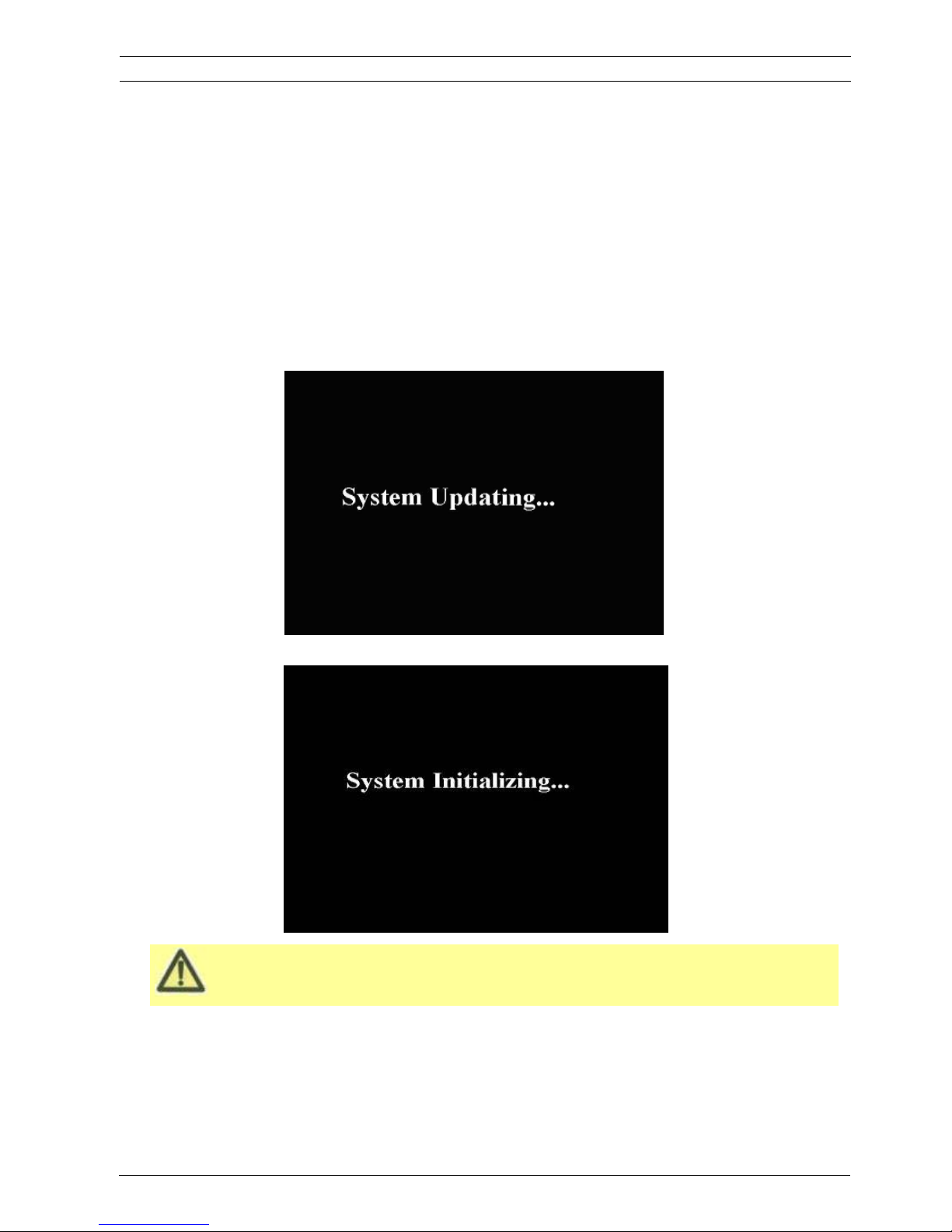
Please check the firmware version after the MDVR reboot up and make sure that the firmware upgrade
is completely successful.
HOW TO UPGRADE THE MDVR FIRMWARE?
1. Please create one folder named dvrupgrade in root directory in thumb drive and then copy the firmware
upgrade file to this folder.
2. Insert the thumb drive into the USB port on the front panel of MDVR.
3. Please access into the MDVR GUI menu “UPGRADE”, select “FIRMWARE” option and press ǏUPGRADEǐ,
MDVR will upgrade the firmware automatically. Please make sure the user do not remove the thumb driver or
cut of the power for the MDVR during upgrading the firmware as this is very easily to damage the FLASH for
MDVR.
4. During the firmware upgrade, then following screen will pop up.
5. After upgrade successfully, the MDVR system will restart automatically, as follow:
MCU UPGRADE: The step is the same as upgrade firmware.
ViPRO Corporation User's Manual MVR-310-GUI |
v1.1 | 2014.01
Mobile DVR MVR-310 UPGRADE 24
Page 25
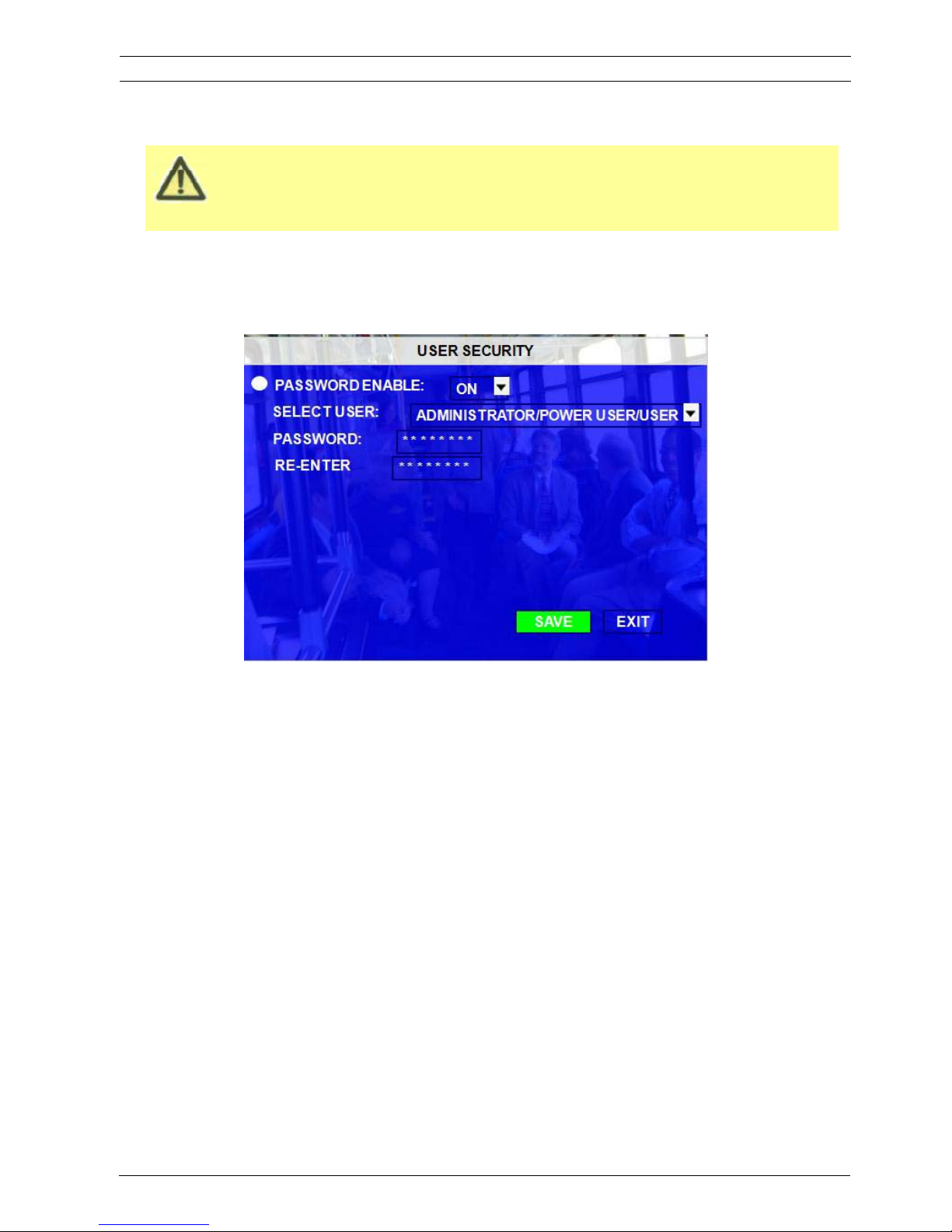
If the FLASH is damaged or firmware crashes (The MDVR can boot up to System Initializing interface
only and the POWER LED on the MDVR is ON. It cannot boot up to quad view interface). For this
situation, please contact our technical support trying to upgrade the firmware by TFTP upgrade
3.2.1.6 USER SECURITY
Setup the password for user and admin.
PASSWORD ENABLE: To active password access. Selecting “ON” will require a password in order to access the
setup menu.
There are 3 levels for MDVR setup, the USER, the POWER USER and ADMINISTRATOR.
USER PASSWORD: the default user password is 22222222. This user level is used for the common user who can
check the video files (and playback the file) and system information only (e.g, network status, the MDVR firmware
version, the battery information), not allowed to make the configuration for the MDVR.
Below is the GUI interface for the user password authority. Usually this level can be authorized to the driver.
User's Manual MVR-310-GUI |
v1.1 | 2014.01
USER SECURITY 25Mobile DVR MVR-310
ViPRO Corporation
Page 26
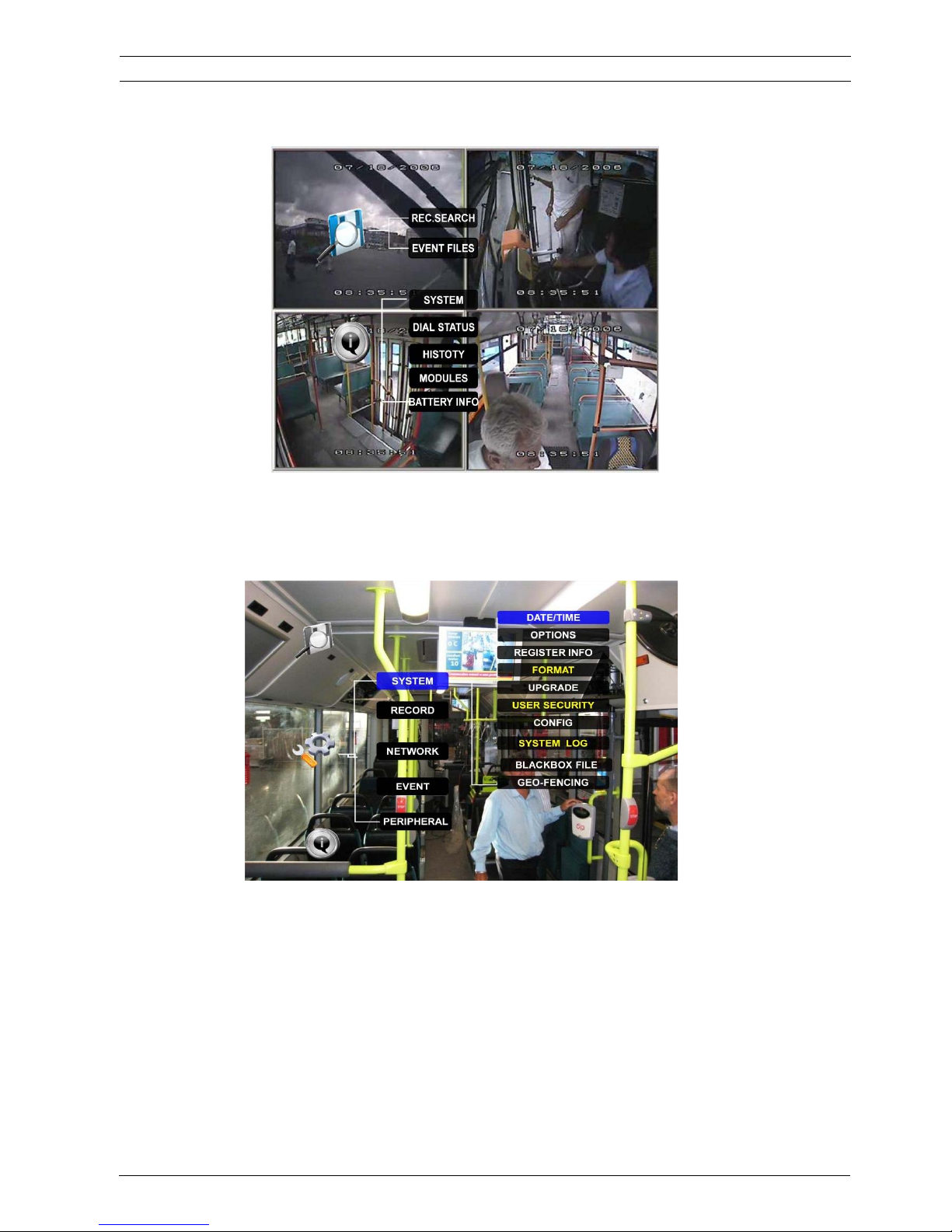
POWER USER PASSWORD: the default user password is 66666666. The authorization for this password is to
check the video files, playback the files and make the setting for the MDVR, but not allowed to access below menu
FORMAT, USER SECURITY, SYSTEM LOG.
ADMINISTRATOR: The default password is 88888888. This is the highest level of the user which indicates that the
user can access all the menus for the MDVR and make all the configurations for the MDVR device.
Re-enter must be same input as first password; otherwise the system would not accept the password setting when
password does not match between the first line and the re-enter line.
Scroll toǏSAVEǐto make the setting valid.
User's Manual MVR-310-GUI |
v1.1 | 2014.01
USER SECURITY 26Mobile DVR MVR-310
ViPRO Corporation
Page 27
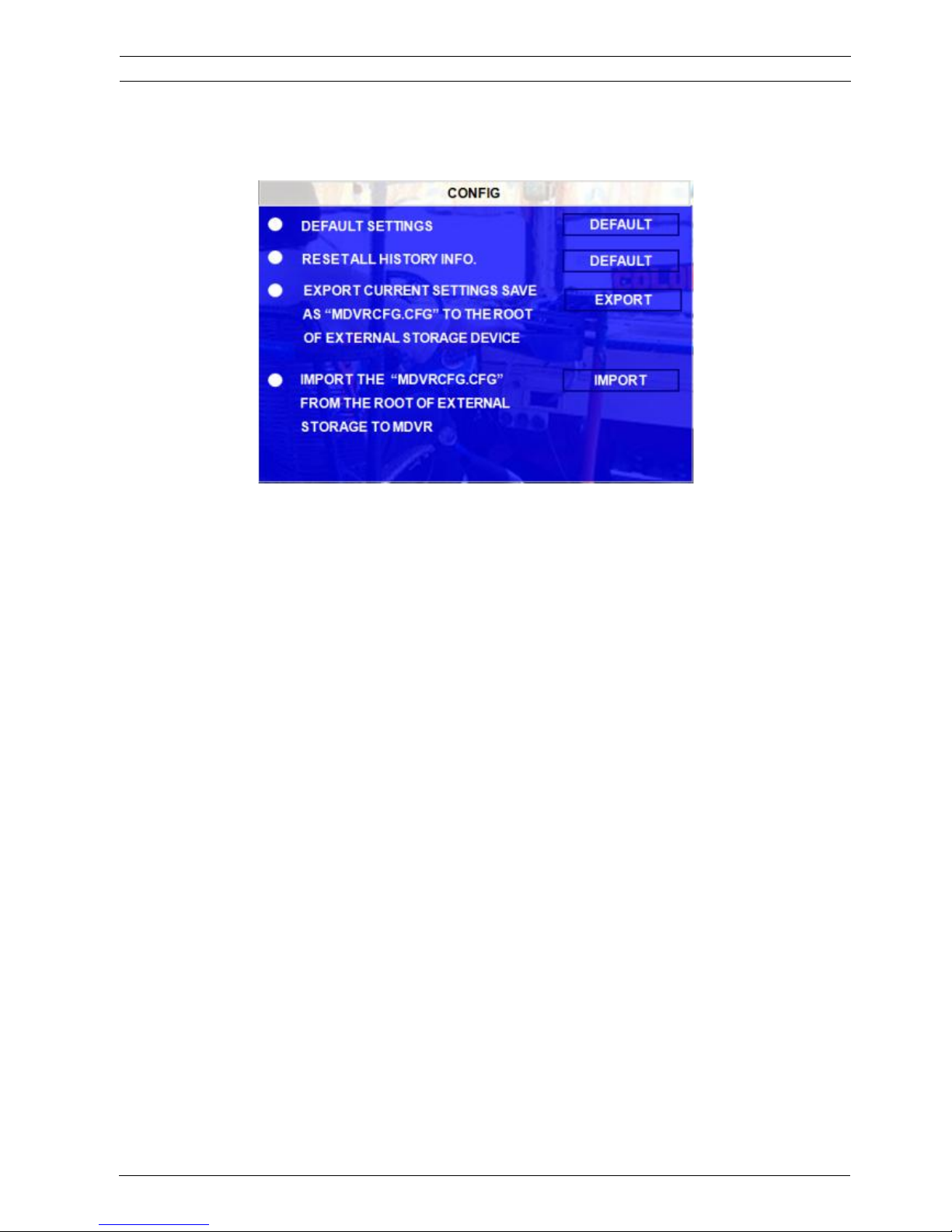
3.2.1.7 CONFIG
Restore the default setting and export and import the MDVR configuration.
EXPORT: Export the all configuration for the MDVR to another MDVR to make sure that two MDVRs have the
same setting. Please insert the external storage device to the USB port and then press ǏEXPORTǐ,
Then the configuration file will backup to external device.
RESET: Reset all the history info to default values.
IMPORT: Follows the operation “EXPORT”, Import the MDVR configuration file to the MDVR, except MAC address
and IP. Please insert the external storage device to the USB port on the MDVR (Must have configuration
file in the storage device) and then press ǏIMPORTǐ. The configuration will be imported to another
MDVR automatically.
RESTORE: Restore all the settings to factory default settings.
3.2.1.8 USER LOG
The user can export or delete the user log in this interface, as follow picture:
Remark: The user log mainly include: start recording and end recording time, event time, GPS module status,
power on and power off time and so on.
User's Manual MVR-310-GUI |
v1.1 | 2014.01
CONFIG 27Mobile DVR MVR-310
ViPRO Corporation
Page 28
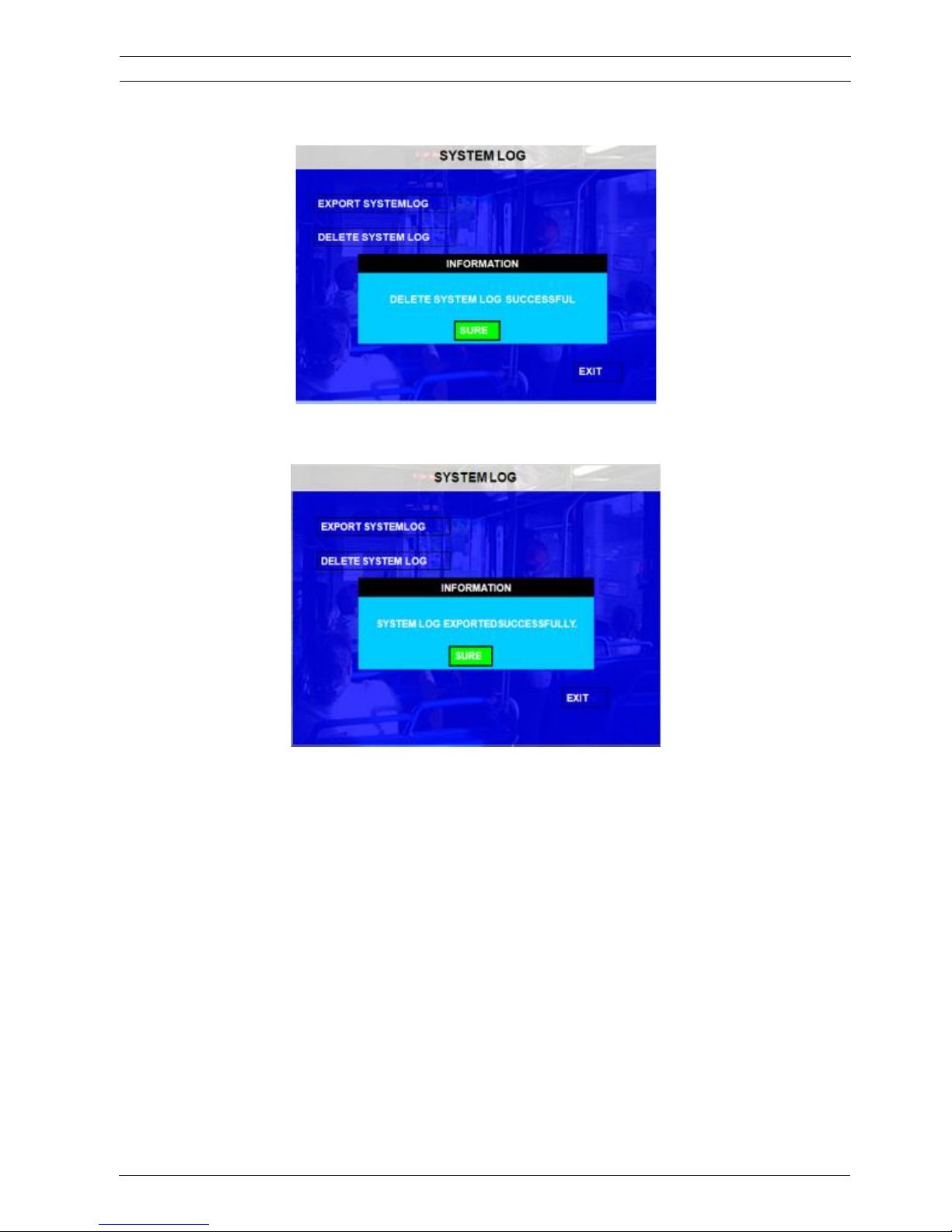
EXPORT SYSTEMLOG: The user log exported to thumb drive is stored by .txt format and it will be saved to
\userlog\00000\0\*** folder according to the date.
3.2.1.9 BLACKBOX FILE
This function is used to export the black box file for analysis. Please insert the thumb drive to the MDVR and
then the MDVR system will export the black box files to the thumb driver directly.
User's Manual MVR-310-GUI |
v1.1 | 2014.01
BLACKBOX FILE 28Mobile DVR MVR-310
ViPRO Corporation
Page 29

3.2.1.10 GEO-FENCING
GEO-FENCING SWITCH: this is the switch to enable GEO-Fencing function. This switch is only for MDVR
terminal. To finish the setting for GEO-FENSE, the user need to setup the CMS software
as well. For more details, please refer to the manual for CMS.
EXPORT and IMPORT: The function can be used in WCMS only (not standard CMS from ViPRO.) The user
can setup the GEO-fencing in the WCMS side and this configuration file will be sent to
the MDVR system by wireless network. The user can EXPORT this configuration file to
the thumb driver and IMPORT this file to another MDVR system.
Remark: Geo-fencing means the user can setup a special virtual area for the vehicle, when the vehicle enters into
or out of this area, the MDVR system will trigger the alarm.
For more details please check the CMS manual.
User's Manual MVR-310-GUI |
v1.1 | 2014.01
GEO-FENCING 29Mobile DVR MVR-310
ViPRO Corporation
Page 30
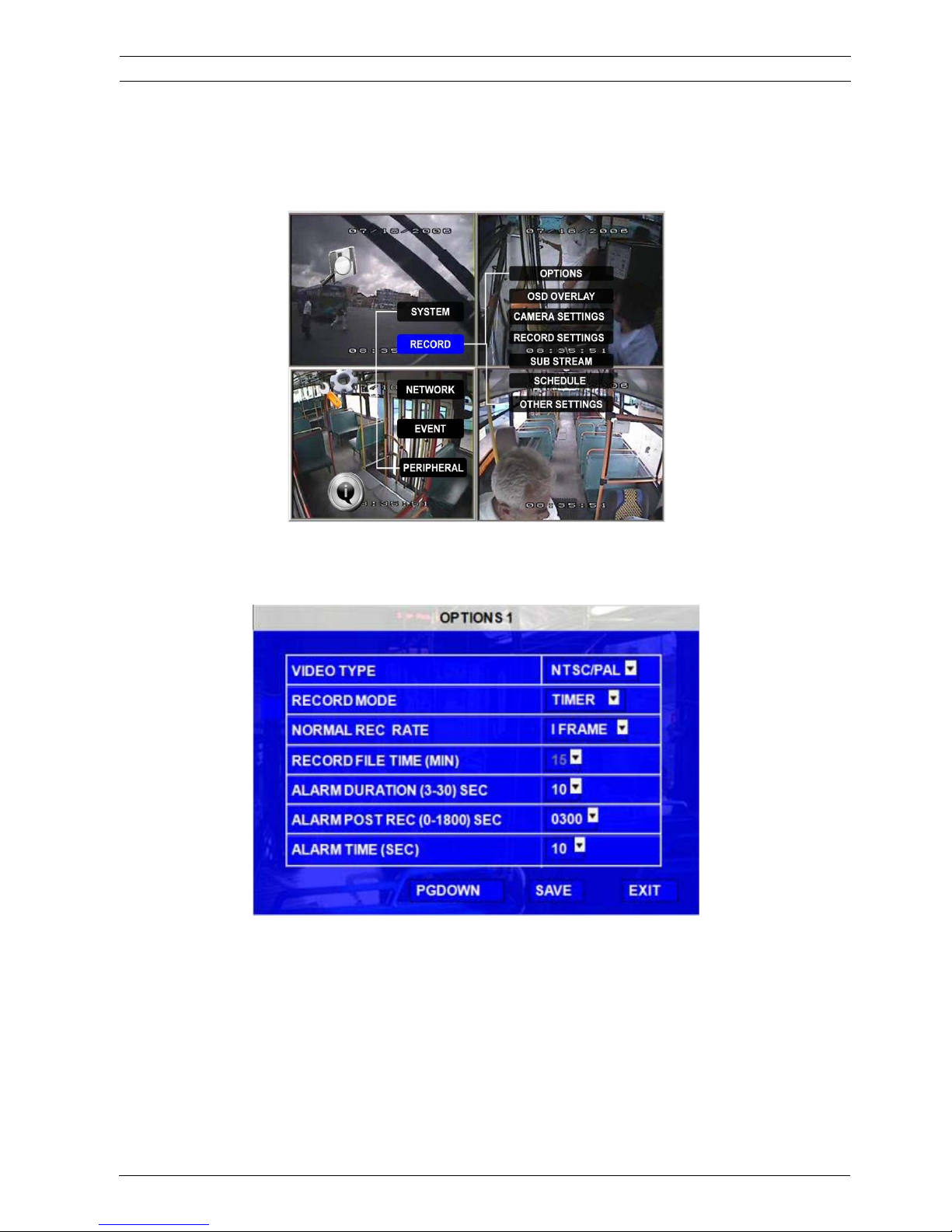
3.2.2 RECORD
Setup the related configuration for record
3.2.2.1 OPTION
This menu is used to setup the basic parameters for MDVR recording.
VIDEO TYPE: PAL and NTSC optional. The default setting is NTSC
RECORD MODE: Record mode, three modes as following:
NORMAL: When MDVR is power supplied and starts up, the MDVR will start to record automatically.
TIMER: This is the switch to start the TIMER recording function. When the user enable this switch,
MDVR will start to record at configured time setting in the SCHEDULE menu
EVENT: This is the switch to start the event recording. Only the user enable this switch, when event is
User's Manual MVR-310-GUI |
v1.1 | 2014.01
RECORD 30Mobile DVR MVR-310
trigged, MDVR will create event record.
ViPRO Corporation
Page 31
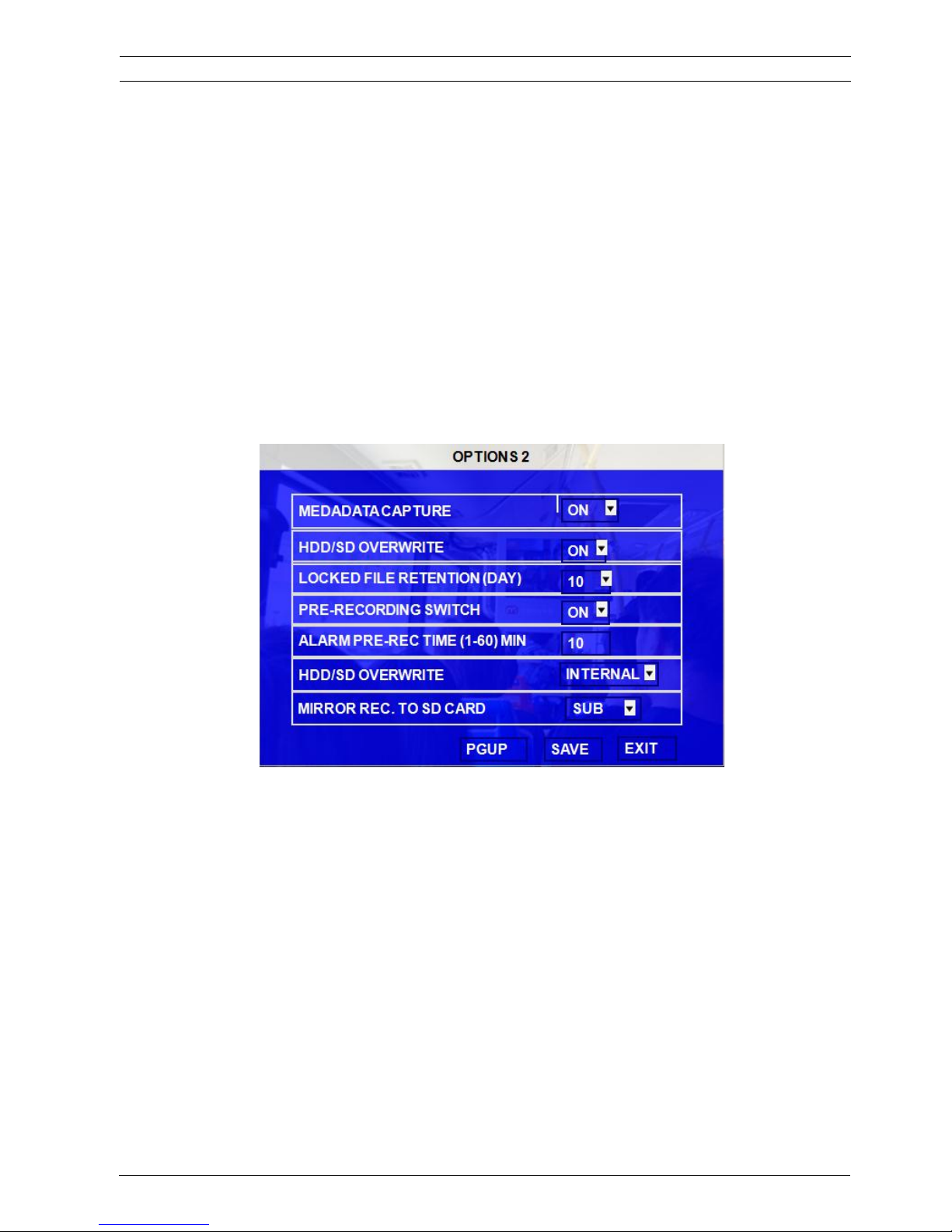
NORMAL REC RATE: normal record rate, two option:
GENERAL: MDVR will start to record according to the setup of RECORD SETTING.
I FRAME: MDVR only record by I frame (the key frame for video) in order to take up less space of hard drive.
BUT when event is trigged, MDVR will record according to setup of RECORD menu.
RECORD FILE TIME˄
˄
MIN˅: Recording file packing size, 15, 30, 45, 60 minutes optional.
ALARM DURATION
˄
3-30˅SEC: The alarm duration time, all the alarm for same type considered to be one alarm
during the time configured for alarm duration. For example, if the setting for
alarm duration is 10 sec and during this 10 sec, anther same type (like panic
button) alarm triggered, MDVR system will consider them to be one alarm event.
And the alarm start time will be reset based on the second time for alarm.
ALARM POST REC˄30-1800˅SEC: Alarm post recording time.
BUZZER TIME: buzzer duration time setup when alarm is triggered
MEDADATA CAPTURE: The MDVR system will capture the black box file if the user enables this function. If the
metadata is captured, when the user playback the video files, the blackbox information
will be analyzed as well.
HDD/SD OVER WRITE: To make the HDD or SD card overwrite when there is only 8GB (for hard disk) or 1G (for
SD card) spare space left.
ON: when hard drive space is less than 8G, according to “First in first out” rule, the MDVR system will start
to delete the earliest record files till hard disk space equal or over 15G (except the alarm file which in
locked time).
OFF: Device will stop recording when hard drive space is full (less than 500M), the user must replace a
hard disk or delete recording file manually. Otherwise, the MDVR system will stop recording.
LOCKED FILE RETENTION (DAY): For the MDVR video files the user can lock or unlock them. Lock function is
only for the event (alarm) files as they are very important. The locked files cannot be
User's Manual MVR-310-GUI |
v1.1 | 2014.01
RECORD 31Mobile DVR MVR-310
ViPRO Corporation
Page 32

deleted by the HDD/SD overwrite function in the retention days. When the retention day
is expired, the locked files will be unlocked automatically and deleted. Locked recording
file save time can be configured to be 7, 10, 15, 20, 30, 45 days. During the retention
time, the locked recording files won’t be deleted. Once pass lock time, the recording file
LOCK identifier will be from L to U, and then can be deleted automatically by overwrite
function.
PRE-RECORDED SWITCH: ON/OFF, ON means open the function of pre-recording, OFF means not. If the user
need to setup pre-recording function, the user must open this switch and also setup the time for
pre-recording in this menu as well.
ALARM PRE-REC TIME˄
˄
1-60˅MIN: Pre-record time setting is from 1 to 60 minutes. For example: If the setting for
pre-record is 30min, when alarm is triggered at 10:30, then the record file
starting from 10:00 to 10:30 will be packed as one alarm file.
HDD/SD OVERWRITE: There are 2 options for the INTERNALand EXTERNAL. INTERNAL is used for the internal
mirror recording SD card. If the MDVR connects external fireproof box for mirror recording
then the user should select EXTERNAL option. Mirror recording means that the hard disk
and SD card can record at the same time with same frame, same resolution, same
image quality. The main purpose for mirror recording is: when the hard disk is broken (like
accident happens) the user can still get the video files in the last minute from the SD card.
MVR-310 MDVR can provide 2 kinds of mirror recording internal and external. Internal
means that we have the SD card slot inside of MDVR device and the user just need to
insert the SD card in the slot on the MDVR device and ENABLE the switch for mirror on
recording the MDVR GUI menu. External symbolizes that the user needs to buy the fireproof
box (SD card inside) from ViPRO in case the vehicle is on fire. This fireproof box is specially
designed for the vehicle accident (like fire) and the maximum temperature can be 500
Celsus degree (can last 15 minutes)
MIRROR REC.TO SD CARD: The enable switch for mirror recording
User's Manual MVR-310-GUI |
v1.1 | 2014.01
RECORD 32Mobile DVR MVR-310
ViPRO Corporation
Page 33
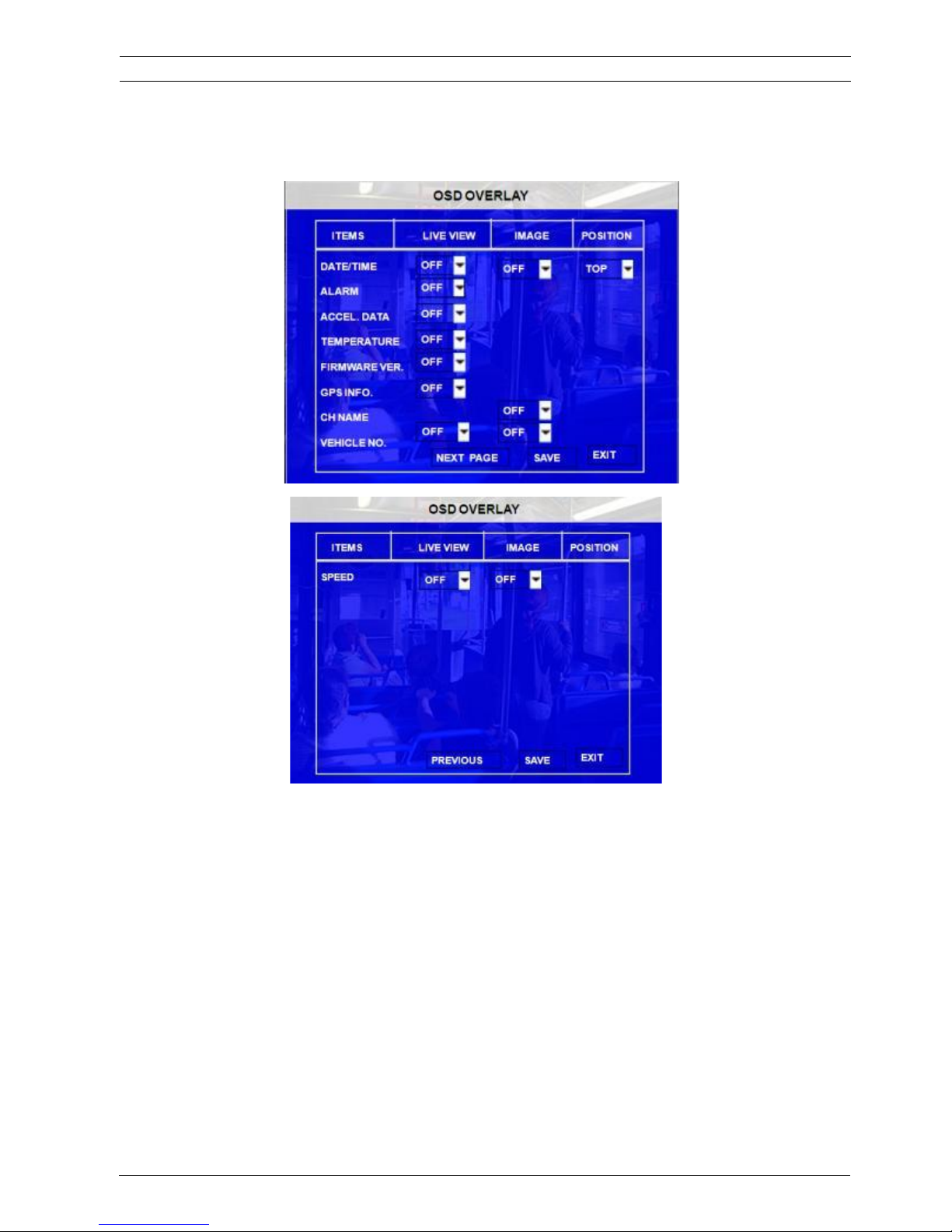
3.2.2.2 OSD OVERLAY
DATE/TIME: Display date and time on OSD.
POSITION: Setup the display position for DATE/TIME
ALARM: Display alarm information on OSD including the I/O sensor, speed, temperature, motion detection etc…
ACCELERATION: Display the information for inertial sensor
TEMPERATURE: Display the temperature on OSD
FIRMWARE VERSION: Display the current firmware version
GPS: Display the GPS information, fixed means it will display the information always, just like date/time.
CHANNEL NAME: Display the channel name.
VEHICLE NO.: Display the vehicle NO.,
SPEED: Display the speed on OSD.
RECORD is ON means it will record the date/time, channel name and vehicle NO. into the record files.
User's Manual MVR-310-GUI |
v1.1 | 2014.01
OSD OVERLAY 33Mobile DVR MVR-310
ViPRO Corporation
Page 34
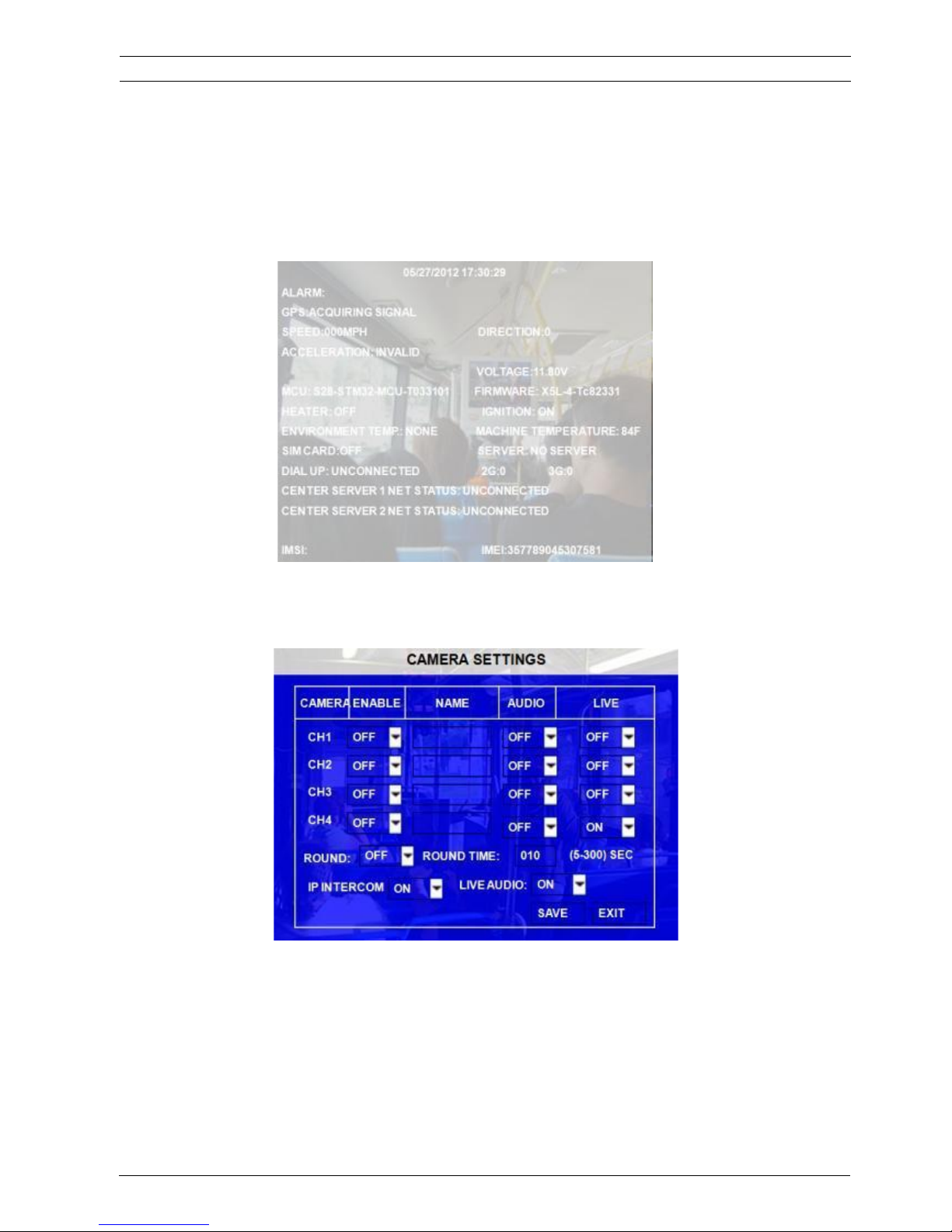
To get the main information for MDVR working easier, on QUAD view, the user can please just press ǏENTERǐ
on remote control to show below screen. This screen will show all the important working information for the MDVR
including sensor, 3G/GPS/WIFI signal and connection, firmware version, MCU version, SIM dialed up status etc…
But the precondition for this OSD is the user must setup the OSD overlay menu to select which information the
user want to display.
3.2.2.3 CAMERA SETTINGS
To setup the parameters for camera related with recording for each channel.
ENABLE: Enable the record function.
NAME: The name of the channel. For example, if the user setup the name for CH1 is ABC, the user can see
ABC three letters display on the video from channel 1
AUDIO: Active the audio record function
LIVE: to enable the channel to display the image in the monitor output.
User's Manual MVR-310-GUI |
v1.1 | 2014.01
CAMERA SETTINGS 34Mobile DVR MVR-310
ViPRO Corporation
Page 35
ROUND: Means channel loop function sequence, if the user setup time as 5 second, which means the video
screen will shift to different channel (the sequence is from channel 1 to channel 4) in every 5
seconds.
IP INTERCOM: This is the switch for intercom function (we also say 2- way audio) which means that that
driver can talk with centre server directly via wireless network 3G. When this switch is ON, the
audio of intercom will be recorded into channel 4.
LIVE AUDIO: enable or disable the live audio settings switch.
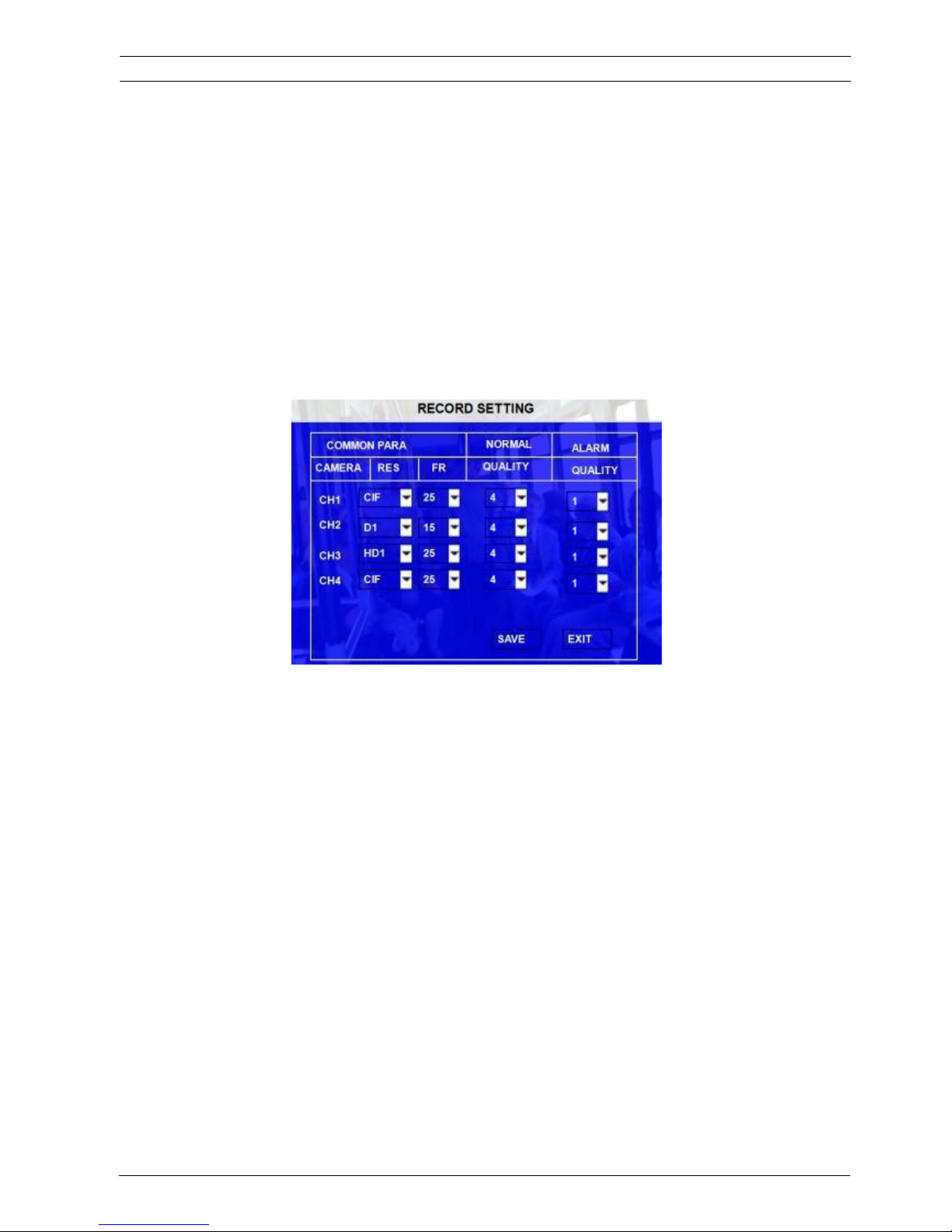
3.2.2.4 RECORD SETTING
Make the configurations for resolution, frame rate, image quality parameter setting for each channel.
RES: Resolution, D1, HD1, CIF optional.
NTSC: 704h576 (D1), 704h288 (HD1), 352h288 (CIF)
PAL: 704h480 (D1), 704h240(HD1), 352h240 (PAL).
FR: Frame rate, frames per second, 1~25 (or 1~30 for NTSC) can be adjustable.
QUANLITY: Image quality, 8 levels optional, Level 1 is the best.
Normal quality is the quality for normal record, and alarm quality is for alarm record.
3.2.2.5 SUB-STREAM
Sub-stream is the settings for 3G wireless transmission. The user can setup the bandwidth and enable the
channels. Otherwise, the MDVR system can’t transmit the live video to the center server. The setup interface as
follow:
User's Manual MVR-310-GUI |
v1.1 | 2014.01
RECORD SETTING 35Mobile DVR MVR-310
ViPRO Corporation
Page 36
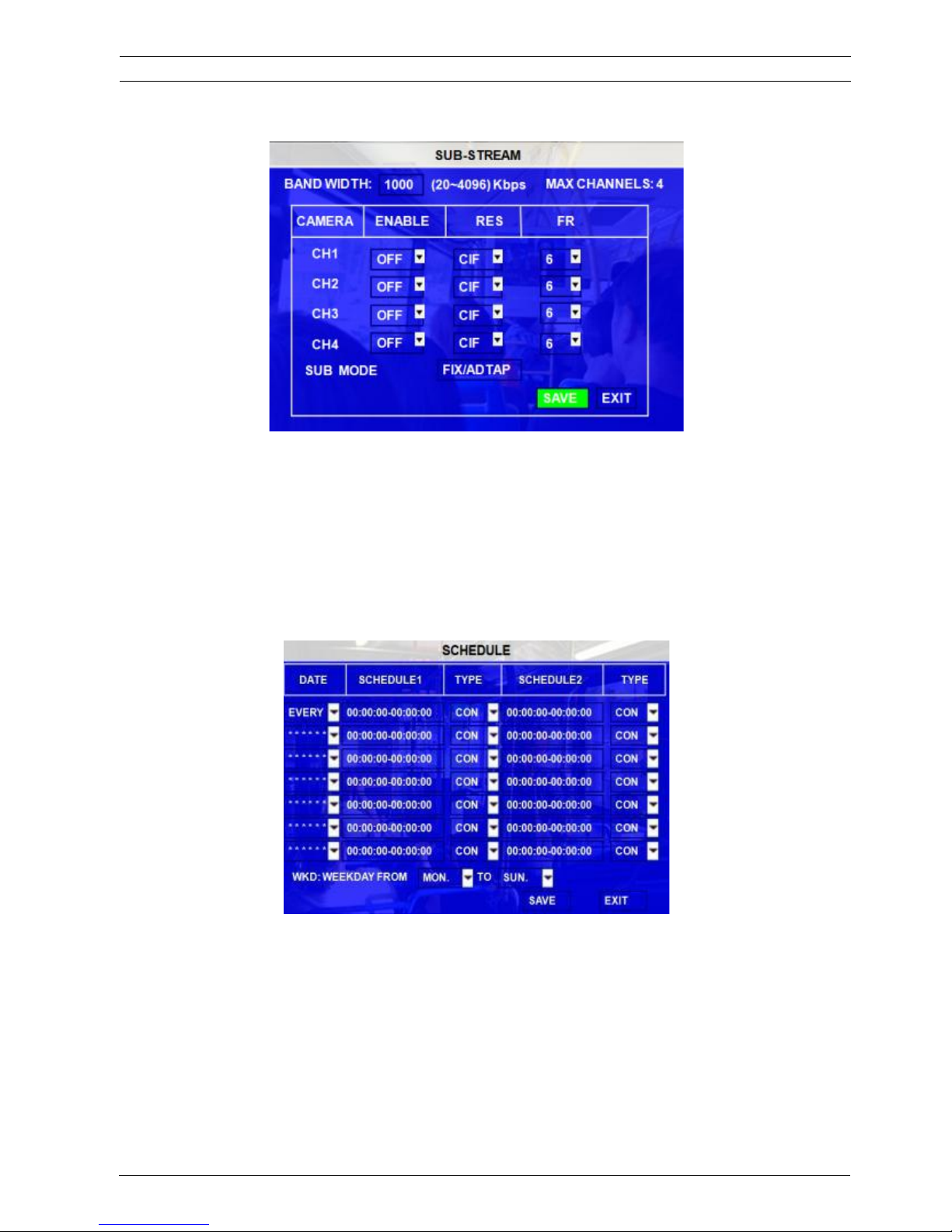
BAND WIDTH: Setup the band width for the sub-stream, which due to the network bandwidth of the SIM card.
ENABLE: Enable the function
RES: Resolution.
FR: Frame rate, frames per second, 1~25 (1~30 for NTSC) adjustable.
SUB MODE: There are 2 options, fixed and adapt. Fixed means that the transmitted resolution and frame is fixed
by the network width configured. Adapt means that the transmitted resolution and frame can be adjust
automatically by the network width.
3.2.2.6 SCHEDULE
DATE: To select the exact date for MDVR recording.
Single Day: Choose the day to create a recording schedule
Every Day: Choose “Every” to apply a schedule to every day of the week
Weekday: Schedule will only apply Weekdays (weekday is from Monday to
Friday)
**********: Choosing the asterisks will suspend the highlighted schedule
User's Manual MVR-310-GUI |
v1.1 | 2014.01
SCHEDULE 36Mobile DVR MVR-310
ViPRO Corporation
Page 37
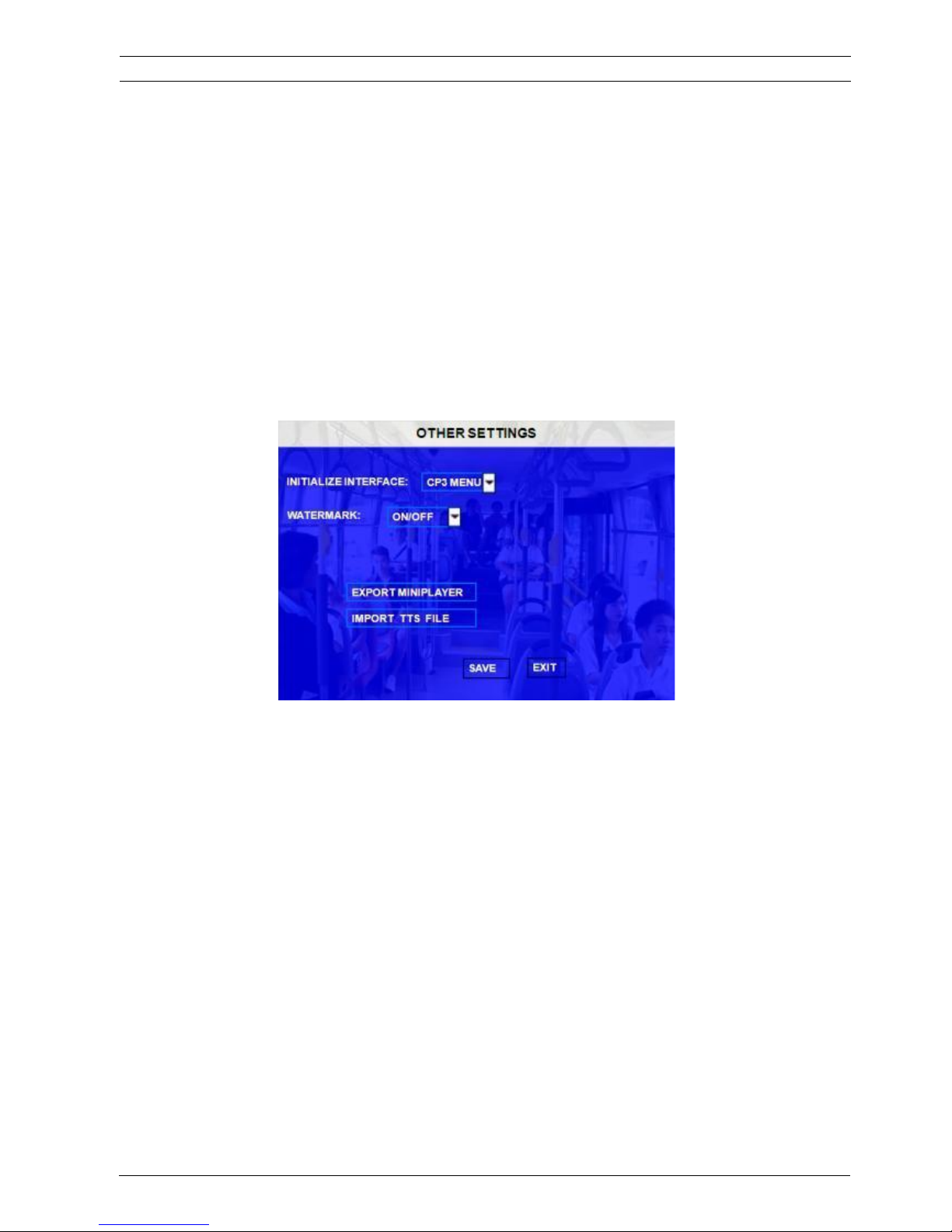
TYPE: Press ENTER to change the type of the recording mode:
SCHEDULE 1/2:
Press the RIGHT ARROW key to enter values using the NUMERIC keypad into any time field;
SCHEDULE 1 is the first of two possible ON/OFF cycles that apply to any day in the period chosen
under Date.
SCHEDULE 2 is the second cycle for any day in the period. There is no need to overlap times of
SCHEDULE 1 and SCHEDULE 2.
Ending at 23:59 of one day and beginning with 00:00 of the next day will provide continuous
recording without interruption (factory default setting)
3.2.2.7 OTHER SETTINGS
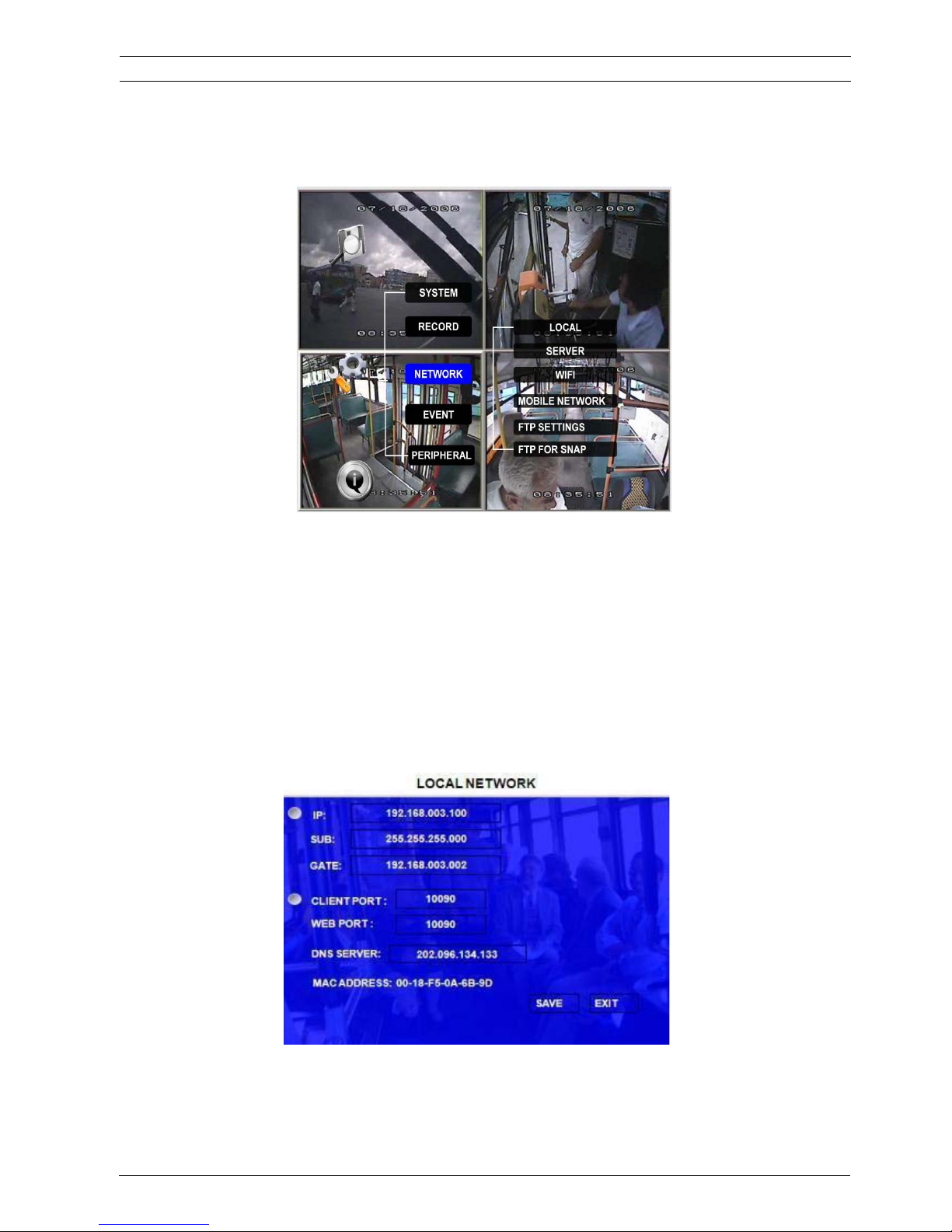
INITIALIZE INTERFACE: This means after MDVR starts up, which default interface the user prefer to show: CP3
menu interface or quad image interface. Quad Image is for the regular monitor output
display. CP3 is the Control Panel which can support one LCD to display the image and
realize the station annoucement function (the precondition is: the MDVR device can
support the station announcement function either)
User's Manual MVR-310-GUI |
v1.1 | 2014.01
OTHER SETTINGS 37Mobile DVR MVR-310
ViPRO Corporation
Page 38
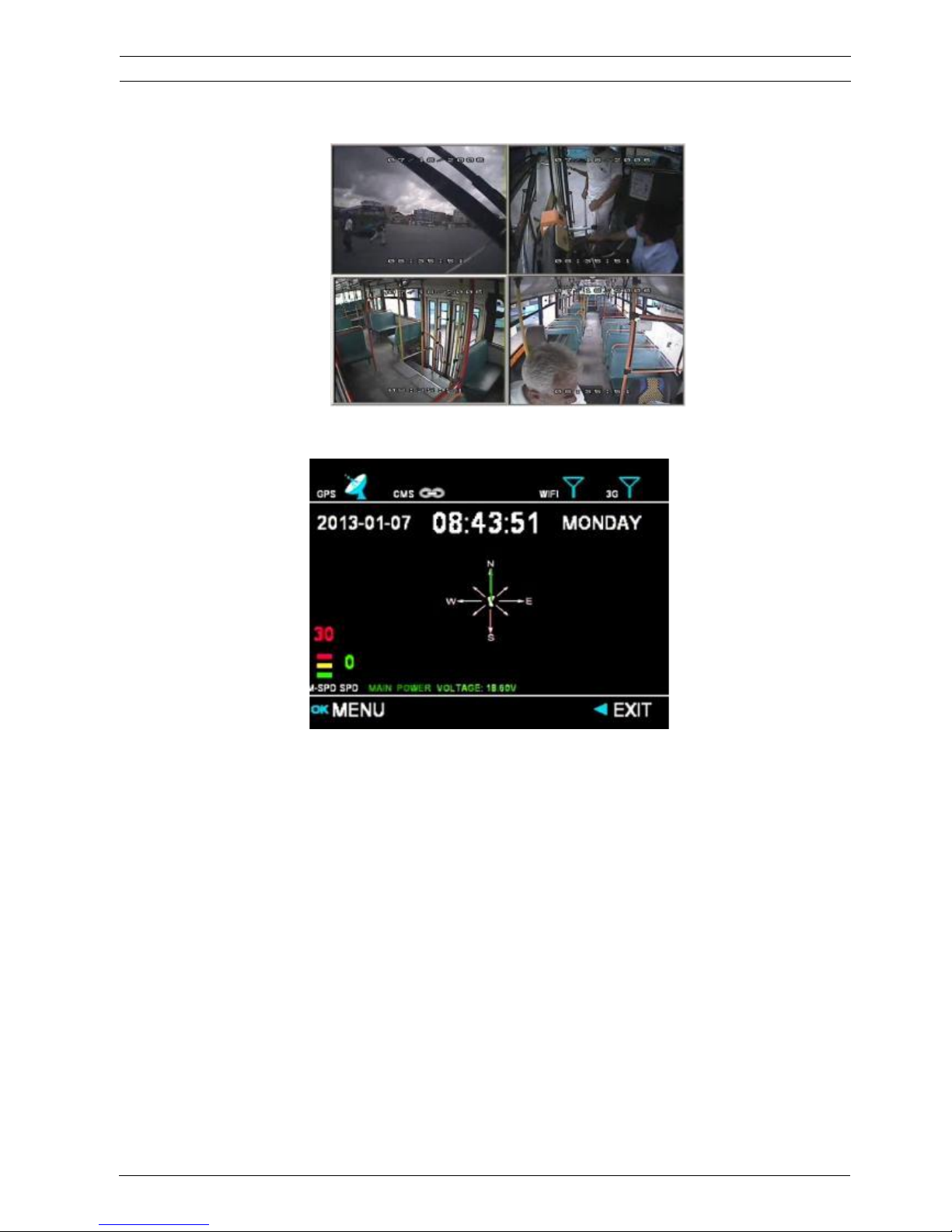
CP3 Interface:
WATERMARK: Water mark is used to protect original data from illegal modification, as long as the user setup
water mark.
EXPORT MINIPLAYER: This option is for user to export Miniplayer.
IMPORT TTS FILE: This option is for user to import TTS file for the audio announcer.
User's Manual MVR-310-GUI |
v1.1 | 2014.01
CP3 INTERFACE 38Mobile DVR MVR-310
Quad Image Interface:
ViPRO Corporation
Page 39
3.2.3 NETWORK
This part will describe how to setup the network parameters for PC software connection. (RJ45 cable
/WIFI connection/3G)
MVR-310 MDVR can support the following PC software: CMS, Ceiba, ADS.:
CMS (Central Management Software) is the software to manage the vehicles real time via 3G
Ceiba is the playback and analysis software
ADS is the downloading software
3.2.3.1 LOCAL
Local IP is the IP setting for the MDVR to make sure that MDVR can go online
User's Manual MVR-310-GUI |
v1.1 | 2014.01
NETWORK 39Mobile DVR MVR-310
ViPRO Corporation
Page 40
The user must enter a fixed IP address to use network capabilities, please consult with local Internet Service
Provider for the information. Use NUMERIC keypad to enter the TCP/IP address information:
IP: Enter the static IP address
SUB: Enter the subnet mask
GATE: Enter the gateway that the MDVR through to network
CLIENT PORT: no use at present
WEB PORT: this port is for IE access, the user have to add this port when the user want to access to MDVR
through IE browser, of example, the user have to access MDVR by: http://192.168.3.155:10090
DNS˖˖The DNS of the router, when the user want connect MDVR to internet via cable, or the CMS server using
domain name, please setup the DNS server for resolving IP address.
MAC Address: MAC address is unique and cannot change it.
3.2.3.2 SERVER NETWORK
The sever IP and port setting for PC software.
User's Manual MVR-310-GUI |
v1.1 | 2014.01
SERVER NETWORK 40Mobile DVR MVR-310
ViPRO Corporation
Page 41
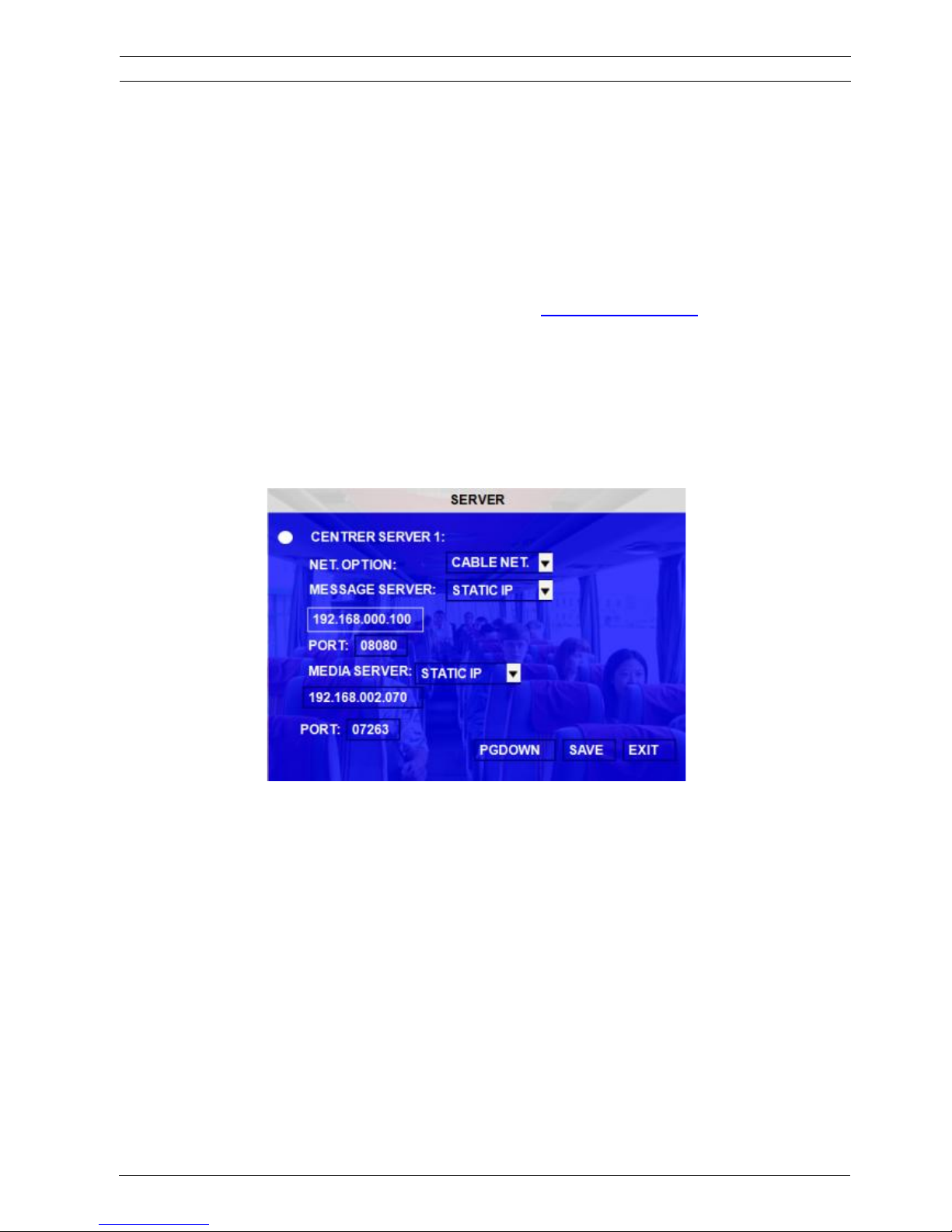
Please refer to the detailed manual for PC software settings for this part.
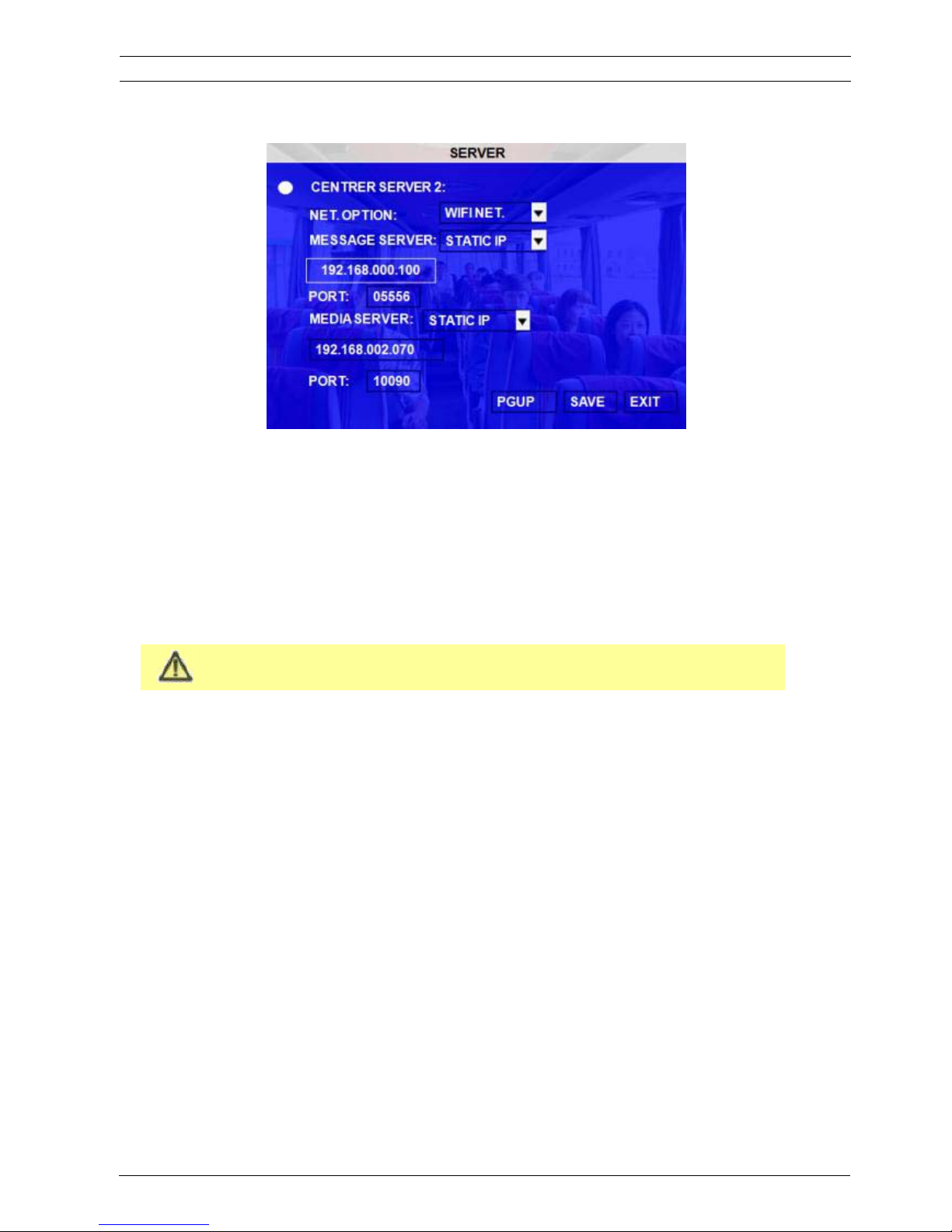
There are two center servers the user can setup by the practical application. Usually the user need one server for
CMS real time monitoring (by 3G) and ADS to download the video file or Ceiba to check the video by WIFI.
The user can connect MDVR via WIFI or CABLE and 3G at the same time.
NET. OPTION: There are three options. The first one is WIFI. The second one is cable network, and the third one
is MOBILE NETWORK. Please select the correct option
MESSAGE SERVER: This server IP must be the IP of the PC that installed message server for PC software
connection. The user can setup it as Static IP or Dynamic Domain name due to the server.
PORT: please use the default port 5556 here.
MEDIA SERVER IP AND PORT: NO use at present.
3.2.3.3 WIFI
This menu is used to setup WIFI parameter for Auto download software or Ceiba playback software.
User's Manual MVR-310-GUI |
v1.1 | 2014.01
WIFI 41Mobile DVR MVR-310
ViPRO Corporation
Page 42
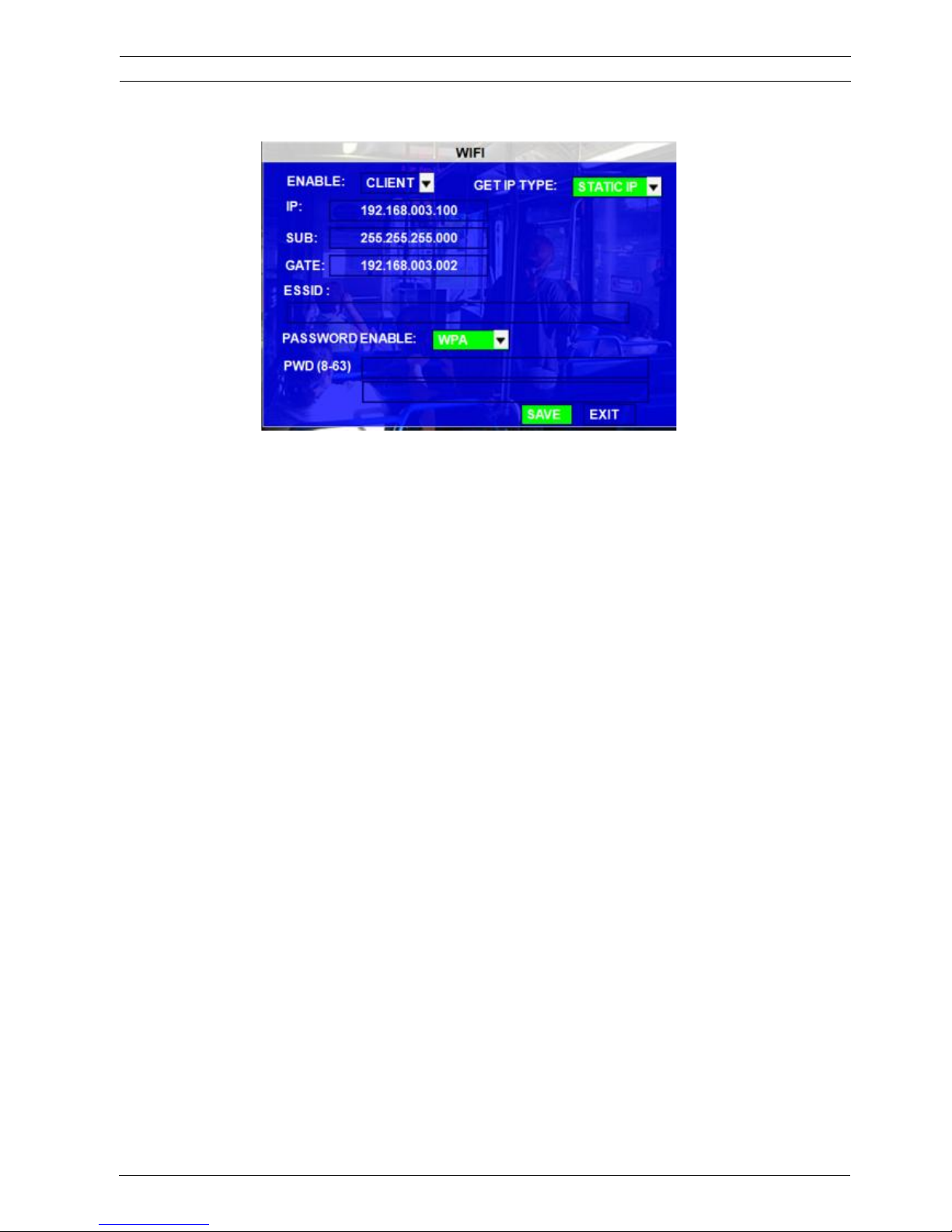
The MDVR WIFI can be used a CLIENT which means that MDVR system can get online by the WIFI module
built-in MDVR.
GET IP TYPE: There are two options; STATIC IP means you have to arrange a static IP for WIFI sever, and
DYNAIC IP means WIFI will get a dynamic IP, and make sure the DHCP function is OK.
IP: Enter the static IP address of built-in WIFI. Only when you select STATIP IP, this option is valid.
SUB: Enter the subnet mask. Only when you select STATIC IP, this option is valid.
GATE: Enter the gateway that the MDVR through to network. Only when you select STATIP IP, this option is
valid.
ESSID: The AP name of this WIFI router.
PSSWORD ENABLE: if the WIFI router need a password, please choose the type and input password. WEP
can only support 5digital ASCII
3.2.3.4 MOBILE NETWORK
This interface is to setup the wireless modules type, active mode and SIM card parameters, when the user connect
with net cable, please select mode type as NONE.
User's Manual MVR-310-GUI |
v1.1 | 2014.01
MOBILE NETWORK 42Mobile DVR MVR-310
ViPRO Corporation
Page 43
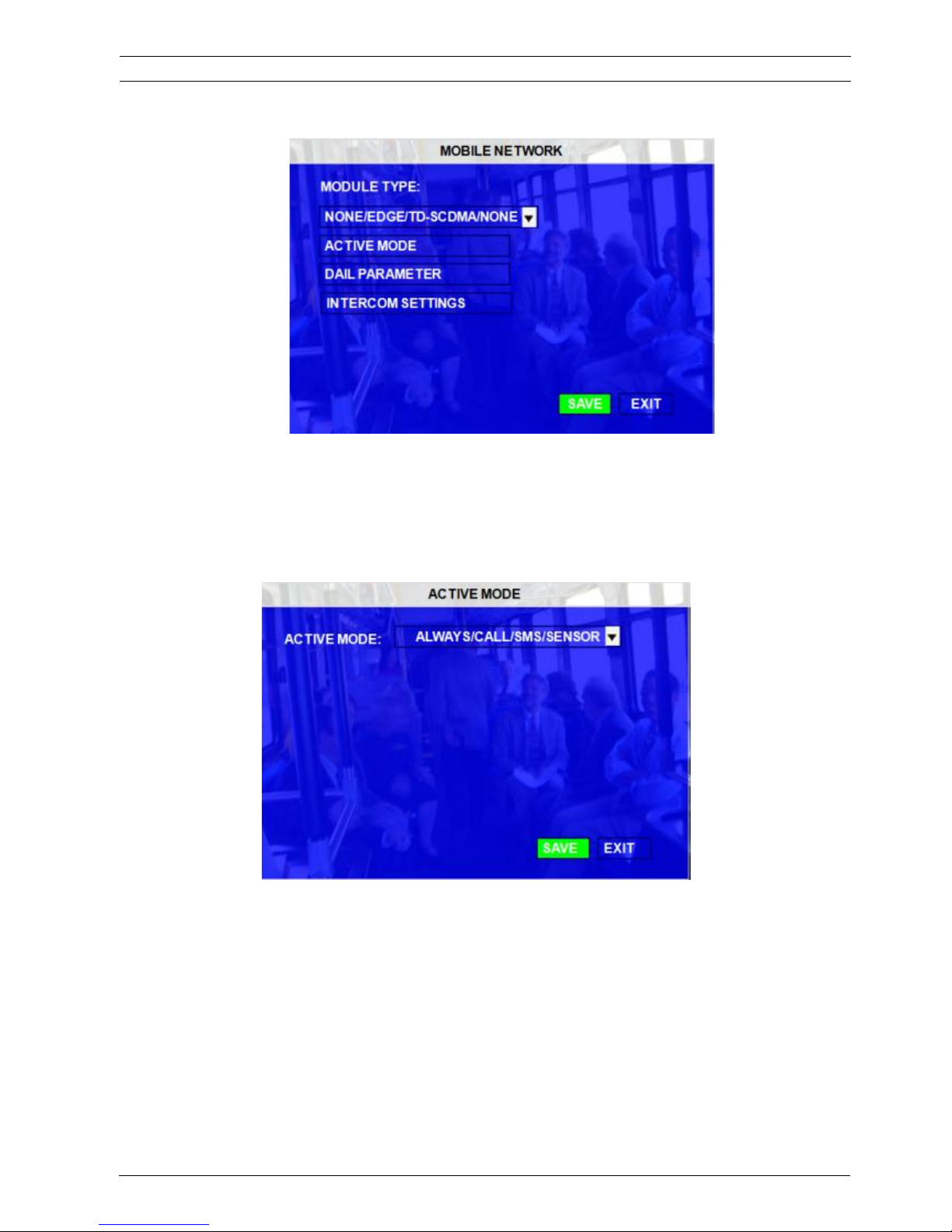
ACTIVE MODE: There are three options.
ALWAYS: means when MDVR started up, the wireless module will always dial up and connect to message server.
CALL/SMS: means only the user call the phone number of the SIM card or send the message to the SIM, it will
active the wireless module and start to dial up.
SENSOR: means the user can setup one sensor to active the wireless module, only when the user triggered the
sensor, the wireless module will start to dial up and then connect to internet.
DIAL PARAMETER settings for SIM card please check the setup as follow form.
User's Manual MVR-310-GUI |
v1.1 | 2014.01
MOBILE NETWORK 43Mobile DVR MVR-310
ViPRO Corporation
Page 44
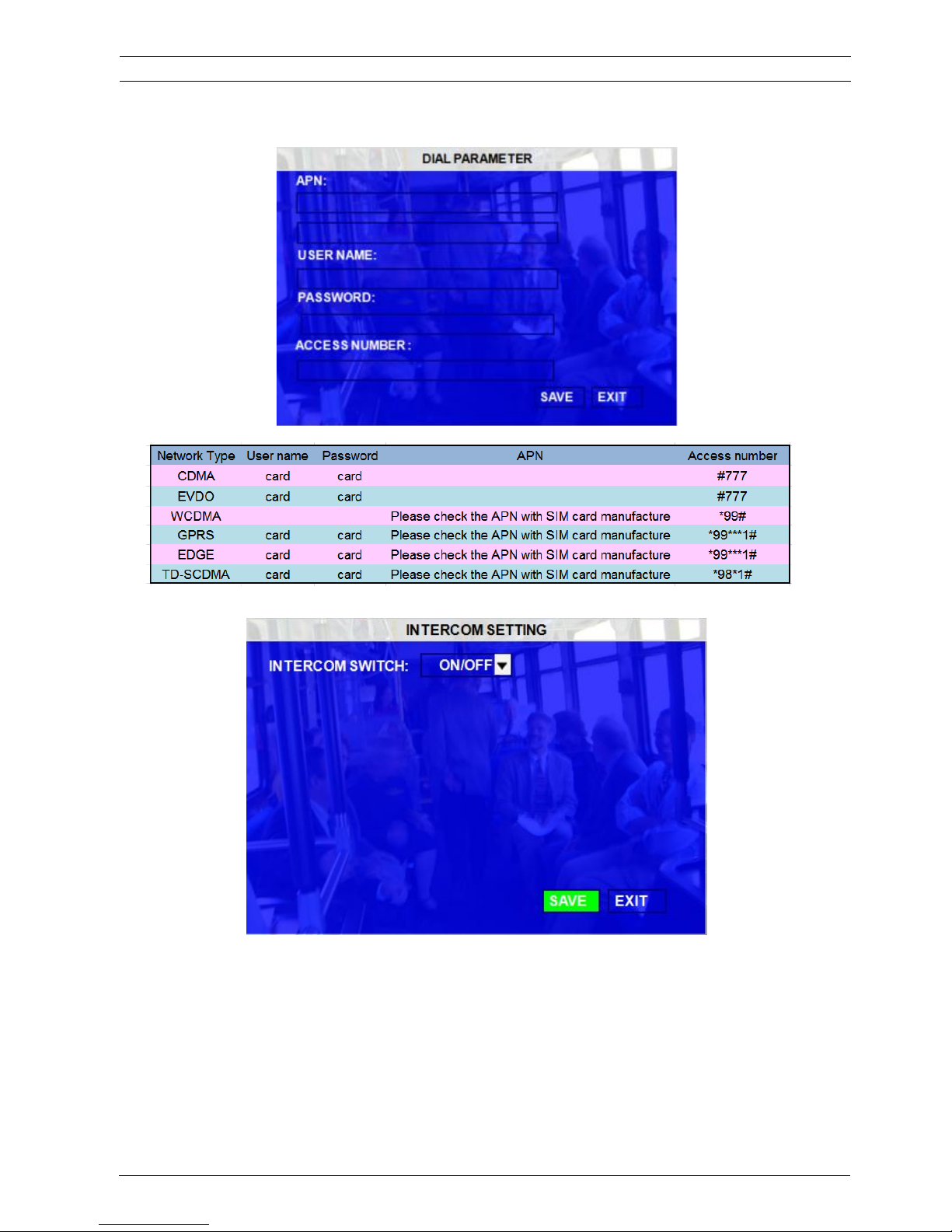
INTERCOM SETTINGS: it's a switch for interphone function, which can realize speak to center via SIM card.
3.2.3.5 FTP SETTINGS
The MDVR can be used as a FTP server. This means that the user can login IE by the MDVR IP address to check
the MDVR equipment video files in the hard disk and download the video file. This interface is to setup the name
and password to control the server limit. Standard FTP protocol, but not all functions are valid, for example delete
User's Manual MVR-310-GUI |
v1.1 | 2014.01
FTP SETTINGS 44Mobile DVR MVR-310
or create file/folder is invalid.
ViPRO Corporation
Page 45
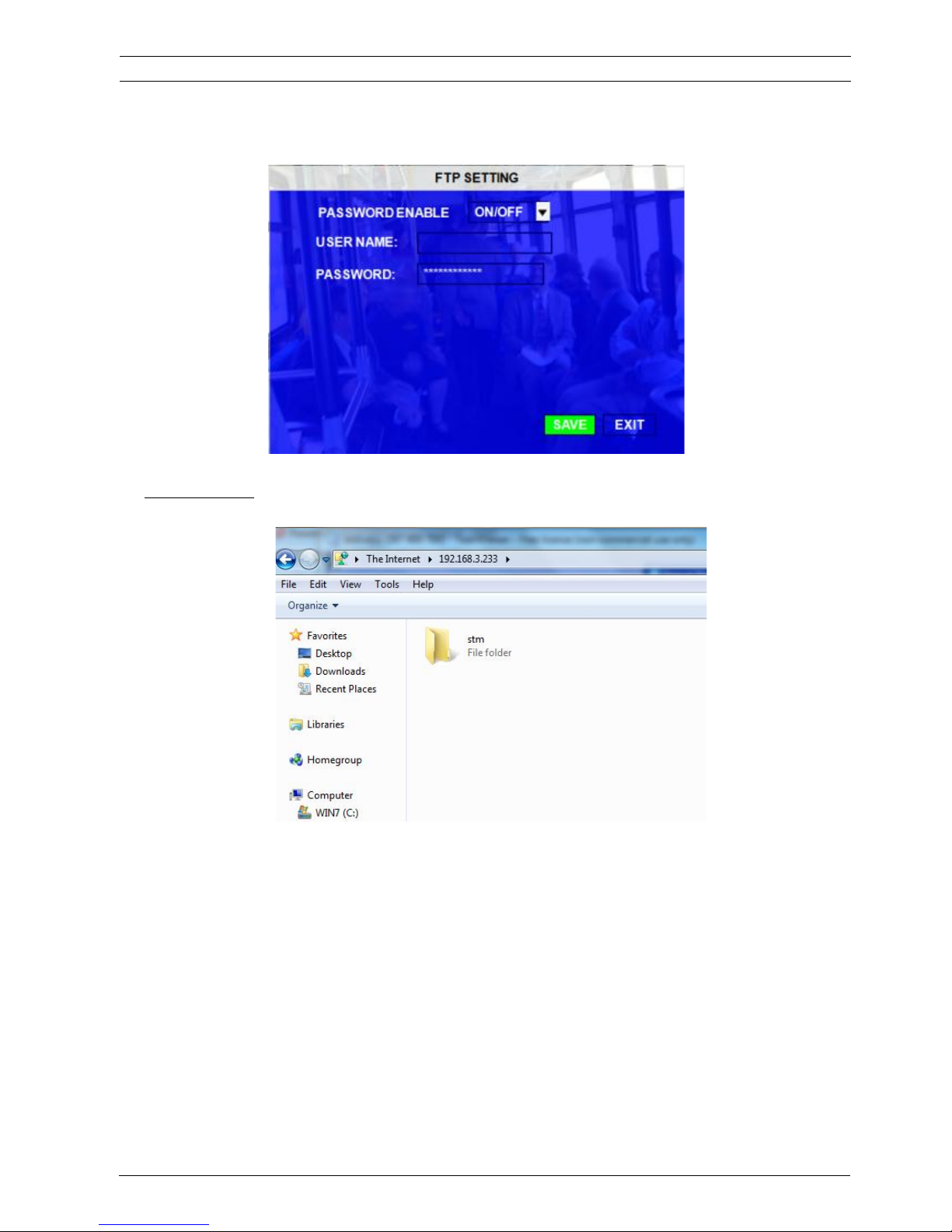
If the local IP of MDVR is 192.168.3.233, the user can log in the MDVR FTP server as follow:
ftp://192.168.3.233
and the recorded file save path is ftp://192.168.3.233/stm/disk/0/p1/2012-11-23/
The default login username is admin, password is: 88888888, if the user can’t login at the first time, please try
again.
User's Manual MVR-310-GUI |
v1.1 | 2014.01
FTP SETTINGS 45Mobile DVR MVR-310
ViPRO Corporation
Page 46
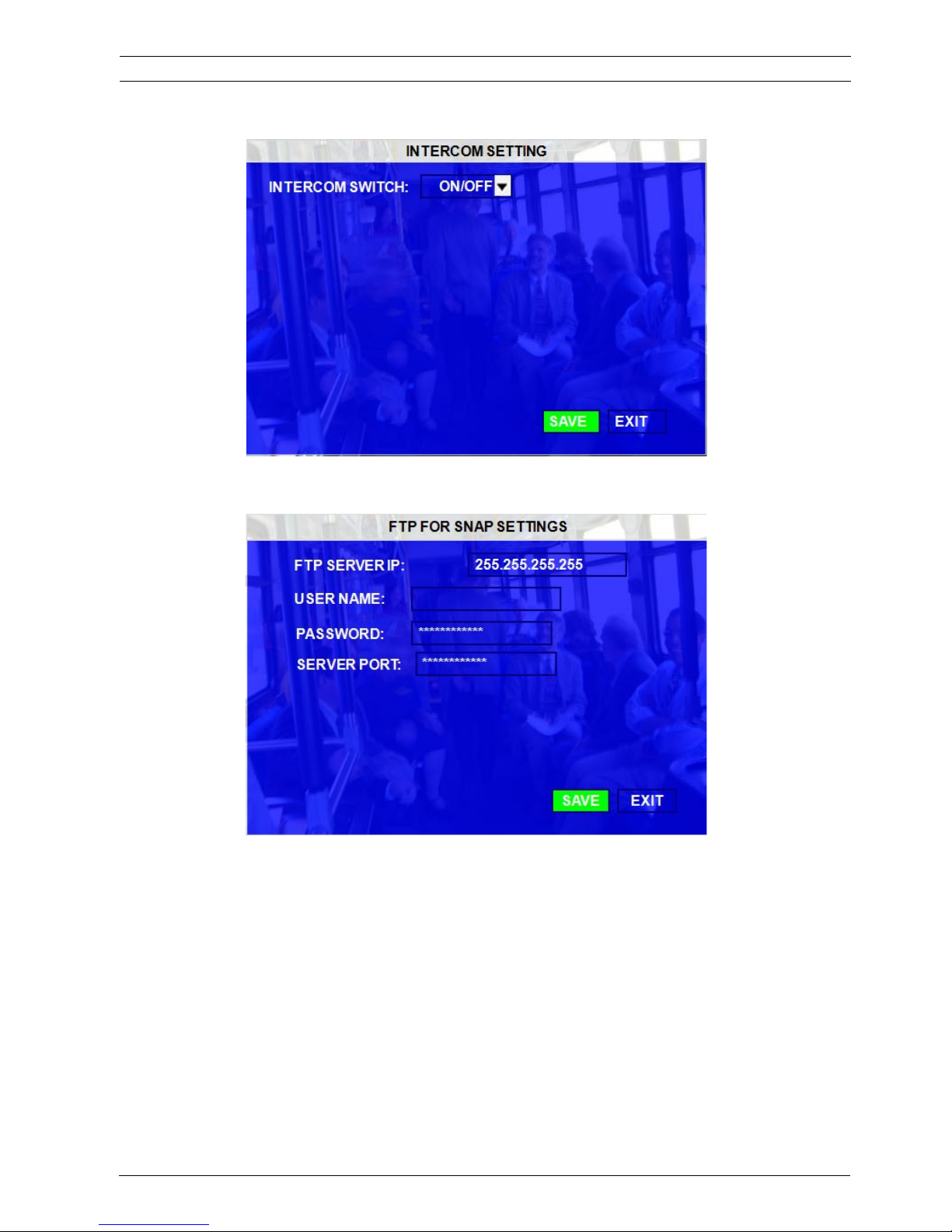
3.2.3.6 FTP FOR SNAP
This page is for uploading snapped image to FTP server when alarm is triggered.
User's Manual MVR-310-GUI |
v1.1 | 2014.01
FTP FOR SNAP 46Mobile DVR MVR-310
ViPRO Corporation
Page 47
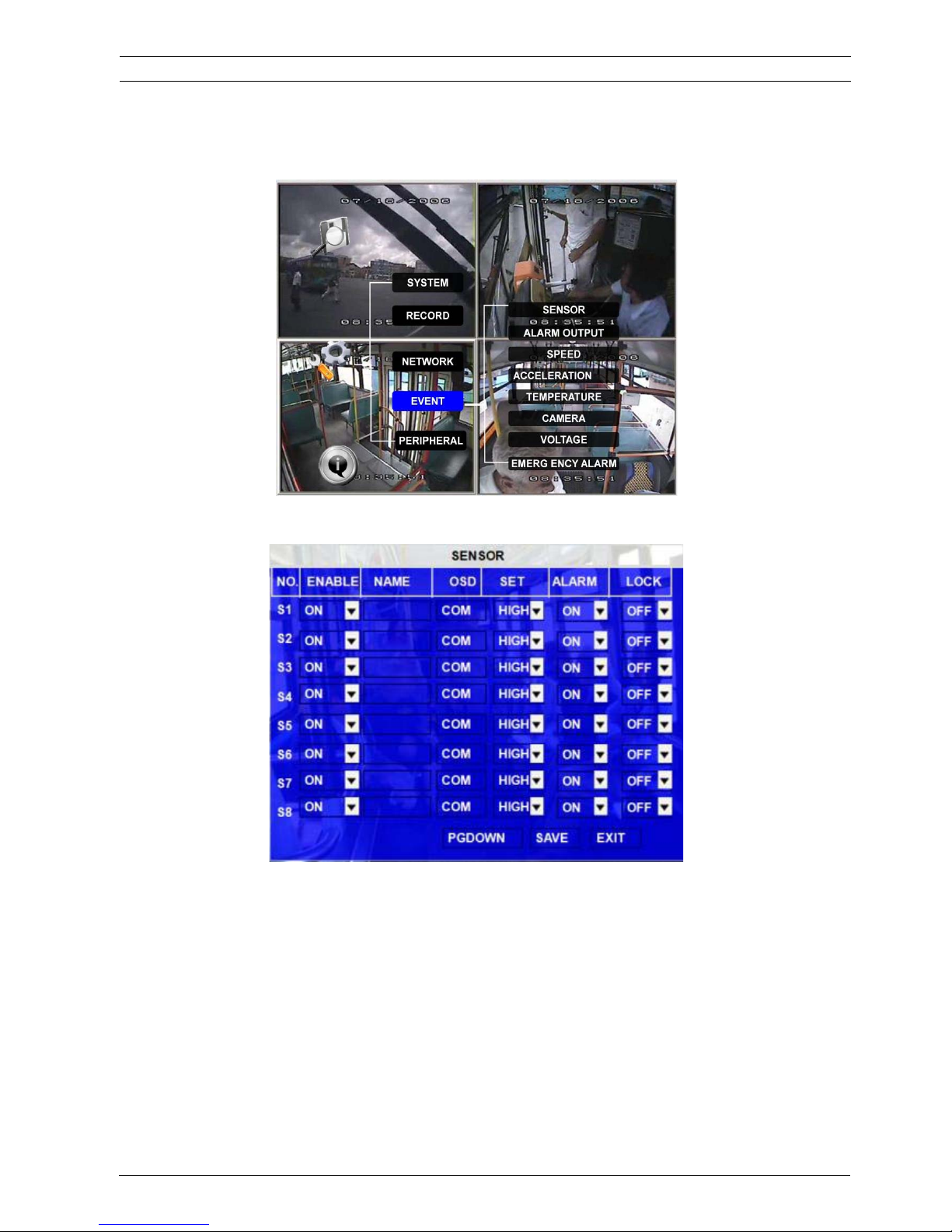
3.2.4 EVENT
3.2.4.1 SENSOR
These are I/O sensor functions to detect the drivers’ behavior such as braking, turning left/right, closing/opening
the door, reversing etc… Once these alarms are generated, they will be sent to central server by 3G network.
EN: Enable, to active this function
NAME: Press ENTER on the Name field to display the soft keyboard. Enter the text name to identify the source of
each sensor connected to the unit.
OSD: Input the numbers and characters, they will be embedded into the alarm video files when alarms happen,
and it will also display in live view, Please pressǏEnterǐ into the soft keyboard. The label also identifies the
type of event when doing a quick search using EVENT SEARCH option.
User's Manual MVR-310-GUI |
v1.1 | 2014.01
EVENT 47Mobile DVR MVR-310
ViPRO Corporation
Page 48
If switch/alarm/log/lock all set as ON, When sensor triggered, it will trigger alarm signal and event log, it
will also trigger alarm recording and event recording, besides, the EVENT LOG can’t be deleted even
HDD-formatted or overwrite.
SET: LOW (normal close) means the power level is from high to low to trigger the alarm.
HIGH (normal open) means the power level is from low to high trigger the alarm.
ALARM: Press ENTER to select between OFF or ON:
ON means when sensor triggered, alarm LED will flash, OSD will display in the live view, a red “A” will
display in each channel, until re-login the system with account, the flashing will disappear, also, MDVR
will record the event log, and, if the security set as OFF, when the user trigger the sensor, there is no
alarm LED flashing and MDVR won’t record the event log.
LOCK: To enable the event does not erase during the over-write process of hard disk;
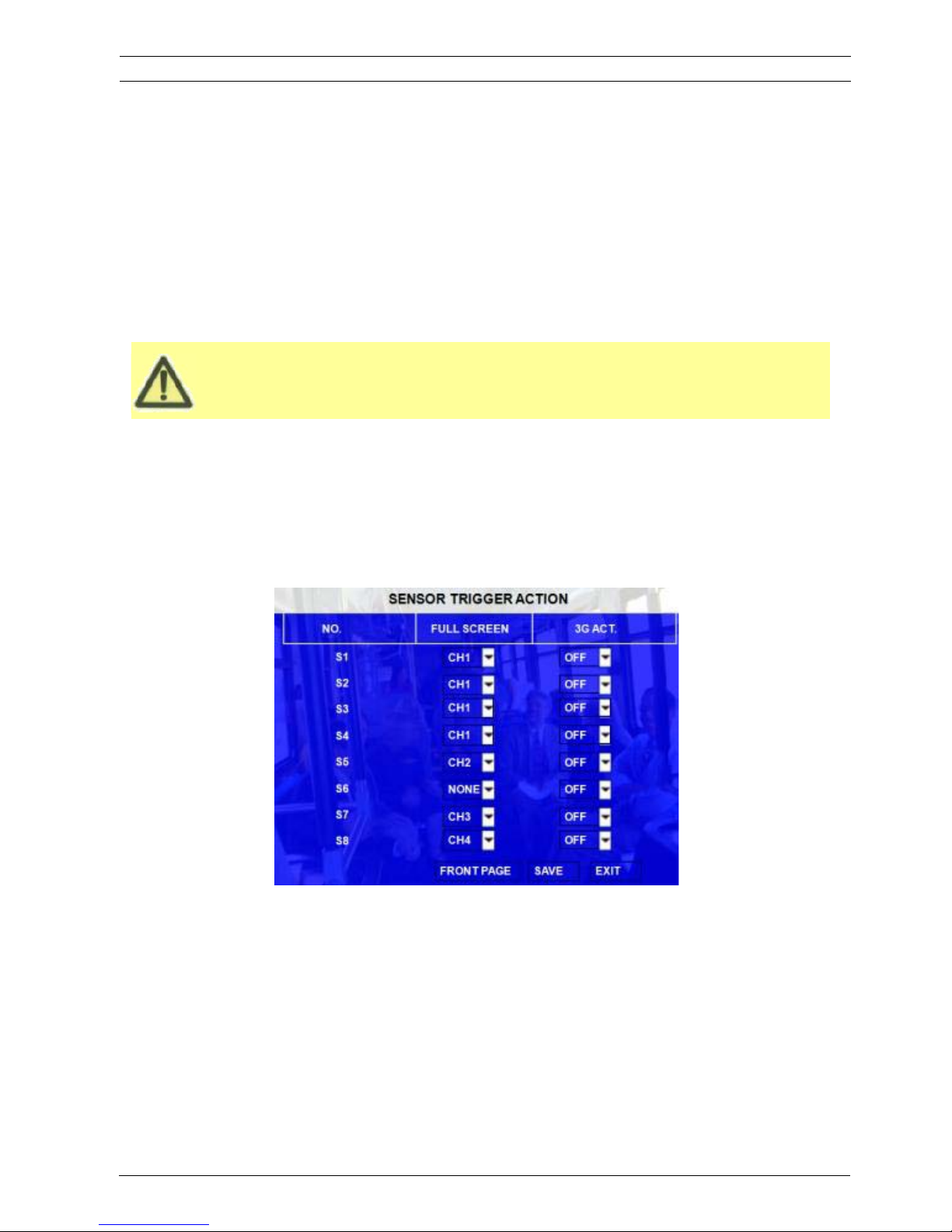
NEXT PAGE: Sensor trigger action means setup the alarm linkage for each sensor, for example, the user setup
the image of channel 1 as the alarm linkage for sensor1, when the alarm from sensor1 is triggered, the image from
channel 1 will change to be full screen. And the priority is from sensor 1 to sensor 8. Sensor1 priority is highest.
Sensor 8 priority is lowest.
3G ACT: means the user can define a sensor to active the 3G module, as there is an active mode in 3G setup
interface, they are corresponding options.
3.2.4.2 SENSOR OUTPUT
MVR-310 MDVR supports 2 sensor outputs. All alarm types can trigger the two sensor outputs, such as
sensor1~8, over speed, temperature, video loss and so on, please access the menu
(GUI>>>>SETUP>>>EVENT>>>SENSOR OUTPUT), as follow:
Remark: Sensor out means when there is an event triggered, the corresponding sensor out will give +12V/2A
output, and the duration is the alarm time the user have setup, so, the user can associate different sensor to
User's Manual MVR-310-GUI |
v1.1 | 2014.01
SENSOR OUTPUT 48Mobile DVR MVR-310
different alarm types.
ViPRO Corporation
Page 49
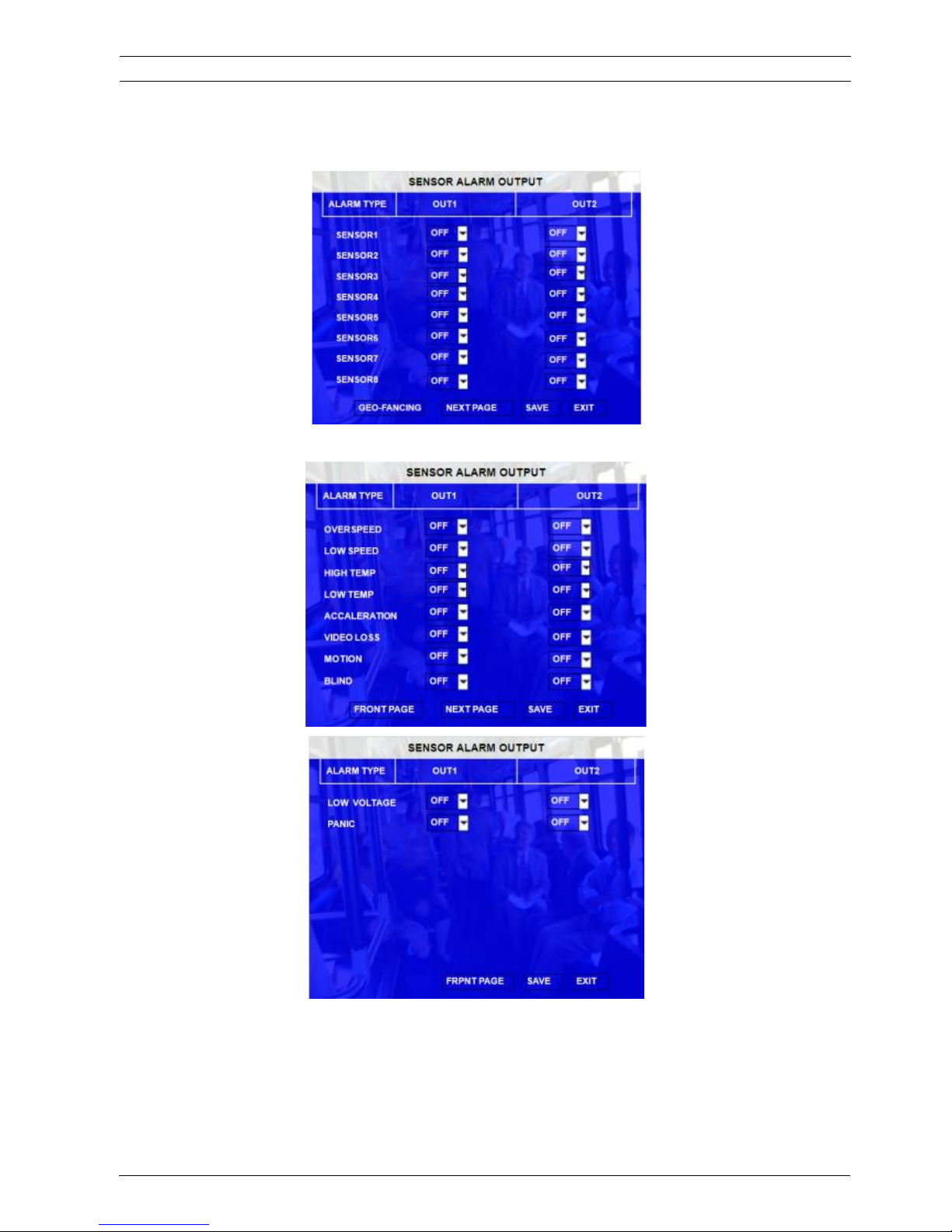
ON means this input can trigger this output, OFF means can’t.
User's Manual MVR-310-GUI |
v1.1 | 2014.01
SENSOR OUTPUT 49Mobile DVR MVR-310
ViPRO Corporation
Page 50
3.2.4.3 SPEED
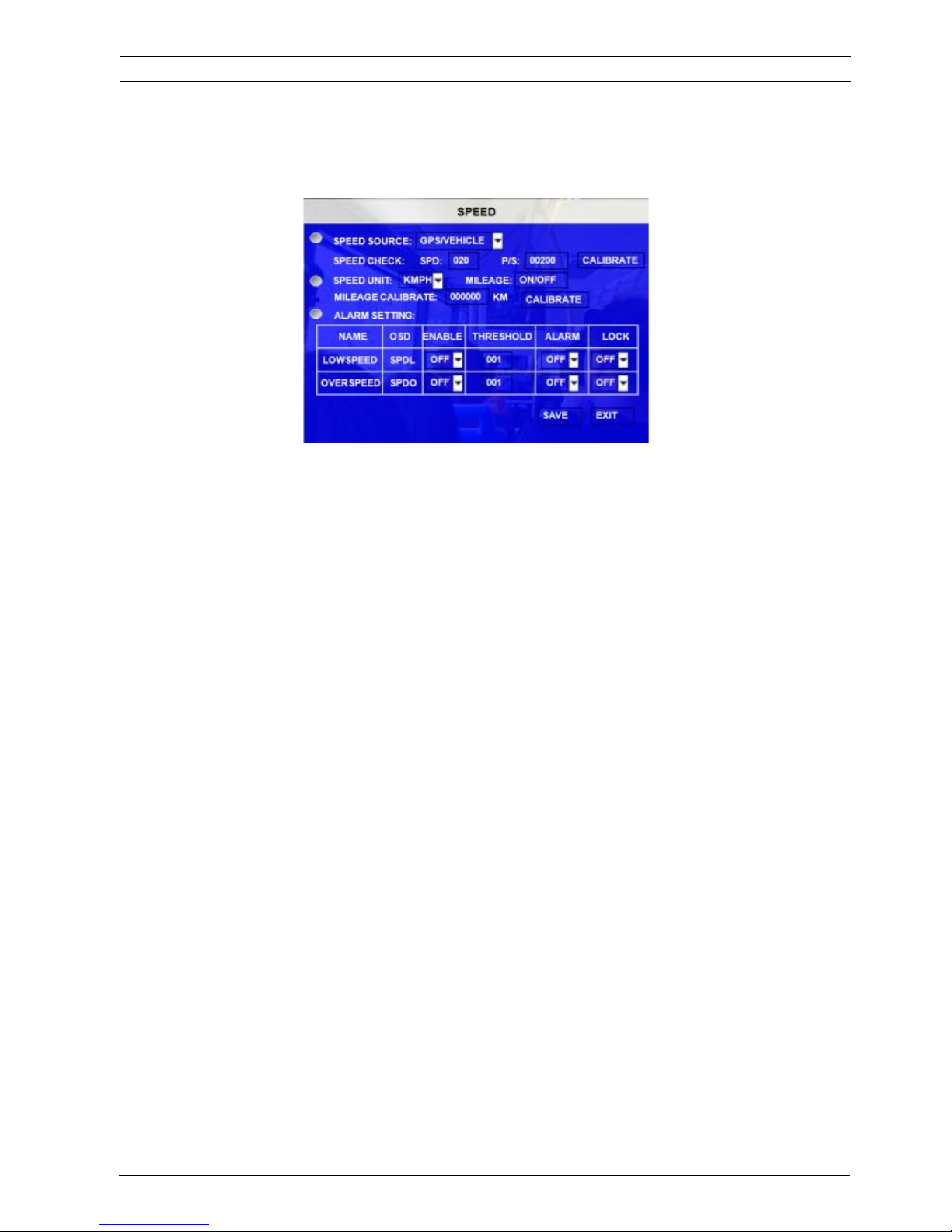
Setup the alarm for over speed and some other parameters.
SOURCE: MDVR is capable of capturing vehicle speed via GPS antenna or Vehicle--speedometer.
z Browse between the settings of GPS or speedometer from the list.
z Please note that the GPS antenna should be connected to MDVR to receive
satellite signals for speed.
z For more information on capturing speed from speedometer please contact local
distributor for more technical support;
SPD CHECK: Speed check is used to calibrate the offset speed when connected to the speedometer.
That’s to say, the check only available when speed source is vehicle.
z Input the first area with the vehicle speed, for example at 80 (in KM/H)
z Start the vehicle and the second area will show the data from speedometer (in HZ)
z When the vehicle reach to 80 KM/H (shown in vehicle meter or dash board), and
keep this speed at 30 seconds, then press the “Check” to make the system
calibrate the second area (HZ) set as first area data (80);
SPEED UNIT: MPH or KPH, MILEAGE is the total mileage that the MDVR has run.
OVER SPEED: If the vehicle exceeds the high speed limit, MDVR will trigger the alarm signal (when the
following option ALARM set as YES) until the driver slows down the speed
LOW SPEED: If the vehicle exceeds the low speed limit, MDVR will trigger the alarm signal (when the
following option ALARM set as YES) until the Admin password is entered to acknowledge the
alarm.
3.2.4.4 ACCELERATION
There are 3 values for G force inertia sensor: X, Y, and Z. X indicates forward and backward. Y indicates left
and right and Z indicated up and down. Threshold is the limitation for the value, if the value large than the
setting in the menu, then MDVR will trigger alarm.
User's Manual MVR-310-GUI |
v1.1 | 2014.01
SPEED 50Mobile DVR MVR-310
ViPRO Corporation
Page 51
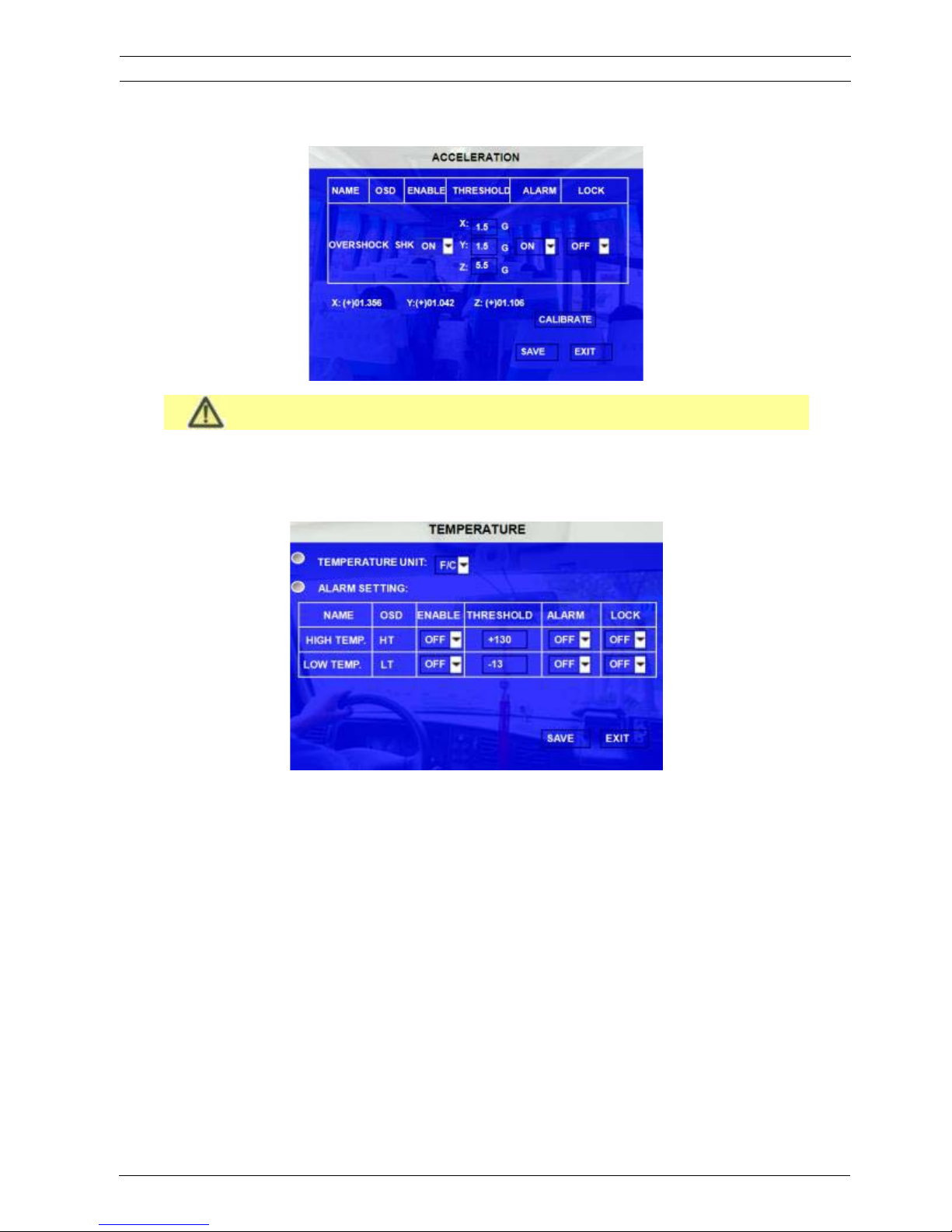
This function only can be active when the MDVR connected with inertia sensor.
3.2.4.5 TEMPERATURE
Inspection for temperature.
If the MDVR working temperature is higher than the setting for HIGH TEMP, MDVR will trigger alarm.
If the MDVR working temperature is lower than the setting for LOW TEMP, MDVR trigger will alarm
.
3.2.4.6 CAMERA
Display the alarm information from camera.
User's Manual MVR-310-GUI |
v1.1 | 2014.01
TEMPERATURE 51Mobile DVR MVR-310
ViPRO Corporation
Page 52
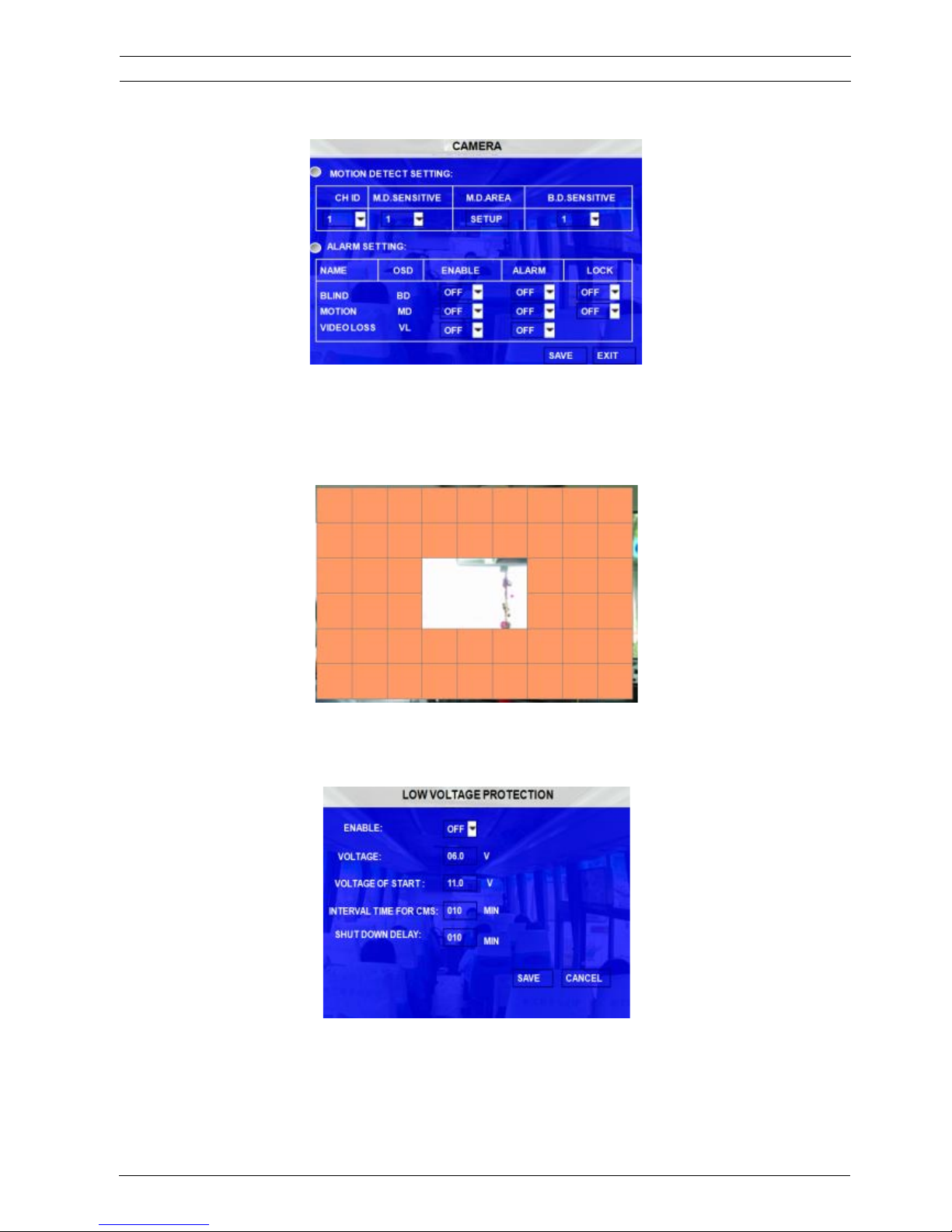
There are three statuses for camera alarm: blind detect, motion detect and video loss.
CH ID: please choose the channel the user want to setup, for motion detect and blind detect.
SENSITIVE: this is the detect sensitivity, 1 is the most sensitive.
M.D.AREA: this option is for user to setup the detect area, as follow, blank square means the area is selected,
please exits to the setup interface to save the settings.
3.2.4.7 VOLTAGE
VOLTAGE PROTECTION: means when MDVR system detects that the voltage input always in a low status,
User's Manual MVR-310-GUI |
v1.1 | 2014.01
VOLTAGE 52Mobile DVR MVR-310
MDVR will disconnect to CMS and shutdown automatically.
ViPRO Corporation
Page 53
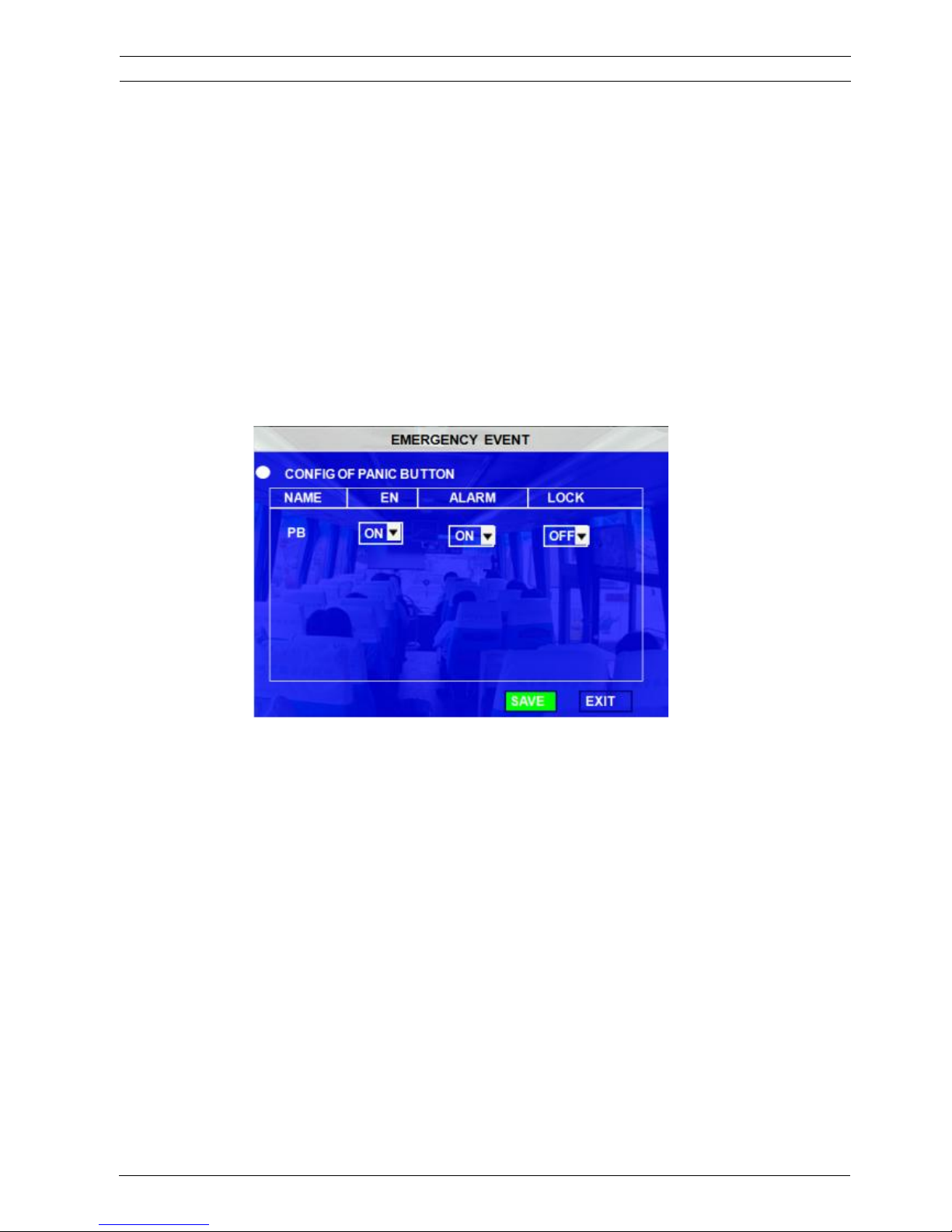
ENABLE: setup the voltage protection switch, ON means enable, OFF means disable.
VOLTAGE: setup the low voltage limited value.
VOLTAGE OF START: this means when the voltages of the battery reach this value, MDVR will startup
automatically.
INTERVAL TIME FOR CMS: means when MDVR in low voltage for so long time, device will disconnect to CMS
server.
SHUTDOWN DELAY: means when MDVR in low voltage for so long time, device will shutdown automatically.
3.2.4.8 EMERGENCY EVENT
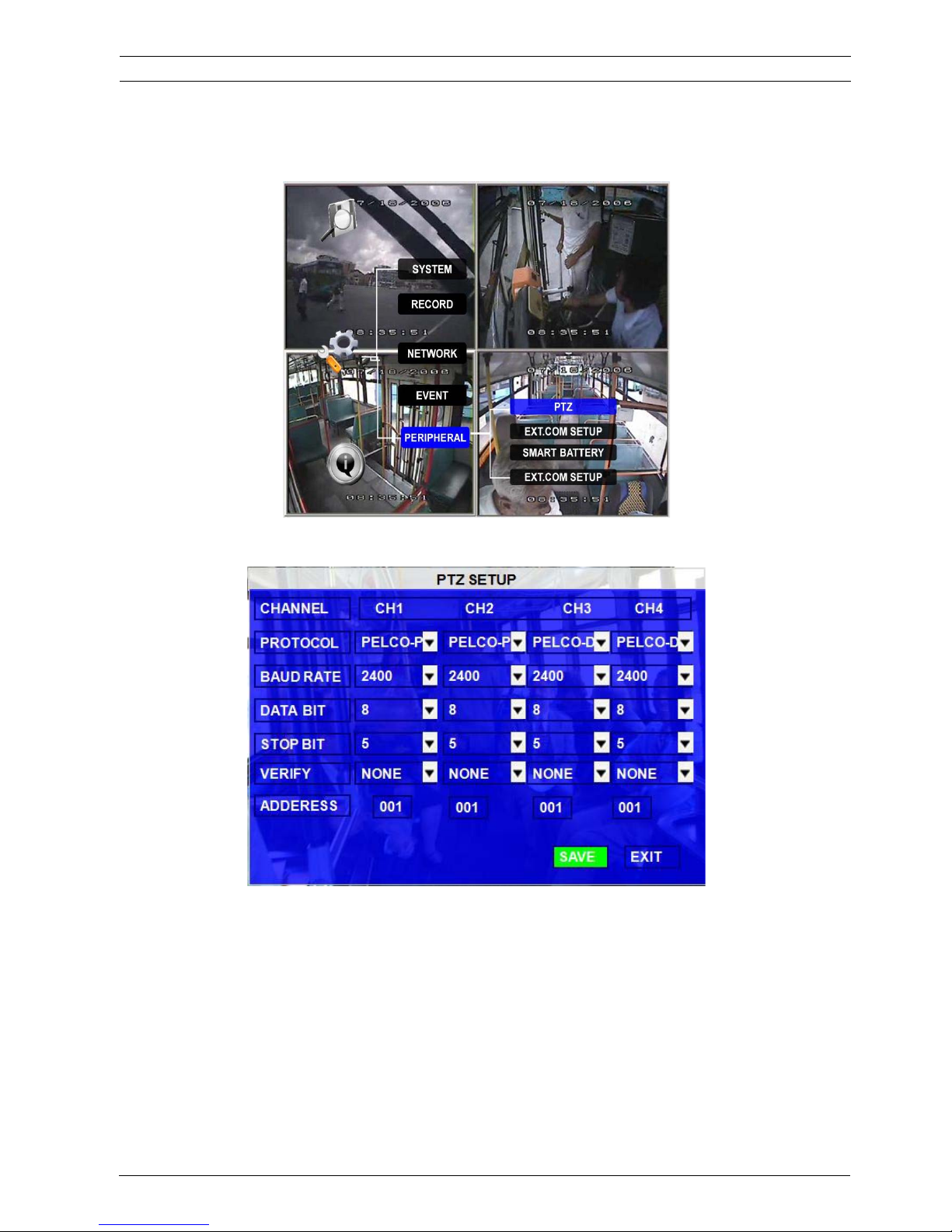
To setup the panic button alarm
User's Manual MVR-310-GUI |
v1.1 | 2014.01
EMERGENCY EVENT 53Mobile DVR MVR-310
ViPRO Corporation
Page 54
3.2.5 PERIPHERAL
3.2.5.1 PTZ
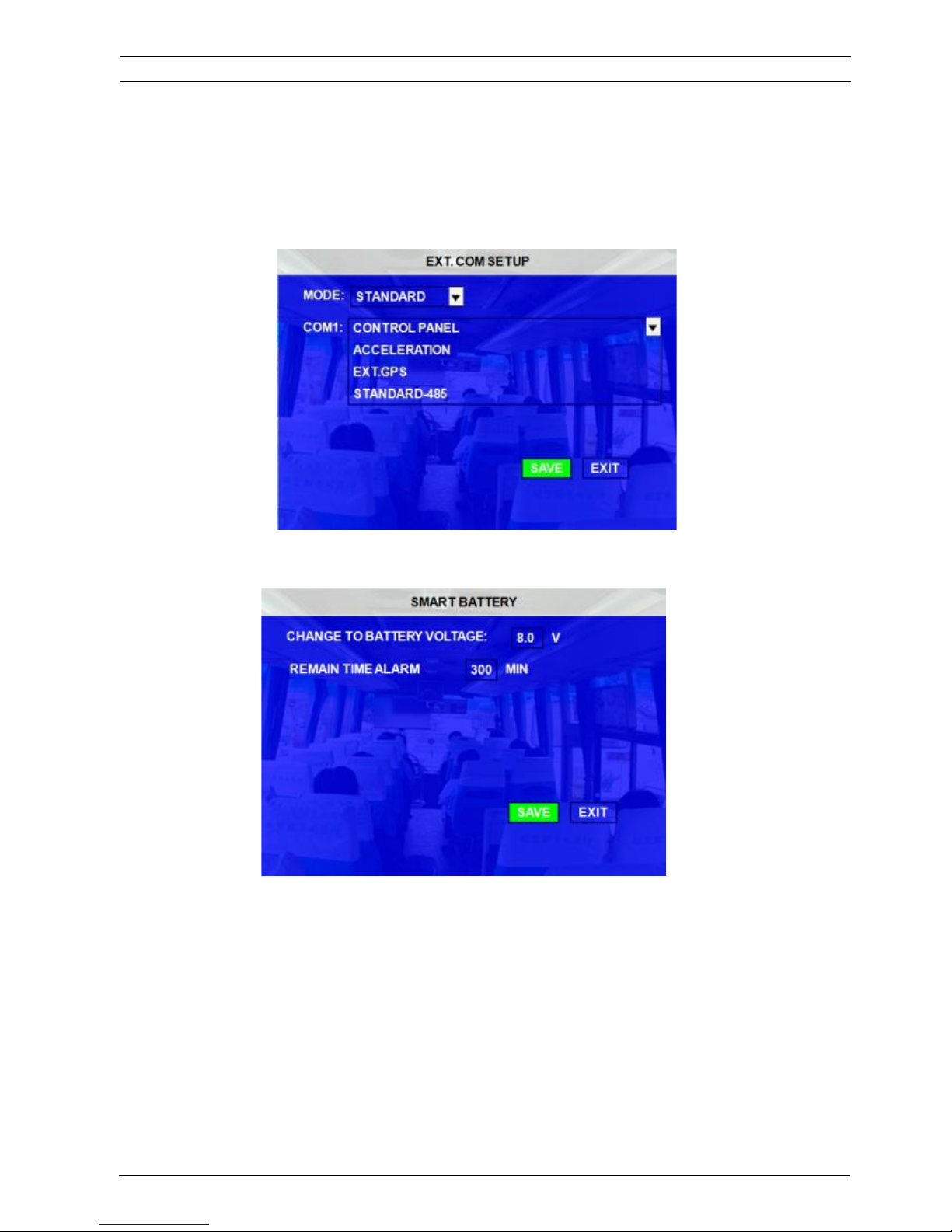
CHANNEL: The channel of PTZ connected.
PROTOCOL: select the protocol of different PTZ, there are two protocols to switch, and the default is Pelco-D
BAUD RATE: select the different baud rate for the PTZ, there are 1200, 2400, 4800, and 9600
DATA BIT: there are 5,6,7,8 options to select, default setting is 8.
STOP BIT: there are 1and 2 to select, the default setting is 1.
VERIFY: there are None/Odd/Even/Mark/Space to select, the default setting is none.
ADDRESS: Fill the code of respective PTZ
User's Manual MVR-310-GUI |
v1.1 | 2014.01
PERIPHERAL I PTZ 54Mobile DVR MVR-310
ViPRO Corporation
Page 55
3.2.5.2 EXT.COM SETUP
This interface is for external accessory connection, such as control pane, PTZ, Inertia sensor, LED screen, station
announcement and so on.
MODE: Standard mode means connect standard accessories to the 485 port.
3.2.5.3 SMART BATTERY
To protect the battery, if the battery voltage is lower than 8.0V or so, switch to UPS for power supply
automatically. And the system will calculate how long the UPS can work. Once the time left < setup value, trigger
alarm.
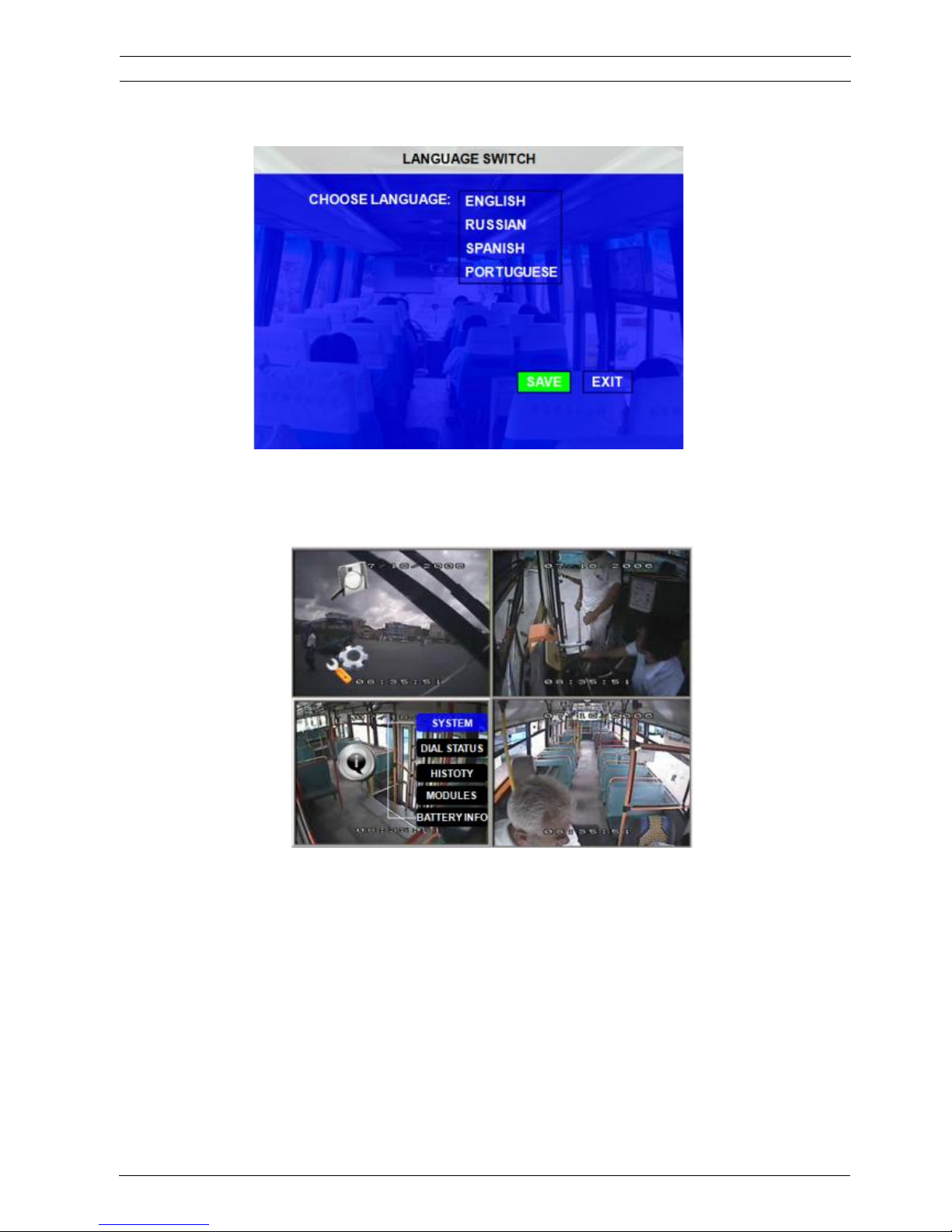
3.2.5.4 LANGUAGE SETTING
Currently, the MDVR can support 4 different languages: English, Russian, Spanish and Portuguese. Please
setup the system language here.
User's Manual MVR-310-GUI |
v1.1 | 2014.01
EXT.COM SETUP 55Mobile DVR MVR-310
ViPRO Corporation
Page 56
3.3 INFORMATION
3.3.1 SYSTEM
Display the MCU version, firmware version, HDD status and SD card information.
1, NO HDD means No HDD installed or the HDD is defective and cannot work.
2, NO FORMAT means HDD installed but not formatted. All the new hard disk must be formatted
after installation
3, showing the detailed information for HDD means HDD works fine.
User's Manual MVR-310-GUI |
v1.1 | 2014.01
INFORMATION 56Mobile DVR MVR-310
ViPRO Corporation
Page 57
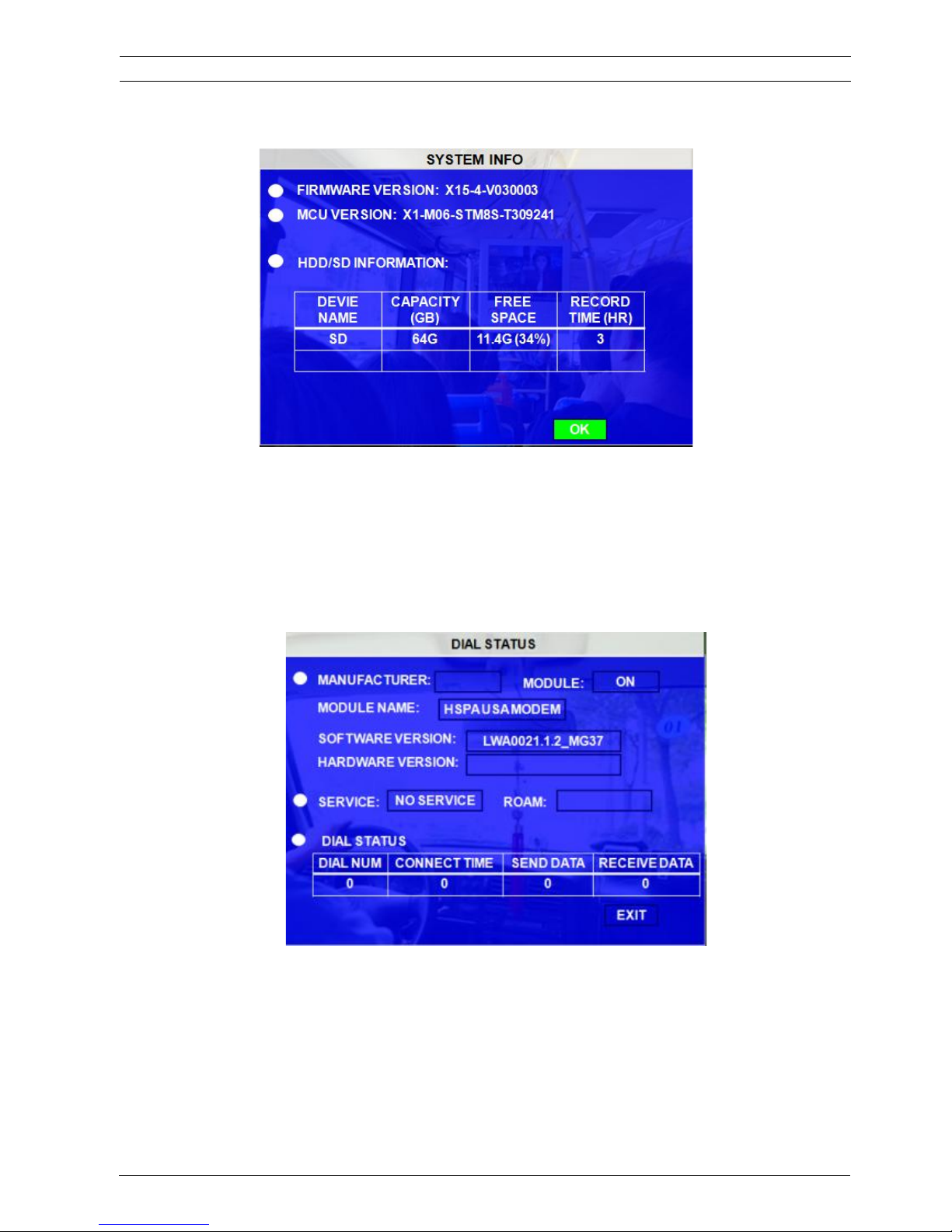
Capacity: This is the capacity for the hard disk recording after format.
Free Space: the spare space for hard disk for recording
Record capacity: The time means that how long that the hard disk can recording based on the current
configuration of the MDVR (like image quality, resolution, frame rate) with the free space.
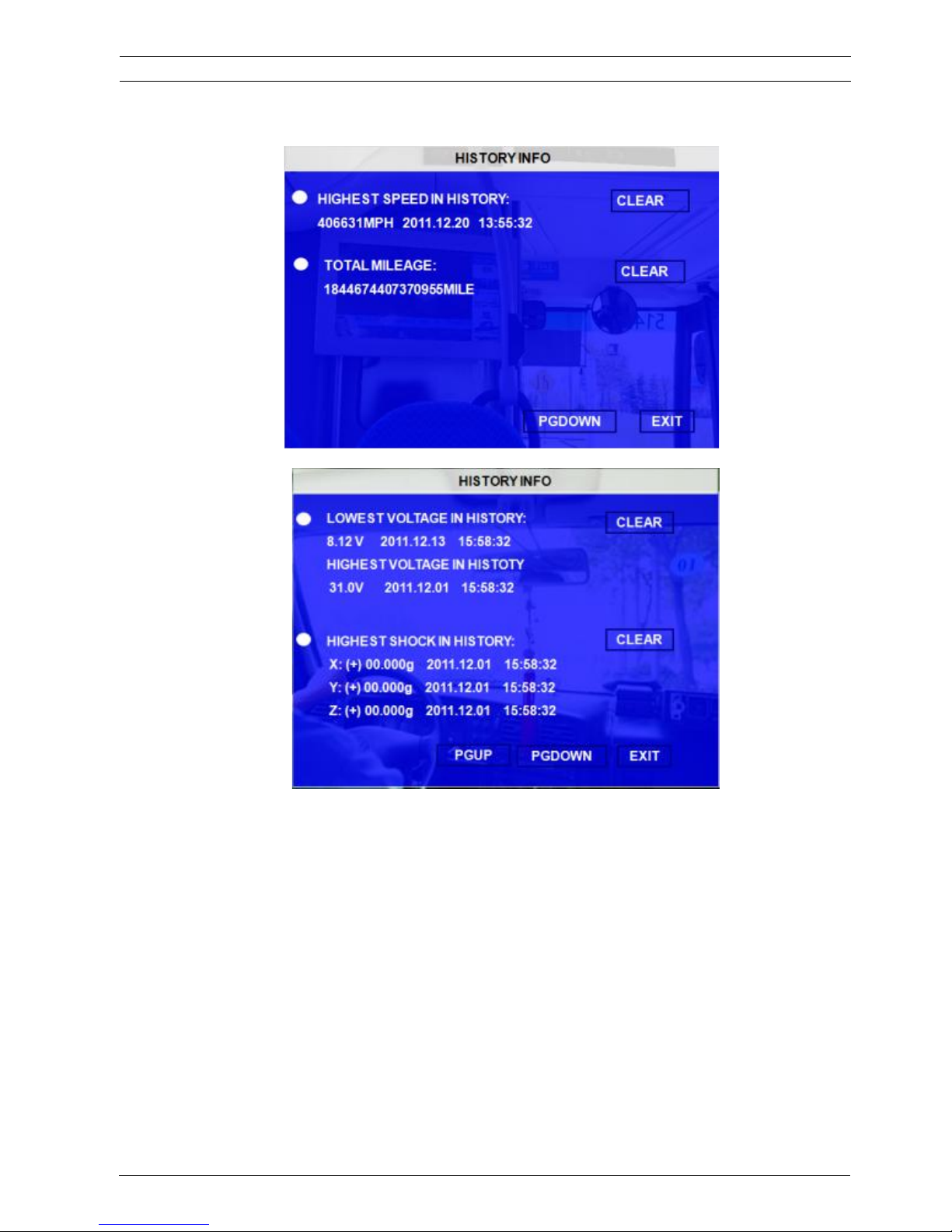
3.3.2 DIAL STATUS
The data for dial status information
3.3.3 HISTORY
The data for history information
User's Manual MVR-310-GUI |
v1.1 | 2014.01
DIAL STATUS 57Mobile DVR MVR-310
ViPRO Corporation
Page 58
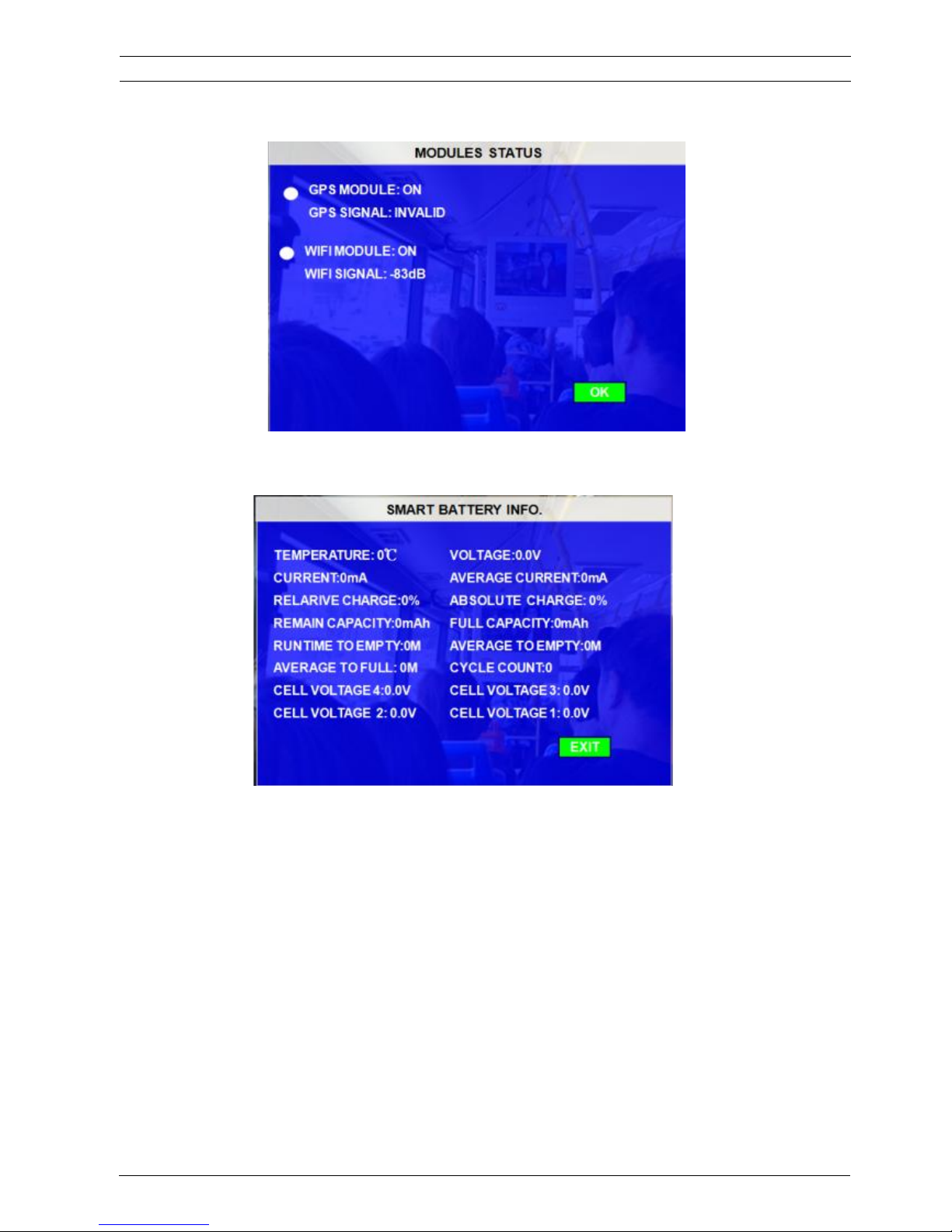
Press ǏCLEARǐto delete all the current data.
3.3.4 MODULES
Display the GPS module information.
User's Manual MVR-310-GUI |
v1.1 | 2014.01
MODULES 58Mobile DVR MVR-310
ViPRO Corporation
Page 59
3.3.5 BATTERY INFO
User's Manual MVR-310-GUI |
v1.1 | 2014.01
BATTERY INFO 59Mobile DVR MVR-310
ViPRO Corporation
 Loading...