

Page 1
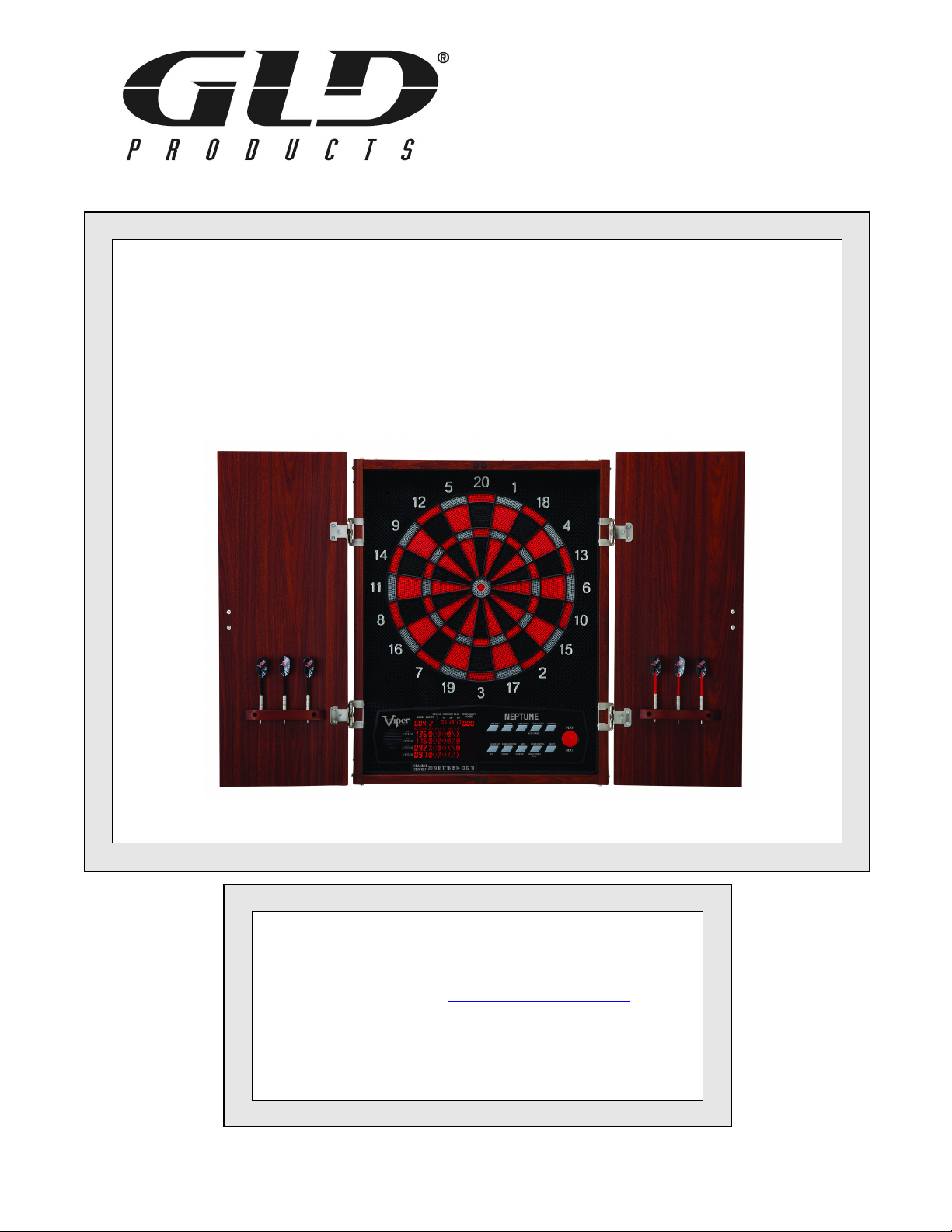
GLD Products Neptune Dartboard
Item 42-1023
NEPTUNE
ELECTRONIC DARTBOARD
Replacement Parts
Order direct at www.gldproducts.com
or call our Customer Service department at
(800) 225-7593
8 am to 4:30 pm Central Standard Time
Publication 42-1023 Rev J
August 2017 UPC Code 7-19265-53260-6
Page 2

GLD Products Neptune Dartboard
Item 42-1023
Staple your receipt here.
Important: A copy of your receipt will be needed to activate your warranty (see page 51).
Page 3
GLD Products Neptune Dartboard
Item 42-1023
Congratulations and THANK YOU for purchasing the
Neptune Dartboard. You have chosen a product that
should provide years of entertainment. To assist you
with customer service and warranty claims, staple
your receipt to the inside cover, then keep this manual
in a safe place for future reference.
GLD Products
S84 W19093 Enterprise Drive
Muskego, WI 53150 USA
1-800-225-7593
Fax: 1-800-841-6944
Email: [email protected]
Web: www.gldproducts.com
This manual may have been updated. For the latest manual visit the GLD products website.
Place your package near the location where it will be used. Carefully unpack
all components and verify you have all the correct pieces.
If you notice missing or defective parts, please call us at:
1-800-225-7593
Please read and understand all instructions before beginning assembly.
This assembly will require 2 adults.
Choking Hazard
This game has small parts that may break free and present a choking
hazard. Children should be supervised by an adult when playing this game.
3 1-800-225-7593
www.gldproducts.com
Page 4

GLD Products Neptune Dartboard
Item 42-1023
IF YOU HAVE A WARRANTY CLAIM, CALL US FIRST
Please see page 51.
GLD Products
Available 8 am to 4:30 pm Central Standard Time
S84 W19093 Enterprise Drive
Muskego, WI 53150 USA
1-800-225-7593
Fax: 1-800-841-6944
Email: [email protected]
Web: www.gldproducts.com
For all claims, please have your receipt and item number when you call. The
product item number can be found on the front cover.
If you are instructed to return the product for service, you are
responsible for shipping the unit at your expense.
PRODUCT REGISTRATION
Important: The product registration form on page 53 and a copy of your
receipt must be completed and returned within 10 days of purchase to
validate your warranty.
Online registration is also available. Go to http://gldproducts.com/warranty-information or
click on this link. Follow the online instructions.
WARNING:
Parents - Please read instructions carefully. Not
for use by children without adult supervision.
Thank you for purchasing the GLD Neptune Dartboard. The computerized scoring system
makes game playing easy and enjoyable. With 57 games and 307 options to choose from,
beginners and more advanced players will find challenging games to suit them.
TOOLS REQUIRED
• Tape measure
• Nail or marker
• Phillips screwdriver
• Level
• Mounting hardware (provided)
4 1-800-225-7593
www.gldproducts.com
Page 5
GLD Products Neptune Dartboard
Item 42-1023
UNPACKING THE GAME
After unpacking the game, it is important to save the original box, all packing material, and
the receipt. These items will be needed if it ever proves necessary to return the game for
service. The power adapter is located on the rear of the dartboard at the upper right hand
corner.
MOUNTING (PHYSICAL INSTALLATION)
Two methods for mounting the dartboard are available.
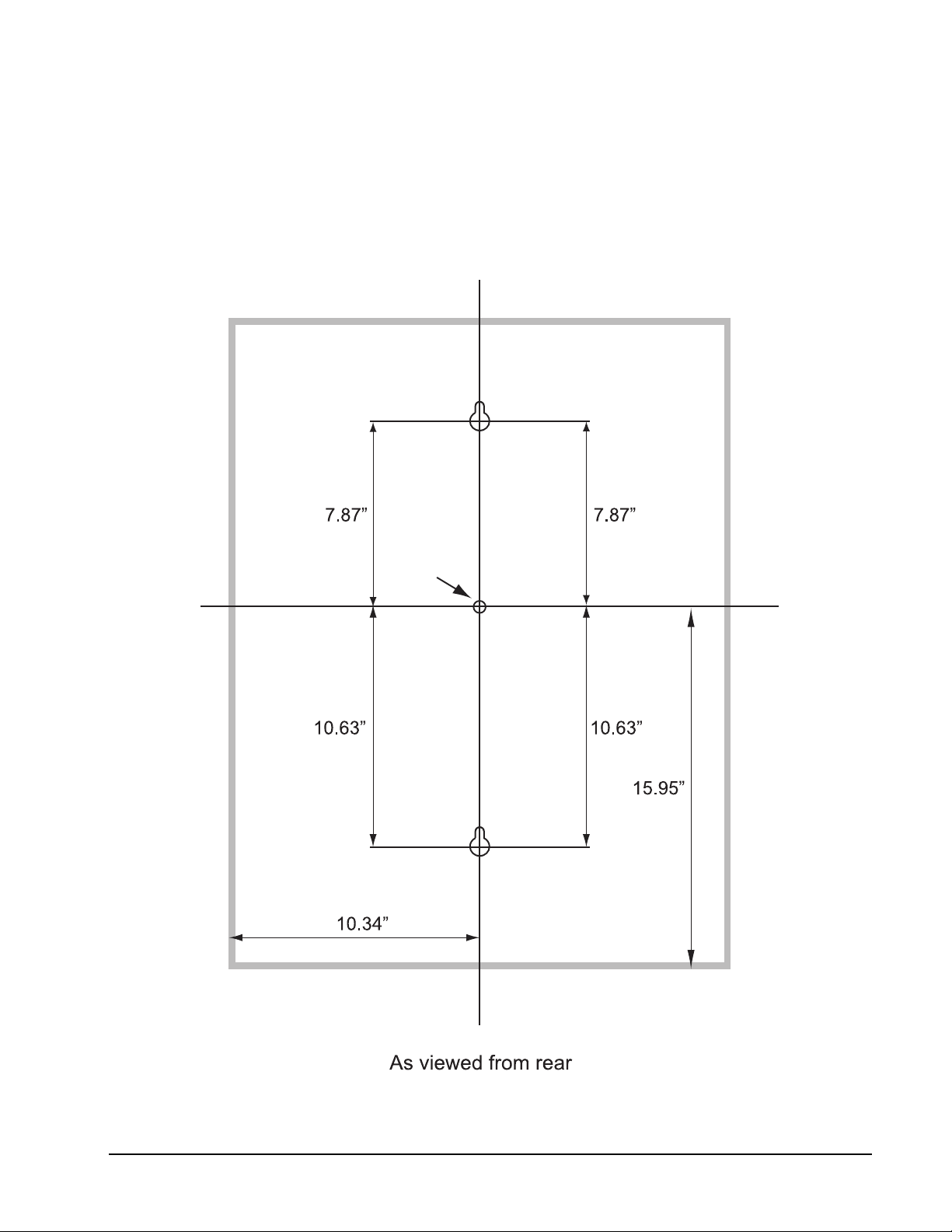
1. Use the two keyhole slots and mount the center of the dartboard following the illustration.
The two screws are screwed into the wall until the screw head is 3/8" away from the wall.
The dartboard is positioned so the two screw heads are inside the slotted keyholes. Slide
the dartboard down to secure. The head of the screw that is used must be larger than
3/8" and smaller than 5/8".
2. Four equally spaced holes are accessible from the front to drive in screws. With the
dartboard held in place, four screws are driven in from the front, through the existing
holes. Use 1/8" diameter screws. The head of the screw must fit inside the pocket.
Wall Anchors
A wall with studs is the most common type of wall to mount the dartboard.
1. Locate a stud and use wood screws or sheet metal type screws to secure the dartboard.
2. If a stud cannot be located or is not in the proper location, use an anchor that is suitable
for the type of wall.
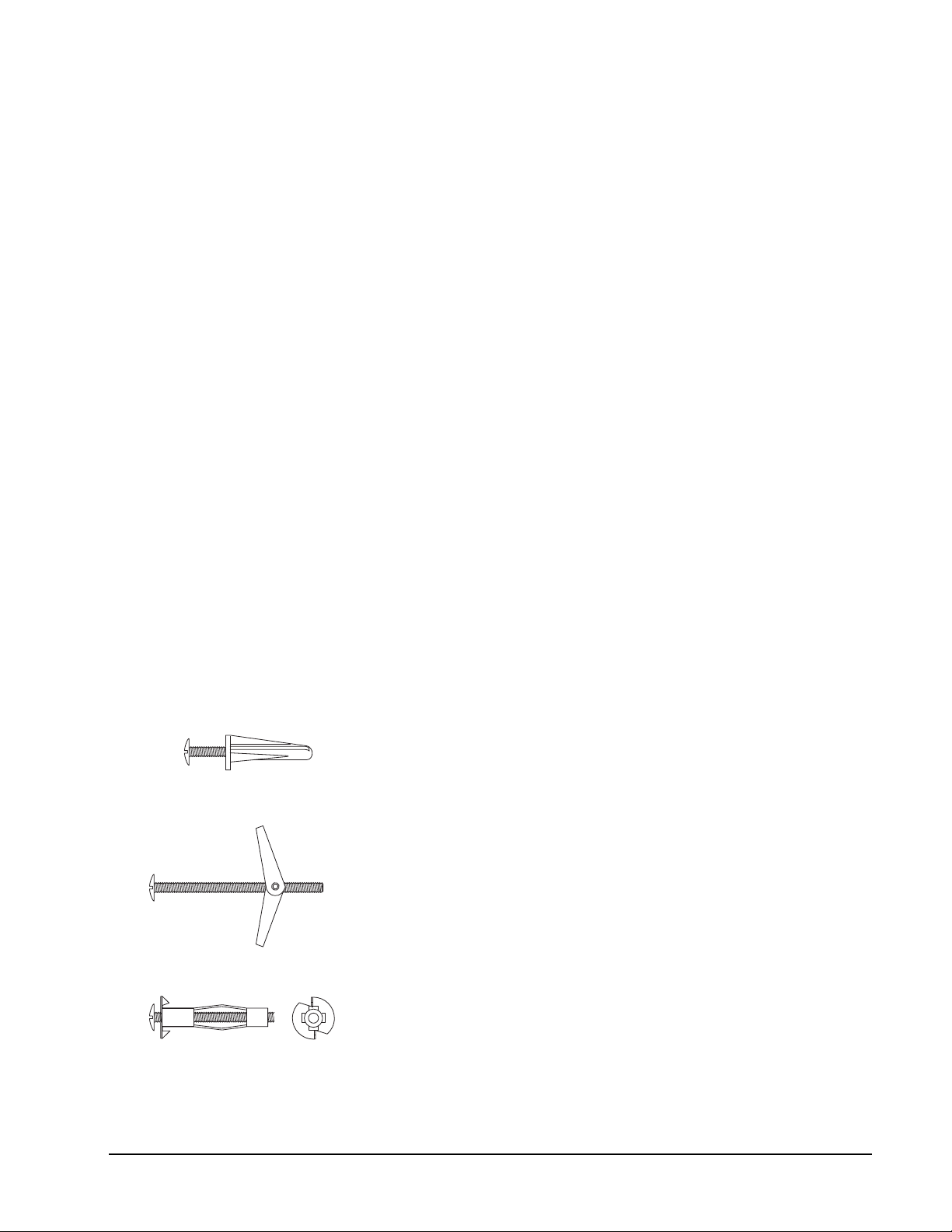
Some common anchors are:
Plastic - Drill a snug hole in drywall and push the anchor in up
to the head. When the screw is screwed into the anchor, the
plastic will expand, locking the anchor in place. Do not use on
thin panelling.
Toggle Bolt - Drill hole through wall. Hole must be large
enough for the wings to pass through. Insert screw through the
holes in the dartboard and thread the toggle wings just onto
the screw. Fold the wings back and push through the hole until
the wings spring open. Pull back on the screw to hold wings
against the inside of the wall and tighten screw.
Hollow wall anchor - Drill a snug hole through the wall. Tap
anchor into the hole until the prongs on the underside of the
head are seated securely into the wall. Turn screw in and
apply pressure to keep the anchor head from turning. Tighten
screw until resistance is felt. Do not over tighten. Turn screw
out to remove. Anchor will stay and screw can be replaced.
Other methods are available. Consult a hardware store if questions arise.
5 1-800-225-7593
www.gldproducts.com
Page 6

GLD Products Neptune Dartboard
Item 42-1023
Mounting Using the Keyhole Slots
Refer to the illustrations on the following pages.
1. Choose a location that is near an electrical outlet and has at least 10 feet of open floor
space in front of the board. Locate and use a wall stud for mounting whenever possible.
2. Determine the location for the dartboard. Place a mark on the wall 68 inches (172.7 cm)
from the floor. This mark is the final position of the center of the dartboard (bullseye).
3. Locate studs and use wood screws or sheet metal screws to secure the dartboard if the
mark is on the stud. The head of the screw must be larger than 3/8" and smaller
than 5/8".
4. If the mark is not over a stud, use the mounting hardware that came with your dartboard.
5. Measure 7.625" (19.4 cm) directly up from the bullseye mark and place a mark on the
wall. Then measure down 10.63" (27 cm) from the bullseye mark and place a mark on
the wall. Use a level to check that all marks are vertical.
6. Drill pilot holes at the two marks. These are for the mounting screws.
7. If using wall anchors, follow the instructions under Wall Anchors on page 5.
8. Drive the screws in until a 1/4" (6.5 mm) gap is left between the wall and the screw head.
9. Hold the dartboard so the two screw heads fit into the lower part of the keyholes. The
dartboard should slide down 1/2 inch and the screw heads will hold it on the wall.
10.Screws can be tightened or loosened to provide a secure mounting.
Mounting Using the Four Holes From the Front
Refer to the illustrations on the following pages.
1. Choose a location that is near an electrical outlet and has at least 10 feet of open floor
space in front of the board. Locate and use a wall stud for mounting whenever possible.
2. Two people are needed for this step. Hold board on the wall. Position center of bullseye
68" from the floor. Level the board. Hold in place.
3. Locate the four mounting holes on the front of the board. Use a marker or nail to mark the
position of the board through the four mounting holes onto the wall. Remove the board.
4. Drill four pilot holes on the marks created in Step 3.
5. If using plastic anchors: drill the holes so the anchors fit snugly. Push anchors into place.
6. Line up dartboard over the anchors. Screw board into place. The screws will expand the
anchors.
7. After the board is mounted, the bullseye should be 68" (173 cm) above the floor.
6 1-800-225-7593
www.gldproducts.com
Page 7
GLD Products Neptune Dartboard
Keyhole Slots
Bullseye
Keyhole Slots
Item 42-1023
Create the Toe Line
1. Place a toe line 96" from the face of the board for the throwing distance. Adhesive tape
or masking tape, 2' long by 2-1/2" wide, may be used. GLD Products offers a Viper
Throwing Line and a Dart Mat for this purpose. Refer to the Parts Order form (page 55)
at the back of this manual.
7 1-800-225-7593
www.gldproducts.com
Page 8
GLD Products Neptune Dartboard
Item 42-1023
HANDLE INSTALLATION
This dartboard comes with handles for the doors. Use the pre-drilled holes to attach the
handles. You may need to use a pointed object like a pen to push through the holes from the
front of the door to open the hole all the way. Use the supplied screws to secure the handles
to the front of the doors.
POWER INSTALLATION
The AC adapter is located on the rear side of the dartboard at the upper right hand corner.
The dartboard is designed to be powered by an AC to 5V DC, 1000 milliamp (minimum)
adapter, with the DC plug polarity configured as positive (+) outside, and negative (-) inside.
To connect the adapter, plug the DC plug into the DC power jack on the lower left side of the
dartboard and the AC plug into an electrical outlet.
1. The board is not intended for children under the age of 9 years old.
2. The board must only be used with the recommended transformer.
3. The transformer is not a toy.
4. Disconnect the dartboard from the transformer before cleaning.
PROTECTIVE FILM
This electronic dartboard has a clear protective film over the entire display and button area
to prevent scratching during shipping. It is recommended that you remove this film for easier
reading of the display. To remove, simply lift edge, peel off and discard.
WARNING:
Not for use by children without adult supervision.
Darts are not toys and may cause injury if used
improperly. Everyone must stand behind the dart
thrower.
8 1-800-225-7593
www.gldproducts.com
Page 9

GLD Products Neptune Dartboard
Item 42-1023
IMPORTANT NOTES
1. During shipping or in the course of normal play, it is possible for scoring segments of this
board to become temporarily jammed, resulting in a “frozen” board. If this occurs, the
built-in Self Diagnostic Function of the e-BOARD Computer will be activated
automatically. Your dartboard will run a self-test routine to determine which segment is
stuck. An error message will flash on the display together with the number for the
“Frozen” segment.
Error Code Malfunction
Err 40 Stuck Game Button
Err 39 Stuck Player Button
Err 38 Stuck Option Button
Err 36 Stuck Double/Auto Change Button
Err 45 Stuck Computer Button
Err 34 Stuck Bounce/301 Button
Err 35 Stuck Eliminate/Cricket Button
Err 37 Stuck Miss/Count Up Button
Err 33 Stuck Sound/Bull Button
Err 32 Stuck Play/Next Button
Err XX A segment is stuck, the XX indicates the number of the segment,
(a D at the end indicates Double, a T at the end indicates Triple).
Take the following steps immediately when the error message appears.
a. Find the “frozen” segment according to the display.
b. Press firmly down on the “frozen” segment until it breaks free and the loose fit is
restored. Once the “frozen” segments are loosened, the error message should be
gone and the board will continue to operate normally.
2. This game is designed for use with 3/4" length soft-tip darts only! Never use metal tipped
darts or longer soft-tip darts on this dartboard! Metal tipped darts will seriously damage
the circuitry, the e-BOARD computer, and electronic operation of the dartboard.
3. Electronic and mechanical reaction time is required between shots. If two shots occur too
close together, pull out second dart and rethrow to properly record your score.
4. Use only the provided AC adapter. Using the wrong adapter may cause electrical
shock and damage to the unit.
5. Do not use excessive force when throwing darts. Throwing a dart too hard will cause
frequent tip breakage and cause excessive wear on the board.
6. Do not spill liquids on the dartboard. Do not use spray cleaners that contain ammonia or
other harsh chemicals, as they may damage the dartboard. Instead, we suggest regular
dusting with a damp cloth. Make sure the game is unplugged and use a mild detergent
and a damp cloth for more vigorous cleaning.
7. This game is for indoor use only.
9 1-800-225-7593
www.gldproducts.com
Page 10
GLD Products Neptune Dartboard
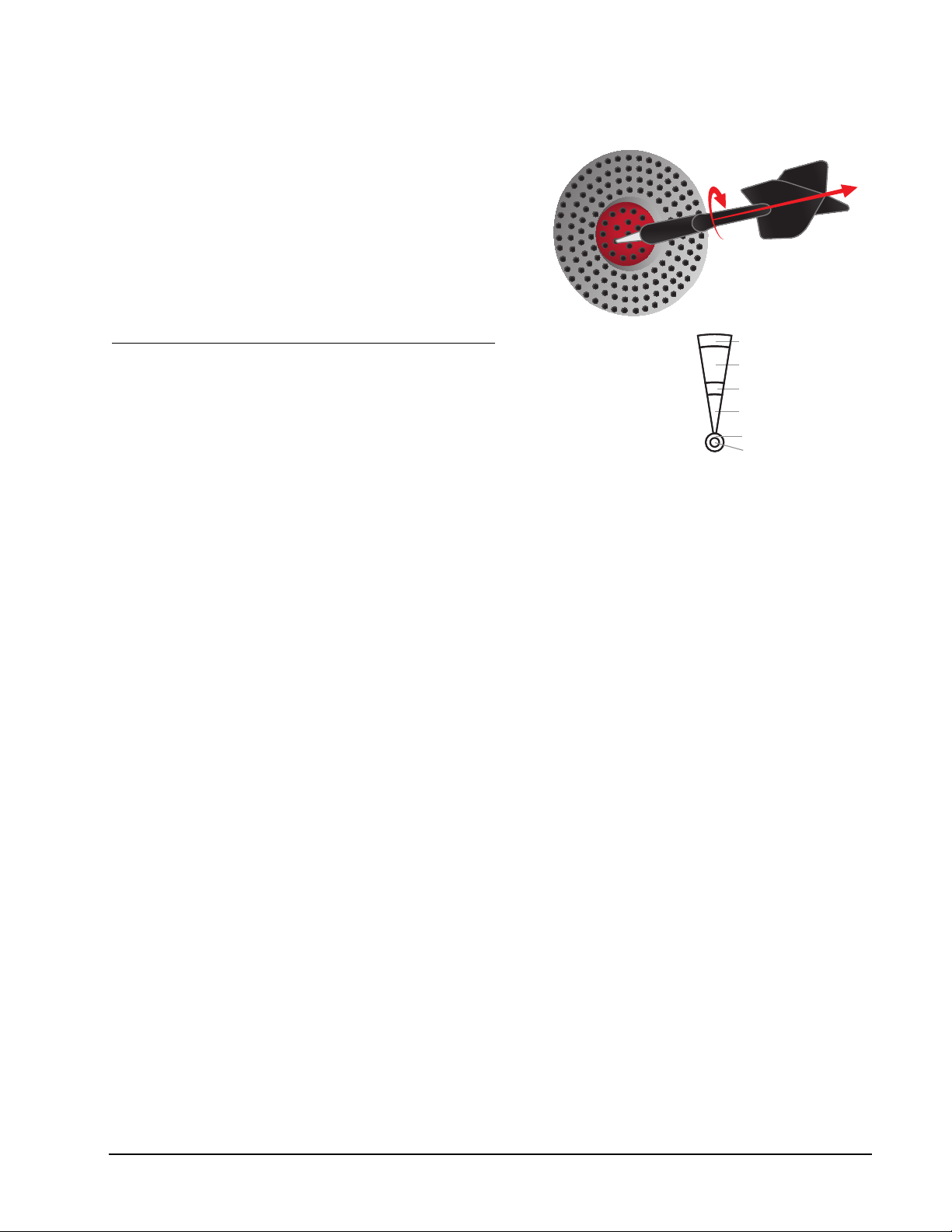
Double
Outer Single
Triple
Inner Single
Single Bullseye
Double Bullseye
Item 42-1023
Helpful Tip: To prevent dart tips from loosening,
twist the dart to the right (clockwise) when pulling
it from the board. This motion will make dart
removal easier and will prolong the life of your
dart tips.
GAME OPERATIONS
Segment Scoring Scoring Rules
Single scoring segment score times 1
Double scoring segment score times 2
Triple scoring segment score times 3
Outer bullseye 25 times 1
Center bullseye 25 times 2
QUICK START - IF YOU JUST WANT TO START THROWING DARTS
1. Turn game on by pressing the ON/OFF button.
2. Press the GAME button once.
NOTE: The default game is G01 301 Count Down with 4 players, and double bull.
3. Press the PLAY/NEXT button.
4. Take turns throwing darts. When a players score reaches exactly 0 they are the winner.
10 1-800-225-7593
www.gldproducts.com
Page 11
GLD Products Neptune Dartboard
Item 42-1023
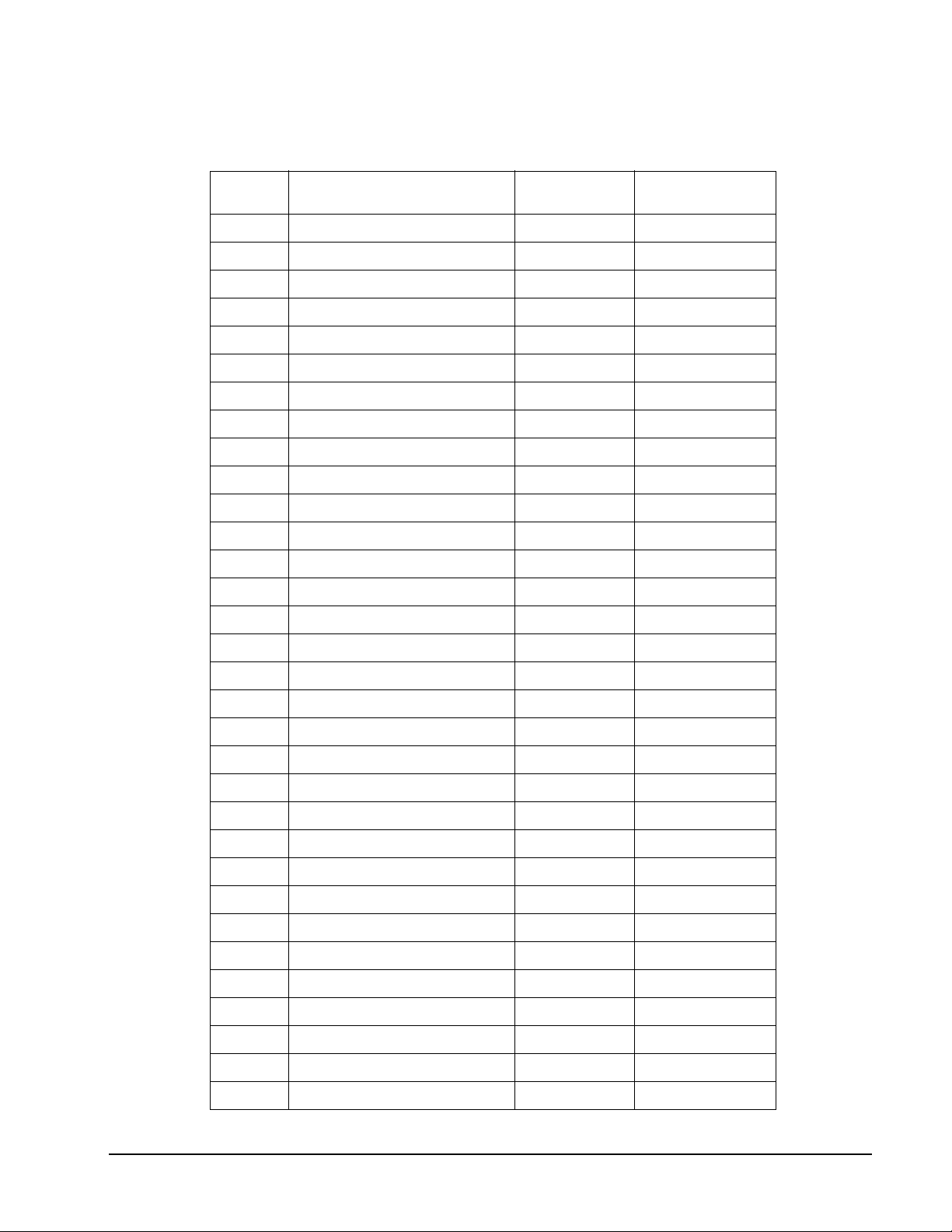
NEPTUNE GAME MENU
Game
Number
G01 301 6 1-16
G01 501 6 1-16
G01 601 6 1-16
G01 701 6 1-16
G01 801 6 1-16
G01 901 6 1-16
G02 301 League 6 4
G02 501 League 6 4
G02 601 League 6 4
G02 701 League 6 4
G02 801 League 6 4
G02 901 League 6 4
G03 Quick Cricket 5 1-16
G04 American Cricket 5 1-16
G05 Cut Throat Cricket 5 1-16
Name Options Players
G06 Scram Cricket 2 2
G07 Double Only Cricket 5 1-16
G08 Random Cricket 2 1-16
G09 Minnesota Cricket Simple 2 1-16
G10 Minnesota Cricket Standard 2 1-16
G11 Spanish Cricket 5 1-16
G12 Shanghai 14 1-16
G13 Count Up 100 2 1-16
G13 Count Up 200 2 1-16
G13 Count Up 300 2 1-16
G13 Count Up 400 2 1-16
G13 Count Up 500 2 1-16
G13 Count Up 600 2 1-16
G13 Count Up 700 2 1-16
G13 Count Up 800 2 1-16
G13 Count Up 900 2 1-16
G14 Shoot Out 12 1-16
11 1-800-225-7593
www.gldproducts.com
Page 12
GLD Products Neptune Dartboard
Item 42-1023
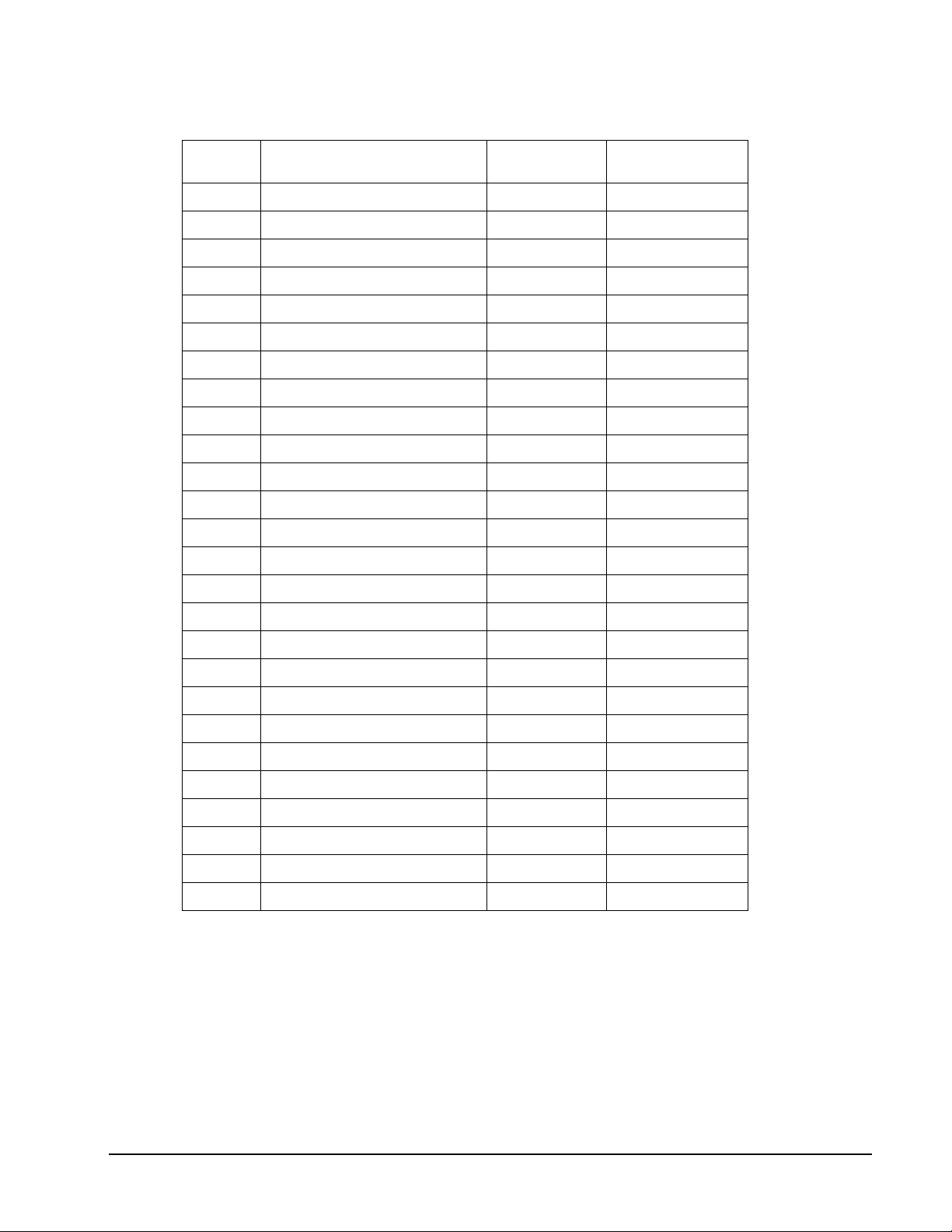
Game
Number
G15 Best of Nine 9 1-16
G16 Call Three 10 1-16
G17 Poker Darts 4 1-16
G18 Hound and Hare 7 2
G19 Halve-It 2 1-16
G20 Gold Hunting 8 1-16
G21 Killer 13 2-16
G22 Blind Killer 12 2-16
G23 Round-The-Clock 6 1-16
G24 Round-The-Clock Double/Triple 10 1-16
G25 Round-The-Clock The Irish Way 2 1-16
G26 Nine-Dart Century 5 1-16
G27 Football 1 1-16
G28 Bowling 8 1-16
G29 Golf 12 1-16
Name Options Players
G30 Car Racing 2 1-16
G31 Big Six 7 2-16
G32 Shove A Penny 2 1-16
G33 Hi Score 12 1-16
G34 Double Down 2 1-16
G35 Forty One 2 1-16
G36 Over 5 2-16
G37 Under 5 2-16
G38 All Fives 7 1-16
G39 Legs 5 2-16
Total 307
12 1-800-225-7593
www.gldproducts.com
Page 13

GLD Products Neptune Dartboard
ON/OFF
SOUND
CONTROL
BOUNCE OUT
ELIMINATE
SCORE
NEXT
AUTO CHANGE
COMPUTER
SINGLE/DOUBLE
BULL
GAME MENU
DOUBLE
IN/OUT
PLAYER GAME OPTION
PLAY
COUNT UPCRICKET301
MISS
1
2
3
4
5
6
8
9
10
11
7
Item 42-1023
DARTBOARD FUNCTIONS
Buttons
1. BOUNCE OUT / 301 button: Used to eliminate a score. Press and release until the dart
score is displayed. Must also press ELIMINATE SCORE / CRICKET button to delete the
score. When selecting games, press to jump game selection to G01 option 301.
2. ELIMINATE SCORE / CRICKET button: Press after using the BOUNCE OUT / 301
button to complete the removal of a dart score. When selecting games, press to jump
game selection to G04 American Cricket.
3. MISS / COUNT UP button: Press to count a thrown dart that misses the scoring area.
When selecting games, press to jump game selection to G13 Count Up.
4. SOUND CONTROL / SINGLE/DOUBLE BULL button: Press during a game to change
the sound level. Press before starting a game to select single or double bullseye.
5. ON / OFF button: Press and release to turn the dartboard on. Press and hold to turn the
dartboard off.
6. PLAY / NEXT button: Press to start a game. After a players turn, press to switch to the
next player.
7. COMPUTER button: Press to select a cyber player for an opponent.
8. DOUBLE IN/OUT / AUTO CHANGE: During game selection, press to select double in or
double our for G01 and G02 games. During a game, press to activate the automatic
player change feature.
9. OPTION button: Press to select the options for the game. The selection applies to all the
players.
10.PLAYER button: Press during game setup to select the number of players.
11.GAME button: Press during game setup to scroll through the game menu.
13 1-800-225-7593
www.gldproducts.com
Page 14
GLD Products Neptune Dartboard
SCORE 20 19 18 1617 15
B
PLAYER 1/5/9/13
PLAYER 2/6/10/14
PLAYER 3/7/11/15
PLAYER 4/8/12/16
GAME
2019 18 1617 15 14 1312 11
SPANISH
CRICKET
DOUBLE
PLAYER
CURRENT DART TEMPORARY
SCORE
1ST
2ND 3RD
IN
OUT
D T
3B
1
2
3
4
5
6
7
Item 42-1023
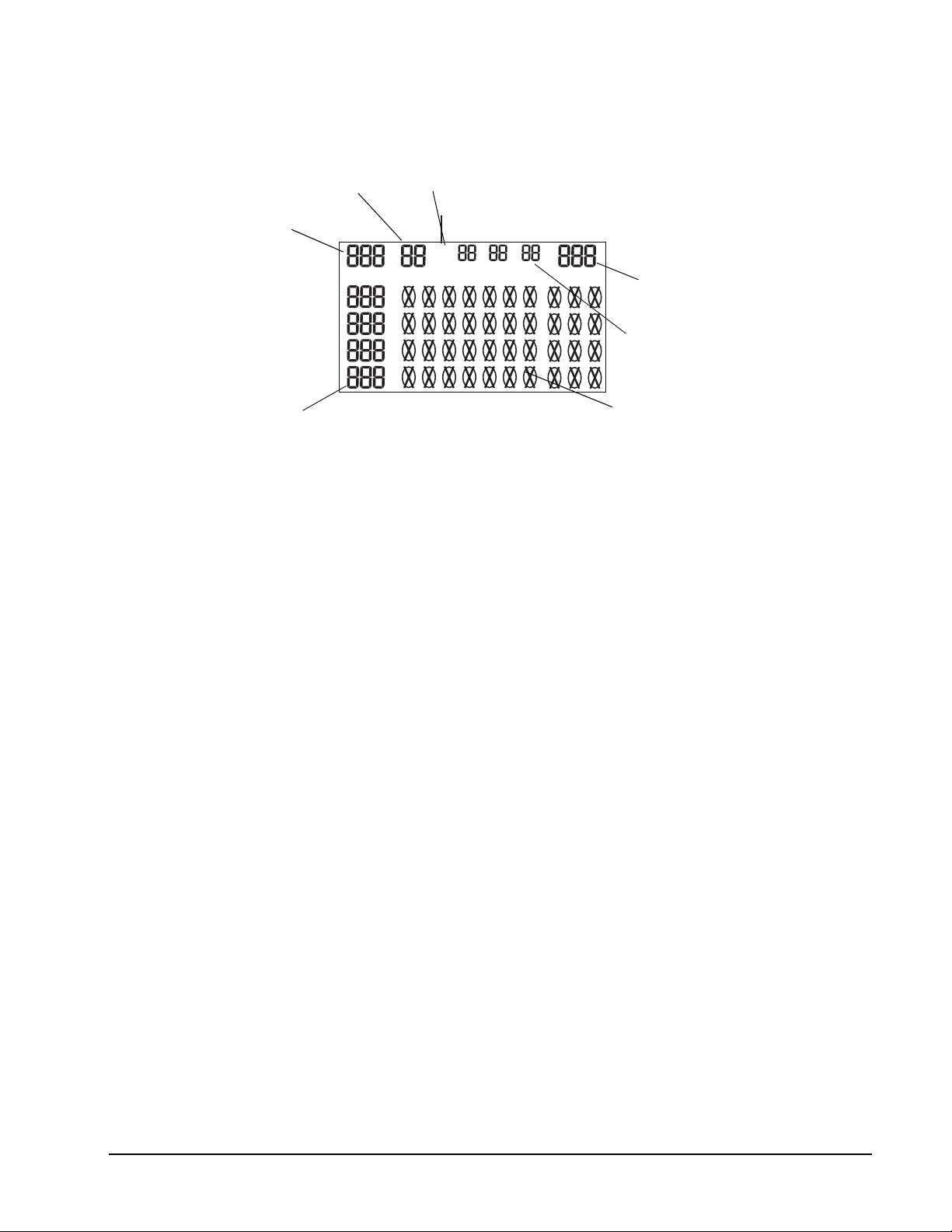
Player Display/Game Display
1. Displays Player’s scores.
2. Cricket Scoring Display: This dartboard utilizes a scoreboard that keeps track of each
player’s segment status when playing Cricket. The exclusive Tournament Cricket
Scoring display on this dartboard utilizes traditional X and O style characters to track
‘marks’. When Cricket is selected, the lights on the Cricket scoreboard are not lit - they
will illuminate as ‘marks’ are scored. There are 3 separate lights within each number (15
through 20 and bullseye). During play, one of the status lights will turn on as a segment
is hit. If a double or triple of an active number is hit, 2 or 3 lights will turn on respectively.
3. Displays the active player’s current score for the turn.
4. Shows the results for each thrown dart during the turn.
5. Indicates the Double In/Double Out setting.
6. Displays the player number.
7. Displays the Game selection.
14 1-800-225-7593
www.gldproducts.com
Page 15

GLD Products Neptune Dartboard
Item 42-1023
READ FIRST - OPERATION
1. Plug the DC plug into the dartboard and the AC plug into a 110/120V electrical outlet.
2. Press the ON / OFF button. When the dartboard turns ON a welcoming fanfare will play.
3. Press the GAME button to scroll through the game menu. Selection will be displayed at
the game display (upper left). While selecting games, you can push the BOUNCE OUT /
301 button to jump you to G01 301. You can also press the ELIMINATE SCORE /
CRICKET button to jump you to G04 American Cricket. Also pressing the MISS / COUNT
UP button will jump you to G13 Count Up.
4. Press the OPTION button to select the designed options/difficulties of the game for all
players. Selection will be displayed at Player 2’s score display.
5. Press the PLAYER button to select the number of players. The selection will be
displayed at Player 3’s score display. The maximum number of players is limited to 16.
For more than 4 players, the players have to share the player’s score display and Cricket
display with other players as indicated on the dartboard and announced by the computer.
6. For G01 301 and G02 301 League players can also press the DOUBLE IN/OUT / AUTO
CHANGE button to select Double In/Double Out options before starting. The display will
say “IN” or “OUT” to show your selection.
• “IN” text displayed Double In/Any Segment Out
• “OUT” text displayed Any Segment In/Double Out
• Both “IN” and “OUT” text displayed Double In/Double Out
• No text displayed Any Segment In/Any Segment Out
7. For all the games you can select a Single Bull or Double Bull. Press the BULL button
before starting a game to select. The Player 4’s scoreboard will show “SbU” for single
and “dbU” for double.
DOUBLE BULL Inner ring = 50 points and the outer ring = 25 points.
SINGLE BULL Both rings = 50 points.
15 1-800-225-7593
www.gldproducts.com
Page 16
GLD Products Neptune Dartboard
Item 42-1023
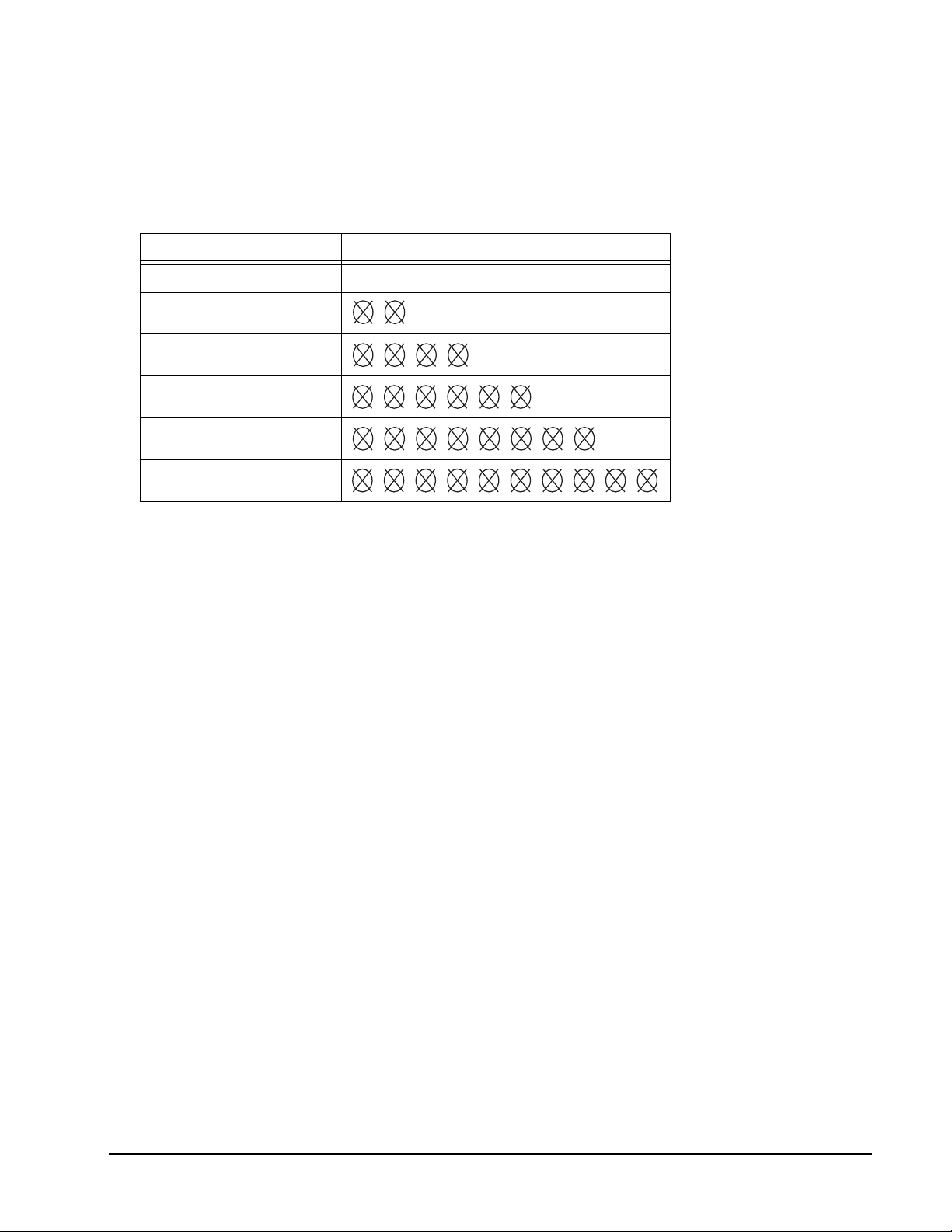
8. The Neptune is equipped with a Cyber Player playing feature. Players can select a Cyber
Player to play in the game by pressing the COMPUTER button. Your selection will be
displayed in the Player 1 scoreboard and the Cricket display. The choices for cyber
player are as follows:
Cyber player Skill Level Player 1 Display
OFF CPU
BEGINNER
INTERMEDIATE
ADVANCED
EXPERT
PROFESSIONAL
When the game begins the last player to throw will be announced as “Cyber Player”. The
cyber player will then post three scores.
9. Press PLAY / NEXT to start a game.
10.While in a game you can change the sound level. Press the SOUND /BULL button to
change the sound. When you push the button, three levels of beeps will be heard and
once in the cycle no sound will be heard.
11.If a dart thrown at the board scores, but does not stick in the board, you can eliminate
that score. Press the BOUNCE OUT / 301 button until the score you wish to eliminate
flashes. Then eliminate this score by pressing the ELIMINATE SCORE / CRICKET
button.
12.If a dart thrown at the dartboard doesn’t hit the scoring segments you can push the MISS
button.
13.This dartboard is equipped with at standby and automatic shut off as a power saving
feature. If the dartboard is untouched for 5 minutes it will go into a standby mode. Push
any button to return to what you were doing. If untouched for long enough it will
automatically shut off.
14.During a game you can push the DOUBLE IN/OUT / AUTO CHANGE button to activate
the Automatic Player Change feature. There is no indication on the board that this is
activated or not. If it is activated the game will change to the next player after a turn is
over automatically after 10 seconds. If this is not activated you must push the
PLAY / NEXT button after your turn has ended to switch to the next player.
15.When a player finishes the game first, the game will announce “winner” and the
celebration and applause will be heard.
16.To turn the dartboard off, press and hold the ON / OFF button
16 1-800-225-7593
www.gldproducts.com
Page 17
GLD Products Neptune Dartboard
Item 42-1023
NEPTUNE GAME DESCRIPTIONS & RULES
G01 301 (with scoring options of 301, 501, 601, 701, 801, 901)
Game Options:
Single In/Single Out
Double In/Single Out
Double In/Double Out
Single In/Double Out
Double Bull
Single Bull
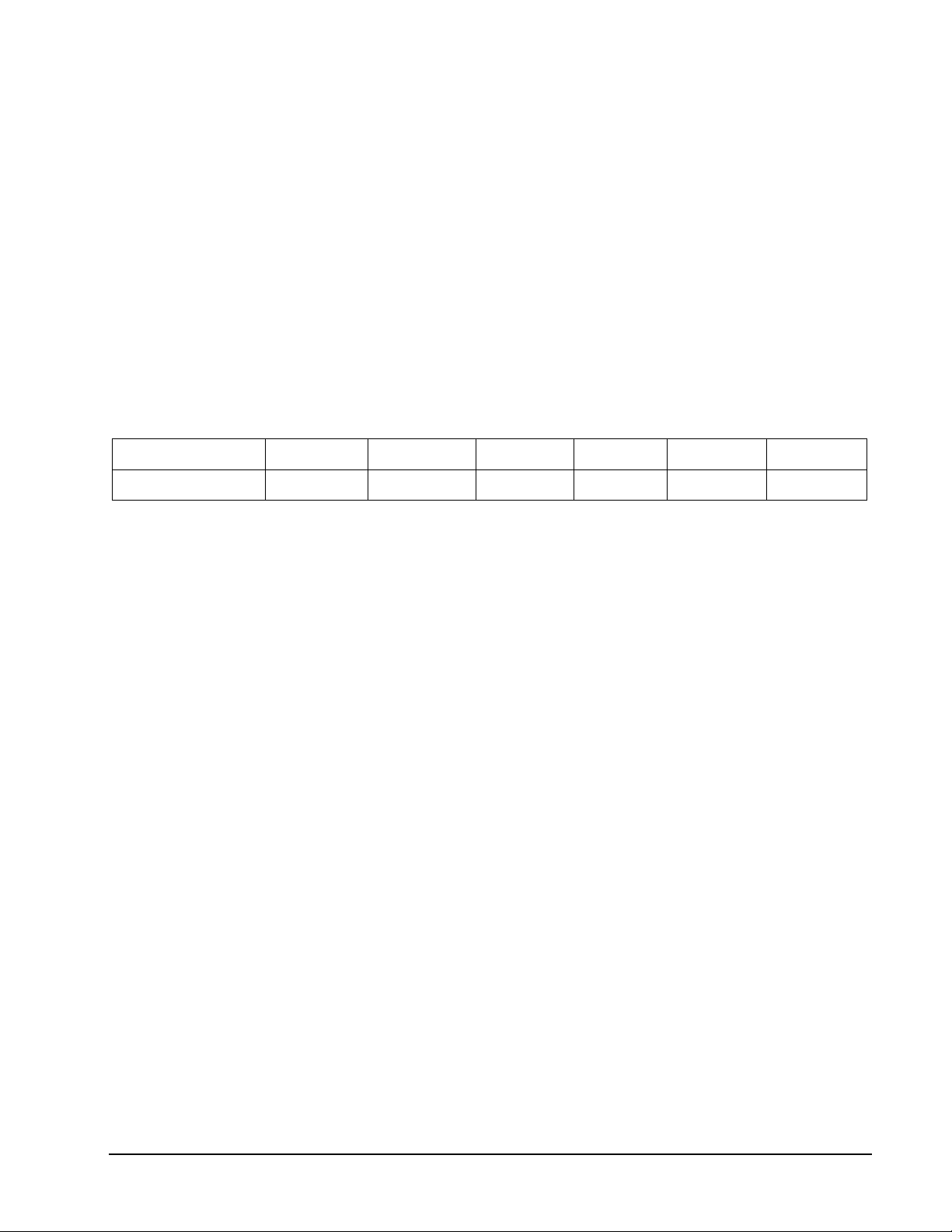
Your scoring options are the starting score for the game, see the chart below. Press GAME
OPTION button to select.
Scoring Options 301 501 601 701 801 901
Starting Score 301 501 601 701 801 901
Refer to the section “Read First - Operation”.
Playing the Game
To win: The first player who reaches exactly zero wins.
• The starting score for each player is 301 (or 501/601/701/801/901) as selected before
starting the game.
• The score will be deducted for each dart that scores.
• You must go out with the exact number. If you go over zero the dartboard will
announce “TOO HIGH, NEXT PLAYER”.
• For Single In or Single Out options, the game can be started or ended by throwing at
any segment, regardless if single, double or triple.
• If you selected Double In, you must hit a double segment or bullseye to start the game.
If you selected Double Out you must hit a double segment or bullseye to end the
game.
• If Double Out has been selected, the Dart Out feature is automatically activated. In this
mode, once a player is 170 or below, the e-BOARD Computer will suggest the 3 best
possible finishing shots, or if an OUT is not possible, the best remaining alternative
shots are displayed.
17 1-800-225-7593
www.gldproducts.com
Page 18
GLD Products Neptune Dartboard
Item 42-1023
G02 301 League (with scoring options 301, 501, 601, 701, 801, 901)
Game Options:
Single In/Single Out
Double In/Single Out
Double In/Double Out
Single In/Double Out
Double Bull
Single Bull
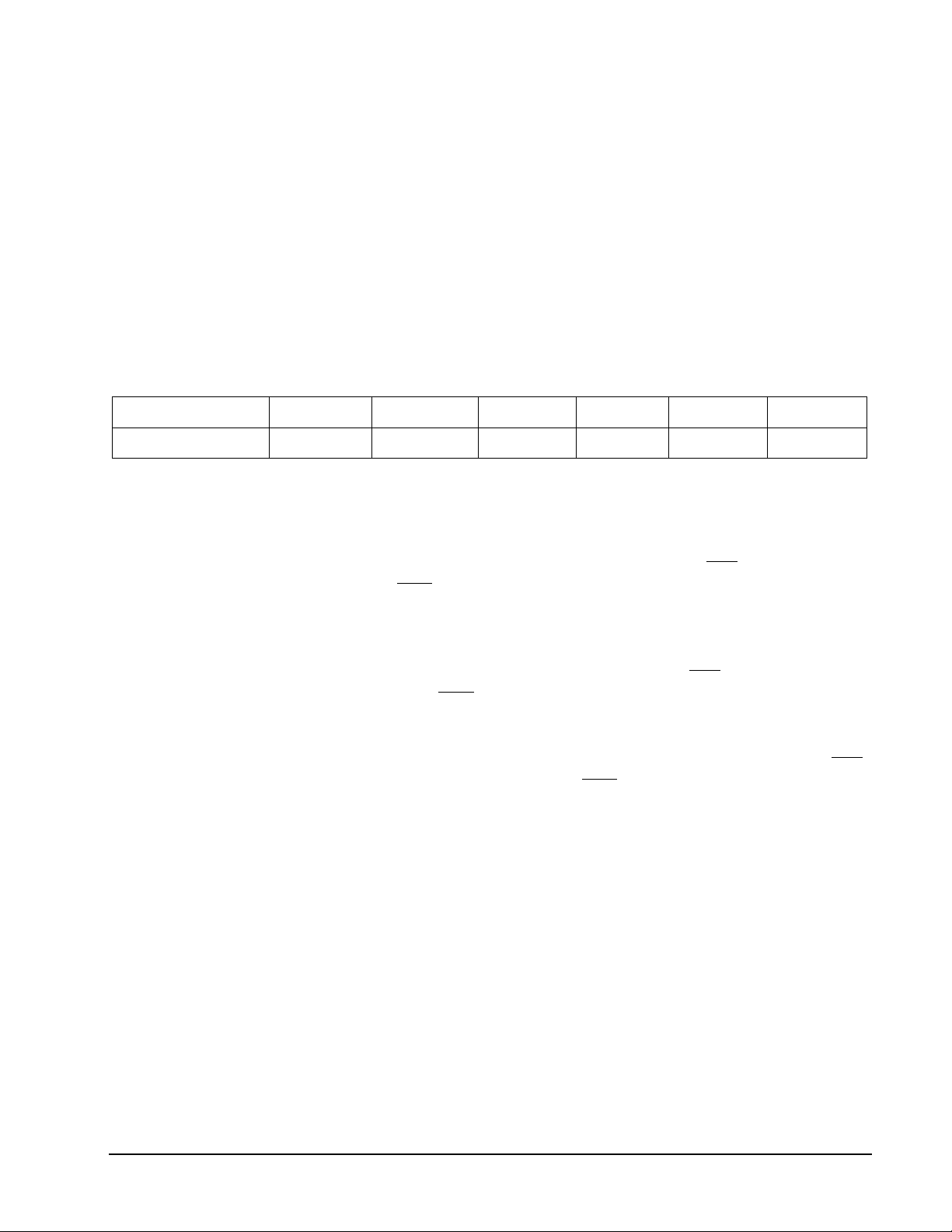
Your scoring options are the starting score for the game, see the chart below. Press GAME
OPTION button to select.
Scoring Options 301 501 601 701 801 901
Starting Score 301 501 601 701 801 901
Refer to the section “Read First - Operation”.
Playing the Game
To win: The team will win when one player’s score reaches exactly zero, and his teammates
score is lower than or equal to the sum of the score of the opposing team.
• This game is played by 2 teams who compete with each other. Each team has 2
members. Team 1 is made up of player 1 and Player 3. Team 2 is made up of Player 2
and Player 4.
• The team will win when one player’s score reaches exactly zero, and his teammates
score is lower than or equal to the sum of the score of the opposing team. Otherwise
the score of the current player returns to the beginning of the turn. That team cannot
win at that time.
• Once a player’s score is at 181 for Single Out, or at 171 or below for Double Out and
their teammate’s score is lower than or equal to the sum of the score of the opposing
team, the dartboard will announce “GO FOR OUT”. This will confirm you have a
chance to win in this round. If you have not met these conditions the dartboard will
announce “FREEZE” even if their score comes to zero.
• The same Single In/Out and Double In/Out rules from game G01 301 apply.
18 1-800-225-7593
www.gldproducts.com
Page 19
GLD Products Neptune Dartboard
Item 42-1023
G03 Quick Cricket (with scoring options of 000, 020, 025)
Game Options:
Double Bull
Single Bull
The scoring options are described in the chart below. Press GAME OPTION button to
select.
Scoring
Options
Description
000 Hit and open numbers 15-20 and bullseye in any order.
020 Hit and open the number 20 first, then in order, open numbers 19, 18, 17, 16,
15 and bullseye.
025 Hit and open bullseye first, then in order, open numbers 15, 16, 17, 18, 19 and
20.
Refer to the section “Read First - Operation”.
Playing the Game
To win: The first player to hit each number 3 times and open them all is the winner.
NOTE: A single segment counts as one hit, a double segment counts as two hits and a
triple segment counts as three hits.
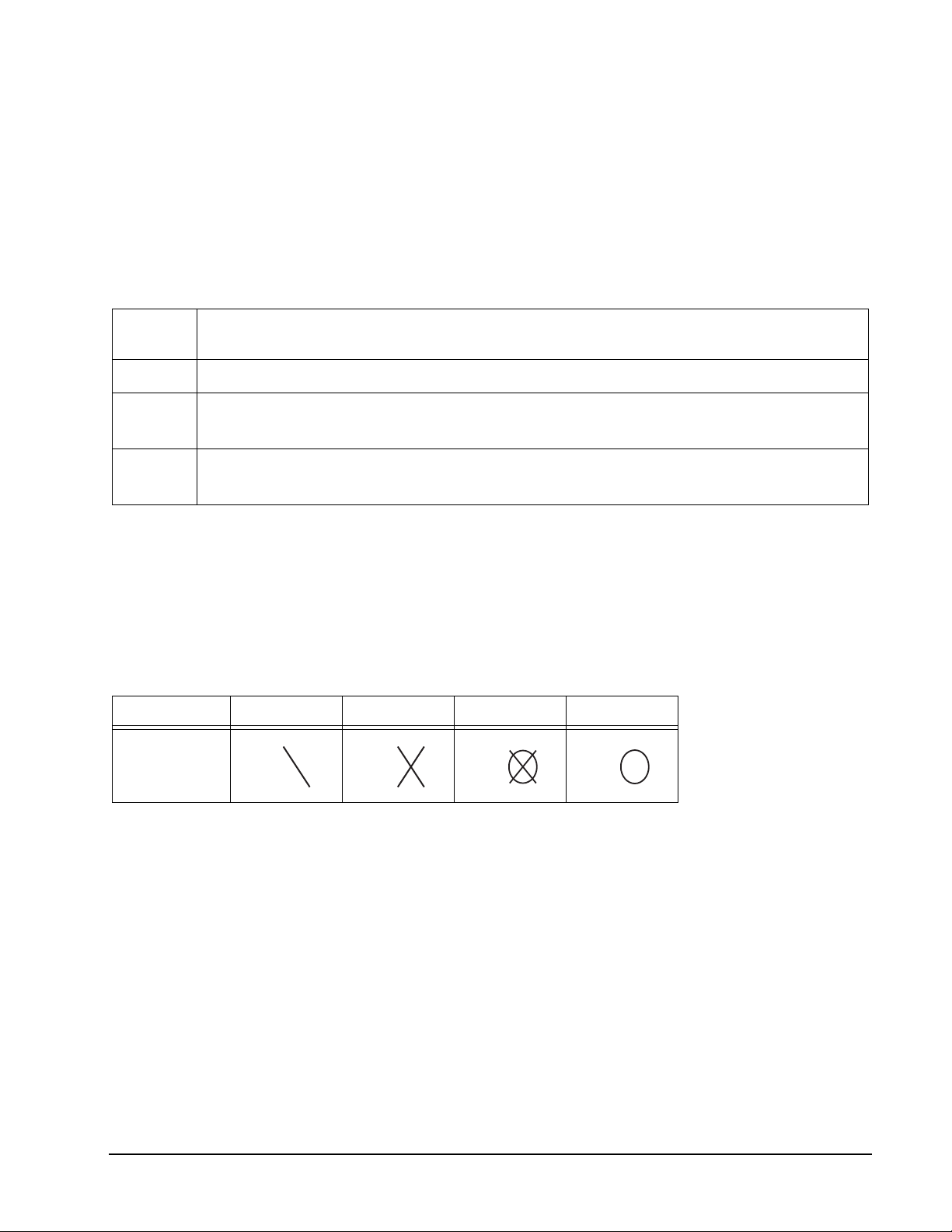
Cricket Status One Time Two Times Open Close
Sign
• In Quick Cricket only the numbers 15-20 and bullseye are used. The first player to hit
each number 3 times and open them all is the winner.
• If every player has opened a number, that number will then close.
NOTE: All valid hits will be confirmed and displayed by the Cricket Display.
19 1-800-225-7593
www.gldproducts.com
Page 20
GLD Products Neptune Dartboard
Item 42-1023
G04 American Cricket (with scoring options of C00, C20, C25)
Game Options:
Double Bull
Single Bull
The scoring options are described in the chart below. Press GAME OPTION button to
select.
Scoring
Options
Description
C00 Hit and open numbers 15-20 and bullseye in any order.
C20 Hit and open the number 20 first, then in order, open numbers 19, 18, 17, 16,
15 and bullseye.
C25 Hit and open bullseye first, then in order, open numbers 15, 16, 17, 18, 19 and
20.
Refer to the section “Read First - Operation”.
Playing the Game
To win: A player wins the game when he first opens all the numbers and has an equal or
greater score than the other players. However, if players are tied on points, or have no
points, the first player to open all numbers wins.
NOTE: A single segment counts as one hit, a double segment counts as two hits and a
triple segment counts as three hits.
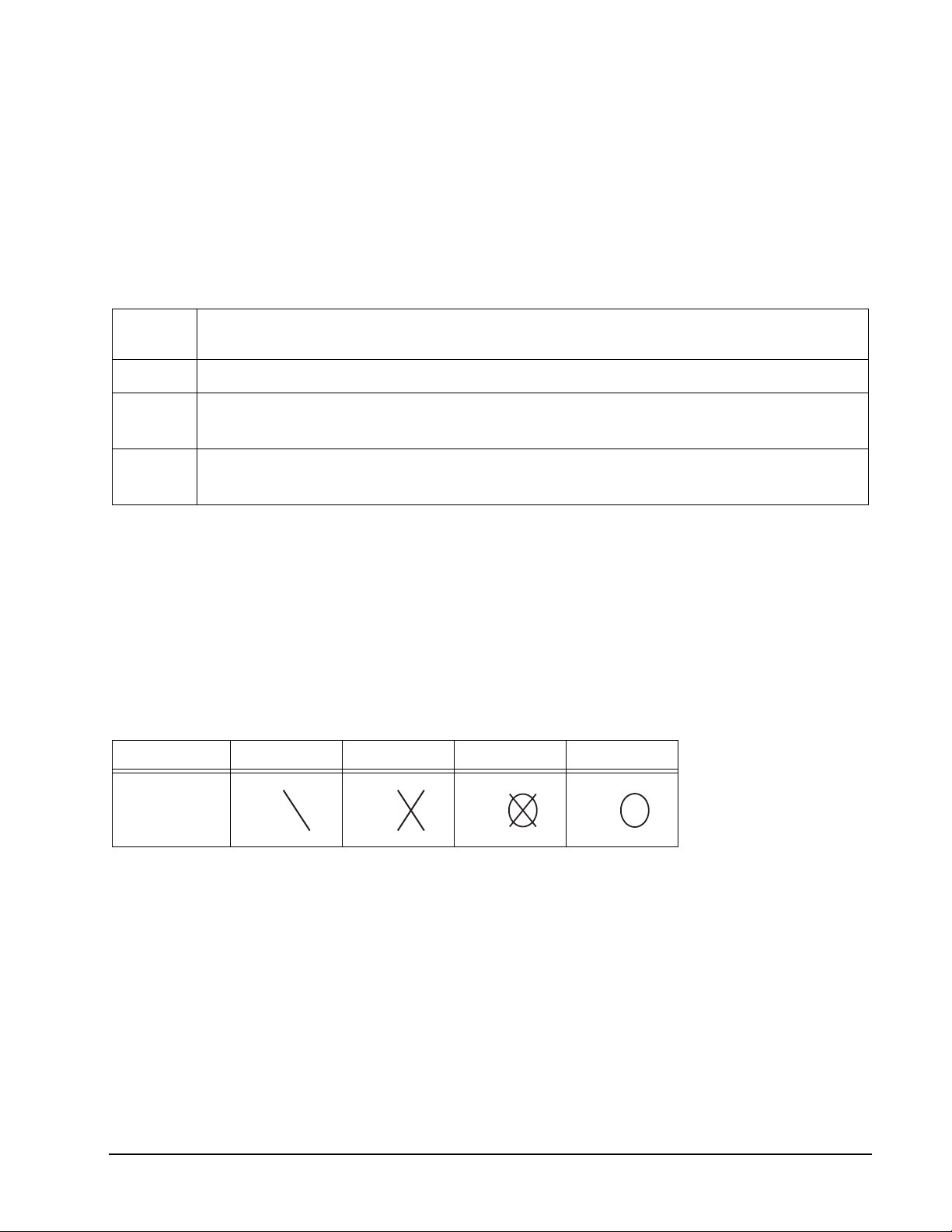
Cricket Status One Time Two Times Open Close
Sign
• In Cricket only the numbers 15-20 and bullseye are used.
• All valid hits will be confirmed and displayed by the Cricket Display.
• When a number has been hit 3 times by a player, it is then open to that player and any
further hits by that player will score points.
• Once a number has been hit 3 times by all the players, that number is then closed and
can no longer be scored upon by any player. At that time the indicator will change to
closed for that number.
• A player who has opened a number can continue to score on that number until it
becomes closed.
• If a player has opened all numbers first, but is behind on points, scoring
continues on open numbers. If that player has not accumulated the highest
point total by the time another player opens all their numbers, the player with
the most points will be the winner.
20 1-800-225-7593
www.gldproducts.com
Page 21
GLD Products Neptune Dartboard
Item 42-1023
G05 Cut Throat Cricket (with scoring options of 00C, 20C, 25C)
Game Options:
Double Bull
Single Bull
The scoring options are described in the chart below. Press GAME OPTION button to
select.
Scoring
Options
Description
00C Hit and open numbers 15-20 and bullseye in any order.
20C Hit and open the number 20 first, then in order, open numbers 19, 18, 17, 16,
15 and bullseye.
25C Hit and open bullseye first, then in order, open numbers 15, 16, 17, 18, 19 and
20.
Refer to the section “Read First - Operation”.
Playing the Game
To win: The player who first opens all numbers and has the lower score wins.
NOTE: A single segment counts as one hit, a double segment counts as two hits and a
triple segment counts as three hits.
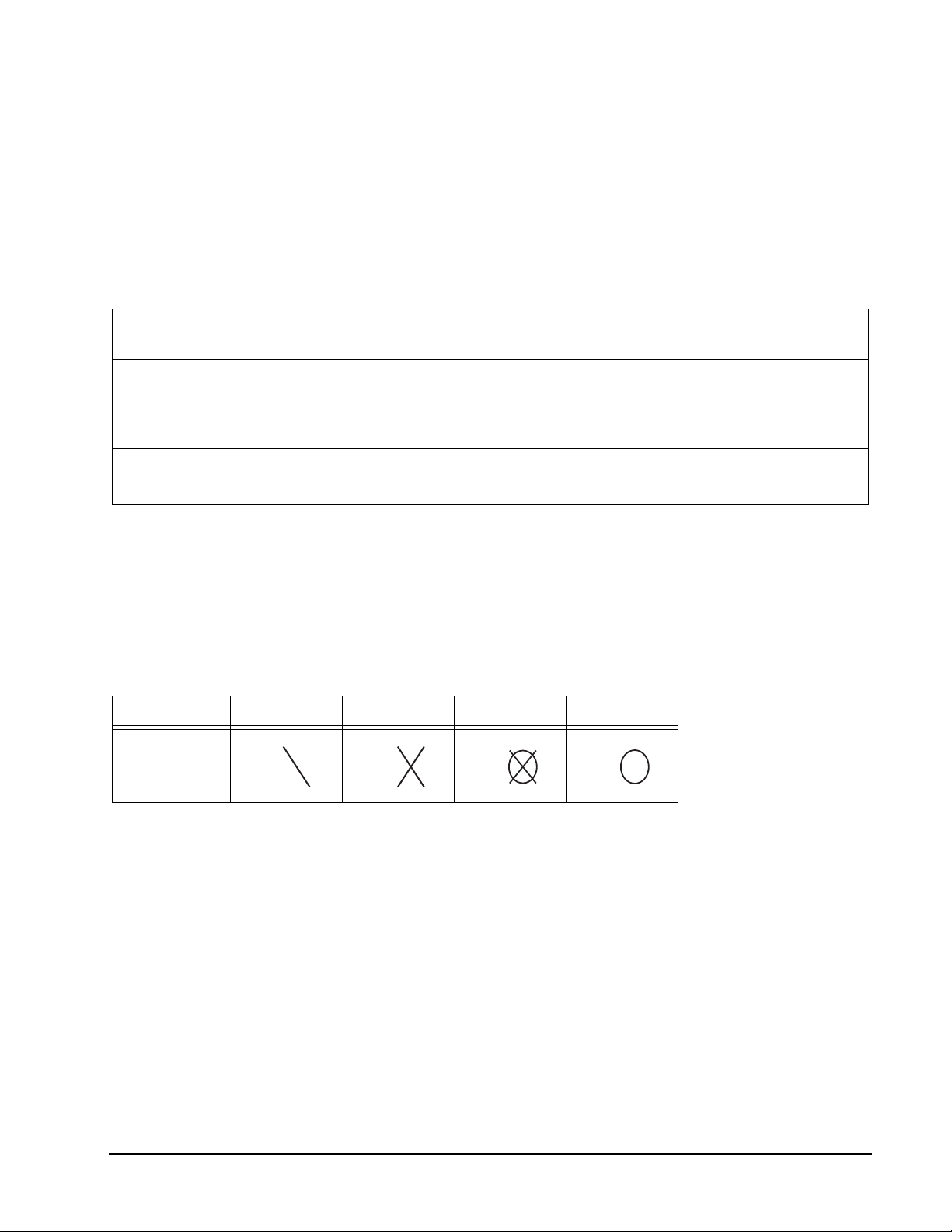
Cricket Status One Time Two Times Open Close
Sign
• In Cricket only the numbers 15-20 and bullseye are used.
• If every player has opened a number, that number will then close.
• All valid hits will be confirmed and displayed by the Cricket Display.
• Once the scoring begins, points are added to your opponents scores who haven’t
opened that number.
21 1-800-225-7593
www.gldproducts.com
Page 22
GLD Products Neptune Dartboard
Item 42-1023
G06 Scram Cricket
Game Options:
Double Bull
Single Bull
Refer to the section “Read First - Operation”.
Playing the Game
To win: During round 2, if Player 1’s score goes over Player 2’s score the game will end and
Player 1 will be the winner. If Player 2 closes all the numbers and has a higher score than
Player 1, Player 2 will be the winner.
NOTE: A single segment counts as one hit, a double segment counts as two hits and a
triple segment counts as three hits.
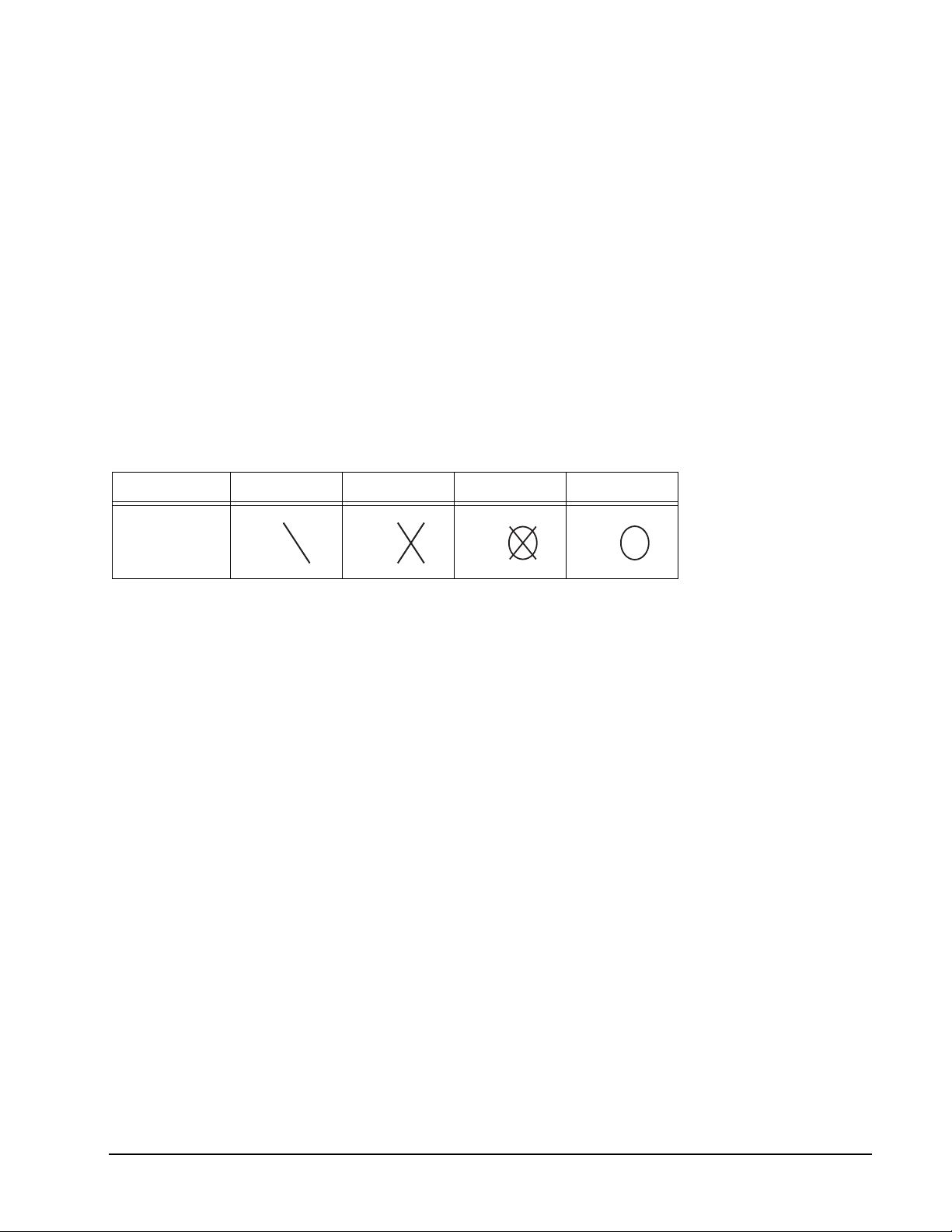
Cricket Status One Time Two Times Open Close
Sign
• All valid hits will be confirmed and displayed by the Cricket Display.
• The game consists of 2 rounds. In the first round, player 1 must close 15 through 20
and bullseye while player 2 attempts to get as high a score as he can by scoring on the
open numbers. Round 1 will be finished when all numbers have been closed. For round
2, the reverse is done.
• During round 2, if Player 1’s score goes over Player 2’s score the game will end and
Player 1 will be the winner. If Player 2 closes all the numbers and has a higher score
than Player 1, Player 2 will be the winner.
22 1-800-225-7593
www.gldproducts.com
Page 23
GLD Products Neptune Dartboard
Item 42-1023
G07 Double Only Cricket (with scoring options of C00, C20, C25)
Game Options:
Double Bull
Single Bull
The scoring options are described in the chart below. Press GAME OPTION button to
select.
Scoring
Options
Description
C00 Hit and open numbers 15-20 and bullseye in any order.
C20 Hit and open the number 20 first, then in order, open numbers 19, 18, 17, 16,
15 and bullseye.
C25 Hit and open bullseye first, then in order, open numbers 15, 16, 17, 18, 19 and
20.
Refer to the section “Read First - Operation”.
Playing the Game
To win: A player wins the game when he first opens all the numbers and has an equal or
greater score than the other players. However, if players are tied on points, or have no
points, the first player to open all numbers wins.
NOTE: A single segment counts as one hit, a double segment counts as two hits and a
triple segment counts as three hits.
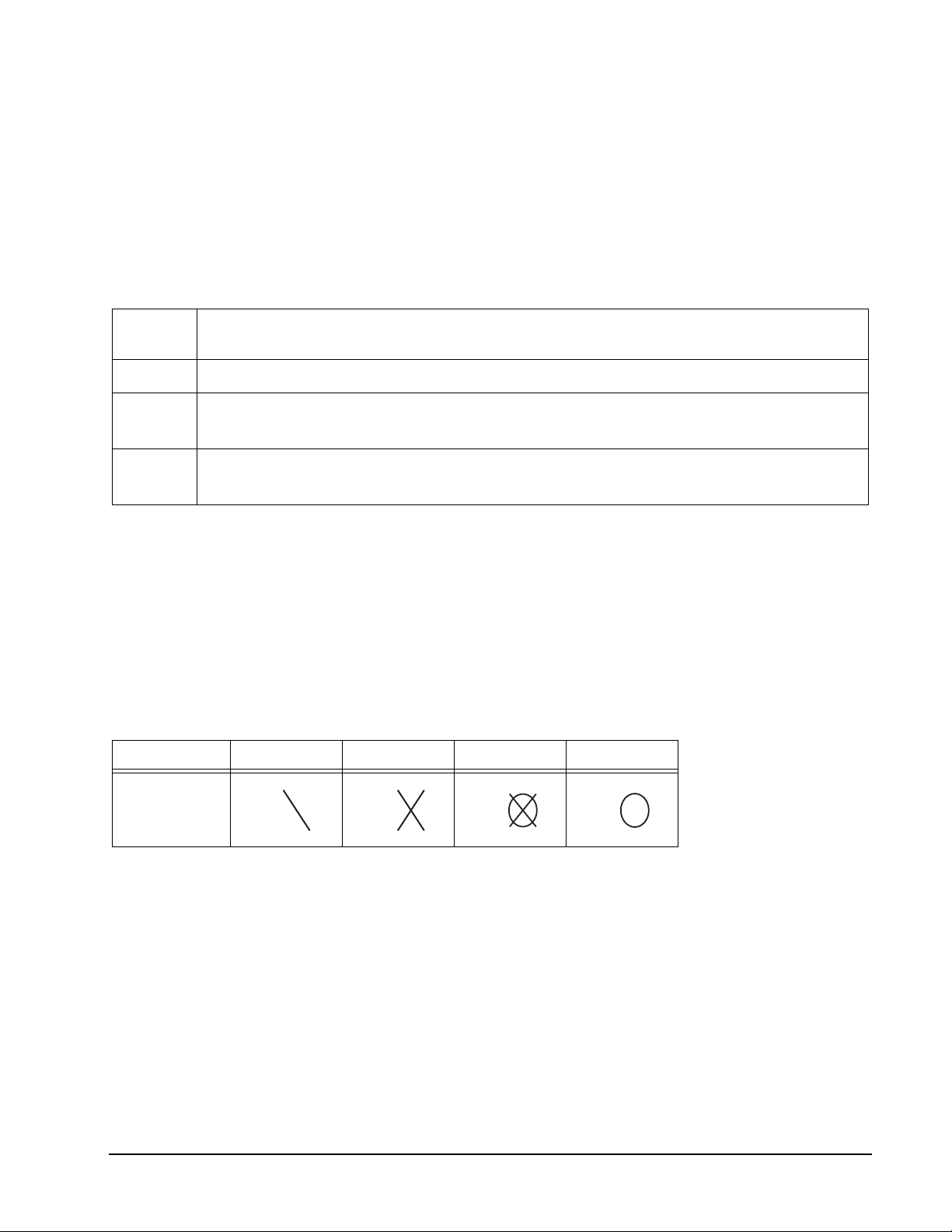
Cricket Status One Time Two Times Open Close
Sign
• All valid hits will be confirmed and displayed by the Cricket Display.
• You have to hit a double segment for each number first, in order for hits or scoring to be
possible.
• For example, to start with the number 20, you must hit the double 20 segment. Any hits
before you do this will count as a miss. Once you’ve hit your double 20 you have three
possibilities for that number:
• If you hit a single 20 it will open the 20 for scoring.
• If you hit a double 20 it will open the 20 for scoring and score you 20 points.
• If you hit a triple 20 it will open the 20 for scoring and score you 40 points.
• Players that have opened a number may continue to score on it until it is closed.
• Once all players have opened a number that number will close and no one can score
on it anymore.
23 1-800-225-7593
www.gldproducts.com
Page 24
GLD Products Neptune Dartboard
Item 42-1023
G08 Random Cricket
Game Options:
Double Bull
Single Bull
Refer to the section “Read First - Operation”.
Playing the Game
To win: The first player to open all the selected numbers and the bullseye and have the
highest score wins.
NOTE: A single segment counts as one hit, a double segment counts as two hits and a
triple segment counts as three hits.
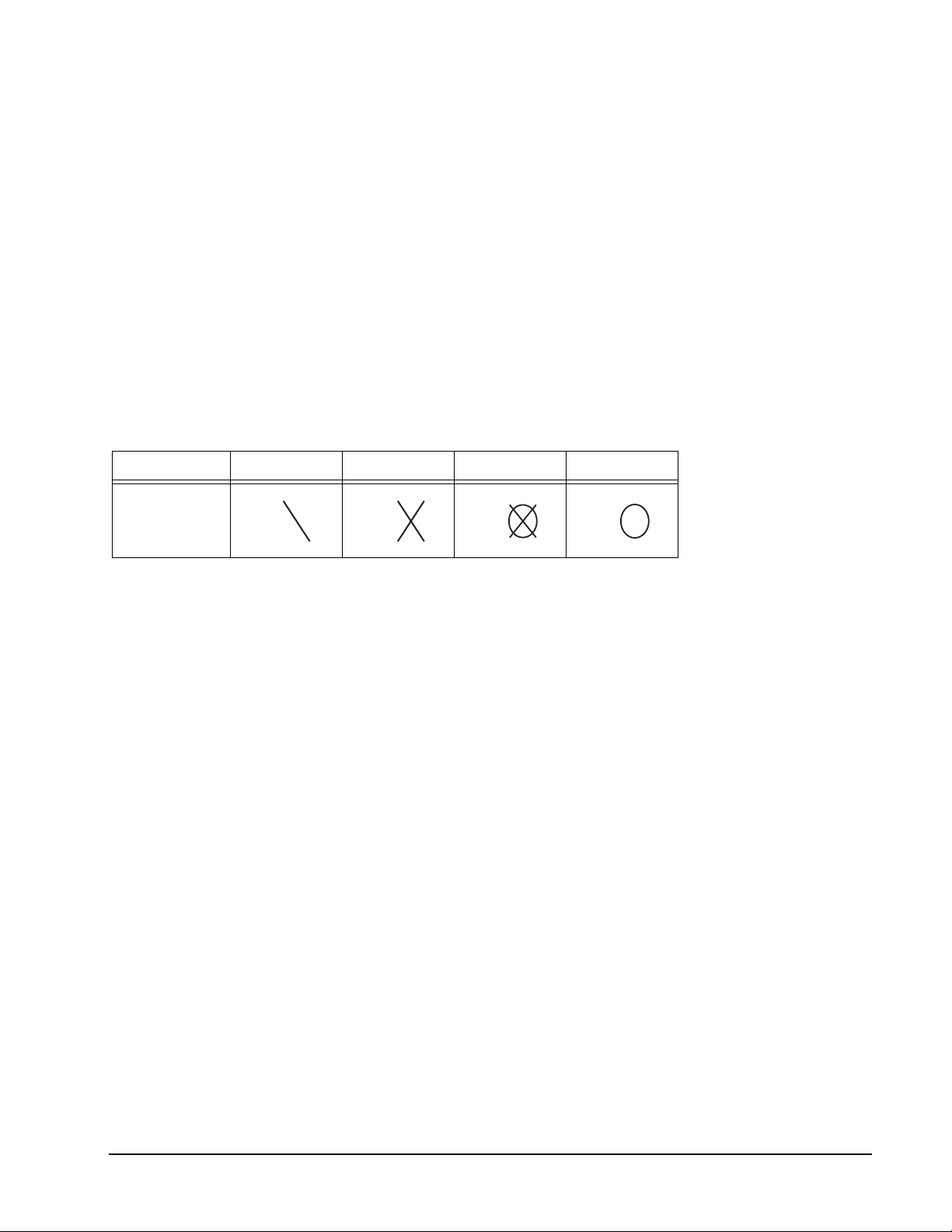
Cricket Status One Time Two Times Open Close
Sign
• If every player has opened a number, that number will then close.
• All valid hits will be confirmed and displayed by the Cricket Display.
• The e-Board Computer will randomly select numbers for you to hit. The random
numbers will alternate on the display. Once a player hits one of the designated random
numbers it will become locked in for all players for the rest of the game.
• The seventh number in every game is the bullseye.
• Numbers can be hit in any order.
• Once a player’s turn is over, the numbers that have not been hit, up to this point, will
change to a different random number.
• The numbers that are locked in will stay the same.
• You have to hit each designated number three times to open it. Double segments count
as two hits and triple segments count as three hits.
24 1-800-225-7593
www.gldproducts.com
Page 25
GLD Products Neptune Dartboard
Item 42-1023
G09 Minnesota Cricket Simple
Game Options:
Double Bull
Single Bull
Refer to the section “Read First - Operation”.
Playing the Game
To win: There is no scoring. The first to close all the cricket numbers is the winner.
NOTE: A single segment counts as one hit, a double segment counts as two hits and a
triple segment counts as three hits.
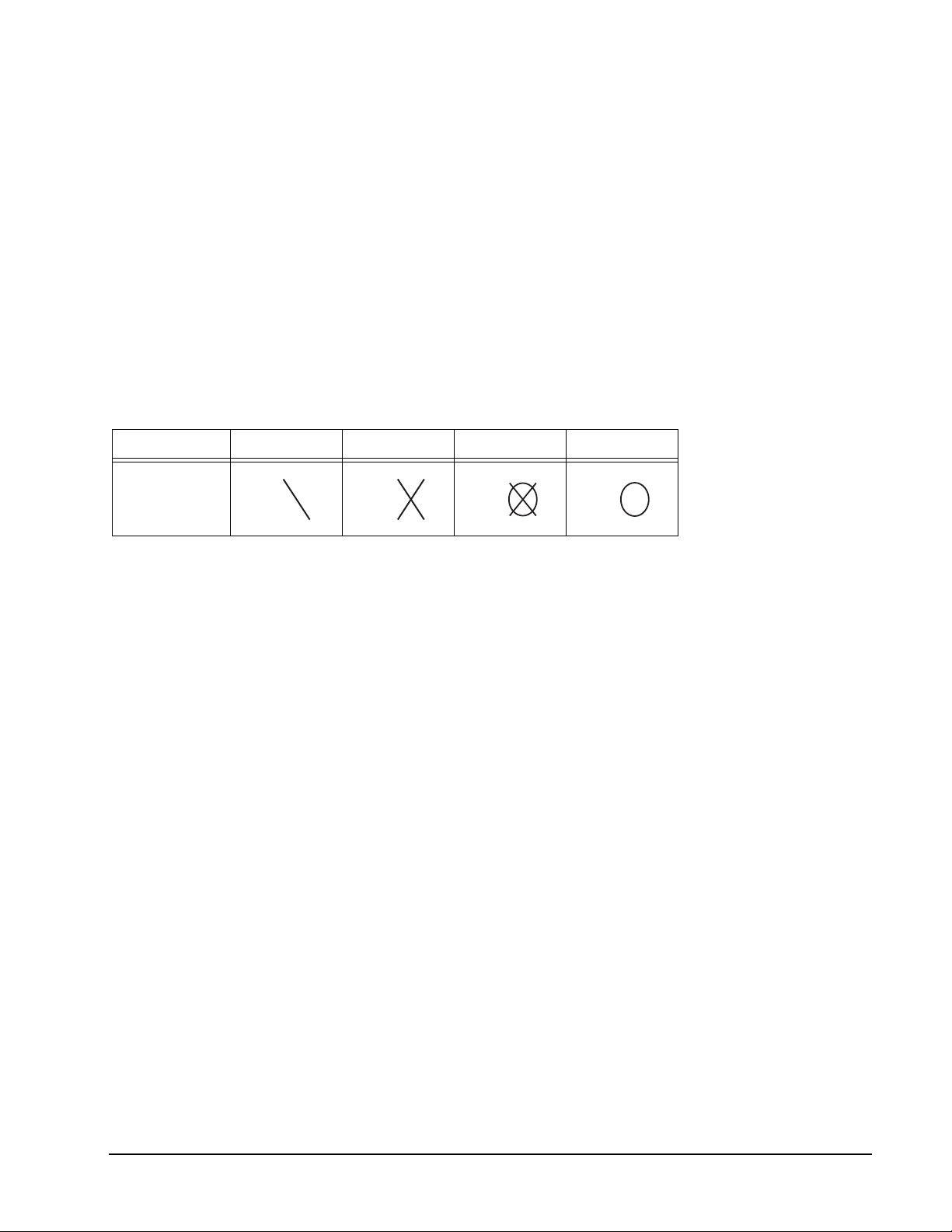
Cricket Status One Time Two Times Open Close
Sign
• If every player has opened a number, that number will then close.
• All valid hits will be confirmed and displayed by the Cricket Display.
• Players can open 15-20, bullseye, D (Double), T (Triple) and 3B (3 singles) in any
order.
• D refers to hitting any three doubles, other than the bullseye, to open the target.
• T refers to hitting any three triples to open the target.
• 3B refers to hitting three single segments, in the same number, in one turn. You have
to do this in 3 separate turns to open this target.
25 1-800-225-7593
www.gldproducts.com
Page 26
GLD Products Neptune Dartboard
Item 42-1023
G10 Minnesota Cricket Standard
Game Options:
Double Bull
Single Bull
Refer to the section “Read First - Operation”.
Playing the Game
To win: The first player to open all cricket numbers is the winner.
NOTE: A single segment counts as one hit, a double segment counts as two hits and a
triple segment counts as three hits.
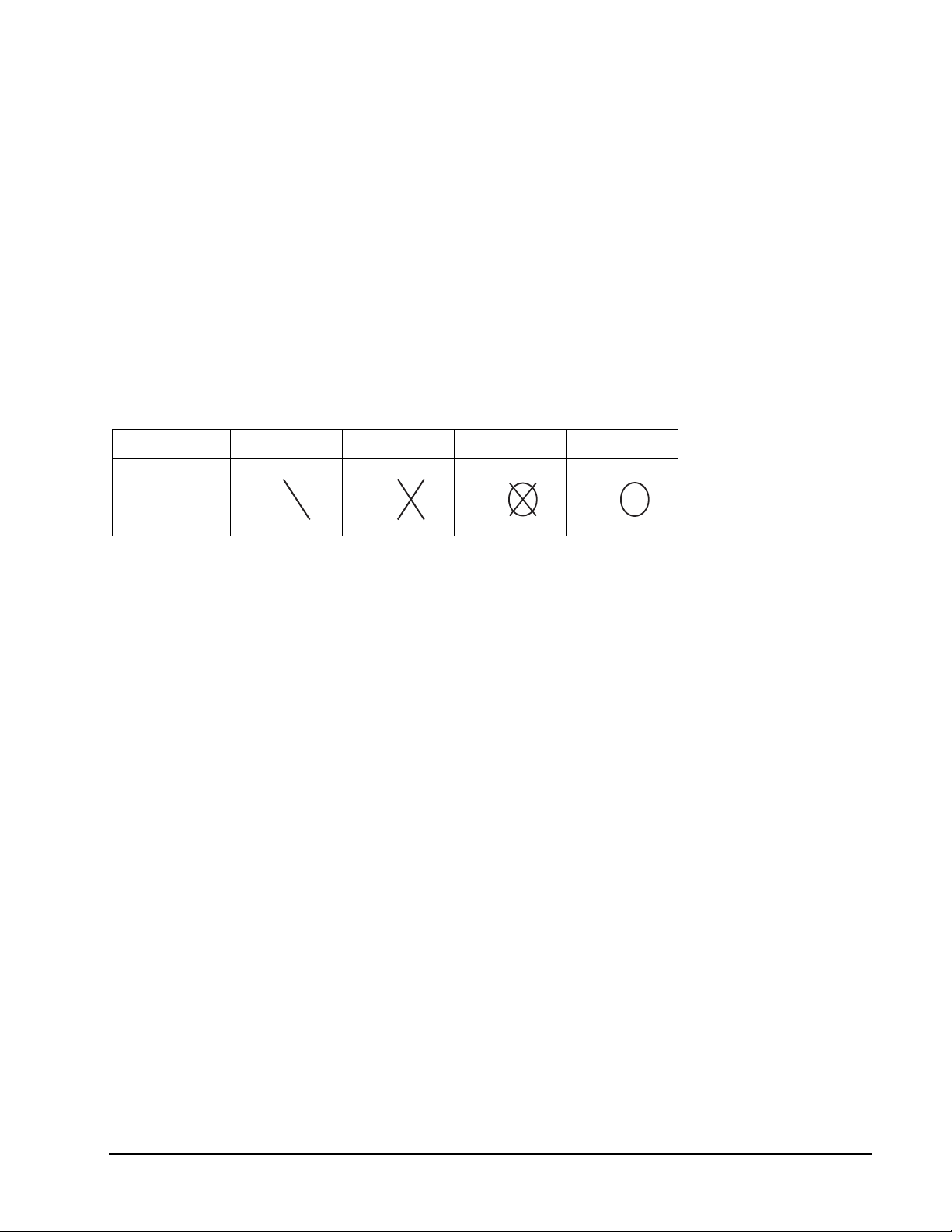
Cricket Status One Time Two Times Open Close
Sign
• Players accumulate scores to win similar to American Cricket.
• If every player has opened a number, that number will then close.
• All valid hits will be confirmed and displayed by the Cricket Display.
• Players can open 15-20, bullseye, D (Double), T (Triple) and 3B (3 singles) in any
order.
• D refers to hitting any three doubles, other than the bullseye, to open the target.
• T refers to hitting any three triples to open the target.
• 3B refers to hitting three single segments, in the same number, in one turn. You have
to do this in 3 separate turns to open this target.
• A standard cricket number will open first before you can use that segment for a D, T or
3B. For example if you hit a T20 and you haven’t opened the standard cricket 20 it will
open the standard cricket 20 instead of giving you one hit for your T target.
26 1-800-225-7593
www.gldproducts.com
Page 27
GLD Products Neptune Dartboard
Item 42-1023
G11 Spanish Cricket (with scoring options of C00, C20, C11)
Game Options:
Double Bull
Single Bull
The scoring options are described in the chart below. Press GAME OPTION button to
select.
Scoring
Options
Description
C00 Hit and open numbers 11-20 in any order.
C20 Hit and open the number 20 first, then in order, open numbers 19, 18, 17, 16,
15, 14, 13, 12 and 11.
C11 Hit and open 11 first, then in order, open numbers 12, 13, 14, 15, 16, 17, 18, 19
and 20.
Refer to the section “Read First - Operation”.
Playing the Game
To win: The player who opens all their numbers first and has an equal or greater score than
all the other players is the winner.
NOTE: A single segment counts as one hit, a double segment counts as two hits and a
triple segment counts as three hits.
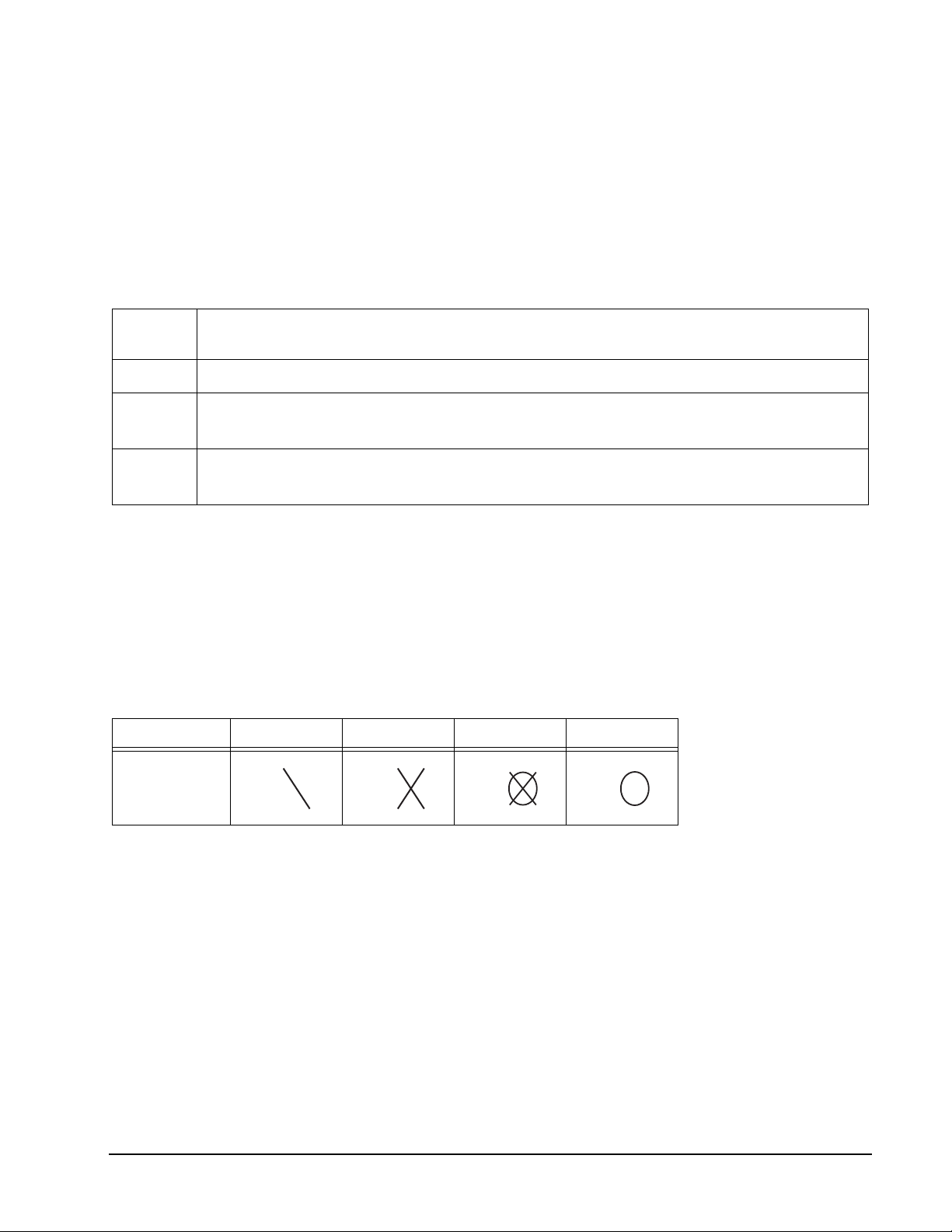
Cricket Status One Time Two Times Open Close
Sign
• The available numbers are 11-20. No bullseye is used for this game.
• All valid hits will be confirmed and displayed by the Cricket Display.
• When a number has been hit 3 times by a player, it is then open to that player and any
further hits by that player will score points.
• Once a number has been hit 3 times by all the players, that number is then closed and
can no longer be scored upon by any player. At that time the indicator will change to
closed for that number.
• A player who has opened a number can continue to score on that number until it
becomes closed.
• If a player has opened all numbers first, but is behind on points, scoring continues on
open numbers. If that player has not accumulated the highest point total by the time
another player opens all their numbers, the player with the most points will be the
winner.
27 1-800-225-7593
www.gldproducts.com
Page 28
GLD Products Neptune Dartboard
Item 42-1023
G12 Shanghai (with scoring options of L01, L05, L10, L15, H01, H05, H10, H15, P01,
P05, P10, P15)
Game Options:
Double Bull
Single Bull
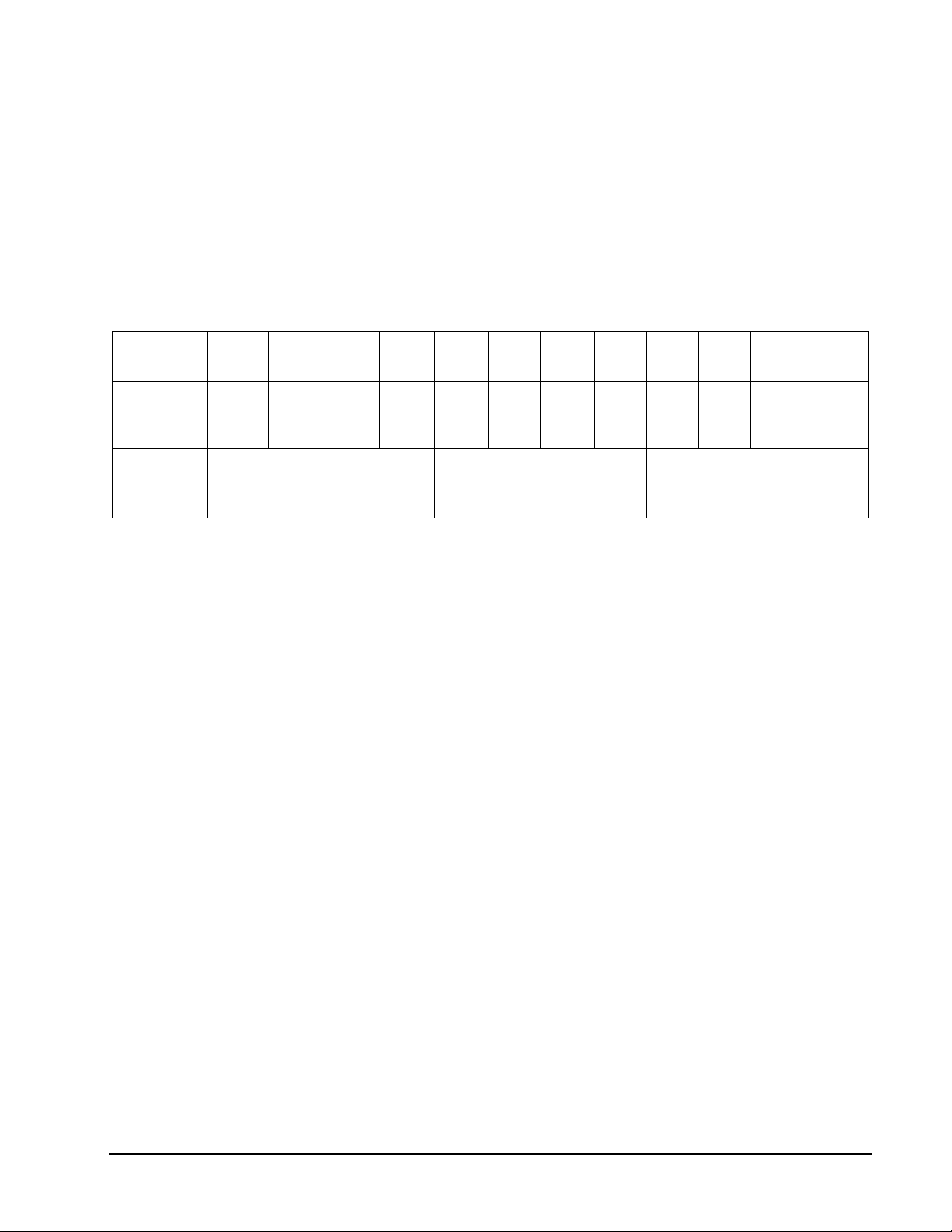
The scoring options are described in the chart below. Press GAME OPTION button to
select.
Scoring
Option
Game
starts on
number
L01 L05 L10 L15 H01 H05 H10 H15 P01 P05 P10 P15
1 5 10 15 1 5 10 15 1 5 10 15
Various doubles and triples
must be hit as specified by
the computer
Can hit any segment
Must hit double or triple
segments
Refer to the section “Read First - Operation”.
Playing the Game
To win: The player who gets the most points at the end of the game wins.
• Each player must hit all the numbers and the bullseye in order. Games have changing
start numbers.
• The target number for each turn will change by one, ending with the bullseye.
• The dartboard will display the target number you are supposed to hit.
• Throw 3 darts for each number and the player who gets the most points at the end of
the game wins.
• Your score is the number of the segment you are on.
• Hitting a double segment in the number you are on will double your points, likewise a
triple will triple your points. For example if you are on number 4 and you hit a single in
segment 4 you get 4 points. If you are on number 4 and you hit a double segment 4
you get 8 points.
28 1-800-225-7593
www.gldproducts.com
Page 29
GLD Products Neptune Dartboard
Item 42-1023
G13 Count Up (with scoring options of 100, 200, 300, 400, 500, 600, 700, 800, 900)
Game Options:
Double Bull
Single Bull
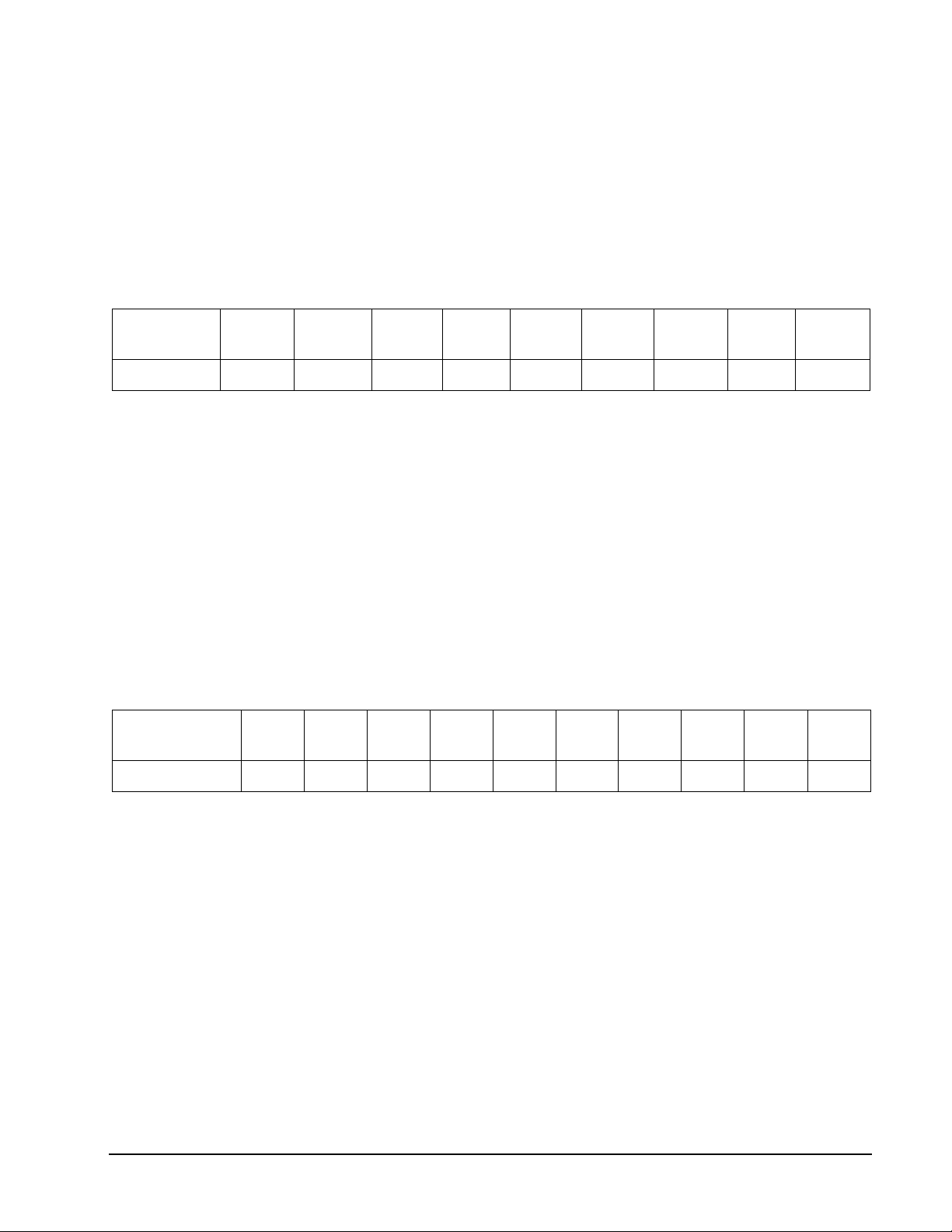
The scoring options are the set points which are the points needed to win, see the chart
below. Press GAME OPTION button to select.
Scoring
Option
Set Points 100 200 300 400 500 600 700 800 900
100 200 300 400 500 600 700 800 900
Refer to the section “Read First - Operation”.
Playing the Game
To win: The first player to reach or go over the set points will be the winner.
• Your score will be accumulated for each dart.
G14 Shoot Out (with scoring options of -11, -12, -13, -14, -15, -16, -17, -18, -19, -20)
Game Options:
Double Bull
Single Bull
The scoring options are the number of marks you must hit, see the chart below. Press
GAME OPTION button to select.
Scoring
Option
-11 -12 -13 -14 -15 -16 -17 -18 -19 -20
No. of Marks 11 12 13 14 15 16 17 18 19 20
Refer to the section “Read First - Operation”.
Playing the Game
To win: The first player who hits 11, 12, 13...20 marks, depending on the option selected, is
the winner.
• The e-BOARD Computer will randomly select a number for the player to hit.
• One correct hit on the displayed number subtracts one mark.
• Single, double and triple segments all count as one hit.
• If a player does not hit the selected number within 8 seconds, the dart is regarded as a
miss and the e-BOARD Computer will automatically select another random number for
the player to hit for the next dart.
29 1-800-225-7593
www.gldproducts.com
Page 30
GLD Products Neptune Dartboard
Item 42-1023
G15 Best of Nine (with scoring options of 009, 012, 015, 018, 021, 024, 027)
Game Options:
Double Bull
Single Bull
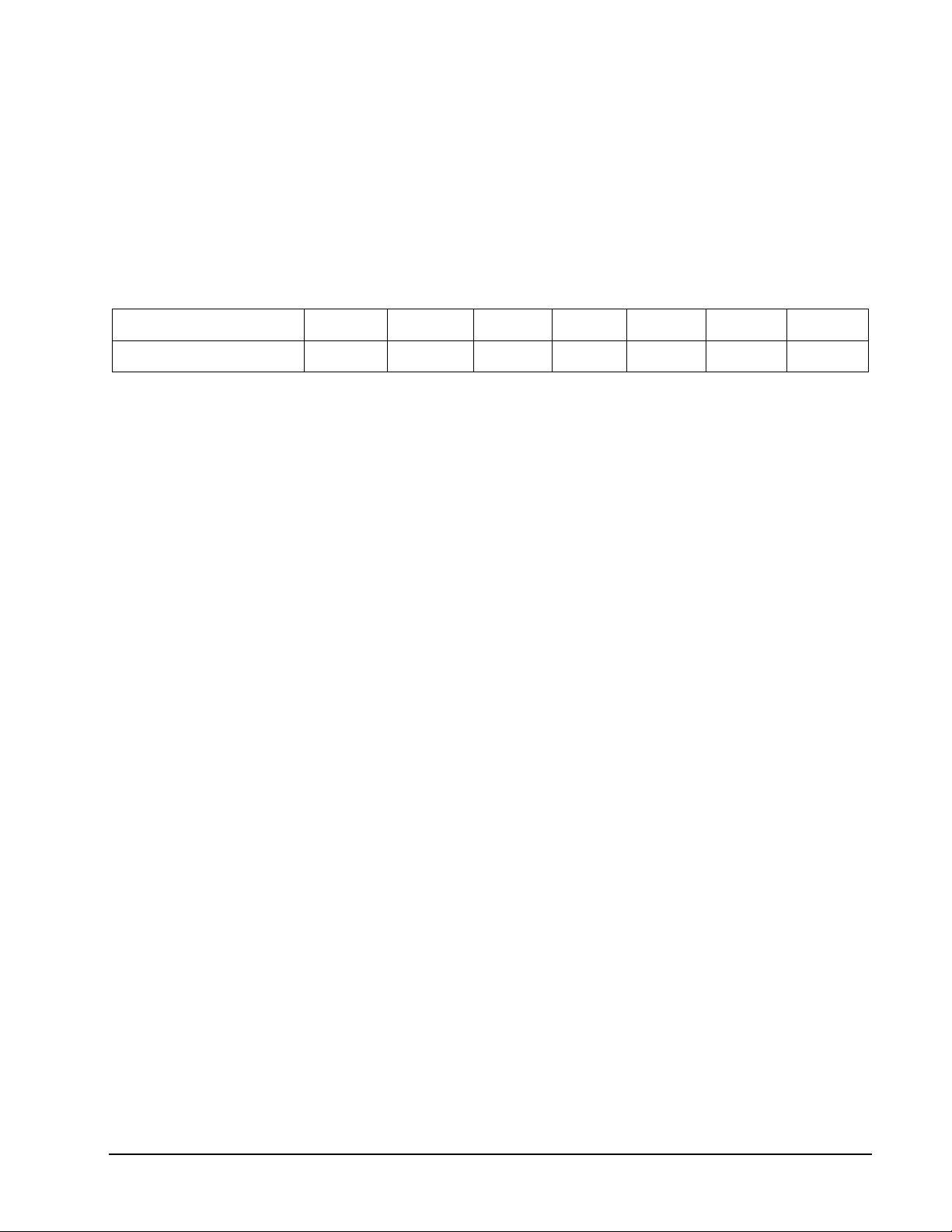
The scoring options are the number of darts thrown, matched with the number of rounds for
the game, see the chart below. Press GAME OPTION button to select.
Scoring Option 009 012 015 018 021 024 027
No. of Darts/Rounds 9/3 12/4 15/5 18/6 21/7 24/8 27/9
Refer to the section “Read First - Operation”.
Playing the Game
To win: The player with the highest score at the end of the game wins.
• The dartboard will announce “PLAYER 1” and display a number for you to hit.
• The target number will change fore each turn.
• Each player will take a turn throwing three darts.
• The object is to hit your assigned number.
• For every single segment hit in your number you will get one point. For every double
segment hit in your number you will get two points and for every triple segment hit in
your number you will get three points.
• The cricket display will count down how many rounds you have left.
30 1-800-225-7593
www.gldproducts.com
Page 31
GLD Products Neptune Dartboard
Item 42-1023
G16 Call Three (with scoring options of r03, r04, r05, r06, r07, r08, r09, r10)
Game Options:
Double Bull
Single Bull
The scoring options are the number of rounds played for the game, see the chart below.
Press GAME OPTION button to select.
Scoring Option r03 r04 r05 r06 r07 r08 r09 r10
No. of Rounds 3 4 5 6 7 8 9 10
Refer to the section “Read First - Operation”.
Playing the Game
To win: The player with the highest score at the end of all the rounds wins.
• The e-Board Computer will select 3 random numbers. The players must hit the
numbers in the order displayed.
• Hitting the number displayed in a single segment, is worth one point. If they hit the
number displayed in a double segment they get two points and if they hit the number
displayed in a triple segment they get three points.
• The cricket display will count down how many rounds you have left.
G17 Poker Darts (with scoring options of A00, d00)
Game Options:
Double Bull
Single Bull
The scoring options for this game do not change the way the game is played.
Refer to the section “Read First - Operation”.
Playing the Game
To win: The first player to get rid of all their “cards” or numbers wins.
• The game uses numbers 1-13 to play. These numbers represent a deck of cards. The
e-Board Computer will assign 5 numbers to a player (5 cards in a hand of poker).
• The player must hit the double segment of any of their “cards” or numbers. When you
do this it will eliminate that “card” or number for you and all players that have it.
• The cricket display will keep track of how many cards you have.
NOTE: The first three cards are displayed in the 1st, 2nd and 3rd dart display. The
Temporary Score display will show 3 numbers. The first 2 digits are the fourth card
and the last digit is the fifth card.
31 1-800-225-7593
www.gldproducts.com
Page 32
GLD Products Neptune Dartboard
Item 42-1023
G18 Hound and Hare (with scoring options of 005, 012, 009, 014, 011)
Game Options:
Double Bull (not used)
Single Bull (not used)
The scoring options are the number at which the Hound starts at, see the chart below. Press
GAME OPTION button to select.
Scoring Option 005 012 009 014 011
Number Hound Starts At 5 12 9 14 11
Refer to the section “Read First - Operation”.
Playing the Game
To win: If the “Hound” (Player 2) hits the same double number that the “Hare” (Player 1) is
trying to hit, the “Hound” wins. If the “Hare” (Player 1) makes it back around the dartboard to
the double 20, the “Hare” wins.
• The “Hare” (Player 1) tries to escape from the “Hound” (Player 2) while the “Hound”
tries to catch the “Hare”.
• The “Hare” (Player 1), starts at the double 20.
• The dartboard will display what number you must hit.
• Only the double segments are used in this game.
• The “Hare” (Player 1) must hit the double 20 to move clockwise to the next number.
The “Hound” (Player 2) will start at the double 5 (or 12, 9, 14, 11) segment. The
“Hound” (Player 2) must hit the double 5 (or 12, 9, 14, 11) segment to move clockwise
to the next number.
• The players continue to take turns throwing darts and moving around the dartboard.
• The object is for the “Hound” to catch up to the “Hare”.
32 1-800-225-7593
www.gldproducts.com
Page 33
GLD Products Neptune Dartboard
Item 42-1023
G19 Halve-It
Game Options:
Double Bull
Single Bull
There are seven rounds of three darts each in this game. Each round has a target number
you must hit to score points. The dartboard will display the number you need to hit for that
round. The target numbers for each round are:
Round 1 2 3 4 5 6 7
Target Number 20 16 Double 7 14 Triple 10 17 Bullseye
Refer to the section “Read First - Operation”.
Playing the Game
To win: The player with the highest score after all seven rounds wins.
• Players take turns throwing darts and attempting to score points.
• If you hit the target number for that round, you will get that number in points. Double
segments will double your points and triple segments will triple your points. For
example, in Round 1 you have to hit the number 20. If you hit it in a single segment you
will get 20 points. If you hit the double 20 you will get 40 points and the triple 20 will
give you 60 points.
• For Round 3 you can only score off the double 7 segment.
• For round 5 you can only score off the triple 10 segment and for Round 7 you can only
score by hitting the bullseye.
• If a player misses the designated number on all three darts in a round, their total score
is cut in half.
33 1-800-225-7593
www.gldproducts.com
Page 34
GLD Products Neptune Dartboard
Item 42-1023
G20 Gold Hunting (with scoring options of 006, 009, 012, 015, 018, 021)
Game Options:
Double Bull
Single Bull
The scoring options are the number of times you must find gold to win, see the chart below.
Press GAME OPTION button to select.
Scoring Option 006 009 012 015 018 021
No. of Times Finding Gold 6 9 12 15 18 21
Refer to the section “Read First - Operation”.
Playing the Game
To win: The player who “Finds Gold” the designated amount of times first will win the game.
• The object of the game is to “Find Gold”. You will “Find Gold” whenever your score
reaches exactly 50 or a multiple of 50 (100, 150, 200 etc.).
• The cricket display will keep track of how many times you find gold.
• The player who “Finds Gold” the designated amount of times first will win the game.
However since gold can make you greedy, whenever you “Find Gold” you will also
steal 1 gold from every player who has gold.
• To score and attempt to “Find Gold”, players take turns throwing darts at the dartboard.
The number on the dartboard that you hit will be your score.
• A double segment is worth double points and a triple is worth triple points.
34 1-800-225-7593
www.gldproducts.com
Page 35
GLD Products Neptune Dartboard
Item 42-1023
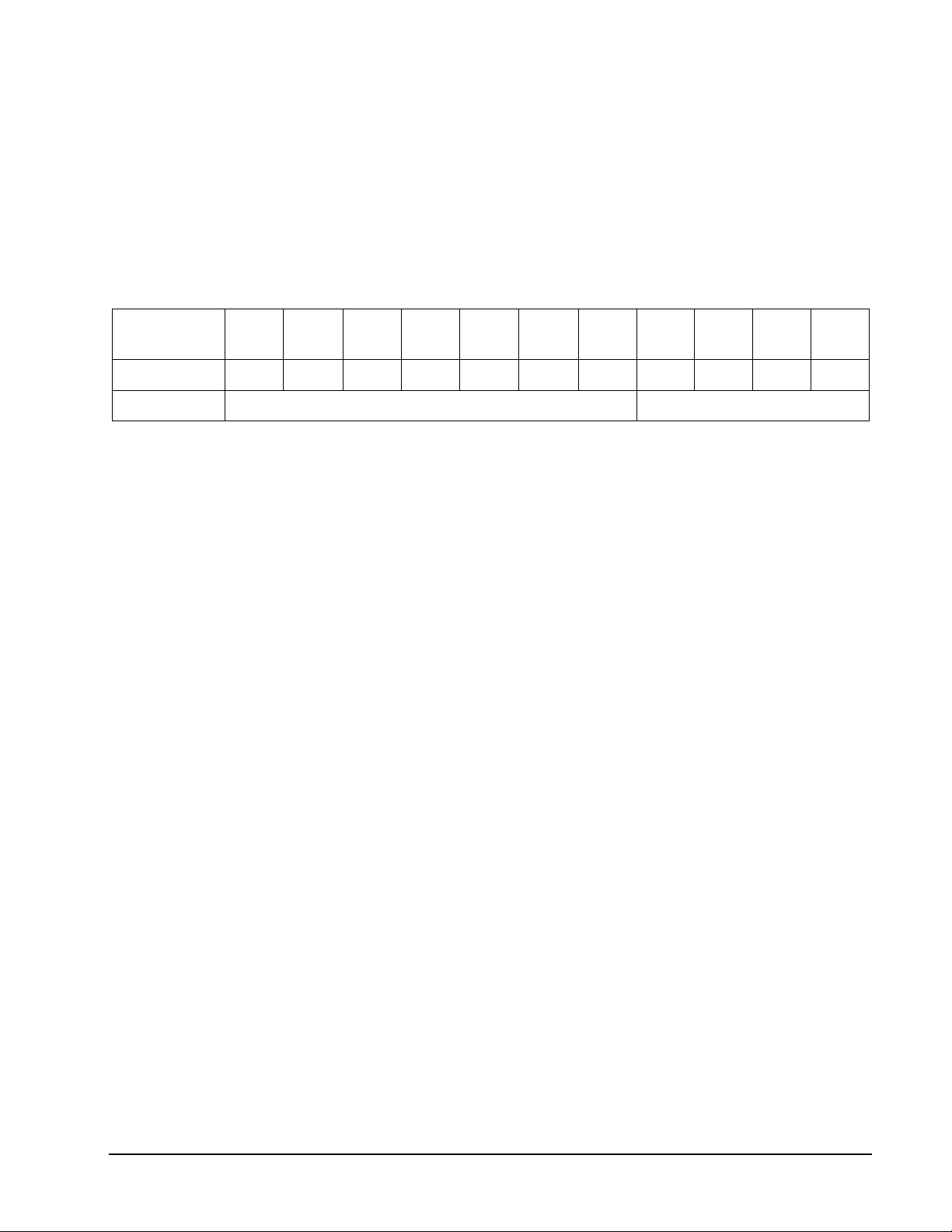
G21 Killer (with scoring options of -7, -8, -9, -10, -11, -12, -13, =3, =5, =7, =9)
Game Options:
Double Bull
Single Bull
The scoring options are the number of lives you have and what segments to hit for a kill, see
the chart below. Press GAME OPTION button to select.
Scoring
Option
No. of Lives 7 8 9 10 11 12 13 3 5 7 9
-7 -8 -9 -10 -11 -12 -13 =3 =5 =7 =9
Hit Single, Double or Triple to kill Must hit Doubles only to kill
Refer to the section “Read First - Operation”.
Playing the Game
To win: The last player with “Lives” will be the winner.
• To start this game, players throw a dart at the dartboard to select their number.
• The dartboard display will show SEL. Select your number by throwing a dart at the
dartboard. The number selected will be used for that player throughout the game. The
number you select will display in your player’s score display. No two players can select
the same number in one game.
• To become a “Killer”, a player must hit the double segment in their selected number.
• Once you become a “Killer” your score display will show - - - during your turn. It will
switch back to your selected number during other players turns.
• Once you become a “Killer” you can then kill other players by hitting the segments of
the number they picked until all their “Lives” are killed. Each hit can only “Kill” one “Life”
regardless if it is a double or triple.
• The number of “Lives” remaining will be displayed on the player’s cricket display.
NOTE: For scoring options =3, =5, =7, and =9 you can only kill if you hit a double. A single
or triple count as a miss.
35 1-800-225-7593
www.gldproducts.com
Page 36
GLD Products Neptune Dartboard
Item 42-1023
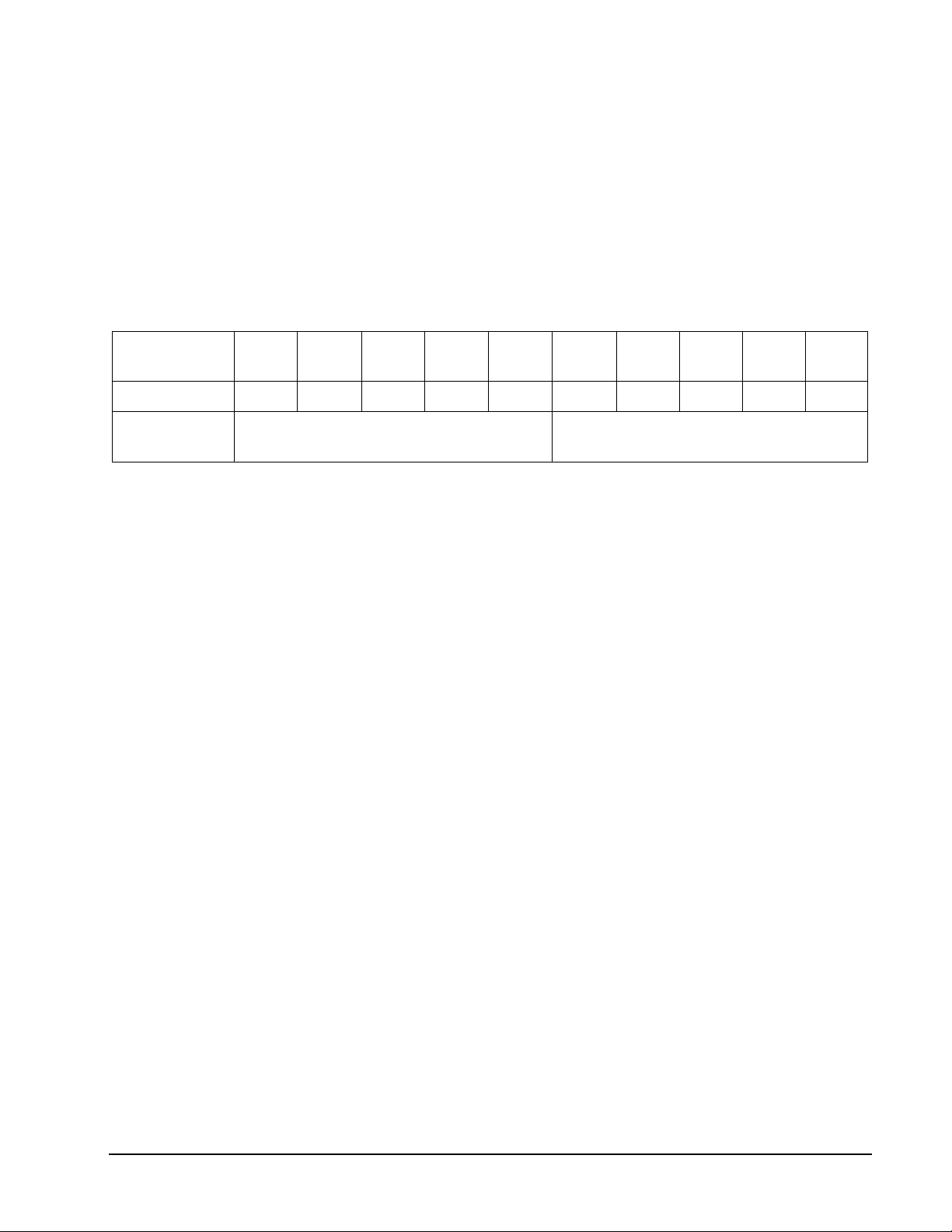
G22 Blind Killer (with scoring options of L03, L04, L05, L06, L07, b03, b04, b05, b06,
b07)
Game Options:
Double Bull
Single Bull
The scoring options are the number of lives you have and what segments to hit for a kill, see
the chart below. Press GAME OPTION button to select.
Scoring
Option
No. of Lives 3 4 5 6 7 3 4 5 6 7
L03 L04 L05 L06 L07 b03 b04 b05 b06 b07
Players are automatically a “Killer” when
game starts
Player must hit Bullseye to become a
“Killer”
Refer to the section “Read First - Operation”.
Playing the Game
To win: The last player with lives left is the winner.
• The dartboard will display SEL. You may select your number by throwing a dart at the
dartboard. The number selected will be used for that player for the game. You must
remember the number you selected, it will not be shown.
• This is your assigned number that other players must hit to “Kill” your lives. This
number should be kept a secret from the other players. Players can try to “Kill” other
players by hitting double segments of that player’s number.
• For the L03-L07 game options, you are automatically a “Killer” when the game
starts.
• For the b03-b07 options you must hit the bullseye to become a “Killer”. The
dartboard will display 000 until you become a “Killer” and then it will
display - - -.
• The number of lives that players have left is kept secret along with the players assigned
number. If a player loses all of their lives they are out.
36 1-800-225-7593
www.gldproducts.com
Page 37
GLD Products Neptune Dartboard
Item 42-1023
G23 Round-The-Clock (with scoring options of 105, 110, 115, 120)
Game Options:
Double Bull
Single Bull
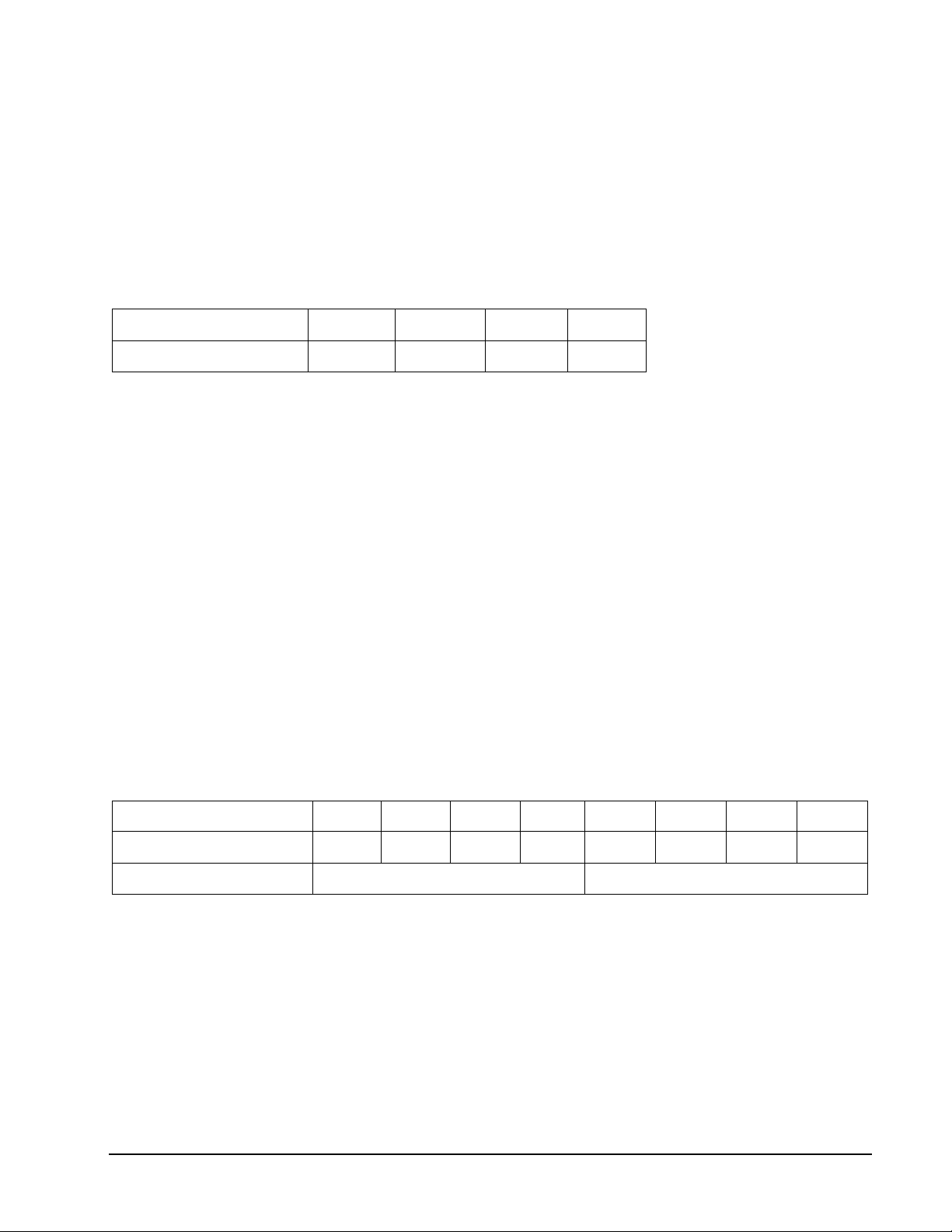
The scoring options are the last number that will be thrown, see the chart below. Press
GAME OPTION button to select.
Scoring Option 105 110 115 120
Last Number Thrown 5 10 15 20
Refer to the section “Read First - Operation”.
Playing the Game
To win: The first player to hit all the designated numbers in order, wins.
• Players must hit numbers 1 through 5 (or 10, 15, 20) in order.
• The dartboard will display the number that must be hit.
• The number can be hit in any segment (single, double or triple).
• A player has to hit the designated number to move on to the next number.
• The scoreboard for each player will display the number of segments remaining.
G24 Round-The-Clock Double/Triple (with scoring options of 205, 210, 215, 220, 305,
310, 315, 320)
Game Options:
Double Bull
Single Bull
The scoring options are the last number that will be thrown and the segment that must be
hit, see the chart below. Press GAME OPTION button to select.
Scoring Option 205 210 215 220 305 310 315 320
Last Number Thrown 5 10 15 20 5 10 15 20
Must hit only Double segments Must hit only Triple segments
Refer to the section “Read First - Operation”.
Playing the Game
To win: The first player to hit all the designated numbers in order, wins.
• Only the double (205, 210, 215, 220) or triple (305, 310, 315, 320) segments are used
to score for each number.
• Players must hit numbers 1 through 5 (or 10, 15, 20) in order.
• The dartboard will display the number that must be hit.
• A player has to hit the designated number to move on to the next number.
• The scoreboard for each player will display the number of segments remaining.
37 1-800-225-7593
www.gldproducts.com
Page 38
GLD Products Neptune Dartboard
Item 42-1023
G25 Round-The-Clock The Irish Way
Game Options:
Double Bull (not used)
Single Bull (not used)
Refer to the section “Read First - Operation”.
Playing the Game
To win: Players must hit targets until they reach the bullseye. Then they must get two single
bullseyes in the same turn or a double bullseye to win the game.
• Hit single segments of the number displayed to advance that number plus 1. On the
first target, hit the single number 1 to move to number 2.
• Doubles and triples advance you the amount of the double or triple plus one. For
example hitting double 1 will move you to number 3.
• Once you pass the number 10, the double and triple segments will count as a miss.
• If 10 is the target, then hitting a double 10 your next number will be the bullseye.
Players must get two single bullseyes in the same turn or a double bullseye to win the
game.
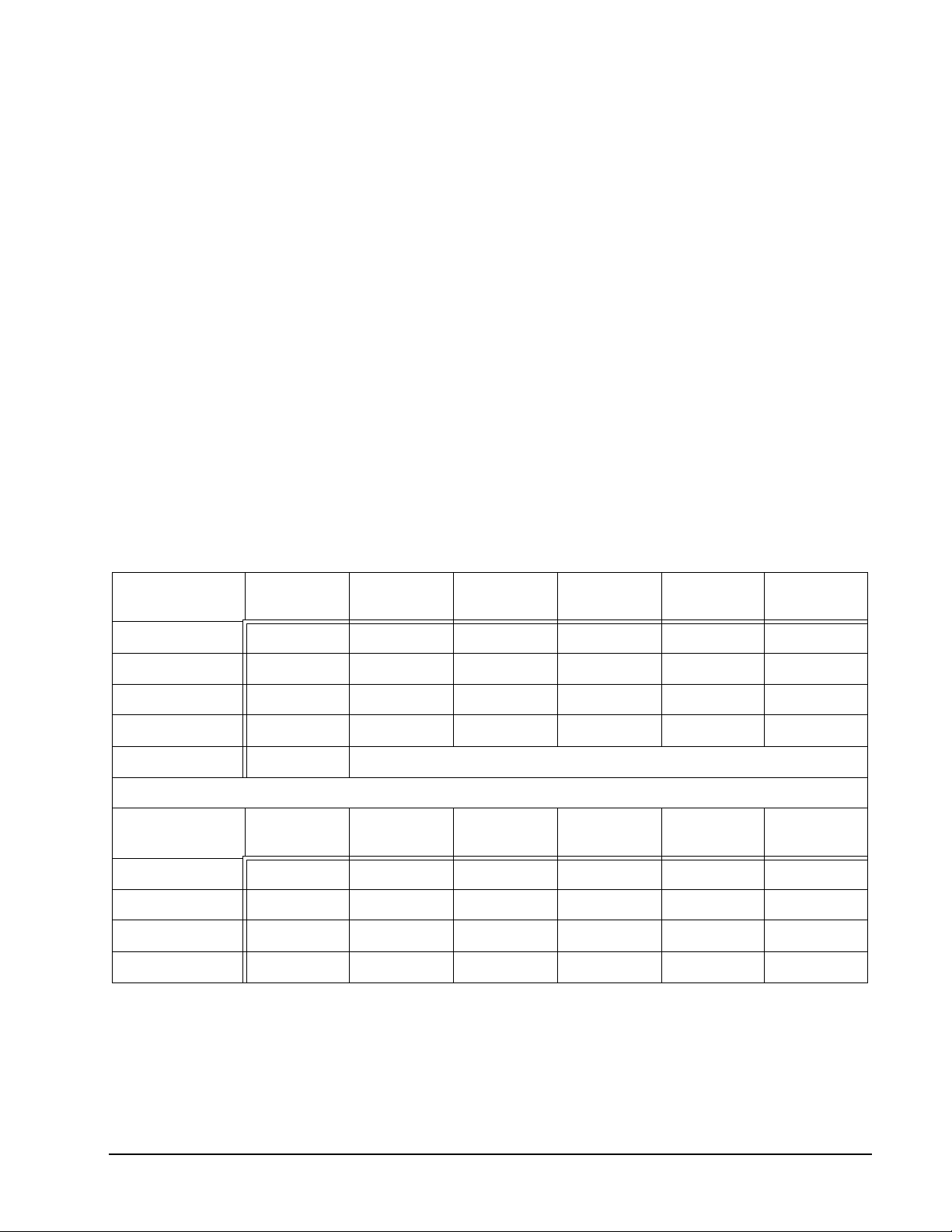
An example of a game played between 2 players is:
Nick 1st Dart
1st Turn S1 2 T2 7 S7 8
2nd Turn D8 17 S17 18 S5 18
3rd Turn S18 19 S19 20 S20 Bull
4th Turn S8 Bull Single Bull Bull S1 Bull
5th Turn Double Bull WINNER!
Marilyn 1st Dart
1st Turn S1 2 S2 3 S3 4
2nd Turn D4 9 S9 10 D10 Bull
3rd Turn Single Bull Bull S17 Bull D4 Bull
4th Turn Single Bull Bull S19 Bull D18 Bull
Next
Target #
Next
Target #
2nd Dart
2nd Dart
Next
Target #
Next
Target #
3rd Dart
3rd Dart
Next
Target #
Next
Target #
38 1-800-225-7593
www.gldproducts.com
Page 39
GLD Products Neptune Dartboard
Item 42-1023
G26 Nine-Dart Century (with scoring options of 100, 150, 200)
Game Options:
Double Bull
Single Bull
The scoring options are the target score, see the chart below. Press GAME OPTION button
to select.
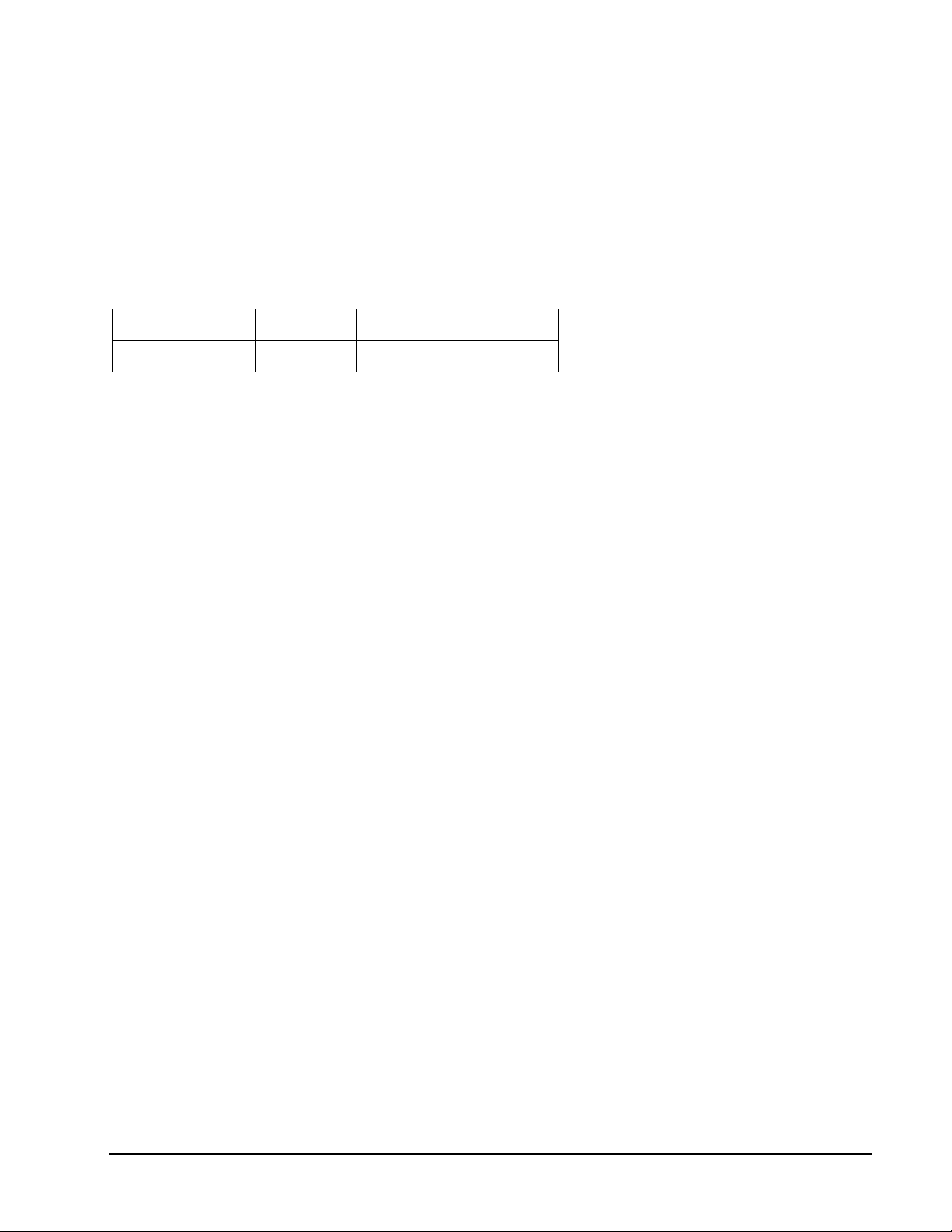
Scoring Option 100 150 200
Target Score 100 Points 150 Points 200 Points
Refer to the section “Read First - Operation”.
Playing the Game
To win: The player that gets closest to the Target Score without going over is the winner.
• In this game each player has 9 darts (three turns) to score 100 (or 150, 200) points
without going over, or get as close as possible.
• If you go over you are out of the game. The dartboard will announce “TOO HIGH”.
• Darts that land outside the scoring area will reset your score back down to zero. Press
the MISS button.
• Darts that bounce out are not penalized and do not count for any points.
• The number on the dartboard that you hit will be your score.
• A double segment is worth double points and a triple is worth triple.
39 1-800-225-7593
www.gldproducts.com
Page 40
GLD Products Neptune Dartboard
D-11 Outer
S-11
T-11 Inner
S-11
Inner
S-6
Bullseye
Inner &
Outer
T-6 Outer
S-6
D-6
Item 42-1023
G27 Football
Game Options:
Double Bull
Refer to the section “Read First - Operation”.
Playing the Game
To win: The first player who finishes crossing their playing field is the winner.
• To start the game the dartboard will display SEL. The player will then throw a dart at
the dartboard to determine their “number” or “playing field”.
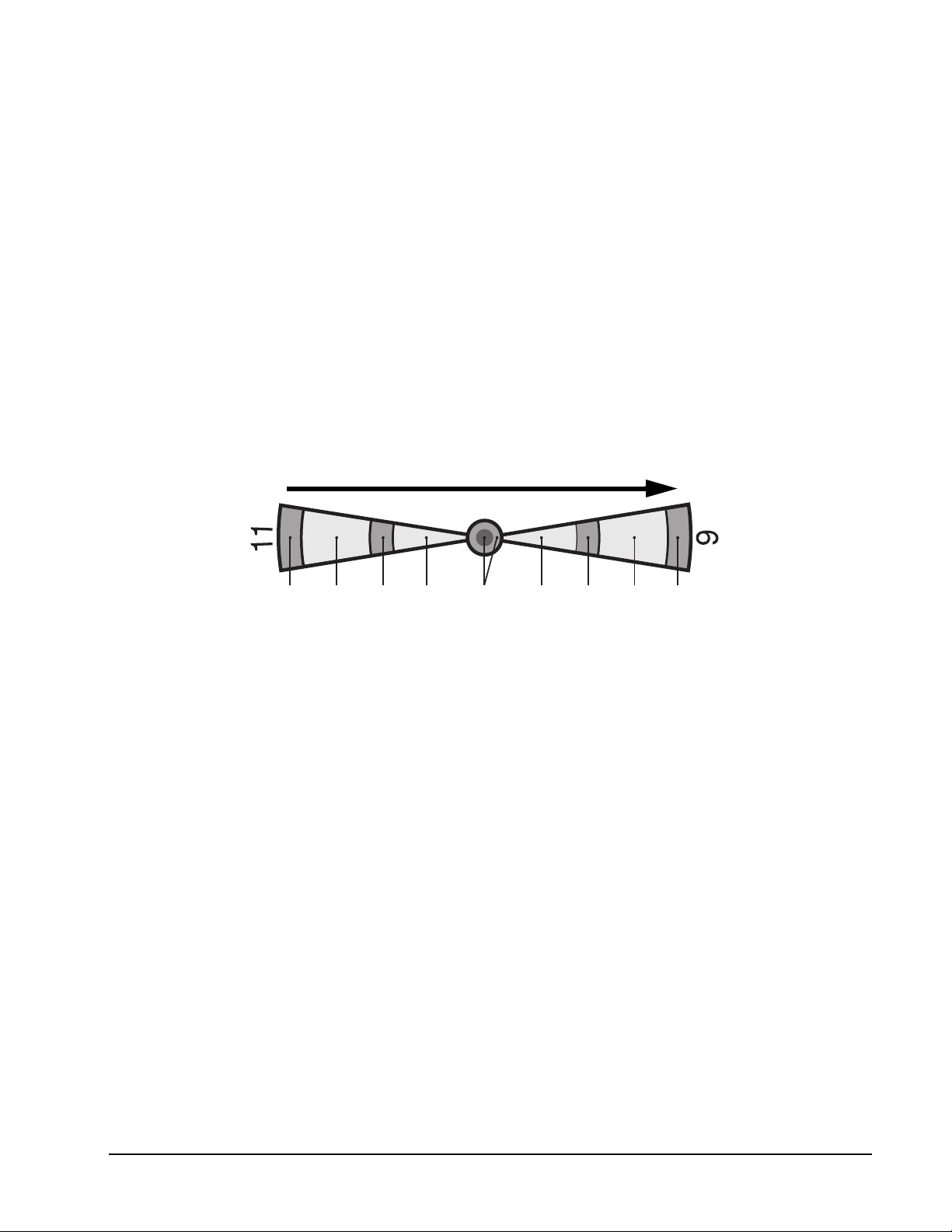
• Once a “playing field” is selected, you must hit the segments in order from the outside
double segment of your number working your way in to the bullseye and to the opposite
side to the outer double segment. See illustration and example below.
• A dart that hits a segment out of their playing field or out of order is a miss.
• For example, if a player selects segment 11, they have to hit D-11, outer S-11, T-11,
inner S-11, outer bullseye, inner bullseye, outer bullseye, inner S-6, T-6, outer S-6 and
finally D-6.
40 1-800-225-7593
www.gldproducts.com
Page 41
GLD Products Neptune Dartboard
Double
Outer Single
Triple
Inner Single
Item 42-1023
G28 Bowling (with scoring options of 10r, 11r, 12r, 13r, 14r, 15r)
Game Options:
Double Bull (not used)
Single Bull (not used)
Before starting the game you must select the number of players and your desired scoring
option. The scoring options are the number of frames, see the chart below. Press GAME
OPTION button to select.
Scoring Option 10r 11r 12r 13r 14r 15r
No. of Frames 10 11 12 13 14 15
Refer to the section “Read First - Operation”.
Playing the Game
To win: The player with the highest points or “pins” at the end of the game is the winner.
• For each turn the dartboard will display SEL. For each turn your first dart will select the
“Alley” and the second and third dart will score “pins” or points. Hitting the bullseye will
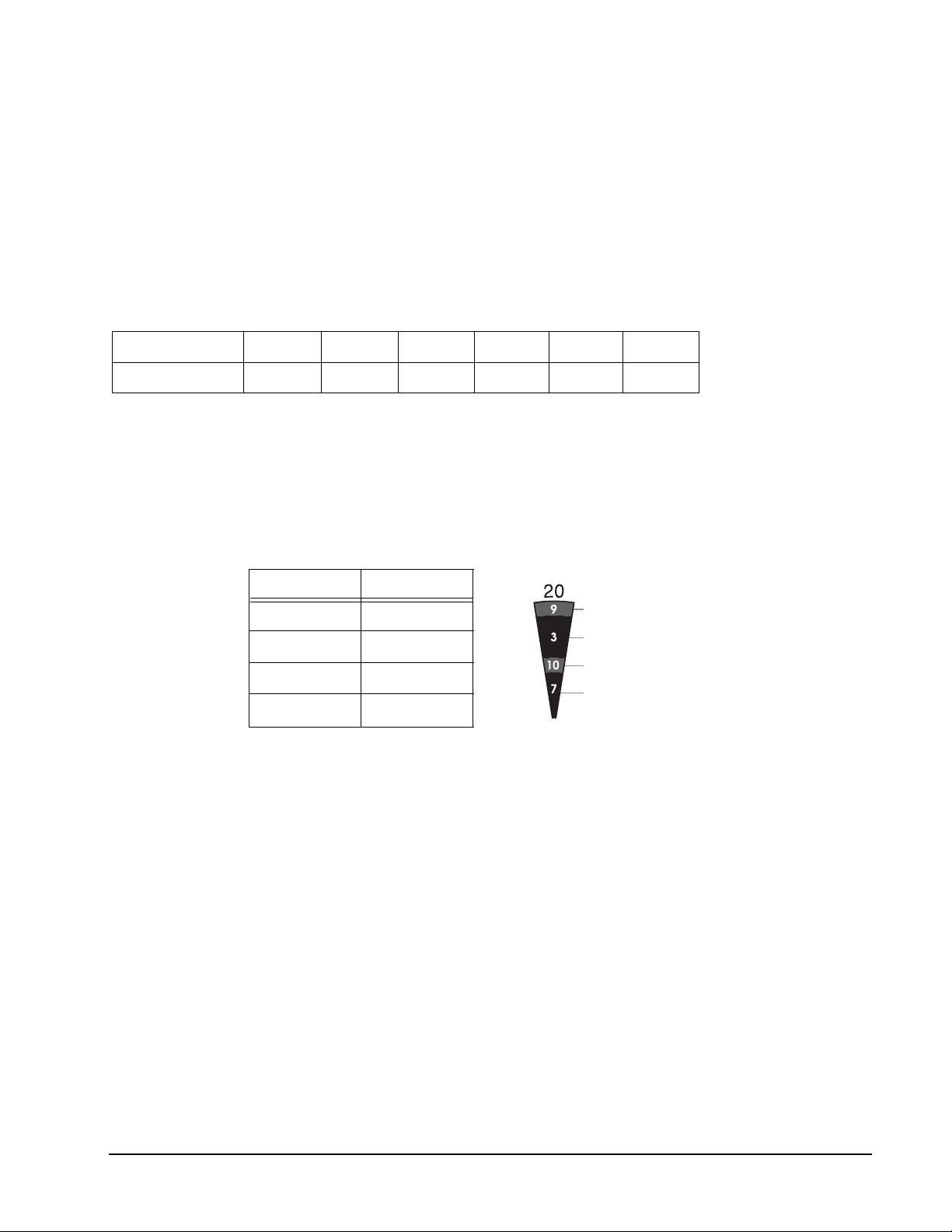
not count as an “Alley” or give you any “pins” or points. Points are scored as follows:
Segments Score
Double 9 Pins
Outer Single 3 Pins
Triple 10 Pins
Inner Single 7 Pins
• A player cannot hit the same single segment twice in the same frame. The second hit
will be counted as zero.
• You can hit the same triple or double segment twice. However hitting the double
segment twice in a row will give you 10 “pins” or points. Hitting the triple segment twice
will give you 20 “pins” or points.
• The cricket display will count down the number of frames left. The perfect game is
200/220/240/260/280/300 respectively for the scoring options chosen.
41 1-800-225-7593
www.gldproducts.com
Page 42
GLD Products Neptune Dartboard
Item 42-1023
G29 Golf (with scoring options of 09F, 10F, 11F, 12F, 13F, 14F, 15F, 16F, 17F, 18F)
Game Options:
Double Bull
Single Bull
The scoring options are the number of “holes”, see the chart below. Press GAME OPTION
button to select.
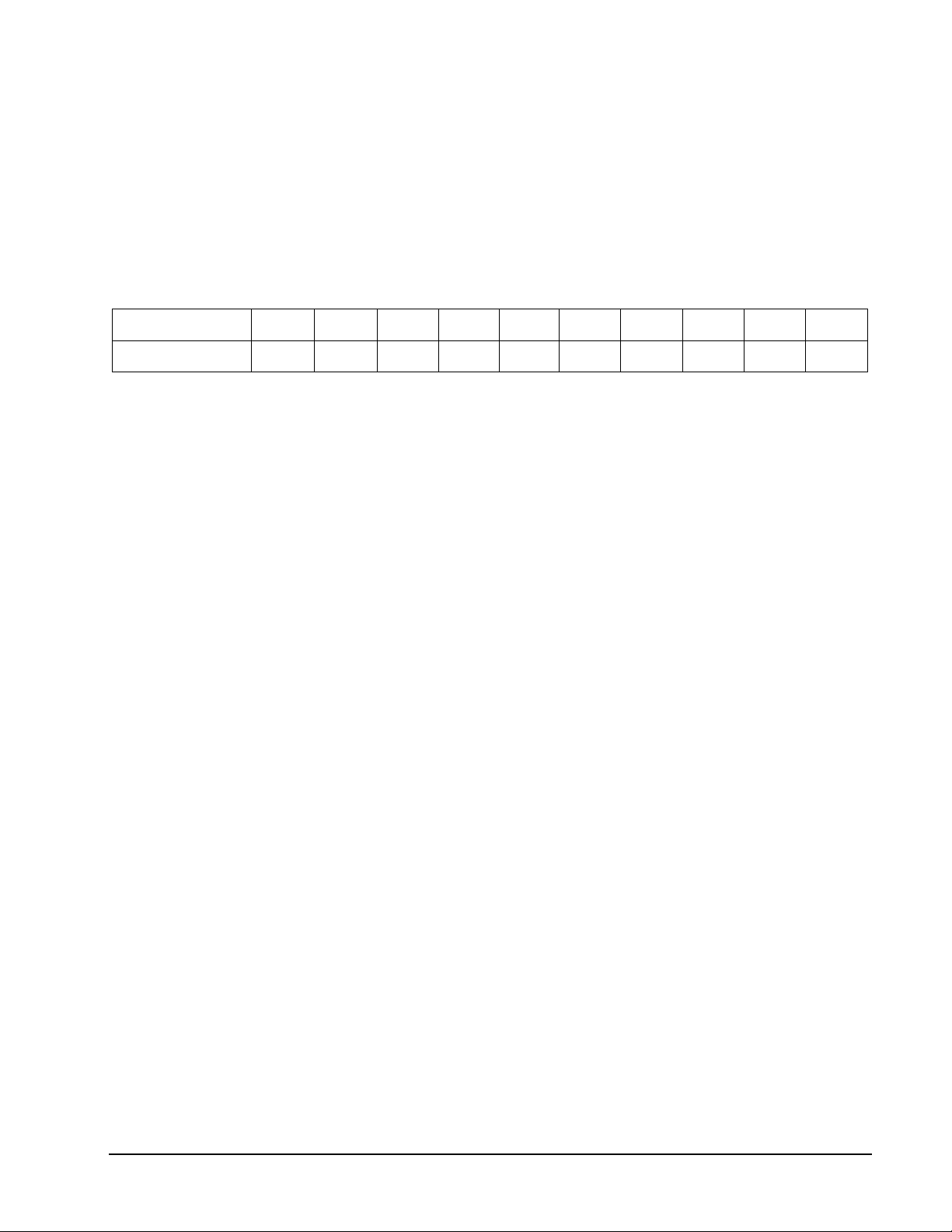
Scoring Option 09F 10F 11F 12F 13F 14F 15F 16F 17F 18F
No. of Holes 9 10 11 12 13 14 15 16 17 18
Refer to the section “Read First - Operation”.
Playing the Game
To win: The first person to complete all their “holes” wins and the game is over.
• Numbers 1-18 are the “Holes” of the golf course and must be hit in order.
• Players must hit each number three times before they can move on to the next “hole”.
• A double will count as two hits, a triple will count as three hits.
• The e-BOARD Computer will display the best hit for the number you are on.
• Each dart thrown counts as a “stroke”, whether it hits your designated number or not,
and will be displayed on the scoreboard for each player.
• The cricket display will show how many “holes” are left.
• The bullseye counts as a miss.
G30 Car Racing
Game Options:
Double Bull
Single Bull
Refer to the section “Read First - Operation”.
Playing the Game
To win: The first player to finish the course is the winner.
• In this game, the dartboard becomes a race course. The course begins at the number
20 and runs clockwise around the dartboard to the number 5 triple segment and ends
with the bullseye.
• You must hit the numbers in order clockwise around the dartboard. A valid hit on the
course is the inner single.
• There are 4 obstacles throughout the course at the following segments: triple 13, triple
17, triple 8 and triple 5. The player must hit the triple in each of those numbers to clear
the obstacle.
• The dartboard will display what segment you need to hit and each players scoreboard
will display the last number hit.
• The cricket scoreboard will count down how many segments you need to finish the
race.
42 1-800-225-7593
www.gldproducts.com
Page 43
GLD Products Neptune Dartboard
Item 42-1023
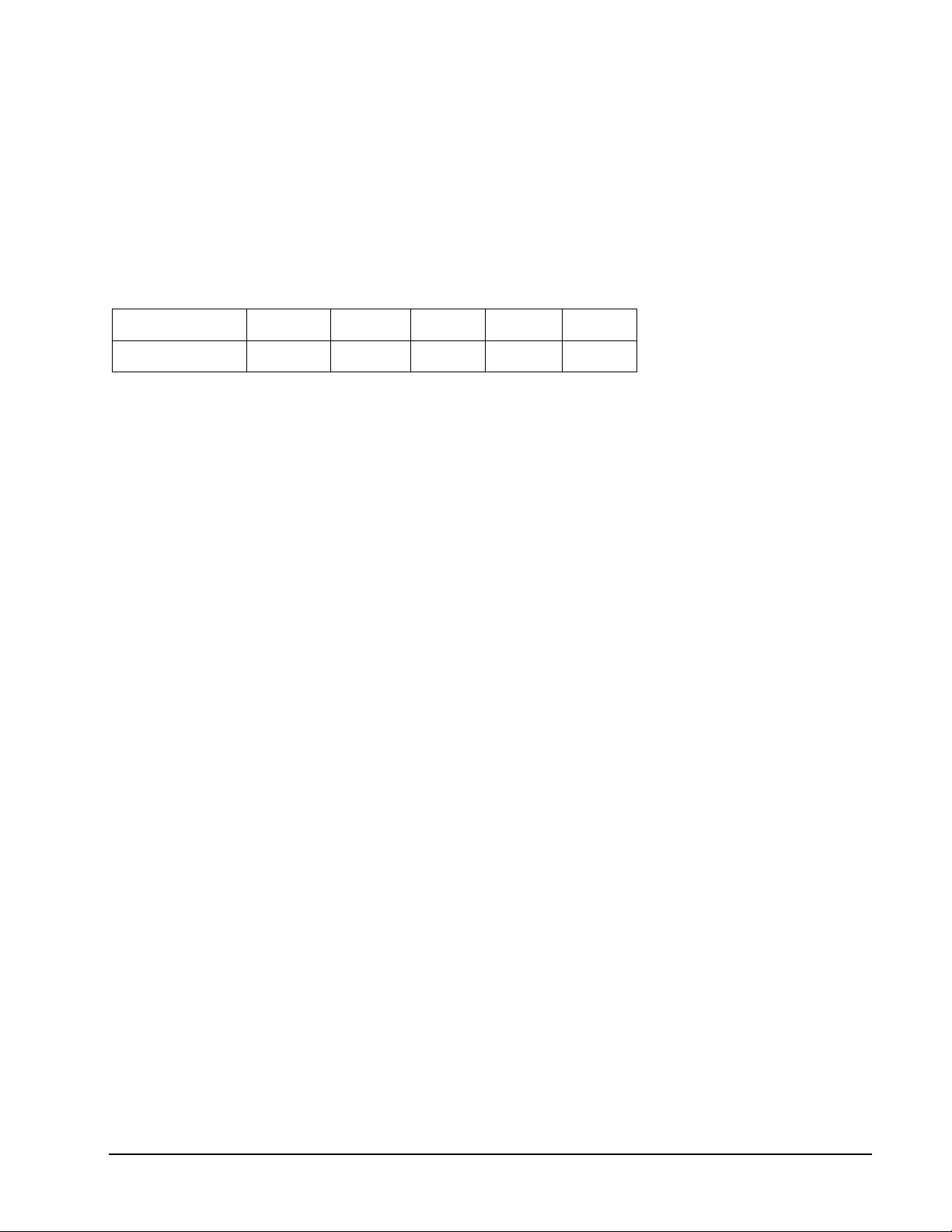
G31 Big Six (with scoring options of 003, 004, 005, 006, 007)
Game Options:
Double Bull
Single Bull
The scoring options are the number of lives, see the chart below. Press GAME OPTION
button to select.
Scoring Option 003 004 005 006 007
No. of Lives 3 4 5 6 7
Refer to the section “Read First - Operation”.
Playing the Game
To win: If a player loses all their lives they are out of the game. The remaining players
continue the game until one player is left with lives. That player is the winner.
• This game allows a player to challenge opponents to hit the targets of the players
choice. The dartboard will display the single 6 segment as the first target. Players must
earn the chance to pick the next target for their opponent by making a hit on the single
6 target. If they hit the single 6, the dartboard will display SEL. They can then throw a
dart to select the next target. That number and segment then becomes the target. The
scoreboard will display the target. In any turn if the player does not hit the designated
target, they lose one life.
• If a player hits the target with the first or second dart, the next dart then determines the
next target and that player’s turn is over.
• If a player hits the target with the third dart their turn is over and the target stays the
same. A life is not lost.
43 1-800-225-7593
www.gldproducts.com
Page 44
GLD Products Neptune Dartboard
Item 42-1023
G32 Shove A Penny
Game Options:
Double Bull
Single Bull
Refer to the section “Read First - Operation”.
Playing the Game
To win: The first player to open all their numbers is the winner.
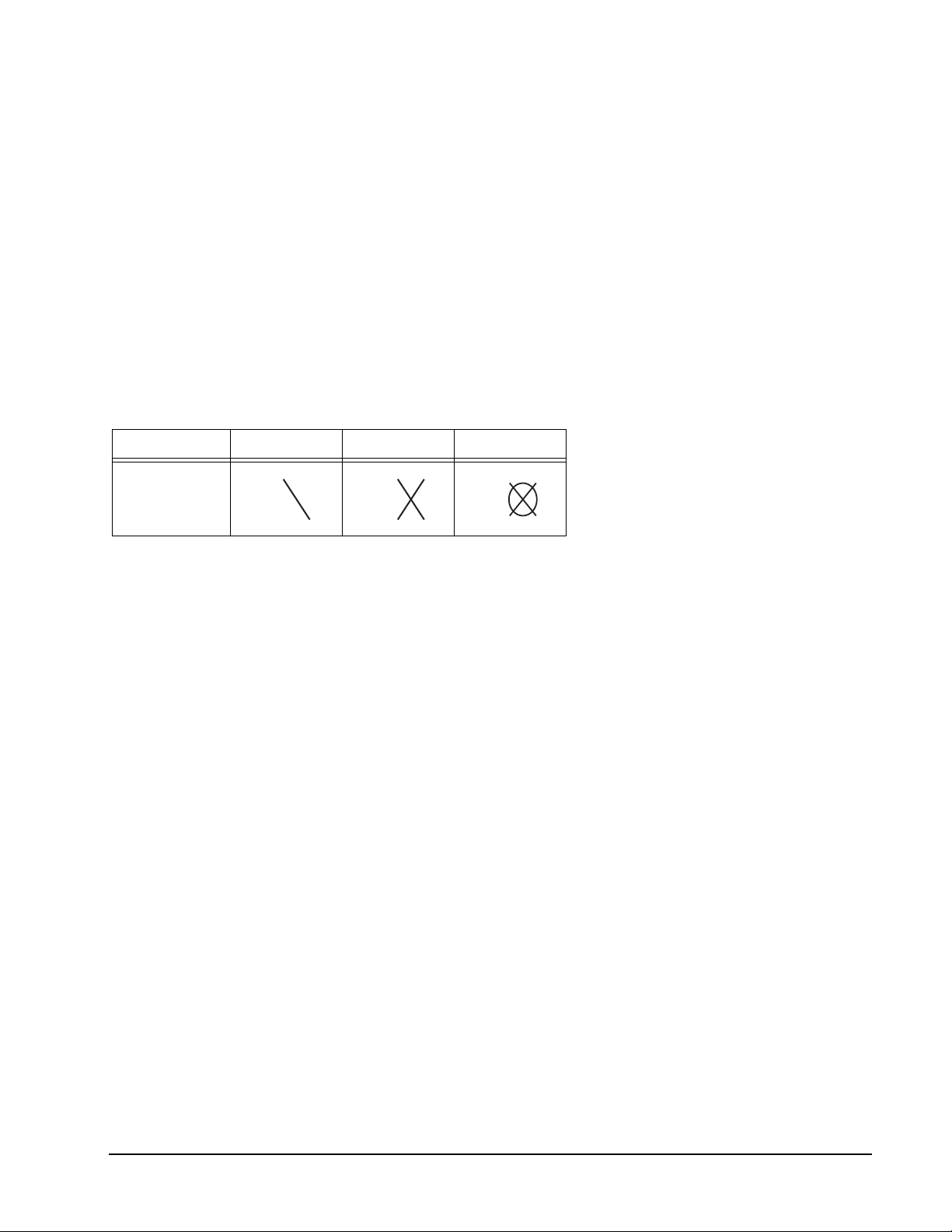
NOTE: A single segment counts as one hit, a double segment counts as two hits and a
triple segment counts as three hits.
Cricket Status One Time Two Times Three Times
Sign
• This game is similar to Cricket in that you must open numbers 15-20 and the bullseye
in order.
• The dartboard will display which number you have to hit. You must hit each number 3
times to open it.
• Should a player score more than 3 hits in any one number, the excess hits will be given
to the next player.
• The cricket display will keep track of the number of hits per number for each player.
44 1-800-225-7593
www.gldproducts.com
Page 45
GLD Products Neptune Dartboard
Item 42-1023
G33 Hi Score (with scoring options of H03, H04, H05, H06, H07, H08, H09, H10, H11,
H12)
Game Options:
Double Bull
Single Bull
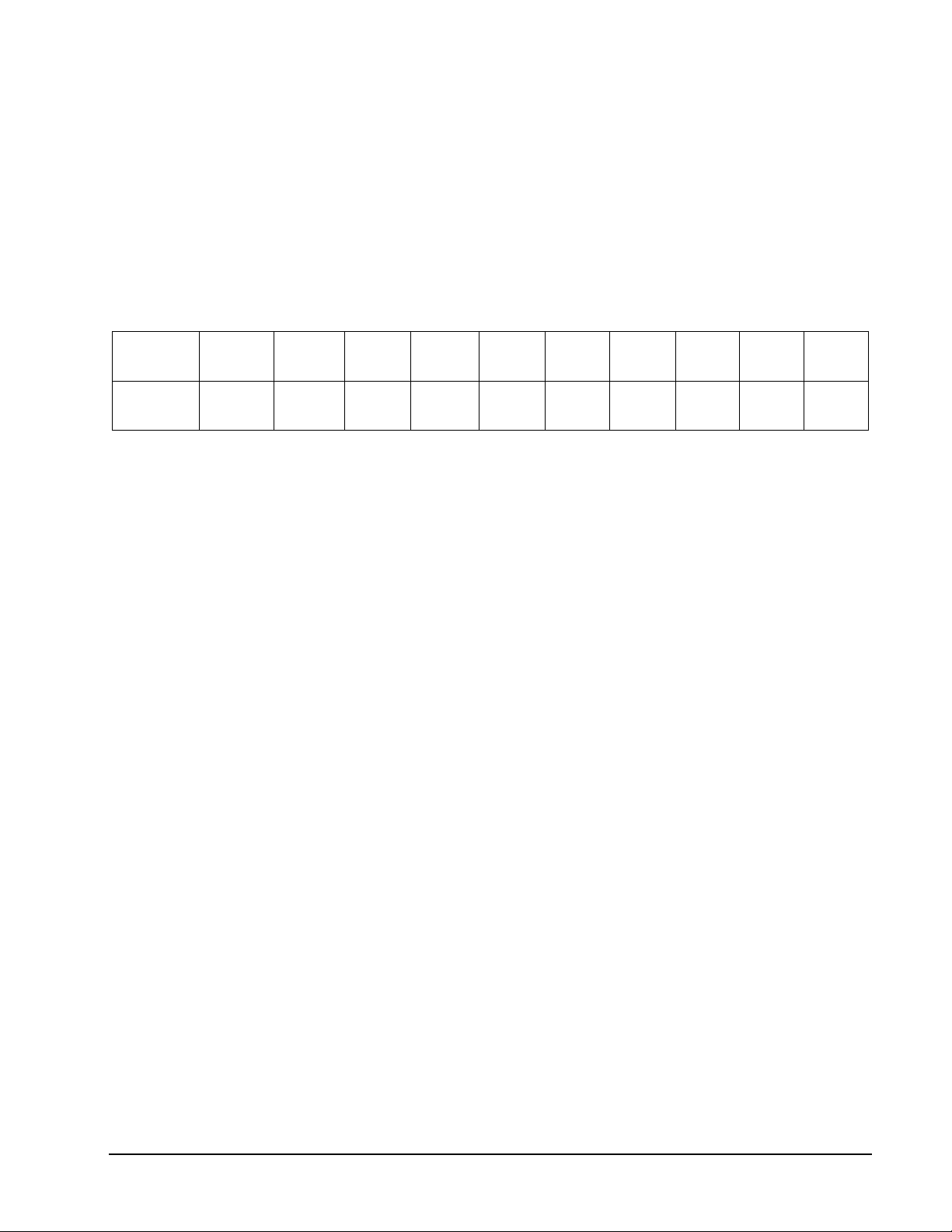
The scoring options are the number of rounds, see the chart below. Press GAME OPTION
button to select.
Scoring
Option
No. of
Rounds
H03 H04 H05 H06 H07 H08 H09 H10 H11 H12
3 4 5 6 7 8 9 10 11 12
Refer to the section “Read First - Operation”.
Playing the Game
To win: The player with the highest score at the end of all the rounds wins.
• The rules are simple. A player must rack up the most points in 3, 4, 5...or 12 rounds
(each round is 3 darts) to win.
• Doubles and triples count as 2 times and 3 times that number’s score respectively.
• The cricket display will count down the remaining rounds.
45 1-800-225-7593
www.gldproducts.com
Page 46
GLD Products Neptune Dartboard
Item 42-1023
G34 Double Down
Game Options:
Double Bull
Single Bull
Refer to the section “Read First - Operation”.
Playing the Game
To win: The player with the highest score after the last round is the winner.
• This game starts with a base score of 60 points for each player.
• There are 9 rounds for each player. Each round has a number or segment that you
must hit in order to score.
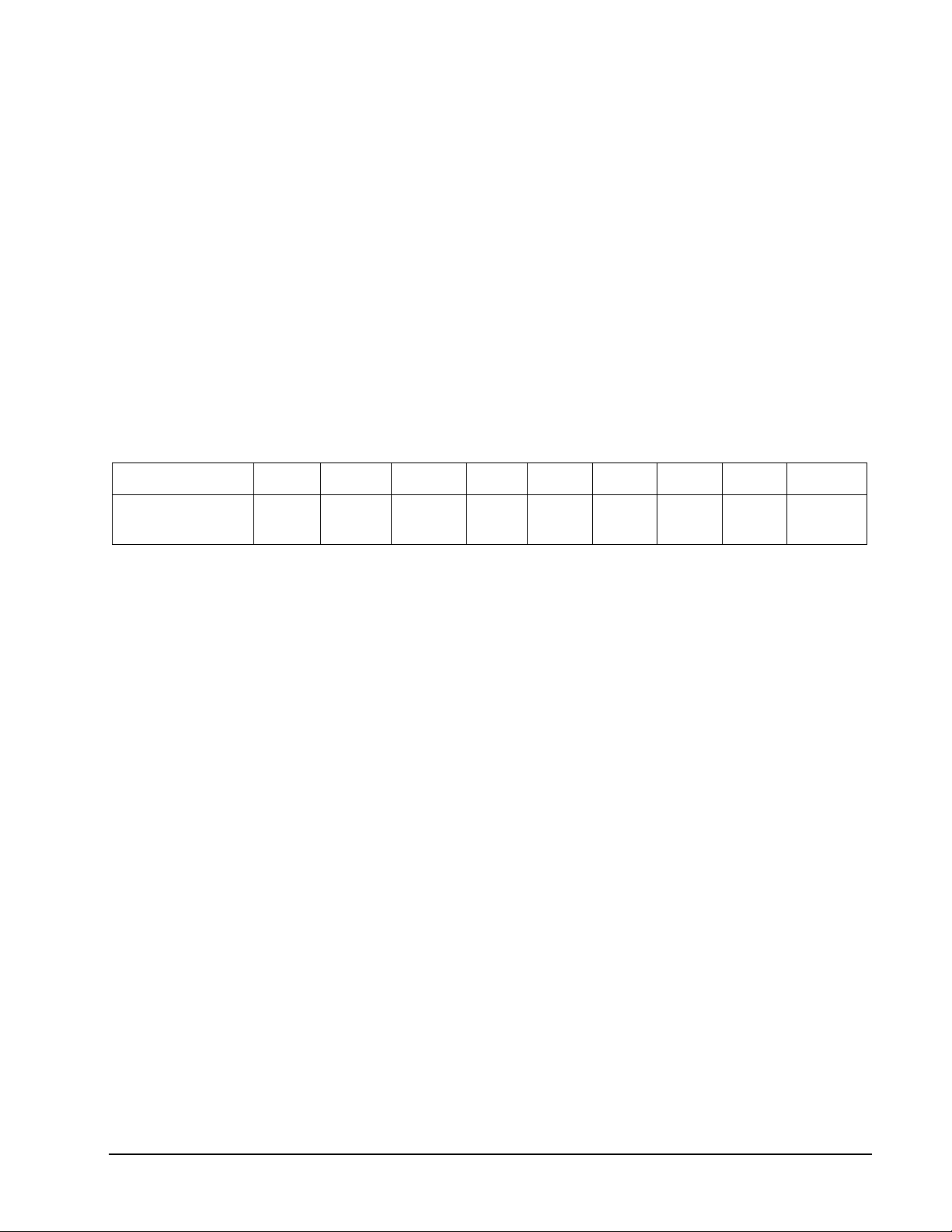
• The dartboard will display what number you must hit for that round. The designated
numbers for each round are:
Round 1 2 3 4 5 6 7 8 9
Target Number 15 16 Any
Double
17 18 Any
Triple
19 20 Bullseye
• Each dart that hits the correct number will score points based on the number and the
segment. For example, if you hit number 15 single segment, you will get 15 points. If
you hit the number 15 double segment, you would get 30 points. If you hit the number
15 triple segment, you would get 45 points.
• If the player does not hit the designated number during their round, their score is cut in
half and they move on to the next round on their next turn.
• For the Any Double and Any Triple, the player must hit any double or triple segment. If
the doubles and triples are not hit, the player’s score is cut in half.
46 1-800-225-7593
www.gldproducts.com
Page 47
GLD Products Neptune Dartboard
Item 42-1023
G35 Forty One
Game Options:
Double Bull
Single Bull
Refer to the section “Read First - Operation”.
Playing the Game
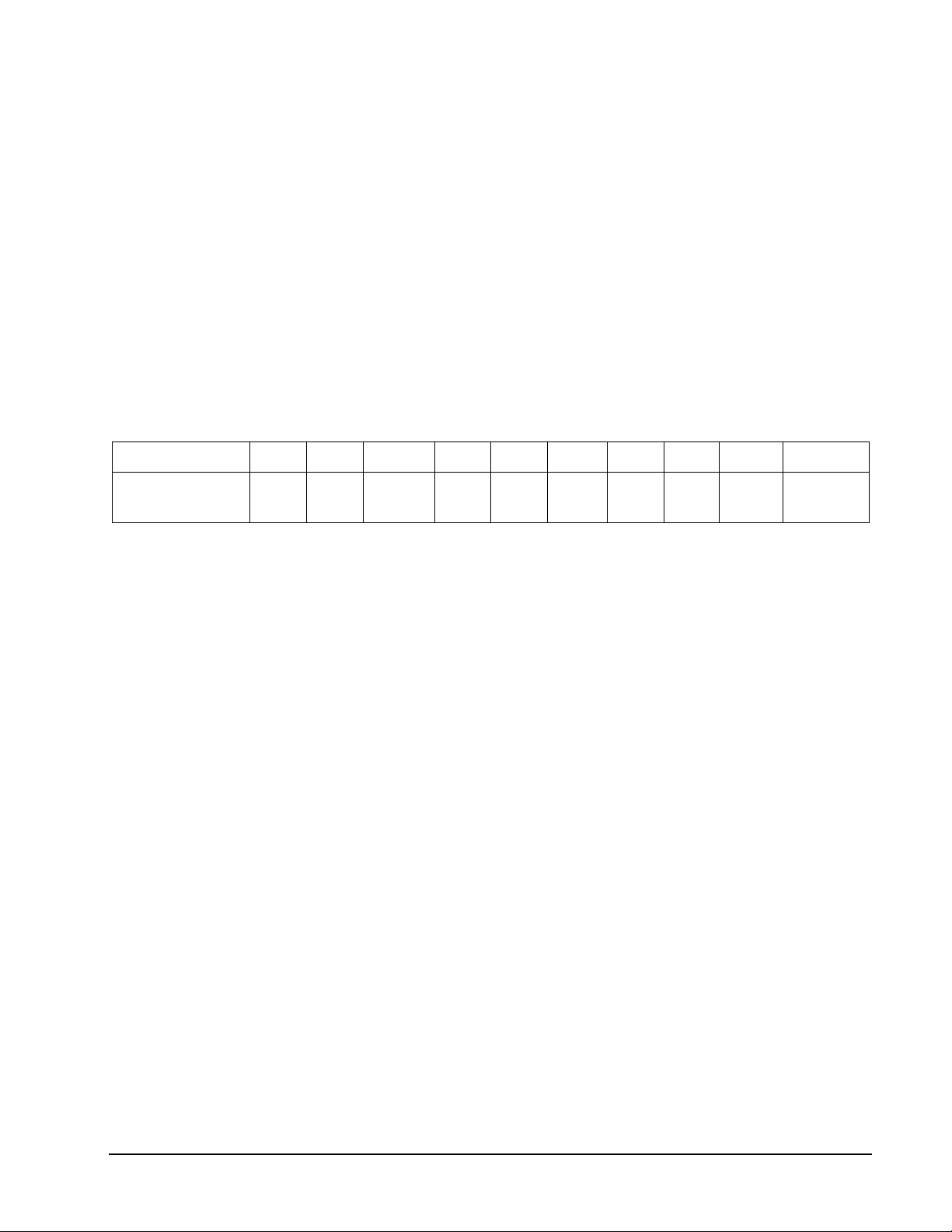
To win: The player with the highest score after the last round is the winner.
• The sequence for the rounds is reversed from number 20 to the bullseye.
• There are 10 rounds for each player.
• The dartboard will display what number you must hit for that round. The designated
numbers for each round are:
Round 1 2 3 4 5 6 7 8 9 10
Target Number 20 19 Any
Double
18 17 Any
Triple
16 15 “41”
Points
Bullseye
• The additional round of 41 points is included before the bullseye, and a player must hit
any 3 segments totaling 41 to score the 41 points.
• Each dart that hits the correct number will score points based on the number and the
segment. For example, if you hit number 15 single segment, you will get 15 points. If
you hit the number 15 double segment, you would get 30 points. If you hit the number
15 triple segment, you would get 45 points.
• If the player does not hit the designated number during their round their score is cut in
half and they move on to the next round on their next turn.
• For the Any Double and Any Triple, the player must hit any double or triple segment. If
the doubles and triples are not hit, the player’s score is cut in half.
47 1-800-225-7593
www.gldproducts.com
Page 48
GLD Products Neptune Dartboard
Item 42-1023
G36 Over (with scoring options of O-7, O-8, O-9)
Game Options:
Double Bull
Single Bull
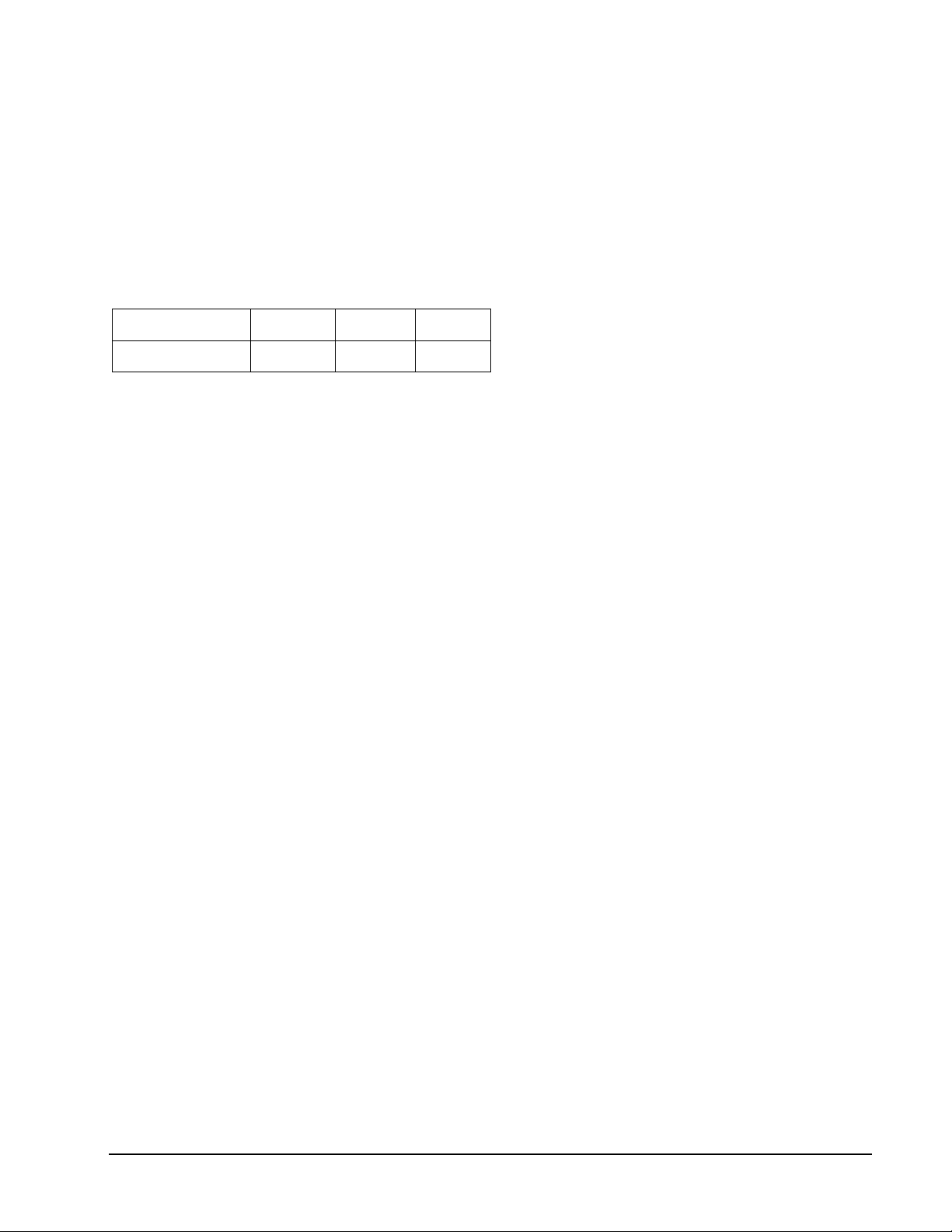
The scoring options are the number of lives, see the chart below. Press GAME OPTION
button to select.
Scoring Option O-7 O-8 O-9
No. of Lives 7 8 9
Refer to the section “Read First - Operation”.
Playing the Game
To win: If a player loses all their lives they are out of the game. The remaining players
continue the game until one player is left with lives. That player is the winner.
• Player 1 will throw 3 darts. Their score will become the “leader’s score” and the
dartboard will announce “LEADER” and play a fanfare.
• A player’s score will become a new “leader’s score” if his score in the new turn is higher
than the previous “leader’s score”. If not, he will lose one life.
• If a leader does not want to challenge and wants to keep his “leader’s score”, he can
press the PLAY / NEXT button and skip his turn. A leader can choose to challenge his
own “leader’s score” but he will also lose a life if his new score is lower than the original
leader’s score.
• The Cricket Display will show how many “Lives” each player has.
• The current “leader’s score” is displayed on the scoreboard.
48 1-800-225-7593
www.gldproducts.com
Page 49
GLD Products Neptune Dartboard
Item 42-1023
G37 Under (with scoring options of U-7, U-8, U-9)
Game Options:
Double Bull
Single Bull
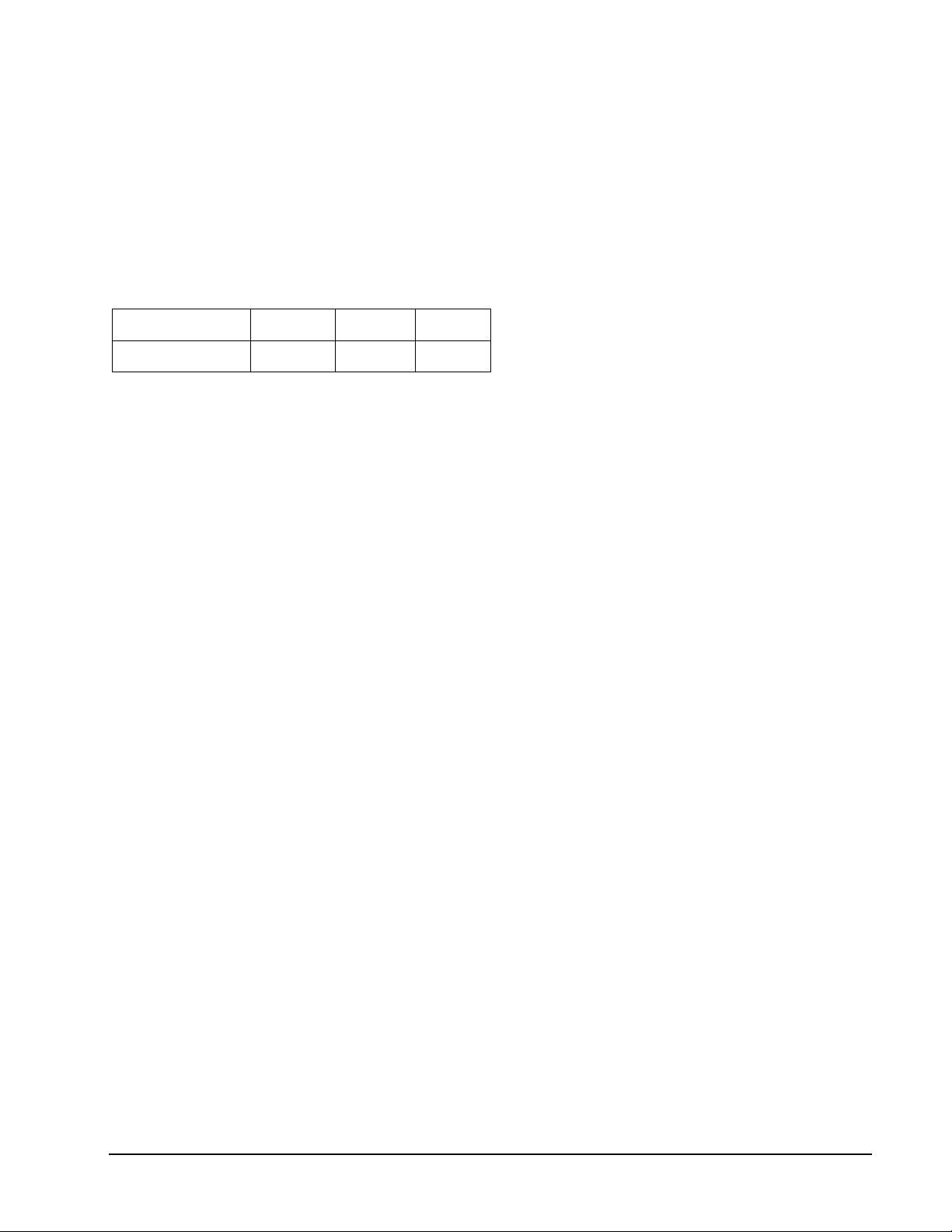
The scoring options are the number of lives, see the chart below. Press GAME OPTION
button to select.
Scoring Option U-7 U-8 U-9
No. of Lives 7 8 9
Refer to the section “Read First - Operation”.
Playing the Game
To win: If a player loses all their lives they are out of the game. The remaining players
continue the game until one player is left with lives. That player is the winner.
• The “leader’s score” is the lowest score for each turn.
• A missed dart will be counted as 60.
• Player 1 will throw 3 darts. Their score will become the “leader’s score” and the
dartboard will announce “LEADER” and play a fanfare.
• A player’s score will become a new “leader’s score” if his score in the new turn is lower
than the previous “leader’s score”. If not, he will lose one life.
• If a leader does not want to challenge and wants to keep his “leader’s score”, he can
press the PLAY / NEXT button and skip his turn. A leader can choose to challenge his
own “leader’s score” but he will also lose a life if his new score is higher than the
original leader’s score.
• The Cricket Display will show how many “Lives” each player has.
• The current “leader’s score” is displayed on the scoreboard.
49 1-800-225-7593
www.gldproducts.com
Page 50
GLD Products Neptune Dartboard
Item 42-1023
G38 All Fives (with scoring options of 551, 561, 571, 581, 591)
Game Options:
Double Bull
Single Bull
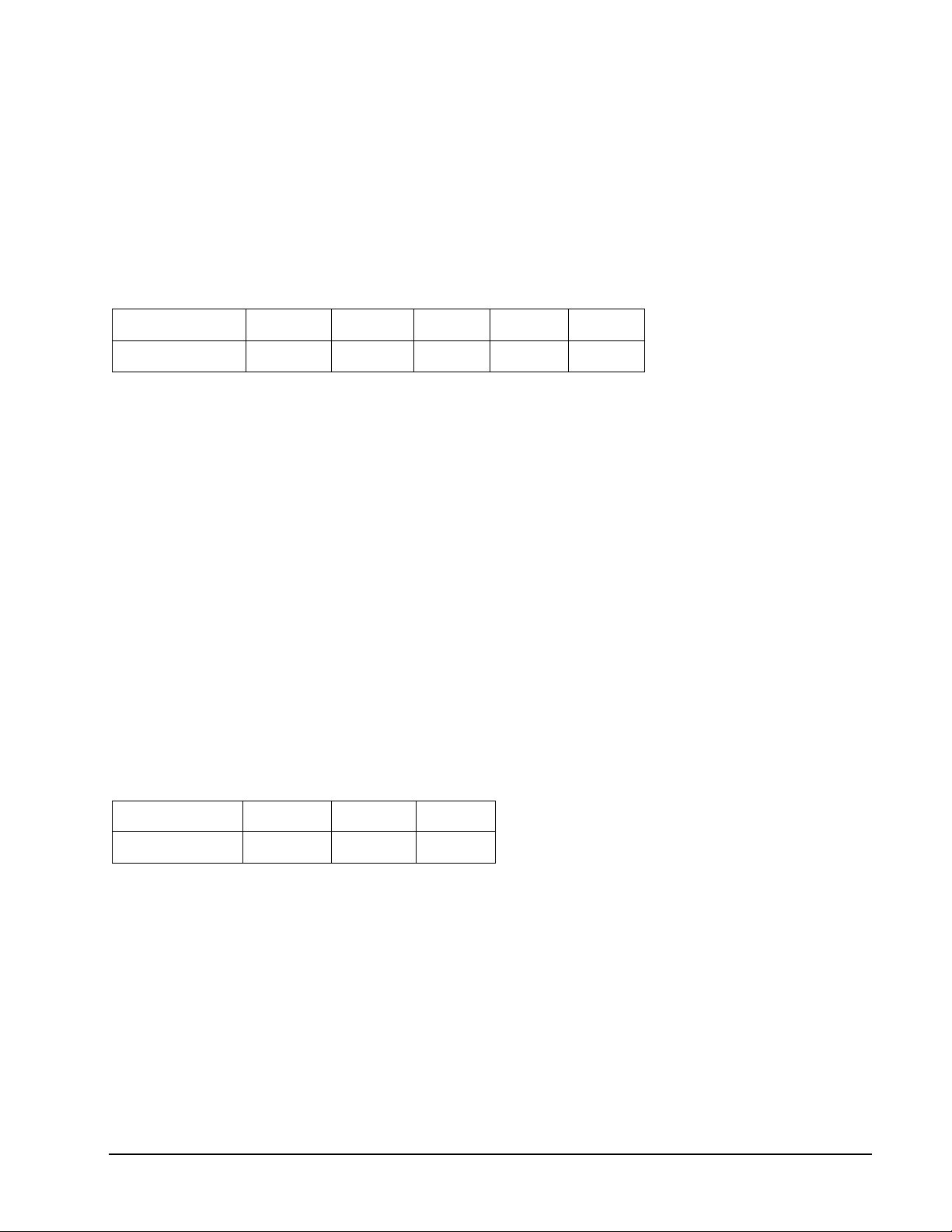
The scoring options are the total points you need to win, see the chart below. Press GAME
OPTION button to select.
Scoring Option 551 561 571 581 591
Total Points 51 61 71 81 91
Refer to the section “Read First - Operation”.
Playing the Game
To win: The first player to score 51, 61, 71, 81, or 91 will be the winner.
• During each round the player’s total score for that round must be divisible by 5. Every
divisible 5 counts as one point. For instance, 2, 8, 5 totals 15. A player will get 3 points
as 15 divided by 5 equals 3. There will be no points if the round of 3 darts’ total score is
not divisible by 5.
• The e-BOARD Computer will display the best possible hit for your third dart, that will
give you the most points.
G39 Legs (with scoring options of L03, L04, L05)
Game Options:
Double Bull
Single Bull
The scoring options are the number of legs, see the chart below. Press GAME OPTION
button to select.
Scoring Option L03 L04 L05
No. of Legs 3 4 5
Refer to the section “Read First - Operation”.
Playing the Game
To win: The last player who still has a “leg” left will win
• Each player will begin with 3 (or 4, 5) “legs”.
• Players will take turns throwing three darts.
Each player must beat the previous player’s score, or they will lose a “leg”.
50 1-800-225-7593
www.gldproducts.com
Page 51

GLD Products Neptune Dartboard
Item 42-1023
ONE YEAR LIMITED WARRANTY
The Manufacturer warrants to the original retail purchaser that this product is free from
defects in material and workmanship under normal use and conditions for a period of one
year from the date of original purchase. The Manufacturer’s liability is limited to the repair or
replacement, at its option, of any defective product and shall not include any liability for indirect, incidental or consequential damages of any kind.
Should this product become defective due to material or workmanship within the warranty
period, contact our Customer Service Department. This warranty is not transferable and
does not cover normal wear and tear or damage caused by improper usage, negligence,
misuse, abuse, transportation damage, acts of nature, or accident (including failure to follow
the instructions in this manual). It does not cover expendable items such as batteries, light
bulbs, fuses, accessories, cosmetic parts and other items that wear out due to normal
usage. This warranty is also void if the product is disassembled and reassembled, damaged, modified from its original state, or used for other than indoor personal residential use
(no commercial or rental applications).
This warranty gives you specific legal rights, and you may have other rights which vary from
state to state.
IF YOU HAVE A WARRANTY CLAIM, CALL US FIRST (8 - 4:30 CST)
Please have your receipt and item number (found on the front cover) when you call.
GLD Products
S84 W19093 Enterprise Drive
Muskego, WI 53150 USA
1-800-225-7593
Fax: 1-800-841-6944
Email: [email protected]
Web: www.gldproducts.com
If you are instructed to return the product for service, you are responsible for shipping the unit at your expense to the above address in packaging that will protect
against further damage. All warranty or repair requests require a Return Authorization Number prior to returning the item.
PRODUCT REGISTRATION
Important: The product registration form on page 53 must be completed and returned
along with a copy of your receipt within 10 days of purchase to validate your warranty.
Online registration is also available. Go to http://gldproducts.com/warranty-information or
click on this link. Follow the online instructions.
51 1-800-225-7593
www.gldproducts.com
Page 52

GLD Products Neptune Dartboard
Item 42-1023
This page left blank intentionally
52 1-800-225-7593
www.gldproducts.com
Page 53
REGISTER YOUR PRODUCT
www.gldproducts.com
GAME TABLES HOME CASINO
GAMES AND ACCESSORIES BILLIARD CUES
BILLIARD ACCESSORIES DARTBOARDS
SOFT-TIP DARTS STEEL-TIP DARTS
FLIGHTS AND SHAFTS DART CASES AND ACCESSORIES
Complete this form, include a copy of your receipt, fold, tape (do
not staple) and return within 10 days of purchase. This protects
your warranty and will help us develop new products!
GLD Products
Warranty Department
Cut here.
Fold here second.
S84 W19093 Enterprise Drive
Muskego, WI 53150 USA
Place postage here
Fold here first.
Name Date of Purchase
Address Phone-Day
City Phone-Evening
State Zip Email
Purchase Price: Item: 42-1023 Neptune Dartboard
Store Name:
Remember to attach a copy of your receipt.
Page 54

This page left intentionally blank.
Page 55
Mail To: GLD Products
S84 W19093 Enterprise Drive
Muskego, WI 53150 USA
1-800-225-7593 · FAX 800-841-6944
Email: [email protected]
Web Site: www.gldproducts.com
Neptune Dartboard
Parts Re-Order Form
Please call or consult the GLD website gldproducts.com to order the following parts:
Order No. Description
42-9987 1000 mA Adapter Positive Outer
6-44 2 Piece Bullseye, Nylon
6-47 Pie Section, Black and Red Segments, Nylon
6-48 Pie Section, Grey and Red Segments, Nylon
6-15 Set of 3 Soft Tip Darts
37-1652-01 Tips (100)
6-38 Aluminum Shafts 3 pc
6-11 Mounting Hardware
6-14 Flights 3 pc
Accessories
37-0125 Viper Bull Throw Line
37-0106 Viper Vinyl Dart Mat
Item 42-1023
55 1-800-225-7593
www.gldproducts.com
Page 56

GLD Products Neptune Dartboard
Item 42-1023
This page left intentionally blank.
1-800-225-7593 56
www.gldproducts.com
Page 57

www.gldproducts.com
GAME TABLES
HOME CASINO
GAMES AND ACCESSORIES
BILLIARD CUES
BILLIARD ACCESSORIES
DARTBOARDS
SOFT-TIP DARTS
STEEL-TIP DARTS
FLIGHTS AND SHAFTS
DART CASES AND ACCESSORIES
Page 58

PR OU D M A N U F A CT U R E R OF
S84 W19093 Enterprise Drive • Muskego, WI 53150 USA
262.679.8730 or 1.800.225.7593 tele
262.679.8738 or 1.800.841.6944 fax
Email: [email protected]
www.gldproducts.com
Page 59
Game
Number
G01 301 6 1-16 Yes Yes
G01 501 6 1-16 Yes Yes
Name Options Players
In/Out
Single/DBL
Bullseye
Single/DBL
G01 601 6 1-16 Yes Yes
G01 701 6 1-16 Yes Yes
G01 801 6 1-16 Yes Yes
G01 901 6 1-16 Yes Yes
G02 301 League 6 4 Yes Yes
G02 501 League 6 4 Yes Yes
G02 601 League 6 4 Yes Yes
G02 701 League 6 4 Yes Yes
G02 801 League 6 4 Yes Yes
G02 901 League 6 4 Yes Yes
G03 Quick Cricket 5 1-16 N/A Yes
G04 American Cricket 5 1-16 N/A Yes
G05 Cut Throat Cricket 5 1-16 N/A Yes
G06 Scram Cricket 2 2 N/A Yes
G07 Double Only Cricket 5 1-16 N/A Yes
G08 Random Cricket 2 1-16 N/A Yes
G09 Minnesota Cricket Simple 2 1-16 N/A Yes
Quick Reference For Neptune Dartboard Item 42-1023
G10 Minnesota Cricket Standard 2 1-16 N/A Yes
G11 Spanish Cricket 5 1-16 N/A Yes
G12 Shanghai 14 1-16 N/A Yes
G13 Count Up 100 2 1-16 N/A Yes
G13 Count Up 200 2 1-16 N/A Yes
G13 Count Up 300 2 1-16 N/A Yes
G13 Count Up 400 2 1-16 N/A Yes
G13 Count Up 500 2 1-16 N/A Yes
G13 Count Up 600 2 1-16 N/A Yes
G13 Count Up 700 2 1-16 N/A Yes
G13 Count Up 800 2 1-16 N/A Yes
G13 Count Up 900 2 1-16 N/A Yes
G14 Shoot Out 12 1-16 N/A Yes
G15 Best of Nine 9 1-16 N/A Yes
G16 Call Three 10 1-16 N/A Yes
G17 Poker Darts 4 1-16 N/A Yes
Page 60
Game
Number
G18 Hound and Hare 7 2 N/A Yes
G19 Halve-It 2 1-16 N/A Yes
G20 Gold Hunting 8 1-16 N/A Yes
G21 Killer 13 2-16 N/A Yes
G22 Blind Killer 12 2-16 N/A Yes
G23 Round-The-Clock 6 1-16 N/A Yes
G24 Round-The-Clock Double/Triple 10 1-16 N/A Yes
G25 Round-The-Clock The Irish Way 2 1-16 N/A Yes
G26 Nine-Dart Century 5 1-16 N/A Yes
G27 Football 1 1-16 N/A Yes
G28 Bowling 8 1-16 N/A Yes
G29 Golf 12 1-16 N/A Yes
G30 Car Racing 2 1-16 N/A Yes
G31 Big Six 7 2-16 N/A Yes
G32 Shove A Penny 2 1-16 N/A Yes
Name Options Players
In/Out
Single/DBL
Bullseye
Single/DBL
Quick Reference For Neptune Dartboard Item 42-1023
G33 Hi Score 12 1-16 N/A Yes
G34 Double Down 2 1-16 N/A Yes
G35 Forty One 2 1-16 N/A Yes
G36 Over 5 2-16 N/A Yes
G37 Under 5 2-16 N/A Yes
G38 All Fives 7 1-16 N/A Yes
G39 Legs 5 2-16 N/A Yes
Total 307
 Loading...