

Page 1
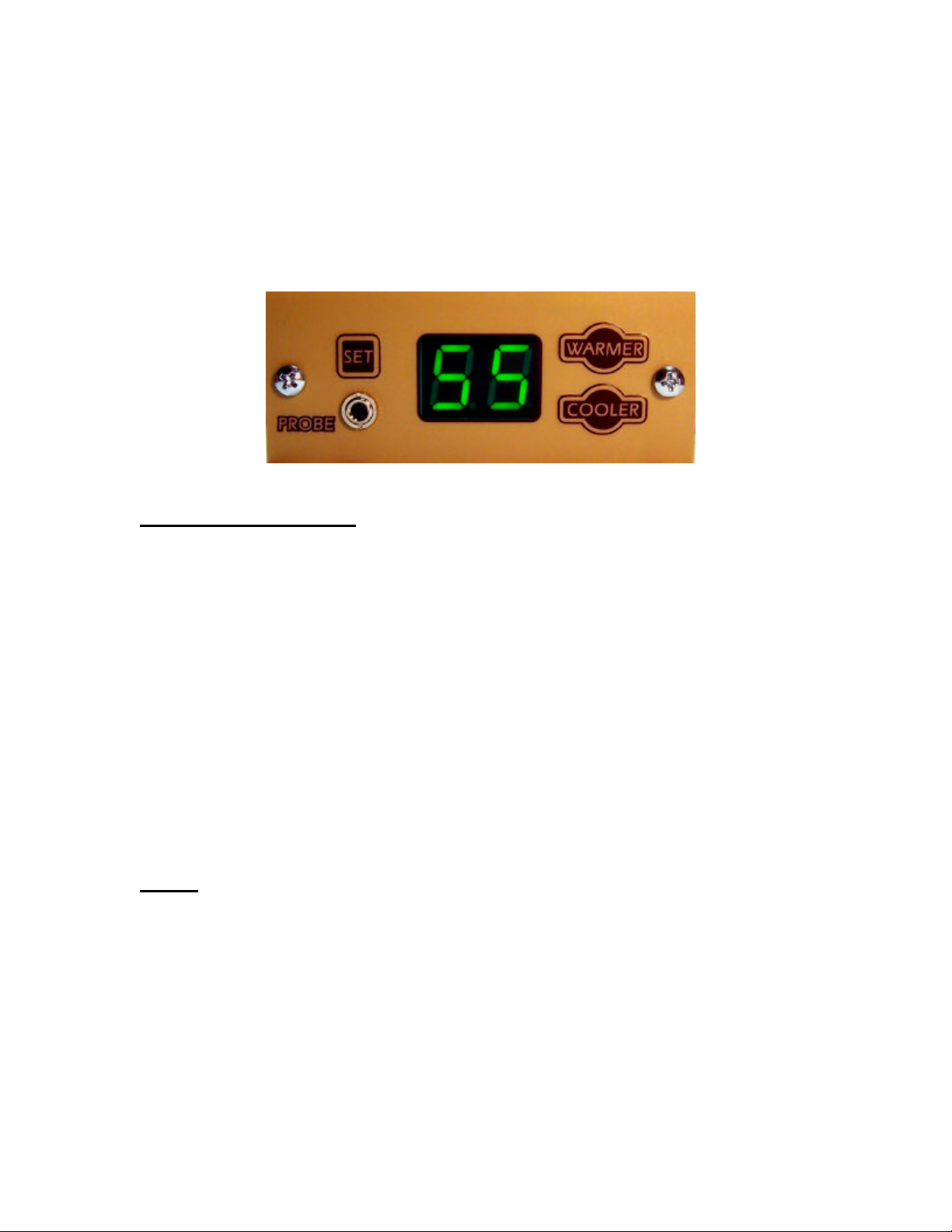
OWNER’S MANUAL
BREEZAIRE SENTRY III Plus Controller
This wine cooler controller is a specially designed state-of-the-art microprocessor
product which provides the user many flexible capabilities, plus a degree of builtin safety features and “user friendliness” to provide a maximum of utility and
reliable operation for your wine storage benefit for years to come.
FEATURES OVERVIEW:
1. Adjustable storage temperature
2. Built-in compressor protection timing functions
3. Special alarm display features
4. Permanent retention of user adjustments during power outage
5. Independent selectable evaporator fan operation
6. Automatic Over-Heat protection
7. User-selectable operating and temperature display parameters
8. Automatic sensor error monitoring
9. Emergency manual operation
When the unit is first powered up, the display will momentarily show “°F” (or
“°C”), then the current wine storage temperature. If the temperature is above the
desired set -point, the unit will start cooling.
NOTE: During the initial power-up of the unit, you should leave the door to your
wine cellar or cabinet closed, in order to allow the unit to effectively cool the
storage space before storing your wines. If the initial temperature is above 70°F
and insufficient cooling is detected by the temperature sensor in the unit within
the first 30 minutes of operation, the unit will automatically shut off, and the
display will flash alternately “E1” and the temperature. You may re-start the
unit by (1) a manual RESET (see below), or (2) unplugging it for 10 minutes or
more.
A “call for cooling” will cause the right-hand decimal of the display to flash, then
will be on steady when the chiller actually runs. The chiller will run for a
minimum of 1 minute, for the compressor to stabilize.
Page 2

The above numbered features are described below:
1. The storage temperature factory setting is 55°F (13°C). To change the
desired wine storage temperature (set -point), press and hold the SET button.
Within five seconds, press either the WARMER or COOLER button to raise or
lower the set -point, within the range of 45°-65°F (7-18°C), then release the SET
button to return to normal storage temperature display.
2. When the unit shuts off, or if there is a momentary power outage, there is an
automatic delay of 5 minutes before it will be enabled to re-start. This is to
protect your compressor from possible damage due to “short-cycling”.
3. As an alert to you, the display will alternately flash “AL” and the temperature
if the storage temperature rises above a preset alarm temperature. The alarm
factory setting is 62°F (17oC). You may adjust this alarm setting (see 7, below).
The unit will continue to operate while in the alarm mode, unless the temperature
rises to 75°F (24°C), as described in 6, below.
4. The computer memory will retain all settings currently in use (see 7, below) if
there is a power interruption for any period of time, or if the unit is unplugged.
There is no need to “re-program” the controller in such an event.
5. When the compressor shuts off, the evaporator fan will continue to run for 45
seconds in order to “harvest” all possible cooling, as an energy -saving feature.
For maximum cooling distribution in your wine cel lar, you may set the evaporator
fan to run continuously (see 7, below).
6. In the unlikely event that the storage temperature rises above 75°F (24°C),
the unit will automatically shut off, and the display will alternately flash “OH” and
the temperature. The unit will remain shut off for a minimum of 30 minutes, after
which you may attempt to re-start the unit with a manual RESET (see below).
Or, during the 30 minute delay, a re-start of the unit may be attempted by
unplugging and re-plugging the power to the unit for any amount of time. If the
same shut-off occurs, contact your Breezaire dealer.
7. You may adjust several operating parameters of the controller; namely, (a) the
desired storage temperature (set -point), (b) the units of temperature display, (c)
the degrees above and below the set -point for the unit to turn on and off
(bandwidth), (d) the alarm temperature desired, and (e) the desired operating
mode of the evaporator fan. Proceed as follows:
(a) Press and hold the SET button to adjust the set-point, as described in
(1) above. (Factory setting is 55°F).
Caution: If the SET button is held more than 5 seconds while adjusting
set-point, the display will enter the control parameter-setting mode, as
described next.
For other parameters:
Hold the SET button for more than 5 seconds, until it changes to:
Page 3

(b) Temperature display units (°F or °C), then let go of the SET button.
(Factory setting is °F). Change the display mode by alternately pressing
either the WARMER or COOLER button. After making this setting (or
not), you may proceed to the next parameter by momentarily pressing the
SET button until the display changes to:
(c) Bandwidth setting: (Factory setting is +/- 1.0°F). You may reduce
this setting to +/-0.5°F by pressing the COOLER button. You may
increase the setting to +/-1.5°F by pressing the WARMER button. The
equivalent changes will apply if the temperature units are °C. After
making this setting (or not), you may proceed to the next parameter by
momentarily pressing the SET button until the display changes to:
(d) Alarm setting: (Factory setting is 62°F). The display will flash “AL”,
then the setting. You may adjust this higher or lower by pressing the
WARMER or COOLER button. After making this setting (or not), you may
proceed to the next parameter by momentarily pressing the SET button
until the display changes to:
(e) Evaporator Fan mode: (Factory setting is Automatic “Au”). You
may change this to always “On” by pressing either the WARMER or
COOLER button, and vice versa. After making this setting (or not),
pressing the SET button will return the display to normal, showing the
storage temperature.
NOTE: After any of the setting steps above, if no further action is taken
after one minute, the display will revert to normal. The prior setting
adjustments will be retained in memory, until further change(s). If
necessary, the factory default settings may be re-set by simultaneously
holding the WARMER and COOLER button down for more than
5 seconds. The display will indicate “Fr”.
8. If the temperature falls below 43°F (6°C), the display will flash the temperature
to draw your attention. If the temperature sensor inputs below 32°F (0°C) the
display will flash “LO”, and if above 99°F (37°C) it will flash “HI”.
9. A faulty sensor will be indicated by a display of “Er”. The unit will shut off, but
may be manually operated with the COOLER button to turn ON, or the WARMER
button to turn the unit OFF.
RESET: The controller may be manually RESET by pressing and holding
simultaneously all three buttons, SET, WARMER and COOLER for at least one
second. The display will momentarily show “8.8.”, then “ °F”, then the storage
temperature. If this action is taken before the unit has been OFF for about ten
minutes, it will not re-start for five minutes, regardless of storage temperature at
the time of RESET. NOTE: All user settings and parameters will be retained in
memory upon a manual RESET operation.
 Loading...