

Page 1
JSC „VILTRUS“ • K. Donelaičio str. 62, LT-44248 Kaunas, Lithuania • Tel. +370 640 65040 • Email: [email protected] • Web: www.viltrus.com
RAY-1 DATA LOGGER / GATEWAY
Quick User Manual
Page 2
JSC „VILTRUS“ • K. Donelaičio str. 62, LT-44248 Kaunas, Lithuania • Tel. +370 640 65040 • Email: [email protected] • Web: www.viltrus.com
DESCRIPTION
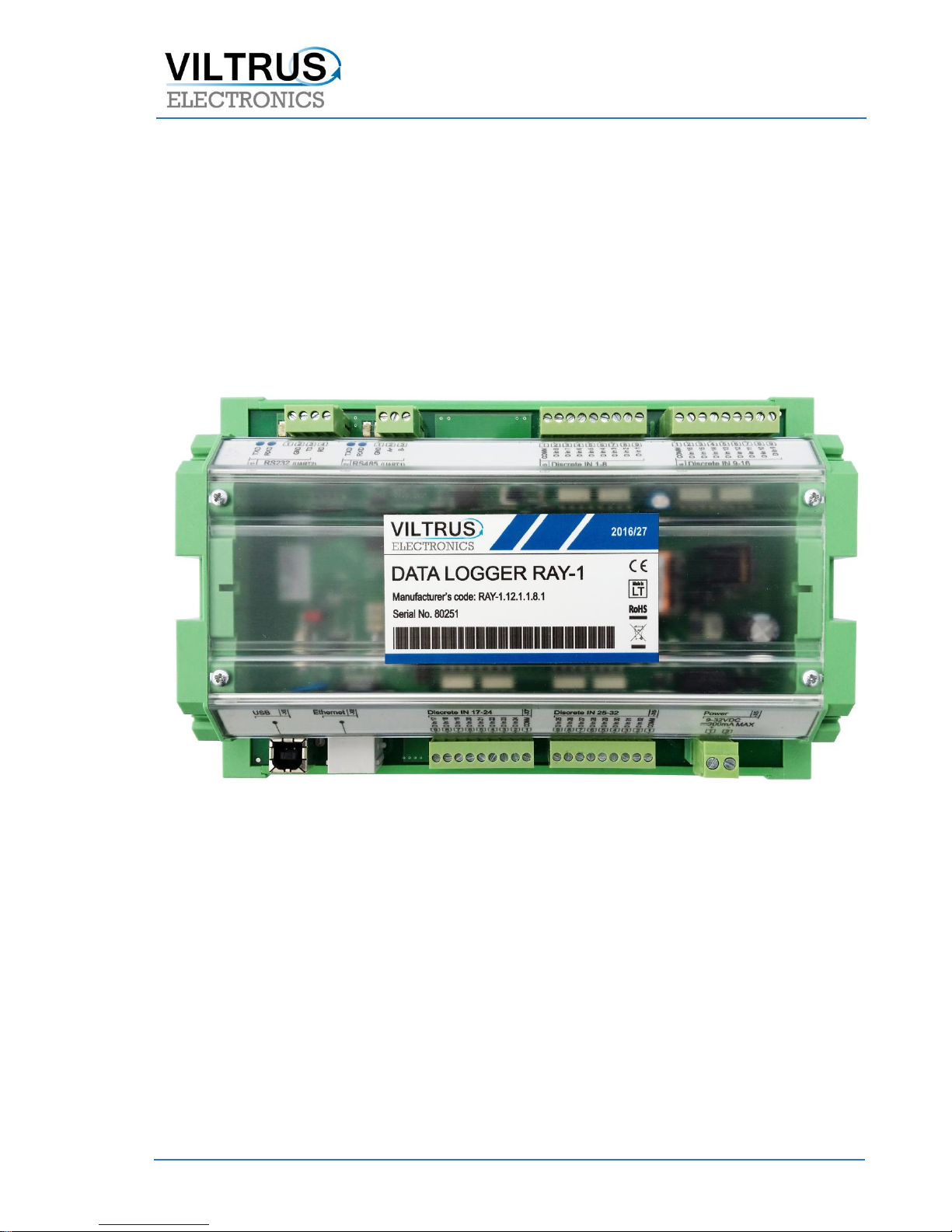
RAY-1 data logger is designed for data lo gging and analyzing different kinds of discrete signals
(limit switches, push buttons, selector switches or relay contacts) in a real time. Data logger
supports RS232, RS485, Ethernet, USB interfaces and up to 32 discrete inputs channels and can be
used as stand-alone device or as extension module. It can be connected to any of our data loggers
like MX-7 or MX-5. For data exchange over Ethernet or any serial RS232/ RS485 interfaces, logger
uses Modbus TCP/IP, Modbus RTU and other protocols.
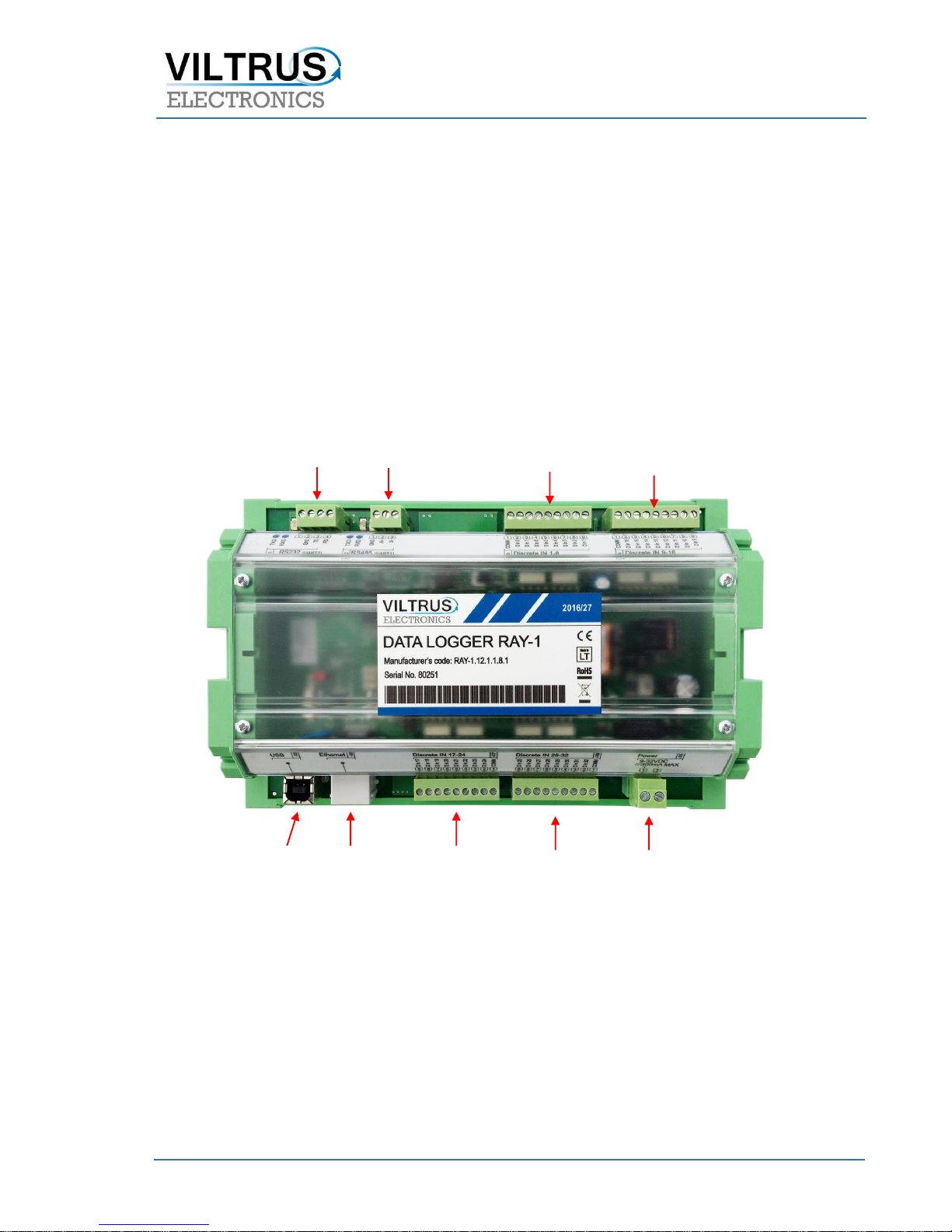
RAY-1 WIRING SCHEMATICS
CONFIGURATION
Discrete measurements [Discrete inputs]
Performed functions:
Tracking of discrete signal status;
Filtering from discrete signal fluctuations;
Discrete signals changes storaging in archives;
RS232 port
RS485 port
Discrete Inputs
Discrete Inputs
USB
ETHERNET
Discrete Inputs
Discrete Inputs
Power Supply
input
Page 3
JSC „VILTRUS“ • K. Donelaičio str. 62, LT-44248 Kaunas, Lithuania • Tel. +370 640 65040 • Email: [email protected] • Web: www.viltrus.com
“Alarm” status (as events) fixation;
Impulse aggregations and storing in archives.
Configurable parameters:
D In channel usage;
Debounce filtering time;
Impulse counting mode;
Impulse multipier (just to view multipliered impulse quantity, this parameter will not effect to
Archive stored value);
“Alarm” state (None (disabled), Input open, Input closed or in both cases);
Archive state (None (disabled), Input open, Input closed or in both cases).
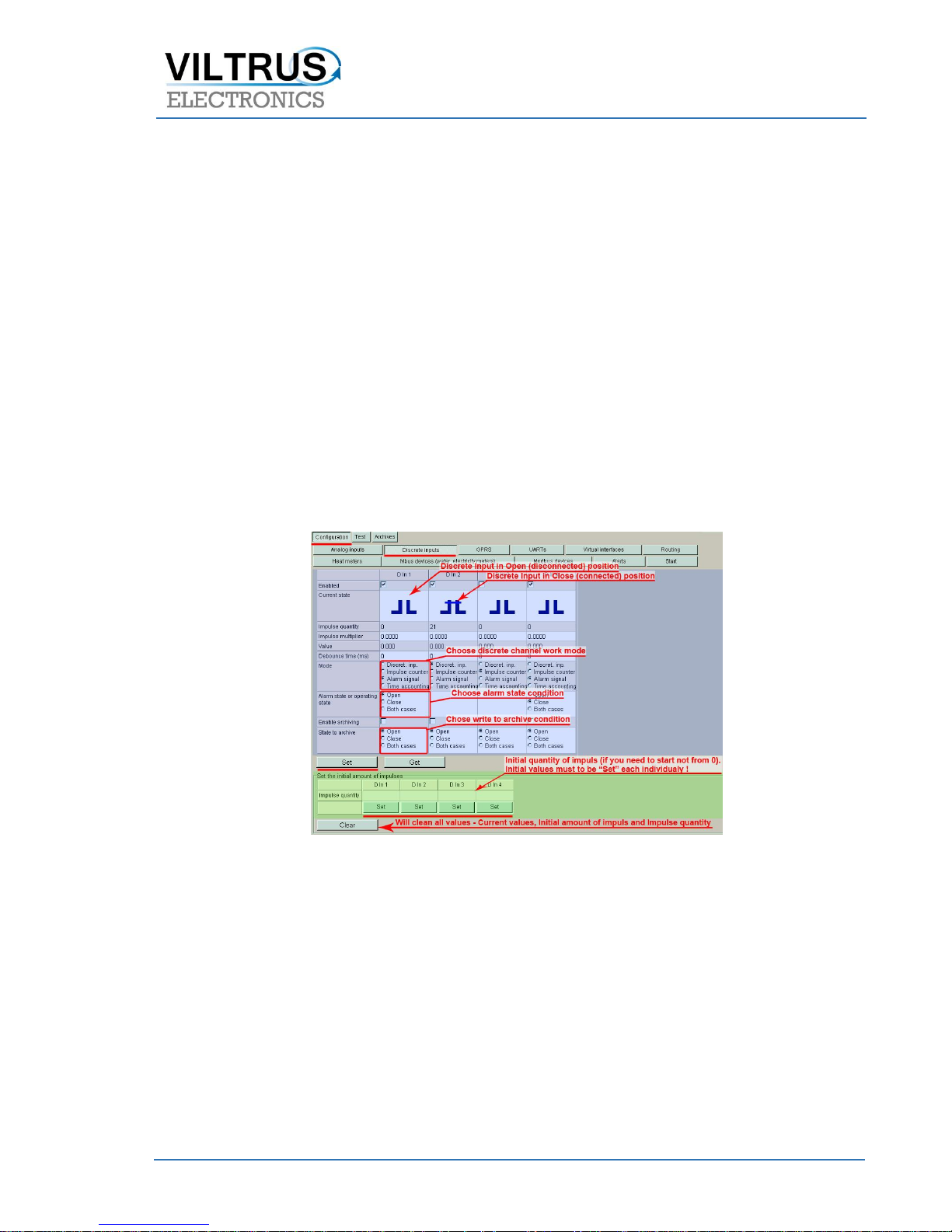
Current discrete channel’s states are shown by corresponding pictures Open and Close (see 0). Using check
box, up to the “Current state” pictures, you can Enable or Disable discrete channels. Discrete signal
meanings are filtered by user-defined debounce times (debounce time value can be set from 1 to 1000ms).
Discrete inputs configuration [Discrete inputs]
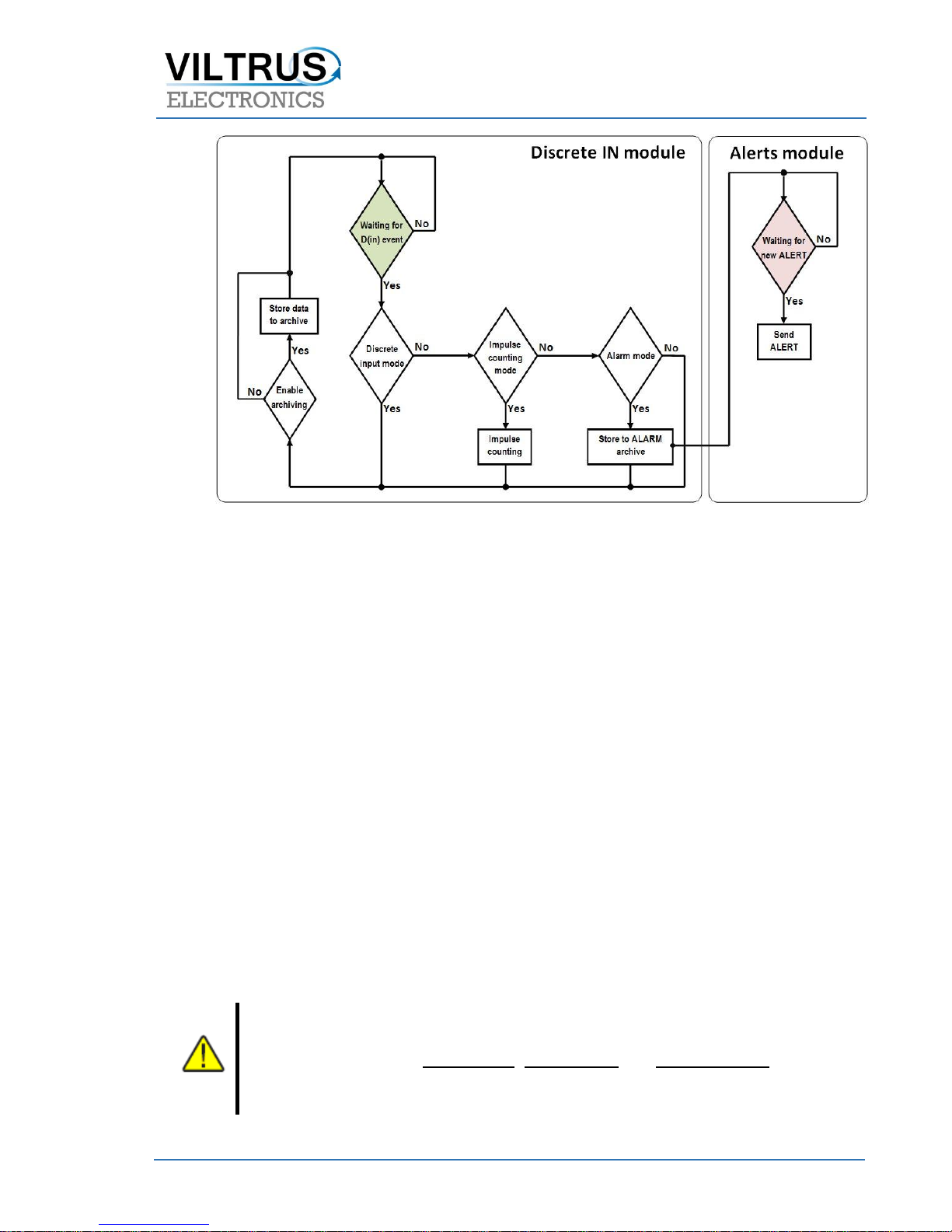
Data logger periodically tracks status of all discrete channels and in case of changes takes action (see 0).
Page 4
JSC „VILTRUS“ • K. Donelaičio str. 62, LT-44248 Kaunas, Lithuania • Tel. +370 640 65040 • Email: [email protected] • Web: www.viltrus.com
Discrete IN channel data flow schema
Discrete channels can be used as impulse counters (see in Blue color marked group in 0). With enabled
impulse mode, counted impulses are periodically storred in to Impulse achive with a real time record.
Impulse meters can be configured to start from any initial amount of impuses. To do that – enter initial
amount of Impuls for “Discrete IN” channel and Set it to controller (see in Green color marked group in 0).
In some cases is needed to have changed values (not counted Impulses), to do that use “Impulse multiplier”
(range from 0.001 to 1000) (see in Blue color marked group in 0). For example, if Impulse meter takes
impulses from water meter after each Liter of the water and you need to calculate cubic meters of the
water, so you add “Impulse multiplier” = 0.001 and result of Current value will have value in cubic meter’s
dimmension.
With enabled “Alarm state”, discrete channels can be used to indicate Alarm status and depending on
Alarm status condition (Open, Close or in Both cases), controller will make a record to Event archive and
Alerts module will send warning message.
If you just need to view status of Discrete channels select Discrete input mode. Like in other modes, by
enabling archiving you can store changes of discrete channels to archive (choose when to save – on Open,
on Close or in Both cases).
Alarm mode will not work if “Impulse counting” mode is enabled!
“Clear” button will clear current Value, Initial amount and Impulse quantity fields – use it
carefully.
Page 5

JSC „VILTRUS“ • K. Donelaičio str. 62, LT-44248 Kaunas, Lithuania • Tel. +370 640 65040 • Email: [email protected] • Web: www.viltrus.com
Ethernet
Ethernet interface is used for:
data transferring to central computer;
controller setup;
Firmware version upgrade and update.
Supported protocols:
Modbus TCP/IP Server – for data transfer;
Modbus TCP/IP Client – for event allert;
TCP – for data transfer;
UDP – for data transfer;
ICMP – for connection quality testing.
Modbus TCP/IP protocol
Modbus TCP/IP it is a Modbus RTU adapted for TCP. Modbus TCP/IP use TCP/IP protocol to transfer
Modbus data packets over Ethernet network. Modbus RTU packet and all his functions (except Modbus
control sum) is inserted into TCP frame and sent over 502 port, with is reserved for use with Modbus. All
Modbus TCP/IP clients and servers query and accept Modbus data over 502 port. Data security is
guaranteed by TCP (Transport Control Protocol). IP (Internet Protocol) takes care of addressing and data
transferring. Controller is using Modbus protocol for direct data exchange with PC, by using Ethernet.
Controller can work as Modbus Server and as Modbus Client at the same time. Modbus Client sends query
to Modbus Server, the Server makes decision, to answer in to query (read/write data), or to send it to other
Server.
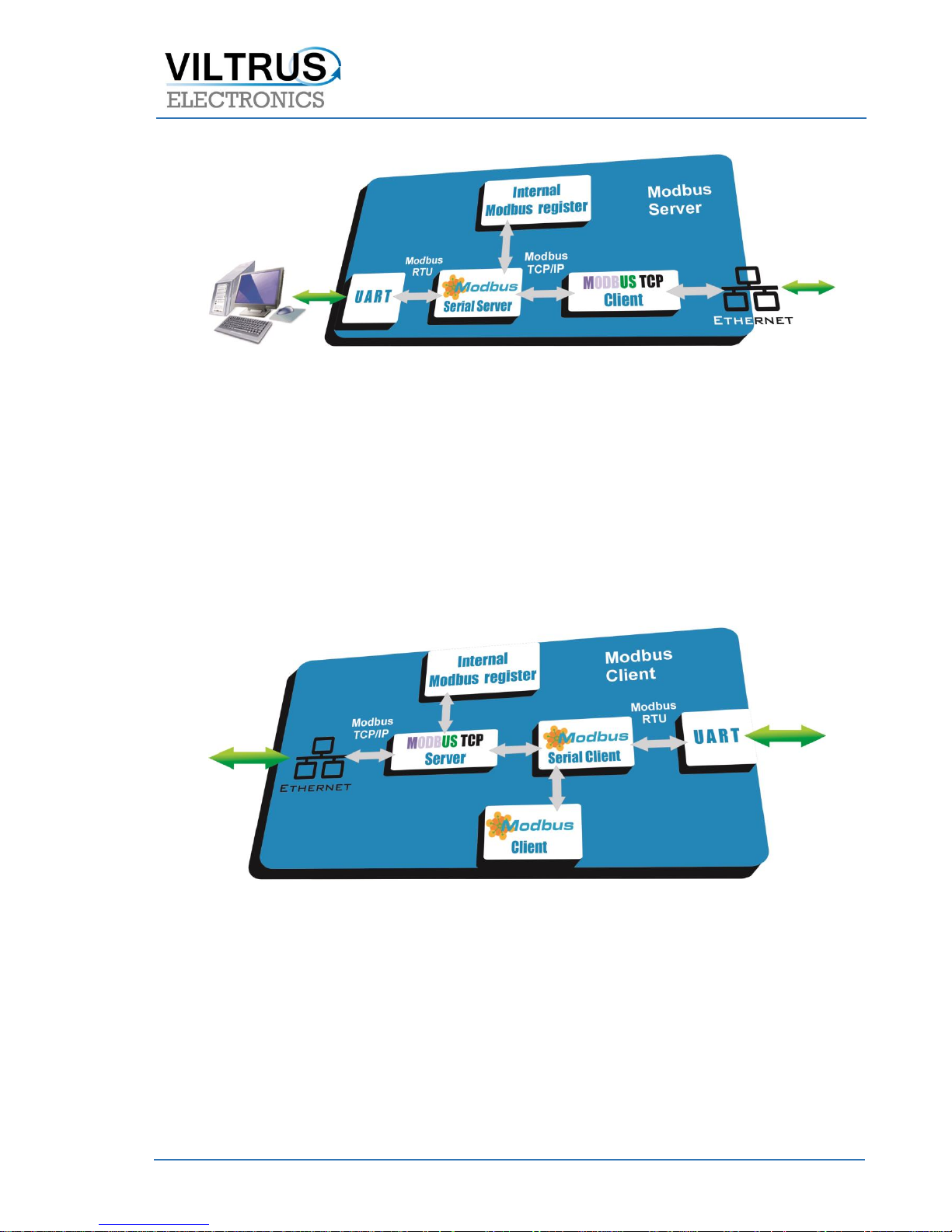
Modbus Server
Controller use Modbus RTU protocol to communicate with client’s PC. PC, over UART interface query
Controller, with Modbus Server. The Modbus Server make decision what to do with query, and query
internal Modbus Server register or send query to next Server and so on…. Query contains TCP port, MAC
address (every controller has unique MAC), controllers IP address. Then query is sent over Ethernet.
Remote Server over Ethernet returns answer to Controllers Modbus Server.
Page 6
JSC „VILTRUS“ • K. Donelaičio str. 62, LT-44248 Kaunas, Lithuania • Tel. +370 640 65040 • Email: [email protected] • Web: www.viltrus.com
Pic 1: Scheme, how controller sends data in Modbus Server mode
Modbus Client
The query received over Ethernet in to Controllers Modbus TCP Server, whitch contains TCP port, Clients IP
and MAC address, are redirected to internal register of Modbus Server or to Modbus Serial Client. Modbus
Serial Client answers to query, sends it to some UART interface, or redirect to Modbus client (temperature,
pressure or other sensor, Mbus counter or other device).
Pic 2: Scheme of controller in Modbus Client mode
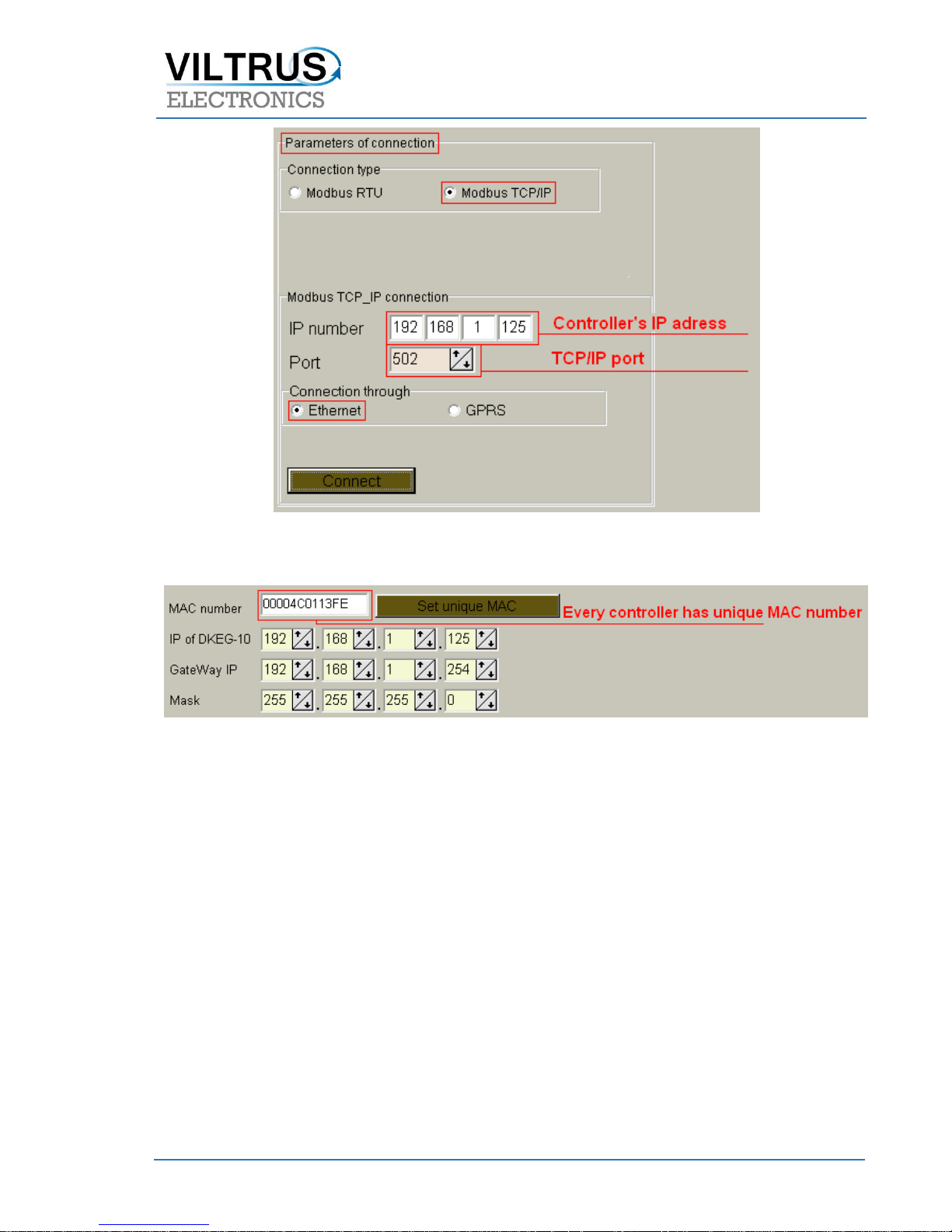
Connecting to controller over Ethernet
You need to choose Modbus TCP/IP Communication type. Every controller must have unique IP address
which will be used to connect to device. By default controller is set to 502 Port (this is system standard
Modbus TCP/IP port), change it if you need other. By pressing “Connect” you will be connected to
controller. If connection fails, recheck cables, Communication type, IP and Port values.
Page 7
JSC „VILTRUS“ • K. Donelaičio str. 62, LT-44248 Kaunas, Lithuania • Tel. +370 640 65040 • Email: [email protected] • Web: www.viltrus.com
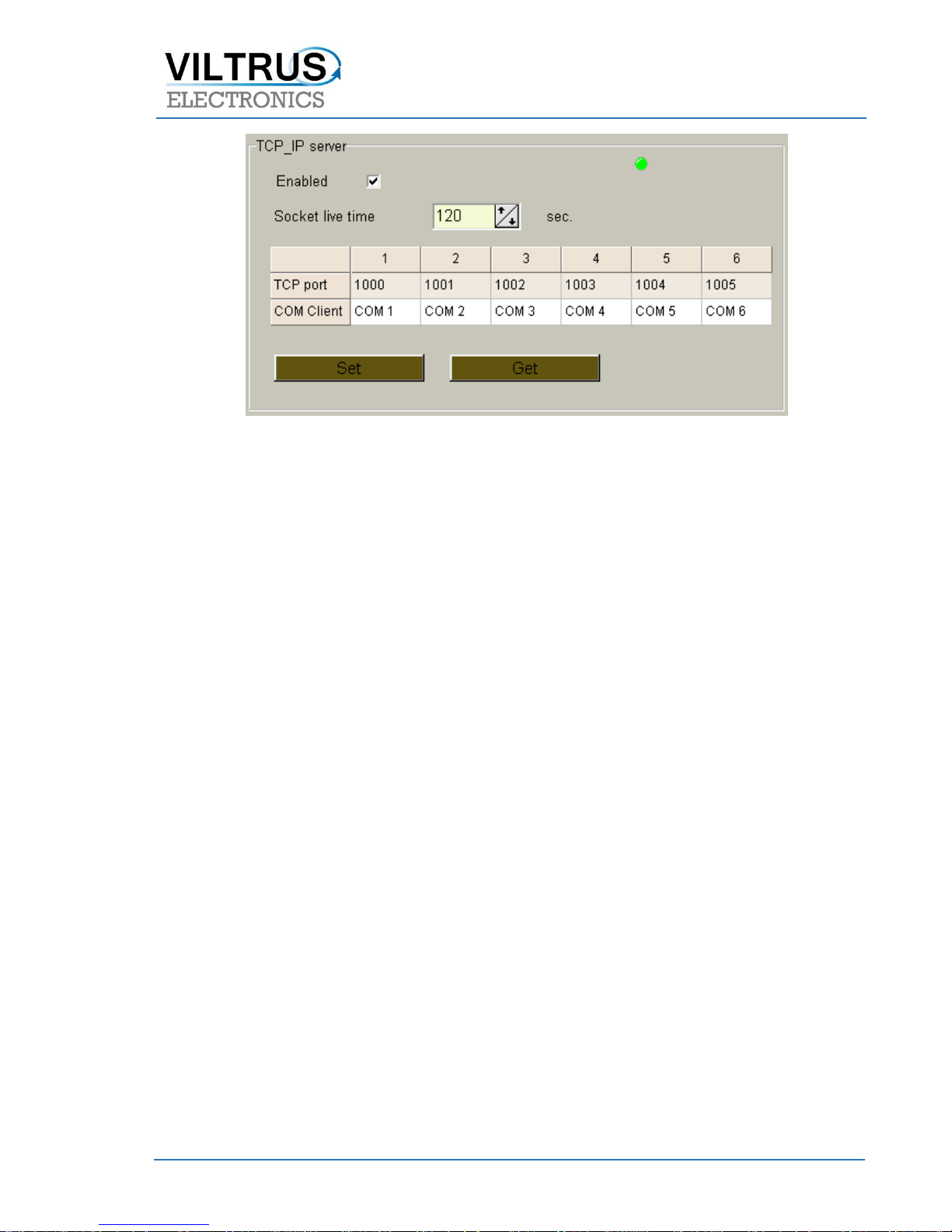
Setting up Modbus TCP/IP Server [Interfaces>TCP parameters]:
Pic 4: Controler connection screen [Interfaces>Ethernet]
Pic 3: Modbus TCP/IP Server screen [Interfaces>TCP parameters]
Page 8
JSC „VILTRUS“ • K. Donelaičio str. 62, LT-44248 Kaunas, Lithuania • Tel. +370 640 65040 • Email: [email protected] • Web: www.viltrus.com
Use check box to Enable or Disable TCP/IP Server. By default TCP/IP socket life time is set to 120 seconds,
you can change if you need other time. Every COM client must have his one TCP port number.
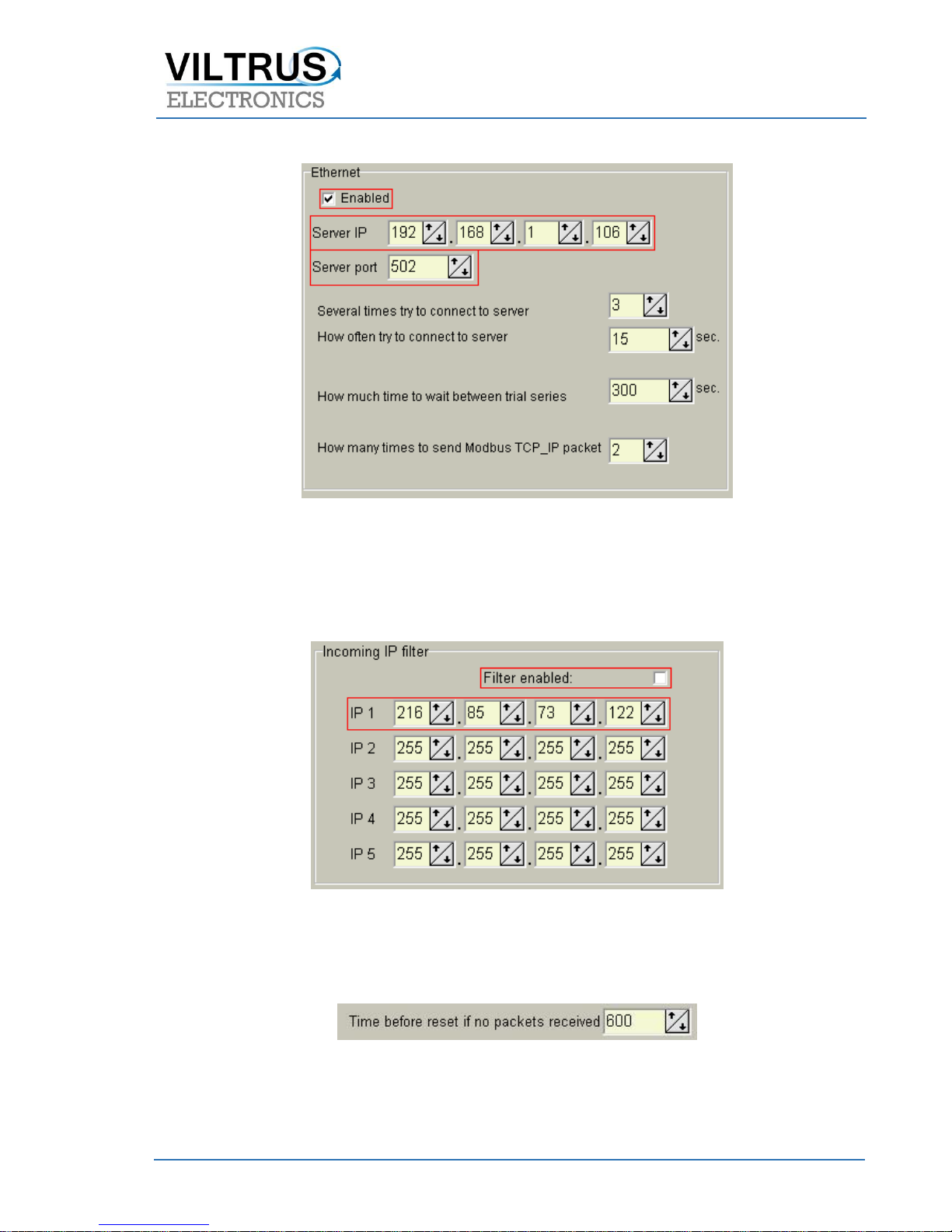
Alert over Ethernet settings [Alerts>Configuration].
Select check box to Enable alert over Ethernet function. Enter destination Modbus TCP/IP servers IP
address and Port, change time values if you need and set data.
If you did everything correct, on every deviation, the alert message will be sent.
Information transfer algorithm:
Controller makes connection to server, over Ethernet TCP socket.
By Modbus TCP/IP protocol, using function nr. 16, deviation report will be sent to server. Report
contains:
Unique controller number;
Controller IP address;
Deviation identifier.
When answer into function nr. 16 is received, controller disconnects from TCP socket.
When server get’s deviation information, it initializes connection with controller and over Modbus
TCP/IP read all details about deviation
If connection with server was not established over the set (connection to server time) number of
tries, controller will try to connect after some time (see Pic 868).
If opening of socket is succeeded, but server do not answer into Modbus function 16, controller
repeat once and on failure, closes TCP socket. After set time (wait between trial times) amount
of time controller will try to send alert again. (see Pic 868).
Pic 5: Ethernet interface settings [Interfaces>Ethernet]
Page 9
JSC „VILTRUS“ • K. Donelaičio str. 62, LT-44248 Kaunas, Lithuania • Tel. +370 640 65040 • Email: [email protected] • Web: www.viltrus.com
Pic 86: Alert over Ethernet configuration section [Alerts>Configuration]
By checking FILTER ENABLE you enable Firewall. You can enter 5 IP (IP1 – IP5) exception addresses. After
enabling filtering, connection to controller can be established only from addresses listed in the table (see
Pic 99).
Pic 9: IP filtering section [Interfaces>Ethernet]
To prevent system hanging up, you can set Ethernet packet time before reset (in seconds), if no packets
received values range from 600 to 36000 seconds (see Pic 1010).
Pic 10: Time before reset if no packet received [Interfaces>Ethernet]
Page 10

JSC „VILTRUS“ • K. Donelaičio str. 62, LT-44248 Kaunas, Lithuania • Tel. +370 640 65040 • Email: [email protected] • Web: www.viltrus.com
Serial interfaces
Controller support all most popular Serial interfaces (RS485, RS232, Data/Req, M-Bus and Current loop).
Information about installed serial interfaces on your controller you can find on Top label - Manufacturer’s
number.
To setup Serial interfaces, you need to do few steps:
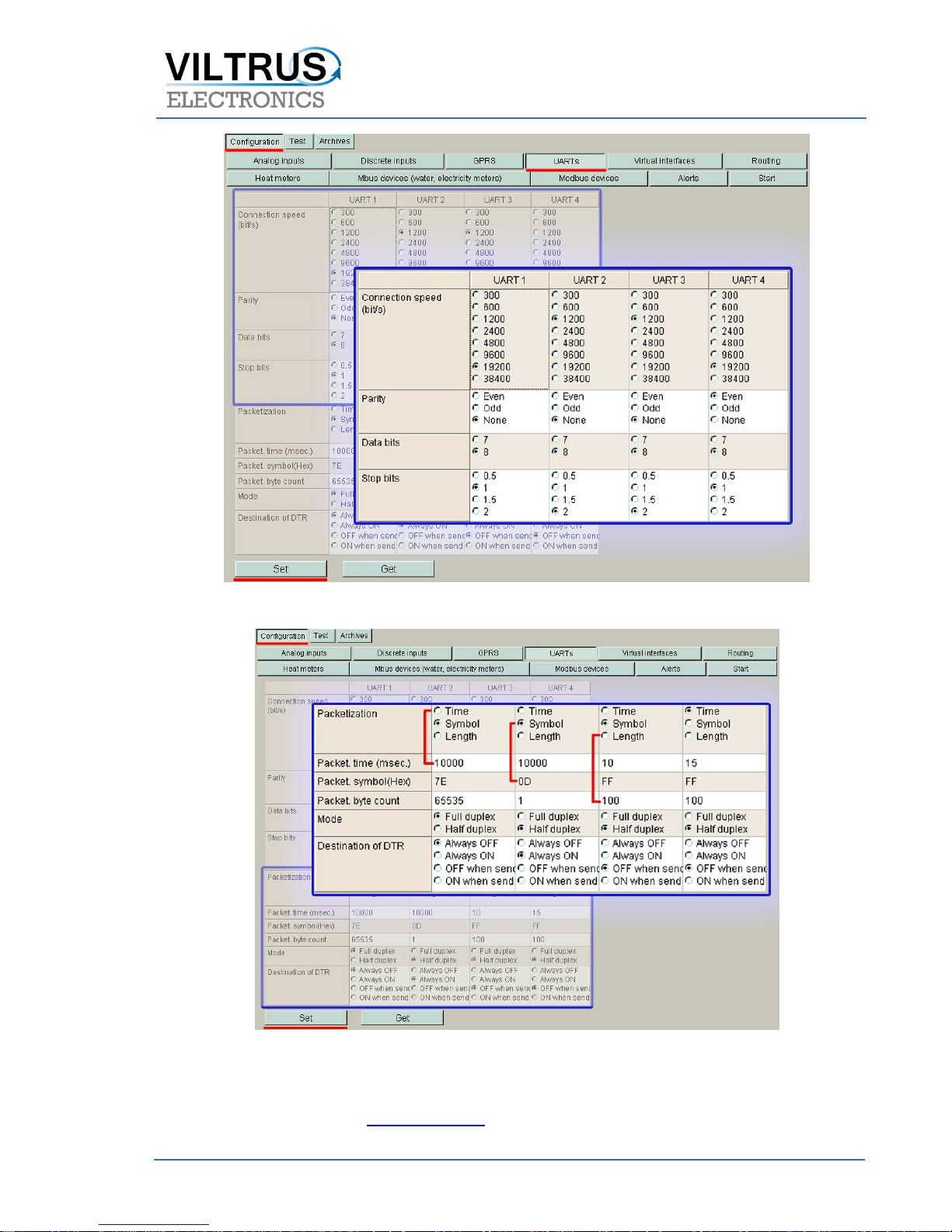
Setup UART’s
Controller support up to 3 UART’s and each of them can be configured individualy:
Connection speed (300-38400 bit/s);
Parity (Even, Odd, Mark, Space, None);
Data bits (5, 6, 7, 8);
Stop bits (1,1.5,2);
Packetization:
Time – in field “Packet time” you can set packet interval (1 – 10000) msec;
Symbol – if you use this packetization method, you need to write “Packet symbol” in HEX
format;
Length – if you select this packetization method, you need to write number of bytes per packet
in field “Packet byte count”;
“>1b+time” – is connecting packetization of methods “Length” and “Time” and you need to
write values to the fiels “Packet time” and “Packet byte count”. End of packet will be the first
met condition.
Packet time (1-10000msec);
Packet symbol (any Hex number, that will mean end of packet);
Packet byte count;
Mode (Full duplex, Half duplex);
Destination of DTR (Always OFF, Always ON, OFF when sending, ON when sending);
For RS485 interfaces “Destination of DTR” must be set – “OFF when sending”
Page 11
JSC „VILTRUS“ • K. Donelaičio str. 62, LT-44248 Kaunas, Lithuania • Tel. +370 640 65040 • Email: [email protected] • Web: www.viltrus.com
Pic 11 Setup UART (Basic)
Pic 12 Setup UART (Packetization)
If there will be any additional questions regarding the wiring, configuration or setting up the M-Bus to
Modbus converter, contact us: [email protected]
 Loading...