

Page 1

INSTALLATION
INSTRUCTIONS
AND SAFETY INFORMATION
FOR THE VIKING R-6S GATE OPERATOR
CLASS I
Residential Vehicular
Swing Gate Operator
Page 2
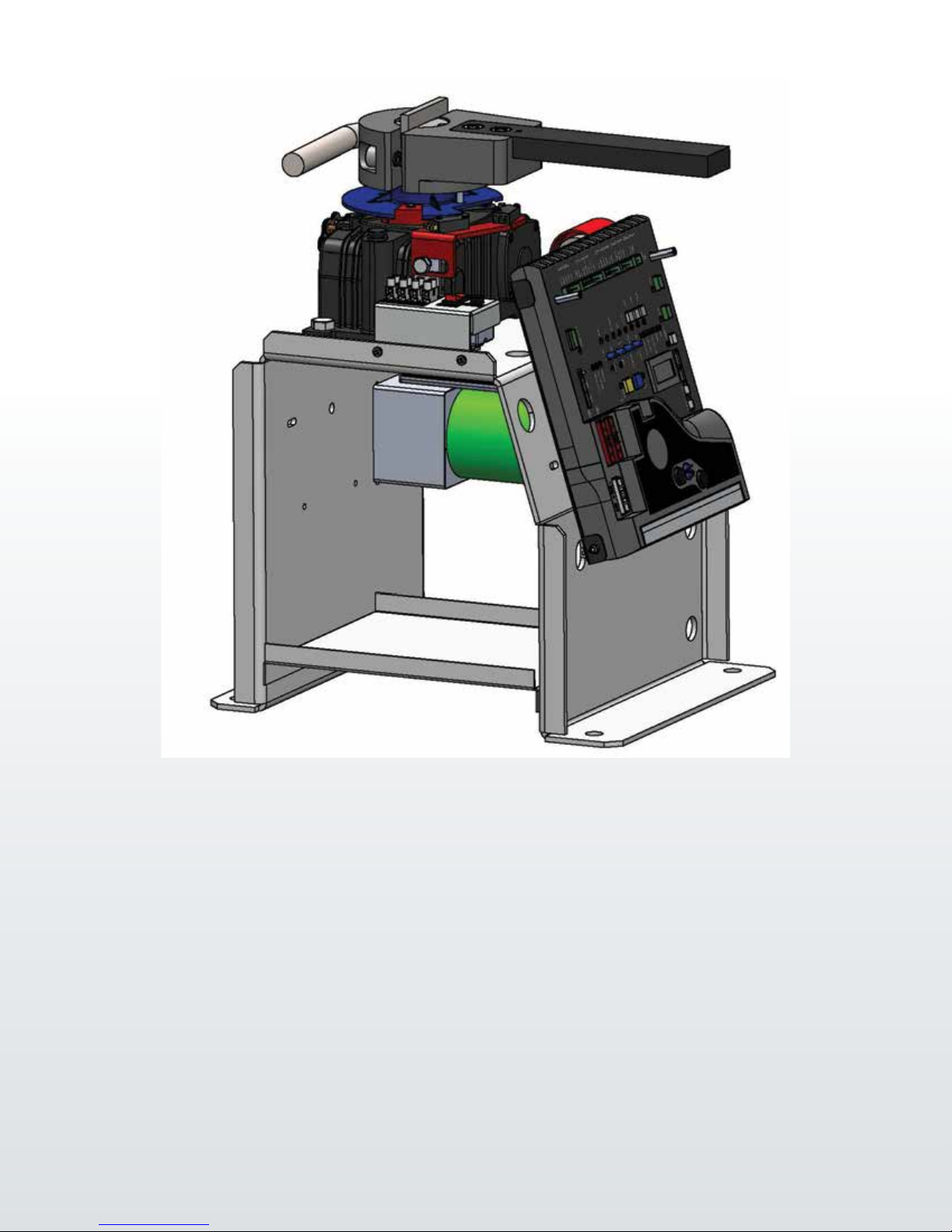
The R-6S™ Viking Solar Swing Gate Operator is capable of handling
gates up to 700 lbs. and 14 ft. long. With its ef cient drivetrain,
built in solar regulator, VFlex control board and Viking Solar Power
Management Systems; the R-6S™ Gate Operator is the ideal choice
for any solar residential applications.
THE VIKING R-6S™ SWING GATE OPERATOR
Page 3

R-6s Solar Vehicular Gate Operator • Revision SR6MN10.B • May 2015
VIKING TECHNICAL SUPPORT 1.800.908.0884
1
Page 4
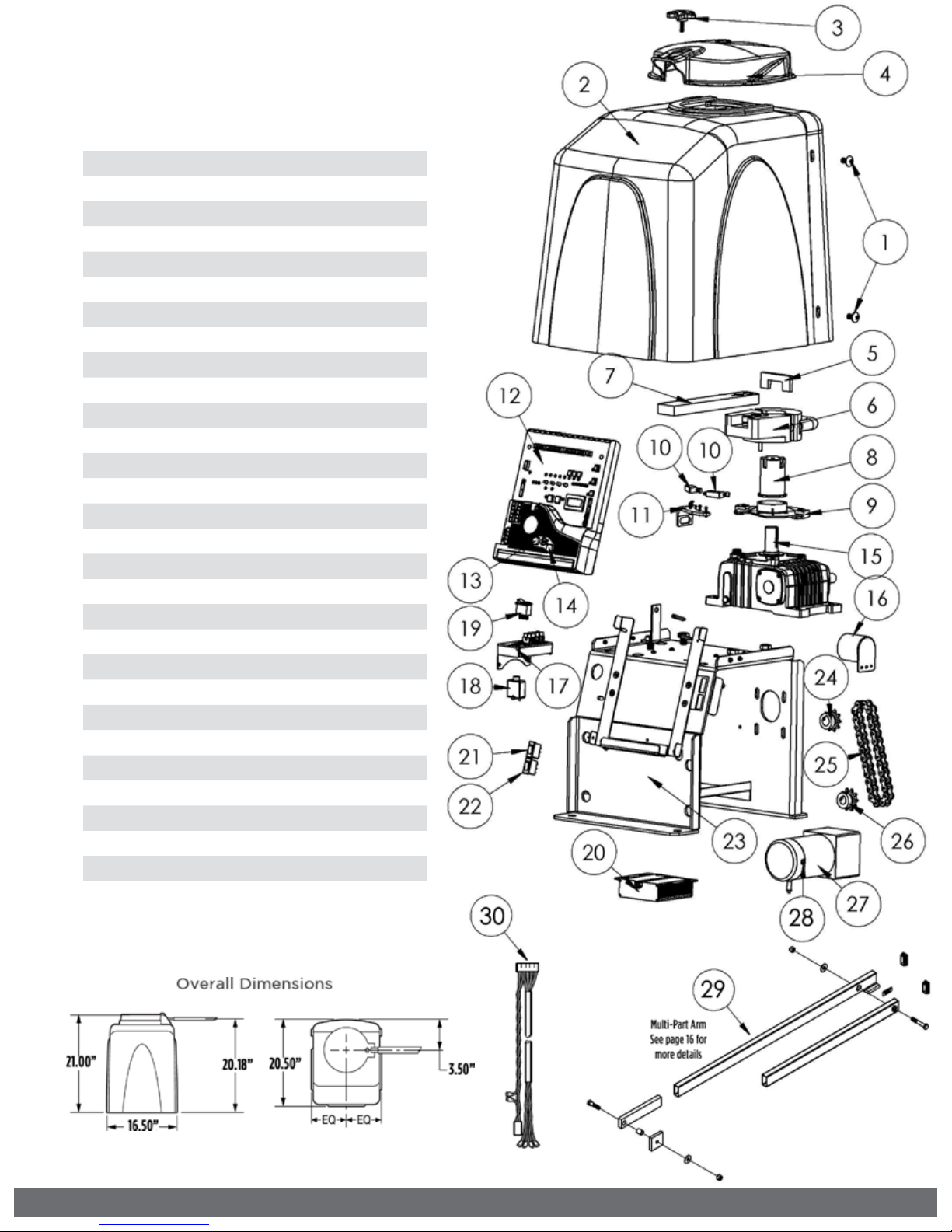
PARTS DIAGRAM:
Item Description Part No.
1 Operator Cover Bolt (4) VASWCB
2 Operator Cover VAR6CO20
3 Output Shaft Knob DWOUK10
4 Output Shaft Cover DWOC20
5 Clutch Key VAWRCK20
6 Clutch and Handle DWCL20
7 Output Arm DWAR20
8 Output Shaft R6OPS20
9 Limit Cam & Holder DWLC10
10 Limit Switch (2) DULS10
11 Limit Switch Holder DWLH10
12 Solar Control Board VSPCB
13 Fuse - 15 amp VNXF15A
14 Fuse - 4 amp VNXF4A
15 Worm Gear #60 Ratio 30:1 R6GB60
16 Alarm DUAL10
17 Solar Terminal Block Assembly VSTBASW
18 Solar Battery Breaker VASBB25
19 Solar Panel Switch DUMRS5
20 Solar Charger VSCHARGSW
21 Motor Switch DUMRS10
22 Power Switch DUMRS10
23 Chassis VSR6CH
24 Sprocket (Gearbox) VASP1034
25 Chain #40x38 Pitches R6CHN40
26 Sprocket (Motor) VASP1058
27 24V DC Gearhead Motor VSR6MO
28 Brush Kit VAMBK
29 Multi-Part Arm Assembly VA-F1ARM20
30 Limit Switch Harness VNXR6LSH
2
VIKING TECHNICAL SUPPORT 1.800.908.0884
Page 5
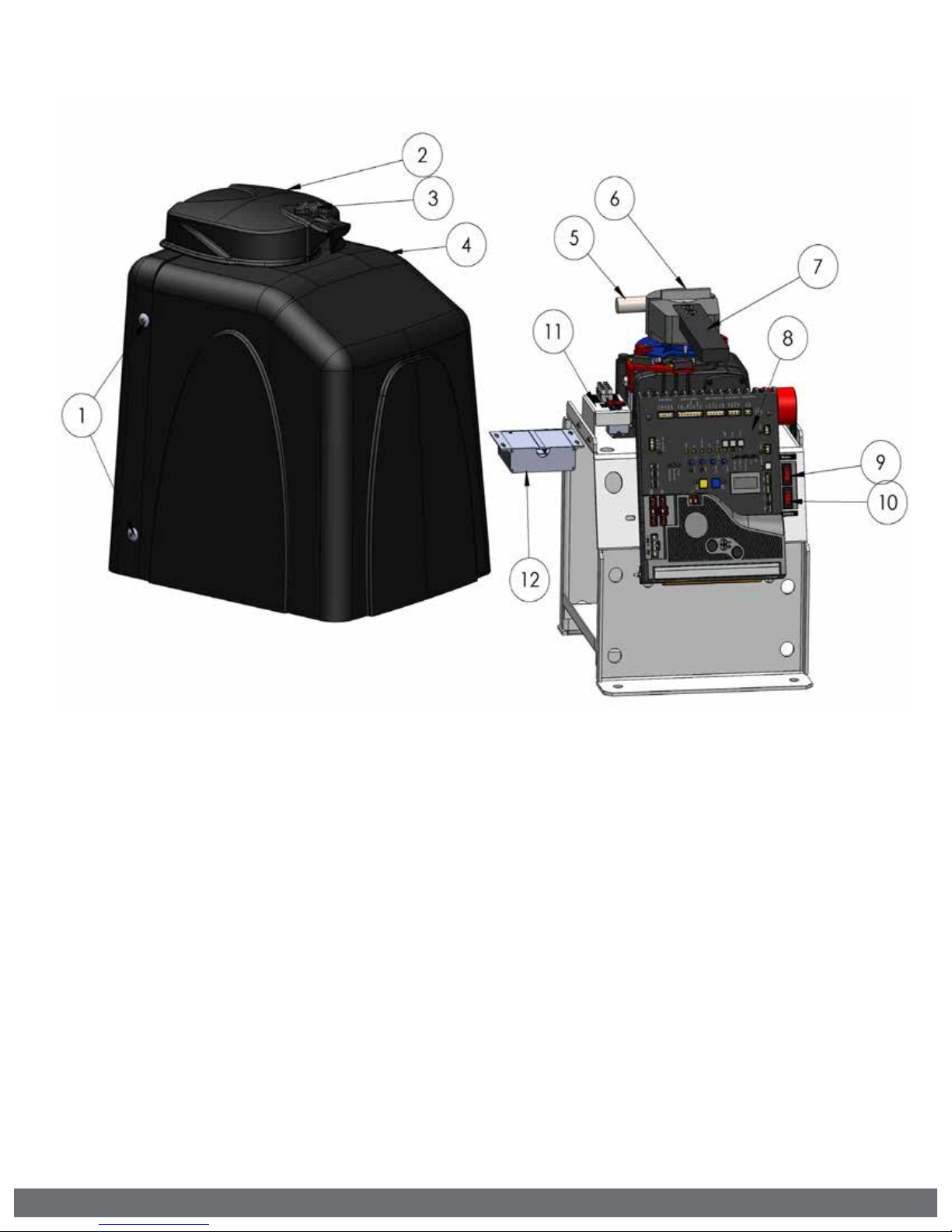
OPERATOR REFERENCES:
1.
COVER BOLTS
2.
OUTPUT SHAFT COVER (HAT)
3.
OUTPUT SHAFT KNOB
secures Hat; remove to access manual release
4.
MAIN COVER ASSEMBLY
5.
MANUAL RELEASE HANDLE
releases the clutch to allow for manual operation
6.
CLUTCH KEY
install if application does not require clutch to slip;
remove to manually operate the gate
7.
OUTPUT ARM
connects the Arm Assembly to Clutch & Handle
Assembly
VIKING TECHNICAL SUPPORT 1.800.908.0884
8.
SOLAR CONTROL BOARD
9.
MOTOR SWITCH
discontinues power to the motor; also serves as
a breaker that will self-trip to protect the motor
circuitry
10.
POWER SWITCH
discontinues all power to the control board
11.
SOLAR TERMINAL BLOCK ASSEMBLY
connections for solar panels and battery
12.
SOLAR CHARGER
regulates and distributes solar power
3
Page 6
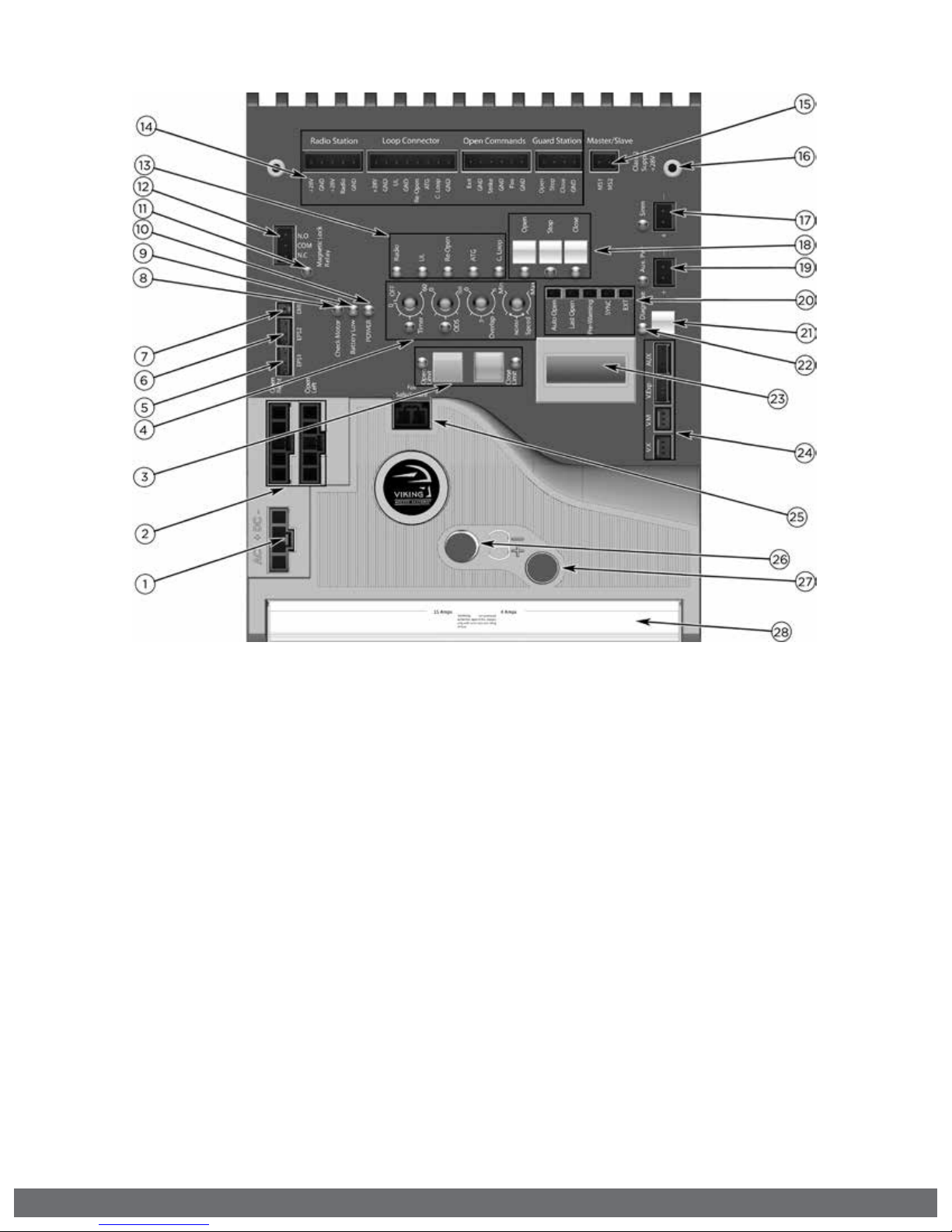
CONTROL BOARD REFERENCES:
1.
POWER HARNESS CONNECTOR
provides power to the control board.
pg 20
2.
“OPEN LEFT” & “OPEN RIGHT”
provides power to the motor. pg 21
3.
LIMIT SETUP BUTTONS
available for future developments.
4.
FEATURE ACTIVATION TRIM POTS
activate and set features. pg 24
5.
“EPS1” CONNECTOR
communication for Viking Solar
Charger.
6.
“EPS2” CONNECTOR
available for future developments.
7.
“EMI” CONNECTOR
not applicable to this model.
8.
“CHECK MOTOR” Status LED
indicates motor power status. pg 36
9.
“BATTERY LOW” Status LED
indicates battery power status. pg 36
10.
“POWER” Status LED
control board power status. pg 36
11.
“MAGNETIC LOCK RELAY” Status LED
status of this on-board relay. pg 36
12.
“MAGNETIC LOCK RELAY” Terminal Block
connect electric locks here. pg 36
13.
INPUT STATUS LEDs
indicates input status. pg 36-37
14.
ACCESS CONTROL TERMINAL BLOCKS
accessory connections. pg 29-32, 42-44
15.
“MASTER/SLAVE” Terminal Block
wired master/slave connection. pg 23
16.
CONTROL BOARD MOUNTING HOLES
secures and grounds the control board.
17.
“Siren” TERMINAL BLOCK
Vikings UL Siren is connected here.
18.
ON-BOARD 3 BUTTON STATION
controls the gate during set up.
19.
“AUX. PWR” Terminal Block
used for solar applications & in-motion
warning devices. pg 20, 25
20.
FEATURE ACTIVATION PIN HEADERS
activate features by placing a jumper
onto the pin headers. pg 25
21.
“DIAGNOSE” Button
allows you to navigate through the
Diagnostics LCD Display. pg 38-40
22.
“DIAGNOSE” LED
informs that errors have been detected
and available on LCD Display. pg 38-40
23.
LCD DIAGNOSTICS DISPLAY
provides error messages, diagnostics
and operator status information.
pg 38-40
24.
EXPANSION PRODUCT CONNECTIONS
connections for additional products
from Viking Access Systems. pg 46
25.
“FAIL SAFE/SECURE” Jumper
power failure option. pg 25
26.
FUSE HOLDER - 15 AMP
for motor circuit.
27.
FUSE HOLDER - 4 AMP
not applicable to this model.
28.
HEAT SINK
secures the control board and
dissipates heat.
4
VIKING TECHNICAL SUPPORT 1.800.908.0884
Page 7

TABLE OF CONTENTS:
23
45
42-44
PARTS DIAGRAM/PARTS LIST 2
OPERATOR REFERENCES 3
CONTROL BOARD REFERENCES 4
IMPORTANT SAFETY INFORMATION 6-12
Important Safety Instructions 6
Important Installation Instructions 7
Maintenance 8
General Safety Precautions 8-9
Operator Classification 9
Photo Beam (non-contact sensor) Installation 10
Edge Sensor (contact sensor) Installation 11
Manual Release 11
Audible Alarm Reset Installation 12
Warning Placard Installation 12
IMPORTANT INSTALLATION INFORMATION 13
Specifications 13
GATE OPERATOR INSTALLATION 14-17
Concrete Pad Option 14
Post Mounting Option 15
Operator Positioning 16-17
ELECTRICAL INSTALLATION 18-20
Battery & Solar Panel Selection 18
Solar Panel Care & Installation Tips 19
Solar Connection & Power Saving Tips 20
LIMITS SETUP 21-22
MASTER/SLAVE SET UP 23
CONTROL BOARD SETUP 24-26
Initial Settings 24-25
Obstruction Detection Sensor (Primary Entrapment Protection) 26
ACCESSORY CONNECTIONS 29-35
Re-Open Photo Beam (Vehicular Safety) 29
Radio Receiver (Typical) 30
Anti-Tail Gate, Open Commands, Guard Station 31
Viking Loop Rack 32
Guidelines for Loop Installations 33
Blank Page 34
Barrier Arm (B-12) Synchronization Option 35
TROUBLESHOOTING 36-41
LED References 36-37
LCD Display References 38-40
Solutions 41
APPENDIX A & B 42-44
VIKING EXPANSION PRODUCTS 45
VIKING TECHNICAL SUPPORT 1.800.908.0884
5
Page 8

IMPORTANT SAFETY INFORMATION
! WARNING! Not Following these instructions may cause severe injury or death.
IMPORTANT SAFETY INSTRUCTIONS
! WARNING! To reduce the risk of severe injury or death.
1.
READ AND FOLLOW ALL INSTRUCTIONS.
2.
Never let children operate or play with gate controls. Keep the remote away
from children.
3.
Always keep people and objects away from the gate. NO ONE SHOULD
CROSS THE PATH OF THE MOVING GATE.
4.
Test the gate operator monthly. The gate MUST reverse on contact with
a rigid object or when an object activates the non-contact sensors. After
adjusting the force or the limit travel, retest the gate operator. Failure to
adjust and retest the gate operator properly can increase the risk of injury or
death.
5.
Use the emergency release only when the gate is not moving.
6.
KEEP GATES PROPERLY MAINTAINED. Read the user’s manual. Have a
qualified service person make repairs to gate hardware.
7.
The entrance is for vehicles only. Pedestrians must use a separate entrance.
8.
Every gate operator installation MUST have secondary protection devices
against entrapment, such as edge sensors and photo beams more in
particularly in places where the risk of entrapment is more likely to occur.
9.
SAVE THESE INSTRUCTIONS.
IMPORTANT INSTALLATION INSTRUCTIONS
1.
Install the gate operator only when:
a.
The operator is appropriate for the construction of the gate and usage
Class of the gate (refer to page 9),
b.
All openings of a horizontal slide gate are guarded or screened from the
bottom of the gate to a minimum of 6 feet (1.83 m) above the ground to
prevent a 2-1/4 inch (57.2 mm) diameter sphere from passing through the
openings anywhere in the gate, and in that portion of the adjacent fence
that the gate covers in the open position,
c.
ALL EXPOSED PINCH POINTS ARE ELIMINATED OR GUARDED, AND
d.
GUARDING IS SUPPLIED FOR EXPOSED ROLLERS.
2.
The Operator is intended for installation only on gates used for vehicles.
Pedestrians must be supplied with a separate access opening. The pedestrian
access opening shall be designed to promote pedestrian usage. Locate the
gate such that persons will not come into contact with the vehicular gate
during the entire path of travel of the vehicular gate.
3.
The gate must be installed in a location so that enough clearance is supplied
between the gate and adjacent structures when opening and closing to
reduce the risk of entrapment. Swinging gates shall not open in to the public
access areas.
4.
The gate must be properly installed and work freely in both directions prior to
the installation of the gate operator. Do not over-tighten the operator clutch
or pressure relief valve to compensate for a damaged gate.
5.
The gate operator controls must be placed so that the user has full view of
the gate area when the gate is moving AND AWAY FROM THE GATE PATH
PERIMETER.
6
VIKING TECHNICAL SUPPORT 1.800.908.0884
Page 9

IMPORTANT SAFETY INFORMATION
! WARNING! Not Following these instructions may cause severe injury or death.
IMPORTANT INSTALLATION INSTRUCTIONS (Continued)
6.
Controls intended for user activation must be located at least six feet (6’)
away from any moving part of the gate and where the user is prevented from
reaching over, under, around or through the gate to operate the controls.
Exception: Emergency access controls only accessible by authorized personnel
(i.e. fire, police, EMS) may be placed at any location in the line-of-sight of the
gate.
7.
The Stop and/or Reset button must be located in the line-of-sight of the gate.
Activation of the reset control shall not cause the operator to start.
8.
A minimum of two (2) WARNING SIGNS shall be installed, one on each side of
the gate where easily visible.
9.
For gate operators using non-contact sensors (Photo Beams or like) in
accordance with section 31.1.1 of the UL standard:
a.
See instructions on the placement of non-contact sensors for each type of
application (refer to page 10).
b.
Care shall be exercised to reduce the risk of nuisance tripping, such as
when a vehicle, trips the sensor while the gate is still moving, and
c.
One or more non-contact sensors shall be located where the risk of
entrapment or obstruction exists, such as the perimeter reachable by a
moving gate or barrier (refer to page 10).
d.
Use only Omron E3K-R10K4 photoelectric eye to comply with UL 325
10.
For a gate operator utilizing a contact sensor (Edge sensor or like) in
accordance with section 31.1.1 of the UL 325 standard:
a.
One or more contact sensors shall be located where the risk of entrapment
or obstruction exists, such as a the leading edge, trailing edge, and post
mounted both inside and outside of a vehicular horizontal slide gate.
b.
One or more contact sensors shall be located at the bottom of a vehicular
vertical lift gate.
c.
One or more contact sensors shall be located at the pinch point of a
vehicular vertical pivot gate.
d.
A hardwired contact sensor shall be located and its wiring arranged so
that the communication between the sensor and the gate operator is not
subject to mechanical damage.
e.
A wireless contact sensor such as one that transmits radio frequency
(RF) signals to the gate operator for entrapment protection functions
shall be located where the transmission of the signals are not obstructed
or impeded by building structures, natural landscaping or similar
obstructions. A wireless contact sensor shall function under the intended
end-use conditions.
f.
One or more contact sensors shall be located on the inside and outside
leading edge of a swing gate. Additionally, if the bottom edge of a swing
gate is greater than 6 inches (152 mm) above the ground at any point in its
arc of travel, one or more contact sensors shall be located at the bottom
edge (refer to page 11).
g.
One or more contact sensors shall be located at the bottom edge of a
vertical barrier (arm).
h.
Only Use Miller Edge Model MGR20 or MGS20 edge sensor to comply with
UL325.
VIKING TECHNICAL SUPPORT 1.800.908.0884
7
Page 10

IMPORTANT SAFETY INFORMATION
! WARNING! Not Following these instructions may cause severe injury or death.
MAINTENANCE
Remove the Power Harness from the Control Board. (refer to page 20)
•Cleanandlubricatetheturningpinsandgatehingesusingtherecommended
lubricant.
•Checkthatallhardwareofthegateoperatorisproperlytighten.
•Ensurethatthegatemovesfreely.
•Checkforcorrodedpartsandreplaceifnecessary.
•Checkthebatteryforthefollowing:
- Battery connections must be free of corrosion.
- Battery voltage must be 13VDC (fully charged battery).
Reconnect the Power Harness for the Control Board. (refer to page 20)
•Checkandconfirmtheproperoperationofallsafetydevices(photoelectric
eye, edge sensors or like).
•Checkandconfirmtheoperationofallinstalledaccessories.
•CheckandconfirmtheoperationofallspecialfeaturessuchastheIntelligent
Obstruction Sensor, Hold Open Timer. (refer to page 24 and 26)
•Checkandconfirmtheoperationofthemanualrelease.(refertopage7)
GENERAL SAFETY PRECAUTIONS
The following precautions are an integral and essential part of the product and must be
supplied to the user. Read them carefully as they contain important indications for the
safe installation, use and maintenance.
•Theseinstructionmustbekeptandforwardedtoallpossiblefutureusersofthe
system.
•Thisproductmustbeusedonlyforthatwhichithasbeenexpresslydesigned.
•Anyotheruseistobeconsideredimproperandthereforedangerous.
•Themanufacturercannotbeheldresponsibleforpossibledamagecausedby
improper, erroneous or unreasonable use.
•Avoidoperatingintheproximityofthehingesormovingmechanicalparts.
•Donotenterthepathofthemovinggatewhileinmotion.
•Donotobstructthemotionofthegateasthismaycauseasituationofdanger.
•Donotallowchildrentoplayorstaywithinthepathofthemovinggate.
•Keepremotecontroloranyothercontroldevicesoutofthereachofchildren,in
order to avoid possible involuntary activation of the gate operator.
•Incaseofbreakdownormalfunctioningoftheproduct,disconnectfromthemain
power source. Do not attempt to repair or intervene directly, contact only qualified
personnel for repair.
•Failuretocomplywiththeabovemaycreateasituationofdanger.
•Allcleaning,maintenanceorrepairworkmustbecarriedoutbyqualifiedpersonnel.
•Inordertoguaranteethatthesystemworksefficientlyandcorrectlyitisimportant
to have the manufacturer’s instructions on maintenance of the gate and operator
carried out by qualified personnel.
•Inparticular,regularchecksarerecommendedinordertoverifythatthesafety
devices are operating correctly.
All installation, maintenance and repair work must be documented and made
available to the user.
8
VIKING TECHNICAL SUPPORT 1.800.908.0884
Page 11
IMPORTANT SAFETY INFORMATION
! CAUTION: To Reduce the Risk of Fire or Injury to Persons:
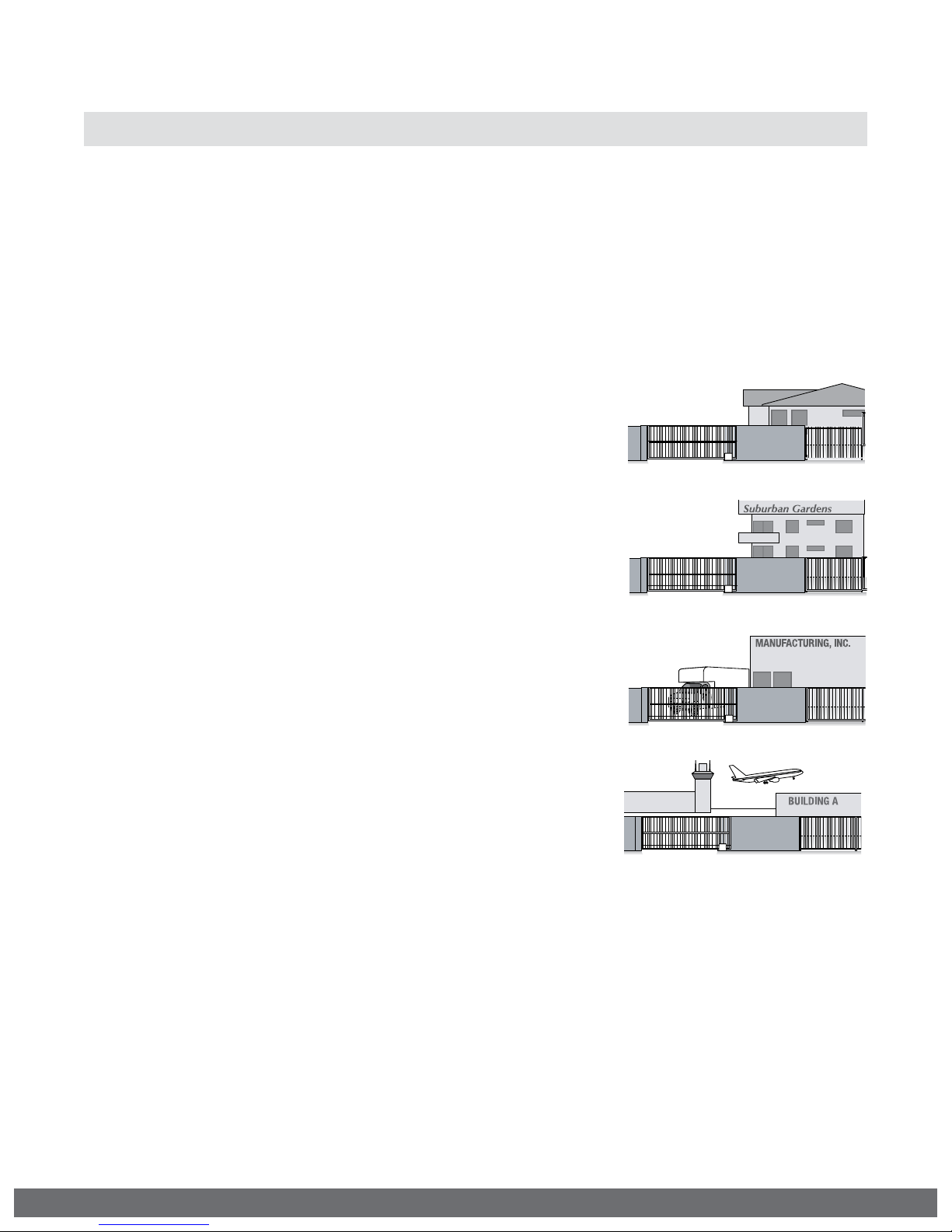
UL325 Gate Operator Classifications
GLOSSARY
RESIDENTIAL VEHICULAR GATE OPERATOR
CLASS I -
for use in garages or parking areas associated with a
residence of one-to four single families.
COMMERCIAL/GENERAL ACCESS VEHICULAR GATE OPERATOR
CLASS II –
intended for use in a commercial location or building
such as a multi-family housing unit (five or more single
family units), hotel, garages, retail store, or other
building servicing the general public.
A vehicular gate operator (or system) intended
A vehicular gate operator (or system)
INDUSTRIAL/LIMITED ACCESS VEHICULAR GATE OPERATOR
CLASS III –
intended for use in an industrial location or building
such as a factory or loading dock area or other
locations not accessible by or intended to service the
general public.
RESTRICTED ACCESS VEHICULAR GATE OPERATOR
CLASS IV –
intended for use in a guarded industrial location or
building such as an airport security area or other
restricted access locations not servicing the general
public, in which unauthorized access is prevented via
supervision by security personnel.
Install the gate operator only when:
The operator is appropriate for the construction of the gate and the Usage Class of
the gate.
A vehicular gate operator (or system)
A vehicular gate operator (or system)
VIKING TECHNICAL SUPPORT 1.800.908.0884
9
Page 12

IMPORTANT SAFETY INFORMATION
! WARNING! Not Following these instructions may cause severe injury or death.
NOTE: This type on installation DOES NOT reverse the gate all the way back to
its limits when the photo beam is obstructed. This installation is only to protect
against entrapment and to comply with UL325.
Secondary Entrapment Protection
Photo Beam (non-contact sensor) Installation
•
Photo beams or like must be installed to reduce the risk of entrapment.
•
Use only Omron E3K-R10K4 photoelectric eye to comply with UL325
•
Make the electrical connections of the photoelectric sensor as described here in
this page.
•
Care shall be exercised to reduce the risk of nuisance tripping, such as when a
vehicle, trips the sensor while the gate is still moving, and;
•
One or more non-contact sensors shall be located where the risk of entrapment or
obstruction exists, such as the perimeter reachable by a moving gate or barrier.
Consult the installation manual for the UL325 device (photo beam or like) for detail
information about the usage, installation and maintenance.
10
VIKING TECHNICAL SUPPORT 1.800.908.0884
Page 13
IMPORTANT SAFETY INFORMATION
! WARNING! Not Following these instructions may cause severe injury or death.
NOTE: This type on installation DOES NOT reverse the gate all the way back to
its limits when the edge sensor is obstructed. This installation is only to protect
against entrapment and to comply with UL325.
Secondary Entrapment Protection
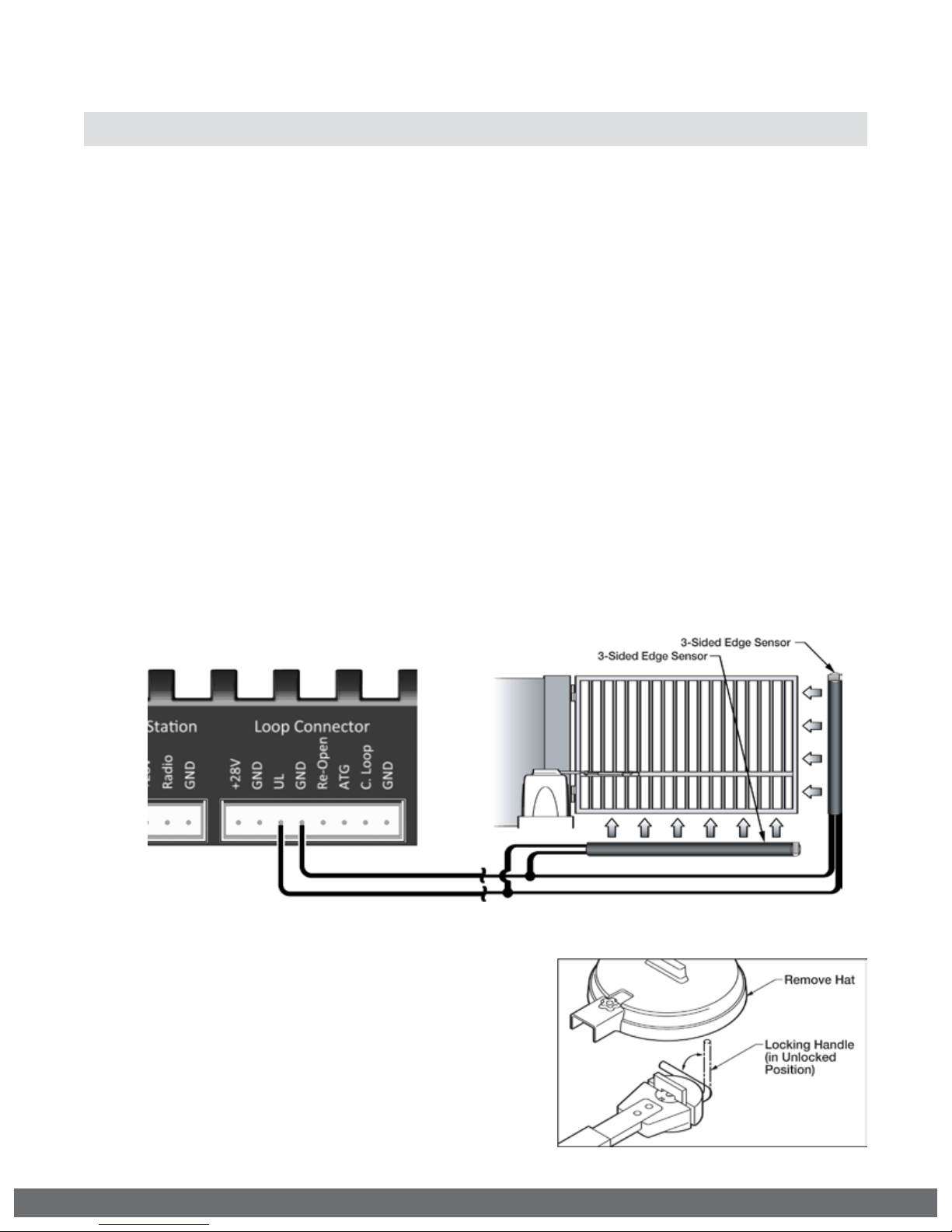
Edge Sensor (contact sensor) Installation
•
Edge Sensors or like must be installed to reduce the risk of entrapment.
•
Use only Miller Edge 3-sided activation type MGR20 or MGS20 to comply with
UL325
•
One or more contact sensors shall be located on the inside and outside leading
edge of a swing gate. Additionally, if the bottom edge of a swing gate is greater
than 6 inches (152 mm) above the ground at any point in its arc of travel, one or
more contact sensors shall be located on the bottom edge.
1.
A hardwired contact sensor shall be located and its wiring arranged so that the
communication between the sensor and the gate operator is not subjected to
mechanical damage.
2.
A wireless contact sensor such as one that transmits radio frequency (RF)
signals to the gate operator for entrapment protection functions shall be located
where the transmission of the signals are not obstructed or impeded by building
structures, natural landscaping or similar obstruction. A wireless contact sensor
shall function under the intended end-use conditions.
Manual Release
When manual operation is required:
1.
Remove the “Output Shaft Cover” or Hat.
2.
Lift the “Manual Release Handle”.
3.
Remove the “Clutch Key”.
To resume normal operation:
1.
Align the notches on the Output Shaft to
the clutch and reinstall the Clutch Key.
2.
Push the Manual Release Handle down,
back to the locked position.
Refer to page 17 for more details
VIKING TECHNICAL SUPPORT 1.800.908.0884
11
Page 14
IMPORTANT SAFETY INFORMATION
! WARNING! Not Following these instructions may cause severe injury or death.
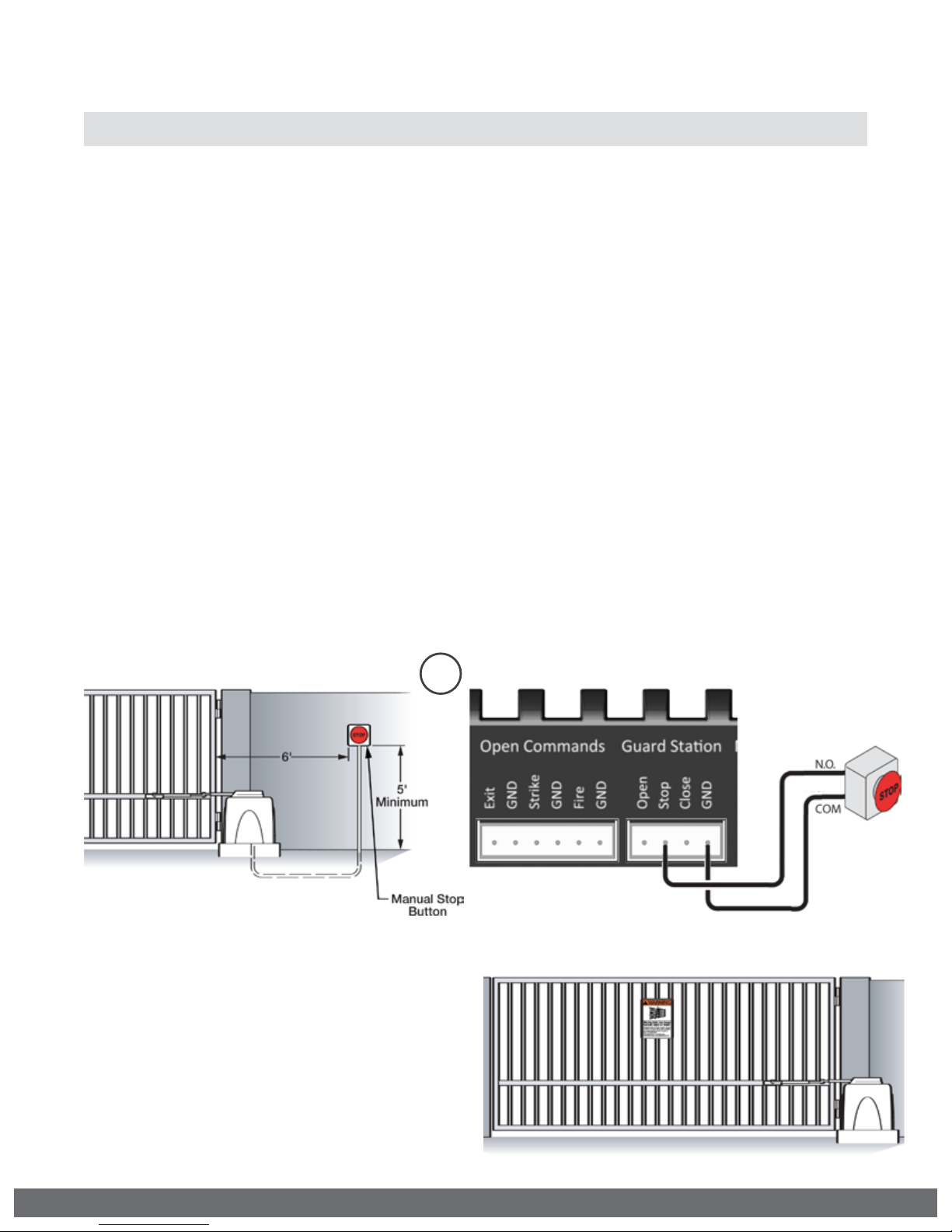
Audible Alarm Reset Switch Installation
Manual Reset for the Audible Alarm
•
UL325 standard requires an audible alarm sound off after two consecutive events
detected by the primary entrapment protection of the gate operator (obstruction
sensor).
•
The audible alarm will continue to sound for 5 minutes or until a stop command
gets actuated.
•
The Stop command can be actuated in two different forms:
1.
Using the Built in Stop switch on the Control Board or;
2.
Using an External Stop button within the sight of the gate, away from moving
parts of the gate and out of reach of children.
a.
Controls intended for user activation must be located at least six feet (6’)
away from any moving part of the gate and where the user is prevented from
reaching over, under, around or through the gate to operate the controls.
Outdoor or easily accessible controls shall have a security feature to prevent
unauthorized use.
b.
The Stop and/or Reset button must be located in the line-of-sight of the gate.
Activation of the reset control shall not cause the operator to start.
2
Warning Placard Installation
•
All Warning Placards must be installed
where visible in the area of the gate.
•
A minimum of two placards shall be installed.
•
A placard is to be installed in the area of
each side of the gate and be visible.
12
VIKING TECHNICAL SUPPORT 1.800.908.0884
Page 15

IMPORTANT INSTALLATION INFORMATION
! CAUTION: To Reduce the Risk of Fire or Injury to Persons:
! WARNING: For use with gates at a maximum 700 lbs. in weight and 14 ft. in length.
DO NOT allow pedestrian use of this gate DO NOT install the gate operator to lift gates
Locate Control Buttons:
1.
Within sight of the gate,
2.
At a minimum height of 5 feet
so small children are not able to
reach it; and
3.
At least 6 feet away from all
moving parts of the gate.
14 ft.
R-6SSpecications:
UL Application Class: Class I
Maximum Gate Length: 14 ft.
Maximum Gate Weight: 700 lb.
Operating Temperature: -4°F (-20°C) to 160°F (71°C)
700 lb.
VIKING TECHNICAL SUPPORT 1.800.908.0884
13
Page 16

GATE OPERATOR INSTALLATION
Concrete Pad Option
1.
Follow the local building code to determine the required depth of the
concrete pad.
2.
Pad measurements recommended by Viking Access Systems are at least
23” long, 20” wide and 30” deep to ensure the stable operation of the
operator, and a minimum of 6” above level grade to avoid any flooding of
the machinery.
3.
Provide a sufficient number of conduit pathways for all low power
accessories such as loop detector leads, maglock, non-contact sensors,
contact sensors, safety and other commands. Also provide conduit for the
power supply to the operator.
! DO NOT run low voltage and high voltage wiring in the same conduit.
! Provide at least 12” separation between low and high voltage conduits.
14
VIKING TECHNICAL SUPPORT 1.800.908.0884
Page 17

GATE OPERATOR INSTALLATION
Post Mounting Option
TIP:
The operator can be post mounted to be elevated above snow and flood lines.
1.
Consult the local building codes for the depth and concrete requirements.
2.
Maximum 3.00” OD pipe.
3.
Provide a sufficient number of conduit pathways for all low power accessories.
Also provide conduit for the power supply to the operator.
! DO NOT run low voltage and high voltage wiring in the same conduit.
! Provide at least 12” separation between low and high voltage conduits.
REQUIRED ADD-ON: PART# VA-F 1PS
•
Main pieces made of 1/4” thick material
•
All mounting hardware is included
•
Posts and U-Bolts are not supplied
VIKING TECHNICAL SUPPORT 1.800.908.0884
15
Page 18

GATE OPERATOR INSTALLATION
Operator Positioning
! IMPO R TANT: Swing Gates must not open into public access areas.
The gate must be installed in a location so that enough clearance is supplied between the
gate, while opening and closing, and adjacent structures to reduce the risk of entrapment.
! TECHNICAL TIPS: Operator and Arm Geometry
•
Increasing “C” dimension provides better gate control and stability by reducing the
affects of inertia and deceasing the gate leverage against the operator.
•
Following to the geometrical formulas and relationships provided is recommended.
Arm Assembly: VA-F1ARM20
16
VIKING TECHNICAL SUPPORT 1.800.908.0884
Page 19

GATE OPERATOR INSTALLATION
! IMPO R TANT: When attaching the Arm Assembly to the gate, if the “Gate Bracket” is not
welded to a frame member that runs the full length of the gate, the operator may damage
the gate. Do not attach the Gate Bracket to only a few pickets.
STEP 1
Install the Clutch and cut the
Arm Assembly to achieve
the desired dimensions for
“D” and “E” according to the
formulas provided on page 16.
! TIP: Leave some additional material
when cutting the Arm Assembly to
allow for adjustment.
STEP 3
With the Clutch installed and released,
manually move the gate to both limits.
Verify the following:
1.
The gate reaches the desired limits.
2.
The Arm does not bind at any point.
STEP 2
With the gate at the closed,
install the Arm Assembly.
Check that the dimensions
correspond accordingly to the
formulas provided on page 16.
! TIP: Use C-clamps or tack-weld the Arm
assembly in place until Step 3 has been
completed.
STEP 4
Once satisfied with the installation and
movement of the gate, weld the arm
pieces securely. Paint the Arm to protect
against rusting.
STEP 5
Rotate the Clutch until it lines up with the
notches on top of the Output Shaft and
insert the Clutch Key.
VIKING TECHNICAL SUPPORT 1.800.908.0884
STEP 6
Verify the Clutch is adjusted properly.
•
Both sides adjusted evenly.
•
Handle is locked, by hand, and
positioned horizontally at 0°.
With the Clutch Key removed, the
Clutch should not slip with moderate
force applied to the gate.
17
Page 20

ELECTRICAL INSTALLATION
SAVE THESE INSTRUCTIONS - This manual contains important instructions for the
R-6s model gate operator that shall be followed during installation and maintenance
of the charge controller.
Battery Selection
•
Battery is sold separately.
•
Use only UL recognized 12V Sealed Lead Acid (SLA)
•
35Ah Maximum battery capacity.
Battery Care and Location
•
Use at least 12AWG wire, rated 90°C or better.
•
A 35Ah battery can be stored under the chassis of
the operator, behind the control board.
•
Ensure the battery terminals will maintain a 1/4”
spacing from all other circuits and metal parts.
•
Donotdisposeofthebatteryinre.Thecellsmayexplode.
Check with local codes for possible disposal instructions.
•
Do not open or mutilate the battery. Released electrolyte
is corrosive and may cause damage to the eyes or skin. It
may be toxic if swallowed.
•
Exercise care in handling batteries in order not to short the
battery with conducting materials such as rings, bracelets
and keys.
•
CAUTION - A battery can present a risk of electrical shock,
burnfromhighshortcircuitcurrent,reorexplosionfrom
vented gasses. Observe proper precautions.
•
Observe proper polarity orientation between the battery
and charging circuit.
Battery
Storage
Solar Panel Selection
•
Solar panel(s) are sold separately.
•
Use only UL Listed 12V solar panel(s), such as Viking part #s:
Wattage Viking Part#
20 Watts VA-SO20W 21.7V 1.25A
40 Watts VA-SO40W 21.8V 2.57A
Open-Circuit
Voltage
Short-Circuit
Current
Ratings
System Voltage: 12V
Max. Solar Wattage: 40W
Max. Solar Voltage: 29V
Max. Battery Capacity: 35Ah
Min. Battery Voltage: 8V
Max. Charger Load Current: 3A
Output Voltage for Controls: 24V This is the voltage the control board will provide
! Important: The number of cycles achieved daily is dependent on many factors,
including current draw of the motor and accessories, and local solar radiation data.
If more specific information is needed please consult with Viking Access Systems.
For more information regarding solar energy refer to: http://rredc.nrel.gov/solar/
pubs/redbook/
18
VIKING TECHNICAL SUPPORT 1.800.908.0884
Page 21

Ground Rod
ELECTRICAL INSTALLATION
Solar Panel Care and Location
•
Where it will receive maximum sunlight throughout the year.
•
Avoid trees and buildings or obstructions, which could cast shadows on the panel.
•
South facing and tilted at an inclined angle that is equal to latitude.
•
If dirt build-up becomes excessive, clean the glass with a soft cloth using a mild
detergent and water.
•
Install solar panels in the following conditions:
•
Operating temperature: -40°F to 185°F
•
Humidity: Below 85RH%
•
Wind pressure: Below 50.12lb / ft² (240 0Pa)
•
Snow load pressure: Below 112.76lb / ft² (5400Pa)
•
DO NOT install the solar panel near open flames or flammable materials.
•
DO NOT install the solar panel where there is a risk of being immersed in water or
continually exposed to water from a sprinkle, fountain, etc..
Solar Panel Safety Precautions
! Installation must be performed by a qualified technician.
•
Before installing your system, contact local authorities and determine the
necessary permit, installation and inspection requirements.
•
Follow all local codes and guidelines.
•
To reduce the risk of electrical shock or burns, the solar panel must be covered
with an opaque material during installation.
•
Do not touch live terminals with bare hands as they can present a risk of electrical
shock, burn or fire.
Solar Panel Installation (per article 690 of ANSI/NFPA 70)
•
Use appropriate methods to mount the solar panel. Fall of the panel from high
places will cause death, injury or damage.
•
The solar panel must be mounted on a post with a supporting structure to support
wind and snow loads rated for use by the appropriate local or civil codes.
•
Use stainless steel washers between the panel aand the supporting frame to
prevent electrolysis corrosion.
•
Use conduit and the appropriate wire type for outdoor applications.
•
Properly ground solar panel and operator according to NEC code.
•
Use the appropriate wire size according to distance and the maximum power
(Watt) rating of the solar panel, or panels combined.
•
Use at least 16 AWG photovolatic cable or 90°C, sunlight and moisture resistant
direct burial cable or better.
•
WARNING - This charge controller must be used with an external GFDI device as
required by article 690 of the National Electric Code for the installation location.
Tips for proper ground installation:
•
Use a ground rod to provide a ground reference.
•
Consult your city code and be aware of under-ground
services in the site of the gate operator to prevent
inconveniences.
•
Always use a single bonding point for grounding.
•
All ground wires must be as short and as thick as
possible.
•
Prevent unnecessary turns or loops in all ground
wires.
Earth Ground
VIKING TECHNICAL SUPPORT 1.800.908.0884
19
Page 22

Power Saving Tip:
The solar VFlex “control board” shuts
down the power at the“Aux. Pwr”
Terminal when the board is in sleep
mode.
To save energy, get the power for your
non-essential devices (such as photo
beams) from this terminal.
Er PANEL
LOW
ER PANEL
HIGH
ER SoLAR
NO PANEL
ERR NO
Sol UNIT
ERR CHRG
HIGH
ERR BAT
LOW
Indicates that the voltage being provided from the solar panel is too low.
Indicates that the voltage being provided from the solar panel is too High.
Indicates that there is no voltage being provided from the solar panel
Indicates that there is no voltage being provided from the solar panel.
Potential problem with the Solar Charger.
The battery is low
20
VIKING TECHNICAL SUPPORT 1.800.908.0884
Page 23

LIMITS SETUP
STEP 1 Connect the “Limit Switch Harness” to the Control Board.
a.
“OPEN RIGHT” Connector if the gate opens Right.
b.
“OPEN LEFT” Connector if the gate opens Left.
1
STEP 2
At the “Limit Cam & Holder” assembly:
a.
Loosen screws on both of the “Limit
Switch Cams”.
b.
With the Articulating Arm and “Clutch”
installed, insure that the “Clutch Guide
Pin” is seated into one of the four
holes on the “Cam Holder”.
c.
Move the gate manually to the desired
closed limit position and adjust the
nearest Limit Switch Cam to actuate
the corresponding limit switch.
d.
Slight tighten the Limit Cam Screw.
e.
Repeat Step 2c & 2d for the desired
open limit position.
f.
Run the 2 full cycles before confirming
your limit settings. Adjust accordingly
if required.
1a
1b
Tip: Referring to Step 2b. The “Cam Holder” contains four (4) Guide Pin holes to allow
for proper positioning, if required, due to an alternative operator orientation.
Gate OPENS to the LEFT
Left Limit Switch = Closed Limit
Right Limit Switch = Open Limit
VIKING TECHNICAL SUPPORT 1.800.908.0884
Gate OPENS to the RIGHT
Left Limit Switch = Open Limit
Right Limit Switch = Closed Limit
21
Page 24

LIMITS SETUP
! IMPORTANT: This gate operator uses mechanical limit switches. Therefore, the limits
cannot be set electronically by the control board. The Limit Buttons on the control
board have been rendered inactive.
! TECHNICAL TIP: Each Limit LED will illuminate solid when the corresponding limit switch
is actuated. The LEDs will flash simultaneously while both limit switches are actuated at
the same time. This display may indicate a problem with the limit switches or wires.
“Open Limit” LED
indicates the gate is
at the open limit.
“Close Limit” LED
indicates the gate is
at the close limit.
22
VIKING TECHNICAL SUPPORT 1.800.908.0884
Page 25

MASTER/SLAVE SETUP
Two Wire Communication
!
IMPORTANT: DO NOT run the Master/Slave communication cable in the same conduit
or within 12” of 115 - 230v power supply cables.
! Technical Tip: DO NOT set the “Timer” and/or “Overlap” features on both operators
Control Boards. Only turn these features on at the Master Control Board.
CABLE REQUIREMENTS:
•
2 Conductor (wire)
•
18 AWG or better
•
Shielded (overall foil)
•
Drain Wire (non-insulated or bare wire)
Shielded Cable
Master Board
“MS1”
“MS2”
Conduit
Drain Wire
Slave Board
“MS1”
“MS2”
Conduit between
Master and Slave
VIKING TECHNICAL SUPPORT 1.800.908.0884
23
Page 26

CONTROL BOARD SETUP
Initial Settings
“Timer”
Hold Open Timer
Automatically closes the gate after
the selected amount of time from 1-60
seconds.
Turning the dial between “0” and “OFF”
will disable this feature, requiring a close
command to close the gate.
“Overlap”
Overlap Delay
For Master/Slave applications. The
control board that has this feature turned
on is the MASTER and will delay from 1-6
seconds. Slave will delay to close.
! Do not turn this feature on at both
control boards, only the Master.
“ODS”
Obstruction Detection Sensor
Sets the amount of force required to trip
the inherent obstruction sensor.
See page 26 for more details about this
feature.
24
“Speed”
Motor Speed
Increases or decreases the speed of gate
travel.
VIKING TECHNICAL SUPPORT 1.800.908.0884
Page 27

Initial Settings
CONTROL BOARD SETUP
NOTE:
Installing a shunt or jumper on the pins will activate the feature.
“Last Open” - Power Failure Option
Opens the gate automatically when the
battery backup voltage is critically low.
“Pre-Warning” Initiates two options for
an audio or visual warning 3 seconds
prior to gate motion and will continue:
1.
Until gate reaches closed limit:
“Magnetic Lock” terminals provide a
contact between “COM” and “N.O”.
2.
While gate is moving:
“AUX. PWR” terminals provide 24VDC.
! IMPORTANT: Regardless of the power failure options chosen, the gate can be moved
manually with a relatively low amount of force by following the steps for “Manual
Release” as outlined at on page 11.
VIKING TECHNICAL SUPPORT 1.800.908.0884
“Sync” Used only in conjunction with
the Viking Barrier gate operator model
B-12. Activating this feature allows for
synchronized operation with the B-12
operator. See page 35.
“EXT” Available for future developments.
25
Page 28

CONTROL BOARD SETUP
Obstruction Sensor (Primary Entrapment Protection)
!
IMPORTANT: The appropriate “ODS” setting is dependant upon the gate installation
and construction. Set this feature accordingly. Additional Safety equipment should
be used to reduce possible risk of injury or vehicle damage.
“ODS” Obstruction Detection Sensor
The Obstruction Sensor detects
obstructions in the path of the traveling
gate. The dial sets the amount of force
required to activate the operators inherent
obstruction detection.
Setting the dial to “0” will require the least
amount of force to activate;
Setting the dial to “100” will require the
maximum amount of force to activate.
UL325 standard requires an audio
alarm to go off after two consecutive
entrapment events sensed by the
Inherent Entrapment Protection of the
Gate Operator.
The audio alarm will sound for a period
of 5 minutes or until a Stop command
or the “Alarm Reset” switch has been
actuated. (refer to page 12)
When the Obstruction Sensor detects
an obstruction it will:
1.
Stop the gate’s movement and reverse
it momentarily.
2.
Bring the gate to a resting position.
3.
Disable the Hold Open Timer feature
until the Gate Operator receives a new
command.
If second obstruction is detected before
the gate reaches either limit it will:
1.
Stop the gate’s movement.
2.
Disable the Gate Operator.
3.
Sound the UL Alarm
4.
A STOP command must be provided
to disable the alarm and continue
operation.
! TECHNICAL TIP: The Status LED for the
“ODS” will indicate the following
when it has been triggered.
A.
Solid: Obstruction.
Detected a sudden or abrupt increase
in gate resistance.
B.
Flashing: Overload.
Detected a more subtle, but sustained
increase in gate resistance.
26
VIKING TECHNICAL SUPPORT 1.800.908.0884
Page 29

(THIS PAGE LEFT BLANK INTENTIONALLY)
VIKING TECHNICAL SUPPORT 1.800.908.0884
27
Page 30

(THIS PAGE LEFT BLANK INTENTIONALLY)
28
VIKING TECHNICAL SUPPORT 1.800.908.0884
Page 31

ACCESSORY CONNECTIONS
Re-Open Photo Beam (vehicular Safety)
NOTE:
to the open limit when the beam is obstructed. Intended for vehicular safety ONLY. For
the purpose of pedestrian entrapment, see pages 10-11.
This type of photo-beam installation will stop then RE-OPEN the gate all the way
N.O.
COM
( - ) ( + )
Power Saving Tip:
To save energy, get the power for your non-essential devices (such as photo beams)
from the “Aux. Pwr” terminal block. Detailed on page 20.
Note regarding Photo Beam types:
Fail-Safe type - connect the “N.C.”
terminal of the photo beam to the
“Re-Open” terminal on the control board.
Typically, these are the reflective type
photo beams.
Fail -Secure type - connect the “N.O.”
terminal of the photo beam to the
“Re-Open” terminal on the control board.
Typically, these are the transmitter/
receiver type photo beams.
Check for proper operation:
The “Re-Open” LED will illuminate
solid while the beam is obstructed
and remain off when the beam is
unobstructed.
! TECHNICAL TIP: For more information
regarding accessory connections
to the control board and individual
input terminal functions, refer to
“Appendix (A)”, pages 42-43.
VIKING TECHNICAL SUPPORT 1.800.908.0884
29
Page 32

ACCESSORY CONNECTIONS
COM
N.O.
(-)
(+)
Radio Receiver (Typical)
!
IMPORTANT: The Hold Open “Timer” setting (page 24) affects how the gate will
respond to the radio receiver command.
The control board provides two modes
of operation that a radio receiver can
control the gate:
Open-Stop-Close
1.
By having the radio receiver connected
as illustrated and with the Hold Open
Timer OFF (see page 24):
Every command of the radio transmitter
will control the gate as follows:
a.
First command opens the gate,
b.
Second command stops the gate and
c.
Third command closes the gate
d.
Any subsequent commands will
continue in the same order to control
the gate.
This type of configuration is not
recommended for commercial
installations.
! TECHNICAL TIP: For more information
regarding accessory connections
and terminal functions, refer to
“Appendix (A)” on pages 42-43.
See “Appendix (B)” on page 44 for
connecting common radio receiver
models.
30
Open Only
2.
By having the radio receiver connected
as illustrated and with the Hold Open
Timer ON (see page 24):
Each command of the radio transmitter is
ALWAYS AN OPEN COMMAND to the gate.
For maximum reception range:
Locate the radio antenna to
the top of the gate column.
VIKING TECHNICAL SUPPORT 1.800.908.0884
Page 33

ACCESSORY CONNECTIONS
Anti-Tailgate, Open Commands & Guard Station
!
TECHNICAL TIP: For more information regarding accessory connections and terminal
functions, refer to “Appendix (A)” on pages 42-43.
Open Commands
“Exit”, “Fire” and “Strike” input terminals
all provide an open command to the
control board. Any device connected as
shown will open the gate.
-
+ +
N.O.
-
COM
N.O.
COM
-
+
“ATG” Anti-Tailgate
This input will stop the
gate when the vehicle
triggers the sensor, then
closes the gate when the
vehicle leaves the sensor,
preventing unauthorized
vehicles from entry.
N.O.
COM
Guard Station
All three buttons must be a
!
Normally Open “N.O.” type of
switch, and can share the same
common “C” connection to “GND”.
-
+
VIKING TECHNICAL SUPPORT 1.800.908.0884
COM
N.O.
31
Page 34

ACCESSORY CONNECTIONS
Viking Loop Rack
TIP:
This operator may be equipped with a pre-wired Loop Rack that plug-in type loop
detectors can be connected to. This provides a convenient alternative to the box
type loop detectors that would need to be wired to the control board. Viking does
not provide either type of loop detectors.
Loop Rack: Part # VA-LR
Loop Rack Wiring Harness: Part # VA-LRH
32
VIKING TECHNICAL SUPPORT 1.800.908.0884
Page 35

ACCESSORY CONNECTIONS
5'
5' 5'
AA
5'
Gate in Open Position
Inside
Reopen
Loop
Center
Loop
Outside
Reopen
Loop
Exit
Loop
Make Even
with Open Gate
Guidelines for Loop Installation
1.
Prevent sharp corners in the geometry of the loop sensor.
2.
Install the appropriate number of turns for your loop geometry based on the loop
perimeter. Use Table C (below) as a guide.
3.
Use XLP (cross-linked-polyethylene) type of wire. This wire reduces the affects
of moisture and other environmental events in altering the functionality of the
vehicular loop detector.
4.
Twist the lead wire at least 6 turns per foot.
5.
Use BACKER-ROD to minimize damage to the loop detector wire prior to using the
sealant.
6.
Place the loop detector wire and adjust the sensitivity of the vehicular loop
detector unit in a way to minimize the affects of the gate over the loop detector
wire.
! IMPORTANT! Some of the following parameters may affect the proper
functionality of the vehicular loop detector.
Consult the manufacturer of the vehicular loop detector and/or loop wire.
•Gatesize
•Numberofturnsintheloopsensorwire
•Distanceoftheloopsensorwiretothegateateitherattheopenorcloseposition
Table C - Recommended Number of Turns
Perimeter (ft.) Number of Turns
10 5
20 4
30-40 3
50-100 2
Dimension “A” - 5’ for Single Gate
6’ for Dual Gate
VIKING TECHNICAL SUPPORT 1.800.908.0884
33
Page 36

(THIS PAGE LEFT BLANK INTENTIONALLY)
34
VIKING TECHNICAL SUPPORT 1.800.908.0884
Page 37

SYNCHRONIZATION WITH B-12
Barrier Arm (B-12) Synchronization Option
NOTE:
synchronized operation with the Viking Barrier Arm Operator model B-12.
This type of application opens and closes in the following pattern:
1.
2.
3.
STEP 1 (Figure A & B)
Connect the Gate Operator to the Viking
B-12 Barrier Arm Operator as illustrated.
STEP 3 (Figure B)
On the Gate Operator Control Board,
activate Sync Mode by placing a jumper
on to the pin headers labeled “SYNC”.
Figure A
The Control Board provides a convenient solution for applications that require
Open Command is provided only to the Viking B-12 Barrier Arm Operator.
The Barrier Arm will delay to open until this Gate Operator reaches its Open Limit.
The Gate Operator will delay to close until the Barrier Arm reaches its Close Limit.
STEP 2 (Figure A)
At the B-12 Barrier Arm Operator,
connect the primary device that will be
used as the OPEN input.
Figure B
1
2
STEP 4 (Figure C & D)
Connect Viking B-12 Barrier Arm
Operator to the Gate Operator as
illustrated.
VIKING TECHNICAL SUPPORT 1.800.908.0884
Figure C
3
Figure D
4
35
Page 38

TROUBLESHOOTING
LED References
In addition to the LCD Display, the control board LEDs monitor the various circuits of the
control board. Use the table below to identify the corresponding “TS Ref#” and refer to
page 38-41 for further troubleshooting.
# LED Status Meaning
1 “Magnetic
Lock Relay”
2 “Check Motor” OFF Normal Condition.
3 “Battery Low” OFF Normal Condition.
4 “POWER” OFF No power to control board (pg 20) or board is in sleep mode.
5 “Radio” OFF Normal Condition.
6 “UL” OFF Normal Condition.
7 “Re-Open” OFF Normal Condition.
8 “ATG” OFF Normal Condition.
OFF At Closed Limit and Magnetic Lock Relay state is closed across “COM” &
“N.C.”. Gate should be at the Close Limit.
SOLID Not at Closed Limit and Magnetic Lock Relay state is closed across “COM” &
“N.O.”. Gate should not be at the Close Limit
SOLID The control board is sending power to the motor but the circuit is open.
SOLID Does not apply to Solar Units.
FLASHING Batteries critically low. Check power supply to the operator (pg 20).
SOLID Normal Condition.
SOLID Control Board is receiving an input from a device connected to the
Radio terminal (pg 30, 42).
SOLID Control Board is receiving an input from a device connected to the UL
terminal (pg 10-11, 42).
SOLID Control Board is receiving an input from a device connected to the Re-
Open terminal (pg 29, 32, 42).
SOLID Control Board is receiving an input from a device connected to the ATG
terminal (pg 31, 42).
Page 41
TS Ref#(s)
7, 8
5
9, 10
9, 10
9, 10
9, 10
36
VIKING TECHNICAL SUPPORT 1.800.908.0884
Page 39

TROUBLESHOOTING
LED References
Use the table below to identify the corresponding “TS Ref#” and refer to page 38-41 for
further troubleshooting.
Pg 41
# LED Status Meaning
9 “C Loop” OFF Normal Condition.
SOLID Control Board is receiving an input from a device connected to the
10 “Open” OFF Normal Condition.
SOLID Control board is receiving an input from a device connected to any of
11 “STOP” OFF Normal Condition.
SOLID Control Board is receiving an input from a device connected to the
12 “Close” OFF Normal Condition.
SOLID Control Board is receiving an input from a device connected to the
13 “Siren”
14 “Aux. Pwr”
15 “Diagnose” OFF Normal Condition.
“Close Limit”
16
17
“Open Limit”
18 “ODS” OFF Normal Condition.
19 “Timer” OFF The close timer is turned OFF or gate is not at the open limit if the timer is
OFF Normal Condition.
SOLID Second consecutive obstruction has been detected. (pg 24, 26).
FLASHING Batteries are critically low.
OFF No voltage output on these terminals at the moment.
SOLID There is 24VDC output on these terminals at the moment.
FLASHING Errors have been detected; Check LCD Display for ERR messages (pg 40).
OFF Gate is not at the close limit position.
SOLID Gate is at the close limit position.
FLASHING Indicates a problem with the limit switches or wires. (pg 21-22).
OFF Gate is not at the open limit position.
SOLID Gate is at the open limit position.
FLASHING Indicates a problem with the limit switches or wires. (pg 21-22).
SOLID Obstruction has been detected. (pg 26).
FLASHING Overload has been detected. (pg 26).
SOLID Gate is at Open Limit, Timer is turned ON and counting down to close. (pg
FLASHING Gate is at Open Limit, Timer is turned ON but is not timing out due to a
C Loop terminal (pg 32, 42).
the following input terminals: Exit, Fire, Strike or Open (pg 31, 42).
Stop terminal (pg 12, 31, 42).
Close terminal (pg 31, 42).
turned ON. (pg 24).
24).
conictingcommand.(pg24).
TS Ref#(s)
9, 10
9, 10
9, 10
9, 10
11, 13
6
6
11, 13
11, 13
9, 10
VIKING TECHNICAL SUPPORT 1.800.908.0884
37
Page 40

TROUBLESHOOTING
LCD Display References
The control board is equipped with a LCD Display that provides operator information,
current conditions, settings, diagnostics and error messages. Use the table below to
identify the corresponding “TS Ref#” and refer to page 41 for further troubleshooting.
1.
ErrorMessageswillbedisplayedrst.
2.
The”Diagnose”LEDwillashconsecutively
indicating how many Error Messages are
available.
3.
Press the Diagnose button to manually
scroll through all of the Messages.
Page 41
LCD MSG Meaning
TS Ref #s
VIKING
ACCESS
MODEL
R6S
GATE IS
IDLE
GATE IS
OPENING
GATE IS
CLOSING
GATE IS
OPENED
GATE IS
CLOSED
STOP BY
OBSTRUCT
Welcome Message
Indicates the Model of the unit
System Status Messages
Gate is stopped between limits
Gate is opening
Gate is closing
Gate is at the limit open position
Gate is at the limit close position
Gate stopped due to an obstruction sensor event
11, 12,
13
STOP BY
Gate stopped due to an overload of the gate system
OVERLOAD
OVERLAP
Gate is waiting for the overlap time
TIMING
HOLDING
__ SEC
EPS2
OK
38
Gate is at the limit open position and timing to close - The display shows
the actual time left before closing
While the gate is running, indicates the percentage of accuracy of the EPS.
“OK” indicates 100% accurate communication
11, 12
VIKING TECHNICAL SUPPORT 1.800.908.0884
Page 41

LCD Display References
LCD MSG Meaning
Multi Meter Displays
TROUBLESHOOTING
Page 41
TS Ref #s
MOT AMP
__._ A
MOT VOLT
__._ VDC
SOL VOLT
__._ VAC
CHARGEr
__._ VDC
BAT VOLT
__._ VDC
Speed
__%
OVERLAP
_._ SEC
ODS SENS
___%
This is the motor current amperage during operation.
This is the actual motor voltage during operation.
This is the actual voltage from the solar panel.
Indicates the voltage being supplied to the Control Board from the Viking
Solar Charger.
This is the actual voltage from the Battery
Board Settings Messages
Shows the percentage of speed set by the Speed adjustment on the control
board. (pg 24)
Shows the number of seconds set by the Overlap Adjustment on the
control board.
Shows the force setting selected to trip the obstruction sensor. (pg 26)
TIMER
__ SEC
VIKING TECHNICAL SUPPORT 1.800.908.0884
Shows the amount time set or remaining to hold the gate at the Open Limit
position, before the gate starts to close. (pg 24)
39
Page 42

TROUBLESHOOTING
LCD Display References
LCD MSG Meaning
Error Messages
Page 41
TS Ref #s
ERR FUSE
15 AMP
Er PANEL
LOW
ER PANEL
HIGH
ER SoLAR
NO PANEL
ERR NO
Sol UNIT
ERR CHRG
HIGH
ERR BAT
LOW
15 Amp motor fuse is blown
Indicates that the voltage being provided from the solar panel is too low.
Indicates that the voltage being provided from the solar panel is too High.
Indicates that there is no voltage being provided from the solar panel
Indicates that there is no voltage being provided from the solar panel.
Potential problem with the Solar Charger.
The battery is low
7, 11, 12
?
?
?
?
?
?
40
VIKING TECHNICAL SUPPORT 1.800.908.0884
Page 43

TROUBLESHOOTING
Solutions
Begin the troubleshooting process by referring to the error messages on the LCD
Display and/or the Status LEDs on the control board. Use pages 36-40 to identify
the Troubleshooting Reference # (TS Ref#) then reference the table below.
TS Ref# CHECK Page Ref#
1 Not applicable to this model
2 Not applicable to this model
3 Not applicable to this model
4 Not applicable to this model
5 Check that the Power Harness is connected to the control board.
Check that the limit circuits are Normally Closed (N.C.). Check the limit switch.
6
7 Check the Motor Fuse on the control board. pg 4
8 Check that the operator is not in Manual Release mode pg 3, 11
9
Check the Status LEDs and LCD Display to determine if the control board is
receiving an input from any external devices or if the “ODS” has been triggered.
Remove the external devices from the control board to determine if the control
10
board is responding to an input or problem with the external device or wiring.
11
Check the “ODS” setting on the control board.
12
Check that the gate can be moved manually with low resistance throughout its
full range of motion.
Check the limit position.
13
14
Not applicable to this model
15
Not applicable to this model
16
Check the LCD Display for Error Messages
Not applicable to this model
17
18
Not applicable to this model
19
Manually adjust any setting on the Control Board to clear all wireless override
settings
20 Not applicable to this model
21 Not applicable to this model
Call Viking Technical Support for further assistance
?
pg 4, 20
pg 21-22
pg 24, 26,
36-38
pg 29-32,
36-37
pg 8, 12,
26
pg 8, 17
pg 21-22
pg 4
pg 40
VIKING TECHNICAL SUPPORT 1.800.908.0884
41
Page 44

Appendix (A)
“N.O.”
Anti -Tailg ate
“N.O.”
Access Control Connections
Power Connections
The control board provides a 24VDC output to power external devices and controls.
Alternatively, for devices that require a power supply other than 24VDC, the
operators Power Box contains a convenient 120VAC receptacle to connect a plug-in
transformer.
“C” = Common
Terminals Connections and Input Functions:
“N.O.” = Normally Open
Viking Terminal Function Device Terminal
“+28v” --------------------- DC Positive --------------- “+”
“GND” --------------------- DC Negative --------------- “–”
“GND” --------------------- Relay Common --------------- “C”
“Radio” ------------------------------------------------------------- “N.O.”
If “Timer” OFF: Open - Stop - Close
If “Timer” ON: Open / Reopen if closing
“U L” (see pages 10 & 11) “N.O.”
If input is brief: Stops gate then Reverses 12 inches
If input is longer: Stops gate, does not reverse
“Re-Open” “N.O.”
If stopped: No function
If closing: Stops then Opens gate
“ATG ” A n ti-Tailgate “N.O.”
Input is received: Stops gate if closing
Input is released: Closes gate to prevent tailgating
“C. Loop” “N.O.”
If not at open limit: No function
If at open limit: Prevents gate from Closing
“Open”, “Exit”, “Fire” & “Strike” “N.O.”
If stopped: Opens gate
If closing: Stops then Opens gate
“Stop” “N.O.”
If traveling: Stops gate
“Close” “N.O.”
If stopped: Closes gate
If traveling: No function
! TECHNICAL TIP: Each input Terminal (i.e. Radio, Exit, Re-Open, UL) has a corresponding
Status LED that when illuminated indicates an input is currently being provided to the
terminal and the gate is responding accordingly. (See pages 36-37 LED References)
42
VIKING TECHNICAL SUPPORT 1.800.908.0884
Page 45

EXIT
+28V
GND
GND
Relays In General
APPENDIX (A)
NOTE:
controls. These items can be purchases from your dealer or distributor.
In General
In regards to the Viking control board,
all external safety devices and access
controls contain, and are, simple relays
that provide an input to the Viking
control board when the device is
activated.
When these devices are activated,
their internal relays create a contact,
or short, between the “C” and “N.O.”
terminals. This contact is what provides
the command to the Viking control
board.
! TECHNICAL TIP: Viking uses the
Normally Open “N.O.” contact from the
device, excluding “fail-safe” type photo
beams. In such instances, the Normally
Closed “N.C.” will be used instead.
Viking Access Systems does not provide the external safety devices and access
Glossary of Terms
1.
Terminal: Wire Connections.
2.
Input Terminal: On the Viking
control board, the terminal which is
labeled for a specific command (ReOpen, Exit, Radio, etc.). The N.O.
contact from the access control
device is to be connected to the Input
Terminal.
3.
Terminal Block: On the Viking
control board, a removable block
containing multiple terminals.
4.
Relay: The component of an access
control or safety device that provides
an input or command to the Viking
control board.
5.
“C” Relay Common Terminal: This is
the relay terminal that makes contact
(a short) to the N.O. terminal when the
device is activated. Always wire this
relay terminal to any “GND” terminal at
the control board.
6.
“N.O.” Relay Normally Open
Terminal: The relay terminal that has
an open contact to “C” while the relay
is not activated, and a closed contact
+
—
COM N.O.
N.C.
Not
Used
when the relay is activated. Almost
always wire this relay terminal to an
“Input Terminal” at the control board,
7.
“N.C.” Relay Normally Closed
Terminal: The relay terminal that has
a closed contact to “C” while the relay
is not activated, and an open contact
when the relay is activated. This
terminal is rarely used.
8.
Relay Coil: Contains the terminals
that provide power at the relay.
9.
“+” Relay Positive Terminal: The
positive power pole for the relay coil.
Always wire this relay terminal to any
“+28v” terminal at the control board.
10.
“–” Relay Negative Terminal: The
negative power pole for the relay coil.
Always wire this relay terminal to any
“GND” terminal at the control board.
VIKING TECHNICAL SUPPORT 1.800.908.0884
43
Page 46

Appendix (B)
Appendix (B)
Common Radio Receivers - Connections
44
VIKING TECHNICAL SUPPORT 1.800.908.0884
Page 47

VIKING EXPANSION PRODUCTS
VIKING KONNECT Master/Slave Kit Secure and reliable
Master/Slave communication using Viking’s Konnect technology. Paired
with the Viking App, each module also doubles as a diagnostic tool.
Part# VA-KONNECT-MS
***Q-7, B-12 & ECU Operators require (2) Antenna Extension Cables (part# VA-RPSMA)***
VIKING KONNECT Diagnostic Tool On-site remote
access to the operator from the convenience of a compatible hand held
device. With the Viking App, this tool becomes a wireless extension
of the control board allowing you to view and change settings, review
diagnostic information, operate the gate for testing and update the
control boards firmware. Part# VA-KONNECT-D
***Q-7, B-12 & ECU Operators require (1) Antenna Extension Cable (part# VA-RPSMA)***
VIKING MONITOR Off-site access to operator diagnostics
and perform firmware updates from just about anywhere with cellular
service. With the Viking App, this tool allows you to monitor and label
multiple operators by site and location for quick reference. Provides error
notifications, operator status, settings and diagnostic information.
Part# VA-MONITOR
***Q-7, B-12 & ECU Operators require (1) Antenna Extension Cable (part# VA-RPSMA)***
VIKING APP Mobile device user interface application for Viking
Konnect and Viking Monitor. Available for iOS, Android and Windows
operating systems. Free for download from your mobile device
application store or www.vikingaccess.com
VIKING SOLAR Related Components:
12V 40W Solar Panels Part# VA-SO40W
12V 35Ah batteries Part# DUBA35
! NOTE: The number of cycles achieved are dependent upon the
following and may require increased panel and battery capacities:
•
Power consumption of all accessories being used
•
Average solar radiation of geographic location
VIKING TECHNICAL SUPPORT 1.800.908.0884
45
Page 48

OUR CONTINUOUS COMMITMENT TO EXCELLENCE
Viking Access Systems is continuously working hard to identify and
design products that will appeal to the industry and its needs. As
technology continues to advance, we have developed a completely
efcient and intelligent line of gate operators to meet the changing
demands. These machines offer: full UL325 and UL991 compliance,
soft-start and soft-stop, intelligent obstruction sensors, continuous
operation (100% duty cycle) and extreme power efciency. Innovative
features include: adaptive and self-learning algorithms, redundancy
design in both hardware and software to ensure operation and
functionality, protection from lightning, short circuit and power surges,
and our exclusive drive-train design offering the highest efciency
rating in the industry. Our entire product line is continually modied
and improved based on the latest technology and our customer’s
valuable feedback. The results are products that offer accuracy,
efciency, reliability and performance, all in sleek, high-tech designs.
We pledge to continue establishing ourself as the leader in high quality,
innovative gate operators by developing “Next Level” technology. We
are committed to providing safety and convenience with innovative
solutions for every security gate need.
Page 49

STANDARD FEATURES
AND OPERATOR SPECIFICATIONS
• Single 12V battery and single 12V solar panel
operation.
• Most Advanced Charging System in the
industry.
• Power Saving Technology minimizes current
draw.
• Viking Solar Power Management System
maximizes the number of cycles per day
• Sleep Mode for non-essential accessories
minimizes current draw on stand-by.
• High Ef ciency Electro-Mechanical Design
increases the number of cycles per day.
• Twice, or more, the number of cycles per
day, with a 10W solar panel, compared to
other manufacturers.
• Real Time Status Display of the solar panel
voltage, charging voltage and battery
voltage.
• 5 years limited warranty (Visit our website
for more details)
• Built-in protection against lightning strikes
or similar electrical surges
• Inherent Overload Protection; Redundancy
Design with multiple types of protection.
• Zinc Plated and Powder Coated steel chassis.
• Easy access to manual operation, allowing
the gate to be move by hand, independently
of the operator.
• Fast and easy installation process.
• Modular connectors for easy access control
and accessory installation.
• LCD display for monitoring and diagnostic
purposes.
• Self Diagnose Features conveniently displays
any errors in the system.
• Made in USA.
INSTALLATION DATE: __________________________________
COMPANY / INSTALLER: ________________________________
CO N TACT: __________________________________________
SERIAL NUMBER(S): ____________________________________
ALL INSTALLATION, MAINTENANCE AND REPAIR WORK MUST BE
DOCUMENTED AND MADE AVAILABLE TO THE USER.
VIKING ACCESS SYSTEMS
631 Wald Irvine, CA 92618
Phone 800.908.0884
Fax 949.753.1640
www.vikingaccess.com
 Loading...