

Page 1
Telecommunication Peripheral Products
Technical Practice
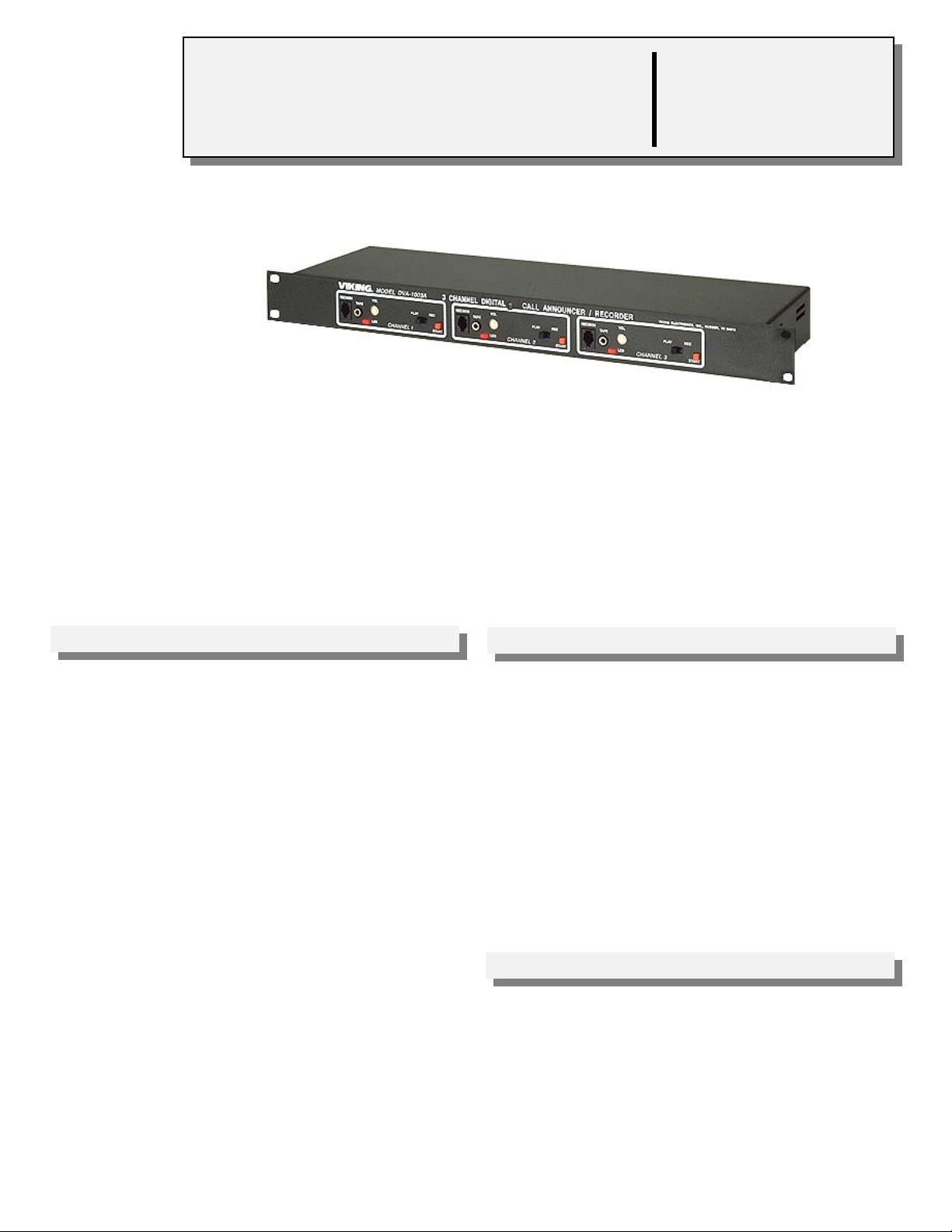
DVA-1003A
Three Channel Digital
Voice Announcer/Recorder
June 30, 1997
Multi-Channel Digital Voice
Announcer and Recorder
The DVA-1003A is a cost-effective, professional digital voice announcer specifically
designed for ACD/UCD, hotel-motel wake-up, auto attendant, intercept, night message
and other announcement functions.
The DVA-1003A will increase call processing capacity by answering on demand or
during the first ring, automatically adjusting the announce cycle to the message length,
and providing instant ”rewind” for the next announcement.
The DVA-1003A provides 16 seconds of record time (expandable to 32 seconds) and
is virtually maintenance-free. There are no moving parts, tapes to replace, or tape
heads to clean.
VIKING©
http://www.VikingElectronics.com
Features
• Advanced technology allows the DVA-1003A to
meet the handshake requirements of virtually
any PABX, Centrex or C.O.
• Record and review announcements using a
standard handset
• Announcements can be down-loaded from a
tape player
• Record level indicator for consistently high quality recordings
• Provides both “ring trip” and 4 wire “E & M”
interface
• Battery back-up option
• 16 seconds of record time (expandable to 32
seconds)
Sales...(715) 386 - 8861
Made in the U.S.A.
Applications
• ACD/UCD announcements
• Intercept announcement
• Announce-only applications
• School closings
• Ski reports
• Night answer
• Wake-up calls
• Bank rates/commodity prices
• Any application where information must be
repeated continuously and may require frequent
updating
• Replace existing tape and drum recorders
Specifications
Power: 120V AC/13.8VAC 1.25 UL listed adapter provided
Dimensions:
Shipping Weight: 1.81 kg (4 lbs.)
Environmental: 0°C to 32°C (20°F to 90°F) with 5% to 95% non-
condensing humidity
Battery Back-up: 1 hour of memory
Message Length: 16 seconds, expandable to 32 seconds using
model DRAM-32 memory kit (Fax Back Document 105)
Connections:
Page 2
Installation
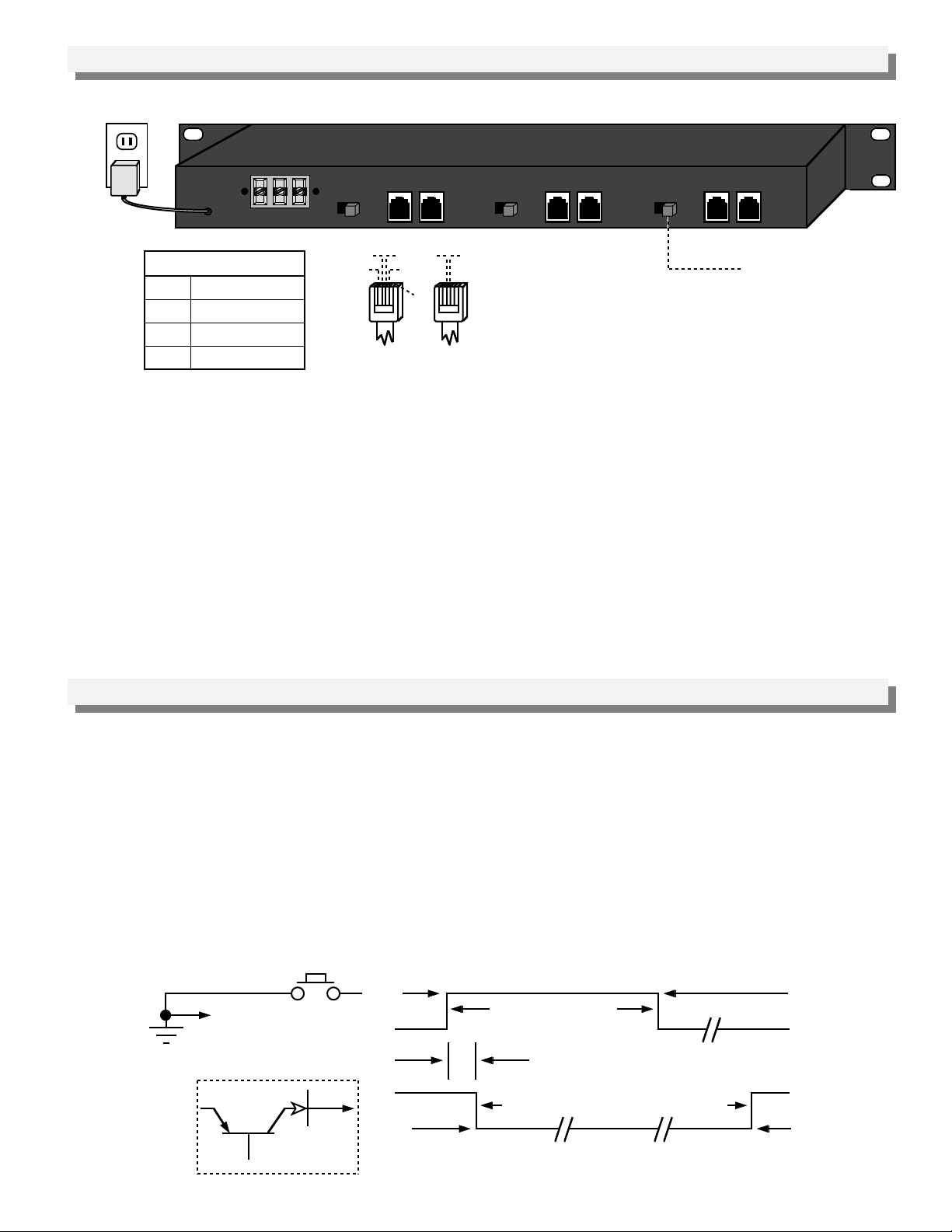
A. Base Unit
POWER
Four Wire E&M (J3)
R&G
600 Ohm audio
BK
M lead (start)
Y
E lead (busy)
W
Earth Ground
B. Power Sources
1. 120V AC Operation
The DVA-1003A is provided with a U.L. or C.S.A. approved power supply with 12V DC output. The DVA-1003A
requires a 24 hour unswitched AC outlet. To protect the micro-processor and provide maximum efficiency, it is
recommended that a surge protector is installed/
2. 48V DC Operation
Connect the terminal strip as shown on the rear panel drawing. Current is less than 200mA. If adding an
external fuse to the 48 volt power supply to the DVA-1003A, a slow blow fuse (500mA) should be used because
of the 600-700mA surge current when first connecting the 48 volts to the ground and -48 volt screw terminals.
-48vGND
Rear View of the DVA-1003A
J3-B
J3-A
600 ohm
CO/PBX
E & M
BK
Line
G
W
A B
R
R&G - Standard C.O. line
A B
GYR
Six wire modular cable
J3-B
J3-A
600 ohm
CO/PBX
E & M
Line
Ring Trip (J2)
or analog PABX/KSU
station
A B
J3-B
J3-A
600 ohm
CO/PBX
E & M
Line
Protocol Switch
C. Battery Back-Up
The DVA-1003A is equipped with a rechargeable NICAD battery that will maintain the memory for up to 1 hour
during a power failure. The DVA-1003A must be powered for 48 hours to fully charge the battery. For applications
requiring full operation during power failures, a power back-up system is recommended (Fax Back Document 505).
Programming
A. Standard Ring Trip 2 Wire (J1-A, J2-A, J3-A)
Use J2 only. Set protocol switch to “A.” Any ringing C.O. line or analog PABX/KSU station will be answered, given
a message, released and immediately be available for the next ring.
B. Continuous Play (J1-B, J2-B, J3-B)
Use J3 only. Set protocol switch to “A.” Connect Y to BK. The announcement will be repeated continuously on
R&G 660 Ohm output.
C. 600 Ohm 4 Wire E & M Protocols (J1-B, J2-B, J3-B)
1. “On Demand”
Use J3 only. Set protocol switch to “A.”
Ground (+)
Black
Open
Ground (+)
Yellow
Open
Earth
Ground
Contact
DVA-1003A
Ground Screw
Terminal
Output From
Start
250 MS, Minimum
Idle
250 MS, Maximum
Idle
1 to 32 Second Announcement
In Use
DVA-1003A
Page 3
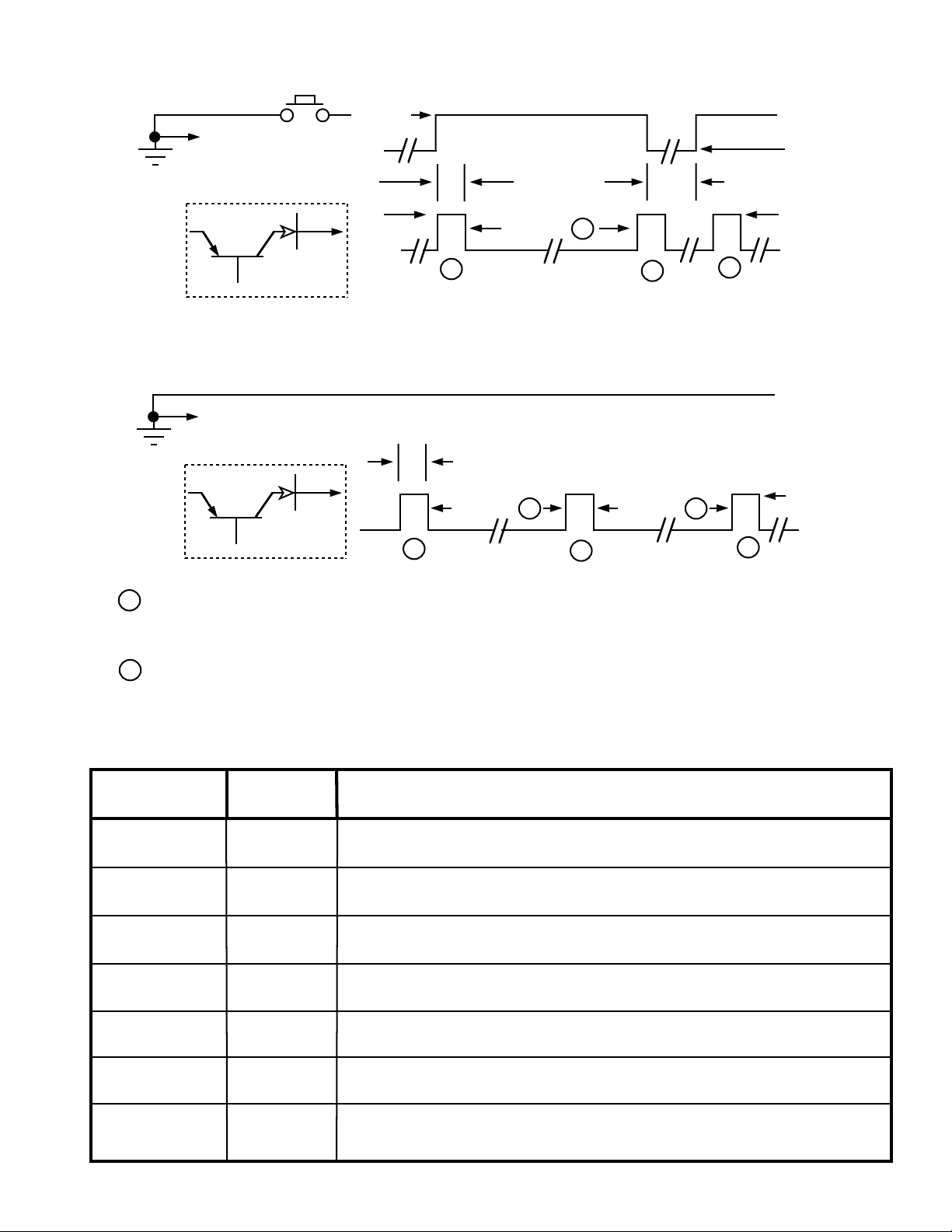
2. Type V E&M, Wink Start
Use J3 only. Set protocol switcj to “B.”
Contact
DVA-1003A
Ground Screw
Earth
Ground
Terminal
Output From
DVA-1003A
3. Drum Recorder Replacement
Use J3 only. Set protocol switch to “A.”
DVA-1003A
Ground Screw
Earth
Ground
Terminal
Output From
DVA-1003A
Start (M)
Idle
Idle
In Use
B
O
M
1
B
O
M
1
Start
250 MS, Typ
Message
250 MS, Typ
Message
2
B
O
M
1
2
E
O
M
1
Message
100 MS, Minimum
B
O
M
1
2
B
O
M
1
Ground (+)
Black
Open
Ground (+)
Yellow
Open
Ground (+)
Black
Open
Ground (+)
Yellow
Open
BOM=”Beginning of Message” pulse.
1
EOM=”End of Message” pulse.
2
The DVA-1003A has 16 seconds (or 32 seconds at a lower fidelity) record time. To expand the record
time to 32 seconds, order model DRAM-32 Memory Kit (Fax Back Document 105).
D. Using the DVA-1003A with Major PABX’s
PABX
Manufacturer
Mitel (all models) Position A
Rolm (all models) Position A
Jistel (all models) Position A
Siemens (Saturn) Position A or B
Harris (20-20) Position B
Protocol
Switch
Use J1-A, J2-A, J3-A. Connect T&R to green and red (STD Ring Trip)
Use J1-A, J2-A, J3-A.. Connect T&R to green and red (STD Ring Trip)
Use J1-A, J2-A, J3-A. Connect T&R to green and red (STD Ring Trip)
Use J1-B, J2-B, J3-B. Connections: 1) T1 and R1 to green and red 2) Earth ground* to both
black and white. 3) EA lead to yellow. Program Saturn system message to be minimum of 2
seconds longer than the actual recording
Use J1-B, J2-B, J3-B.. Connections: 1) T1 and R1 to green and red. 2) M to black. 3) E to
Yellow 4) Earth ground* to white.
Notes
N.E.C. (2400) Position B
Northern (SL-1) Position A
Use J1-B, J2-B, J3-B. Connections: 1) T1 and R1 to green and red. 2) M to black. 3) Earth
ground* to white. On the DVA-1003A circuit board, cut one lead of diode CR16.
Use J1-B, J2-B, J3-B. Connections to QPC74 Ran Trunk circuit pack: 1) T&R to G&R. 2) CPO
to Y. 3) S/MBO to Bk 4) Earth ground* to white. Set C34 switch as follows: 1) SW1.0-closed 2)
SW2.0-closed 3) SW3.0-open 4) SW4.0-closed. Programming SL-1: the DVA-1003A emulates a
cook 201.
* Earth ground is the positive of the PABX system battery.
Page 4
Operation
A. Recording From a Carbon Handset
1. Place the PLAY/REC switch in the REC position.
2. Plug a standard carbon handset into the modular REC/MON jack.
3. Press and hold the START switch and begin speaking as if you were talking on the telephone.
4. When finished release the START switch.
B. Recording From a Tape Player
1. Place the PLAY/REC switch in the REC position.
2. Insert a 3.5mm (1/8”) audio jack into the TAPE jack.
3. Connect the other end of the cable assembly to the speaker, monitor, earphone, etc. jack of a standard cassette
recorder.
4. Adjust the audio level of the tape player by following a-b.
a. Play the recording but do not push START.
b. Adjust the cassette player volume so that the LED flickers but is not mostly on or off.
5. Press and hold the START switch for the duration of the recording.
6. When finished release the START switch.
C. Monitoring From a Carbon Handset
1. Place the PLAY/REC switch in the REC position.
2. Plug a standard carbon handset into the modular REC/MON jack.
3. Press and hold the START switch for the duration of the message.
4. When finished release the START switch.
Note: While playing or recording, the “LED” will display a steady light.
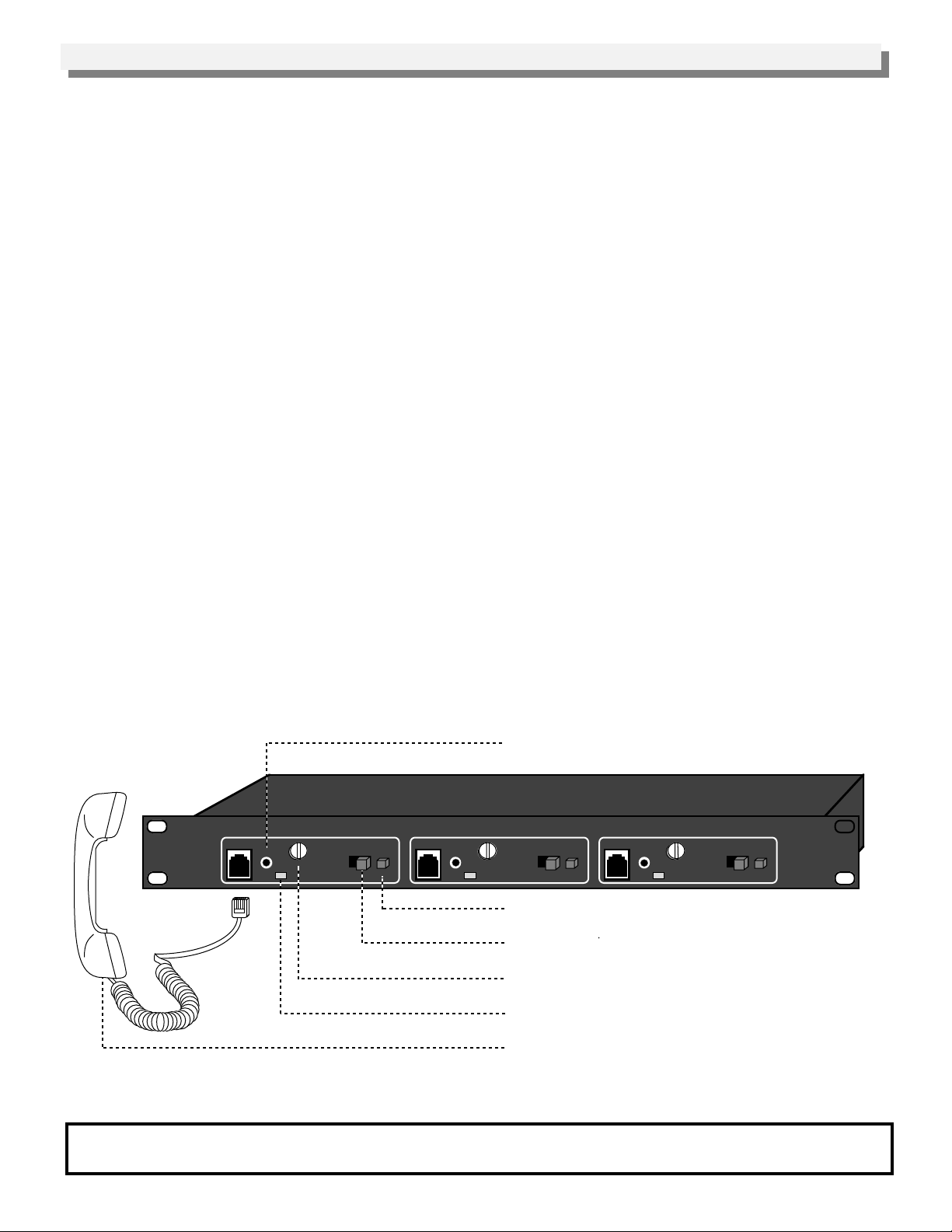
3.5mm (1/8”) audio jack permits down-loading the
message from a tape player.
VIKING©
REC/MON
TAPE
MODEL DVA-1003A Viking Electronics, Inc. Hudson WI 54016
PLAY REC
VOL
LED
CHANNEL 1
3 CHANNEL DIGITAL CALL ANNOUNCER/RECORDER
REC/MON
TAPE
START
VOL
LED
CHANNEL 2
Start Button
Record/Play Selector
PLAY REC
START
REC/MON
TAPE
VOL
LED
PLAY REC
CHANNEL 3
START
Playback Volume Adjustment
“In Use” and “Record Level” Indicator
Standard carbon handset to record and monitor
Note: electrocet handsets will not work.
Product Support Line...(715) 386-8666 Fax Back Line...(715) 386-4345
Due to the dynamic nature of the product design, the information contained in this document is subject to change without notice. Viking
Electronics, its affiliates and/or subsidiaries assume no responsibility for errors and/or omissions contained in this information. Revisions of this
document or new editions of it may be issued to incorporate such changes.
Fax Back Doc # 115
Printed in the U.S.A.
ZF290170 Rev C
 Loading...