

Page 1
30x Zoom Laser Ranger Object Tracking Gimbal Camera
Images are for reference only, please subject to the actual product.
User manual
X30TM
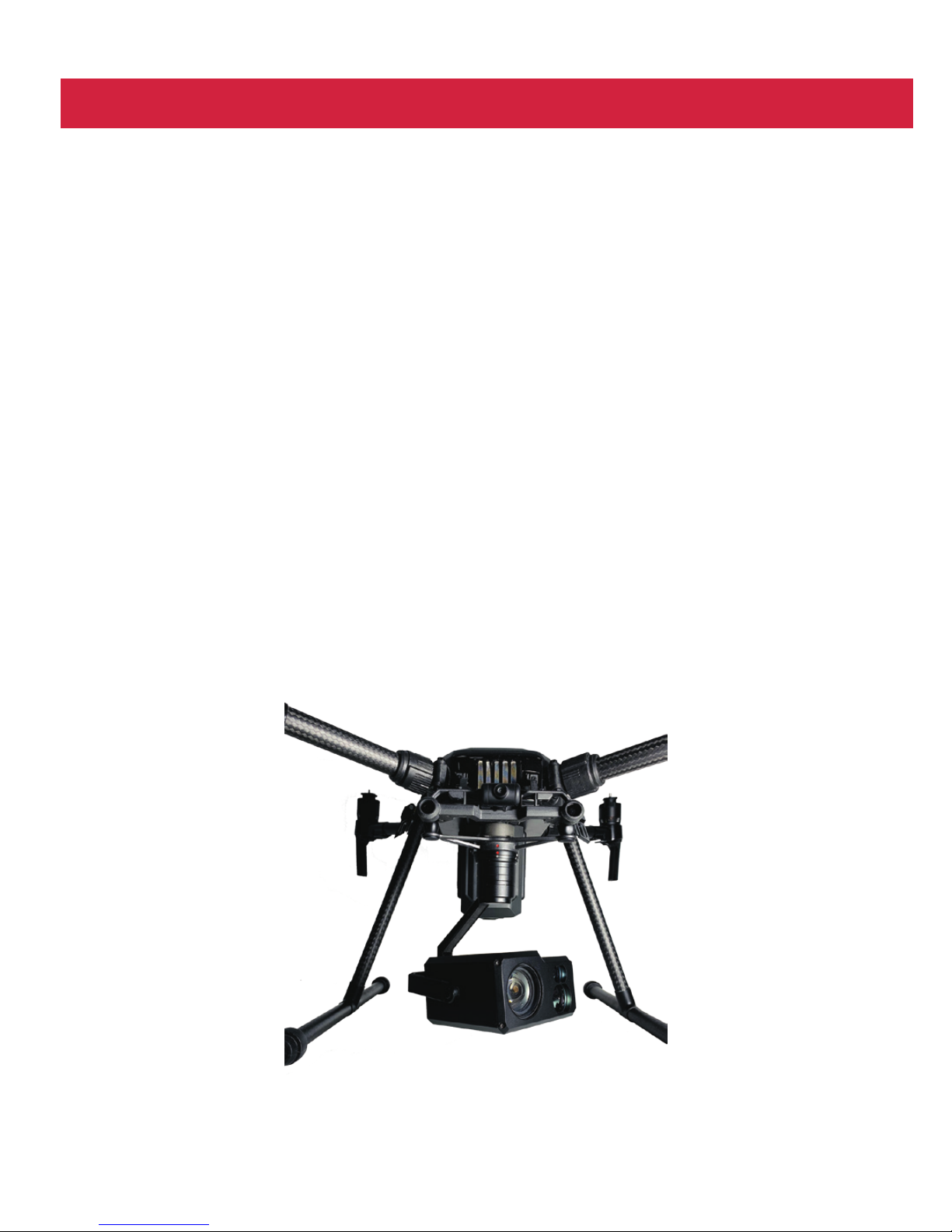
Compatible with DJI M200/M210/M210RTK
Page 2
X30TM High-precision Camera
1. Camera introduction......................................................................................1
2. Camera description........................................................................................1
3. Mechanics@Electronic characteristics........................................................2
4. Application description.................................................................................2
5. Specification................................................................................................9
Contents
Page 3
Gimbal Introduction
Camera Introduction
Camera Description
!
Please make sure that the motor is not stopped by any object during
the rotation, if the gimbal is blocked during rotation, please remove
the obstruction immediately.
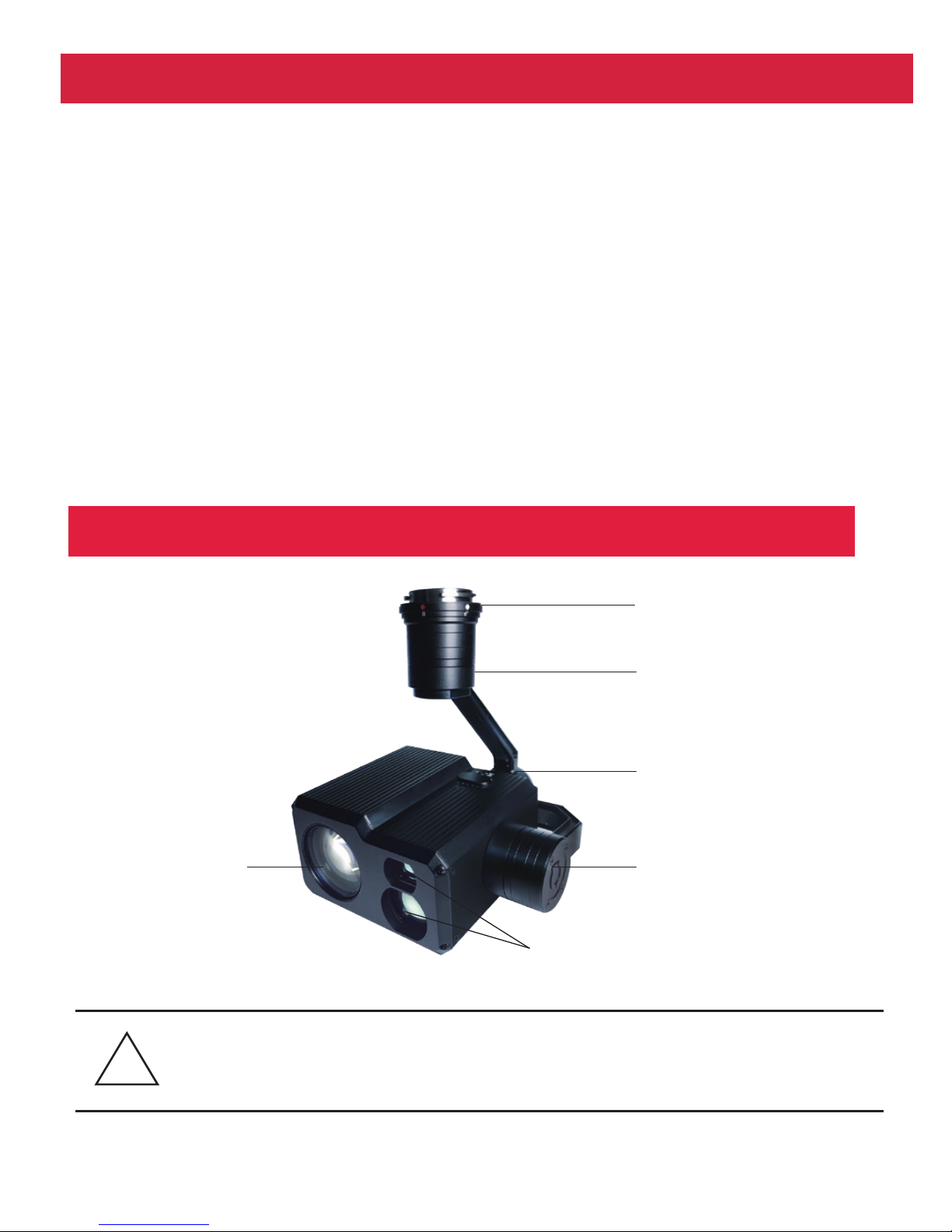
[1] DJI Skyport
[2] Pan motor
[4] Tilt motor
[3] Roll motor
[6] EO camera
[5] IR laser rangefinder
1
X30TM is a high-precision professional 3-axis gimbal which features high stability,
small size, light weight and low power consumption. The 3-axis gimbal based on
FOC motor control technology, adopts high-precision encoder in each motor. It can
be used on DJI drones M200 / M210 / M210RTK. Controlled by APP DJI PILOT it
can fullfill many powerful functions, such as: photos or videos with 30 times optical
zoom, object tracking, laser rangefinder and so on. The speed of X30TM gimbal is
adjustable, LOW speed mode for tele end, the control will be more accurate; Fast
speed mode for wide end, which makes the gimbal control sensitive and quick.
Also the one-key to center function will allow the gimbal return to initial position
automatically and rapidly. You can input a degree in APP Payload Setting and get
the gimbal attitude angles exactly.
Page 4

Mechanics@Electronic Characteristics
Input voltage
Dynamic current
Size
3S~ 4S
450mA@12V
L135.5*W135*H120mm
Idle current
Working
environment temp
Weight
330mA@12V
-20℃ ~ +80℃
835g
Pitch/Tilt: Pitch angle range of action : ±90
Roll: Roll angle range of action : ±85°
Yaw/Pan: Yaw angle range of action : ±360°
Vibration angle: Pitch/Roll: ±0.02°, Yaw: ±0.03°
Application Description
After mounting X30TM on DJI drone and connecting with remote control, you can operate the gimbal
camera via APP DJI Pilot. The gimbal attitude angels (tilt and pan) can be controlled by DJI remote
control. Control method please refer to DJI related user manual.
DJI Pilot
1. Menu instruction
GPS co-ordinate
Object distance
Payload
Settings
Camera
Settings
Return to
1.0x zoom
Picture and
record switch
Real-time Data
Gimbal attitude
angles
UAV direction
Auto / Manual focus
FOV / Zoom times
Record status
Zoom times
Shutter button
2
Page 5
1.2 Payload Settings:
1.1 Camera settings - Photo mode settings:
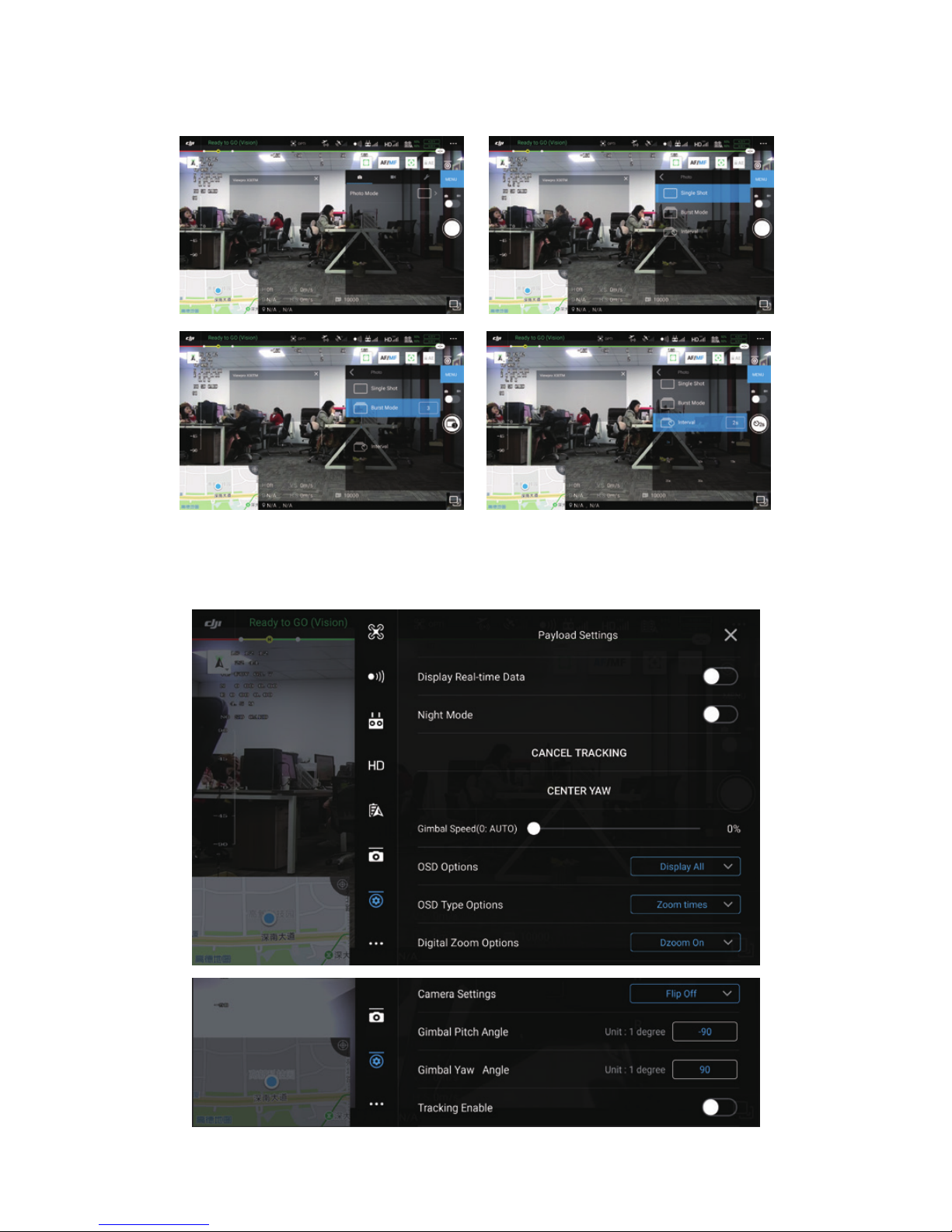
You can choose single shot, burst mode or interval mode.
3
Page 6
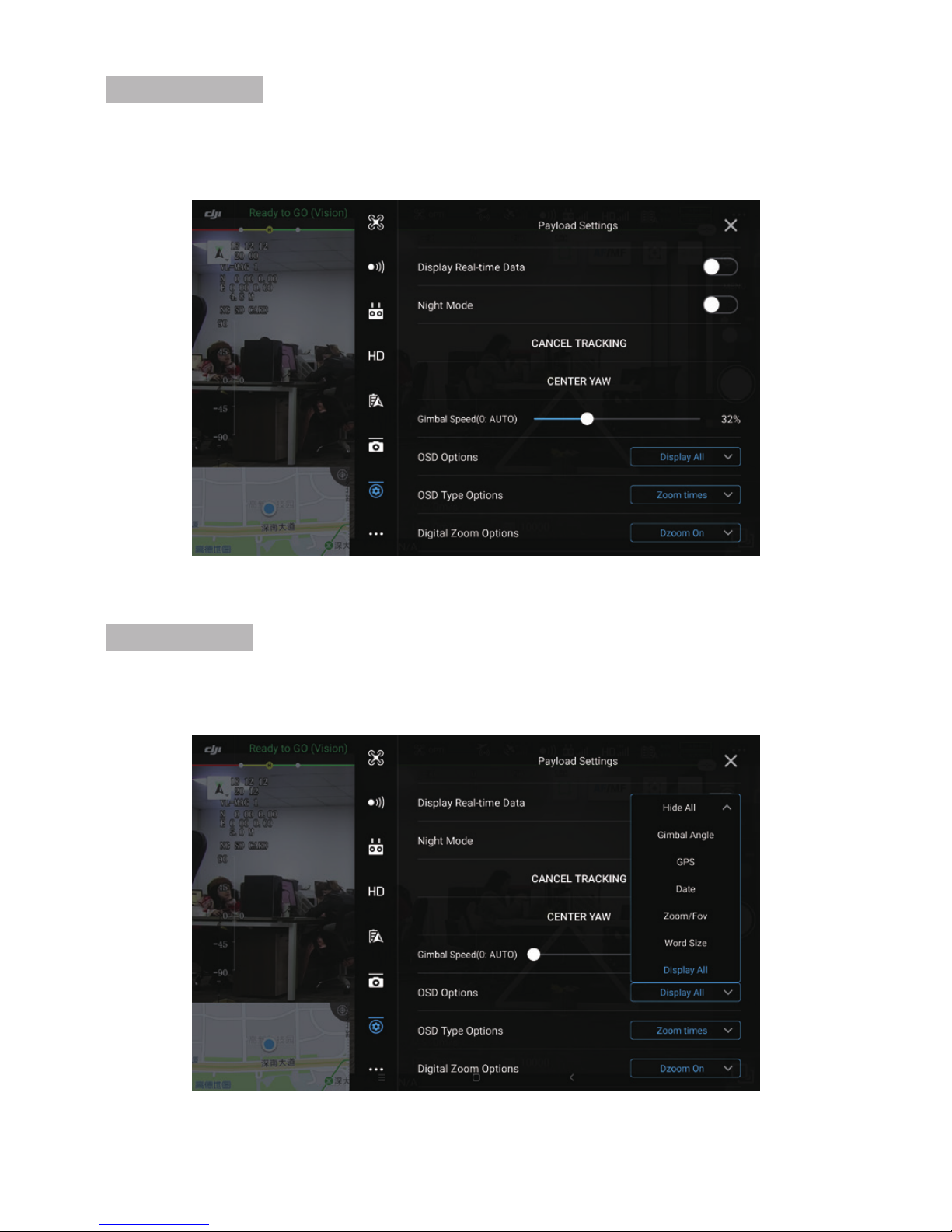
Gimbal Speed:
Gimbal speed is adjustable. When it’s 0%, the speed will be adjust automatically, quick speed
for wide end, slow speed for tele end. When you adjust it to 1% manually, the speed will be
low even in wide end. The high the percentage is, the quicker the speed will be.
OSD Options:
You can DIY you on-screen-display (OSD). Choose Hide All, then you can choose to display
the items you want only.
4
Page 7
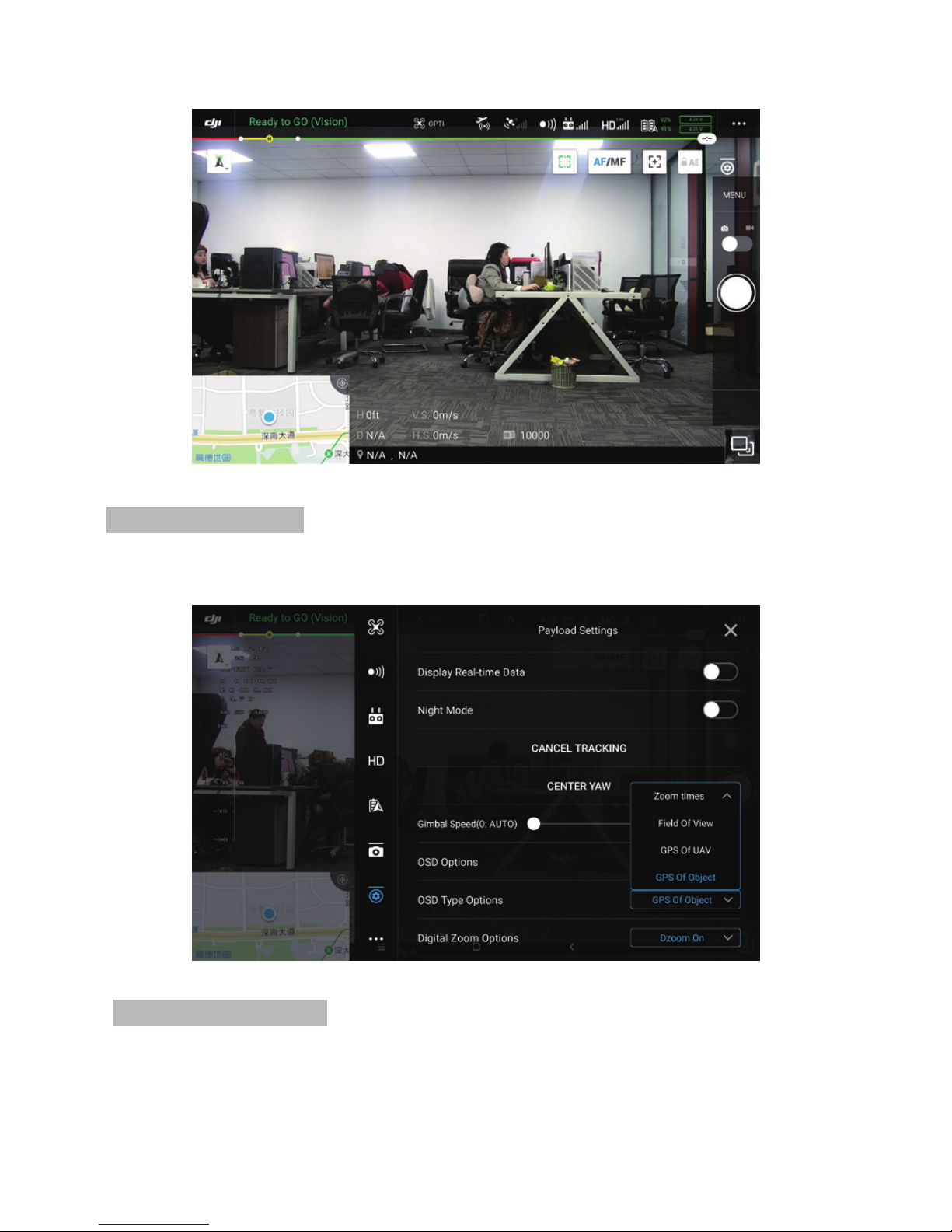
OSD Type Options:
You can choose to display FOV (Field of View) or Zoom times, GPS co-ordinate of UAV or
the object.
Hide All:
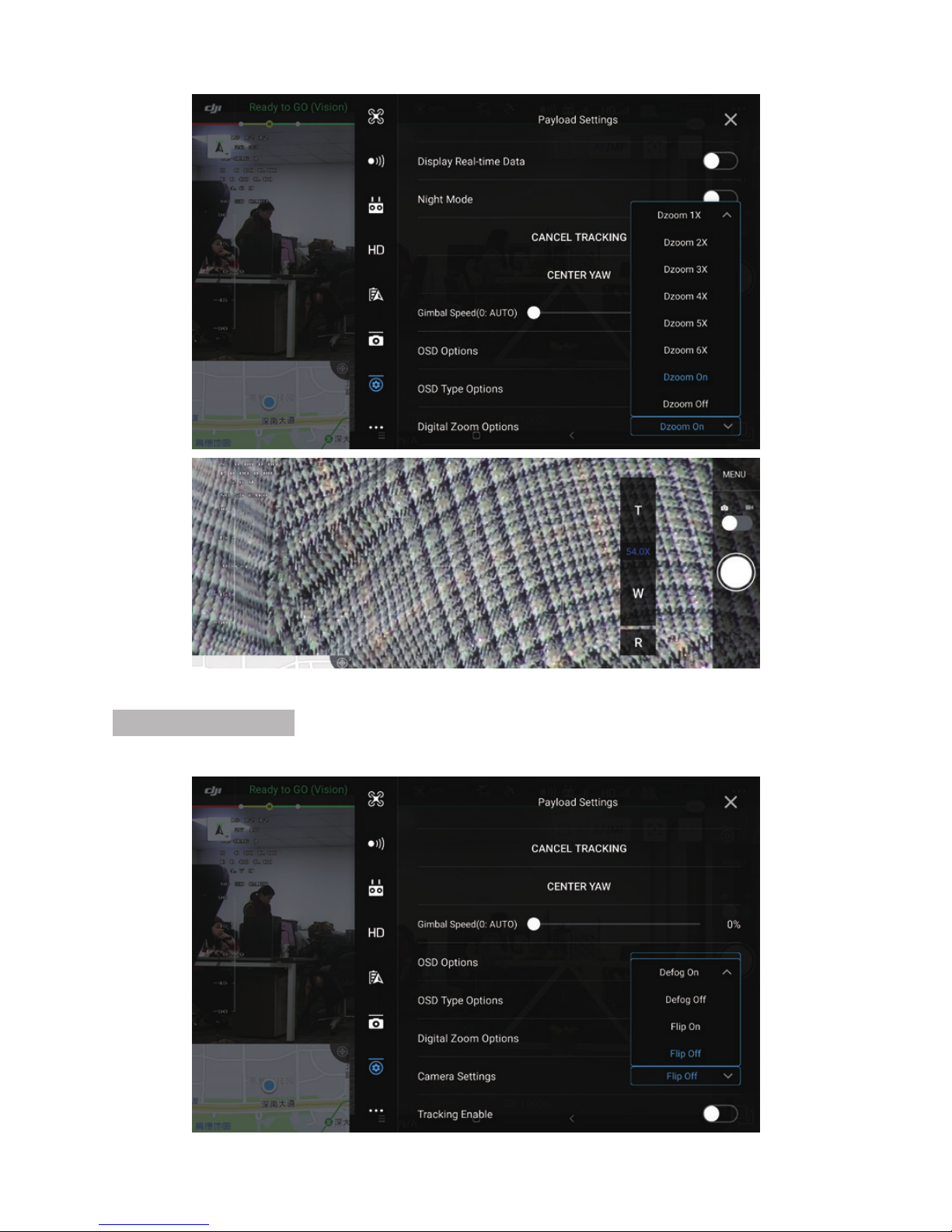
Digital Zoom Options:
The EO camera of X30TM has 6 times digital zoom. Press T continually will get digital zoom
automatically after 30x full optical zoom. Or choose digital zoom from Payload settings directly.
The zoom times number will become blue when it’s in digital zoom status.
5
Page 8
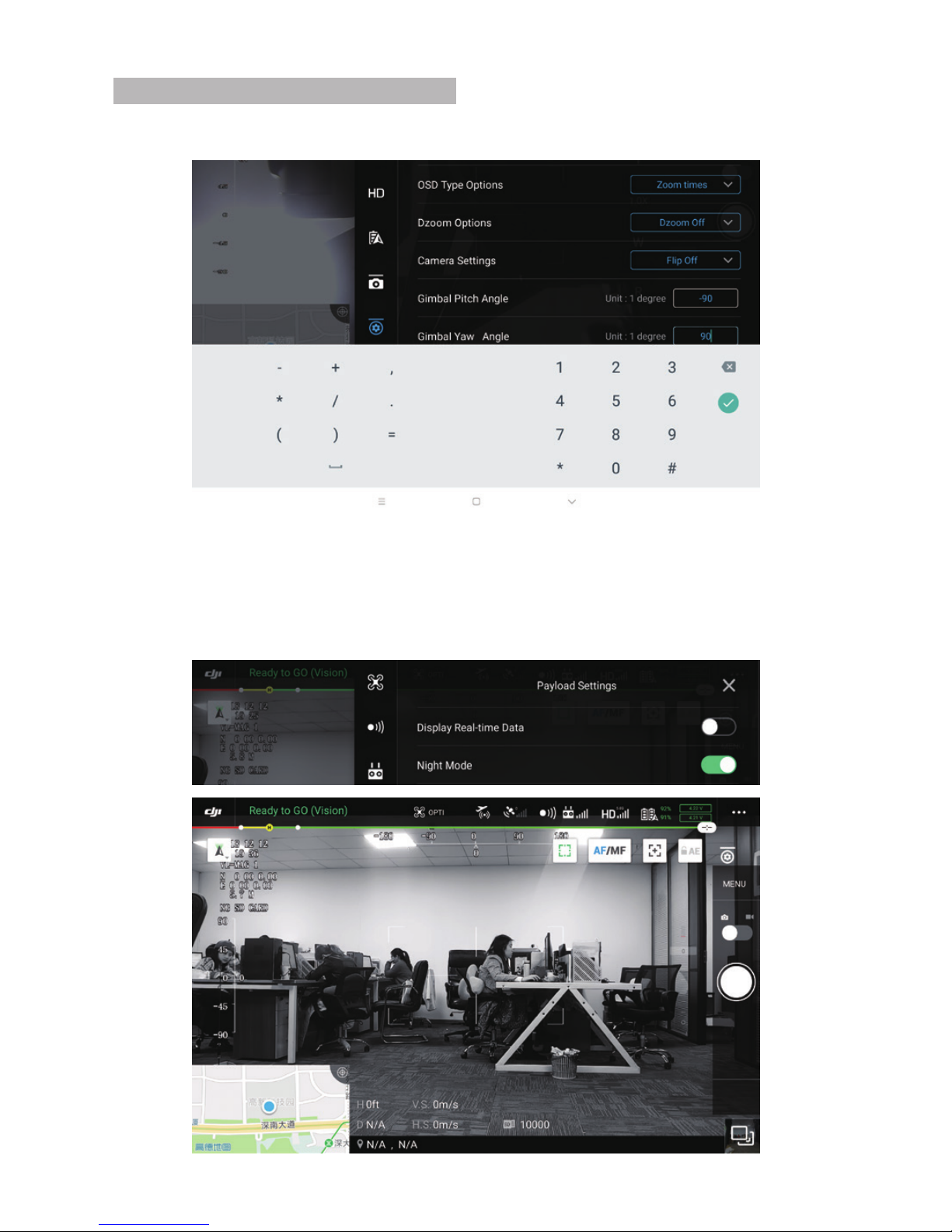
Camera Settings:
Choose defog or flip the screen when necessary.
6
Page 9
2.1 Night vision
With a great low illumination, X30TM can perforance very well even in a dark
environment. Switch to night mode to have a better images.
2. Main functions instruction
7
Gimbal Pitch / Yaw Angle Settings:
Input the pitch / yaw angle degrees to get exact attitude angles directly.
Page 10
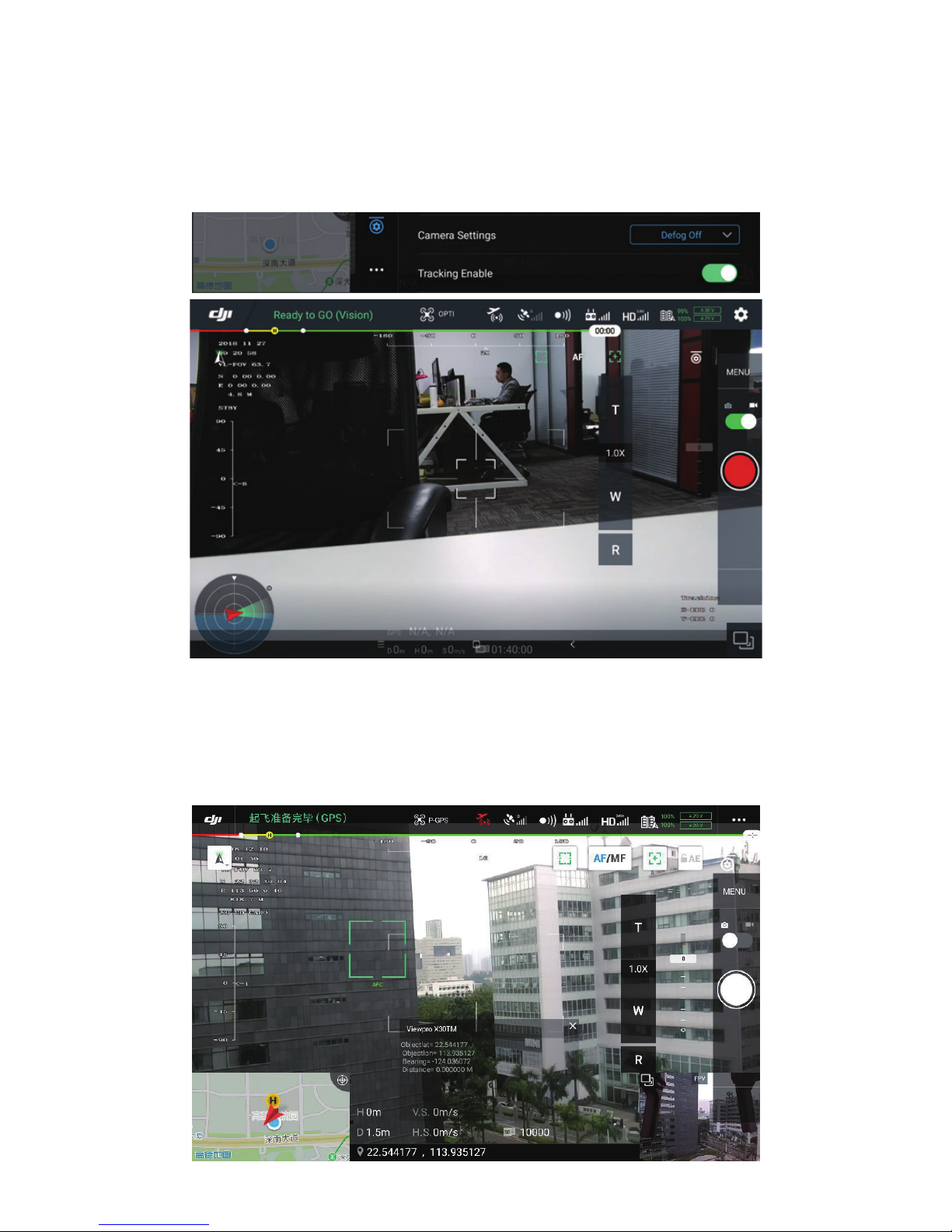
2.2 Object tracking
Start tracking: Enable tracking function, then single touch on the screen to pick tracking object.
Stop tracking:Payload Settings --CANCEL TRACKING
*Note: the gimbal will follow the object automatically after object is choen, to control the gimbal
manually please cancel tracking first.
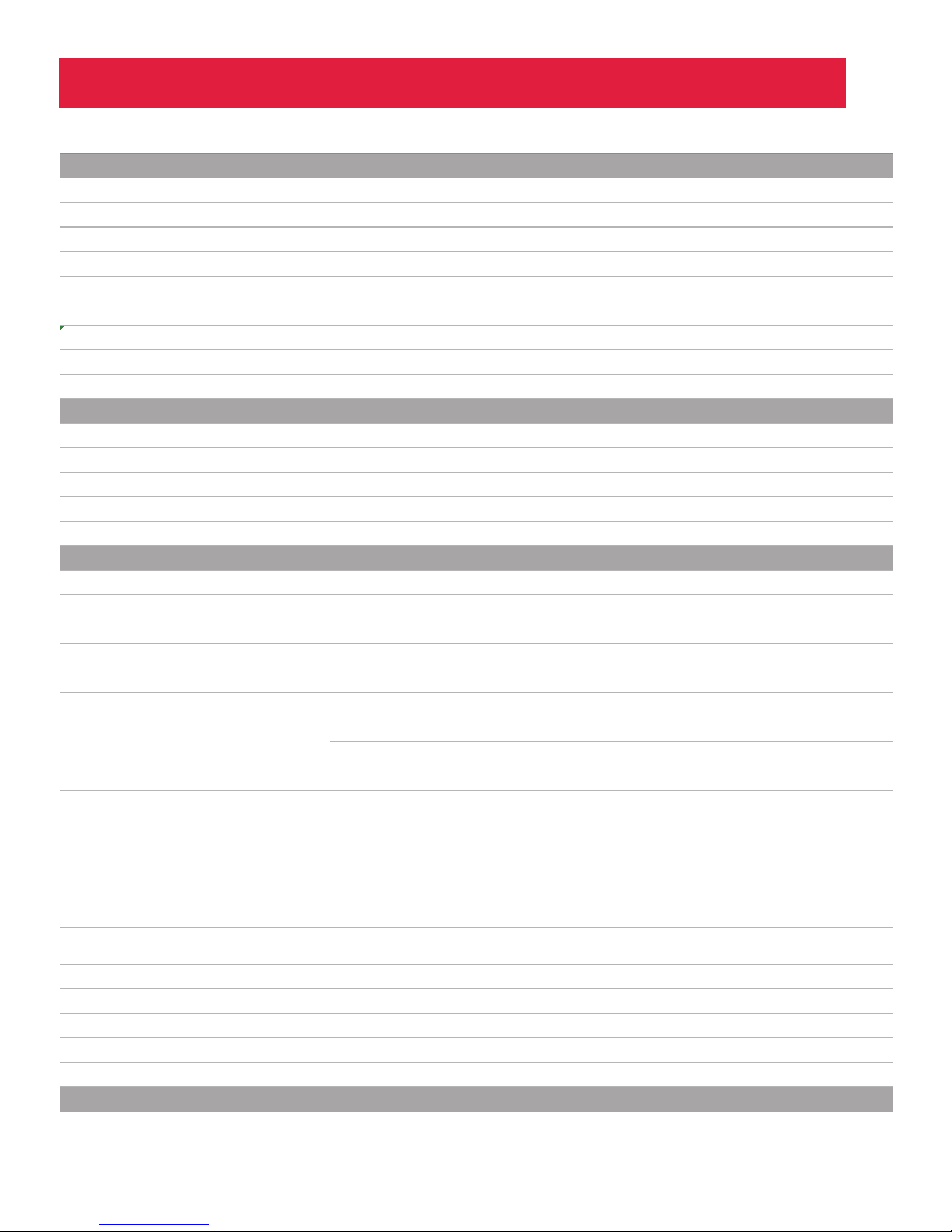
2.3 Laser rangefinder
X30TM build-in infrared (IR) laser rangefinder, can resolve the geo graphic position and
distance of the object automatically after GPS signal is synced from the UAV. The target is
the object in the middle point of the screen. When the object distance is less than 5 meters
or bigger than 1500 meters, the distance will show 0.
8
Page 11
12V
4S ~ 6S
450mA @ 12V
330mA @ 12V
≤ 5.4W
-40 ~ +60
Skyport
SD card (Up to 128G, class 10, FAT32 or ex FAT format)
DJI Pilot
±90°
±85°
±360°
Picth/Roll: ±0.02°, Yaw ±0.03°
√
Full HD 1080 (1920*1080)
2.13MP
30x, F=4.3~129mm
12x (360x with optical zoom)
10mm(wide end) to 1200mm(tele end). Default 300mm
1080p mode: 63.7°(wide end) ~ 2.3°(tele end)
720p mode: 63.7°(wide end) ~ 2.3°(tele end)
SD: 47.8°(wide end) ~ 1.7°(tele
end)
Internal
more than 50dB
Color [email protected]
Auto, Manual, Priority mode(shutter priority & iris priority), Bright, EV compensation, Slow AE
Auto/Manual 0dB to 50.0dB(0 to 28 steps + 2 setep/ total 15 steps)
Max.Gain Limit 10.7 dB to 50.0dB (6 to 28 steps + 2 step/ total 12 steps)
Auto, ATW,
Hardware Parameter
Gimbal Spec
Camera Spec
Working voltage
Input voltage
Dynamic current
Idle current
Power consumpti
on
Working environment temp.
Output
Local-storage
Control method
Pitch/Tilt
Roll
Yaw/Pan
Vibration angle
One-key to center
Imager Sensor SONY 1/2.8" "Exmor R" CMOS
Picture quality
Effective pixel
Lens optical zoom
Digital zoom
Min object distance
Horizontal viewing angle
Sync system
S/N ratio
Min illumination
Exposure control
Gain
White balance
Shutter speed
Backlight compensation
Aperture control
Defog
OSD
Indoor, Outdoor,
Outdoor Auto, Sodium Vapor Lamp (Fix/Auto/Outdoor Auto),
One-push, Manual
1/1s to 1/10,000s, 22 steps
Yes
16 steps
Yes
Yes
℃ ℃
:
Specification
9
Page 12
Camera Object Tracking
Laser Rangefinder
Packing Information
U
pdate rate of deviation pixel
O
utput delay of deviation pixel
M
inimum object contrast
S
NR
M
inimum object size
M
aximum object size
T
racking speed
O
bject memory time
T
he mean square root values of pulse
noise in the object position
R
ange
L
ocation display
50Hz
<10ms
5%
4
16*16 pixel
160*160 pixel
±32 pixel/frame
100 frames (4s)
< 0.5 pixel
5~1500meters
Latitude and longitude
587g
135.5*135*120mm
1pc gimbal camra device / Hight quality plastic box with foam coushion
N
.W.
P
roduct meas.
A
ccessories
10
 Loading...