

Page 1
User manual
10F
Q
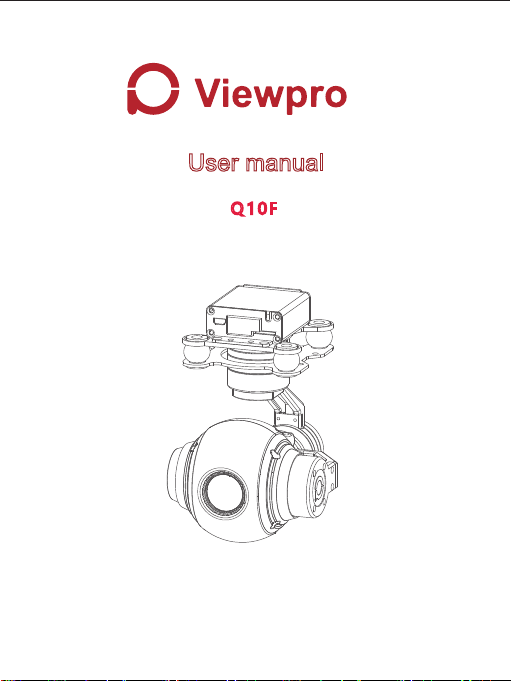
10x Optical Zoom Camera Gimbal
Images are for reference only, please subject to the actual product.
Page 2

Contents
Q10F Pinpoint-precision Gimbal
1.Gimbal introduction ..................................................................................2
2.Object tracking function (Optional)............................................................2
3.Gimbal description ....................................................................................3
4.Gimbal dimension .....................................................................................4
5.Mechanics@Electronic characteristics .....................................................5
6.Working characteristics .............................................................................5
7.Gimbal’s signal wire box ......................................... ..................................6
Q10F Camera
1.Camera introduction ..................................................................................9
2.Parameter index ........................................................................................9
3.Functional characteristics .........................................................................10
-1 -
Page 3

Gimbal Introduction
Q10F pinpoint precision gimbal is specially tailored for 10x zoom cameras.
Factory, all the parameters have been adjusted, the user installed the
camera after hand and installed it to the flight Ready to use on the device.
The gimbal can be increased in three directions: level, roll and pitch design,
can greatly reduce mechanical vibration, can be applied in various fields like
public security, electric power, fire, zoom aerial photography and other i
ndustries in the application of drones.
Object Tracking Function
1. Function description
Build-in normalization, cross-correlation and tracking algorithm,
combining with object missing recapture algorithm, achieve stable
track of the target.
Support custom characters of user OSD, adaptive gate, cross cursor,
tracking information display.
2. Tracking Performance
1)Update rate of deviation pixel 50Hz
2)Output delay of deviation pixel <15ms
3)Minimum object contrast 5%
4)The minimal signal-to-noise ratio (SNR) 4
5)Minimum object size 16*16 pixel
6)Maximum object size 160*160 pixel
7)Tracking speed 32 pixel/frame
8)The mean square root values of pulse noise in the object position<0.5
pixel
-2 -
Page 4
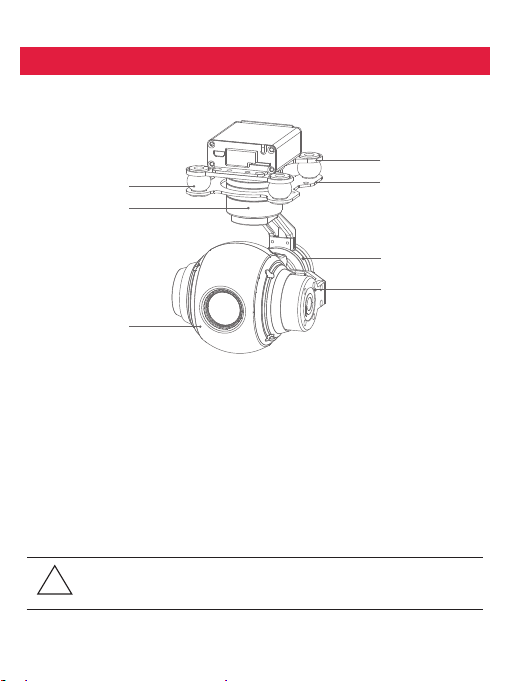
Gimbal Description
[3 ]
[4 ]
[7 ]
[1] Upper damping board
[2] Lower damping board
[3] Damping ball
[4] YAW axis motor
[5] Roll axis motor
Please make sure that the motor is not stopped by any object during
the rotation, if the gimbal is blocked during rotation, please remove
!
the obstruction immediately.
[6] Pitch axis motor
[7] 10x HD zoom camer
[1 ]
[2 ]
[5 ]
[6 ]
-3 -
Page 5
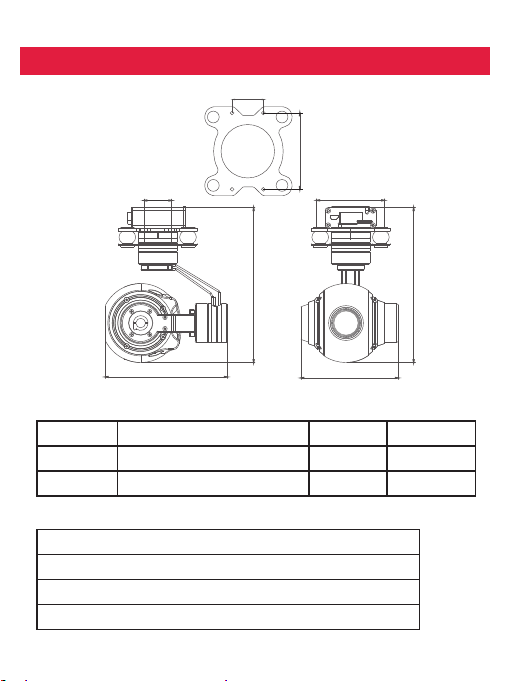
Installing
24. 5
Uint: mm
60
24.5
137.3
108
Mechanics@Electronic Characteristics
Input voltage
Dynamic current
Size
3S~ 4S
320mA@12V
L108*W86.2*H138.3mm
Working Characteristics
Pitch/Tilt: Pitch angle range of action : ±90
Roll: Roll angle range of action : ±45°
Yaw/Pan: Yaw angle range of action : ±150°
Vibration angle: Pitch/Roll: ±0.02°, Yaw:±0.03°
-4 -
60
86.2
Idle current
Working
environment temp
Weight
137.3
240mA@12V
-10℃ ~ 50℃
400g
Page 6
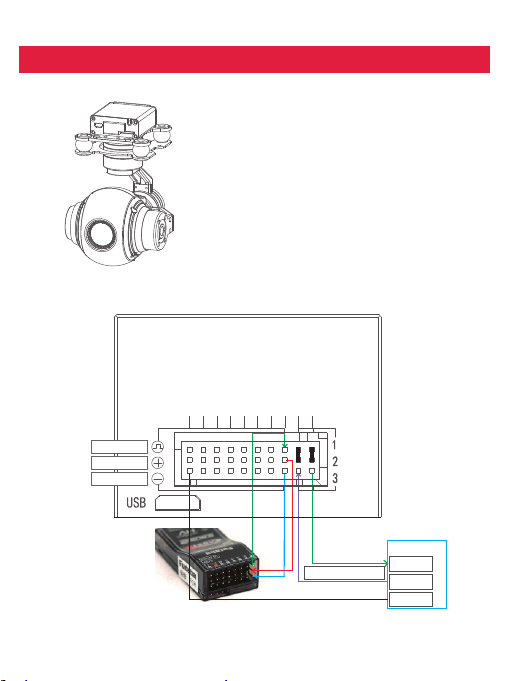
Connection of Control Box and Wiring Instruction
HDMI: micro HDMI OUTPUT
1080P 60fps default
SD card: max 32G, class10
FAT32 or exFAT format
PW M in
5V output
GND
Mode
Pitch
Yaw
S.bus /Rx
Rol l/Tx
TT L 115 20 0/8 /1/N
USER BO ARD
RX
TX
Pic/Rec
Focus
Zoom
Multi
Av
GND
-5 -
Page 7
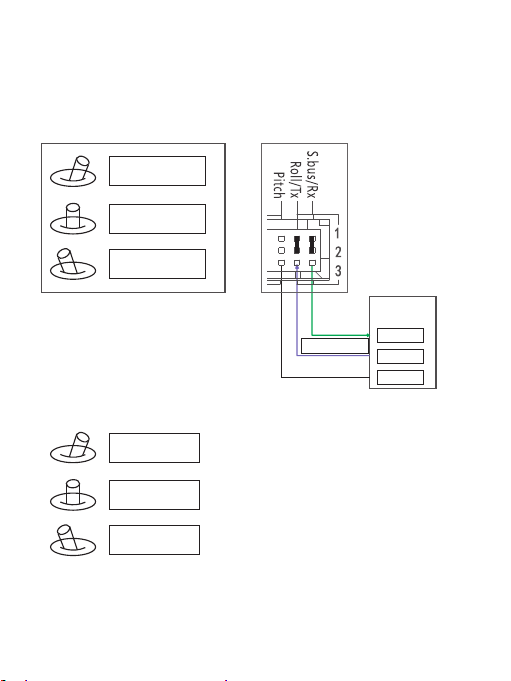
S.bus/Rx: connect to Rx2 for track function.
Roll/ Tx: connect to Tx2 for track function.
Pitch: PWM in, pitch control
1. Pitch up
2. Pitch stop
Pitch down
3.
Yaw:PWM in, Yaw c ontrol
1. Yaw right
2. Yaw stop
3. Yaw left
-6 -
co nt act o ur t ech ni cal
su p p or t f or d et a il
d oc .
TTL 1 15200 /8/1/ N
We h ave p rot oc ol f or
co n tr o l t he gi m ba l
an d c am era , pl eas e
USER BOARD /
GPS module
RX
TX
GND
Page 8
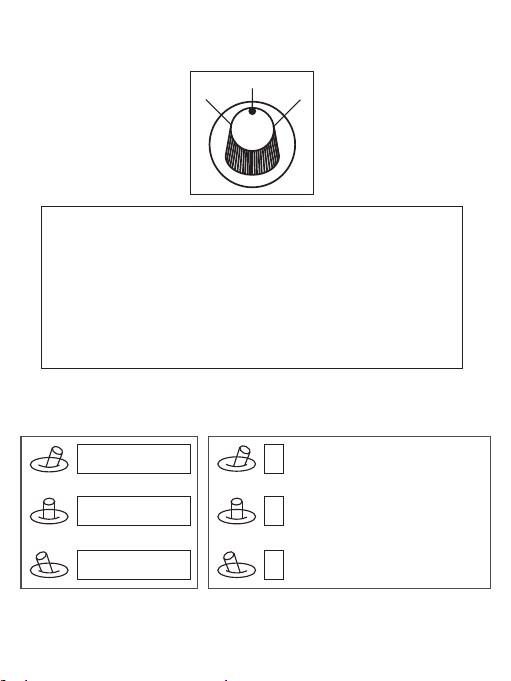
Mode: Change the speed / home position
2
1
Position 1: Lowest speed for pitch and yaw.
Position 2: Middle speed for pitch and yaw.
Position 3: Highest speed for pitch and yaw. The speed is continuously quickly
from 1 to 3.
One click: Home position.
Two click: Look down.
Three click: Yaw not followed by frame.
Four click: Yaw followed by frame.
Five click: Restore the factory settings.
(Click = from 2 to 3 and back to 2 quickly)
3
ZOOM: Zoom the camera
1. Zoom tele
2. Stop zoom
3. Zoom wide
Focus: Focus the camera
Focus tele
1
Stop focus
2
3
Focus near
-7 -
Page 9
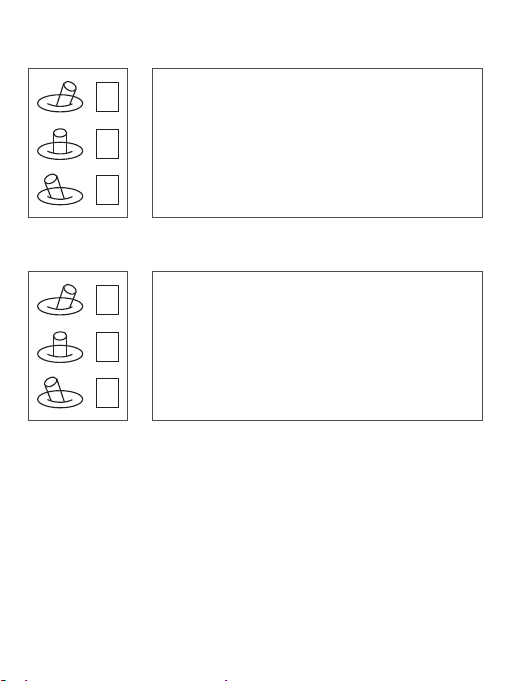
Pic /Rec picture / Start record, stop record
Switch 2 to 1: camera mode change.
1
Picture mode: the number is quantity of SD card can storage;
2
Record mode: the time is recording time from start record.
Switch 2 to 3: A) take a picture. B) Start record / stop record
3
Multi: Backup PWM channel for customize
1
2
3
AV: NO AV output this model.
-8 -
Page 10

Camera Introduction
Q10F has 4 mega effective pixels, supports 10x optical autofocus possess
HD 1080P video. There are two video streams in the camera, one is 1080P
30FPS, local H.264 compression, stored in the device SD card, another
video output 1080p60FPS HDMI HD signal for the wireless transmission,
according to the characteristics of UAV photography application, we design
fast auto-focus speed , small size, support PWM and serial command
control.
Parameter Index
1.Adopt 1/3 inch, 4 mega pixels CMOS SENSOR.
2.The output resolution is 1920*1080P/60 fps.
3.Lens imported from Japan, exhibiting higher definition.
4.10x HD optical zoom lens, 5 mega HD lens.
5.Zoom focal length f=4.9~49mm, aperture diameter φ 12.0.
6.AV simulation output, 1080P30 video stream in local TF card storage.
7.Real time fast focus function, the focus time <1s.
8.Support Flip vertically, horizontal mirror, stationary picture, automatic white
balance, automatic gain, automatic color correction, support OSD menu.
9.Wide temperature range, temperature range from -10℃~55℃ .
10.Support serial command control.
11.Viewing angle Horizontal: 53.2°(Wide end) ~ 5.65°(Tele end)
Vertical: 39.8°(wide end) ~ 4.2°(tele end)
Focus: 66.6°(wide end) ~ 7.2°(tele end)
-9 -
Page 11

Functional Characteristics
Zoom Range
Zoom focal length f=4.9~49mm, zoom ranges up to 10x, exhibiting
image detail Perfectly.
The Speed of Focusing
Design for UAV aerial photography, according to aerial characteristics,
using fast focus algorithm, focus time <1s.
Wide Dynamic
Adopt 105 dB wide dynamic range, in the presence of backlight or
strong light, the view of the over bright and over dark regions can still
be captured at the same time.
Ultra LowI llumination
Ultra low illumination: The device can still clearly display image
features in ultra low illumination or poor light environment.
Output Interface
The hardware uses CVBS simulation and a HDMI signal output
socket, local H.264 compression, stored in the device SD card.
Multiple Control Modes
Support PWM control and serial command control
( ZOOM can be controlled using any flight control channel)
-1 0-
 Loading...