

Page 1
VidyoDesktop Audio Setup Guide : For version3
• Use recommended speaker and microphone devices to prevent echo
and other audio issues. (Please see recommended peripherals list)
• Use USB speakerphone or USB headset than built-in microphone for a
better audio experience.
• Plug each audio device directly into one of your computer’s USB ports
whenever possible rather than a USB hub.
• Make sure you have the latest audio drivers for the audio devices you
use during your VidyoConference.
Audio Best Practice – Before Meeting
• Close all applications except those necessary for your
VidyoConference to free-up your CPU.
• If your computer has a Power Plan (all Windows and Mac laptops do)
choose “high performance”. If you’re using a laptop, avoid running on
battery – it can reduce performance and quality if the power settings
are set to conserve power.
• Use the best connection possible – wired is better than wireless.
• Remove background noise from your location.
• Remove any obstacle around the audio device.
OS : Windows 8/7/XP, Mac OSX 10.6 or later
CPU : Core2Duo 2GHz or higher
RAM : 2GB
VidyoDesktop Recommended Configurations
※ VidyoDesktp 3.0.3
Page 2
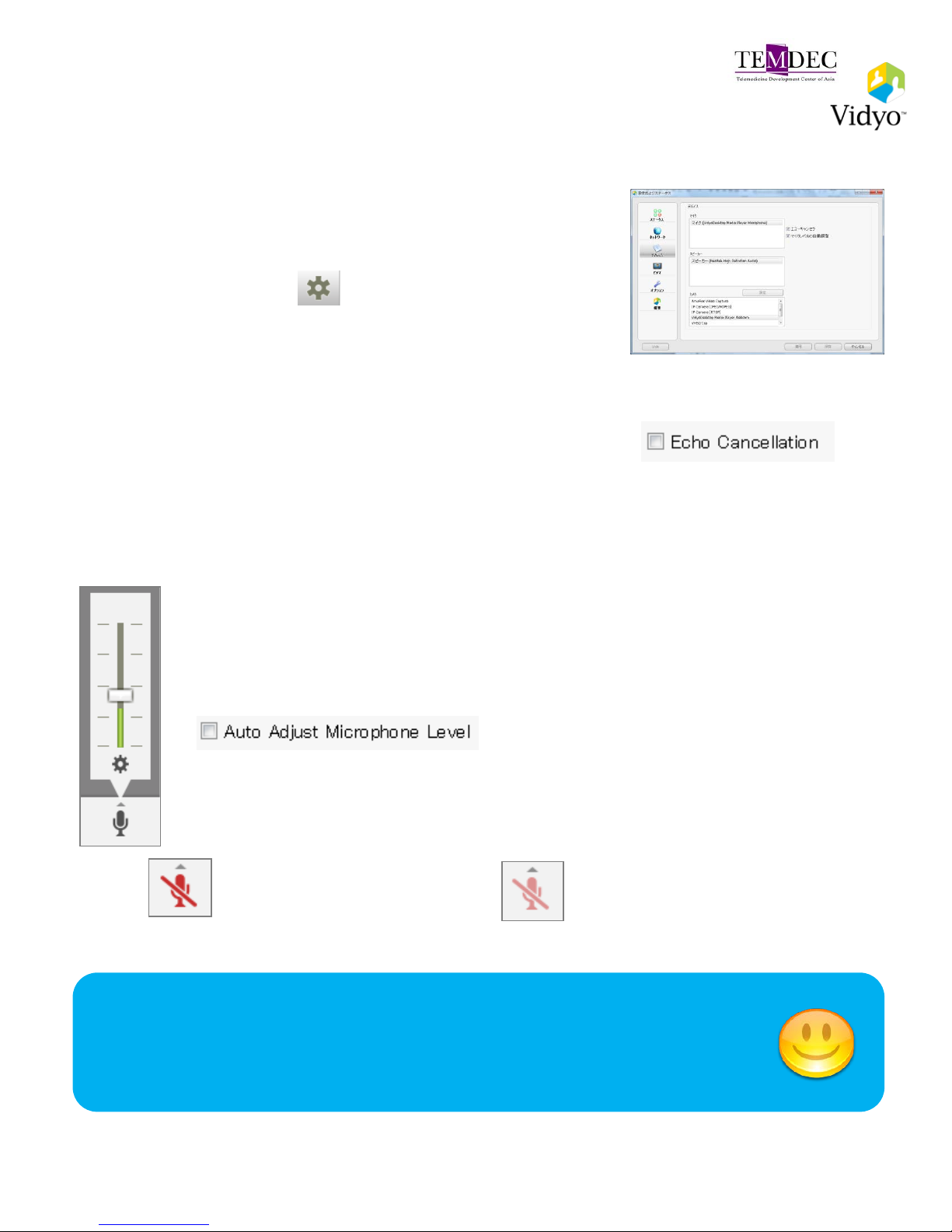
• The first time you join a meeting, the Device window
will automatically appear to enable you to select your
audio device.
• You can also select on the VidyoDesktop to
access the Device settings. This tab shows the
speaker and microphone devices available on your
computer.
• Disable echo cancellation when you are using devices
which have built-in echo cancellation (headset or
speakerphone). It appears grayed out when you use
a Vidyo recommended device.
• After making a change to a setting, click Save.
• Use the drop down arrow ▲ to change the volume level.
• If you find that your voice volume is not changing, clear the Auto
Adjust Microphone checkbox to disable automatic gain control of
microphone.
• Click the Microphone button to mute or unmute the microphone.
The button turns red when you mite yourself.
Local Mute
You can unmute by yourself
Room owner Mute
You can not unmute by yourself
Selecting Your Audio Device for Use
VidyoDesktop Audio Setup Guide : For version3
Adjust Microphone Level
Please mute your microphone
when you’re not actively speaking
Page 3
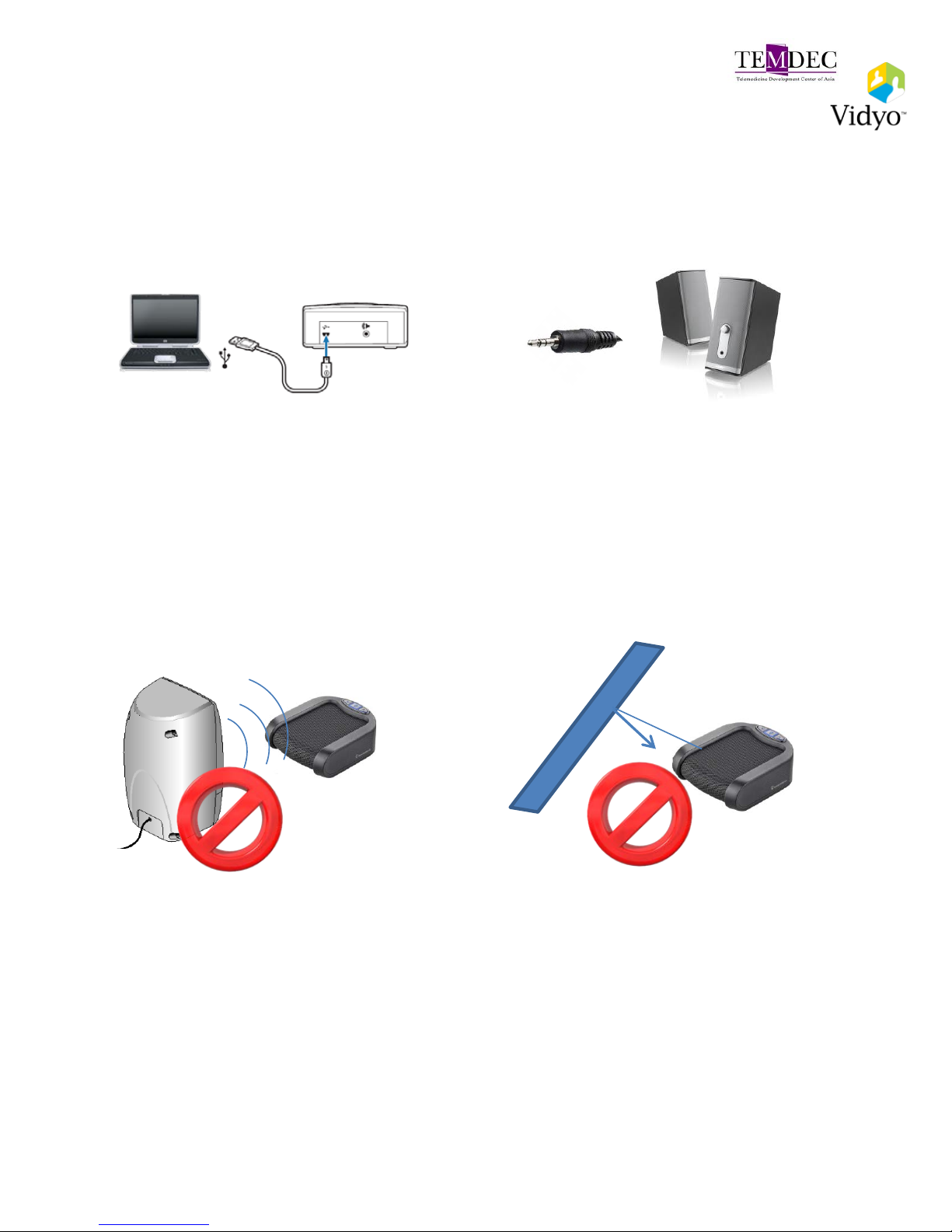
Plantronics Calisto420 (For multiple participants)
• Plantronics Calisto420 is available for multiple participants as it is
equipped with a 3.5mm external speaker connector.
1. Connect the USB cable to the USB
port on your computer.
2.Connect the 3.5 mm cable of the
external speaker to the connector on
Calisto420.
• Don’t put external speaker in front of the speakerphone.
• Remove any obstacle around the audio device.
Page 4

MANUFACTURE
R
MODEL
PLATFORM
TESTED
DRIVER OR
FIRMWARE
VERSION
TESTED
DEVICE DESCRIPTION
RECOMMENDED
ClearOne Chat 60 Windows,
Mac,
Linux
6.1.7601.17514 Personal speakerphone that provides fullduplex audio.
Konftel Konftel 300 Windows Firmware
version: 1.25
Conference phone with microphone, two
additional microphones, and PA system
interface box.
Logitech BCC950 Con-
ferenceCam
Windows 13.40.840.0 All-in-one webcam and speakerphone.
Phoenix Duet PCS
MT202
Windows,
Mac OS,
Linux
6.1.7601.17514
USB desktop speakerphone.Notes:
•
In order for the audio and volume controls to
operate properly when using this
speakerphone with a Mac, go to System
Preferences > Audio and select Phnx
MT202pcs as the device for Audio Output
and Audio Input.
•If you need an extender with this
speakerphone, Vidyo recom-mends the APC
USB extender, which supports up to 55 feet.
Phoenix Quattro3
MT304
Windows 6.1.7601.17514 USB and power daisy-chain
speakerphone.Notes:
•If you choose to daisy chain, each
speakerphone can be powered individually
using the supplied power adapters, or if you
want to power all the speakerphones using
PoE, you can purchase the Daisy Chain Power
Kit from Phoenix Audio Technologies.
•If you need an extender with this
speakerphone, Vidyo recommends the APC
USB extender, which supports up to 55 feet.
Plantronics Calisto 420 Windows 6.1.7601.17514 USB, echo-canceling speakerphone.
Plantronics Calisto P820 Windows Firmware
version:
V01.27.00.00
Multi-device speakerphone system.
Plantronics MCD100 Windows,
Mac OS,
Linux
6.1.7601.17514 USB speakerphone for small to medium-sized
work areas.
VidyoDesktop Peripheral Devices: Speakerphone (1)
Page 5

MANUFACTURER
MODEL
PLATFORM
TESTED
DRIVER OR
FIRMWARE
VERSION TESTED
DEVICE DESCRIPTION
SUPPORTED
Apple
iMac, Macbook
Pro, Macbook Air,
and Thunderbolt
Display Built-in
Speaker
Mac OS Apple devices.
ClearOne Chat 50 Windows,
Mac OS,
Linux
6.1.7601.17514 Personal echo-canceling
speakerphone.
ClearOne Chat 150 Windows,
Linux
6.1.7601.17514 USB-based, echo-canceling
speakerphone.
Jabra Jabra SPEAK 410 Windows,
Mac OS,
Linux
Firmware
version: 1.5.0
Personal echo-canceling
speakerphone.
Yamaha PJP-20UR Windows,
Mac OS,
Linux
Firmware
version: 1.07
Web conference microphone speaker
with built-in echo
canceller.Recommended cables:
•10 feet: Fontel USB 2.0 Type A-to-
Mini B cable (part number GCUSBM10)
•15 feet: Fontel USB 2.0 Type A-to-
Mini B cable (part number GCUSBM1)
Yamaha PJP-25UR Windows,
Mac OS,
Linux
Firmware
version: 1.1.0.9
Conference speakerphone with
movable microphone arms.
VidyoDesktop Peripheral Devices: Speakerphone (2)
Page 6

MANUFACTU
RER
MODEL
PLATFORM
TESTED
DEVICE DESCRIPTION
RECOMMENDED
Microsoft Lifechat LX-3000 Windows,
Linux
Headset with noise-canceling microphone and in-line
volume controls.
Plantronics Blackwire C520-M Windows, Mac
OS
Headset with USB audio and noise-control cancelling
microphone
Plantronics SAVI-740
(wireless)
Windows,
Mac OS
Multi-device wireless headset system.
Plantronics Voyager Pro UC v2
(wireless)
Windows,
Mac OS
Bluetooth headset system with dual-mic AudioIQ2 DSP for
noise cancellation.
SUPPORTED
Apple Thunderbolt Display
Built-In Microphone
Mac OS Built-in display microphone
Cyber
Acoustics
AC-840 Windows,
Linux
USB mono headset with boom microphone.
Cyber
Acoustics
AC-850 Windows,
Linux
USB stereo headset with boom microphone.
Jabra UC 750 Mono Windows Headset with USB audio and noise-cancelling microphone
Logitech B530 USB Headset Windows,
Mac OS
Headset with laser-tuned drivers and a built-in equalizer.
Logitech ClearChat Comfort
USB
Windows,
Linux
Headset with USB audio and noise-canceling microphone.
Logitech USB Headset H330 Windows,
Linux
Headset with USB audio and noise-canceling microphone.
Logitech USB Headset H390 Windows Headset with USB audio, noise-canceling microphone, and
padded headband.
Plantronics Blackwire C435-M Windows,
Mac OS
Headset with noise-canceling microphone and in-line
volume controls.
Plantronics C420 Windows,
Mac OS
Digitally enhanced foldable headset.
Plantronics DSP-400 Windows,
Mac OS
Digitally enhanced foldable headsets.
Plantronics Plantronics Headset
with Plantronics USB
Adapter 01
Windows,
Linux
Analog headset to be used with USB adapter.
Plantronics Savi W740 Wireless
Headset
Windows,
Mac OS
Wireless headset
VidyoDesktop Peripheral Devices: Headsets
 Loading...