

Page 1
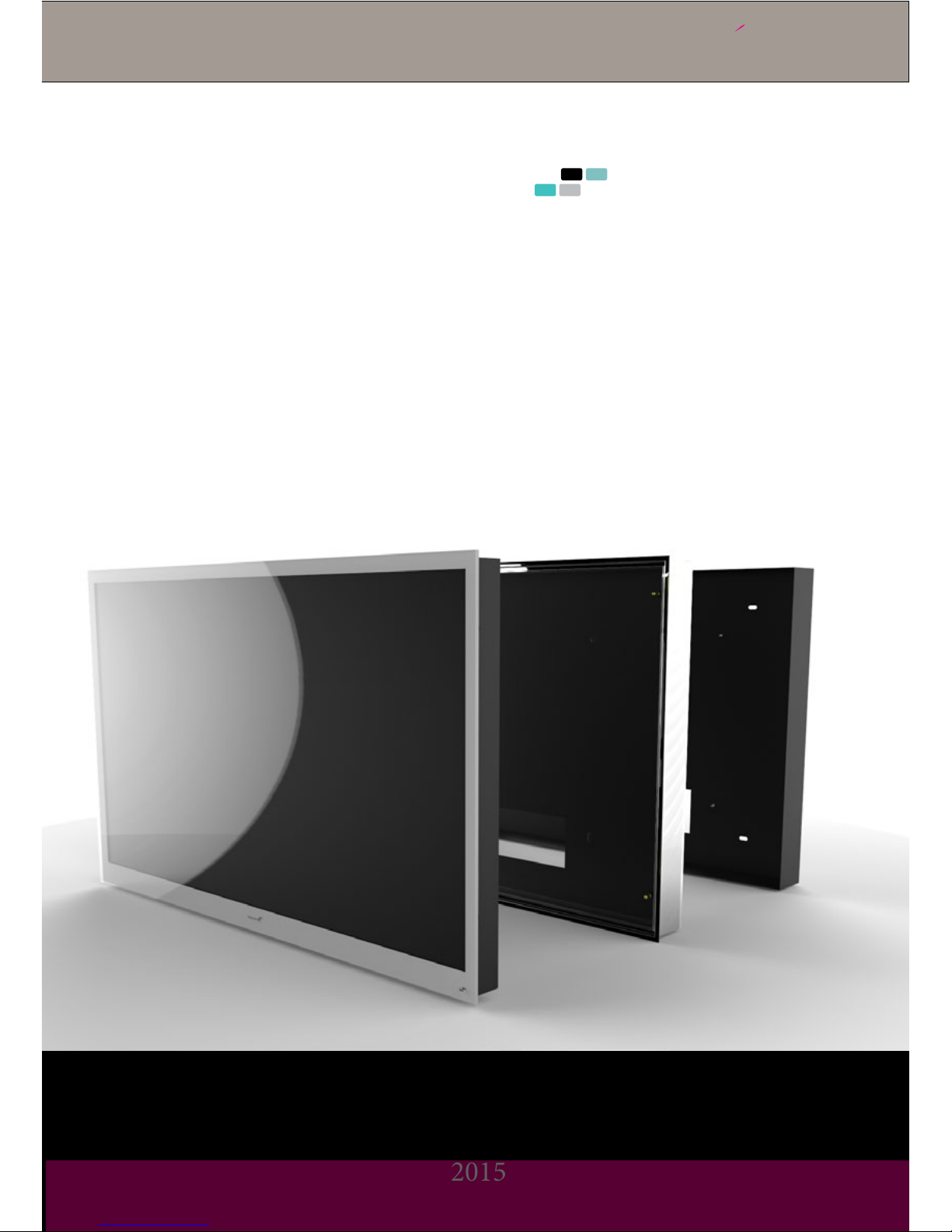
Lifestyle design
2015
Videotree
TM
User & Installation Guide
Page 2

Lifestyle Screen Installation
Lifestyle design
Videotree
TM
2 3
CONTENTS
Introduction
Safety Precautions
Connections
Whats in the box?
Prepare for Installation
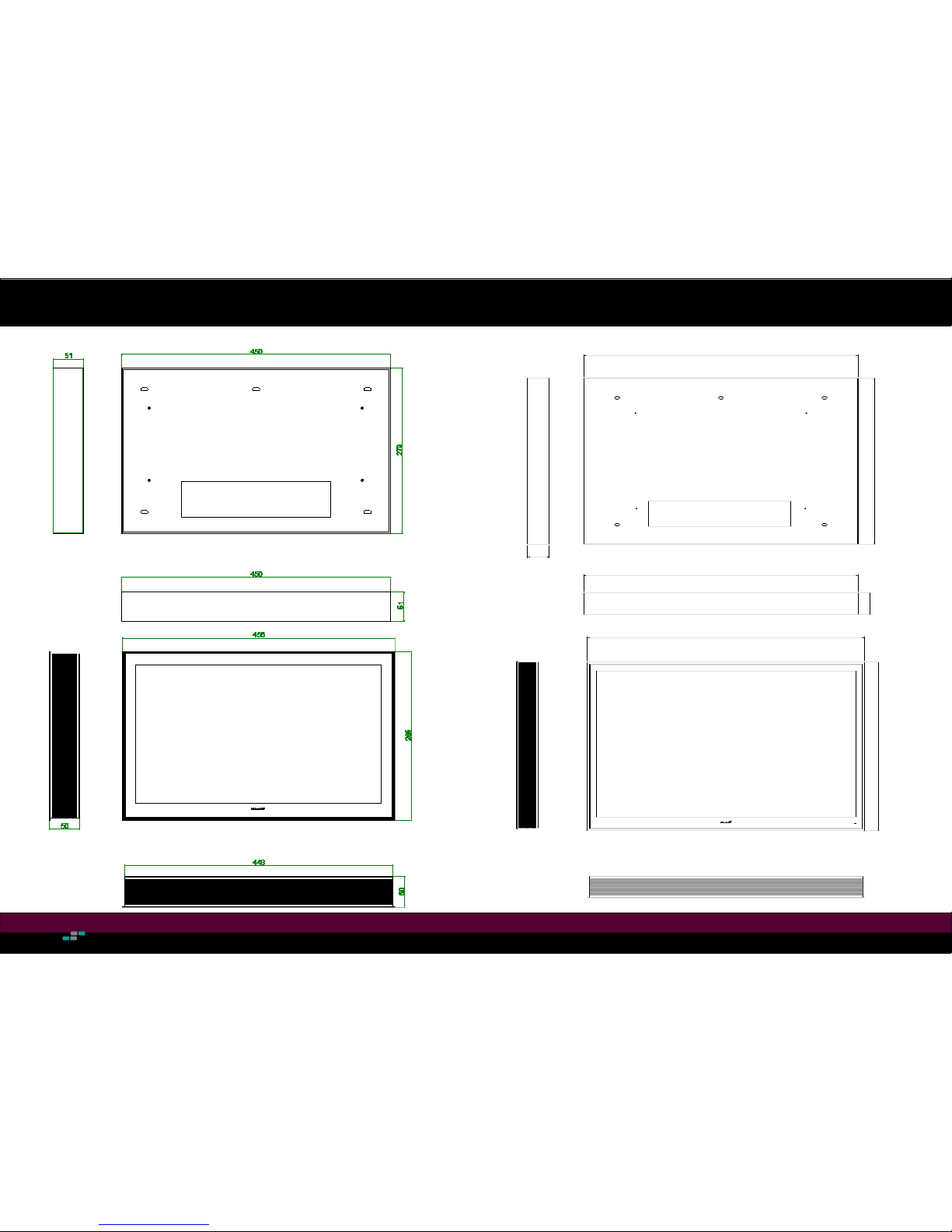
19” Dimensions
27” Dimensions
Installation Procedure
In Wall Flush
Screen Removal
Control Settings
TV Operation
RS232 Commands
Troubleshooting
. . . . . . . . . . . . . . . . . . . . . . . . . . . . . . . . . . . . . . . . . . . . . .
. . . . . . . . . . . . . . . . . . . . . . . . . . . . . . . . . . . . . . . . . . . . . .
. . . . . . . . . . . . . . . . . . . . . . . . . . . . . . . . . . . . . . . . . . . . . .
. . . . . . . . . . . . . . . . . . . . . . . . . . . . . . . . . . . . . . . . . . . . . .
. . . . . . . . . . . . . . . . . . . . . . . . . . . . . . . . . . . . . . . . . . . . . .
. . . . . . . . . . . . . . . . . . . . . . . . . . . . . . . . . . . . . . . . . . . . . .
. . . . . . . . . . . . . . . . . . . . . . . . . . . . . . . . . . . . . . . . . . . . . .
. . . . . . . . . . . . . . . . . . . . . . . . . . . . . . . . . . . . . . . . . . . . . .
. . . . . . . . . . . . . . . . . . . . . . . . . . . . . . . . . . . . . . . . . . . . . .
. . . . . . . . . . . . . . . . . . . . . . . . . . . . . . . . . . . . . . . . . . . . . .
. . . . . . . . . . . . . . . . . . . . . . . . . . . . . . . . . . . . . . . . . . . . . .
. . . . . . . . . . . . . . . . . . . . . . . . . . . . . . . . . . . . . . . . . . . . . .
. . . . . . . . . . . . . . . . . . . . . . . . . . . . . . . . . . . . . . . . . . . . . .
. . . . . . . . . . . . . . . . . . . . . . . . . . . . . . . . . . . . . . . . . . . . . .
3
4
5
6
7
8
9
10-11
12-13
14
15
16-18
19
20
Thank you for purchasing a Lifestyle television from Videotree!
We know you’re going to love your new television, now allow us to help you with the installation.
This guide has been put together so the install process is as straightforward as possible for you.
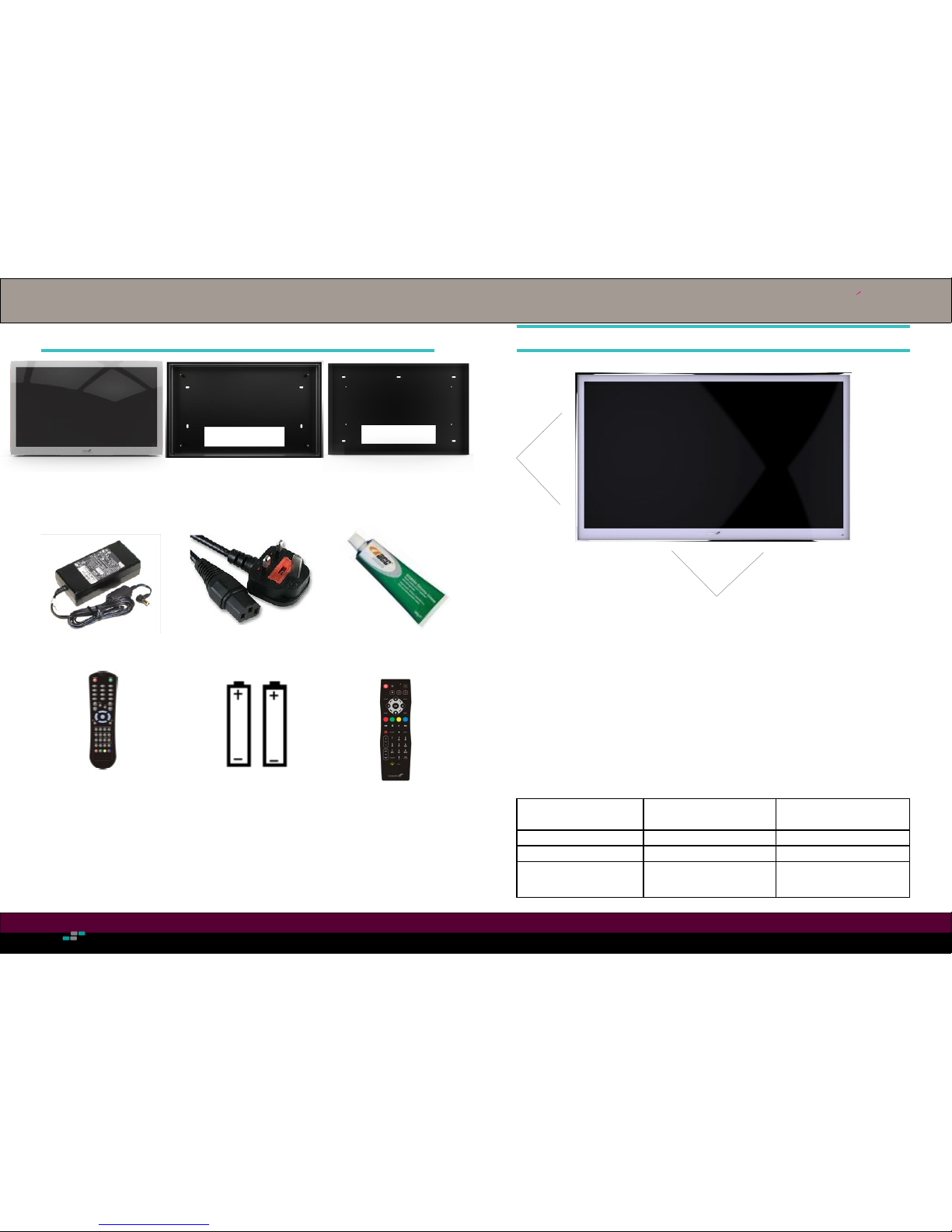
Included with this television will be the following components:
• LifestyleTelevision (requested size)
• Backbox with quick-snap frame system
• 5m Power Supply & Kettle lead
• Master Remote Control
• Waterproof Remote Control
• Silicone Grease
• 2 x AAA Batteries
Any optional accessories that you may have ordered will also be included with your television
upon delivery.
Please contact the reseller if you nd that any components are missing immediately.
Warning: Improper mounting of your TV can lead to damaged or broken property, bodily injury
or death. If at any time you are unable to or do not feel condent that you can complete any step
in this guide STOP IMMEDIATELY! Place the TV in a safe location and contact a professional.
It is the installers responsibility to ensure that your waterproof LED TV is installed and sealed
correctly. Your warranty becomes void if problems occur due to faulty installation or poor sealing.
Warranty Registration
To register your product, visit www.videotree.com/registeryourproduct.
Registering your product will activate your warranty to enable Videotree to provide you support,
should this be required.
INTRODUCTION
Page 3
Lifestyle Screen Installation
Lifestyle design
Videotree
TM
4 5
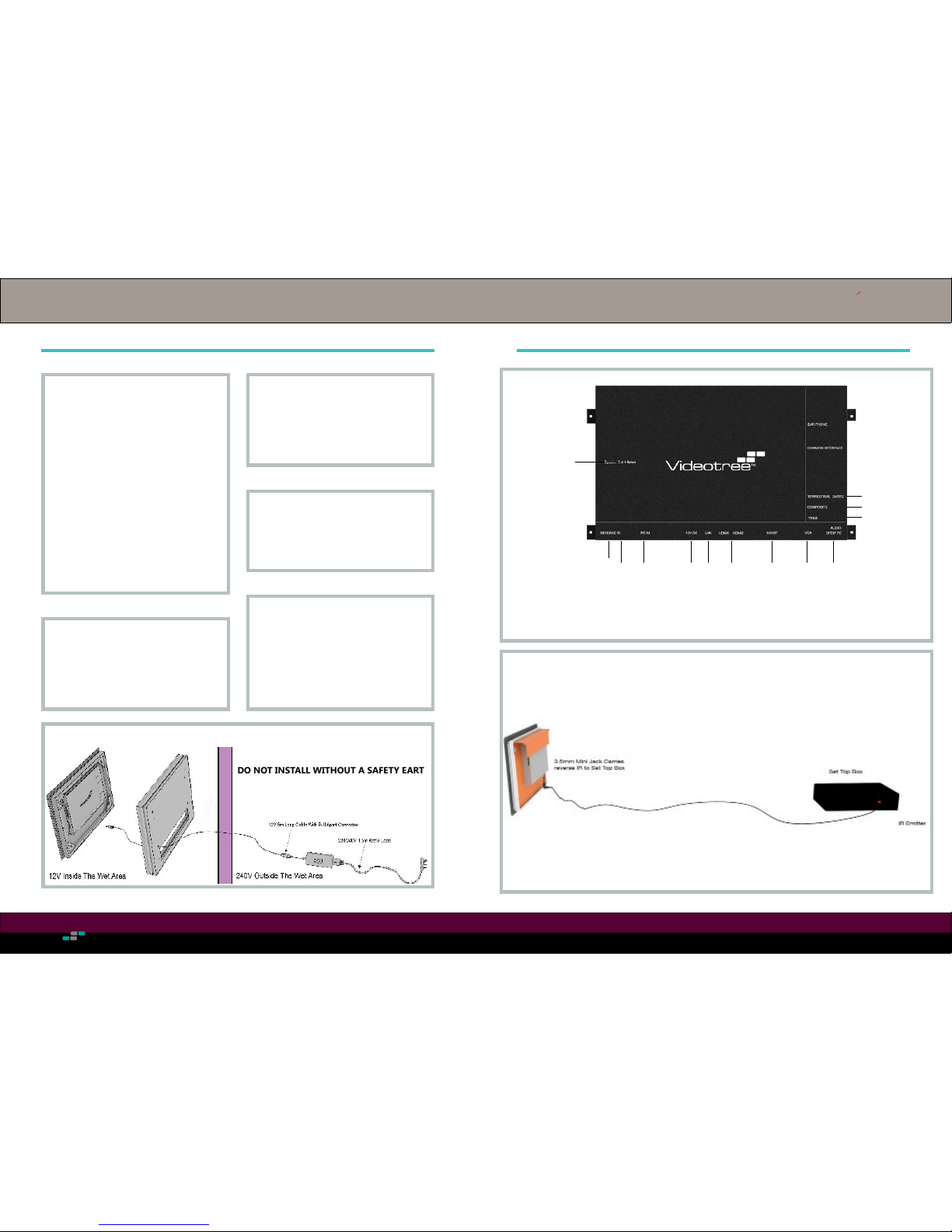
CONNECTIONS
SAFETY PRECAUTIONS
Handling the Power Supply Unit
(PSU)
• Ensure the PSU is disconnected
from the mains supply before
connecting to the TV.
• Ensure the Earth pin on the
mains plug is connected
correctly.
• Do not use any PSU other than
the one provided by Videotree.
• Ensure there is always easy access to the PSU mains supply.
Do not remove the back cover
• There is a risk of electric shock
• There are no user serviceable
parts inside
Do not expose to direct sunlight*
• Avoid exposing the TV to direct
sunlight. This can cause damage
to the screen
2 persons installation required.
• The TV is heavy and requires 2
person handling.
• Do not insert or remove the TV
from the wall frame alone.
Do not expose the rear of the TV
to water or moisture
• The TV is IP66 rated against
water from the front, only after it
has been correctly installed.
WARNING: THIS TV MUST BE EARTHED.
DO NOT INSTALL WITHOUT A SAFETY EARTH
3
Reverse IR Connection
4 watt speaker output
Touch Tile RS232 Power Internet HD 1920P Analogue In/Out PC IN Coax Digital Audio Out
Component In
Video IN
Aerial IN
Control External Devices
Page 4
Lifestyle Screen Installation
Lifestyle design
Videotree
TM
6 7
1. Decide on the correct position for your TV.
2. Test the TV in position to make sure the viewing angle is appropriate for the viewing position.
Each waterproof TV model has specic viewing angles. Position the front bezel in order to
view the picture clearly from all intended areas.
3. Should there be any doubt, make the area safe and power up the TV, positioning the screen
until satised that the picture does not darken or disappear from view.
4. Once you have your position check for any hazards that may stop you installing in this area,
i.e. cables or pipes. When mounting in stud walls, check for any supporting framework behind
the plasterboard.
5. The table below shows the cut out dimensions required for ush and inwall tting options.
Please note the cutout for the back box MUST be cut and lled accurately to ensure there are
no gaps between the recess and the back box tment.
INSTALLATION PROCEDUREWHATS IN THE BOX
LifestyleTV
(In requested size)
Power Supply Power Lead Silicone Grease
Master Remote 2x AAA Batteries
(Master Remote)
Waterproof Remote
Model Screen Size (Inches) Backbox Cutout Dimensions
(Height Width Depth in mm)
VTL19 19 451 - 280 - 51
VTL27 27 634 - 384 - 51
54
The optimal viewing
position is head height when
seated in the bath
65°
85°
Frame
(In requested size)
Back Box
(In requested size)
Viewing Angles
Page 5
Lifestyle Screen Installation
Lifestyle design
Videotree
TM
8 9
19” Dimensions 27” Dimensions
633.0
383.0
633.0
51
51.0
639.0
389
Page 6
Lifestyle Screen Installation
Lifestyle design
Videotree
TM
10 11
INSTALLATION PROCEDURE (CONTINUED)
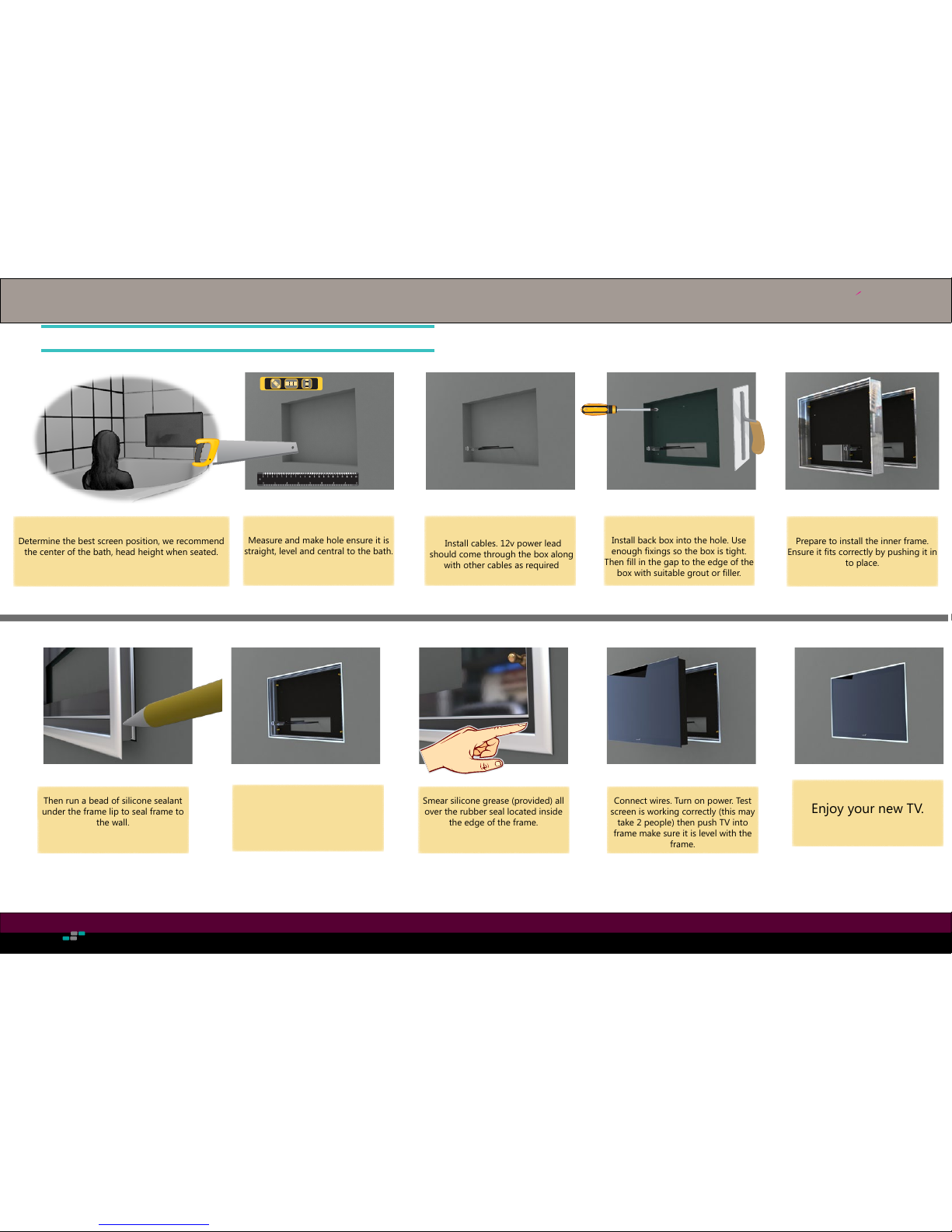
Determine the best screen position, we recommend
the center of the bath, head height when seated.
Fig: 1
Measure and make hole ensure it is
straight, level and central to the bath.
Install cables. 12v power lead
should come through the box along
with other cables as required
Install back box into the hole. Use
enough xings so the box is tight.
Then ll in the gap to the edge of the
box with suitable grout or ller.
Prepare to install the inner frame.
Ensure it ts correctly by pushing it in
to place.
Use Silicon sealant to seal frame to
Tighten nuts in 4 corners and wipe
away any excess sealant.
Then run a bead of silicone sealant
under the frame lip to seal frame to
the wall.
Smear silicone grease (provided) all
over the rubber seal located inside
the edge of the frame.
Fig: 4Fig: 3
Fig: 2
Fig: 5a
Fig: 5
Fig: 6 Fig: 6a Fig: 7
Connect wires. Turn on power. Test
screen is working correctly (this may
take 2 people) then push TV into
frame make sure it is level with the
frame.
Enjoy your new TV.
Fig: 8
Page 7
Lifestyle Screen Installation
Lifestyle design
Videotree
TM
12 13
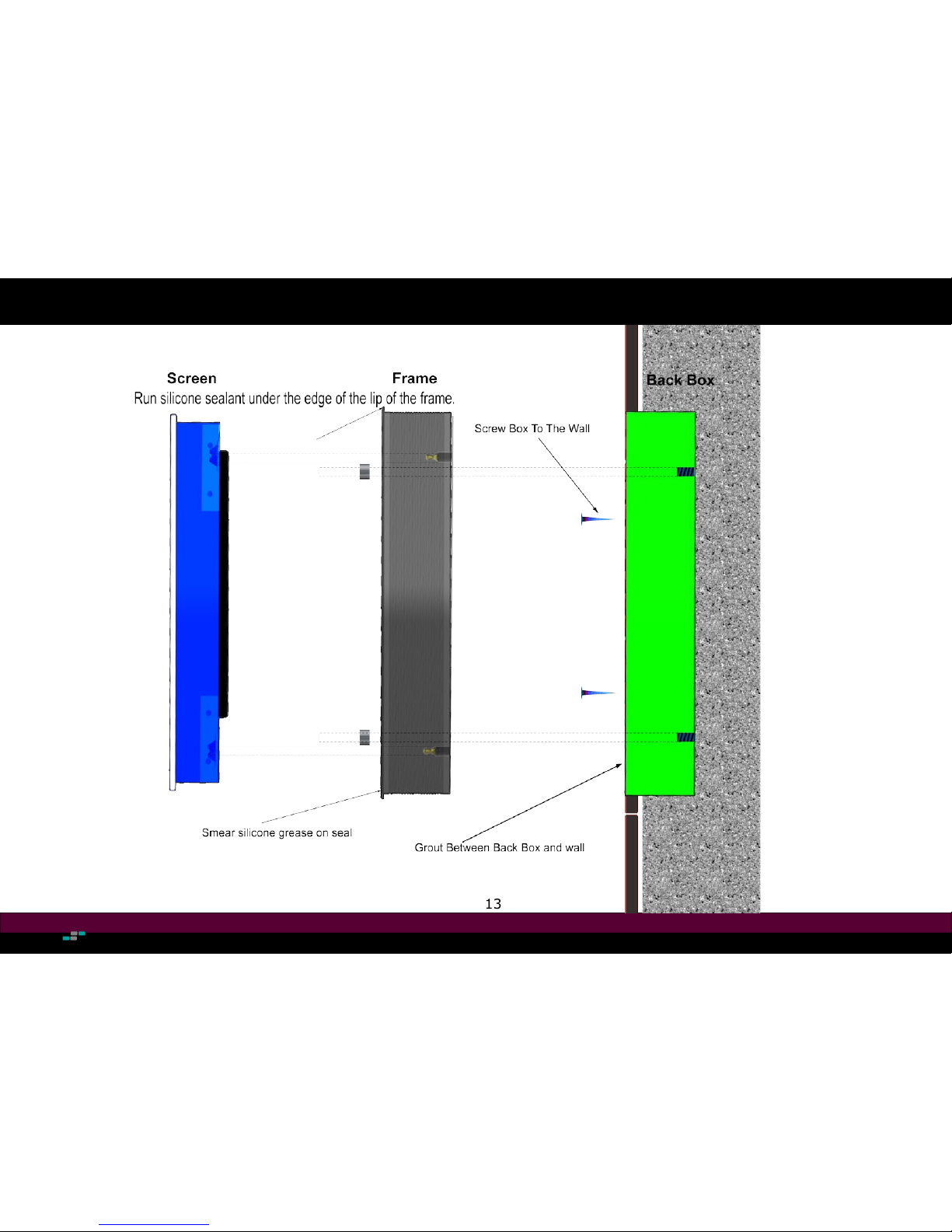
In Wall Flush
Page 8
Lifestyle Screen Installation
Lifestyle design
Videotree
TM
14 15
SCREEN REMOVAL
7
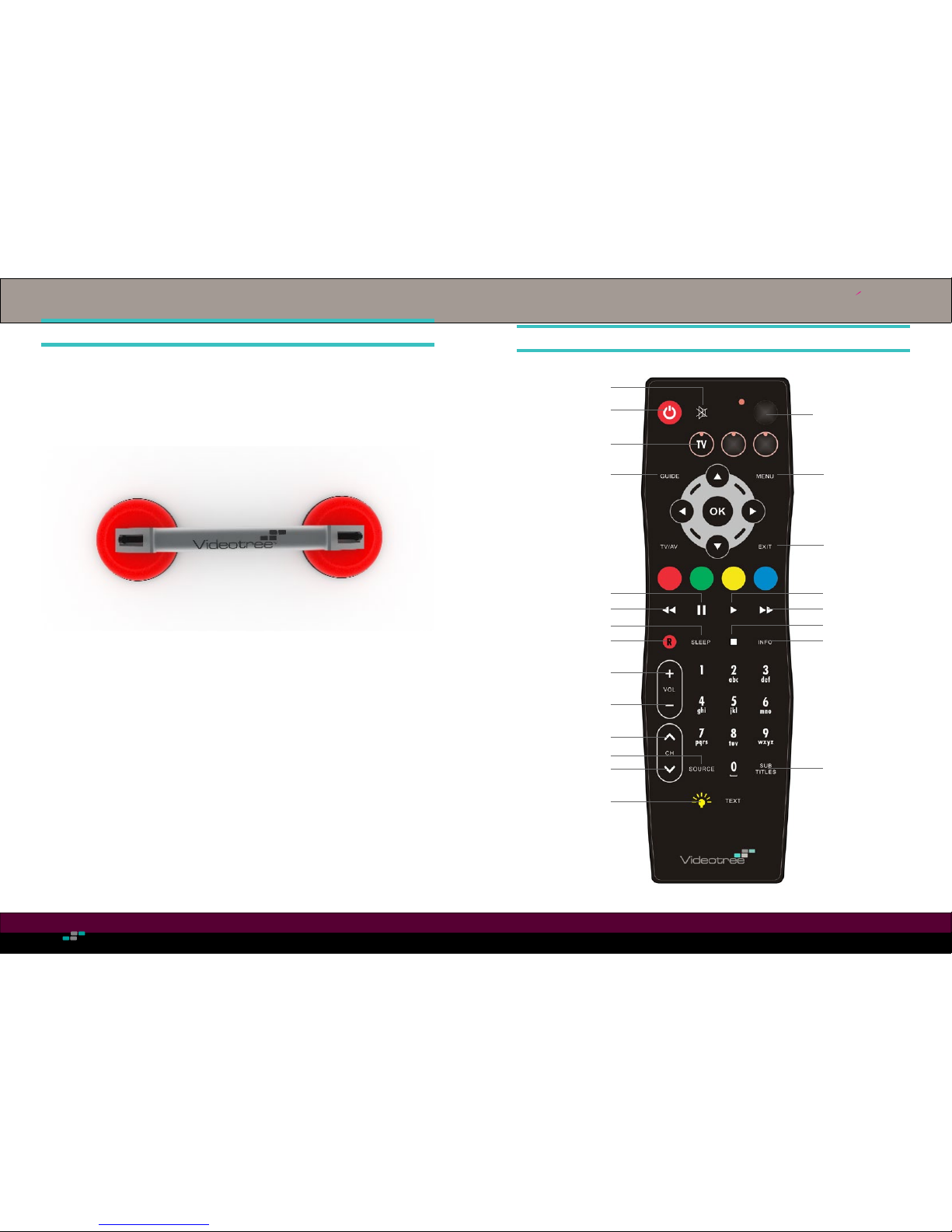
To remove the screen from the backbox requires the use of a single glass sucker (pictured below).
it is strongly advised another person be present during the removal of the screen.
1 Place the glass sucker in the center of the screen and apply the levers so that the sucker grips
the glass.
2. Pull the television out of the backbox, allowing for rear connections. Carefully remove the
television from the backbox.
3. Remove the connections from the back of the television and place in a safe area.
REMOTE CONTROL
Volume Up
Volume Down
Record
Rewind
Power On
TV Guide
Mute
Pause
Main Menu
Exit Menu/Guide
Play
Fast Forward
Channel/Programme
Information
Sleep Mode
Channel Up
Channel Down
Source Select
Subtitle Toggle
Edge Illumination
Control
TV Source Select
Stop
8
Programme
Page 9
Lifestyle Screen Installation
Lifestyle design
Videotree
TM
16 17
TV OPERATION
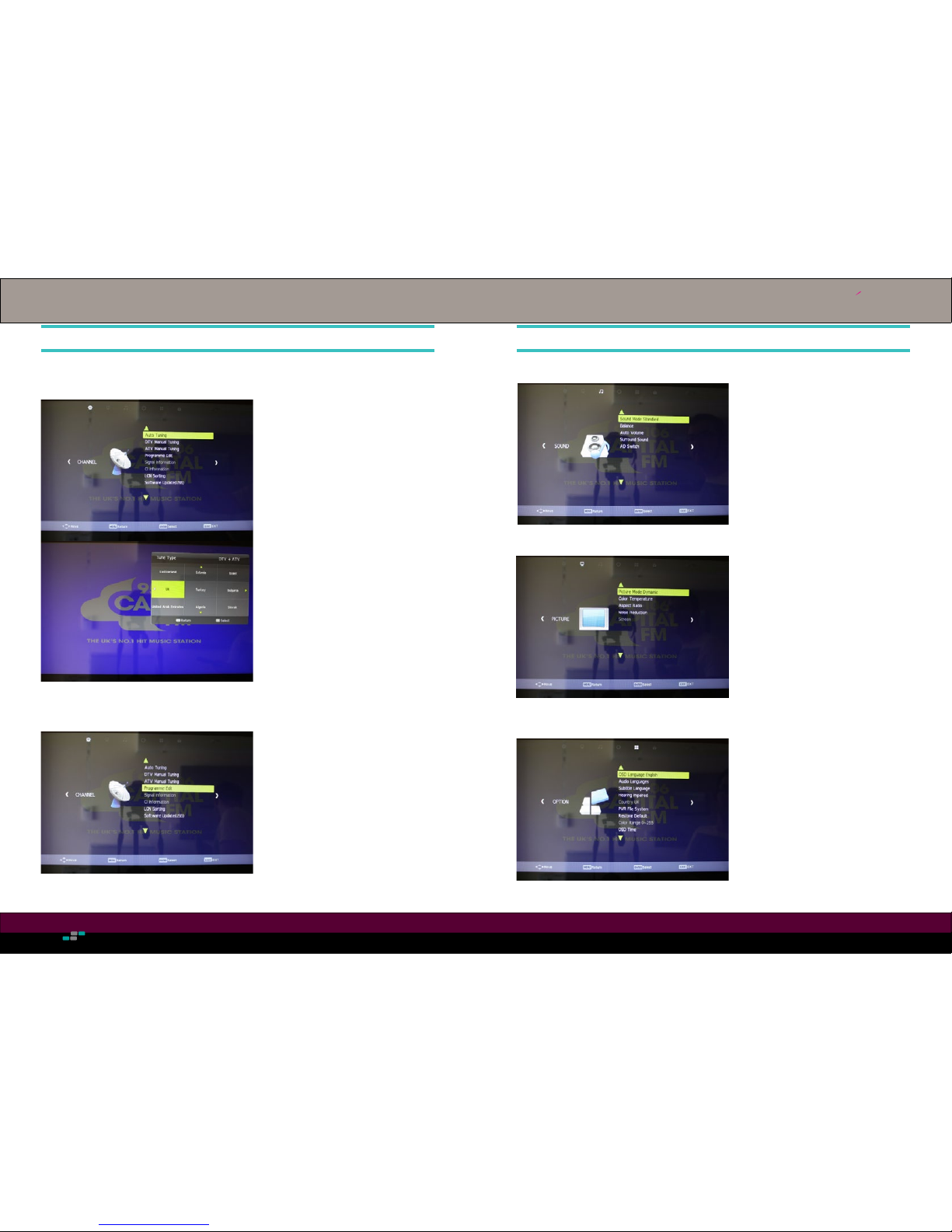
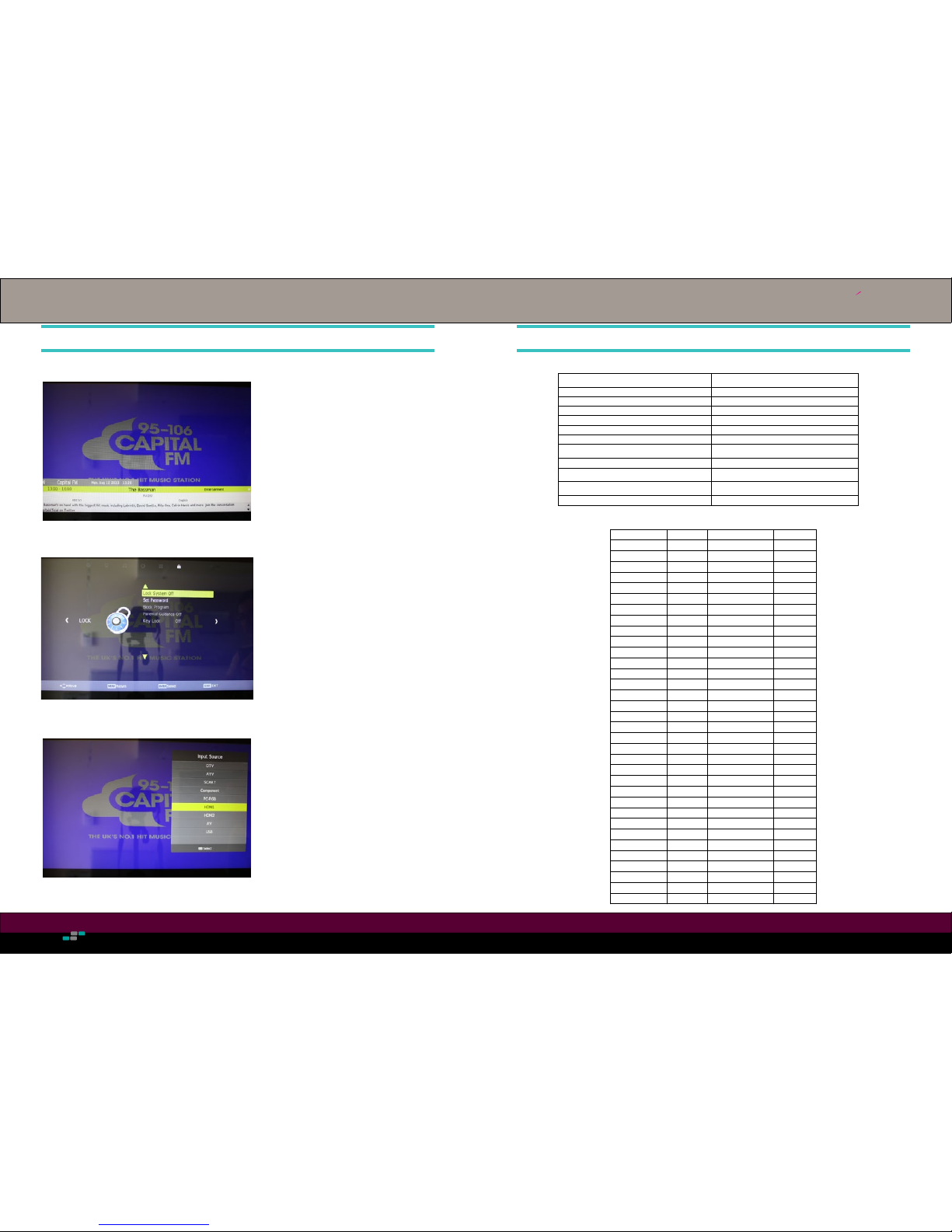
Channel Auto Tuning
1. Press menu on MASTER remote
control.
2. Select AUTO TUNING.
3. Choose the tune type you would like
to perform (DTV, ATV or both).
4. Select the country and press ok and
the auto tune will begin.
Programme Edit
1. Press menu on MASTER remote
control.
2. Scroll down to PROGRAMME EDIT
using the arrow keys.
3. To delete a channel, select the channel
scrolling up or down with the arrow
keys. Press the Red button twice.
4. To move a channel, select the channel
scrolling up or down with the arrow
keys. Press the Yellow button to select
the channel and using the numerical
keys enter the number you would like
the channel to move to.
11
Sound Settings
1. Press menu on MASTER remote
control.
2. Select SOUND icon.
3. Select your desired sound settings.
4. Exit to go back.
General Settings
From here you are able to congure the
OSD language, Audio language, subtitle
langauge and also congure options for
users with hearing impairments.
In addition to this you can adjust the
time and restore the settings to factory
defaults.
TV OPERATION (CONTINUED)
12
Picture Settings
1. Press menu on MASTER remote
control.
2. Scroll right to the PICTURE icon.
3. From this menu you can adjust the
picture mode, color temperature,
aspect ratio and noise reduction.
Page 10
Lifestyle Screen Installation
Lifestyle design
Videotree
TM
18 19
TV OPERATION (CONTINUED)
13
Lock Settings
Changing Input Source
To change the input source, simply press
the source button on your MASTER
or standard remote control and select
which source you would like to change
to from the list
Info
To view channel/programme information
simply press the “info” button on your
remote control and the information for
that channel/programme will pop-up.
1. Press menu on MASTER remote
control.
2. Scroll to the right, to the padlock icon
3. From here you can toggle the lock
system on or off, set a password and
enable or disable parental guidanc
and key lock
RS232 COMMANDS
14
A0 F0 55 FF 0B F5 power A0 F0 55 FF 45 BB num_8
A0 F0 55 FF 50 B0 info A0 F0 55 FF 4C B4 num_9
A0 F0 55 FF 51 AF zoom A0 F0 55 FF 56 AA num_0
A0 F0 55 FF 14 EC mute A0 F0 55 FF 09 F7 return
A0 F0 55 FF 4B B5 p.mode A0 F0 55 FF 15 EB epg
A0 F0 55 FF 5B A5 s.mode A0 F0 55 FF 0A F6 vol+
A0 F0 55 FF 53 AD sleep A0 F0 55 FF 44 BC s ub.t
A0 F0 55 FF 10 F0 fav A0 F0 55 FF 06 FA pg.up
A0 F0 55 FF 57 A9 pvrlist A0 F0 55 FF 55 AB ch+
A0 F0 55 FF 47 B9 pre A0 F0 55 FF 40 C0 vol-
A0 F0 55 FF 13 ED next A0 F0 55 FF 11 EF audio
A0 F0 55 FF 12 EE stop A0 F0 55 FF 58 A8 pg.down
A0 F0 55 FF 48 B8 rec A0 F0 55 FF 5A A6 ch-
A0 F0 55 FF 4F B1 backward A0 F0 55 FF 59 A7 ttx
A0 F0 55 FF 4D B3 forward A0 F0 55 FF 00 00 eco
A0 F0 55 FF 16 EA play A0 F0 55 FF 08 F8 index
A0 F0 55 FF 1B E5 e xit A0 F0 55 FF 49 B7 reveal
A0 F0 55 FF 17 E9 up A0 F0 55 FF 07 F9 cancel
A0 F0 55 FF 31 CF timeshift A0 F0 55 FF 1A E 6 hold
A0 F0 55 FF 0C F4 left A0 F0 55 FF 5F A1 size
A0 F0 55 FF 02 FE select A0 F0 55 FF 04 FC list
A0 F0 55 FF 05 FB right A0 F0 55 FF 46 BA red
A0 F0 55 FF 4E B2 me nu A0 F0 55 FF 4A B6 green
A0 F0 55 FF 0D F3 down A0 F0 55 FF 52 AE yellow
A0 F0 55 FF 01 FF source A0 F0 55 FF 5E A2 blue
A0 F0 55 FF 42 BE num_1 A 0 F0 55 FF 20 E0 DTV
A0 F0 55 FF 43 BD num_2 A0 F0 55 FF 21 DF ATV
A0 F0 55 FF 0F F1 num_3 A0 F0 55 FF 24 DC AV
A0 F0 55 FF 1E E2 num_4 A0 F0 55 FF 22 DE YPBPR
A0 F0 55 FF 1D E3 num_5 A0 F0 55 FF 25 DB USB
A0 F0 55 FF 1C E4 num_6 A0 F0 55 FF 65 9B SVHS
A0 F0 55 FF 18 E8 num_7 A0 F0 55 FF 27 D9 ON
A0 F0 55 FF 23 DD HDMI 1 A0 F0 55 FF 28 D8 VGA
A0 F0 55 FF 34 CC HDMI 2 A0 F0 55 FF 29 D7 OFF
A0 F0 55 FF 35 CB HDMI 3 A0 F0 55 FF 36 CA SCART
customer_code0x20DF
The command sequence must be sent in hex format as
follows:
Select the Appropriate com port
A0 F0 55 FF IR CH
Baud rate: 38400
IR :IR CODE
Parity check: none
CH :IR + CH == 00
Data bit: 8
Stop bit: 1
Handshaking: None
To send a code through the RS232 first input the code
#160#240#085#255# and followed by the code in decimal.
Example POWER #160#240#085#255#011#245
If the software lets you use the ASCII codes: to input the code
would be:
First #A0#F0#55#FF#. and put this code below the code you
want to send in hexadecimal.
Example POWER #A0#F0#55#FF#0B#F5
Page 11
Lifestyle Screen Installation
Lifestyle design
Videotree
TM
20 21
TROUBLESHOOTING
Problem Possible Cause Solution
No LED light No input power • Check the power cable.
• Check if the Green LED on the
power supply is illuminated.
No signal No signal transmitted/different source.
No source cable is properly connected.
Source equipment is not setup correctly.
• Check correct source is selected
• Check cable connection between
TV and source equipment
• Check the external equipment is
on and set to display video on
the required output port.
No remote response Batteries ran out* • Replace the batteries
• The waterproof remote comes
with power LED
No sound Mute is on
Volume is set too low
No speaker is connected
• Press the mute button.
• Press the Vol + button
• Check connection between TV
and speaker
No sound for PC input The audio cable is not connected
correctly.
• Check the cable is connected
between the PC line out and the
TV’s line in connection.
RS232 does not work Transmission protocol is incorrect
If a non-standard RS232 cable is used,
the connector pin out could be incorrect
• Check the transmission protocol.
• Check the DB9 male pin out
* It is possible to check the remotes’ IR transmitters are working.
If the remotes’ IR emitter is viewed through a digital camera (phone camera works too)
and a button is pressed, this will ash. If it does not then replace the batteries.
15
*DISCLAIMER*
Warning: This water resistant television must only be tted by a Videotree trained and recognised
installation engineer. Videotree will not be held responsible for damage caused to this television,
3rd party equipment or it’s installation area if these installation instructions are not carried out
correctly.
DVB is a trademark of the DVB Digital Video Broadcasting Project (1991 to 1996).
HDMI, the HDMI Logo and High-Denition Multimedia Interface are trademarks or registered
trademarks of HDMI.
Please make a note of the model and serial numbers:
Model Number Serial Number
Sales & Support Information
ESC House
South Road
Weybridge
Surrey
KT13 9DZ
www.videotree.com
Videotree
TM
 Loading...