

Page 1
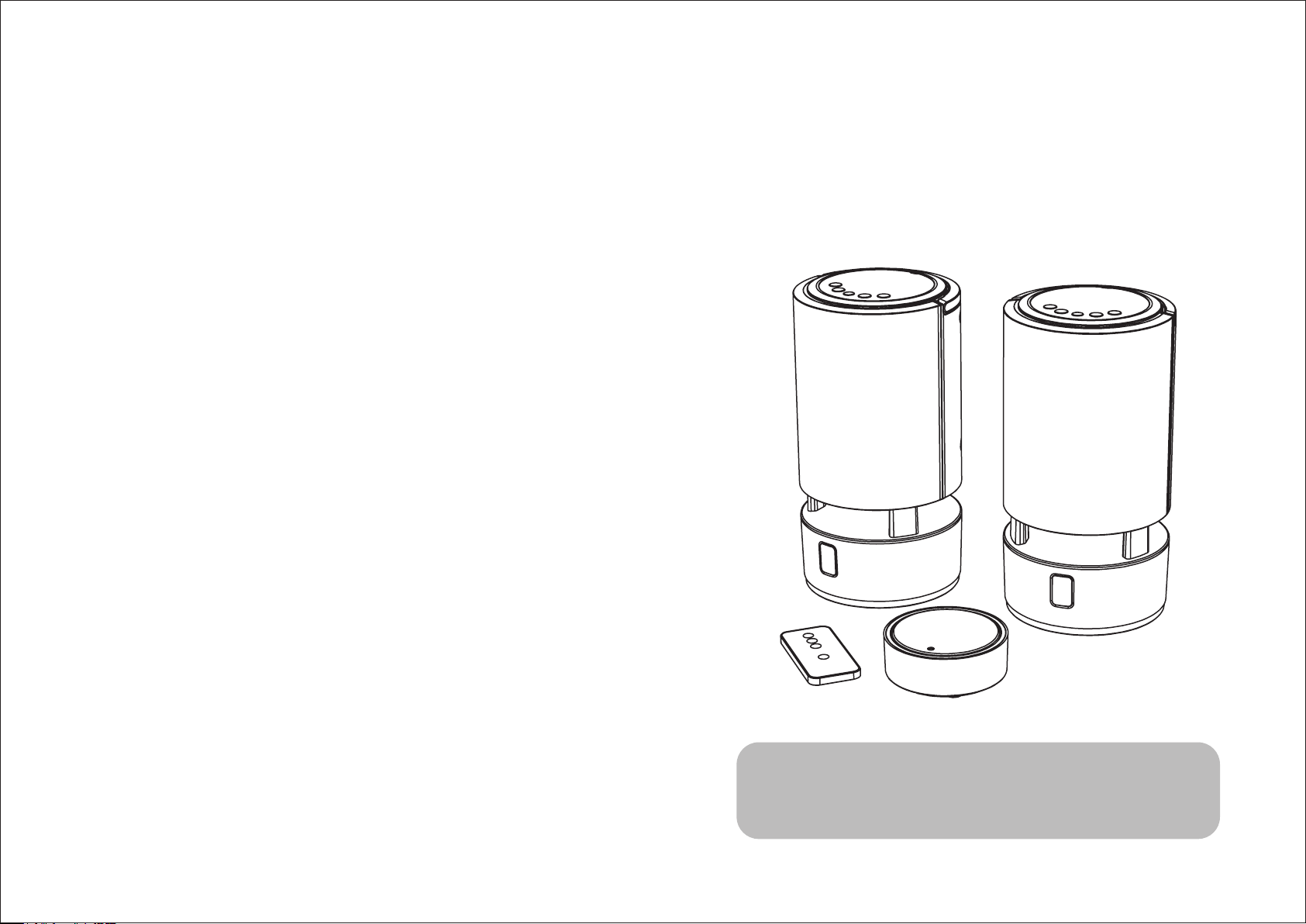
2.4GHz Digital
Indoor/Outdoor Wireless Speakers
with Remote Control
Part No.: XX0000000000 (0902)
User’s Manual
Please read before using the equipment
Page 2

Federal Communication Commission Interference Statement
FCC ID: YMT-FR011VC101
This equipment has been tested and found to comply with the limits for a Class B digital device,
pursuant to Part 15 of the FCC Rules. These limits are designed to provide reasonable protection
CONTENT
1.
SAFETY INFORMATION p.02
2.
3.
4.
5.
6.
SAFETY INSTRUCTION p.04
INTRODUCTION p.05
FEATURES p.05
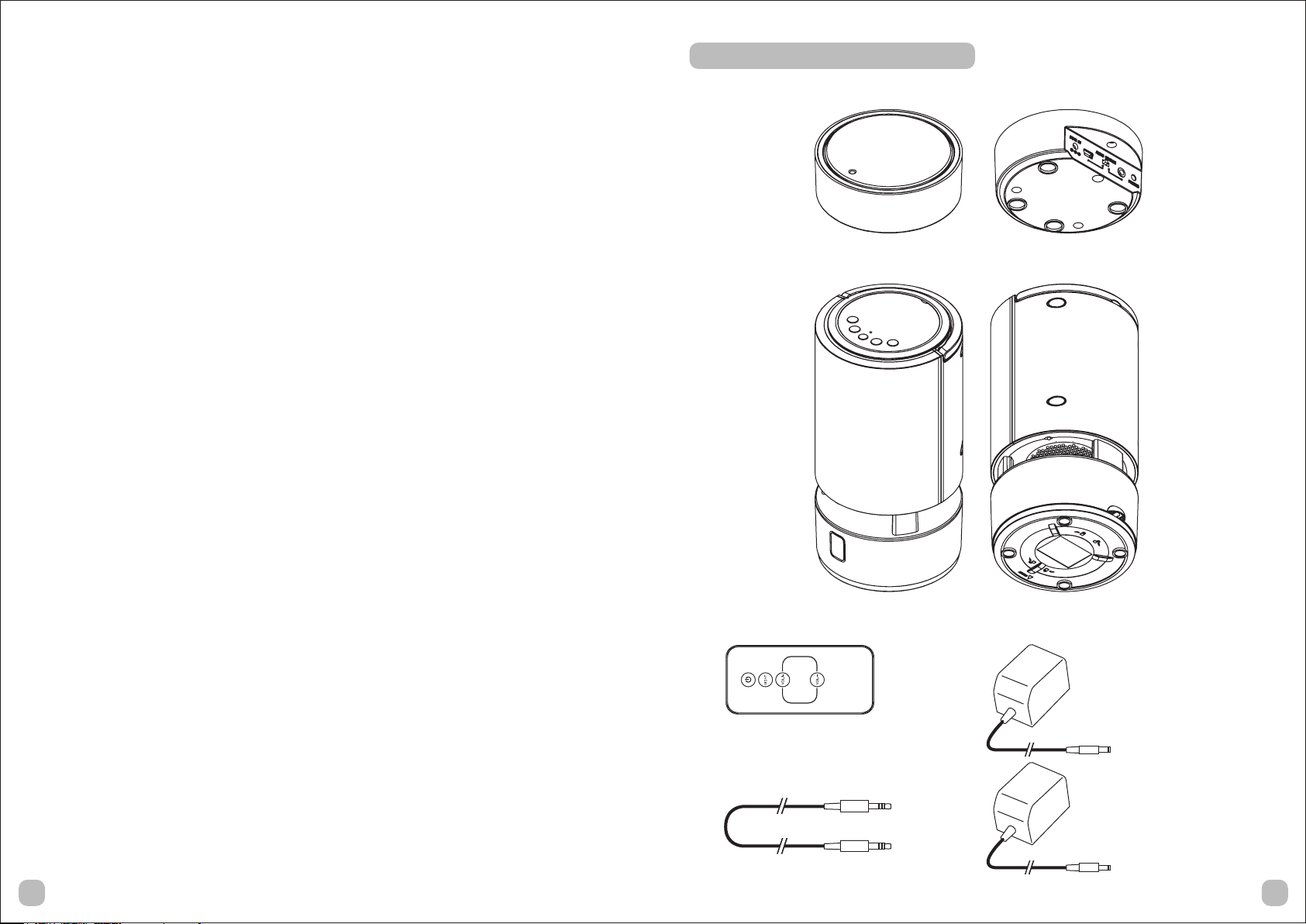
COMPONENT IDENTIFICATION p.06
Transmitter
Speaker receiver
Remote control
Power adapter
Audio cord
OPERATION p.07
Transmitter
- Connect with audio devices
- Connect with PC
Speaker receiver
- Audio receiving
- Audio channel selection
- Standby
- Illuminated LED
- Handling
Pairing
Remote control
against harmful interference in a residential installation.
This equipment generates, uses and can radiate radio frequency energy and, if not
Installed and used in accordance with the instructions, may cause harmful interference to radio
communications. However, there is no guarantee that interference will not occur in a particular
installation. If this equipment does cause harmful interference to radio or television reception,
which can be determined by turning the equipment off and on, the user is encouraged to try to
correct the interference by one of the following measures:
• Reorient or relocate the receiving antenna.
• Increase the separation between the equipment and receiver.
• Connect the equipment into an outlet on a circuit different from that to which the receiver is
connected.
• Consult the dealer or an experienced radio/TV technician for help.
FCC Caution: To assure continued compliance, any changes or modifications not expressly
approved by the party responsible for compliance could void the user's authority to operate this
equipment. (Example - use only shielded interface cables when connecting to computer or
peripheral devices).
FCC Radiation Exposure Statement
This equipment complies with FCC RF radiation exposure limits set forth for an uncontrolled
environment. This equipment should be installed and operated with a minimum distance of 20
centimeters between the radiator and your body.
This device complies with Part 15 of the FCC Rules. Operation is subject to the following two
conditions:
(1) This device may not cause harmful interference, and
(2) This device must accept any interference received, including interference that may cause
undesired operation.
7.
8.
9.
TROUBLE SHOOTING p.1 1
TECHNICAL SPECIFICATION p.12
USEFUL INFORMATION p.13
14
Page 3

To reduce the risk of electrical shock, fire, etc :
8. TECHNICAL SPECIFICATION
• Read these instructions.
• Keep these instructions.
• Heed all warnings.
• Follow all instructions.
• Do not use this apparatus near water.
• Clean only with dry cloth. For stubborn stains, use a soft cloth dampened with a weak solution
of mild detergent and water Dry the apparatus immediately afterwards with a clean cloth. Do not
use abrasive clothes, thinners, alcohol, or other chemical solvents, because they may damage
the finish or remove the panel lettering.
• Do not block any ventilation openings. The ventilation shall not be impeded by covering the
ventilation openings with items, such as newspapers, table clothes, curtains, etc.
• Do not install near any heat source such as radiators, heat registers, stoves, or other apparatus
(including amplifiers) that produce heat.
• Do not defeat the safety purpose of the polarized or grounding type plug. A polarized plug has
two blades with one wider than the other A grounding type plug has two blades and a third
grounding prong The wide blade or the third prong is provided for your safety If the provided
plug does not fit into your outlet, consult an electrician for replacement of the obsolete outlet.
• Protect the power cord from being walked on or pinched particularly at plugs, convenience
receptacles, and the point where they exit from the apparatus. If the power cord is damaged, a
qualified repairer should repair it.
• Only use attachments/accessories specified by the manufacturer.
Carrier Frequency : 2.4GHz Digital
Operation Voltage : Transmitter - DC 5V 1000mA adapter(included)
or 5V USB power
Speaker receivers - DC 9V 1500mA adapters (included)
or 6 X ‘AA’ size Alkaline batteries for
each speaker receiver (not included)
Remote Control Unit - CR2025 battery (included)
Frequency Response : 20Hz ~ 20KHz
Distortion : <1%
S/N Ratio : 75dB
Channel Separation : 65dB
Operation Distance : Up to 80 meters (262 feet) in open area
Output Power : 4W (RMS)
Water Resistance Level : IPX3
Dimensions : Transmitter - 91.5mm (Dia.) x 35mm (H)
Speaker receiver - 130mm (Dia.) x 250mm (H)
• Use only with the cart, stand, tripod, bracket or table specified by the manufacturer, or sold with
the apparatus. When a cart is used, use caution when moving the cart/apparatus combination to
avoid injury from tip-over.
• Unplug this apparatus during lightning storms or when unused for long periods of time.
• Refer all servicing to qualified service personnel. Servicing is required when the apparatus has
been damaged in any way, such as power supply cord or plug is damaged, liquid has been
spilled or objects have fallen into the apparatus, the apparatus has been exposed to rain or
moisture, does not operate normally, or has been dropped.
• The apparatus shall not be exposed to dripping or splashing and no objects filled with liquids,
such as vases, shall be placed on the apparatus.
• The mains power plug or an appliance coupler is used as the disconnect device, the disconnect
device shall remain readily operable.
• Please read Rating Labels at the bottom of the wireless speaker for power input and other
safety information.
1203
Page 4
9. USEFUL INFORMATION
WEEE
1. SAFETY INFORMATION
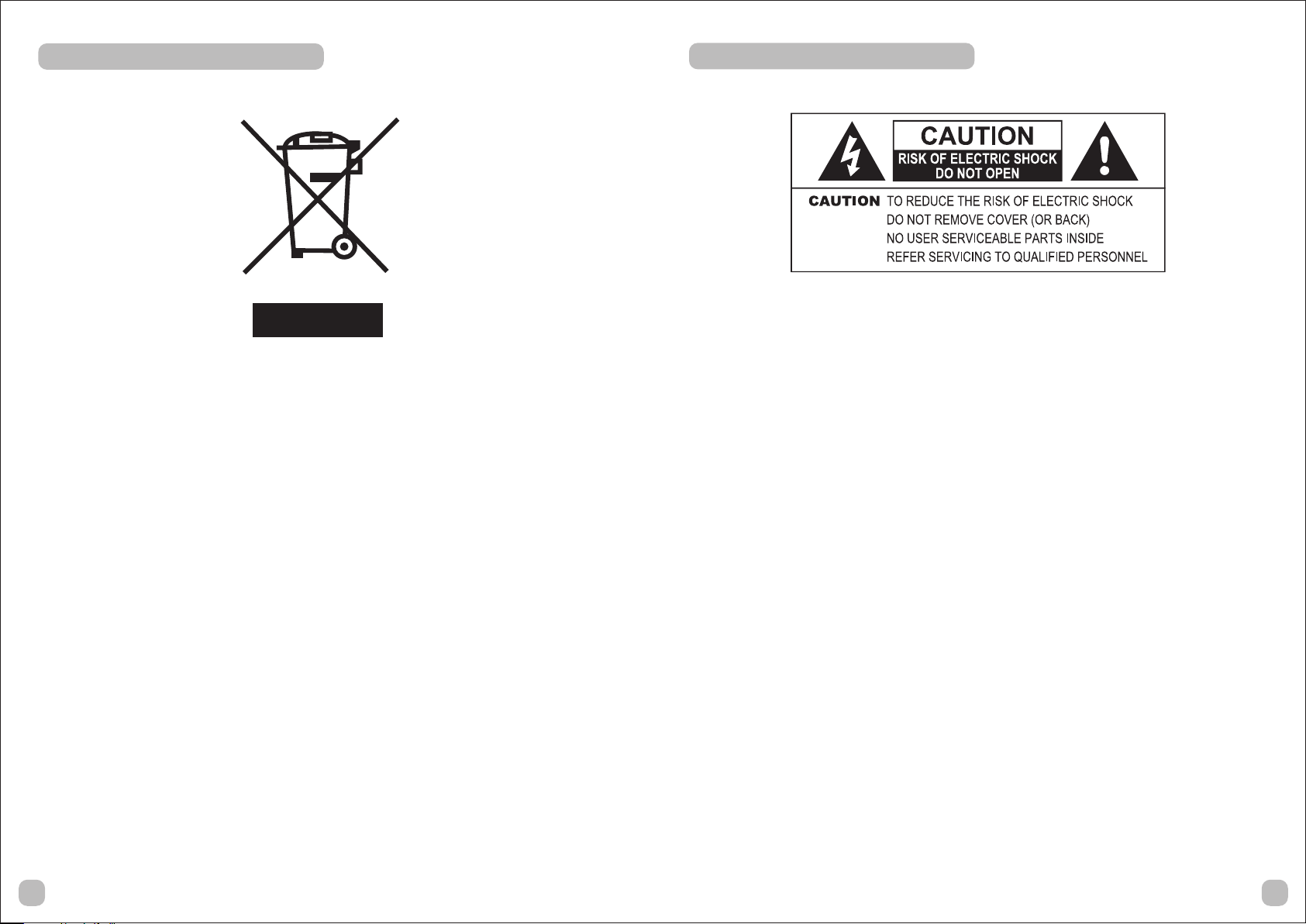
The lightning flash with arrowhead symbol inside an equilateral triangle shown above is intended
to alert the user to the presence of uninsulated ”hazardous voltage” within the product’s
enclosure, which may be of sufficient magnitude to induce a risk of electric shock to persons.
Electrical and electronic equipment (EEE) contains materials, parts and substances, which can be
dangerous to the environment and harmful to human health if waste of electrical and electronic
equipment (WEEE) is not disposed of correctly.
Equipment, which is marked with the WEEE logo (as shown above), should not be thrown away
with your household waste. Contact your local authority waste disposal department, as they will
be able to provide details of the recycling options available in your area.
Adapter
Only use the power supply listed in the user manual. Using an unauthorized power supply will
invalidate your guarantee and may irrecoverably damage the wireless speaker.
The exclamation mark inside an equilateral triangle shown above is intended to alert the user to
the presence of important operating and maintenance (servicing) instructions in the literature
accompanying the product.
0213
Page 5
3. INTRODUCTION
This 2.4GHz digital wireless speakers system uses latest wireless technology that enables you to
enjoy music and TV sound anywhere inside or outside your home.
You can simply connect the system to any audio source such as Radio, TV, VCR, Hi-Fi, Blu-ray
and i-Phone/i-Pod/CD/MP3/DVD player. You can also connect to PC.
Without complicated wiring and installation with your Audio/Video equipments and rear channel
amplifier, the system enables you to enjoy thrilling, lifelike sound in minutes.
4. FEATURES
• 2.4GHz Digital technology
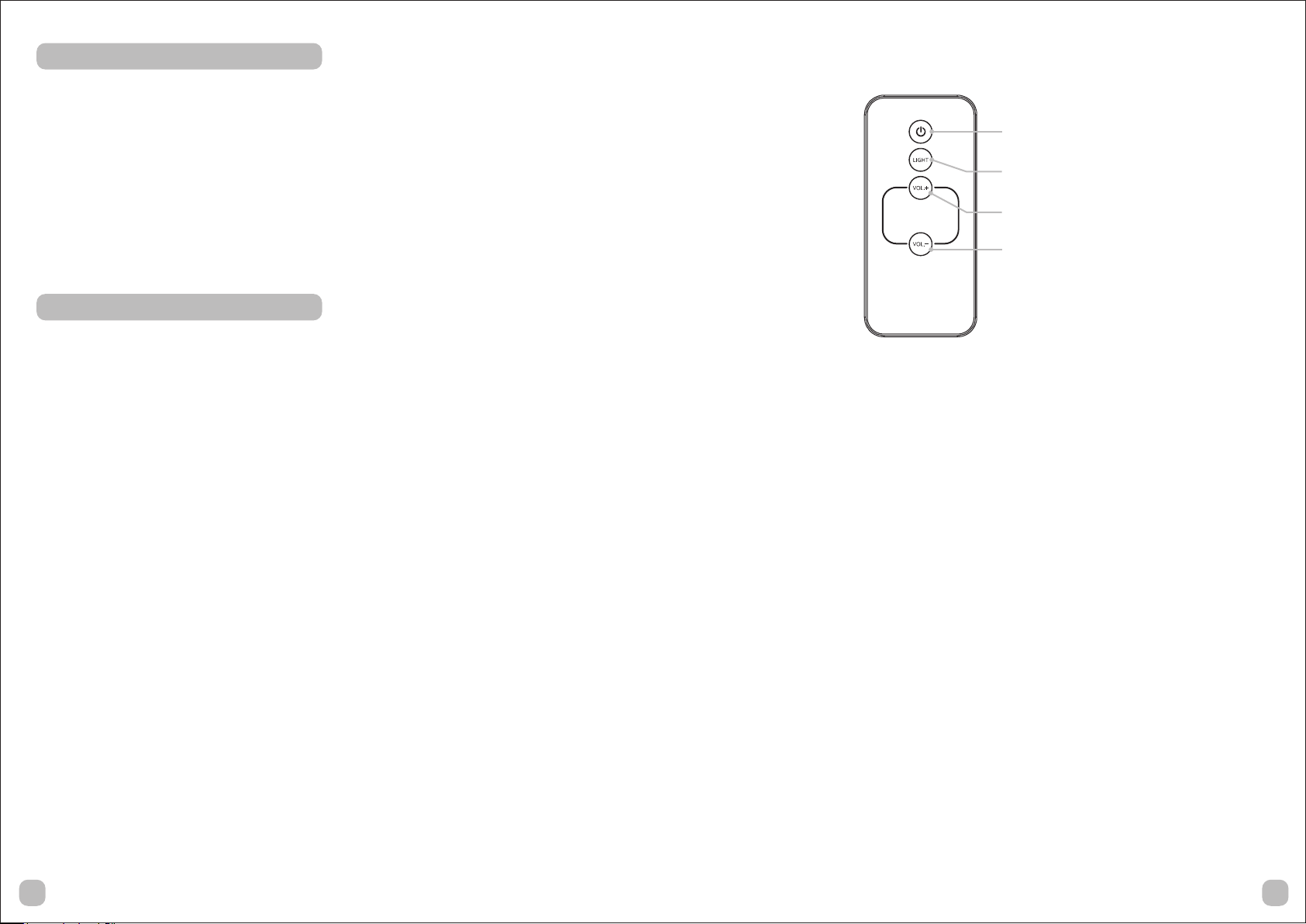
Remote Control
Power Button
Light Button
VOL.+ Button
VOL.- Button
• Digital technology lets you roam freely throughout anywhere at your house
• Virtually interference free audio quality
• Connect to PC, i-Phone, i-Pod, CD, MP3, Hi-Fi, TV, etc.
• Electronic volume control
• Auto tuning control
• Remote control unit for your convenience
• Full-range speaker driver
• Operation distance up to 80 metres (262 feet)
• Water resistance level: IPX3
• Before using the remote control, the safety tab should be removed.
• To open the remote control battery compartment, press the battery compartment cover tabs
together and remove.
• Carefully remove the safety tab which covers the battery.
• Replace the battery compartment cover.
1005
Page 6

7. TROUBLE SHOOTING
2. SAFETY INSTRUCTION
NO SOUND
• Ensure the AC/DC power adapter is fully inserted into the electrical wall AC outlet and the
power connection input on the transmitter.
• Ensure the speaker receivers are ON.
• Speaker receiver’s battery capacity is too low, replace with new batteries or connect the AC/DC
power adapter to the speaker receiver.
• Ensure the audio cord/ USB cable to the transmitter is well connected.
• The connected audio / video equipment is not playing. Start playing the equipment.
• The volume of speaker receivers are too low, adjust the volume to an appropriate level.
DISTORTED
• Pairing the Transmitter and Speaker Receiver again.
• Speaker receiver’s battery capacity is too low, replace with new batteries or connect the AC/DC
power adapter to the speaker receiver.
• Ensure the volume levels of speaker receivers are adjusted properly.
• The speaker reveivers are too far away from the transmitter, move it closer.
• The input level of the audio signal is too high. Turn down the volume of the audio source
equipment.
If the wireless speaker has been moved from a cold place to a warm place (e g from a cold car
boot to a warm room), PLEASE WAIT for 2-3 hours before plugging it in. There is a risk that
moisture may have condensed in the wireless speaker, which can cause damage to your wireless
speaker.
To avoid damage please unpack your wireless speaker and allow it to stand at room temperature
for 2-3 hours before use This will help any moisture evaporate and prevent unnecessary damage
to your wireless speaker.
• DO ensure that the mains power plug is easily accessible.
• Covers - Do not remove any fixed covers as this may expose dangerous voltages.
• Weather - It is advisable to unplug an external aerial during a thunderstorm.
• Ventilation - The ventilation holes on the casing of your wireless speaker prevent it from
overheating. Do not block or cover these holes, especially with cloth or paper. Do allow a
minimum distance of 5 cm around the apparatus for sufficient ventilation.
• Damage - Never use your wireless speaker if it is damaged in any way. Always place your
wireless speaker on a flat level surface avoiding any place, which may be subject to strong
vibration.
• Temperature - Avoid extremes of temperature, either hot or cold, place your wireless speaker
well away from heat sources such as radiators or gas/electric fires.
• Moisture - Do not allow your wireless speaker to be exposed to rain, moisture or dust. If any
liquid is spilt into your wireless speaker, it can cause serious damage. If you spill any liquid into
your wireless speaker you should switch it off at the mains power plug immediately. Contact
your store without delay.
• CAUTION - Do not open any covers and do not repair yourself. Only qualified personnel are
allowed to carry out repair work.
041 1
Page 7
6. OPERATION
Speaker receiver
Transmitter
You can connect the transmitter to different audio devices such as i-Phone, i-Pod or MP3 by using
3.5mm audio cord. You can also connect the Transmitter to PC by using USB cable.
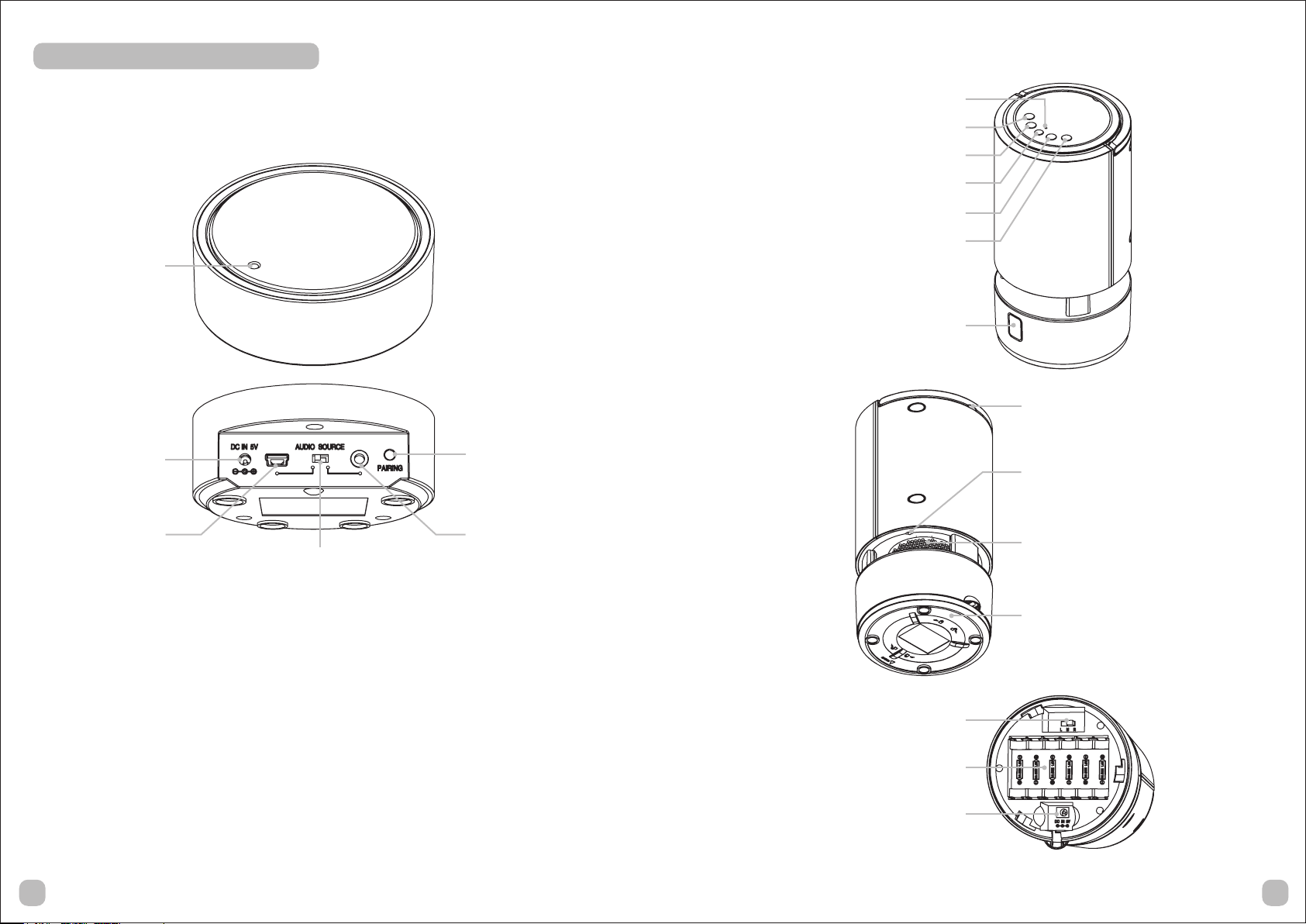
Power LED
DC Jack
Mini USB Jack
Audio Source Switch
Pairing Button
3.5mm Audio Jack
Power LED
Pairing Button
VOL.- Button
Power ON/OFF Button
VOL.+ Button
Light Button
Remote Control Receiver
Handle
Illuminated LED
Driver
- Connect with audio devices
• Connect the supplied AC/DC Power adapter to an electrical wall AC outlet.
• Switch the AUDIO SOURCE to the RIGHT side (towards 3.5mm audio jack).
• Plug the AC/DC Power adapter in the DC jack located on the rear of the transmitter.
• Then the transmitter will turn ON automatically and the Power LED of transmitter will flash.
• You can connect different kinds of audio devices to the 3.5mm audio jack of transmitter by
using the 3.5mm audio cord.
• Once the audio device turn ON and play the audio source, the Power LED of transmitter will
turn ON (not flashing).
- Connect with PC
• Switch the AUDIO SOURCE to the LEFT side (towards USB jack).
• You can connect your PC to the USB jack of the transmitter by using the USB cable.
• When your PC is turned ON, the PC will provide power to the transmitter through the USB jack
and cable. The LED of transmitter will flash. You are no need to use the provide adapter for
power supply.
• When you play the audio source in PC, the LED of transmitter will turn ON (not flashing).
Bottom Cover
Audio Channel Switch
Battery Compartment
DC Jack
0807
Page 8
- Audio receiving
• Connect the supplied AC/DC Power adapter to an electrical wall AC outlet, then plug them to
the DC jack at the bottom of the speaker receiver or insert 6 pieces ‘AA’ size ALKALINE
batteries into the battery compartment with correct polarity at the bottom of the speaker receiver
(batteries not included in the package).
• Press and hold the POWER ON/OFF button to turn on the speaker receiver. The Power LED will
flash.
• When the transmitter is connecting with audio devices / PC which are playing music. The Power
LED of speaker receiver turns ON (non flashing) and will play the music.
• You can adjust the volume to your desired listening level by pressing VOL.+ or VOL.- volume
button.
5. COMPONENT IDENTIFICATION
Transmitter
- Audio channel selection
• You can select the audio channel by using the audio channel switch under the speaker receiver
• You can select Left channel (L), Right channel (R) or Forced mono (M).
• If one speaker receiver is selected Left channel, another is selected Right channel. Then you
can hear the stereo.
- Standby
• You can change the speaker receiver from operation mode to standby mode by press the
POWER ON/OFF button once. The Power LED of the speaker will turn OFF.
• When the speaker receiver does not receive any music over 10 minutes in operation mode, the
speaker receiver also changes to standby mode automatically.
- Illuminated LED
• There are 3 illuminated LEDs beside the driver of the speaker receiver. Press the LIGHT button
of the speaker receiver, all 3 LEDs will turn ON.
- Handling
• There is a handle on the top of the speaker receiver. It will let you to carry it easily when you are
using batteries as the power for the speaker receiver.
Pairing
Each transmitter can connect with more than one speaker receiver. You can pair other speaker
receivers by following steps:
• Connect the supplied AC/DC Power adapters to both transmitter and speaker receiver and turn
on the speaker receiver.
• Connect audio source with transmitter and PLAY the audio source.
• The Power LED of speaker receiver should be flashing and the Power LED of transmitter is ON
• Press and hold the PAIRING button at the back of the transmitter over 3 second, until the Power
LED is fast flashing.
• Press and hold the PAIRING button of speaker receiver over 3 second, until the Power LED
become fast flashing and the speaker receiver has pairing voice.
• If pairing is success, both Power LEDs will ON and stop flashing and the speaker receiver will
play the music.
• If you could hear the interference, you can pair the transmitter and speaker receiver again.
When transmitting / receiving over long distances, the signal from the system will become
weaker.
x 1
Speaker receiver
x 2
Remote control Power adapter
x 1
DC 5V x 1
(for Transmitter)
Audio cord
*This device must be used with the AC/DC power adapters supplied in the package.
x 1
DC 9V x 2
(for Speaker receiver)
0609
 Loading...