

Page 1
Installation Guide
XX256-22-00
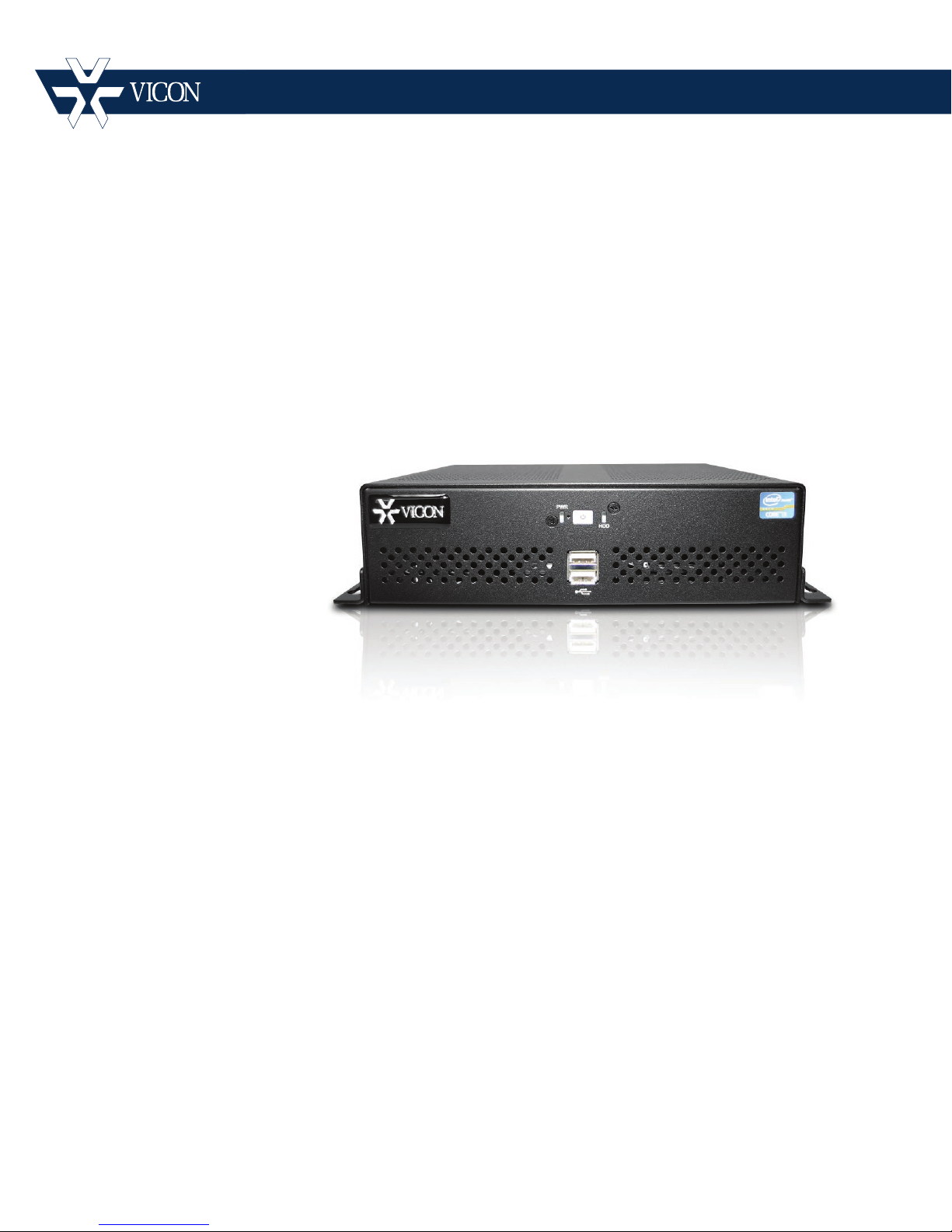
VN-DECODER-2V8 Decoder for
Tel: 631-952-2288 Fax: 631-951-2288 Toll Free: 800-645-9116
24-Hour Technical Support: 800-34-VICON (800-348-4266) UK: 44/(0) 1489-566300
Vicon Industries Inc. does not warrant that the functions contained in this equipment will meet your requirements or that the
operation will be entirely error free or perform precisely as described in the documentation. This system has not been designed
to be used in life-critical situations and must not be used for this purpose.
Document Number: 8009-8256-22-00
Product specications subject to change without notice.
the Virtual Matrix System
Vicon Industries Inc.
www.vicon-security.com
Issued: 715
Copyright © 2014 Vicon Industries Inc. All rights reserved.
Page 2

Important Safeguards – I ndoor Use
GRAPHIC SYMBOL EXPLANATION
The lightning bolt symbol alerts the user to the presence of
dangerous voltage that may present the risk of electric shock.
The exclamation point symbol alerts the user to the presence of
important operating and maintenance instructions.
WARNING
To reduce a risk of fire or electric shock, do not
expose this product to rain or moisture.
1. Read Instructions - Read all safety and operating instructions
before the product is operated.
2. Retain Instructions - Retain all safety and operating
instructions for future reference.
3. Heed Warnings - Pay attention to all product warnings.
4. Follow Instructions - Follow all operating instructions.
5. Installation and Wiring - The equipment shall be installed and
wired in accordance with the National Electrical Code,
ANSI/NFPA 70.
6. Cleaning - (Do not use caustic, abrasive or aerosol
cleaners)
a) For units that CAN BE DISCONNECTED from the power
source, use a damp cloth for cleaning.
units that CANNOT BE DISCONNECTED from the power
b) For
source, use a damp cloth for cleaning and do not allow
moisture or liquids to enter vents.
7. Attachments - Use only UL Listed Vicon recommended
attachments to prevent unit damage and personal injury.
8. Water and Moisture - Use only product s designed f or outdoor
environments where they will be exposed to water or moisture.
9. Accessories - Do not place the unit on an unstable surface to
avoid falling. Use only UL Listed Vicon recommended mounting
accessories.
10. Ventilation - Do not block ventilating slots and openings as
they ensure reliable operation. Do not place the unit near a heat
source or into an enclosure unless recommended by Vicon.
11. Grounding - Only products equipped with a 3-prong
grounded plug should be inserted into a grounded power outlet.
Contact an electrician to replace an obsolete outlet. Do not force
a plug into a non-grounded outlet.
12. Power Cord Protection - Power supply cords should not be
routed in trafficked areas or in tight spaces where they will be
pinched or used to bear weight. Allow some slack in the cord
where it enters the unit.
13. Lightning - Disconnect the product from its power source and
cable system when possible to prevent damage due to lightning
and power-line surges.
14. Power Lines - Do not locate outside cables over power or
utility lines where they can fall and make direct contact. Contact
with power lines can be fatal.
15. Overloading - Do not overload wall outlets and extension
cords to prevent risk of fire and electric shock.
16. Object and Liquid Entry - Never probe through, or spill liquid
into, enclosure openings to prevent risk of fire or electric shock.
17. Servicing - Refer all servicing to qualified service personnel.
18. Damage Requiring Service - Obtain service when:
a) The power-supply cord or plug is damaged.
b) Objects have fallen or liquid has been spilled into the product.
c) The product is not designed for outdoor use and has been
exposed to water or moisture.
d) The product does not operate per the operating instructions.
Perform Vicon recommended adjustments, modifications and
troubleshooting only to avoid unit damage and personal injury.
e) The product has been dropped.
f) The product shows a significant change in performance.
19. Replacement Parts - Use only Vicon specified repl acement
parts or an approved equivalent to prevent unit damage and
injury.
20. Safety Check - Request safety checks to be performed
following repair or maintenance to verify proper operation.
21. ESD Precaution - Take all normal electrostatic disc harge
precautions to avoid component damage during installation and
operation.
22. For 230 VAC Devices Only - When the disconnect device is
not incorporated in the equipment or when the plug on the power
supply is intended to serve as the disconnect device, follow the
guidelines below:
a) For permanently connected 230 VAC units, a readily
accessible disconnect device must be incorporated int o the
site wiring.
b) For 230 VAC units with a plug, the outlet must be installed
near the unit and be easily accessible.
23. For Devices Requiring a Separate Power Supply – All
devices requiring a separate power supply shall be powered by a
UL Listed, Class 2 Power Supply.
24. Lithium Batteries Only:
Fire and burn hazard. Do not recharge, disassemble,
heat above 212°F or incinerate. Keep battery out of
reach of children and in original package until ready
to use. Dispose of used batteries promptly.
Risk of explosion if battery is replaced by incorrect
type. Dispose of used batteries according to the
instructions.
WARNING
Page 3

Important Safeguards – I ndoor Use (Con t )
25. For Rack-Mounted U nits Only – The following precautions apply
to all rack-mounted units.
a) Elevated Operating Ambient - If installed in a closed or multi-unit
rack assembly, the operating ambient temperature of the rack
environment may be greater than room ambient. Therefore,
consideration should be given to installing the equipment in an
environment compatible with the m aximum ambient temperature
(Tma) specified by the manufacturer.
b) Reduced Air Flow - Installation of the equipment in a rack should
be such that the amount of air flow required for safe operation of
the equipment is not compromised.
c) Mechanical Loading - Mounting of the equipment in the rack should
be such that a hazardous condition is not achieved due to uneven
mechanical loading.
d) Circuit Overloading - Consideration should be given to the
connection of the equipment to the supply circuit and the effect that
overloading of the circuits might have on overcurrent protection and
supply wiring. Appropriate consideration of equipment nameplate
ratings should be used when addressing this concern.
e) Reliable Earthing - Reliable earthing of rack-mounted equipment
should be maintained. Particular attention should be given to
supply connections other than direct connections to the branch
circuit (e.g. use of power strips).
Page 4

Quick Guide | 3
V
N-DECODER-2 V8 Quick Guide
This manual provides a quick ov er view for the configuration and
operation of the VN-DECODER-2V8 Decoder for u s e w it h t he Virtual
Matrix Display Controller.
The VN-DECODER-2V8 is a key part of the ViconNet ® Virt ual Matrix
Display Controller (VM DC ) system. Used in conjunction with the VMDC,
network data is received and converted from a digital IP source to an
analog output for display on any monitor with a DVI or HDMI input (a DVI
to VGA adapter can be used if VGA connection is required). Thi s enables
distribution directly to a m onitor and offers an alternative display method
to the PC-based client.
Full functionality of Vicon Net is provided regardless of what type of
monitor is used. The VN-DECODER-2V8 als o supports monitor wall
designs that are typical of large-scale video surveillance in st allations,
such as casinos, correctional facilities, airports and hospitals.
Rev 512
Page 5
4 | Quick Guide
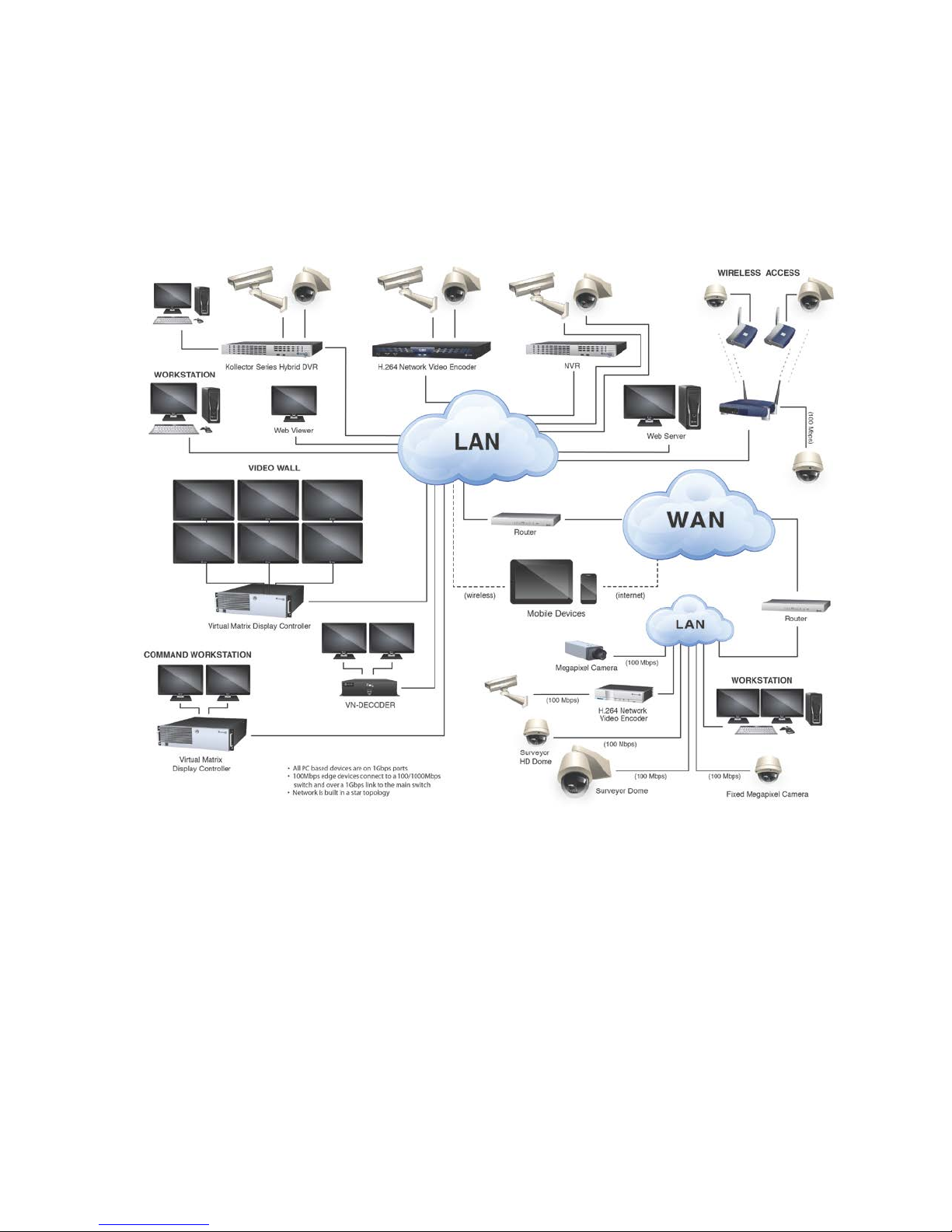
System Architecture
Page 6
Connecting the VN-DECODER-2V8
The VN-DECODER-2V8 is meant to work with a Virtual Matrix Disp lay
Controller (VMDC) to decode digital video for display on monitors.
Rear Panel Connections
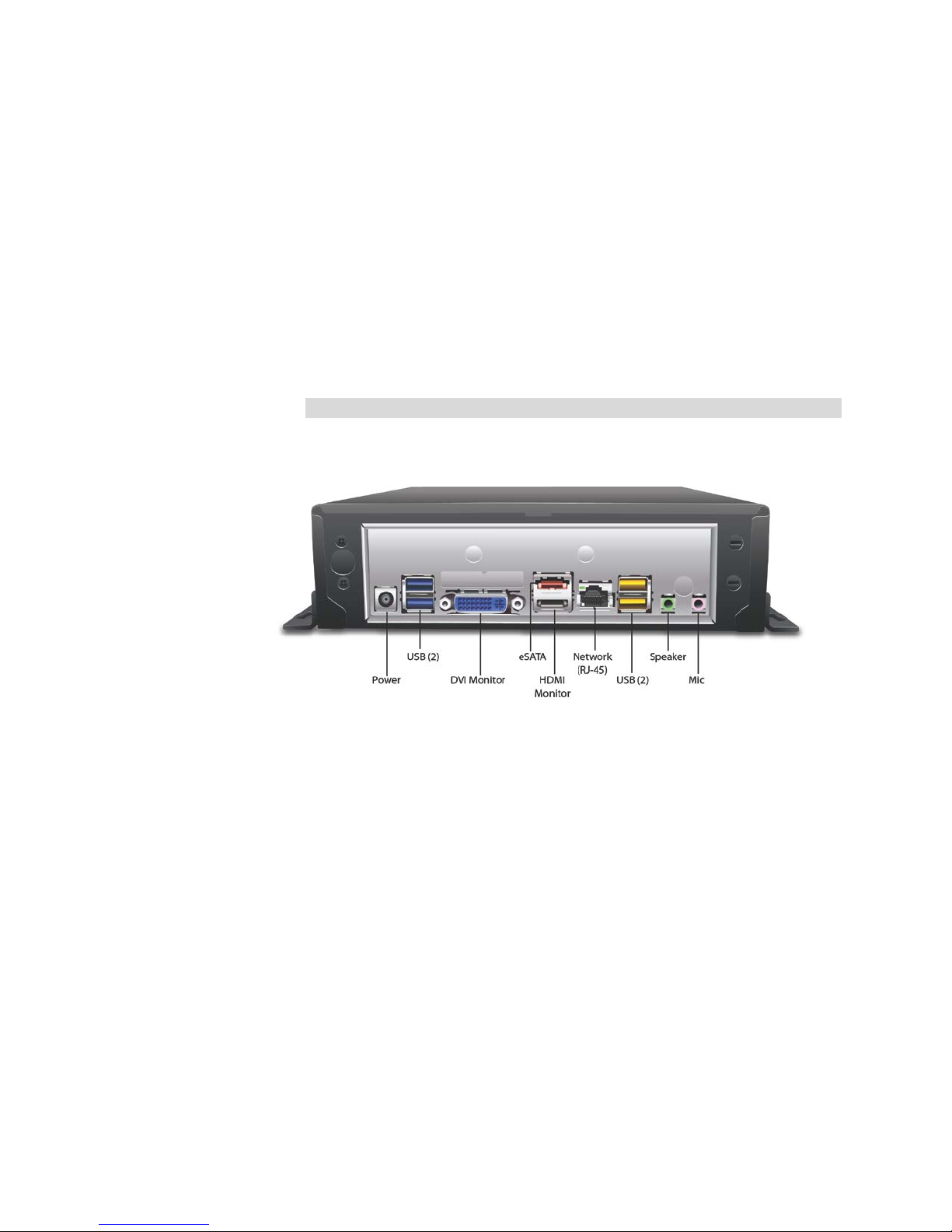
Refer to the figure below for a des cr i pt ion of the rear panel connecti ons.
Note
Ports may vary subject to v ar iat ions in hardware, but will be similar in
function.
Quick Guide | 5
• Power R ec eptacle: Used to connect the provided power cable
to a power source.
• USB 3.0 Ports (2): Used to connect t o US B devices such as a
mouse, keyboard, printer, flas h drive, etc. (supports USB 3.0
specification).
• DVI (1): Connect to a monitor with a DVI connector; adapter
provided for VGA connect ion.
• eSATA/HDMI Combo Port (1): Used to connect t o an external
SATA device; connect to a monitor with an HDMI connector.
• Network Port: A standard RJ-45 connector used to connect to
a LAN/WAN. Vicon recommends using a 1 GB link at all
times.
• USB Ports (2): Used to connect t o USB devices such as a
mouse, keyboard, printer, flas h drive, etc.
• Speaker (Line Out), Mic In Jacks: Used to connect audio
devices and microphones.
Rev 512
Page 7

6 | Quick Guide
Mounting
The VN-DECODER-2V8 can be desk-top/wall or VESA mounted.
Desktop
The VN-DECODER-2V8 can rest on a clean and dry flat service;
additionally, it can be secured to the surface through the screw slots in
the flange. The desk or table mu s t pr ovide a surface of suitable strengt h
to support the weight of the VN-DECODER-2V8. In addition, there must
be enough area left aroun d t he unit t o pr ovide suitable airflow for cooling.
Warning
Failure to leave space for cool in g m ay result in malfunctioning an d
possible failure of the VN-DECODER-2V8.
VESA
Four standoff (4) screws are pr ovided to specifically mount the
VN-DECODER-2V8 to a VESA bracket. Follow the instructions for the
bracket.
VN-DECODER-2 Connections
After the VN-DECODER-2V8 is permanently mounted, the connections
are made. Refer to Rear Panel d iagram and System diagram as needed.
Important Notes
• The connection of external hardware may require simple hand
tools.
• Do not a pply power or plug-in the VN-DECODER-2V8 to any
outlet until instructed to do so. Disable the AC power to prevent
installer injury and damage to the unit.
• Before beginning the hardware inst allation, ensure that the
following environmental conditions have been met:
• The sur face on which the VN-DECODER-2V8 hardware is to
be placed must be level.
• The roo m or ar ea designated for the VN-DECODER-2V8
hardware installation mus t be w ell ventilated.
Make the following connections to the VN-DECODER-2V8:
Note
A mouse and keyboard are r equired for setup only.
Page 8

Quick Guide | 7
• Posit io n t he monitor(s) in a permanent fixed location. Connect the
monitor to the appropriate connector, DVI or HDMI (a DVI-VGA adapter
can be used if required).
Note
There is a ferrite supplied in the accessory kit. To comply with FCC and
CE, this ferrite must be installed onto t he VN-DECODER-2V8 side of the
HDMI cable.
• Inser t one si de of a standard LAN cable to the network port’s RJ-45
connector. Insert the other RJ-45 connector into the LAN side of the
network.
• Inser t t he connector of the provided power supply into the
VN-DECODER-
2V8’s power receptacle. Do not connect the
remaining end to a power recept acle until instructed.
• Connect t he monitor(s) to the power sourc e and switch on.
To ensure that the VN-DECODER-2V8 is protected dur in g a pow er failure
and that no important data is lost, it m ust be connected to an
uninterruptible power source (UPS) before use.
• Connect t he VN-DECODER-
2V8's power supply to the UPS pow er
receptacle.
• Connect t he UPS power cord to the wall outlet.
• Power on t he UPS and ensure that it is wor king properly.
• Power on t he VN-DECODER-
2V8.
Rev 512
Page 9
8 | Quick Guide
Configuring the VN-DECODER-2V8
After all connections are ma de, the VN-DECODER-2V8 can be
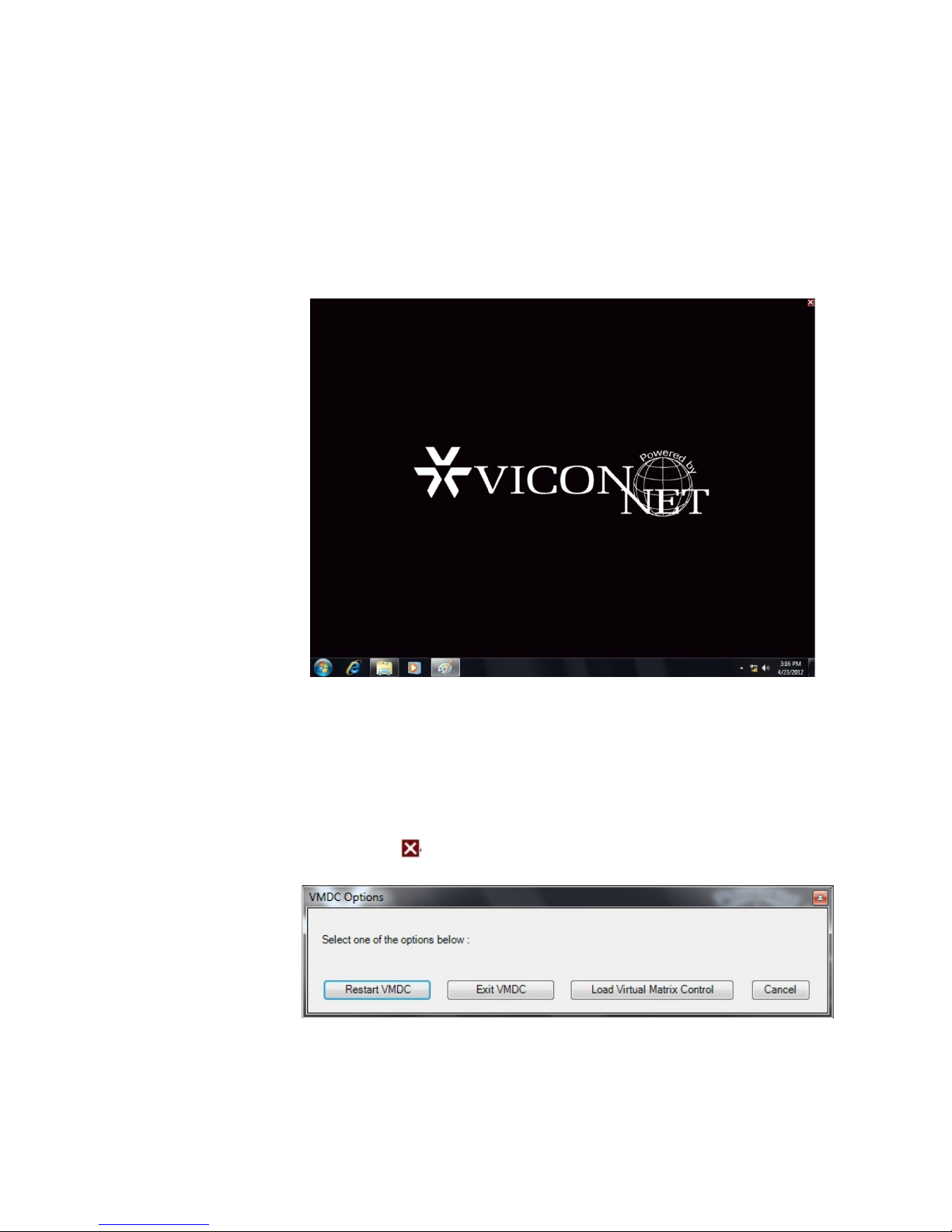
configured; the unit is factory set as a decoder. Upon power up, the
following screen displays.
Connecting the VN-DECODER-2V8 to the Controlling VMDC
Before the VN-DECODER-2V8 can be used with the VMD C system, you
must set the IP address of the unit from Windows® network settings.
Next, you must login to the VMDC software on the unit to connect t o t he
Nucleus.
Click the red in top right corner of the s cr een. The following popup
screen displays.
Select Load Virtual Matrix Control.
Page 10
Login
Quick Guide | 9
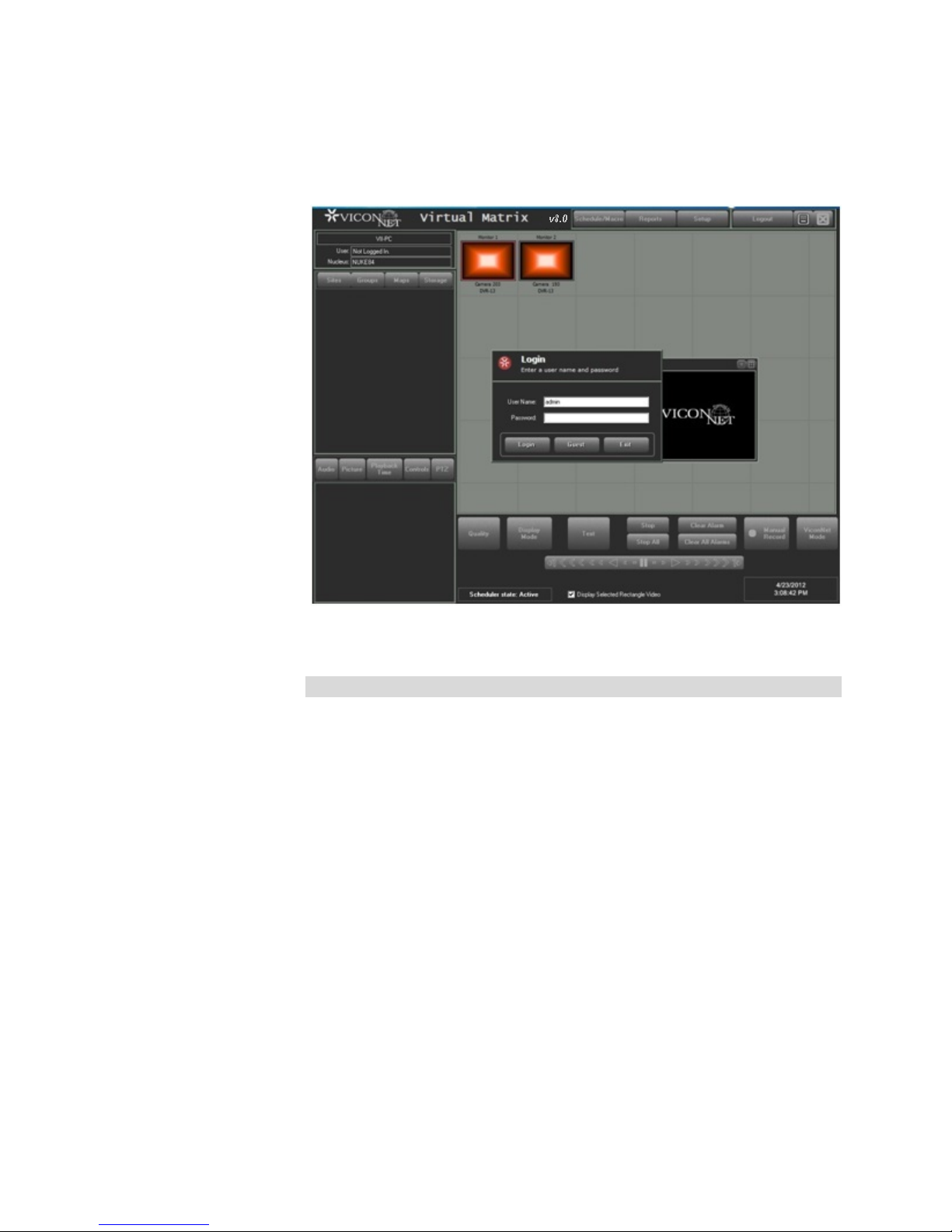
The Login screen disp lays as below.
Enter a User Name and Password. The default login is User Name
“admin” and no Password. Click Login.
Note
Monitor icons will not show on init ial s et up.
Rev 512
Page 11
10 | Quick Guide
Configuration
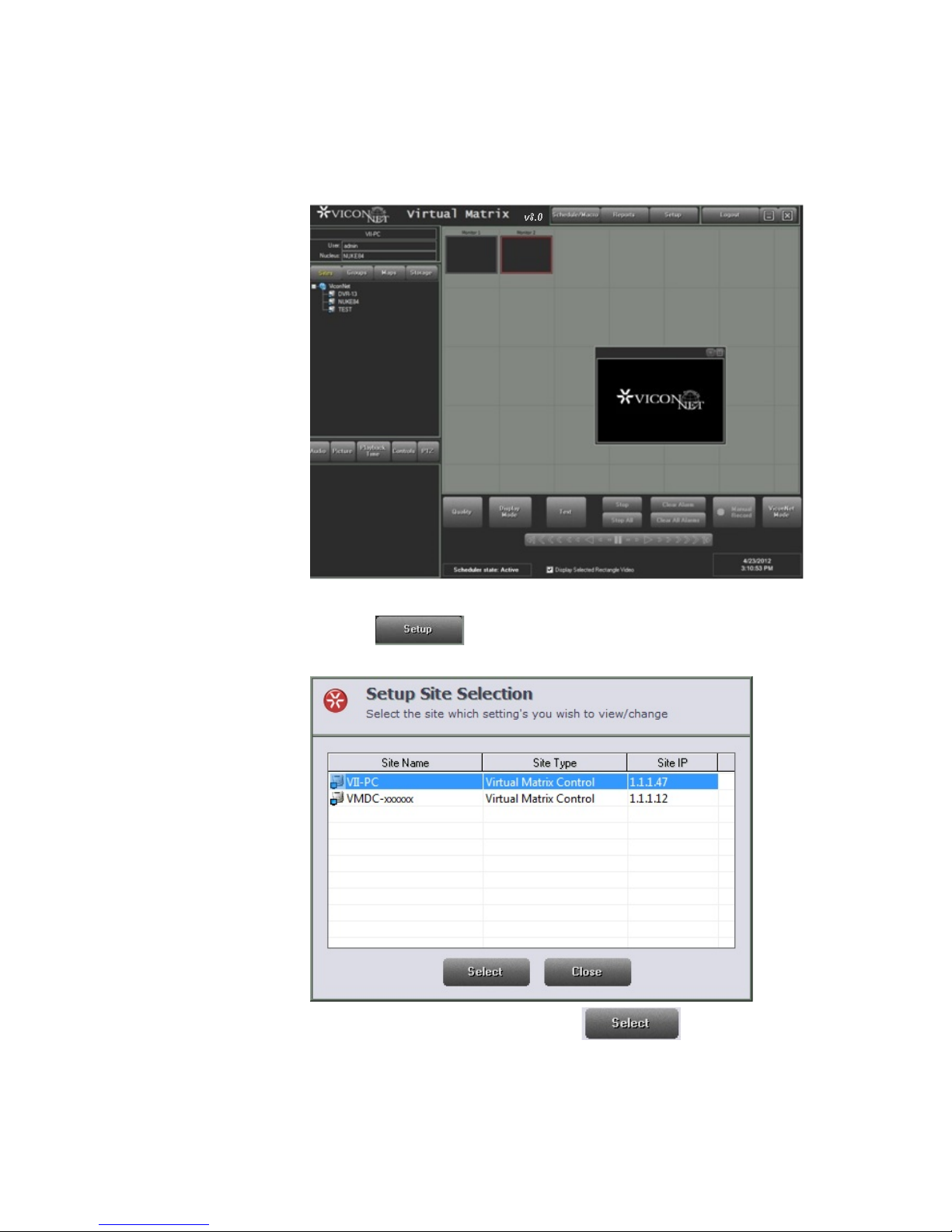
After Login, the Virtual Mat r ix ma in s cr een displays.
Click the button at the top of the screen. The Setup Sit e
Selection list displays.
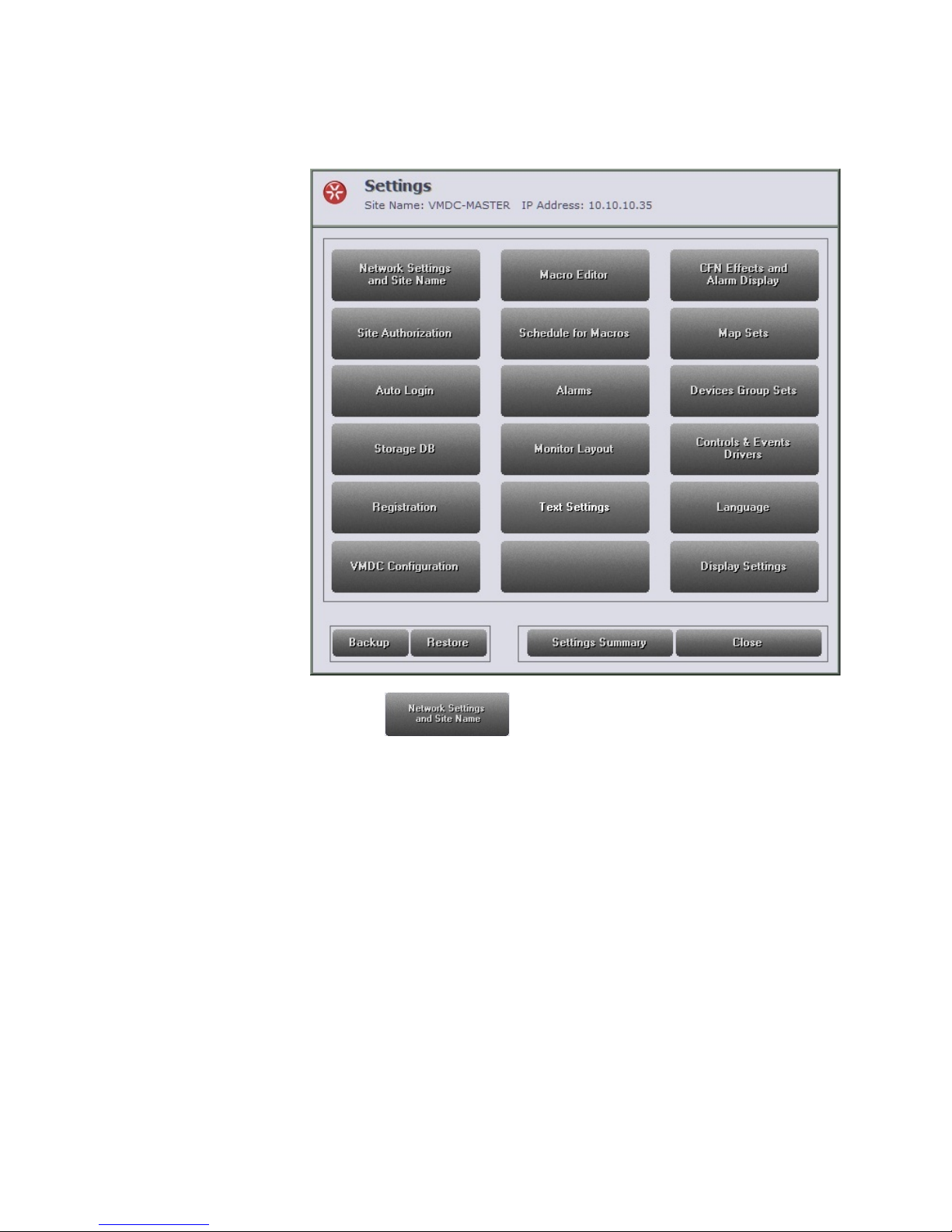
Select your unit from the list and click ; the Settings screen
displays.
Page 12
Quick Guide | 11
Select the button to connect the VN-DECODER-2V8 to
the Nucleus of the system.
Rev 512
Page 13
12 | Quick Guide
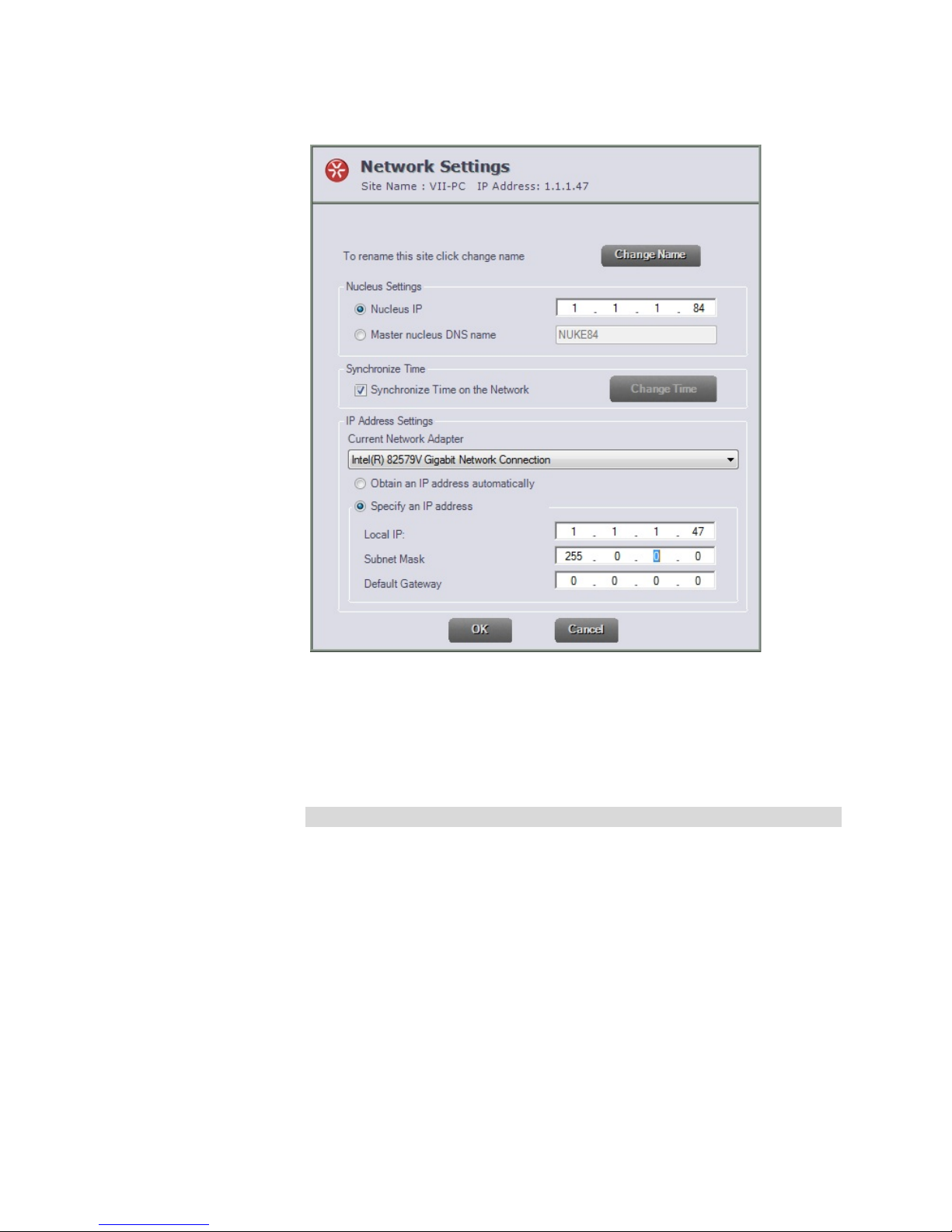
From the Network Settings screen, enter the IP of the Nucl eus of the
system and click OK; the application wil l rest ar t.
Once the Nucleus is defin ed, any VMDC connected to it will now b e
connected to the VN-DECODER-2V8 and the decod er can now be
controlled remotely by a VMDC on the network.
Note
You can disconnect the mouse a nd keyboard after setup is compl et e.
Page 14

Shipping Instr u cti o ns
Use the following procedure when returning a unit to the factory:
1. Call or write Vicon for a Return Authorization (R.A.) at one of the locations listed below.
Record the name of the Vicon employee who issued the R.A.
Vicon Industries Inc.
135 Fell Court
Hauppauge, NY 11788
Phone: 631-952-2288; Toll-Free: 1-800-645-9116; Fax: 631-951-2288
For service or returns from countries in Europe, contact:
Vicon Industries (U.K.) Ltd
Brunel Way
Fareham, PO15 5TX
United Kingdom
Phone: +44 (0)1489/566300; Fax: +44 (0)1489/566322
2. Attach a sheet of paper to the unit with the following information:
a. Name and address of the company returning the unit
b. Name of the Vicon employee who issued the R.A.
c. R. A. number
d. Brief description of the installation
e. Complete description of the problem and circumstances under which it occurs
f. Unit’s original date of purchase, if still under warranty
3. Pack the unit carefully. Use the original shipping carton or its equivalent for maximum
protection.
4. Mark the R.A. number on the outside of the carton on the shipping label.
Page 15

Vicon Standard Equipment Warranty
Vicon Industries Inc. (the “Company”) warrants your equipment to be free from defects in material and
workmanship under Normal Use from the date of original retail purchase for a period of three years, with the
following exceptions:
1. All IQEYE Cameras: Two years if purchased before 1/1/2011.
2. Alliance-mini (IQD3xx), Alliance-mx (IQMxxx) and 3 Series (IQ03xx): Five years if purchased
between 1/2/2011 – 12/31/2014.
3. Alliance-Pro (IQA3xx): Five years if purchased between 3/2/2012 – 12/31/2014. Three years if the
motorized lens (IQA3xx-A3) option.
4. Uninterruptible Power Supplies: Two years from date of original retail purchase.
5. VDR-700 Recorder Series: One year from date of original retail purchase.
6. V5616MUX: One year from date of original retail purchase.
7. Arecont Cameras: One year from date of original retail purchase.
8. FMC series fiber-optic media converters and associated accessories: Lifetime warranty.
9. For PTZ cameras, “Normal Use” excludes pro long ed use of lens and pan-and-tilt motors, gear
heads, and gears due to continuous use of “autopan” or “tour” modes of operation. Such
continuous operation is outside the scope of this warranty.
10. Any product sold as “special” or not listed in Vicon’s commercial price list: One year from date of
original retail purchase.
NOTE:
• If the product is to be used outdoors or in dusty, humid, or other hostile environments, it must be
suitably protected.
• Camera products must be protected, whether in use or not, from exposure to direct sunlight or
halogen light as the light may damage the camera image sensor. This applies to both indoor and
outdoor use of the cameras.
• For camera products supplied without a lens, extreme care should be used when mounting a lens
on these products. Damage to the product due to incorrectly mounted lenses will invalidate this
limited hardware warranty.
• Failure to comply with any of the aforementioned requirements will invalidate this Limited Hardware
Warranty.
Date of retail purchase is the date original end-user takes possession of the equipment, or, at the sole
discretion of the Company, the date the equipment first becomes operational by the original end-user.
The sole remedy under this Warranty is that defective equipment be repaired or (at the Company’s option)
replaced, at Company repair centers, provided t he equ ipment ha s been authorized for retu rn by t he Com pany,
and the return shipment is prepaid in accordance with policy. Repaired or replacement hardware will be
warranted for the remainder of the original Warranty Period or ninety (90) days, whichever is longer. When a
product or part is exchanged the replacement hardware becomes the property of the original purchaser and
all hardware or part thereof that is replaced shall become the property of Vicon.
The warranty does not apply (a) to faulty and improper installation, maintenance, service, repair and/or
alteration in any way that is not contemplated in the documentation for the product or carried out with Vicon
consent in writing, operation adjustments covered in the operating manual for the product or normal
maintenance, (b) to cosmetic damages, (c) if the product is modified or tampered with, (d) if the product is
damaged by acts of God, misuse, abuse, negligence, accident, normal wear and tear and deterioration,
improper environmental conditions (including, but not limited to, electrical surges, water damage, chemical
exposure, an/or heat/cold exposure) or lack of responsib le c are, (e) if the product has had the model or serial
number altered, defaced or removed, (f) to consumables (such as storage media or batteries) (g) to products
that have been purchased “as is” and Vicon the seller or the liquidator expressly disclaim their warranty
obligation pertaining to the product, (h) to any non-Vicon hardware product or any software (irrespective of
packaged or sold with Vicon hardware product) and Vicon products purchased from an unauthorized
distributor/reseller, (i) to d ama ge that o ccurs in shipment or (j) to damages by any other causes not related t o
defective design, workmanship and/or materials.
The warranty for the products shall run from Vicon to End User customers only (including product purchased
through authorized partners an d resellers). Vicon is not obligated under any circumstances to honor warrantie s
on product(s) purchases from internet auction sites including eBay, uBid or from any other unauthorized
resellers. Except as explicitly provided herein, Vicon disclaims all other warranties, including the implied
warranties of fitness for a particular purpose and merchantability.
Software supplied either separately or in hardware is furnished on an “As Is” basis. Vicon does not
warrant that such software shall be error (bug) free. Software support via telephone, if provided at no
cost, may be discontinued at any time without notice at Vicon’s sole discretion. Vicon reserves the
right to make changes to its software in any of its products at any time and without notice.
Page 16

The Warranty and remedies provided above are exclusive and in lieu of all other express or implied
warranties including, but not limited to, the implied warranties of merchantability or fitness for a
particular purpose. Certain jurisdictions do not allow the exclusion of implied warranties. If laws
under such jurisdictions apply, then all express and implied warranties are limited to the warranty
period identified above. Un less provided herein , any statements or repres entations made by any other
person or firm are v oid. Exce pt as provided in this written warranty and to th e extent p ermitted by law,
neither VIcon nor any affiliated shall be liable for any loss, (including loss of data and information),
inconvenience, or damage, including, but not limited to, direct, special, incidental or consequential
damages, resulting from the use or inability to use the Vicon product, whether resulting from breach
of warranty or any other legal theory. Notwithstanding the foregoing, Vicon total liability for all claims
under this warranty shall not exceed the price paid for the product. These limitations on potential
liabilities have been an essential condition in setting the product.
No one is authorized to assume any liability on behalf of the Company, or impose any obligations on it in
connection with the sale of any Goods, ot her than that which is spe cifi ed above. In no ev ent will the Company
be liable for indirect, special, incidental, consequential, or other damages, whether arising from interrupted
equipment operation, loss of data, repl ac ement of equipment or software, costs or repairs undertaken by the
Purchaser, or other causes.
This warranty applies to all sales made by the Company or its dealers and shall be governed by the laws of
New York State without reg ard to its con flict of law s principles. This Warranty shall be enforc eable aga inst t he
Company only in the courts located in the State of New York.
The form of this Warranty is effective February 1, 2015.
THE TERMS OF THIS WARRANTY APPLY ONLY TO SALES MADE WHILE THIS WARRANTY IS IN
EFFECT. THIS WARRANTY SHALL BE OF NO EFFECT IF AT THE TIME OF SALE A DIFFERENT
WARRANTY IS POSTED ON THE COMPANY’S WEBSITE, WWW.VICON-SECURITY.COM. IN THAT
EVENT, THE TERMS OF THE POSTED WARRANTY SHALL APPLY EXCLUSIVELY.
Vicon Part Number: 8006-9010-03-11 Rev 0215
Page 17

Vicon Industries Inc.
For office locations, visit the website:
www.vicon-security.com
 Loading...