

Page 1
USER MANUAL
Page 2
1
VICAIR ACTIVE O2
USER MANUAL
Dear customer,
Product name:
Vicair Active O2
Netherlands
Warranty:
24 months
1,5 kg / 3.3 lbs
the manual
Used materials:
All latex free
polyester fabric
filling:
low friction coating
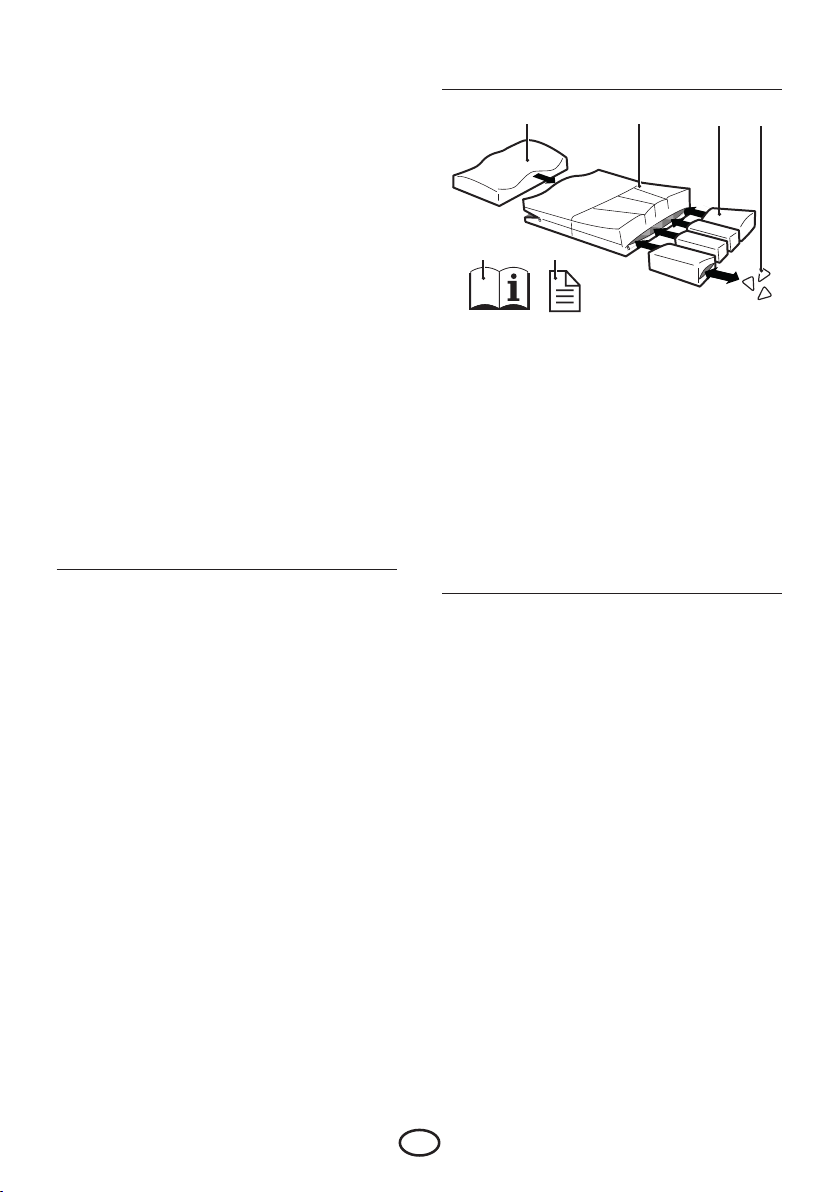
MAIN COMPONENTS
A B C D
ank you for choosing a Vicair® product . We
are sure you will appreciate the simplicity,
reliability and fantastic eect. For quick
installation you can use the quick installation
guide provided with your cushion. In addition,
please read and understand this user manual
before use. Save both the Quick Installation
Guide and this manual for future reference.
For more information or to (re)order manuals,
contact your country’s distributor.
Go to vicair.com for distributor information.
INTRODUCTION
e Vicair Active O2 is a wheelchair seat cushion
that provides a high level of skin protection for
active wheelchair users with a high risk of
developing pressure ulcers. e Vicair Active O2
allows easy transfers and provides stable body
support, comfort and pressure ulcer prevention.
It is also a high performance addition to a
pressure ulcer treatment plan (stage I-IV).
e Vicair Active O2 cushion is machine
washable without removing the SmartCells! You
only have to take out the foam inlay.
E F
A Foam inlay with fluid-resistant foam inlay
liner, placed in front compartment
B Vicair Active O2 Cover
C SmartCell liners, placed in four rear
compartments
D SmartCells™
E User manual
F Quick Installation Guide
GENERAL PRODUCT SPECIFICATIONS
Manufactured by: Vicair B.V., e
Weight (excl.
cover):
Available sizes: See the grid in the back of
Smallest size:
1 kg / 2.2 lbs
Medium size:
1,2 kg / 2.6 lbs
Largest size:
SmartCell liners: Polyurethane coated
SmartCell liner
EN
Air-filled SmartCells with
3
Page 3

Foam inlay:
Polyether
Foam inlay liner: Fluid-resistant
polyester fabric
fabric.
polyurethane coated
Active O2 Cover: Top: Knitted polyester
mesh fabric. Sides:
Polyurethane coated
nylon fabric. Bottom:
Knitted polyester mesh
Covers are machine washable. Covers comply
with EN1021-1, 1021-2 and CAL117.
PRECAUTIONS AND SAFETY
INSTRUCTIONS
A Vicair wheelchair seat cushion may only be
used as a wheelchair seat cushion. e use of
this product in any other way, is considered to be
misuse. Vicair B.V. cannot be held responsible
for damage caused by misuse, improper use or
negligence. Make sure that you read and
understand this manual completely.
Warning! Vicair B.V. recommends to install the
product under direct supervision of a therapist
or technical advisor.
Warning! Your tailbone and pelvic bones should
not touch the bottom of the cushion. Checking
for “bottoming out” should be done during first
use and after adjustments to the cushion filling.
Warning! Make sure that your tailbone and
pelvic bones are resting on the rear
compartments with SmartCell liners, not on the
foam inlay.
Warning! Check your skin regularly for redness,
especially during the first few days. If redness
occurs and does not disappear after 15 minutes,
consult your therapist or technical advisor.
Warning! Make sure the SmartCell liners are
placed in the correct compartment (see
SmartCell liner label).
Warning! Vicair B.V. recommends to adjust the
filling grade under the direct supervision of your
therapist or technical advisor.
Warning! No testing data is currently available
about the safe use of Vicair wheelchair cushions
in motor vehicles. erefore we do not
encourage using the wheelchair cushion in
motor vehicles.
Warning! In case of soiling with body fluids, and
when transferring the product to another user,
the product must be disinfected to avoid cross
contamination.
Warning! Every three months, check the product
for wear and deflated cells. In case of serious
damage, or a large number of deflated cells, do
not continue to use the product. Consult your
dealer.
Caution! Do not use or leave the product close
to a naked flame or a high temperature heat
source.
Caution! Do not steam clean or autoclave the
product. e product cannot withstand
excessive heat or pressure. When the given
cleaning instructions are not followed, it is very
likely that the product will age more rapid.
Caution! Remove foam inlay before washing this
cushion in a washing machine.
Caution! Do not use the foam inlay without the
foam inlay liner.
Caution! Do not use aggressive or abrasive
cleaners, or sharp objects to clean the cushion.
Caution! Do not place the topside of the Vicair
O2 cushion against the glass of the washer door.
Caution! Make sure the cushion cannot interfere
with the wheel spokes.
INSTALLATION
Warning! Vicair B.V. recommends to install the
product under direct supervision of a therapist
or technical advisor.
Warning! Make sure that your tailbone and
pelvic bones are resting on the rear
4
EN
Page 4

compartments with SmartCell liners, not on the
foam inlay.
Caution! Make sure the cushion cannot interfere
with the wheel spokes.
Caution! Do not use the foam inlay without the
foam inlay liner.
Notice! Make sure that the wheelchair seat is
clean and degreased.
Tip: When you prefer not to use the Velcro, you
can remove the Velcro strips. Note that the strips
confected to the bottom of the cushion cannot
be removed.
Perform the following steps when installing the
Vicair Active O2
ese steps correspond to the installation
images 1-5 on the Quick Installation Guide.
Image i (I, II & III) shows how to (re)assemble
the cushion (chapter ‘Maintenance and
cleaning’):
• Check cushion size. Width (X) and depth (Y)
of the cushion and seat should match.
• Remove protective backing tape from selfadhesive Velcro strips attached to the bottom
of the cushion.
• Place cushion by pressing firmly. Make sure
the foam inlay is at the front of the
wheelchair seat.
• Sit on the cushion for a few minutes, to allow
the cushion to adapt to your body shape.
• Sit on the cushion for a few minutes, to allow
the cushion to adapt to your body shape.
Make sure that your tailbone and pelvic
bones are resting on the rear compartments
with SmartCell liners, not on the foam inlay.
• If necessary, adjust footrest(s).
Warning! Make sure that your tailbone and
pelvic bones are resting on the rear
compartments with SmartCell liners, not on the
foam inlay.
Warning! Vicair B.V. recommends to adjust the
filling grade under the direct supervision of your
therapist or technical advisor.
• Check for bottoming out, after sitting on the
cushion for approximately 5 minutes.
• Let your therapist or technical advisor slide a
hand between your buttocks and the Vicair
cushion while leaning forward.
• Ask your therapist or technical advisor to
check if your lowest bony prominences are
supported by at least 2,5 cm / 1” of
SmartCells™. is prevents your seat bones
from touching the wheelchair seat.
• Do not use the cushion if bottoming out
occurs. In most cases, adjusting the filling
grade of the SmartCell liners will solve the
problem.
USE
Checking for redness of the skin
Image 7 - Quick Installation Guide
Warning! Check your skin regularly for redness,
especially during the first few days. If redness
occurs and does not disappear after 15 minutes,
consult your therapist or technical advisor.
Adjusting the filling grade
Warning! Vicair recommends to adjust the filling
grade under the direct supervision of your
therapist or technical advisor.
Checking for “bottoming out”:
Image 6 - Quick Installation Guide
Warning! Your tailbone and pelvic bones should
not touch the bottom of the cushion. Checking
for “bottoming out” should be done during first
use and after adjustments to the cushion filling.
Ready for use
is Vicair product is ready for use. It has its own
unique filling grade, depending on size and
model. However – if necessary – the filling grade
can be adjusted by removing or adding
SmartCells from/to the various SmartCell liners.
EN
5
Page 5

You can find the default filling grade on the label
inside the cover.
Warning! Make sure the SmartCell liners are
placed in the correct compartment (see
SmartCell liner label).
Conditions for use and storage
Caution! Do not use or leave the product close
to a naked flame or a high temperature heat
source.
• User weight:
Minimum: 15 kg / 33 lbs,
maximum: 200 kg / 441 lbs
• Temperature:
Minimum: -20 °C / 4 °F,
maximum: 55 °C / 131 °F
• Use at high altitude
Notice! Vicair B.V. recommends not to use
the cushion above 2400 m (8000 ft) above
sea level or below 50 m (164 ft) below sea
level. Because each SmartCell is filled with
air, the cushion may behave dierently when
used at high altitude or in an airplane. Under
such circumstances, the cushion’s firmness
can be adjusted by removing a few cells from
each SmartCell liner.
• Air humidity:
Minimum: 0%, maximum 100%
fastened to the user’s body) can be used if you
require additional protection during
transportation.
Re-use - Transferring the product to another
user
e product is suitable for repeated use. e
number of times it can be used depends on how
often and in which way the product is used. e
product has to be thoroughly cleaned and
disinfected, before another person is allowed to
use the it. See chapter ‘Maintenance and
cleaning’ for instructions.
Notice! Make sure the product is correctly
adjusted to the other person.
Replacing the cover
Under normal use, Vicair B.V. recommends to
replace the cover every year. Replacement
covers can be purchased separately.
Disposal
e disposal and recycling of used devices and
packaging must comply with the applicable legal
regulation. Ensure the product is cleaned prior
to disposal to avoid any risk of contamination.
MAINTENANCE AND CLEANING
Daily flu-up
Vicair B.V. recommends to flu-up the four rear
compartments of your Vicair Active O2 cushion
before use on a daily basis.
Use of Vicair seat cushions in motor vehicles
Warning! No testing data is currently available
about the safe use of Vicair wheelchair cushions
in motor vehicles. erefore we do not
encourage using the wheelchair cushion in
motor vehicles.
As an alternative for your Vicair wheelchair
cushion, the Vicair AllRounder O2 (which can be
6
Warning! Every three months, check the product
for wear and deflated cells. In case of serious
damage, or a large number of deflated cells, do
not continue to use the product. Consult your
dealer.
Warning! Make sure the SmartCell liners are
placed in the correct compartment (see
SmartCell liner label).
Caution! Do not steam clean or autoclave the
product. e product cannot withstand
excessive heat or pressure. When the given
cleaning instructions are not followed, it is very
likely that the product will age more rapid.
EN
Page 6

Caution! Do not use aggressive or abrasive
0
2
3
7
9
1
2
3
4
5
6
7
8
cleaners, or sharp objects to clean the cushion.
Caution! Remove foam inlay before washing this
cushion in a washing machine.
Caution! Do not use the foam inlay without the
foam inlay liner.
Caution! Do not place the topside of the Vicair
O2 cushion against the glass of the washer door.
Cleaning the Vicair Active O2
After you have emptied the storage pouch and
removed the foam inlay, your Vicair Active O2
cushion can be machine washed at 60°C / 140 °F
using an anti-crease cycle and mild detergent.
You do not need to remove the SmartCell liners
before putting the cushion into the washing
machine. Make sure the topside of the cushion
is not placed against the glass of the washer
door. Do not load the machine with more than
half of its maximum load weight. Spin speed
should be reduced. When using a machine with
agitator, make sure that the cushion can move
freely within the drum. Do not use any chlorine
bleach and do not dry clean! Do not tumble dry
your Vicair Active O2 cushion but let it air dry
(5-6 hours).
• Cleaning the foam
Take the foam out of the foam inlay liner and
clean it by using a disinfectant spray.
Disinfecting your Vicair Active O2
Warning! In case of soiling with body fluids, and
when transferring the product to another user,
the product must be disinfected to avoid cross
contamination. Clean the Active O2 cover, foam
inlay and SmartCell liners as instructed above.
Preferably use an anti-bacterial detergent. After
cleaning spray your cover, foam inlay liner and
SmartCell liners with a disinfectant. Bend the
cover compartments outwards to make sure the
spray gets into the gaps.
(Re)assembling your Vicair Active O2
e Vicair Active O2 is fully assembled on
delivery. When it needs to be (re)assembled, for
instance after cleaning, follow the assembly
instructions underneath. e instructions
correspond to image i (I, II & III) on the Quick
Installation Guide.
Cleaning the Vicair Active O2 foam inlay
Do not machine wash the foam inlay and do not
immerse it in water or any other liquid. To clean
the foam inlay you first remove it from its
compartment.
• Cleaning the foam inlay liner
Take the foam out of the foam inlay liner.
e emptied liner can be machine washed at
60°C. Follow the washing instructions on the
label attached to the inside of the liner.
Placing the foam inlay in the Vicair Active O2
cover (image i - I)
Caution! Do not use the foam inlay without the
foam inlay liner.
• Completely open the zipper at the front of
the Active O2 cover.
• Place the foam inlay in the Active O2 cover,
the sloping side pointing to the back of the
cushion and the contoured side on top.
• Close the zipper. Make sure you do not
damage the foam inlay liner.
Adjusting the number of SmartCells in the
SmartCell liners (image i - II)
Warning! Vicair B.V. recommends to adjust the
filling grade under the direct supervision of your
therapist or technical advisor.
EN
7
Page 7

e number of SmartCells in each SmartCell
liner depends on the size of the cushion. You
can find the default filling grade on the label
inside the cushion cover. When it’s necessary to
adjust the number of SmartCells, follow these
steps:
• Open the SmartCell liner’s zipper and add or
remove the desired number of SmartCells.
• Close the zipper. Make sure that you do not
damage the SmartCells.
Placing the SmartCell liners in the Vicair Active
O2 cover (image i - III)
Warning! Make sure the SmartCell liners are
placed in the correct compartment (see
SmartCell liner label).
• Completely open the zipper at the back of
the cushion cover.
• Place the SmartCell liners in the cover. Make
sure you place the correct SmartCell liner in
each compartment. e SmartCell liner’s
label states where it should be placed.
• Close the zipper. Make sure that you do not
damage the SmartCell liners.
Warranty period
From original date of purchase: 24 months.
e SmartCells in this Vicair O2 cushion have a
lifelong warranty period.
Should a defect in materials or workmanship
occur within the above mentioned warranty
period, Vicair B.V. will – at its own choice – repair
or replace the product free of charge.
Remedies for breach of express warranties
herein are limited to repair or replacement of
the product.
In no event shall damages for breach of any
warranty include any consequential damages or
exceed the cost of non-conforming goods sold.
Any questions?
Contact Vicair B.V. at [email protected] or contact
your country’s Vicair distributor.
WARRANTY
Please see www.vicair.com for complete
information on warranty processes, terms and
conditions.
Vicair B.V. oers a limited warranty against
defects in workmanship and materials, provided
the product has been used normally. Any
damage arising from abnormal use, or caused
by improper handling, cleaning, or negligence, is
excluded from this warranty.
8
ENEN
Page 8
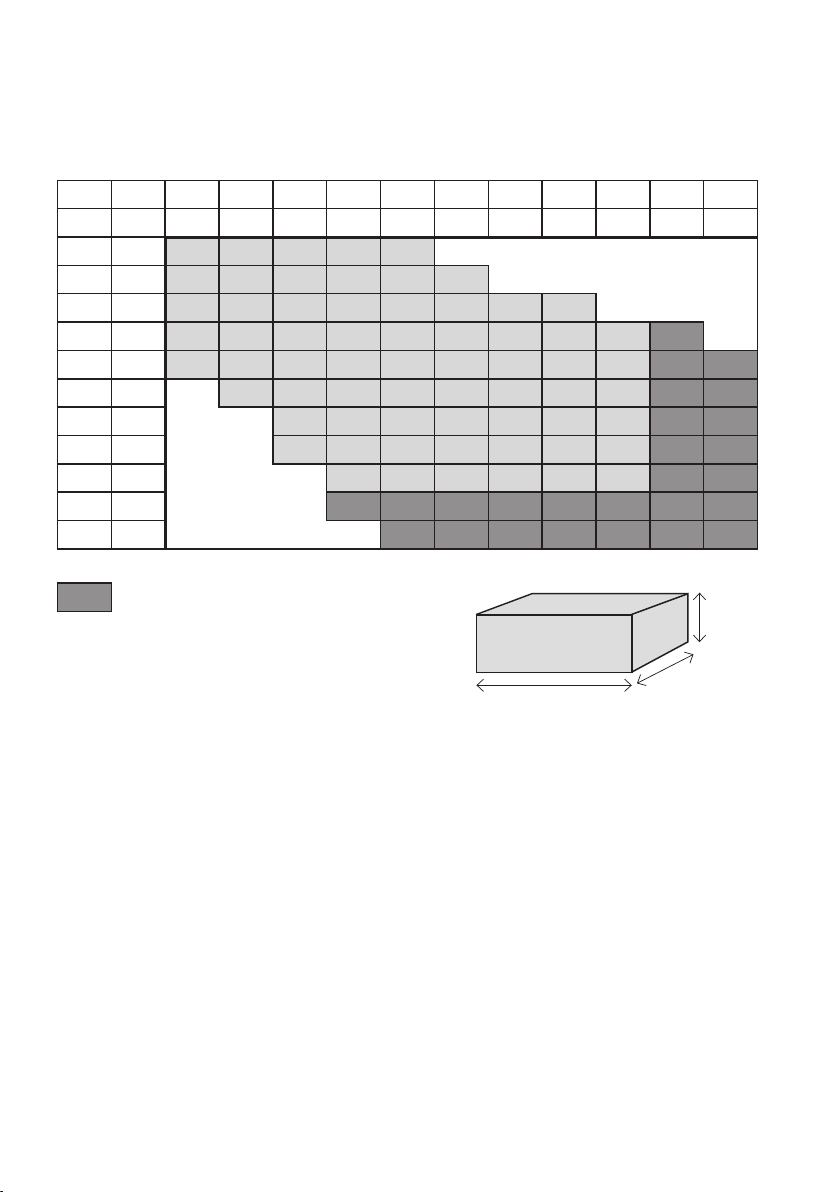
Height Vicair Active O2 6 = 6 cm / 2,5 inch
Height Vicair Active O2 9 = 9 cm / 3,5 inch
Available sizes:
WIDTH
inch 14 15 16 17 18 19 20 21 22 23 24
cm 35 38 40 43 45 48 50 53 55 58 60
14 35
15 38
16 40
17 43
DEPTH
18 45
19 48
20 50
21 53
22 55
23 58
24 60
Only available in height 9 cm / 3,5 inch.
Information about availability of other sizes on request.
Height
Width
Depth
 Loading...