

Page 1
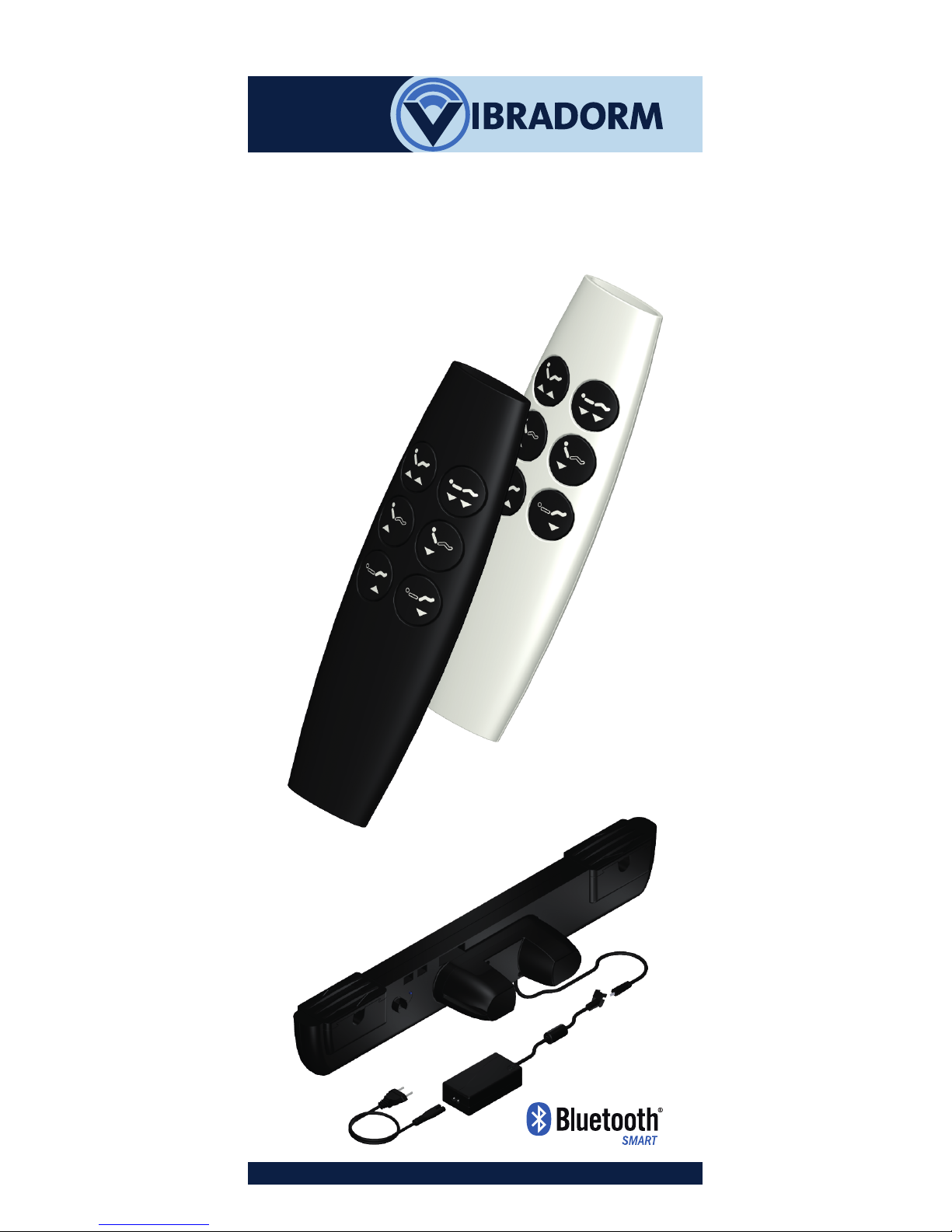
For adjustable beds with a
VIBRADORM dual drive
V-MAT-Basic
Radio transmitter
VFF/DB-Basic
with Bluetooth-Technology
Operating Instructions
(Translation of the original
operating instructions)
Page 2

2
Foreword
Revision history
Version Date
1.0 01.06.2016
Change
First edition
In your own interest
Read these operation instructions and
keep them in a safe place. Observe the
safety instructions.
Disclaimer
We would like to point out that the
company VIBRADORM GmbH will not
assume any liability for injuries or damage
that occurs as a result of
■ non-observance of these operating
instructions,
■ changes to the product that were not
approved by VIBRADORM GmbH, or
■ the use of spare parts not
manufactured or released by
VIBRADORM GmbH, or
■ plug-in parts not manufactured or
released by VIBRADORM GmbH.
Manufacturer's address
VIBRADORM GmbH
Relystraße 38
64720 Michelstadt
GERMANY
Tel.: ++49 (0)6061 / 94 44 0
Fax: ++49 (0)6061 / 94 44 10
http://www.vibradorm.de
E-Mail: [email protected]
Foreword
Page 3

3
Table of contents
Foreword 2
Revision history 2
In your own interest 2
Disclaimer 2
Manufacturer's address 2
Table of contents 3
1 General . . . . . . . . . . . . . . . . . . . . . . . . . . 4
1.1 How to use these instructions . . . . . . . . 4
1.2 Information about these operating
instructions. . . . . . . . . . . . . . . . . . . . . . . . 4
2 Safety instructions . . . . . . . . . . . . . . . . 4-6
2.1 Intended use. . . . . . . . . . . . . . . . . . . . . . 5
2.2 Improper use. . . . . . . . . . . . . . . . . . . . . . 5
2.3 Specific safety instructions . . . . . . . . . . 6
3 Commissioning . . . . . . . . . . . . . . . . . . . . 8
4 Operation . . . . . . . . . . . . . . . . . . . . . . . 10
5 Malfunctions / troubleshooting . . . . . 11
6 Technical data . . . . . . . . . . . . . . . . . . . 11
7 Maintenance and cleaning . . . . . . . . 11
8 Disposal . . . . . . . . . . . . . . . . . . . . . . . . . 12
9 Attachment . . . . . . . . . . . . . . . . . . . 13-14
9.1 Operation with a smartphone
or tablet PC. . . . . . . . . . . . . . . . . . . . . . 13
9.2 Return to default settings . . . . . . . . . . 14
2.4 Information about radio operation . . . 7
Table of contents
Page 4
4
1 General
1.1 How to use these instructions
Symbols used
Indicates about a dangerous situation;
potential consequences: death or
serious injury.
Potentially dangerous situation;
potential consequences: slight or
minor injuries.
General information;
Information that is important for the
function or operation, or that will
facilitate operation or assembly.
1.2 Information about these
operating instructions
These operating instructions serve the
successful and safe use of the radio
transmitter VFF/DB-Basic.
The operating instructions will help you
to avoid dangers, and minimise repairs
and failures.
These operating instructions were
compiled with great care. No liability
will be assumed for the accuracy and
completeness of the data, images or
drawings, unless prescribed by law.
Subject to technical amendments that
serve continuous product improvement without prior announcement!
2 Safety instructions
The radio transmitter VFF/DB-Basic can
be used by children aged 8 and
upwards and by persons with limited
physical, sensory or mental aptitude or
lack of experience and/or knowledge if
they are supervised or have received
instruction from a person responsible for
their safety as to how the radio
General
Warning
Caution
Page 5
5
Safety instructions
transmitter is used and the associated risks.
Children may not play with the radio
transmitter.
Children may not clean or service the
device without supervision.
2.1 Intended usage
The radio transmitter VFF/DB-Basic is
designed for:
• operating VIBRADORM dual drives.
• use within the home
The radio transmitter VFF/DB-Basic is
only designed for the designated
purpose. Any other use is deemed
improper and can lead to accidents
or the destruction of the device.
This will lead to immediate invalidation
of the warranty and any warranty
claims by the end user with respect to
the manufacturer.
2.2 Improper usage
Please observe the following
information about improper usage.
The radio transmitter VFF/DB-Basic
may not be used
• with a medical product or installed
in a medical product,
• in an environment in which there
are inflammable or explosive gases
or vapours (e.g. anaesthetics),
• in damp environments,
• outdoors,
• in applications that are washed in
mechanical washing systems,
• for lifting and lowering of loads, in
craftsman or industrial areas or in
the household.
Caution
Warning
Page 6

6
Safety instructions
2.3 Specific safety instructions
Operating environment
• The radio transmitter may not come
into direct contact with damp or
water. The radio transmitter is only
suitable for dry indoor rooms.
• When switching from cold to warm
environments, allow the radio
transmitter time to adjust to the
ambient temperature for a few hours
before use, otherwise it may suffer
damage as a result of
condensation.
• Never use the radio transmitter close
to devices that emit strong
electromagnetic fields. This could
impact on its function.
• Also avoid environments exposed to
direct sunlight, high temperatures,
cold, damp or wet.
The device
• Check first whether the housing is
damaged. If this is the case, do not
use the radio transmitter but contact
the supplier for a replacement.
• For safety reasons, it is prohibited to
make any unauthorised changes to
the radio transmitter. Do not open
the housing of the radio transmitter,
except to change the batteries,
otherwise the warranty will become
void.
Operation
• The radio transmitter only functions
correctly if it is commissioned and
used properly.
• To avoid injury, never allow children
or other vulnerable persons to use
the radio transmitter unsupervised.
• Radio signals can pass through walls
and ceilings!. Only use the radio
transmitter in the room in which the
adjustable bed is located!
The following safety instructions serve
to protect you, third parties and the
equipment, and must therefore be
adhered to strictly.
Caution
Page 7

7
Safety instructions
2.4 Information about radio
operation
Please note that the transmitter range
depends on the local conditions. It may
impact on other devices operated by
radio, for instance WLANs, cordless
phones or microwave ovens.
Transmission / receiving frequency:
2.4GHz ISM band.
Page 8
8
Commissioning
3 Commissioning
3.1 Inserting the batteries
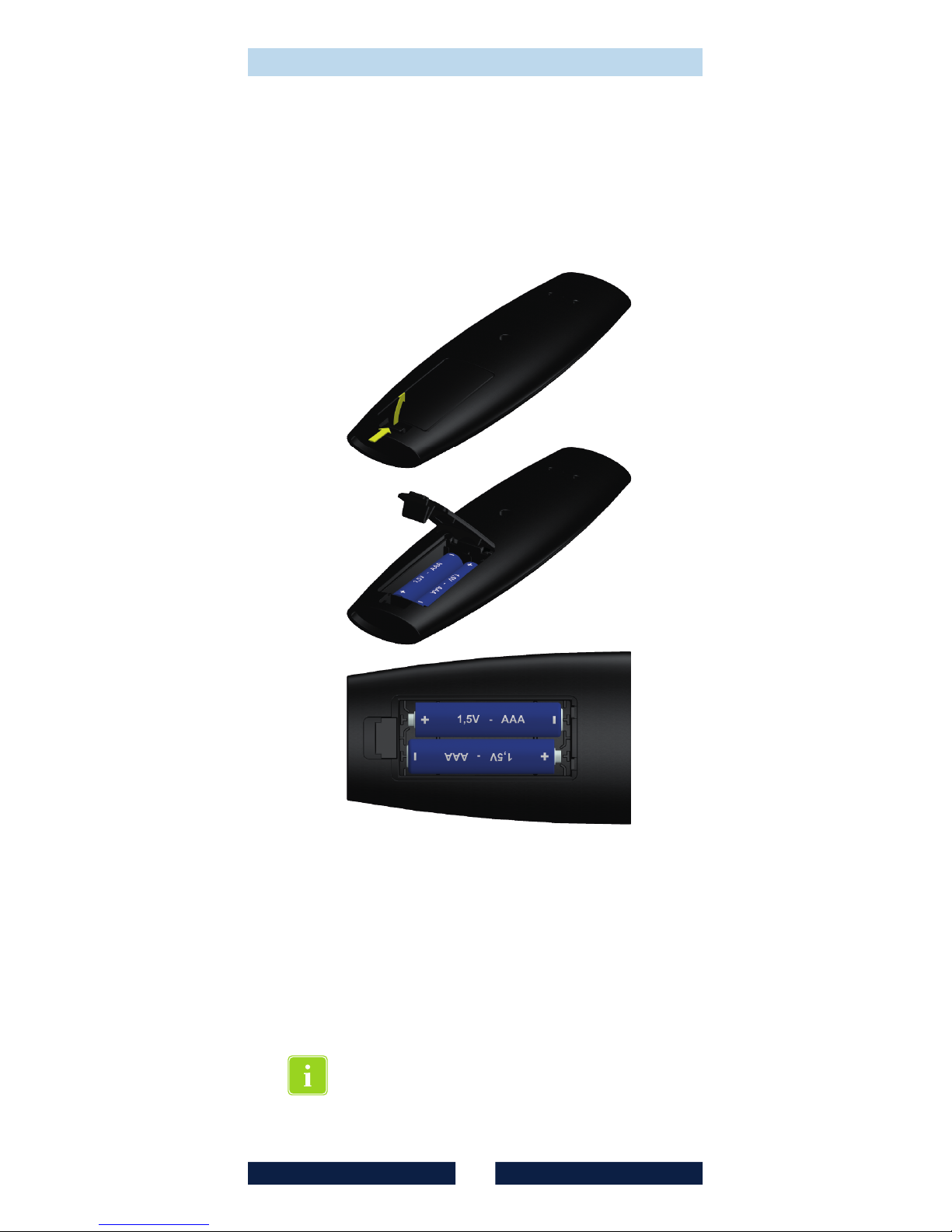
Insert the supplied batteries (2x 1,5V
AAA LR03) into the battery
compartment as shown in the picture.
Ensure that the batteries are inserted
in the right direction (+/-)!
inserted, close the battery
compartment lid again and the radio
transmitter is operational.
Once the batteries have been
3.2 Teach-in process
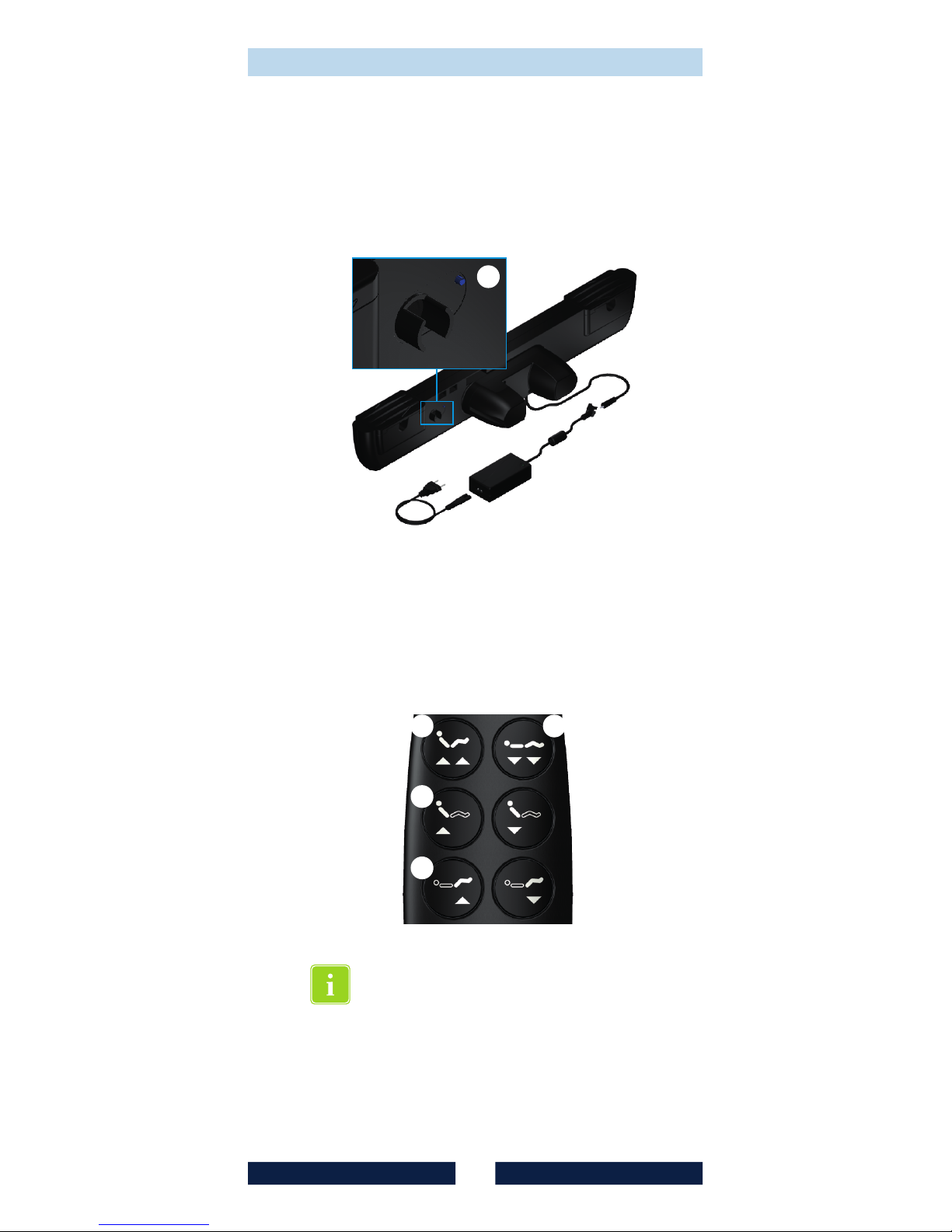
A teach-in process must be carried
out to enable the radio transmitter
and the dual drive V-MAT-Basic to
communicate with each other.
This teach-in process is normally
carried out by the manufacturer and
you can skip this step.
Page 9
9
1 2
3
l
5
Commissioning
• Press button on the dual drive for
approx. 1 s.
l
• Now press the buttons and on
the radio transmitter at the same
time and keep them pressed until
the dual drive acknowledges the
teach-in by moving briefly the head
and foot part.
1 2
If the teach-in process was not
successful (head and foot part do not
move), repeat the above process
again.
• Reset the radio transmitter to factory
settings by pressing buttons ,
and for approx.
8 seconds.
1 3
5 at the same time
Page 10

10
Commissioning
3.3 Teach-in of a second dual
drive (optional)
operate two dual drives
simultaneously (Parallel function).
For this purpose, a teach-in process for
the second dual drive must be carried
out.
After you carried out the teach-in
process for the first dual drive (see
page 9), you carry out the same
process for the second dual drive:
• Press button on the second dual
drive for approx. 1 s.
• Now press the buttons and on
the radio transmitter at the same
time
This function can only be switched off
by resetting the radio transmitter to ist
factory settings (see page 9).
The parallel function will not
synchronize the drives, they will just
move simultaneously. Depending on
the load of each drive, over time there
might show differences of the tilt
angles of the back and leg motors.
In this case use button to move all
drives completely down. After that the
motors should move parallel again.
The radio transmitter VFF/DB-Basic can
l
1 2
1
and keep them pressed until
the second dual drive
acknowledges the teach-in by
moving briefly the head and foot
part.
Page 11
11
1 2
3
5
4
6
b
Operation
4 Operation
Before making any adjustments:
Check that neither you nor anyone
else or any pets are at risk from to the
moving parts of the adjustment
mechanics!
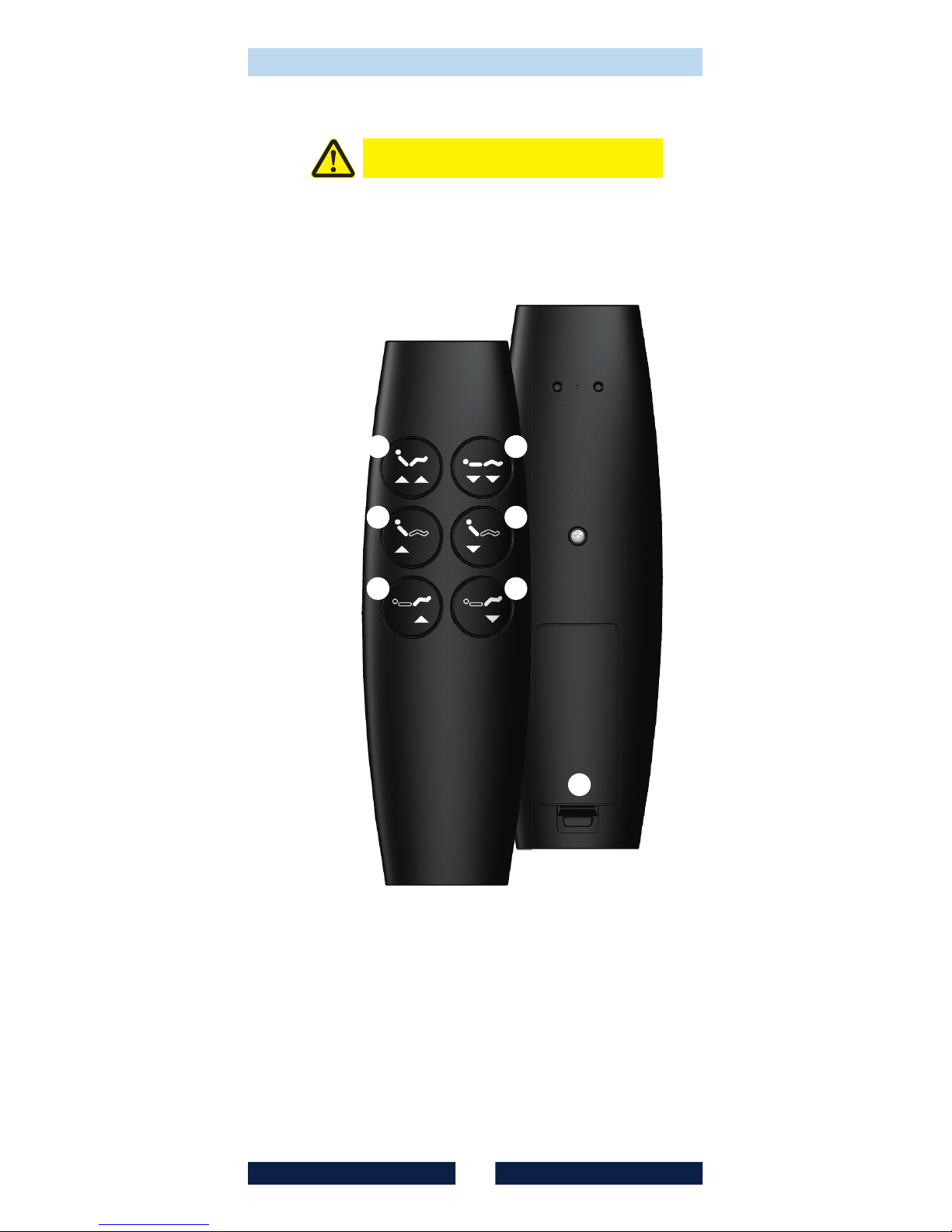
Both drives upwards
Both drives downwards
Back adjustment upwards
Back adjustment downwards
Leg adjustment upwards
Leg adjustment downwards
Battery compartment (see pg. 8)
1
2
3
4
5
6
b
Caution
Page 12

12
Tech. data, maintenance, disposal
5
Before contacting the service office of
the furniture manufacturing company,
please try the following in the event of
a malfunction:
• Check to ensure that the dual drive
VMAT-Basic is connected to the
mains supply (power socket).
• Check (e.g. with a lamp) that the
power socket actually works (fuse).
• Replace the batteries of the radio
transmitter (see page 8).
• Carry out the teach-in process
again (see page 8).
• Reset the dual drive to the default
settings (see page 15) and then
carry out the teach-in process again
(see page 8).
6 Technical data
Operating voltage . . . . . . . . . . . . 3VDC
via batteries
Power consumption
Idle. . . . . . . . . . . . . . . . . . . . . . . . typ.1µA
Operational . . . . . . . . . . . . . . . . . . . 2mA
Transmission freq. . . 2,4GHz (ISM-Band)
Transmission range . . . . . . . . . 10 - 50m
Housing material. . . . . . . . . . . . . . . . ABS
Protection grade . . . . . . . . . . . . . . . IP20
Battery type . . . 2 pcs. 1,5V AAA (LR03)
Weight (incl. batteries and
packaging) . . . . . . . . . . . . approx.. 80g
7 Maintenance and
cleaning
The radio transmitter is maintenancefree, apart from the replacement of
the batteries.
Clean the housing with a slightly damp
cloth. Do not use any aggressive
detergents or scouring agents.
Malfunctions /
troubleshooting
Page 13

13
8 Disposal
This symbol on the product or its
packaging indicates that the product
may not be disposed of via the
household waste system. Users have a
duty to dispose of the old equipment
via the collection point for electronic
and electrical scrap. Separate
collection and correct disposal of your
old equipment helps conserve natural
resources and guarantees recycling,
which protects human health and
preserves the environment.
Please contact your local council or
waste disposal authority to find out
where the collection points are for
your old equipment.
Disposal of the manual radio
transmitter VFF/DB-Basic in Germany is
subject to the Electrical Equipment
Act, internationally to the EU Directive
2002/95/EC (RoHS as of 01.07.2006) or
the respective national laws.
(The product is not subject to the EU
Directive 2002/96/EC (WEEE) and its
supplement EU Directive
2003/108/EC.)
Disposal of batteries in the EU is
subject to the Battery Directive
2006/66/EU, in Germany to the Battery
Act (BattG) dated 25.6.2009, and
internationally to the respective
national laws.
Tech. data, maintenance, disposal
Page 14

14
9 Attachment
9.1 Operation via a smartphone or
tablet PC
The smartphone or tablet must support
Bluetooth 4.0 (Bluetooth Smart, BLE,
Bluetooth Low Energy)!
You will need to download and install
an app to operate the dual drive via
your smartphone or tablet PC.
1)
The app is available for both Android
2)
and iOS systems.
Once the app has been installed,
please proceed as follows:
• Activate the Bluetooth function on
your smartphone or tablet PC. You
will usually find this in the menu
>Settings<. Please check that the
function is activated.
• Press the button on the dual drive
for approx. 1 second (see page 8).
• Now start the connection process
on your smartphone / tablet PC.
Usually the message 'Searching for
devices' will be displayed.
• If the dual drive is still in its default
settings, the smartphone will find a
device called 'V-Mat-…', or a name
that the dual drive was previously
given.
• Now activate the connection
process (pairing; bonding) on your
smartphone. This may take a few
seconds. As soon as the connection
had been made, the app can be
used.
There is a description of the app on
the above-mentioned download
website.
1)
The app for Android operating systems is
available on Google Play.
2)
® ®
The app for iOS (Apple ) operating systems is
® ®
available on Apple iTunes .
l
Attachment
Page 15
LED
15
9.2 Return to default settings
• Press button on the dual drive for
approx. 10 s (see page 9).
• The drive for the leg adjustment
moves briefly to confirm a reset to
the default settings.
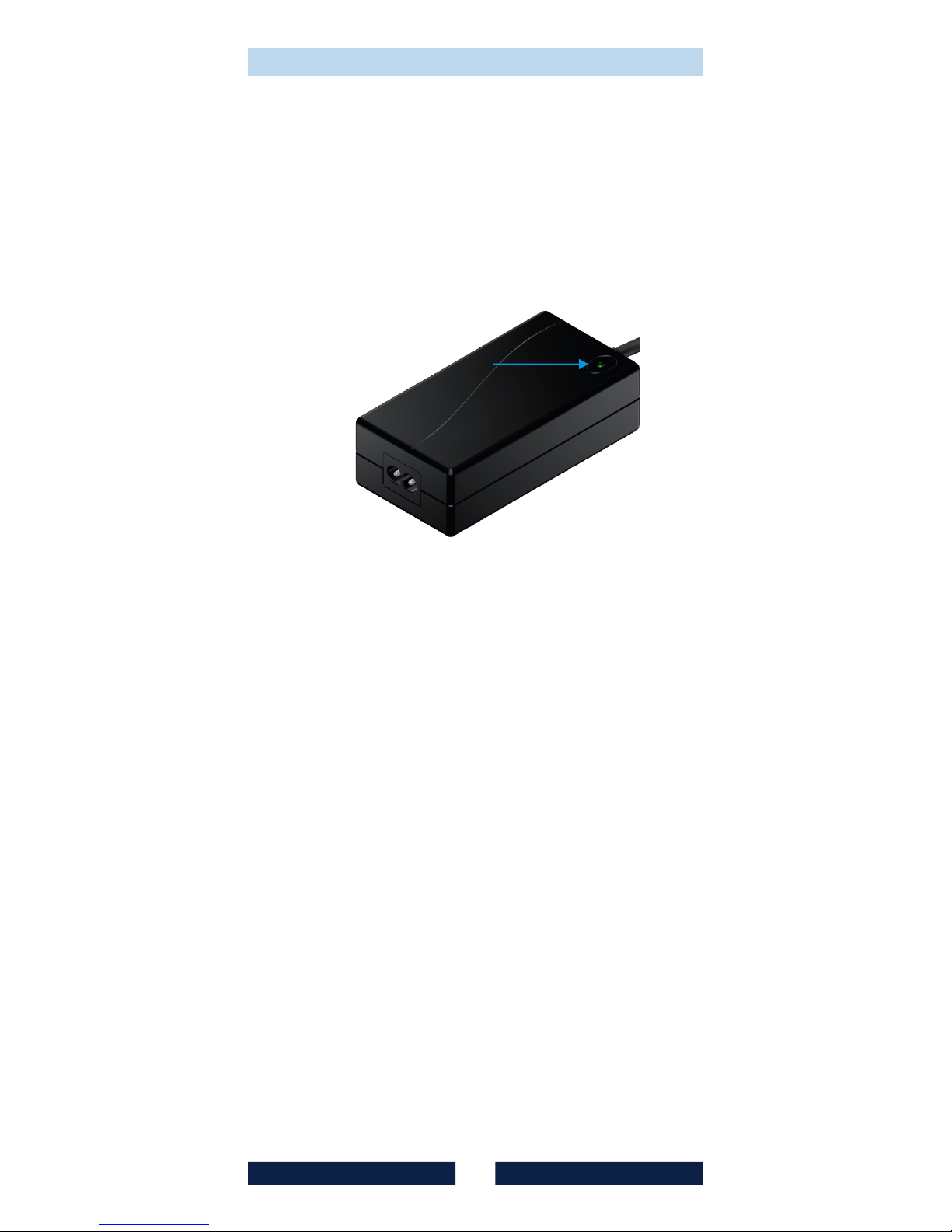
• Remove the plug from the mains
socket and wait until the green LED
on the mains adapter goes off.
l
• Then reconnect the mains plug.
• The dual drive is now returned to its
default settings.
Attachment
Page 16

Document is subject to change without prior
announcement.
© 2016 VIBRADORM GmbH. All rights
reserved.
It is strictly forbidden to duplicate this
document in any form without the prior
consent of the company VIBRADORM
GmbH.
VIBRADORM GmbH is not liable for any errors
in this document or for any ensuing damages
connected to the delivery, performance or
use of this material.
VIBRADORM GmbH
Relystrasse 38 • D-64720 Michelstadt
eMail: [email protected]
Internet: www.vibradorm.de
© VIBRADORM GmbH, June 2016
Drawing No. 080.000.444
Item No. 005852
 Loading...