

Page 1
USER MANUAL
WI
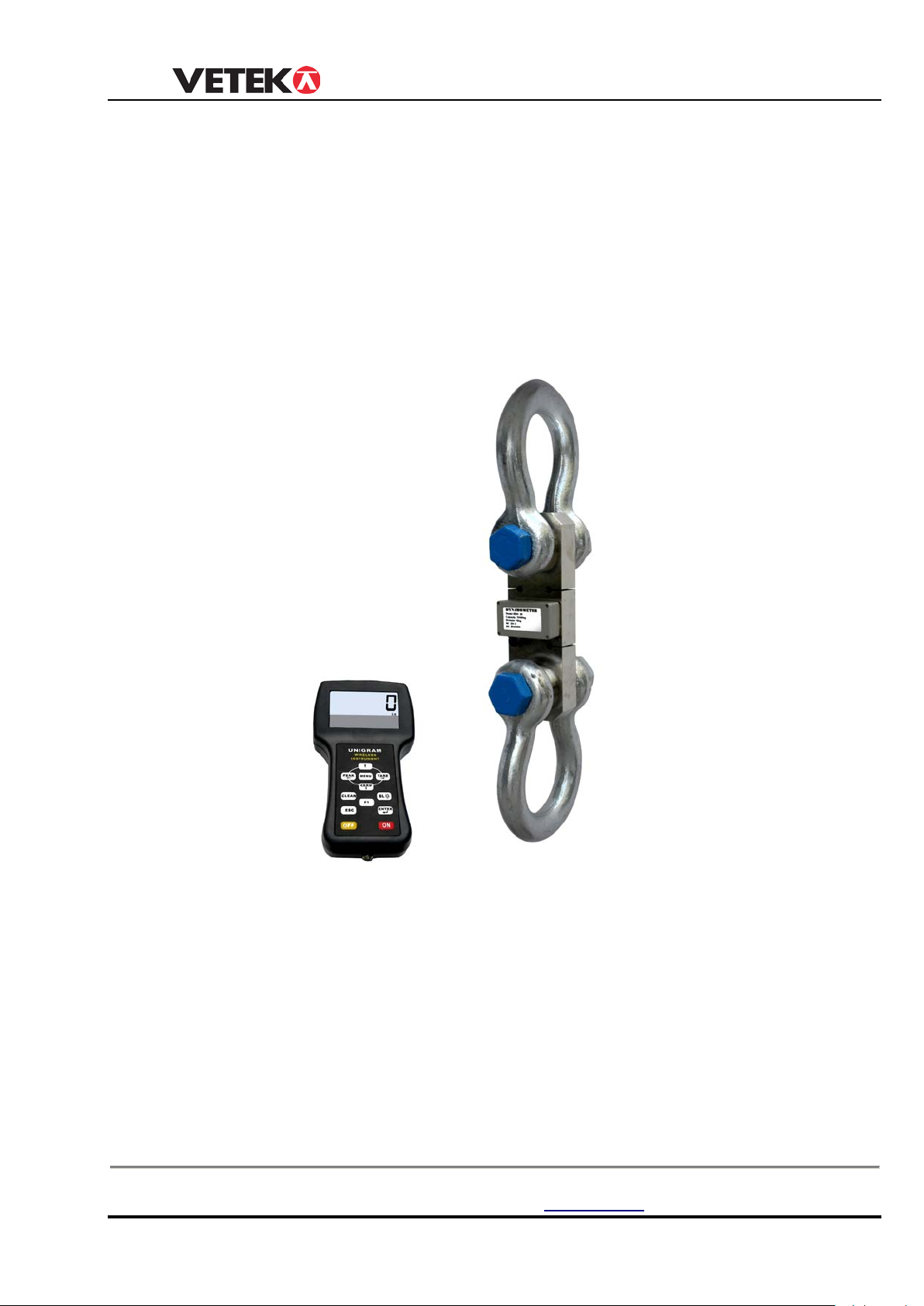
RELESS TENSION LINK
USER MANUAL
MODEL: EBW-2D
Hantverksvägen 15
76493 Väddö, Sverige
Manual_EBW_V1
Tel. +46 (0)176-208920
www.vetek.se
1
Page 2

USER MANUAL
TABLE OF CONTENTS
SAFE OPERATION GUIDE-------------------------------------------------------------------------------2
CHAPTER 1 FEATURES AND SPECIFICATION------------------------------------------------3
1 Features---------------------------------------------------------------------------------------------------3
2 Main technical data-------------------------------------------------------------------------------------3
3 Specification----------------------------------------------------------------------------------------------4
4 Appearance illustration--------------------------------------------------------------------------------4
5 Power supply------------------------------------------------------------------------------------------ -5
CHAPTER 2 INDICATOR DISPLAY----------------------------------------------------------------5
1 Transmitter---------------------------------------------------------------------------------------------5
2 Indicator display ------------------------------------------------------------------------------------- 6
CHAPTER 3 OPERATION GUIDE-----------------------------------------------------------------8
1 Turn on/off-------------------------------------------------------------------------------------------------8
2 Zero--------------------------------------------------------------------------------------------------------8
3 Tare---------------------------------------------------------------------------------------------------------8
4 Hold--------------------------------------------------------------------------------------------------------8
5 Accumulation---------------------------------------------------------------------------------------------9
6 Accumulation Search----------------------------------------------------------------------------------9
7 Accumulation Clear-------------------------------------------------------------------------------------9
8 Battery Voltage-------------------------------------------------------------------------------------------9
9 Unit--------------------------------------------------------------------------------------------------------10
10 Return----------------------------------------------------------------------------------------------------10
11 Set Point-------------------------------------------------------------------------------------------------10
CHAPTER 4 PARAMETER SETTING & CALIBRATION-------------------------------------12
1 Parameter setting-------------------------------------------------------------------------------------12
2 Calibration----------------------------------------------------------------------------------------------15
CHAPTER 5 DISPLAY ILLUSTRATION-----------------------------------------------------------16
CHAPTER 6 TROUBLESHOOTING GUIDE-----------------------------------------------------17
CHAPTER 7 RS232 PROTOCOL-----------------------------------------------------------------18
B
ox 79 Hantverksvägen 15 Tel. +46 (0)176-208920 Web www.vetek.se
2
Page 3

USER MANUAL
SAFE OPERATION GUIDE:
1. The capacity of tension link have been showed on the overlay, Don’t make
lifts beyond rated capacity of the tension link.
2. Operators should not maneuver a loaded tension link over personnel.
3.The tension link must be routinely checked for operation. Don’t operate
if shackle, sling, cable, etc show any sign of defects or excessive wear.
4. If the tension link is not going to be used for long time, recharging the battery
every three months to preserve the life-sp an o f the battery and recharge it
before operation.
5. The battery charger is included in the tension link package. Please use this
charger, It’s normal that the charger will become warm when the battery is charging.
6. Please note when the digits flash on the display, it means that the battery needs
to be recharged.
7. Check shackle, safety pins, and latches periodically. Contact your dealer
for parts replacement in case defect, deform or wearing is found.
Box 79 Hantverksvägen 15 Tel. +46 (0)176-208920 Web www.vetek.se
76040 Väddö, Sverige Fax +46 (0)176-208929 Email [email protected]
3
Page 4
USER MANUAL
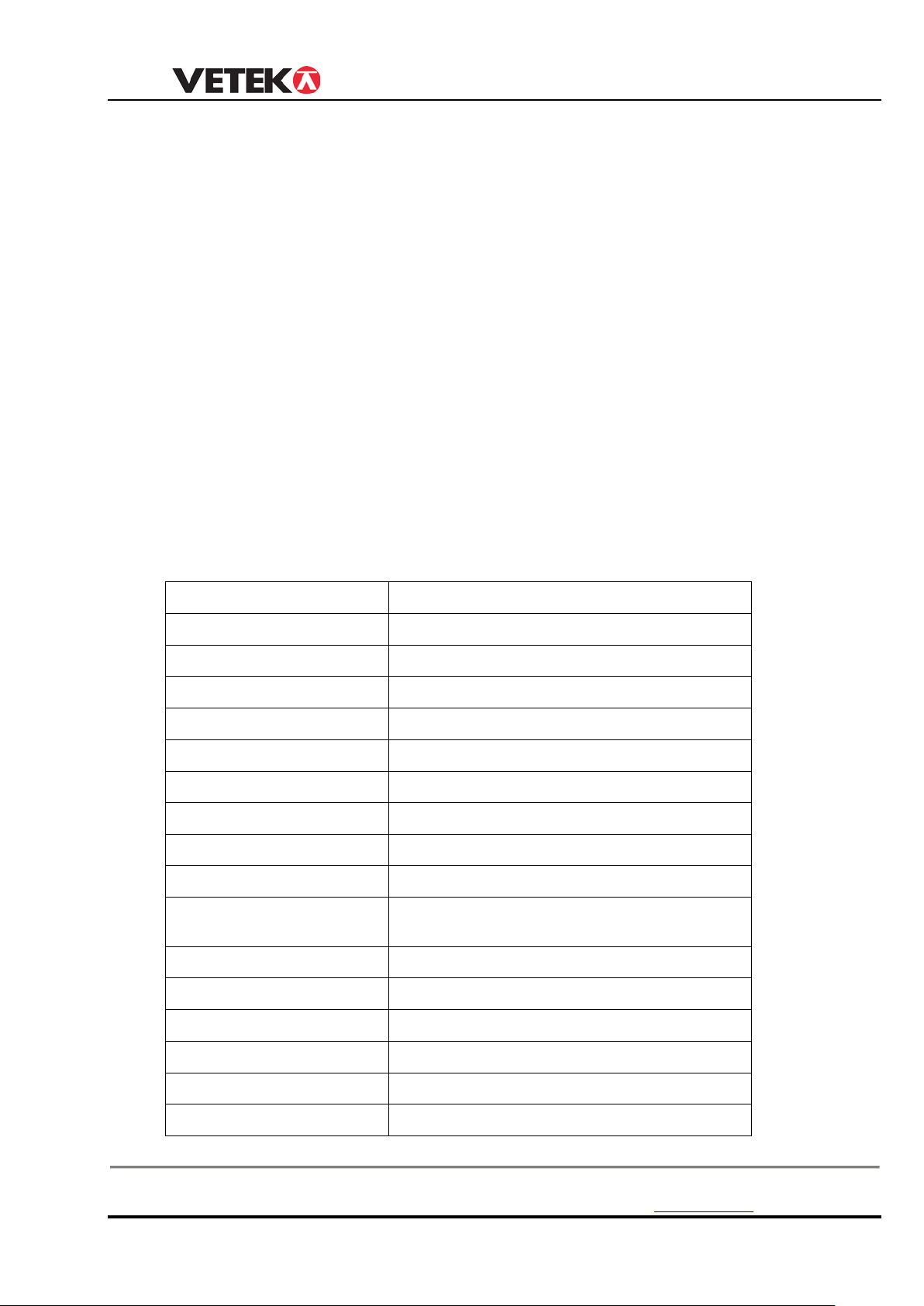
Accuracy Standard
According to OIML class III
Indicator Display
25mm(1”) 5digits LCD
Water Proof Class
IP66 (Hand control no IP class )
Zero Range
4% F.S.
Tare Range
100% F.S.
St abl e Time
≤5 seconds
Overload Indication
100% F.S. + 9e
Max. Safety Load
125% F.S.
Ultimate Load
400% F.S.
Tension link battery Life
Continous using 90 hours after recharged
Tension link battery type
Standard 18650 Lithium battery,
3.7V/3100mAh
Indicator Battery
SC3300mAh NiH Battery. 1.2Vx4
Tension link Charger
DC4.2V/1000mA
Nominal operating Temp.
- 10℃ ~ + 40℃
Operating Humidity
℃
Wireless Distance
100M without obstacl e
Wireless Frequency
433MHz
CHAPTER 1 FEATURES AND S PECIFICATION
1. Features
◆ Wireles s communic ation and display
Wireless indicator, 5 digits LCD display with backlight, Many functions on handheld
indicator
280D. Such as tare, zero, peak, filter setting, gravity regulation.calibration is easy
through
wireless indicator. ,
◆ Two set point
Two user programmable Set-Point can be used for safety and warning applications or
for limit weighing.
◆ User-friendly design:
Cast alloy steel housing for maximum protection; water proof design, gravity
compensation; safety factor up to 4 times capacity; battery operated with low battery
indication; automatic turn off , power-saving function.
2. Main technical data
Box 79 Hantverksvägen 15 Tel. +46 (0)176-208920 Web www.vetek.se
76040 Väddö, Sverige Fax +46 (0)176-208929 Email [email protected]
≤85% RH under 20
4
Page 5
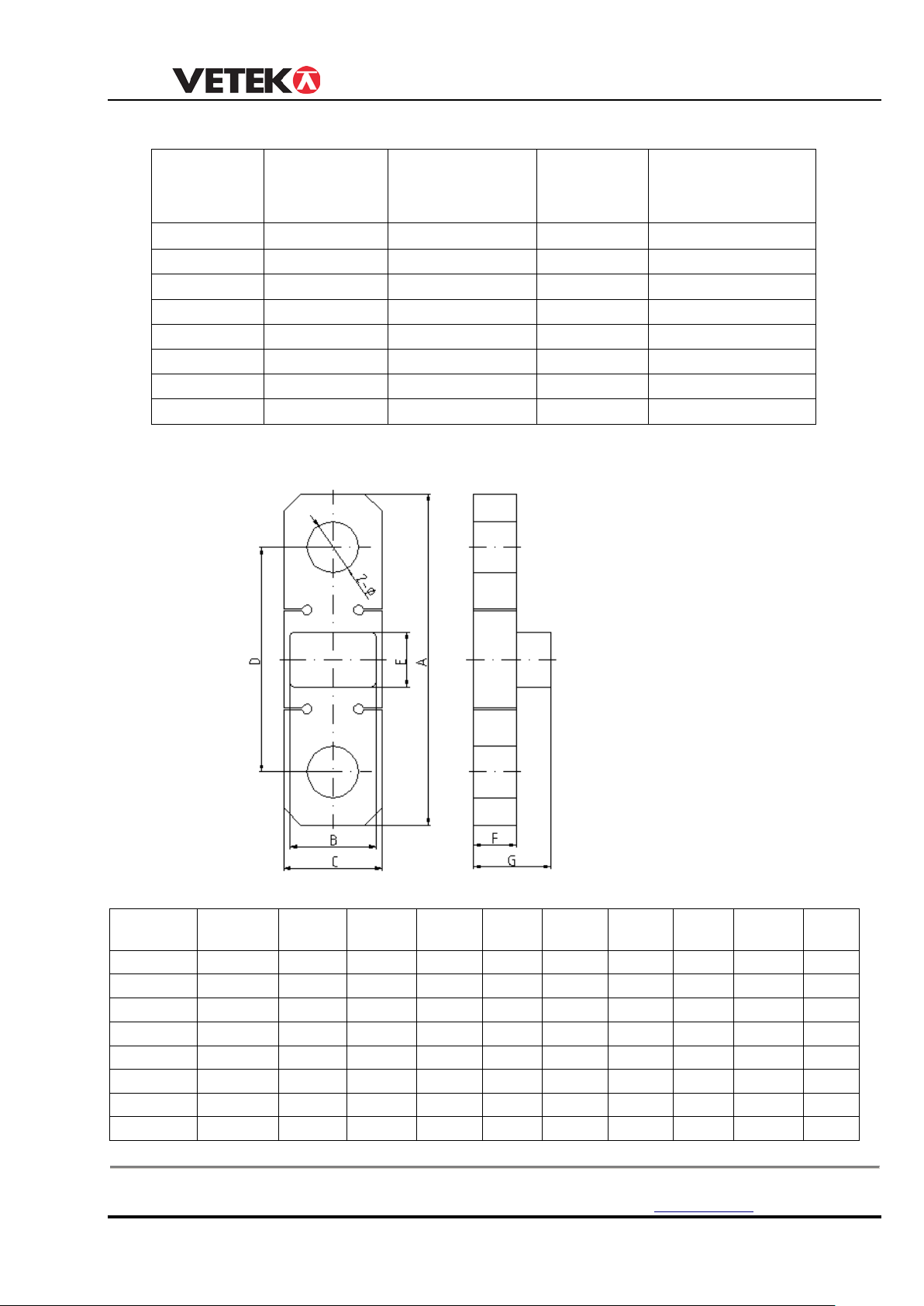
3. Specification
Max.
(kg)
Min. weigh
Division
Total display
EBW-5
5000
40 2 2500
EBW-10
10000
100
5
2000
EBW-20
20000
200
10
2000
EBW-30
30000
200
10
3000
EBW-50
50000
400
20
2500
EBW-100
100000
1000
50
2000
EBW-150
150000
1000
50
3000
EBW-200
200000
2000
100
2000
MODEL
Cap.
2-Φ
N.W
EBW-5
5000
190
110
60
137
65
30
70
27
2.6
EBW-10
10000
245
110
70
168
65
36
76
41
4.3
EBW-20
20000
312
110
94
206
65
45
85
54
8.5
EBW-30
30000
370
110
114
246
65
50
90
60
14
EBW-50
50000
460
110
140
309
65
60
100
73
25
EBW-10
100000
580
110
180
389
65
80
120
99
53
EBW-15
150000
690
110
220
456
65
90
130
112
89
EBW-20
200000
800
110
250
534
65
100
140
134
128
USER MANUAL
MODEL
capacity
4. Appearance illustration
(kg)
(kg)
counts (n)
(kg) A (mm) B (mm) C (mm) D (mmE (mm) F (mm) G (mm
Box 79 Hantverksvägen 15 Tel. +46 (0)176-208920 Web www.vetek.se
76040 Väddö, Sverige Fax +46 (0)176-208929 Email [email protected]
(mm)
.
5
Page 6
USER MANUAL
5. Tension link power supply
Battery: Standard 18650 Lithium battery, 3.7V/3100mAh
Adapter: Standard 18650 Lithium battery charger
Current: the tension link average current is about DC 30mA±10%, if battery charged, it
can be used for about 90hours.the battery voltge should be between 3.40-4.20, When the
voltage below
3.40, it means the battery needs to be recharged. User can remove the battery cover to
change
new battery, and charge the old battery with adapter.
Charging m ethod: Take out the18650 Lithium battery, put in the charger for charging, the
charge
lamp on the front panel will become orange when charging, and it will become green when
the
charging finish. Generally, charging time should not less than 4hours, it have charging
protection,
long time charging can’t damage the battery.
CHAPTER 2 INDICATOR DISPLAY
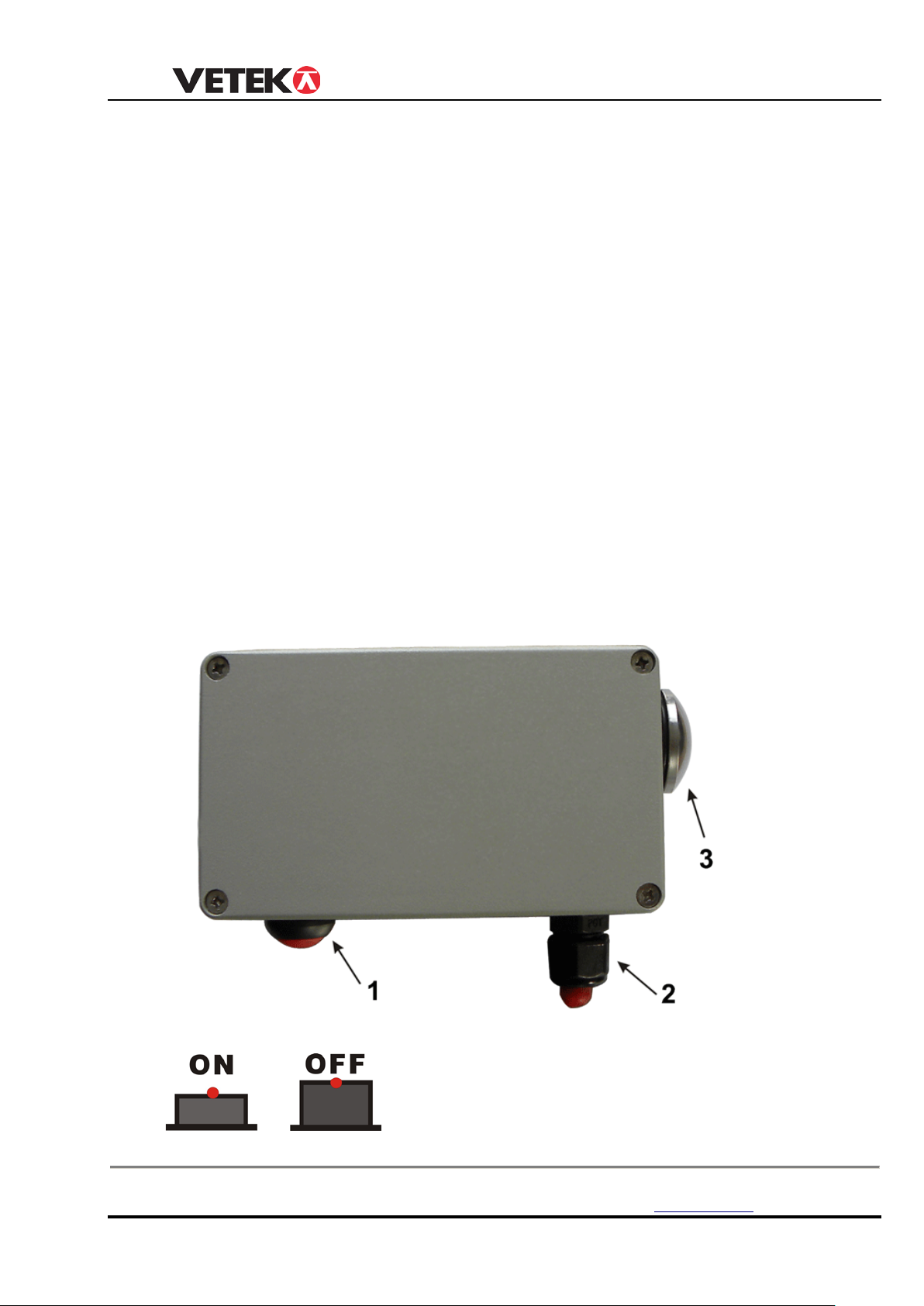
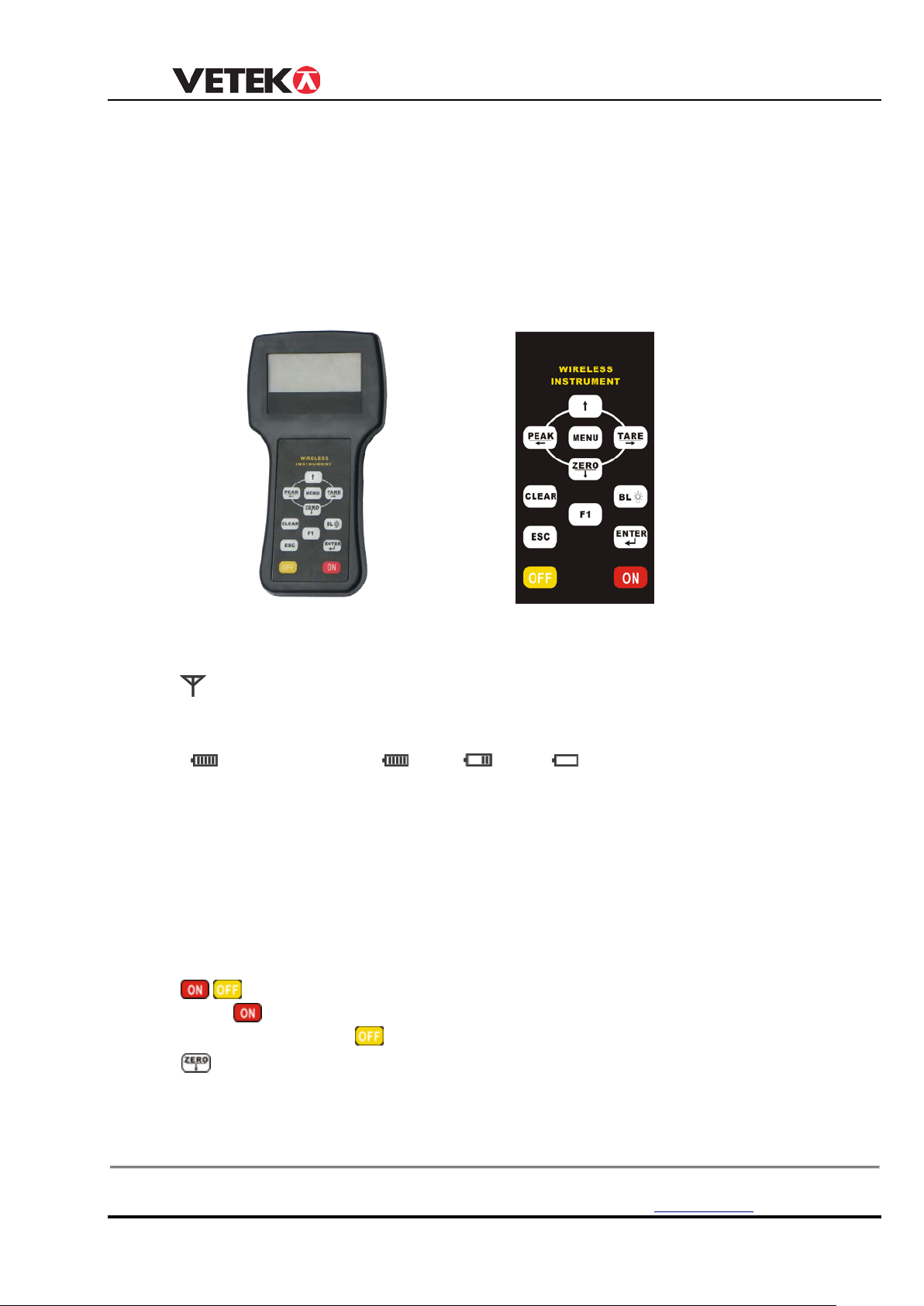
1. Tension link transmitter
1. ON/OFF KEY
Box 79 Hantverksvägen 15 Tel. +46 (0)176-208920 Web www.vetek.se
76040 Väddö, Sverige Fax +46 (0)176-208929 Email [email protected]
6
Page 7
USER MANUAL
When the key is pressed ON, the red light will flash
2. ANTENNA
The antenna is install with water proof connector.
3. Battery cover
User can removed the battery cover to change battery (lithium battery 18650)
2. Indicator display
1. LCD DISPLAY
25mm(1”) 5digits LCD with backlight
2. Signal on LCD
a. : Wireless signal, i t Appear means signal stable, i t di s appear while signal mi ss . i t
flash
means signal weak.
b. : Battery Voltage, : Full, : Low, : Empty
c. PEAK:Current value is Peak Hold value(maximum value).
d. MEM:Appear one time when Parameter or calibration value storage. long time
appearance means current value is Accumulation data.
e. STB: Stable Status.
f. kN: “kilonewton”, N:“Newton”. Tare status “N” will flash.
g. t :“ton”.
h. lb :“pound”.
i. kg :“kilogram ”.
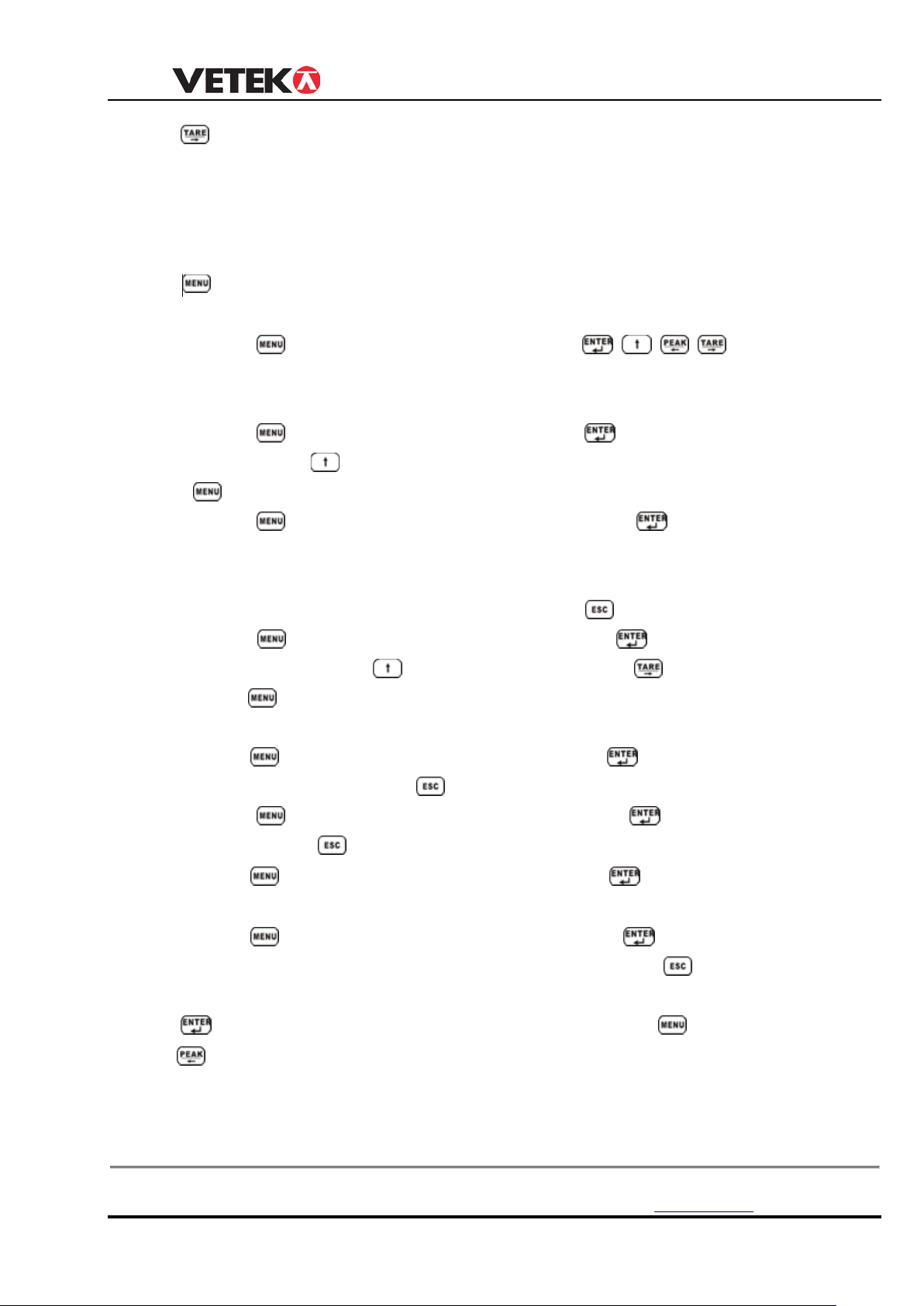
3.Key
a. ,
1. Press Key 1 Second, the indicator turn on.
2. In ON status,Press Key 1 Second,the indicator turn off.
b.
1. In testing status ,there are small digits on screen, press this key to obtain the zero
reading.
2.In Parameter Setting status,it used as scrolling down digit.
Box 79 Hantverksvägen 15 Tel. +46 (0)176-208920 Web www.vetek.se
76040 Väddö, Sverige Fax +46 (0)176-208929 Email [email protected]
7
Page 8
USER MANUAL
c.
1. When there is tare weight such as container, after the reading stable, press this key, it will
display “0”, and “N” indicator Flash.
2. Put the goods into container, the tension link will display goods net weight.
3. If move goods and container, the tension link will display minus value of tare weight.
4. In Parameter Setting status, it used as digits movement.
d.
Used as function shift, or be combined with other keys.
◆ Press key once, it display “P0000”, press key , it can
be input password to access parameter setting or c alibr ati on status.(refer to
P12 CHAPTER 4)
◆ Press key twice, it display “unit”, Press key access unit Setting
status. Press key to se lect unit (kg,lb,N,kN,t,), After setting finish, press
key to confirm setting and back to test mode.
◆ Press key 3 times, it display “SACCU”, Press key to read
accumulate data, it will display “no.xxx” and “Hxxxx”,”Lxxxx”, “no.xxx” means
accumulate numbers, “Hxxxx”,”Lxxxx” means accumulate data, if there is no
accumulate data ,it will display “noACC”, press key back to test mode.
◆ Press key 4 times, it display “SEttr”, Press key access pre-tare
value setting. Press key to adjust digit, press key to move digit,
press key again back to test mode. afte r Pre-tare value setting, the “N”
will flash on LCD.(NOTE: All pre-tare value will set by unit kg)
Press key 5 times,
◆
tension link voltage, press
◆ Press
voltage, press
◆
Press
AD Value.
◆
Press
key 6 times, it display “dISLU”, Press
key back to test mode.
key 7 times, it display “dIS 0”, Press
After 2 seconds,it auto back to test mode.
key 8 times, it display “dISOL”, Press
“OL=xx” it means tension link’s
test mode.
it display “dISrU”, Press
key back to test mode.
overload numbers,P res s Key
key will display
Key will display indicator’s
Key will display te nsion link’s
Key will display
back to
e. Used as function selection, normally combined with Key.
f.
When load is changing, press this key will catch and display the maximum reading of
the load.
Press this key again, reading will return to nor mal.( in setti ng mo de it can mov e dig it to
left).
Box 79 Hantverksvägen 15 Tel. +46 (0)176-208920 Web www.vetek.se
76040 Väddö, Sverige Fax +46 (0)176-208929 Email [email protected]
8
Page 9
g.
OPERATIO
DISPLAY ILLUSTRATION
88888〗
Display twice, self test
Ert 〗
Display twice, abbreviation of Everight
u 2.03〗
Display current software version
5000〗
Display maximum capacity
U=4.
80〗
Display current indicator battery voltage
–––––〗
Waiting stable
If display 0, means the indicator can communicate with the
gnal from tension
The indicator will turn off automatically
after
It is LCD backlight switch. Pre s s on ce, LCD backlight ON, press again, LCD
backlight OFF.
h.
It is accumulation key,In weighing status press this key will accumulate data(the value
must
be stable and more than 20e)
I.
Press key one time, it will display “CLr 1” Press key to clear single
accumulation value, Press key 2 times, it will display “CLr 2” Press key to
clear all
Accumulation value, Press key 3 times, it will display “CLr 3” Press key to
clear
over load records,
USER MANUAL
CHAPTER 3 OPERATION GUIDE
Note: 〖 〗means the display content
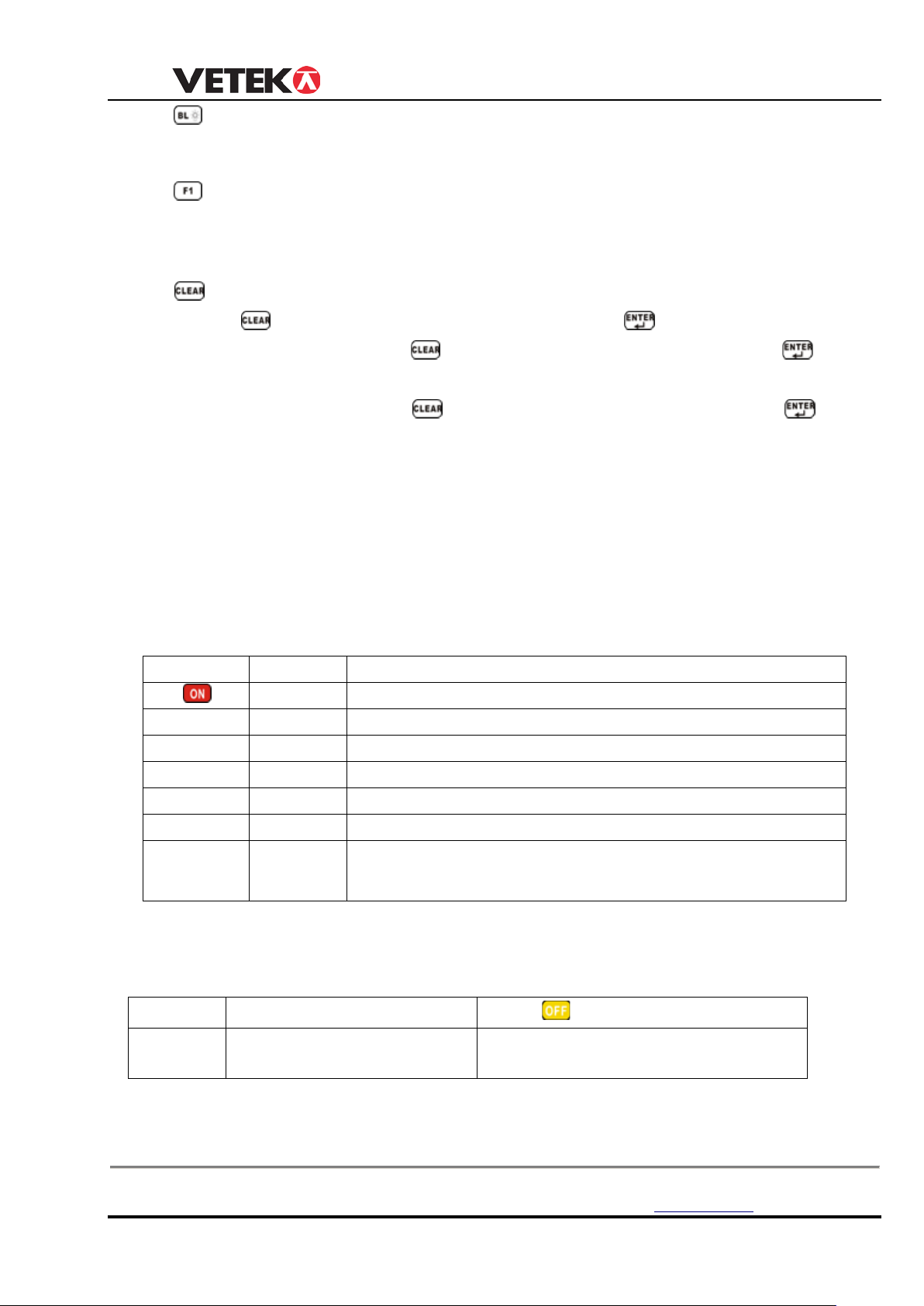
1 TURN ON/OFF
◆Turn on tension link
Press ON/OFF key ,the key light will flash.
◆Turn on indicator( Turn on tension link at first)
〖
〖
〖
〖
〖
〖
〖 0〗or
〖noSIG〗
tension link, if display noSIG, means no si
◆Turn off tension link
Press ON/OFF key when power ON status, ,the key light will not flash
◆
Turn off indicator
1
Manual Power OFF
2 Auto Power OFF
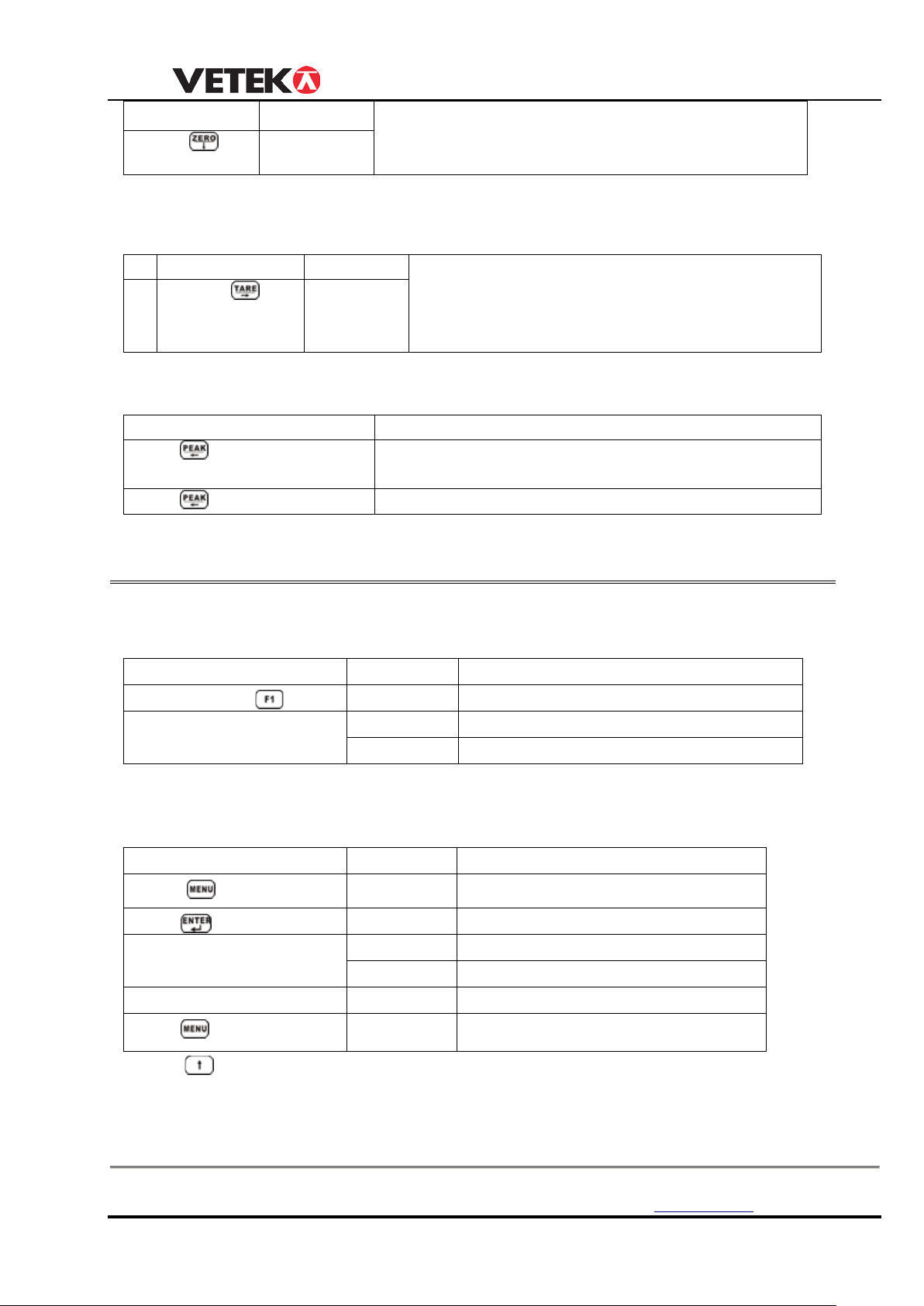
2 ZERO
Box 79 Hantverksvägen 15 Tel. +46 (0)176-208920 Web www.vetek.se
76040 Väddö, Sverige Fax +46 (0)176-208929 Email [email protected]
Press
Key 1 Second
9
Page 10
USER MANUAL
OPERATION
DISPLAY
When tension link turn on, generally tension link
press this key.
0〗
OPERATION
DISPLAY
After turn on, hanging tare weight such as sling,
cable at first, press this key, “TARE” light on,
then the tension link will display net weight of
the goods.
1
〖 0〗
OPERATION
ILLUSTRATION
Press
Hold the maximum weight reading when load
changing
Press again
Return to normal weighing status
OPERATION
DISPLAY
ILLUSTRATION
Press
No***〗
Current accumulation time
H****
Front four digits of total value
L****
Rear four digits of total value
OPERATION
DISPLAY ILLUSTRATION
Press
SACCU〗
Press
No***
Current accumulation time
*****
Current weight reading
H****
Front four digits of total value
L****
Rear four digits of total value
Press
Return
Press
〖
displays〖 0〗,if display s mall digi ts w hen no load,
3 TARE
◆ TARE DIRECTLY
Press
4 PEAK HOLD
USER MANUAL 8
ERT10.022 SSE
5.ACCUMULATION
〖
〖
〗
〖
〗
After display above contents twice, the tension link will return automatically. maximum
Accumulation times is 999.
6.ACCUMULATION SEARCH
〖
〖
〖
〖
〖
〗
〗
〗
〗
Press
key 3 times
key again
key
can check different times weight and accumulation.
7. ACCUMULATION CLEAR
Box 79 Hantverksvägen 15 Tel. +46 (0)176-208920 Web www.vetek.se
76040 Väddö, Sverige Fax +46 (0)176-208929 Email [email protected]
10
Page 11
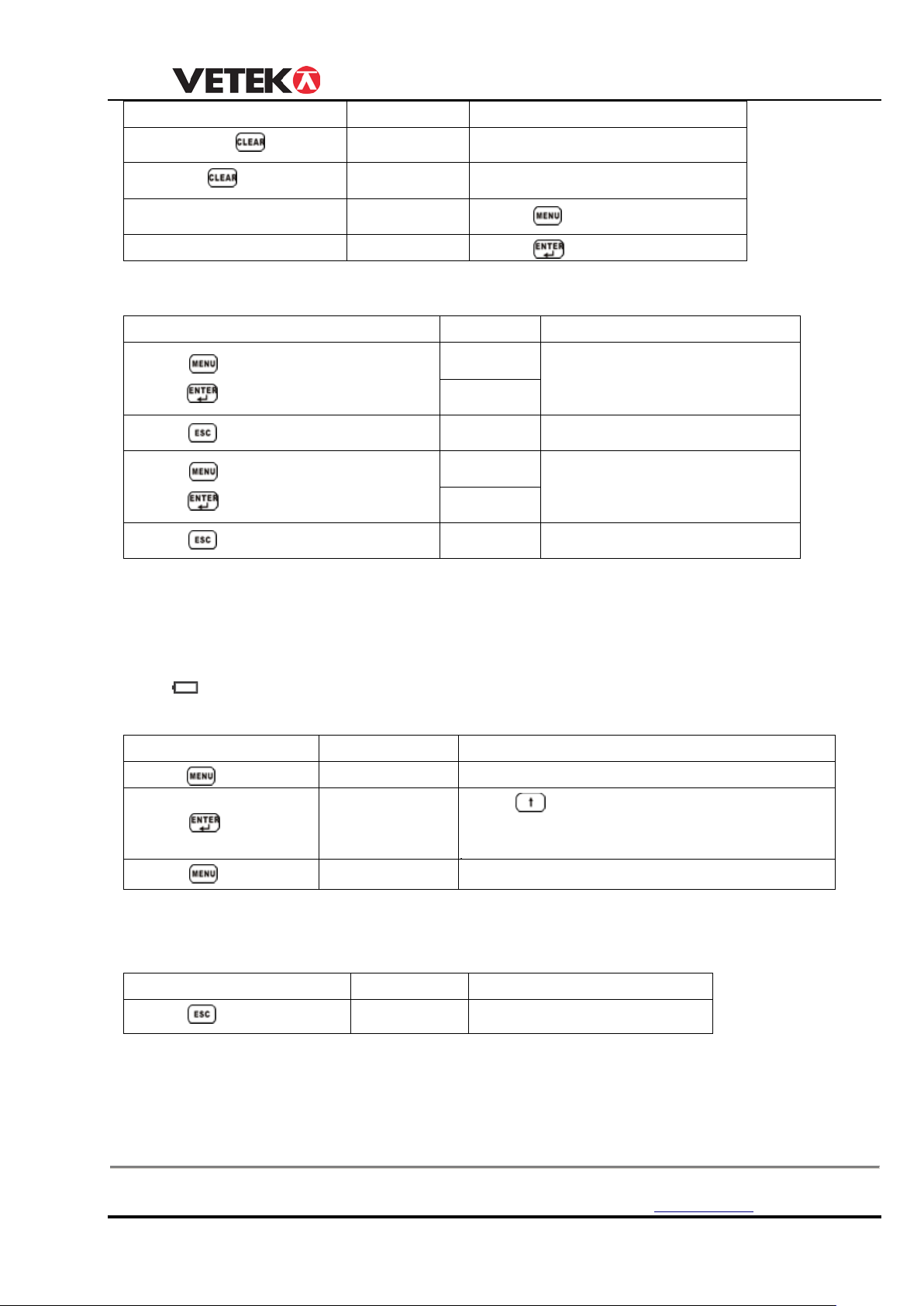
USER MANUAL
OPERATION
DISPLAY
ILLUSTRATION
〖88888〗
Press
key Confirm clear
OPERATION
DISPLAY ILLUSTRATION
〖
〖
〖
〖
OPERAT
DISPLAY ILLUSTRATION
Press key 4 times
〖UnIt 〗
Press
4, 0 means kg
1 means lb,2 means N, 3 means KN, 4means
Press key
0〖
Confirm unit chosen and return
OPERATION
DISPLAY
ILLUSTRATION
〖 0
Return to normal testing
Presss
Presss
key
key
again
〖CLr 1〗 Ask if you want to clear or not
〖CLr 2〗 Ask if you want to clear or not
〖noCLr〗 Press
key Cancel clear
8. TENSION LINK & INDICATOR BATTERY VOLTAGE
Press key 5 times,
k
press
Press key
ey.
Press key 6 times,
k
press
Press key
Note:
Tension link and indic ator
ey.
dISrU
U *.**〗
dISLU
U *.**〗
battery voltage normally between 〖U 3.40〗to 〖U 4.20〗,
〗
display tension link voltage
tension link voltage
Return
〗
display indicator voltage
Indicator voltage
Return
if
tension link battery below 〖U 3.40〗, indicator w ill show 〖-Lb-〗,it means user need to c hang e
new battery.if indicator battery voltage below
〖U 4.20〗, the display will flash, and battery
signal
show
: Empty,
indicator should be recharged immediately
9. UNIT
to select unit from 0-
press
key 〖Un=0〗
〖
10. RETURN
Press
〗
11. SET POINT
There are two user programmable Set-Point can be used for safety and warning
applications
Box 79 Hantverksvägen 15 Tel. +46 (0)176-208920 Web www.vetek.se
76040 Väddö, Sverige Fax +46 (0)176-208929 Email [email protected]
11
Page 12
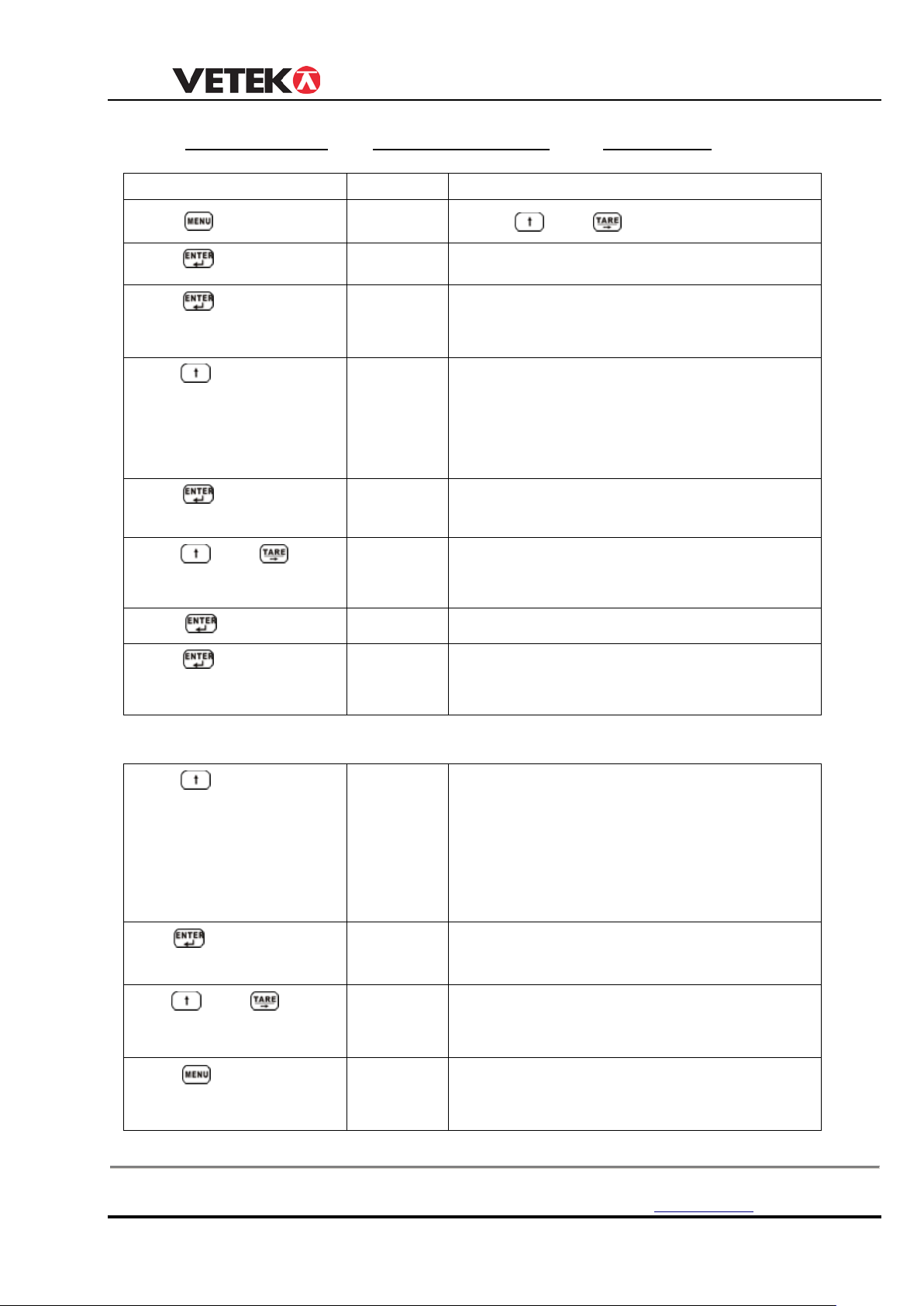
USER MANUAL
OPERATION
DISPLAY ILLUSTRATION
Pres
〖
Press
〖
〗
Press
〖
Press
〖
〖
set point, 1 HI means the indicator will alarm
Press
〖
parameter set, the screen display set value.
Press
change value
〖
Press
〖
Press
〖
Press
〖
〖
set point, 2 HI means the indicator will alarm
Press
〖
Press
change value
〖
Press
〖
〖
or for limit weighing.
_ 1 LO SP1 1 HI 2 LO SP2 2 HI
s
key
12 times
to confirm
to choose
to confirm
and
to confirm
to confirm
P0000〗
SP1
Press
Set point 1
and
input P8088
1 OFF〗 New tension link, it display 1 OFF, if
parameter set, it display set value.
1 HI〗or
1 LO〗
There are 3 choice,1 OFF means you don’t
when load exceed the value you set, 1 LO
means the indicator will alarm when load
smaller than the value
02000〗 New tension link it display 02000, if
to
01000〗 Set “1 HI” or “1 LO” Value. e.g. 1000kg
SP2〗 Set point 2
2 OFF〗 New tension link, it display 2 OFF, if
to choose
to confirm
and
key
to
parameter set, it display set value.
2 HI〗or
There are 3 choice,2 OFF means you don’t
2 LO〗
when load exceed the value you set, 2 LO
means the indicator will alarm when load
smaller than the value
01200〗
New tension link it display 01200, if
parameter set, the screen display set value.
03000〗 Set “2 LO” or “2 HI” Value. e.g.3000kg
End 〗
0〗
Confirm above parameter setting,Exit
parameter setting program.
Box 79 Hantverksvägen 15 Tel. +46 (0)176-208920 Web www.vetek.se
76040 Väddö, Sverige Fax +46 (0)176-208929 Email [email protected]
12
Page 13
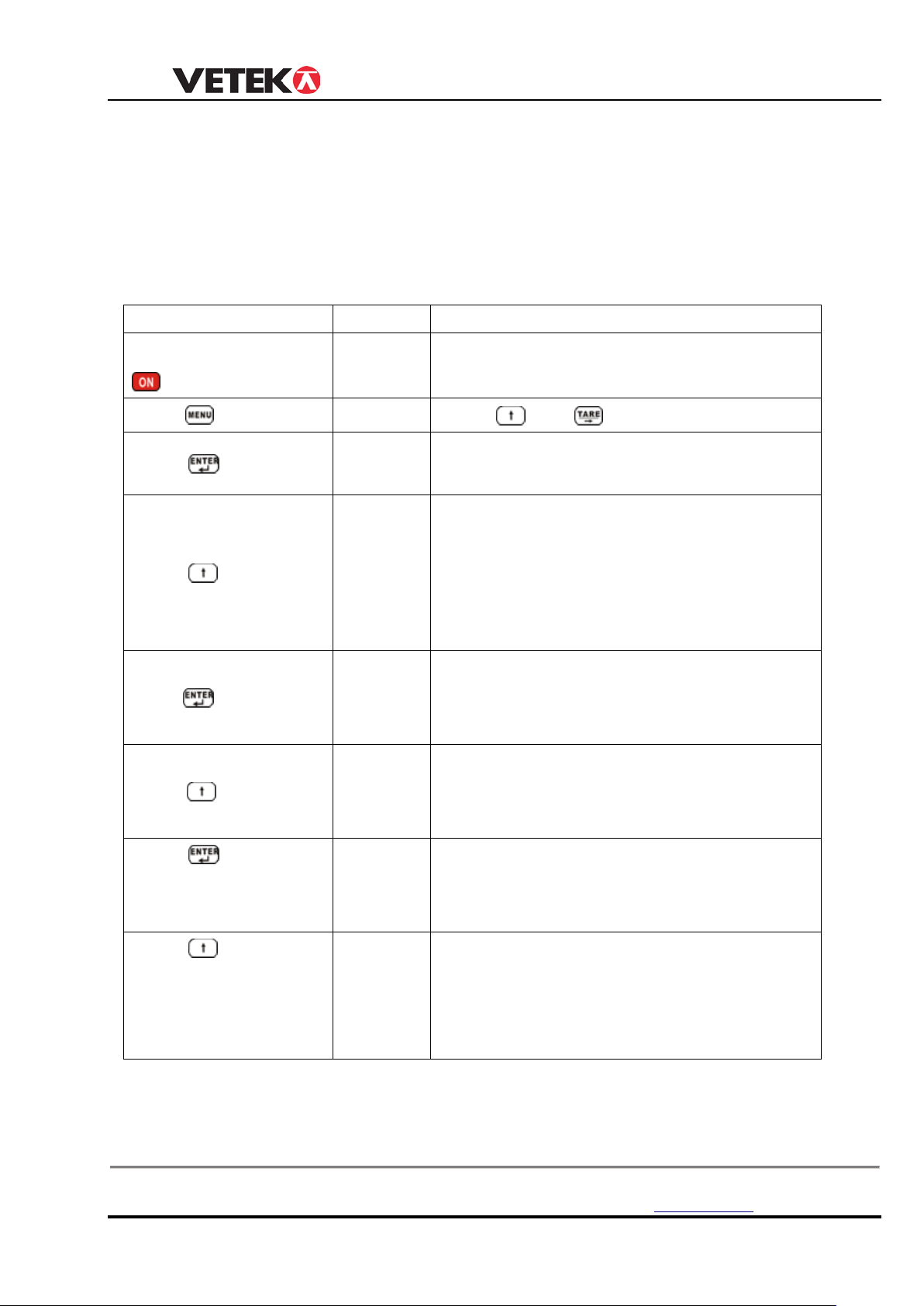
USER MANUAL
OPERATION
DISPLAY
ILLUSTRATION
Press
P0000〗
Press
and
input P8088
tension
link calibrated, it will display capacity.
See following list about FS, Id, Pt chosen.
calibrated division.
division is 2kg, so choose Id=02
if tension link
position
Cap.5000kg ,we choose Pt=0
If you needn’t to set point, you only need to press
〖g= 〗
【ENTER】until it display next function
CHAPTER 4 PARAMETER SETTING &CALIBRATION
1. P ARAMETER SETTING
Press(ON/OFF) and
Press
Press
to choose
〖 0〗
〖
〖FS=06
〗
〖FS=05
〗
Turn on tension link and indicator
New tension link, it display FS=06 , if
Choose capacity, the screen
display
15/20/30/50/60/75/80/A0/F0 circularly,take
cap:5000kg/2kg as example, choose FS=05,
02/03/05/06/10/
Press
Press
Press
Press
to confirm 〖Id=02〗
to choose 〖Id=02〗
to choose
〖Pt=0〗 New tension link, it display Pt=0,
〖Pt=0〗
New tension link , the screen display
Id=02, if
Choose division, it display
01/02/05/10/20circularly. 5000kg tension link
calibrated, it will display
Choose decimal position, the
screen display 0/1/2/3 circularly,
0=xxxxx, 1=xxxx.x, 2=xxx.xx,
tension link calibrated, it will display
calibrated decimal
3=xx.xxx,
Box 79 Hantverksvägen 15 Tel. +46 (0)176-208920 Web www.vetek.se
76040 Väddö, Sverige Fax +46 (0)176-208929 Email [email protected]
13
Page 14
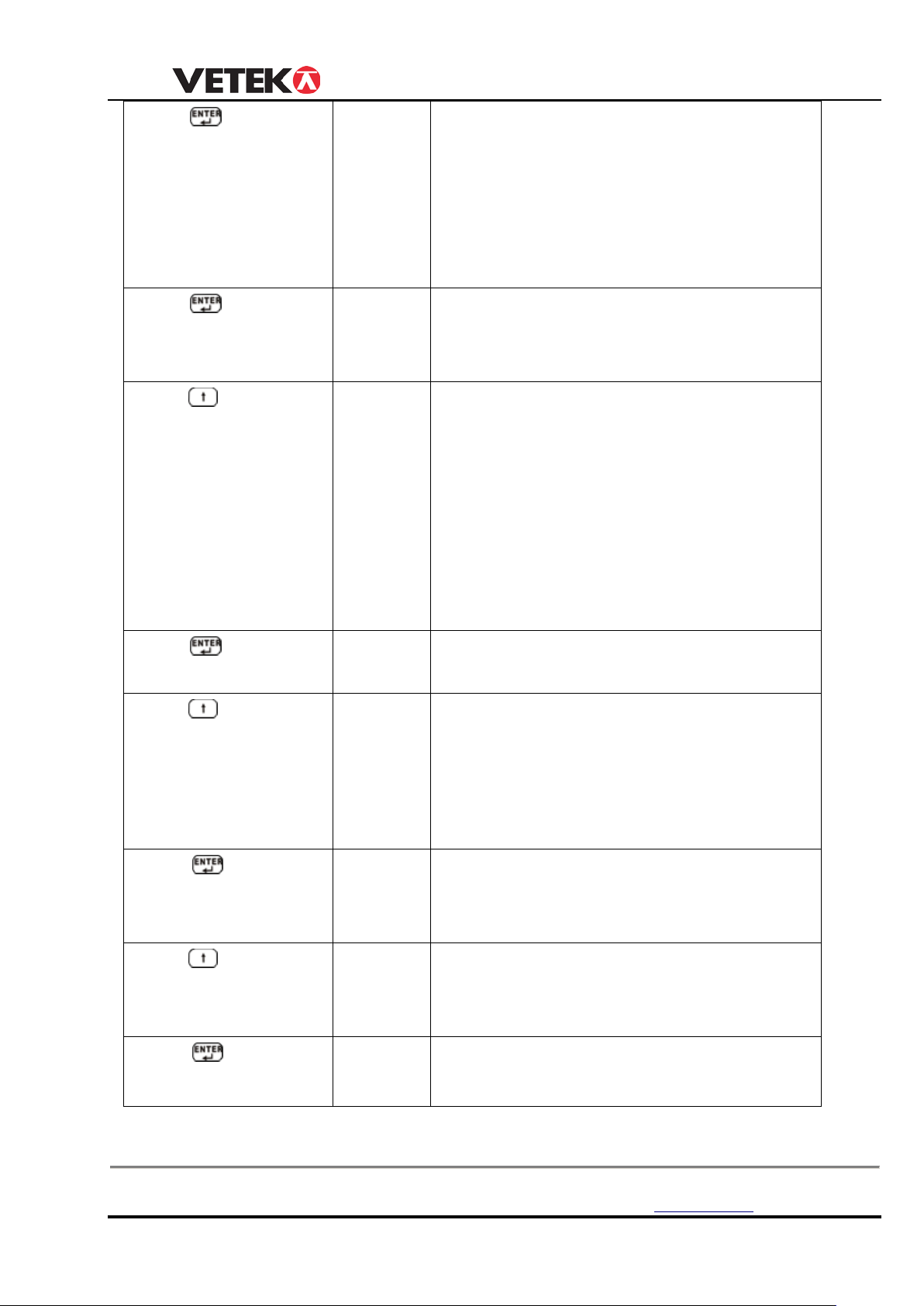
USER MANUAL
5=50%F.S, Generally Don’t change this
parameter.
calibrated value.
generally choose Cd==12 when ex-stock..
link calibrated,it display calibrated value.
generally choose LL=1 when ex-stock..
calibrated unit.
Un=0 when ex-stock.
〗
Press
Press
Press
to confirm 〖Ab=24〗 Display zero range , A: zero range by hand;
B: zero range automatically, 0~5 total
6 options: 0=0%F. S; 1=2%F.S;
2=4%F.S; 3=10%F.S; 4=20%F.S;
to confirm 〖Cd=11〗 New tension link, the screen display
Cd=11,if Tension link calibrated, it display
to choose 〖Cd=12〗 C: zero-tracking range, 0~5 total 6
options;
0=0d; 1=0.5d; 2=1d; 3=1.5d; 4=2d; 5=2.5d
d: display speed,0~2 total 3 options;
0=slow; 1=average; 2=fast; before
calibration, set Cd=00 to achieve high
Press
Press
Press
Press
accuracy, after calibration, set Cd=11 again,
to confirm 〖LL=2〗 New tension link, it display LL=2, if tension
to choose 〖LL=1〗 LL:filter parameter,0~5 total 6 options, from
smallest to biggest , before calibration,
set
LL=0, after calibration, set LL=1 ,
to confirm
〖Un=0〗
to choose 〖Un=0〗 Choose unit,Un=0:kg, Un=1: lb, Un=2:
New tension link, it display Un=0, if
dyna-link calibrated,the screen display
Un=3: KN, Un=4: ton, Generally, choose
N,
Press
Box 79 Hantverksvägen 15 Tel. +46 (0)176-208920 Web www.vetek.se
76040 Väddö, Sverige Fax +46 (0)176-208929 Email [email protected]
to confirm 〖OFF 1
New tension link, i t display OFF 1,if
tension
link calibrated,it display calibrated value.
14
Page 15
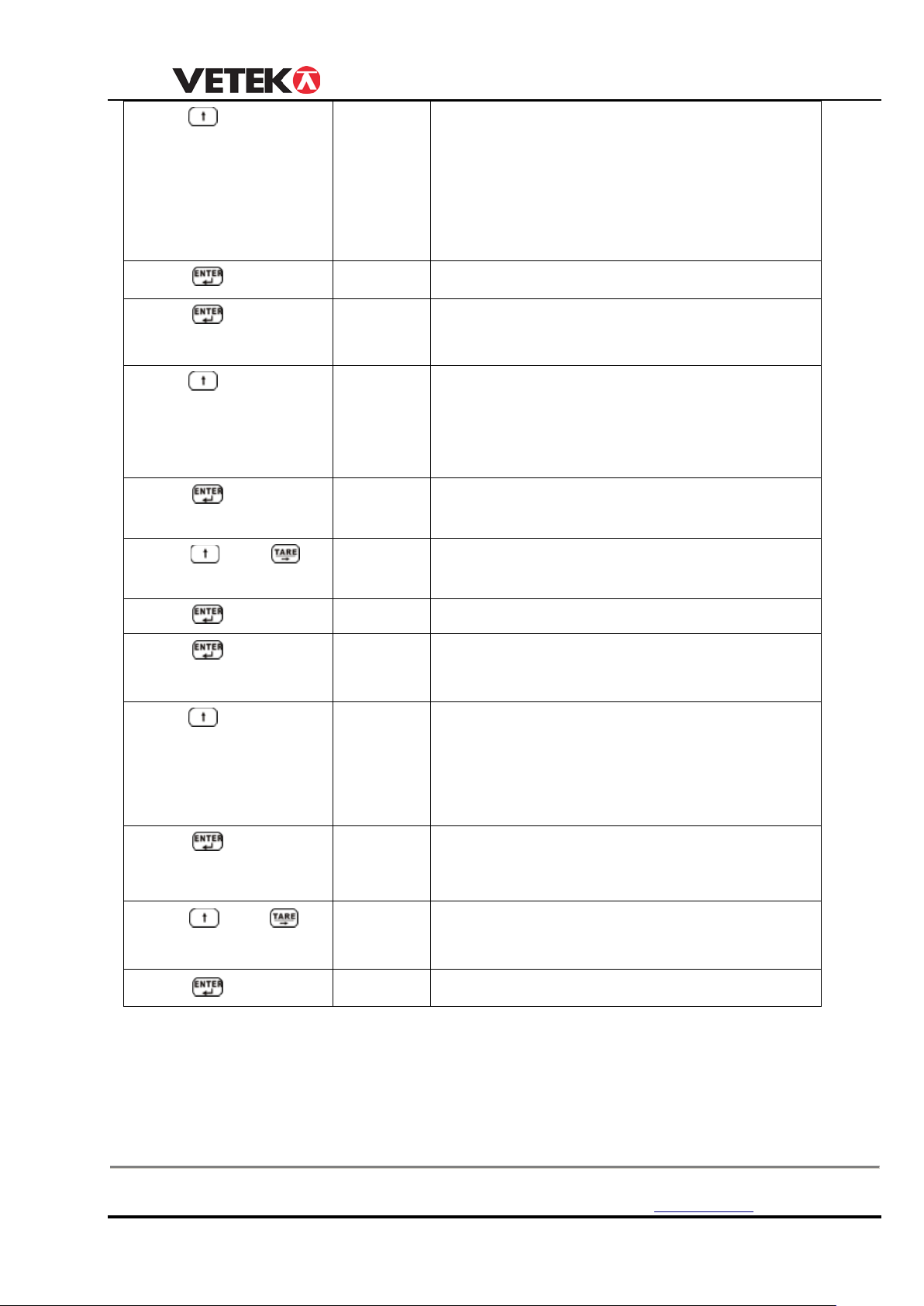
USER MANUAL
〗
; 0:
〗
parameter set, the screen display set value.
change value
means the indicator will alarm when load
〗
Press
Press
Press
Press
Press
Press
to choose 〖OFF 2
to confirm 〖SP1 〗
to confirm 〖1 OFF〗
to choose 〖1 HI〗or
〖1 LO〗
to confirm 〖02000
and to
〖01000〗
Choose turn off method, 0~2 total 3 options
turn off by hand; 1: if no operation, the
screen display ----- after 15minutes to save
power; 2: if no operation, the screen display
----- after 15minutes, and turn off
automatically after 60minutes. Generally,
Set point 1
New tension link, it display 1 OFF, if
parameter set, it display set value.
There are 3 choice,1 OFF means you don’t
set point, 1 HI means the indicator will alarm
when load exceed the value you set, 1 LO
means the indicator will alarm when load
New tension link it display 02000, if
Set “1 HI” or “1 LO” Value. e.g. 1000kg
Press
Press
Press
Press
Press
to confirm 〖 SP2〗
to confirm 〖2 OFF〗
to choose 〖2 HI〗
to confirm 〖01200〗
and to
change value
Press
to confirm
or
〖2 LO〗
〖03000
〖g= 〗
Set point 2
There are 3 choice,2 OFF means you don’t
set point, 2 HI means the indicator will alarm
when load exceed the value you set, 2 LO
New tension link it display 01200, if
parameter set, the screen display set value.
Set “2 LO” or “2 HI” value. e.g.3000kg
Acceleration of gravity
Box 79 Hantverksvägen 15 Tel. +46 (0)176-208920 Web www.vetek.se
76040 Väddö, Sverige Fax +46 (0)176-208929 Email [email protected]
15
Page 16
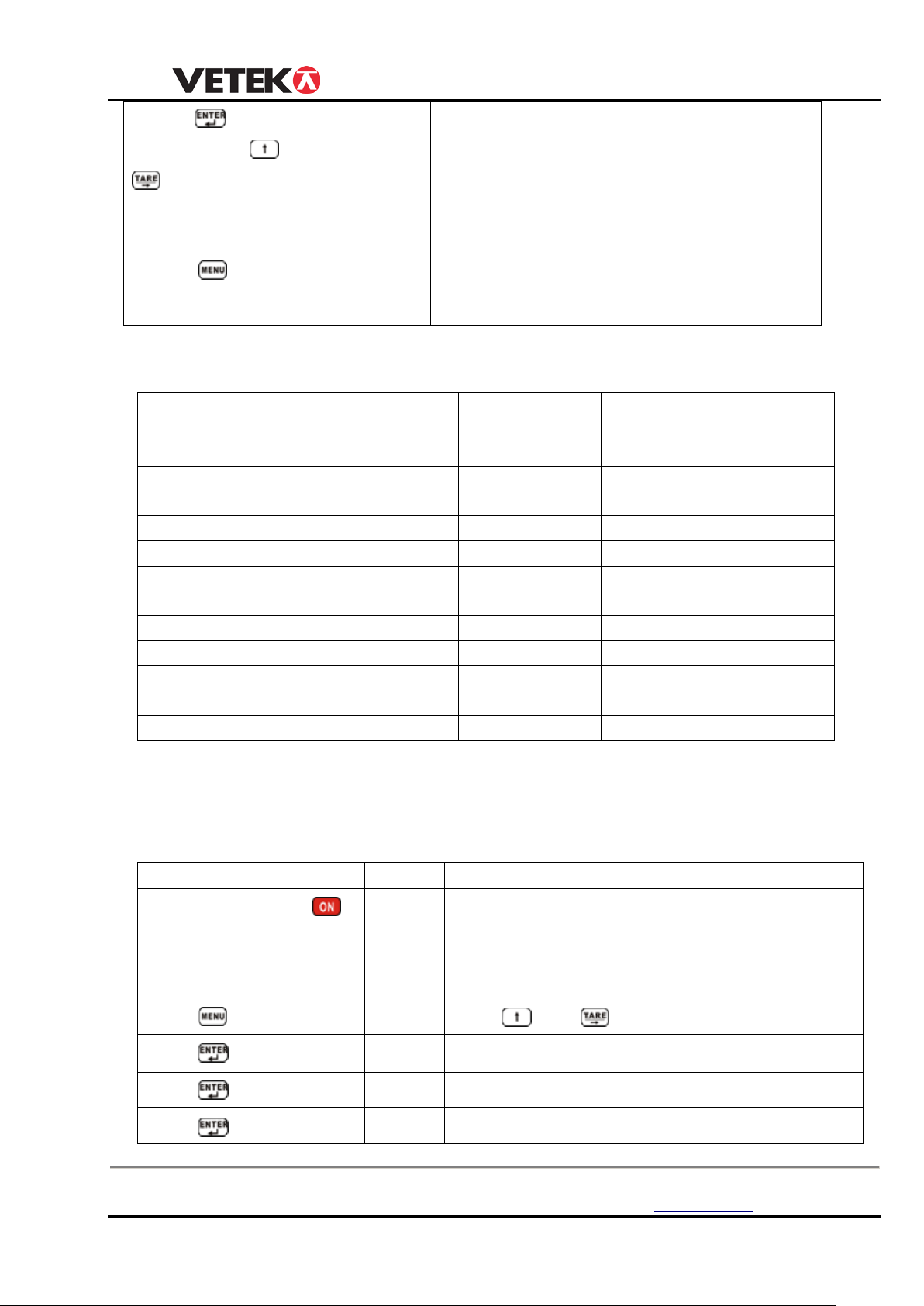
USER MANUAL
value range is 9.783-9.832,
N
FS (CAP)
Id
Pt(DECIMAL POSITIO N)
1000kg/0.5kg
10
05 1 2000kg/1kg
02
01 0 3000kg/1kg
03
01 0 5000kg/2kg
05
02 0 10000kg/5kg
10
05 0 15000kg/5kg
15
05 0 20000kg/10kg
20
10 0 30000kg/10kg
30
10 0 50000kg/20kg
50
20 0 100000kg/50kg
A0
50 0 1500000kg/50kg
F0
50
0
OPERATION
DISPLA
ILLUSTRATION
Press(ON/OFF) and
〖
〗
Turn on tension link and indicator .
T
make
sure
can
hang
Pres
〖
Press
P
〖
〗
P
〖CALSP
Zero point calibration
Press
First load calibration
〖9.7930
〗
New tension link , it display 9.7930(here in
Hangzhou), if tension link calibrated, it
display calibrated value. user can change it
Press
Then Press
to change value
to confirm
and
according to local area gravity value, the
Press
key
〖 End 〗
〖 0〗
Confirm above parameter setting,Exit
parameter setting program.
The capacity you choose relate to division, decimal position, below is detail list:
CAPACITY/DIVISIO
(DIVISION)
200t use specail software, no need to set FS,Id,Pt.
2. Calibration
User must set all parameter before calibration
s
ress
ress
Box 79 Hantverksvägen 15 Tel. +46 (0)176-208920 Web www.vetek.se
76040 Väddö, Sverige Fax +46 (0)176-208929 Email [email protected]
0
P0000
CLIbr
〖LoAd
ake Cap:5000kg tension link as example ,
it display〖 0〗before calibration, you
and
input P1358
Access calibration Status
16
Page 17
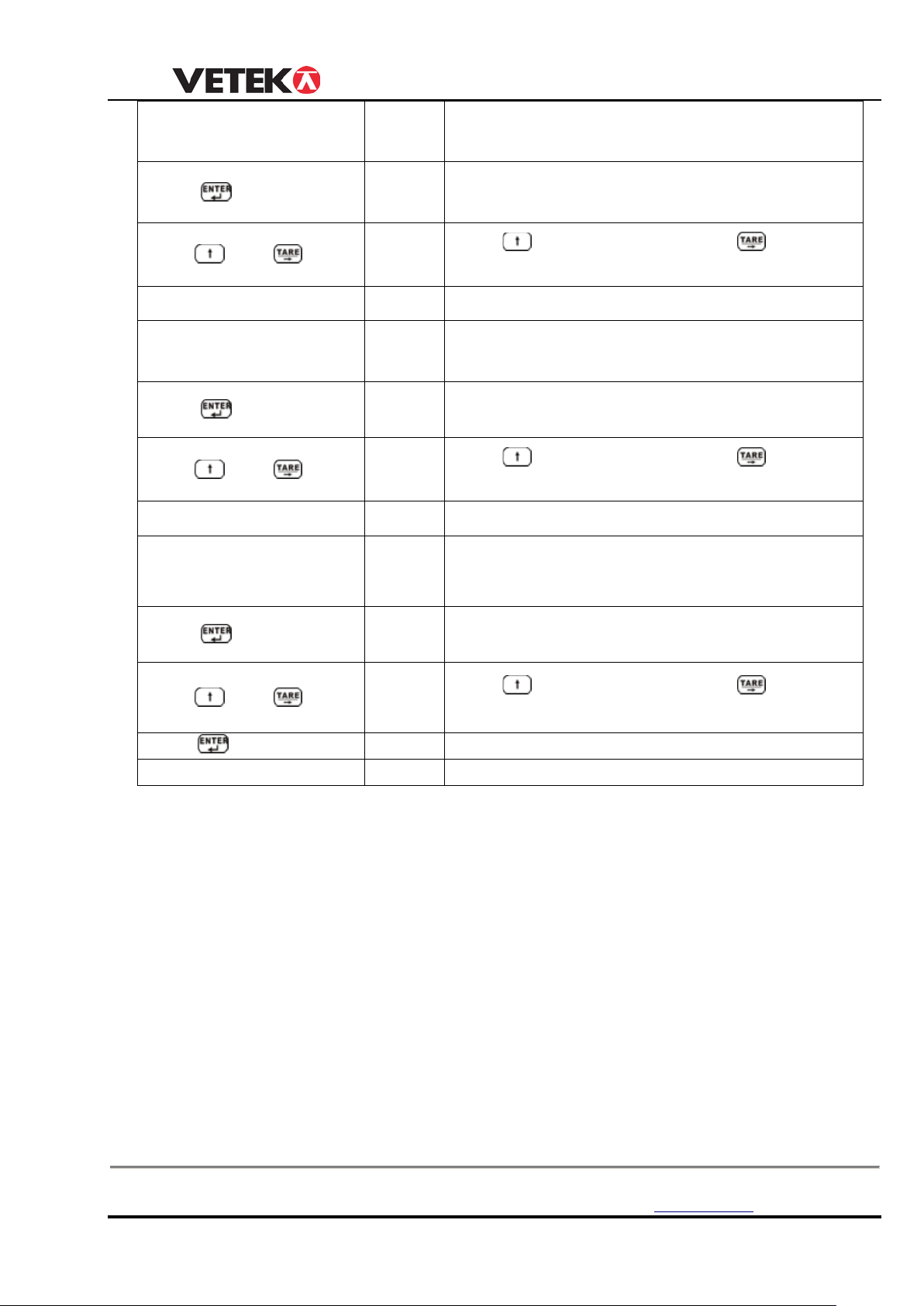
USER MANUAL
Hanging first standard
weight, e.g. 1000kg
W
〖
〗
D
,
and
signal dis play
Press
〖
〗
Press
to move the digit, input actual weight 1000kg
Waiting until stable
〖 LoAd2
Confirm and storage, into second load calibration
Hanging second standard
weight, e.g. 3000kg
Second load must exceed Load 1+20% capacity,
Waiting until ST B lig ht on.Waiting until STB signal
〖
〗
Mention you Load2 must exceed 2000kg
d
Press
〖
〗
Press
to move the digit, input actual weight 3000kg
Waiting
〖 LoAd3
C
Hanging third standard
weight, e.g. 5000kg
Third load must exceed Load 2+20% capacity,
Waiting until ST B lig ht on.
〖
〗
Ment
d
Press
〖
〗
Press
to move the digit, input actual weight 5000kg
Press
〖 End 〗
〖05000〗
Calibration finish
〖
Press
Press
and
Press
and
until stable Press
05000
01000
02000
03000
aiting until STB signal on screen
isplay capacity you choose in parameter setting
first digit flash,Do wait until “STB”
to change value, press
,and first
igit flash,Do wait until “STB” signal display
to change value, press
onfirm and storage, into third load calibration
Waiting until STB signal
Press
and
04000
05000
igit flash,Do wait until “STB” signal display
to change value, press
Attention:
1. LOAD 1 must larg er than 20% cap acity,and LOAD1<LOAD2<LOA D3, at the same
time, between LOAD1 and LOAD2, LO AD2 and LOAD3, the inter val must bigger
than 20% capacity
2. If LOAD1 is bigger than 80% capacity, such as full capacity, after first load
calibration, it will finish automatically,. Generally, we strongly recommend you to
use this one point calibration program if you have 100% capacity standard weight
ion you Load3 must exceed 4000kg ,and first
3. If you onl y have 20% standard weight, after first load calibration, when it display
LoAd2〗, press【ESC】, it will display End. Calibration finish.
Box 79 Hantverksvägen 15 Tel. +46 (0)176-208920 Web www.vetek.se
76040 Väddö, Sverige Fax +46 (0)176-208929 Email [email protected]
17
Page 18
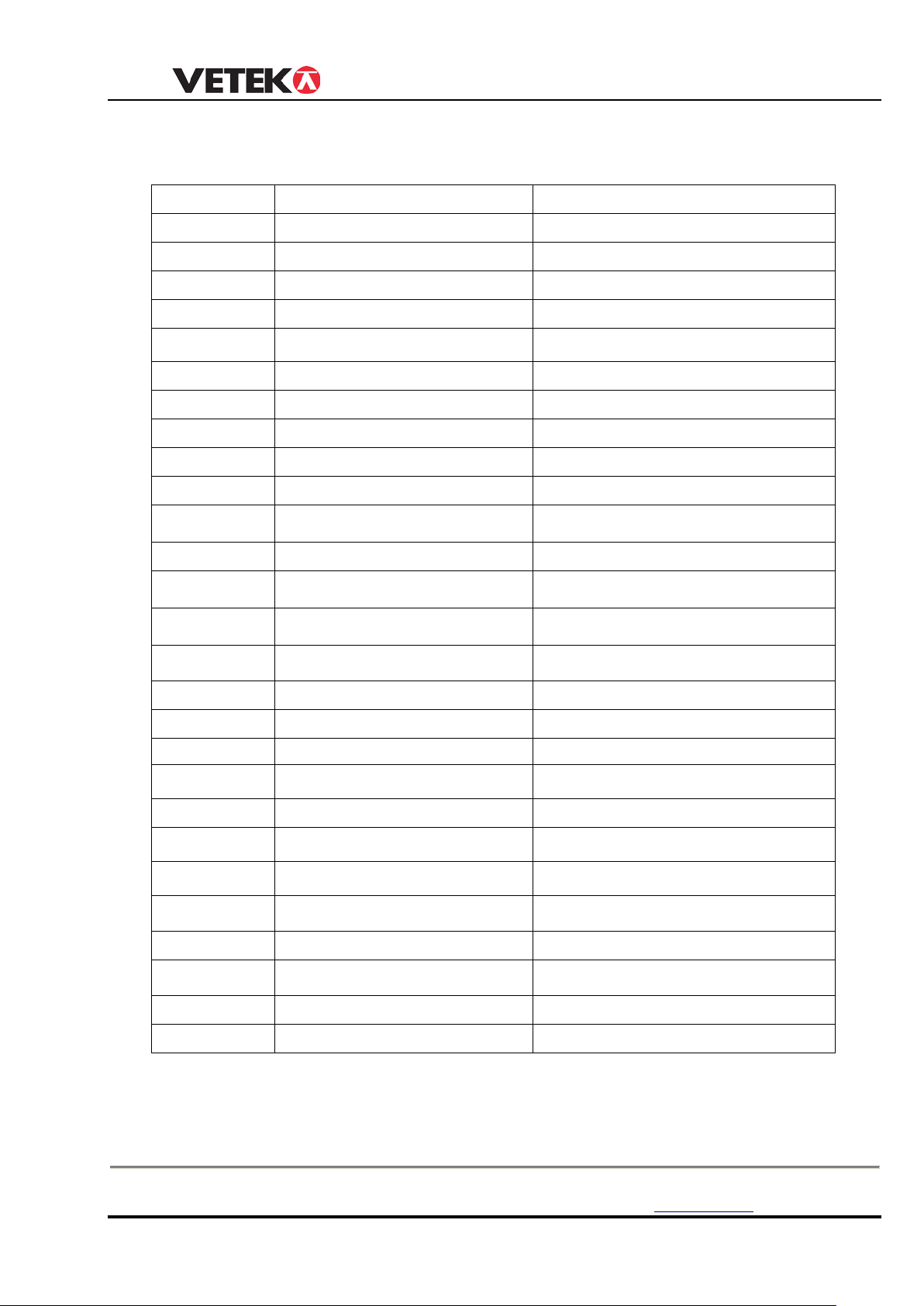
USER MANUAL
DISPLAY
ILLUSTRATION
REMARK
Enter into parameter setting
Calibration point
Tare weight can’t exceed full
capacity
Waiting stable
Weight less than Min.
Accumumated times overflow
Can’t accumulate after 30times
Can’t accumulate one weight
repeatedly
Current accumulation times
Front four digit of
accumulated
Total weight=front four digit +
rare four digit
Rare four digit of
accumulated
Total weight=front four digit + rare
four digit
Ask if you really want to
delete accumulated weight
Confirm deletion
Input value is too large
When you input tare or weight
When you input tare or weight
value
Tare + Net weight exceed full
capacity + 9e
Tare + Net weight exceed full
capacity 125%
Turn off automatically one minute
later
The voltage of current
when parameter setting or
calibration ready
Input value before STB light
CHAPTER 5
DISPLAY ILLUSTRATION
〖noSIg〗
〖SEtUP〗
〖UAdJ 〗
〖LoAd〗
〖
¯ ¯ ¯ ¯ ¯
〖﹍﹍ 〗
〖----- 〗
〖Err10〗
〖Err11〗
〖Err12〗
〖Err13〗
〖no***〗
〖H****〗
〖L****〗
〖 CLr 〗
〗
Without wireless signal
Enter voltage calibration
Exceed high limit
Exceed low limit Tare weight can’t be negative
Accumulated weight overflow Can’t accumulate after 99999
Error in repeat accumulation
Distance too far.
Can’t accumulate the value
In case error deletion
〖noCLr〗
〖88888〗
〖 ¯ ¯ ¯ 〗
〖 ﹍ 〗
〖noACC〗
〖-oL0- 〗
〖-oL1- 〗
〖-Lb- 〗
〖U*.**〗
〖 End 〗
〖 OFF 〗
〖Unstb〗
Low battery warning
CHAPTER 6 TROUBLESHOOTING GUIDE
Give up deletion
Input value is too small
No any accumulated content when you check accumulation
Overload warning
Overload warning
End
Turn off
Box 79 Hantverksvägen 15 Tel. +46 (0)176-208920 Web www.vetek.se
76040 Väddö, Sverige Fax +46 (0)176-208929 Email [email protected]
18
Page 19
USER MANUAL
Kg/lb wrong selection
See operation
=
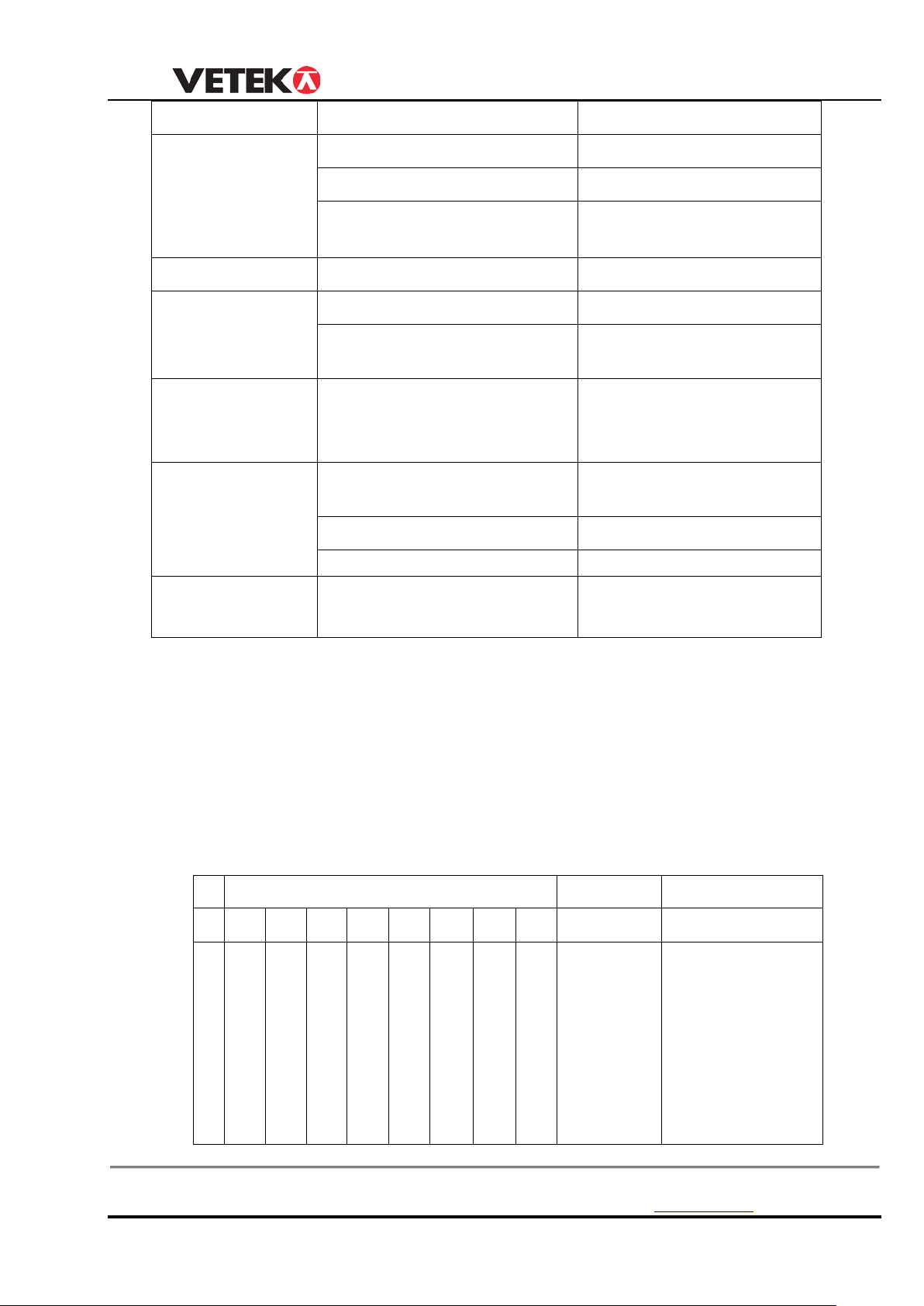
FLAG (1Byte)
Unit
F1
F2
F3
F4
F5
F6
F7
F8
(1Byte)
(1Byte)
p
S
O
T
H
P
B
SP
0x30:kg
(+ and -) sign:
PROBLEM POSSIBLE CAUSE SOUTION
No display Defective battery Replace
Defective button Requires authorized service
Power button not
properly pressed
Press ON/OFF key
firmly in three seconds
Digits flash Low battery Replace battery
Display doesn’t
respond to load
Faulty load cell or PCB Requires authorized service
Out of calibration Re- calibration
changes
Display
experiences
tension link do not stabilize
after turning on
After turning on, heating 3-5
minutes.
excessive Zero
Displayed weight
shows large error
tension link not Zeroed
before applying weight
Depress ZERO
before applying
Requires recalibration See calibration
Wireless distance
shortened
Wireless indicator’s battery is
low
Replace battery.
CHAPTER 7 RS232 PROTOCOL
Port : COM1
Baud Rate: 4800
Data Bits : 8
Stop Bits : 1
Parity : None
ASCII Code and Binary hybrid transmission
r
T
V
A
O
E
E
e
a
m
b
l
e
A
BL
E
E
R
L
O
A
D
R
E
L
D
A
K
T
T
E
R
Y
A
L
A
R
M
0x31:Lb
0x32:N
0x33:kN
0x34:t
Sign and Decimal
High 4 bits
Decimal:
Low 4 bits
Box 79 Hantverksvägen 15 Tel. +46 (0)176-208920 Web www.vetek.se
76040 Väddö, Sverige Fax +46 (0)176-208929 Email [email protected]
19
Page 20
USER MANUAL
=
0:
0:
0:
0:
0:
0:
0:
0:POSITIVE
3:3 Decimal
TTTTT
,
NNNNN/PPPPP
5Byte
1Byte
5Byte
Tare value
Separate
symble
Net value and Peak value
0x30~0x39
0x30~0x39
no
no
no
no
no
L
1:
Y
E
S
1:
Y
E
S
1:
Y
E
S
1:
Y
E
S
1:
Y
E
S
O
W
no
1:
Y
E
S
1:NEGATIVE
0:No Decimal
1:1 Decimal
2:2 Decimal
Overload:
3SP+OL
Overload:
3SP+OL
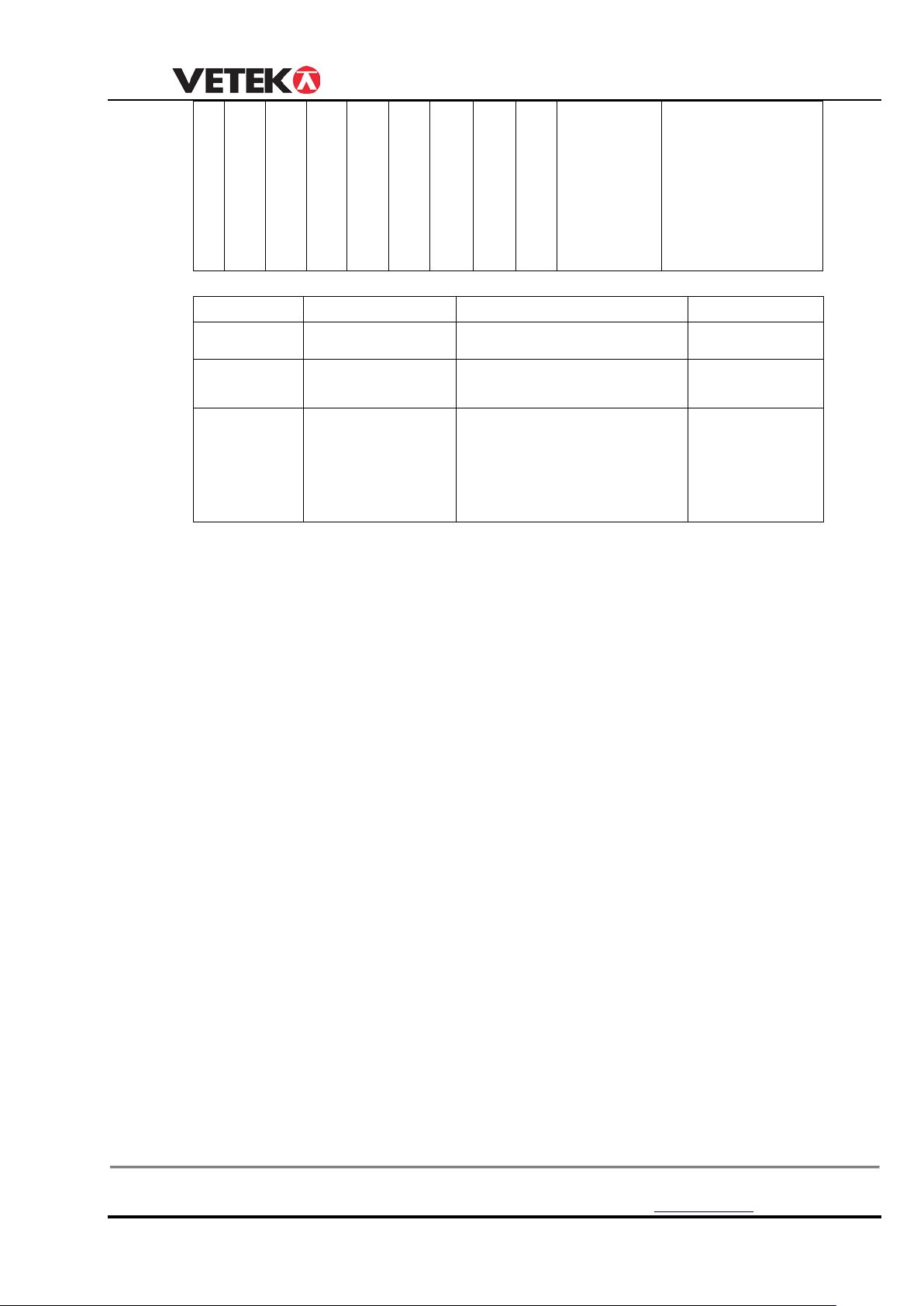
Example:
67.8kg: (F1 F2 F3 F4 F5 F6 F7 F8 )30 01 30 30 36 37 38,30 30 36 37 38
-68.1lb: (F1 F2 F3 F4 F5 F6 F7 F8 )31 F1 30 30 36 37 38,30 30 36 37 38
6.78kg: (F1 F2 F3 F4 F5 F6 F7 F8 )30 02 30 30 36 37 38,30 30 36 37 38
Box 79 Hantverksvägen 15 Tel. +46 (0)176-208920 Web www.vetek.se
76040 Väddö, Sverige Fax +46 (0)176-208929 Email [email protected]
20
 Loading...