

Page 1
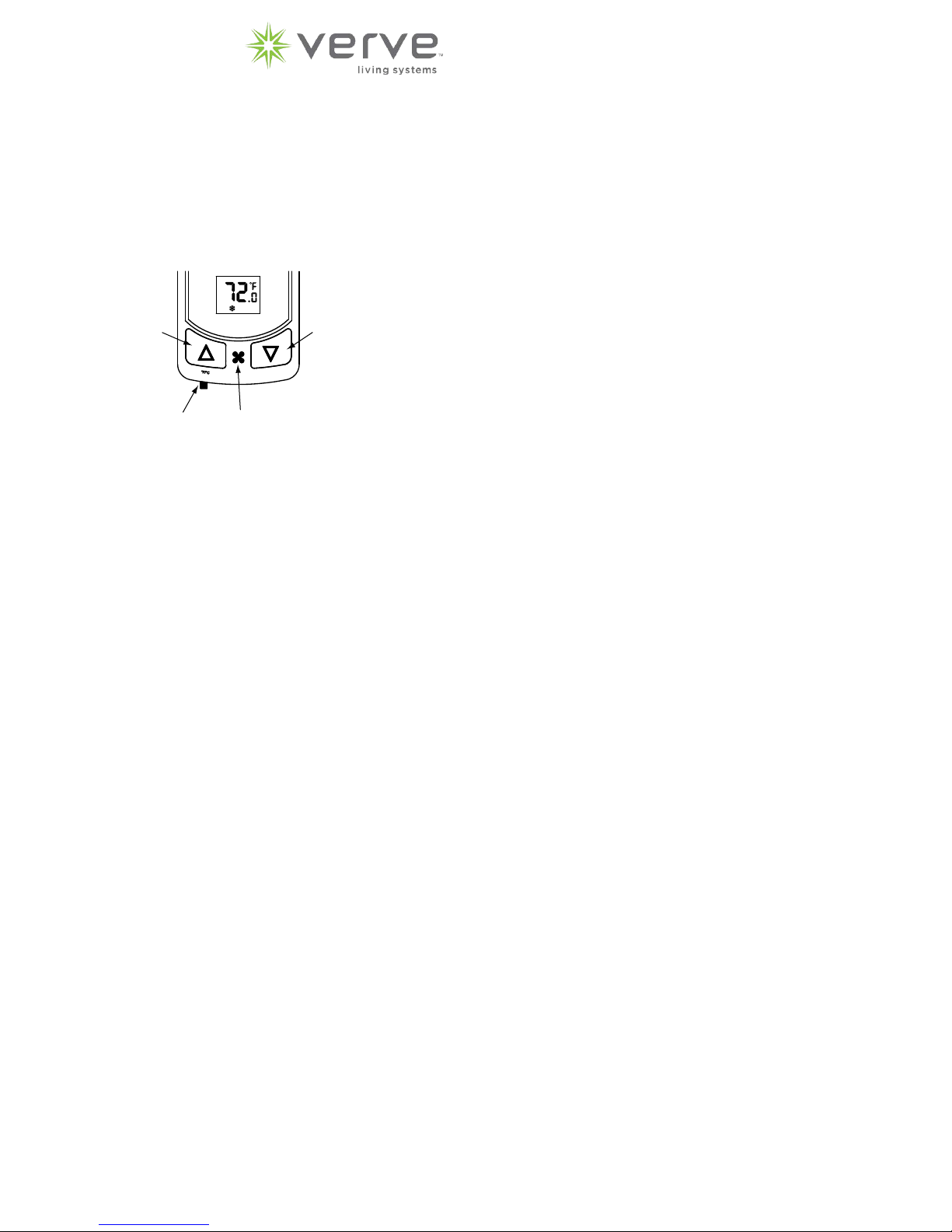
How to Program:
VTST-9 (24V & line-voltage)
EnOcean Parameters: Access Code 20
Note: For use with 902MHz devices ONLY.
NOTE: The programming mode has a time limit of 10 minutes.
The timer is automatically activated when the programming is
started. At the end of the 10 minutes the thermostat will resume
normal operation. The programming parameters will remain
unchanged unless the programming mode was ended in the
“End” mode.
NOTE: The default values mentioned in the next column and
following pages have been pre-programmed at the factory.
However, if the thermostat has been custom programmed, the
defaults may not apply.
◦
AUTO
Up
Button
°F/°C
Slide
Switch
Fan
Button
Down
Button
To enter the programming mode:
Press and hold the up and down arrow buttons while sliding the
°F/°C switch to the opposite side.
00 will appear on the display.
Do not use the °F/°C switch again while in the programming mode,
thi
s will automatically return the thermostat to operating mode.
Press either the up or down arrow button to find the access code.
Access code 20 - EnOcean Settings
Access code 43 - Configuration Mode
Access code 79 - Field Programming
Access code 92 - Restoring Factory Settings
Press the fan button upon reaching the desired code.
End and prog will appear on the display in codes 43 and 79
ALL will appear on the display in code 92.
Press either the up or down arrow button to scroll through the
menu to reach the desired parameter. The parameters are defined
and the factory set defaults listed in the next columns.
Press the fan button to access the parameter.
Press either the up or down arrow button to reach the desired
change.
Press the fan button to return to the program menu.
Continue scrolling and changing as desired.
Read instructions before beginning.
Clear (CLr):
If this is the first time that any device has been connected or all
previously learned devices are to be deleted from the thermostat,
the thermostat must be cleared.
Enter the Clear (CLr) mode and then Press the fan button.
The display will blink (CLr) for a few seconds and will then blink
Ed and 00 while the devices are cleared. When CLr remains on
the display the thermostat has been cleared.
Press the up arrow button to enter the learn mode.
Learn:
Enter the Learn (Lrn) mode and then Press the fan button.
The display will toggle between the function type (see below) and
the number of devices learned to that function type.
Change the desired function type by Pressing the up or down
arrow buttons.
Follow the device’s procedure for learning a device.
After adding a device the display will toggle between (Add) and the
number of devices learned to that function type. Wait for the display to return to the function type and number of devices toggling
before adding another device.
Press the up or down arrow button to change the device type.
If deleting a device, the display will show (dEL) followed by the
number of devices learned to that function type. Wait for the
display to return to the function type before adding or deleting
another device.
Profile Select (PXx):
P03 – Default, EEP 07-10-03, temperature, setpoint
P04 – EEP 07-10-04, temperature, setpoint, fan control
P12 – EEP 07-10-12, temperature, humidity, setpoint
Function Type:
Entry Door (Ed): A door switch is used in conjunction with a
motion detector to latch the room in either occupied or unoccupied
mode.
DO NOT USE without either an onboard or a remote motion
detector.
Outside Door (Od): A door/window switch will place the thermostat in shutdown when any door/window is opened. When door/
window is closed the thermostat will resume normal operation.
To save the changes:
For Access code 43 and 79 Press either the up or down arrow button until End and prog
appear on the display again.
Press the fan button to save the changes and exit the program.
For Access code 20 Move the F/C switch to the opposite side.
When exiting from one access code you will need to re-enter
programming mode to enter a different access code.
Rocker (roc): When the “O” button is pressed the thermostat will
go into unoccupied mode. When the “I” button is pressed the
thermostat will go into occupied mode.
Keycard (Crd): The thermostat will go into occupied mode when
the keycard is inserted. When the keycard is removed the thermostat will go into unoccupied mode.
Temperature Sensor (rS2): Used to control the thermostat or
temperature value may be averaged with the thermostat’s onboard
sensor. Operation is defined within code 79 Remote Sensor (rS2).
Other (OtH): Motion detector, Central Gateway or other 4BS device.
1
Page 2

Sending a Teach-in Telegram:
Press the up or down arrow button to select Teach-in (tEa) mode.
Pressing the fan button will trigger the thermostat to send a
teach-in message.
Configuration Parameters: Access Code 43
Some parameters will change depending on whether the
equipment type is a fan coil or a heat pump.
Explanation of Codes:
To exit, Move the F/C switch to the opposite position.
EnOcean Connectable Devices:
Validate that the desired device has one of the EEP’s listed below.
Learn and clear modes will time out 30 seconds after the last
device has been added or deleted.
RPS Telegrams Accepted:
EEP: 05-10-00 – Window handle
EEP: 05-04-01 – Keycard activated switch
EEP: 05-02-02 – PTM 210 or equivalent
F6-10-00: Window Handle
F6-04-01: Key Card Activated Switch
F6-02-02: PTM200 / PTM 210 or equivalent
1BS Telegrams Accepted:
EEP 06-00-01 – Single input contact
D5-00-01: Single Input Contact
4BS Telegrams Accepted:
A5-02-04: Temperature Sensor Range -10°C to +30°C
A5-02-05: Temperature Sensor Range 0°C to +40°C
A5-02-06: Temperature Sensor Range +10°C to +50°C
A5-02-07: Temperature Sensor Range +20°C to +60°C
A5-02-15: Temperature Sensor Range -10°C to +70°C
A5-04-01: Range 0°C to +40°C and 0% to 100%
A5-07-01: Occupancy
A5-07-02: Occupancy Sensor
A7-07-03: Occupancy Sensor
A5-08-01: Range 0lx to 510lx, 0°C to +51°C and Occupancy
A5-08-02: Range 0lx to 1020lx, 0°C to +51°C and Occupancy
A5-08-03: Range 0lx to 1530lx, -30°C to +50°C and Occupancy
A5-30-01: Single Input Contact, Battery Monitor
A5-30-02: Single Input Contact
A5-38-08: Central Gateway
EEP: 07-02-04 – Te mperature sensor, range -10°C to 30°C
EEP: 07-02-05 – Te mperature sensor, range 0°C to 40°C
EEP: 07-02-06 – Te mperature sensor, range 10°C to 50°C
EEP: 07-02-07 – Te mperature sensor, range 20°C to 60°C
EEP: 07-02-15 – Te mperature sensor, range -10°C to 70°C
EEP: 07-04-01 – Temperature and Humidity sensor, range 0°C to 40°C,
0% to 100%
EEP: 07-07-01 – Occupancy sensor
EEP: 07-07-02 – Occupancy sensor
EEP: 07-07-03 – Occupancy sensor
EEP: 07-08-01 – Only occupancy sensor used
EEP: 07-08-02 – Only occupancy sensor used
EEP: 07-08-03 – Only occupancy sensor used
EEP: 07-30-01 – Digital input, single input contact, battery monitor
EEP: 07-30-02 – Digital input, single input contact
EEP: 07-38-08 – Central Gateway
Equipment Type (E9P):
Selects the type of equipment
FC - Default, fan coil
tHp - Trane heat pump, type O reverse valve
tAc - Trane AC with electric heat
FHp - Friedrich heat pump, type B reverse valve
FAc - Friedrich AC with electric heat
gHp - GE heat pump, type B reverse valve
gAc - GE AC with electric heat
AHp - Amana heat pump, type B reverse valve
AAc - Amana AC with electric heat
Fan Speed and Operation (FOp):
Three speed fan only available for fan coil equipment
3U - Default fan coil, three speed user selectable fan
3C - three speed constant fan
3A - three speed auto fan
2U - Default heat pump, two speed user selectable fan
2C - two speed constant fan
2A - two speed auto fan
1U - single speed user selectable fan
1C - single speed constant fan
1A - single speed auto fan
Compressor Protection (FCp):
Selects the compressor protection and high or low speed fan in
heating
NP - Default fan coil, no compressor protection and high
fan is allowed in heating
CP - Default heat pump, compressor protection and high
fan is allowed in heating
nP - no compressor protection and only low fan is allowed
in heating
cP - compressor protection and only low fan is allowed in
heating
Continuous Fan Operation (CFL):
Selects continuous fan operation
dis - Default, normal fan operation
Ena - continuous low fan in auto or economy modes
Reverse Valve Type (typ):
Selects the valve type
O type - Default, energizes in calls for cooling
b type - energizes in calls for heating
Heat Pump or AC (Pt):
HP - Default, 2 stage heat, single stage cool
Y = compressor, W = 2nd stage heat
AC - AC and electric heat
Y = cool, W = heat
NOTES:
All single input contacts (EEP: 06-00-01, 07-30-01, 07-30-02) and
window handle inputs (EEP: 05-10-00) will place the thermostat into
shutdown mode when any of the contacts are open (any door or
window is open). Thermostat will resume normal mode when all
contacts are closed (all doors and windows are closed).
2
Page 3

Field Programming Parameters: Access Code 79
Explanation of Codes:
Temperature Scale (Unt):
Selects scale parameter that will be shown
F - Default,°F
C - °C
On Power Interrupt (OPi):
Selects whether the thermostat will go into economy mode or
occupied mode after a power interrupt
EC – Default, thermostat will go into economy mode after
a power interrupt
OC – thermostat will go into occupied mode after a power
interrupt
Display Temperature (dSp):
Selects which temperature is shown on display
SP - Default, display will show setpoint only
rt - display will show room temperature unless either up or
down arrow button is pressed. Then the display will show
setpoint.
Srt - display will toggle between room temperature and
setpoint. Display will revert to setpoint when either the up or
down arrow button is pressed.
Temperature Control Mode (HAc):
USr - Default, switch selectable, heat only, auto changeover
or cool only
Aut - auto mode only
CL - cool mode only
Ht - heat mode only
Stop Function Enabled (Stp):
Selects whether or not thermostat can be turned off by pressing
the fan button
Ena – Default, enabled, press fan button until Stp appears
on display
dis – disabled
Economy Function Enabled (ECo):
Selects whether or not thermostat can be manually placed in
economy mode by pressing the fan button
Ena – Default, enabled, press fan button until Eco and
ECON appears on display
dis – disabled
Freeze Protection (FP):
Selects freeze protection enabled or disabled
Ena – Default, enabled at 40°F
dis – disabled
Fan Purge Timer (FPt):
Selects the amount of time the fan will continue to run after a
heating or cooling call.
30 seconds Default
Programmable Range: 0 (Off) to 180 seconds (3 minutes),
in 10 second increment
Clear Logged Data (CLr):
Selects whether or not the logged run time data will be reset to 0’s
NO – default, no reset
yEs – reset
Energy Savings Preset (ESp):
Presets the stepped back functions according to the required energy
savings level. One of three presets can be chosen or skip this
parameter and go directly to the Sbr parameter to begin choosing
other non-preset settings.
L1 – (least energy savings)
Setback Ramping (Sbr): enabled
First Setback Timer (FSt): 480 minutes (8 hours)
Second Setback Timer (SSt): 60 minutes
Degrees Per Setback (dPs): 1.0°
This means that after 8 hours of no motion sensed the thermostat
will begin to step back at a rate of 1.0° every 60 minutes until either
the unoccupied cooling limit (UCL) or the unoccupied heating limit
(UHL) is reached.
L2 – (moderate energy savings)
Setback Ramping (Sbr): enabled
First Setback Timer (FSt): 240 minutes (4 hours)
Second Setback Timer (SSt): 60 minutes
Degrees Per Setback (dPs): 1.0°
This means that after 4 hours of no motion sensed the thermostat
will begin to step back at a rate of 1.0° every 60 minutes until either
the unoccupied cooling limit (UCL) or the unoccupied heating limit
(UHL) is reached.
L3 – Default (most energy savings)
Setback Ramping (Sbr): disabled
First Setback Timer (FSt): 60 minutes
This means that after 1 hour of no motion sensed the thermostat
will go directly to either the unoccupied cooling limit (UCL) or the
unoccupied heating limit (UHL)
Comfort Setpoint (CS):
Selects setpoint default temperature when thermostat powers up
or returns to comfort mode from economy mode
72.0°F (22.0°C) Default
Programmable Range: 60.0°F to 85.0°F (15.5°C to 29.5°C)
Cooling Limit (LC):
Selects minimum room temperature in cooling
65.0°F (18.5°C) Default
Programmable Range: 60.0°F to 85.0°F (15.5°C to 29.5°C)
Heating Limit (LH):
Selects maximum room temperature in heating
85.0°F (29.5°C) Default
Programmable Range: 60.0°F to 85.0°F (15.5°C to 29.5°C)
Setback Ramping (Sbr):
Selects setback function to step back to unoccupied setpoints or to
go directly to unoccupied setpoints.
dis - Default, disabled, directly to unoccupied setpoints
Ena – enabled, steps back to unoccupied setpoints
First Setback Timer (FSt):
When in occupied mode, selects the amount of time when no motion
is detected before the setpoint begins to be stepped back by the
degrees per setback
60 minutes Default
Programmable Range: 1 minute to 720 minutes (12 hours),
in 15 minute increments
3
Page 4

Second Setback Timer (SSt):
When in unoccupied mode, selects the amount of time between
steps, example: if both parameters are defaulted, the thermostat
will step back 1.0° per every 30 minutes until either the unoccupied
cooling limit (UCL) or the unoccupied heating limit (UHL) is reached.
30 minutes Default
Programmable Range: 1 minute to 720 minutes (12 hours),
in 15 minute increments
Degrees Per Setback (dPs):
Selects the number of degrees per time period that the setpoint will
be stepped back
1.0° Default
Programmable Range: 0.0°F to 3.0°F, in 0.5°F increments
Checkout Timer (Ct):
Selects the amount of time when no motion is detected before the
room is considered vacant and sets back to economy mode
24 hours Default
Programmable Range: 1 hour to 48 hours, in 1 hour increments
Open Door Timer (Odt):
After door switch activation, selects the amount of time to check for
motion before determining occupied or unoccupied mode. Available
only with door switch
15 minutes Default
Programmable Range: 5 minute to 240 minutes (4 hours),
in 15 minute increments
Entry Door Timer (Edt):
When the entry door switch detects an open door it selects the
amount of time that the door can be left opened before placing the
thermostat into a shutdown mode.
0 minutes Default, disabled
Programmable Range: 0 minutes to 15 minutes,
in 1 minute increments
Fan Refresh Frequency (FrF):
Selects how often the low fan will operate for a fan refresh
0 hours Default, disabled
Programmable Range: 0 hours to 24 hours
Fan Refresh Duration (Frd):
Selects the length of time the low fan will operate during a fan
refresh
1 minute Default
Programmable Range: 1 minute to 45 minutes
Cycle Rate Timer (crt):
Limits the number of heat/cool cycles per hour
8 cycles per hour Default, fan coil
6 cycles per hour Default, heat pump
Programmable Range: 0 (Off) to 24 cycles per hour, fan coil
Programmable Range: 0 (Off) to 12 cycles per hour, heat pump
Differential (dif):
Selects the minimum room temperature above or below setpoint
when heating or cooling will turn on or off.
0.4°F (0.2°C) Default
Programmable Range (°F): 0.2, 0.4, 0.6, 0.8, 1.0, 1.2
Programmable Range (°C): 0.1, 0.2, 0.3, 0.4, 0.5, 0.6
Setpoint Hold Timer (SH):
Selects a time limit that the occupant’s setpoint will be saved, when
in economy mode.
0 hours Default, disabled
Programmable Range: 0 to 24 hours
Fan Hold Timer (HFt):
Selects a time limit the high and low fans will operate before
automatically returning to auto mode.
0 hours Default, disabled
Programmable Range: 0 to 24 hours
Unoccupied Cooling Limit (UCL):
When in cooling unoccupied mode, the setpoint won’t step back
above this temperature
78.0°F (25.5°C) Default
Programmable Range: 72.0°F to 99.0°F (22.0°C to 37.0°C)
Unoccupied Heating Limit (UHL):
When in heating unoccupied mode, the setpoint won’t step back
below this temperature
64.0°F (18.0°C) Default
Programmable Range: 41.0°F to 72.0°F (5.0°C to 22.0°C)
Economy Cooling Limit (EC):
When in economy or remote setback mode, selects the highest
room temperature before cooling turns on. Cooling turns off when
temperature falls below EC value.
85.0°F (29.5°C) Default
Programmable Range: 72.0°F to 99.0°F (22.0°C to 37.0°C),
in 0.5°F increments
Economy Heating Limit (EH):
When in economy or remote setback mode, selects the lowest
room temperature before heating turns on. Heating turns off when
temperature rises above EH value.
60.0°F (15.5°C) Default
Programmable Range: 41.0°F to 72.0°F (5.0°C to 22.0°C),
in 0.5°F increments
Remote Sensor (rS2):
When a remote sensor is connected, it may be used to control the
thermostat instead of the on board sensor or it may be averaged
with the on board sensor.
NS2 - Default, no remote sensor available
rt - remote sensor is used only
Art - temperature is averaged between on board sensor and
remote sensor
rtr - remote EnOcean temperature sensor is used only
Arr – temperature is averaged between on board sensor and
remote EnOcean temperature sensor
NOTE: If sensor is not connected, the only valid selection is NS2.
Remote Electronic Aquastat Sensor (rS3):
FAN COILS ONLY:
When the electronic aquastat sensor is connected it will control the
thermostat functions based on pipe temperature.
NS3 - Default, aquastat and related functions disabled,
(standard 4-pipe operation)
EA - aquastat and related functions enabled
(standard 2-pipe operation), see parameters in next column
NOTE: If aquastat sensor is not connected, the only valid selection
is NS3.
4
Page 5

Shutdown Delay (Sdd):
Selects the amount of time delay between remote shutdown signal
and the thermostat going into shutdown mode.
0 seconds Default, immediate
Programmable Range: 0 seconds to 200 minutes
Setback Override (Sbo):
Selects the amount of time the remote setback or shutdown can be
overridden by the occupant pressing the up, down or fan buttons.
0 minutes Default, no override
Programmable Range: 0 minutes to 8 hours,
in 15 minute increments
If Remote Pipe Sensor (rS3) is set to EA the following
parameters are available:
Heating Activation Temperature (HAt):
Selects the pipe temperature that activates heating and fans.
85.0°F (29.5°C) Default
Programmable Range: 75.0°F to 99.0°F (24.0°C to 37.0°C)
Cooling Activation Temperature (CAt):
Selects the pipe temperature that activates cooling and fans.
65.0°F (18.5°C) Default
Programmable Range: 40.0°F to 70.0°F (4.5°C to 21.0°C)
To restore factory presets:
Press and hold the fan and down arrow buttons while sliding the
°F/°C switch to the opposite side.
00 will appear on the display.
Press either the up or down arrow button to locate the erase
mode Access code 92.
Press the fan button upon reaching the code.
All and erase will appear on the display.
To restore ALL factory presets, simply press the fan button when
ALL appears on the display. The program will exit also.
To restore individual parameters, press either the up or down
arrow button until the parameter is reached. Press the fan button
and the factory preset is restored.
To exit, press the up or down arrow buttons until End and ERASE
appear on the display.
Press the fan button to exit.
Fan Coil Functions (CFg):
Selects the desired 2-pipe fan coil system.
2Ps - Default, 2-pipe single valve fan coil
2PE - 2-pipe with electric heat
2Pn - 2-pipe valveless
NOTE: Refer to Installation Instructions for further explanations
Valve Purge Frequency (Pgf):
Selects the length of time between valve purges.
60 minutes Default
Programmable Range: 30 minutes to 120 minutes (2 hours),
in 10 minute increments
Valve Purge Duration (Pgd):
Selects the length of time that the valve is in purge mode.
180 seconds (3 minutes) Default
Programmable Range: 30 seconds to 300 seconds (5 minutes),
in 10 second increments
5
9510-1237 Rev 9-22-14
 Loading...