

Page 1

V ER T U
SP- 1 V B L U E T O O T H T R A V E L S P E A K E R
U S E R G U I D E V ER SI ON 1.0
i
Page 2

ii
Page 3

T A B L E O F C O N TE NT S
English ....................................................................................................................................................................................... 1
Français ................................................................................................................................................................................... 23
Deutsch ................................................................................................................................................................................... 45
Italiano ..................................................................................................................................................................................... 67
Р у с с к и й ....................................................................................................................................................................... 89
简体中文 ............................................................................................................................................................................. 111
繁體中文 ............................................................................................................................. ................................................ 135
iii
Page 4

Tiế ng Việ t ........................................................................................................................................................................... 157
Bahasa Indonesia ................................................................................................................................................................. 179
Español.................................................................................................................................................................................. 201
У к р а ї н с ь к а .......................................................................................................................................................... 223
Türkçe.................................................................................................................................................................................... 245
ÉíÈ Ñ Ú áÇ
............................................................................................................................. ...................................................... 267
iv
Page 5

VER TU SP-1V BL UET OOT H T RAV E L SPE AKE R
Thank you for purchasing the Vertu SP-1V Bluetooth travel speaker. The SP-1V speaker allows you to enjoy your media and make
conference calls wirelessly over Bluetooth. You can use the SP-1V speaker with all Vertu phones and devices that are Bluetooth
enabled and have the right specifications.
For details, see Specifications on page 16.
English 1
Page 6

PAC KAG E CO N TEN TS
Bluetooth travel speaker
•
Wall charger AC-32V with regional plugs
•
Micro USB cable 1200 mm (CA-225DV)
•
Audio cable with 3.5 mm to 3.5 mm jack
•
Carry pouch
•
User guide
•
2 English
Page 7

BLU ETO OTH TRAVE L SPE AKE R
Answer or reject a call
1
Volume down
2
Volume up
3
Enter or exit Bluetooth pairing mode
4
1 2 3 4
English 3
Page 8
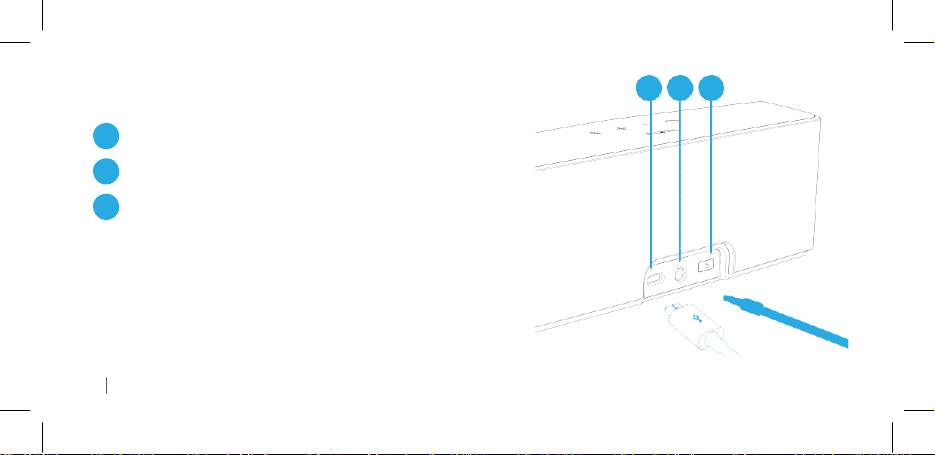
BLU ETO OTH TRAVE L SPE AKE R
Micro USB port
1
3.5 mm jack socket
2
Power on or off
3
1 2 3
4 English
Page 9
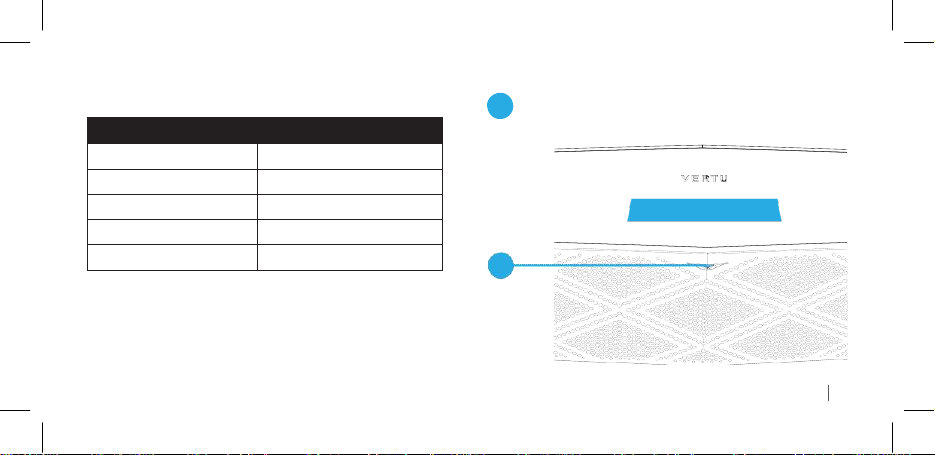
Colour of the light
Speaker status
Flashing white
Switched on
Flashing blue
In Bluetooth pairing mode
Flashing green
Charging
Constant green
Fully charged
Constant red
Power is low
LED STA TUS IND ICATOR
LED status indicator
1
1
English 5
Page 10

CH A RGI NG THE B L UE T OOT H TRAVE L SPEA KER
1 2
6 English
Page 11

CH A RGI NG THE B LUE TOOT H TRAVE L
SPE AKE R
Fully charge the speaker before you use it for the first
•
time.
Use the supplied AC-32V charger.
•
Fully charge the speaker every six months, even if you
•
don’ t use it.
You can use the speaker while it charges. The speaker might
charge more slowly while in use.
CO N NEC TING THE SP EAKE R TO YOUR
DE V ICE WITH BLUE TOO TH
When you switch on the speaker for the first time, it automatically
enters pairing mode.
If the speaker does not enter pairing mode, you can use manual
pairing or simple secure pairing.
The speaker remembers the paired device and automatically
connects to it again when the device is in range and available
for pairing.
If the speaker does not pair with a device within 5 minutes, the
speaker exits pairing mode.
English 7
Page 12

MA N UAL PAIRI NG
1.
Press and hold the Bluetooth pairing button for 2 seconds.
2.
There is a sound and the LED indicator flashes blue.
3.
Enable Bluetooth on your device.
4.
From your device, add or search for devices.
5.
From the list, select Vertu SP-1V.
6.
If you are asked for a pass code, enter 0000.
Bluetooth pairing button
1
1
8 English
Page 13

SIM PLE SE CURE PA IRI N G WITH NFC
To use simple secure pairing, your device must be NFC-enabled.
1
NFC area
1
Put your NFC-enabled device over the NFC area.
•
The SP-1V speaker powers up when it detects your device.
The LED indicator flashes white and then flashes blue. When
the indicator flashes blue, the speaker and the device are
connected.
English 9
Page 14

CO N NEC TING THE SPE AKE R TO YOUR DE VICE WIT H THE AU DI O CA BLE
1 2
10 English
Page 15

LIS TEN ING TO MU SIC
1.
Connect the speaker to your device.
2.
Navigate to the media player on your device and play your
music.
For best results:
Set the volume on your device to maximum and adjust
•
the volume on the speaker.
Stand the speaker on its base facing forwards.
•
INC OMI N G C ALLS
If you are connected to your phone, incoming calls and
messages take priority over media. You hear your ringtone
through the speaker.
Note: If your phone does not support the ringtone transfer
feature, the speaker uses its own default ring tone.
CO N NEC TION PR I ORI T Y
If you connect the speaker to both Bluetooth and the audio
cable, then the Bluetooth connection takes priority.
English 11
Page 16

MA KING HAND S-FREE AND C ONF EREN C E
CAL L S
1
The call button
If you can make hands-free and conference calls with your
phone, then you can make them with the SP-1V speaker. You
can answer and reject calls with your phone, or with the call
button on the speaker.
1
12 English
Page 17

If your phone supports voice dialling with Bluetooth, press the
•
call button to activate voice dialling mode.
ANS WER I NG CA LLS WI TH THE SP EAK ER
1.
Press the call button on the speaker.
The call is played through the speaker.
2.
DI A LLI NG WITH THE SP EAK ER
To end the call, press the call button.
If you were listening to music before the call, the speaker
resumes playing music.
Some phones might play the call through the phone. You might
need to select the speaker as the audio device for hands-free
calls.
RE J ECT I NG CA LLS WI TH THE SPEAK ER
Press and hold the call button for about 2.5 seconds, until
•
the call is rejected.
TI P S FOR MA KING HAND S-FREE CA LLS
Speak into the front of the speaker.
•
Sit within one metre of the speaker.
•
English 13
Page 18

TR O UBL ESH OOT I NG
Unable to connect the speaker to my device with Bluetooth
Check that no other Bluetooth devices are connected to the
•
speaker.
Check that your device is Bluetooth compatible and that
•
Bluetooth is switched on.
Unable to connect the speaker to my device with NFC
Check that your device is NFC enabled and that NFC is
•
switched on.
Sound is distorted
Reduce the volume on the speaker. If the speaker volume is
•
at the lowest setting, reduce the volume on the device.
Check that the speaker is fully charged.
•
Signal cuts out
Check that the speaker and device have a direct line of sight.
•
Obstructions can interrupt the signal.
Check that the device is no more than 10 metres away from
•
the speaker.
14 English
Page 19

No sound or too quiet
On the Bluetooth setting menu of your device, check that your
•
device is connected to the speaker.
Check that the speaker is not in pairing mode. The LED
•
indicator flashes blue when the speaker is in pairing mode.
If you are using the Bluetooth connection, check that the
•
audio cable is not connected.
If you are using the audio cable connection, check that the
•
jacks are firmly inserted into the sockets.
Check the volume levels on your speaker and device.
•
If you are using the Bluetooth connection and the sound is
•
still too low, try using the audio cable connection.
The speaker turned itself off
Turn the speaker on. On the Bluetooth setting menu of your
•
device, check that your device is connected to the speaker.
If the speaker does not receive a signal for 15 minutes, it
powers off automatically.
Check that the speaker is fully charged. If the speaker runs
•
low on power, it powers off automatically.
Force power off
To force the speaker to power off, press and hold the power
•
button for 10 seconds.
English 15
Page 20

SPE CIFI CAT I ONS
Audio
Power rating nominal 5 W, maximum 8 W per channel
•
Built-in microphone x1
•
Frequency Response: 60 Hz - 35 kHz
•
Maximum output power 6 Watts x2
•
Support 3.5 mm line-in using Northern American standard
•
Approximately 16 hours of continuous play measured at
•
1 Watt over Bluetooth. Varies by volume level and audio
content.
Bluetooth
Wireless Range: 10 m minimum point to point line of sight
•
in open space
Supports Enhanced Data Rate (EDR)
•
Supports aptX Standard
•
16 English
Page 21

SUP POR TED BLU E TO O TH PROF ILE S
Advanced Audio Distribution Profile (A2DP) 1.2
•
Hands-Free Profile (HFP) 1.6
•
Headset Profile (HSP) 1.2
•
Audio Video Remote Control Profile (AVRCP) 1.5
•
OTH ER S PEC I FIC A TIO N S
Micro USB charging port
•
Built-in rechargeable Lithium-ion battery
•
DI M ENS I ONS
190 mm W x 60 mm D x 61 mm H
SPE AKE R ME MOR Y
The speaker remembers up to 8 paired devices. If you pair a
ninth device, the speaker deletes the device that you used least
recently.
English 17
Page 22

CA R ING FOR THE C OMP O NEN TS OF YOUR SP-1V TRAV EL SPEA KER
Do:
Keep all components dry and free of dust and dirt.
•
Clean the components with a soft cloth.
•
Do not:
Use or store the components in hot or cold places.
•
Drop, knock or shake the components.
•
Use harsh or abrasive chemicals, cleaning solvents or strong
•
detergents to clean the components.
Paint the components.
•
If you think that the speaker is not working correctly, take it to
your nearest Vertu authorised service facility.
18 English
Page 23

NI C KEL
The surface of this product is nickel-free.
Ro H S STA TEM ENT
This Product does not contain any of the substances, listed
in accordance with EU RoHS (Restriction of Hazardous
Substances) Directive 2011/65/EU.
EXPORT CON TROL S
Your Vertu Bluetooth travel speaker (SP-1V) may contain
commodities, technology, or software exported from the United
States in accordance with the Export Administration regulations.
Diversion contrary to U.S. law is prohibited.
English 19
Page 24

DE C LAR ATI O N OF CONF ORMI TY
We, Vertu, declare, under our sole responsibility, that
the product, Bluetooth travel speaker, type SP-1V and
the USB Wall Charger, type AC-32V are in conformity
with the provision of Council Directive 1999/5/EC. A
copy of the Declaration of Conformity can be found at
http://www.vertu.com.
EU REC YCLI NG N OTI C E
Vertu complies with European Community requirements for the
recycling of Waste Electrical & Electronic Equipment (WEEE).
Such compliance is indicated by the addition of the crossed-out
wheeled-bin symbol to the Product where appropriate.
Background information on the European WEEE directive is
available from http://ec.europa.eu/environment/waste/weee/
index_en.htm.
20 English
Page 25

This symbol indicates that the Product was put onto
the market after the WEEE legislation was
implemented, and that the consumer should not
dispose of the Product as normal household waste or
unsorted municipal waste, but that it should be
appropriately recycled.
If you want Vertu to recycle your Product at the end of its life,
please either return it to the point from which you purchased it (if
known), or return it to Vertu’ s headquarters. Alternatively,
should you purchase a replacement Product from another
supplier, the new supplier is obliged to take back the original
Product and recycle it appropriately.
FCC CO MPL I ANC E STA TEME NT
This Class B digital apparatus complies with Canada CAN
ICES-3 (B)/NMB-3(B).
Any changes or modifications not expressly approved by the
party responsible for compliance could void the user's authority
to operate this equipment.
English 21
Page 26

FCC COMPLIANCE STATEMENT
Federal Communication Commission Interference Statement
This equipment has been tested and found to comply with the limits for a Class B digital device, pursuant to Part 15 of the FCC
Rules. These limits are designed to provide reasonable protection against harmful interference in a residential installation. This
equipment generates, uses and can radiate radio frequency energy and, if not installed and used in accordance with the
instructions, may cause harmful interference to radio communications. However, there is no guarantee that interference will not
occur in a particular installation. If this equipment does cause harmful interference to radio or television reception, which can be
Page 27

determined by turning the equipment off and on, the user is encouraged to try to correct the interference by one or more of the
following measures:
Reorient or relocate the receiving antenna.
Increase the separation between the equipment and receiver.
Connect the equipment into an outlet on a circuit different from that to which the receiver is connected.
Consult the dealer or an experienced radio/TV technician for help.
Page 28

WA R RAN TY
The warranty period Vertu provides for this product is 12 months.
For details please visit the local Vertu online warranty text web
site www.vertu.com
Copyright © 2014 Vertu Corporation Ltd. All
Vertu and the V logo are registered trademarks. Vertu operates
a policy of continuous development. Therefore, Vertu reserves
the right to make changes and improvements to any of the
products described in this document without prior notice. Refer
to www.vertu.com for the latest updates for service and support
in your location.
rights reserved.
© 2012 CSR plc and its group companies. The APTX® mark and
the APTX logo are trademarks of CSR plc or one of its group
companies and maybe registered in one or more jurisdictions.
The Bluetooth word mark and logos are owned by the Bluetooth
SIG, Inc. and any use of such marks by Vertu is under license
Third party products/names may be TMs of their respective
owners.
22 English
Page 29

ع رب ية
 Loading...