

Page 1

User's Guide
Headphone Amplifier
Tube Headphone Ampli er
CONTENTS
■ Features of this Product _________________________________ 2
■ Contents of Package ___________________________________ 3
■
Compatible Models of iPod/iPhone and PC (OS)_________________3
■ How to Use this Product ________________________________ 3
1.
Checking the Remaining Battery of this Product ______________ 3
2. Charging the Built-in Battery of this Product _______________ 4
3. Charging iPod/iPhone by this Product's Built-in Battery ______ 5
4. Connecting with iPod/iPhone __________________________ 5
5.
Listening to Music in iPod/iPhone in "AMP" Mode ______________ 6
6. Synchronizing with iPod/iPhone and iTunes on Computer ____ 6
7. Listening to Music on Computer in "USB DAC" Mode ________7
8. Connecting to Other Audio Devices _____________________ 8
9. Setting Other Functions _____________________
_________ 8
10. Setting Gain _______________________________________ 9
Troubleshooting ______________________________________9
Specications __________________________________________ 10
Cautions on Use ________________________________________11
Product Support _______________________________________14
Trademarks and Registered Trademarks _____________________ 14
Page 2
2
Thank you for purchasing VentureCraft product. Please read
this user's guide thoroughly before using.
Keep this document available for your future reference.
Disclaimer
●
VentureCraft is not responsible for any damages caused
by natural disasters and re, actions or damages caused by
third parties, criminal or accidental use by individuals, or
any other damages caused by other irregular usage.
●
VentureCraft is not responsible for any changes or losses
to recorded data, losses of commercial pro t, interruption
of business operations, or any resultant damages or losses
caused by use or malfunction of this product.
●
VentureCraft is not responsible for any damages caused by
failure to follow instructions in this user's guide.
Dear Valued Customer,
Before using this product, please make sure to read
"Cautions on Use" found on the page 11 of this document.
■
Features of this Product
Go-Dap TT has cer tainly inherited the great features of the
successive products and is a flagship model in the Go-Dap
series. Go-Dap TT integrated the contemporary semiconductor
technology in the rich and soft tube sound and has succeeded
to eliminate thoroughly the microphonics noize, the tube's
weakest point.
Go-Dap TT is the best-suited tube headphone ampli er to play
digital audio sources in the highest quality sound.
To enjoy Go-Dap TT for many year to come, the easily-replaceable
socket-typed "Raytheon 6111 Sub MT Tube" is mounted.
●
The large capacity battery (3500mAh) makes possible the
longer playback time.
●
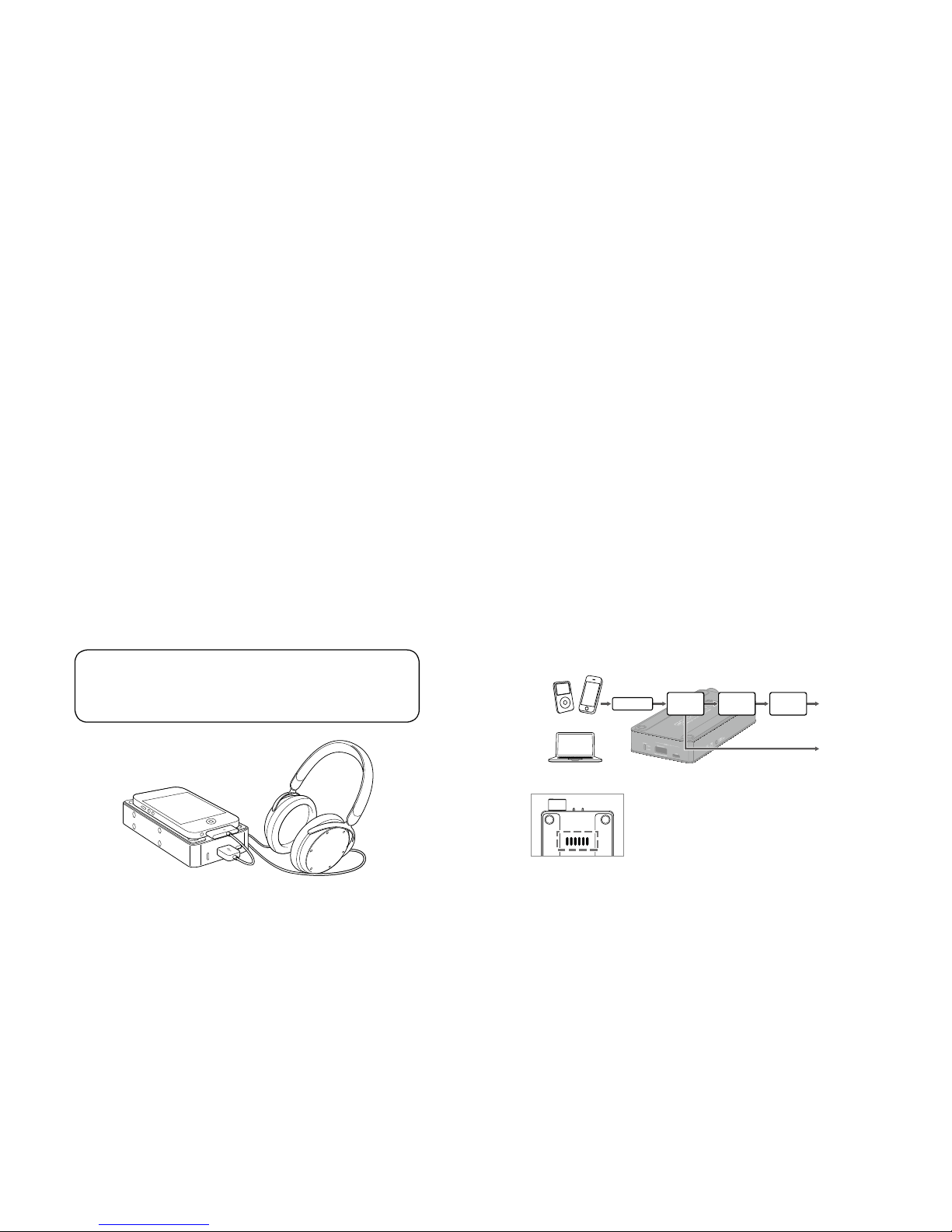
Digital audio signal is converted to S/PDIF by the (DIT built-
in)D/A converter and output from the 3.5mm round optical
digital terminal to connect with
other audio devices.
Headphone
Output
SPDIF OUT
(OPT OUT)
Front end
DAC
AK4353
Tube Pre
6111
Final
OP-AMP
iDevice
PC
On the model with a preheat supporting
tube substrate, when the power gets ON,
a blue LED turns on for about 5 seconds
while preheating the tube heater. This can
be seen in the heat rejection slits.
Page 3
3
■
Contents of Package
●
Go-Dap TT main unit
●
USB cable (USB2.0 compatible[A connector - micro B
connector type])
●
Customer card & Warranty(Japan only)
■
Compatible Models of iPod/iPhone and PC (OS)
●
iPod:
iPod classic (160GB, 2009)/iPod nano (Sixth generation)/
iPod touch (Forth generation)
●
iPhone:
iPhone 5 / 4S / 4 / 3GS
●
PC(OS)
Windows:
8 / 7 / Vista / XP SP3 or later (32 bit/64 bit)
Mac
:
OS X v10.5 Leopard or later
■
How to Use this Product
Please follow operational procedures 1 to 10 below.
1.
Checking the Remaining Battery of this Product
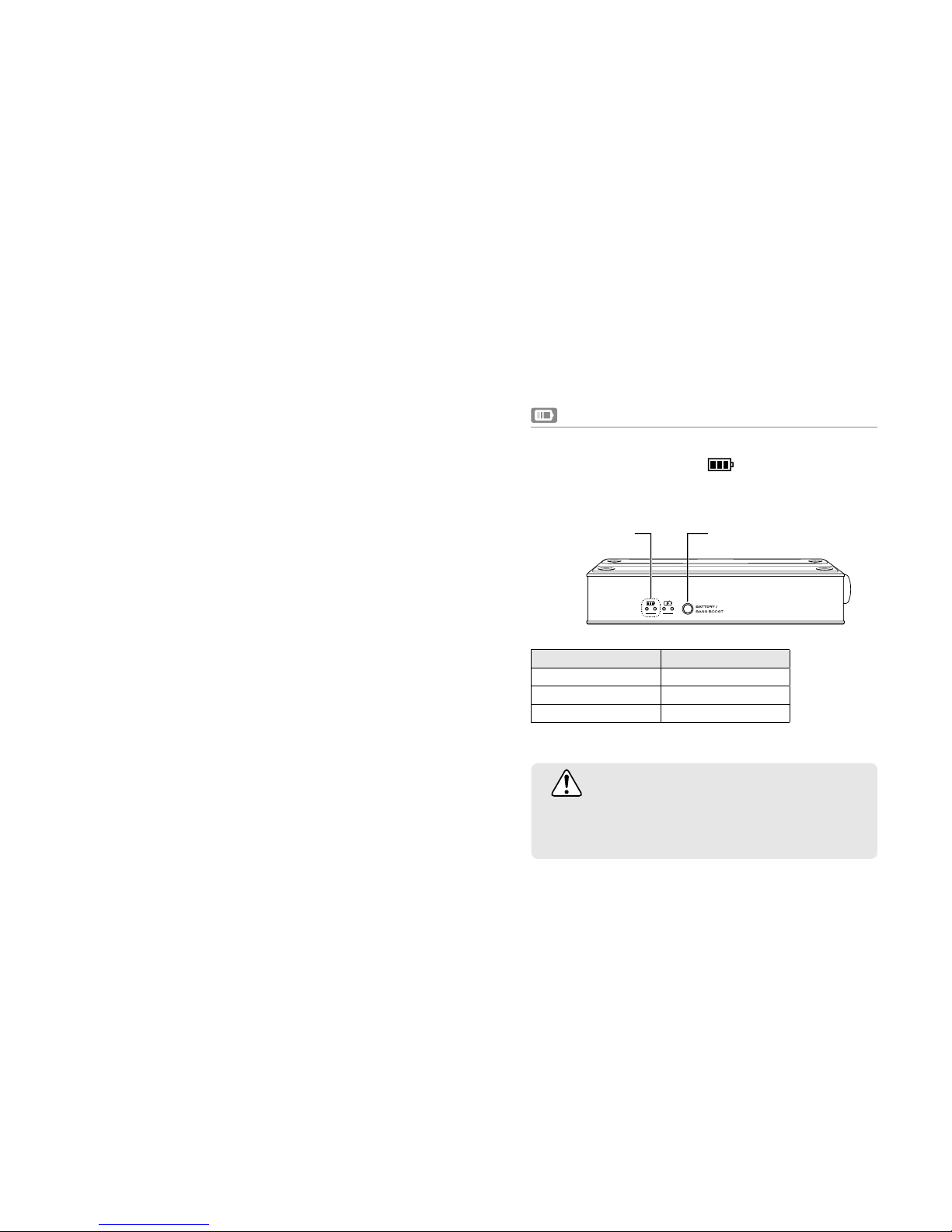
The remaining battery can be checked by the color of the
remaining battery indicator LED
located on the side panel.
The LEDs will light up in accordance with the remaining battery
when the BATTERY / BASS BOOST button is pressed lightly.
BATTERY / BASS BOOST button
Remaining
battery indicator
Remaining battery LED
Full
○ ○
Low ○
Empty O
LED color
○:Orange
CAUTION
The battery at the time of purchase is not fully charged.
Charge the battery before using this product.
Page 4
4
2. Charging the Built-in Battery of this Product
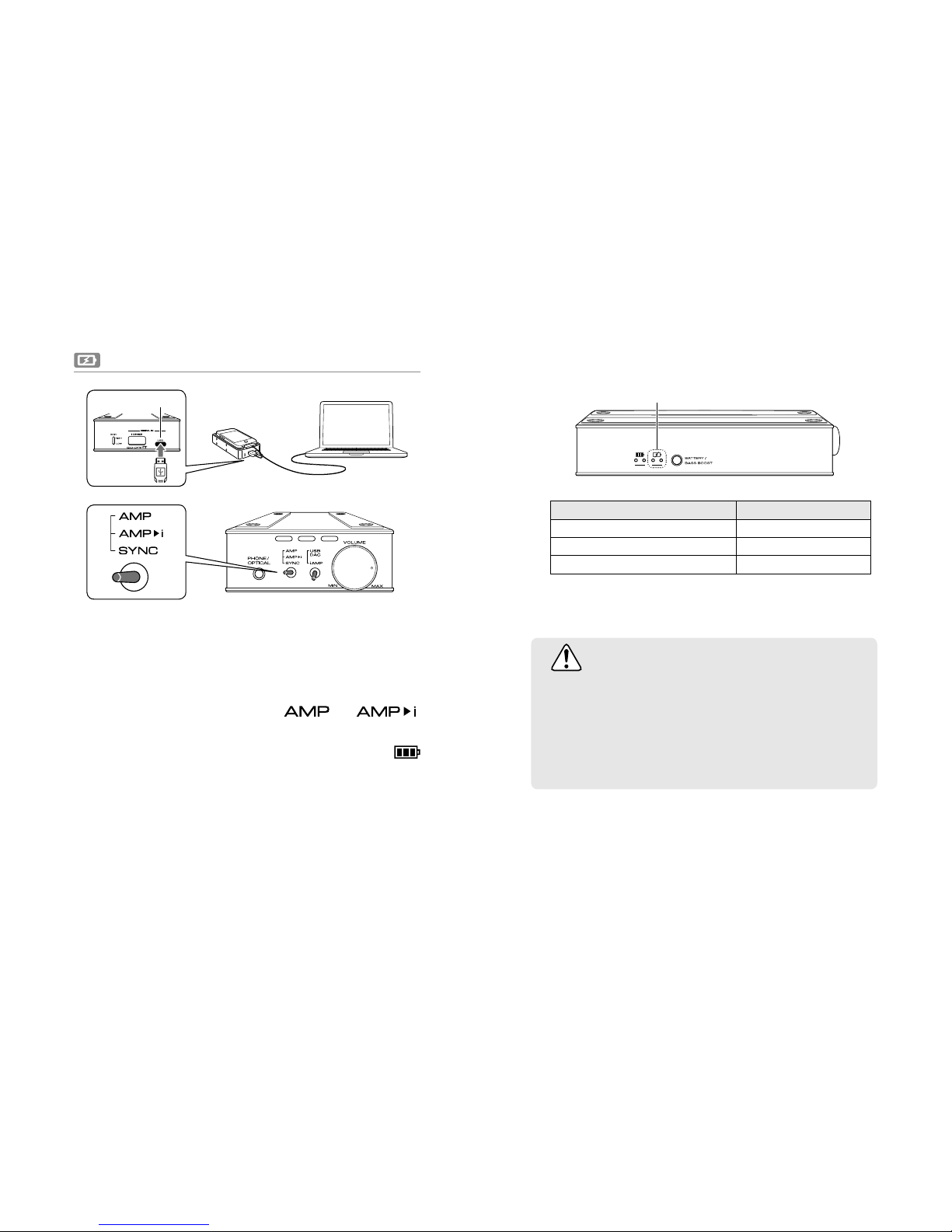
Connect the USB micro B connector on the rear panel of
this product and computer or the USB charging adapter
supplied with iPod/iPhone by using the supplied USB cable.
The built-in battery is charged by setting the toggle
switch (L) on the front panel to "
" or " "
mode. (Make sure the power is OFF.)
During charging, the charging status indicator LED
located on the side panel will light up.
* When the built-in battery of this product has been fully
charged, it will automatically start charging iPod/iPhone. It
takes approximately 6 hours to fully charge this product.
*
The charging status LEDs turn off when the USB cable is
disconnected.
1
2
Charging status indicator
Charging status LED
Pre charge
○ ●
Charge ○
Complete ●
LED color ○:Orange ●:Green
CAUTION
If both LEDs are o or become o when the USB
cable is connected, immediately disconnect the
USB cable and stop charging.
Please refer to "Troubleshooting" on page 9 of
this User's Guide and reset before reuse.
USB
Page 5
5
3. Charging iPod/iPhone by
this Product's Built-in Battery
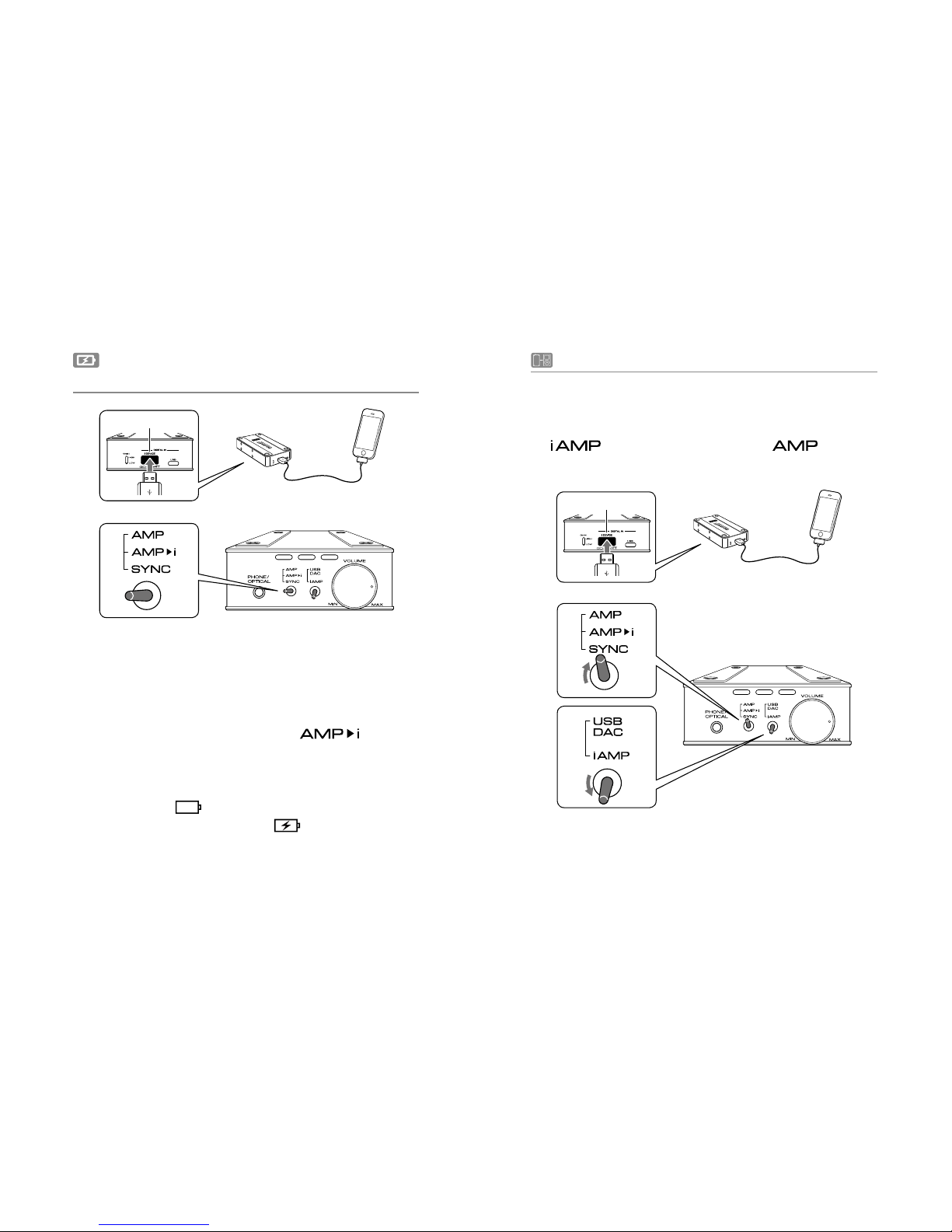
Connect by inserting the Apple genuine dock cable
supplied with iPod/iPhone into the i DEVICE (USB standard
A) connector of this product.
Turn the power ON by the power switch volume knob
and set the toggle switch (L) to "
" position.
iPod/iPhone will start to be charged from the builtin battery of this product after beep or vibration that
indicates the authentication is completed. The battery
mark located
at the top right of iPod/iPhone screen
will change to a charging mark
.
1
2
4. Connecting with iPod/iPhone
Connect by inserting the Apple genuine dock cable supplied
with iPod/iPhone into the i DEVICE (USB standard A) connector
of this product, and set the toggle switch (R) on the front panel
to "
" and the toggle switch (L) to " " mode for
headphone output/digital output.
i DEVICE
i DEVICE
Page 6
6
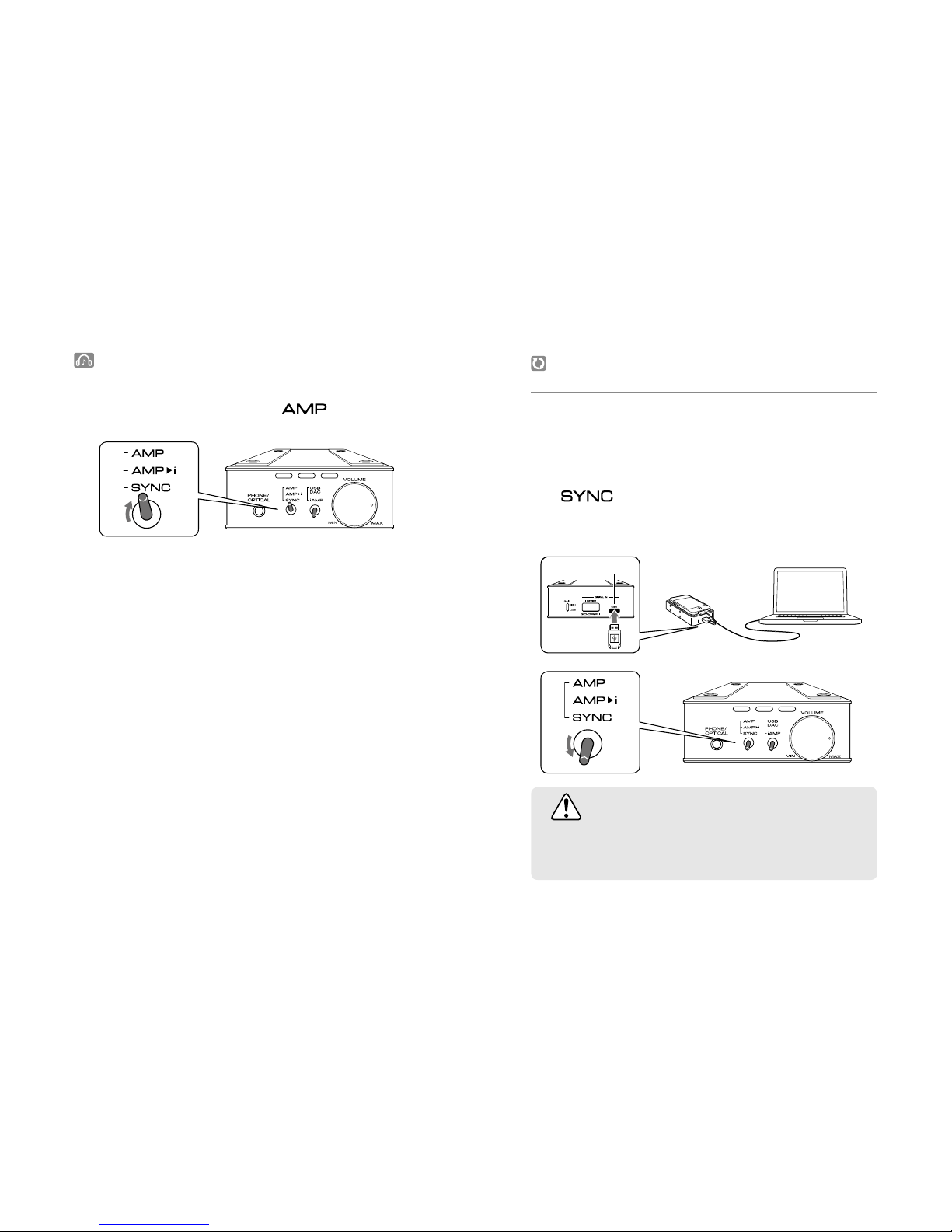
5.
Listening to Music in iPod/iPhone in "AMP" Mode
Turn the power ON by the power switch volume knob
and set the toggle switch (L) to "
" position.
On ce this pro duc t and iPod/iPhon e ar e corre ctl y
connected (authenticated), the toggle switch LED turns
on red or green.
* If the toggle switch is blinking, iPod/iPhone may not be
connected with this product at all, or it may not be correctly
connected (authenticated).
In such case, disconnect iPod/iPhone once and recoonect,
or turn the power OFF by turning the power switchvolume
knob coun
terclockwise all the way until it clicks, and then
turn the power ON again.
6. Synchronizing with iPod/iPhone and
iTunes on Computer
Connect the USB micro B connector on the rear panel of
this product and your computer with the supplied USB
cable.
By setting the toggle switch (L) on the front panel to
"
" mode, it enables synchronization with iTunes
on your computer. "SYNC" state is the same as if iPod/
iPhone was directly connected to your computer.
CAUTION
Do not change the switches or disconnect the
microUSB cable during synchronization.
1
1
2
2
USB
Page 7
7
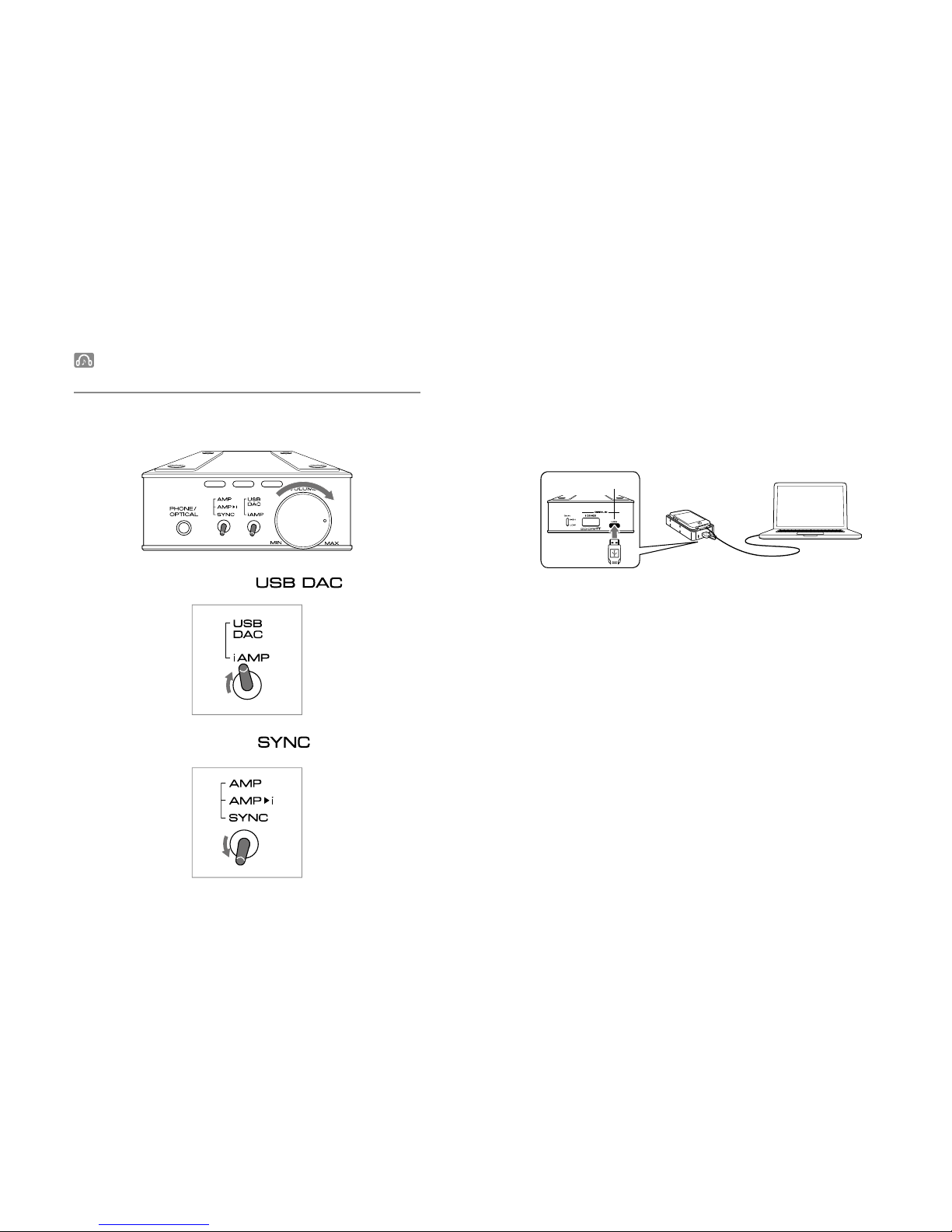
7. Listening to Music on Computer in
"USB DAC" Mode
Turn the power switch volume knob clockwise until it
clicks to turn the power ON.
Connect this product and computer with the supplied
USB cable. The device driver is automatically installed
when this product is connected to computer for the rst
time.
1
USB
Check the sound setting on computer and confirm a
sound is coming. For volume control, adjust the volume
on computer.
* The built-in battery will not be charged.
Set the toggle switch (L) to " " position.
3
4
5
Set the toggle switch (R) to " " position.
2
Page 8
8
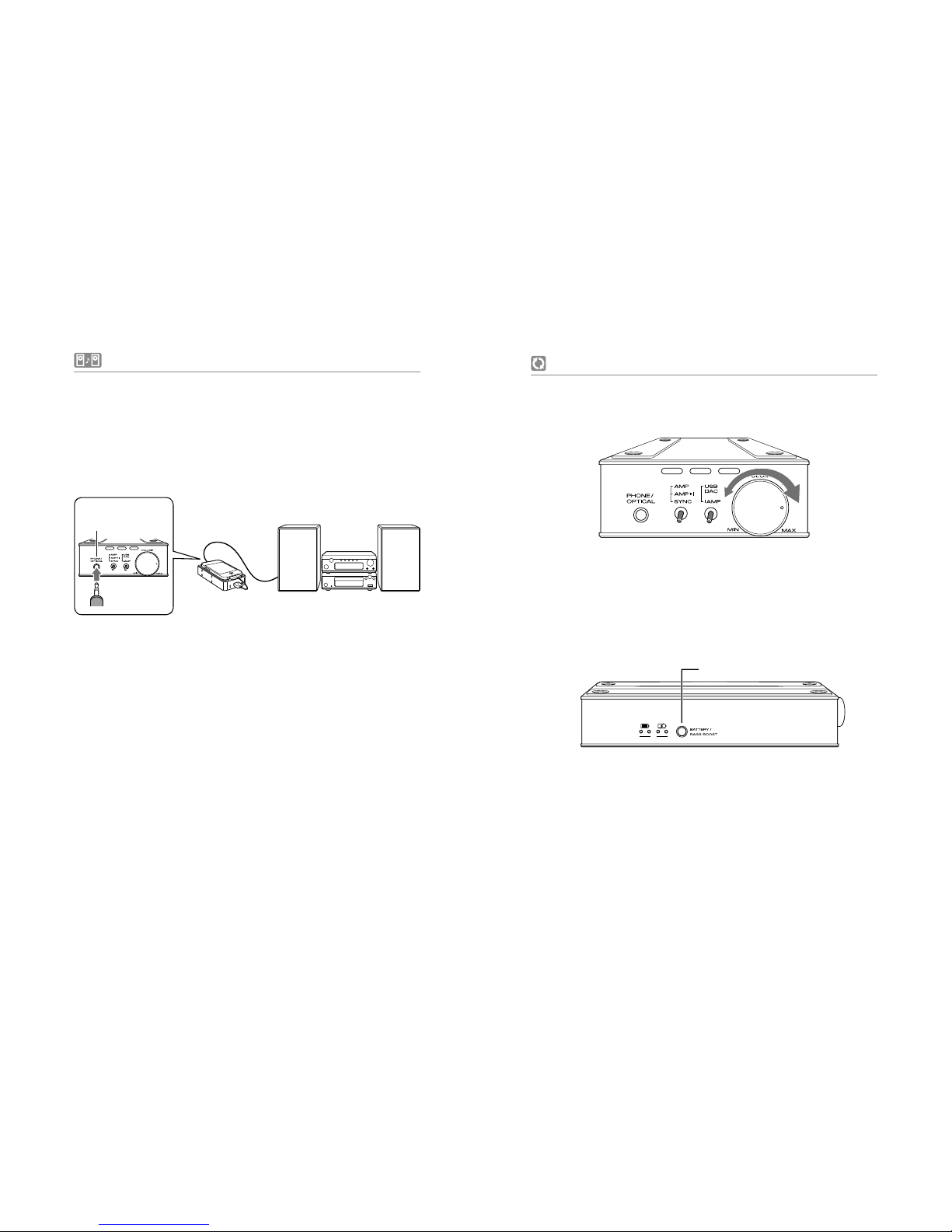
8. Connecting to Other Audio Devices
This product supports both digital and analog output.
■
Digital connection
This product can be connected with other audio devices
which have an OPTICAL input connector.
PHONE/
OPTICAL
9. Setting Other Functions
■
Setting volume
Adjust the power switch volume knob.
■
Setting bass boost
Use bass boost for enhancement in bass.
Press and hold the BATTERY / BASS BOOST button.
BATTERY / BASS BOOST button
The LED on the toggle switch (L) in the front panel starts
blinking.
Move the toggle switch (L) back and forth between AMP
and AMP>i/SYNC positions once.
1
2
3
Page 9
9
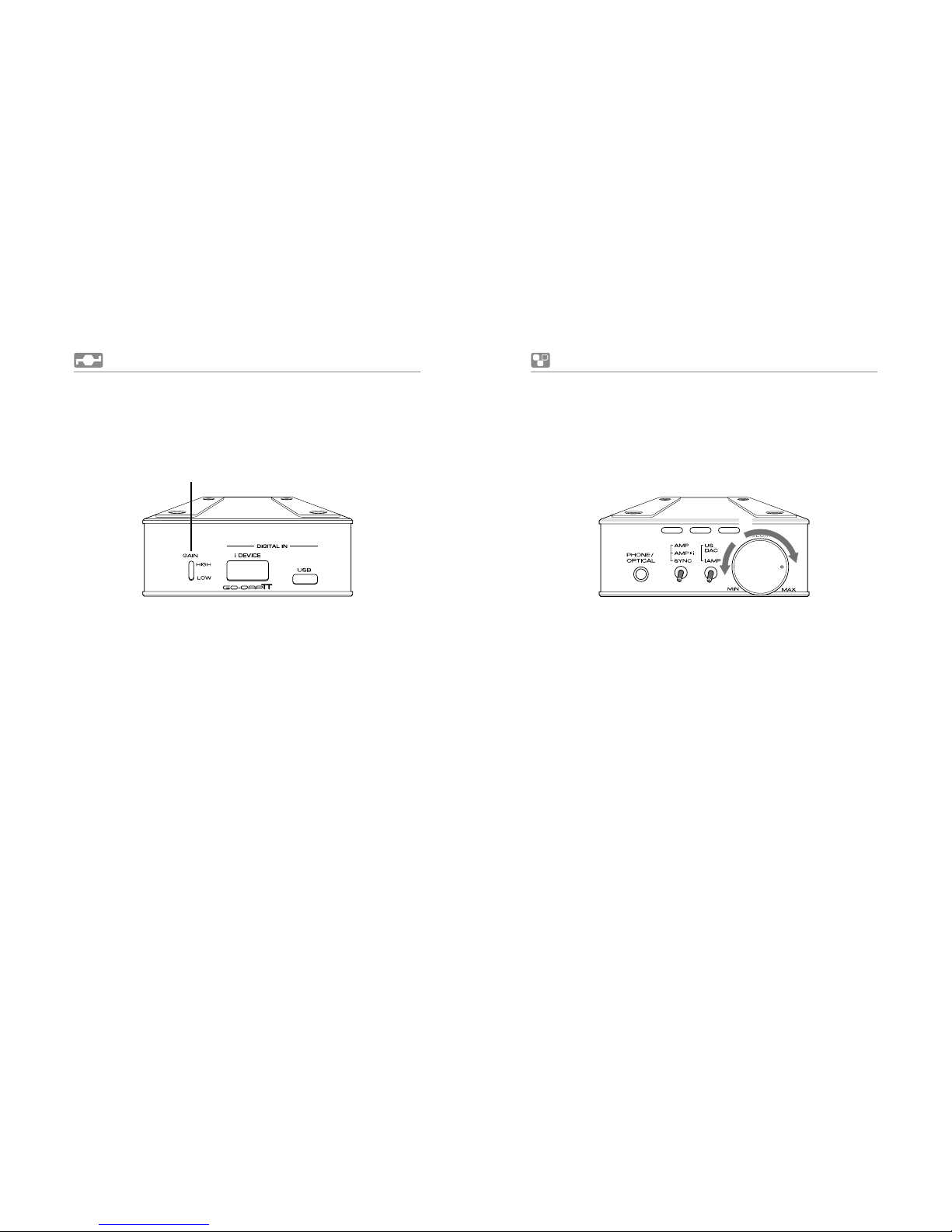
10. Setting Gain
Gain of the headphones can be set by switching the Gain
toggle switch to either [HIGH] or [LOW].
It enables the headphones with di erent impedance to exert
its full performance and to play in high-quality sounds.
* Do not apply force to the Gain toggle switch to avoid breaking
the switch.
Troubleshooting
●
In case the operation of Go-Dap TT freezes (operation
stops), reset Go-Dap TT to the factory setting by turning
the volume knob all the way counterclockwise until it
clicks, turning OFF the main power, and then turning it
back ON by turning the volume knob clockwise again.
●
Reconnect iPod/iPhone and this product.
●
Restart iPod/iPhone.
Gain toggle switch
[OFF] [ON]
①
②
Page 10
10
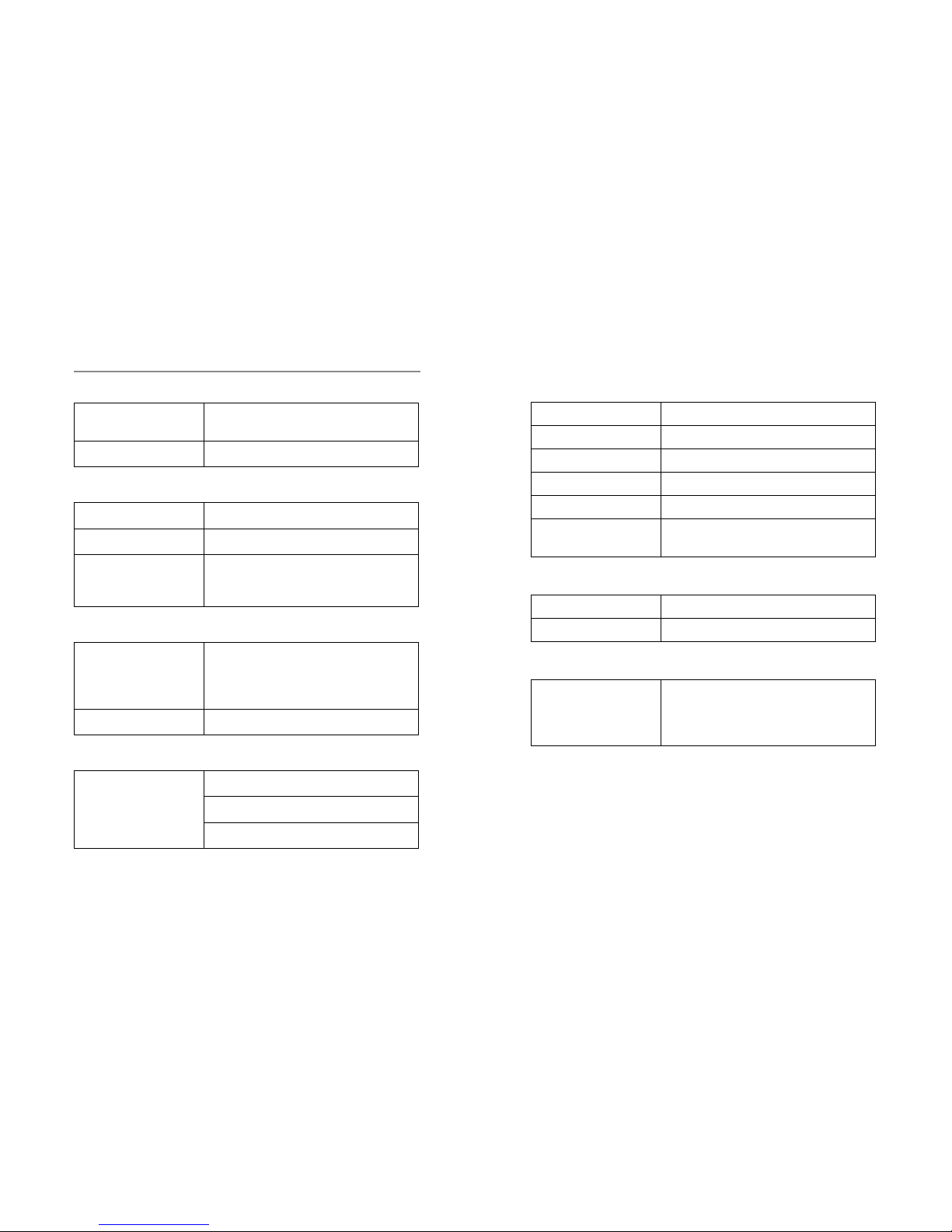
Specications
■ Main unit
Size
Width 67.80
× Depth 133.50 × Height
25.00mm (including the protrusion)
Weight 234g
■ Analog lineout
Frequency characteristic Within 20 to 20kHz±2dB
SN ratio 94dB or greater
Distortion
Distortion: 0.5% or less
Maximum output: 80mW + 80mW @32
Ω
Adaptive impedance: 16Ω or higher
■ Digital lineout
Sampling frequency
PC DAC : Input 32/44.1/48kHz 16bit
Output 32/44.1/48kHz 16bit
iDevice DAC
: Input 32/44.1/48kHz 16bit
Output 48kHz 16bit
Digital output (OPTICAL) S/PDIF
■ Inputs
USB connector
USB standard A connector (concave)
USB micro B connector (concave)
* This product supports USB 2.0.
■ Battery
Battery type Lithium ion polymer battery
Capacity 3500mAh
Charge method Via the supplied USB cable (USB2.0)
Time to full charge Approx. 6 hours
Operation time Approx. 6 hours
Sustainable charge
frequency
Approx. 500 times
■ Power supply
Input 5VDC / 500mA (MicroUSB_B)
Output 5VDC / 1A (USB_A)
■ Compatible audio data format
Audio data format
AAC (16 to 320Kbps), AIFF, AAC (MP4
downloaded from iTunes Store), MP3
(16 to 320 Kbps), MP3 VBR, Audible
(formats 2-4), Apple Lossless, WAV
Page 11

11
Cautions on Use
In orderto use this product safely and prevent accidents,
please take the following cautions.
■ A tube is mounted on this product. In order to avoid a unit
breakdown/malfunction, do not give a vibratory motion
and a drop and do not use in high-temperature and highhumidity environments.
■ In order to avoid risks such as re and electric shock, do not
use in high-humidity environments
or where this product
may come in contact with water.
■ Do not use, charge or leave this product in locations
exposed to direct sunlight such as car dashboards and
window sills. Also, do not use, charge or leave in hightemperature environments such as inside vehicles parked
in the sun or near heat sources such as heaters and stoves.
■ Do not use to play music, etc. while driving a vehicle, riding
a bicycle, or walking.
■ If liquid that has been leaked from the battery makes
contact with your skin or cloths, wash under running water
immediately. Also, if such liquid enters your eyes, wash
under running water immediately without rubbing and
consult a doctor.
■ Do not disassemble, modify, or repair this product by
yourself.
■ If this product does not get fully charged after the specied
charging
time, cease charging and arrange for inspection/
repairs to be performed.
■ Use a soft cloth to clean this product. Do not directly apply
water, dust spray, solvent, polisher, cleaning agent, etc.
■ When charging an iDevice by the built-in battery of this
product, operate in a drafty environment. Operating in
a hermetically-closed environment may cause a unit
breakdown/malfunction and a low-tempera
ture burn by
the temperature upshift.
■ The battery has a life duration. The usable duration will
become shorter due to aging degradation. Do not keep
charging for a long period of time. Always disconnect the
USB cable each time when charging is completed.
Battery Disposal and Recycle
When disposing of this product, do so in accordance with
the laws and regulations applicable in the area you live.
Th
is product has a built-in battery therefore can not be
disposed of together with general household waste.
Replacement of Tube
The mounted tube has a life duration.
When feeling degradation, it is recommended to replace.
For more information, contact Product Support on page 14.
Page 12

12
For the customers in the USA INFORMATION:
This product has been tested and found to comply with the
limits for a Class B digital device, pursuant to Part 15 of the
FCC Rules.
These limits are designed to provide reasonable protection
against harmful interference in a residential installation.
This product generates, uses, and can radiate radio frequency
energy and, if not installed and used in ac
cordance with
the instructions, may cause harmful interference to radio
communications.
However, there is no guarantee that interference will not occur
in a particular installation. If this product does cause harmful
interference to radio or television reception, which can be
determined by turning the product off and on, the user is
encouraged to try to correct the interference by one or more
of t
he following measures:
– Reorient or relocate the receiving antenna.
– Increase the separation between the product and receiver.
– Connect the product into an outlet on a circuit different
from that to which the receiver is connected.
– Consult the dealer or an experienced radio/TV technician
for help.
You are cautioned that any changes or modi cations not expressly
approved in this manual could void
your authority to operate this
product.
If you have any questions about this product:
Visit: http://go-dap.com
Contact: Venture Craft Customer Information Service
+81-3-5204-1004
This device complies with Part 15 of the FCC Rules. Operation
is subject to the following two conditions: (1) This device
may not cause harmful interference, and (2) this device must
accept any interference received, includ
ing interference that
may cause undesired operation.
For the customers in the USA and Canada
RECYCLING LITHIUM-ION BATTERIES
Lithium-ion batteries are recyclable.
You can help preserve our environment by returning your
used rechargeable batteries to the collection and recycling
location nearest you.
For more information regarding recycling of rechargeable
batteries, call toll free 1-800-822-8837, or vi
sit http://www.
rbrc.org/ .
Caution: Do not handle damaged or leaking Lithium-ion
batteries.
Page 13
13
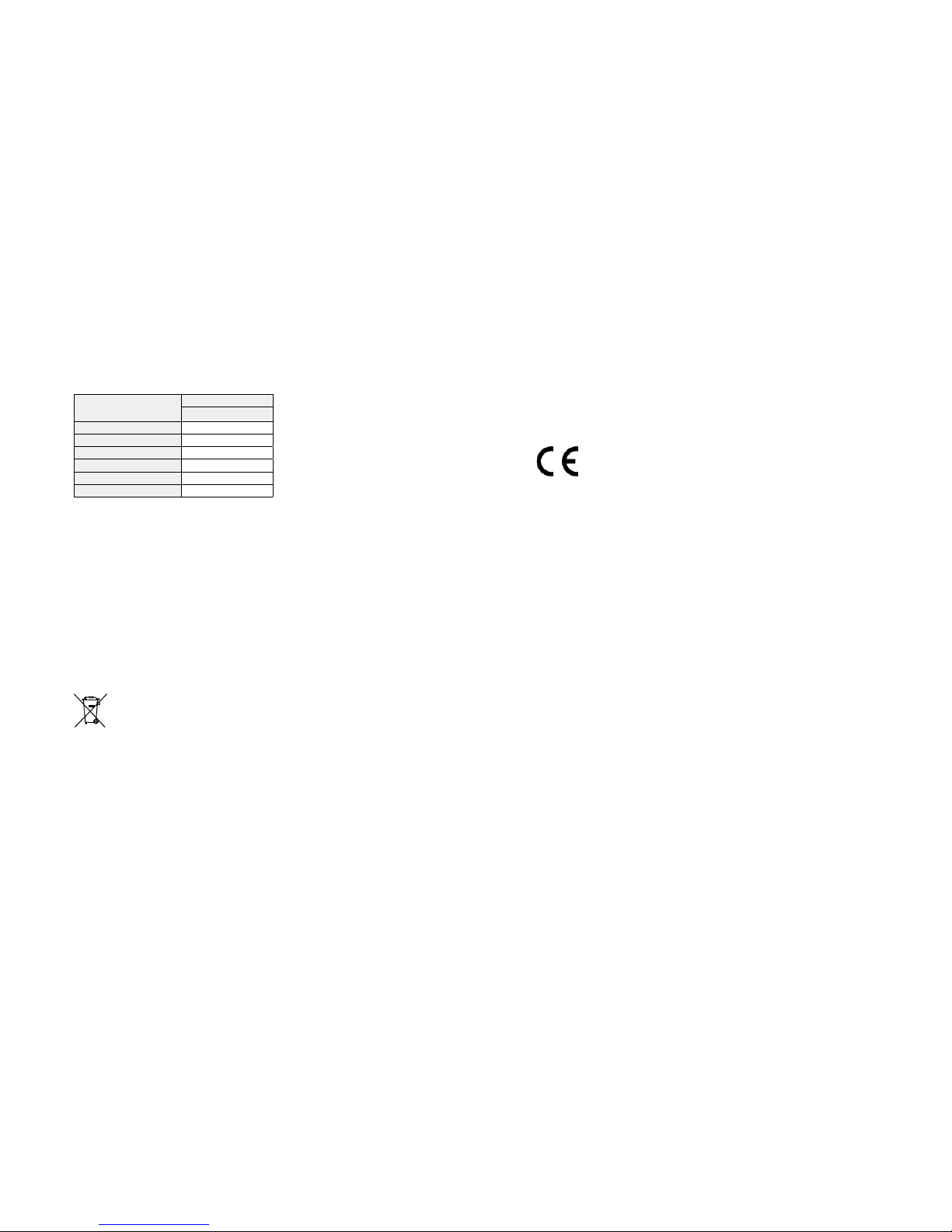
About China RoHS Compliance
DD Limited
有毒有害物质或元素含有表
有毒或
有害物质
零部件
电路板 附件
铅 (Pb) ○ ○
汞 (Hg) ○ ○
镉 (Cd) ○ ○
六价铬 (Cr
6+
) ○ ○
多溴联苯 (PBB) ○ ○
多溴二苯醚 (PBDE) ○ ○
○ 表示该有毒有害物质在该部件所有均质材料中的含量均在 SJ/T
11363-2006 标准规定的限量要求以下。
× 表示该有毒有害物质至少在该部件的某一均质材料中的含量超出
SJ/T11363-2006 规定的限量要求。
根据中国电子行业标准 SJ/T11364-2006 和相关的中国政府法规,本
产品及其某些内部或外部组件上可能带有环保使用期限标识。取决
于组件和组件制造商,产品及其组件上的使用期限标识可能有所不
同。组件上的使用期限标识优先于产品上任何与之相冲突的或不同
的环保使用期限标识。
European Union - Electronics and Battery
Disposal Information:
Th is sy mbo l mea ns that acco rdi ng to loc al la ws and
regulations your product and its battery should be recycled
separately from household waste. When this product reaches
its end of life, take it to a collection point designated by
local authorities for the recycling of electronic product. The
improper d
isposal of waste electronic product from the
consumer may be subject to fines. The separate collection
and recycling of your product and its battery at the time of
disposal will help conserve natural resources and ensure that
it is recycled in a manner that protects human health and the
environment.
CE Notice
This product conforms to the EMC Directive 2004/108/EC
and to the Low Voltage Directive 200
6/95/EC. The complete
Declarations of Conformity can be found at http://go-dap.
com .
Page 14

14
Product Support
VentureCraft Inc. Gadget Business Division
http://www.go-dap.com/
1-3-5-2F Nihonbashihoncho, Chuo-ku, Tokyo 103-0023 JAPAN
Business Hours:
Mon-Fri 10:00 to 17:00 (Closed: Sat, Sun, Holidays)
Contact:
[email protected]
FAX:
+81-3-6893-3728
Trademarks and Registered Trademarks
iPod, iPhone, Made for iPod, Made for iPhone, iTunes, and Mac
OS are registered trademarks or trademarks of Apple Inc., in
the USA, or other countries.
"Made for iPod" and "Made for iPhone" are indications that
the product is an electronic accessory that is designed to
connect exclusively with an iPod/iPhone, and the developer
has certified that the product has f
ulfilled the performance
standard specified by Apple Inc. Apple Inc. is not liable for
performance, safety, and compliance to the standard of this
product.
Other system and product names shown in this document
are the registered trademarks or trademarks of general
developer/manufacturers. Please note that ® and
TM
are not
shown in this document.
© 2013.06 Venture Craft Inc. GDT-1306E
 Loading...