

Page 1
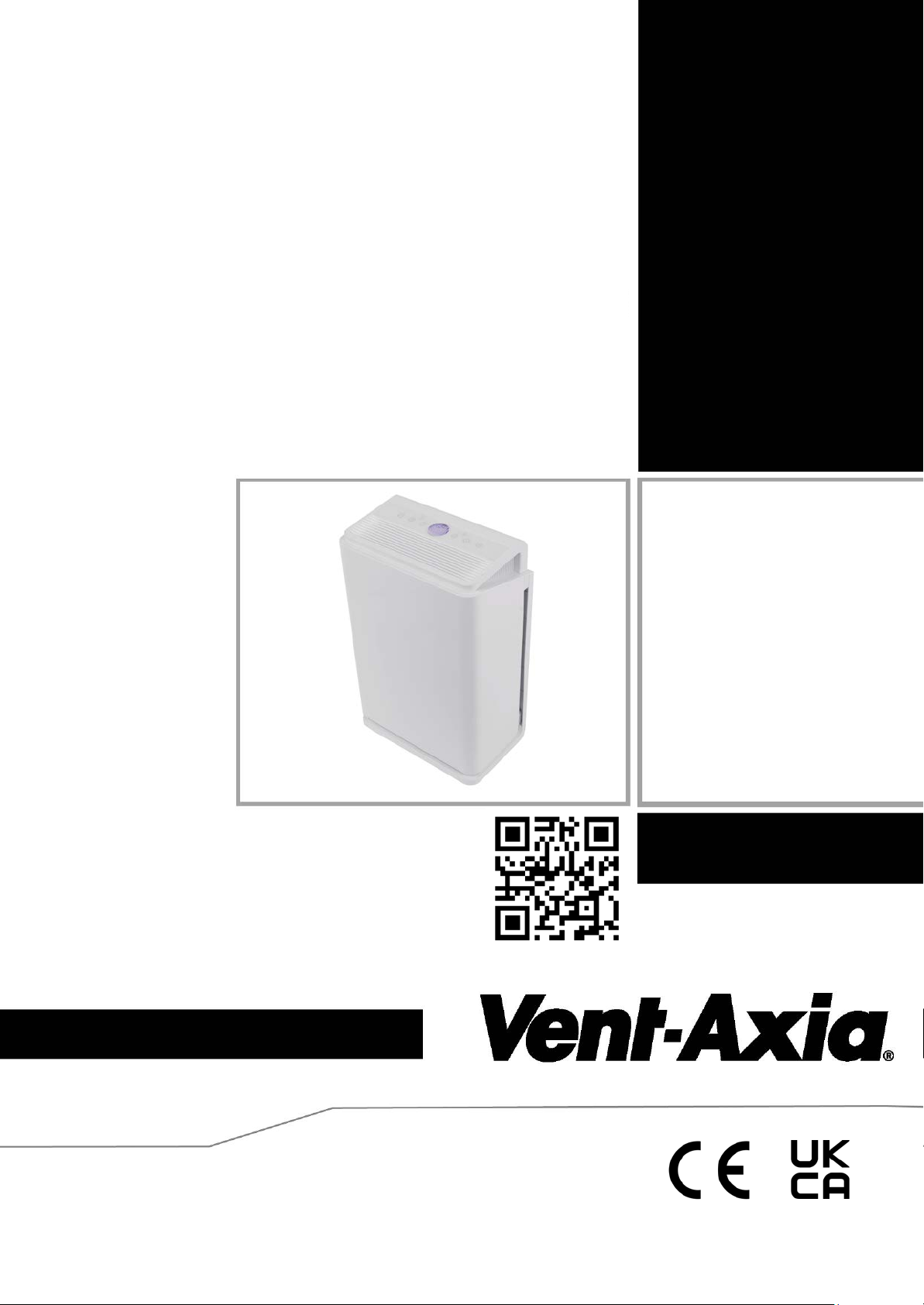
PureAir Room
260 & 260x
Air Purifier Range
User & Oper
Stock
Ref. N°
496611
496612 PureAir Room 260x
496613
220-240V~50Hz
Or go to:- https://www.vent-axia.com/pureairroom
WARNING
1.All the contents in the manual are reviewed.
2.We reserve the right to int erpr et all contents of this manual.
3.Addition:any technical improvements shall be printed in the revised manual withoutnotice; for any changes in
appearance and color,those of the actual product shallprevail
ating Instructions
For Replacement filter Units Scan the QR code
PureAir Room 260
PureAIr Room 260 & 260x
Replacement Filter Set
Page 2
We spend more than 90% of our time indoors breathing up to 50 times more polluted air than
outdoors which may contain over 900 chemicals, particulate and biological materials. Each of us
breaths 9000 litres of air each day and poor indoor air quality effects the health of everyone in your
home.
The PureAir Room 260 is an advanced multi stage air cleaning system which removes these
harmful particles and neutralises bad smells, purifying the air you and your family breathe for a
fresher and healthier indoor environment.
After unpacking the appliance, check for any transport damage and the contents for
completeness. In the event of damage or an incomplete delivery, contact Vent-Axia.
Dispose of the packaging material in a proper manner. Packaging materials should be kept away
from children!
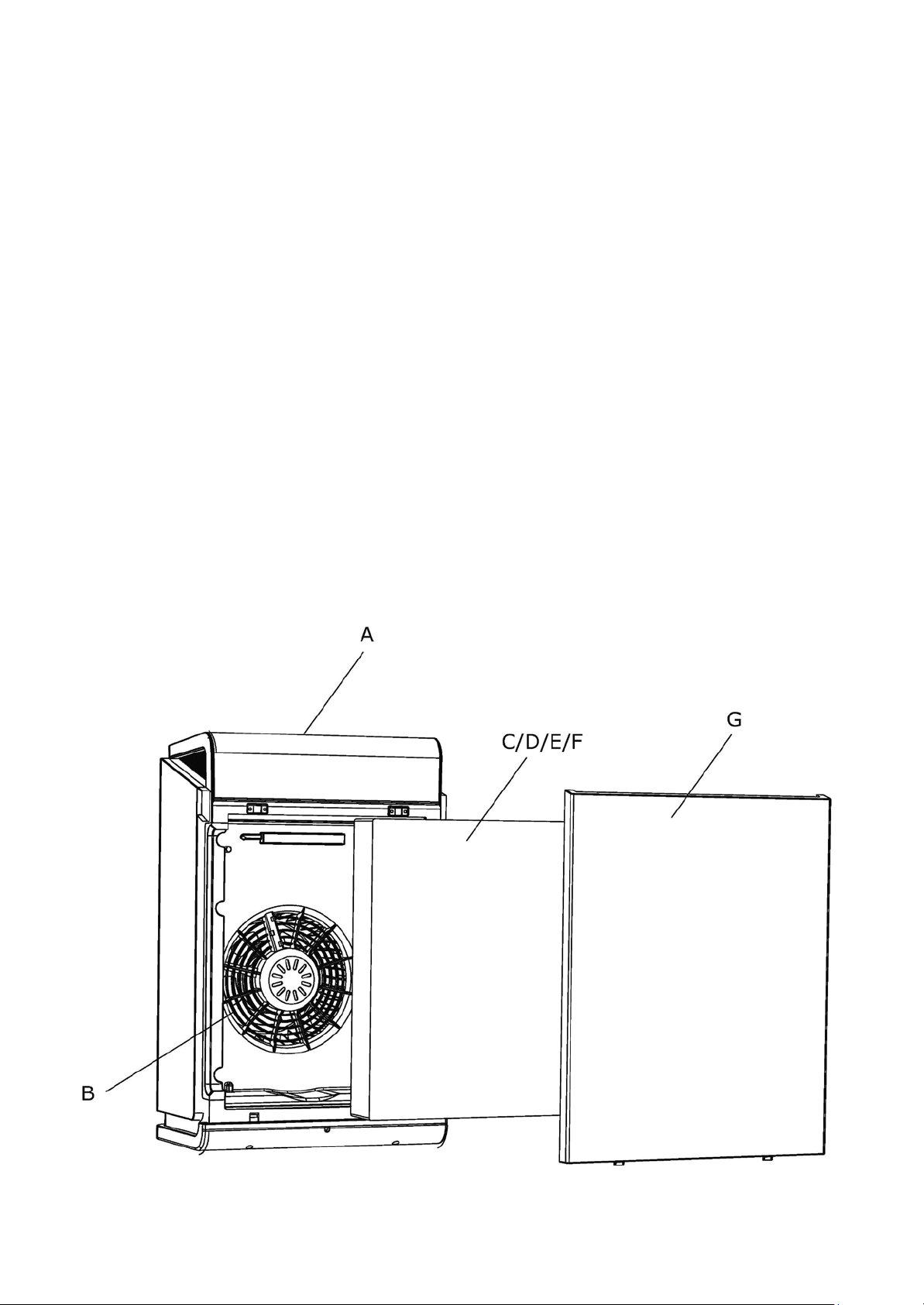
PureAir Room 260 & 260x Residential Air Purifier units
A. - Display Panel
B. - Fan impeller
C/D/E/F. G. - Back Panel
Prefilter/HEPA-filter/Active
Carbon/cold catalyst
Page 3

Warning:
Please read all instructions carefully before commissioning. Failure to follow these
instructions may result in electric shock, fire and/or serious injury. Keep all these
instructions for the future.
Do not open the device until the mains plug has been disconnected from the mains
socket. Risk of death due to electric shock! All repairs should only be carried out by a
suitably quailified person.
Safety instructions
• Ensure that the mains supply (Voltage, Frequency, and phase)
Complies with the prodcut rating label.
• Check the mains plug before plugging in.
• When not in use, unplug the appliance from the wall outlet.
• Do not insert any objects into the air inlets and outlets of the unit. It
may cause a short
circuit. Special care must be taken when operating
the device within the reach of children.
• Use the ON/OFF switch to turn the unit on and off.
Never use the plug to switch the unit "on and off".
• Before changing the device Filters, switch it off and unplug from the
wall.
• Never attempt to clean the air inlets or outlets with sharp objects.
• Never immerse the appliance in water.
• Never spray flammable liquids into the device.
• Never operate the appliance in a damp room (e.g. bathroom). Danger
of electric shock.
• Never use hairsprays, thinners or flammable gases in the vicinity
of the device, as there is a risk of fire and explosion.
• If candles or gas ovens are used in the same room during
operation, open the window occasionally.
• Never cover the air inlet or outlet. This can destroy the motor on the
fan assembly.
• Never operate the device near heat sources such as heaters, open
fires or direct sunlight. The plastic parts can be deformed.
• The unit does not serve as a fan replacement. This
considerably shortens the service life of the filter.
• The device must not be used in an environment containing
high levels of dust or chlorine.
• Do not place heavy objects on the unit and keep it out of the reach of
children.
• The device must not be used in closed and narrow rooms.
Page 4

• If the supply power cord is damaged, stop operation and get it
replaced by a suitably quailifed person/Service engineer.
• If the device is defective, switch off the mains switch and disconnect it.
• To avoid interference, do not operate the equipment near microwaves,
television sets,
or other electrical equipment. A distance of at least two
metres is recommended.
• The device may only be operated by persons who are physically
and mentally capable of correct operation in accordance with
these operating instructions, or who have been instructed on this
device by a responsible person.
• Never operate the device with wet hands.
• Do not attempt to repair or make any other adjustments, both electrical
and
mechanical, to the unit yourself.
• Do not let children play with the packaging, such as plastic films.
• Ensure a minimum distance of at least 10cm between the unit and the
nearest wall.
• Always switch off and disconnect the unit before removing or cleaning
the filter.
• Only use the device indoors with good air circulation.
• Keep sufficient distance from curtains, drapes or other easily movable
objects.
• Do not place the unit on an uneven, sloping or moving surface to
prevent it from tipping over or falling to the ground
The air purifier is only intended for air cleaning of privately used rooms (e.g. living rooms,
bedrooms, Studies or storage rooms). The user must comply with the specified operating
parameters of these instructions.
The machine may only be used for its intended purpose. Any further use beyond this is
not intended. The user/operator and not the manufacturer shall be liable for any damage
or injury of any kind resulting is the misuse of thi s pr od uc t .
Air cleaners are only suitable for occasional use within kitchens, as oils and fats in the air
as well as increased air pollution can very quickly clog up the filters.
Page 5
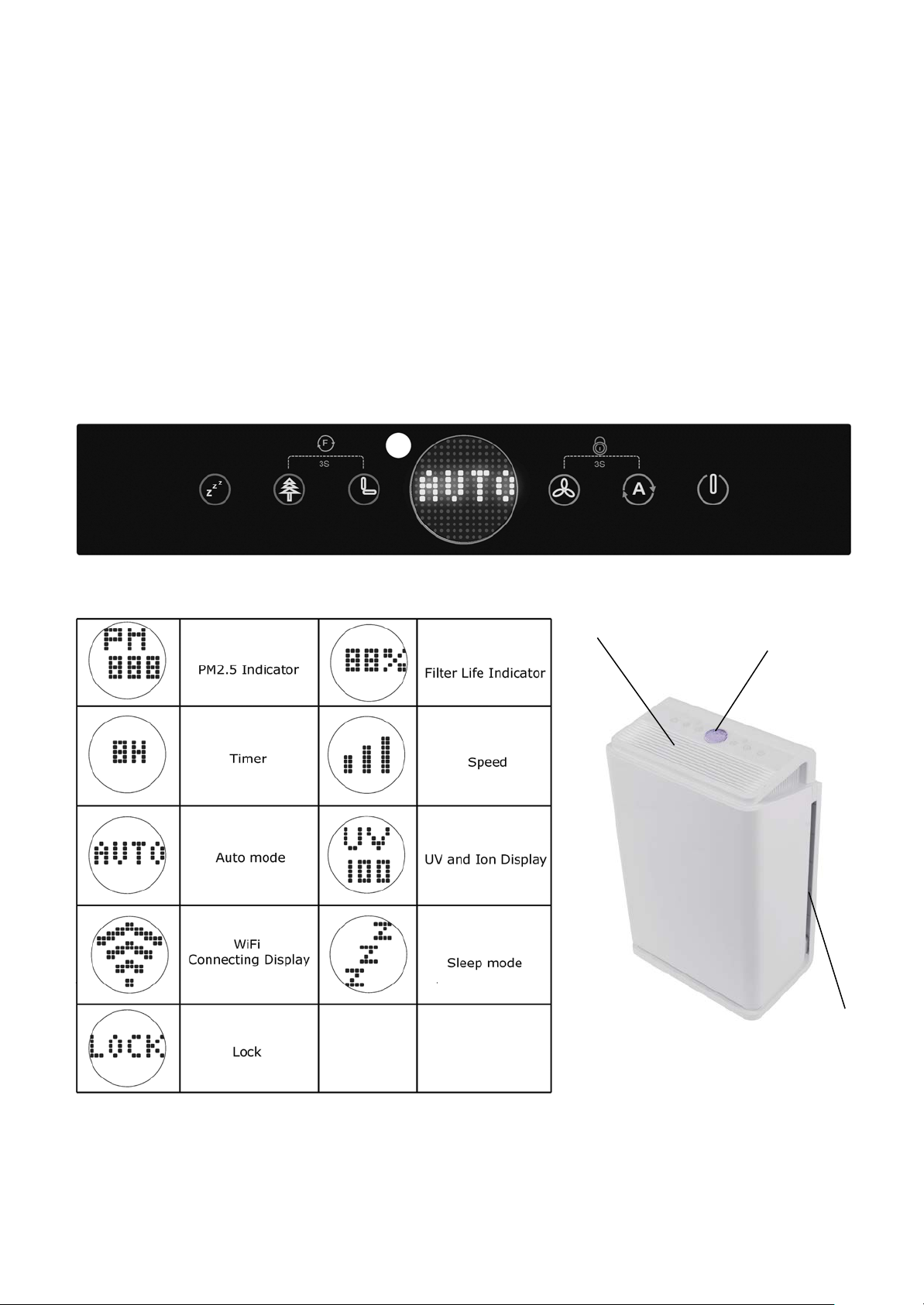
Control Panel
Air outlet
Air Inlet
Control Panel
Technical data
Product names: PureAir Room 260 (496611) & PureAir Room 260x (496612)
Voltage/Frequency: 220-240V ~ 50/60Hz
Rated power: 60W
Air flow rate: 260m³/h
Timer (hours): 1-8
Weight: 5,8 kg
Dimensions (W*D*H): 350*230*550 mm
Room size: 30m²
Noise emission: ≤45dB(A)
Display Indicators
With display
0n both
sides
Page 6
Air Quality
PM2.5(µg/m3)
Display
Fan Stage
Good
10-60
Lights up Green
1
Needs Improving
61-150
Glows Orange
2
Bad
151-300
Glows Red
3
Before commissioning
Remove the filter elements from the device, remove the protective covers and re insert
them back into the device. Follow the steps in the section "Filter change". The main
filter should normally be changed every 6-9 months depending on the enviroment.
The order of the filters is marked with the numbers 1-3 on the filter flaps, the filter
marked 1 should be located nearest to the outside of the unit.
For replacement filters either scan the QR code on the front page or go online
https://www.vent-axia.com/pureairroom and Order:- PureAir Room 260 & 260x
Replacement filter Stock Ref No:-496613
Commissioning
1. Connecting the unit to the power supply.
When you first plug in the air purifier, the unit will make a sound.
Caution: Never insert or remove the plug with wet hands.
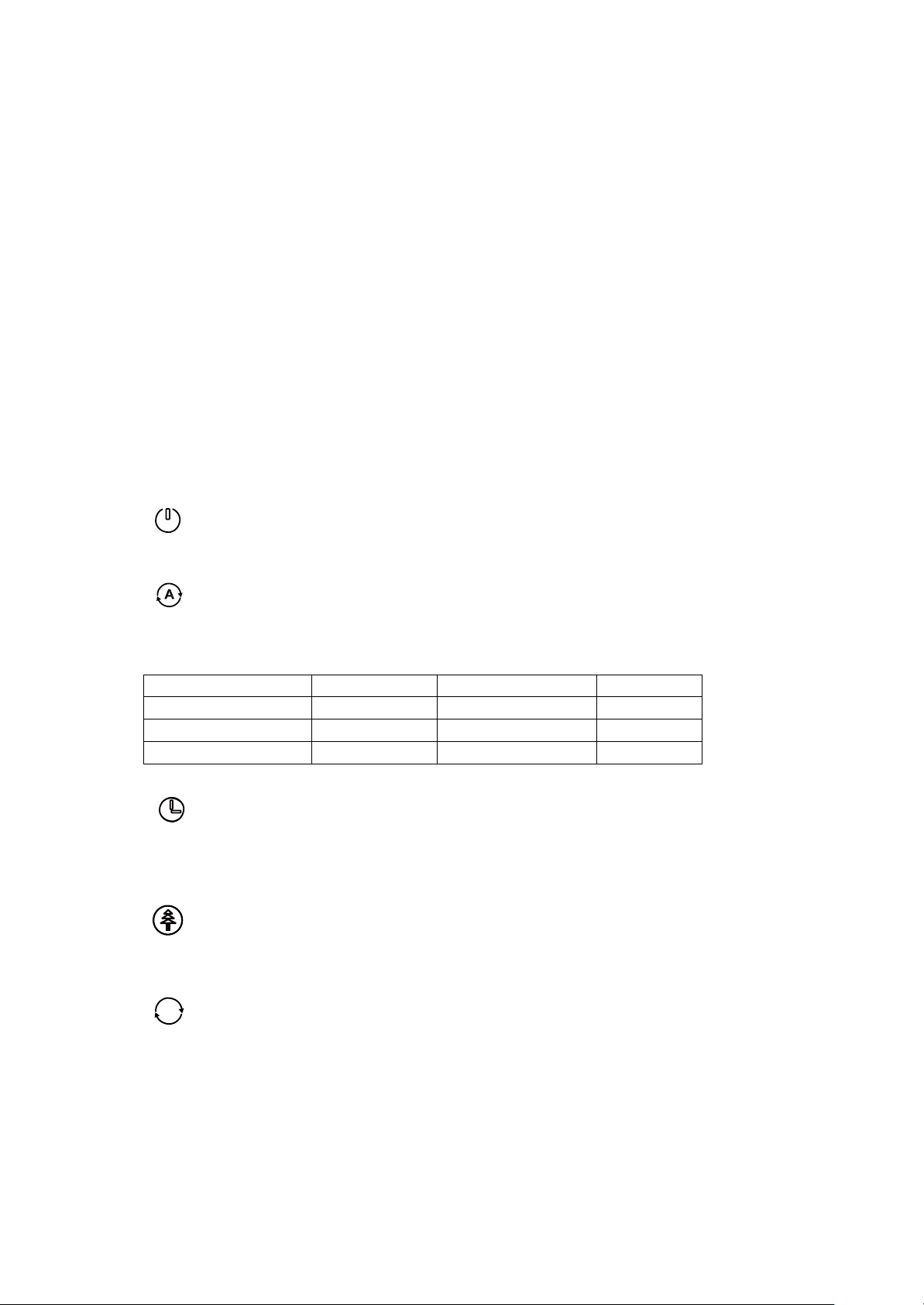
2. POWER
The power button is used to turn the unit on and off.
3. AUTO
If you use the unit in automatic mode, the fan is controlled via the air quality sensor. In
addition, the current air quality is shown on the display as follows:-
4. Timer
With the timer you can set the running time of the device.
You can select between 1 and 8 hours.
5. ION/UV
Press button to turn on/off the ION function as well as
sterilization when the unit is in Normal or Auto mode.
6
F Renew
• Press the “ION” and “Timer” button and the display will show the cumulated
purify time ;If you press and hold both buttons for 3 seconds, the cumulated
purify time will restart from "0" .
Page 7
z
z
Z
7.
Sleep
In this mode, the device operates at the lowest fan speed for minimal noise.
With the exception of the Sleep display and Parental Lock, all displays go out.
To exit Sleep mode, press either Sleep or Speed button.
8. Speed
Press speed button to control the speed from 1 to 3 when it is under Normal mode.
The adjusted fan level is shown via the bars on the display.
9. Child safety lock
Press and hold the “speed” and “Auto Button” for 3 seconds to lock and unlock the
display.
10. WiFi (Available on PureAir Room 260x Stock Ref:- 496612 Only)
Press and hold the “sleep” and “timer” button for 3 seconds. This Will activate the
WiFi connection.
See section
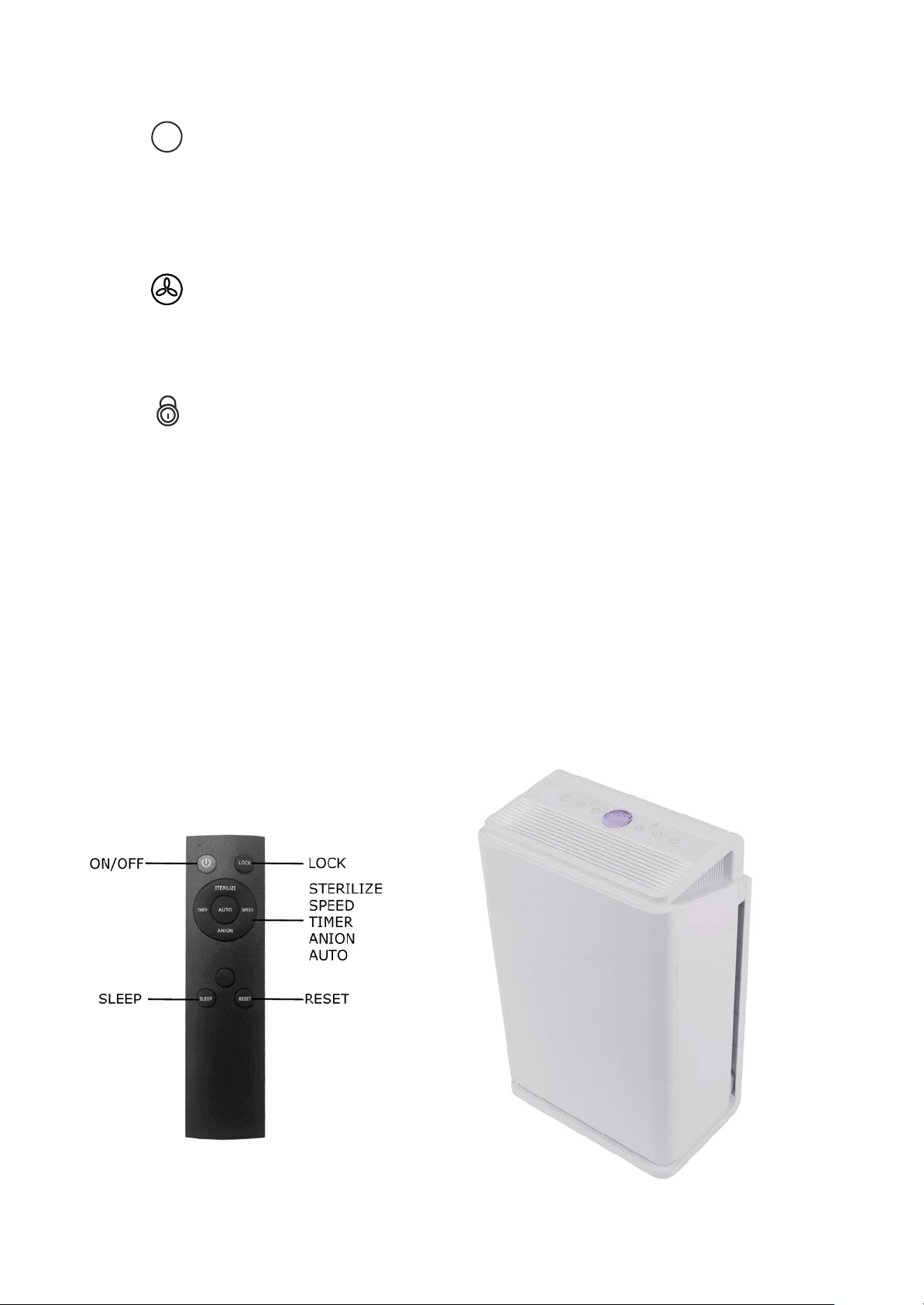
11. Remote Controller
Controlling your PureAir Room 260x via App and Smartphone.
Press the buttons shown on the handset for the respective function.
(Batteries are not provided). Controller uses 2 X AAA LR03 Batteries
When using the remote controller point it directly at the air purifier.
Page 8
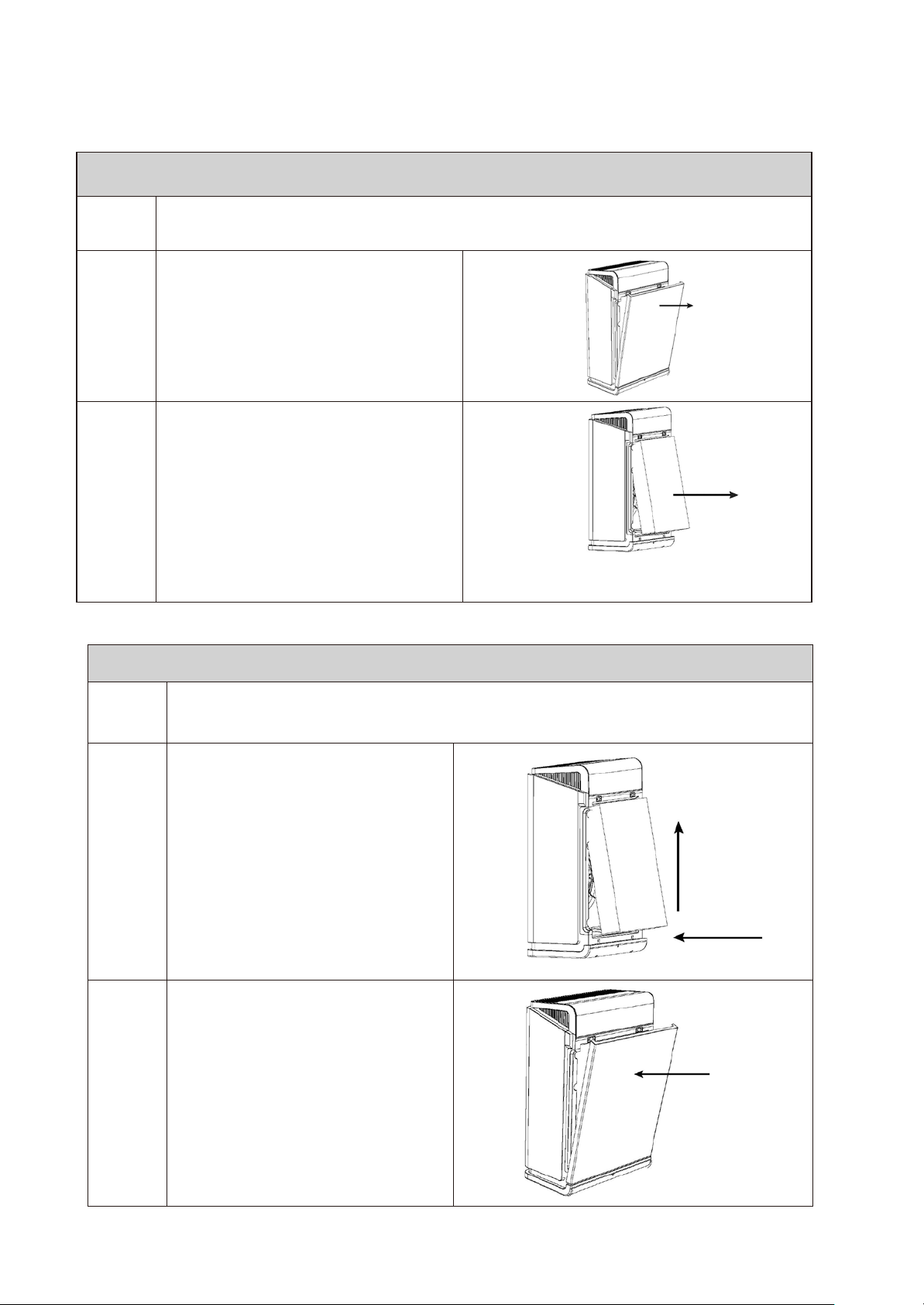
Insert the replacement filter / Front panel assembly
Please ensure the product is switched-off and unplugged before
he
combination
filter
Filter change
Filter replacement
1
opening up
Hold the unit and remove t
2
back
(Magnetic fastening).
panel as shown
Pull the middle textile strap
3
outwards
filter (Prefilter
carbon-filter/cold-catalyst-filter).
the
unit for filter
to
carefully pullout the
/ HEPA-filter/Active-
replacement.
Pull the textile strap in the middle of
the
1
2
Please make sure the correct sequence is used when inserting the new
Insert the new filter
(Prefilter,HEPA,
Active
Carbon,Cold catalyst) placing
the top part in first and push
slightly up and in as shown in
diagram.
Position the back panel on
fixings in the
3
Press the back cover
inwards so that the cover
snaps
diagram.
into
Make sure the back cover is
tightly closed.
main
place. see
the
frame.
slightly
filters.
Page 9

Controlling your PureAir Room 260x via App and Smartphone
Relates to PureAir Room 260x Stock Ref: 496612 Only
1. Download the “Smar tLife” App and install into the users smartphone.
2. Select “Add Manually”-->”smal l home appliances”--->”air purifier”.
3. Fill in ID and password of available wireless network.
The users smartphone and the device must be on the same wireless network.
4. Press the buttons of “Sleep” and “Timer” together for 3 seconds, then WiFI
connection icon will show up on the control panel on the unit.
5. Confirm t he indicator is blinking slowly.
6. Choose “SmartLife-XXXX” and then connect
(XXXX will vary but should appear at the top of the list).
7. Return back to the adding device interface and wait until connection is complete
(You will hear a beep once connection is complete).
8. You can now contr ol your PureAir Room 260X uni t via your smartphone.
Scan the QR code
To Download the “SmartLife”
App.
Page 10

Further information
6 Stage Advanced Filtration system
1 Pre Filter
The pre-filter is a washable coarse particle filter which collects the larger particles from the air
flowing through it. This process additionally protects the HEPA filter element fr om these
particles and thus increases the service life of the following filter elements.
2 HEPA filters
The "High-Efficiency Particulate Air" Filter removes 99.9% of particles in the air including
PM 2.5, Pet Allergens, Pollen, Viruses, Mould and Bacteria by trapping them inside the filter
material.
3 Activated carbon filter
Activated carbon has a huge surface area which removes volatile organic compounds (VOCs),
odours, and other gaseous pollutants from the air by trapping the gas molecules in the
charcoal.
4 Cold catalyst
The Cold catalyst speeds up the decomposition of organic compounds in the air, breaking
them into molecules such as H2O and CO2 which are harmless to the human body.
5 Ultraviolet light
The ultraviolet light attacks bacteria and viruses sanitising the air.
6 Ionizer
The Ionizer is the last stage of the filtration process, generating negatively charged ion s which
adhere to small particulate statically charging them which attract other particles c r eating larger
clusters, which can then absorbed by the filter medium at the start of the cycle.
:
Page 11

Troubleshooting
Turn off the unit immediately and contact a service engineer if any of the following problems
occur:
• Fuse's blown.
• Foreign material gets into the device.
• The plug or power cord heats up.
Do not open the unit without authorized service personnel. However, you can
check the following causes of faults yourself:
The device cannot be switched on:
• Is the plug inserted correctly?
• Has the fuse blown or is t
here no voltage at the socket?
• Is the front cover fitted correctly?
The air flow at the outlet opening is lower:
• Is the filter too dirty or clogged?
The device is disproportionately loud:
• Does the device stand on an uneven surface?
• Is the filter unpacked?
• Is the filter too dirty or clogged?
Remote control does not work:
• Replace the batteries. (2 X AAA LR0 3)
Smoke and odours are filtered very poorly.
Are the filters inserted in the correct order?
•
• Are the filters unpacked?
• Do the filters have to be replaced?
Notes on air cleaning for cigarette smoke
Cigarette smoke consists of numerous complex chemical compounds. For the air purifier, it
is essentially divided into solid components of smoke and gaseous components of smoke.
The solid smoke particles are filtered out by the HEPA filter. The gaseous components are
partly absorbed by the activated carbon filter and partly degraded by the photocatalytic
filter.
• The device should be placed as close as possible to the smoke source.
• The unit should not be placed on the floor (for smokers it is recommended to place it
on a table).
• Depending on how many cigarettes are smoked, the service life of the filter
Will be shortened.
Page 12
Information on air cleaning in case of problems with pollen
The air purifier is able to filter all common pollen from the air. These remain in the HEPA
filter. In order for the device to be fully effective and to significantly reduce the pollen
concentration,
The device can only
we recommend the creation of a refuge in which the air purifier is located.
remove airborne allergens. But not allergens that have already
deposited on beds, walls, furniture, etc..
For this reason, please observe the following instructions:
• Carry out a basic cleaning of the room before using the device.
• Do not use dust cloths for cleaning, but a damp cloth.
• Vacuum upholstered furniture at least once a week. Use a vacuum cleaner suitable for
allergy sufferers.
• Wipe the room wet at least once a week.
• During the day, let the unit run at level 1. Place the device on a table. Don't put it on
the floor.
• Turn off the device for sleeping.
• Set the fan to level 3 during ventilation. The best time to air the rooms is between 6:00
and 8:00 in the morning in cities or from 19:00 in rural areas.
Information on air cleaning in case of problems with house dust
House dust is usually generated by mites living in upholstered furniture, pillows, blankets
and mattresses. The house dust remains there for the time being. The air purifier can only
remove house dust from the air. It is therefore advisable to turn off sources of house dust
before using an air purifier.
• Cover mattresses allergen-proof (Encasing).
• Cover pillow and duvet allergen-tight.
• Wash pillows and duvets frequently.
• Replace older mattresses.
• Use vacuum cleaner with fine filter.
• Vacuum mattresses monthly.
• Avoid dust traps in the bedroom.
• Do not place indoor plants in the bedroom
This product must not be disposed of with household waste. This air
purifier must be disposed of at a recycling point for electronic and electrical
equipment.
Head Office: Fleming Way, Crawley, West Sussex, RH10 9YX.
UK NATIONAL CALL CENTRE, Newton Road, Crawley, West Sussex, RH10 9JA
SALES ENQUIRIES: Tel: 0844 8560590 Fax: 01293 565169
TECHNICAL SUPPORT: Tel: 0844 8560594 Fax: 01293 539209
Web:-www.vent-axia.com Email:- [email protected]
EU Authorised Representative: Vent-Axia Bedrijvenweg 17 7442 C X Nijverdal Nederland [email protected]
As part of the policy of continuous product improvement Vent-Axia reserves the right to alter specifications without notice.
The unit comes with a 2 year warranty* - *2 year warranty Excludes f il ter. See www.vent-axia.com for f ul l warrant y details.
496619B
0322
 Loading...