

Page 1
V3IS00724-021
Mod. Simply
Vemer S.p.A.
I - 32032 Feltre (BL) • Via Camp Lonc, 16
e-mail: [email protected] - web site: www.vemer.it
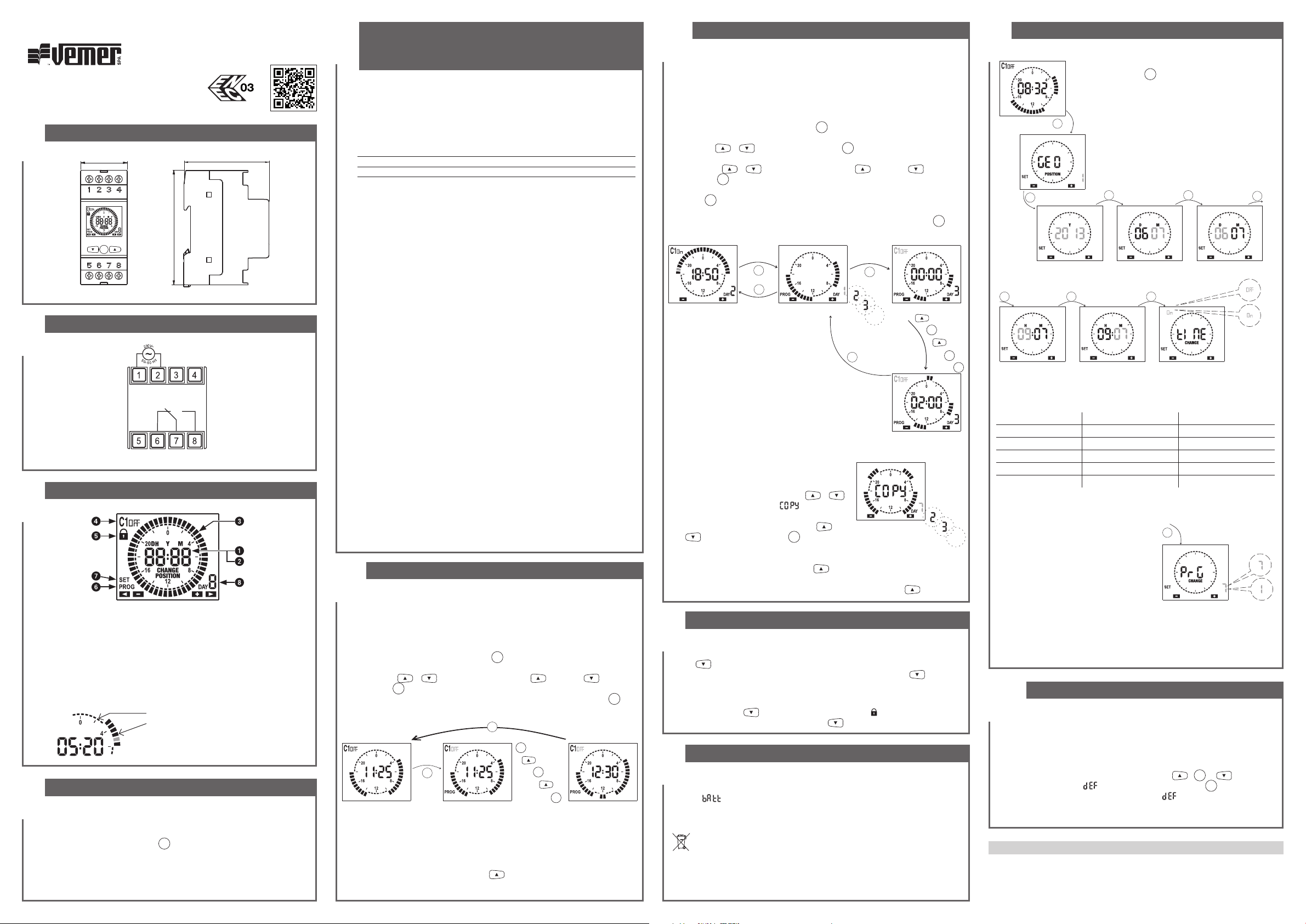
DIMENSIONI
2
35
87
PRG
65
SCHEMI DI COLLEGAMENTO
3
16A / 250V
Nota: il relè monostabile commuta solo se lo strumento è alimentato da rete elettrica.
DESCRIZIONE DISPLAY
4
Indicazione ora corrente
Indicazione anno, mese, giorno impostati (visualizzati in prog. avanzata)
Programmazione impostata
Stato del relè
Blocco commutazioni del relè attivo
Menù programmazione attivo (PROG)
Menù programmazione avanzata attivo (SET)
Giorno della settimana (solo su modello Simply W)
Cavaliere piccolo: relè off (posizione 6-7)
Cavaliere grande: relè on (posizione 7-8)
Nota: il cavaliere corrispondente all’ora
corrente lampeggia.
INSTALLAZIONE
5
Lo strumento viene fornito con la batteria inserita e la data impostata.
E’ possibile risvegliare lo strumento (accensione del display senza
retroilluminazione) premendo il tasto
Collegare alimentazione e uscita relè secondo quanto riportato nel riquadro
“schemi di collegamento”.
La retroilluminazione si accende non appena lo strumento viene alimentato e
rimane sempre accesa (in presenza di alimentazione da rete elettrica).
PRG
.
Manuale d’Uso
INTERRUTTORE ORARIO DIGITALE A CAVALIERI
1
Leggere attentamente tutte le istruzioni
Interruttori orari elettronici con programmazione giornaliera (Simply D) o
settimanale (Simply W) per il controllo di un carico elettrico. Uniscono la
precisione degli interruttori digitali alla semplicità di programmazione degli
interruttori elettromeccanici a cavalieri. Lo sportellino sul retro dello strumento
consente la sostituzione della batteria una volta esaurita. Sono destinati ad
operare in ambienti domestici e similari con grado di inquinamento normale.
Codice Modello Descrizione
VE512000 Simply D Interruttore orario con programmazione giornaliera
VE513800 Simply W Interruttore orario con programmazione settimanale
AVVERTENZE DI SICUREZZA
Durante l’installazione ed il funzionamento dello strumento è necessario
rispettare le seguenti indicazioni:
1) Lo strumento deve essere installato da persona qualificata rispettando
scrupolosamente gli schemi di collegamento.
2) Non alimentare il prodotto se qualche parte risulta danneggiata.
3) Lo strumento deve essere installato e messo in funzione in conformità con la
normativa vigente in materia di impianti elettrici.
4) Nell’impianto elettrico dell’edificio in cui lo strumento viene installato va
compreso un interruttore ed un dispositivo di protezione dalle sovracorrenti.
5) Prima di accedere ai morsetti di collegamento verificare che i conduttori non
siano in tensione.
6) Dopo l’installazione deve essere garantita la inaccessibilità ai morsetti di
collegamento senza l’uso di appositi utensili.
7) In caso di malfunzionamento dello strumento non eseguire interventi di
riparazione e contattare l’assistenza tecnica.
CARATTERISTICHE TECNICHE
• Alimentazione: 230Vac (-15% ÷ +10%) 50/60Hz
• Assorbimento: 6VA (1W)
• Uscita: relè con contatto in scambio monostabile da 16A / 250Vac
• Programmazione:
- Simply D: giornaliera (lo stesso programma eseguito tutti i giorni)
- Simply W: settimanale (un programma diverso per ogni giorno della settimana)
• Risoluzione della programmazione: 30 minuti
• Aggiornamento automatico ora solare/legale (escludibile) in funzione della zona
geografica di installazione (Europa, nord America, Australia, Cile, Nuova Zelanda)
• Retroilluminazione del display attiva con alimentazione da rete elettrica
• Batteria tampone sostituibile tipo CR2032 (durata: 5 anni circa)
• Temperatura di funzionamento: -20 ÷ +50 °C
• Temperatura di immagazzinamento: -25°C ÷ +70°C
• Umidità di funzionamento: 20÷90% non condensante
• Contenitore: 2 moduli DIN
• Grado di protezione: IP20
PROGRAMMAZIONE SIMPLY D
a
6
Nel Simply D la programmazione prevede un unico programma da ripetere tutti i giorni.
Il programma è definito dalla posizione dei 48 cavalieri (uno ogni 30 minuti), che
possono essere in posizione alta (relè on) oppure bassa (relè off). Al primo avvio i
cavalieri sono tutti in posizione bassa (relè off).
Per modificare il programma:
1. dalla pagina principale premere il tasto
2. la programmazione parte dal cavaliere corrispondente all’ora corrente
3. usare i tasti
e premere
4. una volta ottenuta la programmazione desiderata, tenere premuto il tasto
almeno 3 secondi per uscire e tornare alla pagina principale
Pagina principale Menù programmazione Menù programmazione
Nota: si esce dalla programmazione anche se non viene premuto alcun tasto entro
il time-out (40 secondi se lo strumento è alimentato da rele elettrica, 10 secondi se
alimentato con la batteria tampone). Le modifiche vengono comunque salvate.
Visualizzazione data
Dalla pagina principale, premendo il tasto
impostata (giorno e mese).
o per impostare il cavaliere ( = relè on, = relè off)
PRG
per confermare e avanzare di 30 minuti (al cavaliere successivo)
PRG
PRG
.
3s
PRG
PRG
+
+
PRG
+
è possibile visualizzare la data
PRG
+
PRG
per
PROGRAMMAZIONE SIMPLY W PROGRAMMAZIONE AVANZATA
6b 7
Nel Simply W la programmazione prevede 7 programmi differenti, uno per ogni giorno
della settimana. Ogni programma è definito dalla posizione dei 48 cavalieri (uno ogni
30 minuti), che possono essere in posizione alta (relè on) oppure bassa (relè off). Al
primo avvio i cavalieri di tutti i programmi sono in posizione bassa (relè off).
Per modificare la programmazione:
1. dalla pagina principale premere il tasto
2. scegliere il giorno della settimana da modificare (1 = lunedì, …, 7 = domenica)
con i tasti
3. la programmazione parte dalla mezzanotte (00:00) del giorno selezionato
4. usare i tasti
e premere
5. una volta ottenuta la programmazione desiderata per quel giorno, tenere premuto
il tasto
6. ripetere i punti 2, 3, 4, 5 finchè tutti i giorni della settimana sono stati programmati
7. una volta ottenuta la programmazione desiderata, tenere premuto il tasto
almeno 3 secondi per uscire e tornare alla pagina principale
Pagina principale
Nota: si esce dalla programmazione anche
se non viene premuto alcun tasto entro
il time-out (40 secondi se lo strumento è
alimentato da rele elettrica, 10 secondi se
alimentato con la batteria tampone).
Le modifiche vengono comunque salvate.
Funzione copia
La funzione copia permette di copiare in un giorno
qualsiasi la programmazione di un altro giorno.
Per copiare un programma esistente in un altro giorno:
1. accedere al menù modifica del giorno interessato
(punti 1, 2, 3 della programmazione semplice)
2. premere contemporaneamente i tasti
Sul display compare la scritta
giorno da copiare
3. scegliere quale giorno copiare con i tasti
e e confermare con il tasto
Visualizzazione data e programmi
Dalla pagina principale, premendo il tasto
successione i programmi di ogni singolo giorno e infine la data impostata (giorno e
mese). Per passare da un programma al successivo premere il tasto
e e confermare premendo
o per impostare il cavaliere ( = relè on, = relè off)
PRG
per confermare e avanzare di 30 minuti (al cavaliere successivo)
PRG
per almeno 3 secondi per uscire e tornare alla scelta del giorno
PRG
3s
PRG
Scelta del giorno da modificare
COMMUTAZIONE MANUALE RELE’
8
Per cambiare manualmente lo stato dell’uscita relè (da on a off o viceversa) premere
il tasto
Attenzione: lo stato viene mantenuto fino a nuova pressione del tasto
fino alla successiva commutazione in programma.
Per bloccare lo stato attuale del relè e inibirne le commutazioni, premere a lungo
(> 3 secondi) il tasto
Lo sblocco avviene premendo a lungo il tasto
.
. In questa condizione il simbolo è acceso.
BATTERIA SCARICA
9
Quando la batteria di backup è prossima alla scarica, lo strumento visualizza
la scritta
la batteria appena possibile, accedendo al vano batteria posto sul retro dello
strumento, per evitare che, in caso di blackout, vengano perse data e ora.
Attenzione: prima di accedere al vano batterie, scollegare l’alimentazione.
Attenzione: eseguire l’operazione in un tempo massimo di un minuto al fine di non
perdere data e ora impostate. Usare solo batterie tipo CR-2032.
alternata alla pagina principale. In questa condizione sostituire
Gettare le batterie esauste rispettando le disposizioni di legge vigenti in
relazione allo smaltimento dei rifiuti pericolosi.
PRG
e .
e lampeggia il
PRG
.
. Lampeggia il giorno 1 (lunedì)
PRG
PRG
Modifica del programma
...
3s
PRG
Scelta del giorno da copiare
è possibile visualizzare in
.
oppure
.
PRG
per
+
PRG
+
+
PRG
+
...
(*) cambio ora legale/solare
se l'aggiornamento automatico dell'ora legale è attivo (on), il cambio avviene in
base alla zona geografica impostata:
Zona Inizio DST (+1h) Fine DST (-1h)
01 Europa Ultima domenica marzo Ultima domenica ottobre
02 Nordamerica Seconda domenica marzo Prima domenica novembre
03 Australia Prima domenica ottobre Prima domenica aprile
04 Cile Seconda domenica ottobre Seconda domenica marzo
05 Nuova Zelanda Ultima domenica settembre Prima domenica aprile
Nota: il cambio ora è fisso per tutte le zone alle ore 2:00 per l’inizio del DST e alle
ore 3:00 per la fine del DST.
...
Modo di funzionamento (solo su Simply W)
Nel Simply W dopo il menù “cambio ora legale/
solare” si accede al menù per la scelta del
modo di funzionamento: giornaliero (1) o
settimanale (7).
Se impostato come giornaliero, il Simply W
funziona come fosse un Simply D, eseguendo
tutti i giorni lo stesso programma.
Nota: si esce dalla programmazione anche se non viene premuto alcun tasto
entro il time-out (40 secondi se lo strumento è alimentato da rele elettrica, 10
secondi se alimentato con la batteria tampone). In questo caso le modifiche non
vengono salvate.
10
Il default dei parametri riporta lo strumento alle condizioni di fabbrica, ovvero:
- zona geografica: 1 (Europa)
- cambio automatico ora legale: attivo
- programmazione: sempre OFF
Per eseguire il default, dalla schermata principale tenere premuti
contemporaneamente per almeno 3 secondi i tasti
il lampeggio della scritta
Attenzione: se durante il lampeggio della scritta
tasto entro 5 secondi lo strumento ritorna nella schermata principale senza
effettuare il reset.
NORME DI RIFERIMENTO
La conformità con le Direttive Comunitarie:
2014/35/UE (LVD), 2014/30/UE (E.M.C.D.)
è dichiarata in riferimento alle seguenti norme armonizzate:
• CEI EN 60730-2-7
Dalla schermata principale, premendo a lungo
(> 3 secondi) il tasto
zona geografica di installazione, data, ora, aggiornamento
ora legale e, per il solo simply W, il modo di funzionamento
(giornaliero o settimanale).
PRG
3s
Impostazione
zona geografica
PRG
Impostazione anno
PRG PRG PRG
Impostazione ora
PRG
Impostazione mese
Impostazione minuti
DEFAULT PARAMETRI
, confermare premendo il tasto
PRG
è possibile impostare:
PRG
Impostazione giorno
Cambio ora legale/solare*
PRG
Impostazione funzionamento
PRG
,
e e, durante
PRG
non viene premuto alcun
PRG
.
03-2020
Page 2
V3IS00724-021
Mod. Simply
Vemer S.p.A.
I - 32032 Feltre (BL) • Via Camp Lonc, 16
e-mail: [email protected] - web site: www.vemer.it
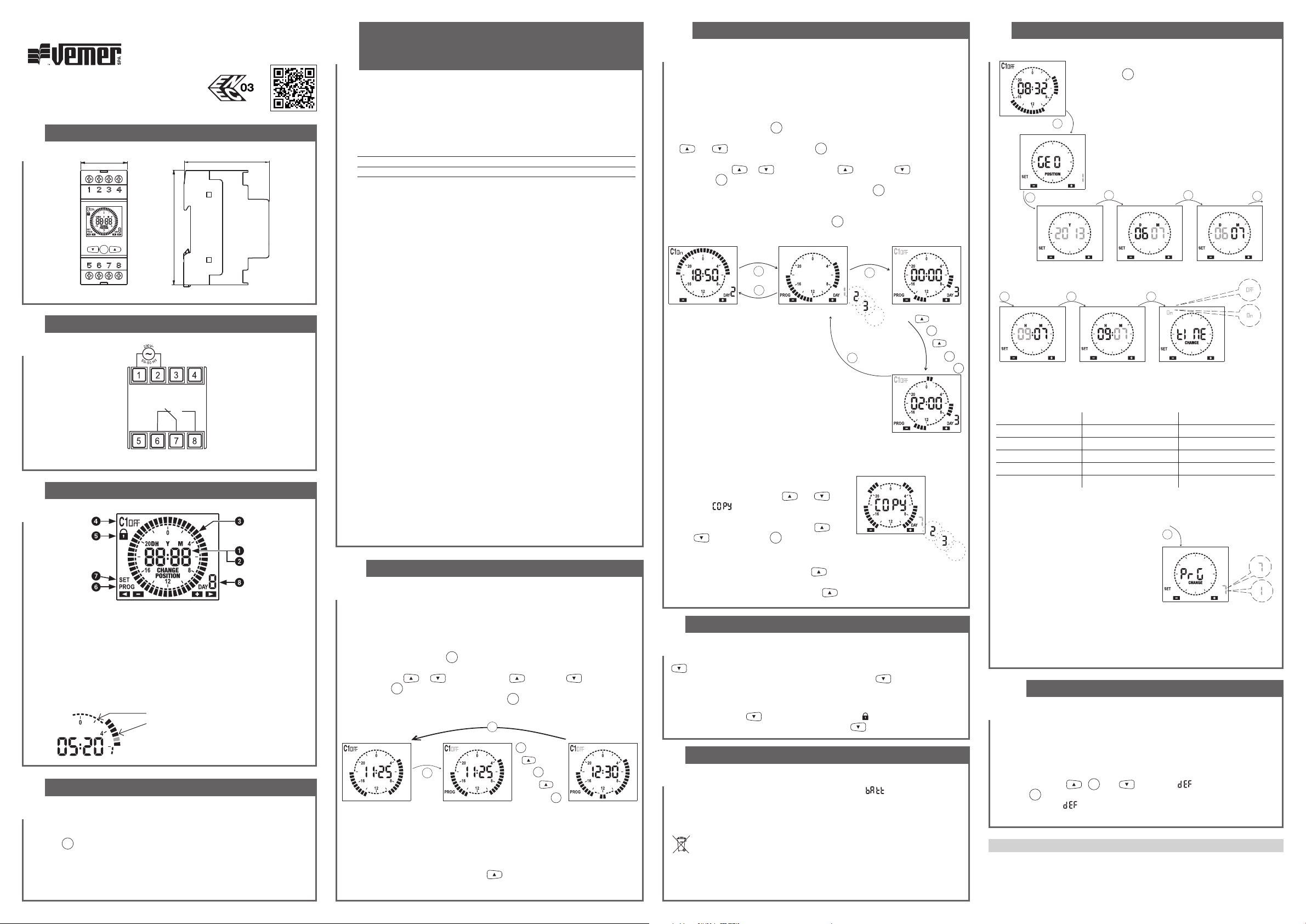
DIMENSIONS
2
35
87
PRG
65
CONNECTION DIAGRAMS
3
16A / 250V
Note: the monostable relay switches only if the instrument is mains powered.
DISPLAY DESCRIPTION
4
Current time indication
Set year, month, day indication (displayed in advanced programming)
Set programming
Relay status
Switchings lock of active relay
Active programming menu (PROG)
Active advanced programming menu (SET)
Day of the week (model Simply W only)
Little tripper: relay off (position 6-7)
Big tripper: relay on (position 7-8)
Note: the tripper that corresponds to the
current time flashes.
INSTALLATION
5
The instrument comes with the inserted battery and the set date.
It is possible to awaken the instrument (display activation without backlight) by
pressing
Connect power supply and relay output as reported in the “connection
diagrams”.
The backlight will turn on as soon as the instrument is powered and remains
always on (in the presence of mains power).
PRG
key.
User manual
DIGITAL TIME SWITCH WITH TRIPPERS
1
Read all instructions carefully
Electronic time switches with daily programming (Simply D) or weekly
(Simply W) for control of an electrical load. Join the accuracy of digital
switches to the simple programming of the electromechanical switches with
trippers. The cover on the back of the instrument allows battery replacement
once depleted. They are intended to operate in domestic and similar
environments with standard pollution degree.
Code Model Description
VE512000 Simply D Time switch with daily programming
VE513800 Simply W Time switch with weekly programming
SAFETY WARNINGS
During product installation and operation it is necessary to observe the
following instructions:
1) The instrument must be installed by a qualified person, in strict compliance
with the connection diagrams.
2) Do not power the product if any part of it is damaged.
3) The instrument must be installed and activated in compliance with current
electric system standards.
4) The electrical system in the building in which the instrument is to be installed
should have an over-current switch and a protection device.
5) Before accessing the connection terminals, verify that the leads are not live.
6) After installation, inaccessibility to the connection terminals without
appropriate tools must be guaranteed.
7) In case of malfunction do not perform repairs and contact immediately the
technical support.
TECHNICAL CHARACTERISTICS
• Power supply: 230Vac (-15% ÷ +10%) 50/60Hz
• Absorption: 6VA (1W)
• Output: relay with change-over monostable contact from 16A / 250Vac
• Programming:
- Simply D: daily (the same program performed every day)
- Simply W: weekly (a different program for every day of the week)
• Resolution of programming: 30 minutes
• Summer/winter time automatic update (removable) depending on the
geographical zone of installation (Europe, North America, Australia, Chile, New
Zealand)
• Active backlight display with mains power
• Replaceable CR2032 type backup battery (duration: 5 years about)
• Operating temperature: -20 ÷ +50 °C
• Storage temperature: -25°C ÷ +70°C
• Operating humidity: 20÷90% non condensing
• Container: 2 DIN modules
• Degree of protection: IP20
SIMPLY D PROGRAMMING
a
6
Simply D programming consists of a single program to be repeated every day.
The program is defined by the position of 48 trippers (one every 30 minutes), which
can be in the up position (relay on) or low (relay off). When you first start the trippers
are all in low position (relay off)
To modify the program:
1. from the main page press
2. the programming starts from the tripper that corresponds to the current time
3. press the key
and press
4. once the desired programming is got, press
and return to the main page.
Note: you can exit programming even if you don’t press any key within the time-out
(40 seconds if the instrument is mains powered, 10 seconds if powered by the
backup battery). The modifications are still saved.
Display date
From the main page, by pressing the key
(day and month).
PRG
to confirm and step up of 30 minutes (the next tripper)
Main page Programming menu Programming menu
.
PRG
key
or to set the tripper ( = relay on, = relay off)
PRG
key for at least 3 seconds to exit
3s
PRG
PRG
+
+
PRG
PRG
+
+
PRG
it’s possible to display the set date
SIMPLY W PROGRAMMING ADVANCED PROGRAMMING
6b 7
Simply W programming consists of 7 different programs, one for each day of the
week. Each program is defined by the position of 48 trippers (one every 30 minutes),
which can be in the up position (relay on) or low (relay off). When you first start the
trippers of all programs are in the low position (relay off).
To modify the programming:
1. from the main page press
2. choose the day of the week to modify (1 = Monday, ..., 7 = Sunday) with the keys
and and confirm by pressing
3. programming starts from midnight (00:00) of the selected day
4. press the keys
and press
5. once the desired programming is got for that day, press
seconds to exit and return to the choice of the day
6. repeat steps 2, 3, 4, 5 until all days of the week have been programmed
7. once the desired programming is got, press
and return to the main page
Note: you can exit programming even if you
don’t press any key within the time-out (40
seconds if the instrument is mains powered,
10 seconds if powered by the backup
battery). The modifications are still saved.
Copy function
The copy function allows you to copy in a day any programming of another day.
This allows to speed up the procedure of programming if two or more days
include the same programming. To copy an existing program in another day:
1. access modification menu of the day concerned
(points 1, 2, 3 of the simple programming)
2. press simultaneously the keys
The word
the day to copy flashes
3. choose which day to copy with the keys
and and confirm with
Displaying date and programs
From the main page, by pressing the key
the programs of every single day and then the set date (day and month). To move
from one program to the next, press the key
Main page
PRG
to confirm and step up of 30 minutes (the next tripper)
appears on the display and
RELAY MANUAL SWITCHING
8
To change manually the status of relay output (from on to off or vice versa) press the
key.
Attention: the status is maintained until new press of the key
program switching.
To lock the current status of the relay and prevent its switchings, press for a long time
(> 3 seconds) the key
Unlocking is done by pressing for a long time the key
DEPLETED BATTERY
9
When the backup battery is low, the instrument displays
main page. In this condition, replace the battery as soon as possible, by accessing
the battery compartment at the back of the instrument to avoid that, in case of
blackout, the date and time are lost.
Dispose of used batteries in accordance with the current legal
provisions regarding the disposal of hazardous waste.
Attention: before you access the battery compartment, disconnect the power supply.
Attention: perform the operation in a maximum time of one minute in order not to
lose date and time. Use only CR-2032 type battery.
PRG
key. The day 1 (Monday) flashes
PRG
or to set the tripper ( = relay on, = relay off)
PRG
key for at least 3
PRG
key for at least 3 seconds to exit
PRG
3s
PRG
Choice of the day to modify
and .
PRG
key.
it’s possible to display in succession
. In this condition the symbol is lit.
PRG
...
3s
PRG
Choice of the day to copy
.
.
Program modification
+
PRG
+
or until the next
alternating with the
+
PRG
+
...
(*) summer/winter time change
If the automatic update of summer time is active (on), the change occurs
according to the set geographical zone:
Zone Start DST (+1h) End DST (-1h)
01 Europe Last Sunday, March Last Sunday, October
02 North America Second Sunday, March First Sunday, November
03 Australia First Sunday, October First Sunday, April
04 Chile Second Sunday, October Second Sunday, March
05 New Zealand Last Sunday, September First Sunday, April
Note: time change is fixed for all zones at 2:00 o’clock for the start of DST and at
3:00 o’clock for the end of DST.
Operating mode (Simply W only)
In Simply W after “summer/winter time
...
change” menu, the menu for the operating
mode choice is accessed: daily (1) or
weekly (7).
If set as daily, Simply W works like a
Simply D, running every day the same
program.
Note: you can exit programming even if you don’t press any key within the
time-out (40 seconds if the instrument is mains powered, 10 seconds if powered
by the backup battery). In this case the modifications are not saved.
10
The default of the parameters shows the instrument factory conditions, that is
to say:
- geographical zone: 1 (Europe)
- winter time automatic change: active
- programming: always OFF
To perform the default, from the main screen press simultaneously for at least
3 seconds the keys
pressing
Attention: if during
instrument returns to the main screen without perform the reset.
REFERENCE STANDARDS
Compliance with Community directives:
2014/35/EU (LVD), 2014/30/EU (E.M.C.D.)
is declared in reference to the following harmonised standards:
• EN 60730-2-7
From the main screen by pressing for a long time
(> 3 seconds)
geographical zone of installation, time, summertime
automatic update and, for Simply W only, the operating
mode (daily or weekly).
PRG
3s
Geographical
zone setting
PRG
Year setting
PRG PRG PRG
Time setting
PRG
key it’s possible to set:
PRG PRG
Month setting
Minute setting
DEFAULT PARAMETERS
PRG
,
PRG
key.
and and, during flashing, confirm by
flashing you don’t press any key within 5 seconds, the
PRG
Day setting
Summer/winter time change*
PRG
Operation setting
03-2020
 Loading...