

Page 1
A
Ventilation Test Instruments
9555 Menu Structure and Quick Reference
Application Note TSI-145
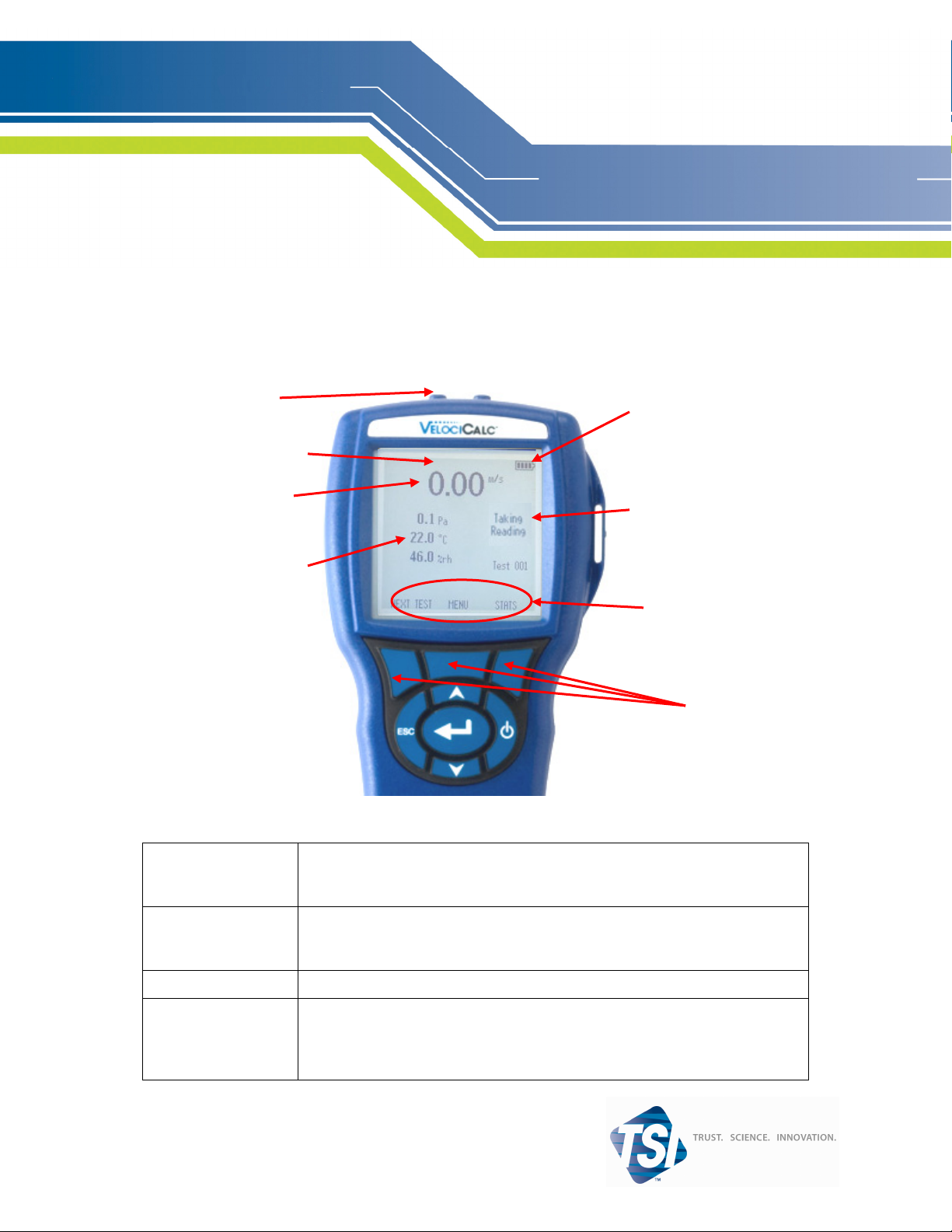
Pressure Ports
Battery Indicator
Additional Messages
Primary Parameter
ctivity Area
Secondary Parameters
Soft Key Indicators
Soft Keys
Keypad Functions
ON/OFF Key
Arrow (ST) Keys
(Enter) Key
Arrow (gor h) and
Menu Soft Keys
Press to turn the A
display will show the following: Model Number, Serial Number, Software
Revision and Last Date Calibrated.
Press to scroll through choices while setting a parameter. Pressing the
keys simultaneously will lock the keypad to prevent unauthorized adjustments
to the instruments. To unlock the keypad, press the
Press to accept a value or condition.
Press arrow keys to change choices while setting a parameter. Press the Menu
soft key to select the Menu selections, which are Display Setup, Pressure Zero,
Settings, Flow Setup, Actual/Std Set up, Data Logging, Applications, Calibration and Printer.
IRFLOW 9555 on and off. During the power up sequence the
ST
ST keys simultaneously.
Page 2
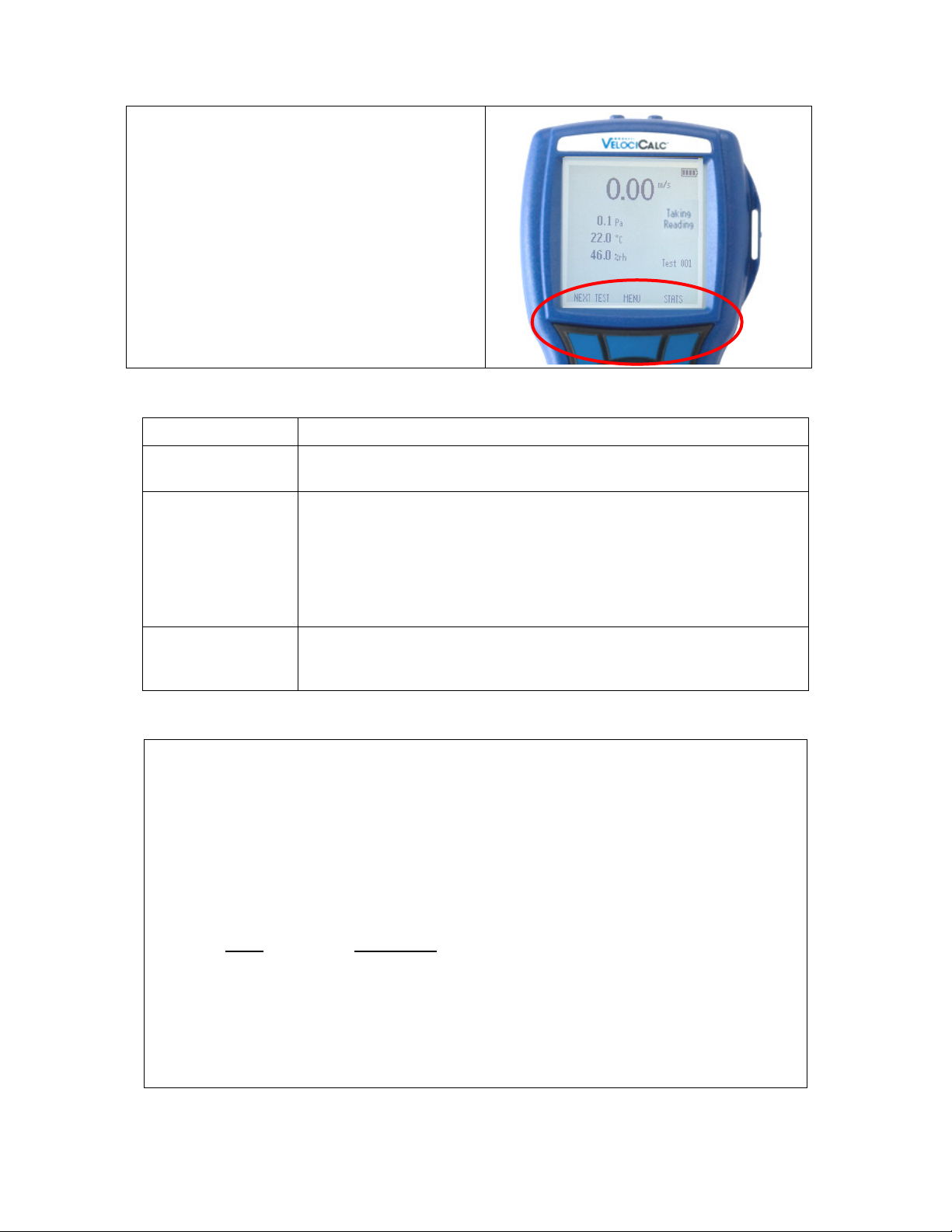
Next Test
Menu
Stats
Main Soft Keys
• Increments to the next available test ID.
• Accesses the main and sub-menus
• Displays the average, minimum, and
maximum readings of the current Test ID.
o Statistics can also be viewed from
the Data Logging menu.
Common Terms
Sample
Consists of all of the measurement parameters stored at the same time.
Test ID
Time Constant
Logging Interval
A group of samples. The statistics (average, minimum, maximum, and count)
are calculated for each test ID. The maximum number of test IDs is 100.
The time constant is an averaging period. It is used to dampen the display. If
you are experiencing fluctuating flows, a longer time constant will slow down
those fluctuations. The display will update every second, but the displayed
reading will be the average over the last time constant period. For example, if
the time constant is 10 seconds, the display will update every second, but the
displayed reading will be the average from the last 10 seconds. This is also
referred to as a “moving average”.
The logging interval is a frequency period that the instrument will log readings. For example, if the logging interval is set to 30 minutes, each sample will
be the average of the last 30 minutes.
Log Mode/Log Settings
You can set Log Mode to Manual, Auto-save, Cont-key, Cont-time, Program 1 or Program 2.
• Manual mode does not automatically save data, but instead prompts the user to save a sample.
• In Auto-save mode, the user manually takes samples that are automatically logged.
• In Cont-key mode, the user starts taking readings and logging by pressing the key. The in-
strument will continue taking measurements until the key is pressed again.
• In Cont-time mode, the user starts taking readings by pressing the key. The instrument will
continue taking samples until a set period of time has passed.
• Auto-save, Cont-Key and Cont-time modes have the following additional Log Settings:
Log Settings
Mode
Auto-save Log Interval
Cont-key Log Interval
Cont-time Log Interval
Test Length
• Pressing the
ments to the instruments. To unlock the keypad, press the
ST keys simultaneously will lock the keypad to prevent unauthorized adjust-
ST keys simultaneously.
-2-
Page 3
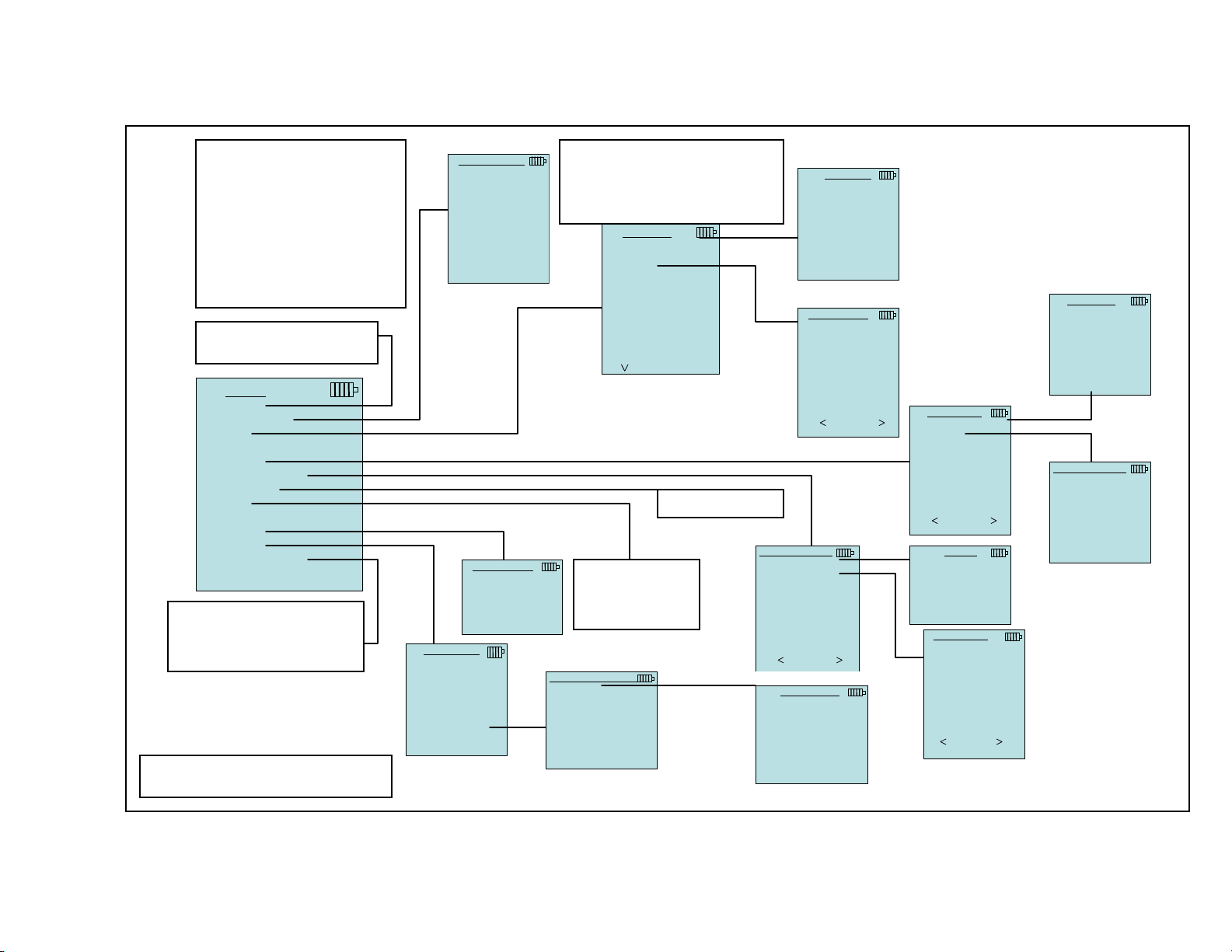
DISPLAY SETUP
• When set to ON, measurement
will be displayed as a secondary parameter (up to 4 can be
displayed)
• When set to PRIMARY, meas-
DISPLAY SETUP
Velocity *ON
Flow OFF
Pitot Velocity OFF
Pressure ON
Temperature ON
Baro Press OFF
urement will be the large number on the display
• When set to OFF, measurement
ON PRIMARY OFF
will not be displayed
To zero the pressure reading,
select Pressure Zero.
MENU
Zero Press
Display Setup
Settings
Flow Setup
Actual/Std Setup
Data Logging
Zero CO
Applications
Calibration
Discover Printer
This function identifies and partners the instrument with the
model 8934 Bluetooth portable
printer
CALIBRATION
Calibrate Temp
Calibrate Vel
Calibrate %RH
Calibrate Press
Calibrate B.P.
Calibrate CO2
Calibrate CO
Restore Factory Cal
APPLICATIONS
Draft Rate
Heatflow
Turbulence
% Outside Air
Settings menu is where you can adjust
the general settings. Use the g or h
soft keys to adjust the settings for each
option and use the key to accept
settings.
SETTINGS
Language English
Beeper Disable
Select Units
Time Constant 1 Second
Contrast 5
Set Time 09:14 AM
Set Date 10/31/08
Time Format 12 hr
Date Format
Number Format
Backlight Auto
Auto Off Enable
---- ----
MM/DD/YY
XX,XXX.YY
See Next Page
If a CO probe is
attached, this function will zero the
CO sensor
RESTORE FACTORY CAL
Restore Temp
Restore Vel
Restore %RH
Restore Press
Restore B.P.
Restore CO2
Restore CO
LANGUAGE
English
German
French
Spanish
Swedish
Finnish
Dutch
Italian
SELECT UNITS
Temperature °F
Velocity ft/min
Flow CFM
Heatflow BTU/h
Pressure in.H2O
Baro Press in.Hg
ACTUAL/STD SETUP
Setting Standard
Temp source Entered
Standard temp 70.0 F
Standard Press 29.92 in.Hg
RESTORE TEMP
Are you Sure?
FLOW SETUP
Flow Type
Enter Settings
SETTING
Standard
Actual
TEMP SOURCE
Entered Temp 70°F
Probe
Thermocouple 1
Thermocouple 2
Round Duct
FLOW TYPE
Round duct
Rect duct
Duct area
Press/Kfact
Horn
Air cone
ENTER SETTINGS
12.0 in dia
9555 Menu Structure
YES NO
Page 4
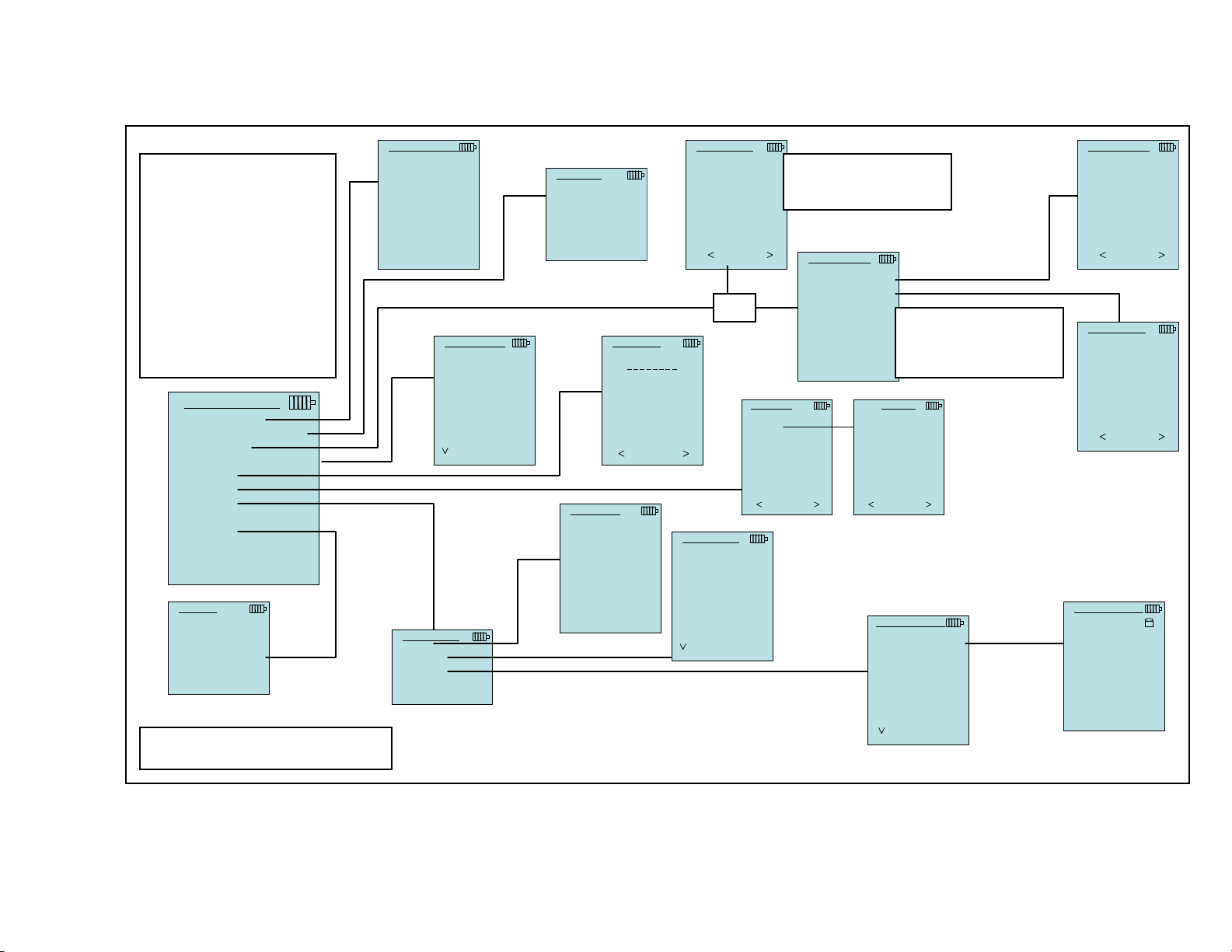
MEASUREMENTS
• Measurements being logged
are independent of measurements on the display
• When set to ON, measure-
ment will be logged to
memory
MEASUREMENTS
Temperature
Velocity
Flow
Heatflow
Pressure
Baro Press
ON DISPLAY OFF
DISPLAY
DISPLAY
DISPLAY
OFF
DISPLAY
ON
LOG MODE
Manual
Auto-save
Cont.-key
Cont.-time
Program 1
Program 2
• When set to DISPLAY,
measurement will be logged
to memory if it is visible on
the main running screen
• When set to OFF, measure-
ment will not be logged to
memory
DATA LOGGING
Measurements
Log Mode Manual
Log Settings
Choose Test Test 001
CHOOSE TEST
Test 001 9 Samples
Test 002 7 Samples
Test 003 0 Samples
Test 004 0 Samples
Test 005 0 Samples
Test 006 0 Samples
Test 007 0 Samples
Test 008 0 Samples
Test 009 0 Samples
Test 010 0 Samples
--- ---NEW DATES
NAME TEST
T e s t 0 0 1
0 1 2 3 4 5 6 7 8 9
A B C D E F G H I J
K L M N O P Q R S T
U V W X Y Z _ ←
SAVE
Name Test
View Data
Delete Data
DELETE ALL
% Memory
Are you sure?
MEMORY
Test ID 83 %
Sample 92 %
DELETE DATA
Delete All
Delete Test
Delete Sample
YES NO
9555 Menu Structure
SAMPLE TIME
00:05
Min:Sec
OR
Choose Test
View Stats
View Samples
Print Test
DELETE TEST
Test 001 8 Samples
Test 002 5 Samples
Test 003 0 Samples
Test 004 0 Samples
Test 005 0 Samples
Test 006 0 Samples
Test 007 0 Samples
Test 008 0 Samples
Test 009 0 Samples
Test 010 0 Samples
--- ---DATES
If Log Mode is set to Autosave, Sample Time can be
adjusted.
LOG SETTINGS
Log Interval 00:01
Test Length 00:00:01
VIEW DATA
Test 001
If Log mode is set to Cont.time or Cont.-key, then the
log interval and test length
can be adjusted
TEST 001
Pressure
Avg 35.4 Pa
Min 27.4 Pa
Max 47.9 Pa
# Samples 3
10/31/08 07:01:39 AM
PRINT
DELETE SAMPLE
Test 001 8 Samples
Test 002 5 Samples
Test 003 0 Samples
Test 004 0 Samples
Test 005 0 Samples
Test 006 0 Samples
Test 007 0 Samples
Test 008 0 Samples
Test 009 0 Samples
Test 010 0 Samples
--- ---DATES
LOG INTERVAL
00:05
Min:Sec
TEST LENGTH
00 : 00 : 05
Day:Hour:Min
DELETE SAMPLE
10/31/08 04:55:03 PM
Test 002
Sample 5
DELETE
→
Page 5

TSI Incorporated – 500 Cardigan Road, Shoreview, MN 55126 U.S.A
USA Tel: +1 800 874 2811 E-mail: [email protected]
UK Tel: +44 149 4 459200 E-mail: [email protected]
France Tel: +33 491 95 21 90 E-mail: [email protected]
Germany Tel: +49 241 523030 E-mail: [email protected]
India Tel: +91 80 41132470 E-mail: [email protected]
China Tel: +86 10 8260 1595 E-mail: [email protected]
Contact your local TSI Distributor or visit our website www.tsi.com for more detailed specifications.
Website: www.tsi.com
Website: www.tsiinc.co.uk
Website: www.tsiinc.fr
Website: www.tsiinc.de
1/09 Copyright © 2009 by TSI Incorporated Printed in U.S.A
 Loading...