

Page 1
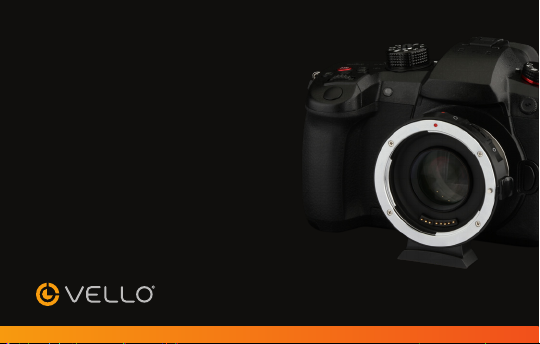
ACCELERATOR
LENS ADAPTER
LAG-MFT-CEF
Canon EF Lens to Micro Four Thirds Mount
Page 2

THANK YOU FOR CHOOSING VELLO
The Vello Accelerator Lens Adapter is for attaching Canon EF-mount lenses to Micro
Four Thirds cameras. It allows a wider field of view on Micro Four Thirds sensors by
magnifying the angle of view by 0.7×. This also provides an extra stop of light without
decreasing image quality. For example, mounting a 50mm f/.4 lens to a Micro Four
Thirds sensor will usually give you a 00mm angle of view. By adding the Accelerator,
you eectively produce a focal length of 7mm with a stepped-down f-stop of f/.0.
This is a great advantage for the widely accepted Micro Four Thirds format.
The Vello Accelerator aords additional benefits, such as a near-silent aperture toggle
which is ideal for quietly selecting the f-stop during video recording. It has four elements in
four groups to maintain image quality, a USB port for firmware updates, and a detachable
tripod foot that works with most /4-20 mounts as well as Arca-type head assemblies.
2
Page 3

PRECAUTIONS
• Avoid sandy or dusty
environments when using
this adapter.
• Handle the adapter with
care. Avoid impacts and
vibrations.
• Clean the adapter by
wiping it with a soft,
dry cloth.
• Be sure to read the
operating instructions for
your digital camera.
• Do not use solvents such
as benzene, alcohol, or
detergents to clean the
adapter.
• Keep this unit away from
children.
• Keep this unit away from
water and flammable
gases or liquids.
• Use only parts provided
by the manufacturer.
• Please read and follow
these instructions. Keep
this manual in a safe
place.
• All images are for
illustrative purposes only.
3
Page 4
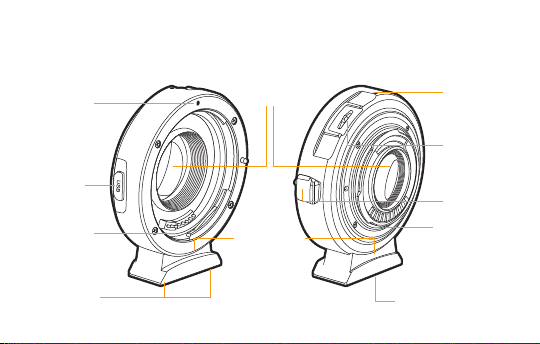
OVERVIEW
Canon lens
alignment dot
USB port
Canon lens
mount
Front Back
Optical
Elements
Tripod foot
Camera
mount
alignment
dot
Aperture
toggle
(Panasonic
only)
Lens
Release
Micro Four
Thirds mount
Hex screws
4
/4-20 tripod socket
Page 5
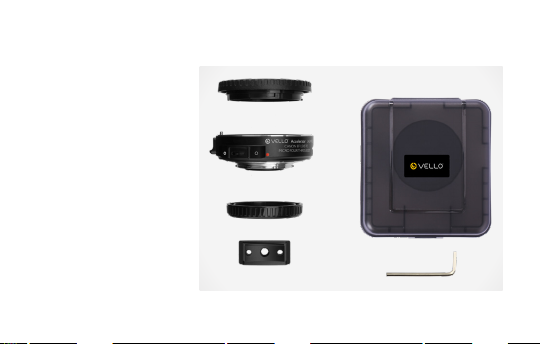
CONTENTS
• Vello LAG-MFT-CEF lens
adapter for Canon EF
Lenses to Micro Four
Thirds Mount
• Front and rear caps
• Removable tripod foot
• 2 mm hex key
• Protective case
• User manual
5
Page 6
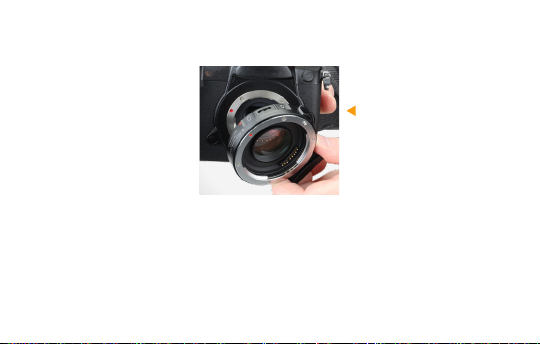
MOUNTING THE LENS ADAPTER
Note: Place the lens and
camera on a stable, flat
surface when mounting or
removing the Accelerator Lens
Adapter.
. Turn the camera’s power
o, and remove all
protective caps.
6
2. Line up the alignment
dots on the lens adapter
and the camera, and
carefully insert the lens
adapter into the camera’s
lens mount. Rotate the
Accelerator clockwise
until it locks into place.
Page 7
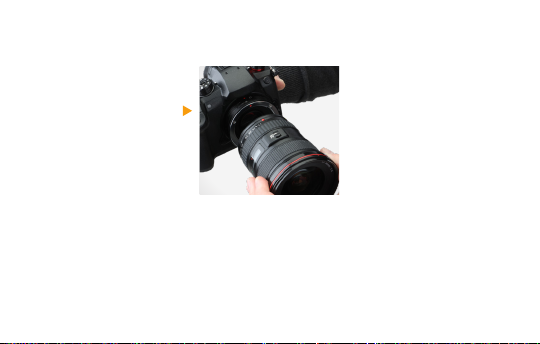
3. Line up the alignment
dot on the lens with the
alignment dot on the
lens adapter, and carefully
insert the lens. Rotate
the lens clockwise until it
locks into place.
7
Page 8
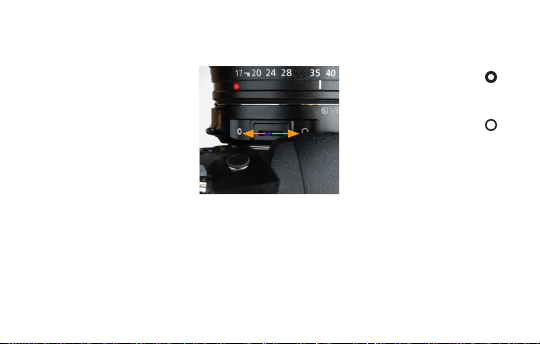
APERTURE CONTROL (PANASONIC ONLY)
The aperture control toggle
allows you to quietly open
and close the aperture
without clicking a camera
dial or rotating a lens ring.
Since it minimizes camera
vibrations and noise, you can
use it to change aperture
during video recording.
8
Press the toggle towards
to close the aperture.
Press the toggle towards
to open the aperture.
Page 9
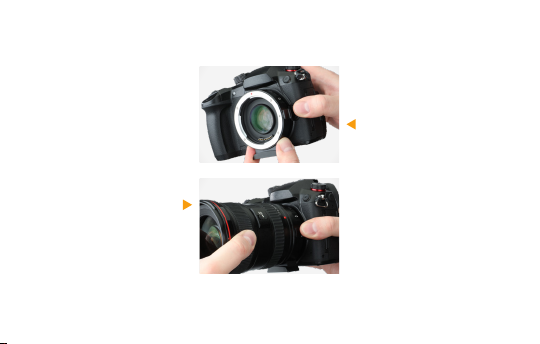
REMOVING THE LENS ADAPTER
. Turn the camera’s
power o.
2. Press and hold the
release pin on the
lens adapter, and
carefully rotate the
lens counterclockwise
to detach it from the
adapter.
3. Reattach the front lens
cap to the lens adapter.
4. Press and hold the lens
release button on the
camera, and carefully
rotate the lens adapter
counterclockwise to
detach it from the
camera.
5. Reattach the rear lens
cap to the lens adapter.
9
Page 10
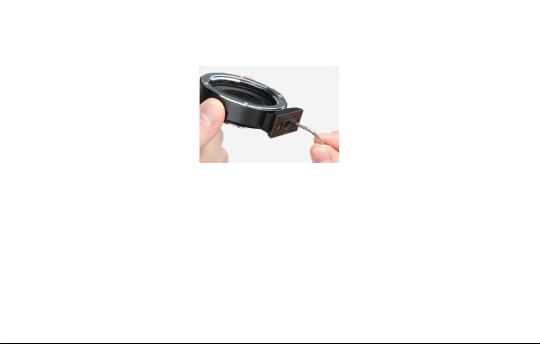
REMOVING THE TRIPOD FOOT
Use the included hex key to
loosen the hex screws until
the foot can be removed
from the lens adapter.
Note: If your lens has a built-in
tripod collar, use the collar on
the lens to mount the assembly
to the tripod.
0
Page 11

FIRMWARE UPDATE
Go to vellogear.com to
check for the latest available
updates for your lens
adapter. Use the USB port
to connect the adapter to
your computer, and follow
the update instructions.
Page 12
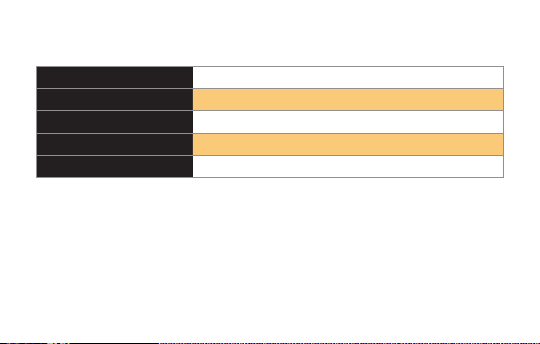
SPECIFICATIONS
Compatible Lenses Canon EF
Compatible Cameras Micro Four Thirds
Optical Design 4 elements in 4 groups
Step-Down Amount f-stop
Angle-of-View Multiplier 0.7×
2
Page 13
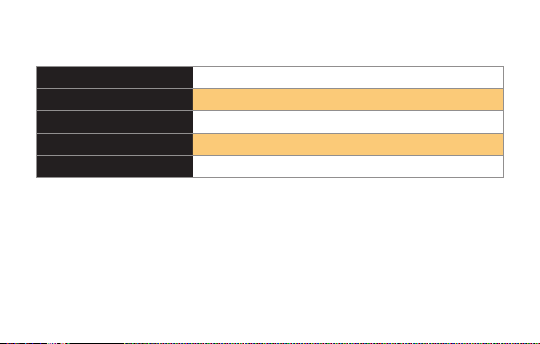
Lens Mount Canon EF
Camera Mount Micro Four Thirds
Tripod Thread /4-20
Dimensions (H × W × D) 2.95 × 2.79 × 0.95 in. (7.5 × 7. × 2.4 cm)
Weight 4.2 oz. (9 g)
3
Page 14

ONE-YEAR LIMITED WARRANTY
This VELLO product is warranted to the original purchaser to be free from defects in materials and workmanship
under normal consumer use for a period of one () year from the original purchase date or thirty (30) days
after replacement, whichever occurs later. The warranty provider’s responsibility with respect to this limited
warranty shall be limited solely to repair or replacement, at the provider’s discretion, of any product that fails
during normal use of this product in its intended manner and in its intended environment. Inoperability of
the product or part(s) shall be determined by the warranty provider. If the product has been discontinued,
the warranty provider reserves the right to replace it with a model of equivalent quality and function.
This warranty does not cover damage or defect caused by misuse, neglect, accident, alteration, abuse, improper
installation or maintenance. EXCEPT AS PROVIDED HEREIN, THE WARRANTY PROVIDER MAKES NEITHER
ANY EXPRESS WARRANTIES NOR ANY IMPLIED WARRANTIES, INCLUDING BUT NOT LIMITED TO ANY
IMPLIED WARRANTY OF MERCHANTABILITY OR FITNESS FOR A PARTICULAR PURPOSE. This warranty
provides you with specific legal rights, and you may also have additional rights that vary from state to state.
4
Page 15

To obtain warranty coverage, contact the Vello Customer Service Department to obtain a return merchandise
authorization (“RMA”) number, and return the defective product to Vello along with the RMA number
and proof of purchase. Shipment of the defective product is at the purchaser’s own risk and expense.
For more information or to arrange service, visit www.vellogear.com or call Customer Service at 22-594-2353.
Product warranty provided by the Gradus Group.
www.gradusgroup.com
VELLO is a registered trademark of the Gradus Group.
© 209 Gradus Group LLC. All Rights Reserved.
All other trademarks are the property of their respective owners.
5
Page 16

www.vellogear.com
GG1
 Loading...