

Page 1
USER MANUAL
EN
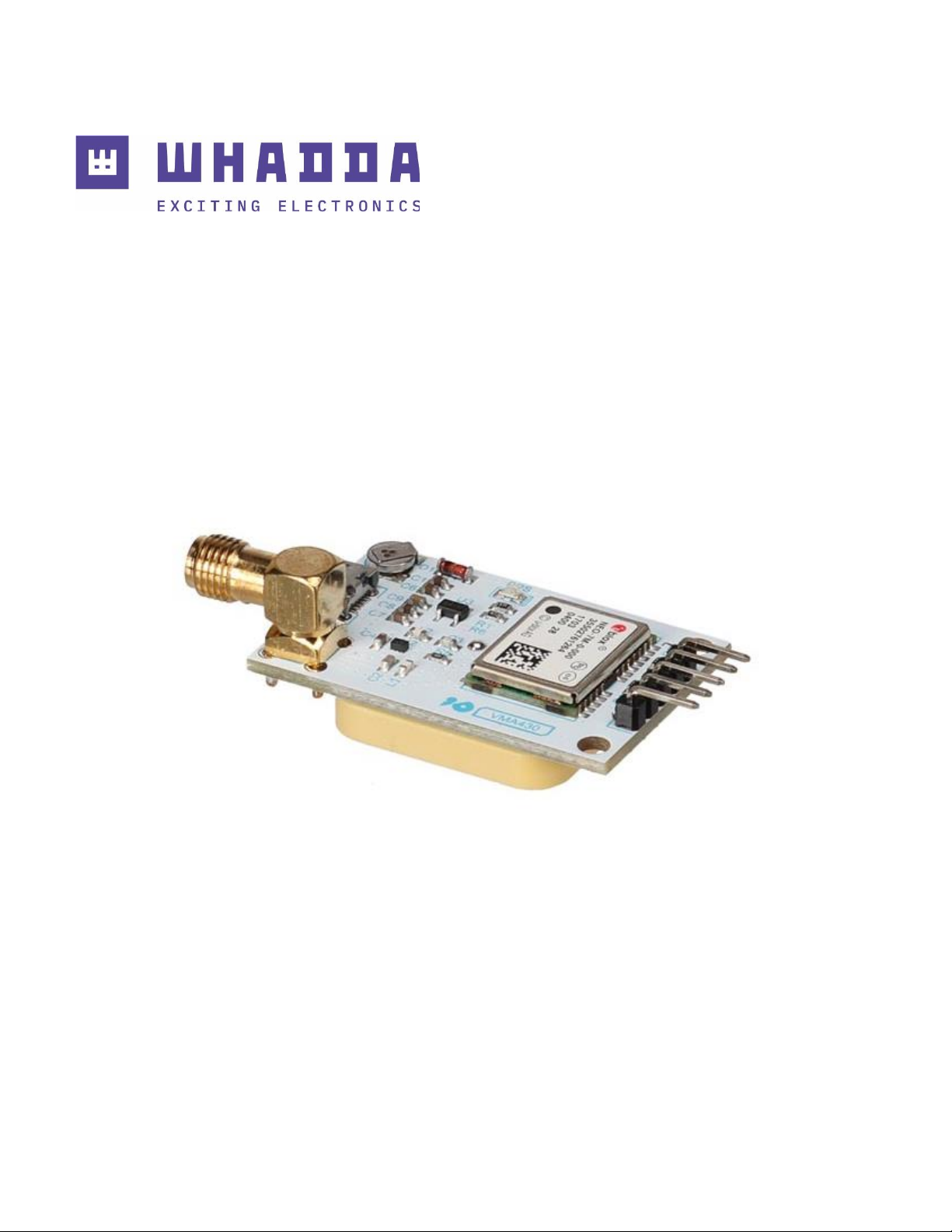
GPS module u-blox NEO-7M for Arduino®
WPI430
whadda.com
Page 2
2
Introduction
To all residents of the European Union
Important environmental information about this product
This symbol on the device or the package indicates that disposal of the device after its
lifecycle could harm the environment. Do not dispose of the unit (or batteries) as unsorted
municipal waste; it should be taken to a specialized company for recycling. This device
should be returned to your distributor or to a local recycling service. Respect the local
environmental rules.
If in doubt, contact your local waste disposal authorities.
Thank you for choosing Whadda! Please read the manual thoroughly before bringing this
device into service. If the device was damaged in transit, do not install or use it and contact
your dealer.
Safety Instructions
Read and understand this manual and all safety signs before using this appliance.
For indoor use only.
• This device can be used by children aged from 8 years and above, and persons with
reduced physical, sensory or mental capabilities or lack of experience and knowledge if
they have been given supervision or instruction concerning the use of the device in a
safe way and understand the hazards involved. Children shall not play with the device.
Cleaning and user maintenance shall not be made by children without supervision.
General Guidelines
• Refer to the Velleman
®
Service and Quality Warranty on the last pages of this manual.
• All modifications of the device are forbidden for safety reasons. Damage caused by
user modifications to the device is not covered by the warranty.
• Only use the device for its intended purpose. Using the device in an unauthorized way
will void the warranty.
• Damage caused by disregard of certain guidelines in this manual is not covered by the
warranty and the dealer will not accept responsibility for any ensuing defects or
problems.
• Nor Velleman Group nv nor its dealers can be held responsible for any damage
(extraordinary, incidental or indirect) – of any nature (financial, physical…) arising from
the possession, use or failure of this product.
• Keep this manual for future reference.
Page 3
3
What is Arduino®
Arduino® is an open-source prototyping platform based on easy-to-use hardware and
software. Arduino® boards are able to read inputs – light-on sensor, a finger on a button or a
Twitter message – and turn it into an output – activating of a motor, turning on an LED,
publishing something online. You can tell your board what to do by sending a set of
instructions to the microcontroller on the board. To do so, you use the Arduino
programming language (based on Wiring) and the Arduino® software IDE (based on
Processing). Additional shields/modules/components are required for reading a twitter
message or publishing online. Surf to www.arduino.cc for more information.
RED Declaration of Conformity
Hereby, Velleman Group nv declares that the radio equipment type WPI430 is in
compliance with Directive 2014/53/EU.
The full text of the EU declaration of conformity is available at the following internet
address: www.velleman.eu.
Product Overview
The NEO-7 series of standalone GNSS modules is built on the exceptional performance of
the u-blox 7 GNSS (GPS, GLONASS, QZSS and SBAS) engine. The NEO-7 series delivers high
sensitivity and minimal acquisition times in the industry-proven NEO form factor.
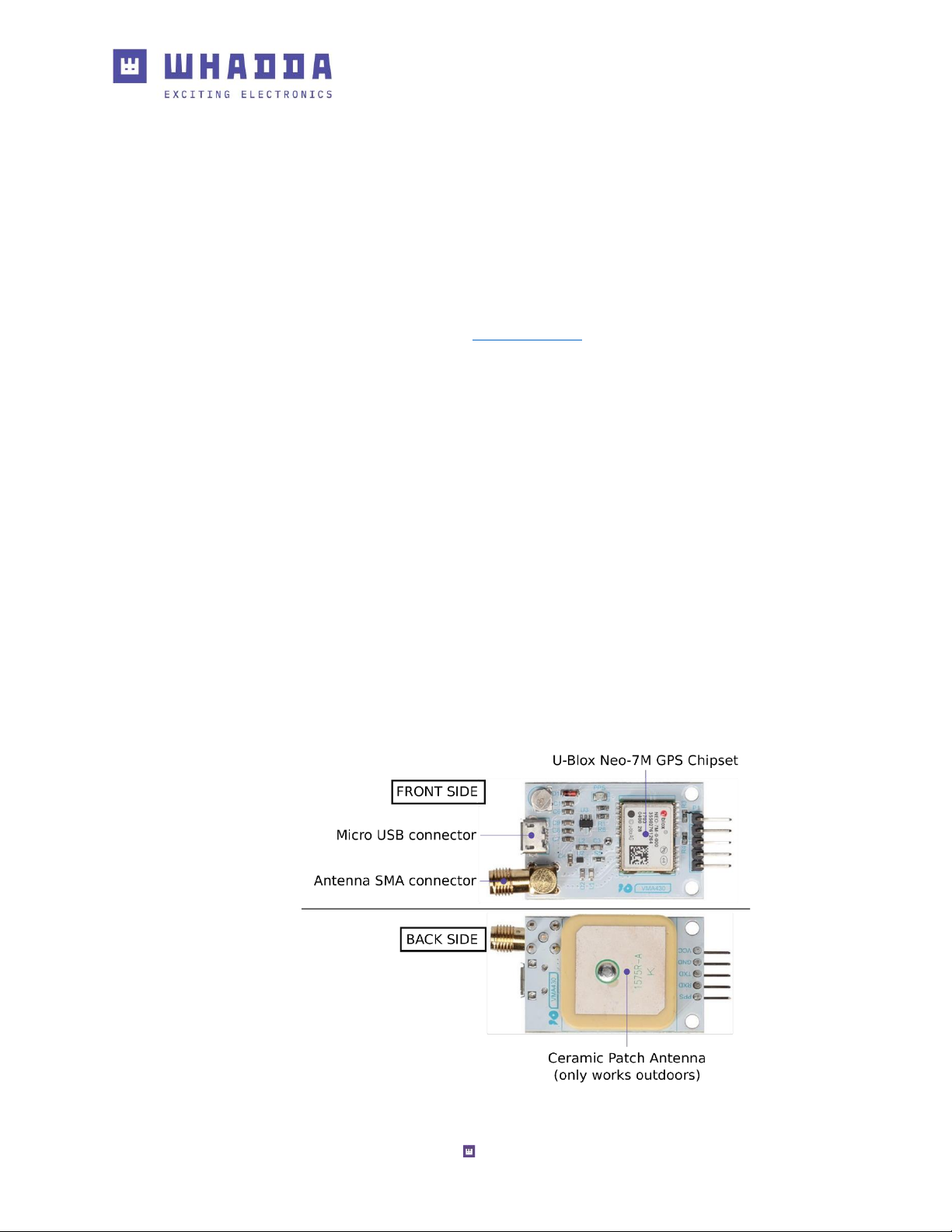
The Whadda WPI430 GPS module uses the u-blox NEO-M chipset at its core in order to
provide accurate location data with low acquisition times.
It features a built-in USB connector to directly interface with PCs, a built-in ceramic patch
antenna (suitable for outdoor uses), and an external SMA antenna connector.
It is advised to remove the C2 capacitor when connecting an external GPS antenna in order
to avoid interference.
Page 4

4
Specifications
• supply voltage: 3.3-5 VDC (or by USB cable)
• connections: VCC (+5 V), GND (ground), TX, RX, PPS (time pulse)
• default baud rate: 9600 baud
• dimensions: 4 x 2.5 x 1.5 cm
• weight: 15 g
Features
• u-blox NEO-7M module, compact and excellent performance
• parameters can be set via serial port and saved in EEPROM
• with SMA interface, you can connect a variety of antenna, strong adaptability
• compatible with 3.3 V/5 V level for easy connection to a variety of microprocessor
systems
• back-up rechargeable battery on board
• with microUSB, no need for USB-TTL tools
• with TTL interface
• onboard ceramic antenna
• sample code: https://playground.arduino.cc/UBlox/GPS
• evaluation software (u-center) available for download
Using the Module Directly with a PC
You can directly connect the GPS module to your PC by using a microUSB cable.
To check the raw incoming data, you can use the Arduino® IDE's serial monitor. Make sure
that the port settings are set to the correct serial port, and the baud rate is set to 9600
baud.
The messages starting with a dollar sign '$' are NMEA messages that can be read by a
variety of software such as google earth.
You can quickly check the data by copying the NMEA messages into an online NMEA
decoder, e.g. http://freenmea.net/decoder.
Page 5
5
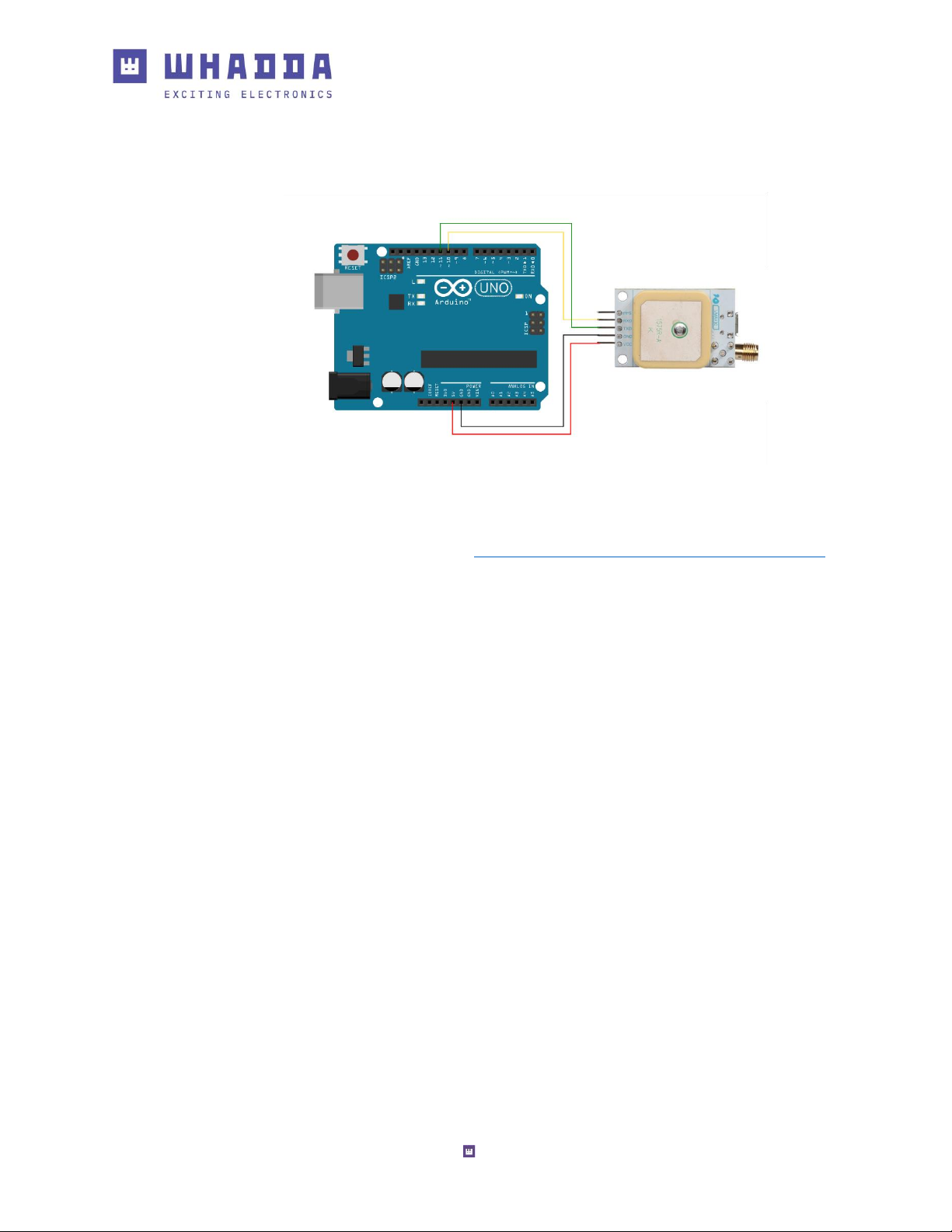
Connection
Example
Library and examples can be found at https://github.com/Velleman/VMA430_GPS_Module.
Page 6

6
whadda.com
Modifications and typographical errors reserved - © Velleman Group nv. WPI430_v01
Velleman Group nv, Legen Heirweg 33 - 9890 Gavere
.
 Loading...