

Page 1
DIRECTIONS FOR USE
Description
The TransLite Veinlite EMS PRO® is a hand-held battery powered illumination device for
nding veins and assisting in vein access. It has two modes of operation: surface
illumination using 8 bright white LEDs and side-transillumination using 12 orange plus
4 red LEDs. Side-transillumination is a patented* technique which enables the Veinlite EMS
PRO to uniformly illuminate a small region of skin and subcutaneous tissue, anywhere on
the body, without any areas of shadow. The side-transillumination technique allows better
visualization of veins than any other transillumination method. The design of the Veinlite
EMS PRO is such that during vein access, the vein is visualized, skin is stretched and the
vein is secured to keep it from rolling.
Copyright 2016 © TransLite, LLC. All rights reserved. These instructions or any part thereof may not be reproduced by
any means, without prior permission of TransLite, LLC.
Manufacturer
TransLite LLC
Veinlite EMS PRO
®
Warnings
• Veinlite EMS PRO is designed for external examination only.
• To avoid contamination of the device, Veinlite EMS PRO must be used with
the disposable plastic cover.
• To avoid the spread of infection, always change the disposable plastic cover
between patients and wipe the new cover with a germicidal wipe.
• These devices are intended for use only by clinicians trained in performing
vascular access, or under the supervision of a clinician.
• Do not look directly into the LEDs while on.
Warranty Information
The Veinlite EMS PRO has a one year parts and labor warranty. Please provide the serial
number located under the battery or the outside of the box when you contact Translite
LLC for any warranty issues. The warranty is valid only if the Veinlite EMS PRO is used
according to the manufacturer’s instructions. Before returning the Veinlite EMS PRO to
TransLite for repair, you must call or e-mail TransLite to obtain a return authorization
code and shipping information before sending your device. No refunds will be given for
unauthorized shipping.
Explanation of Symbols
Healthcare & Education Centre
The Church, Portland Street
Southport, PR81HU, UK
Tel: +44 1704 544 944
Fax: +44 1704 544 050
This product is covered by Patents.
Patent Numbers: 7,874,698;
7,841,751; 8,032,205; 8,177,808
VEMS PRO DFU Rev 3 1016
EC REP
SYMBOL EXPLANATION
REF Model Number
SN Serial Number
Manufacturer
EC Representative (EU Only)
Do not dispose as unsorted
municipal waste.
EC REP
14
FM 633388
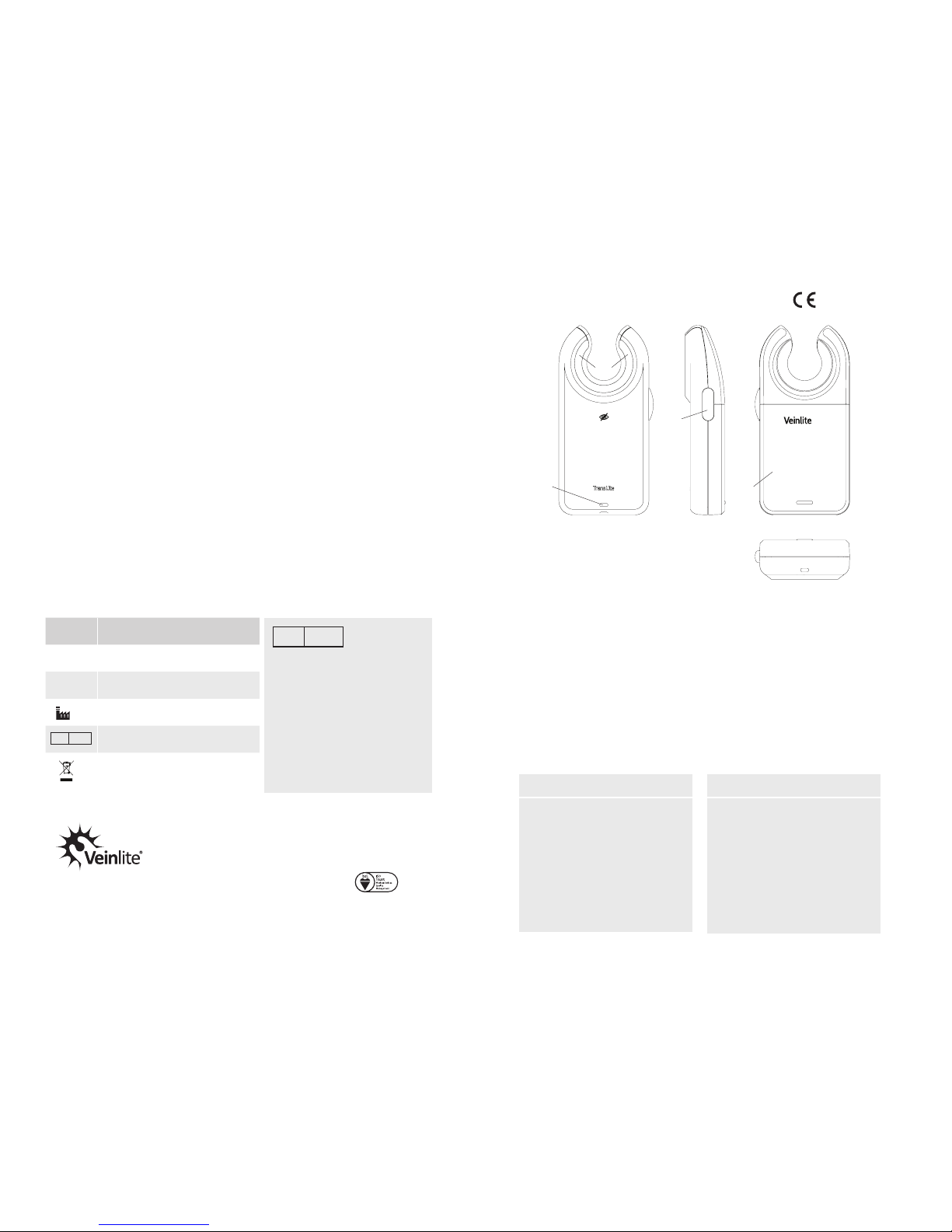
Figure 1. Veinlite EMS PRO
Tel: (281) 240 3111
Fax: (281) 240 3122
Intended Use/Indications
Contraindications
• When used for internal
examination
• When used without the
disposable plastic cover
• Examining the skin surface,
nding veins and assisting in
vein access in all patient
populations
• Venous access in patients with a
history of dicult venous access
or fragile veins
• Easier visualization of veins in
dark skinned patients
EMS PRO
[1] Clear Window
[2] On/O Mode Toggle Switch Button with
Low Battery Light Indicator
[3] Battery Cap
[4] Lanyard Hole
[1]
[2]
[3]
[4]
www.veinlite.com
[email protected]
Page 2
Multi-Color Low Battery Indicator
The Veinlite EMS PRO is powered by two AA alkaline batteries. The batteries will
provide between 3 and 5 hours of continuous use depending on the setting and type
of battery used. When the batteries run low, the green light under the button [2] will be
replaced by an orange low battery indicator light. Approximately one hour of battery
use is left when the orange low battery indicator is replaced by a red blinking light.
Installing or Replacing Batteries
To install or replace the batteries, press rmly on the battery cap [3] and slide it o.
Remove any used batteries. Install two new AA batteries, oriented as indicated by the
markings inside the battery compartment then slide the battery cover back into place.
Attaching a Lanyard
A lanyard can be attached to the Veinlite EMS PRO, via the hole at the bottom of the
unit [4]. Use a thin cord for this purpose.
32
Operation
• Place the Veinlite EMS PRO against the patient’s skin with the LED side in direct
contact with the skin perpendicular to vein direction. Apply gentle pressure to
maintain optimal skin contact.
• To turn on the LEDs, press the opaque button located on the left side of the device.
• Press the button a second time to switch on the white LEDs for surface illumination.
• Press the button a third time to turn o.
Using the Disposable Plastic Cover
The single-use disposable plastic covers (Product #VEMS-DPC) for the Veinlite EMS PRO
MUST be used when the devise is placed in contact with a patient’s skin.
CAUTION: These plastic covers are not sterile. They should be wiped with a germicidal
wipe prior to use.
• Before using Veinlite EMS PRO, place it inside the disposable cover with the ap on
the same side as the LEDs.
• Pull the ap over the device to the other side.
• Wipe the LED side of the Veinlite EMS PRO and any part of it coming in contact with
the patient, with a medically approved germicidal wipe.
Precautions
• Avoid using alcohol on the clear plastic window as this may cause fogging.
• Do not immerse the device in liquid.
• Do not autoclave the device.
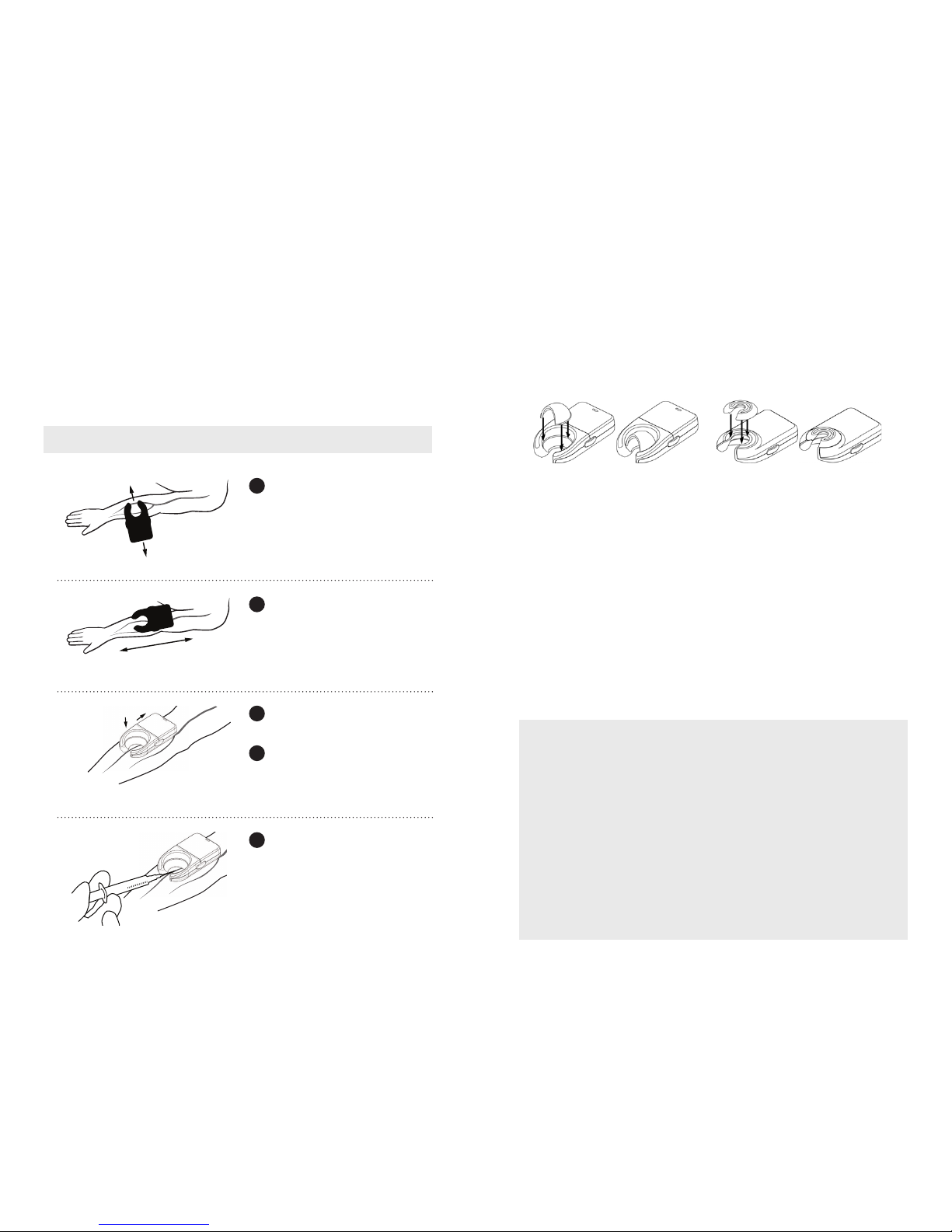
Scan Direction
a
b
Access Vein
To scan for veins, place device
against skin perpendicular to vein
direction. Scan it forward and
backward. Veins will be visible as
dark lines due to transillumination.
Once a suitable vein has been
identied, rotate device 90˚,
parallel to vein.
Apply gentle pressure on the
Veinlite EMS PRO to secure the vein.
Push back slightly on the Veinlite
EMS PRO to stretch the skin and
provide traction.
Insert the needle into the vein,
through the opening of the device.
NOTE: Discard the single-use disposable
plastic cover after each patient.
1
2
4
3a
3b
WARNING: DO NOT SHINE THE LED LIGHTS IN THE PATIENT’S EYES.
Attachments
Two patented*** attachments are included with the Veinlite EMS PRO:
A. A snap-on light shield to reduce interference from bright overhead lighting.
B. A snap-on pediatric adapter to reduce the size of the viewing area for use with infants.
The diagrams below indicate how to attach the light shield and neonatal adapter.
A. Veinlite EMS PRO Light Shield B. Veinlite EMS PRO Pediatric Adapter
 Loading...